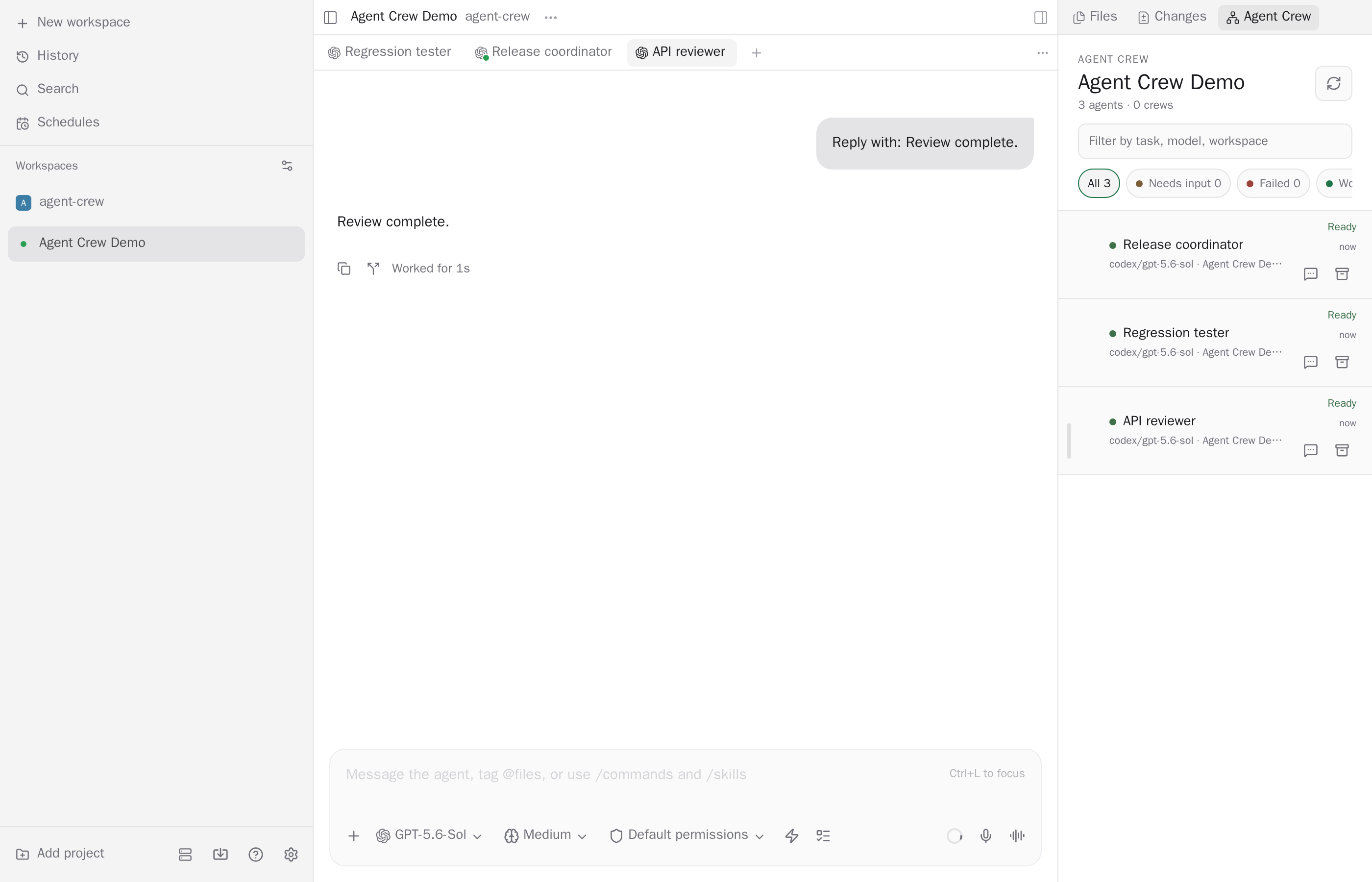
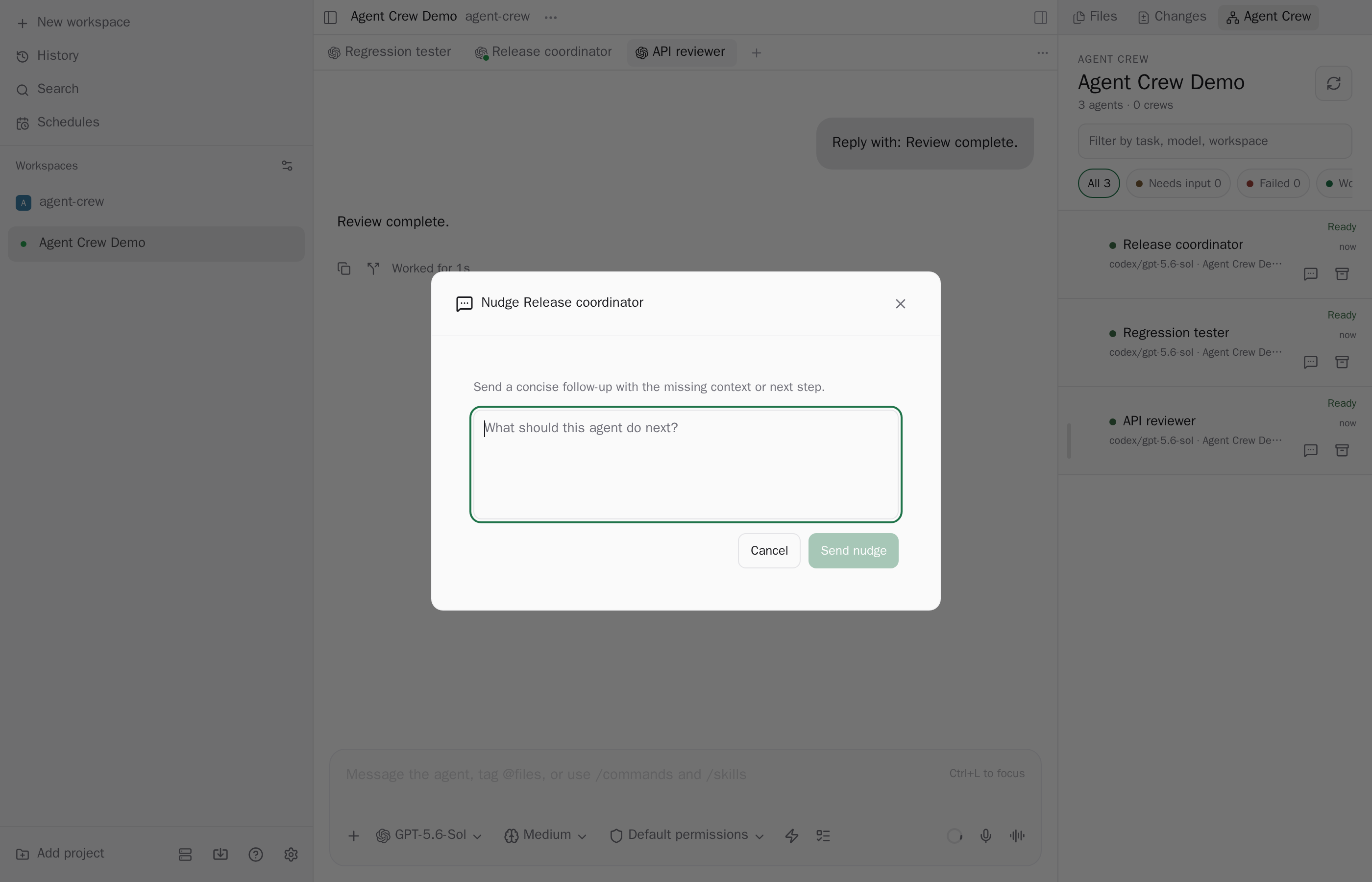
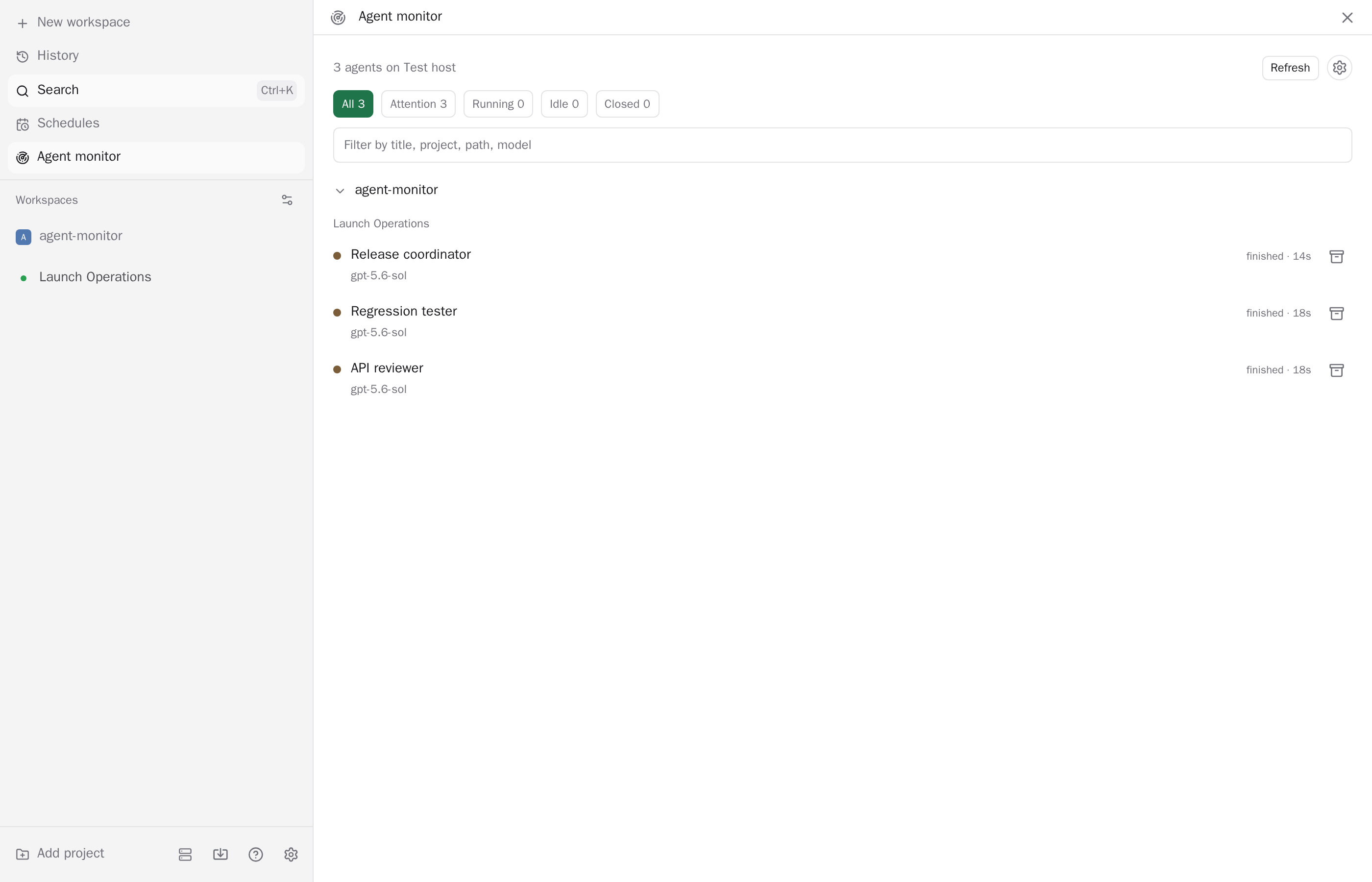
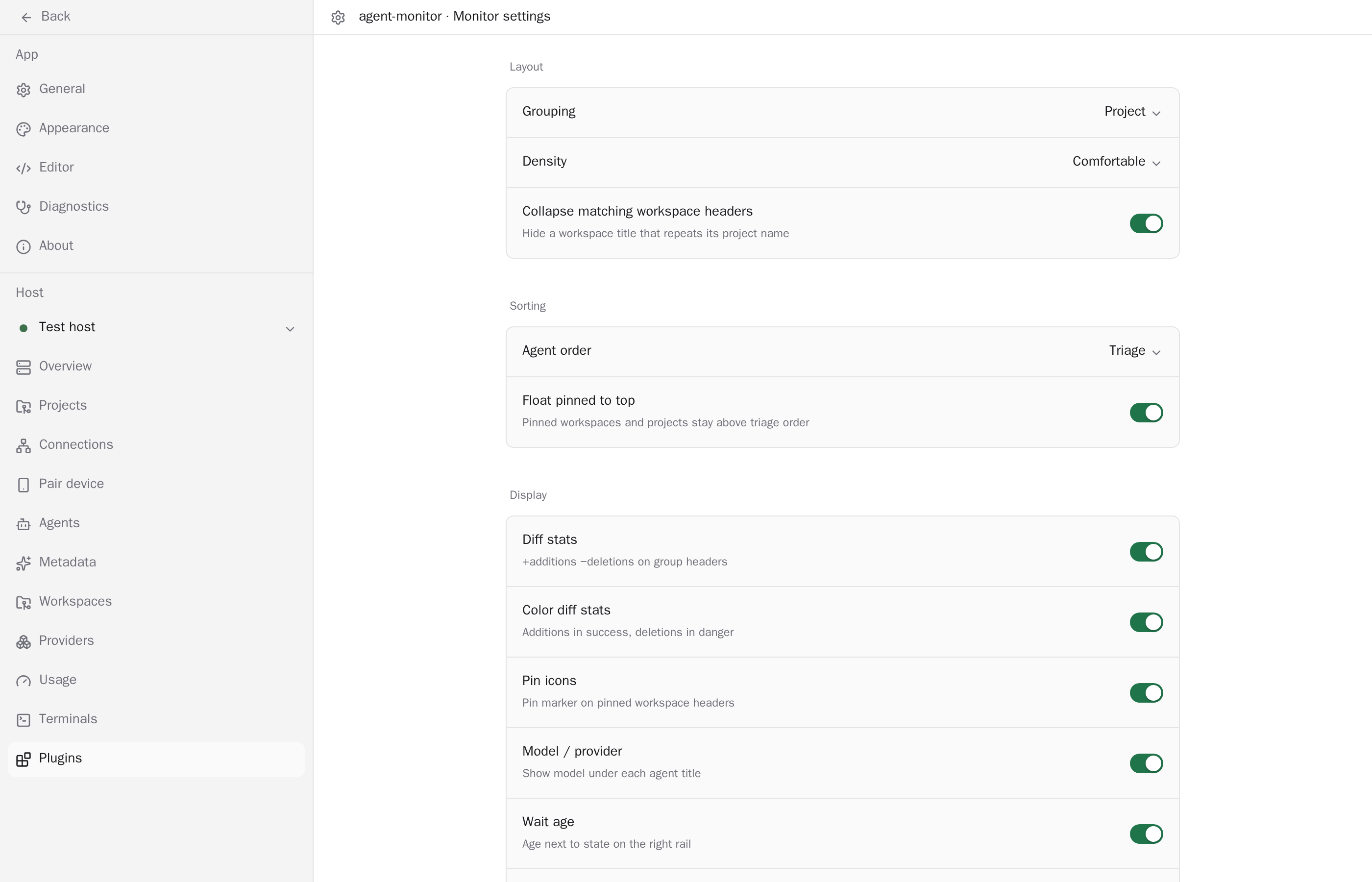
{"plugins":[{"id":"acp-manager","repo":"alhassanaraouf/paseo-acp-manager","url":"https://github.com/alhassanaraouf/paseo-acp-manager","package":"@alhassanaraouf/paseo-acp-manager","npm":{"package":"@alhassanaraouf/paseo-acp-manager","version":"0.1.0","integrity":"sha512-yCacH5MMaXfeQsERjdog4j0lY+1d0g9AdRcsR4aDuUD3kiksy4ISfK3te8DEryfAIJsUEVlDK3WTI5uLgFLB3A==","publishedAt":"2026-09-23T12:19:52.455Z","downloadsLast30Days":69},"name":"acp-manager","description":"Paseo sidebar plugin for managing ACP custom providers: add, edit, enable/disable, test, and quick-add from the ACP agent registry.","categories":["provider","productivity"],"platforms":[],"caveats":["Reload Paseo runs the `paseo` CLI on the daemon host, so `paseo` must be on its PATH","Quick add reads the public ACP agent registry, which requires outbound network access from the daemon host"],"images":["https://raw.githubusercontent.com/alhassanaraouf/paseo-acp-manager/91a1ae9cd8704a05cbbb6f272990f509fc7cdfcf/images/main.png","https://raw.githubusercontent.com/alhassanaraouf/paseo-acp-manager/91a1ae9cd8704a05cbbb6f272990f509fc7cdfcf/images/quick-add.png"],"themes":[],"health":{"manifestValid":true,"hasReadme":true,"hasLicense":true,"hasTests":true,"hasTypecheckScript":true,"updatedRecently":true},"scannedAt":"2026-09-25T20:16:06.884Z","addedAt":"2026-09-12T18:01:41+03:00","npmSecurity":{"status":"passed","blockingFindings":0,"advisoryFindings":0,"scannedAt":"2026-09-25T20:04:23.597Z","version":"0.1.0","integrity":"sha512-yCacH5MMaXfeQsERjdog4j0lY+1d0g9AdRcsR4aDuUD3kiksy4ISfK3te8DEryfAIJsUEVlDK3WTI5uLgFLB3A=="},"version":"0.1.0","security":{"status":"passed","blockingFindings":0,"advisoryFindings":0,"scannedAt":"2026-09-25T20:04:23.597Z","commit":"91a1ae9cd8704a05cbbb6f272990f509fc7cdfcf"},"author":"Al-Hassan Abdel-Raouf","license":"MIT","paseoVersionRequirement":">=0.8.0","descriptionNodes":[{"type":"text","text":"Paseo sidebar plugin for managing ACP custom providers: add, edit, enable/disable, test, and quick-add from the ACP agent registry."}],"caveatNodes":[[{"type":"text","text":"Reload Paseo runs the "},{"type":"text","text":"paseo","code":true},{"type":"text","text":" CLI on the daemon host, so "},{"type":"text","text":"paseo","code":true},{"type":"text","text":" must be on its PATH"}],[{"type":"text","text":"Quick add reads the public ACP agent registry, which requires outbound network access from the daemon host"}]],"manifest":{"id":"acp-manager","requirements":{"paseo":">=0.8.0"}},"repoMeta":{"stars":0,"defaultBranch":"main","pushedAt":"2026-09-23T21:15:35Z"},"owner":{"login":"alhassanaraouf","avatarUrl":"https://avatars.githubusercontent.com/u/56361750?v=4"},"installNotesHtml":"<pre><code class=\"language-bash\">paseo plugin add npm:@alhassanaraouf/paseo-acp-manager\n</code></pre>\n<p>Or from GitHub:</p>\n<pre><code class=\"language-bash\">paseo plugin add alhassanaraouf/paseo-acp-manager\n</code></pre>\n<p>Then open <strong>ACP Manager</strong> in the sidebar.</p>","limitationsNotesHtml":"<ul>\n<li>Provider creation goes through direct config-file edit (read-modify-write on\n<code>agents.providers.&#x3C;id></code> only, timestamped <code>.bak</code> backup, re-parse before replacing)\nbecause the SDK <code>paseo.config.patch</code> schema does not cover <code>extends</code>/<code>command</code>/<code>env</code> yet.</li>\n<li>\"Reload Paseo\" shells out to the <code>paseo</code> CLI on the daemon host, so it requires <code>paseo</code> to be\non the daemon's <code>PATH</code>.</li>\n<li>Quick add only covers registry agents distributed via <code>npx</code>/<code>uvx</code>; agents shipped only as a\nplatform binary are listed but must be installed manually.</li>\n<li>The registry fetch requires outbound network access from the daemon host.</li>\n</ul>","readmeText":"# acp-manager\n\nSidebar UI for managing official ACP custom providers: `agents.providers` entries with\n`extends: \"acp\"` in `$PASEO_HOME/config.json` (typically `~/.paseo/config.json`).\n\n## Features\n\n- Add, edit, enable/disable, test, and remove ACP providers from one panel.\n- **Quick add**: browse agents from the [ACP agent registry](https://agentclientprotocol.com/get-started/registry)\n  and add one with a prefilled command/env, no manual `npx`/`uvx` typing.\n- **Reload Paseo**: applies saved changes immediately (runs `paseo reload` on the daemon host)\n  instead of requiring a separate terminal step.\n- Health summary (providers / enabled / tested OK / failing) and a per-provider Test button\n  that runs the ACP `initialize` handshake against the configured command.\n\n## Install\n\n```bash\npaseo plugin add npm:@alhassanaraouf/paseo-acp-manager\n```\n\nOr from GitHub:\n\n```bash\npaseo plugin add alhassanaraouf/paseo-acp-manager\n```\n\nThen open **ACP Manager** in the sidebar.\n\n## Screenshots\n\n| Overview | Quick add |\n| --- | --- |\n| ![ACP providers overview](images/main.png) | ![Quick add from the ACP agent registry](images/quick-add.png) |\n\n## Known issues\n\n- Provider creation goes through direct config-file edit (read-modify-write on\n  `agents.providers.<id>` only, timestamped `.bak` backup, re-parse before replacing)\n  because the SDK `paseo.config.patch` schema does not cover `extends`/`command`/`env` yet.\n- \"Reload Paseo\" shells out to the `paseo` CLI on the daemon host, so it requires `paseo` to be\n  on the daemon's `PATH`.\n- Quick add only covers registry agents distributed via `npx`/`uvx`; agents shipped only as a\n  platform binary are listed but must be installed manually.\n- The registry fetch requires outbound network access from the daemon host.\n"},{"id":"activity","repo":"koinzhang/paseo-plugins","url":"https://github.com/koinzhang/paseo-plugins/tree/main/activity","package":"@koinzhang/paseo-plugin-activity","npm":{"package":"@koinzhang/paseo-plugin-activity","version":"0.7.0","integrity":"sha512-6Lyk7aRxhAsmx1Z73dDj68S2JVhbz2GSpaALRRZTZpH6llKXqTXEbmX3NWjShVyhEz6T94M/gmq9YL0fgIGtFQ==","publishedAt":"2026-09-27T02:43:32.300Z","downloadsLast30Days":1282},"name":"activity","description":"Local usage analytics and workspace agent ops for Paseo: tools, agents, messages, models, Explorer fleet list, and terminals.","categories":["monitoring","productivity"],"platforms":[],"caveats":["Requires Paseo 0.8.0 or later"],"images":["https://raw.githubusercontent.com/koinzhang/paseo-plugins/05964539e56528df3438f4d32818b08b8578136b/activity/images/activity-1.png","https://raw.githubusercontent.com/koinzhang/paseo-plugins/05964539e56528df3438f4d32818b08b8578136b/activity/images/activity-2.png","https://raw.githubusercontent.com/koinzhang/paseo-plugins/05964539e56528df3438f4d32818b08b8578136b/activity/images/activity-3.png","https://raw.githubusercontent.com/koinzhang/paseo-plugins/05964539e56528df3438f4d32818b08b8578136b/activity/images/activity-4.png"],"themes":[],"health":{"manifestValid":true,"hasReadme":true,"hasLicense":true,"hasTests":true,"hasTypecheckScript":true,"updatedRecently":true},"scannedAt":"2026-09-27T07:46:01.562Z","addedAt":"2026-09-19T07:31:15Z","npmSecurity":{"status":"passed","blockingFindings":0,"advisoryFindings":0,"scannedAt":"2026-09-27T07:45:52.196Z","version":"0.7.0","integrity":"sha512-6Lyk7aRxhAsmx1Z73dDj68S2JVhbz2GSpaALRRZTZpH6llKXqTXEbmX3NWjShVyhEz6T94M/gmq9YL0fgIGtFQ=="},"path":"activity","version":"0.7.0","security":{"status":"passed","blockingFindings":0,"advisoryFindings":0,"scannedAt":"2026-09-27T07:45:52.196Z","commit":"05964539e56528df3438f4d32818b08b8578136b"},"license":"MIT","paseoVersionRequirement":">=0.9.0","descriptionNodes":[{"type":"text","text":"Local usage analytics and workspace agent ops for Paseo: tools, agents, messages, models, Explorer fleet list, and terminals."}],"caveatNodes":[[{"type":"text","text":"Requires Paseo 0.8.0 or later"}]],"manifest":{"id":"activity","description":"Local usage analytics and workspace agent ops: Explorer fleet list, live attention, and terminals","requirements":{"paseo":">=0.9.0"}},"repoMeta":{"stars":5,"defaultBranch":"main","pushedAt":"2026-09-27T02:40:22Z"},"owner":{"login":"koinzhang","avatarUrl":"https://avatars.githubusercontent.com/u/36128970?v=4"},"installNotesHtml":"<p>Requires Paseo <strong>>= 0.9.0</strong>. <strong>0.4.0</strong> is the last release that supports Paseo 0.8.0.</p>\n<p>From Git (Paseo 0.8 and later):</p>\n<pre><code class=\"language-bash\">paseo plugin add koinzhang/paseo-plugins --path activity\n</code></pre>\n<p>From npm (Paseo 0.9 and later; this is the source paseo.cafe hands to Paseo 0.9+). Pin <code>0.4.0</code> on Paseo 0.8:</p>\n<pre><code class=\"language-bash\">paseo plugin install npm:@koinzhang/paseo-plugin-activity\n</code></pre>","limitationsNotesHtml":"<ul>\n<li>Analytics and the agent registry are local to each daemon: every machine keeps its own database, and there is no cross-host aggregation.</li>\n<li>Numbers are reconstructed from the Paseo timeline; items that do not report a model or skill cannot be attributed for that dimension.</li>\n<li>Skill classification is heuristic (exact / inferred / low confidence); check the tier before trusting a count.</li>\n<li>Project attribution for the Projects ranking comes from the workspace root recorded while it was listed, or the agent <code>cwd</code>; sessions with neither group under <strong>Other</strong>.</li>\n<li>Workspace Activity focuses on agent operations for the current workspace; heatmap / provider / model breakdowns stay on the global sidebar.</li>\n</ul>","readmeText":"# Activity\n\nActivity for Paseo: local usage analytics **and** workspace agent management.\n\nIt still answers “how am I using Paseo” (tools, messages, models, habits). With the Explorer **Workspace Activity** panel it also becomes a **vertical ops surface** for the agents in the current workspace — sort, filter, search, open, archive — with live attention cues, open terminals, KPIs, and top skills / MCP.\n\n| Scope | Role |\n|---|---|\n| **Global** | Cross-workspace habits: KPI vs the previous 7 days, daily heatmap, rolling 168-hour activity timeline, `Provider: All ▾` filter, per-chart Sessions / Prompts / Skill calls / MCP calls switches, collapsible Providers / Projects rankings, insights, most-used skills / MCP / models |\n| **Workspace** | Per-workspace agent fleet: ranked list + display prefs + archive; live status (permission / finished / error / running); open Terminals; shell / file / prompt KPIs; times via shared `FormattedTime` |\n| **Agent** | Current session: dense tool KPIs, Skills / MCP header toggle, SKILL.md reader, composer Activity pill; **Needs attention** pill jumps to other same-workspace finished/permission/error sessions |\n\nArchitecture notes: [docs/architecture.md](./docs/architecture.md).\n\n## What is counted\n\nIngests every agent's Paseo timeline into a local SQLite database. Queries read that database; the timeline and `agents.list` are ingestion / backfill / live-status sources only.\n\n| Dimension | What is counted |\n|---|---|\n| Tools | Skill / MCP / shell / file calls; skills classified into exact / inferred / low confidence tiers |\n| Agents | Every created agent (registry with archive metadata) |\n| Prompts | User-sent messages (called **Prompts** in every Activity view) |\n| Models | Model at send time (weighted by messages; global view) |\n\n## Where it shows up\n\n- **Sidebar Activity** — all-time global view by provider (KPI with prev-7d comparison, Activity Calendar heatmap, Daily Activity 30-day histogram, Hourly Activity 168-hour timeline, Providers / Projects rankings, insights, most used)\n- **Explorer → Activity** — workspace agents as a management list (search / sort / group / status / lifecycle / archive), live attention (permission badge, status colors, running spinner; API-owned directory observation + explicit lifecycle/archive fields + 15s reconciliation), open Terminals (list / preview / close), plus workspace KPIs and Skills / MCP ranked or newest-call timeline views (with agent titles and one shared persisted view choice); usage queries get a best-effort refresh hint when agents leave running\n- **Agent workspace panel** — per-agent tool detail (dense KPI including prompts / Skills / MCP toggle / SKILL.md); refreshes on timeline turn terminal events\n- **Composer pills** — Activity: current agent's skill / MCP summary (hidden when empty); **Needs attention**: other same-workspace agents with finished / permission / error (hidden when none; click opens shared list)\n- **Command Center** — Activity · Workspace Activity · Agent Activity\n\n## Data\n\nEverything lives on the daemon machine in `~/.paseo/plugin-data/activity/` (SQLite `usage.db`). Nothing is sent anywhere.\n\n## Install\n\nRequires Paseo **>= 0.9.0**. **0.4.0** is the last release that supports Paseo 0.8.0.\n\nFrom Git (Paseo 0.8 and later):\n\n```bash\npaseo plugin add koinzhang/paseo-plugins --path activity\n```\n\nFrom npm (Paseo 0.9 and later; this is the source paseo.cafe hands to Paseo 0.9+). Pin `0.4.0` on Paseo 0.8:\n\n```bash\npaseo plugin install npm:@koinzhang/paseo-plugin-activity\n# Paseo 0.8: npm:@koinzhang/paseo-plugin-activity@0.4.0\n```\n\nFrom a local checkout (development), run this inside `activity/`. It uses the same plugin ID `activity`, so don't pass `--id`, and it shares the same data directory:\n\n```bash\npaseo plugin install \"$PWD\"   # absolute path; `paseo plugin remove activity` first if npm is installed\n```\n\nAfter source changes, reload and check status:\n\n```bash\npaseo plugin reload activity\npaseo plugin logs activity\npaseo plugin ls\n```\n\n## Limitations\n\n- Analytics and the agent registry are local to each daemon: every machine keeps its own database, and there is no cross-host aggregation.\n- Numbers are reconstructed from the Paseo timeline; items that do not report a model or skill cannot be attributed for that dimension.\n- Skill classification is heuristic (exact / inferred / low confidence); check the tier before trusting a count.\n- Project attribution for the Projects ranking comes from the workspace root recorded while it was listed, or the agent `cwd`; sessions with neither group under **Other**.\n- Workspace Activity focuses on agent operations for the current workspace; heatmap / provider / model breakdowns stay on the global sidebar.\n\n## Development\n\n```bash\nnpm install\nnpm run typecheck\nnpm test\n```\n\nThis plugin is spec-driven: read [specs/README.md](./specs/README.md) before coding, then the matching numbered directory.\n\n## Publish\n\nRelease history: [CHANGELOG.md](./CHANGELOG.md) (current **0.6.0**). npm releases go through a GitHub Release tag `activity-vX.Y.Z` (not push-to-`main` alone). Steps: [CONTRIBUTING.md § Publishing to npm](../CONTRIBUTING.md#publishing-to-npm).\n\n## License\n\n[MIT](../LICENSE) © koinzhang\n"},{"id":"advanced-markdown","repo":"custyhs/paseo-advanced-markdown","url":"https://github.com/custyhs/paseo-advanced-markdown","package":"paseo-advanced-markdown","npm":{"package":"paseo-advanced-markdown","version":"0.2.3","integrity":"sha512-KorQ5WpV0yf/okgWGwGFHbVOm5lbhPDLcua2jpcUvcP0OAFK8xUlBPYnap7wEfxjtZhiiyuXKI8X9UeHZ9YB6Q==","publishedAt":"2026-09-26T11:48:09.986Z","downloadsLast30Days":239},"name":"advanced-markdown","description":"Advanced Markdown rendering for Paseo 0.8 and 0.9: math formulas and Mermaid diagrams in assistant messages","categories":["productivity"],"platforms":[],"caveats":["Requires Paseo app and daemon >=0.8.0 <0.10.0.","Requires Node.js >=22.22, npm and Git on the daemon host, with about 700 MiB of cache space.","Daemon-host validation is on macOS arm64; Windows is untested, and Linux needs the dependencies listed in the README.","The latest iPhone layout and Android UI are not yet device-verified.","Downloads the Mermaid worker and Chrome during setup; message rendering stays on the selected daemon host.","Avoid enabling another plugin that claims the same assistant messages containing math or Mermaid."],"images":["https://raw.githubusercontent.com/custyhs/paseo-advanced-markdown/b1291b9dda2e60ca86a7b07527aa453cc80d69a5/images/01-math-overview.jpg","https://raw.githubusercontent.com/custyhs/paseo-advanced-markdown/b1291b9dda2e60ca86a7b07527aa453cc80d69a5/images/02-formula-viewer.jpg","https://raw.githubusercontent.com/custyhs/paseo-advanced-markdown/b1291b9dda2e60ca86a7b07527aa453cc80d69a5/images/03-mermaid-diagram.jpg"],"themes":[],"health":{"manifestValid":true,"hasReadme":true,"hasLicense":true,"hasTests":true,"hasTypecheckScript":true,"updatedRecently":true},"scannedAt":"2026-09-26T12:45:58.878Z","addedAt":"2026-09-22T12:43:19Z","npmSecurity":{"status":"passed","blockingFindings":0,"advisoryFindings":0,"scannedAt":"2026-09-26T12:45:49.129Z","version":"0.2.3","integrity":"sha512-KorQ5WpV0yf/okgWGwGFHbVOm5lbhPDLcua2jpcUvcP0OAFK8xUlBPYnap7wEfxjtZhiiyuXKI8X9UeHZ9YB6Q=="},"version":"0.2.3","security":{"status":"passed","blockingFindings":0,"advisoryFindings":0,"scannedAt":"2026-09-26T12:45:49.129Z","commit":"b1291b9dda2e60ca86a7b07527aa453cc80d69a5"},"license":"Apache-2.0","paseoVersionRequirement":">=0.8.0 <0.10.0","descriptionNodes":[{"type":"text","text":"Advanced Markdown rendering for Paseo 0.8 and 0.9: math formulas and Mermaid diagrams in assistant messages"}],"caveatNodes":[[{"type":"text","text":"Requires Paseo app and daemon >=0.8.0 <0.10.0."}],[{"type":"text","text":"Requires Node.js >=22.22, npm and Git on the daemon host, with about 700 MiB of cache space."}],[{"type":"text","text":"Daemon-host validation is on macOS arm64; Windows is untested, and Linux needs the dependencies listed in the README."}],[{"type":"text","text":"The latest iPhone layout and Android UI are not yet device-verified."}],[{"type":"text","text":"Downloads the Mermaid worker and Chrome during setup; message rendering stays on the selected daemon host."}],[{"type":"text","text":"Avoid enabling another plugin that claims the same assistant messages containing math or Mermaid."}]],"manifest":{"id":"advanced-markdown","requirements":{"paseo":">=0.8.0 <0.10.0"},"build":[["npm","ci"],["npm","run","build"],["npm","run","prepare-browser"]]},"repoMeta":{"stars":2,"defaultBranch":"main","pushedAt":"2026-09-26T11:45:17Z"},"owner":{"login":"custyhs","avatarUrl":"https://avatars.githubusercontent.com/u/55645731?v=4"},"installNotesHtml":"<p>From Git, pinned to a tag (recommended):</p>\n<pre><code class=\"language-bash\">paseo plugin add custyhs/paseo-advanced-markdown --ref v0.2.3\npaseo plugin ls\n</code></pre>\n<p>Paseo runs the manifest's preparation commands on the daemon host:\n<code>npm ci</code>, <code>npm run build</code>, and <code>npm run prepare-browser</code>. The last one prepares\nthe formula assets and installs the pinned Mermaid CLI runtime and Chrome headless shell into\n<code>~/.cache/paseo-advanced-markdown</code> (or <code>$XDG_CACHE_HOME/paseo-advanced-markdown</code>,\n<code>%LOCALAPPDATA%\\paseo-advanced-markdown</code> on Windows; override with\n<code>PASEO_ADVANCED_MARKDOWN_CACHE</code>, which must be an absolute path). Relative\n<code>XDG_CACHE_HOME</code> and <code>LOCALAPPDATA</code> values are ignored. That directory is outside Paseo's managed\ncheckouts, so plugin updates reuse it and a removed plugin can be cleaned up by\ndeleting it.</p>\n<p>From a local checkout:</p>\n<pre><code class=\"language-bash\">git clone https://github.com/custyhs/paseo-advanced-markdown.git\ncd paseo-advanced-markdown\nnpm ci &#x26;&#x26; npm run build &#x26;&#x26; npm run prepare-browser\npaseo plugin install \"$PWD\"\n</code></pre>\n<p>Put <code>--host &#x3C;host:port></code> before <code>plugin</code> to target a daemon other than the\nCLI's default one. <code>paseo plugin add</code> and <code>plugin install</code> mean you trust this\ncodebase: its server side runs unsandboxed on the daemon host.</p>","limitationsNotesHtml":"<table>\n<thead>\n<tr>\n<th>Limit</th>\n<th>Value</th>\n</tr>\n</thead>\n<tbody>\n<tr>\n<td>Formula</td>\n<td>4096 characters</td>\n</tr>\n<tr>\n<td>Mermaid definition</td>\n<td>32 KiB</td>\n</tr>\n<tr>\n<td>Image</td>\n<td>2,000,000 base64 characters; 8 M raster pixels and 4096 px longest edge (large diagrams are re-rendered at a lower scale, down to 0.5x)</td>\n</tr>\n<tr>\n<td>Math raster</td>\n<td>Density 1/2/3/4/6/8; logical size independent of density; lower detail is used when an image budget is reached</td>\n</tr>\n<tr>\n<td>Math queue</td>\n<td>1 rendering, up to 128 waiting inputs; duplicate requests share work</td>\n</tr>\n<tr>\n<td>Mermaid queue</td>\n<td>1 running, 8 waiting per plugin process; 15 s per task</td>\n</tr>\n<tr>\n<td>Caches</td>\n<td>128 images / 8 MiB on the host and in each client</td>\n</tr>\n</tbody>\n</table>\n<p>Rendering happens on the selected daemon host only. Message content never\nleaves it; the render browser runs with networking disabled.</p>","readmeText":"# Advanced Markdown for Paseo\n\nRenders math formulas and Mermaid diagrams inside assistant messages in\n[Paseo](https://paseo.sh) 0.8.x and 0.9.x, as an installable plugin. No Paseo fork, no\npatch: the official app, daemon, and plugin SDK are the only dependencies.\n\n- Math: `$…$`, `\\(…\\)`, `$$…$$`, `\\[…\\]`, and ```` ```math ```` fences,\n  typeset on the host with MathJax and rasterized with resvg.\n- Mermaid: ```` ```mermaid ```` fences rendered on the host with the pinned\n  Mermaid CLI and a plugin-managed Chrome headless shell.\n- Both in one message, mixed with ordinary Markdown (headings, emphasis,\n  lists, quotes, tables, code, HTTP(S) links).\n- Chinese bold text and boxed equation borders are preserved.\n- Copy TeX and original source, formula/diagram inspection, light and dark themes,\n  and per-host size/module settings.\n\n**v0.2.3** repairs missing or damaged formula assets automatically at startup,\nincluding local directory reloads and npm installations. Recovery works offline\nbefore MathJax loads its font tables. See the [release notes](docs/release/0.2.3.md).\n\nv0.2.2 adds a screenshot gallery for the plugin catalog and includes those\nimages in the npm package. See the [release notes](docs/release/0.2.2.md).\n\nv0.2.1 prepared npm distribution with prebuilt rendering code, verified offline\nassets, and a complete package source-size check. See the\n[package validation](docs/qa/npm-package.md).\n\nv0.2.0 added a shared formula/diagram viewer, mouse dragging for overflowing\nformulas and code, and fixes for footnote rendering and native inline formula\nlayout. See the [release notes](docs/release/0.2.0.md) and\n[validation record](docs/qa/click-viewer.md). The latest iPhone layout adjustment\nstill needs device confirmation; Android UI validation remains pending.\n\n## Screenshots\n\nCaptured in the official Paseo 0.9.0-beta.2 web client, using sample conversations.\n\nInline and display math mixed with ordinary Markdown:\n\n![Inline and display equations in an explanation of attention](images/01-math-overview.jpg)\n\nClick a formula to preview it, adjust its zoom, inspect the source, or copy LaTeX:\n\n![Formula viewer with Preview, Source, Copy LaTeX, and zoom controls](images/02-formula-viewer.jpg)\n\nMermaid diagrams rendered alongside prose and tables:\n\n![Mermaid release pipeline rendered inside a Paseo conversation](images/03-mermaid-diagram.jpg)\n\n## Requirements\n\n| Side | Requirement |\n| --- | --- |\n| Paseo | app and daemon **>=0.8.0 <0.10.0**; compiler/SDK checks cover 0.8.0 and 0.9.0-beta.2 (see the [compatibility record](docs/qa/paseo-0.9-compatibility.md)) |\n| Daemon host | Node ≥ 22.22 and npm on `PATH` for the preparation step, Git, about 700 MiB of disk in the plugin cache, network access during installation only |\n| Text font | A font covering any non-Latin characters used inside formulas (Chinese, Japanese, Korean, …). macOS and most desktop Linux installs already have one; see [Text inside formulas](#text-inside-formulas) |\n| Daemon host OS | verified on macOS arm64; Linux needs a CJK font (`fonts-noto-cjk`), `ps` (`procps`), the usual Chrome shared libraries, and either unprivileged user namespaces or `PASEO_ADVANCED_MARKDOWN_NO_SANDBOX=1` in the daemon's environment (Ubuntu 24.04 restricts them by default); Windows is untested |\n| Clients | official browser web UI verified in detail; prior rendering flow verified by the maintainer on official iOS/Paseo 0.8.0 (2026-09-14) and another Mac; v0.2.0's latest iPhone layout and Android UI remain unverified (see `docs/qa/`) |\n\nPlugins must be enabled on the daemon (Settings → Plugins, or `pluginsEnabled`\nin `config.json`).\n\nPaseo also checks prereleases against their stable core, so `0.9.0-beta.2`\nmeets this range. This is a bounded compatibility policy, not a claim that every\n0.8/0.9 build has received device QA. **v0.1.5** adds this compatibility range;\ntags through v0.1.4 still require exactly 0.8.0. Install v0.2.3 for the current release.\n\n## Install\n\nFrom Git, pinned to a tag (recommended):\n\n```bash\npaseo plugin add custyhs/paseo-advanced-markdown --ref v0.2.3\npaseo plugin ls\n```\n\nPaseo runs the manifest's preparation commands on the daemon host:\n`npm ci`, `npm run build`, and `npm run prepare-browser`. The last one prepares\nthe formula assets and installs the pinned Mermaid CLI runtime and Chrome headless shell into\n`~/.cache/paseo-advanced-markdown` (or `$XDG_CACHE_HOME/paseo-advanced-markdown`,\n`%LOCALAPPDATA%\\paseo-advanced-markdown` on Windows; override with\n`PASEO_ADVANCED_MARKDOWN_CACHE`, which must be an absolute path). Relative\n`XDG_CACHE_HOME` and `LOCALAPPDATA` values are ignored. That directory is outside Paseo's managed\ncheckouts, so plugin updates reuse it and a removed plugin can be cleaned up by\ndeleting it.\n\nFrom a local checkout:\n\n```bash\ngit clone https://github.com/custyhs/paseo-advanced-markdown.git\ncd paseo-advanced-markdown\nnpm ci && npm run build && npm run prepare-browser\npaseo plugin install \"$PWD\"\n```\n\nPut `--host <host:port>` before `plugin` to target a daemon other than the\nCLI's default one. `paseo plugin add` and `plugin install` mean you trust this\ncodebase: its server side runs unsandboxed on the daemon host.\n\n## Update and roll back\n\n```bash\npaseo plugin update advanced-markdown        # tracks the ref you installed\n```\n\nA fixed tag does not advance to the next release. If `paseo plugin update --help`\nlists `--ref`, switch an existing Git installation without removing its settings:\n\n```bash\npaseo plugin update advanced-markdown --ref v0.2.3\n```\n\nOlder CLIs require removing and adding the plugin with the new tag; record your\nplugin settings before removal, because removal deletes them. To roll back, use\n`v0.2.2`, which supports the same Paseo version range. Tags through v0.1.4 require\nexactly Paseo 0.8.0 and cannot be used to roll back on 0.9.\n\nA failed preparation during `plugin update` keeps the installed version running. Updates never touch\nchat history, Drafts, or other plugins.\n\n## What is rendered, and what is not\n\n| Content | Behavior |\n| --- | --- |\n| Complete inline or display math, closed `math` fence | image; click or tap to inspect and copy |\n| A `math` fence whose body is itself wrapped in `\\[…\\]`, `$$…$$`, `\\(…\\)`, or `$…$` | the redundant wrapper is ignored, the formula renders |\n| Complete `mermaid` fence: flowchart, sequence, class, state, ER, Gantt (verified); other types on a best-effort basis | image; click or tap to inspect and copy |\n| Unclosed delimiters or fences while streaming | readable source until closed |\n| Prices (`$5 and $10`), `\\$`, inline code, other fences | plain text / code |\n| Footnote markers and definitions (`[^note]`, `[^note]: …`) | readable text; formulas in definition lines render, without footnote navigation |\n| Invalid TeX, invalid Mermaid, oversized input | source with a short reason; other content still renders |\n| Messages with inline images or links requiring host file navigation | left to Paseo's renderer |\n| User messages, tool output, other timeline rows | unchanged |\n\nBare `$$` display math that contains a blank line is split by Paseo while\nstreaming; each half stays readable source. Use a ```` ```math ```` fence for\nmulti-paragraph display math.\n\nCopy scopes: copying happens inside the viewer. In **Preview**, **Copy LaTeX** or\n**Copy Mermaid** copies the original expression or diagram body. In **Source**,\n**Copy Markdown** copies the exact block, including its delimiters or fence.\n**More** offers the other copy format and **Copy fragment Markdown**,\nwhich copies the timeline row's text. Paseo may split one long reply into several\nrows while it streams; this last action copies only the row containing the entry.\n\n## Reading code blocks\n\nIn messages rendered by this plugin, overflowing code blocks support mouse dragging\non desktop. **Select text** switches to text selection; **Drag to scroll** switches\nback. **Copy source** copies the entire original block body in either mode. Short\ncode blocks and native clients keep their usual text selection and scrolling.\n\n## Reading formulas\n\nFormula size offers 75%, 100%, 125%, 150%, and 200%, relative to the text size.\nThis preference is shared by clients of the selected host and affects only math.\nReset formula size restores 100% without changing prose, Mermaid, or module switches.\n\nEach paragraph/list/table cell measures its own width. A formula can shrink by\nup to 15% to fit; longer formulas keep their reading size and scroll horizontally.\nAn oversized inline formula moves into a scrollable block at the same source\nposition. Short formulas do not stretch to fill the available width.\nOn native clients, ordinary fractions, sums, and scripts stay inline, with line\nheight reserved from their image metrics across the text run. Formulas requiring\nmore than two normal lines move into a separate block, with adjacent closing\npunctuation kept beside the image. The latest native layout still needs iPhone\nand Android device validation.\nOn desktop, drag an overflowing formula left or right to pan; releasing a drag\ndoes not open the viewer. Trackpad and touch scrolling remain available.\n\nClick or tap a formula, diagram, or its source placeholder to open the shared\nviewer. Keyboard users can activate the same entries. The conversation shows no\nhover toolbar or tap-to-reveal action row. Source remains selectable, and dragging\nor selecting text does not open the viewer.\n\nThe viewer has **Preview** and **Source** modes. **Fit** shows the complete image\ninside the available width and height; **−** and **+** adjust temporary zoom, with\nscrolling for larger images. The percentage is relative to the saved reading size\nand does not change the Formula size setting. Diagrams start fitted within the\nviewer without enlargement. Use the modal's close control to return to reading.\nOverflowing previews also support mouse dragging. Source mode retains text selection.\n\nLoading, failed, and disabled-module entries open on readable source. **Preview**\nbecomes available when an image is ready. Recoverable failures expose **Retry**\ninside the viewer. Copy actions stay available in either mode; **Copy LaTeX**\npreserves the original expression body, excluding a redundant outer wrapper.\n\nSharper PNGs are requested by display density and scale, up to 8×. Available\nimages stay visible while more detail loads. Image/payload limits can cap detail;\nzoom cannot provide unlimited resolution. Images have source accessibility labels,\nnot semantic MathML navigation or selectable mathematical glyphs.\n\nThe reviewed TeX profile adds `mathtools` and `cancel`, including `\\mathclap`,\n`\\coloneqq`, `\\cancel`, and `\\cancelto`. Undefined macros fail locally; custom\nmacro definitions do not carry across formulas. Markdown link labels keep their\nexisting literal behavior. See the [host limitations](docs/qa/math-reading-gaps.md).\n\n## Text inside formulas\n\nMathJax's math fonts cover Latin, Greek, and mathematical symbols. Anything else,\nincluding Chinese, Japanese, and Korean in `\\text{…}`, needs a text font on the\ndaemon host. The plugin reads a font collection, plus a matching bold companion when needed, and hands them to the rasterizer; it\nlooks for these, in order, and the first parseable font covering all required fallback characters wins:\n\n| Platform | Looked for |\n| --- | --- |\n| macOS | PingFang, Hiragino Sans GB, STHeiti Light, Songti, Arial Unicode |\n| Linux | Noto Sans/Serif CJK, WenQuanYi Zen Hei, AR PL UMing |\n| Windows | Microsoft YaHei, SimSun, Microsoft JhengHei, Arial Unicode MS |\n\nSet `PASEO_ADVANCED_MARKDOWN_FONT` in the daemon's environment to use a specific\nfont file instead. On a minimal Linux host, install one first, for example\n`apt-get install fonts-noto-cjk`. When no usable font is found the formula keeps\nits source and says so; installing a font takes effect on the next render, with\nno plugin reload. For font and renderer failures, open the source placeholder and\nuse **Retry** in the viewer. A damaged font or missing glyph returns source with\nan error instead of a successful blank image. If bold text is requested,\nthe font must include a matching bold face; common sibling filenames such as\n`NotoSansCJK-Bold.ttc` are discovered automatically.\n\n## Settings\n\nSettings → Plugins → Advanced Markdown, per host:\n\n- Math formulas on/off, Mermaid diagrams on/off. A disabled module shows its\n  source. A message whose enabled content is exhausted returns to Paseo's own\n  renderer the next time it is displayed; rows already on screen update after a\n  reload or when the conversation is reopened.\n- Text size inside plugin rows.\n- Formula size and its independent reset.\n- Runtime status: engine versions, browser, cache directory, queue and cache\n  counts.\n\nThese switches do not change Paseo's built-in Mermaid rendering for rows the\nplugin does not own.\n\n## Limitations\n\n| Limit | Value |\n| --- | --- |\n| Formula | 4096 characters |\n| Mermaid definition | 32 KiB |\n| Image | 2,000,000 base64 characters; 8 M raster pixels and 4096 px longest edge (large diagrams are re-rendered at a lower scale, down to 0.5x) |\n| Math raster | Density 1/2/3/4/6/8; logical size independent of density; lower detail is used when an image budget is reached |\n| Math queue | 1 rendering, up to 128 waiting inputs; duplicate requests share work |\n| Mermaid queue | 1 running, 8 waiting per plugin process; 15 s per task |\n| Caches | 128 images / 8 MiB on the host and in each client |\n\nRendering happens on the selected daemon host only. Message content never\nleaves it; the render browser runs with networking disabled.\n\n## Other timeline plugins\n\nPaseo gives an assistant row to the first plugin whose transformer claims it.\nDo not enable this plugin together with another plugin that replaces assistant\nrows containing math or Mermaid (for example a separate math plugin); disable\none of them.\n\n## Development\n\n```bash\nnpm ci\nnpm run build            # Markdown/MathJax bundles, formula assets, runtime manifest\nnpm run prepare-browser  # formula assets, Mermaid runtime and browser into the cache\nnpm run typecheck && npm run lint && npm run format:check\nnpm test                 # parser, renderer, cache, Mermaid, fault injection\nnpm run paseo-source     # official Paseo 0.8.0 app sources for the smoke\nnpm run smoke            # 0.8 compiler + official projection + RPCs\nHERMES_BIN=… npm run smoke:hermes\n```\n\nTo check a newer compiler/SDK without changing the 0.8 development lockfile:\n\n```bash\nnpm install --prefix .compat-runtime --no-save --package-lock=false @getpaseo/server@0.9.0-beta.2 @getpaseo/plugin@0.9.0-beta.2\nPASEO_COMPAT_RUNTIME=.compat-runtime npm run smoke\n```\n\nThe app projection/stream fixtures remain pinned to 0.8.0. The selected compiler,\nmanifest validator, SDK registrations and RPC handlers use the selected runtime;\nthis smoke does not replace a real 0.9 client/device check.\n\n### Prepare an npm package\n\n```bash\nnpm run pack\nnpm run smoke:package\nPASEO_COMPAT_RUNTIME=.compat-runtime npm run smoke:package\n```\n\n`npm run pack` builds the generated modules and writes\n`.smoke/npm/paseo-advanced-markdown-<version>.tgz`, plus a file inventory and integrity\nhash in `.smoke/npm/pack.json`. It does not publish anything. The generated package\ncontains the runtime sources, original resvg WASM, precompiled MathJax renderer,\nstatic MathJax SVG font data, preparation scripts,\nworker lockfile, and a production `npm-shrinkwrap.json`. Host libraries and build\ntools are excluded from its dependencies. The precompiled renderer uses the same\nMathJax 3.2.2 profile as the Git source and includes its license. Unused MathJax\nspeech/XML dependencies are not installed; dependency overrides in a published\npackage do not reliably control the consuming application's dependency graph.\n\nThe repository stays private in npm metadata because its manifest prepares a Git\ncheckout with `npm ci` and a source build. The generated npm package is public-ready\nand its manifest prepares the formula assets, Mermaid worker and browser. Publis"},{"id":"agent-crew","repo":"omercnet/paseo-plugins","url":"https://github.com/omercnet/paseo-plugins/tree/main/agent-crew","package":"@omercnet/paseo-agent-crew","npm":{"package":"@omercnet/paseo-agent-crew","version":"1.0.1","integrity":"sha512-ysZV0Rcmv3o0uX45gUDriPWc9Of/hZ6lKv6UCa1JTPn26I7cd140HYp3DNW7ylzCGcbPO3YcWrSPUq0qLMlJ2g==","publishedAt":"2026-09-28T11:36:39.809Z","downloadsLast30Days":5008},"name":"agent-crew","description":"A Paseo Explorer panel for visualizing and controlling every managed agent crew in a workspace.","categories":["monitoring","productivity","orchestration"],"platforms":[],"caveats":["Requires Paseo 0.8.x"],"images":["https://raw.githubusercontent.com/omercnet/paseo-plugins/main/agent-crew/docs/images/agent-crew-overview.png","https://raw.githubusercontent.com/omercnet/paseo-plugins/main/agent-crew/docs/images/agent-crew-action.png"],"themes":[],"health":{"manifestValid":true,"hasReadme":true,"hasLicense":true,"hasTests":true,"hasTypecheckScript":true,"updatedRecently":true},"scannedAt":"2026-09-29T03:52:34.153Z","addedAt":"2026-09-08T17:06:44+03:00","npmSecurity":{"status":"passed","blockingFindings":0,"advisoryFindings":0,"scannedAt":"2026-09-28T11:48:35.920Z","version":"1.0.1","integrity":"sha512-ysZV0Rcmv3o0uX45gUDriPWc9Of/hZ6lKv6UCa1JTPn26I7cd140HYp3DNW7ylzCGcbPO3YcWrSPUq0qLMlJ2g=="},"path":"agent-crew","version":"1.0.1","security":{"status":"passed","blockingFindings":0,"advisoryFindings":0,"scannedAt":"2026-09-28T11:48:35.920Z","commit":"38c6a71949140fd608f95ba2e3594031caa1d8f5"},"npmPreview":{"package":"@omercnet/paseo-agent-crew","version":"1.0.1-next.167.1","integrity":"sha512-hEveUpyv4cx/Y7ARnSOkbiycaKD4CnNWduudQA5joDcm5Dtx2BbXRrOLJdqwkvquWHns0xyUPq9DYxTITQwfnw==","publishedAt":"2026-09-28T11:36:37.389Z","distTag":"next"},"npmPreviewSecurity":{"status":"passed","blockingFindings":0,"advisoryFindings":0,"scannedAt":"2026-09-28T11:48:35.920Z","version":"1.0.1-next.167.1","integrity":"sha512-hEveUpyv4cx/Y7ARnSOkbiycaKD4CnNWduudQA5joDcm5Dtx2BbXRrOLJdqwkvquWHns0xyUPq9DYxTITQwfnw=="},"author":"Omer Cohen","license":"MIT","paseoVersionRequirement":"^0.9.0 || ^0.10.0-beta.1","descriptionNodes":[{"type":"text","text":"A Paseo Explorer panel for visualizing and controlling every managed agent crew in a workspace."}],"caveatNodes":[[{"type":"text","text":"Requires Paseo 0.8.x"}]],"manifest":{"id":"agent-crew","description":"A Paseo Explorer panel for visualizing and controlling every managed agent crew in a workspace.","requirements":{"paseo":"^0.9.0 || ^0.10.0-beta.1"}},"repoMeta":{"stars":13,"defaultBranch":"main","pushedAt":"2026-09-29T01:43:00Z"},"owner":{"login":"omercnet","avatarUrl":"https://avatars.githubusercontent.com/u/639682?v=4"},"installNotesHtml":"<p>Paseo plugins are trusted, unsandboxed code. Review the source before installing it.</p>\n<p>From npm:</p>\n<pre><code class=\"language-bash\">paseo plugin install npm:@omercnet/paseo-agent-crew\n</code></pre>\n<p>Update the installed npm package after reviewing the proposed revision:</p>\n<pre><code class=\"language-bash\">paseo plugin update agent-crew\n</code></pre>\n<p>Open a workspace, choose <strong>New tab</strong> in Explorer, then select <strong>Agent Crew</strong>. The <strong>Open Agent Crew</strong>\nCommand Center action opens it directly.</p>","readmeText":"# Agent Crew\n\nSee and control every managed Paseo agent working in a workspace. Agent Crew adds a\nworkspace-context Explorer panel plus an `Open Agent Crew` Command Center item.\n\nIt answers \"which crews are active here, and which agent needs me now?\" while preserving managed\nparent-child relationships across workspace boundaries.\n\n## Demo\n\nhttps://github.com/user-attachments/assets/abed14b4-f30c-4db7-a48e-d5a380d330fe\n\n## Screenshots\n\nAgent, workspace, and task details come from an isolated synthetic workspace. Both PNGs were\ncaptured at 2× pixel density after browser DevTools rewrote local paths and host labels and verified\nthat no private organization names remained in the rendered page.\n\n### Crew overview\n\n![Agent Crew descendant tree and status filters](https://raw.githubusercontent.com/omercnet/paseo-plugins/main/agent-crew/docs/images/agent-crew-overview.png)\n\n### Safe action confirmation\n\n![Agent Crew nudge confirmation](https://raw.githubusercontent.com/omercnet/paseo-plugins/main/agent-crew/docs/images/agent-crew-action.png)\n\n## Auto open\n\nWhen enabled in the plugin settings screen, Agent Crew opens the Explorer tab once for each new workspace observed on that host.\n\n- Default: off.\n- Existing workspaces are not opened when the setting is enabled.\n- Disabling stops queued and future opens. Re-enabling resumes observation for workspaces created or updated afterward.\n- Workspace claims are remembered on the daemon so reconnects and reloads do not reopen a workspace.\n- A failed claim batch is retried once after two seconds, then dropped with a logged error.\n\n## What it shows\n\n- Every non-archived managed agent in the current workspace, organized into orchestration trees.\n- Managed descendants remain in their crew when they run in another workspace.\n- Out-of-workspace ancestors required to explain a local agent appear as dimmed, open-only context;\n  unrelated foreign branches are pruned.\n- Independent agents appear as top-level rows, while collapsible tree rails and descendant counts\n  distinguish delegated crews.\n- Provider and model, workspace, last error, state, and activity age for each visible agent.\n- Counts and filters for Needs input, Failed, Working, Ready, Idle, and Closed.\n- Text search over title, agent ID, provider, model, working directory, workspace, and labels.\n- Live agent and workspace subscriptions, debounced by 500 ms, plus a 30-second backstop refresh.\n- Direct navigation to a selected agent when the host provides agent navigation.\n- Explicit Allow and Deny controls for visible pending permission requests.\n\n## Controls\n\nEach row exposes the operations available through the public Paseo SDK:\n\n- **Open** navigates to the selected agent.\n- **Expand or collapse** shows or hides a managed branch without changing agent state.\n- **Nudge** sends a follow-up to an idle or waiting agent.\n- **Interrupt and redirect** sends a new direction to a running agent. Paseo stops the active turn\n  before starting that direction, and the confirmation dialog says so explicitly.\n- **Detach** removes a managed child branch from its parent while allowing it to continue\n  independently. Root agents and context-only ancestors do not expose this action.\n- **Archive** stops and removes the selected agent. Same-workspace descendants may be archived with\n  it; cross-workspace descendants may detach and continue. The confirmation dialog describes that\n  behavior before the action runs.\n- **Permission allow / deny** opens one explicit request modal for the selected pending request and\n  answers it with `request.id`; no automatic approval policy runs.\n\nEvery mutating control uses a confirmation dialog. Successful actions show a toast; SDK errors are\nshown without hiding the failure.\n\n## How it reads state\n\n`usePaseo().agents.list()` and `usePaseo().workspaces.list()` page the selected daemon directory at\n200 entries per page, up to 10 pages. Parent relationships come from the first-class\n`parentAgentId` field when the public SDK exposes it, with a legacy label fallback for older\nsnapshots. The workspace crew contains local agents, their managed descendants, and only the foreign\nancestor paths needed to explain local membership. Archived agents are omitted, malformed parent\ncycles are bounded, and siblings are ordered by actionable state, creation time, then ID.\n\nState precedence is:\n\n1. Failed\n2. Needs input\n3. Working\n4. Ready\n5. Closed\n6. Idle\n\nFailed takes precedence over pending permission state so an errored agent is never presented as an\nagent that can resume normally.\n\n## Limits\n\nAgent Crew intentionally stays inside the public Paseo plugin SDK.\n\n- It shows managed Paseo agents only. Native provider subagents are not exposed by the public plugin\n  SDK.\n- Workspace-less top-level agents are outside every workspace crew; workspace-less descendants of\n  visible members remain in that crew.\n- It does not add heartbeat controls, private cancellation calls, or direct daemon API access.\n- Sending to a running agent interrupts its active turn; there is no separate non-interrupting send\n  operation.\n- If the daemon contains more than 2,000 agents, the panel warns that its directory snapshot may\n  omit agents in this workspace or their descendants.\n\n## Install\n\nPaseo plugins are trusted, unsandboxed code. Review the source before installing it.\n\nFrom npm:\n\n```bash\npaseo plugin install npm:@omercnet/paseo-agent-crew\n```\n\nUpdate the installed npm package after reviewing the proposed revision:\n\n```bash\npaseo plugin update agent-crew\n```\n\nOpen a workspace, choose **New tab** in Explorer, then select **Agent Crew**. The **Open Agent Crew**\nCommand Center action opens it directly.\n\n## Develop\n\n```bash\nbun install\nbun run check\nbun run test\nbun run test:coverage\nbun run typecheck\n```\n\nThe manifest supports Paseo `^0.9.0 || ^0.10.0-beta.1`. Development pins the stable 0.9 SDK line; nightly compatibility checks run the OMP provider against both the current stable and beta SDK channels. React 19.1 and React Native 0.81 match the host.\n\nRelease Please maintains versions, changelog entries, component tags, and GitHub releases from\nConventional Commits in the monorepo.\n"},{"id":"agent-heartbeats","repo":"panrafal/paseo-plugins","url":"https://github.com/panrafal/paseo-plugins/tree/main/agent-heartbeats","name":"agent-heartbeats","description":"Composer pill with the heartbeat count, plus a panel to list, create, edit, and delete that agent's heartbeats.","categories":["productivity"],"platforms":[],"caveats":["Changing a heartbeat prompt or max-run count creates a replacement and resets run history"],"images":["https://raw.githubusercontent.com/panrafal/paseo-plugins/004c6a80c6aa8e76bb563694c3eee5c2c0b0466f/agent-heartbeats/images/agent-heartbeats-panel.png","https://raw.githubusercontent.com/panrafal/paseo-plugins/004c6a80c6aa8e76bb563694c3eee5c2c0b0466f/agent-heartbeats/images/agent-heartbeats-pill.png"],"themes":[],"health":{"manifestValid":true,"hasReadme":true,"hasLicense":true,"hasTests":false,"hasTypecheckScript":true,"updatedRecently":true},"scannedAt":"2026-09-25T20:16:12.498Z","addedAt":"2026-09-10T11:29:03+03:00","path":"agent-heartbeats","version":"0.1.0","security":{"status":"failed","blockingFindings":1,"advisoryFindings":0,"scannedAt":"2026-09-25T20:04:23.597Z","commit":"004c6a80c6aa8e76bb563694c3eee5c2c0b0466f"},"author":"panrafal","license":"MIT","paseoVersionRequirement":">=0.7.2-0","descriptionNodes":[{"type":"text","text":"Composer pill with the heartbeat count, plus a panel to list, create, edit, and delete that agent's heartbeats."}],"caveatNodes":[[{"type":"text","text":"Changing a heartbeat prompt or max-run count creates a replacement and resets run history"}]],"manifest":{"id":"agent-heartbeats","requirements":{"paseo":">=0.7.2-0"}},"repoMeta":{"stars":2,"defaultBranch":"main","pushedAt":"2026-09-24T07:33:21Z"},"owner":{"login":"panrafal","avatarUrl":"https://avatars.githubusercontent.com/u/1268900?v=4"},"installNotesHtml":"<pre><code class=\"language-bash\">paseo plugin add panrafal/paseo-plugins:agent-heartbeats\n</code></pre>\n<p>From a checkout:</p>\n<pre><code class=\"language-bash\">npm install\nnpm run typecheck\npaseo plugin install /absolute/path/to/paseo-plugins/agent-heartbeats\npaseo plugin ls\n</code></pre>\n<p>After editing:</p>\n<pre><code class=\"language-bash\">npm run typecheck\npaseo plugin reload agent-heartbeats\npaseo plugin logs agent-heartbeats\n</code></pre>","limitationsNotesHtml":"<ul>\n<li>Completed heartbeats are not counted or listed.</li>\n<li>Changing a heartbeat prompt or maximum-run count creates a replacement and resets that\nheartbeat's run history. Cron-only edits keep history.</li>\n</ul>","readmeText":"# agent-heartbeats\n\nPaseo plugin that adds a compact heartbeat icon and count to every active agent's composer. Pressing\nthe pill opens an agent-scoped panel for reviewing and managing that agent's heartbeats.\n\n![Heartbeat pill](./images/agent-heartbeats-pill.png)\n![Heartbeats panel](./images/agent-heartbeats-panel.png)\n\n## Interface\n\n- The composer pill contains only a heartbeat icon and the number of currently scheduled\n  heartbeats.\n- The panel lists each prompt, human-readable cadence, raw cron expression, next run, completed run\n  count, and maximum run count.\n- Heartbeats can be edited or deleted. Cron-only edits preserve their run history. Paseo does not\n  expose prompt or maximum-run updates for heartbeats, so changing either creates a replacement and\n  resets the daemon's run history for that heartbeat.\n- The add form is always visible. Its schedule field accepts five-field cron, one-shot delays such as\n  `15m`, `15 minutes`, or `in one hour`, and recurring phrases such as `every 15 minutes`. Suggested\n  common schedules appear directly below the field.\n- One-shot delays are compiled to a UTC cron occurrence with a one-run limit. Recurring phrases are\n  accepted only when five-field cron can represent the interval exactly.\n\nThe count and panel refresh every 15 seconds and immediately after a mutation. Completed heartbeats\nare not counted or listed.\n\n## Runtime behavior\n\nThe plugin reads the daemon's atomic schedule records under `$PASEO_HOME/schedules` to list\nagent-target heartbeats, including heartbeats created outside this plugin. Mutations run Paseo's\nsupported `heartbeat create`, `heartbeat update`, and `heartbeat delete` commands without a shell,\nafter checking that the heartbeat belongs to the selected agent.\n\n## Limitations\n\n- Completed heartbeats are not counted or listed.\n- Changing a heartbeat prompt or maximum-run count creates a replacement and resets that\n  heartbeat's run history. Cron-only edits keep history.\n\n## Install\n\n```bash\npaseo plugin add panrafal/paseo-plugins:agent-heartbeats\n```\n\nFrom a checkout:\n\n```bash\nnpm install\nnpm run typecheck\npaseo plugin install /absolute/path/to/paseo-plugins/agent-heartbeats\npaseo plugin ls\n```\n\nAfter editing:\n\n```bash\nnpm run typecheck\npaseo plugin reload agent-heartbeats\npaseo plugin logs agent-heartbeats\n```\n"},{"id":"agent-link-9router","repo":"itsjustanks/paseo-plugin-9router","url":"https://github.com/itsjustanks/paseo-plugin-9router/tree/main/apps/paseo","name":"agent-link-9router","description":"The runtime ID is `agent-link-9router`. Open **9Router** in the Paseo sidebar.","categories":["provider","productivity"],"platforms":[],"caveats":[],"images":[],"themes":[],"health":{"manifestValid":true,"hasReadme":true,"hasLicense":true,"hasTests":true,"hasTypecheckScript":true,"updatedRecently":true},"scannedAt":"2026-09-25T20:16:13.450Z","addedAt":"2026-09-10T18:09:18+03:00","path":"apps/paseo","version":"0.16.0","security":{"status":"passed","blockingFindings":0,"advisoryFindings":0,"scannedAt":"2026-09-25T20:04:23.597Z","commit":"f63923bec9feddb4a5e0994d918caf2dbb4beb24"},"license":"MIT","paseoVersionRequirement":">=0.8.0","descriptionNodes":[{"type":"text","text":"The runtime ID is "},{"type":"text","text":"agent-link-9router","code":true},{"type":"text","text":". Open "},{"type":"text","text":"9Router","strong":true},{"type":"text","text":" in the Paseo sidebar."}],"caveatNodes":[],"manifest":{"id":"agent-link-9router","requirements":{"paseo":">=0.8.0"}},"repoMeta":{"stars":4,"defaultBranch":"main","pushedAt":"2026-09-20T11:49:41Z"},"owner":{"login":"itsjustanks","avatarUrl":"https://avatars.githubusercontent.com/u/11022280?v=4"},"readmeText":"# 9Router Paseo plugin\n\nThe runtime ID is `agent-link-9router`. Open **9Router** in the Paseo sidebar.\n\nSee the [illustrated project README](../../README.md) for installation, the guided walkthrough,\nfeature map, Astra setup, direct versus routed providers, troubleshooting, and development.\n\n```sh\nnpm ci\nnpm run typecheck\nnpm test\nnpm run preview:ui\n```\n\nThe local UI preview uses fictional data and does not connect to a live daemon or provider.\n"},{"id":"agent-monitor","repo":"omercnet/paseo-plugins","url":"https://github.com/omercnet/paseo-plugins/tree/main/agent-monitor","package":"@omercnet/paseo-agent-monitor","npm":{"package":"@omercnet/paseo-agent-monitor","version":"1.0.1","integrity":"sha512-yZ7rf+DZfguuPiTVrYtPz91gKFTiose959v0Pm0SAXU2QdfBGYLKjk0CiiZM3M8/frWsmCS0Xp51NLuaTGYeNw==","publishedAt":"2026-09-28T11:43:09.380Z","downloadsLast30Days":4616},"name":"agent-monitor","description":"A Paseo plugin that provides a host-wide agent triage roster.","categories":["monitoring","productivity"],"platforms":["macos","linux","windows"],"caveats":["Requires Paseo 0.8.x"],"images":["https://raw.githubusercontent.com/omercnet/paseo-plugins/main/agent-monitor/docs/images/agent-monitor-roster.png","https://raw.githubusercontent.com/omercnet/paseo-plugins/main/agent-monitor/docs/images/agent-monitor-settings.png"],"themes":[],"health":{"manifestValid":true,"hasReadme":true,"hasLicense":true,"hasTests":true,"hasTypecheckScript":true,"updatedRecently":true},"scannedAt":"2026-09-29T03:52:35.116Z","addedAt":"2026-09-08T17:06:34+03:00","npmSecurity":{"status":"passed","blockingFindings":0,"advisoryFindings":0,"scannedAt":"2026-09-28T11:48:35.920Z","version":"1.0.1","integrity":"sha512-yZ7rf+DZfguuPiTVrYtPz91gKFTiose959v0Pm0SAXU2QdfBGYLKjk0CiiZM3M8/frWsmCS0Xp51NLuaTGYeNw=="},"path":"agent-monitor","version":"1.0.1","security":{"status":"passed","blockingFindings":0,"advisoryFindings":0,"scannedAt":"2026-09-28T11:48:35.920Z","commit":"38c6a71949140fd608f95ba2e3594031caa1d8f5"},"npmPreview":{"package":"@omercnet/paseo-agent-monitor","version":"1.0.0-next.163.1","integrity":"sha512-seRr8f032svlzgf3qA5vFsl3XhIXb7HDFYBxUputnPesvJDpW0U4ZjR5MMTPMkIXmzG4SpK5hUIx1SDnjG3i+A==","publishedAt":"2026-09-28T05:32:50.066Z","distTag":"next"},"npmPreviewSecurity":{"status":"passed","blockingFindings":0,"advisoryFindings":0,"scannedAt":"2026-09-28T11:48:35.920Z","version":"1.0.0-next.163.1","integrity":"sha512-seRr8f032svlzgf3qA5vFsl3XhIXb7HDFYBxUputnPesvJDpW0U4ZjR5MMTPMkIXmzG4SpK5hUIx1SDnjG3i+A=="},"author":"Omer Cohen","license":"MIT","paseoVersionRequirement":"^0.9.0 || ^0.10.0-beta.1","descriptionNodes":[{"type":"text","text":"A Paseo plugin that provides a host-wide agent triage roster."}],"caveatNodes":[[{"type":"text","text":"Requires Paseo 0.8.x"}]],"manifest":{"id":"agent-monitor","description":"A Paseo plugin that provides a host-wide agent triage roster.","requirements":{"paseo":"^0.9.0 || ^0.10.0-beta.1"}},"repoMeta":{"stars":13,"defaultBranch":"main","pushedAt":"2026-09-29T01:43:00Z"},"owner":{"login":"omercnet","avatarUrl":"https://avatars.githubusercontent.com/u/639682?v=4"},"installNotesHtml":"<p>Requires Paseo <code>^0.9.0 || ^0.10.0-beta.1</code>. Development uses the stable 0.9 SDK line.</p>\n<p>Install the published package on the daemon host:</p>\n<pre><code class=\"language-bash\">paseo plugin install npm:@omercnet/paseo-agent-monitor\npaseo plugin update agent-monitor\n</code></pre>","readmeText":"# agent-monitor\n\nOne roster for every agent on a daemon. Sidebar surface (`Agent monitor`) plus a global Command\nCenter item (`Open agent monitor`).\n\nAnswers \"which of my 38 agents needs me right now\" without walking the workspace tree.\n\n## Demo\n\nhttps://github.com/user-attachments/assets/3c841799-ed98-4ec4-86a0-a7917e3894fc\n\n## Screenshots\n\nAgent, project, and workspace names come from an isolated synthetic workspace. Both PNGs were\ncaptured at 2× pixel density after browser DevTools replaced the local host label and verified that\nno private organization names remained in the rendered page.\n\n### Project-first roster\n\n![Agent Monitor project-first roster](https://raw.githubusercontent.com/omercnet/paseo-plugins/main/agent-monitor/docs/images/agent-monitor-roster.png)\n\n### Monitor settings\n\n![Agent Monitor settings sheet](https://raw.githubusercontent.com/omercnet/paseo-plugins/main/agent-monitor/docs/images/agent-monitor-settings.png)\n\n## What it shows\n\n- Counts and filters by triage bucket: Attention, Running, Idle, Closed. Attention covers\n  `requiresAttention`, `status === \"error\"`, and pending permission requests.\n- Default layout groups agents by **project**, then by workspace under each project. Open the\n  gear beside Refresh for the host-native Monitor settings screen, which can switch to workspace\n  groups or a flat compact list.\n- Settings also control float-pinned sorting, agent sort (triage / recently updated / title),\n  collapse of matching workspace headers, density, default bucket, whether Closed stays out of\n  All, and display toggles for diffs, pin markers, model, wait age, subagent counts, last error, and\n  compact placement. Preferences are a typed, host-scoped document shared by connected clients.\n- Workspace headers show up to two workspace labels and current `+additions −deletions`\n  (additions in the success color, deletions in danger when color diffs are on).\n- Per row: a status dot that separates errors (danger) from agents waiting on you (warning) and\n  running agents (success), state and wait age on a right-aligned rail (`attentionTimestamp`,\n  falling back to `updatedAt`), model, and `lastError` inline.\n- Parent rows show their subagent count; child rows use a left indent guide.\n- Text filter over title, agent id, provider, model, cwd, project, and workspace.\n- Select an agent row to open that agent, or select a workspace header (or its folder button when\n  collapsed) to open its workspace through Paseo's cross-platform navigation API.\n- Archive one agent, or sweep every closed agent (two taps).\n\n## How it reads state\n\n`usePaseo().agents.list()` pages the daemon agent directory, `usePaseo().workspaces.list()` reads\nworkspace pin state, project id, and diff stats (200 per page, up to 10 pages each), and\n`usePaseo().projects.list()` supplies registered project names, including custom renames, so an\nagent whose workspace is beyond the paged workspace list still lands under its real project. Rows\nrefresh from agent, workspace, and project subscription deltas, debounced 750ms, with a 30s\nbackstop refetch. The plugin borrows the selected host's connection; it opens no socket of its own.\n\n## Limits\n\nInterrupting a turn is not part of `PaseoApi`, so archive is the only lifecycle action here.\n\n## Install\n\nRequires Paseo `^0.9.0 || ^0.10.0-beta.1`. Development uses the stable 0.9 SDK line.\n\nInstall the published package on the daemon host:\n\n```bash\npaseo plugin install npm:@omercnet/paseo-agent-monitor\npaseo plugin update agent-monitor\n```\n\n## Develop\n\n```bash\nbun install\nbun run check\nbun run test\nbun run test:coverage\nbun run typecheck\n```\n\nRelease Please maintains the version, changelog, component tag, and GitHub release from\nConventional Commits in the monorepo.\n\nThe project supports Paseo `^0.9.0 || ^0.10.0-beta.1` and pins `@getpaseo/plugin`, `@getpaseo/client`,\n`@getpaseo/protocol`, and `@getpaseo/cli` to the stable 0.9 SDK line. Renovate groups `@getpaseo/*`\nupdates so the SDKs move together.\n\nReact `19.1` and React Native `0.81` intentionally match the versions supplied by Paseo.\n"},{"id":"agents-dash-list","repo":"panrafal/paseo-plugins","url":"https://github.com/panrafal/paseo-plugins/tree/main/agents-dash-list","name":"agents-dash-list","description":"Sidebar dashboard of workspaces grouped by waiting, unread, in progress, failing, approved, idle, or closed, with archive and unread actions.","categories":["monitoring","productivity"],"platforms":[],"caveats":["Unread marks stay on the daemon that stored them and do not sync across hosts"],"images":["https://raw.githubusercontent.com/panrafal/paseo-plugins/004c6a80c6aa8e76bb563694c3eee5c2c0b0466f/agents-dash-list/images/agents-dash-list.png"],"themes":[],"health":{"manifestValid":true,"hasReadme":true,"hasLicense":true,"hasTests":false,"hasTypecheckScript":true,"updatedRecently":true},"scannedAt":"2026-09-25T20:16:15.340Z","addedAt":"2026-09-10T11:29:03+03:00","path":"agents-dash-list","version":"0.1.0","security":{"status":"failed","blockingFindings":1,"advisoryFindings":0,"scannedAt":"2026-09-25T20:04:23.597Z","commit":"004c6a80c6aa8e76bb563694c3eee5c2c0b0466f"},"author":"panrafal","license":"MIT","paseoVersionRequirement":">=0.7.2-0","descriptionNodes":[{"type":"text","text":"Sidebar dashboard of workspaces grouped by waiting, unread, in progress, failing, approved, idle, or closed, with archive and unread actions."}],"caveatNodes":[[{"type":"text","text":"Unread marks stay on the daemon that stored them and do not sync across hosts"}]],"manifest":{"id":"agents-dash-list","requirements":{"paseo":">=0.7.2-0"}},"repoMeta":{"stars":2,"defaultBranch":"main","pushedAt":"2026-09-24T07:33:21Z"},"owner":{"login":"panrafal","avatarUrl":"https://avatars.githubusercontent.com/u/1268900?v=4"},"installNotesHtml":"<pre><code class=\"language-bash\">paseo plugin add panrafal/paseo-plugins:agents-dash-list\n</code></pre>\n<p>From a checkout:</p>\n<pre><code class=\"language-bash\">npm install            # from the monorepo root\nnpm run typecheck\npaseo plugin install /absolute/path/to/paseo-plugins/agents-dash-list\npaseo plugin ls        # expect \"running\"\n</code></pre>\n<p>After editing:</p>\n<pre><code class=\"language-bash\">npm run typecheck\npaseo plugin reload agents-dash-list\npaseo plugin logs agents-dash-list\n</code></pre>","limitationsNotesHtml":"<ul>\n<li>The dash only shows a workspace's root agents as pills; subagents running inside their parent's\nworkspace contribute to that workspace's activity but do not get their own pill.</li>\n<li>Pull request state, checks, and review decision are only as fresh as what Paseo's daemon has\nalready synced from the forge; the plugin does not poll the forge itself.</li>\n<li>Unread marks and viewing settings live on the daemon the dash was opened on. Opening the dash\nfrom a different host shows that host's marks and settings instead.</li>\n<li>Workspaces on other hosts show the lettered color square rather than their project icon, and\ntheir workspace labels are colored from the opening host's catalog when the names match.</li>\n</ul>","readmeText":"# agents-dash-list\n\nPaseo plugin that adds an **Agents dash** entry to the app sidebar, next to \"New workspace\",\n\"History\" and \"Schedules\". It lists every workspace on **every host you have configured** and the\nagents inside it, on one screen, grouped by what needs your attention.\n\n![Agents dash](./images/agents-dash-list.png)\n\n## Groups\n\nWorkspaces are sorted into exactly one group, in this order, and within a group by last activity\n(newest first):\n\n| Group | Shown when |\n| --- | --- |\n| Waiting for you | An agent (or the workspace itself) is waiting for a question or permission to be answered. |\n| Unread | An agent finished with new results you have not seen yet, or you marked the workspace unread from the dash. |\n| In progress | An agent is currently working. |\n| Failing | An agent errored, the pull request has a failing check, or a reviewer requested changes. |\n| Approved | The pull request is approved by reviewers and nothing above applies. |\n| Idle | Everything is done and read. |\n| Merged or closed | The pull request was merged or closed. |\n\nOnly non-empty groups are shown. Each group is a bordered section with a bold heading; pressing\nthe heading folds the group shut or open. The Unread and Approved headings also carry an\n**Archive all** button (see below).\n\n## Hosts\n\nEvery host configured in Paseo is read at once and the workspaces are merged into a single feed,\nso a group like \"Waiting for you\" holds whatever is waiting anywhere. Each row names its host on\nthe meta line, opens on that host when pressed, and is archived through that host's own\nconnection.\n\nWhen more than one host is configured the header holds a **Host** picker listing them all with\nworkspace counts; disconnected hosts are listed as `name (offline)`. Pick any number of hosts to\nnarrow the feed. A host that is disconnected or fails to answer is reported in a notice above the\nfeed while the other hosts keep working; only when *none* of the selected hosts answers does the\nwhole screen turn into an error with a Retry.\n\nOn a Paseo older than 0.8 the app exposes no host list, and the dash shows the host it was opened\non exactly as before.\n\n## Project filter\n\nThe header holds a **Project** picker listing every project that has a workspace on a visible\nhost, with workspace counts. Pick any number of projects to show only their workspaces; the count\nin the header then reads `12 of 61 workspaces`, and \"All\" in the picker (or \"Clear filters\" on the\nempty screen) clears the choice.\n\n## Remembered settings\n\nThe host choice, the project choice and the folded groups are remembered between opens and across\napp restarts. They are stored per daemon by the plugin's server entry under\n`$PASEO_HOME/plugin-data/agents-dash-list/settings.json`, so every client of that daemon opens the\ndash the way it was left.\n\n## Row anatomy\n\nEach workspace is one row:\n\n1. **Main line** — the project icon, the workspace name, the time of last activity, and (for the\n   groups that have them) quick-action buttons.\n2. **Meta line** — project name, branch, host, and, when the workspace has a pull request: its\n   state, checks, and review decision. Workspace labels render last, as the same colored chips\n   the built-in sidebar workspace list uses.\n3. **Agents line** — a row of small pills, one per agent, each showing a shortened agent name and\n   an icon for that agent's own activity (waiting, unread, working, failing, idle). Pills are\n   sorted by activity, then by last activity.\n\nPressing the main line navigates to the workspace's first agent (or the workspace itself when it\nhas no agents); pressing an agent pill navigates straight to that agent. Pressing the pull request\nitem on the meta line opens it in the browser instead of navigating.\n\n## Quick actions\n\nQuick actions appear on the groups a glance can settle; the groups with live activity (Waiting,\nIn progress, Failing) are navigate-only:\n\n- **Unread** — Archive.\n- **Approved** — Archive.\n- **Idle** — Mark as unread, Archive.\n- **Merged or closed** — Archive.\n\nArchiving a workspace that has uncommitted changes or unpushed commits asks for confirmation\nfirst, listing what would be left behind.\n\nThe **Unread** and **Approved** headings also offer **Archive all**, which archives every\nworkspace currently in that group. It always asks first: the dialog says how many workspaces go\nand lists the ones that still hold uncommitted changes or unpushed commits. Workspaces are\narchived one after another and a toast reports the outcome, naming any that failed.\n\n## Unread marks\n\n\"Mark as unread\" is a marker owned by this plugin, not by Paseo itself — the built-in sidebar has\nno notion of it. The mark clears automatically the moment the workspace is opened from the dash,\nor the moment the workspace produces newer activity than the mark (a finished run, a new pull\nrequest check, and so on), whichever comes first. Marks are stored per daemon under\n`$PASEO_HOME/plugin-data/agents-dash-list/unread.json` and pruned after 90 days, or when their\nworkspace no longer exists and the dash was able to list *every* host's whole workspace directory\n(a directory too large to enumerate, or a host that did not answer, is never treated as a census,\nso no mark is dropped by mistake). The store is the one belonging to the host the dash was opened\non, and it holds marks for workspaces on the other hosts too.\n\n## How it works\n\n- The client keeps one live mirror per host: `useHosts()` lists the configured hosts and\n  `getPaseoClient(serverId)` borrows each one's API, and the mirror subscribes to that host's\n  workspace and agent directories (the same `list` + `subscribe` streams the rest of the app\n  uses). Mirrors are reconciled as hosts connect and disconnect, so one host dropping does not\n  re-seed the others. The grouped model is recomputed locally whenever any stream changes or an\n  unread mark is set or cleared; each host is indexed separately, since agents and their parents\n  never cross hosts.\n- The server side exposes small RPCs the client can't do itself because they need the daemon's\n  filesystem: reading the workspace-label color catalog, resolving project icons (custom upload\n  or automatic discovery), and reading/writing this plugin's own unread marks and viewing\n  settings — all under `$PASEO_HOME` on the daemon machine (resolved the way the daemon resolves\n  it, including a leading `~`).\n- Project icons in SVG or ICO form only render on web and desktop. React Native cannot decode\n  those containers on iOS or Android, and a plugin cannot bring its own SVG renderer, so on\n  phones and tablets those projects show the same lettered color square Paseo falls back to.\n- Plugin RPC has no cross-host form, so the server side only ever runs on the host the dash was\n  opened on. Project icons are therefore resolved for that host's projects alone — rows from other\n  hosts fall back to the lettered color square — while the label color catalog, unread marks and\n  viewing settings from that one host apply to the whole feed.\n\n## Limitations\n\n- The dash only shows a workspace's root agents as pills; subagents running inside their parent's\n  workspace contribute to that workspace's activity but do not get their own pill.\n- Pull request state, checks, and review decision are only as fresh as what Paseo's daemon has\n  already synced from the forge; the plugin does not poll the forge itself.\n- Unread marks and viewing settings live on the daemon the dash was opened on. Opening the dash\n  from a different host shows that host's marks and settings instead.\n- Workspaces on other hosts show the lettered color square rather than their project icon, and\n  their workspace labels are colored from the opening host's catalog when the names match.\n\n## Install\n\n```bash\npaseo plugin add panrafal/paseo-plugins:agents-dash-list\n```\n\nFrom a checkout:\n\n```bash\nnpm install            # from the monorepo root\nnpm run typecheck\npaseo plugin install /absolute/path/to/paseo-plugins/agents-dash-list\npaseo plugin ls        # expect \"running\"\n```\n\nAfter editing:\n\n```bash\nnpm run typecheck\npaseo plugin reload agents-dash-list\npaseo plugin logs agents-dash-list\n```\n"},{"id":"agents-history","repo":"panrafal/paseo-plugins","url":"https://github.com/panrafal/paseo-plugins/tree/main/agents-history","name":"agents-history","description":"Sidebar history of every workspace and agent, including archived ones, with filters and ranked search over on-disk conversation transcripts.","categories":["monitoring","productivity"],"platforms":[],"caveats":["Reads on-disk provider transcripts; writes only its own search index under plugin-data"],"images":["https://raw.githubusercontent.com/panrafal/paseo-plugins/004c6a80c6aa8e76bb563694c3eee5c2c0b0466f/agents-history/images/agents-history.png"],"themes":[],"health":{"manifestValid":true,"hasReadme":true,"hasLicense":true,"hasTests":false,"hasTypecheckScript":true,"updatedRecently":true},"scannedAt":"2026-09-25T20:16:16.234Z","addedAt":"2026-09-10T11:29:03+03:00","path":"agents-history","version":"0.1.0","security":{"status":"failed","blockingFindings":1,"advisoryFindings":0,"scannedAt":"2026-09-25T20:04:23.597Z","commit":"004c6a80c6aa8e76bb563694c3eee5c2c0b0466f"},"author":"panrafal","license":"MIT","paseoVersionRequirement":">=0.7.2-0","descriptionNodes":[{"type":"text","text":"Sidebar history of every workspace and agent, including archived ones, with filters and ranked search over on-disk conversation transcripts."}],"caveatNodes":[[{"type":"text","text":"Reads on-disk provider transcripts; writes only its own search index under plugin-data"}]],"manifest":{"id":"agents-history","requirements":{"paseo":">=0.7.2-0"}},"repoMeta":{"stars":2,"defaultBranch":"main","pushedAt":"2026-09-24T07:33:21Z"},"owner":{"login":"panrafal","avatarUrl":"https://avatars.githubusercontent.com/u/1268900?v=4"},"installNotesHtml":"<pre><code class=\"language-bash\">paseo plugin add panrafal/paseo-plugins:agents-history\n</code></pre>\n<p>From a checkout:</p>\n<pre><code class=\"language-bash\">npm install            # from the monorepo root\nnpm run typecheck\npaseo plugin install /absolute/path/to/paseo-plugins/agents-history\npaseo plugin ls        # expect \"running\"\n</code></pre>\n<p>After editing:</p>\n<pre><code class=\"language-bash\">npm run typecheck\npaseo plugin reload agents-history\npaseo plugin logs agents-history   # \"search index at …\" and \"index sync\" lines once the surface is opened\n</code></pre>","limitationsNotesHtml":"<ul>\n<li>Only providers that keep a transcript file on disk are searchable (see the table above).</li>\n<li>Conversation files that have been deleted, or a Claude session directory Paseo cannot map to\nthe agent's directory, make that agent \"not searchable\"; the census still lists it.</li>\n<li>The index holds what people and agents said. Tool input and output, injected context, and\nprovider bookkeeping are not indexed; use <strong>Regex</strong> to grep those.</li>\n<li>Ranked search folds case and stems words with the English porter stemmer; it does not match\ninside words (<code>beat</code> does not find <code>heartbeat</code>) and cannot take a regular expression.</li>\n<li>A transcript's last line is indexed once its newline is written; a message still being\nstreamed appears after the next sync.</li>\n<li><code>grep -i</code> folds case according to the daemon's locale. A grep hit inside a very long line (a\nlarge tool result) shows a snippet cut from the first megabyte of that line. <code>grep</code> returns\nthe first hits in file order, and a query that also appears in a record's fields (a branch\nname, a directory, a session id) matches every line of that transcript; such hits are labelled\n<code>meta</code> and shown only when nothing said in the conversation matched.</li>\n<li>A grep-backed search needs <code>grep</code> on the daemon's <code>PATH</code>. Windows ships none, so when <code>PATH</code>\nhas no <code>grep</code> the one bundled with Git for Windows is used, looked up under <code>%ProgramFiles%</code>,\n<code>%ProgramFiles(x86)%</code>, <code>%LOCALAPPDATA%</code>, <code>scoop</code>, and <code>C:\\msys64</code>. On a host with neither,\nRanked search still …</li>\n</ul>","readmeText":"# agents-history\n\nPaseo plugin that adds an **Agents history** entry to the app sidebar. It lists every workspace\nthe selected daemon has ever had, archived ones included, with the agents that ran in each, and\nsearches what was said in those conversations through a ranked full-text index of the providers'\ntranscript files on the daemon host (falling back to `grep -E` over the raw transcripts for\nregular expressions, and wherever the index is not available yet — see **Limitations**).\n\nPaseo's own History screen searches agent titles and hides archived workspaces; this surface is\nfor finding the workspace where something was discussed weeks ago.\n\n![Agents history](./images/agents-history.png)\n\n## What is listed\n\nEvery workspace in the daemon's registry, newest activity first, grouped into **Active** and\n**Archived** when the archived filter is set to all. Each card carries:\n\n1. **Head** — the workspace title (its name when it has no title), an amber `archived` badge\n   when the workspace or its project is archived, and how long ago anything in it last moved.\n   Below, each with a small icon: project, branch, worktree name, agent count, and labels. Pressing the head opens\n   the workspace; for an archived one Paseo shows its recovery screen and offers to unarchive.\n2. **Agent rows** — one per agent, archived ones included: a status glyph (a spinner while\n   running), the title, an `archived` badge, the last activity, and under it, each with a small\n   icon, provider, model, and last status.\n   Pressing an active row opens the agent. Pressing an archived row asks whether to restore it.\n   **Restore and open** restores its provider session, then opens that agent; **Cancel** leaves\n   it archived. A failed restore shows an error and keeps the dialog open for retry.\n\nAgents whose workspace record no longer exists are grouped under a \"Workspace record missing\"\ncard so they stay reachable.\n\nThe header sums what is showing: how many workspaces and agents, and, with filters on, out of how\nmany.\n\n## Search\n\nTyping in the search box does two things:\n\n- **Immediately**, the list narrows to workspaces whose name, title, branch, directory, project,\n  labels, or agent titles contain the text.\n- **After a short pause** (or on Enter), the daemon searches every conversation of the agents that\n  pass the other filters and the list is reordered: workspaces with the best match first, and\n  inside each, the best-matching agents first. Under a matching agent up to three lines appear:\n  who said it (`you` or `agent`), the text around the match, and the match itself in bold.\n  \"+ N more matching lines\" means more exist than are shown.\n\n**Ranked** (the default) answers from the search index. Every word must occur, in any order and\nany form (`schedule` finds `scheduled`, `heartbeat` finds `heartbeats`); the last word may be a\nprefix so results fill in while typing. When no conversation has every word, any word is accepted\nand the note under the filters says so. Names count more than what was said: a hit in an agent\ntitle, workspace name, branch, project, label, directory segment, model, or provider is weighted\nabove hits in the conversation text, and such agents show \"matches workspace name, branch\" above\ntheir snippets. Letter case is ignored, so **Aa** is muted.\n\n**Regex** treats the text as an extended regular expression and runs `grep -E` over the raw\ntranscript files instead; **Aa** then makes it case-sensitive. Grep also answers when the index\nhas not been built yet (the note says so) or when the daemon's Node.js has no SQLite with FTS5.\nGrep hits are listed in file order, not ranked, and also cover tool output and provider\nbookkeeping (`tool` and `meta` lines), which the index leaves out.\n\nA line under the filters says how many conversations matched across how many agents, how many\nagents could not be searched or are not indexed yet, and whether the search was cut short. An\ninvalid regular expression is reported there as well. A second line shows the state of the index.\n\n## Filters\n\n- **Archived** — all, active only, or archived only. A workspace counts as archived when it or\n  its project is.\n- **Provider** — pick any number of providers, with agent counts; a workspace stays listed when\n  at least one of its agents matches, and only those agents are shown.\n- **Project** — pick any number of projects, with workspace counts.\n- **Label** — pick any number of workspace labels, with workspace counts; a workspace needs at\n  least one of them.\n- **Period** — last 24 hours, 7, 30, or 90 days, or any time, on the latest activity of the\n  workspace or any of its agents.\n\nOn a desktop-sized window the dropdowns open as popovers under their trigger; on a phone they\nopen in Paseo's sheet.\n\nThe search text and filter choices are kept while you navigate around the app, so opening a\nworkspace you found and coming back shows the same results; they reset when the app restarts.\n\n## Where the history comes from\n\nPaseo does not store conversations itself; it replays the provider's own transcript. The plugin\nsearches those files directly:\n\n| Provider          | File                                                                                                  |\n| ----------------- | ----------------------------------------------------------------------------------------------------- |\n| Claude Code       | `~/.claude/projects/<encoded cwd>/<session id>.jsonl` plus the subagent files under `<session id>/subagents/` (`CLAUDE_CONFIG_DIR` respected) |\n| Codex             | `~/.codex/sessions/<date>/rollout-*-<thread id>.jsonl`, or `~/.codex/archived_sessions/` once the agent is archived (`CODEX_HOME` respected) |\n| OMP, Pi           | the session file the daemon recorded as the agent's native handle                                     |\n| Cursor, Kilo, Copilot, other ACP providers | nothing on disk; these agents are listed but say \"keeps no conversation file to search\" during a search |\n\n## How it works\n\n- The plugin SDK lists only live workspaces, so the server entry reads the daemon's own records:\n  `$PASEO_HOME/projects/workspaces.json`, `projects.json`, and one JSON file per agent under\n  `$PASEO_HOME/agents`. Files are re-parsed only when their size or modification time changes;\n  the client re-reads the census every 30 seconds. Agent records also hold provider credentials;\n  the server never returns or logs those fields.\n- Typing is debounced by 400 ms; a newer search cancels the one still running; at most two run\n  at once; a grep search is cut short after 20 seconds.\n- Everything is scoped to the host you are viewing; switching hosts reloads the census.\n\n### Search index\n\n- The index is one SQLite file, `$PASEO_HOME/plugin-data/agents-history/search.sqlite`, using\n  Node's built-in `node:sqlite` and its FTS5 extension (present in Node 24 and in Node 22.16 or\n  later). Nothing is installed. It holds one row per user or assistant message (`chunks`) and one\n  row of metadata per agent (`agent_meta`: title, workspace, project, branch, labels, paths,\n  model, provider), both with the porter stemmer.\n- It is built the first time the surface is opened and brought up to date every time the surface\n  refreshes its census (every 30 seconds while open) or a ranked search finds it stale, at most\n  once per 15 seconds. Nothing runs while the surface is closed, and nothing watches the files.\n  A schema bump — a change to how a line is parsed — deletes the file and rebuilds it from the\n  transcripts on the next open, because a file already consumed to its end would otherwise never\n  be read again.\n- Transcripts are append-only, so each file remembers how many bytes were consumed and a later\n  sync reads only what was added; a file that shrank or was replaced is re-read from the start.\n  Work happens in small batches, each its own transaction, with the event loop released in\n  between, so searches answer while indexing runs and a plugin reload stops it within a batch.\n  Files, agents, and messages that disappear are pruned.\n- A search runs two FTS5 queries: one over the messages (every word required, prefix on the last\n  one; relaxed to any word when nothing matched) and one over the agent metadata with per-column\n  weights (title 6, workspace 5, project, branch, and labels 4, path 2, model and provider 1.5).\n  An agent's score is five times its metadata score plus its best message score plus a share of\n  its next four. Snippets come from FTS5's `snippet()`.\n- A Node.js without `node:sqlite` or without FTS5 leaves every search on grep; the note under the\n  filters says so.\n\n## Limitations\n\n- Only providers that keep a transcript file on disk are searchable (see the table above).\n- Conversation files that have been deleted, or a Claude session directory Paseo cannot map to\n  the agent's directory, make that agent \"not searchable\"; the census still lists it.\n- The index holds what people and agents said. Tool input and output, injected context, and\n  provider bookkeeping are not indexed; use **Regex** to grep those.\n- Ranked search folds case and stems words with the English porter stemmer; it does not match\n  inside words (`beat` does not find `heartbeat`) and cannot take a regular expression.\n- A transcript's last line is indexed once its newline is written; a message still being\n  streamed appears after the next sync.\n- `grep -i` folds case according to the daemon's locale. A grep hit inside a very long line (a\n  large tool result) shows a snippet cut from the first megabyte of that line. `grep` returns\n  the first hits in file order, and a query that also appears in a record's fields (a branch\n  name, a directory, a session id) matches every line of that transcript; such hits are labelled\n  `meta` and shown only when nothing said in the conversation matched.\n- A grep-backed search needs `grep` on the daemon's `PATH`. Windows ships none, so when `PATH`\n  has no `grep` the one bundled with Git for Windows is used, looked up under `%ProgramFiles%`,\n  `%ProgramFiles(x86)%`, `%LOCALAPPDATA%`, `scoop`, and `C:\\msys64`. On a host with neither,\n  Ranked search still works once the index is built, but the first search after a fresh install\n  fails with a message saying which executable is missing. Set `AGENTS_HISTORY_GREP` to a grep\n  binary to override the search.\n- Grep is handed one command line per chunk of transcript files. Windows rejects a command line\n  over 32,767 characters, so the chunk budget is smaller there and a single agent holding more\n  files than one command line can carry is split across chunks.\n- The plugin never archives, unarchives, or deletes anything. Its only writes are its own index\n  file, which can be deleted at any time and is rebuilt on the next open.\n- Browsing and searching write only the plugin's index, which can be deleted and rebuilt.\n  Confirming **Restore and open** uses the daemon-local Paseo CLI (`agent reload`) to unarchive\n  the selected agent and restore its provider session. This may also recover its owning workspace.\n  The CLI must be available as `paseo` or through `PASEO_CLI_PATH`.\n\n## Install\n\n```bash\npaseo plugin add panrafal/paseo-plugins:agents-history\n```\n\nFrom a checkout:\n\n```bash\nnpm install            # from the monorepo root\nnpm run typecheck\npaseo plugin install /absolute/path/to/paseo-plugins/agents-history\npaseo plugin ls        # expect \"running\"\n```\n\nAfter editing:\n\n```bash\nnpm run typecheck\npaseo plugin reload agents-history\npaseo plugin logs agents-history   # \"search index at …\" and \"index sync\" lines once the surface is opened\n```\n"},{"id":"agy-provider","repo":"3ae3ae/paseo-plugin-agy-provider","url":"https://github.com/3ae3ae/paseo-plugin-agy-provider","name":"agy-provider","description":"Paseo 0.8+ provider plugin for Google's official Antigravity ACP server","categories":["provider"],"platforms":["macos"],"caveats":["Requires Paseo 0.8.x and the official ACP server; the login action also needs Node.js 22.18+ on the daemon host.","Log in from the workspace Command Center; API-key authentication can instead use the official server settings.","Official server 1.1.1 ignores Paseo system prompts; workflows relying on them are unsupported.","Real-agent verification: macOS ARM64 only; see README for other official distributions.","The current shim/server can display duplicate tool rows and split streamed text."],"images":["https://raw.githubusercontent.com/3ae3ae/paseo-plugin-agy-provider/899a1f4ea222beb974306d6ea672e2330dc402eb/images/compact.jpg","https://raw.githubusercontent.com/3ae3ae/paseo-plugin-agy-provider/899a1f4ea222beb974306d6ea672e2330dc402eb/images/conversation.jpg","https://raw.githubusercontent.com/3ae3ae/paseo-plugin-agy-provider/899a1f4ea222beb974306d6ea672e2330dc402eb/images/demo.gif","https://raw.githubusercontent.com/3ae3ae/paseo-plugin-agy-provider/899a1f4ea222beb974306d6ea672e2330dc402eb/images/models.jpg"],"themes":[],"health":{"manifestValid":true,"hasReadme":true,"hasLicense":true,"hasTests":true,"hasTypecheckScript":true,"updatedRecently":true},"scannedAt":"2026-09-25T20:16:17.080Z","addedAt":"2026-09-11T10:22:44Z","version":"0.1.2","security":{"status":"passed","blockingFindings":0,"advisoryFindings":0,"scannedAt":"2026-09-25T20:04:23.597Z","commit":"899a1f4ea222beb974306d6ea672e2330dc402eb"},"author":"3ae3ae","license":"MIT","paseoVersionRequirement":">=0.8.0","descriptionNodes":[{"type":"text","text":"Paseo 0.8+ provider plugin for Google's official Antigravity ACP server"}],"caveatNodes":[[{"type":"text","text":"Requires Paseo 0.8.x and the official ACP server; the login action also needs Node.js 22.18+ on the daemon host."}],[{"type":"text","text":"Log in from the workspace Command Center; API-key authentication can instead use the official server settings."}],[{"type":"text","text":"Official server 1.1.1 ignores Paseo system prompts; workflows relying on them are unsupported."}],[{"type":"text","text":"Real-agent verification: macOS ARM64 only; see README for other official distributions."}],[{"type":"text","text":"The current shim/server can display duplicate tool rows and split streamed text."}]],"manifest":{"id":"agy-provider","requirements":{"paseo":">=0.8.0"}},"repoMeta":{"stars":5,"defaultBranch":"main","pushedAt":"2026-09-24T12:27:44Z"},"owner":{"login":"3ae3ae","avatarUrl":"https://avatars.githubusercontent.com/u/83870598?v=4"},"installNotesHtml":"<h3>1. Install the official server</h3>\n<p>On the <strong>Paseo daemon host</strong>, download your platform's archive from the <a href=\"https://github.com/agentclientprotocol/registry/blob/main/antigravity-acp/agent.json\">official ACP Registry</a>. Extract the entire archive, keeping the companion <code>localharness_external</code> executable beside the server. The ordinary <code>agy</code> CLI does not replace this server. The plugin has no macOS-only restriction; it selects the command for the daemon host on macOS, Linux, or Windows.</p>\n<table>\n<thead>\n<tr>\n<th>Platform</th>\n<th>Executable</th>\n<th>Plugin-supplied arguments</th>\n</tr>\n</thead>\n<tbody>\n<tr>\n<td>macOS ARM64</td>\n<td><code>agy_acp_server.par</code></td>\n<td>None</td>\n</tr>\n<tr>\n<td>Linux x64 / ARM64</td>\n<td><code>agy_acp_server.par</code></td>\n<td><code>--uid=</code></td>\n</tr>\n<tr>\n<td>Windows x64 / ARM64</td>\n<td><code>agy_acp_server.exe</code></td>\n<td>None</td>\n</tr>\n</tbody>\n</table>\n<p>Add the extraction directory to the daemon's PATH, or set <code>PASEO_AGY_ACP_BIN</code> to the executable's absolute path. For example:</p>\n<pre><code class=\"language-sh\">export PASEO_AGY_ACP_BIN=\"$HOME/.local/share/antigravity-acp/agy_acp_server.par\"\n</code></pre>\n<p>Set this in the environment that starts the daemon; exporting it in another terminal does not change a running daemon. Restart the daemon after changing its environment. The login terminal also needs <strong>Node.js 22.18+</strong> and the same server configuration.</p>\n<h3>2. Install the plugin</h3>\n<pre><code class=\"language-sh\">paseo plugin add 3ae3ae/paseo-plugin-agy-provider\n</code></pre>\n<p>For an existing installation, run <code>paseo plugin update agy-provider</code>. Both the client and daemon must use Paseo 0.8 or later and a plugin revision with the matching version requirement. The login menu requires plugin…</p>","limitationsNotesHtml":"<ul>\n<li>Real-agent verification covers macOS ARM64 and personal Google OAuth. Linux/Windows sessions, API-key and enterprise authentication, and physical mobile devices are unverified.</li>\n<li>In-place steering and structured output guarantees are not implemented.</li>\n<li>The current server/shim can display duplicate tool rows.</li>\n<li>The login action requires an open workspace and the default plugin ID <code>agy-provider</code>. For a remote daemon, authentication runs on that host; the helper does not relay OAuth callbacks to another machine.</li>\n</ul>\n<p>See <a href=\"VERIFICATION.md\">VERIFICATION.md</a> for tested behavior and versions.</p>","readmeText":"# agy-provider\n\nUse Google's official **Antigravity ACP server** in [Paseo](https://paseo.sh/docs/plugins/providers) **0.8 and later** (`>=0.8.0`), including **0.9.0**. This is a community-maintained plugin. Real-agent verification covers 0.8.0; the stable 0.9.0 SDK has passed type and automated compatibility checks, with live sessions still unverified. Later versions are allowed by the manifest but have not been verified.\n\n> [!IMPORTANT]\n> **Paseo's injected system prompts and the instructions they contain are not applied.**\n> Official ACP server 1.1.1 ignores these instructions. Workflows that rely on them are unsupported by this plugin. Review this limitation before installing.\n\n**Known issue in Paseo 0.8.0:** streamed replies can appear as separate blocks with large gaps, splitting words, lists, and Markdown formatting ([paseo#4699](https://github.com/getpaseo/paseo/issues/4699)). **Paseo 0.9.0 includes the upstream ACP fix** ([#4701](https://github.com/getpaseo/paseo/pull/4701)); the original Antigravity session has not been reverified. The fix comes from the daemon's ACP runtime; updating this plugin alone does not fix a 0.8.0 daemon.\n\n![Antigravity in Paseo](images/demo.gif)\n\nCaptured model picker and conversation in Paseo 0.8.0. [Desktop](images/conversation.jpg) · [Compact layout](images/compact.jpg)\n\n## Installation\n\n### 1. Install the official server\n\nOn the **Paseo daemon host**, download your platform's archive from the [official ACP Registry](https://github.com/agentclientprotocol/registry/blob/main/antigravity-acp/agent.json). Extract the entire archive, keeping the companion `localharness_external` executable beside the server. The ordinary `agy` CLI does not replace this server. The plugin has no macOS-only restriction; it selects the command for the daemon host on macOS, Linux, or Windows.\n\n| Platform | Executable | Plugin-supplied arguments |\n| --- | --- | --- |\n| macOS ARM64 | `agy_acp_server.par` | None |\n| Linux x64 / ARM64 | `agy_acp_server.par` | `--uid=` |\n| Windows x64 / ARM64 | `agy_acp_server.exe` | None |\n\nAdd the extraction directory to the daemon's PATH, or set `PASEO_AGY_ACP_BIN` to the executable's absolute path. For example:\n\n```sh\nexport PASEO_AGY_ACP_BIN=\"$HOME/.local/share/antigravity-acp/agy_acp_server.par\"\n```\n\nSet this in the environment that starts the daemon; exporting it in another terminal does not change a running daemon. Restart the daemon after changing its environment. The login terminal also needs **Node.js 22.18+** and the same server configuration.\n\n### 2. Install the plugin\n\n```sh\npaseo plugin add 3ae3ae/paseo-plugin-agy-provider\n```\n\nFor an existing installation, run `paseo plugin update agy-provider`. Both the client and daemon must use Paseo 0.8 or later and a plugin revision with the matching version requirement. The login menu requires plugin v0.1.1+; older revisions restricted to 0.8 must be updated for 0.9.\n\n### 3. Log in\n\n1. Open a workspace in Paseo.\n2. Open the **Command Center** (`Cmd+K` on macOS) and choose **Antigravity: Log in with Google**.\n3. Complete Google's browser sign-in. The **Antigravity login** workspace terminal shows progress and the result; use its sign-in link if the browser does not open.\n4. If the model list still shows an earlier authentication error, reload `agy-provider` in Settings → Plugins.\n\n**No separate clone or npm install is needed.** The action uses the helper already included in the installed plugin.\n\nThe official server owns authentication and credential storage. Existing ACP authentication can be reused; ordinary `agy` CLI login alone is insufficient. If you override `GEMINI_HOME`, use the same value for the daemon and login terminal.\n\n### Gemini API key instead of Google sign-in\n\nSet `GEMINI_API_KEY` securely in the daemon's launch environment. Merge this into `~/.gemini/antigravity-acp/settings.json`, preserving other settings:\n\n```json\n{\n  \"auth\": { \"type\": \"gemini-api-key\" }\n}\n```\n\nUse the corresponding path under `GEMINI_HOME` if overridden, and restart the daemon to load the environment. Both the key and `auth.type` are required. This route needs no browser or login-helper invocation. See [Google's authentication options](https://antigravity.google/docs/ide/extensions/zed).\n\n## Usage\n\nChoose **Antigravity** in the model picker, or run:\n\n```sh\npaseo run --provider agy \"Explain this project's entry point.\"\n```\n\nModels and modes come from the official server and your account.\n\n```sh\npaseo plugin update agy-provider\npaseo plugin reload agy-provider\npaseo plugin remove agy-provider\n```\n\nUpdate the official server separately. Removing the plugin leaves Google's server, credentials, and conversations intact.\n\n- **Paseo 0.8:** release-pinned installations do not track updates; remove and re-add with a newer `--ref` to change the pin.\n- **Paseo 0.9:** `plugin update` previews the proposed revision and asks for confirmation. Add `--check` to preview only or `--yes` to approve without a prompt. Git updates target the default branch HEAD regardless of the initial `--ref`; that selector is not a persistent pin. To select a specific tag or commit, run `paseo plugin update agy-provider --ref <tag-or-commit>` (applies without another confirmation). See the [update reference](https://paseo.sh/docs/plugins/reference#cli-reference).\n\n## Limitations\n\n- Real-agent verification covers macOS ARM64 and personal Google OAuth. Linux/Windows sessions, API-key and enterprise authentication, and physical mobile devices are unverified.\n- In-place steering and structured output guarantees are not implemented.\n- The current server/shim can display duplicate tool rows.\n- The login action requires an open workspace and the default plugin ID `agy-provider`. For a remote daemon, authentication runs on that host; the helper does not relay OAuth callbacks to another machine.\n\nSee [VERIFICATION.md](VERIFICATION.md) for tested behavior and versions.\n\n## Troubleshooting\n\n| Symptom | Check |\n| --- | --- |\n| Executable not found | Daemon PATH or `PASEO_AGY_ACP_BIN`. |\n| `Internal error` opening a session | Keep the companion executable beside the server; extract the full archive. |\n| `Authentication required` | Use the login action, or check API-key configuration. |\n| Login menu missing | Update the plugin, use a Paseo 0.8+ client, and open a workspace. |\n| Plugin rejected on Paseo 0.9 | Update to a plugin revision whose manifest requires `>=0.8.0`; check the client and daemon versions. |\n| No models after login | Reload the plugin; check `paseo provider diagnostic agy`. |\n\nPlugin startup logs: `paseo plugin logs agy-provider`. Remove credentials, OAuth links, and private content before sharing logs.\n\n## Development\n\n```sh\nnpm ci\nnpm run typecheck\nnpm test\npaseo plugin install /absolute/path/to/paseo-plugin-agy-provider\n```\n\nThe provider uses `runAcpProvider()`; the login action reuses Paseo's terminal. There are no plugin runtime dependencies or build steps. The development SDK stays at 0.8.0 to check the oldest supported API; Paseo supplies the runtime SDK. CI runs type checks and tests against SDKs 0.8.0 and 0.9.0 on macOS, Linux, and Windows. Keep the manifest compatible with 0.8: its strict schema rejects the `description` field introduced in 0.9.\n\n[Contributing](CONTRIBUTING.md) · [Code of Conduct](CODE_OF_CONDUCT.md) · [Security reports](SECURITY.md)\n\n## License\n\n[MIT](LICENSE) covers this repository's code. Google's proprietary server is installed separately under [Google's terms](https://antigravity.google/terms).\n"},{"id":"antigravity-cli","repo":"lefos13/paseo-plugin-antigravity-cli","url":"https://github.com/lefos13/paseo-plugin-antigravity-cli","package":"paseo-plugin-antigravity-cli","npm":{"package":"paseo-plugin-antigravity-cli","version":"0.6.0","integrity":"sha512-rRPnvPbi6V3OV5xkOJZ/DqLbl/j0cCh3dl8vc6hDYcHWsk2k4fdunj4GnQ1rZPzH/0ipOs9zbNFcN5Z2pGnpNA==","publishedAt":"2026-09-28T11:49:07.573Z","downloadsLast30Days":1036},"name":"antigravity-cli","description":"Antigravity CLI (agy) as a Paseo provider: streaming turns, tool rows with diffs, images, structured output, skills and slash commands, question cards for ask_question, conversation import, opt-in MCP sharing, and multiple accounts with per-account usage quota.","categories":["provider"],"platforms":[],"caveats":["Requires Google's Antigravity CLI (agy) installed and signed in on the daemon host; built against agy 1.2.10.","No steering, tool-approval prompts, or revert: agy's stream-json mode does not expose them.","Sharing Paseo's MCP tools is opt-in and writes a credential-bearing .agents/mcp_config.json (locally git-excluded).","Plan mode is enforced by the plugin (instruction plus approval prompt); agy's headless --mode plan does not block edits.","Verified end to end on macOS only."],"images":["https://raw.githubusercontent.com/lefos13/paseo-plugin-antigravity-cli/6b559c4f9408289f0c3643a608325c010a97fcbf/images/01-chat.jpg","https://raw.githubusercontent.com/lefos13/paseo-plugin-antigravity-cli/6b559c4f9408289f0c3643a608325c010a97fcbf/images/02-slash-commands.jpg","https://raw.githubusercontent.com/lefos13/paseo-plugin-antigravity-cli/6b559c4f9408289f0c3643a608325c010a97fcbf/images/03-provider-enabled.jpg","https://raw.githubusercontent.com/lefos13/paseo-plugin-antigravity-cli/6b559c4f9408289f0c3643a608325c010a97fcbf/images/04-models.jpg","https://raw.githubusercontent.com/lefos13/paseo-plugin-antigravity-cli/6b559c4f9408289f0c3643a608325c010a97fcbf/images/05-multiple-accounts.jpg"],"themes":[],"health":{"manifestValid":true,"hasReadme":true,"hasLicense":true,"hasTests":true,"hasTypecheckScript":true,"updatedRecently":true},"scannedAt":"2026-09-28T12:10:51.756Z","addedAt":"2026-09-24T20:52:43+01:00","npmSecurity":{"status":"passed","blockingFindings":0,"advisoryFindings":0,"scannedAt":"2026-09-28T12:10:34.337Z","version":"0.6.0","integrity":"sha512-rRPnvPbi6V3OV5xkOJZ/DqLbl/j0cCh3dl8vc6hDYcHWsk2k4fdunj4GnQ1rZPzH/0ipOs9zbNFcN5Z2pGnpNA=="},"version":"0.6.0","security":{"status":"passed","blockingFindings":0,"advisoryFindings":0,"scannedAt":"2026-09-28T11:48:35.920Z","commit":"6b559c4f9408289f0c3643a608325c010a97fcbf"},"author":"lefos13","license":"MIT","paseoVersionRequirement":">=0.9.1","descriptionNodes":[{"type":"text","text":"Antigravity CLI (agy) as a Paseo provider: streaming turns, tool rows with diffs, images, structured output, skills and slash commands, question cards for ask_question, conversation import, opt-in MCP sharing, and multiple accounts with per-account usage quota."}],"caveatNodes":[[{"type":"text","text":"Requires Google's Antigravity CLI (agy) installed and signed in on the daemon host; built against agy 1.2.10."}],[{"type":"text","text":"No steering, tool-approval prompts, or revert: agy's stream-json mode does not expose them."}],[{"type":"text","text":"Sharing Paseo's MCP tools is opt-in and writes a credential-bearing .agents/mcp_config.json (locally git-excluded)."}],[{"type":"text","text":"Plan mode is enforced by the plugin (instruction plus approval prompt); agy's headless --mode plan does not block edits."}],[{"type":"text","text":"Verified end to end on macOS only."}]],"manifest":{"id":"antigravity-cli","requirements":{"paseo":">=0.9.1"}},"repoMeta":{"stars":1,"defaultBranch":"main","pushedAt":"2026-09-28T11:46:52Z"},"owner":{"login":"lefos13","avatarUrl":"https://avatars.githubusercontent.com/u/71150524?v=4"},"installNotesHtml":"<p>From npm, from GitHub, or by pasting either source into <strong>Settings → Plugins → Plugin source</strong>:</p>\n<pre><code>paseo plugin install npm:paseo-plugin-antigravity-cli\npaseo plugin install github:lefos13/paseo-plugin-antigravity-cli\n</code></pre>\n<p>Check it with <code>paseo plugin ls</code>; <code>antigravity-cli</code> should be <code>running</code>. <code>agy --version</code> must print and\n<code>agy</code> must be signed in, and then pick <strong>Antigravity</strong> when you start a new agent. The sidebar entry\n<strong>Antigravity accounts</strong> picks which account new agents run under — see\n<a href=\"#multiple-accounts\">Multiple accounts</a>.</p>\n<p>Unlike <a href=\"https://paseo.cafe/plugins/agy-provider\"><code>agy-provider</code></a>, which adapts Antigravity's ACP\nserver through Paseo's ACP shim, this plugin drives the <code>agy</code> CLI directly over its documented\n<code>stream-json</code> mode. The <code>agy</code> it launches is the first of <code>providerOptions.agyPath</code>,\n<code>PASEO_ANTIGRAVITY_BIN</code>, <code>~/.local/bin/agy</code> (checked explicitly, because a daemon started by a GUI app\noften has no such directory on <code>PATH</code>), then <code>agy</code> from <code>PATH</code>.</p>","limitationsNotesHtml":"<ul>\n<li><strong><code>--sandbox</code> is not demonstrated.</strong> The flag is accepted and the turn runs, but with permissive\nAntigravity settings a write outside the workspace still succeeded, so the plugin does not claim the\nrestriction holds.</li>\n<li><strong>Edit diffs are reconstructed</strong> from file snapshots, because the stream names only the edited file;\na file the plugin cannot read, or one that did not change, leaves the row without a diff.</li>\n<li><strong>Transient 503s</strong> fail the turn with <code>code: \"unavailable\"</code>, and an error result ends the CLI\nprocess, which the next turn relaunches on the same conversation.</li>\n<li><strong>Imported conversations</strong> resume from <code>session.list</code>, but their earlier turns are not replayed.</li>\n<li><strong>The command list is read from disk, not from the CLI</strong>, so a skill the CLI would refuse to load can\nappear in the picker, and a command it no longer expands is sent as ordinary text.</li>\n<li><strong>Subagent sessions are read-only in Paseo</strong>, and rely on agy's undocumented transcript file: if a\nCLI update changes it, subagents fall back to rows without a child session.</li>\n<li><strong>Questions are relayed after the fact.</strong> The plugin stops the CLI once agy has already answered\n<code>User Skipped</code>, so any tool the model called in the same step as the question has already run. The\ncard lives in memory: a plugin reload or daemon restart drops it, and you answer in chat instead.\nQuestions asked inside a subagent, and on a structured-output turn, are not relayed, so agy settles\nthem itself. The relay reads agy's undocumented…</li>\n</ul>","readmeText":"# Antigravity CLI provider for Paseo\n\nRuns Google's official Antigravity CLI (`agy`) as a Paseo provider: Paseo owns the session, the CLI\ndoes the work, and every turn, tool call, and message is rendered from the CLI's `stream-json`\nprotocol. Nothing about Antigravity is reimplemented — the plugin spawns the `agy` binary that is\nalready installed and signed in on your machine.\n\n- Provider id: `antigravity-cli`\n- Requires: Paseo ≥ 0.9.1 (provider protocol version 1), Node 24 for the plugin process, and\n  Antigravity CLI 1.2.9–1.2.11 for the behaviour described below. The plugin also ships a client\n  entry (the [accounts screen](#multiple-accounts)), so the connected Paseo **app** must satisfy the\n  same minimum — a compatible daemon does not make an older app compatible.\n\n## Screenshots\n\n![Chatting with Gemini 3.8 Flash through the Antigravity provider](images/01-chat.jpg)\n![Slash commands and skills in the composer](images/02-slash-commands.jpg)\n![Antigravity enabled in Paseo's provider settings](images/03-provider-enabled.jpg)\n![Models discovered from agy](images/04-models.jpg)\n![Antigravity accounts: active account, Use button and per-account usage quota](images/05-multiple-accounts.jpg)\n\n## Install\n\nFrom npm, from GitHub, or by pasting either source into **Settings → Plugins → Plugin source**:\n\n```\npaseo plugin install npm:paseo-plugin-antigravity-cli\npaseo plugin install github:lefos13/paseo-plugin-antigravity-cli\n```\n\nCheck it with `paseo plugin ls`; `antigravity-cli` should be `running`. `agy --version` must print and\n`agy` must be signed in, and then pick **Antigravity** when you start a new agent. The sidebar entry\n**Antigravity accounts** picks which account new agents run under — see\n[Multiple accounts](#multiple-accounts).\n\nUnlike [`agy-provider`](https://paseo.cafe/plugins/agy-provider), which adapts Antigravity's ACP\nserver through Paseo's ACP shim, this plugin drives the `agy` CLI directly over its documented\n`stream-json` mode. The `agy` it launches is the first of `providerOptions.agyPath`,\n`PASEO_ANTIGRAVITY_BIN`, `~/.local/bin/agy` (checked explicitly, because a daemon started by a GUI app\noften has no such directory on `PATH`), then `agy` from `PATH`.\n\n## What the plugin supports\n\nOne `agy` process per session: each prompt is one NDJSON turn and exactly one `result` back, and a\nprompt sent while a turn runs is queued by the CLI as the next turn. Model, tier, mode, and settings\nare launch flags, so a change restarts the CLI on the next turn and resumes the same conversation;\nAntigravity conversations can be imported read-only, the conversation id agy reports is persisted,\neach subagent becomes a child session ([Subagents](#subagents)), and `permission` covers plan approval\nand the questions agy cannot ask ([Questions](#questions-ask_question)). Images go over by file,\nbecause a `stream-json` turn carries text only.\n\nModels come from `agy models` (cached ten minutes; `force` rediscovers), so the composer offers one\nmodel per family with the tiers that family has — High, Medium and Low today. `providerOptions.effort`\nis described in the table below.\n\nModes are *Default* (review file writes before they run), *Accept edits*, and *Plan*; tool rows cover\nshell commands, file edits with a diff, searches, web fetches, and MCP tool calls.\n\n### Plan mode\n\nagy's own `--mode plan` is never passed: on 1.2.11 it either has no effect, while slash-command\nexpansion is disabled, or approves its own plan review — nobody can answer that in a headless run —\nand implements in the same turn. Plan mode is therefore the plugin's own: a plan-mode turn is prefixed\nwith a `<plan_mode>` block telling the model to investigate read-only and end with a plan, and its last\nanswer is then offered as a plan (`kind: \"plan\"` permission) with **Implement** and **Keep planning**.\n*Implement* switches to *Accept edits* and sends `The plan is approved. Implement it now.`; *Keep\nplanning*, or another message, withdraws it. It is an instruction, not a sandbox: a model that ignores\nit can still write files.\n\n### Questions (`ask_question`)\n\nHeadless agy never shows an `ask_question` dialog. It answers the call itself with `User Skipped` and\nthe model carries on, making the choice on its own. That is what happens to `/teamwork-preview`'s\nteam-scale question, `/grill-me`'s interview, `/schedule`'s time, and any question the model decides\nto ask. The stream reports the call only as an `unknown` step, so the plugin reads the question from\nthe conversation's transcript. It then stops the CLI before the model acts on the skip, completes the\nturn, and offers the questions as Paseo's question card (`kind: \"question\"`): single or multi-select,\nalways with a write-in answer.\n\n- **Answer:** the answers go back as the next turn of the same conversation, in a fresh CLI. The model\n  is told the skip came from the CLI, not from you. A command turn's answer is a plain message.\n- **Dismiss:** nothing is sent. The model has \"User Skipped\", and the next message is yours.\n- **Another message instead:** the card is withdrawn and the message is sent as usual. The same\n  happens to a question whose turn already had a message queued behind it: that message runs, and\n  the question is not asked.\n\nIn Plan mode the question comes first and the plan card follows the answer turn.\n\n### Background commands\n\nWhen the model starts a long-running command in the background, agy holds back every later step until\nit exits. After 5 s of that the plugin reads the conversation's own transcript, publishes the held\nsteps, and completes the turn as soon as the transcript shows the final answer. The CLI holding the\ncommand is left running, so the server stays up (a notice says so), but it cannot take another turn:\nyour next message stops it, and the command with it, and resumes the conversation in a fresh CLI.\n\n## Subagents\n\n`invoke_subagent` starts each subagent as its own conversation while the parent turn stays open. The\nplugin shows a **row per subagent** in the parent timeline (type, role, prompt, *running* until it\nfinishes) and a **child session per subagent** following the transcript agy names for it: the prompt,\neach tool call with its result, and the final answer. A child spawned with `Workspace: branch` runs in\nits own git worktree, which becomes that child session's working directory; a `Workspace: inherit`\nchild keeps the parent's.\n\nThe transcript is agy-internal and undocumented, so a child session is best-effort: a missing,\nunreadable, or unrecognised transcript leaves the row above in place and never affects the parent turn.\nFollowing stops when the subagent finishes, the session closes, or the turn is interrupted or fails.\n\n## Slash commands\n\nThe composer's picker lists the commands this plugin has verified the CLI expands in `stream-json`\nturns; a command is a *turn* on a CLI launched without `--disable-slash-commands`, and the next plain\nturn relaunches with it.\n\n| Command | Source |\n|---|---|\n| `/plan`, `/goal`, `/grill-me`, `/teamwork-preview`, `/learn`, `/schedule`, `/boost`, `/browser` | The CLI's own workflows. `/learn` records a behaviour in the workspace's `GEMINI.md`, `/schedule` sets up a recurring run, and `/boost` and `/browser` are the deep-thinking and browser-agent flows. |\n| `/<name>` | A skill, either in the workspace's customization roots (`.agents/skills/<name>/SKILL.md`, and the same under `.agent/`, `_agents/`, `_agent/`) or installed for every workspace under `~/.gemini/antigravity-cli/skills/`, `~/.gemini/config/skills/`, `~/.gemini/skills/`, in that precedence. The name is the skill's frontmatter `name`, and the CLI's own built-ins are listed too. |\n| `<plugin>:<name>` | A plugin's skill, under `~/.gemini/config/plugins/<plugin>/skills/`. A plugin holding one skill directly in `skills/` is addressed with a `..` placeholder: `/android-cli-plugin:..:android-cli`. |\n\n- **Disabled plugins** are left out: `\"enabled\": false` in `~/.gemini/config/config.json`, or\n  `\"disabled\": true` in a `plugin.json` with no `config.json` entry (an entry there always wins).\n- **`skills.json`** (`.agents/skills.json`, the same file under the other workspace roots, and\n  `~/.gemini/config/skills.json`) loads the items directly inside its `path`, one level deep;\n  `include_only` and `exclude` name those items exactly, a nested one is named by its relative path in\n  `include_only` (`nested/deep`), and a relative `path` resolves from the repository root.\n- **Some built-ins are per account**: `/compact`, `/review` and `/owl` are gated server-side, and\n  commands the CLI answers itself (`/skills`, `/model`, …) end a `stream-json` turn, so both stay out.\n\n## What it cannot do, and why\n\n- **Steering** is impossible: a line written to agy's stdin while a turn runs is queued as the *next*\n  turn, so Paseo replaces the active turn instead of offering to steer it.\n- **Tool permission prompts** cannot be surfaced either — agy resolves tool approval internally from\n  its own `toolPermission` setting. Choose the behaviour in session settings.\n- **Rewind**: Antigravity's `/rewind` is interactive-only; nothing in `stream-json` exposes it.\n- **Shared-installer skills** (`~/.agents/skills/`) are offered and expanded by the plugin, not the\n  CLI: the turn is sent the `SKILL.md` body, capped at 64 KiB (a larger one fails with\n  `code: \"skill_too_large\"`).\n\n## Session settings\n\n| Setting | Behaviour |\n|---|---|\n| **Tool approval** | Default *Use Antigravity setting*, no flag; *Skip all permissions* passes `--dangerously-skip-permissions`. |\n| **Sandbox** | Off/On; *On* passes `--sandbox`. |\n| **Share Paseo tools with Antigravity** | Off/On, *Off* by default — see [MCP sharing](#sharing-paseos-mcp-servers-opt-in). |\n| **Agent profile** | An optional select of the custom agents `agy` has here; *Default* passes no `--agent`. |\n\nThe select only offers what `agy` will launch: agents under the workspace's `.agents/agents/` and its\nglobal agent roots, `<name>.md` or `<name>/agent.md`, with a frontmatter `name` and `description`.\n`mainAgent: false` agents are skipped, hidden ones are offered, and workspace agents need that workspace\ntrusted in `antigravity-cli/settings.json` (`trustedWorkspaces`) — the real\n`~/.gemini/antigravity-cli/settings.json` for the Default account, and each other account's own copy\n([Multiple accounts](#multiple-accounts)) — an unknown `--agent` name\nsilently runs the default agent. The two Off/On settings are selects rather than toggles, because a\nPaseo plugin toggle has no visible state; older `true`/`false` values read as *On*/*Off*.\n\n## providerOptions\n\n| Option | Effect |\n|---|---|\n| `agyPath` | Absolute path to the CLI binary for this session. |\n| `extraArgs`, `addDirs` | Extra argv appended after the plugin's own flags, and absolute paths each passed as an extra `--add-dir` (anything else is dropped with a warning notice). |\n| `agent` | Custom agent persona to pass as `--agent <name>`. The **Agent profile** setting wins over it. |\n| `effort` | Reasoning effort: the selected model family's tier when it has that tier, the `--effort` flag when no model is selected, and otherwise dropped with one log line. Never passed alongside `--model`. |\n\n## Multiple accounts\n\n> **Your own responsibility.** Using the plugin with the Default account — the one sign-in `agy`\n> already has — stays within the [terms of service](#terms-of-service) as described there. Whether\n> running several Antigravity accounts side by side is allowed is **not clear** from the published\n> terms. Use multiple accounts at your own risk.\n\nThe sidebar entry **Antigravity accounts** manages a host-wide *active account*: the account every new\nagent runs under. The screen lists the accounts and marks the active one; pressing an account shows\nits settings in the pane below, and that account's **Use** button makes it the active account — the\nactive row shows the `active` badge in place of the button. It also adds, signs in and removes\naccounts, and edits the two per-account settings below.\n\n- **Default** is the real home and its `~/.gemini` — the account `agy` already uses in a normal\n  terminal. It is always listed first, has no directory of its own, and cannot be removed; the plugin\n  reads and writes about it exactly as it did before multiple accounts existed.\n- **New agents** spawn the official `agy` with `HOME` pointing at the active account's own home. A\n  running agent keeps the account it started with: switching changes the next spawn only.\n- **Resumed and imported conversations** reopen under the account that created them, because the\n  account id is stored beside the conversation id; a conversation with no account id belongs to\n  Default. Opening one whose account has been removed fails with an error naming it.\n- **Add account** asks for a name, creates the account's home, and opens the CLI's own sign-in there.\n  On macOS that is a Terminal window on the **daemon's** machine (the screen names the host) with\n  `HOME` set to the account's home; the launcher is `sign-in.command` in the account's directory, run\n  with `open`. Off macOS, or when that hand-off fails, nothing is launched and the screen shows the\n  exact `HOME=… agy` line to run on that host instead.\n- **Sign in again** re-runs that flow for an existing account.\n- **Remove** deletes the account's own directory — its sign-in and its conversation history — and\n  never touches the real home. Removing the active account makes Default active.\n- **Per-account settings**: the pane below the list edits the account's *tool permission* and its\n  *trusted workspaces*; the change applies to that account's next launch. Default's copy is shown\n  read-only, because `agy` owns the real file.\n\n### Usage quota\n\nEach account's card shows what that account has left: one row per pool the CLI reports — for the\naccounts seen here, Gemini models and Claude and GPT models, each with a weekly and a 5-hour pool —\nwith the share left, a bar, the reset time, and a `checked HH:MM` line (local clock) under the rows.\nThe figures come from the account's own run of the CLI's print-mode command, spawned under that\naccount's `HOME` (Default: the daemon's environment unchanged) from the temp directory:\n\n```\nHOME=<account home> agy -p /usage --output-format json\n```\n\n`agy` 1.1.11 added non-interactive answers for the read-only slash commands, so the binary answers\n`/usage` without starting an agent turn, without spending quota and without leaving a conversation\nbehind; the plugin additionally refuses any answer whose `num_turns` is not 0. The argv is exactly\n`-p /usage --output-format json` — never `--disable-slash-commands`, which session launches pass\nunless slash commands are allowed, and which would stop `/usage` from expanding and turn it into a\nreal agent turn that spends quota — and the plugin parses only that command's output. One read takes\na few seconds to about twenty, and writes a normal `agy` log file in the account's\n`.gemini/antigravity-cli/log/`.\n\nA card reads when the screen is opened and when **Refresh** is pressed; nothing polls in the\nbackground. The daemon keeps a successful answer for 5 minutes per account and merges concurrent\nreads into one process, so reopening the screen is free. While a read runs the card shows *Checking\nquota…*; a signed-out account shows a hint; `agy` reporting an error is shown with its own message\n(for example an account with no quota summary); anything else is an error with **Refresh** beside it.\n\nThe shape of that JSON is not in Antigravity's documentation — it comes from `agy`'s changelog and\nobserved output — so a future `agy` may change it, and the card then shows an error instead of wrong\nnumbers.\n\n### The shadow home\n\nAn account is a *shadow home*: a directory that looks like a home directory to the CLI. Its top level\nis links into your real home, so the agent's shell keeps seeing your dotfiles, and `.gemini` is a real\ndirectory whose shared parts link back to the real `~/.gemini`:\n\n| Shared with the "},{"id":"archive-branch-cleanup","repo":"MaplumeX/paseo-archive-branch-cleanup","url":"https://github.com/MaplumeX/paseo-archive-branch-cleanup","name":"archive-branch-cleanup","description":"A [Paseo](https://paseo.sh) plugin that automatically deletes the local git branch when a Paseo-owned worktree workspace is archived.","categories":["git","automation"],"platforms":[],"caveats":[],"images":[],"themes":[],"health":{"manifestValid":true,"hasReadme":true,"hasLicense":false,"hasTests":false,"hasTypecheckScript":true,"updatedRecently":true},"scannedAt":"2026-09-25T20:16:19.264Z","addedAt":"2026-09-10T18:09:18+03:00","version":"0.1.0","security":{"status":"passed","blockingFindings":0,"advisoryFindings":0,"scannedAt":"2026-09-25T20:04:23.597Z","commit":"59bc5335e7cd3d5e61fc375565bb1fca9faee6da"},"paseoVersionRequirement":">=0.8.0","descriptionNodes":[{"type":"text","text":"A "},{"type":"link","href":"https://paseo.sh","children":[{"type":"text","text":"Paseo"}]},{"type":"text","text":" plugin that automatically deletes the local git branch when a Paseo-owned worktree workspace is archived."}],"caveatNodes":[],"manifest":{"id":"archive-branch-cleanup","requirements":{"paseo":">=0.8.0"}},"repoMeta":{"stars":0,"defaultBranch":"master","pushedAt":"2026-09-13T10:51:22Z"},"owner":{"login":"MaplumeX","avatarUrl":"https://avatars.githubusercontent.com/u/44311044?v=4"},"installNotesHtml":"<pre><code class=\"language-sh\">paseo plugin install /absolute/path/to/paseo-archive-branch-cleanup\n</code></pre>\n<p>Requires the daemon-wide <strong>Enable plugins</strong> switch under Settings → Plugins.</p>","readmeText":"# paseo-archive-branch-cleanup\n\nA [Paseo](https://paseo.sh) plugin that automatically deletes the local git branch when a Paseo-owned worktree workspace is archived.\n\n## Why\n\nWhen you archive a PR worktree workspace in Paseo, the daemon removes the worktree directory but leaves the local branch behind. Over time these stale branches accumulate. This plugin cleans them up automatically.\n\n## How it works\n\nThe plugin runs a background watcher inside the Paseo daemon plugin subprocess:\n\n1. Connects to the local Paseo daemon via `@getpaseo/client`\n2. Subscribes to workspace update events\n3. Caches branch and repo info for Paseo-owned worktree workspaces from upsert events\n4. On a workspace `remove` event, deletes the cached branch from the main repo with `git branch -D`\n\nBranch deletion retries for up to 30 seconds, because the daemon may still be removing the worktree (the branch stays checked out until the worktree is gone).\n\n## Safety\n\n- Only touches workspaces where `gitRuntime.isPaseoOwnedWorktree === true` (branches Paseo created)\n- Refuses to delete main-line branches (`main`, `master`, `trunk`, `develop`, `dev`, `production`, `prod`, `release/*`) even on a Paseo-owned worktree, since a worktree can check out an existing branch\n- Only deletes the **local** branch (`git branch -D`), never the remote\n- Branch name is resolved from `githubRuntime.pullRequest.headRefName`, falling back to `gitRuntime.currentBranch`\n- Deletion runs in the main repo root (`project.checkout.mainRepoRoot`), not the worktree\n\n## Install\n\n```sh\npaseo plugin install /absolute/path/to/paseo-archive-branch-cleanup\n```\n\nRequires the daemon-wide **Enable plugins** switch under Settings → Plugins.\n\n## Requirements\n\n- Paseo daemon reachable on the local machine. The plugin auto-detects the listen target from `PASEO_HOME/config.json` (`daemon.listen`), falling back to `127.0.0.1:6767`.\n- Git CLI on PATH\n\n## Development\n\n```sh\nnpm run typecheck        # type-check\npaseo plugin reload paseo-archive-branch-cleanup   # reload after edits\npaseo plugin logs paseo-archive-branch-cleanup      # view backend output\n```\n\n## License\n\nMIT"},{"id":"auto-pin","repo":"stv1024/paseo-auto-pin","url":"https://github.com/stv1024/paseo-auto-pin","package":"paseo-auto-pin","npm":{"package":"paseo-auto-pin","version":"0.4.0","integrity":"sha512-qP6IgwXcJhiCU+Ep5oSC+BjJI10fjUMO37D6SOSMp/Sky/oWA8a5eG3xymBhhuTzkEtVHtoV/xD6vCtaQU2Nqw==","publishedAt":"2026-09-24T07:28:48.151Z","downloadsLast30Days":0},"name":"auto-pin","description":"Automatically pin new Paseo workspaces, with defaults and rules for individual projects.","categories":["automation","productivity"],"platforms":[],"caveats":["Requires Paseo >=0.9.1 <0.10.0 and Node.js/npm on the daemon host.","Uses Paseo's internal daemon client API for workspace pinning.","Rules apply to newly created workspaces only; existing pins and restored workspaces stay unchanged."],"images":["https://raw.githubusercontent.com/stv1024/paseo-auto-pin/2685698055b7cb6476392f3b0661a5c56ac49415/docs/demo.gif"],"themes":[],"health":{"manifestValid":true,"hasReadme":true,"hasLicense":true,"hasTests":true,"hasTypecheckScript":true,"updatedRecently":true},"scannedAt":"2026-09-25T20:16:20.078Z","addedAt":"2026-09-25T10:00:16Z","npmSecurity":{"status":"passed","blockingFindings":0,"advisoryFindings":0,"scannedAt":"2026-09-25T20:04:23.597Z","version":"0.4.0","integrity":"sha512-qP6IgwXcJhiCU+Ep5oSC+BjJI10fjUMO37D6SOSMp/Sky/oWA8a5eG3xymBhhuTzkEtVHtoV/xD6vCtaQU2Nqw=="},"version":"0.4.0","security":{"status":"passed","blockingFindings":0,"advisoryFindings":0,"scannedAt":"2026-09-25T20:04:23.597Z","commit":"2685698055b7cb6476392f3b0661a5c56ac49415"},"author":"stv1024","license":"MIT","paseoVersionRequirement":">=0.9.1 <0.10.0","descriptionNodes":[{"type":"text","text":"Automatically pin new Paseo workspaces, with defaults and rules for individual projects."}],"caveatNodes":[[{"type":"text","text":"Requires Paseo >=0.9.1 <0.10.0 and Node.js/npm on the daemon host."}],[{"type":"text","text":"Uses Paseo's internal daemon client API for workspace pinning."}],[{"type":"text","text":"Rules apply to newly created workspaces only; existing pins and restored workspaces stay unchanged."}]],"manifest":{"id":"auto-pin","description":"Automatically pin new workspaces. Follow a default or choose Always / Never for each project.","requirements":{"paseo":">=0.9.1 <0.10.0"},"build":[["npm","ci","--include=dev","--ignore-scripts"]]},"repoMeta":{"stars":1,"defaultBranch":"main","pushedAt":"2026-09-24T08:09:32Z"},"owner":{"login":"stv1024","avatarUrl":"https://avatars.githubusercontent.com/u/10416476?v=4"},"installNotesHtml":"<p>Requires <strong>Paseo 0.9.1–0.9.x</strong> and Node.js/npm on the machine running the Paseo daemon.</p>\n<pre><code class=\"language-bash\">paseo plugin install npm:paseo-auto-pin@0.4.0\n</code></pre>\n<p>Or install from GitHub:</p>\n<pre><code class=\"language-bash\">paseo plugin install https://github.com/stv1024/paseo-auto-pin\n</code></pre>\n<p>Open <strong>Auto-Pin</strong> in the sidebar to adjust your settings. It starts with auto-pin\non for all new workspaces.</p>","readmeText":"# Auto-Pin for Paseo\n\nAutomatically pin new [Paseo](https://paseo.sh) workspaces, with exceptions for individual projects.\n\nKeep everyday work near the top of your sidebar and leave experiments unpinned.\nAuto-Pin runs in the background, even when its panel is closed.\n\n![A newly created workspace automatically appears in the Pinned section of the Paseo sidebar.](docs/demo.gif)\n\nCreate a workspace. Auto-Pin moves it into **Pinned** automatically.\n[Watch the original video](docs/demo.mp4).\n\n## Install\n\nRequires **Paseo 0.9.1–0.9.x** and Node.js/npm on the machine running the Paseo daemon.\n\n```bash\npaseo plugin install npm:paseo-auto-pin@0.4.0\n```\n\nOr install from GitHub:\n\n```bash\npaseo plugin install https://github.com/stv1024/paseo-auto-pin\n```\n\nOpen **Auto-Pin** in the sidebar to adjust your settings. It starts with auto-pin\non for all new workspaces.\n\n## Choose what gets pinned\n\nThe **Pin new workspaces by default** switch sets the behavior for projects\nwithout an override. Each project has three choices:\n\n| Rule | What happens when you create a workspace |\n| --- | --- |\n| **Follow default** | Uses the current default switch. |\n| **Always** | Pins it, even when the default is off. |\n| **Never** | Leaves it unpinned, even when the default is on. |\n\nFor example, set your main project to **Always**, experiments to **Never**, and\nleave everything else on **Follow default**.\n\nProjects appear automatically from Paseo. You can search by name or folder path.\nRules apply to new workspaces belonging to that project, including worktrees.\n\n### A few things to know\n\n- Changes save automatically and are shared by clients connected to the same daemon.\n- Rules only affect workspaces created afterward. Existing pins stay as they are.\n- Restoring an archived workspace does not pin it again.\n- Auto-Pin never removes a pin. You can still pin or unpin workspaces yourself.\n- **Always** and **Never** override the default switch. To pause the entire plugin,\n  disable it in Paseo's plugin settings.\n\nIn the Command Center, use **Auto-Pin: Toggle Default** for a quick change, or\n**Auto-Pin: Open Panel** to manage project rules.\n\n## Update\n\nFor an installation from npm or Git:\n\n```bash\npaseo plugin update auto-pin --check\npaseo plugin update auto-pin\n```\n\nUpdating from 0.3 keeps your existing on/off setting. Every project starts on\n**Follow default** until you choose otherwise.\n\nAuto-Pin **0.4.x** supports Paseo **0.9.1–0.9.x**.\nFor Paseo 0.8, use Auto-Pin 0.2.0; for Paseo 0.7, use 0.1.0.\n\n## Need a hand?\n\nIf a new workspace is not pinned, check its project rule and the default switch.\nIf you just changed a setting on another device, press **Refresh** in the panel.\n\nFor errors or unexpected behavior, [open an issue](https://github.com/stv1024/paseo-auto-pin/issues).\nInclude your Paseo and Auto-Pin versions, the rule you selected, and what happened.\nLogs are available with `paseo plugin logs auto-pin`; remove private paths before\nsharing them.\n\nHave a workflow this does not cover? Describe it in an issue. A concrete example\nhelps decide what to build next.\n\n[Share your workflow in the Paseo community discussion](https://github.com/getpaseo/paseo/discussions/5346).\n\n[What's changed](CHANGELOG.md) · [Development](docs/development.md) · [Community post and demo guide](docs/community.md)\n\n## License\n\n[MIT](LICENSE)\n"},{"id":"beads-board","repo":"jmkelly/paseo-beads-board","url":"https://github.com/jmkelly/paseo-beads-board","package":"paseo-beads-board","npm":{"package":"paseo-beads-board","version":"0.1.1","integrity":"sha512-gcJa6jjn7Zm+hnOIhllhdN+zzQLzCUvQE48PZRx0uR3z2/niE+bigtpmnmtTpj2xEsrTdxfzRSOKvWceGcemJA==","publishedAt":"2026-09-28T12:31:47.474Z","downloadsLast30Days":0},"name":"beads-board","description":"Kanban board for the beads (bd) issue tracker inside Paseo, with a workspace panel, sidebar surface, and composer attachment source.","categories":["productivity"],"platforms":[],"caveats":["Requires the beads `bd` CLI on the daemon host; set PASEO_BEADS_BD_BIN if it is not on PATH.","Server code runs `bd` as the daemon user and can modify any beads database that user can reach.","Pre-1.0 release: versions are 0.x, so a minor bump may contain breaking changes.","No drag and drop: move beads with the status buttons in the bead detail sheet.","Board only; beads-web's GitOps, PR, memory, and worktree panels are not included.","Boards load at most 5000 beads per project, and long bead text is fetched on demand."],"images":["https://raw.githubusercontent.com/jmkelly/paseo-beads-board/2a501e7caa780ae85ed02aa49d8d3a01add0e6d8/images/bead-detail.png","https://raw.githubusercontent.com/jmkelly/paseo-beads-board/2a501e7caa780ae85ed02aa49d8d3a01add0e6d8/images/board-closed-column.png","https://raw.githubusercontent.com/jmkelly/paseo-beads-board/2a501e7caa780ae85ed02aa49d8d3a01add0e6d8/images/board.png","https://raw.githubusercontent.com/jmkelly/paseo-beads-board/2a501e7caa780ae85ed02aa49d8d3a01add0e6d8/images/create-bead.png"],"themes":[],"health":{"manifestValid":true,"hasReadme":true,"hasLicense":true,"hasTests":true,"hasTypecheckScript":true,"updatedRecently":true},"scannedAt":"2026-09-28T13:25:38.677Z","addedAt":"2026-09-28T16:20:36+03:00","npmSecurity":{"status":"passed","blockingFindings":0,"advisoryFindings":0,"scannedAt":"2026-09-28T13:25:21.577Z","version":"0.1.1","integrity":"sha512-gcJa6jjn7Zm+hnOIhllhdN+zzQLzCUvQE48PZRx0uR3z2/niE+bigtpmnmtTpj2xEsrTdxfzRSOKvWceGcemJA=="},"version":"0.1.1","security":{"status":"passed","blockingFindings":0,"advisoryFindings":0,"scannedAt":"2026-09-28T13:25:21.577Z","commit":"2a501e7caa780ae85ed02aa49d8d3a01add0e6d8"},"author":"James Kelly","license":"MIT","paseoVersionRequirement":">=0.8.0","descriptionNodes":[{"type":"text","text":"Kanban board for the beads (bd) issue tracker inside Paseo, with a workspace panel, sidebar surface, and composer attachment source."}],"caveatNodes":[[{"type":"text","text":"Requires the beads "},{"type":"text","text":"bd","code":true},{"type":"text","text":" CLI on the daemon host; set PASEO_BEADS_BD_BIN if it is not on PATH."}],[{"type":"text","text":"Server code runs "},{"type":"text","text":"bd","code":true},{"type":"text","text":" as the daemon user and can modify any beads database that user can reach."}],[{"type":"text","text":"Pre-1.0 release: versions are 0.x, so a minor bump may contain breaking changes."}],[{"type":"text","text":"No drag and drop: move beads with the status buttons in the bead detail sheet."}],[{"type":"text","text":"Board only; beads-web's GitOps, PR, memory, and worktree panels are not included."}],[{"type":"text","text":"Boards load at most 5000 beads per project, and long bead text is fetched on demand."}]],"manifest":{"id":"beads-board","requirements":{"paseo":">=0.8.0"}},"repoMeta":{"stars":0,"defaultBranch":"main","pushedAt":"2026-09-28T12:32:54Z"},"owner":{"login":"jmkelly","avatarUrl":"https://avatars.githubusercontent.com/u/124026?v=4"},"installNotesHtml":"<p>Paseo 0.9 and newer install from npm:</p>\n<pre><code class=\"language-bash\">paseo plugin install npm:paseo-beads-board\n</code></pre>\n<p>Pin a specific release when you do not want to track the latest one:</p>\n<pre><code class=\"language-bash\">paseo plugin install npm:paseo-beads-board@0.1.0\n</code></pre>\n<p>Paseo 0.8 installs from the repository:</p>\n<pre><code class=\"language-bash\">paseo plugin add jmkelly/paseo-beads-board\n</code></pre>\n<p>The daemon must have plugins enabled. Check with <code>paseo daemon status --json</code>; the file is\n<code>&#x3C;home>/config.json</code> and needs a root <code>\"pluginsEnabled\": true</code>, followed by <code>paseo reload</code>.</p>\n<p>From a clone of this repository:</p>\n<pre><code class=\"language-bash\">npm install\nnpm run typecheck\nnpm test\npaseo plugin install /absolute/path/to/paseo-beads-board\npaseo plugin ls\npaseo plugin logs beads-board\n</code></pre>\n<p>Source changes need <code>paseo plugin reload beads-board</code>. After installing, open <strong>Beads board</strong> in\nthe sidebar, pick a project, and the board appears.</p>","limitationsNotesHtml":"<ul>\n<li>This plugin is pre-1.0 (<code>0.x</code>). A minor version bump may contain breaking changes, so pin a\nversion if you are depending on today's behaviour.</li>\n<li>The <code>bd</code> CLI must be installed on each daemon host you install this plugin on; a missing binary\nsurfaces as an error on the board and in <code>paseo plugin logs beads-board</code>.</li>\n<li>No drag and drop. React Native plugin code has no gesture-handler dependency, so cards move\nthrough the status buttons in the detail sheet.</li>\n<li>No GitOps, PR, memory, or worktree panels: this plugin covers the beads board itself, unlike\nbeads-web.</li>\n<li>Beads are always read with <code>bd list --brief</code>; long text is fetched on demand with <code>bd show</code>, so\nvery large boards briefly load in two passes.</li>\n<li>Board data is capped at 5000 beads per load; larger databases show a truncated board.</li>\n<li>Status names come from each database (<code>bd statuses --json</code>), so a database that has renamed\n<code>in_progress</code> will move beads to whatever status currently maps to that column.</li>\n</ul>","readmeText":"# Beads board for Paseo\n\nA Paseo plugin that turns the [beads](https://github.com/steveyegian/beads) `bd` CLI into a\nkanban board inside Paseo, inspired by [beads-web](https://github.com/weselow/beads-web).\n\n> **Pre-1.0.** Releases are `0.x`, following semver's pre-1.0 convention: features and fixes bump\n> the patch version, but a minor bump may still contain breaking changes until the plugin API and\n> the board settle at `1.0.0`. Pin an exact version if you do not want to track the latest release.\n\nThe board is rendered by the Paseo app (React Native, so desktop, browser, iOS, and Android all\nwork) and every data operation runs the `bd` CLI in a subprocess on the daemon host. Install the\nplugin on each host you want a board for; Paseo shows one sidebar item with a host picker and the\nselected host serves its own projects.\n\n## Screenshots\n\n![The beads board inside Paseo, with Open, In Progress, and In Review columns](./images/board.png)\n\n<details>\n<summary>More screenshots</summary>\n\n![The same board with the Closed column enabled](./images/board-closed-column.png)\n\n![Bead detail: move between columns, edit fields, and read comments](./images/bead-detail.png)\n\n![Creating a bead against any discovered beads database](./images/create-bead.png)\n\n</details>\n\n## Features\n\n- **Project discovery** — scans Paseo projects and workspaces on the host for an initialized beads\n  database, plus any extra paths you add in settings. Worktrees that share a database are collapsed\n  onto it, so each project is listed once.\n- **Kanban board** — Open / In Progress / In Review / Closed, with the same status mapping as\n  beads-web (`blocked`, `deferred`, `pinned` show as badges on Open; `hooked` shows on In\n  Progress; `tombstone` is hidden).\n- **Epics** — child beads are grouped under their parent with a progress bar, like beads-web.\n- **Blocked detection** — a bead is blocked when an unresolved dependency is still open, or its\n  status is `blocked`.\n- **Mutations** — create beads (with a project dropdown covering every discovered beads database),\n  move them between columns, edit title/description/notes/priority/assignee, close and reopen, and\n  add comments. Each mutation shells out to `bd`.\n- **Bead detail** — full text (`bd show`), relations, and comments (`bd comments`).\n- **Workspace panel** — the same board as a workspace tab, preselected to the workspace's project.\n- **Composer attachment source** — attach a bead to a prompt from any composer.\n- **Host settings** — extra project paths, refresh interval, closed-column default.\n\n## Requirements\n\n- Paseo 0.8.0 or newer, on the daemon host and the connected app.\n- The [beads](https://github.com/steveyegian/beads) `bd` CLI on the **daemon host's `PATH`**, so the\n  plugin can shell out to it. Set `PASEO_BEADS_BD_BIN` in the daemon environment if the binary\n  lives somewhere unusual.\n\nPlugins are trusted, unsandboxed code. This plugin's server code runs `bd` in the daemon user's\naccount, so it can read and change the beads databases that user can reach. Review the source\nbefore installing it on a machine you care about.\n\n## Install\n\nPaseo 0.9 and newer install from npm:\n\n```bash\npaseo plugin install npm:paseo-beads-board\n```\n\nPin a specific release when you do not want to track the latest one:\n\n```bash\npaseo plugin install npm:paseo-beads-board@0.1.0\n```\n\nPaseo 0.8 installs from the repository:\n\n```bash\npaseo plugin add jmkelly/paseo-beads-board\n```\n\nThe daemon must have plugins enabled. Check with `paseo daemon status --json`; the file is\n`<home>/config.json` and needs a root `\"pluginsEnabled\": true`, followed by `paseo reload`.\n\nFrom a clone of this repository:\n\n```bash\nnpm install\nnpm run typecheck\nnpm test\npaseo plugin install /absolute/path/to/paseo-beads-board\npaseo plugin ls\npaseo plugin logs beads-board\n```\n\nSource changes need `paseo plugin reload beads-board`. After installing, open **Beads board** in\nthe sidebar, pick a project, and the board appears.\n\n## Using the board\n\n- **Move a bead** — open it and use the status buttons in the detail sheet. There is no drag and\n  drop (see [Limitations](#limitations)).\n- **Create a bead** — the *New bead* button on the board; the project dropdown lists every\n  discovered beads database.\n- **Add a bead to a prompt** — type in the composer and pick the **Beads** attachment source, then\n  search by id or title.\n- **Per-host preferences** — **Settings → Beads board** controls extra project paths, the refresh\n  interval, and whether the Closed column is shown. Preferences are host-scoped and shared by every\n  client connected to that daemon.\n\n## Layout\n\n```text\npaseo-plugin.json     plugin id, description, supported Paseo versions\nindex.client.tsx      surface, sidebar item, workspace panel, settings screen, commands, attachment source\nindex.server.ts       RPC handlers + host settings registration\nshared/beads.ts       Zod contracts, RPC definitions, status -> column mapping\nshared/settings.ts    host-scoped preferences document\nshared/attachments.ts composer attachment source\nserver/bd.ts          `bd` process execution helpers\nserver/beads.ts       raw bd JSON -> board normalization (parents, blockers, epic progress)\nserver/handlers.ts    project discovery and every RPC handler\nclient/hooks.ts       TanStack Query hooks and mutations\nclient/board/         board screen, columns, cards, detail/create/picker modals\ntests/                unit tests for the status mapping and board normalization\n```\n\n## RPCs\n\n| RPC              | Runs                                    |\n| ---------------- | --------------------------------------- |\n| `beads.projects` | `bd status --json`, `bd count --json --status inreview`, `bd where --json` |\n| `beads.board`    | `bd list`, `bd statuses --json`, `bd where --json` |\n| `beads.show`     | `bd show <id> --json`, `bd comments <id> --json` |\n| `beads.create`   | `bd create --json`                      |\n| `beads.update`   | `bd update` / `bd close` / `bd reopen`  |\n| `beads.comment`  | `bd comment`                            |\n| `beads.search`   | `bd list --json --brief --all`          |\n\nDiscovery uses the daemon's Paseo API (`projects.list()`, `workspaces.list()`) to find candidate\ndirectories, and a directory appears on the board when `.beads` holds an initialized database\n(`config.yaml`, `metadata.json`, or `issues.db`) — directly, or within four parent levels. Each\ndatabase is listed once however many Paseo worktrees point at it, and the counts come from `bd`'s\nown `status` summary rather than a full issue list.\n\n## Development\n\n```bash\nnpm install\nnpm run typecheck\nnpm test\npaseo plugin install /absolute/path/to/paseo-beads-board\npaseo plugin reload beads-board\n```\n\nKeep the plugin ID (`beads-board`) and the npm version in `package.json` in step: Paseo 0.9\ninstalls the npm package, and the paseo.cafe catalog uses the published version as the plugin's\nupdate identity, so every release needs a version bump and an `npm publish`. While the plugin is\npre-1.0, bump with `npm version patch` for fixes and `npm version minor` for anything that may\nchange existing behaviour.\n\n## Limitations\n\n- This plugin is pre-1.0 (`0.x`). A minor version bump may contain breaking changes, so pin a\n  version if you are depending on today's behaviour.\n- The `bd` CLI must be installed on each daemon host you install this plugin on; a missing binary\n  surfaces as an error on the board and in `paseo plugin logs beads-board`.\n- No drag and drop. React Native plugin code has no gesture-handler dependency, so cards move\n  through the status buttons in the detail sheet.\n- No GitOps, PR, memory, or worktree panels: this plugin covers the beads board itself, unlike\n  beads-web.\n- Beads are always read with `bd list --brief`; long text is fetched on demand with `bd show`, so\n  very large boards briefly load in two passes.\n- Board data is capped at 5000 beads per load; larger databases show a truncated board.\n- Status names come from each database (`bd statuses --json`), so a database that has renamed\n  `in_progress` will move beads to whatever status currently maps to that column.\n\n## Contributing\n\nIssues and pull requests are welcome at\n<https://github.com/jmkelly/paseo-beads-board/issues>. Please run `npm run typecheck` and\n`npm test` before opening a pull request.\n\n## License\n\n[MIT](./LICENSE)\n"},{"id":"beads-viewer","repo":"cuongntr/paseo-beads-viewer","url":"https://github.com/cuongntr/paseo-beads-viewer","package":"beads-viewer","npm":{"package":"beads-viewer","version":"0.6.0","integrity":"sha512-ZCrpAMklPYWh8OCnBX+FzGf/gmqJAVBrfP5Te2v3LfslinHnP98YiM/lDmNkvUAk+0boR3K0AoUHGvupgbLTkA==","publishedAt":"2026-09-28T09:17:38.051Z","downloadsLast30Days":542},"name":"beads-viewer","description":"Read-only Beads console for Paseo: project progress, ready and waiting work, the critical chain, and a whole-project board, read through bv.","categories":["monitoring","productivity","orchestration"],"platforms":["macos","linux"],"caveats":["Requires the bv (beads_viewer) CLI on the Paseo daemon's PATH; verified against bv v0.25.0.","Read-only by design: it never claims, closes or edits issues; do that with br or bd.","Issue detail, types and assignees need the project's br or bd CLI on the daemon's PATH.","Custom statuses from .beads/policy.yaml are shown as written, never mapped to ready or done.","Projects over 2000 issues load all open work but only some closed issues, and the panel says so.","Composer attachment search covers at most 4 recently active Beads workspaces."],"images":["https://raw.githubusercontent.com/cuongntr/paseo-beads-viewer/b4c35acebdece0252fea72bcc3fbd5f9194ec9b7/images/board.png","https://raw.githubusercontent.com/cuongntr/paseo-beads-viewer/b4c35acebdece0252fea72bcc3fbd5f9194ec9b7/images/overview.png","https://raw.githubusercontent.com/cuongntr/paseo-beads-viewer/b4c35acebdece0252fea72bcc3fbd5f9194ec9b7/images/plan.png","https://raw.githubusercontent.com/cuongntr/paseo-beads-viewer/b4c35acebdece0252fea72bcc3fbd5f9194ec9b7/images/risks.png"],"themes":[],"health":{"manifestValid":true,"hasReadme":true,"hasLicense":true,"hasTests":true,"hasTypecheckScript":true,"updatedRecently":true},"scannedAt":"2026-09-28T11:12:56.630Z","addedAt":"2026-09-24T22:59:22+03:00","npmSecurity":{"status":"passed","blockingFindings":0,"advisoryFindings":0,"scannedAt":"2026-09-28T11:12:47.026Z","version":"0.6.0","integrity":"sha512-ZCrpAMklPYWh8OCnBX+FzGf/gmqJAVBrfP5Te2v3LfslinHnP98YiM/lDmNkvUAk+0boR3K0AoUHGvupgbLTkA=="},"version":"0.6.0","security":{"status":"passed","blockingFindings":0,"advisoryFindings":0,"scannedAt":"2026-09-28T11:12:47.026Z","commit":"b4c35acebdece0252fea72bcc3fbd5f9194ec9b7"},"author":"cuongntr","license":"MIT","paseoVersionRequirement":">=0.8.0","descriptionNodes":[{"type":"text","text":"Read-only Beads console for Paseo: project progress, ready and waiting work, the critical chain, and a whole-project board, read through bv."}],"caveatNodes":[[{"type":"text","text":"Requires the bv (beads_viewer) CLI on the Paseo daemon's PATH; verified against bv v0.25.0."}],[{"type":"text","text":"Read-only by design: it never claims, closes or edits issues; do that with br or bd."}],[{"type":"text","text":"Issue detail, types and assignees need the project's br or bd CLI on the daemon's PATH."}],[{"type":"text","text":"Custom statuses from .beads/policy.yaml are shown as written, never mapped to ready or done."}],[{"type":"text","text":"Projects over 2000 issues load all open work but only some closed issues, and the panel says so."}],[{"type":"text","text":"Composer attachment search covers at most 4 recently active Beads workspaces."}]],"manifest":{"id":"beads-viewer","requirements":{"paseo":">=0.8.0"}},"repoMeta":{"stars":1,"defaultBranch":"main","pushedAt":"2026-09-28T09:10:28Z"},"owner":{"login":"cuongntr","avatarUrl":"https://avatars.githubusercontent.com/u/6338052?v=4"},"installNotesHtml":"<pre><code class=\"language-bash\">paseo plugin add cuongntr/paseo-beads-viewer\npaseo plugin ls beads-viewer    # expect beads-viewer running\n</code></pre>\n<p>Update to the latest release with <code>paseo plugin update beads-viewer</code>. If the panel does not\nappear, <code>paseo plugin logs beads-viewer</code> shows why; the most common cause is <code>bv</code> missing from\nthe daemon's <code>PATH</code>.</p>\n<p>Releases before 0.2.0 used the plugin id <code>paseo-beads</code> and the npm package <code>paseo-beads</code>. That id\nbelongs to another plugin on paseo.cafe, so this one is now <code>beads-viewer</code>. If you installed an\nearlier release, remove it first with <code>paseo plugin remove paseo-beads</code>.</p>\n<p>To run a local checkout instead:</p>\n<pre><code class=\"language-bash\">npm install &#x26;&#x26; npm run typecheck &#x26;&#x26; npm test\npaseo plugin install /absolute/path/to/paseo-beads-viewer\n</code></pre>\n<p>After editing source, run <code>paseo plugin reload beads-viewer</code>.</p>","limitationsNotesHtml":"<ul>\n<li>Read-only by design. Claiming, closing, and editing issues stay in <code>br</code>/<code>bd</code>.</li>\n<li>Issue detail requires an exact tracker and database route. The plugin checks <code>bv</code>, then the\nselected source's <code>.beads/metadata.json</code>; if identity or routing remains inconclusive, detail\nreads are disabled rather than guessed.</li>\n<li>Attachment search has no workspace context, so it scans a bounded set of recently active\nPaseo workspaces, searches at most 4 Beads-enabled ones, and returns at most 8 items. An\nissue in a workspace outside that window will not appear.</li>\n<li>Search relevance, ranking, and analysis semantics are entirely <code>bv</code>'s; the plugin only\nreshapes them.</li>\n<li>Statuses, readiness values, and alert severities are treated as opaque strings, so a newer\n<code>bv</code> renders without a plugin update but without bespoke styling for new values.</li>\n<li>The panel serves any Beads project, so it interprets only what Beads and <code>bv</code> define and what\nthe data's structure says. Statuses are Beads' built-in set (<code>open</code>, <code>in_progress</code>, <code>hooked</code>,\n<code>blocked</code>, <code>deferred</code>, <code>draft</code>, <code>pinned</code>, <code>closed</code>, <code>tombstone</code>); a custom status declared in a\nproject's <code>.beads/policy.yaml</code> is shown verbatim under <strong>Other status</strong>, not guessed to be ready\nor done. Groups follow parent links, never type names or id patterns. Labels are the project's\nown vocabulary: they are shown and counted as written, a label carried by every open item is\nset aside as uninformative, and no label is given a meaning — so there is no buil…</li>\n</ul>","readmeText":"# beads-viewer\n\nA read-only Beads console for Paseo workspaces. For the workspace you are in it shows how far\nalong the project is per parent issue, what is in progress, what can start now, how the project's\nown labels spread over open work, and the critical chain of dependencies; a whole-project board\nby work state;\nexecution tracks; risks; issue search; Markdown-rendered issue detail; and a composer attachment\nsource for Beads issues.\n\nThe plugin never invokes a mutating `br` or `bd` command. There is no claim, close,\nupdate, or create path in the code. `bv` may refresh its own compatibility export while\nloading a `bd`/Dolt workspace, so `bv` calls are serialized per workspace.\n\n## Screenshots\n\nShown on a made-up demo project.\n\n**Overview**: progress per parent, what is in progress, held and ready now, the project's labels\nover open work, and the critical chain.\n\n![Overview](images/overview.png)\n\n**Board**: one column per work state in the order work moves, filtered by parent or label, each\ncolumn with its definition.\n\n![Board](images/board.png)\n\n**Plan**: `bv`'s parallel execution tracks, containers left out.\n\n![Plan](images/plan.png)\n\n**Risks**: stuck and parked work, alerts by severity, and the keystones that unblock the most.\n\n![Risks](images/risks.png)\n\n## Requirements\n\n- Paseo `>=0.8.0` (daemon and app).\n- The [`bv`](https://github.com/Dicklesworthstone/beads_viewer) analysis CLI on the daemon machine's `PATH`.\n  Verified against `bv v0.25.0`.\n- A project that uses Beads through `br` or `bd`. The tracker CLI matching the project must\n  also be on the daemon `PATH` for issue detail and for issue types and assignees; everything\n  else works without it.\n\nEverything else degrades gracefully: a missing `bv`, a workspace without a `.beads` source,\nand an empty-but-healthy project are three distinct, clearly labelled states.\n\n## Install\n\n```bash\npaseo plugin add cuongntr/paseo-beads-viewer\npaseo plugin ls beads-viewer    # expect beads-viewer running\n```\n\nUpdate to the latest release with `paseo plugin update beads-viewer`. If the panel does not\nappear, `paseo plugin logs beads-viewer` shows why; the most common cause is `bv` missing from\nthe daemon's `PATH`.\n\nReleases before 0.2.0 used the plugin id `paseo-beads` and the npm package `paseo-beads`. That id\nbelongs to another plugin on paseo.cafe, so this one is now `beads-viewer`. If you installed an\nearlier release, remove it first with `paseo plugin remove paseo-beads`.\n\nTo run a local checkout instead:\n\n```bash\nnpm install && npm run typecheck && npm test\npaseo plugin install /absolute/path/to/paseo-beads-viewer\n```\n\nAfter editing source, run `paseo plugin reload beads-viewer`.\n\n## Development\n\n```bash\nnpm install\nnpm run typecheck\nnpm test\n```\n\nMobile audit — a hit here is a bug:\n\n```bash\nrg -n \"document\\.|window\\.|localStorage|navigator\\.|<[a-z]+[ >]|className=|onClick=\" client/\n```\n\n## What it contributes\n\n| Contribution | Where |\n| --- | --- |\n| Workspace panel `beads` (\"Beads Viewer\") | Workspace tab bar and the Explorer |\n| Command Center: **Open Beads Viewer** | Workspace context |\n| Command Center: **Refresh Beads Viewer** | Workspace context; re-reads `bv` then opens the panel |\n| Slash command `/beads` | Opens the panel for the current workspace |\n| Slash command `/bead <issue-id>` | Opens the panel with that issue selected |\n| Attachment source **Beads issue** | Composer attachment picker |\n\n## Security and read-only behaviour\n\n- Only the daemon-side `server/` code touches Node, the process table, or the filesystem.\n  Client code imports no Node module.\n- Subprocesses are spawned with `spawn` using a **literal argv** and an absolute executable\n  path resolved by scanning `PATH` directly. `shell` is never enabled, so no input can be\n  interpreted as a shell operator.\n- The working directory always comes from Paseo's own workspace record\n  (`paseo.workspaces.ref(id).refresh()`), never from client input, and must be an existing\n  absolute directory.\n- Only an explicit allowlist of read-only commands can run: `bv --version`,\n  `bv --robot-triage`, `bv --robot-plan`, `bv --robot-alerts`, `bv --robot-graph`,\n  `bv --robot-search`,\n  `<tracker> --db <validated-route> list --status all --fields id,issue_type,assignee,updated_at,closed_at --format csv`\n  (retried with `--fields id,issue_type,assignee` when the tracker rejects the timestamps),\n  and `<tracker> --db <validated-route> show --json -- <id>`. `br` reads also pass\n  `--no-auto-import --no-auto-flush`. Bare `bv` is never invoked. Neither tracker argv takes any\n  user input beyond the validated route and, for `show`, a pattern-checked issue id.\n- The search query is whitespace-collapsed, control-character-stripped, length-bounded, and\n  passed as a single argv value. Issue ids are pattern-checked and passed after `--` so an id\n  can never be read as a flag.\n- `bv` calls clear inherited `BEADS_DIR`, `BEADS_DB`, `BEADS_JSONL`, and `BD_DB` values so\n  daemon-level environment configuration cannot redirect a workspace read. Tracker detail calls set those\n  variables only to the validated route.\n- Every subprocess has a timeout and an output size cap, and is killed when either is\n  exceeded. Unavailable binary, timeout, non-zero exit, oversized output, and malformed JSON\n  are reported as distinct error codes. Plugin cleanup kills any process still running.\n- Plugin code never parses or writes `.beads/*.jsonl` or a Beads SQLite/Dolt database. It reads\n  only `.beads/metadata.json` to bind tracker identity to `bv`'s selected source; issue data comes\n  from CLI output. `bv` itself may refresh a `bd` compatibility export, so its calls are serialized.\n- `bv --robot-*` is the authority for ranking, recommendations, execution tracks, alerts, cycle\n  detection, and velocity. The plugin derives only each issue's work state (from its status and\n  its still-open blockers) and the longest remaining dependency chain, because `bv`'s own counts\n  treat dependency-blocked work as unblocked and containers as ready; see the design doc. `bv` and its `source_authority`, freshness, and `data_hash` are shown as\n  reported.\n- Only short-lived normalized command results are cached (15 s for the dashboard, 2 min for\n  tracker identity and its validated route), invalidated purely by expiry. No derived graph is\n  ever cached.\n\n## Limitations\n\n- Read-only by design. Claiming, closing, and editing issues stay in `br`/`bd`.\n- Issue detail requires an exact tracker and database route. The plugin checks `bv`, then the\n  selected source's `.beads/metadata.json`; if identity or routing remains inconclusive, detail\n  reads are disabled rather than guessed.\n- Attachment search has no workspace context, so it scans a bounded set of recently active\n  Paseo workspaces, searches at most 4 Beads-enabled ones, and returns at most 8 items. An\n  issue in a workspace outside that window will not appear.\n- Search relevance, ranking, and analysis semantics are entirely `bv`'s; the plugin only\n  reshapes them.\n- Statuses, readiness values, and alert severities are treated as opaque strings, so a newer\n  `bv` renders without a plugin update but without bespoke styling for new values.\n- The panel serves any Beads project, so it interprets only what Beads and `bv` define and what\n  the data's structure says. Statuses are Beads' built-in set (`open`, `in_progress`, `hooked`,\n  `blocked`, `deferred`, `draft`, `pinned`, `closed`, `tombstone`); a custom status declared in a\n  project's `.beads/policy.yaml` is shown verbatim under **Other status**, not guessed to be ready\n  or done. Groups follow parent links, never type names or id patterns. Labels are the project's\n  own vocabulary: they are shown and counted as written, a label carried by every open item is\n  set aside as uninformative, and no label is given a meaning — so there is no built-in \"needs a\n  human\". To keep agents off some work, use `bv`'s own `BV_ROBOT_NOT_READY_LABELS`, which the\n  panel's `bv` reads inherit.\n- Work states, in Beads' own terms (Ready and Waiting match `br ready` and `br blocked`):\n  **Ready** — status `open`, and nothing it depends on is still open. **Waiting** — status\n  `open`, but a dependency, or one of its parent's, is still open; a parent's dependency on its\n  own children does not count. **In progress** — `in_progress` or `hooked`. **Held** — status\n  set by hand to `blocked`, `deferred`, `draft` or `pinned`. **Other status** — a custom status.\n  **Done** — `closed`. Each Board column shows its definition under its title.\n- The **Board** is a plain board: one column per work state in the order work moves — Ready,\n  Waiting, In progress, Held and Other status (each only when non-empty), and Done (only with\n  **Show done**) — each column\n  one list that scrolls on its own, with no swimlanes. The **Filter** is a searchable\n  multi-select over the project's parents and labels: work under any chosen parent, carrying any\n  chosen label. Each card names its parent and shows how long ago it last changed (\"9m ago\";\n  Beads records no separate status-change time). On a phone\n  the columns become a state picker over one list. Issues that other issues name as parent are\n  filter options and card context, never cards. Each column renders at most 60 cards with the\n  rest reported as `+N more`, and a project past 2000 issues drops closed issues from the payload\n  first and says so. If the graph read fails, the panel falls back to the triage and plan\n  working set and says so. It is read-only: no drag, no drop, no status change.\n- Issue prose renders through a bounded in-repo Markdown subset (headings h1–h3, lists, task\n  items, quotes, rules, code, bold, italic, links). HTML, images, and tables are not rendered,\n  and link targets are shown as text — the panel never opens a URL.\n"},{"id":"beam","repo":"maxwell-01/paseo-beam","url":"https://github.com/maxwell-01/paseo-beam","name":"beam","description":"[Paseo](https://paseo.sh) plugins, one per folder. Each folder is a self-contained plugin with its own `package.json`, tests and README.","categories":["git","productivity","automation"],"platforms":[],"caveats":["Only one beam can be active at a time; beam out before beaming another workspace.","Overwrites your main checkout's working tree while active, then restores it on beam out.","The workspace and its main checkout must be worktrees of the same git repo."],"images":[],"themes":[],"health":{"manifestValid":false,"hasReadme":true,"hasLicense":true,"hasTests":false,"hasTypecheckScript":false,"updatedRecently":true},"scannedAt":"2026-09-25T20:16:22.886Z","addedAt":"2026-09-14T21:09:21+01:00","security":{"status":"failed","blockingFindings":2,"advisoryFindings":0,"scannedAt":"2026-09-25T20:04:23.597Z","commit":"975f8c4c062cb78ca82b203c8952e6c31621a9e6"},"scanError":"paseo-plugin.json missing or missing an 'id' field","license":"MIT","descriptionNodes":[{"type":"link","href":"https://paseo.sh","children":[{"type":"text","text":"Paseo"}]},{"type":"text","text":" plugins, one per folder. Each folder is a self-contained plugin with its own "},{"type":"text","text":"package.json","code":true},{"type":"text","text":", tests and README."}],"caveatNodes":[[{"type":"text","text":"Only one beam can be active at a time; beam out before beaming another workspace."}],[{"type":"text","text":"Overwrites your main checkout's working tree while active, then restores it on beam out."}],[{"type":"text","text":"The workspace and its main checkout must be worktrees of the same git repo."}]],"repoMeta":{"stars":1,"defaultBranch":"main","pushedAt":"2026-09-25T17:19:31Z"},"owner":{"login":"maxwell-01","avatarUrl":"https://avatars.githubusercontent.com/u/45392468?v=4"},"installNotesHtml":"<p>Append the plugin's folder to the repo URL:</p>\n<pre><code class=\"language-bash\">paseo plugin install https://github.com/maxwell-01/maxs-paseo-plugins.git:&#x3C;folder>\n</code></pre>","readmeText":"# Max's Paseo plugins\n\n[Paseo](https://paseo.sh) plugins, one per folder. Each folder is a self-contained plugin with its\nown `package.json`, tests and README.\n\n| Plugin | What it does |\n| --- | --- |\n| [beam](beam/) | Mirrors a workspace's working tree onto your main checkout, so a running dev environment shows its changes. |\n| [cross-daemon](cross-daemon/) | Lets agents on different Paseo daemons list and message each other, without interrupting a working agent. |\n| [repo-notes](repo-notes/) | Gives every agent your own notes for its repo, kept out of the repo and synced across daemons. |\n\n## Install\n\nAppend the plugin's folder to the repo URL:\n\n```bash\npaseo plugin install https://github.com/maxwell-01/maxs-paseo-plugins.git:<folder>\n```\n\n## License\n\nMIT. See [LICENSE](LICENSE).\n"},{"id":"beautiful-chat","repo":"ABorakati/beautiful-chat","url":"https://github.com/ABorakati/beautiful-chat","name":"beautiful-chat","description":"Paseo plugin: a beautiful chat for OMP tools, reasoning, prompts, and tasks","categories":["productivity"],"platforms":[],"caveats":["Requires Paseo 0.8 or newer","Syntax highlighting runs on the daemon over a plugin RPC","Selection actions and the pointer glow are desktop and web only"],"images":["https://raw.githubusercontent.com/ABorakati/beautiful-chat/42b61d8301b5400a67821bbbfcf99fa8b681dc37/images/hero.png","https://raw.githubusercontent.com/ABorakati/beautiful-chat/42b61d8301b5400a67821bbbfcf99fa8b681dc37/images/thread.png","https://raw.githubusercontent.com/ABorakati/beautiful-chat/42b61d8301b5400a67821bbbfcf99fa8b681dc37/docs/images/tool-bash.png","https://raw.githubusercontent.com/ABorakati/beautiful-chat/42b61d8301b5400a67821bbbfcf99fa8b681dc37/docs/images/tool-read.png","https://raw.githubusercontent.com/ABorakati/beautiful-chat/42b61d8301b5400a67821bbbfcf99fa8b681dc37/docs/images/tool-image.png","https://raw.githubusercontent.com/ABorakati/beautiful-chat/42b61d8301b5400a67821bbbfcf99fa8b681dc37/docs/images/tool-edit.png","https://raw.githubusercontent.com/ABorakati/beautiful-chat/42b61d8301b5400a67821bbbfcf99fa8b681dc37/docs/images/tool-thinking.png","https://raw.githubusercontent.com/ABorakati/beautiful-chat/42b61d8301b5400a67821bbbfcf99fa8b681dc37/docs/images/tool-mcp.png"],"themes":[],"health":{"manifestValid":true,"hasReadme":true,"hasLicense":true,"hasTests":false,"hasTypecheckScript":true,"updatedRecently":true},"scannedAt":"2026-09-25T20:16:23.821Z","addedAt":"2026-09-15T13:31:08+03:00","version":"0.1.0","security":{"status":"passed","blockingFindings":0,"advisoryFindings":0,"scannedAt":"2026-09-25T20:04:23.597Z","commit":"42b61d8301b5400a67821bbbfcf99fa8b681dc37"},"license":"MIT","paseoVersionRequirement":">=0.8.0","descriptionNodes":[{"type":"text","text":"Paseo plugin: a beautiful chat for OMP tools, reasoning, prompts, and tasks"}],"caveatNodes":[[{"type":"text","text":"Requires Paseo 0.8 or newer"}],[{"type":"text","text":"Syntax highlighting runs on the daemon over a plugin RPC"}],[{"type":"text","text":"Selection actions and the pointer glow are desktop and web only"}]],"manifest":{"id":"beautiful-chat","requirements":{"paseo":">=0.8.0"},"build":[["npm","ci","--include=dev"]]},"repoMeta":{"stars":3,"defaultBranch":"main","pushedAt":"2026-09-23T10:50:21Z"},"owner":{"login":"ABorakati","avatarUrl":"https://avatars.githubusercontent.com/u/41518783?v=4"},"installNotesHtml":"<pre><code class=\"language-bash\">paseo plugin install ABorakati/beautiful-chat\n</code></pre>\n<p>The manifest requires Paseo <code>>=0.8.0</code>. Open <strong>Settings → Plugins → Beautiful Chat</strong> for the\naccent, fonts, frosted glass, and prompt bubble options.</p>\n<hr>","readmeText":"# Beautiful Chat\n\nA Paseo plugin that redraws the Oh My Pi (OMP) chat stream: tool calls, reasoning, prompts, approvals,\nand checklists. It replaces the host rendering of OMP timeline items with typed, syntax-aware cards\nthat follow the active Paseo theme.\n\n![A prompt, a tool call, a finished background job, and the reply that closes the turn](images/hero.png)\n\nEvery screenshot here is a capture of the real component, rendered by the harness in `.showcase/`.\n[One whole turn, top to bottom](images/thread.png) shows the cards in the order the timeline draws\nthem.\n\n## Install\n\n```bash\npaseo plugin install ABorakati/beautiful-chat\n```\n\nThe manifest requires Paseo `>=0.8.0`. Open **Settings → Plugins → Beautiful Chat** for the\naccent, fonts, frosted glass, and prompt bubble options.\n\n---\n\n## Tool calls\n\n### Shell and Git\n\nTerminal frame, Bash syntax, exit code, duration, and the Git brand mark. A command that prints\nnothing says so rather than showing an empty panel.\n\n![Shell and Git tool calls](docs/images/tool-bash.png)\n\n### Read\n\nThe file's own language logo, a wrapped path, line numbers, and a copy button. The path is a link:\npressing it shows the file in the machine's file manager.\n\n![Read tool call](docs/images/tool-read.png)\n\n### Images\n\nA read of a `.png` carries no bytes through the timeline, so the host draws it as an empty code\nblock with a language badge. This card draws the file instead: a picture mark, the path as a link,\nthe pixel size and file size read from the header, and an eye control that hides the thumbnail. The\nbytes come from the plugin's own daemon-side RPC (`file.image`), which is the only side that can\nreach the file; PNG, JPEG, GIF, WebP, AVIF, BMP, ICO and SVG are recognised, and anything past\n3 MB reports its size rather than inlining a data URI.\n\n![Image read](docs/images/tool-image.png)\n\n### Edit\n\nDiff rendering where adjacent removed and added rows join into one rounded block, and only the\nmarker column carries the red or green.\n\n![Edit tool call](docs/images/tool-edit.png)\n\n### Reasoning tool\n\nLive thinking text, a token badge, and numbered steps.\n\n![Thinking tool call](docs/images/tool-thinking.png)\n\n### MCP\n\nServer badge, transport, input parameters, and the response payload, each syntax-highlighted.\n\n![MCP tool call](docs/images/tool-mcp.png)\n\n### Eval\n\nOne card per kernel cell: the source that ran, then the text it printed.\n\n![Eval tool call](docs/images/tool-eval.png)\n\n### Ask\n\nOption cards with the recommended badge, the chosen answer marked, and a typed reply labelled as\ntyped rather than shown as a selection.\n\n![Ask tool call](docs/images/tool-ask.png)\n\n### Task\n\nSubagent name, type, model, and the delegated instructions.\n\n![Task tool call](docs/images/tool-task.png)\n\n### Hub\n\nEvery `hub` op is mapped: `start`, `stop`, `restart`, `ps`, `logs`, and `describe` render the\nprocess card with its launch line, readiness, and recent output; `send`, `wait`, `inbox`, and\n`list` render the message card; `jobs` and `cancel` render the job snapshot. The cards report;\nthey carry no buttons, because a plugin cannot restart or cancel anything.\n\n![Hub tool calls](docs/images/hub.png)\n\n### Paseo tools\n\nPaseo's own mark leads the card, and the created agent's provider carries its brand mark.\n\n![Paseo tool call](docs/images/paseo.png)\n\n---\n\n## Stream components\n\n### Reasoning trace\n\nA collapsible trace with a connected step rail, per-step duration, and a token total.\n\n![Reasoning trace](docs/images/reasoning.png)\n\n### Checklist\n\nPhase name, per-task status, durations, and a blocked task with its reason.\n\n![Checklist](docs/images/tasks.png)\n\n### Approval card\n\nRisk classification, the exact command, target path, working directory, and the approve or deny\nactions the host owns.\n\n![Approval card](docs/images/approval.png)\n\n### Prompt bubble\n\nThe authored turn on a raised theme surface with a square tail, a copy button, and the turn's token\nusage.\n\n![Prompt bubble](docs/images/user.png)\n\n### Syntax block\n\nShared by every card that shows code: language detection from the path, line numbers, diff tints,\nDevicon brand marks, and the file-manager link.\n\n![Syntax block](docs/images/syntax.png)\n\n---\n\n## Settings\n\n![Settings screen](docs/images/settings.png)\n\n| Setting                | Effect                                                             |\n| ---------------------- | ------------------------------------------------------------------ |\n| Accent colour          | Follow the Paseo theme, or pick Jade, Violet, Amber, or Rose.      |\n| Interface font         | Embedded Inter, or the system interface face.                      |\n| Code glyphs            | Iosevka with ligatures, or literal glyphs.                         |\n| Frosted glass          | Blur card surfaces, or paint them solid.                           |\n| Enhanced prompt bubble | Off hands prompts back to Paseo, whose bubble shows pasted images. |\n| Assistant markdown     | Off hands replies back to Paseo's own markdown renderer.           |\n\n---\n\n## Finding text\n\nPaseo's own chat find (Ctrl/Cmd+F) cannot reach a prompt or reply this plugin draws (see\n[limitation 14](#plugin-sdk-limitations-found-while-building-this)). The plugin therefore takes\nCtrl/Cmd+F on desktop and web and opens its own find bar over the chat. The bar searches\neverything the chat has rendered, including tool cards. Enter moves to the next match, Shift+Enter\nto the previous one, and Escape closes the bar.\n\nThe bar searches only messages the chat has loaded. Scroll up first to include older history.\n\nTo keep Paseo's native search, which also searches unloaded history, turn off **Assistant\nmarkdown** and **Enhanced prompt bubble** in **Settings -> Plugins -> Beautiful Chat**. Paseo then\ndraws replies and prompts itself, and Ctrl/Cmd+F opens Paseo's find instead of the plugin's bar.\nNew messages follow the change.\nTool, reasoning, and checklist cards keep the plugin's styling, so Paseo's find still cannot reveal a\nmatch inside one of them.\n\n## Opening files\n\nA file name in a read, write, edit, or code block is a link. Pressing it calls the plugin's own\ndaemon-side RPC (`file.reveal`), which resolves the path against the agent's working directory and\nasks the platform shell to show it:\n\n| Platform | Behaviour                                              |\n| -------- | ------------------------------------------------------ |\n| Windows  | `explorer.exe /select,<file>` selects the file.        |\n| macOS    | `open -R <file>` selects the file in Finder.           |\n| Other    | `xdg-open <directory>` opens the containing directory. |\n\nA directory path opens that directory. A path the daemon cannot stat does nothing.\n\n## Unmapped output\n\nA tool the plugin has no typed card for still shows its output in the terminal frame, and a call\nthat printed nothing says so. No card renders an empty panel.\n\nThe link cannot open Paseo's own file editor: see the first limitation below.\n\n---\n\n## Plugin SDK limitations found while building this\n\nMeasured against `@getpaseo/plugin` 0.8.0 and the Paseo 0.8.0 desktop build. Each entry names the\nevidence and the workaround this plugin uses.\n\n1. **No file navigation.** Timeline renderer props are exactly `{agentId, theme, host, layout,\ntimestamp, item}`, and plugin navigation offers only `openSettings`, `openSurface`,\n   `openWorkspacePanel`, `openAgentPanel`, `openAgent`, and `openWorkspace`. The host's own file tab\n   target (`{kind:\"file\", path}`, reachable in-app through `?open=file:<path>`) is not exposed, and\n   the `paseo://` scheme only carries agent deep links. Workaround: a daemon-side RPC that reveals\n   the path in the operating system's file manager.\n2. **Transformers see a stripped item.** The app maps its stream item to the plugin item before any\n   transformer runs, and a user message keeps only `text`, `messageId`, and `clientMessageId`. Pasted\n   images never reach plugin code, and the daemon timeline row stores the same item, so a server RPC\n   cannot recover them either. Workaround: the **Enhanced prompt bubble** setting returns prompts to\n   the host.\n3. **Interception is all or nothing.** A transformer replaces the host item completely. There is no\n   way to decorate an item or keep host affordances that the plugin does not reimplement. Returning\n   `undefined` is the only opt-out.\n4. **Transform results are cached per item.** Changing a preference does not re-run transformers for\n   items already on screen. New items follow the change; existing ones need a reload.\n5. **Renderers get no workspace.** Props carry `agentId` only, so `cwd` and `workspaceId` need a\n   second lookup through `useAgent`.\n6. **Token usage is live-only.** Usage is not persisted on timeline items, so a turn this client did\n   not observe live shows no figures.\n7. **RPC names are validated late.** The host requires `^[a-z][a-z0-9._-]*$`. A camelCase name such\n   as `revealPath` typechecks, then fails the whole plugin at install or reload with\n   `Invalid plugin RPC method`.\n8. **The React Native runtime module is a stub in the package.** `@getpaseo/plugin/client/react-native`\n   ships as `export {}`; the host injects the implementations. Bundling or testing plugin UI outside\n   Paseo needs a shim, which is what `.showcase/shims` provides.\n9. **The theme carries six colours.** `PluginTheme` exposes `surface0`–`surface2`, `border`,\n   `foreground`, `foregroundMuted`, `accent`, `accentForeground`, and three status colours. Every\n   other surface, including code backgrounds and diff tints, must be derived with alpha; that is what\n   `client/components/theme-tokens.ts` exists for.\n10. **No CSS escape hatch.** React Native styles drop unknown keys, so `backdrop-filter` is\n    impossible through the style API. Frosted glass is a hand-injected `<style>` rule matched by a\n    data attribute.\n11. **No font registration.** Faces are embedded as data URIs in an injected `@font-face` rule, and\n    every surface needs a wrapper that escapes the host's own font cascade.\n12. **A closed module allowlist, and no SVG renderer.** Plugin client code may import only\n    `react`, `react/jsx-runtime`, `react-native`, `@tanstack/react-query`, `zod`,\n    `@getpaseo/plugin`, `@getpaseo/plugin/client`, `@getpaseo/plugin/client/react-native`, and\n    `@getpaseo/plugin/client/ui`. Anything else throws\n    `Module \"x\" is not available in plugin client code` when the bundle loads, so\n    `react-native-svg` and `lucide-react-native` are out of reach. Lucide icons still work,\n    because the host renders them: `Icon` from `@getpaseo/plugin/client/react-native` takes any\n    Lucide name. Brand marks are not in Lucide, and React Native's `<Image>` decodes PNG, JPEG,\n    GIF, and WebP but never SVG, so a data-URI SVG renders on web and stays blank on iOS and\n    Android. Those marks ship as PNG rasters in `client/components/mark-bitmaps.ts`.\n13. **Settings are host-scoped only.** `defineSettings` rejects any scope other than `host`, so\n    per-workspace or per-agent presentation settings are impossible. This plugin keeps presentation\n    preferences in client storage instead.\n14. **Paseo's chat find cannot reach replaced rows.** Paseo 0.9.1 finds a match by its original\n    message id, then waits for a row carrying that id. A transformed row always carries\n    `<pluginId>/<itemId>` instead, so Ctrl+F on a styled prompt or reply never reveals the match.\n    Workaround: the plugin's own find bar, described in [Finding text](#finding-text).\n\n---\n\n## Project structure\n\n```text\nbeautiful-chat/\n  paseo-plugin.json          # Manifest: id and Paseo requirement\n  index.client.tsx           # Timeline transformers, renderers, settings screen\n  index.server.ts            # Daemon-side RPCs (file.reveal)\n  shared/\n    contracts.ts             # Data contracts shared by client and server\n    file-rpc.ts              # file.reveal contract\n  client/\n    live-renderers.tsx       # Timeline item to component mapping\n    settings-page.tsx        # Settings screen\n    preferences.ts           # Client-side presentation preferences\n    components/              # Cards, syntax block, glyphs, motion, theme tokens\n      mark-bitmaps.ts        # GENERATED PNG rasters of every brand mark\n      devicon-data.ts        # Vendor SVG sources, read only by the generator\n      lobe-marks.ts          # Vendor SVG sources, read only by the generator\n  .showcase/                 # Offline harness used to capture the screenshots\n  docs/images/               # Screenshots in this README\n```\n\n## Development\n\n```bash\nnpm install\nnpm run typecheck\npaseo plugin reload beautiful-chat\n```\n\nRebuild the screenshots after a visual change:\n\n```bash\nesbuild .showcase/showcase.tsx --bundle --outfile=.showcase/showcase.js --jsx=automatic \\\n  --alias:react-native=react-native-web \\\n  --alias:@getpaseo/plugin/client/react-native=./.showcase/shims/plugin-react-native.tsx\n```\n\nThen serve `.showcase/` and capture each `#shot-*` element.\n\n## License\n\nMIT\n"},{"id":"branch-garden","repo":"NaruForge/Paseo-Plugin","url":"https://github.com/NaruForge/Paseo-Plugin/tree/main/plugins/branch-garden","name":"branch-garden","description":"Inspect registered Git projects, workspaces, branches and worktrees without changing Git state.","categories":["git","productivity"],"platforms":[],"caveats":[],"images":["https://raw.githubusercontent.com/NaruForge/Paseo-Plugin/294cf5200eb61a8580026d638198999ce0fbb90e/plugins/branch-garden/../../docs/screenshots/branch-garden/overview-live.png","https://raw.githubusercontent.com/NaruForge/Paseo-Plugin/294cf5200eb61a8580026d638198999ce0fbb90e/plugins/branch-garden/../../docs/screenshots/branch-garden/repository-live.png"],"themes":[],"health":{"manifestValid":true,"hasReadme":true,"hasLicense":true,"hasTests":true,"hasTypecheckScript":true,"updatedRecently":true},"scannedAt":"2026-09-25T20:16:24.700Z","addedAt":"2026-09-10T18:09:18+03:00","path":"plugins/branch-garden","version":"0.1.0-rc.4","security":{"status":"passed","blockingFindings":0,"advisoryFindings":0,"scannedAt":"2026-09-25T20:04:23.597Z","commit":"294cf5200eb61a8580026d638198999ce0fbb90e"},"license":"MIT","paseoVersionRequirement":"^0.9.0","descriptionNodes":[{"type":"text","text":"Inspect registered Git projects, workspaces, branches and worktrees without changing Git state."}],"caveatNodes":[],"manifest":{"id":"branch-garden","description":"Inspect registered Git projects, workspaces, branches and worktrees without changing Git state.","requirements":{"paseo":"^0.9.0"}},"repoMeta":{"stars":1,"defaultBranch":"main","pushedAt":"2026-09-21T08:45:31Z"},"owner":{"login":"SWBaek","avatarUrl":"https://avatars.githubusercontent.com/u/40167269?v=4"},"installNotesHtml":"<p>Choose <strong>Paseo 0.7.2</strong> for this published release command. Enable trusted plugins in the intended daemon’s <strong>Settings → Plugins</strong>, then run:</p>\n<pre><code class=\"language-sh\">paseo plugin add NaruForge/Paseo-Plugin:plugins/branch-garden --ref v0.1.0-rc.2\npaseo plugin ls\n</code></pre>\n<p>This pins the 0.7-compatible release; <code>update</code> does not advance a pinned tag. Omitting <code>--ref</code> tracks the default branch, which already contains 0.8 source incompatible with 0.7. Review and trust source before enabling plugins; see <a href=\"../../docs/GIT_INSTALLATION.md\">Git installation</a>.</p>\n<p>For current 0.9 source evaluation, follow the <a href=\"../../README.md#evaluate-current-09-source\">source checkout steps</a>, then run this in PowerShell from the repository root on the daemon host:</p>\n<pre><code class=\"language-powershell\">$repoRoot = (Resolve-Path .).Path\npaseo plugin ls\npaseo plugin install (Join-Path $repoRoot \"plugins/branch-garden\")\npaseo plugin ls\n</code></pre>\n<p>Expect runtime ID <code>branch-garden</code> with status <code>running</code> and no load error. If that ID already exists, choose a distinct <code>--id branch-garden-dev</code> and use it in subsequent commands. Open <strong>Branch Garden</strong> in the sidebar.</p>\n<p>For Git source evaluation of <strong>0.9</strong> source, choose a reviewed published commit that contains this plugin. Do not use <code>v0.1.0-rc.2</code> or <code>v0.1.0-rc.3</code> for 0.9:</p>\n<pre><code class=\"language-sh\">paseo plugin add NaruForge/Paseo-Plugin:plugins/branch-garden --ref v0.1.0-rc.4\n</code></pre>\n<p>The command pins v0.1.0-rc.4. See <a href=\"../../docs/GIT_INSTALLATION.md\">Git installation</a>.</p>","readmeText":"# Branch Garden\n\nRelease **v0.1.0-rc.4** targets **Paseo 0.9.0-beta.2**. See [0.9 checks and remaining runtime limits](../../docs/verification/paseo-0.9.0-beta.2.md). Screenshots below show the installed Paseo 0.8.0 Windows app.\n\n```sh\npaseo plugin add NaruForge/Paseo-Plugin:plugins/branch-garden --ref v0.1.0-rc.4\n```\n\nInspect registered Git projects, active workspaces, local branches and worktrees on the selected host. No branch is checked out, reset or deleted.\n\n[Collection](../../README.md) · [Compatibility](../../docs/COMPATIBILITY.md) · [Install](#install) · [Support](../../SUPPORT.md)\n\n**Current source targets Paseo 0.9.0-beta.2.** Runtime entries, imports and exact SDK dependencies have been migrated and checked with the target compiler, including a copy without `node_modules`. See the [0.9 verification](../../docs/verification/paseo-0.9.0-beta.2.md). Historical v0.1.0-rc.3 (0.8) and v0.1.0-rc.2 (0.7) installation instructions remain below.\n\n## Screenshots\n\nCaptured from the installed **Paseo 0.8.0 Windows app** on 2026-09-10, in the dark desktop layout. Images are cropped from real screens; see the [capture scope](../../docs/verification/plugin-screenshots-0.8.0.md).\n\n![Branch Garden live overview with scan totals and repository filters](../../docs/screenshots/branch-garden/overview-live.png)\n\nThe overview shows totals for the selected Host. The separate detail crop below shows only this public repository, including its active Workspace and kept default branch.\n\n![Branch Garden live Paseo-Plugin repository detail with Workspace and kept branch evidence](../../docs/screenshots/branch-garden/repository-live.png)\n\n## Install\n\nChoose **Paseo 0.7.2** for this published release command. Enable trusted plugins in the intended daemon’s **Settings → Plugins**, then run:\n\n```sh\npaseo plugin add NaruForge/Paseo-Plugin:plugins/branch-garden --ref v0.1.0-rc.2\npaseo plugin ls\n```\n\nThis pins the 0.7-compatible release; `update` does not advance a pinned tag. Omitting `--ref` tracks the default branch, which already contains 0.8 source incompatible with 0.7. Review and trust source before enabling plugins; see [Git installation](../../docs/GIT_INSTALLATION.md).\n\nFor current 0.9 source evaluation, follow the [source checkout steps](../../README.md#evaluate-current-09-source), then run this in PowerShell from the repository root on the daemon host:\n\n```powershell\n$repoRoot = (Resolve-Path .).Path\npaseo plugin ls\npaseo plugin install (Join-Path $repoRoot \"plugins/branch-garden\")\npaseo plugin ls\n```\n\nExpect runtime ID `branch-garden` with status `running` and no load error. If that ID already exists, choose a distinct `--id branch-garden-dev` and use it in subsequent commands. Open **Branch Garden** in the sidebar.\n\nFor Git source evaluation of **0.9** source, choose a reviewed published commit that contains this plugin. Do not use `v0.1.0-rc.2` or `v0.1.0-rc.3` for 0.9:\n\n```sh\npaseo plugin add NaruForge/Paseo-Plugin:plugins/branch-garden --ref v0.1.0-rc.4\n```\n\nThe command pins v0.1.0-rc.4. See [Git installation](../../docs/GIT_INSTALLATION.md).\n\n## Requirements and configuration\n\nFor the pinned `v0.1.0-rc.2` release: Paseo 0.7.2. For current source: daemon and app compatible with `^0.9.0`, with development checks pinned to 0.9.0-beta.2; this is not a native 0.9 runtime certification. Git is required on the daemon host. No repository-specific configuration is required. The plugin reads the selected host's existing Paseo project/workspace registry. Windows is the primary runtime environment; macOS/Linux automated checks and live runtime evidence are tracked separately in [Compatibility](../../docs/COMPATIBILITY.md).\n\n## Use\n\nOpen **Branch Garden** in the sidebar, select the intended host and refresh. Expand a project to inspect workspace state, dirty worktrees and branch information. Registered projects can appear without active workspaces. Empty results mean no repositories matched the current scan or filter; they do not mean the filesystem is empty.\n\nThe plugin's labels, accessibility text, warnings and error messages are in English. Scan times use a 24-hour clock in the client's local time zone. Project, workspace and branch names remain unchanged; diagnostic details returned by Git or the host may use that tool's language. Paseo's surrounding interface follows its own language setting.\n\nUse **All**, **Cleanup candidates** or **Needs review** to filter repositories. Expand **Kept branches** to see branches retained because they are the default branch, checked out, or unmerged with an existing upstream. Classification is advisory; this plugin never deletes branches.\n\n## Data access and limitations\n\nReads project/workspace metadata and bounded read-only Git commands. It never prunes worktrees, deletes branches or writes Git configuration. Detached HEAD, missing repositories and scan failures are displayed explicitly. A snapshot can become stale while another process changes the repository.\n\n## Troubleshooting\n\nCheck that Git is installed on the daemon host, that the selected host owns the workspace and that its repository still exists. Refresh after external Git changes.\n\n```sh\npaseo plugin ls\npaseo plugin logs branch-garden\n```\n\nUse the actual runtime ID if installed with `--id`. For remote diagnostics, the syntax is `paseo --host <host> plugin ls`; check the daemon and app versions independently. Directory development installations use `reload` instead of `update`. If it still fails, follow [Support](../../SUPPORT.md#troubleshooting-first-steps) with redacted logs and the installed ref.\n\n\n## Update and remove\n\nRun `paseo plugin ls` against the intended Host before changing an installation. These examples use the default ID `branch-garden`; replace it with your actual ID if you used `--id`. On the 0.8 CLI, put remote selection before the command: `paseo --host <host> plugin ls`.\n\nFor a **Git source** installation, check the tracked ref and update it:\n\n```sh\npaseo plugin status branch-garden\npaseo plugin update branch-garden\npaseo plugin ls\n```\n\nBranches advance; fixed tags and commits do not. For a **directory source**, after reviewing changes to the local checkout use `paseo plugin reload branch-garden`, then `paseo plugin ls`. See [ref changes and rollback](../../docs/RELEASING.md#rollback) before switching a pinned installation.\n\nRemoval is optional and separate from troubleshooting. Branch Garden has no saved plugin settings. Removal leaves your original repositories, branches and worktrees intact. A Git-source removal deletes the managed checkout; a directory-source removal leaves the original source directory intact.\n\n```sh\npaseo plugin remove branch-garden\npaseo plugin ls\n```\n\nConfirm only the intended runtime has disappeared. No daemon restart is needed.\n"},{"id":"catppuccin-theme","repo":"sleeyax/paseo-plugins","url":"https://github.com/sleeyax/paseo-plugins/tree/main/plugins/catppuccin-theme","name":"catppuccin-theme","description":"Adds all four Catppuccin flavours — Latte, Frappé, Macchiato, and Mocha — as Paseo app themes.","categories":["theme"],"platforms":[],"caveats":[],"images":[],"themes":[{"id":"latte","name":"Catppuccin Latte","appearance":"light","colors":{"background":"#eff1f5","foreground":"#4c4f69","raised":"#ccd0da","control":"#bcc0cc","border":"#bcc0cc","accent":"#8839ef","mutedForeground":"#6c6f85","ring":"#9ca0b0"}},{"id":"frappe","name":"Catppuccin Frappé","appearance":"dark","colors":{"background":"#303446","foreground":"#c6d0f5","raised":"#414559","control":"#51576d","border":"#51576d","accent":"#ca9ee6","mutedForeground":"#a5adce","ring":"#737994"}},{"id":"macchiato","name":"Catppuccin Macchiato","appearance":"dark","colors":{"background":"#24273a","foreground":"#cad3f5","raised":"#363a4f","control":"#494d64","border":"#494d64","accent":"#c6a0f6","mutedForeground":"#a5adcb","ring":"#6e738d"}},{"id":"mocha","name":"Catppuccin Mocha","appearance":"dark","colors":{"background":"#1e1e2e","foreground":"#cdd6f4","raised":"#313244","control":"#45475a","border":"#45475a","accent":"#cba6f7","mutedForeground":"#a6adc8","ring":"#6c7086"}}],"health":{"manifestValid":true,"hasReadme":true,"hasLicense":true,"hasTests":true,"hasTypecheckScript":true,"updatedRecently":true},"scannedAt":"2026-09-25T20:16:25.946Z","addedAt":"2026-09-11T14:35:12Z","path":"plugins/catppuccin-theme","version":"0.0.1","security":{"status":"passed","blockingFindings":0,"advisoryFindings":0,"scannedAt":"2026-09-25T20:04:23.597Z","commit":"41ff25de85931953ace4daa1a7923e20823514c5"},"license":"Apache-2.0","paseoVersionRequirement":">=0.9.0","descriptionNodes":[{"type":"text","text":"Adds all four Catppuccin flavours — Latte, Frappé, Macchiato, and Mocha — as Paseo app themes."}],"caveatNodes":[],"manifest":{"id":"catppuccin-theme","description":"Adds all four Catppuccin flavours — Latte, Frappé, Macchiato, and Mocha — as Paseo app themes.","requirements":{"paseo":">=0.9.0"}},"repoMeta":{"stars":2,"defaultBranch":"main","pushedAt":"2026-09-25T15:38:23Z"},"owner":{"login":"sleeyax","avatarUrl":"https://avatars.githubusercontent.com/u/30344294?v=4"},"installNotesHtml":"<pre><code class=\"language-sh\">paseo plugin add sleeyax/paseo-plugins --path plugins/catppuccin-theme\n</code></pre>\n<p>Then pick your favorite theme in <strong>Settings -> Appearance</strong>.</p>\n<p>Paseo tracks the default branch from there, so <code>paseo plugin update catppuccin-theme</code> picks up new releases without a clone. <code>paseo plugin status</code> says what is installed against what is available.</p>","readmeText":"# Catppuccin theme\n\n[![Paseo Cafe](https://img.shields.io/badge/Paseo_Cafe-catppuccin--theme-blue)](https://paseo.cafe/plugins/catppuccin-theme)\n\nAdds all [Catppuccin](https://catppuccin.com/palette/) flavours — Latte, Frappé, Macchiato, and Mocha — as Paseo app themes.\n\n## Screenshots\n\n_None yet._\n\n## Installation\n\n```sh\npaseo plugin add sleeyax/paseo-plugins --path plugins/catppuccin-theme\n```\n\nThen pick your favorite theme in **Settings -> Appearance**.\n\nPaseo tracks the default branch from there, so `paseo plugin update catppuccin-theme` picks up new releases without a clone. `paseo plugin status` says what is installed against what is available.\n\n## Settings\n\nThe plugin has no settings. Change the theme in Settings -> Appearance.\n\n## Development\n\n```sh\npaseo plugin reload catppuccin-theme\npaseo plugin logs catppuccin-theme\n```\n\nEach flavour maps the same seven palette colours onto Paseo's theme tokens.\n\n## License and attributions\n\nThe palettes comes from [Catppuccin](https://github.com/catppuccin/catppuccin), licensed under the MIT License.\n"},{"id":"chat-resume","repo":"panrafal/paseo-plugins","url":"https://github.com/panrafal/paseo-plugins/tree/main/chat-resume","name":"chat-resume","description":"Composer pills that continue a quota-exhausted agent now, resume after allowance renewal, or prepare a handover to another provider.","categories":["productivity"],"platforms":[],"caveats":["Pills appear only when the latest agent error is a usage-limit / quota exhaustion"],"images":[],"themes":[],"health":{"manifestValid":true,"hasReadme":true,"hasLicense":true,"hasTests":true,"hasTypecheckScript":true,"updatedRecently":true},"scannedAt":"2026-09-25T20:16:26.989Z","addedAt":"2026-09-10T11:29:03+03:00","path":"chat-resume","version":"0.1.0","security":{"status":"failed","blockingFindings":1,"advisoryFindings":0,"scannedAt":"2026-09-25T20:04:23.597Z","commit":"004c6a80c6aa8e76bb563694c3eee5c2c0b0466f"},"author":"panrafal","license":"MIT","paseoVersionRequirement":">=0.7.2-0","descriptionNodes":[{"type":"text","text":"Composer pills that continue a quota-exhausted agent now, resume after allowance renewal, or prepare a handover to another provider."}],"caveatNodes":[[{"type":"text","text":"Pills appear only when the latest agent error is a usage-limit / quota exhaustion"}]],"manifest":{"id":"chat-resume","requirements":{"paseo":">=0.7.2-0"}},"repoMeta":{"stars":2,"defaultBranch":"main","pushedAt":"2026-09-24T07:33:21Z"},"owner":{"login":"panrafal","avatarUrl":"https://avatars.githubusercontent.com/u/1268900?v=4"},"installNotesHtml":"<pre><code class=\"language-bash\">paseo plugin add panrafal/paseo-plugins:chat-resume\n</code></pre>\n<p>From a checkout:</p>\n<pre><code class=\"language-bash\">npm install\nnpm run typecheck --workspace=chat-resume\npaseo plugin install /absolute/path/to/paseo-plugins/chat-resume\n</code></pre>\n<p>After source changes:</p>\n<pre><code class=\"language-bash\">paseo plugin reload chat-resume\n</code></pre>","limitationsNotesHtml":"<ul>\n<li>Pills appear when the latest idle or error state is a usage-limit / quota-exhaustion\nmessage, not for context-window overflows or other failures.</li>\n<li>ACP providers that keep no on-disk transcript are read through <code>lastError</code>, the live turn-end\nevent, and the daemon's timeline tail, which also carries a silent turn across a daemon restart.</li>\n<li>A turn that ends silently for another reason also gets the pills.</li>\n<li>A turn whose last tool call is cancelled reads as a deliberate interruption and gets no\n<strong>Continue</strong>, so a turn cut short by a provider process exit mid-tool is missed.</li>\n<li>A turn that legitimately ends on a tool call without a closing message reads as unfinished.</li>\n<li>The handover prompt is edited in a plugin modal, not the native composer, and the app stays\non the source agent after <strong>Send</strong>.</li>\n</ul>","readmeText":"# chat-resume\n\nAdds composer pills to agents that stopped without finishing: a provider usage-limit / quota\nexhaustion — including Claude's \"You've hit your monthly spend limit\" assistant message,\nwhich leaves the agent idle instead of in `error`.\n\nPills are offered when that state is the latest provider error **or** the last assistant\nline in the transcript, both live and when you reopen the thread later. Codex's quota error is\nread from the turn's `task_complete` record, which carries the renewal time.\n\nSome providers stop on quota without any message. An idle agent whose latest turn produced\nno output at all after the user message — no text, tool call, or reasoning, and not\ninterrupted — is treated as quota-exhausted with no known renewal time, so it gets\n**Continue** and **Handover**.\n\n- **Continue** sends a follow-up on the same agent. Shown when the parsed renewal time has\n  already passed, or when the message has no parseable renewal time.\n- **Resume when renewed** creates one heartbeat with `maxRuns: 1`. Shown while the renewal\n  time is still in the future. It runs two minutes after renewal and continues the same\n  agent. Once that time arrives, the pill becomes **Continue**.\n- **Handover** opens a modal with an editable continuation prompt (commands for recovering the\n  source chat through the `paseo` CLI) and a choice of the other ready providers and their\n  models, preferring Claude, Codex, Cursor, OpenCode, Copilot, and Gemini. The mode is matched by\n  permission level (Codex Auto-review → Claude Auto mode, Full Access ↔ Bypass, plan stays plan),\n  falling back to the target provider's default; the effort is matched by level. **Send** starts\n  a new agent with that prompt **in the same workspace**. It carries the source agent's labels plus\n  `chat-resume.source-agent` set to the source agent ID.\n\n## Turns that stopped mid-work\n\nAn agent can also go idle without finishing its turn and without saying why — the daemon\nrestarted, the provider process exited, the machine went down. The plugin reads the tail of the\nagent's timeline (through the daemon, so it covers every provider, including ACP ones with no\non-disk transcript) and treats a turn as unfinished when tool calls ran after the last thing the\nagent said, or when the page shows only work. Trailing thoughts, todo lists, and compactions do\nnot count as work, since they routinely follow a finished turn.\n\nSuch an agent gets a single **Continue** pill (`StepForward`) that asks it to review the\nconversation and the workspace state and pick the work back up. There is no **Handover** and no\nrenewal schedule: nothing about the provider's allowance is known to be wrong. A quota stop\nalways wins over this check, and an agent with a pending permission request is left alone —\nit is waiting for an answer, not stopped.\n\n`paseo.agents.create({ cwd })` always opens a new workspace; handover therefore uses\n`workspaces.ref(id).agents.create` so the new agent stays in the thread you are looking at.\nNo agent is created until **Send** is pressed.\n\nProvider renewal windows are not currently exposed through the public plugin API. The\nplugin reads the latest refreshed agent error and the last transcript assistant message\nfor the exhaustion state and reset time, including times such as `resets 12am (Europe/Warsaw)`.\n\n## Limitations\n\n- Pills appear when the latest idle or error state is a usage-limit / quota-exhaustion\n  message, not for context-window overflows or other failures.\n- ACP providers that keep no on-disk transcript are read through `lastError`, the live turn-end\n  event, and the daemon's timeline tail, which also carries a silent turn across a daemon restart.\n- A turn that ends silently for another reason also gets the pills.\n- A turn whose last tool call is cancelled reads as a deliberate interruption and gets no\n  **Continue**, so a turn cut short by a provider process exit mid-tool is missed.\n- A turn that legitimately ends on a tool call without a closing message reads as unfinished.\n- The handover prompt is edited in a plugin modal, not the native composer, and the app stays\n  on the source agent after **Send**.\n\n## Install\n\n```bash\npaseo plugin add panrafal/paseo-plugins:chat-resume\n```\n\nFrom a checkout:\n\n```bash\nnpm install\nnpm run typecheck --workspace=chat-resume\npaseo plugin install /absolute/path/to/paseo-plugins/chat-resume\n```\n\nAfter source changes:\n\n```bash\npaseo plugin reload chat-resume\n```\n"},{"id":"colorful-agent-activity","repo":"mcowger/paseo-plugins","url":"https://github.com/mcowger/paseo-plugins/tree/main/colorful-agent-activity","name":"colorful-agent-activity","description":"Colorful agent activity replaces Paseo's public reasoning and agent tool-call rows with dense, IDE-style activity rows across desktop, web, and native mobile (iOS and Android). It keeps the latest thinking block and latest tool call open, shows useful details on demand, and uses Prism for shell and code output.","categories":["productivity"],"platforms":[],"caveats":["Requires Paseo Tool call detail to be set to Detailed","Disable reasoning-display while this plugin is enabled","Only public agent tool calls are transformed; internal orchestrator calls remain native"],"images":["https://raw.githubusercontent.com/mcowger/paseo-plugins/8deeaea6e07efd50e6eb1698285f14da05b151ea/colorful-agent-activity/images/ask-user-question.png","https://raw.githubusercontent.com/mcowger/paseo-plugins/8deeaea6e07efd50e6eb1698285f14da05b151ea/colorful-agent-activity/images/desktop-shell-command.png","https://raw.githubusercontent.com/mcowger/paseo-plugins/8deeaea6e07efd50e6eb1698285f14da05b151ea/colorful-agent-activity/images/desktop-thought-and-diff.png","https://raw.githubusercontent.com/mcowger/paseo-plugins/8deeaea6e07efd50e6eb1698285f14da05b151ea/colorful-agent-activity/images/mobile-activity-timeline.png","https://raw.githubusercontent.com/mcowger/paseo-plugins/8deeaea6e07efd50e6eb1698285f14da05b151ea/colorful-agent-activity/images/mobile-diff-view.png","https://raw.githubusercontent.com/mcowger/paseo-plugins/8deeaea6e07efd50e6eb1698285f14da05b151ea/colorful-agent-activity/images/mobile-shell-output.png","https://raw.githubusercontent.com/mcowger/paseo-plugins/8deeaea6e07efd50e6eb1698285f14da05b151ea/colorful-agent-activity/images/paseo-create-agent.png"],"themes":[],"health":{"manifestValid":true,"hasReadme":true,"hasLicense":true,"hasTests":true,"hasTypecheckScript":true,"updatedRecently":true},"scannedAt":"2026-09-25T20:16:27.725Z","addedAt":"2026-09-10T23:52:09+03:00","path":"colorful-agent-activity","version":"0.3.0","security":{"status":"passed","blockingFindings":0,"advisoryFindings":0,"scannedAt":"2026-09-25T20:04:23.597Z","commit":"8deeaea6e07efd50e6eb1698285f14da05b151ea"},"license":"MIT","paseoVersionRequirement":">=0.9.0","descriptionNodes":[{"type":"text","text":"Colorful agent activity replaces Paseo's public reasoning and agent tool-call rows with dense, IDE-style activity rows across desktop, web, and native mobile (iOS and Android). It keeps the latest thinking block and latest tool call open, shows useful details on demand, and uses Prism for shell and code output."}],"caveatNodes":[[{"type":"text","text":"Requires Paseo Tool call detail to be set to Detailed"}],[{"type":"text","text":"Disable reasoning-display while this plugin is enabled"}],[{"type":"text","text":"Only public agent tool calls are transformed; internal orchestrator calls remain native"}]],"manifest":{"id":"colorful-agent-activity","requirements":{"paseo":">=0.9.0"}},"repoMeta":{"stars":6,"defaultBranch":"main","pushedAt":"2026-09-24T17:51:29Z"},"owner":{"login":"mcowger","avatarUrl":"https://avatars.githubusercontent.com/u/1929548?v=4"},"installNotesHtml":"<p>From the public repository:</p>\n<pre><code class=\"language-bash\">paseo plugin add mcowger/paseo-plugins:colorful-agent-activity\n</code></pre>\n<p>For a local checkout:</p>\n<pre><code class=\"language-bash\">cd /absolute/path/to/paseo-plugins/colorful-agent-activity\nnpm install --legacy-peer-deps\nnpm run typecheck\nnpm test\npaseo plugin install \"$PWD\"\n</code></pre>","limitationsNotesHtml":"<ul>\n<li>The plugin sees public agent tool calls, not internal orchestrator calls.</li>\n<li>Detailed tool-call mode is required for one card per tool call.</li>\n<li>Paseo's native detail and syntax components are private, so this plugin renders its own details.</li>\n<li>Syntax highlighting uses Prism in the plugin bundle. It is not a terminal emulator.</li>\n<li>Unsupported or oversized output falls back to plain monospace text.</li>\n<li>Inline images show the file as it currently exists on disk, and files over 3 MiB stay as text.</li>\n<li>Unknown tool payloads render as syntax-highlighted JSON, with a plain-text fallback for oversized or unsupported output.</li>\n<li>A transformer that claims the same source row in another plugin can win before this plugin runs.</li>\n</ul>","readmeText":"# Colorful agent activity\n\nColorful agent activity replaces Paseo's public reasoning and agent tool-call rows with dense,\nIDE-style activity rows across desktop, web, and native mobile (iOS and Android). It keeps the latest\nthinking block and latest tool call open, shows useful details on demand, and uses Prism for shell and\ncode output.\n\nRequires Paseo `>=0.9.0`.\n\n## Screenshots\n\n### Desktop & Web\n\nThought process with file read and inline diff:\n\n![Desktop thought and diff](./images/desktop-thought-and-diff.png)\n\nExpanded shell command with formatted output:\n\n![Desktop shell command](./images/desktop-shell-command.png)\n\nInteractive agent question row:\n\n![Ask user question](./images/ask-user-question.png)\n\nPaseo tool calls use purpose-built detail views for prompts, configuration, results, and status:\n\n![Paseo create-agent card](./images/paseo-create-agent.png)\n\n### Native mobile (iOS)\n\nTimeline with active thinking and tool activity:\n\n![Mobile activity timeline](./images/mobile-activity-timeline.png)\n\nExpanded shell command with formatted output:\n\n![Mobile shell command output](./images/mobile-shell-output.png)\n\nFile edit with colored line diff:\n\n![Mobile file diff](./images/mobile-diff-view.png)\n\n## Features\n\n- Works on desktop, web, and native mobile (iOS and Android Hermes runtime).\n- Compact reasoning and tool-call rows with small Lucide icons and restrained accents.\n- Markdown reasoning support for headings, inline bold/italic/code, ordered and unordered lists,\n  blockquotes, blank-line spacing, and fenced code blocks.\n- The newest thinking block stays open until a newer thinking block starts, including while tools run.\n- The newest tool call stays open until a newer tool call appears.\n- Shell commands and terminal output highlighted with Prism.\n- Extension-aware file icons for reads, writes, edits, and search results.\n- Image reads render inline as thumbnails (tap to expand) instead of the `Read image file [...]` placeholder.\n- Edit statistics such as `+8 / -0` with colored diff rows.\n- Detail views for shell, read, write, edit, search, fetch, worktree, sub-agent, plan, plain-text,\n  and unknown tool payloads.\n- Vivid, soft, and high-contrast palette modes using the active Paseo theme.\n- Status indicators for running, completed, failed, and canceled calls.\n- Specialized Paseo views for agents, workspaces, terminals, schedules, providers, permissions, and browser automation instead of raw JSON.\n- Dedicated Exa views show search queries, result metadata, URLs, and highlights instead of the raw MCP envelope.\n- Dedicated GitHub views show repository and code search results, files, pull requests, Actions runs, and job logs instead of raw MCP payloads.\n\n## Install\n\nFrom the public repository:\n\n```bash\npaseo plugin add mcowger/paseo-plugins:colorful-agent-activity\n```\n\nFor a local checkout:\n\n```bash\ncd /absolute/path/to/paseo-plugins/colorful-agent-activity\nnpm install --legacy-peer-deps\nnpm run typecheck\nnpm test\npaseo plugin install \"$PWD\"\n```\n\n## Setup\n\nSet Paseo's **Tool call detail** setting to **Detailed**. In Overview mode, Paseo groups consecutive\ntool calls before plugin transforms run, so the plugin cannot recover each individual call.\n\nChoose a palette under the plugin's **Colorful activity** settings screen:\n\n- **Vivid** - restrained category accents on neutral rows.\n- **Soft** - mostly neutral icons with color reserved for status.\n- **High contrast** - stronger dividers and status colors.\n\nReload after installation or source changes:\n\n```bash\npaseo plugin reload colorful-agent-activity\n```\n\n## Limitations\n\n- The plugin sees public agent tool calls, not internal orchestrator calls.\n- Detailed tool-call mode is required for one card per tool call.\n- Paseo's native detail and syntax components are private, so this plugin renders its own details.\n- Syntax highlighting uses Prism in the plugin bundle. It is not a terminal emulator.\n- Unsupported or oversized output falls back to plain monospace text.\n- Inline images show the file as it currently exists on disk, and files over 3 MiB stay as text.\n- Unknown tool payloads render as syntax-highlighted JSON, with a plain-text fallback for oversized or unsupported output.\n- A transformer that claims the same source row in another plugin can win before this plugin runs.\n\n## Development\n\n```bash\nnpm run lint\nnpm run typecheck\nnpm test\n```\n\nThe plugin uses separate Paseo v0.9 client and server entries. The server entry registers the\nhost-scoped palette settings and serves image files back to the client for inline read previews;\ntimeline rendering runs in the client bundle.\n\n## paseo.cafe submission\n\nThe registry entry belongs in the separate `paseo-cafe/paseo-cafe` repository. This plugin's entry\nwould be `registry/colorful-agent-activity.json`:\n\n```json\n{\n  \"repo\": \"mcowger/paseo-plugins\",\n  \"path\": \"colorful-agent-activity\",\n  \"categories\": [\"developer-tools\", \"productivity\"],\n  \"caveats\": [\n    \"Requires Paseo Tool call detail to be set to Detailed\"\n  ],\n  \"submittedBy\": \"mcowger\"\n}\n```\n\nThe public repository, manifest ID, README sections, screenshots, test script, typecheck script, and\nlicense are all present for the registry health checks.\n\n## License\n\nMIT. See [LICENSE](./LICENSE).\n"},{"id":"command-deck","repo":"NaruForge/Paseo-Plugin","url":"https://github.com/NaruForge/Paseo-Plugin/tree/main/plugins/command-deck","name":"command-deck","description":"Save Project PowerShell commands and run, inspect and stop their terminals from the Composer on Windows.","categories":["productivity","other"],"platforms":[],"caveats":[],"images":["https://raw.githubusercontent.com/NaruForge/Paseo-Plugin/294cf5200eb61a8580026d638198999ce0fbb90e/plugins/command-deck/../../docs/screenshots/command-deck/panel-live.png","https://raw.githubusercontent.com/NaruForge/Paseo-Plugin/294cf5200eb61a8580026d638198999ce0fbb90e/plugins/command-deck/../../docs/screenshots/command-deck/settings-live.png"],"themes":[],"health":{"manifestValid":true,"hasReadme":true,"hasLicense":true,"hasTests":true,"hasTypecheckScript":true,"updatedRecently":true},"scannedAt":"2026-09-25T20:16:28.716Z","addedAt":"2026-09-10T18:09:18+03:00","path":"plugins/command-deck","version":"0.1.0-rc.4","security":{"status":"passed","blockingFindings":0,"advisoryFindings":0,"scannedAt":"2026-09-25T20:04:23.597Z","commit":"294cf5200eb61a8580026d638198999ce0fbb90e"},"license":"MIT","paseoVersionRequirement":"^0.9.0","descriptionNodes":[{"type":"text","text":"Save Project PowerShell commands and run, inspect and stop their terminals from the Composer on Windows."}],"caveatNodes":[],"manifest":{"id":"command-deck","description":"Save Project PowerShell commands and run, inspect and stop their terminals from the Composer on Windows.","requirements":{"paseo":"^0.9.0"}},"repoMeta":{"stars":1,"defaultBranch":"main","pushedAt":"2026-09-21T08:45:31Z"},"owner":{"login":"SWBaek","avatarUrl":"https://avatars.githubusercontent.com/u/40167269?v=4"},"readmeText":"# Command Deck\n\nRelease **v0.1.0-rc.4** targets **Paseo 0.9.0-beta.2**. See [0.9 checks and remaining runtime limits](../../docs/verification/paseo-0.9.0-beta.2.md). Screenshots below show the installed Paseo 0.8.0 Windows app.\n\n```sh\npaseo plugin add NaruForge/Paseo-Plugin:plugins/command-deck --ref v0.1.0-rc.4\n```\n\nSave PowerShell commands for a Project and run them from the Agent Composer or a Workspace panel. **Experimental, v0.1.0-rc.4; Windows hosts only.** Requires Paseo daemon/app/CLI **0.9.0-beta.2**, PowerShell 7 on the daemon PATH, and the tools used by your commands (for example Node.js/npm).\n\nSource and Windows SDK checks are complete as described in the [verification record](../../docs/verification/command-deck-0.8-source.md). Backend installation/reload passed. The [Windows screenshot session](../../docs/verification/plugin-screenshots-0.8.0.md) covers the installed Settings and empty panel; command execution and mobile interaction remain outside that session. Existing verification reports for the other three plugins do not cover Command Deck.\n\n[Collection](../../README.md) · [Compatibility](../../docs/COMPATIBILITY.md) · [Install](#install-current-source) · [Support](../../SUPPORT.md)\n\n## Screenshots\n\nCaptured from the installed **Paseo 0.8.0 Windows app** on 2026-09-10, in the dark desktop layout. The selected Paseo-Plugin Project has no saved commands, so these captures show its actual empty state; see the [capture scope](../../docs/verification/plugin-screenshots-0.8.0.md).\n\n![Command Deck live Workspace panel with an empty saved-command list and no connected terminal](../../docs/screenshots/command-deck/panel-live.png)\n\nThe panel exposes Manage commands and Refresh. No command was run and no terminal was created for the screenshot.\n\n![Command Deck live Settings for Paseo-Plugin with Add command, Save changes, Load latest and Copy draft](../../docs/screenshots/command-deck/settings-live.png)\n\nSettings edits the Host-scoped command library for the selected Project. Save changes is disabled because the draft is unchanged.\n\n## Install current source\n\nThe v0.1.0-rc.4 collection includes this plugin. Use it with compatible **0.9.0-beta.2 daemon, app and CLI** on a **Windows** host. Enable trusted plugins in the intended daemon’s **Settings → Plugins**.\n\nFollow the [source checkout steps](../../README.md#evaluate-current-09-source), then run this in PowerShell from the repository root on the daemon host. npm is not needed just to install the existing source.\n\n```powershell\n$repoRoot = (Resolve-Path .).Path\npaseo plugin ls\npaseo plugin install (Join-Path $repoRoot \"plugins/command-deck\")\npaseo plugin ls\n```\n\nExpect `command-deck` to be `running` without load errors. If that ID already exists, use a separate `--id command-deck-dev` and use that ID in later commands. On a remote 0.8 daemon, put `--host <target>` before `plugin`. Installation is per daemon. Use final 0.8.0 daemon and app: beta.1 lacks the revised pill API even though Paseo’s prerelease matcher can accept its manifest range.\n\nOpen **Settings → Plugins → Command Deck**. An empty command list is normal on first install. Then use **Commands** on an Agent Composer, or **Open workspace commands** in Command Center.\n\nFor Git source evaluation, choose a published commit containing this plugin that you have reviewed:\n\n```powershell\npaseo plugin add NaruForge/Paseo-Plugin:plugins/command-deck --ref v0.1.0-rc.4\n```\n\nThe command pins v0.1.0-rc.4. Command Deck is absent from `v0.1.0-rc.2`. This command is not evidence that Command Deck Git installation has been verified. See [Git installation](../../docs/GIT_INSTALLATION.md).\n\n## Use\n\n1. Open **Settings → Plugins → Command Deck** and select a Project.\n2. **Add command**: enter its name, one PowerShell command line, and optionally its working directory. For example `npm run dev` or `.\\dashboard.ps1`.\n3. **Apply to draft → Save changes**. Leaving Settings discards unsaved edits. The library belongs to this host/installation and uses revision conflict protection.\n4. Open the Agent Composer's **Commands** button, or **Open workspace commands** in Command Center. No Agent is required for the Command Center route.\n5. Select a command and press **Run command**. Inspect its output, use **Send Ctrl+C** to request interruption, or confirm **Terminate terminal** to close it.\n\nAn empty command list is normal on first install. Commands and Open workspace commands still open the panel and can return you to Settings.\n\nCommands belong to Projects and are shared across their Workspaces and Git worktrees. Run state and terminals remain separate for each Workspace. The default working directory is the Workspace root; relative paths resolve against that root, and full Windows absolute paths are accepted. `C:relative`, root-relative paths and missing directories are rejected. Environment expansion is not applied to the working-directory field.\n\nPowerShell runs with `-NoLogo -NoProfile -Command`. Commands use the daemon's environment and privileges, not the viewing phone's shell. Profiles and execution policies are not automatically changed. Interactive prompts must be handled in the existing Workspace terminal; there is no general input field or direct terminal-tab navigation in this plugin.\n\n## Storage and limits\n\nHost Settings schema version 2 keys commands by Project ID. Up to 100 commands across the installation; names up to 80, command lines 8,000 and directories 2,000 JavaScript string code units. See [Command Deck Settings](../../docs/CONFIGURATION.md#command-deck-settings).\n\nSettings are ordinary JSON, not a secret vault. They survive reload, disable, update and daemon restart. **Removing the plugin installation deletes its commands and installation identifier.** Copy anything you want to keep before removal; there is no import/export. Terminals are not automatically killed, and a reinstalled plugin will not adopt the old installation's terminals.\n\n## Runs and output\n\n- Terminal presence is **not** a successful exit or a ready development server. An ended terminal has an unknown command result.\n- While the panel is mounted, it reads the latest 200 output lines every two seconds without overlapping polls. Long lines/responses are truncated. Previously captured output is retained in that panel after termination, but is not stored as a permanent log.\n- Fast commands can exit before any output is captured. Reconnecting/reopening the panel does not recover output from terminals that have already disappeared.\n- Concurrent starts for the same task share the pending operation. An existing owned terminal is reused. Creation requests are never automatically retried.\n- If a response is lost, refresh and inspect the Workspace terminals. **Allow another run…** explicitly clears an unknown-run record; it does not stop an existing process and may allow a duplicate. Exactly-once execution across disconnects/reloads is not guaranteed.\n- Changing a saved command affects its next run only. Removing a command leaves its terminal accessible under **removed command** in the panel.\n- Client disconnect and plugin cleanup do not kill terminals. Matching installation/task markers allow rediscovery after reconnect or runner recreation. Do not rename these terminals if you want automatic discovery. Ambiguous ownership is never automatically terminated.\n- The daemon owns terminal lifecycle. There is no automatic relaunch after daemon restart. Terminating a terminal may interrupt unsaved work; processes deliberately detached by a command need separate management.\n- Opening a development website remotely requires its own network/preview route. The host's `localhost` URL is not automatically available on your phone.\n\n## Troubleshooting\n\n- **Commands is missing:** check a Windows daemon host, `running` plugin status, compatible daemon/app, and the intended Host. The Command Center route does not need an Agent. Installed app and native mobile interaction are not yet verified.\n- **PowerShell is unavailable:** confirm PowerShell 7 (`pwsh`) is on the daemon PATH, not only on the viewing client.\n- **A command is missing:** Apply to draft is local; choose Save changes before switching Host or leaving Settings. Confirm you are using the same Host and installation.\n- **Working directory rejected:** use the Workspace root, a path relative to that root, or a full Windows absolute path. Missing directories, `C:relative` and root-relative paths are rejected.\n- **Save conflict or invalid settings:** retain/copy your draft before loading latest. Do not remove/reinstall to fix a conflict; removal deletes the command library and installation identifier.\n- **No output after Run:** fast commands can finish before the panel captures output. Inspect Workspace terminals; disappeared terminals cannot be recovered from this panel.\n- **Run result is unknown:** terminal presence is not success. Check Workspace terminals before **Allow another run…**, which may start a duplicate.\n\nFor load errors, run `paseo plugin ls`, then `paseo plugin logs <runtime-id>`. On 0.8 use global `--host` for remote commands. Report persistent problems through [Support](../../SUPPORT.md), including the installed ref and versions, without command bodies, captured output, credentials or private paths.\n\n## Update and remove\n\nRun `paseo plugin ls` against the intended Host before changing an installation. These examples use the default ID `command-deck`; replace it with your actual ID if you used `--id`. On the 0.8 CLI, put remote selection before the command: `paseo --host <host> plugin ls`.\n\nFor a **Git source** installation, check the tracked ref and update it:\n\n```sh\npaseo plugin status command-deck\npaseo plugin update command-deck\npaseo plugin ls\n```\n\nBranches advance; fixed tags and commits do not. For a **directory source**, after reviewing changes to the local checkout use `paseo plugin reload command-deck`, then `paseo plugin ls`. Settings survive update/reload. See [ref changes and rollback](../../docs/RELEASING.md#rollback) before switching a pinned installation.\n\nRemoval is optional and separate from troubleshooting. **Removal deletes this installation’s commands and installation identifier.** Copy the draft first; there is no import feature. Terminals are not automatically killed, and a reinstalled plugin will not adopt the old installation's terminals. Inspect or stop them in the Workspace terminal before removal. A Git-source removal deletes the managed checkout; a directory-source removal leaves the original source directory intact.\n\n```sh\npaseo plugin remove command-deck\npaseo plugin ls\n```\n\nConfirm only the intended runtime has disappeared. No daemon restart is needed.\n\n## Contribute\n\nFor source changes, follow [Contributing](../../CONTRIBUTING.md). Development checks are separate from installation.\n\n```powershell\nnpm run typecheck --workspace command-deck\nnpm test --workspace command-deck\nnpm run check\n```\n\nThe source uses official Settings and Terminal SDK APIs. Server RPCs coordinate run ownership and requests; clients use the selected host's connection. Saved commands and output are ordinary user data, not a credential vault. The plugin adds no command/output backend logging, telemetry, custom process manager or direct vendor HTTP.\n\nSee [#104](https://github.com/NaruForge/Paseo-Plugin/issues/104), [implementation #105](https://github.com/NaruForge/Paseo-Plugin/issues/105), and [verification and remaining runtime checks](../../docs/verification/command-deck-0.8-source.md).\n\nExisting version 1 settings preserve command and installation IDs during migration. Known Workspace-to-Project links are resolved in the client; Save changes persists those links with revision protection. Unresolved commands remain under **Needs Project assignment** for manual selection. No commands or terminals are deleted by migration.\n"},{"id":"commandcode-provider","repo":"alhassanaraouf/paseo-commandcode-provider","url":"https://github.com/alhassanaraouf/paseo-commandcode-provider","package":"@alhassanaraouf/paseo-commandcode-provider","npm":{"package":"@alhassanaraouf/paseo-commandcode-provider","version":"0.1.3","integrity":"sha512-57gOwrJ+EoA9BpTYH3OHmjmMSdPD0MjlKH2XJdLE1NWK8374kQ1a4qaL4pzx4Fhz7xLl8ZP2msDgXTZhFcY9zA==","publishedAt":"2026-09-23T21:28:56.357Z","downloadsLast30Days":473},"name":"commandcode-provider","description":"Paseo provider for the Command Code coding agent (headless via `commandcode -p`)","categories":["provider"],"platforms":[],"caveats":["Requires the commandcode CLI on PATH, logged in via commandcode login.","Images and steering are rejected; valid effort levels differ per model."],"images":["https://raw.githubusercontent.com/alhassanaraouf/paseo-commandcode-provider/df3009dd400720df238b7dc7d558c34b67149b24/images/composer.png","https://raw.githubusercontent.com/alhassanaraouf/paseo-commandcode-provider/df3009dd400720df238b7dc7d558c34b67149b24/images/modes.png"],"themes":[],"health":{"manifestValid":true,"hasReadme":true,"hasLicense":true,"hasTests":true,"hasTypecheckScript":true,"updatedRecently":true},"scannedAt":"2026-09-25T20:16:29.735Z","addedAt":"2026-09-12T15:04:04Z","npmSecurity":{"status":"passed","blockingFindings":0,"advisoryFindings":0,"scannedAt":"2026-09-25T20:04:23.597Z","version":"0.1.3","integrity":"sha512-57gOwrJ+EoA9BpTYH3OHmjmMSdPD0MjlKH2XJdLE1NWK8374kQ1a4qaL4pzx4Fhz7xLl8ZP2msDgXTZhFcY9zA=="},"version":"0.1.3","security":{"status":"passed","blockingFindings":0,"advisoryFindings":0,"scannedAt":"2026-09-25T20:04:23.597Z","commit":"df3009dd400720df238b7dc7d558c34b67149b24"},"author":"Al-Hassan Abdel-Raouf","license":"MIT","paseoVersionRequirement":">=0.8.0","descriptionNodes":[{"type":"text","text":"Paseo provider for the Command Code coding agent (headless via "},{"type":"text","text":"commandcode -p","code":true},{"type":"text","text":")"}],"caveatNodes":[[{"type":"text","text":"Requires the commandcode CLI on PATH, logged in via commandcode login."}],[{"type":"text","text":"Images and steering are rejected; valid effort levels differ per model."}]],"manifest":{"id":"commandcode-provider","requirements":{"paseo":">=0.8.0"}},"repoMeta":{"stars":6,"defaultBranch":"main","pushedAt":"2026-09-23T21:23:24Z"},"owner":{"login":"alhassanaraouf","avatarUrl":"https://avatars.githubusercontent.com/u/56361750?v=4"},"installNotesHtml":"<pre><code class=\"language-bash\">paseo plugin add npm:@alhassanaraouf/paseo-commandcode-provider\n</code></pre>\n<p>Or from GitHub:</p>\n<pre><code class=\"language-bash\">paseo plugin add alhassanaraouf/paseo-commandcode-provider\n</code></pre>\n<p>Or from a local checkout:</p>\n<pre><code class=\"language-bash\">paseo plugin add /path/to/paseo-commandcode-provider\n</code></pre>\n<p>Then create an agent with the <strong>Command Code</strong> provider.</p>","limitationsNotesHtml":"<ul>\n<li>Interactive/TTY-only features (<code>/usage</code>, <code>/login</code>, <code>/connect</code>, IDE setup) are unavailable headless — ask for them in the model prompt instead.</li>\n<li>Images and steering are rejected with a clear error (the CLI has no image flag or live-turn channel; v2 may use the Provider API).</li>\n<li>Effort levels are per-model (e.g. deepseek flash accepts only high/max) — the selector is omit-by-default so untouched sessions never error. Models probed as effortless (e.g. MiMo Flash rejects <code>--effort</code> at startup) get per-model <code>thinkingOptions: []</code> so the host hides the Thinking pill, stale pill values are stripped on model switch, and the turn is retried once without <code>--effort</code> instead of failing.</li>\n</ul>","readmeText":"# paseo-commandcode-provider\n\nA [Paseo](https://paseo.sh) provider plugin for [Command Code](https://commandcode.ai) (`commandcode` CLI). Requires Paseo `>=0.8.0` and `commandcode` on `PATH` (logged in via `commandcode login`) — on Windows the plugin looks for `cmdc` instead, since `commandcode` isn't guaranteed to have installed a `cmd` shim (that name is taken by the Windows shell).\n\nTo point at a different binary (a different alias, a full path, a wrapper script), either:\n- Set it once for everyone under **Settings → Plugins → Command Code**, or\n- Set the `COMMANDCODE_CLI_COMMAND` environment variable on a specific agent, which takes priority over the shared setting.\n\n## Screenshots\n\n![Composer controls](images/composer.png)\n![Build and plan modes](images/modes.png)\n\n## Install\n\n```bash\npaseo plugin add npm:@alhassanaraouf/paseo-commandcode-provider\n```\n\nOr from GitHub:\n\n```bash\npaseo plugin add alhassanaraouf/paseo-commandcode-provider\n```\n\nOr from a local checkout:\n\n```bash\npaseo plugin add /path/to/paseo-commandcode-provider\n```\n\nThen create an agent with the **Command Code** provider.\n\n## What works\n\n- **Messages** — prompts run headless (`commandcode -p --output-format json`), streamed into the timeline (text, thinking, tool calls, usage).\n- **Tasks** — `task_create` / `task_update` / `task_list` / `task_get` maintain a session task list shown in the Tasks pill (`todo` timeline item, like the opencode provider).\n- **Models** — full live list from `commandcode --list-models` (1h cache, fallback on failure).\n- **Modes** — Build / Plan (`--plan`).\n- **Effort** — optional per-model selector (low/medium/high/max); omitted by default because valid levels differ per model.\n- **Persistence** — native session id + task list stored opaquely; resume via `--session`, replay on reopen (tasks rebuilt from the native transcript).\n- **Health** — probes the CLI (`--version`) on session open; a missing binary or failed probe surfaces an actionable notice (which binary, where it's from, `commandcode login` / `commandcode status` hints) instead of a bare ENOENT.\n- **Commands** (composer `/` menu, side effects via the CLI):\n  - `/status`, `/info`, `/models`, `/mcp-list`\n  - `/taste-list`, `/taste-learn [path|owner/repo]`\n  - `/skills-list`, `/skills-add <owner/repo>`\n  - `/mods-list`, `/mods-add <source>`\n- **Skills** — installed skills (`commandcode skills list`) appear in the composer `/` menu and run as agent turns (`/paseo ...`), like other providers.\n- Interrupt cancels the running turn (emits `canceled`, no dangling turn).\n- Session titles derive from the first prompt when the host provides none.\n\n## Known issues\n\n- Interactive/TTY-only features (`/usage`, `/login`, `/connect`, IDE setup) are unavailable headless — ask for them in the model prompt instead.\n- Images and steering are rejected with a clear error (the CLI has no image flag or live-turn channel; v2 may use the Provider API).\n- Effort levels are per-model (e.g. deepseek flash accepts only high/max) — the selector is omit-by-default so untouched sessions never error. Models probed as effortless (e.g. MiMo Flash rejects `--effort` at startup) get per-model `thinkingOptions: []` so the host hides the Thinking pill, stale pill values are stripped on model switch, and the turn is retried once without `--effort` instead of failing.\n\n## Develop\n\n```bash\nnpm install\nnpm run typecheck\nnpm test\npaseo plugin reload commandcode-provider\npaseo plugin logs commandcode-provider\n```\n"},{"id":"commands","repo":"koinzhang/paseo-plugins","url":"https://github.com/koinzhang/paseo-plugins/tree/main/commands","package":"@koinzhang/paseo-plugin-commands","npm":{"package":"@koinzhang/paseo-plugin-commands","version":"0.1.0","integrity":"sha512-5PGX3blnyGoQVzyVxLv39ZuZFip283XYsBefxtscNcvNtbgI82+vaCVRN2a49+RjxZRuqzdFJZtNxEp57Gt1xQ==","publishedAt":"2026-09-27T16:40:41.682Z","downloadsLast30Days":0},"name":"commands","description":"Essential client-side slash commands for controlling the current Paseo agent.","categories":["productivity","automation"],"platforms":[],"caveats":["Requires Paseo 0.9.0 or later.","Password-protected local daemons require PASEO_PASSWORD for setting changes."],"images":["https://raw.githubusercontent.com/koinzhang/paseo-plugins/8369d5710e27ccfe769b665416be1e62b21862bf/commands/images/commands-1.png","https://raw.githubusercontent.com/koinzhang/paseo-plugins/8369d5710e27ccfe769b665416be1e62b21862bf/commands/images/commands-2.png","https://raw.githubusercontent.com/koinzhang/paseo-plugins/8369d5710e27ccfe769b665416be1e62b21862bf/commands/images/commands-3.png"],"themes":[],"health":{"manifestValid":true,"hasReadme":true,"hasLicense":true,"hasTests":true,"hasTypecheckScript":true,"updatedRecently":true},"scannedAt":"2026-09-28T05:30:28.430Z","addedAt":"2026-09-28T08:26:24+03:00","npmSecurity":{"status":"passed","blockingFindings":0,"advisoryFindings":0,"scannedAt":"2026-09-28T05:30:20.029Z","version":"0.1.0","integrity":"sha512-5PGX3blnyGoQVzyVxLv39ZuZFip283XYsBefxtscNcvNtbgI82+vaCVRN2a49+RjxZRuqzdFJZtNxEp57Gt1xQ=="},"path":"commands","version":"0.1.0","security":{"status":"passed","blockingFindings":0,"advisoryFindings":0,"scannedAt":"2026-09-28T05:30:20.029Z","commit":"8369d5710e27ccfe769b665416be1e62b21862bf"},"license":"MIT","paseoVersionRequirement":">=0.9.0","descriptionNodes":[{"type":"text","text":"Essential client-side slash commands for controlling the current Paseo agent."}],"caveatNodes":[[{"type":"text","text":"Requires Paseo 0.9.0 or later."}],[{"type":"text","text":"Password-protected local daemons require PASEO_PASSWORD for setting changes."}]],"manifest":{"id":"commands","description":"Slash commands for the current agent: /model, /effort, /profile, /mode, /feature, /rename, /cancel, /resend","requirements":{"paseo":">=0.9.0"}},"repoMeta":{"stars":6,"defaultBranch":"main","pushedAt":"2026-09-28T05:15:01Z"},"owner":{"login":"koinzhang","avatarUrl":"https://avatars.githubusercontent.com/u/36128970?v=4"},"installNotesHtml":"<pre><code class=\"language-bash\">paseo plugin add npm:@koinzhang/paseo-plugin-commands\n</code></pre>\n<p>To install from GitHub, use <code>paseo plugin add koinzhang/paseo-plugins --path commands</code>.</p>\n<p>Requires Paseo >= 0.9.0. The plugin SDK cannot change agent settings yet, so the daemon side of\nthe plugin connects to its local daemon (<code>PASEO_LISTEN</code> or <code>$PASEO_HOME/paseo.pid</code>) and sends the\nsame requests the app uses. If the daemon requires a password, set <code>PASEO_PASSWORD</code> for it.</p>","readmeText":"# Commands\n\nEssential client-side slash commands for controlling the current Paseo agent.\n\nCommands:\n\n- `/model [model]` — show or switch the model\n- `/effort [level]` — show or set thinking effort\n- `/profile [profile]` — apply an agent profile's runtime settings (model, mode, effort, features)\n- `/mode [mode]` — show or switch the mode\n- `/feature [name] [value]` — show or set a provider feature\n- `/rename [-t|-w] <title>` — rename the current tab, or the workspace with `-w`\n- `/cancel` — cancel the running turn\n- `/resend [text]` — resend the latest non-empty user prompt, appending any text on a new line\n\nOptions come from what the agent's provider reports; nothing is hardcoded. Without an argument,\na command opens a menu right away, anchored above the composer on desktop and as a sheet on\nmobile, with the current choice checked. Input is matched case-insensitively by ID or label. An exact match wins, then a unique\nprefix. Ambiguous input lists the candidates. `/rename` without a flag renames the current\ntab; `-t` and `--tab` do the same, and `-w` or `--workspace` renames the workspace. `/resend`\nresends the latest prompt as text, appending extra text after one newline.\n\nTurn individual commands on or off in **Settings → Plugins → commands → Settings**. A disabled command disappears\nfrom slash autocomplete, so the provider's own command of the same name (if any) takes over.\n\n## Examples\n\n```text\n/model gpt-5.6-sol\n/effort high\n/feature fast_mode on\n/profile reviewer\n/rename Payment Review\n/rename -w Payments work\n/resend Also cover the empty input\n```\n\n## Install\n\n```bash\npaseo plugin add npm:@koinzhang/paseo-plugin-commands\n```\n\nTo install from GitHub, use `paseo plugin add koinzhang/paseo-plugins --path commands`.\n\nRequires Paseo >= 0.9.0. The plugin SDK cannot change agent settings yet, so the daemon side of\nthe plugin connects to its local daemon (`PASEO_LISTEN` or `$PASEO_HOME/paseo.pid`) and sends the\nsame requests the app uses. If the daemon requires a password, set `PASEO_PASSWORD` for it.\n\n## Development\n\n```bash\ncd commands\nnpm install\nnpm run typecheck\nnpm test\npaseo plugin install \"$PWD\"\npaseo plugin reload commands\n```\n\nCommand definitions and option matching live in `shared/` (`commands.ts`, `parse.ts`,\n`resolve-option.ts`), daemon-side setting writes in `server/daemon.ts`, and the menus plus\nsettings UI in `client/`. Specs are in [`specs/`](./specs/).\n"},{"id":"compact-agent-activity","repo":"cnaron/compact-agent-activity","url":"https://github.com/cnaron/compact-agent-activity","name":"compact-agent-activity","description":"Compact and folded agent activity for Paseo with single-line turn summaries, dense line spacing, and rich inspection.","categories":["developer-tools","productivity"],"platforms":[],"caveats":["Requires Paseo Tool call detail to be set to Detailed","Disable reasoning-display while this plugin is enabled"],"images":["https://raw.githubusercontent.com/cnaron/compact-agent-activity/4866482961c4c43a2f5f102fd63eadff85e15ef2/images/folded-summary-collapsed.png","https://raw.githubusercontent.com/cnaron/compact-agent-activity/4866482961c4c43a2f5f102fd63eadff85e15ef2/images/folded-summary-dense.png","https://raw.githubusercontent.com/cnaron/compact-agent-activity/4866482961c4c43a2f5f102fd63eadff85e15ef2/images/folded-summary-expanded.png"],"themes":[],"health":{"manifestValid":true,"hasReadme":true,"hasLicense":true,"hasTests":true,"hasTypecheckScript":true,"updatedRecently":true},"scannedAt":"2026-09-25T20:16:31.527Z","addedAt":"2026-09-14T17:44:13Z","version":"0.1.0","security":{"status":"passed","blockingFindings":0,"advisoryFindings":0,"scannedAt":"2026-09-25T20:04:23.597Z","commit":"4866482961c4c43a2f5f102fd63eadff85e15ef2"},"license":"MIT","paseoVersionRequirement":">=0.8.0","descriptionNodes":[{"type":"text","text":"Compact and folded agent activity for Paseo with single-line turn summaries, dense line spacing, and rich inspection."}],"caveatNodes":[[{"type":"text","text":"Requires Paseo Tool call detail to be set to Detailed"}],[{"type":"text","text":"Disable reasoning-display while this plugin is enabled"}]],"manifest":{"id":"compact-agent-activity","requirements":{"paseo":">=0.8.0"},"build":[["npm","install","--legacy-peer-deps"]]},"repoMeta":{"stars":0,"defaultBranch":"main","pushedAt":"2026-09-15T09:18:21Z"},"owner":{"login":"cnaron","avatarUrl":"https://avatars.githubusercontent.com/u/44219765?v=4"},"installNotesHtml":"<h3>From GitHub:</h3>\n<pre><code class=\"language-bash\">paseo plugin add cnaron/compact-agent-activity\n</code></pre>\n<h3>Local Development / Checkout:</h3>\n<pre><code class=\"language-bash\">git clone https://github.com/cnaron/compact-agent-activity.git\ncd compact-agent-activity\nnpm install --legacy-peer-deps\nnpm run typecheck\nnpm test\npaseo plugin install \"$PWD\"\n</code></pre>\n<hr>","readmeText":"# Compact agent activity\n\nA high-performance Paseo plugin that brings **single-line folded activity summaries**, **ultra-compact IDE-style line spacing**, and **rich interactive detail inspection** to Paseo across macOS desktop, web, and native mobile (iOS and Android).\n\nBy default, it condenses each agent turn's tool calls and thoughts into a clean, single-line folded summary (`> Ran 34 commands · Edited 13 files · Read 40 files`), eliminating chat clutter while keeping full details one click away.\n\nRequires Paseo `>=0.8.0`.\n\n---\n\n## Preview\n\n### 1. Clean Single-line Summary in Context\nEach agent turn condenses commands, file reads, and edits into a single, compact line (`> Thought · Ran 17 commands · Edited 1 file`), keeping conversation history focused and readable:\n\n![Folded summary in chat](./images/folded-summary-collapsed.png)\n\n### 2. On-demand Click-to-Expand Details\nClick anywhere across the entire row to smoothly expand the structured activity tree with status icons, diffs, and execution output:\n\n![Expanded detail view](./images/folded-summary-expanded.png)\n\n### 3. Consecutive Multi-turn Compact Spacing\nUltra-dense 3px row spacing between consecutive folded activities eliminates vertical clutter during multi-step tasks:\n\n![Dense multi-turn spacing](./images/folded-summary-dense.png)\n\n---\n\n## Highlights\n\n- **Folded summary mode (default)**: Aggregates turn activity into a single, ultra-compact folded line matching modern agent CLI workflows (like Claude Code / OpenCode). Click anywhere across the full width to smoothly expand or collapse full details.\n- **Ultra-compact line spacing**: Optimized vertical footprint with 3px row spacing, keeping multi-round agent interactions clean, tight, and readable.\n- **Natural image sizing & zero-jitter scrolling**: Constrains oversized assistant response images to natural dimensions without full-width stretching, using pure declarative CSS for 100% flicker-free fast scrolling during virtualization.\n- **Touch-optimized mobile experience**: Full-row clickability with generous invisible touch hit-slop (`hitSlop: 8`) for comfortable tapping on mobile devices.\n- **Configurable display modes**: Seamlessly toggle between **Folded** (compact single line per turn) and **Detailed** (individual cards for each tool call and thought) under the plugin's settings panel.\n\n---\n\n## Installation\n\n### From GitHub:\n\n```bash\npaseo plugin add cnaron/compact-agent-activity\n```\n\n### Local Development / Checkout:\n\n```bash\ngit clone https://github.com/cnaron/compact-agent-activity.git\ncd compact-agent-activity\nnpm install --legacy-peer-deps\nnpm run typecheck\nnpm test\npaseo plugin install \"$PWD\"\n```\n\n---\n\n## Setup\n\n1. **Tool call detail**: Set Paseo's **Tool call detail** setting to **Detailed** in Paseo Settings. (In Overview mode, Paseo combines calls before plugin transformers run).\n2. **Conflict prevention**: Disable `reasoning-display` while this plugin is enabled, as both transform reasoning timeline rows.\n3. **Plugin Settings**: Click **Compact activity** in the plugin settings screen to configure:\n   - **Display mode**:\n     - **Folded** (Recommended) — One compact summary line per turn with on-demand click expansion.\n     - **Detailed** — Displays each individual thought block and tool call as its own card.\n   - **Palette**:\n     - **Vivid** — Restrained category accents on neutral rows.\n     - **Soft** — Mostly neutral icons with color reserved for status.\n     - **High contrast** — Stronger dividers and status colors.\n\nReload after installation or changes:\n\n```bash\npaseo plugin reload compact-agent-activity\n```\n\n---\n\n## Acknowledgements & Credits\n\nThis project builds upon and draws inspiration from several wonderful open-source projects:\n\n- **[mcowger/paseo-plugins](https://github.com/mcowger/paseo-plugins)**: Special thanks to **@mcowger** for creating the original `colorful-agent-activity` plugin. The excellent foundation—including AST parsers, diff rendering, theme palettes, and detail viewers—serves as the bedrock of this enhanced experience.\n- **[Paseo](https://paseo.app)**: Heartfelt thanks to the Paseo team for providing an outstanding extensible agent workspace platform with native plugin capabilities.\n- **[PrismJS](https://prismjs.com/)**: Fast, extensible syntax highlighting engine powering shell commands and code snippets.\n- **[Lucide Icons](https://lucide.dev/)**: Beautiful and consistent iconography throughout the activity timeline.\n- **Modern Agent UX (Claude Code / OpenCode / OpenChamber)**: Gratitude for the inspiring design paradigms of compact, single-line folded action summaries that keep long agent sessions readable and focused.\n\n---\n\n## paseo.cafe submission\n\nThis plugin is designed to be listed in the official [paseo.cafe](https://paseo.cafe) plugin registry under `registry/compact-agent-activity.json`:\n\n```json\n{\n  \"repo\": \"cnaron/compact-agent-activity\",\n  \"categories\": [\"developer-tools\", \"productivity\"],\n  \"caveats\": [\n    \"Requires Paseo Tool call detail to be set to Detailed\",\n    \"Disable reasoning-display while this plugin is enabled\"\n  ],\n  \"submittedBy\": \"cnaron\"\n}\n```\n\n---\n\n## License\n\nMIT. See [LICENSE](./LICENSE).\n"},{"id":"context-mode","repo":"omercnet/paseo-plugins","url":"https://github.com/omercnet/paseo-plugins/tree/main/context-mode","package":"@omercnet/paseo-context-mode","npm":{"package":"@omercnet/paseo-context-mode","version":"1.0.1","integrity":"sha512-umkCcPGQiw+j41dRy91qBbJrS9aeI3mAAYhhPPHiEDsaJNvmpcCDun6lNAaVR0ekpixDIU09VEj+x1psJkoG5Q==","publishedAt":"2026-09-28T11:39:06.326Z","downloadsLast30Days":1433},"name":"context-mode","description":"Provider-aware Context Mode health, savings, and MCP activation for Paseo.","categories":["productivity","monitoring"],"platforms":[],"caveats":["Requires Node.js 24 or later.","Context Mode is a separate dependency distributed under the Elastic License 2.0"],"images":["https://raw.githubusercontent.com/omercnet/paseo-plugins/main/context-mode/screenshot.png","https://raw.githubusercontent.com/omercnet/paseo-plugins/main/context-mode/screenshot-compact.png"],"themes":[],"health":{"manifestValid":true,"hasReadme":true,"hasLicense":true,"hasTests":true,"hasTypecheckScript":true,"updatedRecently":true},"scannedAt":"2026-09-29T03:52:37.107Z","addedAt":"2026-09-26T16:44:20Z","npmSecurity":{"status":"passed","blockingFindings":0,"advisoryFindings":0,"scannedAt":"2026-09-28T11:48:35.920Z","version":"1.0.1","integrity":"sha512-umkCcPGQiw+j41dRy91qBbJrS9aeI3mAAYhhPPHiEDsaJNvmpcCDun6lNAaVR0ekpixDIU09VEj+x1psJkoG5Q=="},"path":"context-mode","version":"1.0.1","security":{"status":"passed","blockingFindings":0,"advisoryFindings":0,"scannedAt":"2026-09-28T11:48:35.920Z","commit":"38c6a71949140fd608f95ba2e3594031caa1d8f5"},"npmPreview":{"package":"@omercnet/paseo-context-mode","version":"1.0.1-next.169.1","integrity":"sha512-mw09KRBUXYpeRJBL7pKOsVmNCze5ird74aMCGGH1C4nvuFovMRkOlhkJf0+WeLlcwNNooBciFKF6BAuqWHk1Uw==","publishedAt":"2026-09-28T11:40:56.410Z","distTag":"next"},"npmPreviewSecurity":{"status":"passed","blockingFindings":0,"advisoryFindings":0,"scannedAt":"2026-09-28T11:48:35.920Z","version":"1.0.1-next.169.1","integrity":"sha512-mw09KRBUXYpeRJBL7pKOsVmNCze5ird74aMCGGH1C4nvuFovMRkOlhkJf0+WeLlcwNNooBciFKF6BAuqWHk1Uw=="},"author":"Omer Cohen","license":"MIT","paseoVersionRequirement":"^0.9.0 || ^0.10.0-beta.1","descriptionNodes":[{"type":"text","text":"Provider-aware Context Mode health, savings, and MCP activation for Paseo."}],"caveatNodes":[[{"type":"text","text":"Requires Node.js 24 or later."}],[{"type":"text","text":"Context Mode is a separate dependency distributed under the Elastic License 2.0"}]],"manifest":{"id":"context-mode","description":"Provider-aware Context Mode health, savings, and MCP activation for Paseo.","requirements":{"paseo":"^0.9.0 || ^0.10.0-beta.1"}},"repoMeta":{"stars":13,"defaultBranch":"main","pushedAt":"2026-09-29T01:43:00Z"},"owner":{"login":"omercnet","avatarUrl":"https://avatars.githubusercontent.com/u/639682?v=4"},"installNotesHtml":"<p>Install the published npm package on the daemon host:</p>\n<pre><code class=\"language-bash\">paseo plugin install npm:@omercnet/paseo-context-mode\n</code></pre>\n<p>Update an npm installation to the latest published release:</p>\n<pre><code class=\"language-bash\">paseo plugin update context-mode\n</code></pre>\n<p>The npm install and update flow requires Paseo 0.9 or 0.10.0-beta.1.</p>","readmeText":"# Paseo Context Mode\n\nA Paseo sidebar and provider integration for [Context Mode](https://github.com/mksglu/context-mode). It bundles a pinned Context Mode runtime, shows health and savings, and activates Context Mode for supported Paseo agents without replacing existing provider-native integrations.\n\n## Demo\n\nhttps://github.com/user-attachments/assets/43065ede-3fbd-4a9c-b1bb-79d327d90d9b\n\n## Screenshots\n\nThese previews were captured from an isolated Paseo test daemon with Context Mode installed on a disposable home. The browser opened the real plugin surface on the daemon's Tailscale address, and both PNGs are 2× captures of the live data-backed UI.\n\n### Wide surface\n\n![Context Mode wide surface](https://raw.githubusercontent.com/omercnet/paseo-plugins/main/context-mode/screenshot.png)\n\n### Compact surface\n\n![Context Mode compact surface](https://raw.githubusercontent.com/omercnet/paseo-plugins/main/context-mode/screenshot-compact.png)\n\n## Current scope\n\n- Bundles Context Mode as a runtime dependency; a separately installed global executable remains optional.\n- Resolves a configured absolute executable first, then the daemon's `PATH`, then the bundled runtime.\n- Shows Context Mode version, structured diagnostics, provider activation, storage roots, lifetime savings, activity, categories, and indexed sources.\n- Reads Context Mode 1.0.169 SQLite databases in query-only mode, honors active WAL state, isolates corrupt databases, and reports partial coverage instead of mutating schemas.\n- Injects the bundled stdio MCP server into new supported agents through Paseo's `agent.create` hook.\n- Injects provider identity and an existing provider-specific storage root on create, resume, refresh, and import.\n- Preserves existing MCP servers and explicit environment overrides.\n- Prefers detected native provider integrations to avoid duplicate `ctx_*` tools.\n- Reuses existing provider-specific databases. It does not merge session databases across providers because Context Mode intentionally isolates their session identities.\n- Provides provider- and project-scoped knowledge search, local-path indexing, URL fetch/index, indexed-source visibility, and an Insight link.\n- Requires an explicit provider, project path, scope review, and second confirmation before purge. Purge remains delegated to Context Mode's own MCP contract.\n- Returns structured install and provider-specific upgrade argv for review; Paseo never executes those commands automatically.\n- Adds a per-agent composer shortcut to the Context Mode surface.\n\nContext Mode currently couples sessions, stats, and indexed content under `CONTEXT_MODE_DIR`. Until upstream supports separate session and content roots, this plugin keeps storage provider-scoped instead of risking cross-provider session contamination.\n\n## Prerequisites\n\nNode.js 24 or later is required by this plugin. The bundled Context Mode runtime is installed with the plugin. Native provider integrations such as OMP's plugin remain recommended because generic MCP injection provides tools but cannot add provider-native lifecycle hooks.\n\nThe plugin depends on the upstream `context-mode` npm package under the Elastic License 2.0. See [NOTICE](NOTICE).\n## Install\n\nInstall the published npm package on the daemon host:\n\n```bash\npaseo plugin install npm:@omercnet/paseo-context-mode\n```\n\nUpdate an npm installation to the latest published release:\n\n```bash\npaseo plugin update context-mode\n```\n\nThe npm install and update flow requires Paseo 0.9 or 0.10.0-beta.1.\n\n\n## Commands and limits\n\nThe daemon launches Context Mode directly with an argv array and no shell. MCP calls cover diagnostics, raw stats fallback, search, indexing, fetch/index, and explicitly confirmed purge. Each subprocess has a 12-second timeout and a 192 KiB combined output cap. Status is cached for 10 seconds and raw stats for 5 seconds.\n\nInstall and upgrade actions return separate program and argument fields. They are displayed for review and never executed by the plugin. Older Context Mode builds that lack required tools are reported as unsupported. Missing executables, launch failures, timeouts, protocol errors, output limits, unsupported database schemas, locked databases, and partial database scans are surfaced as typed states or warnings.\n\n## Development\n\n```bash\nbun install\nbun run typecheck\nbun run test\nbun run check\n```\n\n## Licensing and attribution\n\nThe plugin is MIT licensed. Context Mode is a separate project by Mert Koseoglu and contributors, distributed under the Elastic License 2.0. See [NOTICE](NOTICE).\n"},{"id":"cross-daemon","repo":"maxwell-01/maxs-paseo-plugins","url":"https://github.com/maxwell-01/maxs-paseo-plugins/tree/main/cross-daemon","package":"paseo-cross-daemon","npm":{"package":"paseo-cross-daemon","version":"0.2.0","integrity":"sha512-GpUr6i+6KdWHteav01E7HzeK0wDud53bn5rQpvh7D7X1D+94iGJOcE1d8W16ro5F2NRPG4wr/ImhiAAEFErpuw==","publishedAt":"2026-09-25T20:36:52.276Z","downloadsLast30Days":119},"name":"cross-daemon","description":"Let Paseo agents on different daemons list and message each other.","categories":["orchestration","productivity"],"platforms":[],"caveats":["Requires Paseo 0.9.2 or newer on every daemon and on the app","Install it on every daemon that takes part, then switch each one on from the Cross-daemon sidebar page","The Paseo app must be open for daemons to exchange links","Switched-on daemons hold each other's pairing links, which grant full control of that daemon","Messages from Codex agents cannot be replied to"],"images":[],"themes":[],"health":{"manifestValid":true,"hasReadme":true,"hasLicense":true,"hasTests":true,"hasTypecheckScript":true,"updatedRecently":true},"scannedAt":"2026-09-27T08:57:36.840Z","addedAt":"2026-09-27T11:54:31+03:00","npmSecurity":{"status":"passed","blockingFindings":0,"advisoryFindings":0,"scannedAt":"2026-09-27T08:57:26.759Z","version":"0.2.0","integrity":"sha512-GpUr6i+6KdWHteav01E7HzeK0wDud53bn5rQpvh7D7X1D+94iGJOcE1d8W16ro5F2NRPG4wr/ImhiAAEFErpuw=="},"path":"cross-daemon","version":"0.2.0","security":{"status":"passed","blockingFindings":0,"advisoryFindings":0,"scannedAt":"2026-09-27T08:57:26.759Z","commit":"975f8c4c062cb78ca82b203c8952e6c31621a9e6"},"license":"MIT","paseoVersionRequirement":">=0.9.2","descriptionNodes":[{"type":"text","text":"Let Paseo agents on different daemons list and message each other."}],"caveatNodes":[[{"type":"text","text":"Requires Paseo 0.9.2 or newer on every daemon and on the app"}],[{"type":"text","text":"Install it on every daemon that takes part, then switch each one on from the Cross-daemon sidebar page"}],[{"type":"text","text":"The Paseo app must be open for daemons to exchange links"}],[{"type":"text","text":"Switched-on daemons hold each other's pairing links, which grant full control of that daemon"}],[{"type":"text","text":"Messages from Codex agents cannot be replied to"}]],"manifest":{"id":"cross-daemon","requirements":{"paseo":">=0.9.2"}},"repoMeta":{"stars":1,"defaultBranch":"main","pushedAt":"2026-09-25T17:19:31Z"},"owner":{"login":"maxwell-01","avatarUrl":"https://avatars.githubusercontent.com/u/45392468?v=4"},"installNotesHtml":"<p>Install it on every daemon that takes part, then switch each one on in the app:</p>\n<pre><code class=\"language-bash\">paseo plugin install paseo-cross-daemon\n</code></pre>\n<p>That installs the npm package. To install from Git instead:\n<code>paseo plugin install https://github.com/maxwell-01/maxs-paseo-plugins.git:cross-daemon</code>.\nUpdate with <code>paseo plugin update cross-daemon</code>.</p>","readmeText":"# Cross-daemon\n\nA [Paseo](https://paseo.sh) plugin that lets agents on different Paseo daemons list and message each\nother. Requires **Paseo 0.9.2 or newer**, installed on every daemon that takes part.\n\n## Switching a daemon on\n\nOpen **Cross-daemon** in the app's sidebar. It lists every daemon the app is connected to, each\nwith a switch and the daemons it can reach. Switches are off by default. Daemons that are switched\non can reach each other; a switched-off daemon shares no link and keeps no peers. A daemon without\nthe plugin, or offline, is shown but cannot be switched.\n\nThe same switch is in each host's settings: **Settings → Plugins → cross-daemon ⋯ → Cross-daemon**.\n\nWhile the app is open it syncs every host that has the plugin, one sync at a time: at connect, after\na switch change, and every minute. Each daemon gets the names and links of the other switched-on\ndaemons. The app is the only party that can reach every daemon, so a peer list changes only while\nit is open; daemons keep their last list when it closes.\n\nSwitching off clears that daemon's peer list at once. The other daemons drop it at their next sync.\n\nA daemon that does not answer a sync, for example a sleeping Mac, keeps its place on its peers'\nlists until it answers switched off.\n\n## Links\n\nEach daemon gives its own relay pairing link, the same as `paseo pair`, only while it is switched\non. A pairing link grants full control of that daemon. Peers are stored owner-only in\n`$PASEO_HOME/plugin-data/cross-daemon/`, which keeps other users out but not the daemon's own\nagents: they run as the same user. The cross-daemon tools never print a link.\n\n## Agent tools\n\nEvery new Claude, Codex or OpenCode agent on a daemon with the plugin gets a `cross-daemon` MCP\nserver. Other providers are left unchanged: Paseo refuses to create them with MCP servers or tool\napprovals. Claude and Codex agents get the tools pre-approved; OpenCode does not, because a tool\npolicy turns off its auto-accept.\n\nAn agent keeps the tools it was created with. Agents created before the plugin, or before an\nupdate that adds a tool, do not see the new tools.\n\nCodex does not pass `PASEO_AGENT_ID` to MCP servers, so a message from a Codex agent cannot say\nwhich agent sent it, and the receiver cannot reply to it.\n\n## Tools\n\n| Tool | What it does |\n| --- | --- |\n| `list_daemons` | The daemons this one can reach, by name and server ID. |\n| `list_workspaces(daemon)` | That daemon's workspaces. |\n| `list_agents(daemon)` | That daemon's agents, with status and folder. |\n| `get_agent_activity(daemon, agentId, tail)` | An agent's recent activity. |\n| `send_agent_prompt(daemon, agentId, prompt, notifyOnFinish)` | Sends a message; see below. |\n\n`daemon` is a name or a server ID; use the server ID when two daemons share a name.\n\n## Sending without interrupting\n\n`send_agent_prompt` never interrupts a working agent:\n\n- If the agent is idle, the message goes at once with `paseo send`.\n- If it is working, the message is queued and the sender is told so. Every 15 seconds the plugin\n  delivers the oldest queued message for each agent that has become idle. The queue survives a\n  restart.\n- Each message says which agent and daemon sent it and how to reply.\n- With `notifyOnFinish` (on by default), the sender is told when the agent finishes, with its last\n  message. Paseo's own tool steers that notice into the sender's running turn; this one waits until\n  the sender is idle, so it never interrupts the sender either.\n\nThe plugin checks and sends to one agent at a time, so two messages cannot both find an agent idle.\nA target that starts a turn of its own between the plugin's check and its send is still interrupted,\nas it would be by Paseo's own `send_agent_prompt`.\n\nLimits, each reported to the sender:\n\n- A message that waits more than 24 hours is dropped, as is a message to an agent that is archived,\n  missing or ambiguous.\n- A send cut off by a restart or a timeout is not repeated: it may have been delivered.\n- At most 20 messages wait per agent, and a prompt is at most 50,000 characters.\n- A finish notice is given up after 24 hours.\n\nEvery line the plugin adds to a message or notice carries a random marker, so text inside a message\ncannot pose as the sender or as a reply target.\n\n## Install\n\nInstall it on every daemon that takes part, then switch each one on in the app:\n\n```bash\npaseo plugin install paseo-cross-daemon\n```\n\nThat installs the npm package. To install from Git instead:\n`paseo plugin install https://github.com/maxwell-01/maxs-paseo-plugins.git:cross-daemon`.\nUpdate with `paseo plugin update cross-daemon`.\n\n## License\n\nMIT.\n"},{"id":"customize","repo":"koinzhang/paseo-plugins","url":"https://github.com/koinzhang/paseo-plugins/tree/main/customize","package":"@koinzhang/paseo-plugin-customize","npm":{"package":"@koinzhang/paseo-plugin-customize","version":"0.3.0","integrity":"sha512-S2ghIntBzpoImaj0yk+ICZ9FDUhzQpO0Ah8wyB/M0TWAbAdxX1WijdhRAnSzhIyQwug1qydsdLvUkTtVCt484Q==","publishedAt":"2026-09-28T07:42:39.318Z","downloadsLast30Days":130},"name":"customize","description":"Inspect local instructions, rules, skills, MCP servers, commands, subagents, and plugins for Paseo providers.","categories":["productivity","provider"],"platforms":[],"caveats":[],"images":["https://raw.githubusercontent.com/koinzhang/paseo-plugins/9033318495a6c0d1fccc96cc9caaa421eb25402f/customize/images/customize-1.png","https://raw.githubusercontent.com/koinzhang/paseo-plugins/9033318495a6c0d1fccc96cc9caaa421eb25402f/customize/images/customize-2.png","https://raw.githubusercontent.com/koinzhang/paseo-plugins/9033318495a6c0d1fccc96cc9caaa421eb25402f/customize/images/customize-3.png"],"themes":[],"health":{"manifestValid":true,"hasReadme":true,"hasLicense":true,"hasTests":true,"hasTypecheckScript":true,"updatedRecently":true},"scannedAt":"2026-09-28T08:37:26.075Z","addedAt":"2026-09-25T20:05:19Z","npmSecurity":{"status":"passed","blockingFindings":0,"advisoryFindings":0,"scannedAt":"2026-09-28T08:37:17.374Z","version":"0.3.0","integrity":"sha512-S2ghIntBzpoImaj0yk+ICZ9FDUhzQpO0Ah8wyB/M0TWAbAdxX1WijdhRAnSzhIyQwug1qydsdLvUkTtVCt484Q=="},"path":"customize","version":"0.3.0","security":{"status":"passed","blockingFindings":0,"advisoryFindings":0,"scannedAt":"2026-09-28T08:37:17.374Z","commit":"9033318495a6c0d1fccc96cc9caaa421eb25402f"},"license":"MIT","paseoVersionRequirement":">=0.9.0","descriptionNodes":[{"type":"text","text":"Inspect local instructions, rules, skills, MCP servers, commands, subagents, and plugins for Paseo providers."}],"caveatNodes":[],"manifest":{"id":"customize","description":"Per-provider board of local instructions, rules, skills, MCP servers, commands, subagents, and plugins","requirements":{"paseo":">=0.9.0"}},"repoMeta":{"stars":6,"defaultBranch":"main","pushedAt":"2026-09-28T07:40:06Z"},"owner":{"login":"koinzhang","avatarUrl":"https://avatars.githubusercontent.com/u/36128970?v=4"},"installNotesHtml":"<pre><code class=\"language-bash\">paseo plugin add koinzhang/paseo-plugins --path customize\n</code></pre>","readmeText":"# Customize\n\nOne board that scans local agent configuration for a project: **instructions** (AGENTS.md, CLAUDE.md …), **rules**, **skills**, **MCP servers**, **commands**, **subagents**, and **plugins** at project and user level.\n\nRequires Paseo >= 0.9.0.\n\n## What you get\n\n- A **Customize** item in the sidebar's top navigation (next to New workspace, History, Search, Schedules) and in the Command Center opens the board.\n- Submit `/customize` in an agent composer to open the board. It selects the agent's Provider and workspace Project when available, updating each independently and keeping the current selection for any unavailable value.\n- Top-right **Provider** and **Project** pickers. The Provider menu lists enabled Paseo providers that Customize can scan, including Cursor, Cline, CodeBuddy Code, Gemini CLI, Goose, Grok Build, Kilo Code, Kiro CLI, Kimi Code, Qwen Code, and TraeCode CLI. It groups Built-in providers above ACP ones, each group sorted by name and separated by a divider, and marks each option as Built-in or ACP. Choices persist on the Paseo host; before a project is chosen, it defaults to the workspace you were last on. The Project menu lists every Paseo project.\n- Tabs for Instructions / Rules / Skills / MCP / Commands / Subagents / Plugins. Each tab starts with a \"how it loads\" note for that provider and then **Project** and **User** sections grouped by source directory.\n- On Skills, a switch beside search shows all skills, automatic skills (Auto and Conditional), or manual-only skills. Disabled and not-loaded skills stay under All. The choice stays on the page and is not saved with Provider or Project.\n- Entries can be shown as a list or as a responsive card grid. The toggle to the right of the search field switches views (grid icon = card view, list icon = list view). Cards carry the same name, status, description, path/reason, token estimate, and Agent Plugins badge, reflow from one to three columns with the panel width, and open the same preview pane. The choice is saved on the Paseo host together with Provider and Project.\n- A link icon to the left of Provider marks agents that search shared skill directories; providers without compatibility support show no icon. Cursor's icon follows its local `thirdPartyExtensibilityEnabled` IDE setting; OpenCode's follows its external-skill environment flags. The icon and skill explanation update on the next scan when those settings change.\n- Every provider with a detected version shows it with a `v` prefix to the left of Provider, between the compatibility icon (when present) and the picker. Versions come from the host diagnostic first, then a local CLI fallback; missing versions and probe/parse failures hide the version area entirely. Version metadata refreshes with each scan and persists in the saved snapshot. Compact layouts keep the compatibility icon, version, and Provider together while the remaining controls can wrap.\n- A skill reachable through several symlinked roots appears once. Customize prefers the provider's native path, then `.agents/skills`, then another path. Same-name skills backed by different files remain separate.\n- OpenCode v2 skills with `metadata.opencode/autoinvoke: false` (boolean or string `\"false\"`) show as Manual only: hidden from the model's available list, but still explicitly loadable by ID. Customize detects the version from the host's provider diagnostic first, then falls back to `opencode --version` on the daemon's PATH. The mechanism note explains the matching v1/v2 behavior; an unknown version leaves flagged skills awaiting confirmation. v1 ignores this field. OpenCode ignores other agents' `disable-model-invocation`; skill deny permissions still hide and block loading (v1 `permission.skill`, v2 `permissions[]`).\n- Each row shows name, description, directory, and a status:\n\n| Status | Meaning |\n|---|---|\n| Auto | Loaded / offered to the model without you doing anything |\n| Conditional | Loaded when a glob, nested directory, or the agent's judgement matches |\n| Manual only | Only when you invoke it (`/name`, `@rule`, `disable-model-invocation`, `allow_implicit_invocation: false` …) |\n| Needs approval | Found, but the provider asks before using it (e.g. unapproved `.mcp.json` servers) |\n| Disabled | Explicitly turned off in config (`enabled = false`, `skillOverrides: off`, `disabledMcpServers` …) |\n| Not loaded | Present but ignored (shadowed by a higher-priority file, untrusted project, off by default) |\n\nThe reason (the exact frontmatter key or config setting) is shown next to the status.\n\n- Each row shows an estimated token count after the status pill for Instructions, Rules, Skills, Commands, Subagents, and Plugins. The estimate is a script-aware heuristic — `ceil(ascii / 4 + cjk * 1.05 + otherNonAsciiBytes / 3)` — calibrated against GPT's `o200k_base` on local Chinese `AGENTS.md` files and a 2168-file corpus (about 10% mean error; Claude-family tokenizers run another 10–20% denser on CJK). Instructions and Rules show one number (`≈1.2k tok`) because they are always on. Skills, Commands, and Subagents show two: the advertised `name` + `description` that is always in context (`≈114 tok`) plus the body that arrives when the entry is invoked (`+1.2k on invoke`); manual-only entries show the invoke segment alone, and disabled or not-loaded entries show none. Plugin rows recursively sum the prompt files (`.md` / `.markdown` / `.mdc` / `.rules` / `.txt`) under the package's `skills`, `commands`, `agents`, `rules`, and `instructions` directories with the same split; manifests, code, and `node_modules` are not counted. **MCP is not counted**, because a server's real cost is its `tools/list` payload, which cannot be read from a config file. Counts are cached by path + mtime + size and persisted with the scan snapshot.\n\n- Click a row for a preview pane at the bottom (first 64 KiB / 400 lines) with **Open**, **Reveal**, and **Copy path**. MCP previews mask `env` / `headers` values and secret-looking arguments.\n\nScanning is read-only. Preview and open only accept paths returned by a scan.\nThe list is disk evidence, not a live CLI inventory. Trust, plugin enablement, command-line flags, and newer CLI versions may change what a running agent uses. An empty category marked \"No scanned location\" means no verified file location is configured in Customize; it does not mean the provider lacks that capability.\n\nProvider/Project scans are saved as private JSON snapshots in the Paseo host's `plugin-data/customize/` directory (`$PASEO_HOME`, or `~/.paseo` by default). The board shows the saved list after an app or plugin restart; hover over Rescan to see the last scan time. It scans in the background when the snapshot is at least 10 minutes old, a compatibility switch changes, no snapshot exists, or you press Rescan. A failed refresh keeps the last list visible with a retry action. Damaged or incompatible snapshots are ignored. Previews and Open recheck paths from saved snapshots against a current scan.\n\nPlugin rows read the declared specification version from the root `plugin.json` `$schema`. A valid supported manifest shows **Agent Plugins 1.0.0**; a future canonical version shows its declared version with an **unverified** qualifier until Customize supports that schema. The badge does not validate bundled skills or MCP servers, or confirm runtime activation.\nFor Cursor, the Plugins tab also scans local test packages under `~/.cursor/plugins/local/<plugin-name>`.\n\nPer-provider mechanisms and their sources are recorded in [`specs/001-customize-board/research.md`](./specs/001-customize-board/research.md) and [`specs/003-acp-configurations/research.md`](./specs/003-acp-configurations/research.md).\n\n## Install\n\n```bash\npaseo plugin add koinzhang/paseo-plugins --path customize\n```\n\n## Development\n\n```bash\ncd customize\nnpm install\nnpm run typecheck\nnpm test\npaseo plugin install \"$PWD\"\npaseo plugin reload customize\n```\n\nProvider scanners live in `server/providers/`; shared helpers (nested directory index, skill discovery, redaction) in `server/scan-kit.ts` and `server/mcp.ts`. The \"how it loads\" notes are data in `shared/mechanisms.ts`. UI follows the Activity design tokens (`client/design-tokens.ts`); `npm test` rejects raw font / radius / icon literals.\n"},{"id":"daemon-link","repo":"itsjustanks/paseo-plugin-daemon","url":"https://github.com/itsjustanks/paseo-plugin-daemon","name":"daemon-link","description":"Daemon Link for Paseo: Hosts: private localhost links, reviewed Git project transfers, and project-scoped monitoring.","categories":["orchestration","monitoring"],"platforms":[],"caveats":[],"images":["https://raw.githubusercontent.com/itsjustanks/paseo-plugin-daemon/2d546c207dd1d1855289ea62d08a13428704e106/docs/screenshots/dev-servers.png","https://raw.githubusercontent.com/itsjustanks/paseo-plugin-daemon/2d546c207dd1d1855289ea62d08a13428704e106/docs/screenshots/dev-relay.png","https://raw.githubusercontent.com/itsjustanks/paseo-plugin-daemon/2d546c207dd1d1855289ea62d08a13428704e106/docs/screenshots/project-sync.png","https://raw.githubusercontent.com/itsjustanks/paseo-plugin-daemon/2d546c207dd1d1855289ea62d08a13428704e106/docs/screenshots/daemon-health.png","https://raw.githubusercontent.com/itsjustanks/paseo-plugin-daemon/2d546c207dd1d1855289ea62d08a13428704e106/docs/screenshots/guide-mobile.png"],"themes":[],"health":{"manifestValid":true,"hasReadme":true,"hasLicense":true,"hasTests":true,"hasTypecheckScript":true,"updatedRecently":true},"scannedAt":"2026-09-25T20:16:32.431Z","addedAt":"2026-09-10T18:09:18+03:00","version":"0.9.0","security":{"status":"passed","blockingFindings":0,"advisoryFindings":0,"scannedAt":"2026-09-25T20:04:23.597Z","commit":"2d546c207dd1d1855289ea62d08a13428704e106"},"license":"MIT","paseoVersionRequirement":">=0.8.0","descriptionNodes":[{"type":"text","text":"Daemon Link for Paseo: Hosts: private localhost links, reviewed Git project transfers, and project-scoped monitoring."}],"caveatNodes":[],"manifest":{"id":"daemon-link","requirements":{"paseo":">=0.8.0"},"build":[["npm","ci","--ignore-scripts"]]},"repoMeta":{"stars":2,"defaultBranch":"main","pushedAt":"2026-09-10T13:32:56Z"},"owner":{"login":"itsjustanks","avatarUrl":"https://avatars.githubusercontent.com/u/11022280?v=4"},"installNotesHtml":"<p>Add <code>itsjustanks/paseo-plugin-daemon</code> in <strong>Paseo → Settings → Plugins</strong>, or use the CLI:</p>\n<pre><code class=\"language-sh\">paseo plugin add itsjustanks/paseo-plugin-daemon\npaseo plugin ls\n</code></pre>\n<p>Enable plugins if needed, confirm <strong>daemon-link</strong> is <code>running</code>, and open <strong>Hosts</strong> from the\nsidebar. Paseo installs dependencies in its managed checkout; no manual build or daemon restart\nis needed. The plugin also provides a workspace panel and a Command Center entry.</p>\n<p>Plugins run as trusted code with your daemon's privileges. Install from a source you trust.\nFor private localhost access, install this plugin on <strong>both</strong> computers running Paseo.\nA browser-only device can use a temporary browser link instead.</p>\n<p>Update a Git-managed installation with:</p>\n<pre><code class=\"language-sh\">paseo plugin update daemon-link\n</code></pre>","readmeText":"# Daemon Link for Paseo\n\n**Open a remote project's dev server from Paseo in one press.**\n\nSee every dev server running on a host, press **Open**, and it appears in your browser. Pair two\nPaseo hosts for a private local URL, or save an SSH forward. Receive selected Git projects with a\npreview and history. Check host health from the same place.\n\nThe plugin is **Daemon Link**; its sidebar entry is **Hosts**, matching Paseo's host terminology.\n\n[Install](#install) · [One-press Open](#open-a-dev-server-in-one-press) ·\n[Private connection](#your-first-private-connection) · [Screenshots](#inside-the-plugin) ·\n[Troubleshooting](#troubleshooting) · [Contributing](#development-and-contributing)\n\n![Hosts leads with the dev servers running on the selected host, each with Open.](docs/screenshots/dev-servers.png)\n\n*Actual plugin components rendered with fictional data. Every screenshot in this repository uses\nan isolated preview: no real accounts, host addresses, project names, credentials, or conversations.*\n\n## What you get\n\n- **One press to open.** Every verified dev server on the host is a card with an **Open** button, in\n  the Hosts sidebar and in each workspace's Hosts tab. Open starts a browser link (or reuses the live\n  one) and lands your browser on the app; the card shows starting, ready with time left, or why not.\n- **Links that last a work session.** Browser links default to 2 hours (15 minutes to 8 hours in\n  Settings), show their remaining time, and **Extend** in place without a new URL, up to 24 hours.\n- **Private routes, side by side.** Pair hosts once for a private localhost link, or save an SSH\n  forward preset to the server's port; nothing is published. The surface says when each is right.\n- **Reviewed project transfers.** Separate sharing permissions, a commit preview, isolated checkouts,\n  and persistent transfer history. Nothing syncs automatically.\n- **Useful health information.** Whole-machine CPU and memory, alongside searchable project processes\n  with sortable columns and 15 rows per page.\n- **Automatic health checks.** The daemon re-checks hosts on a schedule and flags a dev server that\n  stopped serving, a failed browser link, an SSH forward that is down, or a workspace process that\n  is driving host pressure, per workspace.\n- **What this workspace costs.** The workspace tab sums the CPU and memory of the workspace's own\n  processes and shows each as a share of the host, so you can tell a loaded machine from a loaded\n  workspace.\n- **A composer pill that knows your workspace.** Under each agent's composer, a chip counts that\n  workspace's dev servers or names its problem, and opens the Hosts tab for it. Quiet workspaces get\n  no chip.\n- **Guidance where you need it.** Four descriptive tabs, a collapsed setup guide with live checks, clear\n  empty states, and recovery steps.\n\nAgent Browser is not required. Daemon Link forwards traffic; your normal browser renders the app. The\napp cannot be rendered inside Paseo itself: the plugin SDK has no WebView and no plugin HTTP route,\nso a browser link, a paired-host forward, or an SSH forward is always the mechanism. Daemon Link's\njob is to make that one press.\n\n## Install\n\nAdd `itsjustanks/paseo-plugin-daemon` in **Paseo → Settings → Plugins**, or use the CLI:\n\n```sh\npaseo plugin add itsjustanks/paseo-plugin-daemon\npaseo plugin ls\n```\n\nEnable plugins if needed, confirm **daemon-link** is `running`, and open **Hosts** from the\nsidebar. Paseo installs dependencies in its managed checkout; no manual build or daemon restart\nis needed. The plugin also provides a workspace panel and a Command Center entry.\n\nPlugins run as trusted code with your daemon's privileges. Install from a source you trust.\nFor private localhost access, install this plugin on **both** computers running Paseo.\nA browser-only device can use a temporary browser link instead.\n\nUpdate a Git-managed installation with:\n\n```sh\npaseo plugin update daemon-link\n```\n\n## Open a dev server in one press\n\nWith the remote host selected, open **Hosts → Dev servers** (or the **Hosts** tab of the workspace\nthe server runs in) and press **Open in browser** on its card. Daemon Link reserves a browser tab,\nstarts a temporary HTTPS link to that port (or reuses the live one), and sends the tab there once the\nlink is connected. The card reads **Starting link**, then **Link ready · 2 h left**, or **Link\nfailed** with the reason. Press **Extend** to renew a live link without a new URL, or **Close link**\nwhen you are done. The dev server itself is never touched.\n\nA browser link is a public URL protected by a private session cookie and by the service lease, and it\nalways expires. If you would rather publish nothing, switch the card row to **Private forward**: it\nshows the same servers with an **SSH forward…** button that presets the remote port, and a\n**Paired-host link…** button for the private relay described next.\n\n## Your first private connection\n\nImagine a development server running Paseo and a laptop also running Paseo. The server hosts the\napp; the laptop receives a local port. You can manage either through Paseo's host picker.\n\n```text\nDevelopment server                         Your laptop\nPaseo + Daemon Link                         Paseo + Daemon Link\nProject app on port 3000  <── encrypted ──  Local forward on port 3000\n                             relay                   ↑\n                                           Browser: localhost:3000\n```\n\n### 1. Start a project app\n\nOn the development server, open a project in Paseo, then start its normal dev command in that\nproject's terminal. For example:\n\n```sh\nnpm run dev\n```\n\nKeep that terminal running. Open **Hosts → Dev servers** with the server selected.\nRecognized apps appear automatically with their project, framework, and listening port.\nThe plugin discovers an existing server; opening the panel does not start your project for you.\n\n### 2. Pair the two hosts\n\nOn the development server, open **Hosts → Connect → Private localhost → Pair hosts → Create pairing code**.\nUse Paseo's host picker to select your **laptop's daemon**, then paste the code under **Pair host**.\n\nPairing establishes permission for one host to discover and access the other's eligible project\napps. It does not grant agent, file, process-control, or daemon-management access. Pair separately\nin the other direction if both computers will host apps.\n\n### 3. Open the remote app\n\nKeep your laptop selected. Choose the paired development server and press **Create local link**\nbeside its app. **Copy local URL** and open it on your laptop, or use **Open in this browser**\nwhen this browser runs on that same computer. If the preferred local port is occupied, Daemon Link\nchooses a free one instead.\n\n**A local port belongs to the selected daemon's computer.** Selecting the remote daemon does not\ncreate a port on your laptop. The host label and in-app guide explain this throughout the flow.\n\n### 4. Finish or reconnect\n\n**Close forward** removes local access while leaving the project server running. **Revoke access**\non the hosting daemon removes a peer's permission and closes its active connections.\n\nPairings persist. Active forwards close when the plugin stops; use **Create local link** to recreate\nthem. After a plugin or daemon restart, open Hosts on the hosting daemon once to initialize\nproject access. Both plugins must remain running while you use a connection.\n\n## Inside the plugin\n\n| Tab | What to do here |\n| --- | --- |\n| **Dev servers** | First thing you see: a card per running app with Open, link state, Extend, private routes. |\n| **Connect** | Pair hosts for private localhost links, manage browser links, or save an SSH forward. |\n| **Project Sync** | Share selected Git projects, review a transfer, and inspect receive history. |\n| **Daemon Health** | Check CPU and memory; search, sort, and inspect processes associated with Paseo projects. |\n\nVersion 0.9.0 reduced six tabs to these four. **Overview** and **Local Projects** both answered \"what\ncan I open?\", so they are one tab, **Dev servers**; **Guide & Setup** became a collapsed card at the\nbottom of it; **Dev Relay** was renamed **Connect**. Nothing was removed: counts, search, setup\nchecks, the walkthrough, and the troubleshooting cards are all still there.\n\nEach workspace also gets a **Hosts** tab, in the workspace view and in the Projects explorer; what it\nshows depends on the panel scope setting described below.\n\n### Hosts workspace tab: only what belongs to this workspace\n\nBy default the workspace tab leads with **Dev servers in this workspace**: one card per verified dev\nserver whose working directory sits inside the workspace, each with the same **Open**, link state,\n**Extend**, and **Close link** controls as the sidebar surface. A **Health** card follows: the\nworkspace's status, how many verified dev servers run inside it and on which ports, when the daemon\nlast checked, and every issue that touches it. Then a **Resources** card: the summed CPU and resident memory of the\nworkspace's processes, how many processes that is, and each figure as a share of the host (CPU\nagainst the machine's cores and its current load; memory against total and used memory). The\nnumbers come from the same sample as the process rows; a process the host has not measured twice yet\nis reported as still sampling rather than as zero, and a share is left out when the host total it\nneeds is not available. Below that come the other processes whose working directory sits inside the\nworkspace directory (or that share one of its ports), plus any temporary browser links pointing at\nthose ports with their remaining time. Stop and force-stop controls are the same as in Daemon Health\nand keep the same server-side checks. Switch the scope to **Whole host** to get the full Hosts surface\ninside the tab instead; the whole-host surface shows machine totals, not a per-workspace rollup.\n\n### Health checks and the composer pill\n\nThe daemon evaluates host health on the refresh interval and caches one verdict, so every panel and\npill reads the same result instead of probing the host. A host or workspace is flagged when:\n\n- the host cannot be read, or its Paseo projects cannot be verified;\n- a dev-server port that was serving at a recent check is no longer served by anything;\n- a temporary browser link is in the error state;\n- a saved SSH forward is retrying, or is set to auto-connect but is not running;\n- a project process is a zombie;\n- CPU or memory pressure is critical;\n- a project process is one of the top CPU or memory users while the host is under matching\n  pressure. This is the only way a workspace is blamed for host load: a busy process on a quiet\n  host, or a quiet workspace on a busy host, never triggers it.\n\nEach agent's composer gets a small pill while its workspace has something to report: `2 dev servers\n:3000 :4000` when things are fine, `Dev server :3000 stopped`, `Driving host pressure`, or `Host\nunreachable` when they are not. A problem inside the workspace leads the chip ahead of a host-wide\none. Pressing it opens the Hosts tab for that workspace. When a workspace has no verified dev server\nand no issue, the pill is not shown at all. The chip never shows CPU or memory figures; those live in\nthe Resources card. The verdict never carries tokens, link URLs, or raw command lines.\n\n### Settings: Hosts\n\nOpen **Settings → Plugins → Daemon Link → Hosts**, or run **Configure Hosts** from the Command\nCenter. Settings are saved per host and shared by every client of that host.\n\n| Setting | Default | Effect |\n| --- | --- | --- |\n| Panel shows | This workspace only | Workspace tab lists only the workspace's processes, or the whole host. |\n| Refresh interval | 20 seconds | How often the workspace tab re-reads the host (5–120 seconds). |\n| Check host health in the background | On | The daemon re-checks on the refresh interval; off means only on demand. |\n| Show the composer pill | On | Show the per-agent health chip described above. |\n| Link duration | 2 hours | How long Open keeps a new browser link alive, and what each Extend adds (15 min–8 h). |\n| Close browser links on archive | On | Archiving a workspace stops browser links that point at its dev servers. |\n\nArchive cleanup and background health checks run on the daemon, so they work even when no app is\nconnected. Cleanup only stops temporary browser links; the dev server itself keeps running. If the\nsaved settings file cannot be read, cleanup is skipped rather than guessed. Settings saved by 0.6.0\nthrough 0.8.0 are migrated in place: every value you chose is kept and the link duration starts at 2\nhours.\n\n### Browser links: how long they live\n\nA temporary browser link is created with the configured duration and shows its expiry and remaining\ntime everywhere it is listed. **Extend** renews a live link in place: the public URL, the session\ncookie in your browser, and the tunnel process all stay as they are; only the expiry moves. A link\ncan be renewed as often as you like but never past **24 hours after it was first started**; at that\npoint it is closed and a fresh one costs one press. The service lease keeps being re-verified every\ntwo seconds, so an extended link still dies with the dev server it was issued for. Unlimited links\nare deliberately not offered: the URL is public for as long as the link lives.\n\n### Dev servers: the first thing you see\n\n![Dev servers with fictional running apps, each with Open.](docs/screenshots/dev-servers.png)\n\n### Connect: choose an access method\n\n![Connect explains private localhost access between fictional hosts.](docs/screenshots/dev-relay.png)\n\n| Method | Best fit | What it requires |\n| --- | --- | --- |\n| **Private localhost** | Two Paseo computers; HMR, WebSockets, SSE | Daemon Link on both hosts and one-time pairing |\n| **Browser link** | Phone or guest device; another network route; one press | Explicit helper setup on the app host |\n| **SSH forward** | Existing SSH workflow; private `127.0.0.1:PORT` | SSH keys/agent and a trusted known host |\n\n**Remote apps**, **Pair hosts**, and **Manage access** keep everyday connections separate from\npairing and revocation. Creating a link shows the receiving host and a copyable URL; it does not\nautomatically open a browser on a potentially different computer.\n\nPrivate forwarding uses an encrypted channel over Paseo's relay with outbound TLS WebSockets,\nusually on port 443. Machines do not need to share a LAN or accept new inbound ports.\nYou may configure a compatible self-hosted relay using `PASEO_DAEMON_LINK_RELAY` on both hosts.\n\nTemporary browser links use an authenticated HTTPS gate and expire after the configured duration\n(2 hours by default), with a hard 24-hour lifetime even when extended. The optional Cloudflare helper\nis pinned and checksum-verified, and installed only in the plugin's user state directory. Links are\ncreated explicitly by pressing Open; a failed private connection never silently publishes an app.\nCloudflare Quick Tunnels do not support SSE and cannot bypass every firewall.\n\nSaved SSH forwarding uses your existing keys and strict host verification. It does not store SSH\npasswords or wait on a hidden password prompt.\n\n### Project Sync: preview before receiving\n\n![A fictional project transfer preview.](docs/screenshots/project-sync.png)\n\nThis brings the Sync plugin's selected-project, preview, and history workflow into Hosts using\nits existing encrypted relay. Install this version on both hosts; no SSH credentials are needed.\n\n1. Pair the hosts under **Connect → Private localhost → Pair hosts**.\n2. Select the source in Paseo. Open **Project Sync → Share with a host** and allow a project for\n   the intended pairing code. Existing pairings start with **no project access**.\n3. Select the receiving host. Under **Receive a project**, choose the source and preview a project.\n4. Review its commit, history count, and size. Press **Receive into a new checkout** when ready.\n5. **Transfer history** shows the result and a co"},{"id":"deepseek-harness","repo":"geoqiao/paseo-stuff","url":"https://github.com/geoqiao/paseo-stuff/tree/main/plugins/deepseek-harness","name":"deepseek-harness","description":"DeepSeek Harness through its official ACP profile for Paseo 0.8 and later.","categories":["provider"],"platforms":[],"caveats":["Experimental: Paseo >=0.8.0 (SDK-tested to 0.10.0-beta.1), daemon Node >=22.19, and a separately installed official DSH with credentials.","Accepted DSH: 0.1.5-rc.1, 0.1.5-rc.2, 0.1.6-alpha.2, 0.1.7-alpha.2, 0.1.7-rc.1, 0.1.7-rc.2; trusted, unsandboxed tools.","Resumes native DSH context without transcript replay; Paseo retains displayed history.","No raw token deltas, slash commands, steering, plans or terminal UI; real vision/MCP services are untested.","Discovery can leave empty DSH sessions; DSH profiles are authoritative and Paseo's extra system prompt is not injected.","Real macOS daemon turns passed on Paseo 0.8.0 (with restart resume) and 0.10.0-beta.1; desktop-app and native mobile UI are unverified."],"images":[],"themes":[],"health":{"manifestValid":true,"hasReadme":true,"hasLicense":true,"hasTests":true,"hasTypecheckScript":true,"updatedRecently":true},"scannedAt":"2026-09-28T11:12:59.490Z","addedAt":"2026-09-12T19:27:34+03:00","path":"plugins/deepseek-harness","version":"0.1.0-beta.7","security":{"status":"passed","blockingFindings":0,"advisoryFindings":0,"scannedAt":"2026-09-28T11:12:47.026Z","commit":"8f1895fbc4c123623832bef9c76ece69f55a4273"},"license":"MIT","paseoVersionRequirement":">=0.8.0","descriptionNodes":[{"type":"text","text":"DeepSeek Harness through its official ACP profile for Paseo 0.8 and later."}],"caveatNodes":[[{"type":"text","text":"Experimental: Paseo >=0.8.0 (SDK-tested to 0.10.0-beta.1), daemon Node >=22.19, and a separately installed official DSH with credentials."}],[{"type":"text","text":"Accepted DSH: 0.1.5-rc.1, 0.1.5-rc.2, 0.1.6-alpha.2, 0.1.7-alpha.2, 0.1.7-rc.1, 0.1.7-rc.2; trusted, unsandboxed tools."}],[{"type":"text","text":"Resumes native DSH context without transcript replay; Paseo retains displayed history."}],[{"type":"text","text":"No raw token deltas, slash commands, steering, plans or terminal UI; real vision/MCP services are untested."}],[{"type":"text","text":"Discovery can leave empty DSH sessions; DSH profiles are authoritative and Paseo's extra system prompt is not injected."}],[{"type":"text","text":"Real macOS daemon turns passed on Paseo 0.8.0 (with restart resume) and 0.10.0-beta.1; desktop-app and native mobile UI are unverified."}]],"manifest":{"id":"deepseek-harness","requirements":{"paseo":">=0.8.0"},"build":[["npm","ci","--ignore-scripts","--legacy-peer-deps","--no-audit","--no-fund"],["npm","run","check"]]},"repoMeta":{"stars":2,"defaultBranch":"main","pushedAt":"2026-09-28T10:48:39Z"},"owner":{"login":"geoqiao","avatarUrl":"https://avatars.githubusercontent.com/u/105639506?v=4"},"readmeText":"# DeepSeek Harness for Paseo\n\n**Use the official DeepSeek Harness in Paseo — with native context resume and complete tool results.**\n\nA community-maintained provider plugin for Paseo 0.8 and later, not a\nreplacement agent loop or an official DeepSeek/Paseo endorsement. It runs\n`dsh --profile acp`; Paseo owns the chat UI. No custom client surface or\npatched Paseo app is required.\n\n[Install](#install-prerequisites) · [Compatibility](#acp-compatibility-and-limitations) · [Verification](docs/verification.md) · [Code review](docs/code-review.md)\n\n> [!IMPORTANT]\n> **Requirements:** Paseo 0.8.0 or later (tested Paseo versions are listed\n> under [Paseo installation](#paseo-installation)), daemon Node.js 22.19.0 or\n> newer, and a separately installed official DeepSeek Harness executable. The\n> supported and tested DSH versions are **0.1.5-rc.1**, **0.1.5-rc.2**,\n> **0.1.6-alpha.2**, **0.1.7-alpha.2**, **0.1.7-rc.1**, and **0.1.7-rc.2**.\n> The executable must be able to run `dsh --version` and\n> `dsh --profile acp`.\n\n## What it does\n\n- Registers provider ID deepseek-harness with Paseo.\n- Launches the official ACP profile directly, without a shell and without a\n  headless flag.\n- Uses Paseo's public runAcpProvider shim for ACP lifecycle, permissions,\n  prompts, timeline mapping, usage and configuration.\n- Presents DSH's live model and reasoning-effort options without rewriting\n  their wire IDs. DSH model IDs are opaque JSON strings.\n- Passes configured MCP servers, images, environment variables and working\n  directories to DSH session runtimes.\n- Keeps complete raw tool output. The adapter maps an ACP tool update whose\n  output is represented by typed content blocks, but has no rawOutput, to\n  rawOutput: { content: ... } without flattening or truncating it.\n\n## Install prerequisites\n\nInstall a verified official DSH version **on the daemon machine**, then check\nthat the daemon can find the executable on its PATH. The npm `latest` and\n`next` dist-tags currently both resolve to `0.1.7-rc.2`, which is also the\nnewest tested official closure:\n\n~~~sh\nnpm install -g --ignore-scripts @deepseek-ai/dsh@0.1.7-rc.2\ndsh --version\n~~~\n\nConfigure a DeepSeek key through official DSH **Settings → Models** (`dsh web`),\nor its documented environment/configuration mechanism. The official local\nstore is `$DSH_HOME/.credentials.yaml`, with owner-only permissions on POSIX.\nSee the [official model configuration guide](https://github.com/deepseek-ai/deepseek-harness/blob/183f08e9c6dde7e36cd2318eaee70b0da08fb35e/docs/user/guide/providers.md).\n\nThe plugin does not download, install, update or restart DSH. DSH itself owns\ncredentials and provider configuration. Credentials may be supplied through\nDSH's normal configuration or environment; the plugin does not read DSH credential files,\nmirror sessions, or read private DSH transcripts.\n\nBy default the plugin resolves the executable as `dsh`. Set\n`DSH_PASEO_COMMAND` in the **daemon's environment** to an executable path to use\nanother installation; setting it only in an unrelated terminal does not update\na running desktop-managed daemon. This is a path, not a shell command string.\n`DSH_PASEO_PROFILE` defaults to `acp`; any override must still expose the ACP\nstdio protocol, not the web/TUI profile. Custom profiles are untested.\nCapability/catalog/session-list probes use the daemon environment. Session runtimes\nreceive that environment merged with per-session Paseo overrides, so variables\nsuch as `DSH_HOME` are preserved for the session.\nThe parent process environment is never mutated.\n\nThe verified runtime compositions use CLI `0.1.5-rc.1` or `0.1.5-rc.2` with\n`@deepseek-ai/dsh-acp` `0.1.5-rc.2`, CLI `0.1.6-alpha.2` with\n`@deepseek-ai/dsh-acp` `0.1.6-alpha.2`, and the isolated published CLI/ACP\nclosures `0.1.7-alpha.2`, `0.1.7-rc.1` and `0.1.7-rc.2`; all use ACP SDK\n`1.4.0`. The plugin probes the CLI version and explicitly accepts only the six\nDSH versions\nlisted above; it does not claim compatibility with other package closures.\n\n## ACP compatibility and limitations\n\nDSH advertises session/resume but not ACP's older top-level loadSession\ncapability. Paseo's public ACP shim (0.8 through 0.10.0-beta.1) uses session/load when\nit sees persistence. A small typed stdio adapter therefore does the following:\n\n1. After initialize, if the peer has session/resume and does not have\n   loadSession, it exposes loadSession only to the private shim-facing\n   stream.\n2. It translates that stream's session/load request to session/resume,\n   keeping the same session ID, cwd, MCP servers, request ID and other fields.\n3. It does not synthesize transcript replay. The shim emits\n   restoration: \"core\" and Paseo owns the displayed history; DSH resumes\n   context without replaying old updates.\n4. It never retries with a new session after a resume error.\n\nAll other ACP frames pass through unchanged except for the narrow tool-output\nprojection described above. Existing rawOutput wins, including null.\nPermission, error, cancellation, image, MCP, response and notification\npayloads are not flattened or discarded. The provider deliberately does not\nadvertise or implement raw token deltas, commands, steering, plans,\nterminals, elicitation, client filesystem operations or other unsupported DSH\nsurfaces. DSH model and reasoning configuration is exposed when the ACP\nserver advertises it. The public ACP shim emits complete timeline snapshots;\nthis plugin does not claim token-level or UI streaming.\n\nPaseo 0.9's shim supplies fallback identities when an ACP assistant or\nreasoning chunk omits `messageId`. Both tested DSH ACP closures emit message\nIDs for those chunks, so the plugin preserves the host behavior and does not\ninvent a second identity scheme.\n\nThe plugin has no local persistence layer, no daemon-side DSH session mirror,\nno custom persona or provider preset, and no permission-policy override.\nActivity or another Paseo client may choose how to preview a complete tool\nresult; this provider does not truncate it.\n\nThe native Paseo timeline works without another plugin. Optional\n[Readable Agent Activity](https://github.com/geoqiao/paseo-stuff/tree/main/plugins/agent-activity)\nadds bounded readable previews; **that separate renderer** requires Full detail.\n\n**Known side effects and boundaries:** catalog discovery uses ACP `session/new`\nand can leave empty sessions in DSH's native session list. DSH profile settings\nremain authoritative; the generic ACP shim does not inject Paseo's extra\n`systemPrompt`. Real vision/MCP services, custom profiles, Windows and native\niOS/Android clients have not been exercised. See [verification](docs/verification.md).\n\n## Paseo installation\n\nReview this trusted, unsandboxed plugin and install the pinned prerelease on the\nintended daemon:\n\n~~~sh\npaseo plugin add geoqiao/paseo-stuff:plugins/deepseek-harness --ref deepseek-harness-v0.1.0-beta.7 --host <your-host>\npaseo plugin ls --host <your-host>\n~~~\n\nSelect **DeepSeek Harness** when creating an agent in Paseo. Model and thinking\nchoices come from the installed DSH profile. Plugins and DSH tools are trusted,\nunsandboxed code; file permissions do not hide credentials from tools running\nas your OS user. This adapter does not add a security sandbox.\n\nThe source manifest requires `>=0.8.0`. Under Paseo's requirements contract,\na minimum-only range admits 0.8.0 and every later release, including\nprereleases and future breaking releases; it is not a promise that untested\nversions work. Tested Paseo versions: an installed 0.8.0 daemon (historical),\nand the automated public-SDK suite against 0.9.0-beta.1, 0.9.2 and\n0.10.0-beta.1, plus a live load and a real turn on a 0.10.0-beta.1 daemon.\nNo live 0.9.x daemon was tested. Do not restart the daemon for this plugin. Follow Paseo's\nglobal plugin-enable and per-installation\nenable/disable rules; an existing disabled installation should remain\ndisabled unless the user explicitly enables it.\n\nFor local development, run the checks below and install this plugin directory\nby its absolute path. Existing Git installations do not switch sources or pinned\ntags automatically.\n\n## Development and test entry point\n\nThe production entry is index.server.ts. The reusable server-side factory is\nserver/provider.ts:\n\n- `createDeepSeekHarnessProvider(options?)` returns a public\n  `ProviderRegistration` plus an idempotent async `dispose()`;\n- `createProvider` is an alias;\n- `createDshAcpStream` and `createAcpCompatibilityStream` are exported from\n  `server/dsh-compatibility.ts` for focused ACP and lifecycle tests.\n\nThis makes an independent temporary script able to call the same\nProviderRegistration.connect, send, onEvent and close path used by Paseo.\nCall `await provider.dispose()` when the owner stops, including if a connection\nis still being established or the host has already started closing it. The\nproduction entry does this in its async cleanup. Supply a key only in the child environment when performing an opt-in\nreal-model check; do not persist it in this repository.\n\nFrom this directory:\n\n~~~sh\nnpm ci --ignore-scripts --legacy-peer-deps --no-audit --no-fund\nnpm run typecheck\nnpm run lint\nnpm test\n~~~\n\nThe tests use the installed public Paseo SDK (pinned to 0.9.2; the same suite\nalso passes against 0.9.0-beta.1 and 0.10.0-beta.1), public\n`runAcpProvider`, ACP SDK 1.4.0 framing, and a fake ACP peer process. They cover catalog discovery,\nmodel and thinking options, multi-turn prompts, configuration, persistence\nresume, tool output fidelity, images, MCP, permissions, errors, cancellation,\nEOF and startup cleanup, concurrent environment/cwd isolation, unsupported\ncapabilities, direct stream guards, and public-provider close during version\nprobe, initialize, and prompt. Real DSH/model credentials are intentionally\nnot part of the automated fixture.\n\n## Verification record\n\nAutomated checks use `npm run typecheck`, `npm run lint` and `npm test`.\nThe [verification record](docs/verification.md) distinguishes fake-peer protocol\ntests, real official-API calls, actual daemon integration and untested clients.\n\nA separate live check in the parent workspace exercised this production\nprovider factory through the public Paseo SDK and the official DSH ACP peer.\nIt ran three real-inference rounds for each of CLI `0.1.5-rc.1` and\n`0.1.5-rc.2` (the recorded four-model/v4-flash, reasoning-off checks passed),\nincluding two-turn memory, file write/read, a complete tool-output tail over\n8,000 characters, and recovery of the same persistence context after both the provider\nand DSH processes restarted. Five usage events were received in each run; emitted events\nvalidated with the public `ProviderEventSchema`. Both installation closures\nresolved to DSH ACP `0.1.5-rc.2` and ACP SDK `1.4.0`.\n\nThe beta.4 local migration then ran the same production provider factory on\nNode 22.23.2 with isolated CLI `0.1.5-rc.2` and the upgraded global CLI\n`0.1.6-alpha.2`. Both completed catalog discovery, session configuration, one\nbounded synthetic no-tools prompt, usage/timeline validation and clean close;\nthe prompt produced no permission event. The exact closure and ACP probe are\nrecorded in [verification](docs/verification.md). No daemon reload, enable,\ndisable or restart was performed for this migration.\n\nA follow-up Node 24.21.0 check completed the latest alpha.2 persistence\nregression: teardown closed all six owned ACP profile children, reopening used\nthe returned persistence through the real `session/resume` bridge, and a second\nprompt recalled its marker without repeating it. A temporary read-only file\nprobe also verified typed raw tool output under the existing policy without a\npermission response or approval change.\n\nThe beta.5 upstream check installed the published `0.1.7-alpha.2` CLI closure\nin an isolated `DSH_HOME`. Its ACP initialize response retained `session/list`,\n`session/resume`, and `session/close`; the production provider factory completed\ninitialize and clean close through Paseo's public shim. No model prompt or paid\ninference was attempted. The exact-version guard now accepts this release while\nretaining the existing resume bridge and tool-output fidelity path.\n\nThe beta.6 upstream check installed the published `0.1.7-rc.1` CLI/ACP closure\nin an isolated `DSH_HOME`. Its ACP initialize response retained `session/list`,\n`session/resume`, and `session/close`; a bounded `session/list` returned an empty\ncatalog, and the production provider factory completed capability mapping and\nclean connection/provider close through Paseo's public shim. No model prompt,\ntool execution, approval, credential or paid inference was attempted.\n\nThe beta.7 upstream check installed the published `0.1.7-rc.2` CLI/ACP closure\nin an isolated `DSH_HOME` on Node 24.18.0. It reported the exact version; its\nACP initialize response retained `session/list`, `session/resume`, and\n`session/close`, and a temporary session closed and resumed in the same and a\nfresh process. With the guard updated, the production provider factory mapped\ncapabilities, returned an empty session list and a three-model catalog, and\nclosed and disposed cleanly without leftover processes through Paseo's public\nshim. No model prompt, tool execution, approval, credential or paid inference\nwas attempted, and the signed-in account model catalog was not checked.\n\nSeparately, an installed macOS Paseo 0.8.0 daemon completed real turns and kept\ntool-output tails, prior displayed history and DSH context through a plugin\ndisable/enable cycle. An initial host IPC shutdown race was fixed by explicit\nasync cleanup ownership; the repeated installed cycle had no new IPC errors,\nand the following real turn retained context and history. The current **32-test** suite\nincludes pending-connect and close-ordering regressions; exact evidence is\ntracked in [verification](docs/verification.md).\nThe [post-release review](docs/code-review.md) adds diagnostic-redaction, timeout,\nmissing-workspace and defensive-input regressions without changing the ACP mappings.\nThese are backend tests, not a desktop UI matrix or mobile-device test. Official DSH does not provide raw token deltas,\nprovider-specific commands, steering, transcript replay, or its own plan/\nterminal UI surfaces; those are not claimed by this plugin. Credentials and\nprivate session contents are not stored in the repository.\n\n## Community catalog\n\nThe original paseo.cafe [PR #87](https://github.com/paseo-cafe/paseo-cafe/pull/87)\nwas merged. Migration to this monorepo is a separate registry change that retains\nthe existing `deepseek-harness` catalog ID. The entry uses the\n`provider` category and flags prerequisites, beta compatibility, safety,\npersistence semantics, unsupported surfaces and verification limits. Its source\nis [docs/catalog-entry.json](docs/catalog-entry.json); publication of this plugin\nand acceptance into the community catalog are separate actions.\n\n## License\n\nMIT. DeepSeek Harness and its official packages remain under their own\nlicenses.\n"},{"id":"discord-rich-presence","repo":"sleeyax/paseo-plugins","url":"https://github.com/sleeyax/paseo-plugins/tree/main/plugins/discord-rich-presence","name":"discord-rich-presence","description":"Show your current Paseo activity on Discord.","categories":["other"],"platforms":["linux","macos"],"caveats":["The Paseo daemon and the Discord app have to run on the same machine.","Talks to Discord over its local IPC socket, so Windows named pipes are not supported."],"images":["https://raw.githubusercontent.com/sleeyax/paseo-plugins/41ff25de85931953ace4daa1a7923e20823514c5/plugins/discord-rich-presence/docs/screenshots/presence2.png","https://raw.githubusercontent.com/sleeyax/paseo-plugins/41ff25de85931953ace4daa1a7923e20823514c5/plugins/discord-rich-presence/docs/screenshots/presence1.png","https://raw.githubusercontent.com/sleeyax/paseo-plugins/41ff25de85931953ace4daa1a7923e20823514c5/plugins/discord-rich-presence/docs/screenshots/presence3.png"],"themes":[],"health":{"manifestValid":true,"hasReadme":true,"hasLicense":true,"hasTests":true,"hasTypecheckScript":true,"updatedRecently":true},"scannedAt":"2026-09-25T20:16:34.044Z","addedAt":"2026-09-11T14:35:12Z","path":"plugins/discord-rich-presence","version":"0.1.0","security":{"status":"passed","blockingFindings":0,"advisoryFindings":0,"scannedAt":"2026-09-25T20:04:23.597Z","commit":"41ff25de85931953ace4daa1a7923e20823514c5"},"license":"Apache-2.0","paseoVersionRequirement":">=0.9.0","descriptionNodes":[{"type":"text","text":"Show your current Paseo activity on Discord."}],"caveatNodes":[[{"type":"text","text":"The Paseo daemon and the Discord app have to run on the same machine."}],[{"type":"text","text":"Talks to Discord over its local IPC socket, so Windows named pipes are not supported."}]],"manifest":{"id":"discord-rich-presence","description":"Show your current Paseo activity on Discord.","requirements":{"paseo":">=0.9.0"}},"repoMeta":{"stars":2,"defaultBranch":"main","pushedAt":"2026-09-25T15:38:23Z"},"owner":{"login":"sleeyax","avatarUrl":"https://avatars.githubusercontent.com/u/30344294?v=4"},"installNotesHtml":"<pre><code class=\"language-sh\">paseo plugin add sleeyax/paseo-plugins --path plugins/discord-rich-presence\n</code></pre>\n<p>Paseo tracks the default branch from there, so <code>paseo plugin update discord-rich-presence</code> picks up new releases without a clone. <code>paseo plugin status</code> says what is installed against what is available.</p>\n<p>The plugin uses a shared Paseo Discord application by default. Open <strong>Discord Rich Presence</strong> in the Paseo sidebar to see the connection status and change its settings.</p>\n<p>Native, Snap, and Flatpak Discord installations are supported. The plugin reconnects automatically when Discord starts.</p>\n<p>Requires Paseo 0.9 or newer. Earlier versions stored settings in <code>${XDG_CACHE_HOME:-~/.cache}/paseo-plugins/discord-rich-presence/</code>, which is no longer read. After updating, set your detail levels and application ID again (until then, every project shows as <strong>Detailed</strong>), then delete that directory.</p>","readmeText":"# Discord Rich Presence\n\n[![Paseo Cafe](https://img.shields.io/badge/Paseo_Cafe-discord--rich--presence-blue)](https://paseo.cafe/plugins/discord-rich-presence)\n\nShow your current Paseo activity on Discord. The Paseo daemon and Discord app must run on the same machine.\n\n## Screenshots\n\n![Discord presence with project details](./docs/screenshots/presence2.png)\n\n![Discord presence with workspace status](./docs/screenshots/presence1.png)\n\n![Discord presence with a finished turn](./docs/screenshots/presence3.png)\n\n## Installation\n\n```sh\npaseo plugin add sleeyax/paseo-plugins --path plugins/discord-rich-presence\n```\n\nPaseo tracks the default branch from there, so `paseo plugin update discord-rich-presence` picks up new releases without a clone. `paseo plugin status` says what is installed against what is available.\n\nThe plugin uses a shared Paseo Discord application by default. Open **Discord Rich Presence** in the Paseo sidebar to see the connection status and change its settings.\n\nNative, Snap, and Flatpak Discord installations are supported. The plugin reconnects automatically when Discord starts.\n\nRequires Paseo 0.9 or newer. Earlier versions stored settings in `${XDG_CACHE_HOME:-~/.cache}/paseo-plugins/discord-rich-presence/`, which is no longer read. After updating, set your detail levels and application ID again (until then, every project shows as **Detailed**), then delete that directory.\n\n## Settings\n\n**Detail level** decides how much of your work reaches your profile:\n\n| Level | Example |\n| --- | --- |\n| Detailed | `paseo-plugins — main` and `3 workspaces · 1 agent running` |\n| Projects only | `paseo-plugins` and `3 workspaces` |\n| Hidden | `Using Paseo` |\n\nThe second line counts only the project named on the first, so work in your other projects never shows through.\n\n**All projects** sets the level every project follows. Every project Paseo knows is listed beneath it, whether or not it has a workspace open, and each starts on **Default**. Giving one a level of its own saves it by project path until you set it back to **Default**. Workspace titles can contain task details, so review them before leaving a project on **Detailed**.\n\nA project set to **Hidden** is never named: Paseo names another project with active work when possible, and otherwise falls back to `Using Paseo`.\n\nUse the sidebar or Command Center to turn the presence on or off and to show the current project as Detailed, Projects only, Hidden, or at the default level. Turning the presence off removes it immediately.\n\nThe status badge matches the workspace state shown by Paseo:\n\n| Badge | State |\n| --- | --- |\n| Amber | Waiting for permission |\n| Red | Failed |\n| Blue | Running |\n| Green | Finished and waiting for you |\n| Grey | Idle |\n\nThe green badge may appear briefly whenever an agent finishes a turn. It clears after you view the session.\n\n## Use your own Discord application\n\nThe default Application ID is shared. To use your own:\n\n1. Create an application in the [Discord Developer Portal](https://discord.com/developers/applications). Its name becomes the bold title in your presence.\n2. Copy its **Application ID** from **General Information**.\n3. Under **Rich Presence → Art Assets**, upload the six files from `assets/` using their filenames as the asset keys.\n4. Enter the new Application ID in the plugin settings and select **Save**.\n\nDiscord may take a few minutes to process uploaded artwork. Clearing the Application ID disables the connection until you save another one.\n\n## Troubleshooting\n\n| Message or symptom | What to do |\n| --- | --- |\n| **Discord refused this application ID** | Copy the ID again from the Developer Portal and save it. The plugin does not retry a refused ID until it changes. |\n| **Discord not running — retrying…** | Start Discord and wait for the plugin to reconnect. |\n| **Cannot read Paseo** | Check that the daemon is reachable and is not listening on a Unix socket. The plugin checks `PASEO_HOST`, `PASEO_LISTEN`, `$PASEO_HOME/paseo.pid`, then the daemon config. |\n| Icons appear without images | Check the asset filenames and wait for Discord to finish processing them. |\n\nRun `paseo plugin logs discord-rich-presence` for more detail.\n\n## Development\n\n```sh\npnpm typecheck\npnpm test\npaseo plugin reload discord-rich-presence\npaseo plugin logs discord-rich-presence\n```\n\nPaseo builds the app bundle from `index.client.tsx` and the daemon bundle from `index.server.ts`. A module's directory decides which it joins: `client/` the app's, `server/` the daemon's, `shared/` both.\n\nThe Discord IPC client in `server/ipc.ts` is implemented without a dependency because CommonJS packages do not survive Paseo's plugin compiler.\n\nTo regenerate the Discord artwork after Paseo changes its assets, run:\n\n```sh\nscripts/render-assets.sh /path/to/paseo\n```\n\n## Attribution\n\nThe files in `assets/` are derived from the Apache-2.0-licensed artwork in [getpaseo/paseo](https://github.com/getpaseo/paseo/tree/main/packages/app/assets/images). Paseo relicensed from AGPLv3 to Apache-2.0; note that the licence's trademark clause does not grant any right to Paseo's name or marks.\n"},{"id":"emoji","repo":"YoseptF/paseo-emoji","url":"https://github.com/YoseptF/paseo-emoji","name":"emoji","description":"Slack-style :emoji: autocomplete for the Paseo composer.","categories":["productivity"],"platforms":["windows","linux","macos"],"caveats":["Desktop and web only; does nothing in the mobile app.","Reads the composer from the page because the plugin API has no composer-text hook.","Requires Paseo 0.8 or newer."],"images":["https://raw.githubusercontent.com/YoseptF/paseo-emoji/425e37563234d05a3ceaf15040db221625537db9/images/screenshot.png"],"themes":[],"health":{"manifestValid":true,"hasReadme":true,"hasLicense":true,"hasTests":true,"hasTypecheckScript":true,"updatedRecently":true},"scannedAt":"2026-09-25T20:16:35.717Z","addedAt":"2026-09-16T15:14:13+01:00","version":"0.1.0","security":{"status":"passed","blockingFindings":0,"advisoryFindings":0,"scannedAt":"2026-09-25T20:04:23.597Z","commit":"425e37563234d05a3ceaf15040db221625537db9"},"author":"Joseph Flores","license":"MIT","paseoVersionRequirement":">=0.8.0","descriptionNodes":[{"type":"text","text":"Slack-style :emoji: autocomplete for the Paseo composer."}],"caveatNodes":[[{"type":"text","text":"Desktop and web only; does nothing in the mobile app."}],[{"type":"text","text":"Reads the composer from the page because the plugin API has no composer-text hook."}],[{"type":"text","text":"Requires Paseo 0.8 or newer."}]],"manifest":{"id":"emoji","requirements":{"paseo":">=0.8.0"}},"repoMeta":{"stars":0,"defaultBranch":"main","pushedAt":"2026-09-16T13:46:01Z"},"owner":{"login":"YoseptF","avatarUrl":"https://avatars.githubusercontent.com/u/44252641?v=4"},"installNotesHtml":"<pre><code class=\"language-bash\">paseo plugin add YoseptF/paseo-emoji\n</code></pre>","limitationsNotesHtml":"<ul>\n<li><strong>Desktop and web only.</strong> Paseo's plugin API has no hook into the composer text, so the\nplugin attaches to the composer's DOM. On iOS and Android it does nothing.</li>\n<li>The popup takes its colors from the composer, so it follows the active theme, but it is\ndrawn outside Paseo's own component tree.</li>\n</ul>","readmeText":"# Emoji\n\nA [Paseo](https://paseo.sh) plugin that adds Slack-style `:emoji:` autocomplete to the composer.\n\n![Emoji autocomplete popup above the Paseo composer](images/screenshot.png)\n\nType `:` followed by at least three letters and a popup lists the matching emoji, with the\nmatched letters highlighted. Pick one with **Enter** or **Tab**, move with **↑/↓**, dismiss\nwith **Esc**, or click a row. The shortcode is replaced by the emoji character itself.\n\nMatching covers exact names, prefixes, word prefixes (`:dav` → `star_of_david`), substrings,\nand letters in order across one gap (`:tada` → `s·ta·r_of_·da·vid`). Shortcodes are Slack's,\nfrom [emoji-datasource](https://github.com/iamcal/emoji-data).\n\n## Install\n\n```bash\npaseo plugin add YoseptF/paseo-emoji\n```\n\n## Limitations\n\n- **Desktop and web only.** Paseo's plugin API has no hook into the composer text, so the\n  plugin attaches to the composer's DOM. On iOS and Android it does nothing.\n- The popup takes its colors from the composer, so it follows the active theme, but it is\n  drawn outside Paseo's own component tree.\n\n## Development\n\n```bash\nbun install\nbun run typecheck\nbun run test\n```\n\n`shared/emoji-data.ts` is generated; to refresh it:\n\n```bash\nnpm i --no-save emoji-datasource && node scripts/generate-emoji-data.mjs\n```\n"},{"id":"firstmate","repo":"gpambrozio/paseo-plugins","url":"https://github.com/gpambrozio/paseo-plugins/tree/main/firstmate","package":"@gpambrozio/paseo-firstmate","npm":{"package":"@gpambrozio/paseo-firstmate","version":"0.2.1","integrity":"sha512-pFm0nIf6mAdod7eAYdp3JRwkKB1LYhA4N1PFXAoQGGvUB4HJn47cV8vSznu0Rygw0FtD13GtttWX9s0pKA0lsw==","publishedAt":"2026-09-26T22:33:40.658Z","downloadsLast30Days":289},"name":"firstmate","description":"Paseo plugin: talk to one first mate agent that runs a crew of Paseo agents in their own worktrees, with a live board of the crew","categories":["orchestration","productivity"],"platforms":[],"caveats":["Requires Paseo 0.9.0 or newer on both the daemon and the device running the app","Paseo's agent tools must be turned on (they ship off); the panel offers a one-press switch","The first mate needs a capable model: Claude Sonnet or better, or a comparable Codex model"],"images":["https://raw.githubusercontent.com/gpambrozio/paseo-plugins/f940b198d839895cd8ee00ffa1461264afd1d47c/firstmate/docs/demo.webp","https://raw.githubusercontent.com/gpambrozio/paseo-plugins/f940b198d839895cd8ee00ffa1461264afd1d47c/firstmate/docs/landed.png","https://raw.githubusercontent.com/gpambrozio/paseo-plugins/f940b198d839895cd8ee00ffa1461264afd1d47c/firstmate/docs/board.png","https://raw.githubusercontent.com/gpambrozio/paseo-plugins/f940b198d839895cd8ee00ffa1461264afd1d47c/firstmate/docs/watch.png"],"themes":[],"health":{"manifestValid":true,"hasReadme":true,"hasLicense":true,"hasTests":true,"hasTypecheckScript":true,"updatedRecently":true},"scannedAt":"2026-09-26T23:50:24.727Z","addedAt":"2026-09-25T05:03:15Z","npmSecurity":{"status":"passed","blockingFindings":0,"advisoryFindings":0,"scannedAt":"2026-09-26T23:50:15.968Z","version":"0.2.1","integrity":"sha512-pFm0nIf6mAdod7eAYdp3JRwkKB1LYhA4N1PFXAoQGGvUB4HJn47cV8vSznu0Rygw0FtD13GtttWX9s0pKA0lsw=="},"path":"firstmate","version":"0.2.1","security":{"status":"passed","blockingFindings":0,"advisoryFindings":0,"scannedAt":"2026-09-26T23:50:15.968Z","commit":"f940b198d839895cd8ee00ffa1461264afd1d47c"},"license":"MIT","paseoVersionRequirement":">=0.9.0","descriptionNodes":[{"type":"text","text":"Paseo plugin: talk to one first mate agent that runs a crew of Paseo agents in their own worktrees, with a live board of the crew"}],"caveatNodes":[[{"type":"text","text":"Requires Paseo 0.9.0 or newer on both the daemon and the device running the app"}],[{"type":"text","text":"Paseo's agent tools must be turned on (they ship off); the panel offers a one-press switch"}],[{"type":"text","text":"The first mate needs a capable model: Claude Sonnet or better, or a comparable Codex model"}]],"manifest":{"id":"firstmate","description":"Talk to one first mate; it runs a crew of agents in their own worktrees","requirements":{"paseo":">=0.9.0"}},"repoMeta":{"stars":9,"defaultBranch":"main","pushedAt":"2026-09-26T22:30:34Z"},"owner":{"login":"gpambrozio","avatarUrl":"https://avatars.githubusercontent.com/u/672135?v=4"},"installNotesHtml":"<pre><code class=\"language-bash\">paseo plugin install npm:@gpambrozio/paseo-firstmate\n</code></pre>\n<p>To hack on it, clone the repository and run <code>paseo plugin install \"$PWD\"</code> from this folder after\n<code>npm install</code> and <code>npm run typecheck</code>. Everything the plugin writes into the first mate's home — its\ncharter, the records it starts with, the home's icon — is in <code>templates/</code>, as the files it becomes;\n<code>paseo plugin reload firstmate</code> puts a change to work.</p>","limitationsNotesHtml":"<ul>\n<li><strong>Nothing is merged or thrown away without you.</strong> Workers push their own branches and open pull\nrequests, but merging needs your word (or <code>+yolo</code> on that project), and a worker's worktree is only\ncleaned up after its work has landed.</li>\n<li><strong>A worker you prompt by hand</strong> in its own tab is not watched by anyone until the first mate next\nreviews the fleet (it keeps a half-hourly check while work is under way). Steer from the board\ninstead, and the first mate hears about it.</li>\n<li><strong>The first mate's model, thinking and mode</strong> are changed from its own tab in Paseo, not from the\nboard.</li>\n<li><strong>Attachments</strong> — images, files — go to the first mate from its own tab, not from the panel's chat.</li>\n<li><strong>Watch shows a worker's latest activity</strong>, not its whole history; a long-running worker's earlier\nwork is in its own session in Paseo.</li>\n<li>It does not reproduce firstmate's second mates, relay to X and Discord, away mode, or the\n<code>no-mistakes</code> pipeline (<code>reviewed-PR</code> stands in for the last).</li>\n<li><strong>Watches run only while Paseo does</strong>, and a run missed while the Mac was asleep is not made up. After\nthe plugin is reloaded, what a watch prints waits until any agent works or the panel is opened.</li>\n<li>The panel has not yet been checked on a phone.</li>\n</ul>","readmeText":"# FirstMate\n\nA [Paseo](https://paseo.sh) plugin: talk to one agent, ship with a crew.\n\nYou talk to a single agent — the **first mate** — and it runs the crew for you. Every task goes to a\n**worker**: its own Paseo agent, in its own git worktree, so parallel work on one repository never\ncollides. The first mate writes each worker's instructions, supervises it to the end, and brings you\nfinished pull requests, investigation findings, and only the decisions that are really yours. You are\nthe captain.\n\nA **FirstMate** panel in the sidebar puts the conversation with the first mate beside a board of its\ncrew — Queued, Working, Blocked, Parked, Done, Failed and Idle — with each worker's last word on what\nit is doing and a link to its pull request.\n\n![A 30-second loop of FirstMate at work, zooming in on each step: one message to the first mate asks\nfor a dark mode toggle and a speed-conversion fix in a small web app; two cards appear in Queued and\nmove to Working, each worker in its own worktree; one worker is watched live, its commands and edits\nscrolling past; each card reaches Done with \"Captain's call: land branch …\" beside the first mate's\nreport; the message \"land both\" sends them to main, and the first mate's Bearings report, with both\ncards marked landed, closes it out.](docs/demo.webp)\n\nThis is a Paseo-native take on [firstmate](https://github.com/kunchenguid/firstmate) by Kun Chen, by\nway of [ABorakati/paseo-firstmate](https://github.com/ABorakati/paseo-firstmate). Where those run the\ncrew in terminal sessions and supervise it with shell scripts, this one uses nothing but Paseo: the\nworkers are ordinary Paseo agents you can open, read and type into like any other, in worktrees Paseo\nmanages, and Paseo itself tells the first mate when a worker finishes, fails or asks for permission.\nThere is nothing else to install.\n\n## What you need\n\n- Paseo **0.9.0 or newer**, on the daemon and on the device running the app.\n- **Paseo's agent tools turned on.** They are how the first mate starts its workers and hears back from\n  them, and Paseo ships with them off. The panel says so and turns them on with one press; it is the\n  *Agent tools* switch in the FirstMate settings too.\n- A capable model for the first mate. It spends its day reading records and deciding who does what,\n  and a small model gets the tools wrong. Claude Sonnet or better, or a comparable Codex model, works.\n- The `paseo` command on the daemon machine, which a Paseo install puts there. It is used to find the\n  plugin's own files, to interrupt a worker from the board, and to name the first mate's project in\n  Paseo's sidebar.\n\n## Install\n\n```bash\npaseo plugin install npm:@gpambrozio/paseo-firstmate\n```\n\nTo hack on it, clone the repository and run `paseo plugin install \"$PWD\"` from this folder after\n`npm install` and `npm run typecheck`. Everything the plugin writes into the first mate's home — its\ncharter, the records it starts with, the home's icon — is in `templates/`, as the files it becomes;\n`paseo plugin reload firstmate` puts a change to work.\n\n## Getting started\n\n1. Open **FirstMate** in the sidebar, pick the first mate's model, and press **Launch the first mate**.\n   If you already started an agent for the job, adopt it from the list below the button instead.\n2. Tell it about a project: \"the web app is at ~/code/web — ship through pull requests\". It keeps a\n   registry, so you only say this once.\n3. Ask for work: \"fix the flaky login test and add dark mode\". Two workers appear on the board, each in\n   its own worktree. Minutes later:\n\n   > PR ready for review, captain: https://github.com/you/web/pull/42 (fix the flaky login test - risk: low - CI green)\n\n4. \"Merge it.\" The first mate never merges without your word, unless you have told it a project may.\n\n## Talking to the first mate\n\n- The chat in the panel — Enter sends and Shift+Enter starts a new line, as in Paseo — or open the\n  first mate in Paseo for the whole session, every tool call and its output. The chat follows new\n  messages while you are at the bottom; scroll up to read, and the round button at the bottom brings\n  you back. A file in the home that the first mate names in a reply is a link that opens it in the\n  Files view.\n- **How full its memory is** — the ring at the end of the chat's buttons shows how much of the first\n  mate's context window is used, the way Paseo's own chat does: amber from 70%, red past 90%. Hover\n  over it, or tap it on a phone, for the share and the token counts.\n  **Compact** has it summarise its conversation to free room, as `/compact` does in Paseo. **Restart**\n  starts a new first mate from scratch, with the same model and settings, after asking you. Both wait\n  until the first mate is between turns. On a restart its records carry over, the old conversation stays in\n  Paseo's history, and workers already running keep going — the new first mate checks on them\n  regularly, since Paseo tells only the agent that started a worker when it finishes.\n- **Questions it asks you** — which option, whether to go ahead, a plan to approve — appear in the\n  chat as a form you answer there, the same as in the first mate's own tab.\n- **`/fm <message>`** in any composer sends the message to the first mate, from wherever you are.\n- **`/bearings`** — where everything stands, in four sections: what needs your call, what landed,\n  what is under way, and what is next. `/bearings file` also writes it to a dated report in the first\n  mate's home; `/bearings include PRs` checks the live pull requests too.\n- **`/ahoy`** — what happened since you last spoke, then every open decision, one at a time, with a\n  recommendation.\n- *Bearings* and *Ahoy* are also buttons above the chat, and *FirstMate: bearings* is in ⌘K.\n- **Suggestions** — when the first mate has an idea of what you will want next (\"Land web#42\", \"Review\n  loop on web#42\"), it shows as a button: on a wide screen in a card before the board's columns, on a\n  phone in a Suggestions tab after First mate. Pressing one sends that request to the first mate right\n  away, just as if you had typed it and pressed Send, and brings the chat into view so you see it go\n  out; anything you were typing stays in the message box. The trash button beside a suggestion takes it\n  off the list without sending it. With no suggestions there is no card and no tab.\n\n![After the voyage: the first mate's Bearings report in the chat — Captain's Call: nothing needs your\naction; Recently Landed: the knots fix and the dark mode toggle, both landed on main; Underway and\nCharted Next: nothing — beside the board, where both cards sit in Done marked \"landed\".](docs/landed.png)\n\n## The board\n\n![The FirstMate panel mid-voyage: the first mate's chat on the left explaining the two workers it sent\noff; on the right the board, with \"Add a dark mode toggle to the header\" in Working, its card open on\nWatch, Steer, Interrupt, Relaunch and End, and \"Fix knots-to-km/h conversion and add a test\" in Done,\nreading \"Done: ready in branch fm/fix-knots-kmh\" and \"Captain's call: land branch\nfm/fix-knots-kmh\".](docs/board.png)\n\nEach card is a worker, a backlog item, or both. Press one for its actions:\n\n- **Watch** — the worker's card beside everything it is doing, live, in place of the board: the brief\n  it was given, its reasoning, each command and file it touched (press one for what it ran and what\n  came back), its plan, and its replies. Anything it is waiting on — a question, a permission — is\n  answered there. The chat with the first mate stays beside it; **Crew** takes you back to the board,\n  and **Open in Paseo** shows the worker's whole session.\n- **Steer** — a word straight to the worker. It counts as coming from you, and the first mate is told\n  what you said and what the worker answered.\n- **Interrupt** — stops the worker's current turn.\n- **Relaunch** — asks the first mate for a fresh worker in the same worktree, with your note. The work\n  on disk carries over; the conversation does not.\n- **End** — archives the worker. Its workspace and worktree are left exactly as they are.\n\n![Watching a worker: the chat with the first mate stays on the left; in the board's place, the worker's\ncard with its actions beside its live transcript — the brief it was given, then Read, Edit and Shell\nrows for each step (npm test among them), its notes between them, and a spinner on the step under\nway.](docs/watch.png)\n\nA column with nobody in it is hidden, so the board shows only what has workers in it. On a wide\nscreen up to three columns sit side by side; past three they take two rows, with the extra one in the\nsecond row. Columns fold to a strip and move with the arrows in their headers, and the split between\nchat and board drags. The layout is remembered, including where a hidden column goes when it fills\nagain.\n\nOpening the panel counts as looking at the first mate: when it has finished a turn, its workspace in\nPaseo's sidebar turns to done, as it would if you had opened the first mate itself. One waiting on\nyour permission stays flagged until you answer.\n\nA worker's workspace and session also get a **FirstMate** tab showing its card, with a box for telling\nthe first mate something about it.\n\n## The first mate's home\n\nThe **Files** view — next to the crew board, or its own tab on a phone — shows everything in the home\nand opens any text file for editing, with a preview for Markdown. Cmd/Ctrl+S saves on a desktop. The\nfirst mate writes these files too, so a save never silently replaces its newer version: you are told\nit changed, and choose to load theirs or overwrite it with yours.\n\nThe first mate lives in a directory of its own — by default inside Paseo's plugin data, or anywhere you\nchoose in the settings. It writes there and nowhere else; your projects are read-only to it, and every\nchange is a worker's job.\n\nIn Paseo's sidebar the first mate's project and workspace are called **FirstMate** rather than after\nthe folder, and the project shows FirstMate's ship, from `icon.svg` in the home — Paseo picks up a\nproject's icon from its folder. Rename either, replace the file, or upload an icon in the project's\nsettings, and your choice is kept.\n\n- `AGENTS.md` — its charter: how it takes requests, briefs and supervises workers, and talks to you.\n  Written from `data/charter.md` every time the plugin starts or the first mate is launched, so do not\n  edit it here.\n- `data/charter.md` — **the charter itself, yours to change.** It starts as FirstMate's own charter, and\n  while you leave it alone, a new version of the plugin brings its improvements. Once you edit it, your\n  version is kept; if FirstMate's charter changes after that, the board tells you, **Compare** opens the\n  new one beside yours (`data/charter.new.md`) and **Done** marks yours up to date. Saving it in the panel\n  rewrites `AGENTS.md` at once; the first mate reads it at its next session, or when you ask it to re-read\n  its charter. The note at the top lists the `{{placeholders}}` filled in for you, notes between `<!--`\n  and `-->` are left out, and an empty file goes back to FirstMate's charter.\n- `data/captain.md` — **your standing orders.** Anything you write here outranks the charter (except\n  its hard rules: it never writes to a project, never merges without your word, never throws away\n  unlanded work). Never overwritten.\n- `data/opening.md` — **the first thing a new first mate is told**, when you launch it and when you\n  restart it. Change the words, the language, or what it should do before anything else; keep asking\n  it to read `AGENTS.md` and take the helm, which is what makes it a first mate. Notes between `<!--`\n  and `-->` are left out, a restart adds a note of its own after yours about the first mate before, and\n  an empty file means FirstMate's own wording. Never overwritten.\n- `data/projects.md` — the project registry, and how each one ships:\n  - `direct-PR` — the worker opens a pull request ready for review;\n  - `reviewed-PR` — the worker also reviews its own diff, runs the full test suite and waits for CI;\n  - `local-only` — no remote; the worker leaves a clean branch, and the first mate lands it when you say.\n  - `+yolo` after the mode lets the first mate merge green work on that project without asking.\n- `data/backlog.md` — every task, in flight, queued and done. The board reads it.\n- `data/suggestions.md` — what the first mate thinks you will want next, one per line as\n  `- <label> :: <what to send>`. The first mate keeps it up to date; the board turns it into buttons.\n- `data/<task>/brief.md`, `data/<task>/report.md` — each worker's instructions, and an investigation's\n  findings.\n- `watches/` — scripts FirstMate runs on a schedule; see below.\n\nBecause all of it is on disk, a restart is a non-event: the first mate reads its records, checks them\nagainst the live crew, and carries on.\n\n## Watches\n\nA **watch** is a small script in the home's `watches/` folder that FirstMate runs on a schedule, while\nPaseo is running. When it prints nothing, nothing happens; when it prints something, all of it reaches\nthe first mate as one note, as soon as it is between turns — several at once arrive together, and the\nchat shows them as one line naming the watches. FirstMate adds nothing to what a watch prints, so it\nreaches the first mate as the script's own words: since the script is yours, what it says to do the\nfirst mate takes as your instruction. A watch that passes on text from someone else — a pull request\ncomment, a web page — has to mark it as quoted, and the first mate treats what is marked that way as\nnews, not orders. `pr-watch` does, and says so.\n\nFirstMate comes with one, **`pr-watch`**, which checks every five minutes on the pull requests in the\nbacklog — yours and those to other people's projects — and tells the first mate when one is merged or\nclosed, gets a review or a comment from someone else, or its checks go red or green. So a pull request\nyou merge on GitHub is cleaned up within minutes, and a maintainer's review reaches the worker without\nyou passing it on. It needs the `gh` command, logged in, and Node, on the machine Paseo runs on.\n\nA **Watches** card after the board's columns — at the bottom of the Crew tab on a phone — lists each\nwatch with its schedule, when it last ran and what came of it, and what it last said (press it to read\nit all). Its switch turns a watch off or on without touching the script, and a watch's name opens the\nscript in the Files view. A watch that fails is reported\nto the first mate once, and shown on the card until it works again.\n\nTo write your own, put an executable script in `watches/` with its schedule in a comment near the top,\ncrontab style, in the Mac's local time:\n\n```sh\n#!/bin/sh\n# schedule: 0 9 * * 1-5\n```\n\n`watches/README.md` in the home has the details: the schedule syntax, and what a script is given to find\nthe home, the backlog, and a folder of its own to remember what it has already reported. Until you edit\n`pr-watch`, a new version of FirstMate replaces it; once you have, yours is kept, and the card says when\nFirstMate's has changed. The first mate adds or changes a watch only when you say so.\n\n## Settings\n\n**Settings › Plugins › FirstMate** — or the gear in the panel's header, or *FirstMate settings* in ⌘K.\n\n- **First mate** — which agent it is, and *Release* to forget it (the agent keeps running).\n- **Home directory** — where the first mate lives. It can be moved only while no first mate is aboard.\n- **Crew model and mode** — what every worker runs, unless you tell the first mate otherwise for a\n  task. \"Let the first mate choose\" gives workers its own model.\n- **Agent tools** — Paseo's switch, described above.\n- **Refresh every** — how often the board polls.\n\n## Limitations\n\n- **Nothing is merged or thrown away without you.** Workers push their own branches and open pull\n  requests, but merging needs your word (or `+yolo` on that project), and a worker's worktree is only\n  cleaned up after its work has landed.\n- **A worker you prompt by "},{"id":"forges","repo":"xpufx/paseo","url":"https://github.com/xpufx/paseo/tree/main/plugins/forges","package":"@xpufx/paseo-forges","npm":{"package":"@xpufx/paseo-forges","version":"0.1.3","integrity":"sha512-8Q/Uw1hAZLe7nJJjkkeoAFKgSGblKRLH4BCpVtZTub62vQthtX+RzAbKgWzSIlALXf3qxRNR7L8E2HJqp8P9bg==","publishedAt":"2026-09-24T15:50:01.814Z","downloadsLast30Days":511},"name":"forges","description":"Work with Forge/Gitea-family issues from inside Paseo via the embedded fetch API client.","categories":["productivity","git","orchestration"],"platforms":[],"caveats":["Implement included workflow/labels/skills for EXTRA functionality."],"images":["https://raw.githubusercontent.com/xpufx/paseo/main/plugins/forges/screenshots/forge-main.png","https://raw.githubusercontent.com/xpufx/paseo/main/plugins/forges/screenshots/forge-list.png","https://raw.githubusercontent.com/xpufx/paseo/main/plugins/forges/screenshots/forge-issue-detail.png"],"themes":[],"health":{"manifestValid":true,"hasReadme":true,"hasLicense":true,"hasTests":true,"hasTypecheckScript":true,"updatedRecently":true},"scannedAt":"2026-09-25T20:16:37.583Z","addedAt":"2026-09-17T10:51:46Z","npmSecurity":{"status":"passed","blockingFindings":0,"advisoryFindings":0,"scannedAt":"2026-09-25T20:04:23.597Z","version":"0.1.3","integrity":"sha512-8Q/Uw1hAZLe7nJJjkkeoAFKgSGblKRLH4BCpVtZTub62vQthtX+RzAbKgWzSIlALXf3qxRNR7L8E2HJqp8P9bg=="},"path":"plugins/forges","version":"0.1.3","security":{"status":"passed","blockingFindings":0,"advisoryFindings":0,"scannedAt":"2026-09-25T20:04:23.597Z","commit":"2de1094f09b5c61b3ced789ad9e04850a6f72dae"},"license":"MIT","paseoVersionRequirement":">=0.8.0","descriptionNodes":[{"type":"text","text":"Work with Forge/Gitea-family issues from inside Paseo via the embedded fetch API client."}],"caveatNodes":[[{"type":"text","text":"Implement included workflow/labels/skills for EXTRA functionality."}]],"manifest":{"id":"forges","requirements":{"paseo":">=0.8.0"}},"repoMeta":{"stars":2,"defaultBranch":"main","pushedAt":"2026-09-25T15:20:13Z"},"owner":{"login":"xpufx","avatarUrl":"https://avatars.githubusercontent.com/u/25581961?v=4"},"installNotesHtml":"<p>Install from npm:</p>\n<pre><code class=\"language-sh\">paseo plugin add npm:@xpufx/paseo-forges\n</code></pre>\n<p>Or install directly from the Git repository:</p>\n<pre><code class=\"language-sh\">paseo plugin add xpufx/paseo --path plugins/forges\n</code></pre>","readmeText":"# forges\n\nWork with Forge/Gitea-family issues from inside Paseo: list open issues for the\nrepo backing a workspace, read an issue's body and comments (with parsed agent\nenvelopes), change scoped labels, and post comments, all in plugin surfaces\nwith no browser. Augment with the provided webhook bridge and scoped labels\nto unlock autonomous agent orchestration.\n\nPull requests, releases, actions, and everything else are out of scope for now.\n\nBuilt on [paseo-plugin-helper](https://github.com/xpufx/paseo/tree/main/packages/paseo-plugin-helper), the shared Paseo plugin runtime.\n\n## Screenshots\n\n| Main | Issue List | Issue Detail |\n| :---: | :---: | :---: |\n| <img src=\"https://raw.githubusercontent.com/xpufx/paseo/main/plugins/forges/screenshots/forge-main.png\" width=\"100%\" alt=\"Forges Main\" /> | <img src=\"https://raw.githubusercontent.com/xpufx/paseo/main/plugins/forges/screenshots/forge-list.png\" width=\"100%\" alt=\"Forge Issue List\" /> | <img src=\"https://raw.githubusercontent.com/xpufx/paseo/main/plugins/forges/screenshots/forge-issue-detail.png\" width=\"100%\" alt=\"Forge Issue Detail\" /> |\n\n## Highlights\n\n- **No CLI dependency.** All forge access goes through an embedded TypeScript\n  `fetch` client (`server/forge-client.ts`) against the Gitea-family\n  `/api/v1`. There is no `git`/`fgj`/`fgjx` subprocess and no dependency on any\n  host dotfile.\n- **Daemon-side tokens.** The API token is stored per host in plugin settings\n  and only ever attached to `fetch` calls in the daemon. It never reaches the\n  client.\n- **Live label vocabulary.** Scopes are derived from the labels actually on the\n  board, so a foreign board degrades gracefully instead of failing on an\n  unknown scope.\n- **Paged reads.** Issue list, keyword search, label list, and comment list are\n  all collections: each call returns **one page**, and the default page size is\n  **server-defined and can change**. Treat every list as paged\n  (`limit`/`page`, or follow `Link`/`X-Total-Count`) instead of assuming a\n  single call is complete; one unpaged call is never evidence of \"no results\".\n  A surface that lists results should page internally rather than render a\n  truncated set (#189).\n- **Example skills.** Our agent workflow ships under `examples/` as a starting\n  point to adapt (see [`examples/README.md`](./examples/README.md)).\n\nSupported forges (verified live, anonymous reads): any Forgejo/Gitea-family\nhost, including Forgejo, Gitea, and Codeberg.\n\n## Workflow Augmentation: Turn Issues into Agent Fleet Automation\n\nOut of the box, `forges` gives you in-app issue management, scoped label chips, and steering comments directly inside Paseo.\n\nWhen augmented with our scoped label taxonomy and lightweight webhook bridge ([`examples/hook-service/`](./examples/hook-service/)), `forges` becomes an autonomous agent coordination layer:\n\n- **Automated Webhook Ingestion:** New issues, label edits, or comments on your forge immediately dispatch events to your orchestrator agent via Paseo's agent transport.\n- **Autonomous Agent Handoffs:** Coding agents pick up assigned tickets, transition `state/` chips (`0-triage` → `1-wip` → `2-review` → `3-verify` → `4-done`), publish structured status envelopes, and pass attention back to the operator when human signoff is required.\n- **Drop-In Scoped Label Taxonomy:** Seed our four core scopes (`state/`, `priority/`, `attention/`, `spec/`) using the generic template in [`examples/labels/label-base.yaml`](./examples/labels/label-base.yaml).\n- **Adaptable Agent Skills:** Ships with zero-CLI skills (using plugin `/api/v1` RPCs directly) as well as CLI-assisted workflows ([`examples/skills/`](./examples/skills/)).\n\nSee [`docs/workflow.md`](./docs/workflow.md) for the end-to-end architecture and [`examples/README.md`](./examples/README.md) for starter templates.\n\n## Install\n\nInstall from npm:\n\n```sh\npaseo plugin add npm:@xpufx/paseo-forges\n```\n\nOr install directly from the Git repository:\n\n```sh\npaseo plugin add xpufx/paseo --path plugins/forges\n```\n\n## Configuration\n\nOpen the plugin's **Settings** tab inside a workspace.\n\n- **Active forge.** Each workspace watches one active forge at a time. The\n  list holds the workspace's forge remotes (any `parseForgeRemote` form plus\n  a bare `owner/repo`); **Auto** derives the remote from the workspace's git\n  `origin`. An explicit selection wins absolutely: an invalid or unreachable\n  selection fails loudly instead of silently deriving.\n- **API token.** Saved per host in daemon-side plugin settings. Reads work\n  anonymously on public repos; labels and comments need an accepted token with\n  write scope on both public and private repos. For Forgejo/Gitea create the\n  PAT with `read:user`, `read:repository`, and `write:issue` (add\n  `write:repository` if label management still 403s). Edit capability is read\n  from the repo's permission object (`permissions.push`/`admin`, or GitLab\n  `access_level >= 30`), so a token that is accepted but under-scoped shows\n  \"token lacks write scope\" instead of enabling edits.\n\n## Development\n\n```sh\nnpm install --workspace=plugins/forges\nnpm run typecheck --workspace=plugins/forges\nnpm test --workspace=plugins/forges\n```\n\nThe helper audit also applies:\n\n```sh\nnode packages/paseo-plugin-helper/bin/paseo-plugin-helper.js audit plugins/forges\n```\n\nSee [`docs/specs/forge-workflow-gui.md`](./docs/specs/forge-workflow-gui.md)\nfor the data model, RPC contracts, and UI surfaces, and\n[`docs/workflow.md`](./docs/workflow.md) for the end-to-end agent workflow\n(hook service, label usage, agent responsibilities, and what the plugin ships\nversus what an adopter supplies).\n"},{"id":"fresh-worktrees","repo":"omercnet/paseo-plugins","url":"https://github.com/omercnet/paseo-plugins/tree/main/fresh-worktrees","package":"@omercnet/paseo-fresh-worktrees","npm":{"package":"@omercnet/paseo-fresh-worktrees","version":"2.0.1","integrity":"sha512-rXp4sjkaeoEmQSgvskvCgDuqMF2zLc+p9zCp/eL5oCFiPs0oLANV8j7trJjnDouBOOzlWR8DJcQyJfMEnWdBqA==","publishedAt":"2026-09-28T12:16:34.721Z","downloadsLast30Days":5325},"name":"fresh-worktrees","description":"Fast-forwards clean local base branches before Paseo creates branch-off worktrees","categories":["automation","git","productivity"],"platforms":["macos","linux","windows"],"caveats":["Requires Paseo 0.8.0-beta.1 or newer","Fetch failures stop branch-off worktree creation rather than using stale refs"],"images":["https://raw.githubusercontent.com/omercnet/paseo-plugins/main/fresh-worktrees/docs/images/fresh-worktrees-behind.png","https://raw.githubusercontent.com/omercnet/paseo-plugins/main/fresh-worktrees/docs/images/fresh-worktrees-settings.png"],"themes":[],"health":{"manifestValid":true,"hasReadme":true,"hasLicense":true,"hasTests":true,"hasTypecheckScript":true,"updatedRecently":true},"scannedAt":"2026-09-29T03:52:38.623Z","addedAt":"2026-09-10T13:23:07+03:00","npmSecurity":{"status":"passed","blockingFindings":0,"advisoryFindings":0,"scannedAt":"2026-09-28T13:25:21.577Z","version":"2.0.1","integrity":"sha512-rXp4sjkaeoEmQSgvskvCgDuqMF2zLc+p9zCp/eL5oCFiPs0oLANV8j7trJjnDouBOOzlWR8DJcQyJfMEnWdBqA=="},"path":"fresh-worktrees","version":"2.0.1","security":{"status":"passed","blockingFindings":0,"advisoryFindings":0,"scannedAt":"2026-09-28T13:25:21.577Z","commit":"f783e59afe709f066b1ac1fc257b1a38cb23cb0b"},"npmPreview":{"package":"@omercnet/paseo-fresh-worktrees","version":"2.0.1-next.177.1","integrity":"sha512-l7NEXqw3tQ/3ZyUJRBK+/aBA0XuFe+jv9IU19jYH4RrLkIzj2S22q5iMeki4zH/gOq+pzz6gFPV+KW5xUeilmw==","publishedAt":"2026-09-28T12:16:32.118Z","distTag":"next"},"npmPreviewSecurity":{"status":"passed","blockingFindings":0,"advisoryFindings":0,"scannedAt":"2026-09-28T13:25:21.577Z","version":"2.0.1-next.177.1","integrity":"sha512-l7NEXqw3tQ/3ZyUJRBK+/aBA0XuFe+jv9IU19jYH4RrLkIzj2S22q5iMeki4zH/gOq+pzz6gFPV+KW5xUeilmw=="},"author":"Omer Cohen","license":"MIT","paseoVersionRequirement":"^0.9.0 || ^0.10.0-beta.1","descriptionNodes":[{"type":"text","text":"Fast-forwards clean local base branches before Paseo creates branch-off worktrees"}],"caveatNodes":[[{"type":"text","text":"Requires Paseo 0.8.0-beta.1 or newer"}],[{"type":"text","text":"Fetch failures stop branch-off worktree creation rather than using stale refs"}]],"manifest":{"id":"fresh-worktrees","description":"Fast-forwards clean local base branches before Paseo creates branch-off worktrees.","requirements":{"paseo":"^0.9.0 || ^0.10.0-beta.1"}},"repoMeta":{"stars":13,"defaultBranch":"main","pushedAt":"2026-09-29T01:43:00Z"},"owner":{"login":"omercnet","avatarUrl":"https://avatars.githubusercontent.com/u/639682?v=4"},"installNotesHtml":"<p>Paseo plugins are trusted, unsandboxed code. Review the source before installing it on the daemon\nhost.</p>\n<pre><code class=\"language-bash\">paseo plugin install npm:@omercnet/paseo-fresh-worktrees\n</code></pre>\n<p>The plugin requires Paseo <code>^0.9.0 || ^0.10.0-beta.1</code>.</p>","readmeText":"# Fresh Worktrees\n\nA Paseo plugin that fast-forwards the source checkout's clean local base branch before creating a\nbranch-off workspace.\n\nThe plugin runs the refresh inside the Paseo daemon and adds a workspace-header indicator when an\nactive worktree falls behind the source checkout's remote base.\n\n## Demo\n\nhttps://github.com/user-attachments/assets/d0687b37-8292-459d-ad28-7960c193195a\n\n## Screenshots\n\nThe repository, remote, branch, and workspace are disposable local fixtures. Both PNGs come from\nan isolated Paseo test daemon at 2× pixel density. Browser DevTools rewrites local paths and host\nlabels and verifies that no private organization names remain before capture.\n\n### Behind indicator\n\n![Fresh Worktrees behind indicator](https://raw.githubusercontent.com/omercnet/paseo-plugins/main/fresh-worktrees/docs/images/fresh-worktrees-behind.png)\n\n### Installed plugin\n\n![Fresh Worktrees plugin settings](https://raw.githubusercontent.com/omercnet/paseo-plugins/main/fresh-worktrees/docs/images/fresh-worktrees-settings.png)\n\n## Behavior\n\nBefore Paseo creates a branch-off worktree, the plugin:\n\n1. Resolves the source repository from the request path or Paseo project.\n2. Fetches and prunes the relevant Git remote without interactive prompts.\n3. For an implicit or local base such as `main`, verifies that branch is checked out and the source\n   checkout is clean, then fast-forwards it to its remote-tracking branch.\n4. Leaves the workspace request unchanged, so Paseo forks from the local branch.\n5. Rechecks active worktrees every five minutes and shows `Behind · N` in the workspace header when\n   their `HEAD` is behind the source branch's remote-tracking ref. Select the indicator to recheck it.\n\nExplicit checkout and change-request workspaces are unchanged. Explicit remote bases are fetched\nbut do not mutate a local branch. Repositories without remotes are unchanged. A dirty source\ncheckout emits a warning and skips the local branch update, allowing workspace creation to continue\nfrom the existing local base. Failed fetches and non-fast-forward updates do the same.\nConcurrent requests for the same target share one refresh, and updates are serialized per repository.\n\n## Install\n\nPaseo plugins are trusted, unsandboxed code. Review the source before installing it on the daemon\nhost.\n\n```bash\npaseo plugin install npm:@omercnet/paseo-fresh-worktrees\n```\n\nThe plugin requires Paseo `^0.9.0 || ^0.10.0-beta.1`.\n\n## Develop\n\n```bash\nbun install\nbun run typecheck\nbun run test\n```\n"},{"id":"gas-city","repo":"omercnet/paseo-plugins","url":"https://github.com/omercnet/paseo-plugins/tree/main/paseo-gas-city","package":"@omercnet/paseo-gas-city","npm":{"package":"@omercnet/paseo-gas-city","version":"1.0.1","integrity":"sha512-zBFHk6z/mQ22rk91rtmfcm5PbcIHqQvfD80z6F4LFfO1zJHhVHCDYA0e4CJtDj2TnZTccUg/5a2cNFT5NEFRbA==","publishedAt":"2026-09-28T11:54:19.821Z","downloadsLast30Days":4781},"name":"gas-city","description":"A Paseo control plane for observing and operating Gas City supervisors.","categories":["orchestration","monitoring","productivity"],"platforms":[],"caveats":["Requires Paseo 0.8.x","Requires a reachable Gas City v1.4.1 supervisor on the Paseo daemon host","Native Open in Paseo session bridging is unavailable until Gas City exposes correlated prompt and reply identifiers"],"images":["https://raw.githubusercontent.com/omercnet/paseo-plugins/main/paseo-gas-city/docs/images/paseo-gas-city-wide-overview.png","https://raw.githubusercontent.com/omercnet/paseo-plugins/main/paseo-gas-city/docs/images/paseo-gas-city-wide-events.png","https://raw.githubusercontent.com/omercnet/paseo-plugins/main/paseo-gas-city/docs/images/paseo-gas-city-compact-overview.png"],"themes":[],"health":{"manifestValid":true,"hasReadme":true,"hasLicense":true,"hasTests":true,"hasTypecheckScript":true,"updatedRecently":true},"scannedAt":"2026-09-29T03:52:39.363Z","addedAt":"2026-09-11T17:49:34+03:00","npmSecurity":{"status":"passed","blockingFindings":0,"advisoryFindings":0,"scannedAt":"2026-09-28T12:10:34.337Z","version":"1.0.1","integrity":"sha512-zBFHk6z/mQ22rk91rtmfcm5PbcIHqQvfD80z6F4LFfO1zJHhVHCDYA0e4CJtDj2TnZTccUg/5a2cNFT5NEFRbA=="},"path":"paseo-gas-city","version":"1.0.1","security":{"status":"passed","blockingFindings":0,"advisoryFindings":0,"scannedAt":"2026-09-28T12:10:34.337Z","commit":"04a2ac5eeef51c0be3f6308fe39c155e237ceda9"},"npmPreview":{"package":"@omercnet/paseo-gas-city","version":"1.0.1-next.172.1","integrity":"sha512-BdGfFD0gpJFrHZZTKQyEeqkKXxDzT403ILAkf7QUjK1UREbx9snECGjHNuCNiD+p9O2t5VYVVknI++JqrnhAQQ==","publishedAt":"2026-09-28T11:55:44.652Z","distTag":"next"},"npmPreviewSecurity":{"status":"passed","blockingFindings":0,"advisoryFindings":0,"scannedAt":"2026-09-28T12:10:34.337Z","version":"1.0.1-next.172.1","integrity":"sha512-BdGfFD0gpJFrHZZTKQyEeqkKXxDzT403ILAkf7QUjK1UREbx9snECGjHNuCNiD+p9O2t5VYVVknI++JqrnhAQQ=="},"author":"Omer Cohen","license":"MIT","paseoVersionRequirement":"^0.9.0 || ^0.10.0-beta.1","descriptionNodes":[{"type":"text","text":"A Paseo control plane for observing and operating Gas City supervisors."}],"caveatNodes":[[{"type":"text","text":"Requires Paseo 0.8.x"}],[{"type":"text","text":"Requires a reachable Gas City v1.4.1 supervisor on the Paseo daemon host"}],[{"type":"text","text":"Native Open in Paseo session bridging is unavailable until Gas City exposes correlated prompt and reply identifiers"}]],"manifest":{"id":"gas-city","description":"A Paseo control plane for observing and operating Gas City supervisors.","requirements":{"paseo":"^0.9.0 || ^0.10.0-beta.1"}},"repoMeta":{"stars":13,"defaultBranch":"main","pushedAt":"2026-09-29T01:43:00Z"},"owner":{"login":"omercnet","avatarUrl":"https://avatars.githubusercontent.com/u/639682?v=4"},"installNotesHtml":"<p>With Paseo <code>^0.9.0 || ^0.10.0-beta.1</code>, install the npm package:</p>\n<pre><code class=\"language-bash\">paseo plugin install npm:@omercnet/paseo-gas-city\n</code></pre>\n<p>Paseo 0.9 and 0.10 beta npm updates are reviewed before they are applied. Check for a candidate, then run the\ninteractive review:</p>\n<pre><code class=\"language-bash\">paseo plugin update gas-city --check\npaseo plugin update gas-city\n</code></pre>\n<p>Start or confirm the Gas City supervisor before opening the plugin:</p>\n<pre><code class=\"language-bash\">gc start /path/to/city\ngc status /path/to/city --json\npaseo plugin ls\n</code></pre>\n<p><code>paseo plugin ls</code> must report <code>gas-city</code> as <code>running</code> with no load error.</p>\n<p>Open <strong>Gas City</strong> from the sidebar or Command Center. Configure the supervisor endpoint and optional\nworkspace mappings under <strong>Gas City settings</strong>. In a workspace, open the <strong>Factory</strong> panel for the\nmapped rig.</p>","readmeText":"# Paseo Gas City\n\nA Paseo control plane for observing and operating Gas City supervisors. It adds a global Gas City\nsurface and a workspace-scoped Factory panel.\n\n## Demo\n\nhttps://github.com/user-attachments/assets/f1e82351-f11e-440e-9875-7e266d0bbdb4\n\n## Screenshots\n\nThese PNGs use a temporary local Gas City v1.4.1 fixture and an isolated Paseo test daemon. Browser\nDevTools verifies that no private organization names remain before each 2× capture. Wide captures\nomit Paseo's host navigation so the plugin surface remains the focus.\n\n### Wide overview\n\n![Gas City supervisor, city status, sessions, convoys, and work](https://raw.githubusercontent.com/omercnet/paseo-plugins/main/paseo-gas-city/docs/images/paseo-gas-city-wide-overview.png)\n\n### Work and event feed\n\n![Gas City sessions, work, and recent event feed](https://raw.githubusercontent.com/omercnet/paseo-plugins/main/paseo-gas-city/docs/images/paseo-gas-city-wide-events.png)\n\n\n### Compact layout\n\n![Gas City compact mobile layout](https://raw.githubusercontent.com/omercnet/paseo-plugins/main/paseo-gas-city/docs/images/paseo-gas-city-compact-overview.png)\n\n## What it does\n\n- Discovers the configured supervisor and shows its cities, health, version, and diagnostics.\n- Shows city-wide status and recent events, plus rig-filtered sessions and work. Convoys without\n  upstream rig attribution remain visible in mapped workspace views.\n- Maps a Paseo workspace to a Gas City rig by explicit override or longest ancestor path.\n- Provides **Open Gas City**, **Configure Gas City**, and workspace **Open Gas City Factory** commands.\n- Provides `/sling <bead-id> [agent-role]` to prefill a confirmed dispatch from a workspace.\n- When mutations are enabled, supports confirmed bead dispatch plus wake, message, submit, stop,\n  suspend, close, and kill session actions.\n\n## Configure\n\nGas City settings are host-scoped and shared by every Paseo client connected to that daemon:\n\n- **Supervisor endpoint** defaults to `http://127.0.0.1:8372`.\n- **Allow remote endpoint** opts into daemon-side requests to a non-loopback host.\n- **Enable mutations** unlocks confirmed dispatch and session controls; observation remains available\n  while it is off.\n- **Refresh interval** and **event limit** control dashboard polling and bounded event pages.\n- **Workspace mappings** override automatic longest-ancestor rig matching when a workspace is\n  ambiguous or lives outside its rig path.\n\nGas City requires Paseo `^0.9.0 || ^0.10.0-beta.1`, whose server settings handle lets every daemon-side operation\nuse the persisted configuration.\n\nSettings are a safety and routing configuration, not a credential vault. Put authentication and\nnetwork access controls in front of Gas City itself.\n\n## Safety defaults\n\nThe default endpoint is `http://127.0.0.1:8372`. Non-loopback endpoints are rejected unless **Allow\nremote endpoint** is enabled. Mutations are disabled by default, and mutation RPCs require explicit\nconfirmation even after they are enabled. These controls are an interactive safety interlock, not\nan authorization boundary; Gas City remains responsible for access control. Responses, lists, and\nstrings are bounded and validated before they reach the UI.\n\nPaseo plugins are trusted, unsandboxed code. Review the source before installing it on the daemon\nhost. Enabling a remote endpoint sends requests to that host from the Paseo daemon.\n\n## Requirements and limitations\n\n- Paseo `^0.9.0 || ^0.10.0-beta.1` with plugins enabled.\n- A reachable Gas City v1.4.1 supervisor exposing its HTTP API.\n- HTTP or HTTPS endpoints only. Credentials, query strings, and fragments are rejected.\n- Automatic workspace mapping requires the workspace path to be inside exactly one discovered rig;\n  ambiguous or unrelated paths need an explicit mapping.\n- The dashboard polls at the configured interval. Supervisor events are a head snapshot, city event\n  pages expose continuation cursors, and bounded or partial responses are marked truncated.\n- **Open in Paseo is unavailable with Gas City v1.4.1.** `POST\n  /v0/city/{cityName}/session/{id}/messages` returns a request ID and city event cursor, but\n  `/v0/city/{cityName}/session/{id}/stream` emits transcript events with no request, message, or\n  turn correlation ID. A provider would therefore be unable to assign a reply to a Paseo prompt\n  safely when the session produces independent output.\n\n## Install\n\nWith Paseo `^0.9.0 || ^0.10.0-beta.1`, install the npm package:\n\n```bash\npaseo plugin install npm:@omercnet/paseo-gas-city\n```\n\nPaseo 0.9 and 0.10 beta npm updates are reviewed before they are applied. Check for a candidate, then run the\ninteractive review:\n\n```bash\npaseo plugin update gas-city --check\npaseo plugin update gas-city\n```\n\nStart or confirm the Gas City supervisor before opening the plugin:\n\n```bash\ngc start /path/to/city\ngc status /path/to/city --json\npaseo plugin ls\n```\n\n`paseo plugin ls` must report `gas-city` as `running` with no load error.\n\nOpen **Gas City** from the sidebar or Command Center. Configure the supervisor endpoint and optional\nworkspace mappings under **Gas City settings**. In a workspace, open the **Factory** panel for the\nmapped rig.\n\n## Develop\n\n```bash\nbun install\nbun run check\nbun run typecheck\nbun run test\nbun run test:coverage\n```\n\nStandalone ZIP archives are retired. Releases publish npm tarballs with npm provenance from the release workflow.\n\nRelease Please maintains the package version, changelog, component tag, and GitHub release. Tags use\n`paseo-gas-city-v<version>`.\n"},{"id":"git-tree","repo":"ZFhuang/paseo-git-tree","url":"https://github.com/ZFhuang/paseo-git-tree","name":"git-tree","description":"Git branch tree panel for Paseo: a lane-based commit graph (git log --graph) as a workspace tab, with branch actions, search, and commit diffs","categories":["git","productivity"],"platforms":[],"caveats":[],"images":[],"themes":[],"health":{"manifestValid":true,"hasReadme":true,"hasLicense":true,"hasTests":true,"hasTypecheckScript":true,"updatedRecently":true},"scannedAt":"2026-09-25T20:16:40.901Z","addedAt":"2026-09-15T13:32:55+03:00","version":"0.1.0","security":{"status":"passed","blockingFindings":0,"advisoryFindings":0,"scannedAt":"2026-09-25T20:04:23.597Z","commit":"8c99642eff41e3d8d338e9181d0bcec8d86ba5d2"},"license":"MIT","paseoVersionRequirement":">=0.8.0","descriptionNodes":[{"type":"text","text":"Git branch tree panel for Paseo: a lane-based commit graph (git log --graph) as a workspace tab, with branch actions, search, and commit diffs"}],"caveatNodes":[],"manifest":{"id":"git-tree","requirements":{"paseo":">=0.8.0"}},"repoMeta":{"stars":2,"defaultBranch":"main","pushedAt":"2026-09-11T03:27:06Z"},"owner":{"login":"ZFhuang","avatarUrl":"https://avatars.githubusercontent.com/u/22721612?v=4"},"installNotesHtml":"<pre><code class=\"language-bash\">git clone https://github.com/ZFhuang/paseo-git-tree.git\ncd paseo-git-tree\nnpm install\n</code></pre>","readmeText":"# paseo-git-tree\n\n**A git branch tree for Paseo — `git log --graph` as a panel tab.**\n\n[English](README.md) · [简体中文](README.zh-CN.md)\n\nA [Paseo](https://paseo.sh) plugin that draws the current workspace's branch history as a lane-based commit graph.\n\n## Features\n\n| Feature | Description |\n|---------|-------------|\n| **Workspace tab** | Branch tree as a panel tab; also allowed in the explorer sidebar pane. |\n| **Windowed graph** | Lane-based topology rendering — 500 commits by default, up to 2000 — with dot and line positions that stay put when a card expands. |\n| **Branch picker** | Current-branch dropdown in the header: left-click to preview a branch's history (no checkout), right-click or ⋯ for checkout / merge / rebase / push / pull / fetch / rename / delete. |\n| **Branch chips** | On-graph branch chips: left-click previews, right-click opens the same branch menu as the header. Right-click a commit for create branch / checkout / cherry-pick / revert / merge / rebase / reset / tag. |\n| **Commit cards** | Subject, author, relative time, ref decorations (HEAD / branch names / tags), with branch names sharing one color system between chips and the dropdown. |\n| **Scope switch** | Branch (checked-out branch only), Local (all local branches), All (local + remotes + tags). |\n| **Search** | Client-side match on message / author / hash prefix / branch name; `f: <path>` switches to a server-side `git log -- <path>` filter. |\n| **Compare** | Ctrl/Cmd-click two commits to diff them; expands to a per-file diff view. |\n| **Uncommitted row** | Working-tree summary at the top: changed + untracked file counts and ± line counts. |\n| **Expandable cards** | Click a commit to expand full detail (author, date, parents, message body, per-file diff). Expanded cards refresh in place on fetch/reload. |\n| **Rename-aware files** | File lists show R status with old ⟶ new paths. |\n| **Manual refresh** | ↻ button in the panel header. |\n\n## Install\n\n```bash\ngit clone https://github.com/ZFhuang/paseo-git-tree.git\ncd paseo-git-tree\nnpm install\n\n# Install into Paseo\npaseo plugin install /absolute/path/to/paseo-git-tree\n\n# Verify it's running\npaseo plugin ls\n```\n\nRequirements:\n\n- Paseo 0.8.0 or newer (runtime plugin entries; verified against the bundled `paseo` CLI)\n- `pluginsEnabled: true` in the daemon's `config.json` (Settings → Plugins in the desktop app)\n\n## Usage\n\n### Opening the panel\n\nThe panel registers both the `explorer` and `workspace` locations. Paseo's explorer sidebar only renders its own built-in Files / Changes / Pull request tabs, so plugin panels are not appended there. Open Git Tree from the new-tab menu:\n\n1. Open a workspace.\n2. Click **+ (New tab)** on the tab strip at the top of the main area.\n3. Pick **Git Tree** from the dropdown. It is listed after the built-in tabs, in the plugin group.\n\nIt opens as a regular workspace tab. To open it inside the explorer sidebar pane instead, right-click the sidebar's tab rail and choose **New tab** — that runs the new-tab launcher inside the sidebar, where Git Tree is listed too. Send a sidebar tab back to the main area with its context menu → **Move to main panel**.\n\n### Header controls\n\nLeft to right: title + commit count, current-branch chip, scope filter, search, pull, push, refresh.\n\n| Control | What it does |\n|---------|--------------|\n| **Current branch chip** | Opens the branch list. |\n| **Scope (Filter icon)** | Switch refs: **Branch** (checked-out branch only), **Local** (all local branches), **All** (local + remotes + tags). |\n| **🔍** | Toggles the search input. |\n| **↓ / ↑** | Pull / push the current branch. Push is hidden when the repo has no remotes; both are hidden when HEAD is detached. |\n| **↻** | Reload. Runs `git fetch --all --prune` first when the repo has remotes. |\n\n### Rows\n\nClick a commit to expand it: author, date, parents, message body, and a per-file diff. Hovering shows a tooltip with the full commit message.\n\nWhen the worktree is dirty, the top row is an **Uncommitted changes** pseudo-commit with the short hash `WT`. Expanding it lists the working-tree files.\n\nRight-click or long-press a row for the commit menu: create branch, checkout (detached), cherry-pick, revert, merge, rebase, reset (mixed / hard), add tag, copy message / hash. Uncommitted rows only offer the copy actions.\n\n### Comparing two commits\n\nCtrl/Cmd/Alt-click a commit to set it as the base. The row is badged `⇔ base`. Ctrl/Cmd/Alt-click a second commit to expand the per-file diff between the two; that row is badged `⇔ target`. Ctrl-click the base again to cancel.\n\n### Search\n\nType to match subject, author, hash prefix, or branch name. The graph is re-laid out over the matches.\n\nPrefix the query with `f:` to filter by file instead — for example `f: src/foo.ts`. This runs `git log -- <path>` on the server, so it covers history beyond the loaded window. Input is debounced by 250 ms.\n\n### Branch menu\n\nClick the colored current-branch chip, or right-click a branch chip on the graph to open that ref's actions directly.\n\nThe list has a filter box and a `+ Create branch…` entry, which can check the new branch out immediately. Left-clicking a branch previews its history without moving HEAD; click it again to cancel the preview.\n\nRight-click, long-press, or ⋯ opens that branch's actions:\n\n- **Checkout** — remotes use `git checkout --track`, or switch to the existing local branch of the same name.\n- **Merge / rebase** into the current branch.\n- **Pull / fetch** for remotes.\n- **Push**, or force push with `--force-with-lease`.\n- **Rename**, **copy name**, **delete**.\n\nRebase, force push, and delete ask for a second confirming click.\n\n### File rows\n\nRight-click a file for **Filter commits by this file** (fills in `f: <path>`) or **Copy path**.\n\n## Plugin structure\n\n```\npaseo-git-tree/\n├── paseo-plugin.json        # Manifest (id: \"git-tree\")\n├── index.client.tsx         # Client entry: workspace panel registration\n├── index.server.ts          # Server entry: RPC handler registration\n├── client/git-tree-panel.tsx # Panel UI (React Native) — client bundle\n├── server/git-tree.ts       # git subprocess wrapper — server bundle\n├── shared/git-tree.ts       # Zod RPC contracts + pure graph/layout algorithms\n├── shared/git-tree.test.ts  # Logic tests (node:test) incl. seeded random cases\n├── package.json\n├── tsconfig.json\n├── LICENSE\n└── README.md / README.zh-CN.md\n```\n\n`client/`, `server/`, and `shared/` are compiler boundaries in Paseo 0.8: the client\nbundle compiles only `client/` + `shared/`, the server bundle only `server/` + `shared/`.\n\n## Testing\n\n```bash\nnpm test\n```\n\nPure logic tests on the node built-in test runner, with no UI dependencies:\n\n- Hand-picked edge cases: empty graph, single root, linear chains, fork/merge/octopus merges, multi-child convergence, ref parsing and scope rules, list-geometry round-trips.\n- Programmatically generated cases: a seeded PRNG (mulberry32) builds random commit DAGs, ref decorations, and list-geometry parameters, then checks structural invariants — lane continuity, color assignment, `itemOffset`/`indexAtY` inversion, window coverage.\n- Reproducing a failure: test names carry `seed=N`. Edit the seed arrays in `git-tree.shared.test.ts` to replay one generation.\n\n## Development\n\n```bash\n# Type-check after changes\nnpm run typecheck\n\n# Reload the plugin\npaseo plugin reload git-tree\n\n# Check logs\npaseo plugin logs git-tree\n```\n\n## License\n\nMIT — see [LICENSE](./LICENSE).\n"},{"id":"github-board","repo":"gpambrozio/paseo-plugins","url":"https://github.com/gpambrozio/paseo-plugins/tree/main/github-board","package":"@gpambrozio/paseo-github-board","npm":{"package":"@gpambrozio/paseo-github-board","version":"0.9.0","integrity":"sha512-j1DQJqbSYCFGgiwKV6XjmSzBYKB/qyLTOco7UrQekj5gV/FWLVHBzJeBzXRIFhXlhl6If676ucdyW5p+LJ0VGw==","publishedAt":"2026-09-23T05:33:42.708Z","downloadsLast30Days":475},"name":"github-board","description":"Paseo plugin: a GitHub sidebar board of your issues, draft and open pull requests, and discussions","categories":["github","productivity","monitoring"],"platforms":[],"caveats":["Requires gh installed and authenticated on the daemon machine, not the device running the app","Editing labels needs a gh login with write access to the repository"],"images":["https://raw.githubusercontent.com/gpambrozio/paseo-plugins/02c0c4d475db32aab64c26e9064ead45bf9ddf0c/github-board/docs/screenshot.png","https://raw.githubusercontent.com/gpambrozio/paseo-plugins/02c0c4d475db32aab64c26e9064ead45bf9ddf0c/github-board/docs/detail-panel.png"],"themes":[],"health":{"manifestValid":true,"hasReadme":true,"hasLicense":true,"hasTests":true,"hasTypecheckScript":true,"updatedRecently":true},"scannedAt":"2026-09-25T20:16:41.607Z","addedAt":"2026-09-09T16:19:20+03:00","npmSecurity":{"status":"passed","blockingFindings":0,"advisoryFindings":0,"scannedAt":"2026-09-25T20:04:23.597Z","version":"0.9.0","integrity":"sha512-j1DQJqbSYCFGgiwKV6XjmSzBYKB/qyLTOco7UrQekj5gV/FWLVHBzJeBzXRIFhXlhl6If676ucdyW5p+LJ0VGw=="},"path":"github-board","version":"0.9.0","security":{"status":"passed","blockingFindings":0,"advisoryFindings":0,"scannedAt":"2026-09-25T20:04:23.597Z","commit":"02c0c4d475db32aab64c26e9064ead45bf9ddf0c"},"license":"MIT","paseoVersionRequirement":">=0.9.0","descriptionNodes":[{"type":"text","text":"Paseo plugin: a GitHub sidebar board of your issues, draft and open pull requests, and discussions"}],"caveatNodes":[[{"type":"text","text":"Requires gh installed and authenticated on the daemon machine, not the device running the app"}],[{"type":"text","text":"Editing labels needs a gh login with write access to the repository"}]],"manifest":{"id":"github-board","description":"Your GitHub issues, pull requests and discussions on one sidebar board","requirements":{"paseo":">=0.9.0"}},"repoMeta":{"stars":9,"defaultBranch":"main","pushedAt":"2026-09-25T20:07:34Z"},"owner":{"login":"gpambrozio","avatarUrl":"https://avatars.githubusercontent.com/u/672135?v=4"},"installNotesHtml":"<pre><code class=\"language-bash\">paseo plugin install npm:@gpambrozio/paseo-github-board\n</code></pre>\n<p>That is the shortest route on <strong>Paseo 0.9 or newer</strong>, which installs plugins straight from npm; add\n<code>@&#x3C;version></code> to pin one. On 0.8, install the last release that supported it from this repository instead:</p>\n<pre><code class=\"language-bash\">paseo plugin add gpambrozio/paseo-plugins --path github-board\n</code></pre>\n<p>This repository holds five plugins, hence <code>--path</code>. The daemon clones it under <code>$PASEO_HOME/plugins</code>\nand runs no package manager — the plugin is source only, and everything it imports at runtime the\nhost provides. Pin a release with <code>--ref &#x3C;tag></code>; later, <code>paseo plugin status</code> and\n<code>paseo plugin update github-board</code> follow the branch.</p>\n<p>To hack on it instead, install from a clone of your own:</p>\n<pre><code class=\"language-bash\">git clone https://github.com/gpambrozio/paseo-plugins.git\ncd paseo-plugins/github-board\nnpm install\nnpm run typecheck\npaseo plugin install \"$PWD\"\n</code></pre>\n<p><code>install</code> records the directory, so keep that clone where it is — the daemon loads the plugin from\nthat path every time it starts. <code>npm install</code> is for the typecheck; installing needs none of it.</p>\n<p>The daemon needs <code>\"pluginsEnabled\": true</code> in its <code>config.json</code>. Run <code>paseo reload</code> after changing\nit. Plugin code is trusted and unsandboxed: the server half shells out to <code>gh</code> on the daemon\nmachine and the client half runs inside the Paseo app.</p>","readmeText":"# paseo-github-board\n\nA Paseo plugin that adds a **GitHub** sidebar surface showing your work — and the\nwork waiting on you — in four columns:\n\n| Column | Source |\n| --- | --- |\n| Issues | `gh api graphql`, `search(type: ISSUE)` for `is:issue state:open` |\n| Draft PRs | `gh api graphql`, `search(type: ISSUE)` for `is:pr state:open`, filtered to `isDraft` |\n| Open PRs | the same search, filtered to non-draft |\n| Discussions | `gh api graphql`, `search(type: DISCUSSION)` |\n\nEvery column runs its search **more than once** and unions the results: once for\n`author:<login>`, once for `user:<login>` — everything in the repositories that\nlogin owns, whoever opened it — and, for issues and pull requests, once for\n`assignee:<login>`. Those last two are why work somebody else opened shows up\nhere: an issue filed on your own repository, or one handed to you anywhere on\nGitHub. The card names its author when it is not you. Discussions get the first\ntwo only, since a discussion has no assignee. GitHub search ANDs its qualifiers,\nso they cannot be folded into one query; they are aliased searches sharing one\n`gh api graphql` request instead.\n\nBoth pull request columns come from one search, so the four columns cost three\n`gh` calls per refresh, not four or six — plus one more for the check runs on\nthe open pull requests, and one for how far each pull request's branch is\nbehind, when there are any. Everything goes through GraphQL\nrather than `gh search`, because only GraphQL exposes `closingIssuesReferences`\nand `statusCheckRollup` — see below.\n\n![The GitHub board: Issues, Draft PRs and Open PRs columns of cards, with the repository\nfilter, the settings gear and the refresh button in the header.](docs/screenshot.png)\n\n## Issues folded into their pull requests\n\nAn issue that already has an open pull request against it is the same piece of\nwork as that pull request, so it gets one card, not two: the issue drops out of\nthe **Issues** column and shows up as an accent-coloured `Issue #123` pill on\nthe pull request card. Drafts count — the work exists either way — so a draft\npull request claims its issue too.\n\nThe link is GitHub's own `closingIssuesReferences`, which sees both closing\nkeywords in the pull request body (`Closes #123`) and issues attached by hand\nfrom the Development panel. A pill reads `Issue owner/name#123` when the issue\nlives in another repository.\n\nThe fold happens after the repository filter, so hiding a pull request's\nrepository puts its issue back on the board rather than taking both cards away.\n\n## Empty columns come off the board\n\nA column with nothing in it is left out: the remaining columns share the full\nwidth, and on a phone the tab bar lists only the tabs that lead somewhere. It is\ncounted after the repository filter and the issue fold, so filtering a repository\ndown to nothing, or a pull request claiming the last issue, takes that column\nwith it.\n\nA column that **failed** to load stays, error and all — it is empty because the\nquery broke, not because there is no work. And when every column is empty the\nwhole board comes back, four \"Nothing here.\" columns saying it loaded and found\nnothing.\n\n## Checks on open pull requests\n\nAn open pull request card leads its footer with the state of CI on the head\ncommit, the same three counts Paseo's own sidebar shows on a workspace:\n\n| Pill | Means |\n| --- | --- |\n| `✓ 12` | checks that passed |\n| `✕ 1` | checks that failed, timed out, or need action — in the theme's danger colour |\n| `● 3` | checks still queued or running, in the accent colour |\n\nAn outcome nobody has is left out, so a green pull request shows one pill rather\nthan two zeroes, and a pull request whose head commit nothing reported on shows\nnone at all. Skipped and cancelled checks are counted nowhere: they are neither\na result nor something to wait for. Where a check has been re-run, only the\nlatest attempt counts.\n\n**Draft pull requests show no checks.** A draft says the work is not finished,\nso its CI is not yet anyone's business — and asking for fewer pull requests\nkeeps the extra request small.\n\nThe checks are a **separate `gh` call** from the search on purpose. A token\nwithout permission to read checks — a fine-grained PAT, usually — makes GitHub\nfail the whole GraphQL request, and folding the rollup into the search would\nturn that into two blank pull request columns. On its own, it costs only the\npills, and the reason lands in `paseo plugin logs github-board`.\n\nChecks are cached with the rest of the board for five minutes; **Refresh** is\nwhat re-reads a run that has finished since.\n\n## Out-of-date pull requests\n\nA draft or open pull request whose base branch has moved on since the branch was\nlast updated shows an **Out of date** pill, in the theme's warning colour, next\nto its checks — or **Conflicts**, in the danger colour, when the branch and its\nbase change the same lines and someone has to resolve them by hand. The base is\nwhatever the pull request targets — `main` for most, another branch for a\nstacked one. The detail panel shows the same pill and says how far behind on the\nbranch line: `feature → main · 12 commits behind`.\n\nWhere GitHub would let you bring it up to date, the card and the panel also\noffer **Update branch** — on a card it appears on hover beside **Send to chat**,\nand on a phone it sits in the card's button row. In a tablet's browser, where\nnothing hovers, open the card and use the button in the panel. It does what\nGitHub's own button does, merging the base branch into the pull request's branch\non GitHub; it never rebases, so a checkout of the branch elsewhere still pulls\ncleanly. The pill goes away once GitHub accepts the update.\n\nA pull request with conflicts never offers the button, since an automatic update\ncannot succeed there. GitHub only works out whether a branch has conflicts once\nsomebody asks, so the first time the board loads a pull request it may not know\nyet; pressing **Update branch** checks again first, and if it finds conflicts it\nmerges nothing, switches the pill to **Conflicts** and says so.\n\nOther out-of-date pull requests can show the pill and no button too. That is\nGitHub's answer, not the plugin's: it offers no update when your login cannot\npush to the branch, or when the repository has **Always suggest updating pull\nrequest branches** turned off — which is the default for a new repository — and\nbranch protection does not require an up-to-date branch. Turn that setting on\nunder the repository's **Settings → General → Pull Requests** to get the button\nthere.\n\nThis works for pull requests from forks too. How far behind a branch is comes\nfrom its own `gh` call, so if that fails the pills and buttons are left off and\nthe reason lands in `paseo plugin logs github-board`; the pull requests\nthemselves still load. Like checks, it is cached with the board for five\nminutes, and **Refresh** reads it again.\n\n## Configuring the prompts\n\nThe **gear button** in the header opens the settings view. It holds the GitHub\nlogin the board queries for, and the first message each kind of card is sent\nwith:\n\n| Column | Default prompt |\n| --- | --- |\n| Issues | `Read issue {url}, investigate and give me ways to address it.` |\n| Draft PRs | `Read draft pull request {url} and help me finish it.` |\n| Open PRs | `Review pull request {url} and tell me what needs attention.` |\n| Discussions | `Read discussion {url} and summarise what is being decided.` |\n\nTemplates can use `{url}`, `{title}`, `{number}` and `{repository}`. Anything\nelse in braces is passed through untouched. A template is only the starting\npoint — the launch dialog lets you rewrite the message before it is sent.\n\nPick a Paseo project from the row of chips to override those four prompts for\nthat project alone; a dot on a chip means it has overrides. Cards are matched to\na project by the repository's git remote, the same way sending one is — so a\nfork and the repository it was forked from share one set of prompts, and a\nrepository with no project needs none, since it cannot be sent anywhere either.\n\n**Clearing a field is how you reset it** — a blank project prompt falls back to\nthe one for all projects, and a blank prompt for all projects falls back to the\nbuilt-in default above. Nothing is saved until you press **Save prompts**.\n\n## Filtering by repository\n\nThe header dropdown next to **Set** lists every repository with a card anywhere\non the board and filters all four columns at once. Everything starts selected;\n**All** and **None** set the whole list.\n\nThe selection is saved by Paseo, per daemon, because the surface unmounts on\nevery workspace switch and component state would not survive it. Changing it on\none device shows up on the others without a reload. It is stored as the\n*hidden* repositories rather than the visible\nones, so a repository the filter has never seen — a new one, or one whose first\ncard only appears on a later refresh — arrives selected rather than silently\nfiltered out.\n\n## Reading a card\n\n**Click a card** and it opens in a panel beside the board — the right half of the surface, or the\nwhole of it on a phone. The panel shows the title, who opened it, the comment count, the labels,\na pull request's branches, and the description rendered the way GitHub renders it — including\nthe HTML a bot like Dependabot writes, whose release notes show as collapsible sections — followed\nby the assignees. A pill in the panel's header says whether the item is still open, or has been closed or\nmerged since the board was fetched.\n\n**Open on GitHub** is in the panel, next to **Send to chat**, so nothing the card used to do is\ngone — it is one press further away. **Refresh** reloads the description if it was edited on\nGitHub in the meantime; otherwise the panel remembers what it fetched for five minutes.\n\nA **Load comments** button at the foot of the panel fetches the conversation — the comments on an\nissue or pull request, or a discussion's comments with their replies indented under them. It shows\nthe first 50 and says so if there are more; pull request review comments on the diff are not\nincluded. Refresh reloads the comments too once they have been loaded.\n\nScreenshots pasted into the description or a comment are shown in the panel, including\nattachments on private repositories, which the plugin fetches through `gh` on the daemon. Press\none to open the original.\n\nOn a desktop the panel's left edge can be dragged to make it wider or narrower. The width is saved\nas a share of the board, so it comes back the same after a restart and scales with the window.\n\nWhile the panel is open the board behind it is blurred, and clicking it closes the panel. The open\ncard is outlined so you can see which one you are reading.\n\n![A pull request open in the detail panel: repository and state at the top, the title, who opened\nit and when, its branches, Send to chat and Open on GitHub buttons, and the description below,\nwith the board blurred behind it.](docs/detail-panel.png)\n\n## Labels\n\n**Right-click** an issue or pull request card — **long-press** on a phone or tablet — and its\nrepository's labels open where you clicked. Press a label to add it, press it again to remove it.\nEach press is applied to GitHub straight away and the card's pills update with whatever GitHub\nreports back, so a label a teammate added in the meantime shows up rather than being wiped by your\nedit.\n\nDiscussions have no label menu. Cards show three labels and then a `+2`, so an edit past the third\nis still visible as a change.\n\nEditing labels needs a `gh` login with write access to the repository; without it the menu says so\nand leaves the label alone. The menu lists the repository's first 100 labels by name, with a filter\nbox once there are more than eight.\n\n## Send to chat\n\nHover a card and a **Send to chat** button appears in its bottom-right corner.\nIt opens a **New workspace** dialog, the same choices Paseo asks for when you\nstart a chat yourself:\n\n- **Which computer** it runs on, when the app is connected to more than one — the\n  board's own, or any other that is online. Only shown when there is a choice.\n- **Local** or **New worktree** — a worktree is offered only for git projects.\n- The **agent**, picked the way Paseo picks one: a menu of providers with their\n  model counts, then that provider's models behind a back arrow, with a search\n  box that ranks across every provider.\n- **Thinking**, for models that have levels, and the **permission mode**, for\n  providers that have modes. Both follow the model you pick.\n- The **first message**, pre-filled from that column's prompt template and\n  yours to rewrite.\n\nPress **Send** and the plugin creates the workspace on the project checked out\nfrom that card's repository, titled after the issue, pull request or discussion,\nstarts the agent you chose in it, sends your message, and opens the new\nworkspace in the app.\n\nThe conversation opens with the card itself — repository and number, title,\nauthor and labels — as the first thing under your message. Click it to open the\noriginal on GitHub. It is saved with the conversation, so it is still there\nafter a restart and on your other devices, and it does not depend on your\nprompt template having mentioned the issue.\n\nYour choices are remembered, so the next card opens on the same agent. A model\nor provider that has since disappeared quietly falls back to what the host\nactually offers.\n\nIf no project has a git remote pointing at the repository, the dialog says so\nand creates nothing.\n\n### Sending to another computer\n\nThe board always comes from the computer it is installed on — that is where `gh`\nruns — but the agent does not have to. Pick another computer in the dialog and\nthe workspace, the agent and its models are that computer's; the plugin does not\nneed to be installed there. Two things work differently:\n\n- **The repository has to be the project's own there.** On the board's computer a\n  card also finds a fork that keeps the repository as a second remote; on\n  another one it only finds a project whose main remote is the card's\n  repository.\n- **The conversation does not open with the card.** Paseo only lets the plugin\n  add it on the board's own computer, so on another one the issue is only as\n  present as your message makes it — the default prompts include its link.\n\nOn phones and tablets there is no hover, so the button is always visible.\n\n## Caching\n\nRevisiting the board does not re-run `gh`. Two caches sit in front of it, both\nin memory and both five minutes:\n\n- The surface keeps the last board at module scope, so a workspace switch —\n  which unmounts it — repaints instantly. Past the window the stale board stays\n  on screen while a refresh runs underneath it.\n- The handler keeps the last board per login, so even a cold mount usually skips\n  the `gh` calls. A board with a failed column is not cached, so the retry\n  is not held off for five minutes.\n\n**Refresh** bypasses both. The repository filter is not part of the cached board\nat all — Paseo keeps it separately — so changing it cannot be undone by a cache\nhit.\n\n## Requirements\n\n- **Paseo 0.9.0 or newer**, for the daemon *and* the app that shows the board.\n  Both check the version themselves, so an older one reports the plugin as\n  incompatible rather than loading part of it.\n- `gh` installed and authenticated **on the daemon machine**, not the device\n  running the app. Handlers run in a subprocess next to the daemon.\n\n## Install\n\n```bash\npaseo plugin install npm:@gpambrozio/paseo-github-board\n```\n\nThat is the shortest route on **Paseo 0.9 or newer**, which installs plugins straight from npm; add\n`@<version>` to pin one. On 0.8, install the last release that supported it from this repository instead:\n\n```bash\npaseo plugin add gpambrozio/paseo-plugins --path github-board\n```\n\nThis repository holds five plugins, hence `--path`. The daemon clones it under `$PASEO_HOME/plugins`\nand runs no package manager — the plugin is source only, and everything it imports at runtime the\nhost provides. Pin a relea"},{"id":"github-integration","repo":"alysnnix/paseo-github-integration","url":"https://github.com/alysnnix/paseo-github-integration","name":"github-integration","description":"GitHub inside [Paseo](https://paseo.sh): the issues and pull requests you are attached to, the ones waiting on your review, your Projects boards, and the review actions that finish a pull request — without leaving the app, and with one click to hand any of them to a coding agent.","categories":["github","productivity","monitoring"],"platforms":[],"caveats":["Requires gh installed and authenticated on the daemon machine, not the device running the app","Sweeps review requests, mentions, assignments and authorship, plus any owner you add to the watched list","Approving, merging and editing labels need a gh login with the matching access to the repository","GitHub Projects needs the read:project scope, which gh auth login does not grant by default","Shows open work only: the board is a state:open search, so closed and merged items leave it","Images hosted outside GitHub are shown as links rather than loaded, so a comment cannot report your IP address"],"images":["https://raw.githubusercontent.com/alysnnix/paseo-github-integration/d6f7184a4db16fb1be930700d1e960872caf8c2e/images/board.png","https://raw.githubusercontent.com/alysnnix/paseo-github-integration/d6f7184a4db16fb1be930700d1e960872caf8c2e/images/detail-panel.png"],"themes":[],"health":{"manifestValid":true,"hasReadme":true,"hasLicense":true,"hasTests":true,"hasTypecheckScript":true,"updatedRecently":true},"scannedAt":"2026-09-25T20:16:42.769Z","addedAt":"2026-09-14T04:22:52Z","version":"1.0.1","security":{"status":"passed","blockingFindings":0,"advisoryFindings":0,"scannedAt":"2026-09-25T20:04:23.597Z","commit":"d6f7184a4db16fb1be930700d1e960872caf8c2e"},"license":"MIT","paseoVersionRequirement":">=0.8.0","descriptionNodes":[{"type":"text","text":"GitHub inside "},{"type":"link","href":"https://paseo.sh","children":[{"type":"text","text":"Paseo"}]},{"type":"text","text":": the issues and pull requests you are attached to, the ones waiting on your review, your Projects boards, and the review actions that finish a pull request — without leaving the app, and with one click to hand any of them to a coding agent."}],"caveatNodes":[[{"type":"text","text":"Requires gh installed and authenticated on the daemon machine, not the device running the app"}],[{"type":"text","text":"Sweeps review requests, mentions, assignments and authorship, plus any owner you add to the watched list"}],[{"type":"text","text":"Approving, merging and editing labels need a gh login with the matching access to the repository"}],[{"type":"text","text":"GitHub Projects needs the read:project scope, which gh auth login does not grant by default"}],[{"type":"text","text":"Shows open work only: the board is a state:open search, so closed and merged items leave it"}],[{"type":"text","text":"Images hosted outside GitHub are shown as links rather than loaded, so a comment cannot report your IP address"}]],"manifest":{"id":"github-integration","requirements":{"paseo":">=0.8.0"}},"repoMeta":{"stars":0,"defaultBranch":"main","pushedAt":"2026-09-19T04:33:31Z"},"owner":{"login":"alysnnix","avatarUrl":"https://avatars.githubusercontent.com/u/26152669?v=4"},"installNotesHtml":"<p>Requires Paseo <strong>0.8.0 or newer</strong> on the daemon <em>and</em> on the app, plus the\n<a href=\"https://cli.github.com/\"><code>gh</code> CLI</a> authenticated on the daemon machine — the plugin shells out to\nit and never handles a token itself.</p>\n<pre><code class=\"language-bash\">paseo plugin add alysnnix/paseo-github-integration\n</code></pre>\n<p>Then enable plugins on the daemon (Settings → Plugins) if they are not already on, and open\n<strong>GitHub</strong> in the sidebar.</p>\n<p>For Projects:</p>\n<pre><code class=\"language-bash\">gh auth refresh -h github.com -s read:project\n</code></pre>\n<h3>With Nix</h3>\n<p>The flake packages the plugin as a source-only derivation, which pairs with a <code>directory</code> plugin\nsource so the installed version is pinned by your lock file rather than a branch that moves:</p>\n<pre><code class=\"language-nix\">inputs.paseo-github.url = \"github:alysnnix/paseo-github-integration\";\n</code></pre>","limitationsNotesHtml":"<ul>\n<li><strong>The <code>gh</code> CLI does the talking.</strong> Every query is a <code>gh api graphql</code> subprocess on the daemon\nmachine, so <code>gh</code> has to be installed and authenticated there. The plugin never handles a token\nitself and cannot log you in.</li>\n<li><strong>Projects needs a scope <code>gh auth login</code> does not grant.</strong> Without <code>read:project</code> the Projects\ntab shows the command to run instead of your boards.</li>\n<li><strong>The board is a <code>state:open</code> search.</strong> Closed issues and merged pull requests leave it; there is\nno archive view, and nothing here searches history.</li>\n<li><strong>GitHub search backs the sweep</strong>, so its rules apply: results are capped per query, and a\nwatched owner with thousands of open items shows the most recently updated slice rather than all\nof them.</li>\n<li><strong>One GitHub account at a time</strong>, the one <code>gh</code> is authenticated as. There is no account switcher.</li>\n<li><strong>Images hosted outside GitHub are not loaded</strong>, deliberately: they would report your IP address\nto whoever wrote the comment. They render as a link you can open yourself.</li>\n</ul>","readmeText":"# paseo-github-integration\n\nGitHub inside [Paseo](https://paseo.sh): the issues and pull requests you are attached to, the ones\nwaiting on your review, your Projects boards, and the review actions that finish a pull request —\nwithout leaving the app, and with one click to hand any of them to a coding agent.\n\n![The GitHub surface: the Pull requests / Issues / Discussions / Projects switcher, the relation\nchips with their counts, the owner and repository pickers, the search box, and the list of pull\nrequests.](images/board.png)\n\n## What it does\n\n**Sweeps everything you are attached to, not just what you wrote.** The server runs one GitHub\nsearch per relationship — review requested, mentioned, assigned, authored — plus one per watched\nowner, and unions the results. A pull request someone else opened and asked you to review is on the\nboard; so is everything open under an organisation you watch.\n\n**Filters it back down on the client.** Each card carries every relationship it matched, so the\nchips (`Needs my review`, `Mentions me`, `Assigned to me`, `Mine`, `Other`) narrow the list with no\nnew request. Owner and repository pickers narrow it further, and both filter their own list, so a\nlong list of repositories is typed at rather than scrolled.\n\n**Search with sigils.** A plain word matches a title, a repository or a number. `/name` restricts to\nrepositories, `#123` to numbers, `@login` to authors, and several terms are ANDed: `@dependabot\n/trunk` is \"opened by dependabot, in a trunk repository\". Separators are ignored on both sides, so\n`checkout frontend` finds `owner/checkout-frontend`.\n\n**Three orderings.** Recently updated, recently created, and last commit — the last one being the\ndate that answers \"what has actually moved\". Each card reports the date the list is sorted on.\n\n**Read and act without leaving.** Opening a card shows the body, the comments and the checks\nrendered from Markdown, with images proxied through the daemon. From there: approve, merge with any\nmethod the repository allows, edit labels, open on GitHub — or **send to chat**, which starts a\nPaseo agent with a prompt template of your choosing, in a workspace of your choosing, with the\nissue or pull request pinned to the top of the conversation.\n\n![One pull request open in the detail panel: title, author, branches, checks, the Approve, Merge,\nSend to chat and Open on GitHub actions, and the rendered body.](images/detail-panel.png)\n\n**Projects.** The Projects v2 boards you and your watched owners own, grouped by their Status\ncolumn. Projects need a scope `gh auth login` does not grant, so a token without it gets the\ncommand to run and a button to copy it, rather than an error.\n\n## Install\n\nRequires Paseo **0.8.0 or newer** on the daemon *and* on the app, plus the\n[`gh` CLI](https://cli.github.com/) authenticated on the daemon machine — the plugin shells out to\nit and never handles a token itself.\n\n```bash\npaseo plugin add alysnnix/paseo-github-integration\n```\n\nThen enable plugins on the daemon (Settings → Plugins) if they are not already on, and open\n**GitHub** in the sidebar.\n\nFor Projects:\n\n```bash\ngh auth refresh -h github.com -s read:project\n```\n\n### With Nix\n\nThe flake packages the plugin as a source-only derivation, which pairs with a `directory` plugin\nsource so the installed version is pinned by your lock file rather than a branch that moves:\n\n```nix\ninputs.paseo-github.url = \"github:alysnnix/paseo-github-integration\";\n# services.paseo.settings.plugins.github-integration = {\n#   source = \"directory\";\n#   path = \"${pkgs.paseo-github-integration}\";\n#   enabled = true;\n# };\n```\n\n## Limitations\n\n- **The `gh` CLI does the talking.** Every query is a `gh api graphql` subprocess on the daemon\n  machine, so `gh` has to be installed and authenticated there. The plugin never handles a token\n  itself and cannot log you in.\n- **Projects needs a scope `gh auth login` does not grant.** Without `read:project` the Projects\n  tab shows the command to run instead of your boards.\n- **The board is a `state:open` search.** Closed issues and merged pull requests leave it; there is\n  no archive view, and nothing here searches history.\n- **GitHub search backs the sweep**, so its rules apply: results are capped per query, and a\n  watched owner with thousands of open items shows the most recently updated slice rather than all\n  of them.\n- **One GitHub account at a time**, the one `gh` is authenticated as. There is no account switcher.\n- **Images hosted outside GitHub are not loaded**, deliberately: they would report your IP address\n  to whoever wrote the comment. They render as a link you can open yourself.\n\n## Trust\n\nPlugin code is **trusted and unsandboxed**: the server half runs beside the daemon with your files,\nprocesses and credentials, including whatever `gh` is logged in as, and the client half runs inside\nthe Paseo app. That is true of every Paseo plugin, this one included. Read the code before you\ninstall it.\n\nReleases are verifiable: every release tag is signed, the published tarball ships with\n`SHA256SUMS`, and the artifact carries GitHub build provenance.\n\n```bash\ngit verify-tag v1.0.1\nsha256sum -c SHA256SUMS\ngh attestation verify paseo-github-integration-1.0.1.tar.gz --repo alysnnix/paseo-github-integration\n```\n\n## Development\n\nThe repository *is* the plugin: its root holds `paseo-plugin.json` and the two runtime entries.\n\n```bash\nnpm install\nnpm run typecheck\nnpm run lint\nnpm test\npaseo plugin install \"$PWD\" --id github-integration-dev\npaseo plugin reload github-integration-dev   # after every source change\n```\n\nSee [CONTRIBUTING.md](CONTRIBUTING.md) for the module layout and the rules the linter enforces.\n\n## Credits\n\nThis started as a fork of [gpambrozio/paseo-plugins](https://github.com/gpambrozio/paseo-plugins),\nwhose `github-board` plugin is the origin of this one and the source of much of the code that\nremains. The fork has since diverged: the relation sweep, the filters and search, the orderings,\nreview and merge, the Projects tab, the cache rewrite and the module layout are this repository's,\nand the other plugins that lived beside it there are not carried here. Thanks to Gustavo for the\nstarting point and for the MIT licence that made it possible.\n\nLicensed under the MIT licence — see [LICENSE](LICENSE).\n"},{"id":"gruvbox","repo":"juanlatorre/paseo-gruvbox","url":"https://github.com/juanlatorre/paseo-gruvbox","name":"gruvbox","description":"Gruvbox Dark & Light themes for Paseo, under Settings → Appearance","categories":["theme"],"platforms":[],"caveats":[],"images":["https://raw.githubusercontent.com/juanlatorre/paseo-gruvbox/4d7d73f89a434db23f9870ff37b8c24d6244b6eb/images/preview-dark.png","https://raw.githubusercontent.com/juanlatorre/paseo-gruvbox/4d7d73f89a434db23f9870ff37b8c24d6244b6eb/images/preview-light.png"],"themes":[{"id":"gruvbox-dark","name":"Gruvbox Dark","appearance":"dark","colors":{"background":"#282828","foreground":"#ebdbb2","raised":"#3c3836","control":"#504945","border":"#504945","accent":"#fabd2f","mutedForeground":"#a89984","ring":"#928374"}},{"id":"gruvbox-light","name":"Gruvbox Light","appearance":"light","colors":{"background":"#fbf1c7","foreground":"#3c3836","raised":"#f2e5bc","control":"#d5c4a1","border":"#d5c4a1","accent":"#b57614","mutedForeground":"#7c6f64","ring":"#a89984"}}],"health":{"manifestValid":true,"hasReadme":true,"hasLicense":true,"hasTests":true,"hasTypecheckScript":true,"updatedRecently":true},"scannedAt":"2026-09-25T20:16:43.686Z","addedAt":"2026-09-14T07:21:41+03:00","version":"1.0.0","security":{"status":"passed","blockingFindings":0,"advisoryFindings":0,"scannedAt":"2026-09-25T20:04:23.597Z","commit":"4d7d73f89a434db23f9870ff37b8c24d6244b6eb"},"author":"Juan Latorre","license":"NOASSERTION","paseoVersionRequirement":">=0.8.0","descriptionNodes":[{"type":"text","text":"Gruvbox Dark & Light themes for Paseo, under Settings → Appearance"}],"caveatNodes":[],"manifest":{"id":"gruvbox","requirements":{"paseo":">=0.8.0"}},"repoMeta":{"stars":0,"defaultBranch":"main","pushedAt":"2026-09-13T16:56:28Z"},"owner":{"login":"juanlatorre","avatarUrl":"https://avatars.githubusercontent.com/u/4494526?v=4"},"installNotesHtml":"<pre><code class=\"language-bash\">paseo plugin add juanlatorre/paseo-gruvbox --ref main\n</code></pre>\n<blockquote>\n<p>Tracking <code>main</code> means <code>paseo plugin update gruvbox</code> pulls new versions.\nPin a tag instead with <code>--ref v1.0.0</code> if you prefer stability.</p>\n</blockquote>","readmeText":"# paseo-gruvbox\n\n[Gruvbox](https://github.com/morhetz/gruvbox) Dark & Light themes for\n[Paseo](https://paseo.sh) — the \"retro groove\" color scheme, right in\n**Settings → Appearance**.\n\nRequires Paseo **>= 0.8.0** (daemon and app).\n\n![Gruvbox Dark palette preview](images/preview-dark.png)\n\n![Gruvbox Light palette preview](images/preview-light.png)\n\n## Install\n\n```bash\npaseo plugin add juanlatorre/paseo-gruvbox --ref main\n```\n\n> Tracking `main` means `paseo plugin update gruvbox` pulls new versions.\n> Pin a tag instead with `--ref v1.0.0` if you prefer stability.\n\n## Activate\n\nOpen **Settings → Appearance** in any Paseo client (desktop, web, iOS,\nAndroid) and pick:\n\n- **Gruvbox Dark** — `bg0 #282828` with `fg1 #ebdbb2` text and the signature\n  bright yellow `#fabd2f` accent\n- **Gruvbox Light** — `bg0 #fbf1c7` with `fg1 #3c3836` text and a faded\n  yellow `#b57614` accent for contrast on cream\n\nPaseo derives the full token set from `appearance`, so surfaces, status\ncolors, diffs, syntax, terminal, and shadows all stay coherent.\n\n## Palette mapping\n\nOnly the 8 seed colors are contributed; Paseo expands them into its full\ntoken set.\n\n| Token            | Gruvbox Dark          | Gruvbox Light            |\n| ---------------- | --------------------- | ------------------------ |\n| `background`     | `#282828` (bg0)       | `#fbf1c7` (bg0)          |\n| `foreground`     | `#ebdbb2` (fg1)       | `#3c3836` (fg1)          |\n| `raised`         | `#3c3836` (bg1)       | `#f2e5bc` (bg0 soft)     |\n| `control`        | `#504945` (bg2)       | `#d5c4a1` (bg2)          |\n| `border`         | `#504945` (bg2)       | `#d5c4a1` (bg2)          |\n| `accent`         | `#fabd2f` (yellow)    | `#b57614` (faded yellow) |\n| `mutedForeground`| `#a89984` (fg4)       | `#7c6f64` (fg4)          |\n| `ring`           | `#928374` (gray)      | `#a89984` (bg4)          |\n\n## Uninstall\n\nThemes are opt-in data, so uninstalling is always safe:\n\n1. Pick another theme under **Settings → Appearance** (if a Gruvbox theme is\n   active and the plugin goes away, Paseo falls back to the default theme\n   automatically).\n2. `paseo plugin disable gruvbox` to keep it installed but inactive, or\n   `paseo plugin remove gruvbox` to uninstall completely.\n\n## Development\n\n```bash\ngit clone https://github.com/juanlatorre/paseo-gruvbox\ncd paseo-gruvbox\nnpm install\nnpm run typecheck\npaseo plugin install \"$PWD\"\n# after edits:\npaseo plugin reload gruvbox\n```\n\nThe whole plugin is a single `addTheme` contribution in `index.client.tsx` —\nthemes are client data, so there is no server entry or daemon subprocess.\n\n## Credits\n\n- Palette by [Pavel Pertov (@morhetz)](https://github.com/morhetz/gruvbox) —\n  gruvbox is MIT/X11 licensed.\n- Plugin code MIT — see [LICENSE](LICENSE).\n\n## License\n\n[MIT](LICENSE)\n"},{"id":"herald","repo":"gpambrozio/paseo-plugins","url":"https://github.com/gpambrozio/paseo-plugins/tree/main/herald","package":"@gpambrozio/paseo-herald","npm":{"package":"@gpambrozio/paseo-herald","version":"0.5.1","integrity":"sha512-rXdlaxgRlYP3nmZrvbG29sQeluz5JC7TPuJDgKzyh9itDH1AvZYGjLgGp9XZGKxdBBhaGxgGAFhDh+VTL8h9dw==","publishedAt":"2026-09-27T19:03:31.943Z","downloadsLast30Days":1291},"name":"herald","description":"Paseo plugin: speaks one sentence when an agent needs you, and lists everything waiting in a sidebar panel","categories":["productivity","monitoring"],"platforms":["macos"],"caveats":["Doesn't play on mobile, only tested on MacOS"],"images":["https://raw.githubusercontent.com/gpambrozio/paseo-plugins/b658d0ab58735959e46d12660ae179c002cdadda/herald/docs/panel.png","https://raw.githubusercontent.com/gpambrozio/paseo-plugins/b658d0ab58735959e46d12660ae179c002cdadda/herald/docs/timeline-card.png"],"themes":[],"health":{"manifestValid":true,"hasReadme":true,"hasLicense":true,"hasTests":true,"hasTypecheckScript":true,"updatedRecently":true},"scannedAt":"2026-09-27T21:16:47.444Z","addedAt":"2026-09-18T10:53:43+03:00","npmSecurity":{"status":"passed","blockingFindings":0,"advisoryFindings":0,"scannedAt":"2026-09-27T21:16:39.779Z","version":"0.5.1","integrity":"sha512-rXdlaxgRlYP3nmZrvbG29sQeluz5JC7TPuJDgKzyh9itDH1AvZYGjLgGp9XZGKxdBBhaGxgGAFhDh+VTL8h9dw=="},"path":"herald","version":"0.5.1","security":{"status":"passed","blockingFindings":0,"advisoryFindings":0,"scannedAt":"2026-09-27T21:16:39.779Z","commit":"b658d0ab58735959e46d12660ae179c002cdadda"},"license":"MIT","paseoVersionRequirement":">=0.9.0","descriptionNodes":[{"type":"text","text":"Paseo plugin: speaks one sentence when an agent needs you, and lists everything waiting in a sidebar panel"}],"caveatNodes":[[{"type":"text","text":"Doesn't play on mobile, only tested on MacOS"}]],"manifest":{"id":"herald","description":"Speaks one sentence when an agent needs you, and lists what is waiting","requirements":{"paseo":">=0.9.0"}},"repoMeta":{"stars":10,"defaultBranch":"main","pushedAt":"2026-09-27T19:02:18Z"},"owner":{"login":"gpambrozio","avatarUrl":"https://avatars.githubusercontent.com/u/672135?v=4"},"installNotesHtml":"<pre><code class=\"language-bash\">paseo plugin install npm:@gpambrozio/paseo-herald\n</code></pre>\n<p>That is the shortest route on <strong>Paseo 0.9 or newer</strong>, which installs plugins straight from npm; add\n<code>@&#x3C;version></code> to pin one. On 0.8, install the last release that supported it from this repository instead:</p>\n<pre><code class=\"language-bash\">paseo plugin add gpambrozio/paseo-plugins --path herald\n</code></pre>\n<p>Pin a repository install with <code>--ref herald/v&#x3C;version></code>. To hack on it, clone the repository and\n<code>paseo plugin install \"$PWD\"</code> from this folder after <code>npm install</code> and <code>npm run typecheck</code>.</p>","readmeText":"# Herald\n\nA [Paseo](https://paseo.sh) plugin that tells you, out loud, when one of your agents needs you.\n\nWhen an agent asks a question, pauses for permission, wants a plan approved, finishes its turn, or\nfails, Herald has a small helper agent write one spoken sentence about it — what is being asked and\nthe choices, or what was done and whether anything is left — and the Paseo app on your desk speaks\nit. A **Herald** panel in the sidebar lists every agent waiting on you with that sentence. Tap a row\nto open that session, or the speaker beside its title to hear the sentence again.\n\n![The Herald panel: three finished agents, each headed by its workspace title with a speaker icon\nbeside it and how long ago it finished, then what the agent was last asked, its own last line, and\nin italics the sentence Herald wrote about it. Mute here, Test voice, a refresh button and a settings\nbutton sit in the header, next to a badge counting the agents waiting.](docs/panel.png)\n\n## The sentence is in the conversation too\n\nEvery announced event also leaves a card in the agent's own transcript, right where the turn or the\nquestion happened, with a play icon to hear it again. It is written as soon as the event lands, so it\nreads \"Writing the summary…\" for the second or two the helper takes.\n\n![A Herald card in an agent's conversation: a small panel headed \"Herald · Finished\" with a play\nicon, and under it, in italics, the sentence written about the turn that just ended. The agent's\ncomposer sits below it.](docs/timeline-card.png)\n\n## What you need\n\n- Paseo **0.9.0 or newer**, on the daemon and on the device running the app.\n- Speech comes out of the device running the Paseo app, not the daemon machine. The voice, by\n  default, is the daemon Mac's: it renders each sentence with `say` and the app plays the audio, so\n  you hear the Mac's voices rather than a browser's. If the daemon is not a Mac, the browser's own\n  voice is used. The **desktop app** speaks on its own. A **browser tab** speaks once you have pressed\n  *Test voice* in the panel (browsers do not let a page play sound until it has been tapped). **Phones\n  cannot speak** from a plugin yet; Herald can vibrate instead, and Paseo's own notifications already\n  carry the text there.\n- Summaries are written by a helper agent through whichever provider you pick, Claude Haiku 4.5 by\n  default. Each event is one short turn of that model; the helper appears briefly under the agent it\n  describes and is deleted once its sentence is written, so it leaves nothing in your history.\n- The `paseo` command, on the daemon's `PATH`. It is what deletes the helpers, and it is the only\n  thing Herald needs it for — without it, helper sessions simply pile up.\n\n## Install\n\n```bash\npaseo plugin install npm:@gpambrozio/paseo-herald\n```\n\nThat is the shortest route on **Paseo 0.9 or newer**, which installs plugins straight from npm; add\n`@<version>` to pin one. On 0.8, install the last release that supported it from this repository instead:\n\n```bash\npaseo plugin add gpambrozio/paseo-plugins --path herald\n```\n\nPin a repository install with `--ref herald/v<version>`. To hack on it, clone the repository and\n`paseo plugin install \"$PWD\"` from this folder after `npm install` and `npm run typecheck`.\n\n## Settings\n\n**Settings › Plugins › Herald** — the gear in the panel's header, *Herald settings* from the Command\nCenter, or the settings screen itself.\n\n- **Speech** — the master switch; whether the desktop app, browser tabs, and phones act on it; the\n  voice source (the daemon Mac's `say` voices, or this device's browser voice), which voice, the\n  speed; a test button. To add Mac voices, install them on the daemon Mac under System Settings ›\n  Accessibility › Spoken Content. These are shared by every device connected to the daemon, and each\n  device follows its own switch. *Mute here* in the panel silences just the device you are on until\n  the app restarts.\n- **Summaries** — the model that writes them, the prompt they are written from, whether the helper\n  sessions are deleted, and which kinds of event are announced: questions, plan approvals, tool\n  permissions, finished turns, errors. A kind that is switched off still appears in the panel,\n  without a summary and without being spoken.\n- **Agents started by another agent** — off by default. A subagent, or a worker a\n  FirstMate first mate dispatched, reports to the agent that started it: Paseo tells\n  that agent when it finishes, fails or needs a permission, and you hear the parent's announcement,\n  in its words, rather than two. Such an agent is still listed in the panel, like a switched-off\n  kind. Turn it on to hear both. Paseo tells the parent only about the task it handed over, so\n  while this is off two things go unannounced by anyone: anything that agent does after its first\n  task has finished or failed — a prompt you send it yourself, say — and every agent started\n  without asking to be told when it finishes.\n\n### The prompt\n\n*Summary prompt* opens the whole prompt the helper is given, to edit however you like — shorter\nsentences, another language, more about what matters to you for a finished turn than for a question.\nHerald fills in the parts that change per event wherever you put them:\n\n| Placeholder | Filled with |\n| --- | --- |\n| `{{agent}}` | What the work is called: the agent's title, or its workspace's. |\n| `{{workspace}}` | The workspace's title, or the folder name when it has none. |\n| `{{folder}}` | The last part of the agent's working directory. |\n| `{{event}}` | A sentence saying why the agent is waiting. |\n| `{{headline}}` | The one line Herald builds without a model: the question, the command, \"Finished\". |\n| `{{detail}}` | The choices, the command, or the start of the final message. Often empty. |\n| `{{request}}` | What you last asked this agent for. Empty when the agent paused without one. |\n| `{{output}}` | What the agent said since that message. Empty for a pause. |\n\nA **line** whose placeholder has nothing to fill it for that event is left out whole, so keep a label\nand its placeholder on the same line — `Detail: {{detail}}` simply disappears when there is no detail.\nAnything else in double braces is sent as you typed it. *Restore the default* brings the original\nprompt back, and an empty prompt is the default one.\n\nThe default prompt ends by asking for a small JSON object, which is what Herald reads the sentence\nout of. You can drop that — Herald then speaks whatever the model replies, trimmed to the first 45\nwords — but the result is less predictable, so the editor says so.\n\n## Helper sessions\n\nA helper agent is a session like any other, so left alone every summary would put one in your\nhistory. Herald deletes each one the moment its sentence is written, and shortly after the daemon\nstarts it clears any that were left over — the ones from before you upgraded, and any orphaned by a\nplugin reload or a daemon that stopped mid-summary. A summary still being written is never touched.\n\nTurn *Delete the helper when it is done* off under **Summaries** to keep them instead, which is worth\ndoing when a summary comes out wrong and you want to read what the helper was actually asked.\n\n## What the helper sees\n\nWith the default prompt, for a finished turn the helper is given what the agent said after your last\nmessage, and your last message. For a question or permission it is given the question and the choices, or the command. That\ntext goes to the model you chose, through your own provider credentials, the same way the agent's own\nwork does.\n"},{"id":"k8s","repo":"jeroenfrenken/paseo-k8s","url":"https://github.com/jeroenfrenken/paseo-k8s","name":"k8s","description":"Kubernetes workloads, logs, GitOps and a kubectl command bar, as a Paseo plugin","categories":["monitoring","automation"],"platforms":[],"caveats":[],"images":[],"themes":[],"health":{"manifestValid":true,"hasReadme":true,"hasLicense":false,"hasTests":true,"hasTypecheckScript":true,"updatedRecently":true},"scannedAt":"2026-09-25T20:16:45.648Z","addedAt":"2026-09-10T18:09:18+03:00","version":"0.1.0","security":{"status":"passed","blockingFindings":0,"advisoryFindings":0,"scannedAt":"2026-09-25T20:04:23.597Z","commit":"f4c7cf5cee700dd8ad4080aeb43b9952c8cddb6d"},"paseoVersionRequirement":">=0.8.0","descriptionNodes":[{"type":"text","text":"Kubernetes workloads, logs, GitOps and a kubectl command bar, as a Paseo plugin"}],"caveatNodes":[],"manifest":{"id":"k8s","requirements":{"paseo":">=0.8.0"}},"repoMeta":{"stars":1,"defaultBranch":"main","pushedAt":"2026-09-24T07:25:20Z"},"owner":{"login":"jeroenfrenken","avatarUrl":"https://avatars.githubusercontent.com/u/16974549?v=4"},"installNotesHtml":"<pre><code class=\"language-sh\">paseo plugin add jeroenfrenken/paseo-k8s\n</code></pre>\n<blockquote>\n<p><strong>Requires Paseo >= 0.8.0.</strong> v0.8 split plugins into separate client and server\nruntime entries; this plugin is migrated to that layout and declares\n<code>requirements.paseo</code> in its manifest, so an older Paseo will refuse to load it.\nThe last version that ran on 0.7.x is tagged <code>v0.7-final</code>.</p>\n</blockquote>\n<p>Or from a local clone:</p>\n<pre><code class=\"language-sh\">git clone git@github.com:jeroenfrenken/paseo-k8s.git\ncd paseo-k8s &#x26;&#x26; npm install\npaseo plugin install \"$PWD\"\n</code></pre>\n<p>Once installed, pick it up later with:</p>\n<pre><code class=\"language-sh\">paseo plugin status k8s     # is there a newer commit?\npaseo plugin update k8s     # pull it in\npaseo plugin logs k8s       # what the plugin printed\n</code></pre>\n<p>Nothing is configured out of the box: on first run the panel offers any kubeconfig\nit discovers, checks which command-line tools are present, and takes you to\nSettings to add a cluster.</p>","readmeText":"# Kubernetes panel (Paseo plugin)\n\nAdds a **Kubernetes** item to the Paseo sidebar — its own global surface, below the\nbuilt-in items, not attached to a workspace or agent chat. Add as many clusters as\nyou like and switch between them from the header.\n\n## Install\n\n```sh\npaseo plugin add jeroenfrenken/paseo-k8s\n```\n\n> **Requires Paseo >= 0.8.0.** v0.8 split plugins into separate client and server\n> runtime entries; this plugin is migrated to that layout and declares\n> `requirements.paseo` in its manifest, so an older Paseo will refuse to load it.\n> The last version that ran on 0.7.x is tagged `v0.7-final`.\n\nOr from a local clone:\n\n```sh\ngit clone git@github.com:jeroenfrenken/paseo-k8s.git\ncd paseo-k8s && npm install\npaseo plugin install \"$PWD\"\n```\n\nOnce installed, pick it up later with:\n\n```sh\npaseo plugin status k8s     # is there a newer commit?\npaseo plugin update k8s     # pull it in\npaseo plugin logs k8s       # what the plugin printed\n```\n\nNothing is configured out of the box: on first run the panel offers any kubeconfig\nit discovers, checks which command-line tools are present, and takes you to\nSettings to add a cluster.\n\n## What it shows\n\nA Lens-style workspace built inside the one surface the host gives a plugin.\n\n**Header** — a cluster dropdown naming the current cluster and its context, then\nrefresh, auto-refresh, Shell and Settings. Production clusters carry a red\n`PRODUCTION` badge. Below it, the live context and API server.\n\n**Tabs** — open as many resource views as you like. `+` opens a full picker showing\nevery view with its live count; `×` closes a tab. The **namespace dropdown** sits on\nthe same line as the tabs, on the right, and is searchable.\n\n**First run** — with no cluster configured yet, the panel opens on a setup screen\nthat lists any kubeconfig it discovered, checks which command-line tools are\ninstalled, and links straight into Settings.\n\n## Command-line tools\n\nNothing needs to be installed to browse a cluster: that path talks to the API\nserver over HTTPS directly. The setup screen and **Settings → Command bar** both\nshow what is present and what each one unlocks:\n\n| Tool | | Unlocks |\n|---|---|---|\n| `kubectl` | recommended | The command bar, and the Flux reconcile/suspend buttons |\n| `git` | optional | Comparing the deployed revision to a local Flux checkout |\n| `helm` | optional | Running helm from the command bar |\n| `flux` | optional | Nothing the panel needs — Flux state is read from the API. Only for running `flux` in the command bar |\n\nMissing tools show an install hint rather than blocking anything.\n\n**Settings** — its own screen with a sidebar:\n\n- **Clusters** — add and remove as many as you like. There is no fixed set of\n  environments: each cluster is a name, a kubeconfig, a context, a default\n  namespace, and a *production* flag that turns it red everywhere. Ids are slugged\n  from the name and kept unique. Each has a connection test.\n- **Command bar** — how commands run, the allowed programs, and the timeout.\n- **GitOps** — the Flux repo path.\n- **Config file** — where all of this is stored, and how to point at another file.\n\n**List view** — a dense sortable table per tab. Click any column header to sort\n(again to reverse). A search box filters as you type across name, namespace, status,\nnode and image. Live **CPU and memory** columns come from metrics-server; they are\nhidden automatically when it is not installed. The footer shows matched/total counts.\n\n**Detail drawer** — click a row. Opens on the right (stacked below on narrow\nwindows) with stat tiles, a replica or capacity meter, full properties, the owning\nworkload's pods, and one-click actions that push a prefilled command into the shell\n(`describe`, `get -o yaml`, `rollout status`, `top`, `events`).\n\n**Bottom dock** — resizable by dragging its handle, collapsible, with its own tabs:\n\n- **Log tabs** — one per pod, several open at once. 100/500/2000 line tail, container\n  picker on multi-container pods, a **Previous** toggle on pods that have restarted\n  (reads the terminated container), **Follow** for 5s polling, and a search box that\n  filters the lines. Timestamps render as wall-clock time.\n- **Shell tab** — type kubectl commands with `KUBECONFIG` already pointed at the\n  selected environment. Up/down arrows walk history. One status line shows the\n  cluster, namespace and what may run; everything configurable lives in Settings,\n  reachable from the ⚙ in the tab's own header. See *Command bar* below.\n\n**Overview tab** — replica availability as the headline figure, stat tiles, a\npods-by-phase bar, and per-node CPU/memory pressure meters.\n\n**Flux tab** — see *GitOps* below.\n\nHealth is always carried by a glyph and a word as well as a colour\n(`● Healthy`, `▲ Progressing`, `◆ Degraded`, `■ Down`, `○ Idle`), so nothing depends\non hue alone.\n\n## GitOps (Flux)\n\nThe **Flux** tab reads the cluster's Flux state directly — it is cluster-wide and\ndeliberately ignores the namespace filter.\n\n- **Deployed revision** as the headline: the git revision every Kustomization has\n  applied, e.g. `main@1a2b3c4`.\n- **Local comparison.** If a checkout of the GitOps repo is found, the panel says\n  whether your branch is in sync or lists the commits the cluster has not applied\n  yet. It is strictly read-only: it never fetches and never touches the working\n  tree. If the deployed commit is not in your clone it says so and suggests\n  `git fetch` rather than running one.\n- **Sources, Kustomizations, Helm releases** with ready / failed / suspended state,\n  the path or chart each came from, applied revision, and the condition message.\n- **Image automation** — ImagePolicies with the newest image they resolve to. When\n  that differs from what the workload is actually running, the row is flagged\n  **update pending** with `running … → latest …`.\n- **Actions** on any row: **Reconcile**, and **Suspend**/**Resume** for the kinds\n  that support it.\n\nActions run through `kubectl` on the command-bar path rather than a raw API PATCH,\nso they inherit the allowlist and show up as a normal command. `Reconcile` only sets\nthe standard `reconcile.fluxcd.io/requestedAt` annotation; suspend/resume patch\n`spec.suspend`. Nothing else is ever written.\n\nThe repo is found at `PASEO_K8S_FLUX_REPO`, then `fluxRepoPath` in clusters.json,\nthen `~/flux`. Saving clusters from the UI preserves `fluxRepoPath`.\n\n## Attaching cluster context to an agent\n\nThe plugin registers a **Kubernetes** composer attachment source. In an agent's\ncomposer, attach → Kubernetes → search, and the picked resource arrives as context:\n\n- **A pod** — phase and reason, container readiness, restarts, node, CPU/memory,\n  its recent warning events, and its last 80 log lines.\n- **A workload** — replica counts, health, condition message, images, every pod with\n  its status, the warning events across them, **and a log tail from each of up to four\n  of its pods**, so asking about \"the api pods\" gets all of them rather\n  than one. Running pods are preferred over finished ones (completed Jobs and\n  migrations sort last).\n\nBoth environments are searched at once and each result is labelled Staging or\nProduction. Unhealthy resources are ranked first, since a broken pod is usually the\none you meant to ask about. Cluster listings are cached for 20s so typing in the\npicker does not hammer the API; logs are fetched live for the results actually shown.\n\n## Launching an agent from a resource\n\nSelecting a pod, workload or node puts an **✦ Ask an agent** button at the top of\nthe detail drawer. It opens an inline panel with an editable instruction, a project\npicker and a model picker, and starts a new Paseo agent whose opening prompt is your\ninstruction followed by the same live context bundle the attachment picker builds —\nstatus, events and log tail for a pod; replicas, images, pods and events for a\nworkload; pressure and scheduled pods for a node.\n\n**A fresh workspace is always created**, never reused. Pick the project it belongs\nto and whether it is a **Worktree** (branch-off, the default) or a plain **Local**\ndirectory. Non-git projects only offer Local, and the panel says why.\n\nThe agent is created inside that new workspace and tagged with labels\n`source=k8s-plugin`, `environment` and `resource`, so agents started this way are\neasy to find later.\n\nThe panel reads the daemon's provider catalogue, so **Agent** lists every provider\nthat is enabled and available (Claude, Codex, OpenCode, Cursor, …) and **Model**\nlists that provider's models, with its default preselected. Providers that report\nno models are left out rather than offered as dead entries.\n\n## Command bar\n\nThe shell tab runs commands on the daemon with `KUBECONFIG` set to the selected\nenvironment's kubeconfig. It is **not** a PTY — the host's plugin API exposes no\nterminal, so `kubectl exec -it` and anything else needing a TTY will not work. One\ncommand in, its output back.\n\nThe shell tab is only a shell: you type, it runs. *How* it runs is decided once in\n**Settings → Command bar**, which offers two clearly described modes:\n\n- **Allowlist only** (default, recommended) — the first word must be one of the\n  programs you listed (`kubectl`, `helm`, `kustomize` out of the box). The line is\n  split into arguments directly, without a shell, so quoting tricks and injection\n  cannot happen. Pipes, redirects and wildcards are refused, with a message saying\n  which setting to change.\n- **Full bash** — the whole line goes to `bash -lc`. Pipes, redirects and wildcards\n  work and anything on your PATH can run, including things that delete. Marked\n  *less safe* in Settings, and the shell tab's header says **▲ Full bash** while it\n  is active.\n\nThe shell header always states the current mode and links straight to the setting.\nOutput is capped at 400 KB per stream.\n\nFlux actions ignore this setting entirely: they are fixed `kubectl` calls, pinned to\nallowlist mode with `kubectl` as the only permitted program.\n\n## Configuration\n\nThe panel talks to the Kubernetes API directly over HTTPS using a kubeconfig per\nenvironment. Open **Clusters** in the header to set them.\n\nConfig lives at `~/.config/paseo-k8s/clusters.json`:\n\n```json\n{\n  \"environments\": [\n    {\n      \"id\": \"staging\",\n      \"label\": \"Staging\",\n      \"kubeconfig\": \"/home/you/.config/kubernetes-mcp/staging.kubeconfig\",\n      \"context\": null,\n      \"namespace\": null\n    },\n    {\n      \"id\": \"prod\",\n      \"label\": \"Production\",\n      \"kubeconfig\": \"/home/you/.config/kubernetes-mcp/prod.kubeconfig\",\n      \"context\": null,\n      \"namespace\": \"app\"\n    }\n  ]\n}\n```\n\n- `kubeconfig` — path to a kubeconfig file. `~` is expanded.\n- `context` — which context inside that file; `null` uses `current-context`.\n  The Clusters editor lists the contexts it finds in the file so you can pick one.\n- `namespace` — the namespace the panel opens on; `null` means all namespaces.\n\n**Pointing at a file elsewhere.** The Clusters section has a *Use a config file\nelsewhere* field: give it a path to another `clusters.json` (or a directory\ncontaining one) and the panel reads and writes that file from then on. The pointer\nis stored in `~/.config/paseo-k8s/pointer.json`; *Use default* clears it.\n`PASEO_K8S_CONFIG` overrides both.\n\n**Before any config exists** the panel discovers kubeconfigs on its own: it reads\n`kubeconfig = \"...\"` out of `~/.config/kubernetes-mcp/{staging,prod}.toml` (the\n`kubernetes-mcp-server` configs behind the `k8s-staging` / `k8s-prod` MCP servers),\nthen falls back to `~/.config/kubernetes-mcp/<env>.kubeconfig` and conventionally\nnamed files under `~/.kube`. So on a machine that already has the k8s MCP servers\nset up, it works with no configuration at all.\n\n### Credentials\n\nSupported: bearer `token`, `tokenFile`, client certificate (`client-certificate-data`\n/ `client-key-data` or their file forms), basic auth, and `exec` credential plugins\n(`client.authentication.k8s.io`, e.g. `aws eks get-token`). Exec credentials are\nresolved before requests, with concurrent requests sharing one plugin invocation.\nCredentials are cached until a minute before their stated expiry or until an API\nrequest returns HTTP 401; the next request then runs the plugin again. Without an\nexpiry, credentials remain cached until HTTP 401 or a daemon restart.\nThe plugin receives `KUBERNETES_EXEC_INFO` using its configured `v1` or `v1beta1`\nAPI version, with `interactive: false` and cluster information when requested.\nPlugins requiring `interactiveMode: Always` cannot run in the daemon. `certificate-authority-data`, `tls-server-name` and\n`insecure-skip-tls-verify` are honoured.\n\n`auth-provider` (OIDC and friends) is **not** supported — the panel cannot drive\nthose exchanges. Use a kubeconfig with a token, client certificate, or exec\ncredential plugin instead.\n\nEverything the panel does is a read (`GET` only), including `pods/log`. Kubernetes RBAC on the credential\nremains the authorization boundary; if the credential cannot list a resource the\npanel reports it under *Partial data* and shows the rest.\n\n## Development\n\n```sh\nnpm install\nnpm run check          # typecheck + client/server boundary + regression tests\npaseo plugin reload k8s\npaseo plugin logs k8s\n```\n\n`reload` picks up edits when the plugin was installed from a directory. If it was\ninstalled with `paseo plugin add`, it runs from a checkout under `~/.paseo/plugins`\ninstead — commit, push, then `paseo plugin update k8s`.\n\nLayout:\n\n| File | Runs on | Purpose |\n|---|---|---|\n| `index.client.tsx` | app | client entry: surface, sidebar, attachment source, command-center items |\n| `index.server.ts` | daemon | server entry: every RPC handler |\n| `shared/contracts.ts` | both | zod RPC contracts and shared types |\n| `server/config.ts` | daemon | clusters.json read/write, pointer file, kubeconfig discovery |\n| `server/kubeconfig.ts` | daemon | kubeconfig → connection (server, TLS material, credentials) |\n| `server/yaml.ts` | daemon | minimal YAML reader for the kubeconfig subset |\n| `server/k8s-api.ts` | daemon | HTTPS GET against the API server, resource types |\n| `server/collect.ts` | daemon | fetches and shapes the snapshot: workloads, pods, nodes, metrics, events |\n| `server/flux.ts` | daemon | Flux resources, the git comparison, and reconcile/suspend actions |\n| `server/attach.ts` | daemon | composer attachment search and the context bundles it returns |\n| `server/agent.ts` | daemon | workspace/model discovery and agent creation via PaseoApi |\n| `server/node-context.ts` | daemon | node context bundle |\n| `server/exec.ts` | daemon | the command runner behind the shell tab |\n| `client/main.tsx` | app | surface shell: header, tabs, split layout, dock |\n| `client/list.tsx` | app | sortable, searchable resource table |\n| `client/detail.tsx` | app | the detail drawer |\n| `client/flux.tsx` | app | the Flux tab |\n| `client/launch.tsx` | app | the \"Ask an agent\" panel |\n| `client/dock.tsx` | app | resizable dock, log tabs, shell tab |\n| `client/settings.tsx` | app | the Settings screen and its sidebar |\n| `client/chooser.tsx` | app | the `+` tab picker and the first-run screen |\n| `client/ui.tsx` | app | shared primitives (chips, buttons, tiles, meters, tabs) |\n| `client/theme.ts` | app | status palette, tokens, formatters |\n\n**The directories are load-bearing.** Paseo compiles the two entries separately and\nrefuses to pull a `server/` module into the app bundle, a `client/` module into the\ndaemon bundle, or any `node:` builtin into the app bundle. `shared/` lands in both,\nso it must never import `node:` builtins. `npm run check` enforces all of that\nlocally, before the plugin is loaded.\n"},{"id":"keep-awake","repo":"hichamboushaba/paseo-plugins","url":"https://github.com/hichamboushaba/paseo-plugins/tree/main/keep-awake","package":"paseo-keep-awake","npm":{"package":"paseo-keep-awake","version":"0.1.2","integrity":"sha512-py6V/KpQR3dmx0CqtFU0+1Fgjn1nxOfRP2U86M+a2sPWlTIgZt758OyLTo97g8bT8wV1ICFU7uN3EyNUEKLoGA==","publishedAt":"2026-09-27T23:52:06.067Z","downloadsLast30Days":256},"name":"keep-awake","description":"Keeps the daemon host awake while Paseo agents and their subagents are working.","categories":["productivity"],"platforms":[],"caveats":["Can't stop a MacBook from sleeping when its lid is closed without an external display.","Linux needs systemd; auto-suspend is held on GNOME and KDE, not yet on XFCE or Cinnamon.","Windows support is untested.","Background shell commands started by agents don't keep the host awake on their own."],"images":["https://raw.githubusercontent.com/hichamboushaba/paseo-plugins/d15242bc107b004e493f2e13cccb057ccd4cc296/keep-awake/images/settings.png","https://raw.githubusercontent.com/hichamboushaba/paseo-plugins/d15242bc107b004e493f2e13cccb057ccd4cc296/keep-awake/images/workspace-menu.png"],"themes":[],"health":{"manifestValid":true,"hasReadme":true,"hasLicense":true,"hasTests":true,"hasTypecheckScript":true,"updatedRecently":true},"scannedAt":"2026-09-28T13:25:45.514Z","addedAt":"2026-09-28T16:20:55+03:00","npmSecurity":{"status":"passed","blockingFindings":0,"advisoryFindings":0,"scannedAt":"2026-09-28T13:25:21.577Z","version":"0.1.2","integrity":"sha512-py6V/KpQR3dmx0CqtFU0+1Fgjn1nxOfRP2U86M+a2sPWlTIgZt758OyLTo97g8bT8wV1ICFU7uN3EyNUEKLoGA=="},"path":"keep-awake","version":"0.1.2","security":{"status":"passed","blockingFindings":0,"advisoryFindings":0,"scannedAt":"2026-09-28T13:25:21.577Z","commit":"d15242bc107b004e493f2e13cccb057ccd4cc296"},"author":"Hicham Boushaba","license":"MIT","paseoVersionRequirement":">=0.9.0-beta.2","descriptionNodes":[{"type":"text","text":"Keeps the daemon host awake while Paseo agents and their subagents are working."}],"caveatNodes":[[{"type":"text","text":"Can't stop a MacBook from sleeping when its lid is closed without an external display."}],[{"type":"text","text":"Linux needs systemd; auto-suspend is held on GNOME and KDE, not yet on XFCE or Cinnamon."}],[{"type":"text","text":"Windows support is untested."}],[{"type":"text","text":"Background shell commands started by agents don't keep the host awake on their own."}]],"manifest":{"id":"keep-awake","description":"Keeps the daemon host awake while Paseo agents and their subagents are working.","requirements":{"paseo":">=0.9.0-beta.2"}},"repoMeta":{"stars":1,"defaultBranch":"main","pushedAt":"2026-09-27T23:50:41Z"},"owner":{"login":"hichamboushaba","avatarUrl":"https://avatars.githubusercontent.com/u/1657201?v=4"},"installNotesHtml":"<p>Install the published package from npm:</p>\n<pre><code class=\"language-bash\">paseo plugin install npm:paseo-keep-awake\npaseo plugin ls keep-awake\n</code></pre>\n<p>Or install straight from this repository:</p>\n<pre><code class=\"language-bash\">paseo plugin install github:hichamboushaba/paseo-plugins:keep-awake\n</code></pre>\n<p>For local development, install the directory instead:</p>\n<pre><code class=\"language-bash\">paseo plugin install /absolute/path/to/paseo-plugins/keep-awake\n</code></pre>\n<p><code>paseo plugin ls</code> should report <code>keep-awake</code> as <code>running</code>. After changing the source, reload it without restarting the daemon:</p>\n<pre><code class=\"language-bash\">paseo plugin reload keep-awake\n</code></pre>\n<p>Paseo plugins are trusted code. The client contribution runs in the app; the server contribution runs on the daemon host with access to that machine.</p>","limitationsNotesHtml":"<ul>\n<li>A permission prompt does not end an agent turn, so the host remains awake while that prompt waits for an answer.</li>\n<li>Closing a MacBook lid still sleeps Apple Silicon machines. <code>caffeinate</code> cannot override clamshell sleep.</li>\n<li>The plugin prevents sleep; it cannot wake a machine that is already asleep.</li>\n<li>Holds are host-wide. There are no per-workspace or per-provider filters.</li>\n<li>Linux hosts without systemd need a custom command.</li>\n<li>At the GDM login screen, with nobody signed in, GNOME's auto-suspend runs as a different user and can't be held. If the host must stay up there, set GDM's <code>sleep-inactive-ac-type</code> to <code>'nothing'</code>.</li>\n<li>XFCE and Cinnamon auto-suspend isn't held yet; both ignore the logind idle lock.</li>\n<li>Reload recovery depends on the plugin process being able to run the Paseo CLI until an SDK handle becomes available.</li>\n<li>Background shell commands (such as Claude's <code>run_in_background</code>) are not reported to plugins. If an agent ends its turn while only such a command is running, the hold is released after the grace period.</li>\n<li>Schedules and heartbeats are not visible either; use <strong>Always</strong> if you rely on one to run unattended.</li>\n<li>After a plugin reload, the subagent feed starts with the first hook or status request, and an already-running subagent is picked up at its next progress update.</li>\n<li>A subagent whose final update never reaches the plugin (for example during a reconnect, or one replayed as still running shortly after a daemon restart) keeps the host awake until the plugin reloads…</li>\n</ul>","readmeText":"# paseo-keep-awake\n\nKeeps the Paseo daemon host awake while agents and their subagents work, then releases the hold a minute after the last one finishes. It can also hold continuously, stay completely off, and keep the display awake on supported platforms.\n\nRequires Paseo `>=0.9.0-beta.2`.\n\n## Install\n\nInstall the published package from npm:\n\n```bash\npaseo plugin install npm:paseo-keep-awake\npaseo plugin ls keep-awake\n```\n\nOr install straight from this repository:\n\n```bash\npaseo plugin install github:hichamboushaba/paseo-plugins:keep-awake\n```\n\nFor local development, install the directory instead:\n\n```bash\npaseo plugin install /absolute/path/to/paseo-plugins/keep-awake\n```\n\n`paseo plugin ls` should report `keep-awake` as `running`. After changing the source, reload it without restarting the daemon:\n\n```bash\npaseo plugin reload keep-awake\n```\n\nPaseo plugins are trusted code. The client contribution runs in the app; the server contribution runs on the daemon host with access to that machine.\n\n## Usage\n\nEvery workspace gets a mode button in its header. The icon reflects the current mode, and pressing it opens all three choices plus the display option. It opens a menu rather than cycling: with three states, a cycling button makes you guess where the next press will land.\n\n![Keep Awake controls in the workspace header](images/workspace-menu.png)\n\n| Mode | Behaviour |\n| --- | --- |\n| **Off** | Never holds the host awake. Turn tracking continues, so switching modes takes effect at once. |\n| **While an agent is working** | Holds while any agent or its subagents are working, plus 60 seconds after the last one finishes. This is the default. |\n| **Always** | Holds for as long as Paseo is running. |\n\nThe Command Center exposes the same controls as four explicit actions: one opens settings, and one selects each mode. Explicit actions work better in a search palette than a single command that cycles through hidden state.\n\nOpen **Settings → Plugins → keep-awake → ··· → Settings** for the full configuration and live status:\n\n![Keep Awake settings and live status](images/settings.png)\n\nThe screen shows the daemon platform, whether a hold is active, how many agents and subagents currently require it (or a countdown to release once none do), and the exact command being used.\n\n## Platform support\n\n| Daemon platform | Built-in mechanism | Display option | Tested |\n| --- | --- | --- | --- |\n| macOS | `caffeinate -i -m [-d] -w <plugin pid>` | Supported with `-d` | macOS 26, Paseo 0.9.1 |\n| Linux | `systemd-inhibit --what=idle --mode=block`, plus `gnome-session-inhibit --inhibit suspend` in a GNOME session | Not supported | Fedora 44 (GNOME 50), Paseo 0.9.1 |\n| Windows | PowerShell `SetThreadExecutionState` | Supported with `ES_DISPLAY_REQUIRED` | Argument-level tests only |\n\nLinux requires systemd. Its idle lock is what logind's own idle suspend and KDE honor, but GNOME's auto-suspend ignores it, so in a GNOME session the plugin also takes a gnome-session inhibitor. Either lock may be unavailable; the hold lasts while at least one is held. If neither can be taken, for example on a host without systemd and outside GNOME, the hold ends at once and the settings screen reports that `sh` exited on its own. An unsupported platform still loads the plugin and tracks turns, but it does not spawn a hold unless you provide a custom command.\n\n## Custom command\n\nThe optional command replaces the built-in mechanism completely; it does not wrap or extend it. The plugin tokenizes the value and spawns the resulting program directly, without a shell.\n\nA useful command must satisfy three properties:\n\n1. It blocks for as long as the hold should remain active.\n2. It exits when the plugin sends `SIGTERM`.\n3. It should stop on its own if the plugin process dies.\n\nUse the literal `{pid}` placeholder for the third property. It is replaced with the plugin process ID before spawning. For example:\n\n```text\ncaffeinate -i -m -w {pid}\n```\n\nThe placeholder is optional, but omitting it means the command has no way to notice that the plugin disappeared. A command that forks and exits immediately is also unsuitable; the settings screen reports that early exit as a command error.\n\nOn Linux, to block every kind of suspend while agents work, including manual suspend, use `systemd-inhibit --what=idle:sleep --mode=block tail --pid={pid} -f /dev/null`. Unlike the built-in hold, it needs a local session (or a polkit rule) to take the lock.\n\nChanging the command, or toggling **Keep the display on too**, while a hold is active carries the hold over to the new command, as long as it starts: the plugin starts the new instance first and stops the old one 10 seconds later, once the new one has had time to start. If the new command fails to start, the hold ends with the old instance and the settings screen shows the error. Expect two instances of the command to overlap briefly whenever the change succeeds.\n\nWhile a custom command is set, **Keep the display on too** is disabled because there is no built-in command left for that option to modify. Clear the field and apply, or press **Reset**, to restore the platform default.\n\n## How it stays correct\n\nThe server contribution listens for `agent.turn_started` and `agent.turn_ended`, tracks active agents by ID, and owns one sleep-suppression child process (briefly two while the command changes). A hold can be a small process tree (on Linux, a shell running two inhibitors), so releasing it signals the child's whole process group. Every built-in child watches the plugin PID as well as the plugin watching the child, so either side disappearing releases the operating-system assertion.\n\nSubagents can outlive their parent's turn. A Claude agent can end its turn while a backgrounded subagent or workflow keeps working; Paseo reopens the parent's turn as soon as that subagent streams output, but one that stays quiet (inside a single long tool call, for example) leaves the parent idle meanwhile. Codex sub-agents run on their own threads and never reopen the parent's turn. The plugin therefore also subscribes to the daemon's `agent.provider_subagents.update` feed and holds while any subagent Paseo reports is running.\n\nThe hold does not drop the instant the last turn or subagent ends. With the display off and a short system sleep timer, macOS commits to idle sleep within seconds of the first moment no assertion exists, and a hand-off (a child agent's turn ending just before the parent it notifies starts its next one) produces exactly that gap for a few milliseconds. The plugin therefore holds for 60 seconds after the last turn or subagent finishes, and releases only if nothing resumes in that window. **Off** still releases at once, and switching back to **While an agent is working** within the window does not bring the hold back.\n\nChanging the command while a hold is active follows the same reasoning: see [Custom command](#custom-command) for why the plugin starts the replacement before stopping the old one instead of the other way around.\n\nLifecycle delivery is best-effort, so event handling alone is not enough. Every 60 seconds the plugin reconciles its tracker against the daemon's running agents in both directions: it acquires holds for starts it missed and releases holds for ends it missed. This reconcile pass covers agent turns only. The plugin API has no way to list subagents, so subagent holds depend on staying subscribed to the feed above; the same 60-second tick retries that subscription if it ever fails. A failed query means “unknown,” never “nothing is running.” That bias is deliberate: staying awake a little too long is harmless; sleeping during a live turn is not.\n\nImmediately after a reload there may not be a `PaseoApi` handle yet. The first reconciliation therefore falls back to `paseo agent ls -g --json`, using the `PASEO_CLI` and `PASEO_HOME` values supplied to the plugin process. Once an SDK handle is available, later reconciliations use it directly. If neither path can list agents, the plugin keeps its current hold state rather than making a destructive guess.\n\nSettings are host-scoped and stored at version 2. Existing version 1 values migrate automatically: enabled becomes **While an agent is working**, and disabled becomes **Off**.\n\n## Limitations\n\n- A permission prompt does not end an agent turn, so the host remains awake while that prompt waits for an answer.\n- Closing a MacBook lid still sleeps Apple Silicon machines. `caffeinate` cannot override clamshell sleep.\n- The plugin prevents sleep; it cannot wake a machine that is already asleep.\n- Holds are host-wide. There are no per-workspace or per-provider filters.\n- Linux hosts without systemd need a custom command.\n- At the GDM login screen, with nobody signed in, GNOME's auto-suspend runs as a different user and can't be held. If the host must stay up there, set GDM's `sleep-inactive-ac-type` to `'nothing'`.\n- XFCE and Cinnamon auto-suspend isn't held yet; both ignore the logind idle lock.\n- Reload recovery depends on the plugin process being able to run the Paseo CLI until an SDK handle becomes available.\n- Background shell commands (such as Claude's `run_in_background`) are not reported to plugins. If an agent ends its turn while only such a command is running, the hold is released after the grace period.\n- Schedules and heartbeats are not visible either; use **Always** if you rely on one to run unattended.\n- After a plugin reload, the subagent feed starts with the first hook or status request, and an already-running subagent is picked up at its next progress update.\n- A subagent whose final update never reaches the plugin (for example during a reconnect, or one replayed as still running shortly after a daemon restart) keeps the host awake until the plugin reloads.\n- Only providers that report subagents to Paseo are covered.\n\n## Development\n\n```bash\nnpm install\nnpm run typecheck\nnpm test\n```\n\nBoth checks must pass before installing or reloading the plugin.\n\n### Releasing\n\nBump `version` in `package.json`, commit, and push `main`. Then push a tag that matches the new version:\n\n```bash\ngit tag keep-awake/v0.1.2\ngit push origin keep-awake/v0.1.2\n```\n\nThe tag starts the repository's publish workflow, which checks the tag against `package.json`, runs the checks above, and publishes the package to npm.\n\n## License\n\nMIT\n"},{"id":"launchd-jobs","repo":"gpambrozio/paseo-plugins","url":"https://github.com/gpambrozio/paseo-plugins/tree/main/launchd-jobs","package":"@gpambrozio/paseo-launchd-jobs","npm":{"package":"@gpambrozio/paseo-launchd-jobs","version":"0.5.0","integrity":"sha512-H6CQnalMdyQjW9ta9ZT40qEPJsREgNFSEAH8EC4sJXdz2Hz9tIsInSUmm2bDcgfY3D3HFffUrwf1mmeevi/wUA==","publishedAt":"2026-09-22T17:56:41.061Z","downloadsLast30Days":339},"name":"launchd-jobs","description":"Paseo plugin: schedule shell commands on your Mac through launchd, from a sidebar panel","categories":["automation"],"platforms":["macos"],"caveats":["Requires an active login session — won't run from a headless SSH-only daemon"],"images":["https://raw.githubusercontent.com/gpambrozio/paseo-plugins/02c0c4d475db32aab64c26e9064ead45bf9ddf0c/launchd-jobs/docs/screenshot.png"],"themes":[],"health":{"manifestValid":true,"hasReadme":true,"hasLicense":true,"hasTests":true,"hasTypecheckScript":true,"updatedRecently":true},"scannedAt":"2026-09-25T20:16:46.459Z","addedAt":"2026-09-06T12:28:49+01:00","npmSecurity":{"status":"passed","blockingFindings":0,"advisoryFindings":0,"scannedAt":"2026-09-25T20:04:23.597Z","version":"0.5.0","integrity":"sha512-H6CQnalMdyQjW9ta9ZT40qEPJsREgNFSEAH8EC4sJXdz2Hz9tIsInSUmm2bDcgfY3D3HFffUrwf1mmeevi/wUA=="},"path":"launchd-jobs","version":"0.5.0","security":{"status":"passed","blockingFindings":0,"advisoryFindings":0,"scannedAt":"2026-09-25T20:04:23.597Z","commit":"02c0c4d475db32aab64c26e9064ead45bf9ddf0c"},"license":"MIT","paseoVersionRequirement":">=0.9.0","descriptionNodes":[{"type":"text","text":"Paseo plugin: schedule shell commands on your Mac through launchd, from a sidebar panel"}],"caveatNodes":[[{"type":"text","text":"Requires an active login session — won't run from a headless SSH-only daemon"}]],"manifest":{"id":"launchd-jobs","description":"Schedule shell commands on your Mac through launchd","requirements":{"paseo":">=0.9.0"}},"repoMeta":{"stars":9,"defaultBranch":"main","pushedAt":"2026-09-25T20:07:34Z"},"owner":{"login":"gpambrozio","avatarUrl":"https://avatars.githubusercontent.com/u/672135?v=4"},"installNotesHtml":"<pre><code class=\"language-bash\">paseo plugin install npm:@gpambrozio/paseo-launchd-jobs\n</code></pre>\n<p>That is the shortest route on <strong>Paseo 0.9 or newer</strong>, which installs plugins straight from npm; add\n<code>@&#x3C;version></code> to pin one. On 0.8, install the last release that supported it from this repository instead:</p>\n<pre><code class=\"language-bash\">paseo plugin add gpambrozio/paseo-plugins --path launchd-jobs\n</code></pre>\n<p>Or from a clone:</p>\n<pre><code class=\"language-bash\">cd paseo-plugins/launchd-jobs\nnpm install\nnpm run typecheck\npaseo plugin install \"$PWD\"\n</code></pre>\n<p>Requires <strong>Paseo 0.9.0 or newer</strong>, on the computer running the daemon and on whatever you view the\nsurface on. Both check the version themselves, so an older one reports the plugin as incompatible\nrather than half working.</p>\n<p>The <strong>daemon</strong> has to be running on macOS, because that is where the agents live and where the\ncommands run. A daemon on Linux loads the plugin and the surface says so instead of showing a list.\nThe Paseo app can be anywhere.</p>","limitationsNotesHtml":"<ul>\n<li>macOS only. A daemon on Linux would need a systemd user timer backend, which does not exist here.</li>\n<li>The daemon has to run inside your login session — which it does when the desktop app starts it.\nA daemon started over SSH with no GUI session may not be able to load agents into it.</li>\n<li>Six-field cron expressions with seconds are refused; launchd has no seconds field. Use a fixed\ninterval instead.</li>\n<li><strong>With more than one Paseo host, the sidebar row belongs to one of them.</strong> The app merges the\nentry contributed by every host into a single row and takes its label and icon from whichever\nhost it lists first, so the count you see is that host's jobs, and a host still running an older\nversion of this plugin pins the row to a plain \"Scheduled jobs\" with no count at all. Clicking the\nrow still opens the host you were last on. Update the plugin everywhere, and read the count as\nbelonging to one machine.</li>\n<li>The sidebar's failing count only knows about runs that finished badly. A job launchd has quietly\nstopped scheduling — one shown as <strong>Not loaded</strong> — is not counted, because finding that out means\nasking launchd about every job once a minute.</li>\n<li>What launchd reports — whether a job is running, its process id, its spawn count — comes from\n<code>launchctl print</code>, whose output is prose. If a macOS release rewords it, those facts go blank\nuntil the parser is updated; the run history and the log do not depend on it.</li>\n</ul>","readmeText":"# launchd-jobs\n\nA Paseo plugin that schedules shell commands on your Mac through launchd. It adds a **Scheduled\njobs** sidebar surface where you create a job — a name, a command, a working directory, and either\na cron expression or a fixed interval — and the plugin writes it as a LaunchAgent. From then on\nlaunchd runs it, whether or not Paseo is open. The surface shows what launchd knows about each job,\nthe last twenty runs with their exit codes, and the tail of its log.\n\n![The Scheduled jobs surface: a job named \"Update claude\" in the list on the left, marked OK with\n\"At 06:20\" and its last run; on the right its detail with Run now, Disable, Edit and Delete\nbuttons, the schedule, the command, the recent runs with duration and exit code, and the log\ntail.](docs/screenshot.png)\n\nIt is a front for launchd, not a scheduler of its own. Nothing here has to stay running: the plugin\nholds no timers and keeps no job database. The plists in `~/Library/LaunchAgents` are the source of\ntruth, and the surface reads them back on every refresh.\n\n## Install\n\n```bash\npaseo plugin install npm:@gpambrozio/paseo-launchd-jobs\n```\n\nThat is the shortest route on **Paseo 0.9 or newer**, which installs plugins straight from npm; add\n`@<version>` to pin one. On 0.8, install the last release that supported it from this repository instead:\n\n```bash\npaseo plugin add gpambrozio/paseo-plugins --path launchd-jobs\n```\n\nOr from a clone:\n\n```bash\ncd paseo-plugins/launchd-jobs\nnpm install\nnpm run typecheck\npaseo plugin install \"$PWD\"\n```\n\nRequires **Paseo 0.9.0 or newer**, on the computer running the daemon and on whatever you view the\nsurface on. Both check the version themselves, so an older one reports the plugin as incompatible\nrather than half working.\n\nThe **daemon** has to be running on macOS, because that is where the agents live and where the\ncommands run. A daemon on Linux loads the plugin and the surface says so instead of showing a list.\nThe Paseo app can be anywhere.\n\n## What a job is\n\nEach job is one file, `~/Library/LaunchAgents/com.paseo-plugins.launchd-jobs.<name>.plist`. The\nplugin only ever lists, writes, and removes files whose label starts with that prefix, so your other\nLaunchAgents are never touched. A plist you write by hand under the prefix shows up too.\n\nThe command runs through `/bin/zsh -lc`, so it can be anything you would type at a prompt, and\nwith the PATH your interactive shell reports — launchd's own PATH is `/usr/bin:/bin:/usr/sbin:/sbin`\nand nothing from Homebrew or a version manager, which is the usual reason a LaunchAgent works in\nthe terminal and fails when scheduled. The PATH is captured when the job is saved, so if you change\nit, save the job again.\n\nThe working directory is optional and may start with `~/`. Without one, launchd starts the command\nin your home directory.\n\n### Schedules\n\n**Cron expression**, five fields: minute, hour, day of month, month, weekday. Lists (`1,15`),\nranges (`9-17`), steps (`*/15`, `9-17/2`), and three-letter names (`mon`, `jan`) all work. The form\nshows the schedule in words as you type — \"At 09:00 on Mon–Fri\" — and how many launchd entries it\nbecomes, because launchd has no expression language: every combination of the values you list is\nits own entry. `0,30 9-17 * * 1-5` is ninety of them. The cap is a thousand.\n\nOne difference from cron: when both a day of month and a weekday are given, cron fires when\n*either* matches, launchd only when *both* do. The preview says \"(both must match)\" so it is not a\nsurprise.\n\n**Fixed interval**: every N seconds, minutes, or hours, counted from when the job was loaded.\n\n### When it fires, and when it does not\n\n- **Paseo closed**: the job runs. launchd does not know Paseo exists.\n- **Mac asleep at the scheduled time**: launchd runs the job once when the Mac wakes. Several\n  missed times collapse into one run.\n- **Mac off, or you logged out**: the run is missed. LaunchAgents belong to your login session.\n- **Job disabled**: launchd remembers that across reboots until you enable it again.\n\n## Runs and logs\n\nEvery run appends a line to the log with a timestamp, the command's combined output, and the exit\ncode, and one record to a history file — when it started, how long it took, and how it ended. The\nsurface shows the last twenty runs and the last 64 KB of the log. Both files live under\n`$PASEO_HOME/plugins/launchd-jobs/` (`~/.paseo/plugins/launchd-jobs/` by default). A log is rotated\nonce it passes 1 MB, and the history keeps its last two hundred runs.\n\n**Follow** shows the log as the job writes it, instead of only when you press **Refresh log** —\nuseful for a job you have just started, or one that takes a while. Press it again to stop;\nfollowing also ends when you switch jobs or leave the surface, so nothing is left running.\n\nFollowing needs somewhere to run, and borrows one of your open workspaces: while it lasts it shows\nup in that workspace's terminal list as `launchd: <job name>`, and it goes away when you stop. With\nno workspace open there is nowhere to run it, and the button says so — **Refresh log** still works.\n\n**Run now** asks launchd to start the job immediately. It does not change the schedule.\n\n## When a job fails\n\nA job that fails at three in the morning is worth knowing about without going looking, so the\nsidebar says so: **Scheduled jobs** becomes **Scheduled jobs (2 failing)**, and its icon changes to\na crossed-out calendar. A job counts as failing when its most recent run ended with a non-zero exit\ncode, which is the same thing the list shows as **Failed (exit N)**.\n\nOpening the job clears it from the count — that is all it takes, there is nothing to dismiss. The\nalert comes back if the job fails again, because what is remembered is the run you saw, not the\njob. A job whose next run succeeds drops out of the count on its own.\n\nThe count is checked about once a minute, whether or not the surface is open, so the sidebar can be\na minute behind a failure that has just happened. Opening the surface and pressing **Refresh** shows\nthe truth immediately.\n\n## Removing\n\nDeleting a job in the surface unloads it, deletes the plist, and deletes its log and history.\nRemoving the *plugin* does not: the agents stay installed and keep running, because they are\nlaunchd's, not Paseo's. Delete the jobs first, or delete the plists by hand and run\n`launchctl bootout gui/$UID/<label>` for each.\n\n## Limitations\n\n- macOS only. A daemon on Linux would need a systemd user timer backend, which does not exist here.\n- The daemon has to run inside your login session — which it does when the desktop app starts it.\n  A daemon started over SSH with no GUI session may not be able to load agents into it.\n- Six-field cron expressions with seconds are refused; launchd has no seconds field. Use a fixed\n  interval instead.\n- **With more than one Paseo host, the sidebar row belongs to one of them.** The app merges the\n  entry contributed by every host into a single row and takes its label and icon from whichever\n  host it lists first, so the count you see is that host's jobs, and a host still running an older\n  version of this plugin pins the row to a plain \"Scheduled jobs\" with no count at all. Clicking the\n  row still opens the host you were last on. Update the plugin everywhere, and read the count as\n  belonging to one machine.\n- The sidebar's failing count only knows about runs that finished badly. A job launchd has quietly\n  stopped scheduling — one shown as **Not loaded** — is not counted, because finding that out means\n  asking launchd about every job once a minute.\n- What launchd reports — whether a job is running, its process id, its spawn count — comes from\n  `launchctl print`, whose output is prose. If a macOS release rewords it, those facts go blank\n  until the parser is updated; the run history and the log do not depend on it.\n"},{"id":"linear-tickets","repo":"Vokturz/paseo-plugins","url":"https://github.com/Vokturz/paseo-plugins/tree/main/linear-tickets","package":"paseo-linear-tickets","npm":{"package":"paseo-linear-tickets","version":"0.4.0","integrity":"sha512-P47YdNJ6pI2/s/fwriTNePDpG/zgflpKPMNE354yPxiPx3U1Yb1xuWJ31UOnBPvXnqj3BmxjecNU9HVOs0OXqg==","publishedAt":"2026-09-24T12:40:29.317Z","downloadsLast30Days":557},"name":"linear-tickets","description":"Paseo sidebar plugin that lists your assigned Linear tickets and starts an agent with the ticket context, comments and relationships.","categories":["productivity"],"platforms":[],"caveats":["Requires a Linear personal API key with access to the relevant teams","Marking the ticket In Progress on launch writes to Linear and needs write permission"],"images":["https://raw.githubusercontent.com/Vokturz/paseo-plugins/d256f68150a861c86dc9613600ff8d6f3bb9e8c7/linear-tickets/images/01-create-agent.png","https://raw.githubusercontent.com/Vokturz/paseo-plugins/d256f68150a861c86dc9613600ff8d6f3bb9e8c7/linear-tickets/images/02-ticket-list.png","https://raw.githubusercontent.com/Vokturz/paseo-plugins/d256f68150a861c86dc9613600ff8d6f3bb9e8c7/linear-tickets/images/03-create-agent-mobile.jpeg"],"themes":[],"health":{"manifestValid":true,"hasReadme":true,"hasLicense":true,"hasTests":true,"hasTypecheckScript":true,"updatedRecently":true},"scannedAt":"2026-09-25T20:16:47.281Z","addedAt":"2026-09-19T19:30:43+03:00","npmSecurity":{"status":"passed","blockingFindings":0,"advisoryFindings":0,"scannedAt":"2026-09-25T20:04:23.597Z","version":"0.4.0","integrity":"sha512-P47YdNJ6pI2/s/fwriTNePDpG/zgflpKPMNE354yPxiPx3U1Yb1xuWJ31UOnBPvXnqj3BmxjecNU9HVOs0OXqg=="},"path":"linear-tickets","version":"0.4.0","security":{"status":"passed","blockingFindings":0,"advisoryFindings":0,"scannedAt":"2026-09-25T20:04:23.597Z","commit":"d256f68150a861c86dc9613600ff8d6f3bb9e8c7"},"license":"MIT","paseoVersionRequirement":">=0.8.0","descriptionNodes":[{"type":"text","text":"Paseo sidebar plugin that lists your assigned Linear tickets and starts an agent with the ticket context, comments and relationships."}],"caveatNodes":[[{"type":"text","text":"Requires a Linear personal API key with access to the relevant teams"}],[{"type":"text","text":"Marking the ticket In Progress on launch writes to Linear and needs write permission"}]],"manifest":{"id":"linear-tickets","requirements":{"paseo":">=0.8.0"},"build":[["npm","ci","--include=dev"]]},"repoMeta":{"stars":1,"defaultBranch":"main","pushedAt":"2026-09-25T09:04:50Z"},"owner":{"login":"Vokturz","avatarUrl":"https://avatars.githubusercontent.com/u/21696514?v=4"},"installNotesHtml":"<p>Requires Paseo 0.8.0 or newer and Node.js 22 or newer on the daemon host.</p>\n<p>From npm, with Paseo 0.9 or newer (the pinned package and its production\ndependencies are installed for you):</p>\n<pre><code class=\"language-sh\">paseo plugin add npm:paseo-linear-tickets@0.4.0\n</code></pre>\n<p>From a local checkout:</p>\n<pre><code class=\"language-sh\">cd linear-tickets\nnpm ci\nnpm run typecheck\nnpm test\npaseo plugin install /absolute/path/to/linear-tickets\n</code></pre>\n<p>Enable plugins in Paseo Settings → Plugins if needed. Open <strong>Linear tickets</strong> in\nthe sidebar or <strong>Open Linear tickets</strong> in the command center. After source changes:</p>\n<pre><code class=\"language-sh\">paseo plugin reload linear-tickets\n</code></pre>","readmeText":"# Linear tickets\n\nA Paseo sidebar plugin that connects to Linear's GraphQL API, shows tickets assigned to you\n(filtered and searched server-side across your workspace), and starts an agent with the\nticket details, comments and relationships in its first prompt.\n\n![Ticket list with status filters, search and sorting](images/02-ticket-list.png)\n![Starting an agent from a ticket](images/01-create-agent.png)\n![The launch form on mobile](images/03-create-agent-mobile.jpeg)\n\n## Install\n\nRequires Paseo 0.8.0 or newer and Node.js 22 or newer on the daemon host.\n\nFrom npm, with Paseo 0.9 or newer (the pinned package and its production\ndependencies are installed for you):\n\n```sh\npaseo plugin add npm:paseo-linear-tickets@0.4.0\n```\n\nFrom a local checkout:\n\n```sh\ncd linear-tickets\nnpm ci\nnpm run typecheck\nnpm test\npaseo plugin install /absolute/path/to/linear-tickets\n```\n\nEnable plugins in Paseo Settings → Plugins if needed. Open **Linear tickets** in\nthe sidebar or **Open Linear tickets** in the command center. After source changes:\n\n```sh\npaseo plugin reload linear-tickets\n```\n\n## Connect and start work\n\n1. Create a personal Linear API key in Settings → Security & access. Read permission\n   and access to the relevant teams are sufficient; write permission is only needed\n   for the optional \"mark the ticket In Progress\" step (see below).\n2. Paste it into **Connect Linear**. Alternatively, set `LINEAR_API_KEY` in the\n   Paseo daemon's environment before starting the daemon.\n3. Select an assigned ticket. Preview the ticket context and choose a Paseo project.\n   For Git projects, select a base branch from the local or remote branches known\n   to the checkout. Choose a provider, then search its models. When supported, choose the\n   provider's change mode and the model's reasoning level, then optionally add instructions.\n4. Select **Start agent with ticket**, then **Open agent**.\n\nAfter an agent starts successfully, the plugin remembers that provider's model, change\nmode, and reasoning level on this host. The most recently used provider is restored the\nnext time the launcher opens, and switching providers restores each provider's own choices.\nChoices that are no longer advertised by Paseo are safely ignored.\n\nTickets load in pages of 50. By default they cover **open work only** — completed,\ncanceled and duplicated states are hidden server-side; the **Settings** menu (gear in\nthe header) has a toggle to include them. The status chips show counts over exactly\nwhat the list shows, following that setting — Linear's GraphQL exposes no aggregation,\nso they come from a bounded server pass (25 pages × 50; counts show a “+” when your\nassignments exceed that) and selecting a chip filters the list server-side by that\nexact state name. The search box filters the loaded tickets\ninstantly and, from two characters up, also runs Linear's workspace-wide search:\nits matches appear in a separate **Across Linear** section, and tickets already on\nthe list are not repeated there. Sort by **Updated**, **Created**, **Due date** or\n**Priority**, then **Newest / Oldest** (for due dates: latest / soonest; for priority:\nhighest / lowest); missing dates and tickets with no priority sort last. Sorting\napplies to the loaded tickets; choose **Load all tickets** to include\nevery assignment. Archived tickets are excluded.\n\nThe **Dependencies** filter can focus the assigned list on tickets that are **Blocking\nothers** or are themselves **Blocked**. This filtering runs in Linear, so it covers every\nassignment rather than only loaded pages. Rows show compact **Blocks N** and **Blocked by N**\nbadges whenever a dependency is present.\n\nThe most recent first page and its status counts are cached on the Paseo host. Reopening\nthe surface within five minutes uses that snapshot immediately instead of querying Linear\nagain; older snapshots are shown while a fresh request runs. The list shows when it was\nlast updated, and **Refresh tickets** always requests a fresh page. Caches are isolated by\nthe connected Linear credential and by the open/closed-ticket setting.\n\nRows show the ticket's priority, a status colour and icon for its workflow state,\nlabel chips, a due date and estimate when your team sets them, and a relative\ntimestamp (\"3h ago\"), with the absolute date in the accessibility label. Status colours follow Linear's workflow category (`started`,\n`completed`, `canceled`, `backlog`, `unstarted`, `duplicate`, …), so custom state\nnames such as \"In Review\" get the right tone in any workspace; keyword matching on\nthe state name remains as a fallback for categories that are not recognised. Status symbols\ndistinguish a segmented backlog circle, an empty Todo circle, a filled In Progress circle,\nand a padlock for blocked work. The status filter chips use the same symbols as ticket\nbadges. While tickets load,\nplaceholder rows stand in for the table so the layout does not jump.\n\nFor Git projects, the plugin creates a dedicated worktree from the selected base\nbranch, using Linear's own branch name for the ticket (which respects your workspace's\nbranch-format setting) so Linear's GitHub integration keeps matching branches to issues.\nIf that name is missing or not a safe git ref, a `<ticket id>–<request id>` fallback is\nused instead. When the branch already exists — for example a second launch of the same\nticket — the worktree is created once more with a short request-id suffix appended.\nYour existing checkout is not switched. Remote\nbranches use their locally fetched state; fetch in the project first if you need\nthe newest remote commits. Projects without Git use their project directory.\n\nEach created agent keeps the Linear issue ID, identifier and URL in its Paseo labels.\nOpening that ticket later shows its linked agents and lets you jump straight back to\nthem, including after the plugin or daemon restarts. In the other direction, the\nagent shows a persistent ticket-number pill beside its composer; selecting it opens the\nissue in Linear. The command-center action **Open linked Linear ticket** opens the ticket\npanel as a fallback. These references live with Paseo's agent records rather than being\ncopied into the agent prompt. Archived agents are omitted from a ticket's linked-agent\nlist and their pills are removed.\n\nThe launch fetches fresh details, relationships and comments through Linear's GraphQL API.\nRelationships arrive in both directions — links the ticket makes and links pointing at it\n(blocks, blocked by, related, duplicates, duplicated by) — and appear as a compact\n**Relationships** list above the JSON snapshot, so the agent sees blockers before starting\nwork. Status changes arrive the same way: a compact **Status changes** line (for example\n\"Todo → In Progress → Done (currently Done)\") and the raw state-history spans in the JSON\nsnapshot. The JSON response is preserved in the prompt, including the description and any\nreturned links. Linked documents and attachments are not downloaded. If comments\nare unavailable, the preview and agent prompt say so. Context over 200,000 characters\nis rejected rather than silently truncated.\n\nThe ticket preview shows the ticket's project, team, labels, priority, dates (including\ndue date and estimate when set), a status-history line, and a **Related tickets** section.\nThat section includes the parent, subissues, blockers, blocked tickets, duplicates, and\ngeneral relations returned by Linear—even when those tickets are unassigned or assigned\nto somebody else. It stays collapsed behind a **Show related tickets** toggle until needed;\ntickets assigned to the connected Linear user are highlighted. Selecting one opens its\nown detail and launch view. The preview then\nrenders the description as Markdown: headings, bullet and numbered lists, task\ncheckboxes, pipe tables, quotes, dividers, bold text, inline code and fenced code\nblocks. Tables scroll horizontally when they are too wide and keep their column\nalignment. Code blocks carry a copy button, and **Copy context** copies the exact\nJSON snapshot that will be sent to the agent. HTTPS images linked with standard\nMarkdown image syntax and interactive HTTPS links are rendered too.\nImages are loaded by the Paseo client only for display and are not downloaded into the\nagent's workspace or added to its prompt. Provider badges, available modes, and reasoning\nlevels are read from the configured Paseo provider catalog; unavailable capabilities stay\nout of the form.\n\n## Project mappings\n\nOpening a ticket preselects where its agent runs. A Linear project (or, for tickets without\none, the team) maps to a Paseo project and, for Git projects, a base branch. Starting an agent\nremembers the choice for that Linear project; until a mapping exists, a Paseo project whose\nname equals the Linear project name is preselected when exactly one matches. A choice you make\nby hand is never overridden. **Settings → Project mappings** lists the saved mappings and can\nforget them. Mappings are stored per host in `settings.json`.\n\n## Agent access to Linear\n\nAgents started from a ticket get a `linear_ticket` MCP server (on by default, **Settings →\nAgent access to Linear** turns it off). Its tools act only on the ticket the agent started from:\n\n- `get_ticket` — fresh title, description, status, the team's workflow states, comments, links;\n- `add_comment` — post a Markdown comment;\n- `set_status` — move to another state of the ticket's team by name (canceled and duplicate\n  states are left to people);\n- `link_url` — attach an https link, such as the pull request.\n\nThe launch prompt tells the agent to comment when it starts and finishes, link its pull request\nand move the ticket to review; custom templates can place that note with `{{linear_access}}`,\nand it is appended when they do not. The server is a dependency-free script written to\n`$PASEO_HOME/linear-tickets/ticket-mcp-<hash>.mjs` and run with the daemon's own Node runtime\n(the desktop app's bundled runtime included), so it does not depend on `node` being on the\nagent's PATH. If the selected provider reports that it cannot load MCP servers, the launch\nreturns a warning, since that agent has no Linear tools.\nThe agent configuration carries only that path and the issue ID; the server reads the key at\ncall time from `LINEAR_API_KEY` or the saved connection, so it needs a key with write access.\nAgents run as the same user as the daemon, so this scopes the tools, not the key: an agent\nthat reads the credentials file directly is not prevented from using it. When the host sets\n`LINEAR_API_KEY` in the daemon's environment, agents and their MCP servers may inherit it, so\nan agent that reads its own environment can see the key; prefer the saved connection if that\nmatters to you.\n\n## Settings\n\nThe **Settings** menu (gear icon in the header, next to the connection and refresh\nbuttons) holds the plugin's per-host settings:\n\n- **Ticket status** — optionally mark the ticket In Progress when the agent starts\n  (off by default; see below).\n- **Tickets shown** — include completed, canceled and duplicated tickets in the list\n  and the status counts (off by default, keeping the list focused on open work).\n- **Default prompt** — replace the built-in launch prompt with a template (below).\n\nThe last successful model, mode, and reasoning choices are stored in the same per-host\nsettings file. They update automatically and do not need a separate settings toggle.\n\n## Customizing the launch prompt\n\nEvery launch starts from the built-in default prompt: work on the ticket in the current\nworkspace, respect the repository's instructions, and treat the snapshot as data, not as\nauthority. You can replace it with your own template under **Default prompt** in the\nplugin's **Settings** (gear icon in the header) — for example to have the agent list a\nplan before coding, run the test suite, or open a pull request in a specific format.\n\nPlaceholders are substituted at launch time:\n\n- `{{ticket}}` — the ticket's ID and title\n- `{{instructions}}` — the per-launch \"A little extra direction\" text\n- `{{context}}` — the ticket snapshot (required; a template without it is rejected)\n\nTemplates are limited to 8,000 characters, stored per host with the other plugin settings,\nand apply to new agents only. **Reset to built-in** restores the default. The per-launch\ninstructions field and the 200,000-character context limit apply as before.\n\n`{{linear_access}}` places the note about Linear access: with **Agent access to Linear** on,\nthe agent is told to use its ticket tools; with it off, not to write to Linear. A template\nwithout the placeholder gets the note appended. Templates saved from the built-in default\nbefore 0.4.0 contain the old sentence \"Do not post comments or change Linear status unless\nthe user explicitly asks.\"; that sentence is treated as the placeholder, so the toggle\ndecides rather than the saved wording.\n\n## Marking tickets In Progress\n\nBy default the plugin never changes Linear. When you switch on **Mark the ticket In\nProgress when the agent starts** in the plugin's **Settings** (gear icon in the\nheader), a launch also moves the ticket\ninto its team's started state — the state named *In Progress* when the team has one,\notherwise the first started state in the team's workflow. Tickets already in a started\nstate are left as they are, and a team without a started state never produces a write.\nThe choice is saved per host and needs Linear's write permission. If the change cannot\nbe made, the agent still starts and the failure appears as a warning with the result.\nThe transition is made just before the agent is created, so with agent access to Linear on,\nany status change the agent makes itself always comes after it.\n\n## Connection storage\n\nThe API-key form stores the key on the daemon host in\n`$PASEO_HOME/linear-tickets/credentials.json` (default:\n`~/.paseo/linear-tickets/credentials.json`). The directory is owner-only and the\nfile uses mode `0600`; it is a plaintext credential, not an OS keychain entry.\n`LINEAR_API_KEY` takes precedence over a saved key. Disconnect removes the saved\nkey; environment keys must be removed from the daemon environment followed by a\nrestart. All clients connected to this host share the same Linear account. Saved\ndefault-prompt templates live next to the key in `settings.json` with the same\npermission pattern. The ticket snapshot cache lives in `cache.json` with the same\nprivate permissions; its credential scope is a one-way hash, never the API key itself.\n\nThe plugin talks directly to Linear's official [GraphQL API](https://linear.app/developers/graphql)\nat `https://api.linear.app/graphql`. Its queries are read-only; the only write is the\noptional In Progress transition made when a launch is explicitly opted in. Only the\nserver contacts Linear. The key is never added to ticket context, agent configuration,\nor agent labels.\n\nRepeated launch requests reuse their result for the lifetime of the loaded plugin.\nIf agent creation returns an uncertain failure, the same request is not retried\nautomatically: check the project's workspaces and agent list before reopening the ticket to\nstart again. This retry cache does not survive a plugin or daemon restart.\n\n## Validation\n\n`npm run typecheck` checks both entrypoints against Paseo's SDK. `npm test` covers\nGraphQL response parsing, pagination, context preservation, prompt template rendering\nand validation, credential and settings persistence, ticket retrieval, state-transition\nresolution and failure handling, and agent creation/retries with mocked Linear and Paseo\ncalls.\nLive account authentication and agent execution require your configured host and key.\n"},{"id":"maka","repo":"geoqiao/paseo-stuff","url":"https://github.com/geoqiao/paseo-stuff/tree/main/plugins/maka","name":"maka","description":"MaKa through its ACP provider for Paseo 0.9.","categories":["provider"],"platforms":[],"caveats":["Unmaintained since 2026-09-24: last tested with signed MaKa Desktop/CLI dev39, Paseo 0.9, Node >=22.19; newer MaKa is not tracked.","Keep Desktop/CLI compatible: dev40-43 require schema 19, unsupported by dev39 Desktop; candidates checked only in isolated profiles.","ACP tool cards work when emitted; .41-.43 include mapper, but live .43 tools remain unverified.","Standard tool approvals are forwarded when emitted; questions/forms, MCP, and usage updates remain unsupported.","Connected follow-ups work; importing or reopening sessions after reload/restart is unavailable.","Uses MaKa's configured model/permissions; Paseo prompts/tool policy are not applied. macOS verified; other OS/mobile unverified."],"images":[],"themes":[],"health":{"manifestValid":true,"hasReadme":true,"hasLicense":true,"hasTests":true,"hasTypecheckScript":true,"updatedRecently":true},"scannedAt":"2026-09-25T20:16:48.488Z","addedAt":"2026-09-14T20:43:04+03:00","path":"plugins/maka","version":"0.1.0-beta.4","security":{"status":"passed","blockingFindings":0,"advisoryFindings":0,"scannedAt":"2026-09-25T20:04:23.597Z","commit":"1ba4353ac8ae979877dd66b1a85f0204d4315b0f"},"license":"MIT","paseoVersionRequirement":">=0.9.0-beta.1 <0.10.0","descriptionNodes":[{"type":"text","text":"MaKa through its ACP provider for Paseo 0.9."}],"caveatNodes":[[{"type":"text","text":"Unmaintained since 2026-09-24: last tested with signed MaKa Desktop/CLI dev39, Paseo 0.9, Node >=22.19; newer MaKa is not tracked."}],[{"type":"text","text":"Keep Desktop/CLI compatible: dev40-43 require schema 19, unsupported by dev39 Desktop; candidates checked only in isolated profiles."}],[{"type":"text","text":"ACP tool cards work when emitted; .41-.43 include mapper, but live .43 tools remain unverified."}],[{"type":"text","text":"Standard tool approvals are forwarded when emitted; questions/forms, MCP, and usage updates remain unsupported."}],[{"type":"text","text":"Connected follow-ups work; importing or reopening sessions after reload/restart is unavailable."}],[{"type":"text","text":"Uses MaKa's configured model/permissions; Paseo prompts/tool policy are not applied. macOS verified; other OS/mobile unverified."}]],"manifest":{"id":"maka","requirements":{"paseo":">=0.9.0-beta.1 <0.10.0"},"build":[["npm","ci","--ignore-scripts","--legacy-peer-deps","--no-audit","--no-fund"],["npm","run","check"]]},"repoMeta":{"stars":2,"defaultBranch":"main","pushedAt":"2026-09-24T02:02:21Z"},"owner":{"login":"geoqiao","avatarUrl":"https://avatars.githubusercontent.com/u/105639506?v=4"},"installNotesHtml":"<p>Requirements: Paseo 0.9.0-beta.1 with plugins enabled, Node.js 22.19 or newer, and a configured\nMaKa CLI on the machine running the Paseo daemon. The tested signed MaKa release is\n<a href=\"https://github.com/apache/maka/releases/tag/v0.2.0-dev.39.20260916\">0.2.0-dev.39.20260916</a>.\nKeep Desktop and CLI on the same MaKa release because they share a workspace database. The\npublished <code>.41</code>, <code>.42</code>, and <code>.43</code> nightlies were checked only in isolated profiles; they are not a\nreason to migrate a normal dev39 profile.</p>\n<p>Install the matching CLI release:</p>\n<pre><code class=\"language-bash\">npm install --global --ignore-scripts maka-agent@0.2.0-dev.39.20260916\nmaka\n</code></pre>\n<p>Use MaKa's own UI to configure a working provider connection, credentials, and a default model,\nthen exit it. A working MaKa default is required before Paseo can discover the model catalog.\nThe plugin neither imports credentials nor changes your MaKa profile.</p>\n<p>Install the pinned plugin prerelease:</p>\n<pre><code class=\"language-bash\">paseo plugin add geoqiao/paseo-stuff:plugins/maka --ref maka-v0.1.0-beta.4 --host &#x3C;your-host>\n</code></pre>\n<p>For local development, run from this directory:</p>\n<pre><code class=\"language-bash\">npm ci --ignore-scripts --legacy-peer-deps --no-audit --no-fund\nnpm run check\npaseo plugin install \"$PWD\" --host 127.0.0.1:6767\n</code></pre>\n<p>Replace the host with your daemon's address if different. Source changes require a reload before\nthey are visible to Paseo, and reloading ends existing MaKa sessions.</p>\n<p>Select <strong>MaKa → MaKa configured default</strong> when creating an agent. The model label is a local\nselector for…</p>","readmeText":"# MaKa provider for Paseo\n\n> **Unmaintained since 2026-09-24.** MaKa is still changing too quickly to track release by\n> release. The last release is `maka-v0.1.0-beta.4`, tested with signed MaKa Desktop/CLI\n> `0.2.0-dev.39.20260916` on Paseo 0.9. Newer MaKa nightlies are not reviewed or supported.\n> The code stays here so the provider can be revived later.\n\nAn experimental server-only plugin that adds **MaKa** to Paseo 0.9's provider picker through\nthe official `maka --acp` interface. It supports streamed conversations, tool cards when MaKa\nemits them, standard tool approvals, real file and shell work, follow-up prompts, cancellation,\nand MaKa's configuration selectors.\n\n## Install\n\nRequirements: Paseo 0.9.0-beta.1 with plugins enabled, Node.js 22.19 or newer, and a configured\nMaKa CLI on the machine running the Paseo daemon. The tested signed MaKa release is\n[0.2.0-dev.39.20260916](https://github.com/apache/maka/releases/tag/v0.2.0-dev.39.20260916).\nKeep Desktop and CLI on the same MaKa release because they share a workspace database. The\npublished `.41`, `.42`, and `.43` nightlies were checked only in isolated profiles; they are not a\nreason to migrate a normal dev39 profile.\n\nInstall the matching CLI release:\n\n```bash\nnpm install --global --ignore-scripts maka-agent@0.2.0-dev.39.20260916\nmaka\n```\n\nUse MaKa's own UI to configure a working provider connection, credentials, and a default model,\nthen exit it. A working MaKa default is required before Paseo can discover the model catalog.\nThe plugin neither imports credentials nor changes your MaKa profile.\n\nInstall the pinned plugin prerelease:\n\n```bash\npaseo plugin add geoqiao/paseo-stuff:plugins/maka --ref maka-v0.1.0-beta.4 --host <your-host>\n```\n\nFor local development, run from this directory:\n\n```bash\nnpm ci --ignore-scripts --legacy-peer-deps --no-audit --no-fund\nnpm run check\npaseo plugin install \"$PWD\" --host 127.0.0.1:6767\n```\n\nReplace the host with your daemon's address if different. Source changes require a reload before\nthey are visible to Paseo, and reloading ends existing MaKa sessions.\n\nSelect **MaKa → MaKa configured default** when creating an agent. The model label is a local\nselector for the model already chosen in MaKa; it does not switch the upstream model. Thinking\nlevels depend on that model. MaKa also exposes collaboration, permission, and orchestration\nconfiguration through ACP; Paseo presents the selectors supported by its public ACP shim.\n\nThe provider launches the executable with the working directory and environment supplied by\nPaseo. If `maka` is unavailable on the daemon's `PATH`, set `MAKA_PASEO_COMMAND` in the daemon's\nenvironment to the absolute executable path. This variable accepts an executable path only;\nthe plugin supplies `--acp` itself.\n\n## Current limits\n\nThe tested official MaKa ACP implementation has these boundaries:\n\n- **Tool visibility:** When MaKa publishes standard ACP tool-call and tool-call-update\n  notifications, Paseo renders the call, bounded output/progress, and final result through its\n  public ACP shim. The published `.41`, `.42`, and `.43` ACP line includes this mapper. Real `.42`\n  and `.43` tool execution was not observed in isolated candidate profiles, and MaKa still\n  publishes no ACP usage updates.\n- **MCP:** MaKa rejects MCP servers. The plugin omits Paseo's MCP configuration and emits an\n  explicit session notice, without exposing its values. Paseo's agent-management MCP is also\n  unavailable inside MaKa conversations.\n- **Permissions and questions:** Standard ACP tool permission requests are forwarded through\n  Paseo's permission flow when MaKa emits them; the plugin never automatically approves tools.\n  The public Paseo 0.9 ACP shim does not expose `elicitation/create`, so MaKa questions/forms and\n  other elicitation interactions remain unsupported and fail explicitly. Configure effective\n  behavior through MaKa's own UI where possible.\n- **History:** follow-ups work while the session is connected. MaKa's ACP interface has native\n  session listing and close, but no load/resume operation. The plugin therefore withholds session\n  listing from Paseo so it cannot offer imports that would fail when opened. Imported history and\n  restoration after plugin reload or daemon restart are unavailable. Requests carrying\n  persistence are rejected. Shutdown closes the owned ACP session and allows MaKa to cancel its\n  associated Runtime Host work before process termination.\n- **Prompt configuration:** MaKa does not apply Paseo's `_paseo` metadata, including custom\n  system prompts, provider options, or tool policy. Configure effective behavior in MaKa.\n- **Other input:** image prompts, provider commands, and prompt steering are unsupported.\n\nThe plugin rejects unsupported requests and documents the remaining upstream gaps. It uses\npublic SDKs and does not reconstruct missing features from private Runtime Host state.\n\nThese are limits of the tested MaKa ACP adapter, not the ACP protocol itself. Closing the ACP\nconnection does not delete MaKa's durable history; the adapter lacks a way to reopen it.\nSee the [upstream maintenance procedure](docs/upstream-maintenance.md) for how new MaKa releases\nare reviewed and supported capabilities are added.\n\n## Troubleshooting and verification\n\nCheck `maka --version`, ensure the same OS user can run MaKa with a working default, then inspect:\n\n```bash\npaseo plugin ls --host 127.0.0.1:6767\npaseo provider models maka --host 127.0.0.1:6767\npaseo plugin logs maka --host 127.0.0.1:6767\n```\n\nA configured free provider is not necessarily available for inference. Validate an ordinary\nprompt in MaKa if Paseo can discover selectors but turns time out.\n\nIf Desktop reports `OperationalStateMigrationBlockedError` or a schema newer than its supported\nversion, update Desktop to match the CLI. Changing schema version numbers or restoring only\npart of the database is not a compatible downgrade.\n\n`npm run check` runs TypeScript, lint, and tests against the public Paseo 0.9 ACP shim and synthetic\nACP peers. Real CLI, installed-host, and UI evidence is in\n[`docs/verification.md`](docs/verification.md), including the versions and platform limits.\n"},{"id":"math-renderer","repo":"geoqiao/paseo-stuff","url":"https://github.com/geoqiao/paseo-stuff/tree/main/plugins/math-renderer","name":"math-renderer","description":"Render block LaTeX in completed Paseo replies, with source viewing, copying and native-reply mode. Experimental beta for Paseo 0.9.0-beta.1 or newer.","categories":["productivity"],"platforms":[],"caveats":["Experimental beta for Paseo 0.9.0-beta.1+; 0.9.2 checked offline, 0.10.0-beta.1 live. Completed replies, block math only.","macOS host and browser components checked; native mobile UI and sustained multi-client load are untested.","Unsupported whole replies stay native; code highlighting and native file interactions are not fully reproduced.","Use the Math native-reply Command Center action before chat Find; rendered rows lack host search integration.","Unsupported TeX falls back to source. Local MathJax/resvg input bounds are not a hard CPU or memory sandbox.","Avoid enabling another assistant-message replacement plugin for the same content."],"images":["https://raw.githubusercontent.com/geoqiao/paseo-stuff/8f1895fbc4c123623832bef9c76ece69f55a4273/plugins/math-renderer/images/math-compact.png","https://raw.githubusercontent.com/geoqiao/paseo-stuff/8f1895fbc4c123623832bef9c76ece69f55a4273/plugins/math-renderer/images/math-dark.png","https://raw.githubusercontent.com/geoqiao/paseo-stuff/8f1895fbc4c123623832bef9c76ece69f55a4273/plugins/math-renderer/images/math-light.png"],"themes":[],"health":{"manifestValid":true,"hasReadme":true,"hasLicense":true,"hasTests":true,"hasTypecheckScript":true,"updatedRecently":true},"scannedAt":"2026-09-28T11:13:02.816Z","addedAt":"2026-09-12T21:59:44+03:00","path":"plugins/math-renderer","version":"0.1.0-beta.4","security":{"status":"passed","blockingFindings":0,"advisoryFindings":0,"scannedAt":"2026-09-28T11:12:47.026Z","commit":"8f1895fbc4c123623832bef9c76ece69f55a4273"},"author":"geoqiao","license":"MIT","paseoVersionRequirement":">=0.9.0-beta.1","descriptionNodes":[{"type":"text","text":"Render block LaTeX in completed Paseo replies, with source viewing, copying and native-reply mode. Experimental beta for Paseo 0.9.0-beta.1 or newer."}],"caveatNodes":[[{"type":"text","text":"Experimental beta for Paseo 0.9.0-beta.1+; 0.9.2 checked offline, 0.10.0-beta.1 live. Completed replies, block math only."}],[{"type":"text","text":"macOS host and browser components checked; native mobile UI and sustained multi-client load are untested."}],[{"type":"text","text":"Unsupported whole replies stay native; code highlighting and native file interactions are not fully reproduced."}],[{"type":"text","text":"Use the Math native-reply Command Center action before chat Find; rendered rows lack host search integration."}],[{"type":"text","text":"Unsupported TeX falls back to source. Local MathJax/resvg input bounds are not a hard CPU or memory sandbox."}],[{"type":"text","text":"Avoid enabling another assistant-message replacement plugin for the same content."}]],"manifest":{"id":"math-renderer","requirements":{"paseo":">=0.9.0-beta.1"},"build":[["npm","ci","--ignore-scripts","--legacy-peer-deps","--no-audit","--no-fund"],["npm","run","prepare:markdown"],["npm","run","prepare:wasm"],["npm","run","typecheck"]]},"repoMeta":{"stars":2,"defaultBranch":"main","pushedAt":"2026-09-28T10:48:39Z"},"owner":{"login":"geoqiao","avatarUrl":"https://avatars.githubusercontent.com/u/105639506?v=4"},"installNotesHtml":"<p>Plugins run as trusted, unsandboxed code. Review the source, choose the target daemon,\nand enable plugins in Paseo before installing the pinned prerelease:</p>\n<pre><code class=\"language-sh\">paseo plugin add geoqiao/paseo-stuff:plugins/math-renderer --ref math-renderer-v0.1.0-beta.4 --host &#x3C;host:port>\npaseo --host &#x3C;host:port> plugin ls\n</code></pre>\n<p>The manifest ID is <code>math-renderer</code>. This directory is independently installable;\nit does not import any sibling plugin or depend on root-installed packages.\nFor local development, run the checks below, then install this directory or reload\nthe existing runtime ID.</p>\n<p>Beta.4 removes the <code>&#x3C;0.10.0</code> upper bound so Paseo 0.10 prereleases can load the plugin,\nand tests against Paseo 0.9.2 host sources. Beta.3 added 0.9 whole-message handling,\nhost external-link opening and a native-reply mode for chat Find. Beta.2 fixed mobile\nbundle loading and added bold Greek symbols.\nSee <a href=\"docs/verification.md#native-bundle-loading-fix-beta2\">verification details</a>\nfor the reproduced Hermes error and the scope of the fix.</p>\n<p>If you used the earlier local prototype alias <code>paseo-math-renderer-prototype</code>, keep\nthat installation's ID for reload/disable. Do not enable a second copy alongside it.\nLikewise, avoid overlapping assistant-message replacement plugins.</p>","limitationsNotesHtml":"<ul>\n<li><strong>Block math only:</strong> <code>$...$</code> and <code>\\(...\\)</code> remain source, not inline math layout.</li>\n<li>The Paseo plugin SDK (0.9.0-beta.1 through 0.10.0-beta.1) does not expose the native\nMarkdown renderer or math-node extensions.\nThe plugin replaces supported source rows with its own small Markdown renderer;\ncode highlighting, workspace-file interactions and native selection behavior are not fully reproduced.</li>\n<li>Tables, images, explicit HTML, non-HTTP(S) links, more than 32 formulas or more\nthan 96,000 characters cause the entire completed source reply to remain native.</li>\n<li><strong>Chat Find:</strong> Paseo 0.9.0-beta.1 through 0.10.0-beta.1 cannot map a search hit to a\nreplaced plugin row. Before Cmd/Ctrl+F, choose <strong>Math: use native replies for chat\nFind</strong> in the Command Center.\nChoose <strong>Math: render block formulas</strong> afterwards. These actions affect this\nclient's selected host, restore native rows without changing history, and reset\nto formula rendering when the plugin/client reloads. Other clients are unaffected.\nFind inside rendered formula replies remains an upstream integration limitation.</li>\n<li>Local formula viewing state does not survive every virtualization unmount.</li>\n<li>MathJax base + AMS + boldsymbol only. <code>\\boldsymbol{\\mu}</code> and other bold math\nsymbols are supported. Missing glyphs (including many non-Latin text glyphs),\nexternal resources, custom macros and unsupported commands fall back to source.</li>\n<li>Host foreground colors currently must be six-digit hex strings. Font size is cl…</li>\n</ul>","readmeText":"# Math Renderer for Paseo\n\nRender **block LaTeX inside assistant reply bodies**, with one muted English action row\nper formula: **Show LaTeX** and **Copy LaTeX**. No extra panel or duplicate message toolbar.\n\n> **Experimental beta — 0.1.0-beta.4.** Requires Paseo app and daemon\n> **0.9.0-beta.1 or newer**. Checked offline against Paseo 0.9.2 and 0.10.0-beta.1,\n> and live on a 0.10.0-beta.1 daemon in the hosted web client. Replies stay native while\n> streaming; supported block formulas render after completion.\n> Inline math is not typeset. Native iOS/Android acceptance and complete native Markdown\n> parity are not finished. Read the limitations before enabling this trusted plugin.\n\n![Dark component preview of block math and English actions](images/math-dark.png)\n\n*Synthetic React Native Web component preview, not a native mobile or live Paseo screenshot.*\n[Light preview](images/math-light.png) · [Compact preview](images/math-compact.png)\n\n## Install\n\nPlugins run as trusted, unsandboxed code. Review the source, choose the target daemon,\nand enable plugins in Paseo before installing the pinned prerelease:\n\n```sh\npaseo plugin add geoqiao/paseo-stuff:plugins/math-renderer --ref math-renderer-v0.1.0-beta.4 --host <host:port>\npaseo --host <host:port> plugin ls\n```\n\nThe manifest ID is `math-renderer`. This directory is independently installable;\nit does not import any sibling plugin or depend on root-installed packages.\nFor local development, run the checks below, then install this directory or reload\nthe existing runtime ID.\n\nBeta.4 removes the `<0.10.0` upper bound so Paseo 0.10 prereleases can load the plugin,\nand tests against Paseo 0.9.2 host sources. Beta.3 added 0.9 whole-message handling,\nhost external-link opening and a native-reply mode for chat Find. Beta.2 fixed mobile\nbundle loading and added bold Greek symbols.\nSee [verification details](docs/verification.md#native-bundle-loading-fix-beta2)\nfor the reproduced Hermes error and the scope of the fix.\n\nIf you used the earlier local prototype alias `paseo-math-renderer-prototype`, keep\nthat installation's ID for reload/disable. Do not enable a second copy alongside it.\nLikewise, avoid overlapping assistant-message replacement plugins.\n\n## Supported content\n\n- Closed display-math blocks: `$$...$$` and `\\[...\\]`, with delimiters occupying their own lines\n  or the entire block on one line.\n- Closed fenced `math` blocks, including one redundant outer display-delimiter pair.\n- Paragraphs, headings, emphasis, lists, quotes, ordinary code, and HTTP(S) Markdown links.\n- Streaming replies use Paseo's native Markdown renderer. Supported formulas are\n  typeset when the whole reply completes, avoiding repeated full-document parsing\n  and mid-stream fallback when an image, file link or size limit appears later.\n- Invalid or unsupported TeX retains its source; transport/render failures offer **Retry**.\n- **Show LaTeX** changes to **Show formula** while viewing source. Manual viewing survives\n  text and theme updates while the card remains mounted.\n- Long equations scroll horizontally. Colors follow the host theme; compact actions have\n  44-pixel minimum height.\n\nExample prompt for a model:\n\n```text\nExplain the quadratic formula in English. Mix normal Markdown paragraphs, a list and\na quotation with display formulas. Put display delimiters on their own lines. Include\na Gaussian integral, a matrix in a math fence, and an aligned three-line derivation.\nInclude a Python code block with the string \"$$not_math$$\". End with a valid formula\nafter a deliberately invalid \\badUnknownCommand{1} display formula. Do not use tools\nor wrap the entire reply in a code fence.\n```\n\n## Limitations\n\n- **Block math only:** `$...$` and `\\(...\\)` remain source, not inline math layout.\n- The Paseo plugin SDK (0.9.0-beta.1 through 0.10.0-beta.1) does not expose the native\n  Markdown renderer or math-node extensions.\n  The plugin replaces supported source rows with its own small Markdown renderer;\n  code highlighting, workspace-file interactions and native selection behavior are not fully reproduced.\n- Tables, images, explicit HTML, non-HTTP(S) links, more than 32 formulas or more\n  than 96,000 characters cause the entire completed source reply to remain native.\n- **Chat Find:** Paseo 0.9.0-beta.1 through 0.10.0-beta.1 cannot map a search hit to a\n  replaced plugin row. Before Cmd/Ctrl+F, choose **Math: use native replies for chat\n  Find** in the Command Center.\n  Choose **Math: render block formulas** afterwards. These actions affect this\n  client's selected host, restore native rows without changing history, and reset\n  to formula rendering when the plugin/client reloads. Other clients are unaffected.\n  Find inside rendered formula replies remains an upstream integration limitation.\n- Local formula viewing state does not survive every virtualization unmount.\n- MathJax base + AMS + boldsymbol only. `\\boldsymbol{\\mu}` and other bold math\n  symbols are supported. Missing glyphs (including many non-Latin text glyphs),\n  external resources, custom macros and unsupported commands fall back to source.\n- Host foreground colors currently must be six-digit hex strings. Font size is clamped\n  to 12–28 and image density to 1–3; other accessibility configurations need testing.\n- PNG output has a LaTeX accessibility label and copy action, but is not semantic MathML\n  and does not provide continuous mathematical text selection.\n- Historical macOS Paseo 0.8.0 checks used actual model output. Native iOS/Android, other\n  app/daemon versions, full desktop reconnect/disable cycles and sustained multi-client\n  performance are **not** accepted as tested.\n- The transformer only selects assistant messages and does not change tool display settings.\n  Summary/Full detail behavior has pinned-source integration tests, not a complete\n  live-App matrix of both modes and other plugins.\n\n## Rendering and trust\n\nFormula text goes through the existing Paseo plugin RPC to MathJax on the daemon machine.\nMathJax produces self-contained SVG glyph paths; bundled resvg WASM rasterizes them into\nPNG data URIs. The client renders ordinary React Native images, text and scroll views.\n\nNo external math service, font URL, system-font scan, runtime filesystem access, shell\nprocess or extra HTTP listener is used by the renderer. This is not a promise that\nPaseo's trusted plugin environment is a security sandbox.\n\nLimits include 96,000 characters / 32 formulas per complete source reply, 4,096 characters per formula,\nbounded TeX commands/nesting/rows, 2,400×800 logical pixels / 4 million raster pixels,\n1 MB SVG/PNG, 128 cache entries / 8 MB of image URIs, and at most 16 pending renders.\nThese are **not a hard CPU timeout or a strict memory sandbox**. Use trusted inputs;\nadversarial/high-concurrency load remains a beta risk.\n\nCleanup unregisters contributions, clears the cache and releases MathJax resources.\nThe host terminates the plugin subprocess to reclaim its WASM memory.\nMathJax 3 is deliberately pinned for self-contained, synchronous glyph output;\nmigration to MathJax 4 is a separate maintenance task.\n\n## Development\n\nFrom this directory:\n\n```sh\nnpm ci --ignore-scripts --legacy-peer-deps --no-audit --no-fund\nnpm run prepare:markdown\nnpm run prepare:wasm\nnpm run check\n```\n\n`prepare:markdown` lowers the pinned Markdown parser to function-based JavaScript\nand wraps it as ESM in ignored `shared/generated/` for Hermes compatibility.\n`prepare:wasm` embeds the unmodified npm resvg WASM artifact into ignored\n`server/generated/wasm.ts`. The manifest runs both build steps during installation.\nDo not commit generated files, dependencies or compiled bundles.\n\nTypecheck before reloading the exact installed ID on the intended host. Do not restart\nthe daemon or auto-enable a disabled installation.\n\n## Verification\n\nThe 0.9 migration adds real pinned host presentation/identity/Find-model tests and\nbundle lifecycle checks for both native-reply actions. Beta.4 pins those host sources\nto Paseo v0.9.2 (identical in v0.10.0-beta.1) and passes the checks with the 0.9.2 and\n0.10.0-beta.1 SDK packages. Historical evidence follows;\nsee [verification details](docs/verification.md) for current checks and limits.\n\n- Typecheck, lint and **57 automated tests** passed locally, including the complete\n  client bundle evaluated in the RN 0.81.5 Hermes executable. Host UI/hooks and RPC\n  contracts are stubbed in that engine test; on-device rendering remains unverified.\n- Tests include real MathJax/resvg PNG output, malformed/oversized inputs, stable source-row\n  identity using pinned Paseo 0.8.0 source, cleanup, and synthetic mixed-output regressions.\n- Two real model replies contained 12 display formulas: 11 valid and one intentionally invalid.\n  Their 18 recorded deltas reconstructed history exactly; backend replay produced 11 images\n  and retained the invalid source. Selected rendering and failure cases were inspected in the App.\n- Nine separate browser interaction groups passed using actual plugin components and the\n  real local renderer, including exact LaTeX copy, English/muted single-row actions, source\n  state, light/dark themes, 390px overflow, streaming completion and simulated transport failure.\n  These browser checks are **not** native mobile acceptance.\n- Publication-time production dependency audit reported zero known advisories; this is\n  a point-in-time result, not a security guarantee.\n\nSee [verification details](docs/verification.md) and the repository's CI results.\n\n## License\n\nPlugin-authored code is MIT. Third-party code, glyphs, WASM and pinned host fixtures\nretain their licenses. See [THIRD_PARTY.md](THIRD_PARTY.md), `third-party/`, and the fixture LICENSE.\n"},{"id":"mcp-tools","repo":"xpufx/paseo","url":"https://github.com/xpufx/paseo/tree/main/plugins/mcp-tools","package":"@xpufx/paseo-mcp-tools","npm":{"package":"@xpufx/paseo-mcp-tools","version":"0.1.6","integrity":"sha512-tD80auRMJprty3nk7GVQuxa1HNSW3V5s2WAxwzjInCogET5kX2wWpGQNTUJGe9oyasUF1/254DhYFBo8Yn69jQ==","publishedAt":"2026-09-24T15:49:13.044Z","downloadsLast30Days":500},"name":"mcp-tools","description":"> **⚠️ WIP — use at your own risk.** Not release-ready; APIs and behavior may change without notice.","categories":["automation","monitoring","productivity"],"platforms":[],"caveats":[],"images":["https://raw.githubusercontent.com/xpufx/paseo/main/plugins/mcp-tools/screenshots/mcp-servers.png","https://raw.githubusercontent.com/xpufx/paseo/main/plugins/mcp-tools/screenshots/mcp-diagnostic.png","https://raw.githubusercontent.com/xpufx/paseo/main/plugins/mcp-tools/screenshots/mcp-settings.png","https://raw.githubusercontent.com/xpufx/paseo/main/plugins/mcp-tools/screenshots/mcp-server-details.png","https://raw.githubusercontent.com/xpufx/paseo/main/plugins/mcp-tools/screenshots/mcp-execute.png"],"themes":[],"health":{"manifestValid":true,"hasReadme":true,"hasLicense":true,"hasTests":true,"hasTypecheckScript":true,"updatedRecently":true},"scannedAt":"2026-09-25T20:16:49.978Z","addedAt":"2026-09-18T07:50:13Z","npmSecurity":{"status":"passed","blockingFindings":0,"advisoryFindings":0,"scannedAt":"2026-09-25T20:04:23.597Z","version":"0.1.6","integrity":"sha512-tD80auRMJprty3nk7GVQuxa1HNSW3V5s2WAxwzjInCogET5kX2wWpGQNTUJGe9oyasUF1/254DhYFBo8Yn69jQ=="},"path":"plugins/mcp-tools","version":"0.1.6","security":{"status":"passed","blockingFindings":0,"advisoryFindings":0,"scannedAt":"2026-09-25T20:04:23.597Z","commit":"2de1094f09b5c61b3ced789ad9e04850a6f72dae"},"license":"MIT","paseoVersionRequirement":">=0.8.0","descriptionNodes":[{"type":"text","text":"⚠️ WIP — use at your own risk.","strong":true},{"type":"text","text":" Not release-ready; APIs and behavior may change without notice."}],"caveatNodes":[],"manifest":{"id":"mcp-tools","requirements":{"paseo":">=0.8.0"}},"repoMeta":{"stars":2,"defaultBranch":"main","pushedAt":"2026-09-25T15:20:13Z"},"owner":{"login":"xpufx","avatarUrl":"https://avatars.githubusercontent.com/u/25581961?v=4"},"readmeText":"# paseo-mcp-tools plugin\n\n> **⚠️ WIP — use at your own risk.** Not release-ready; APIs and behavior may change without notice.\n\nProvides an inline UI for checking MCP servers available to an agent session with additional functionality per MCP, such as listing and directly executing MCP tools with auto-generated input forms. Uses the most authoritative list per provider CLI and verifies actual session inclusion with live probes.\n\n(**Paseo** is an agent orchestrator: AI coding agents run on paseo daemons, each managing workspaces, tools, and permissions.)\n\nBuilt on [paseo-plugin-helper](https://github.com/xpufx/paseo/tree/main/packages/paseo-plugin-helper), the shared Paseo plugin runtime.\n\n## Screenshots\n\n| MCP Servers | Diagnostics | Settings |\n| :---: | :---: | :---: |\n| <img src=\"https://raw.githubusercontent.com/xpufx/paseo/main/plugins/mcp-tools/screenshots/mcp-servers.png\" width=\"100%\" alt=\"MCP Servers\" /> | <img src=\"https://raw.githubusercontent.com/xpufx/paseo/main/plugins/mcp-tools/screenshots/mcp-diagnostic.png\" width=\"100%\" alt=\"Diagnostics\" /> | <img src=\"https://raw.githubusercontent.com/xpufx/paseo/main/plugins/mcp-tools/screenshots/mcp-settings.png\" width=\"100%\" alt=\"Settings\" /> |\n\n| Server Details | Tool Execution |\n| :---: | :---: |\n| <img src=\"https://raw.githubusercontent.com/xpufx/paseo/main/plugins/mcp-tools/screenshots/mcp-server-details.png\" width=\"100%\" alt=\"Server Details\" /> | <img src=\"https://raw.githubusercontent.com/xpufx/paseo/main/plugins/mcp-tools/screenshots/mcp-execute.png\" width=\"100%\" alt=\"Tool Execution\" /> |\n\n## What it does\n\n- **Pill** above the composer shows `MCP n` (live servers for that agent). Badge updates via `mcp.list`, shared between pill and modal.\n- **Live discovery** per-CLI via isolated `providers/<id>.ts` (`opencode` → `opencode mcp list`, `claude` → `~/.claude.json` live, `antigravity` → `~/.gemini/config/mcp_config.json`, etc.) + Paseo-injected `StoredAgentRecord.mcpServers`. Groups by `source.label`, dedupes by name.\n- **Paseo Built-in Host MCP**: Automatically discovers Paseo's host daemon control plane (`/mcp/agents?callerAgentId=...`) as a first-class MCP server (`Paseo (Builtin)`), exposing all 60+ live tools (workspaces, browser automation, schedules, terminals, agent orchestration).\n- **Detail & Live Health**: Server tap reveals real-time status dots, latency, server instructions, and full tool declarations.\n- **Interactive Tool Runner (User Execution)**: Users can execute any discovered MCP tool directly from the UI without prompting the agent. Features a dynamic schema-driven form with `*REQUIRED` validation, type coercion (boolean, number, object, array, union/nullable types), live tool execution via host RPC (`mcp.call_tool`), and output inspection with 1-tap clipboard copying.\n- **Real-Time Tool Search**: Server Detail view features a real-time search input filtering across tool names and descriptions, making servers with large command sets (like Paseo, Forgejo, Chrome DevTools) fast and easy to navigate.\n- **Diagnostics**: Full polymorphic probe checklist verifying paths, permissions, and agent records across hosts.\n\n## Supported Providers\n\n| Provider | Probe Mechanism | Status |\n|---|---|---|\n| **Paseo** (`paseo`) | Built-in host daemon MCP control plane (`~/.paseo/config.json` + live daemon HTTP session) | **Fully tested & verified (60+ tools)** |\n| **Antigravity** (`antigravity`, `antigravity-acp`) | Global `~/.gemini/config/mcp_config.json` + `~/.antigravity/mcp_config.json` | **Fully tested & verified** |\n| **OpenCode** (`opencode`) | Live `opencode mcp list` daemon CLI command + config | **Fully tested & verified** |\n| **Pi** (`pi`) | User canonical `~/.pi/.mcp.json` / project overrides + heuristics | **Fully tested & verified** |\n| **Claude** (`claude`) | User `~/.claude.json` / project `.claude.json` heuristics | **Tested against real active configs** *(without live subscription session)* |\n| **CodeX** (`codex`) | Global `~/.codex/config.toml` / project `.codex/config.toml` | **Provided as-is** *(without guarantees)* |\n\n## Dropping in New Providers\n\nAdding a new tool/CLI probe (e.g. Cursor, Windsurf, Zed, Roo, Cline) is black-box and takes 2 simple steps:\n1. Create `providers/<id>.ts` declaring candidate config paths using `discoverFromCandidates()` (or live CLI RPC) with `export default <id>Probe`.\n2. Add a 1-line re-export to `providers/catalog.ts`: `export { default as <id> } from \"./<id>\";`.\n\nSee the complete step-by-step guide in the [write-mcp-provider skill](.agents/skills/write-mcp-provider/SKILL.md) (`.agents/skills/write-mcp-provider/SKILL.md`). Run `npm test` to automatically verify the probe satisfies the contract.\n\n## Layout\n\n| File | Owns |\n|---|---|\n| [`index.ts`](index.ts) | Wiring only: `handle(mcp.list)`, `handle(mcp.read)`, `handle(mcp.health)`, `handle(mcp.call_tool)`, `handle(mcp.diagnose)`, `addClientSide` |\n| [`mcp.shared.ts`](mcp.shared.ts) | zod RPC contracts & shared types (`ToolInfoSchema`, `callMcpTool`, etc.) |\n| [`mcp.server.ts`](mcp.server.ts) | `discoverLiveServers()`, tool runner execution bridge, and polymorphic diagnostic handlers |\n| [`discovery/extract.ts`](discovery/extract.ts) | Universal heuristic MCP parser (JSON/JSONC, comments, trailing commas, URL safe) & candidate discovery |\n| [`discovery/types.ts`](discovery/types.ts) | Core contracts (`McpProbe`, `ProbeContext`, `ProbeResult`) |\n| [`providers/<id>.ts`](providers/) | Per-CLI live probe (isolated, contract `McpProbe`: `antigravity.ts`, `claude.ts`, etc.) |\n| [`providers/paseo.ts`](providers/paseo.ts) | Dedicated host daemon probe discovering Paseo control plane & tools |\n| [`providers/catalog.ts`](providers/catalog.ts) | 1-line re-export catalog for zero-boilerplate probe registration |\n| [`health/health.server.ts`](health/health.server.ts) | Generic MCP SDK client (`instructions`, schema-aware `tools`, and `callMcpServerTool`) |\n| [`mcp-query.client.tsx`](mcp-query.client.tsx) | `useMcpQuery` shared pill/modal, 30m timer + manual Refresh |\n| [`pill.client.tsx`](pill.client.tsx) | Pill, modal, server details, diagnostics, real-time search, and interactive Tool Runner UI |\n| [`scripts/version.mjs`](scripts/version.mjs) | Offline build-time version stamper (tag / beta-[hash]) |\n| [`docs/TEST_METHODOLOGY.md`](docs/TEST_METHODOLOGY.md) | Test procedures, adapter verification, and QA methodology |\n\n## Install & Updates\n\nInstall from npm:\n\n```sh\npaseo plugin add npm:@xpufx/paseo-mcp-tools\n```\n\nOr install directly from the Git repository:\n\n```sh\npaseo plugin add xpufx/paseo --path plugins/mcp-tools\n```\n\nTo update or reload the installed plugin:\n\n```sh\n# update to the latest release\npaseo plugin update mcp-tools\n\n# reload the daemon process after local edits\npaseo plugin reload mcp-tools\n```\n\n`pluginsEnabled: true` required. Use `paseo plugin logs mcp-tools` for diagnostics and runtime logs. Failed reload stays failed (Paseo doesn't restore).\n"},{"id":"model-pricing","repo":"gpambrozio/paseo-plugins","url":"https://github.com/gpambrozio/paseo-plugins/tree/main/model-pricing","package":"@gpambrozio/paseo-model-pricing","npm":{"package":"@gpambrozio/paseo-model-pricing","version":"0.3.0","integrity":"sha512-jLfC6iCLOwNACiili8nw3/qmBymoj6YHitMeGCa2RggiMdUhT6n+INRsSjoTs2kNzeYMftMfQ3MZJXeLLF1opA==","publishedAt":"2026-09-22T18:03:14.979Z","downloadsLast30Days":496},"name":"model-pricing","description":"Paseo plugin: a sidebar table of what every model costs, across Anthropic, OpenAI, Fireworks AI, Ollama Cloud and OpenRouter","categories":["productivity"],"platforms":[],"caveats":["Prices for Anthropic, OpenAI, Fireworks AI and Ollama Cloud come from the community models.dev catalog, not the vendors","The daemon machine needs outbound network access to fetch the price lists"],"images":["https://raw.githubusercontent.com/gpambrozio/paseo-plugins/02c0c4d475db32aab64c26e9064ead45bf9ddf0c/model-pricing/docs/screenshot.png"],"themes":[],"health":{"manifestValid":true,"hasReadme":true,"hasLicense":true,"hasTests":true,"hasTypecheckScript":true,"updatedRecently":true},"scannedAt":"2026-09-25T20:16:50.931Z","addedAt":"2026-09-20T01:37:27+03:00","npmSecurity":{"status":"passed","blockingFindings":0,"advisoryFindings":0,"scannedAt":"2026-09-25T20:04:23.597Z","version":"0.3.0","integrity":"sha512-jLfC6iCLOwNACiili8nw3/qmBymoj6YHitMeGCa2RggiMdUhT6n+INRsSjoTs2kNzeYMftMfQ3MZJXeLLF1opA=="},"path":"model-pricing","version":"0.3.0","security":{"status":"passed","blockingFindings":0,"advisoryFindings":0,"scannedAt":"2026-09-25T20:04:23.597Z","commit":"02c0c4d475db32aab64c26e9064ead45bf9ddf0c"},"license":"MIT","paseoVersionRequirement":">=0.9.0","descriptionNodes":[{"type":"text","text":"Paseo plugin: a sidebar table of what every model costs, across Anthropic, OpenAI, Fireworks AI, Ollama Cloud and OpenRouter"}],"caveatNodes":[[{"type":"text","text":"Prices for Anthropic, OpenAI, Fireworks AI and Ollama Cloud come from the community models.dev catalog, not the vendors"}],[{"type":"text","text":"The daemon machine needs outbound network access to fetch the price lists"}]],"manifest":{"id":"model-pricing","description":"What every model costs, across five providers, in one table","requirements":{"paseo":">=0.9.0"}},"repoMeta":{"stars":9,"defaultBranch":"main","pushedAt":"2026-09-25T20:16:48Z"},"owner":{"login":"gpambrozio","avatarUrl":"https://avatars.githubusercontent.com/u/672135?v=4"},"installNotesHtml":"<pre><code class=\"language-bash\">paseo plugin install npm:@gpambrozio/paseo-model-pricing\n</code></pre>\n<p>That is the shortest route on <strong>Paseo 0.9 or newer</strong>, which installs plugins straight from npm; add\n<code>@&#x3C;version></code> to pin one. On 0.8, install the last release that supported it from this repository instead:</p>\n<pre><code class=\"language-bash\">paseo plugin add gpambrozio/paseo-plugins --path model-pricing\n</code></pre>\n<p>Pin a repository install with <code>--ref model-pricing/v&#x3C;version></code>. To hack on it, clone the repository\nand <code>paseo plugin install \"$PWD\"</code> from this folder after <code>npm install</code> and <code>npm run typecheck</code>.</p>","limitationsNotesHtml":"<ul>\n<li><strong>The prices are only as current as their source.</strong> models.dev is community-maintained, so a\nprice change at Anthropic or OpenAI reaches this table when somebody updates the catalog, not when\nthe vendor announces it. Each provider's own pricing page remains the authority; this table is for\ncomparing, not for billing.</li>\n<li><strong>Only per-token prices are shown.</strong> Cached input, batch discounts, image and audio pricing, and\nminimum charges are not in the table, so a model's real cost can be well below what the input\ncolumn implies if you use prompt caching heavily.</li>\n<li><strong>A model that appears twice is not a bug.</strong> With OpenRouter on, a model sold both directly and\nthrough the gateway is two rows with two prices, which is usually the comparison you wanted.</li>\n<li><strong>A model's link is worked out from its name</strong>, because no catalog publishes one. It is right for\nevery model in the table today, but a provider that retires a page or files a new model somewhere\nunexpected can leave a row pointing at a page that no longer exists.</li>\n<li><strong>\"Ollama\" here means Ollama Cloud</strong>, the hosted models with real per-token prices — not the\nmodels pulled onto your own machine, which cost nothing to run and are not listed.</li>\n</ul>","readmeText":"# model-pricing\n\nA Paseo plugin that adds a **Model pricing** panel to the sidebar: one table of what every model on\nthe providers you follow costs, so choosing which model to point an agent at does not mean opening\nfive vendor pricing pages and doing arithmetic.\n\nEach row carries the price per million tokens in and out, the context window, how much the model can\nwrite in one go, whether it can reason, call tools, return structured output and take a temperature,\nand a relative-cost figure that measures it against the cheapest model on screen. Sort by any of it,\nsearch for a model by name, and switch providers on and off.\n\nPrices come from two places, neither of which needs an API key. Anthropic, OpenAI and Fireworks AI\npublish no pricing API at all — their own model endpoints want a key and return no prices — so those\nthree, together with Ollama Cloud, are read from [models.dev](https://models.dev), a community\ncatalog of model specifications. OpenRouter publishes its own, so it is read directly from\nOpenRouter. The daemon does the fetching; nothing is sent anywhere.\n\n![The Model pricing panel: a subtitle reading \"Agent-capable models, 80/20 input:output blend,\ncheapest = 1.0x, USD per 1M tokens, updated 1 hour ago\", a row of coloured provider dots for\nAnthropic, OpenAI, Fireworks AI and Ollama Cloud, a search box, and a table with columns for model,\ncontext, output, price, reasoning, tool call, structured, temperature, relative and platform. The\nrows run from o1-pro at $150 / $600 and 3000.0x down to Claude Fable 5.1 at $10 / $50, each with a\ncoloured strip at its left edge matching its platform.](docs/screenshot.png)\n\n## What you need\n\n- Paseo 0.9.0 or newer, with plugins enabled.\n- Network access from the daemon machine to `models.dev` and `openrouter.ai`.\n\nNo accounts, keys or logins. The plugin only reads public price lists.\n\n## Install\n\n```bash\npaseo plugin install npm:@gpambrozio/paseo-model-pricing\n```\n\nThat is the shortest route on **Paseo 0.9 or newer**, which installs plugins straight from npm; add\n`@<version>` to pin one. On 0.8, install the last release that supported it from this repository instead:\n\n```bash\npaseo plugin add gpambrozio/paseo-plugins --path model-pricing\n```\n\nPin a repository install with `--ref model-pricing/v<version>`. To hack on it, clone the repository\nand `paseo plugin install \"$PWD\"` from this folder after `npm install` and `npm run typecheck`.\n\n## Settings\n\nUnder **Settings › Plugins › Model pricing**, or the gear in the panel header.\n\n**Providers.** One switch each for Anthropic, OpenAI, Fireworks AI, Ollama Cloud and OpenRouter. A\nprovider switched off is not shown *and not fetched*, so turning off the ones you do not use makes\nthe panel lighter as well as shorter. All five are on to begin with, which is a little over five\nhundred models — OpenRouter alone is four hundred of them.\n\n**Input / output blend.** The relative-cost column needs one number per model, and a model's input\nand output prices are usually different, often by five times. This setting says how much of that\nblend is input. The default, 80/20, suits an agent that reads a large repository and writes a small\npatch; a chat that drafts prose is closer to 25/75. The ranking genuinely reorders between them,\nwhich is why it is a choice rather than a constant. The prices themselves are always shown in full,\nso only the last column changes.\n\n**Only models that can call tools.** On by default, because a model that cannot call a tool cannot\nrun an agent. Models whose provider does not say either way are always shown rather than guessed at.\n\n### Hiding a provider for a moment\n\nThe coloured dots under the heading are buttons. Tap one and that provider's models drop out of the\ntable and its dot goes hollow; tap it again and they come back. This is instant and does not touch\nthe network — it is for narrowing the table while you compare two providers, not for saying which\nones you care about. Use the settings switches for that: a provider switched off there is not\nfetched at all. Hiding is forgotten when you restart the app.\n\n## Reading the table\n\nPrices are US dollars per million tokens, written input first. An em dash means the provider did not\npublish that fact, not that the answer is no — a third of the models in the catalog simply do not\nstate whether they support structured output.\n\nThe relative column divides each model's blended price by the cheapest one currently on screen, so\nthe cheapest always reads `1.0×` and the rest say how many times more they cost. It is computed over\nwhat you can see: switching a provider off or typing in the search box moves the baseline, because a\nmultiple of a price that is not on screen would not mean anything. Models that are genuinely free\nsay **Free** rather than `0.0×`.\n\nPress a row — or a card, on a narrow window — and the provider's own page for that model opens in\nyour browser, where the description, the licence and the vendor's own price live.\n\nOn a phone or a narrow window the ten columns become one card per model — the same information, laid\nout to be read rather than scanned across.\n\n## Where prices are kept\n\nFetched prices are cached on the daemon under `$PASEO_HOME/plugins/model-pricing/`, one small file\nper upstream, and reused for twelve hours. **Refresh** ignores that and asks again. The refresh is\ncheap: models.dev supports conditional requests, so an unchanged catalog costs a single round trip\nrather than a 4.7 MB download.\n\nIf one upstream cannot be reached, the panel keeps showing the last prices it has for that source\nwith a note saying so and how old they are, and the other source's rows are unaffected.\n\n## Limitations\n\n- **The prices are only as current as their source.** models.dev is community-maintained, so a\n  price change at Anthropic or OpenAI reaches this table when somebody updates the catalog, not when\n  the vendor announces it. Each provider's own pricing page remains the authority; this table is for\n  comparing, not for billing.\n- **Only per-token prices are shown.** Cached input, batch discounts, image and audio pricing, and\n  minimum charges are not in the table, so a model's real cost can be well below what the input\n  column implies if you use prompt caching heavily.\n- **A model that appears twice is not a bug.** With OpenRouter on, a model sold both directly and\n  through the gateway is two rows with two prices, which is usually the comparison you wanted.\n- **A model's link is worked out from its name**, because no catalog publishes one. It is right for\n  every model in the table today, but a provider that retires a page or files a new model somewhere\n  unexpected can leave a row pointing at a page that no longer exists.\n- **\"Ollama\" here means Ollama Cloud**, the hosted models with real per-token prices — not the\n  models pulled onto your own machine, which cost nothing to run and are not listed.\n"},{"id":"mono","repo":"koinzhang/paseo-plugins","url":"https://github.com/koinzhang/paseo-plugins/tree/main/mono","package":"@koinzhang/paseo-plugin-mono","npm":{"package":"@koinzhang/paseo-plugin-mono","version":"0.2.1","integrity":"sha512-hOqDYaSN5k66T0VcOcXUaKsLl7imL7X5x+D5CavBIkem96jEK2fFPH+DFqDnUwljD/EhiQfyJM8TdQee9lNghw==","publishedAt":"2026-09-28T03:03:11.009Z","downloadsLast30Days":517},"name":"mono","description":"Neutral gray themes and configurable interface tweaks for Paseo.","categories":["theme","productivity"],"platforms":[],"caveats":["Requires Paseo 0.9.0 or later."],"images":["https://raw.githubusercontent.com/koinzhang/paseo-plugins/8369d5710e27ccfe769b665416be1e62b21862bf/mono/images/mono-1.png","https://raw.githubusercontent.com/koinzhang/paseo-plugins/8369d5710e27ccfe769b665416be1e62b21862bf/mono/images/mono-2.png","https://raw.githubusercontent.com/koinzhang/paseo-plugins/8369d5710e27ccfe769b665416be1e62b21862bf/mono/images/mono-3.png","https://raw.githubusercontent.com/koinzhang/paseo-plugins/8369d5710e27ccfe769b665416be1e62b21862bf/mono/images/mono-4.png"],"themes":[],"health":{"manifestValid":true,"hasReadme":true,"hasLicense":true,"hasTests":true,"hasTypecheckScript":true,"updatedRecently":true},"scannedAt":"2026-09-29T03:52:40.777Z","addedAt":"2026-09-24T22:59:12+03:00","npmSecurity":{"status":"passed","blockingFindings":0,"advisoryFindings":0,"scannedAt":"2026-09-28T05:30:20.029Z","version":"0.2.1","integrity":"sha512-hOqDYaSN5k66T0VcOcXUaKsLl7imL7X5x+D5CavBIkem96jEK2fFPH+DFqDnUwljD/EhiQfyJM8TdQee9lNghw=="},"path":"mono","version":"0.2.1","security":{"status":"passed","blockingFindings":0,"advisoryFindings":0,"scannedAt":"2026-09-28T05:30:20.029Z","commit":"8369d5710e27ccfe769b665416be1e62b21862bf"},"npmPreview":{"package":"@koinzhang/paseo-plugin-mono","version":"0.1.0-rc.0","integrity":"sha512-mUt679ftvRni62aL6nGkhEdiG3KrFCGnenQ9BQeQndclzrvplndFlAGtk6EpGeVAawGaf/CUHqiWA1z4RmIVEg==","publishedAt":"2026-09-24T03:37:14.174Z","distTag":"next"},"npmPreviewSecurity":{"status":"passed","blockingFindings":0,"advisoryFindings":0,"scannedAt":"2026-09-25T20:04:23.597Z","version":"0.1.0-rc.0","integrity":"sha512-mUt679ftvRni62aL6nGkhEdiG3KrFCGnenQ9BQeQndclzrvplndFlAGtk6EpGeVAawGaf/CUHqiWA1z4RmIVEg=="},"license":"MIT","paseoVersionRequirement":">=0.9.0","descriptionNodes":[{"type":"text","text":"Neutral gray themes and configurable interface tweaks for Paseo."}],"caveatNodes":[[{"type":"text","text":"Requires Paseo 0.9.0 or later."}]],"manifest":{"id":"mono","description":"Neutral gray light and dark themes, plus optional layout tweaks","requirements":{"paseo":">=0.9.0"}},"repoMeta":{"stars":6,"defaultBranch":"main","pushedAt":"2026-09-28T15:52:04Z"},"owner":{"login":"koinzhang","avatarUrl":"https://avatars.githubusercontent.com/u/36128970?v=4"},"installNotesHtml":"<pre><code class=\"language-bash\">paseo plugin add npm:@koinzhang/paseo-plugin-mono@0.2.1\n</code></pre>\n<p>Then pick <strong>Mono Dark</strong> or <strong>Mono Light</strong> in Settings → Appearance.</p>\n<p>To install from GitHub, use <code>paseo plugin add koinzhang/paseo-plugins --path mono</code>.</p>","readmeText":"# Mono\n\nNeutral gray themes for Paseo: **Mono Dark** and **Mono Light**. Backgrounds, surfaces, borders, and text use distinct gray levels; accent, selection, and focus use the foreground color. Paseo retains semantic status colors for success, warning, and danger.\n\nRequires Paseo >= 0.9.0.\n\nThe layout tweaks below are independent of the theme: they work with any theme, and you can use the Mono themes without them.\n\nOn desktop and web, Mono condenses the top sidebar navigation — **New workspace**, **History**, **Search**, **Schedules**, and any plugin sidebar items — into one icon-only row that follows your configured order. Hovering an icon shows its name; native buttons and accessibility labels remain intact. The composer's dictation and voice-mode buttons are hidden as well (keyboard shortcuts still work), and the divider lines at the top and bottom of the left sidebar, at the top of the Explorer, under the center header and tabs, and between the sidebar, center, and Explorer are removed (resizing still works). The composer and the pills above it drop their outlines too, and popover menus keep only a hairline border at 50% opacity (tinted from the Mono palette when a Mono theme is selected, or from the current theme otherwise).\n\nOn desktop and web, file attachments in the composer show a file-type mark and filename, sized to match the composer's input text. Hover or click a workspace file attachment to see its path; long paths keep their first directory and filename, and the full path remains available in the hover tooltip.\n\nOn every platform, Mono also hides agent **Thinking** rows from the timeline (via an official timeline transformer). Tool calls and messages are unchanged.\n\nEach tweak is on by default and can be toggled in **Settings → Plugins → mono → Settings**: compact sidebar navigation, hide dividers and borders, hide Thinking, optimize Composer file attachments, hide the dictation button, and hide the voice mode button. Settings are shared by every client of the same host.\n\nOn desktop and web (any theme), each model in **Settings → Providers → _provider_** gets a switch. Turning it off hides that model from the composer model picker and the new-agent model list; turn it back on to restore it. Provider rows in the picker count only visible models. The currently selected model and agent profiles are unaffected.\n\n## Install\n\n```bash\npaseo plugin add npm:@koinzhang/paseo-plugin-mono@0.2.1\n```\n\nThen pick **Mono Dark** or **Mono Light** in Settings → Appearance.\n\nTo install from GitHub, use `paseo plugin add koinzhang/paseo-plugins --path mono`.\n\n## Development\n\n```bash\ncd mono\nnpm install\nnpm run typecheck\nnpm test\nnpm run test:browser # Chromium DOM regression; requires ego-browser\npaseo plugin install \"$PWD\"\npaseo plugin reload mono\n```\n\nPalettes live in `shared/palette.ts`; Paseo expands each 8-color palette into the full token set. The disposable Web DOM adapters live in `client/web.ts` and `client/model-visibility-web.ts` and use Paseo's semantic test IDs rather than visible labels.\n"},{"id":"obol","repo":"broomva/obol","url":"https://github.com/broomva/obol","name":"obol","description":"A Paseo plugin for running more than one subscription behind the same provider, switching which one your agents use without restarting the daemon, and seeing what they are consuming.","categories":["provider","monitoring"],"platforms":[],"caveats":[],"images":[],"themes":[],"health":{"manifestValid":true,"hasReadme":true,"hasLicense":false,"hasTests":true,"hasTypecheckScript":true,"updatedRecently":true},"scannedAt":"2026-09-25T20:16:53.213Z","addedAt":"2026-09-10T18:09:18+03:00","version":"0.0.0","security":{"status":"failed","blockingFindings":1,"advisoryFindings":0,"scannedAt":"2026-09-25T20:04:23.597Z","commit":"71d563a0abf6581e761ebd79fa5bd18fb14ba8b2"},"scanError":"package.json version \"0.0.0\" is a placeholder; publish a real release version","paseoVersionRequirement":">=0.8.0-beta.1","descriptionNodes":[{"type":"text","text":"A Paseo plugin for running more than one subscription behind the same provider, switching which one your agents use without restarting the daemon, and seeing what they are consuming."}],"caveatNodes":[],"manifest":{"id":"obol","requirements":{"paseo":">=0.8.0-beta.1"}},"repoMeta":{"stars":1,"defaultBranch":"main","pushedAt":"2026-09-11T22:12:46Z"},"owner":{"login":"broomva","avatarUrl":"https://avatars.githubusercontent.com/u/11726633?v=4"},"installNotesHtml":"<pre><code class=\"language-bash\">npm install\nnpm run typecheck\nnpm test\npaseo plugin install /absolute/path/to/obol\npaseo plugin ls          # expect: running\n</code></pre>\n<p>Plugins must be enabled on the target daemon (<code>pluginsEnabled: true</code> in\n<code>$PASEO_HOME/config.json</code>, then <code>paseo reload</code>). Plugin code is trusted and\nunsandboxed: the server half runs on the daemon machine with access to its\nfiles, processes and credentials.</p>","readmeText":"# Obol\n\nA Paseo plugin for running more than one subscription behind the same provider,\nswitching which one your agents use without restarting the daemon, and seeing\nwhat they are consuming.\n\nTwo halves:\n\n- **Subscriptions** — bind a Paseo provider to an account, and swap live agents\n  onto it.\n- **Usage** — live subscription windows plus per-agent token counts.\n\n## How the swap works\n\nAn account is a credential store, and which store a provider process reads is\ndecided by one environment variable: `CLAUDE_CONFIG_DIR` for Claude, `CODEX_HOME`\nfor Codex. Paseo already honours both.\n\nObol registers `server.before(\"agent.session_open\")`, which Paseo calls on\n**create, resume, refresh and import**. Paseo does not persist environment\noverrides with the agent, so the hook is consulted fresh every time a provider\nsession opens — the currently bound account is always the one that takes effect.\n\nThat makes the swap two steps:\n\n1. Bind the provider to another account (`obol.accounts.select`).\n2. Reload the affected agents, which closes and reopens their provider sessions.\n\nReload is the part the plugin SDK does not expose: `agent.refresh()` in the SDK\nis a data refetch, not a session reopen. The reopen lives behind the daemon's\nagent-reload RPC, so the handler shells out to `paseo agent reload <id>` — the\nsupported route for daemon-local work from a server handler. A reload that fails\nis reported per agent; the binding itself has already been saved, so the agent\npicks it up the next time its session opens either way.\n\n### Scope: fleet, workspace, or one agent\n\nA binding is resolved most-specific-first — the agent's own, then its\nworkspace's, then the fleet-wide provider default. Because Obol never rewrites a\nshared credential store, nothing forces the fleet to move together: three agents\ncan sit on the work subscription while three others sit on personal, at the same\ntime.\n\nThat also decides what a swap reloads. The plan compares each agent's\n**effective** account before and after the change and reloads only the ones that\nactually moved, so changing the fleet default leaves a pinned agent alone —\nits subscription did not change, and reopening its session would cost a turn and\nbuy nothing. Measured on a live daemon:\n\n```\ncreate              [obol] bound claude -> claude-alpha via provider (create)\npin agent -> beta   reloaded 1\n                    [obol] bound claude -> claude-beta via agent (refresh)\nfleet default -> alpha   reloaded 0      # the pinned agent stayed put\n```\n\nPin one agent from its composer:\n\n```\n/obol claude-personal\n```\n\nA binding that names an account which no longer exists falls through to the next\nscope rather than stranding the session unbound.\n\n### A swap never interrupts a turn in flight\n\nReloading closes and reopens the provider session, and Paseo interrupts a\nrunning turn to do it (`interruptAgentIfRunning` in `session.ts`). On a daemon\nwith live work that would destroy a turn — including, on your own machine, the\nagent that may be driving the swap. So a swap reloads only agents that are not\nmid-turn and reports the rest as **deferred**. Deferring costs nothing: the\nrouter is re-consulted on every session open, so a busy agent picks the new\nbinding up as soon as its session next opens.\n\n### The conversation has to travel with the agent\n\n`CLAUDE_CONFIG_DIR` scopes the credential store **and** the conversation store.\nSwapping a live agent therefore moves its credentials and orphans its history:\nthe reopened session resumes by session id, and that id is a `.jsonl` file under\nthe account it came from. Measured, before this was handled:\n\n```\n[obol] bound claude -> claude-beta (refresh, keys: CLAUDE_CONFIG_DIR)\nClaude Code returned an error result:\n  No conversation found with session ID: a882dcb9-0767-41f4-965c-a12d678b7224\n\n$ grep -rl a882dcb9 .claude-alpha .claude-beta\n.claude-alpha/projects/-private-tmp-obol-demo/a882dcb9-....jsonl\n```\n\nSo before reloading an agent, Obol mirrors that agent's conversation into the\ntarget account (`server/history.ts`). The copy only ever adds files: the source\naccount is never modified, and an existing target file is replaced only by a\nstrictly newer source. The `projects/<dir>` name is computed with the same\nencoding Paseo uses (`packages/server/src/server/agent/providers/claude/\nproject-dir.ts`), so both land on the same directory.\n\n**The order matters.** Copying the conversation into a session that is already\nopen does nothing — the provider resolves its history when the session opens.\nMirroring after a reload leaves the same error in place; mirroring before it\nlets the same agent resume:\n\n```\nmirror → reload → send   {\"status\":\"completed\"}\nreload → mirror → send   {\"status\":\"error\",\"message\":\"No conversation found...\"}\n```\n\n### Switching clears the other account's variables\n\nIf one account sets two variables and the account replacing it sets one, the\nleftover would survive and the session would open against a mix of two\ncredential stores. Obol computes every key any account for that provider could\nset and clears all of them before applying the selected account's. See\n`server/routing.test.ts`.\n\n## Accounts\n\nObol proposes one account per `~/.claude*` and `~/.codex*` directory it finds:\n`~/.claude` becomes `claude-default`, `~/.claude-work` becomes `claude-work`.\nDiscovery only proposes rows. Nothing is bound until you select it.\n\nState lives at `$PASEO_HOME/obol/state.json` and is written atomically:\n\n```json\n{\n  \"accounts\": [\n    {\n      \"id\": \"claude-work\",\n      \"provider\": \"claude\",\n      \"label\": \"claude (work)\",\n      \"env\": { \"CLAUDE_CONFIG_DIR\": \"/Users/you/.claude-work\" }\n    }\n  ],\n  \"active\": { \"claude\": \"claude-work\" },\n  \"bindings\": [\n    { \"scope\": \"agent\", \"key\": \"<agent-id>\", \"provider\": \"claude\", \"accountId\": \"claude-personal\" }\n  ]\n}\n```\n\n`active` is the fleet default; `bindings` are the narrower overrides. A file\nwritten before scoped bindings existed still loads — `bindings` defaults to `[]`.\n\n`provider` is a Paseo provider id, so it also works with a provider profile\nalias from `docs/custom-providers.md`.\n\n## What the numbers mean\n\nThree different quantities get called \"usage\" and this plugin does not collapse\nthem.\n\n| Panel section          | What it is                                                              | What it is not                     |\n| ---------------------- | ----------------------------------------------------------------------- | ---------------------------------- |\n| Subscription windows   | Paseo's own quota fetcher, via `providers.listUsage()`                  | Not a per-account probe            |\n| Last-turn consumption  | The token counts each agent reported for its **most recent turn**       | Not a cumulative total, not a bill |\n\nTwo limits worth knowing before you read a number off the screen:\n\n- **Windows are not per-account, and for Claude they are not even per-directory.**\n  Paseo's fetchers read the daemon's own environment, not the per-agent override\n  (`quota-fetcher/providers/codex.ts:87`). For Claude it is worse: the fetcher\n  reads `CLAUDE_HOME` — a variable Claude Code does not have — and never\n  `CLAUDE_CONFIG_DIR`, then falls back to an *unscoped* Keychain item. Pointed at\n  an empty directory it still returns the default account's live usage, measured.\n  Claude Code scopes credentials as `Claude Code-credentials-<sha256(dir)[:8]>`;\n  the fetcher never reads the scoped item. Reported upstream on\n  [getpaseo/paseo#3589](https://github.com/getpaseo/paseo/issues/3589). Until it\n  lands, treat the Claude windows as \"some account on this machine\", not the\n  bound one.\n- **`lastUsage` is one turn.** Paseo exposes the last turn's tokens per agent,\n  not a running total, so the totals row is \"the sum of everyone's last turn\",\n  which is what the heading says.\n\nA cost that no agent reported reads `not reported`, never `$0.00`. An absent\nnumber is unknown, and unknown is not zero.\n\n## Requires Paseo 0.8\n\nObol is a 0.8 plugin and there is no 0.7 version of it to write. The mechanism it\nis built on — `server.before(\"agent.session_open\")`, which rewrites a session's\nlaunch environment — was **added in 0.8.0-beta.1** (#4435), along with slash\ncommands and the split `index.client` / `index.server` entry format. None of\nthose exist in 0.7.x.\n\nOn a 0.7 daemon the install fails while parsing the manifest, because\n`requirements` is itself a 0.8 key:\n\n```\nRequest failed: [{ \"code\": \"unrecognized_keys\", \"keys\": [\"requirements\"],\n  \"message\": \"Unrecognized key: \\\"requirements\\\"\" }]\n  requestType=plugin.directory.install.request\n```\n\nRemoving that key does not help — it only moves the failure to the entry format.\n\nAt the time of writing 0.8.0 has not reached stable; `v0.8.0-beta.1` is a\npre-release and `v0.7.2` is `Latest`. To run Obol today, join the beta channel:\n**Settings → About → Release channel → Beta**. It is reversible — switching back\nto stable installs the next stable update normally.\n\n## Install\n\n```bash\nnpm install\nnpm run typecheck\nnpm test\npaseo plugin install /absolute/path/to/obol\npaseo plugin ls          # expect: running\n```\n\nPlugins must be enabled on the target daemon (`pluginsEnabled: true` in\n`$PASEO_HOME/config.json`, then `paseo reload`). Plugin code is trusted and\nunsandboxed: the server half runs on the daemon machine with access to its\nfiles, processes and credentials.\n\n## Development\n\n```bash\nnpm run typecheck\nnpm test                 # pure logic: routing, ledger aggregation, formatting\npaseo plugin reload obol\npaseo plugin logs obol\n```\n\nThe client half must stay mobile-safe — React Native primitives only, colors\nfrom `theme.colors`. This audit must come back empty:\n\n```bash\ngrep -rnE \"document\\.|window\\.|localStorage|navigator\\.|<[a-z]+[ >]|className=|onClick=\" client/\n```\n"},{"id":"opencode-mcp-toggle","repo":"Davnn1/opencode-mcp-toggle","url":"https://github.com/Davnn1/opencode-mcp-toggle","package":"opencode-mcp-toggle","npm":{"package":"opencode-mcp-toggle","version":"1.0.1","integrity":"sha512-HtiM/F42yAlTU2ORBXnZSv/zu6kG8uIskyXnHWSq2BePddsSUJL2zfTCPgP2oqUmZhCAohXDCCBrCHjiTGIunQ==","publishedAt":"2026-09-24T12:06:19.250Z","downloadsLast30Days":315},"name":"opencode-mcp-toggle","description":"Manage and toggle OpenCode MCP servers on the fly directly from Paseo to save context tokens.","categories":["orchestration","productivity"],"platforms":[],"caveats":["Requires OpenCode and Paseo >= 0.9.0"],"images":["https://raw.githubusercontent.com/Davnn1/opencode-mcp-toggle/d16f5d234cdf7f6973a915b1d7d7296daef7fc4d/images/composer-pill.png","https://raw.githubusercontent.com/Davnn1/opencode-mcp-toggle/d16f5d234cdf7f6973a915b1d7d7296daef7fc4d/images/mcp-manager.png","https://raw.githubusercontent.com/Davnn1/opencode-mcp-toggle/d16f5d234cdf7f6973a915b1d7d7296daef7fc4d/images/mobile-sheet.jpeg"],"themes":[],"health":{"manifestValid":true,"hasReadme":true,"hasLicense":true,"hasTests":false,"hasTypecheckScript":true,"updatedRecently":true},"scannedAt":"2026-09-25T20:16:53.938Z","addedAt":"2026-09-19T04:17:25Z","npmSecurity":{"status":"passed","blockingFindings":0,"advisoryFindings":0,"scannedAt":"2026-09-25T20:04:23.597Z","version":"1.0.1","integrity":"sha512-HtiM/F42yAlTU2ORBXnZSv/zu6kG8uIskyXnHWSq2BePddsSUJL2zfTCPgP2oqUmZhCAohXDCCBrCHjiTGIunQ=="},"version":"1.0.1","security":{"status":"passed","blockingFindings":0,"advisoryFindings":0,"scannedAt":"2026-09-25T20:04:23.597Z","commit":"d16f5d234cdf7f6973a915b1d7d7296daef7fc4d"},"license":"MIT","paseoVersionRequirement":">=0.9.0","descriptionNodes":[{"type":"text","text":"Manage and toggle OpenCode MCP servers on the fly directly from Paseo to save context tokens."}],"caveatNodes":[[{"type":"text","text":"Requires OpenCode and Paseo >= 0.9.0"}]],"manifest":{"id":"opencode-mcp-toggle","requirements":{"paseo":">=0.9.0"},"build":[["npm","install","--omit=dev"]]},"repoMeta":{"stars":0,"defaultBranch":"main","pushedAt":"2026-09-24T12:05:40Z"},"owner":{"login":"Davnn1","avatarUrl":"https://avatars.githubusercontent.com/u/128177533?v=4"},"installNotesHtml":"<p>Ensure plugins are enabled in your Paseo daemon (<code>pluginsEnabled: true</code> in <code>~/.paseo/config.json</code>).</p>\n<h3>From Git (Recommended)</h3>\n<pre><code class=\"language-bash\">paseo plugin add Davnn1/opencode-mcp-toggle\n</code></pre>\n<h3>From Local Checkout</h3>\n<pre><code class=\"language-bash\">git clone https://github.com/Davnn1/opencode-mcp-toggle.git\ncd ~\npaseo plugin install ./opencode-mcp-toggle\n</code></pre>\n<blockquote>\n<p><strong>Note</strong>: If installing from a local path on Linux AppImage, always provide a relative path (e.g. <code>./folder</code>) from your working directory.</p>\n</blockquote>\n<p>To verify the installation:</p>\n<pre><code class=\"language-bash\">paseo plugin ls\n</code></pre>\n<hr>","readmeText":"# opencode-mcp-toggle\n\n> Seamlessly toggle OpenCode MCP servers on the fly and save context tokens directly from [Paseo](https://paseo.sh).\n\n[![Paseo](https://img.shields.io/badge/Paseo-Plugin-blue)](https://paseo.sh)\n[![License: MIT](https://img.shields.io/badge/License-MIT-green.svg)](LICENSE)\n\n---\n\n## The Problem: MCP Token Bloating\n\nEvery active Model Context Protocol (MCP) server injects its full tool schema (names, descriptions, parameters, validation JSON) into **every single LLM request's system prompt**. \n\nLarge MCP servers (like Jira, Playwright, Database inspectors, or Figma) easily consume **3,000 to 10,000+ tokens per turn**. When these tools aren't actively needed for the current task, they waste money, degrade prompt attention, and shrink your useful context window.\n\nWhile OpenCode's native terminal UI provides `/mcps` to enable/disable servers dynamically, **Paseo currently has no native UI to manage or toggle third-party MCP servers**.\n\n**`opencode-mcp-toggle` bridges this gap.**\n\n---\n\n## Features\n\n- ⚡ **1-Click Dynamic Toggling**: Enable or disable any MCP server in real time via OpenCode's internal server API. Disabling a server instantly purges its tool schemas from subsequent prompt requests.\n- 💾 **Auto-Save as Default (`opencode.json`)**:\n  - Keep **\"Save as default\"** checked (default) to persist the toggle state across restarts.\n  - Uncheck it to toggle servers temporarily for the current session only.\n- 📱 **Mobile & Desktop First**:\n  - **Desktop**: Compact, anchored inspector popover directly above the composer.\n  - **Mobile**: Native adaptive bottom sheet with gesture support.\n- 🔒 **Security Hardened**:\n  - Resolves target working directories server-side using trusted daemon agent state (prevents path traversal / CWE-22).\n  - No secrets or credentials ever cross the client RPC boundary.\n- 🚀 **Zero Configuration**:\n  - Automatically discovers running `opencode serve` daemon instances and their ports.\n  - Automatically activates in the composer bar only when interacting with OpenCode agents.\n\n---\n\n## Installation\n\nEnsure plugins are enabled in your Paseo daemon (`pluginsEnabled: true` in `~/.paseo/config.json`).\n\n### From Git (Recommended)\n\n```bash\npaseo plugin add Davnn1/opencode-mcp-toggle\n```\n\n### From Local Checkout\n\n```bash\ngit clone https://github.com/Davnn1/opencode-mcp-toggle.git\ncd ~\npaseo plugin install ./opencode-mcp-toggle\n```\n\n> **Note**: If installing from a local path on Linux AppImage, always provide a relative path (e.g. `./folder`) from your working directory.\n\nTo verify the installation:\n\n```bash\npaseo plugin ls\n```\n\n---\n\n## Usage\n\n1. Open any **OpenCode agent session** in Paseo (desktop or mobile).\n2. Look at the composer bar at the bottom: an **`[ • MCP ]`** pill will appear.\n\n<p align=\"center\">\n  <img src=\"images/composer-pill.png\" alt=\"OpenCode Composer MCP Pill\" width=\"600\" />\n</p>\n\n3. Tap the pill to open the server manager:\n\n<p align=\"center\">\n  <img src=\"images/mcp-manager.png\" alt=\"MCP Servers Manager Popover\" width=\"360\" />\n</p>\n\n   - **Flip the switch**: Instantly disconnects or reconnects the MCP server for the running session.\n   - **Save as default**: When checked, your choices are automatically saved to your workspace or global `opencode.json(c)`.\n   - If a server is toggled only for the current session without saving, it will be clearly marked with a `session only` badge.\n\n### Mobile Experience\n\nOn mobile devices, the manager seamlessly adapts into a native bottom sheet:\n\n<p align=\"center\">\n  <img src=\"images/mobile-sheet.jpeg\" alt=\"Mobile Bottom Sheet\" width=\"300\" />\n</p>\n\n---\n\n## How It Works\n\n1. **Daemon Service**: Scans active `opencode serve` instances and connects to their local HTTP management endpoints (`GET /mcp`, `POST /mcp/{name}/connect|disconnect`).\n2. **Persistence**: Parses and applies surgical edits to `opencode.json` / `opencode.jsonc` using `jsonc-parser`, preserving comments and formatting.\n3. **Client UI**: Built using React Native and Paseo's `@getpaseo/plugin` design primitives, automatically adjusting between desktop popovers and mobile bottom sheets.\n\n---\n\n## License\n\n[MIT](LICENSE) © 2026 Davnn\n"},{"id":"parent-wake","repo":"EPISTEX0/paseo-parent-wake","url":"https://github.com/EPISTEX0/paseo-parent-wake","name":"parent-wake","description":"Wake an orchestrating parent agent on every question and every finished turn of its child agents, not only the first one.","categories":["orchestration"],"platforms":[],"caveats":["Does nothing until an agent carries the parent-wake label; pass notifyOnFinish: false on spawns to avoid a duplicate first wake.","Held messages live in memory; a daemon or plugin restart drops them."],"images":[],"themes":[],"health":{"manifestValid":true,"hasReadme":true,"hasLicense":true,"hasTests":true,"hasTypecheckScript":true,"updatedRecently":true},"scannedAt":"2026-09-25T20:16:55.394Z","addedAt":"2026-09-18T07:49:51Z","version":"0.2.0","security":{"status":"passed","blockingFindings":0,"advisoryFindings":0,"scannedAt":"2026-09-25T20:04:23.597Z","commit":"90dfe0fcc815a83b9c7ab3dcc7a2e4f29e095f95"},"author":"EPISTEX0","license":"MIT","paseoVersionRequirement":">=0.8.0","descriptionNodes":[{"type":"text","text":"Wake an orchestrating parent agent on every question and every finished turn of its child agents, not only the first one."}],"caveatNodes":[[{"type":"text","text":"Does nothing until an agent carries the parent-wake label; pass notifyOnFinish: false on spawns to avoid a duplicate first wake."}],[{"type":"text","text":"Held messages live in memory; a daemon or plugin restart drops them."}]],"manifest":{"id":"parent-wake","requirements":{"paseo":">=0.8.0"}},"repoMeta":{"stars":0,"defaultBranch":"main","pushedAt":"2026-09-19T12:48:10Z"},"owner":{"login":"EPISTEX0","avatarUrl":"https://avatars.githubusercontent.com/u/171461678?v=4"},"installNotesHtml":"<pre><code class=\"language-bash\">paseo plugin add EPISTEX0/paseo-parent-wake\n</code></pre>\n<p>Plugins must be enabled on the daemon (<strong>Settings → Plugins → Enable plugins</strong>). Requires Paseo 0.8 or later. Server-only: no UI, no network, no filesystem access.</p>\n<p>From a local checkout:</p>\n<pre><code class=\"language-bash\">git clone https://github.com/EPISTEX0/paseo-parent-wake\ncd paseo-parent-wake &#x26;&#x26; npm install &#x26;&#x26; npm run typecheck &#x26;&#x26; npm test\npaseo plugin install \"$PWD\"\n</code></pre>","limitationsNotesHtml":"<ul>\n<li>Events raised while the daemon or the plugin is restarting are not replayed.</li>\n<li>A wake is invisible in the parent's chat and takes no slot in its jump list. It is in the parent's context and in the provider transcript, but not in the daemon's timeline. To read one back, use <code>get_agent_activity</code> on the child.</li>\n<li>Held messages live in memory; a plugin restart drops them.</li>\n<li>The message format mirrors Paseo 0.8's wording. If Paseo changes it, the parent still gets the ids it needs, only the prose differs.</li>\n<li>If Paseo ever adds a persistent notify option, prefer it and remove this plugin.</li>\n</ul>","readmeText":"# parent-wake\n\nWakes an orchestrating parent agent in [Paseo](https://paseo.sh) on **every** question and **every** finished turn of its child agents, not only the first one.\n\n## Why\n\nWhen an agent spawns another with `create_agent` or `send_agent_prompt`, Paseo's `notifyOnFinish` subscribes the parent once per prompt: the parent hears about the child's permission requests only until the child's first finished (or errored) turn, then the subscription ends. A child that ends a turn early (for example, after delegating to its own subagent) and later asks a question wakes nobody. The parent only finds out when someone else prompts it and it happens to call `list_pending_permissions`.\n\nThis plugin listens to the daemon's lifecycle hooks and keeps waking the parent for as long as the child carries the `paseo.parent-agent-id` label and the parent is not archived.\n\n## Install\n\n```bash\npaseo plugin add EPISTEX0/paseo-parent-wake\n```\n\nPlugins must be enabled on the daemon (**Settings → Plugins → Enable plugins**). Requires Paseo 0.8 or later. Server-only: no UI, no network, no filesystem access.\n\nFrom a local checkout:\n\n```bash\ngit clone https://github.com/EPISTEX0/paseo-parent-wake\ncd paseo-parent-wake && npm install && npm run typecheck && npm test\npaseo plugin install \"$PWD\"\n```\n\n## Setup\n\nThe plugin does nothing until an agent opts in with the label `parent-wake` (any value except `off`, `false`, `0`), on either side:\n\n- **On the parent**, to cover every child it spawns:\n  `update_agent(agentId: <own id>, labels: {\"parent-wake\": \"always\"})`. An agent's own id is in `PASEO_AGENT_ID`.\n- **On a child**, at spawn time:\n  `create_agent(..., labels: {\"parent-wake\": \"always\"}, notifyOnFinish: false)`.\n\nPass `notifyOnFinish: false` on `create_agent` and `send_agent_prompt` once the plugin is active, otherwise the first notification arrives twice (once from Paseo, once from the plugin). Parents without the label keep Paseo's built-in behavior unchanged.\n\n## How it works\n\n- Hooks `agent.permission_requested` and `agent.turn_ended` (`completed` and `failed`; `canceled` is skipped).\n- Sends the parent a `<paseo-system>` message shaped like Paseo's own notification, with a readable first line:\n\n  ```\n  <paseo-system>\n  Child · my-project asks: \"ping?\" — yes / no\n\n  Answer with `respond_to_permission` · agentId: <id> · requestId: <id>\n\n  <permission-request>\n  { ...the request exactly as Paseo reported it... }\n  </permission-request>\n  </paseo-system>\n  ```\n\n  Finished turns read `<title> finished. · agentId: <id>` followed by `<agent-response>` with the last assistant message (capped at 4000 characters); failed turns read `errored: <message>`. Delivered with `activeTurnBehavior: \"steer\"` so a running parent is not interrupted.\n- Sent with `messageId: \"\"`, which keeps the wake out of the parent's message jump list — the strip of ticks down the left margin of the chat, where each tick jumps back to one earlier message. Measured, see [Measuring a change](#measuring-a-change). The chain, reading Paseo 0.8.0:\n  - `@getpaseo/client` builds the request with `options?.messageId ?? crypto.randomUUID()` and then drops the key when it is falsy. Omitting `messageId` therefore buys a generated id; `\"\"` passes through `??` untouched and is dropped, so the request carries no id at all.\n  - Without an id the daemon sets no `clientMessageId` (`agent-prompt.js`), and the two call sites that would write a `user_message` timeline row for a submitted prompt are both gated on it (`agent-manager.js`).\n  - The jump list is built from exactly those rows: the daemon's prompt index keeps `row.item.type === \"user_message\"` (`timeline-prompt-index.js`) and the web UI maps the resulting `prompts` array into the ticks (`useChatOutline`).\n\n  A wake still reaches the parent's context, still steers its running turn, and still appears in the provider transcript. It just takes no slot in the jump list. Paseo's own `<paseo-system>` notifications end up equally invisible, but by a different route — the daemon filters that envelope off the provider echo path, which is not the mechanism used here.\n- If the parent itself has a permission pending (for example its own `AskUserQuestion`), the message is held and delivered when that permission is resolved or the parent's turn ends. Sending immediately would clear the parent's pending question.\n- Each permission request id is delivered once.\n\n## Measuring a change\n\n`npm test` reaches the pure helpers and the shape of the call this plugin makes. It cannot reach\nthe daemon, so anything about what the daemon *does* with that call has to be measured against a\nrunning one. This is the procedure that produced the numbers below.\n\n### Loading a test build\n\n`paseo plugin install <dir>` refuses an id that is already configured:\n\n```\nPlugin ID \"parent-wake\" is already configured; choose another ID with --id\n```\n\n`paseo plugin update` is not the way round it either. `sources.json` records a `remote` and a\n`commit` pointing at GitHub, so `update` pulls `main` from GitHub over the checkout and destroys\nany unpushed commit sitting in it.\n\nWhat works is to copy the runtime files straight into `checkoutRoot` and reload:\n\n```bash\nCHECKOUT=$(node -e 'const fs=require(\"fs\"),os=require(\"os\");console.log(JSON.parse(fs.readFileSync(os.homedir()+\"/.paseo/plugins/sources.json\",\"utf8\"))[\"parent-wake\"].checkoutRoot)')\ncp index.server.ts \"$CHECKOUT/\"\ncp server/lib.ts \"$CHECKOUT/server/\"\nsha256sum index.server.ts server/lib.ts \"$CHECKOUT/index.server.ts\" \"$CHECKOUT/server/lib.ts\"\npaseo plugin reload parent-wake\n```\n\nCompare the four hashes before trusting anything the run produces, and run `sha256sum` again after\nrolling back, so the \"before\" and \"after\" builds are both pinned rather than assumed.\n\nPrefer this over `remove` + `install`: it leaves no window in which the plugin is absent, and\nduring such a window every parent on the machine silently stops being woken.\n\nAfter the reload `paseo plugin ls` still prints the commit recorded in `sources.json` — the one\nfrom the last `plugin add`, not the build now running. The hashes above and the reload event in\n`~/.paseo/daemon.log` are the evidence; that column is not.\n\n### Jump list ticks\n\nCount the ticks in a parent's jump list by counting its `user_message` rows:\n\n```bash\npaseo logs <parentAgentId> | grep -c '^\\[User\\]'\n```\n\n`paseo logs` prints `[User]` for exactly `item.type === \"user_message\"`, the same field the\ndaemon's prompt index filters on to build the jump list, so this count and the tick count move\ntogether.\n\nThen, for each version under test: load it as above, confirm from `~/.paseo/daemon.log` that the\nplugin actually reloaded (see the two traps in `CLAUDE.md` — neither the `paseo plugin ls` commit\ncolumn nor the checkout mtime tells you what is loaded), count, trigger three real wakes, count\nagain. Each wake leaves a `[parent-wake] → …` line in `daemon.log` to prove it fired.\n\nResult on Paseo 0.8.0, three wakes per branch:\n\n| plugin  | wakes | ticks before → after |\n| ------- | ----- | -------------------- |\n| 0.1.1   | 3     | 3 → 6                |\n| 0.2.0   | 3     | 6 → 6                |\n\nUnder 0.2.0 all three wakes still steered the parent's running turn and still landed in the\nprovider transcript. The wakes left the jump list; they did not leave.\n\n## Limitations\n\n- Events raised while the daemon or the plugin is restarting are not replayed.\n- A wake is invisible in the parent's chat and takes no slot in its jump list. It is in the parent's context and in the provider transcript, but not in the daemon's timeline. To read one back, use `get_agent_activity` on the child.\n- Held messages live in memory; a plugin restart drops them.\n- The message format mirrors Paseo 0.8's wording. If Paseo changes it, the parent still gets the ids it needs, only the prose differs.\n- If Paseo ever adds a persistent notify option, prefer it and remove this plugin.\n"},{"id":"paseo-ado","repo":"jegork/paseo-ado","url":"https://github.com/jegork/paseo-ado","name":"paseo-ado","description":"> **Archived.** This plugin now lives in [jegork/paseo-plugins](https://github.com/jegork/paseo-plugins/tree/main/paseo-ado).","categories":["azure-devops","pull-requests","productivity"],"platforms":[],"caveats":["Requires the az CLI with the azure-devops extension, logged in on the daemon host","Runs az commands with the daemon user's Azure DevOps access"],"images":[],"themes":[],"health":{"manifestValid":true,"hasReadme":true,"hasLicense":true,"hasTests":false,"hasTypecheckScript":true,"updatedRecently":true},"scannedAt":"2026-09-25T20:16:56.067Z","addedAt":"2026-09-13T19:28:41Z","version":"0.1.0","security":{"status":"failed","blockingFindings":1,"advisoryFindings":0,"scannedAt":"2026-09-25T20:04:23.597Z","commit":"77af95a28767b45f2589f1f041c8ecd70b71e8c7"},"license":"MIT","paseoVersionRequirement":">=0.8.0-beta.1","descriptionNodes":[{"type":"text","text":"Archived.","strong":true},{"type":"text","text":" This plugin now lives in "},{"type":"link","href":"https://github.com/jegork/paseo-plugins/tree/main/paseo-ado","children":[{"type":"text","text":"jegork/paseo-plugins"}]},{"type":"text","text":"."}],"caveatNodes":[[{"type":"text","text":"Requires the az CLI with the azure-devops extension, logged in on the daemon host"}],[{"type":"text","text":"Runs az commands with the daemon user's Azure DevOps access"}]],"manifest":{"id":"paseo-ado","requirements":{"paseo":">=0.8.0-beta.1"}},"repoMeta":{"stars":0,"defaultBranch":"main","pushedAt":"2026-09-23T08:29:46Z"},"owner":{"login":"jegork","avatarUrl":"https://avatars.githubusercontent.com/u/43540177?v=4"},"installNotesHtml":"<pre><code class=\"language-sh\">paseo plugin add jegork/paseo-ado\n</code></pre>\n<p>Requires the <code>az</code> CLI with the <code>azure-devops</code> extension, logged in on the daemon machine (<code>az login</code>).</p>","readmeText":"# paseo-ado\n\n> **Archived.** This plugin now lives in [jegork/paseo-plugins](https://github.com/jegork/paseo-plugins/tree/main/paseo-ado).\n\nAzure DevOps support for Paseo, built on the `az` CLI (`azure-devops` extension). No credentials are stored by the plugin; `az login` on the daemon machine is the only setup.\n\n## Install\n\n```sh\npaseo plugin add jegork/paseo-ado\n```\n\nRequires the `az` CLI with the `azure-devops` extension, logged in on the daemon machine (`az login`).\n\n## What it adds\n\n- **ADO PR panel** (workspace tab, also in Explorer): the active pull request for the current branch, reviewer votes, pipeline runs on `refs/pull/<id>/merge`, and review comments. Offers a Create button when the branch has no PR.\n- **Merge** from the panel: pick a strategy the branch policy allows, delete-source-branch and work-item transition, then either set auto-complete (Azure DevOps merges when every policy passes) or complete now, which is enabled only when the merge has succeeded and all required policies are approved. Never bypasses policies.\n- **Send to agent** from the panel: one review comment, all open comments at once, the pipeline status table, or a failed run's error issues plus the tail of each failed task's log (capped at about 12 KB). Goes to the workspace's agent, with a picker when there are several. Sending is one-directional; the plugin never writes to Azure DevOps threads.\n- **Attachment sources** in the composer: *Azure DevOps work item* and *Azure DevOps pull request*. Search by id or title fragment; the attached text is a snapshot of the item.\n- **Slash commands** (workspace context):\n  - `/adopr [title]` pushes the branch if needed and opens a PR with the given title or the last commit subject. The description is left empty on purpose.\n  - `/ado-checkout <pr-id>` creates a worktree workspace on the PR's source branch.\n- **Command Center**: \"Open Azure DevOps pull request\".\n\nRepo-scoped calls run inside the workspace directory, so `az` reads org, project and repository from the git remote. Attachment search has no workspace, so it uses `az devops configure` defaults for org and project.\n\nEvery `az` call goes through a pool of three, because Azure DevOps throttles per user.\n\n## Develop\n\n```sh\npnpm install\npnpm run typecheck\npaseo plugin reload paseo-ado\npaseo plugin logs paseo-ado\n```\n"},{"id":"paseo-adwaita-theme","repo":"alhassanaraouf/paseo-themes","url":"https://github.com/alhassanaraouf/paseo-themes/tree/main/packages/paseo-adwaita-theme","package":"@alhassanaraouf/paseo-adwaita-theme","npm":{"package":"@alhassanaraouf/paseo-adwaita-theme","version":"0.1.1","integrity":"sha512-umoVfsk7x/7ZRq+YL3yaYVzq/DhxbEjKrzlV9FRlq2KAnEbXhpuIanvq5zge9F5NaIl4aG6PShVb7DOAkNqG2w==","publishedAt":"2026-09-24T15:20:59.616Z","downloadsLast30Days":0},"name":"paseo-adwaita-theme","description":"Adwaita theme for Paseo, ported from the Obsidian theme birneee/obsidian-adwaita-theme.","categories":["theme"],"platforms":[],"caveats":[],"images":["https://raw.githubusercontent.com/alhassanaraouf/paseo-themes/d3ce6b58b749418209284617edf3555263dabfe1/packages/paseo-adwaita-theme/preview-dark.png","https://raw.githubusercontent.com/alhassanaraouf/paseo-themes/d3ce6b58b749418209284617edf3555263dabfe1/packages/paseo-adwaita-theme/preview-light.png"],"themes":[{"id":"adwaita","name":"Adwaita","appearance":"dark","colors":{"background":"#1a1a1e","foreground":"#ffffff","raised":"#28282c","control":"#3a3a3e","border":"#434346","accent":"#2d8b62","mutedForeground":"#bfbfbf","ring":"#469975"}},{"id":"adwaita-light","name":"Adwaita Light","appearance":"light","colors":{"background":"#ffffff","foreground":"#000000","raised":"#f5f5f5","control":"#e8e8e8","border":"#e0e0e0","accent":"#2d8b62","mutedForeground":"#000000","ring":"#287d58"}}],"health":{"manifestValid":true,"hasReadme":true,"hasLicense":true,"hasTests":true,"hasTypecheckScript":true,"updatedRecently":true},"scannedAt":"2026-09-25T20:16:56.761Z","addedAt":"2026-09-24T22:55:37+03:00","npmSecurity":{"status":"passed","blockingFindings":0,"advisoryFindings":0,"scannedAt":"2026-09-25T20:04:23.597Z","version":"0.1.1","integrity":"sha512-umoVfsk7x/7ZRq+YL3yaYVzq/DhxbEjKrzlV9FRlq2KAnEbXhpuIanvq5zge9F5NaIl4aG6PShVb7DOAkNqG2w=="},"path":"packages/paseo-adwaita-theme","version":"0.1.1","security":{"status":"passed","blockingFindings":0,"advisoryFindings":0,"scannedAt":"2026-09-25T20:04:23.597Z","commit":"d3ce6b58b749418209284617edf3555263dabfe1"},"license":"MIT","paseoVersionRequirement":">=0.8.0","descriptionNodes":[{"type":"text","text":"Adwaita theme for Paseo, ported from the Obsidian theme birneee/obsidian-adwaita-theme."}],"caveatNodes":[],"manifest":{"id":"paseo-adwaita-theme","requirements":{"paseo":">=0.8.0"}},"repoMeta":{"stars":0,"defaultBranch":"main","pushedAt":"2026-09-25T10:17:20Z"},"owner":{"login":"alhassanaraouf","avatarUrl":"https://avatars.githubusercontent.com/u/56361750?v=4"},"installNotesHtml":"<pre><code class=\"language-bash\">paseo plugin install npm:@alhassanaraouf/paseo-adwaita-theme\n</code></pre>","readmeText":"# paseo-adwaita-theme\n\nAdwaita for [Paseo](https://paseo.sh), ported from the Obsidian theme [`birneee/obsidian-adwaita-theme`](https://github.com/birneee/obsidian-adwaita-theme) by birneee.\n\n## Install\n\n```bash\npaseo plugin install npm:@alhassanaraouf/paseo-adwaita-theme\n```\n\n## Activate\n\n1. Open **Settings \\u2192 Appearance**.\n2. Set **Theme** to **Adwaita** for the dark variant or **Adwaita Light** for the light variant.\n\n## Themes\n\nThis plugin contributes two `addTheme` variants derived from the upstream Obsidian palette.\n\n## Preview\n\n![Dark](./preview-dark.png)\n\n![Light](./preview-light.png)\n## License\n\n[MIT License](./LICENSE). Palette values come from the upstream Obsidian theme (see link above).\n"},{"id":"paseo-amethyst-theme","repo":"alhassanaraouf/paseo-themes","url":"https://github.com/alhassanaraouf/paseo-themes/tree/main/packages/paseo-amethyst-theme","package":"@alhassanaraouf/paseo-amethyst-theme","npm":{"package":"@alhassanaraouf/paseo-amethyst-theme","version":"0.1.1","integrity":"sha512-gZEooHODb08p6MTSIOFT6fwBbCa2PTPh9uytkiJOQ2ZD/TixsX+t/XKjbjkU3Qy9kUk7L9Qh5s9SJXTESsu4xA==","publishedAt":"2026-09-24T15:19:01.237Z","downloadsLast30Days":0},"name":"paseo-amethyst-theme","description":"Amethyst theme for Paseo, ported from the Obsidian theme cotemaxime/obsidian-amethyst.","categories":["theme"],"platforms":[],"caveats":[],"images":["https://raw.githubusercontent.com/alhassanaraouf/paseo-themes/d3ce6b58b749418209284617edf3555263dabfe1/packages/paseo-amethyst-theme/preview-dark.png","https://raw.githubusercontent.com/alhassanaraouf/paseo-themes/d3ce6b58b749418209284617edf3555263dabfe1/packages/paseo-amethyst-theme/preview-light.png"],"themes":[{"id":"amethyst","name":"Amethyst","appearance":"dark","colors":{"background":"#1a1a1e","foreground":"#fafafa","raised":"#28282c","control":"#3a3a3e","border":"#434346","accent":"#3e3471","mutedForeground":"#bcbcbc","ring":"#3e3471"}},{"id":"amethyst-light","name":"Amethyst Light","appearance":"light","colors":{"background":"#ffffff","foreground":"#1a1a1e","raised":"#f5f5f5","control":"#e8e8e8","border":"#e0e0e0","accent":"#705dcf","mutedForeground":"#1a1a1e","ring":"#705dcf"}}],"health":{"manifestValid":true,"hasReadme":true,"hasLicense":true,"hasTests":true,"hasTypecheckScript":true,"updatedRecently":true},"scannedAt":"2026-09-25T20:16:57.803Z","addedAt":"2026-09-24T22:55:37+03:00","npmSecurity":{"status":"passed","blockingFindings":0,"advisoryFindings":0,"scannedAt":"2026-09-25T20:04:23.597Z","version":"0.1.1","integrity":"sha512-gZEooHODb08p6MTSIOFT6fwBbCa2PTPh9uytkiJOQ2ZD/TixsX+t/XKjbjkU3Qy9kUk7L9Qh5s9SJXTESsu4xA=="},"path":"packages/paseo-amethyst-theme","version":"0.1.1","security":{"status":"passed","blockingFindings":0,"advisoryFindings":0,"scannedAt":"2026-09-25T20:04:23.597Z","commit":"d3ce6b58b749418209284617edf3555263dabfe1"},"license":"MIT","paseoVersionRequirement":">=0.8.0","descriptionNodes":[{"type":"text","text":"Amethyst theme for Paseo, ported from the Obsidian theme cotemaxime/obsidian-amethyst."}],"caveatNodes":[],"manifest":{"id":"paseo-amethyst-theme","requirements":{"paseo":">=0.8.0"}},"repoMeta":{"stars":0,"defaultBranch":"main","pushedAt":"2026-09-25T10:17:20Z"},"owner":{"login":"alhassanaraouf","avatarUrl":"https://avatars.githubusercontent.com/u/56361750?v=4"},"installNotesHtml":"<pre><code class=\"language-bash\">paseo plugin install npm:@alhassanaraouf/paseo-amethyst-theme\n</code></pre>","readmeText":"# paseo-amethyst-theme\n\nAmethyst for [Paseo](https://paseo.sh), ported from the Obsidian theme [`cotemaxime/obsidian-amethyst`](https://github.com/cotemaxime/obsidian-amethyst) by cotemaxime.\n\n## Install\n\n```bash\npaseo plugin install npm:@alhassanaraouf/paseo-amethyst-theme\n```\n\n## Activate\n\n1. Open **Settings \\u2192 Appearance**.\n2. Set **Theme** to **Amethyst** for the dark variant or **Amethyst Light** for the light variant.\n\n## Themes\n\nThis plugin contributes two `addTheme` variants derived from the upstream Obsidian palette.\n\n## Preview\n\n![Dark](./preview-dark.png)\n\n![Light](./preview-light.png)\n## License\n\n[MIT License](./LICENSE). Palette values come from the upstream Obsidian theme (see link above).\n"},{"id":"paseo-anuppuccin-theme","repo":"alhassanaraouf/paseo-themes","url":"https://github.com/alhassanaraouf/paseo-themes/tree/main/packages/paseo-anuppuccin-theme","package":"@alhassanaraouf/paseo-anuppuccin-theme","npm":{"package":"@alhassanaraouf/paseo-anuppuccin-theme","version":"0.1.1","integrity":"sha512-vqobGeFtOcaAoIauJH32UzLQGSU9vu1q5RNp/z5g1v4sspVz1QqsY1zRmSAd9YrVXqMKxjATImGLqTgwdbw45w==","publishedAt":"2026-09-24T15:22:03.931Z","downloadsLast30Days":0},"name":"paseo-anuppuccin-theme","description":"AnuPpuccin theme for Paseo, ported from the Obsidian theme anubisnekhet/AnuPpuccin.","categories":["theme"],"platforms":[],"caveats":[],"images":["https://raw.githubusercontent.com/alhassanaraouf/paseo-themes/d3ce6b58b749418209284617edf3555263dabfe1/packages/paseo-anuppuccin-theme/preview-dark.png","https://raw.githubusercontent.com/alhassanaraouf/paseo-themes/d3ce6b58b749418209284617edf3555263dabfe1/packages/paseo-anuppuccin-theme/preview-light.png"],"themes":[{"id":"anuppuccin","name":"AnuPpuccin","appearance":"dark","colors":{"background":"#1e1e2e","foreground":"#c6d0f5","raised":"#181825","control":"#313244","border":"#313244","accent":"#b4befe","mutedForeground":"#8e95b3","ring":"#b4befe"}},{"id":"anuppuccin-light","name":"AnuPpuccin Light","appearance":"light","colors":{"background":"#eff1f5","foreground":"#4c4f69","raised":"#e6e9ef","control":"#ccd0da","border":"#bcc0cc","accent":"#7287fd","mutedForeground":"#7c7f93","ring":"#7287fd"}}],"health":{"manifestValid":true,"hasReadme":true,"hasLicense":true,"hasTests":true,"hasTypecheckScript":true,"updatedRecently":true},"scannedAt":"2026-09-25T20:16:58.774Z","addedAt":"2026-09-24T22:55:37+03:00","npmSecurity":{"status":"passed","blockingFindings":0,"advisoryFindings":0,"scannedAt":"2026-09-25T20:04:23.597Z","version":"0.1.1","integrity":"sha512-vqobGeFtOcaAoIauJH32UzLQGSU9vu1q5RNp/z5g1v4sspVz1QqsY1zRmSAd9YrVXqMKxjATImGLqTgwdbw45w=="},"path":"packages/paseo-anuppuccin-theme","version":"0.1.1","security":{"status":"passed","blockingFindings":0,"advisoryFindings":0,"scannedAt":"2026-09-25T20:04:23.597Z","commit":"d3ce6b58b749418209284617edf3555263dabfe1"},"license":"MIT","paseoVersionRequirement":">=0.8.0","descriptionNodes":[{"type":"text","text":"AnuPpuccin theme for Paseo, ported from the Obsidian theme anubisnekhet/AnuPpuccin."}],"caveatNodes":[],"manifest":{"id":"paseo-anuppuccin-theme","requirements":{"paseo":">=0.8.0"}},"repoMeta":{"stars":0,"defaultBranch":"main","pushedAt":"2026-09-25T10:17:20Z"},"owner":{"login":"alhassanaraouf","avatarUrl":"https://avatars.githubusercontent.com/u/56361750?v=4"},"installNotesHtml":"<pre><code class=\"language-bash\">paseo plugin install npm:@alhassanaraouf/paseo-anuppuccin-theme\n</code></pre>","readmeText":"# paseo-anuppuccin-theme\n\nAnuPpuccin for [Paseo](https://paseo.sh), ported from the Obsidian theme [`anubisnekhet/AnuPpuccin`](https://github.com/anubisnekhet/AnuPpuccin) by anubisnekhet.\n\n## Install\n\n```bash\npaseo plugin install npm:@alhassanaraouf/paseo-anuppuccin-theme\n```\n\n## Activate\n\n1. Open **Settings \\u2192 Appearance**.\n2. Set **Theme** to **AnuPpuccin** for the dark variant or **AnuPpuccin Light** for the light variant.\n\n## Themes\n\nThis plugin contributes two `addTheme` variants derived from the upstream Obsidian palette.\n\n## Preview\n\n![Dark](./preview-dark.png)\n\n![Light](./preview-light.png)\n## License\n\n[MIT License](./LICENSE). Palette values come from the upstream Obsidian theme (see link above).\n"},{"id":"paseo-ars-magna-theme","repo":"alhassanaraouf/paseo-themes","url":"https://github.com/alhassanaraouf/paseo-themes/tree/main/packages/paseo-ars-magna-theme","package":"@alhassanaraouf/paseo-ars-magna-theme","npm":{"package":"@alhassanaraouf/paseo-ars-magna-theme","version":"0.1.1","integrity":"sha512-4BWIe0YwIh/We0zH6IfjLzzVY85Gewqr+NIvHGBM5/hCXArcuMnkbKrWE7d4DOApbrMzNrdrUswZokaj1kVGlA==","publishedAt":"2026-09-24T15:19:36.993Z","downloadsLast30Days":0},"name":"paseo-ars-magna-theme","description":"Ars Magna theme for Paseo, ported from the Obsidian theme mediapathic/obsidian-arsmagna-theme.","categories":["theme"],"platforms":[],"caveats":[],"images":["https://raw.githubusercontent.com/alhassanaraouf/paseo-themes/d3ce6b58b749418209284617edf3555263dabfe1/packages/paseo-ars-magna-theme/preview-dark.png","https://raw.githubusercontent.com/alhassanaraouf/paseo-themes/d3ce6b58b749418209284617edf3555263dabfe1/packages/paseo-ars-magna-theme/preview-light.png"],"themes":[{"id":"ars-magna","name":"Ars Magna","appearance":"dark","colors":{"background":"#363c3f","foreground":"#f0f0f0","raised":"#2f3437","control":"#2a2a2a","border":"#f0f0f0","accent":"#c87800","mutedForeground":"#ffb400","ring":"#c87800"}},{"id":"ars-magna-light","name":"Ars Magna Light","appearance":"light","colors":{"background":"#ffffff","foreground":"#37352f","raised":"#f4f5f6","control":"#f2f3f5","border":"#37352f","accent":"#c87800","mutedForeground":"#37352f","ring":"#c87800"}}],"health":{"manifestValid":true,"hasReadme":true,"hasLicense":true,"hasTests":true,"hasTypecheckScript":true,"updatedRecently":true},"scannedAt":"2026-09-25T20:16:59.707Z","addedAt":"2026-09-24T22:55:37+03:00","npmSecurity":{"status":"passed","blockingFindings":0,"advisoryFindings":0,"scannedAt":"2026-09-25T20:04:23.597Z","version":"0.1.1","integrity":"sha512-4BWIe0YwIh/We0zH6IfjLzzVY85Gewqr+NIvHGBM5/hCXArcuMnkbKrWE7d4DOApbrMzNrdrUswZokaj1kVGlA=="},"path":"packages/paseo-ars-magna-theme","version":"0.1.1","security":{"status":"passed","blockingFindings":0,"advisoryFindings":0,"scannedAt":"2026-09-25T20:04:23.597Z","commit":"d3ce6b58b749418209284617edf3555263dabfe1"},"license":"MIT","paseoVersionRequirement":">=0.8.0","descriptionNodes":[{"type":"text","text":"Ars Magna theme for Paseo, ported from the Obsidian theme mediapathic/obsidian-arsmagna-theme."}],"caveatNodes":[],"manifest":{"id":"paseo-ars-magna-theme","requirements":{"paseo":">=0.8.0"}},"repoMeta":{"stars":0,"defaultBranch":"main","pushedAt":"2026-09-25T10:17:20Z"},"owner":{"login":"alhassanaraouf","avatarUrl":"https://avatars.githubusercontent.com/u/56361750?v=4"},"installNotesHtml":"<pre><code class=\"language-bash\">paseo plugin install npm:@alhassanaraouf/paseo-ars-magna-theme\n</code></pre>","readmeText":"# paseo-ars-magna-theme\n\nArs Magna for [Paseo](https://paseo.sh), ported from the Obsidian theme [`mediapathic/obsidian-arsmagna-theme`](https://github.com/mediapathic/obsidian-arsmagna-theme) by mediapathic.\n\n## Install\n\n```bash\npaseo plugin install npm:@alhassanaraouf/paseo-ars-magna-theme\n```\n\n## Activate\n\n1. Open **Settings \\u2192 Appearance**.\n2. Set **Theme** to **Ars Magna** for the dark variant or **Ars Magna Light** for the light variant.\n\n## Themes\n\nThis plugin contributes two `addTheme` variants derived from the upstream Obsidian palette.\n\n## Preview\n\n![Dark](./preview-dark.png)\n\n![Light](./preview-light.png)\n## License\n\n[MIT License](./LICENSE). Palette values come from the upstream Obsidian theme (see link above).\n"},{"id":"paseo-atom-theme","repo":"alhassanaraouf/paseo-themes","url":"https://github.com/alhassanaraouf/paseo-themes/tree/main/packages/paseo-atom-theme","package":"@alhassanaraouf/paseo-atom-theme","npm":{"package":"@alhassanaraouf/paseo-atom-theme","version":"0.1.1","integrity":"sha512-Gyiu4A4dpP8iSFlCZ9vBDvYFf6hpcCYPozgESO5zl4rpcx6iUw4WE7B5IrFRl19b7C0fg0Ur1U2oeGlCEUOmCA==","publishedAt":"2026-09-24T15:22:09.647Z","downloadsLast30Days":0},"name":"paseo-atom-theme","description":"Atom theme for Paseo, ported from the Obsidian theme kognise/obsidian-atom.","categories":["theme"],"platforms":[],"caveats":[],"images":["https://raw.githubusercontent.com/alhassanaraouf/paseo-themes/d3ce6b58b749418209284617edf3555263dabfe1/packages/paseo-atom-theme/preview-dark.png","https://raw.githubusercontent.com/alhassanaraouf/paseo-themes/d3ce6b58b749418209284617edf3555263dabfe1/packages/paseo-atom-theme/preview-light.png"],"themes":[{"id":"atom","name":"Atom","appearance":"dark","colors":{"background":"#272b34","foreground":"#dcddde","raised":"#20242b","control":"#20242b","border":"#424958","accent":"#61afef","mutedForeground":"#888888","ring":"#2d5eb9"}},{"id":"atom-light","name":"Atom Light","appearance":"light","colors":{"background":"#fafafa","foreground":"#383a42","raised":"#eaeaeb","control":"#eaeaeb","border":"#dbdbdc","accent":"#1592ff","mutedForeground":"#8e8e90","ring":"#4f67e3"}}],"health":{"manifestValid":true,"hasReadme":true,"hasLicense":true,"hasTests":true,"hasTypecheckScript":true,"updatedRecently":true},"scannedAt":"2026-09-25T20:17:00.687Z","addedAt":"2026-09-24T22:55:37+03:00","npmSecurity":{"status":"passed","blockingFindings":0,"advisoryFindings":0,"scannedAt":"2026-09-25T20:04:23.597Z","version":"0.1.1","integrity":"sha512-Gyiu4A4dpP8iSFlCZ9vBDvYFf6hpcCYPozgESO5zl4rpcx6iUw4WE7B5IrFRl19b7C0fg0Ur1U2oeGlCEUOmCA=="},"path":"packages/paseo-atom-theme","version":"0.1.1","security":{"status":"passed","blockingFindings":0,"advisoryFindings":0,"scannedAt":"2026-09-25T20:04:23.597Z","commit":"d3ce6b58b749418209284617edf3555263dabfe1"},"license":"MIT","paseoVersionRequirement":">=0.8.0","descriptionNodes":[{"type":"text","text":"Atom theme for Paseo, ported from the Obsidian theme kognise/obsidian-atom."}],"caveatNodes":[],"manifest":{"id":"paseo-atom-theme","requirements":{"paseo":">=0.8.0"}},"repoMeta":{"stars":0,"defaultBranch":"main","pushedAt":"2026-09-25T10:17:20Z"},"owner":{"login":"alhassanaraouf","avatarUrl":"https://avatars.githubusercontent.com/u/56361750?v=4"},"installNotesHtml":"<pre><code class=\"language-bash\">paseo plugin install npm:@alhassanaraouf/paseo-atom-theme\n</code></pre>","readmeText":"# paseo-atom-theme\n\nAtom for [Paseo](https://paseo.sh), ported from the Obsidian theme [`kognise/obsidian-atom`](https://github.com/kognise/obsidian-atom) by kognise.\n\n## Install\n\n```bash\npaseo plugin install npm:@alhassanaraouf/paseo-atom-theme\n```\n\n## Activate\n\n1. Open **Settings \\u2192 Appearance**.\n2. Set **Theme** to **Atom** for the dark variant or **Atom Light** for the light variant.\n\n## Themes\n\nThis plugin contributes two `addTheme` variants derived from the upstream Obsidian palette.\n\n## Preview\n\n![Dark](./preview-dark.png)\n\n![Light](./preview-light.png)\n## License\n\n[MIT License](./LICENSE). Palette values come from the upstream Obsidian theme (see link above).\n"},{"id":"paseo-aubade-theme","repo":"alhassanaraouf/paseo-themes","url":"https://github.com/alhassanaraouf/paseo-themes/tree/main/packages/paseo-aubade-theme","package":"@alhassanaraouf/paseo-aubade-theme","npm":{"package":"@alhassanaraouf/paseo-aubade-theme","version":"0.1.1","integrity":"sha512-gdkTezfBDBqEAG9RiPm6Dk+3uharx3FNB6NUqU9tdQJVJaCRhDUEdL7coQunkkDsX5PWDPO89HFb54h7wPpwdw==","publishedAt":"2026-09-24T15:21:12.787Z","downloadsLast30Days":0},"name":"paseo-aubade-theme","description":"Aubade theme for Paseo, ported from the Obsidian theme ducktapekiller/obsidian-aubade.","categories":["theme"],"platforms":[],"caveats":[],"images":["https://raw.githubusercontent.com/alhassanaraouf/paseo-themes/d3ce6b58b749418209284617edf3555263dabfe1/packages/paseo-aubade-theme/preview-dark.png","https://raw.githubusercontent.com/alhassanaraouf/paseo-themes/d3ce6b58b749418209284617edf3555263dabfe1/packages/paseo-aubade-theme/preview-light.png"],"themes":[{"id":"aubade","name":"Aubade","appearance":"dark","colors":{"background":"#050505","foreground":"#ffb000","raised":"#000000","control":"#050505","border":"#805500","accent":"#805500","mutedForeground":"#cc8e00","ring":"#ffb000"}},{"id":"aubade-light","name":"Aubade Light","appearance":"light","colors":{"background":"#bfc8cf","foreground":"#323232","raised":"#9db2bf","control":"#bfc8cf","border":"#323232","accent":"#323232","mutedForeground":"#222222","ring":"#7aa4bd"}}],"health":{"manifestValid":true,"hasReadme":true,"hasLicense":true,"hasTests":true,"hasTypecheckScript":true,"updatedRecently":true},"scannedAt":"2026-09-25T20:17:01.831Z","addedAt":"2026-09-24T22:55:37+03:00","npmSecurity":{"status":"passed","blockingFindings":0,"advisoryFindings":0,"scannedAt":"2026-09-25T20:04:23.597Z","version":"0.1.1","integrity":"sha512-gdkTezfBDBqEAG9RiPm6Dk+3uharx3FNB6NUqU9tdQJVJaCRhDUEdL7coQunkkDsX5PWDPO89HFb54h7wPpwdw=="},"path":"packages/paseo-aubade-theme","version":"0.1.1","security":{"status":"passed","blockingFindings":0,"advisoryFindings":0,"scannedAt":"2026-09-25T20:04:23.597Z","commit":"d3ce6b58b749418209284617edf3555263dabfe1"},"license":"MIT","paseoVersionRequirement":">=0.8.0","descriptionNodes":[{"type":"text","text":"Aubade theme for Paseo, ported from the Obsidian theme ducktapekiller/obsidian-aubade."}],"caveatNodes":[],"manifest":{"id":"paseo-aubade-theme","requirements":{"paseo":">=0.8.0"}},"repoMeta":{"stars":0,"defaultBranch":"main","pushedAt":"2026-09-25T10:17:20Z"},"owner":{"login":"alhassanaraouf","avatarUrl":"https://avatars.githubusercontent.com/u/56361750?v=4"},"installNotesHtml":"<pre><code class=\"language-bash\">paseo plugin install npm:@alhassanaraouf/paseo-aubade-theme\n</code></pre>","readmeText":"# paseo-aubade-theme\n\nAubade for [Paseo](https://paseo.sh), ported from the Obsidian theme [`ducktapekiller/obsidian-aubade`](https://github.com/ducktapekiller/obsidian-aubade) by ducktapekiller.\n\n## Install\n\n```bash\npaseo plugin install npm:@alhassanaraouf/paseo-aubade-theme\n```\n\n## Activate\n\n1. Open **Settings \\u2192 Appearance**.\n2. Set **Theme** to **Aubade** for the dark variant or **Aubade Light** for the light variant.\n\n## Themes\n\nThis plugin contributes two `addTheme` variants derived from the upstream Obsidian palette.\n\n## Preview\n\n![Dark](./preview-dark.png)\n\n![Light](./preview-light.png)\n## License\n\n[MIT License](./LICENSE). Palette values come from the upstream Obsidian theme (see link above).\n"},{"id":"paseo-aura-theme","repo":"alhassanaraouf/paseo-themes","url":"https://github.com/alhassanaraouf/paseo-themes/tree/main/packages/paseo-aura-theme","package":"@alhassanaraouf/paseo-aura-theme","npm":{"package":"@alhassanaraouf/paseo-aura-theme","version":"0.1.1","integrity":"sha512-0zM4iP5Uv3s1vEzcF471czHJmfTZkciqV9c+mXVfCDdNZebcOUoHQlvJrlNyfgV7cFbXKCGEHrw2YQ2Jj0/K3w==","publishedAt":"2026-09-24T15:19:17.283Z","downloadsLast30Days":0},"name":"paseo-aura-theme","description":"Aura theme for Paseo, ported from the Obsidian theme shadowash8/obsidian-aura.","categories":["theme"],"platforms":[],"caveats":[],"images":["https://raw.githubusercontent.com/alhassanaraouf/paseo-themes/d3ce6b58b749418209284617edf3555263dabfe1/packages/paseo-aura-theme/preview-dark.png","https://raw.githubusercontent.com/alhassanaraouf/paseo-themes/d3ce6b58b749418209284617edf3555263dabfe1/packages/paseo-aura-theme/preview-light.png"],"themes":[{"id":"aura","name":"Aura","appearance":"dark","colors":{"background":"#191919","foreground":"#f0f0f0","raised":"#141414","control":"#121212","border":"#323232","accent":"#707afa","mutedForeground":"#f0f0f0","ring":"#707afa"}},{"id":"aura-light","name":"Aura Light","appearance":"light","colors":{"background":"#f7f3ee","foreground":"#4a341c","raised":"#eee7dd","control":"#eee7dd","border":"#e9dfd1","accent":"#e9b35c","mutedForeground":"#4a341c","ring":"#e9b35c"}}],"health":{"manifestValid":true,"hasReadme":true,"hasLicense":true,"hasTests":true,"hasTypecheckScript":true,"updatedRecently":true},"scannedAt":"2026-09-25T20:17:02.723Z","addedAt":"2026-09-24T22:55:37+03:00","npmSecurity":{"status":"passed","blockingFindings":0,"advisoryFindings":0,"scannedAt":"2026-09-25T20:04:23.597Z","version":"0.1.1","integrity":"sha512-0zM4iP5Uv3s1vEzcF471czHJmfTZkciqV9c+mXVfCDdNZebcOUoHQlvJrlNyfgV7cFbXKCGEHrw2YQ2Jj0/K3w=="},"path":"packages/paseo-aura-theme","version":"0.1.1","security":{"status":"passed","blockingFindings":0,"advisoryFindings":0,"scannedAt":"2026-09-25T20:04:23.597Z","commit":"d3ce6b58b749418209284617edf3555263dabfe1"},"license":"MIT","paseoVersionRequirement":">=0.8.0","descriptionNodes":[{"type":"text","text":"Aura theme for Paseo, ported from the Obsidian theme shadowash8/obsidian-aura."}],"caveatNodes":[],"manifest":{"id":"paseo-aura-theme","requirements":{"paseo":">=0.8.0"}},"repoMeta":{"stars":0,"defaultBranch":"main","pushedAt":"2026-09-25T10:17:20Z"},"owner":{"login":"alhassanaraouf","avatarUrl":"https://avatars.githubusercontent.com/u/56361750?v=4"},"installNotesHtml":"<pre><code class=\"language-bash\">paseo plugin install npm:@alhassanaraouf/paseo-aura-theme\n</code></pre>","readmeText":"# paseo-aura-theme\n\nAura for [Paseo](https://paseo.sh), ported from the Obsidian theme [`shadowash8/obsidian-aura`](https://github.com/shadowash8/obsidian-aura) by shadowash8.\n\n## Install\n\n```bash\npaseo plugin install npm:@alhassanaraouf/paseo-aura-theme\n```\n\n## Activate\n\n1. Open **Settings \\u2192 Appearance**.\n2. Set **Theme** to **Aura** for the dark variant or **Aura Light** for the light variant.\n\n## Themes\n\nThis plugin contributes two `addTheme` variants derived from the upstream Obsidian palette.\n\n## Preview\n\n![Dark](./preview-dark.png)\n\n![Light](./preview-light.png)\n## License\n\n[MIT License](./LICENSE). Palette values come from the upstream Obsidian theme (see link above).\n"},{"id":"paseo-ayu-mirage-theme","repo":"alhassanaraouf/paseo-themes","url":"https://github.com/alhassanaraouf/paseo-themes/tree/main/packages/paseo-ayu-mirage-theme","package":"@alhassanaraouf/paseo-ayu-mirage-theme","npm":{"package":"@alhassanaraouf/paseo-ayu-mirage-theme","version":"0.1.1","integrity":"sha512-pAmIP6JX3ePD4aaXohuNM4EfVc3yD9Obslzs9/qiYHV5+CJYSN1bavN8DwWPfX5mE9dtgyXpptoZXrZ0Z3TQng==","publishedAt":"2026-09-24T15:21:17.034Z","downloadsLast30Days":0},"name":"paseo-ayu-mirage-theme","description":"Ayu Mirage theme for Paseo, ported from the Obsidian theme bcdavasconcelos/Obsidian-Ayu_Mirage.","categories":["theme"],"platforms":[],"caveats":[],"images":["https://raw.githubusercontent.com/alhassanaraouf/paseo-themes/d3ce6b58b749418209284617edf3555263dabfe1/packages/paseo-ayu-mirage-theme/preview.png"],"themes":[{"id":"ayu-mirage","name":"Ayu Mirage","appearance":"dark","colors":{"background":"#171a23","foreground":"#d1cec6","raised":"#13151e","control":"#171a23","border":"#686e80","accent":"#3f455b","mutedForeground":"#686e80","ring":"#313646"}}],"health":{"manifestValid":true,"hasReadme":true,"hasLicense":true,"hasTests":true,"hasTypecheckScript":true,"updatedRecently":true},"scannedAt":"2026-09-25T20:17:03.656Z","addedAt":"2026-09-24T22:55:37+03:00","npmSecurity":{"status":"passed","blockingFindings":0,"advisoryFindings":0,"scannedAt":"2026-09-25T20:04:23.597Z","version":"0.1.1","integrity":"sha512-pAmIP6JX3ePD4aaXohuNM4EfVc3yD9Obslzs9/qiYHV5+CJYSN1bavN8DwWPfX5mE9dtgyXpptoZXrZ0Z3TQng=="},"path":"packages/paseo-ayu-mirage-theme","version":"0.1.1","security":{"status":"passed","blockingFindings":0,"advisoryFindings":0,"scannedAt":"2026-09-25T20:04:23.597Z","commit":"d3ce6b58b749418209284617edf3555263dabfe1"},"license":"MIT","paseoVersionRequirement":">=0.8.0","descriptionNodes":[{"type":"text","text":"Ayu Mirage theme for Paseo, ported from the Obsidian theme bcdavasconcelos/Obsidian-Ayu_Mirage."}],"caveatNodes":[],"manifest":{"id":"paseo-ayu-mirage-theme","requirements":{"paseo":">=0.8.0"}},"repoMeta":{"stars":0,"defaultBranch":"main","pushedAt":"2026-09-25T10:17:20Z"},"owner":{"login":"alhassanaraouf","avatarUrl":"https://avatars.githubusercontent.com/u/56361750?v=4"},"installNotesHtml":"<pre><code class=\"language-bash\">paseo plugin install npm:@alhassanaraouf/paseo-ayu-mirage-theme\n</code></pre>","readmeText":"# paseo-ayu-mirage-theme\n\nAyu Mirage for [Paseo](https://paseo.sh), ported from the Obsidian theme [`bcdavasconcelos/Obsidian-Ayu_Mirage`](https://github.com/bcdavasconcelos/Obsidian-Ayu_Mirage) by bcdavasconcelos.\n\n## Install\n\n```bash\npaseo plugin install npm:@alhassanaraouf/paseo-ayu-mirage-theme\n```\n\n## Activate\n\n1. Open **Settings \\u2192 Appearance**.\n2. Set **Theme** to **Ayu Mirage**.\n\n## Themes\n\nThis plugin contributes one `dark`-mode `addTheme` variant derived from the upstream Obsidian palette.\n\n## Preview\n\n![Ayu Mirage](./preview.png)\n\n## License\n\n[MIT License](./LICENSE). Palette values come from the upstream Obsidian theme (see link above).\n"},{"id":"paseo-ayu-theme","repo":"alhassanaraouf/paseo-themes","url":"https://github.com/alhassanaraouf/paseo-themes/tree/main/packages/paseo-ayu-theme","package":"@alhassanaraouf/paseo-ayu-theme","npm":{"package":"@alhassanaraouf/paseo-ayu-theme","version":"0.1.1","integrity":"sha512-uvb7zXchjOVorcIYIBSgJik4sl+bKUbVe5Yer5Zypzf0i8qa0DOMkOySLOaomtUk2kI+WjmhoEjHI6pVugKq4g==","publishedAt":"2026-09-24T15:19:22.026Z","downloadsLast30Days":0},"name":"paseo-ayu-theme","description":"Ayu theme for Paseo, ported from the Obsidian theme bcdavasconcelos/Obsidian-Ayu.","categories":["theme"],"platforms":[],"caveats":[],"images":["https://raw.githubusercontent.com/alhassanaraouf/paseo-themes/d3ce6b58b749418209284617edf3555263dabfe1/packages/paseo-ayu-theme/preview.png"],"themes":[{"id":"ayu","name":"Ayu","appearance":"light","colors":{"background":"#f9f9fb","foreground":"#595371","raised":"#fbf9f9","control":"#f9f9fb","border":"#b1b4b9","accent":"#000000","mutedForeground":"#b1b4b9","ring":"#e3eef2"}}],"health":{"manifestValid":true,"hasReadme":true,"hasLicense":true,"hasTests":true,"hasTypecheckScript":true,"updatedRecently":true},"scannedAt":"2026-09-25T20:17:04.762Z","addedAt":"2026-09-24T22:55:37+03:00","npmSecurity":{"status":"passed","blockingFindings":0,"advisoryFindings":0,"scannedAt":"2026-09-25T20:04:23.597Z","version":"0.1.1","integrity":"sha512-uvb7zXchjOVorcIYIBSgJik4sl+bKUbVe5Yer5Zypzf0i8qa0DOMkOySLOaomtUk2kI+WjmhoEjHI6pVugKq4g=="},"path":"packages/paseo-ayu-theme","version":"0.1.1","security":{"status":"passed","blockingFindings":0,"advisoryFindings":0,"scannedAt":"2026-09-25T20:04:23.597Z","commit":"d3ce6b58b749418209284617edf3555263dabfe1"},"license":"MIT","paseoVersionRequirement":">=0.8.0","descriptionNodes":[{"type":"text","text":"Ayu theme for Paseo, ported from the Obsidian theme bcdavasconcelos/Obsidian-Ayu."}],"caveatNodes":[],"manifest":{"id":"paseo-ayu-theme","requirements":{"paseo":">=0.8.0"}},"repoMeta":{"stars":0,"defaultBranch":"main","pushedAt":"2026-09-25T10:17:20Z"},"owner":{"login":"alhassanaraouf","avatarUrl":"https://avatars.githubusercontent.com/u/56361750?v=4"},"installNotesHtml":"<pre><code class=\"language-bash\">paseo plugin install npm:@alhassanaraouf/paseo-ayu-theme\n</code></pre>","readmeText":"# paseo-ayu-theme\n\nAyu for [Paseo](https://paseo.sh), ported from the Obsidian theme [`bcdavasconcelos/Obsidian-Ayu`](https://github.com/bcdavasconcelos/Obsidian-Ayu) by bcdavasconcelos.\n\n## Install\n\n```bash\npaseo plugin install npm:@alhassanaraouf/paseo-ayu-theme\n```\n\n## Activate\n\n1. Open **Settings \\u2192 Appearance**.\n2. Set **Theme** to **Ayu**.\n\n## Themes\n\nThis plugin contributes one `light`-mode `addTheme` variant derived from the upstream Obsidian palette.\n\n## Preview\n\n![Ayu](./preview.png)\n\n## License\n\n[MIT License](./LICENSE). Palette values come from the upstream Obsidian theme (see link above).\n"},{"id":"paseo-base2tone-theme","repo":"alhassanaraouf/paseo-themes","url":"https://github.com/alhassanaraouf/paseo-themes/tree/main/packages/paseo-base2tone-theme","package":"@alhassanaraouf/paseo-base2tone-theme","npm":{"package":"@alhassanaraouf/paseo-base2tone-theme","version":"0.1.2","integrity":"sha512-baP+qh3MlPgwACvt72XjrULjbDHARofzHfxyGGVVl22iw6qVnMzyfBJXi4exgtplvD/yPqf/XlsqD8wTqHB+lg==","publishedAt":"2026-09-24T17:12:05.467Z","downloadsLast30Days":0},"name":"paseo-base2tone-theme","description":"Base2Tone theme for Paseo, ported from the Obsidian theme deathau/Base2Tone-For-Obsidian.md.","categories":["theme"],"platforms":[],"caveats":[],"images":["https://raw.githubusercontent.com/alhassanaraouf/paseo-themes/d3ce6b58b749418209284617edf3555263dabfe1/packages/paseo-base2tone-theme/preview.png"],"themes":[{"id":"base2tone","name":"Base2Tone","appearance":"dark","colors":{"background":"#292433","foreground":"#f1ebff","raised":"#544b68","control":"#3a3346","border":"#544b68","accent":"#cf884a","mutedForeground":"#e1d2fe","ring":"#d99559"}}],"health":{"manifestValid":true,"hasReadme":true,"hasLicense":true,"hasTests":true,"hasTypecheckScript":true,"updatedRecently":true},"scannedAt":"2026-09-25T20:17:05.846Z","addedAt":"2026-09-24T22:55:37+03:00","npmSecurity":{"status":"passed","blockingFindings":0,"advisoryFindings":0,"scannedAt":"2026-09-25T20:04:23.597Z","version":"0.1.2","integrity":"sha512-baP+qh3MlPgwACvt72XjrULjbDHARofzHfxyGGVVl22iw6qVnMzyfBJXi4exgtplvD/yPqf/XlsqD8wTqHB+lg=="},"path":"packages/paseo-base2tone-theme","version":"0.1.2","security":{"status":"passed","blockingFindings":0,"advisoryFindings":0,"scannedAt":"2026-09-25T20:04:23.597Z","commit":"d3ce6b58b749418209284617edf3555263dabfe1"},"license":"MIT","paseoVersionRequirement":">=0.8.0","descriptionNodes":[{"type":"text","text":"Base2Tone theme for Paseo, ported from the Obsidian theme deathau/Base2Tone-For-Obsidian.md."}],"caveatNodes":[],"manifest":{"id":"paseo-base2tone-theme","requirements":{"paseo":">=0.8.0"}},"repoMeta":{"stars":0,"defaultBranch":"main","pushedAt":"2026-09-25T10:17:20Z"},"owner":{"login":"alhassanaraouf","avatarUrl":"https://avatars.githubusercontent.com/u/56361750?v=4"},"installNotesHtml":"<pre><code class=\"language-bash\">paseo plugin install npm:@alhassanaraouf/paseo-base2tone-theme\n</code></pre>","readmeText":"# paseo-base2tone-theme\n\nBase2Tone for [Paseo](https://paseo.sh), ported from the Obsidian theme [`deathau/Base2Tone-For-Obsidian.md`](https://github.com/deathau/Base2Tone-For-Obsidian.md) by deathau.\n\n## Install\n\n```bash\npaseo plugin install npm:@alhassanaraouf/paseo-base2tone-theme\n```\n\n## Activate\n\n1. Open **Settings \\u2192 Appearance**.\n2. Set **Theme** to **Base2Tone**.\n\n## Themes\n\nThis plugin contributes one `dark`-mode `addTheme` variant derived from the upstream Obsidian palette.\n\n## Preview\n\n![Base2Tone](./preview.png)\n\n## License\n\n[MIT License](./LICENSE). Palette values come from the upstream Obsidian theme (see link above).\n"},{"id":"paseo-baseline-theme","repo":"alhassanaraouf/paseo-themes","url":"https://github.com/alhassanaraouf/paseo-themes/tree/main/packages/paseo-baseline-theme","package":"@alhassanaraouf/paseo-baseline-theme","npm":{"package":"@alhassanaraouf/paseo-baseline-theme","version":"0.1.1","integrity":"sha512-RP5oP69JsEMas0tKxpcb1S7KauuzrEVPc7mQ1jafciEQQdI99zQ9QFm9F8O7iIE4+Lx4B+2jF2+1b7hZYFFnBQ==","publishedAt":"2026-09-24T15:19:26.477Z","downloadsLast30Days":0},"name":"paseo-baseline-theme","description":"Baseline theme for Paseo, ported from the Obsidian theme svnaxis/obsidian-baseline.","categories":["theme"],"platforms":[],"caveats":[],"images":["https://raw.githubusercontent.com/alhassanaraouf/paseo-themes/d3ce6b58b749418209284617edf3555263dabfe1/packages/paseo-baseline-theme/preview-dark.png","https://raw.githubusercontent.com/alhassanaraouf/paseo-themes/d3ce6b58b749418209284617edf3555263dabfe1/packages/paseo-baseline-theme/preview-light.png"],"themes":[{"id":"baseline","name":"Baseline","appearance":"dark","colors":{"background":"#11111b","foreground":"#c6d0f5","raised":"#181825","control":"#1e1e2e","border":"#313244","accent":"#314f52","mutedForeground":"#8e95b3","ring":"#39595c"}},{"id":"baseline-light","name":"Baseline Light","appearance":"light","colors":{"background":"#fdfcfc","foreground":"#333231","raised":"#f7f3f0","control":"#fdfcfc","border":"#eef0f4","accent":"#538a8a","mutedForeground":"#807974","ring":"#5c9e9e"}}],"health":{"manifestValid":true,"hasReadme":true,"hasLicense":true,"hasTests":true,"hasTypecheckScript":true,"updatedRecently":true},"scannedAt":"2026-09-25T20:17:06.766Z","addedAt":"2026-09-24T22:55:37+03:00","npmSecurity":{"status":"passed","blockingFindings":0,"advisoryFindings":0,"scannedAt":"2026-09-25T20:04:23.597Z","version":"0.1.1","integrity":"sha512-RP5oP69JsEMas0tKxpcb1S7KauuzrEVPc7mQ1jafciEQQdI99zQ9QFm9F8O7iIE4+Lx4B+2jF2+1b7hZYFFnBQ=="},"path":"packages/paseo-baseline-theme","version":"0.1.1","security":{"status":"passed","blockingFindings":0,"advisoryFindings":0,"scannedAt":"2026-09-25T20:04:23.597Z","commit":"d3ce6b58b749418209284617edf3555263dabfe1"},"license":"MIT","paseoVersionRequirement":">=0.8.0","descriptionNodes":[{"type":"text","text":"Baseline theme for Paseo, ported from the Obsidian theme svnaxis/obsidian-baseline."}],"caveatNodes":[],"manifest":{"id":"paseo-baseline-theme","requirements":{"paseo":">=0.8.0"}},"repoMeta":{"stars":0,"defaultBranch":"main","pushedAt":"2026-09-25T10:17:20Z"},"owner":{"login":"alhassanaraouf","avatarUrl":"https://avatars.githubusercontent.com/u/56361750?v=4"},"installNotesHtml":"<pre><code class=\"language-bash\">paseo plugin install npm:@alhassanaraouf/paseo-baseline-theme\n</code></pre>","readmeText":"# paseo-baseline-theme\n\nBaseline for [Paseo](https://paseo.sh), ported from the Obsidian theme [`svnaxis/obsidian-baseline`](https://github.com/svnaxis/obsidian-baseline) by Alexis C.\n\n## Install\n\n```bash\npaseo plugin install npm:@alhassanaraouf/paseo-baseline-theme\n```\n\n## Activate\n\n1. Open **Settings \\u2192 Appearance**.\n2. Set **Theme** to **Baseline** for the dark variant or **Baseline Light** for the light variant.\n\n## Themes\n\nThis plugin contributes two `addTheme` variants derived from the upstream Obsidian palette.\n\n## Preview\n\n![Dark](./preview-dark.png)\n\n![Light](./preview-light.png)\n## License\n\n[MIT License](./LICENSE). Palette values come from the upstream Obsidian theme (see link above).\n"},{"id":"paseo-be-concise","repo":"yannelli/paseo-plugin-concise","url":"https://github.com/yannelli/paseo-plugin-concise","name":"paseo-be-concise","description":"Live be-concise activity, configuration, and hook previews inside Paseo","categories":["productivity"],"platforms":[],"caveats":[],"images":[],"themes":[],"health":{"manifestValid":true,"hasReadme":true,"hasLicense":true,"hasTests":true,"hasTypecheckScript":true,"updatedRecently":true},"scannedAt":"2026-09-25T20:17:07.833Z","addedAt":"2026-09-10T18:09:18+03:00","version":"2.0.1","security":{"status":"passed","blockingFindings":0,"advisoryFindings":0,"scannedAt":"2026-09-25T20:04:23.597Z","commit":"a4b26e7b5ec77f8daadfde0374bf23352c10f154"},"license":"MIT","paseoVersionRequirement":">=0.9.0","descriptionNodes":[{"type":"text","text":"Live be-concise activity, configuration, and hook previews inside Paseo"}],"caveatNodes":[],"manifest":{"id":"paseo-be-concise","requirements":{"paseo":">=0.9.0"}},"repoMeta":{"stars":2,"defaultBranch":"main","pushedAt":"2026-09-24T01:12:12Z"},"owner":{"login":"yannelli","avatarUrl":"https://avatars.githubusercontent.com/u/59575788?v=4"},"installNotesHtml":"<p>Requires Paseo 0.9.0 or newer (tested with 0.9.1) and be-concise 0.7.0 or newer on the daemon machine. The adapter uses the configuration, monitoring, and preview APIs shipped with be-concise 0.7.0. Paseo supplies all runtime dependencies.</p>\n<pre><code class=\"language-sh\">paseo plugin add yannelli/paseo-plugin-concise\npaseo plugin ls\n</code></pre>\n<p>For local development:</p>\n<pre><code class=\"language-sh\">git clone https://github.com/yannelli/paseo-plugin-concise.git\ncd paseo-plugin-concise\nnpm ci\nnpm run check\npaseo plugin install \"$PWD\"\npaseo plugin ls\n</code></pre>\n<p>Plugins must be enabled in Paseo Settings → Plugins. Installation runs trusted code with the daemon user’s access.</p>\n<p>The plugin detects installed be-concise versions in the Claude and Codex caches, respecting <code>CLAUDE_CONFIG_DIR</code> and <code>CODEX_HOME</code>. For a source checkout or custom installation, set <code>PASEO_CONCISE_ROOT</code> in the daemon environment to the repository or <code>plugins/concise</code> directory, then reload this plugin.</p>","readmeText":"# Be concise for Paseo\n\nA native companion to [be-concise](https://github.com/yannelli/be-concise/tree/v0.7.0) for Claude Code and Codex. Open **Be concise** in Paseo's sidebar, workspace panels, or Command Center. The composer badge shows enforcement status and decision counts. It opens a quick preview with a workspace enforcement toggle.\n\n- Live hook decisions, searchable by tool, file, session, project, and reason. Pause the feed or open an event’s request and response.\n- A composer badge with a monochrome icon, enforcement status, and decision counts; a compact popup with workspace stats and an enforcement switch. Turning enforcement off sets the workspace's `softFail` override; flagged actions are allowed while hooks and test-output filtering remain active. Turn it on to restore enforcement. Agent environment overrides apply separately.\n- Call counts, interventions, sessions, average hook duration, and a 30-minute activity chart.\n- User and project configuration with threshold controls, check switches, writing presets, an advanced JSON editor, and test filter settings.\n- An isolated playground for file writes, Codex patches, shell commands, and final replies. Previews inspect hook responses without executing the pasted command or writing the target file.\n\n## Install\n\nRequires Paseo 0.9.0 or newer (tested with 0.9.1) and be-concise 0.7.0 or newer on the daemon machine. The adapter uses the configuration, monitoring, and preview APIs shipped with be-concise 0.7.0. Paseo supplies all runtime dependencies.\n\n```sh\npaseo plugin add yannelli/paseo-plugin-concise\npaseo plugin ls\n```\n\nFor local development:\n\n```sh\ngit clone https://github.com/yannelli/paseo-plugin-concise.git\ncd paseo-plugin-concise\nnpm ci\nnpm run check\npaseo plugin install \"$PWD\"\npaseo plugin ls\n```\n\nPlugins must be enabled in Paseo Settings → Plugins. Installation runs trusted code with the daemon user’s access.\n\nThe plugin detects installed be-concise versions in the Claude and Codex caches, respecting `CLAUDE_CONFIG_DIR` and `CODEX_HOME`. For a source checkout or custom installation, set `PASEO_CONCISE_ROOT` in the daemon environment to the repository or `plugins/concise` directory, then reload this plugin.\n\n## Activity and settings\n\nThe view refreshes every two seconds. It follows the project registry and saved records under the daemon’s HOME/XDG directories, alongside any running `concise-web` console. It retains up to 500 events per project within a shared 16 MiB budget. Stats describe that retained window; they are not lifetime totals. New activity requires `monitor.persist` to be enabled and `BEC_MONITOR_DISABLED` to be unset in the agent’s environment.\n\nConfiguration controls edit the selected file and preserve its other keys. **Save changes** validates through be-concise and checks the file revision. An intervening edit preserves your draft and requires an explicit reload. The effective view uses the daemon’s environment; agent-specific environment overrides apply separately. The interface labels active and inactive layers because creating a higher-priority file changes which configuration is selected.\n\nEach preview starts with separate retry state. Preview results do not enter live activity. The plugin does not modify the Claude or Codex installation or start another web console.\n\n## Development\n\n```sh\nnpm run check\npaseo plugin reload paseo-be-concise\npaseo plugin logs paseo-be-concise\n```\n\nTests use Node.js 24 and temporary home/project directories. They cover activity normalization, retention, stats, installation discovery, config conflicts, file permissions, and preview isolation. Integration tests require an installed be-concise; set `PASEO_CONCISE_ROOT` to a checkout to select it explicitly.\n\nPaseo API reference: [v0.9 plugins](https://paseo.sh/docs/plugins/v0.9/reference).\n\n## Releases\n\nGitHub Actions runs the checks and publishes a GitHub release on qualifying pushes to `main`. The first release is `v0.1.0`. The workflow updates `package.json` and `package-lock.json`, pushes an annotated tag, and publishes release notes. It uses the repository's `GITHUB_TOKEN`; no extra secrets or npm publication are required.\n\nUse Conventional Commits in commits and squash-merge titles:\n\n| Commit | Version change |\n| --- | --- |\n| `fix:`, `perf:`, `revert:` | Patch |\n| `feat:` | Minor |\n| `!` after the type/scope, or a `BREAKING CHANGE:` footer | Major, including before 1.0 |\n| `docs:`, `chore:`, `ci:`, and other types without a breaking marker | No release |\n\nThe highest change since the last release determines the next version. For example, `fix: repair the badge` changes `0.1.0` to `0.1.1`; `feat: add a filter` changes it to `0.2.0`.\n\nRun `npm run release:dry-run` from a clean `main` checkout with all tags fetched to preview the next release. Rerun the **Release** workflow to complete a publication interrupted after its tag was pushed.\n"},{"id":"paseo-beads","repo":"omercnet/paseo-plugins","url":"https://github.com/omercnet/paseo-plugins/tree/main/paseo-beads","package":"@omercnet/paseo-beads","npm":{"package":"@omercnet/paseo-beads","version":"1.0.1","integrity":"sha512-Isw8bnifT2nHYBeg80O5FCkL01ORxZTbuaLmQma0qbWGfKhriSq1R6xZQBPCDVJkgI7I2Dez9Z+wjs6ZjEGmmQ==","publishedAt":"2026-09-28T11:45:29.006Z","downloadsLast30Days":4700},"name":"paseo-beads","description":"A dependency-aware Beads work queue for each Paseo workspace.","categories":["monitoring","productivity"],"platforms":[],"caveats":["Requires Paseo 0.8.x","Requires bd 1.0 or newer on the Paseo daemon host and an initialized Beads workspace","Read-only: does not create or update Beads issues"],"images":["https://raw.githubusercontent.com/omercnet/paseo-plugins/main/paseo-beads/docs/images/paseo-beads-wide.png","https://raw.githubusercontent.com/omercnet/paseo-plugins/main/paseo-beads/docs/images/paseo-beads-compact.png"],"themes":[],"health":{"manifestValid":true,"hasReadme":true,"hasLicense":true,"hasTests":true,"hasTypecheckScript":true,"updatedRecently":true},"scannedAt":"2026-09-29T03:52:42.244Z","addedAt":"2026-09-11T10:09:40+03:00","npmSecurity":{"status":"passed","blockingFindings":0,"advisoryFindings":0,"scannedAt":"2026-09-28T11:48:35.920Z","version":"1.0.1","integrity":"sha512-Isw8bnifT2nHYBeg80O5FCkL01ORxZTbuaLmQma0qbWGfKhriSq1R6xZQBPCDVJkgI7I2Dez9Z+wjs6ZjEGmmQ=="},"path":"paseo-beads","version":"1.0.1","security":{"status":"passed","blockingFindings":0,"advisoryFindings":0,"scannedAt":"2026-09-28T11:48:35.920Z","commit":"38c6a71949140fd608f95ba2e3594031caa1d8f5"},"npmPreview":{"package":"@omercnet/paseo-beads","version":"1.0.1-next.171.2","integrity":"sha512-Gi7GeHF8S6Phlvw1TQAdkaeMCqXc3hLI2DR+029O+9Ckzp8q5HMmxyBnUAMiOJ69OpPushFYOA4RkY8sypqKzg==","publishedAt":"2026-09-28T11:49:14.069Z","distTag":"next"},"npmPreviewSecurity":{"status":"passed","blockingFindings":0,"advisoryFindings":0,"scannedAt":"2026-09-28T12:10:34.337Z","version":"1.0.1-next.171.2","integrity":"sha512-Gi7GeHF8S6Phlvw1TQAdkaeMCqXc3hLI2DR+029O+9Ckzp8q5HMmxyBnUAMiOJ69OpPushFYOA4RkY8sypqKzg=="},"author":"Omer Cohen","license":"MIT","paseoVersionRequirement":"^0.9.0 || ^0.10.0-beta.1","descriptionNodes":[{"type":"text","text":"A dependency-aware Beads work queue for each Paseo workspace."}],"caveatNodes":[[{"type":"text","text":"Requires Paseo 0.8.x"}],[{"type":"text","text":"Requires bd 1.0 or newer on the Paseo daemon host and an initialized Beads workspace"}],[{"type":"text","text":"Read-only: does not create or update Beads issues"}]],"manifest":{"id":"paseo-beads","description":"A dependency-aware Beads work queue for each Paseo workspace.","requirements":{"paseo":"^0.9.0 || ^0.10.0-beta.1"}},"repoMeta":{"stars":13,"defaultBranch":"main","pushedAt":"2026-09-29T01:43:00Z"},"owner":{"login":"omercnet","avatarUrl":"https://avatars.githubusercontent.com/u/639682?v=4"},"installNotesHtml":"<p>Paseo plugins are trusted, unsandboxed code. Review the source before installing it on the daemon\nhost.</p>\n<p>From npm:</p>\n<pre><code class=\"language-bash\">paseo plugin install npm:@omercnet/paseo-beads\n</code></pre>\n<p>With Paseo 0.9.0 or 0.10.0-beta.1, update the installed npm package with:</p>\n<pre><code class=\"language-bash\">paseo plugin update paseo-beads\n</code></pre>\n<p>Paseo shows the installed and proposed revisions and asks for approval before applying an ordinary\nupdate. Review the source changes before approving them.</p>\n<p>Open a workspace, choose <strong>New tab</strong> in Explorer, then select <strong>Beads</strong>. You can also run <strong>Open\nBeads</strong> from the Command Center while viewing a workspace or one of its agents.</p>","readmeText":"# Paseo Beads\n\nA dependency-aware Beads work queue for every Paseo workspace. Paseo Beads turns active issues into\na read-only delivery view that makes the ready frontier, work in progress, and blockers immediately\nvisible.\n\nIt adds a workspace-scoped **Beads** Explorer panel and an **Open Beads** Command Center item.\n\n## Demo\n\nhttps://github.com/user-attachments/assets/f85e3c94-fbc1-49b6-9439-25bb7f66e9d7\n\n## Screenshots\n\nIssue IDs, titles, assignees, labels, and details come from a temporary synthetic Beads project.\nBoth PNGs were captured from an isolated Paseo daemon at 2× pixel density after browser DevTools\nverified the rendered page contained no private organization names.\n\n### Wide\n\n![Paseo Beads wide work queue](https://raw.githubusercontent.com/omercnet/paseo-plugins/main/paseo-beads/docs/images/paseo-beads-wide.png)\n\n### Compact\n\n![Paseo Beads compact work queue](https://raw.githubusercontent.com/omercnet/paseo-plugins/main/paseo-beads/docs/images/paseo-beads-compact.png)\n\n## What it shows\n\n- Active issues grouped into **Ready frontier**, **In progress**, **Blocked**, and **Other** lanes.\n- Priority, issue ID, title, type, assignee, labels, and relationship and comment counts on each row.\n- Lane totals, text search over ID, title, assignee, and labels, and **All**, **P0–P1**, and\n  **Assigned** filters.\n- A detail view with status, readiness, priority, type, assignee, parent, labels, description,\n  acceptance criteria, design, notes, dependencies, dependents, and update time.\n- A side-by-side list and detail view when space permits, with list/detail navigation in compact\n  layouts.\n- A virtualized issue list, descriptive accessibility labels, and focus restoration when navigating\n  between the compact list and detail view.\n\nWithin each lane, issues are ordered by priority, most recent update, then ID. In-progress and hooked\nissues enter **In progress** first; remaining blocked issues enter **Blocked**; ready issues enter\n**Ready frontier**; all remaining active issues enter **Other**.\n\n## How it works\n\nThe panel calls workspace-scoped Paseo plugin RPC handlers. On the daemon host, each handler resolves\nthe workspace directory through Paseo and executes the `bd` CLI with `--readonly` and `-C`:\n\n- The list handler runs `bd list --json --sort priority`, then runs one authoritative\n  `bd list --ready --json --limit 0` query and intersects its IDs with the displayed issues.\n- Selecting an issue runs `bd show <issue-id> --json --include-dependents` plus the same authoritative\n  readiness query.\n\nThe server validates and normalizes the CLI JSON before returning bounded data to the panel. The\nplugin never reads or writes `.beads` storage directly and exposes no issue mutation controls.\n\nThe list and selected detail poll every 10 seconds. **Refresh** requests the list immediately. A\nfailed background refresh keeps the previous data visible with an inline error; initial and detail\nfailures provide a retry action.\n\n## Limits\n\n- Paseo `^0.9.0 || ^0.10.0-beta.1` with plugins enabled is required.\n- Beads `bd` 1.0 or newer must be available on the Paseo daemon's `PATH`.\n- A Beads project must be initialized in the workspace for issue data to appear.\n- CLI calls time out after 10 seconds and accept at most 8 MiB of output. Unexpected CLI details stay\n  in Paseo plugin logs; the panel receives a stable, sanitized error message.\n- At most 500 issues are displayed. When more exist, the panel warns that lane counts and local\n  search results may be incomplete.\n- The server rejects oversized IDs, titles, body fields, labels, relationships, comments, and\n  readiness sets rather than transferring unbounded data to the client.\n- Search and filters operate only on the displayed snapshot.\n- The panel distinguishes an unavailable `bd` binary, an uninitialized Beads project, an empty\n  project, request failures, and missing issue details.\n- This plugin is read-only and workspace-scoped. It uses the `bd` CLI exclusively and does not\n  create, edit, close, or assign issues.\n\n## Install\n\nPaseo plugins are trusted, unsandboxed code. Review the source before installing it on the daemon\nhost.\n\nFrom npm:\n\n```bash\npaseo plugin install npm:@omercnet/paseo-beads\n```\n\nWith Paseo 0.9.0 or 0.10.0-beta.1, update the installed npm package with:\n\n```bash\npaseo plugin update paseo-beads\n```\n\nPaseo shows the installed and proposed revisions and asks for approval before applying an ordinary\nupdate. Review the source changes before approving them.\n\nOpen a workspace, choose **New tab** in Explorer, then select **Beads**. You can also run **Open\nBeads** from the Command Center while viewing a workspace or one of its agents.\n\n## Develop\n\n```bash\nbun install\nbun run check\nbun run test\nbun run test:coverage\nbun run typecheck\n```\n\nThe package is `@omercnet/paseo-beads` at version `0.1.0`. Release Please maintains versions,\nchangelog entries, component tags, and GitHub releases from Conventional Commits in the monorepo.\n"},{"id":"paseo-blue-topaz-theme","repo":"alhassanaraouf/paseo-themes","url":"https://github.com/alhassanaraouf/paseo-themes/tree/main/packages/paseo-blue-topaz-theme","package":"@alhassanaraouf/paseo-blue-topaz-theme","npm":{"package":"@alhassanaraouf/paseo-blue-topaz-theme","version":"0.1.1","integrity":"sha512-o719LrZz721oJ8Mg8AYbZK6DpJ3PjJCxias5oI+yihKroF//If9jHBifkH9o2nQUuyYqUvhyzCSmEW7lzvwhPA==","publishedAt":"2026-09-24T15:19:59.786Z","downloadsLast30Days":0},"name":"paseo-blue-topaz-theme","description":"Blue Topaz theme for Paseo, ported from the Obsidian theme pkm-er/Blue-Topaz_Obsidian-css.","categories":["theme"],"platforms":[],"caveats":[],"images":["https://raw.githubusercontent.com/alhassanaraouf/paseo-themes/d3ce6b58b749418209284617edf3555263dabfe1/packages/paseo-blue-topaz-theme/preview-dark.png","https://raw.githubusercontent.com/alhassanaraouf/paseo-themes/d3ce6b58b749418209284617edf3555263dabfe1/packages/paseo-blue-topaz-theme/preview-light.png"],"themes":[{"id":"blue-topaz","name":"Blue Topaz","appearance":"dark","colors":{"background":"#1f1f1f","foreground":"#c6c6c6","raised":"#000000","control":"#2b2b2b","border":"#343434","accent":"#95a503","mutedForeground":"#8a8a8a","ring":"#95a503"}},{"id":"blue-topaz-light","name":"Blue Topaz Light","appearance":"light","colors":{"background":"#ffffff","foreground":"#0e0e0e","raised":"#ffffff","control":"#efefef","border":"#dddddd","accent":"#42a1fa","mutedForeground":"#7f7f7f","ring":"#42a1fa"}}],"health":{"manifestValid":true,"hasReadme":true,"hasLicense":true,"hasTests":true,"hasTypecheckScript":true,"updatedRecently":true},"scannedAt":"2026-09-25T20:17:09.768Z","addedAt":"2026-09-24T22:55:37+03:00","npmSecurity":{"status":"passed","blockingFindings":0,"advisoryFindings":0,"scannedAt":"2026-09-25T20:04:23.597Z","version":"0.1.1","integrity":"sha512-o719LrZz721oJ8Mg8AYbZK6DpJ3PjJCxias5oI+yihKroF//If9jHBifkH9o2nQUuyYqUvhyzCSmEW7lzvwhPA=="},"path":"packages/paseo-blue-topaz-theme","version":"0.1.1","security":{"status":"passed","blockingFindings":0,"advisoryFindings":0,"scannedAt":"2026-09-25T20:04:23.597Z","commit":"d3ce6b58b749418209284617edf3555263dabfe1"},"license":"MIT","paseoVersionRequirement":">=0.8.0","descriptionNodes":[{"type":"text","text":"Blue Topaz theme for Paseo, ported from the Obsidian theme pkm-er/Blue-Topaz_Obsidian-css."}],"caveatNodes":[],"manifest":{"id":"paseo-blue-topaz-theme","requirements":{"paseo":">=0.8.0"}},"repoMeta":{"stars":0,"defaultBranch":"main","pushedAt":"2026-09-25T10:17:20Z"},"owner":{"login":"alhassanaraouf","avatarUrl":"https://avatars.githubusercontent.com/u/56361750?v=4"},"installNotesHtml":"<pre><code class=\"language-bash\">paseo plugin install npm:@alhassanaraouf/paseo-blue-topaz-theme\n</code></pre>","readmeText":"# paseo-blue-topaz-theme\n\nBlue Topaz for [Paseo](https://paseo.sh), ported from the Obsidian theme [`pkm-er/Blue-Topaz_Obsidian-css`](https://github.com/pkm-er/Blue-Topaz_Obsidian-css) by pkm-er.\n\n## Install\n\n```bash\npaseo plugin install npm:@alhassanaraouf/paseo-blue-topaz-theme\n```\n\n## Activate\n\n1. Open **Settings \\u2192 Appearance**.\n2. Set **Theme** to **Blue Topaz** for the dark variant or **Blue Topaz Light** for the light variant.\n\n## Themes\n\nThis plugin contributes two `addTheme` variants derived from the upstream Obsidian palette.\n\n## Preview\n\n![Dark](./preview-dark.png)\n\n![Light](./preview-light.png)\n## License\n\n[MIT License](./LICENSE). Palette values come from the upstream Obsidian theme (see link above).\n"},{"id":"paseo-bm","repo":"hieunt286/paseo-bm","url":"https://github.com/hieunt286/paseo-bm/tree/main/plugin","package":"paseo-bm-plugin","npm":{"package":"paseo-bm-plugin","version":"0.4.1","integrity":"sha512-GDOxr5dLR3UkJ9Fi8NP2zp0Jg/z6/nJazdGpwirorWBOVtwXa9rcDFTgAWaj0TokjEIIye31ygC2ooWFmeDaVg==","publishedAt":"2026-09-28T01:42:18.973Z","downloadsLast30Days":1258},"name":"paseo-bm","description":"Beads Management for Paseo: a Beads Manager agent that hands each request to a Beads Worker, with Metric, Beads and Setup screens. Install from paseo.cafe or with \"paseo plugin add npm:paseo-bm-plugin\" (Paseo 0.9+).","categories":["orchestration","productivity"],"platforms":["macos","linux"],"caveats":["Install from this page or with `paseo plugin add npm:paseo-bm-plugin`; the three bm-* agent roles are created the first time you open it.","Requires Paseo 0.9.0+ and the br and bv Beads CLIs (Setup offers to install them). macOS or Linux only, no Windows.","Setup asks before each grant: Paseo agent tools (given to every agent on the machine) and skills via a third-party CLI.","Removing the plugin without Setup → Remove paseo-bm's settings leaves the bm-* config and the agent-tools switch behind.","Installed with npx paseo-bm before? Installing here fails (\"already configured\") until you run `npx paseo-bm@0.4.0` once.","The Worker runs without permission prompts; its limits are role instructions only, so review git diff before you commit."],"images":["https://raw.githubusercontent.com/hieunt286/paseo-bm/aad2b79fdfcbc25ca1e8b9443ee083d3d913395a/plugin/images/01-beads-screen.jpg","https://raw.githubusercontent.com/hieunt286/paseo-bm/aad2b79fdfcbc25ca1e8b9443ee083d3d913395a/plugin/images/02-metric-request.jpg","https://raw.githubusercontent.com/hieunt286/paseo-bm/aad2b79fdfcbc25ca1e8b9443ee083d3d913395a/plugin/images/03-installer-roles.png"],"themes":[],"health":{"manifestValid":true,"hasReadme":true,"hasLicense":true,"hasTests":false,"hasTypecheckScript":true,"updatedRecently":true},"scannedAt":"2026-09-29T03:52:43.291Z","addedAt":"2026-09-25T05:00:53Z","npmSecurity":{"status":"passed","blockingFindings":0,"advisoryFindings":0,"scannedAt":"2026-09-28T02:01:44.195Z","version":"0.4.1","integrity":"sha512-GDOxr5dLR3UkJ9Fi8NP2zp0Jg/z6/nJazdGpwirorWBOVtwXa9rcDFTgAWaj0TokjEIIye31ygC2ooWFmeDaVg=="},"path":"plugin","version":"0.4.1","security":{"status":"passed","blockingFindings":0,"advisoryFindings":0,"scannedAt":"2026-09-28T02:01:44.195Z","commit":"aad2b79fdfcbc25ca1e8b9443ee083d3d913395a"},"npmPreview":{"package":"paseo-bm-plugin","version":"0.4.0-alpha.0","integrity":"sha512-SNVom8EeV44/7Tea4GtxUw3fPQjk4SMMZHsbHji0AxlPcjhjcGvo6xvd78iEBn8g49XxaFv7pqcGvLfOZ8wX9A==","publishedAt":"2026-09-26T04:59:34.343Z","distTag":"next"},"npmPreviewSecurity":{"status":"passed","blockingFindings":0,"advisoryFindings":0,"scannedAt":"2026-09-26T06:05:24.479Z","version":"0.4.0-alpha.0","integrity":"sha512-SNVom8EeV44/7Tea4GtxUw3fPQjk4SMMZHsbHji0AxlPcjhjcGvo6xvd78iEBn8g49XxaFv7pqcGvLfOZ8wX9A=="},"license":"MIT","paseoVersionRequirement":">=0.9.0","descriptionNodes":[{"type":"text","text":"Beads Management for Paseo: a Beads Manager agent that hands each request to a Beads Worker, with Metric, Beads and Setup screens. Install from paseo.cafe or with \"paseo plugin add npm:paseo-bm-plugin\" (Paseo 0.9+)."}],"caveatNodes":[[{"type":"text","text":"Install from this page or with "},{"type":"text","text":"paseo plugin add npm:paseo-bm-plugin","code":true},{"type":"text","text":"; the three bm-* agent roles are created the first time you open it."}],[{"type":"text","text":"Requires Paseo 0.9.0+ and the br and bv Beads CLIs (Setup offers to install them). macOS or Linux only, no Windows."}],[{"type":"text","text":"Setup asks before each grant: Paseo agent tools (given to every agent on the machine) and skills via a third-party CLI."}],[{"type":"text","text":"Removing the plugin without Setup → Remove paseo-bm's settings leaves the bm-* config and the agent-tools switch behind."}],[{"type":"text","text":"Installed with npx paseo-bm before? Installing here fails (\"already configured\") until you run "},{"type":"text","text":"npx paseo-bm@0.4.0","code":true},{"type":"text","text":" once."}],[{"type":"text","text":"The Worker runs without permission prompts; its limits are role instructions only, so review git diff before you commit."}]],"manifest":{"id":"paseo-bm","requirements":{"paseo":">=0.9.0"}},"repoMeta":{"stars":2,"defaultBranch":"main","pushedAt":"2026-09-28T06:35:48Z"},"owner":{"login":"hieunt286","avatarUrl":"https://avatars.githubusercontent.com/u/53159837?v=4"},"installNotesHtml":"<p>Needs <strong>Paseo 0.9.0 or newer</strong>. Install it from <a href=\"https://paseo.cafe\">paseo.cafe</a>, or:</p>\n<pre><code class=\"language-bash\">paseo plugin add npm:paseo-bm-plugin\n</code></pre>\n<p>Then open <strong>Beads Manager</strong> in Paseo's sidebar. The plugin creates its three agent roles\n(<code>bm-manager</code>, <code>bm-worker</code>, <code>bm-reviewer</code>) the first time you open it, with the first provider and\nmodel Paseo reports as available; change them in <strong>Setup → Agents</strong>.</p>\n<p>Open <strong>Setup</strong> and work through <strong>Set up paseo-bm</strong>. Three steps need a press, because each grants\nsomething: <strong>Allow agent tools</strong> (Paseo's machine-wide <code>daemon.mcp.injectIntoAgents</code> switch, without\nwhich Beads Manager does not start, because a Manager started earlier could never create a Worker), <strong>Install skills</strong> (runs the third-party <code>skills</code> CLI\nonce) and <strong>Install <code>br</code> / <code>bv</code></strong> (the beads tools).</p>\n<p>Update it with <code>paseo plugin update paseo-bm</code>.</p>","readmeText":"# paseo-bm-plugin — Beads Management for Paseo\n\nThis package **is** paseo-bm: a small agent team for [Paseo](https://paseo.sh) plus the screens it\ncontributes. You describe a change in chat; a **Beads Manager** hands it to a **Beads Worker**, which\nturns it into documents (only where the change needs them), beads and working code, with a\n**Reviewer** checking each batch. Loading it gives you **Metric** (what each request did and cost),\n**Beads** (the workspace's beads) and **Setup** (roles, tools, skills and role instructions).\n\n![The Beads screen: totals, progress, filters and the bead list](images/01-beads-screen.jpg)\n\n## Install\n\nNeeds **Paseo 0.9.0 or newer**. Install it from [paseo.cafe](https://paseo.cafe), or:\n\n```bash\npaseo plugin add npm:paseo-bm-plugin\n```\n\nThen open **Beads Manager** in Paseo's sidebar. The plugin creates its three agent roles\n(`bm-manager`, `bm-worker`, `bm-reviewer`) the first time you open it, with the first provider and\nmodel Paseo reports as available; change them in **Setup → Agents**.\n\nOpen **Setup** and work through **Set up paseo-bm**. Three steps need a press, because each grants\nsomething: **Allow agent tools** (Paseo's machine-wide `daemon.mcp.injectIntoAgents` switch, without\nwhich Beads Manager does not start, because a Manager started earlier could never create a Worker), **Install skills** (runs the third-party `skills` CLI\nonce) and **Install `br` / `bv`** (the beads tools).\n\nUpdate it with `paseo plugin update paseo-bm`.\n\n## Removing it\n\nOpen **Setup**, press **Remove paseo-bm's settings…** and confirm, **then**:\n\n```bash\npaseo plugin remove paseo-bm\n```\n\nPaseo has no hook that runs when a plugin is removed, so the button is what takes paseo-bm's entries\nout of your configuration and puts the agent-tools switch back. Removing the plugin without pressing\nit leaves those entries behind. Your history and settings are kept unless you confirm a second time.\n\n## If you installed paseo-bm with `npx paseo-bm` before\n\nYou have a **directory install**. It never updates by itself, and installing this package on top of\nit is refused by Paseo with exactly:\n\n```\nPlugin ID \"paseo-bm\" is already configured; choose another ID with --id\n```\n\nDo **not** choose another id: two copies of paseo-bm would both create roles and both inject\ninstructions. Run this once instead — it switches your install to this package and keeps your roles,\nsettings and history:\n\n```bash\nnpx paseo-bm@0.4.0\n```\n\n## Before you install\n\nPaseo plugins run **without a sandbox**: this plugin has the same access to your machine as the\nPaseo daemon. The agent-tools switch applies to **every agent on this machine**, not only to\npaseo-bm's roles. The Worker runs without permission prompts, so review `git diff` before you commit.\nThe **Install skills** button runs a third-party tool that downloads from\n[cuongntr/agent-skills](https://github.com/cuongntr/agent-skills) (another author's repository);\npaseo-bm never writes to your skills folders itself. The full list of what paseo-bm records on your\nmachine is in\n[GUIDE.md](https://github.com/hieunt286/paseo-bm/blob/main/GUIDE.md#before-you-install-read-these-warnings).\n\n## If the plugin does not load\n\nCheck `paseo plugin ls` and `paseo plugin logs paseo-bm`.\n\n## Documentation\n\n- [Repository and README](https://github.com/hieunt286/paseo-bm#readme)\n- [GUIDE.md](https://github.com/hieunt286/paseo-bm/blob/main/GUIDE.md) — requirements, the screens, everything paseo-bm writes, updating, removal, migration, troubleshooting\n- [Guided tour](https://paseo-bm.erai.pro)\n\n## License\n\nMIT, see [LICENSE](LICENSE).\n"},{"id":"paseo-border-theme","repo":"alhassanaraouf/paseo-themes","url":"https://github.com/alhassanaraouf/paseo-themes/tree/main/packages/paseo-border-theme","package":"@alhassanaraouf/paseo-border-theme","npm":{"package":"@alhassanaraouf/paseo-border-theme","version":"0.1.1","integrity":"sha512-yEChzoAvOFV/Eo7/oV2zMlXZ0sLV3SOPcqKRLS/evsCg8V8ODu+62Fd0f/j/z+un5Uj3s3R5usPgaQONW+87PQ==","publishedAt":"2026-09-24T15:22:31.492Z","downloadsLast30Days":0},"name":"paseo-border-theme","description":"Border theme for Paseo, ported from the Obsidian theme akifyss/obsidian-border.","categories":["theme"],"platforms":[],"caveats":[],"images":["https://raw.githubusercontent.com/alhassanaraouf/paseo-themes/d3ce6b58b749418209284617edf3555263dabfe1/packages/paseo-border-theme/preview-dark.png","https://raw.githubusercontent.com/alhassanaraouf/paseo-themes/d3ce6b58b749418209284617edf3555263dabfe1/packages/paseo-border-theme/preview-light.png"],"themes":[{"id":"border","name":"Border","appearance":"dark","colors":{"background":"#27282e","foreground":"#d3d5de","raised":"#24252a","control":"#1e1e1e","border":"#363636","accent":"#707bc2","mutedForeground":"#b8bac7","ring":"#818bc9"}},{"id":"border-light","name":"Border Light","appearance":"light","colors":{"background":"#ffffff","foreground":"#1d1d20","raised":"#fafafa","control":"#e3e3e3","border":"#e0e0e0","accent":"#4b63fb","mutedForeground":"#545664","ring":"#4459e2"}}],"health":{"manifestValid":true,"hasReadme":true,"hasLicense":true,"hasTests":true,"hasTypecheckScript":true,"updatedRecently":true},"scannedAt":"2026-09-25T20:17:12.337Z","addedAt":"2026-09-24T22:55:37+03:00","npmSecurity":{"status":"passed","blockingFindings":0,"advisoryFindings":0,"scannedAt":"2026-09-25T20:04:23.597Z","version":"0.1.1","integrity":"sha512-yEChzoAvOFV/Eo7/oV2zMlXZ0sLV3SOPcqKRLS/evsCg8V8ODu+62Fd0f/j/z+un5Uj3s3R5usPgaQONW+87PQ=="},"path":"packages/paseo-border-theme","version":"0.1.1","security":{"status":"passed","blockingFindings":0,"advisoryFindings":0,"scannedAt":"2026-09-25T20:04:23.597Z","commit":"d3ce6b58b749418209284617edf3555263dabfe1"},"license":"MIT","paseoVersionRequirement":">=0.8.0","descriptionNodes":[{"type":"text","text":"Border theme for Paseo, ported from the Obsidian theme akifyss/obsidian-border."}],"caveatNodes":[],"manifest":{"id":"paseo-border-theme","requirements":{"paseo":">=0.8.0"}},"repoMeta":{"stars":0,"defaultBranch":"main","pushedAt":"2026-09-25T10:17:20Z"},"owner":{"login":"alhassanaraouf","avatarUrl":"https://avatars.githubusercontent.com/u/56361750?v=4"},"installNotesHtml":"<pre><code class=\"language-bash\">paseo plugin install npm:@alhassanaraouf/paseo-border-theme\n</code></pre>","readmeText":"# paseo-border-theme\n\nBorder for [Paseo](https://paseo.sh), ported from the Obsidian theme [`akifyss/obsidian-border`](https://github.com/akifyss/obsidian-border) by akifyss.\n\n## Install\n\n```bash\npaseo plugin install npm:@alhassanaraouf/paseo-border-theme\n```\n\n## Activate\n\n1. Open **Settings \\u2192 Appearance**.\n2. Set **Theme** to **Border** for the dark variant or **Border Light** for the light variant.\n\n## Themes\n\nThis plugin contributes two `addTheme` variants derived from the upstream Obsidian palette.\n\n## Preview\n\n![Dark](./preview-dark.png)\n\n![Light](./preview-light.png)\n## License\n\n[MIT License](./LICENSE). Palette values come from the upstream Obsidian theme (see link above).\n"},{"id":"paseo-bots","repo":"oliexe/paseo-bots","url":"https://github.com/oliexe/paseo-bots","package":"@oliexe/paseo-bots","npm":{"package":"@oliexe/paseo-bots","version":"0.2.0","integrity":"sha512-ClK2r+tzpKSTOHwdyGR+0sXJlM/JFi+kepi6Vbmm9VyaUSdsFegIwXJSJevTaO2Btt9wR4PVN7QcJ+LR1ZcROg==","publishedAt":"2026-09-28T09:38:32.595Z","downloadsLast30Days":227},"name":"paseo-bots","description":"Personal bots for Paseo: instructions, a model, memory, routines, teams, skills, MCP tools and connected apps.","categories":["orchestration","productivity","other"],"platforms":["macos","linux","windows"],"caveats":[],"images":["https://raw.githubusercontent.com/oliexe/paseo-bots/main/docs/splash.png","https://raw.githubusercontent.com/oliexe/paseo-bots/main/docs/bot.png","https://raw.githubusercontent.com/oliexe/paseo-bots/main/docs/skills.png","https://raw.githubusercontent.com/oliexe/paseo-bots/main/docs/mcp.png","https://raw.githubusercontent.com/oliexe/paseo-bots/main/docs/apps.png","https://raw.githubusercontent.com/oliexe/paseo-bots/main/docs/teams.png","https://raw.githubusercontent.com/oliexe/paseo-bots/main/docs/bots.svg"],"themes":[],"health":{"manifestValid":true,"hasReadme":true,"hasLicense":true,"hasTests":true,"hasTypecheckScript":true,"updatedRecently":true},"scannedAt":"2026-09-29T03:52:44.124Z","addedAt":"2026-09-29T03:50:01Z","npmSecurity":{"status":"passed","blockingFindings":0,"advisoryFindings":0,"scannedAt":"2026-09-29T03:52:30.761Z","version":"0.2.0","integrity":"sha512-ClK2r+tzpKSTOHwdyGR+0sXJlM/JFi+kepi6Vbmm9VyaUSdsFegIwXJSJevTaO2Btt9wR4PVN7QcJ+LR1ZcROg=="},"version":"0.2.0","security":{"status":"passed","blockingFindings":0,"advisoryFindings":0,"scannedAt":"2026-09-29T03:52:30.761Z","commit":"39a700006c204aef25de4e0db11419b6f75ac814"},"author":"Ondrej Rehacek","license":"MIT","paseoVersionRequirement":">=0.9.2","descriptionNodes":[{"type":"text","text":"Personal bots for Paseo: instructions, a model, memory, routines, teams, skills, MCP tools and connected apps."}],"caveatNodes":[],"manifest":{"id":"paseo-bots","description":"Personal bots with their own instructions, agent, memory, routines, skills, tools and connected apps.","requirements":{"paseo":">=0.9.2"}},"repoMeta":{"stars":7,"defaultBranch":"main","pushedAt":"2026-09-28T09:53:20Z"},"owner":{"login":"oliexe","avatarUrl":"https://avatars.githubusercontent.com/u/441290?v=4"},"installNotesHtml":"<pre><code class=\"language-bash\">paseo plugin install npm:@oliexe/paseo-bots\n</code></pre>\n<p>Or paste <code>npm:@oliexe/paseo-bots</code> into <strong>Settings → Plugins → Plugin source</strong> in Paseo. Requires Paseo 0.9.2 or later.</p>","readmeText":"<p align=\"center\">\n  <img src=\"https://raw.githubusercontent.com/oliexe/paseo-bots/main/docs/bots.svg\" width=\"512\" alt=\"Six pixel-art bots\">\n</p>\n\n# paseo-bots\n\nPersonal bots for [Paseo](https://paseo.sh), like Grok Bot or Hermes Bots. Give each bot instructions, a model, memory, skills and tools, then chat with it in its own workspace or let it run routines.\n\n## Core Features\n\n| Feature | Description |\n| --- | --- |\n| **Bots** | Instructions, provider and model, host, approval mode and an avatar. Start blank or from a role such as Email triage or Researcher, or ask a bot to set them up. |\n| **Memory** | Each bot keeps a `MEMORY.md` it updates as it learns, and a daily log of its chats. |\n| **Routines** | Runs on a schedule, such as every weekday at 9:00, or when its webhook is called. |\n| **Teams** | Put bots on a team with a Chief of Staff, who takes your requests and hands parts to the others. Each team gets a tab and a pixel-art logo. |\n| **Skills & Tools** | One library of skills and MCP servers, switched on per bot. Import skills from GitHub and MCP servers from Claude Code, Claude Desktop or Cursor. |\n| **Learning** | Send `/learn` after a task and the bot writes it up as a skill. |\n| **Connected apps** | 1,000+ apps such as Gmail, Slack and Notion through [Composio](https://composio.dev), with several named accounts per app. |\n| **Paseo tools** | Bots can start other agents, open workspaces, set up schedules and use the browser. |\n\n## Screenshots\n\n| | |\n| --- | --- |\n| **Bots** | **Bot settings** |\n| ![Bots](https://raw.githubusercontent.com/oliexe/paseo-bots/main/docs/splash.png) | ![Bot settings](https://raw.githubusercontent.com/oliexe/paseo-bots/main/docs/bot.png) |\n| **Skills** | **MCP servers** |\n| ![Skills](https://raw.githubusercontent.com/oliexe/paseo-bots/main/docs/skills.png) | ![MCP servers](https://raw.githubusercontent.com/oliexe/paseo-bots/main/docs/mcp.png) |\n| **Connected apps** | **Teams** |\n| ![Connected apps](https://raw.githubusercontent.com/oliexe/paseo-bots/main/docs/apps.png) | ![Teams](https://raw.githubusercontent.com/oliexe/paseo-bots/main/docs/teams.png) |\n\n## Install\n\n```bash\npaseo plugin install npm:@oliexe/paseo-bots\n```\n\nOr paste `npm:@oliexe/paseo-bots` into **Settings → Plugins → Plugin source** in Paseo. Requires Paseo 0.9.2 or later.\n\n## Usage\n\n### Bots\n\n1. Open **Bots** in Paseo's sidebar and press **New bot**. Start blank, from a role, from one of your presets, or paste a bot or team file under **Import**.\n2. Chat with it. Every chat is a thread in the bot's workspace; **Open in Paseo** in a chat's menu shows it in Paseo's own view.\n3. Open its settings with the panel button at the top right of a chat, or **Open bot settings** in the bot's menu. **Identity** holds the name, avatar and voice, **Soul** its standing instructions, **Model** the provider and model, and **Permissions** the approval mode.\n\nBots can do the setting up too. Ask one in a chat, for example \"Create a research team of three bots with Scout as Chief of Staff\", and it shows every change on one card; **Apply changes** makes them. A bot can create, edit and delete bots, teams, routines, library skills and MCP servers, and change what new bots start with. Each bot's earlier settings stay under **History** in its settings.\n\n### Memory\n\nA bot updates its `MEMORY.md` when it learns something worth keeping, for example when you say \"Remember that I prefer short answers\". New chats start with it.\n\nIn the bot's settings, **Memory** shows `MEMORY.md` and its topic files, which you can edit, a **Daily log** of its chats, and **Changes**, where **Undo** puts a file back the way it was.\n\n### Routines\n\n1. In the bot's settings, open **Routines** and press **New routine**.\n2. Give it a name and a prompt. The prompt is the first message of each run.\n3. Pick when it repeats: a preset such as **Weekdays 9:00** or your own cron expression, **Once**, or **When its webhook is called**.\n4. To collect results in one place, pick a chat under **Post results to**. Each run still gets its own chat.\n\nBots can propose routines too: ask in a chat, then press **Create routine** on the card. A webhook routine's URL is under **Copy webhook URL** in its menu; `POST` to it from this computer.\n\n### Teams\n\n1. Press **Team map** at the bottom of the bot list, then **New team**.\n2. Name the team, switch on its members, pick a **Lead** as its Chief of Staff, and add shared instructions for every member. The team gets a pixel-art logo; **Reroll** draws another, or use your own picture.\n3. Send your requests to the Chief of Staff. It hands parts of the work to its teammates.\n\nWith teams, the Bots screen gets a tab for each team, and **Other bots** for bots without one (a menu on phones); **+** next to the tabs adds a team, and right-clicking a tab edits it. A team file carries your bots and their teams: find it in **Settings → Plugins**, under **Bots** in the paseo-bots menu.\n\nWhether a bot may ask others for help is set in its settings under **Permissions → Contact other bots**: **Ask first**, **Allowed** or **Off**.\n\n### Skills & Tools\n\nPress **Skills & Tools** at the bottom of the bot list.\n\n- **Skills**: press **+** to import skills from GitHub (`owner/repo`, a folder or a `SKILL.md` link) or write a new one. Open an imported skill and press **Review** to turn it on.\n- **MCP servers**: press **+**, then **New server**, or **Import config** to pick up the servers set up in Claude Code, Claude Desktop or Cursor. Press **Test and turn on** on the server's page.\n\nThen give them to a bot in its settings: skills under **Skills**, MCP servers under **Access**.\n\n### Learning\n\nAfter a task, send `/learn` in the chat, or `/learn <what to focus on>`. The bot writes up what worked as a skill and shows it as a card; press **Save skill** to add it to Skills & Tools and turn it on for that bot.\n\n### Connected apps\n\nConnected apps run on your own Composio account.\n\n1. Create a project at [platform.composio.dev](https://platform.composio.dev) and copy its API key (it starts with `ak_`).\n2. In Paseo, open **Bots**, then **Skills & Tools** at the bottom of the bot list.\n3. Next to **Connected apps**, press **+**, paste the key and press **Connect**.\n4. Find an app, press **Connect** and finish signing in in your browser.\n5. Switch the app on for a bot under the bot's **Access** settings, or on the app's page.\n\nTo add a second account of an app, such as a work and a personal Gmail, open the app's page and press **Connect** next to **Add another account**. Bots pick an account by its name.\n\nWhen a bot needs an app that isn't connected, its chat shows a card: press **Sign in**, finish on Composio's page, then **Continue**. Signing in from the card also switches the app on for that bot.\n\nTo limit what a bot does with an app, open the app under the bot's **Access** settings: allow all of its tools, only the read-only ones, or the ones you choose, and keep the bot to one account. The relay refuses anything else, and turns off Composio's remote workbench for bots with limits, since code there could run any app's tools.\n\nThe key stays on the Paseo host and never reaches the agents: bots reach Composio through a local relay that only lets each bot use the apps you switched on for it.\n\n### Paseo tools\n\nBots get Paseo's own tools, so you can ask one in a chat to start other agents, open workspaces and terminals, set up schedules or use the browser. A bot's **Access** settings show whether they're on, and **Turn on** there switches them on for every agent on the host.\n"},{"id":"paseo-cafe","repo":"paseo-cafe/paseo-cafe","url":"https://github.com/paseo-cafe/paseo-cafe/tree/main/plugin","package":"paseo-cafe","npm":{"package":"paseo-cafe","version":"0.9.1","integrity":"sha512-rWlQkDNRWnWfmUBOEoCDDoiMig0qZpROQnZNIG9CNg16IhnakJFbgljilQWZ8g0zhZNHFu5FV1KCb2abk1OMmA==","publishedAt":"2026-09-28T12:11:46.813Z","downloadsLast30Days":2785},"name":"paseo-cafe","description":"Browse the paseo.cafe plugin catalog inside Paseo and install plugins without leaving the app.","categories":["productivity"],"platforms":[],"caveats":["Installs plugins by running the paseo CLI on the daemon host","Browsing the catalog requires the daemon to reach the configured catalog URL"],"images":["https://raw.githubusercontent.com/paseo-cafe/paseo-cafe/c2658c1dbda9d8caf17d642b020037da273db8f1/plugin/images/catalog-browse.webp","https://raw.githubusercontent.com/paseo-cafe/paseo-cafe/c2658c1dbda9d8caf17d642b020037da273db8f1/plugin/images/install-review.webp","https://raw.githubusercontent.com/paseo-cafe/paseo-cafe/c2658c1dbda9d8caf17d642b020037da273db8f1/plugin/images/plugin-detail.webp","https://raw.githubusercontent.com/paseo-cafe/paseo-cafe/c2658c1dbda9d8caf17d642b020037da273db8f1/plugin/images/screenshot-gallery.webp"],"themes":[],"health":{"manifestValid":true,"hasReadme":true,"hasLicense":true,"hasTests":true,"hasTypecheckScript":true,"updatedRecently":true},"scannedAt":"2026-09-29T03:52:44.916Z","addedAt":"2026-09-09T20:55:26+03:00","npmSecurity":{"status":"passed","blockingFindings":0,"advisoryFindings":0,"scannedAt":"2026-09-28T13:25:21.577Z","version":"0.9.1","integrity":"sha512-rWlQkDNRWnWfmUBOEoCDDoiMig0qZpROQnZNIG9CNg16IhnakJFbgljilQWZ8g0zhZNHFu5FV1KCb2abk1OMmA=="},"path":"plugin","version":"0.9.1","security":{"status":"passed","blockingFindings":0,"advisoryFindings":0,"scannedAt":"2026-09-28T13:25:21.577Z","commit":"c2658c1dbda9d8caf17d642b020037da273db8f1"},"npmPreview":{"package":"paseo-cafe","version":"0.9.2-next.36419438642.1.0","integrity":"sha512-JIOH369N+f59i+viPds/SzGb1fcPNZSWh8/yiKyhGPriHdiYk8NGpOGxSYNcjg35LRGAbZqFXxAlouzRME8I0Q==","publishedAt":"2026-09-28T12:12:26.554Z","distTag":"next"},"npmPreviewSecurity":{"status":"passed","blockingFindings":0,"advisoryFindings":0,"scannedAt":"2026-09-28T13:25:21.577Z","version":"0.9.2-next.36419438642.1.0","integrity":"sha512-JIOH369N+f59i+viPds/SzGb1fcPNZSWh8/yiKyhGPriHdiYk8NGpOGxSYNcjg35LRGAbZqFXxAlouzRME8I0Q=="},"license":"Apache-2.0","paseoVersionRequirement":">=0.8.0 <0.10.0 || >=0.10.0-beta.1 <0.11.0","descriptionNodes":[{"type":"text","text":"Browse the paseo.cafe plugin catalog inside Paseo and install plugins without leaving the app."}],"caveatNodes":[[{"type":"text","text":"Installs plugins by running the paseo CLI on the daemon host"}],[{"type":"text","text":"Browsing the catalog requires the daemon to reach the configured catalog URL"}]],"manifest":{"id":"paseo-cafe","requirements":{"paseo":">=0.8.0 <0.10.0 || >=0.10.0-beta.1 <0.11.0"},"build":[["npm","ci","--omit=dev"]]},"repoMeta":{"stars":39,"defaultBranch":"main","pushedAt":"2026-09-29T03:50:03Z"},"owner":{"login":"paseo-cafe","avatarUrl":"https://avatars.githubusercontent.com/u/326468978?v=4"},"installNotesHtml":"<pre><code class=\"language-bash\">paseo plugin add paseo-cafe/paseo-cafe:plugin\n</code></pre>\n<p>Supports Paseo 0.8, 0.9, and 0.10 releases; the manifest declares <code>requirements.paseo</code> as\n<code>>=0.8.0 &#x3C;0.10.0 || >=0.10.0-beta.1 &#x3C;0.11.0</code>. The prerelease comparator is required because\nnpm semver rules do not match <code>0.10.0-beta.1</code> with a plain <code>>=0.10.0</code> range.</p>\n<p>By default the catalog is read from <code>https://paseo.cafe/api/plugins</code>. Point <strong>Settings →\nPlugins → Paseo Cafe</strong> at another deployment (a local <code>bun run dev</code>, a staging build, or a\nself-hosted fork) that serves the same shape. <code>PASEO_CAFE_DIRECTORY_URL</code> on the daemon is a\nlower-priority fallback for hosts that cannot persist plugin settings.</p>\n<p>A custom catalog must use HTTPS, or HTTP on loopback (<code>localhost</code>, <code>*.localhost</code>,\n<code>127.0.0.0/8</code>, <code>[::1]</code>). The catalog picks which public npmjs package or GitHub repository the\ninstall button hands to the <code>paseo</code> CLI, so anyone able to rewrite a plaintext response chooses\nwhat gets installed on the daemon host.</p>","limitationsNotesHtml":"<ul>\n<li>Plugins listed here are community-submitted and are not vetted by paseo.cafe. They are\ntrusted, unsandboxed code on your daemon host: read the source before installing.</li>\n<li>Installing shells out to the <code>paseo</code> CLI, so that binary must be on the daemon's <code>PATH</code>.</li>\n<li>Git installs and updates of this companion plugin run <code>npm ci --omit=dev</code> so its server-side\nsemver dependency is available in the managed checkout.</li>\n<li>On Paseo 0.8, composer attachment searches use the default catalog because that server API\ncannot read plugin settings. Paseo 0.9 attachment searches honor the configured Catalog URL.</li>\n<li>Catalog responses are cached on the daemon for five minutes. <strong>Refresh</strong> bypasses that cache.</li>\n</ul>","readmeText":"# Paseo Cafe\n\nBrowse the [paseo.cafe](https://paseo.cafe) plugin catalog from inside Paseo, and install\nplugins without leaving the app.\n\nThe plugin adds a **Paseo Cafe** sidebar surface listing every plugin in the catalog with its\npackage version, description, categories, platforms, Paseo version requirement, caveats, health\nchecks, and screenshots. npm-backed plugins appear before Git-only plugins and rank by 30-day\ndownloads then exact-version publish date; Git-only plugins retain their star-based ordering.\nSearch and filtering happen on the client. Installs run\n`paseo plugin add` on the daemon host behind a confirmation step. A **Paseo plugin** composer\nattachment source can attach the plugin's full listing to a prompt for agent review before you\ntrust it.\n\nUpdate availability is based on package semver. The catalog accepts packages from npmjs only and\npins the scanner-resolved version; Paseo resolves that exact package/version through the daemon\nhost's npm configuration. Paseo 0.8 installs the exact security-scanned Git commit instead; those\nlegacy installs remain pinned until reinstalled or moved to Paseo 0.9. Existing installations\nalways update from their installed source using the exact catalog version or commit.\n\nWhen a package publishes a distinct `next` dist-tag, the detail page offers that exact scanned\nversion as an opt-in Preview. Stable remains the default. Preview users receive updates from the\npreview channel until they explicitly return to stable.\n\nAutomatic updates are enabled by default for every reviewed npm installation. Disable them per\ninstallation from the plugin detail page when a plugin should stay pinned; Cafe checks shortly\nafter startup and every six hours, always following that installation's selected Stable or Preview\nchannel. Updates install the exact security-scanned catalog version, never downgrade, and isolate\nfailures between plugins. Cafe updates itself through the same policy using its restart-safe\ndetached handoff. **Settings → Plugins → Paseo Cafe → Check now** runs the policy immediately.\n\n## Screenshots\n\n### Browse the Catppuccin theme cards\n\n![Paseo Cafe catalog filtered to the Catppuccin theme card, with search, sort, installation-state, category, and platform filters](images/catalog-browse.webp)\n\n### Review a plugin before installation\n\n![Paseo Cafe installation review dialog showing the source repository, install command, freshness, health, security status, and caveats](images/install-review.webp)\n\n### Inspect plugin details and theme previews\n\n![Paseo Cafe plugin detail page showing metadata, trust guidance, caveats, and included theme previews](images/plugin-detail.webp)\n\n### Browse a plugin's screenshot gallery\n\n![Paseo Cafe screenshot gallery showing a single app screenshot inside the gallery view](images/screenshot-gallery.webp)\n\n## Install\n\n```bash\npaseo plugin add paseo-cafe/paseo-cafe:plugin\n```\n\nSupports Paseo 0.8, 0.9, and 0.10 releases; the manifest declares `requirements.paseo` as\n`>=0.8.0 <0.10.0 || >=0.10.0-beta.1 <0.11.0`. The prerelease comparator is required because\nnpm semver rules do not match `0.10.0-beta.1` with a plain `>=0.10.0` range.\n\nBy default the catalog is read from `https://paseo.cafe/api/plugins`. Point **Settings →\nPlugins → Paseo Cafe** at another deployment (a local `bun run dev`, a staging build, or a\nself-hosted fork) that serves the same shape. `PASEO_CAFE_DIRECTORY_URL` on the daemon is a\nlower-priority fallback for hosts that cannot persist plugin settings.\n\nA custom catalog must use HTTPS, or HTTP on loopback (`localhost`, `*.localhost`,\n`127.0.0.0/8`, `[::1]`). The catalog picks which public npmjs package or GitHub repository the\ninstall button hands to the `paseo` CLI, so anyone able to rewrite a plaintext response chooses\nwhat gets installed on the daemon host.\n\n## Limitations\n\n- Plugins listed here are community-submitted and are not vetted by paseo.cafe. They are\n  trusted, unsandboxed code on your daemon host: read the source before installing.\n- Installing shells out to the `paseo` CLI, so that binary must be on the daemon's `PATH`.\n- Git installs and updates of this companion plugin run `npm ci --omit=dev` so its server-side\n  semver dependency is available in the managed checkout.\n- On Paseo 0.8, composer attachment searches use the default catalog because that server API\n  cannot read plugin settings. Paseo 0.9 attachment searches honor the configured Catalog URL.\n- Catalog responses are cached on the daemon for five minutes. **Refresh** bypasses that cache.\n"},{"id":"paseo-cardstock-theme","repo":"alhassanaraouf/paseo-themes","url":"https://github.com/alhassanaraouf/paseo-themes/tree/main/packages/paseo-cardstock-theme","package":"@alhassanaraouf/paseo-cardstock-theme","npm":{"package":"@alhassanaraouf/paseo-cardstock-theme","version":"0.1.1","integrity":"sha512-73CmqpqxJeqF5RXbsP3dBuyTZqKVlC4u8L5EME3xWaSyOi+G6GCHEBfXEx7rLzmC049FL7Nu237mTgDEbkDb3g==","publishedAt":"2026-09-24T15:19:34.413Z","downloadsLast30Days":0},"name":"paseo-cardstock-theme","description":"Cardstock theme for Paseo, ported from the Obsidian theme cassidoo/cardstock.","categories":["theme"],"platforms":[],"caveats":[],"images":["https://raw.githubusercontent.com/alhassanaraouf/paseo-themes/d3ce6b58b749418209284617edf3555263dabfe1/packages/paseo-cardstock-theme/preview-dark.png","https://raw.githubusercontent.com/alhassanaraouf/paseo-themes/d3ce6b58b749418209284617edf3555263dabfe1/packages/paseo-cardstock-theme/preview-light.png"],"themes":[{"id":"cardstock","name":"Cardstock","appearance":"dark","colors":{"background":"#2f2a27","foreground":"#ffffff","raised":"#2f2a27","control":"#473e3a","border":"#38312e","accent":"#c95454","mutedForeground":"#f0eae2","ring":"#c95454"}},{"id":"cardstock-light","name":"Cardstock Light","appearance":"light","colors":{"background":"#ffffff","foreground":"#2d2c2c","raised":"#ffffff","control":"#f0eae2","border":"#f0eae2","accent":"#c95454","mutedForeground":"#949494","ring":"#c95454"}}],"health":{"manifestValid":true,"hasReadme":true,"hasLicense":true,"hasTests":true,"hasTypecheckScript":true,"updatedRecently":true},"scannedAt":"2026-09-25T20:17:14.261Z","addedAt":"2026-09-24T22:55:37+03:00","npmSecurity":{"status":"passed","blockingFindings":0,"advisoryFindings":0,"scannedAt":"2026-09-25T20:04:23.597Z","version":"0.1.1","integrity":"sha512-73CmqpqxJeqF5RXbsP3dBuyTZqKVlC4u8L5EME3xWaSyOi+G6GCHEBfXEx7rLzmC049FL7Nu237mTgDEbkDb3g=="},"path":"packages/paseo-cardstock-theme","version":"0.1.1","security":{"status":"passed","blockingFindings":0,"advisoryFindings":0,"scannedAt":"2026-09-25T20:04:23.597Z","commit":"d3ce6b58b749418209284617edf3555263dabfe1"},"license":"MIT","paseoVersionRequirement":">=0.8.0","descriptionNodes":[{"type":"text","text":"Cardstock theme for Paseo, ported from the Obsidian theme cassidoo/cardstock."}],"caveatNodes":[],"manifest":{"id":"paseo-cardstock-theme","requirements":{"paseo":">=0.8.0"}},"repoMeta":{"stars":0,"defaultBranch":"main","pushedAt":"2026-09-25T10:17:20Z"},"owner":{"login":"alhassanaraouf","avatarUrl":"https://avatars.githubusercontent.com/u/56361750?v=4"},"installNotesHtml":"<pre><code class=\"language-bash\">paseo plugin install npm:@alhassanaraouf/paseo-cardstock-theme\n</code></pre>","readmeText":"# paseo-cardstock-theme\n\nCardstock for [Paseo](https://paseo.sh), ported from the Obsidian theme [`cassidoo/cardstock`](https://github.com/cassidoo/cardstock) by cassidoo.\n\n## Install\n\n```bash\npaseo plugin install npm:@alhassanaraouf/paseo-cardstock-theme\n```\n\n## Activate\n\n1. Open **Settings \\u2192 Appearance**.\n2. Set **Theme** to **Cardstock** for the dark variant or **Cardstock Light** for the light variant.\n\n## Themes\n\nThis plugin contributes two `addTheme` variants derived from the upstream Obsidian palette.\n\n## Preview\n\n![Dark](./preview-dark.png)\n\n![Light](./preview-light.png)\n## License\n\n[MIT License](./LICENSE). Palette values come from the upstream Obsidian theme (see link above).\n"},{"id":"paseo-charcoal-theme","repo":"alhassanaraouf/paseo-themes","url":"https://github.com/alhassanaraouf/paseo-themes/tree/main/packages/paseo-charcoal-theme","package":"@alhassanaraouf/paseo-charcoal-theme","npm":{"package":"@alhassanaraouf/paseo-charcoal-theme","version":"0.1.1","integrity":"sha512-4wH3MFNG/0g8McIr9Ps8Wh3CSQW3DLtfNWI/ykl8mrIPciA9+108IwU8iAgbBnNhuqTd+blOi/tTaLzxlH5YDw==","publishedAt":"2026-09-24T15:20:10.232Z","downloadsLast30Days":0},"name":"paseo-charcoal-theme","description":"Charcoal theme for Paseo, ported from the Obsidian theme bcdavasconcelos/Obsidian-Charcoal.","categories":["theme"],"platforms":[],"caveats":[],"images":["https://raw.githubusercontent.com/alhassanaraouf/paseo-themes/d3ce6b58b749418209284617edf3555263dabfe1/packages/paseo-charcoal-theme/preview.png"],"themes":[{"id":"charcoal","name":"Charcoal","appearance":"dark","colors":{"background":"#222527","foreground":"#959595","raised":"#1c1e21","control":"#222527","border":"#6d6d6d","accent":"#9bb7c5","mutedForeground":"#6d6d6d","ring":"#3c444c"}}],"health":{"manifestValid":true,"hasReadme":true,"hasLicense":true,"hasTests":true,"hasTypecheckScript":true,"updatedRecently":true},"scannedAt":"2026-09-25T20:17:15.101Z","addedAt":"2026-09-24T22:55:37+03:00","npmSecurity":{"status":"passed","blockingFindings":0,"advisoryFindings":0,"scannedAt":"2026-09-25T20:04:23.597Z","version":"0.1.1","integrity":"sha512-4wH3MFNG/0g8McIr9Ps8Wh3CSQW3DLtfNWI/ykl8mrIPciA9+108IwU8iAgbBnNhuqTd+blOi/tTaLzxlH5YDw=="},"path":"packages/paseo-charcoal-theme","version":"0.1.1","security":{"status":"passed","blockingFindings":0,"advisoryFindings":0,"scannedAt":"2026-09-25T20:04:23.597Z","commit":"d3ce6b58b749418209284617edf3555263dabfe1"},"license":"MIT","paseoVersionRequirement":">=0.8.0","descriptionNodes":[{"type":"text","text":"Charcoal theme for Paseo, ported from the Obsidian theme bcdavasconcelos/Obsidian-Charcoal."}],"caveatNodes":[],"manifest":{"id":"paseo-charcoal-theme","requirements":{"paseo":">=0.8.0"}},"repoMeta":{"stars":0,"defaultBranch":"main","pushedAt":"2026-09-25T10:17:20Z"},"owner":{"login":"alhassanaraouf","avatarUrl":"https://avatars.githubusercontent.com/u/56361750?v=4"},"installNotesHtml":"<pre><code class=\"language-bash\">paseo plugin install npm:@alhassanaraouf/paseo-charcoal-theme\n</code></pre>","readmeText":"# paseo-charcoal-theme\n\nCharcoal for [Paseo](https://paseo.sh), ported from the Obsidian theme [`bcdavasconcelos/Obsidian-Charcoal`](https://github.com/bcdavasconcelos/Obsidian-Charcoal) by bcdavasconcelos.\n\n## Install\n\n```bash\npaseo plugin install npm:@alhassanaraouf/paseo-charcoal-theme\n```\n\n## Activate\n\n1. Open **Settings \\u2192 Appearance**.\n2. Set **Theme** to **Charcoal**.\n\n## Themes\n\nThis plugin contributes one `dark`-mode `addTheme` variant derived from the upstream Obsidian palette.\n\n## Preview\n\n![Charcoal](./preview.png)\n\n## License\n\n[MIT License](./LICENSE). Palette values come from the upstream Obsidian theme (see link above).\n"},{"id":"paseo-clusters","repo":"thisjrodriguez/paseo-plugin-clusters","url":"https://github.com/thisjrodriguez/paseo-plugin-clusters","package":"@thisjrodriguez/paseo-plugin-clusters","npm":{"package":"@thisjrodriguez/paseo-plugin-clusters","version":"0.3.3","integrity":"sha512-/ziA2pz6M341VdvOAvKRnHVghtmm7EQQCUoKfXyVKkWrWZPKSRNCEhS3age19b8Vcuh9wFnl4oFQTLr4w/vPSw==","publishedAt":"2026-09-28T08:48:05.862Z","downloadsLast30Days":954},"name":"paseo-clusters","description":"Clusters de proyectos para la barra lateral de Paseo","categories":["productivity"],"platforms":[],"caveats":["The sidebar circles only appear in the desktop app; iOS and Android get the Clusters screen instead.","It hooks into Paseo's sidebar through its data-testid attributes, so a Paseo UI update may break it.","Clusters are stored per daemon and shared by every client connected to that daemon."],"images":["https://raw.githubusercontent.com/thisjrodriguez/paseo-plugin-clusters/65ebd7d8d36b2e3da692b837d297f00b5e378df7/images/sidebar.png"],"themes":[],"health":{"manifestValid":true,"hasReadme":true,"hasLicense":true,"hasTests":true,"hasTypecheckScript":true,"updatedRecently":true},"scannedAt":"2026-09-28T11:13:09.510Z","addedAt":"2026-09-21T09:29:37Z","npmSecurity":{"status":"passed","blockingFindings":0,"advisoryFindings":0,"scannedAt":"2026-09-28T11:12:47.026Z","version":"0.3.3","integrity":"sha512-/ziA2pz6M341VdvOAvKRnHVghtmm7EQQCUoKfXyVKkWrWZPKSRNCEhS3age19b8Vcuh9wFnl4oFQTLr4w/vPSw=="},"version":"0.3.3","security":{"status":"passed","blockingFindings":0,"advisoryFindings":0,"scannedAt":"2026-09-28T11:12:47.026Z","commit":"65ebd7d8d36b2e3da692b837d297f00b5e378df7"},"license":"MIT","paseoVersionRequirement":">=0.8.0","descriptionNodes":[{"type":"text","text":"Clusters de proyectos para la barra lateral de Paseo"}],"caveatNodes":[[{"type":"text","text":"The sidebar circles only appear in the desktop app; iOS and Android get the Clusters screen instead."}],[{"type":"text","text":"It hooks into Paseo's sidebar through its data-testid attributes, so a Paseo UI update may break it."}],[{"type":"text","text":"Clusters are stored per daemon and shared by every client connected to that daemon."}]],"manifest":{"id":"paseo-clusters","requirements":{"paseo":">=0.8.0"},"build":[["npm","ci","--omit=dev"]]},"repoMeta":{"stars":7,"defaultBranch":"main","pushedAt":"2026-09-28T08:45:01Z"},"owner":{"login":"thisjrodriguez","avatarUrl":"https://avatars.githubusercontent.com/u/5730714?v=4"},"installNotesHtml":"<pre><code class=\"language-bash\">paseo plugin install github:thisjrodriguez/paseo-plugin-clusters\n</code></pre>\n<p></p>","limitationsNotesHtml":"<ul>\n<li>Paseo <strong>0.8.0</strong> or newer.</li>\n<li><strong>Desktop only.</strong> The circles are injected into the app's web UI, so they do not appear on iOS or\nAndroid. On mobile the Clusters screen still lists your clusters and their workspaces.</li>\n<li>The plugin relies on the <code>data-testid</code> attributes of Paseo's sidebar. They are stable, but a Paseo\nupdate may change them; open an issue if something stops showing up.</li>\n</ul>","readmeText":"# paseo-plugin-clusters\n\n*English · [Español](README.es.md)*\n\nA [Paseo](https://paseo.sh) plugin that groups your projects into **clusters** and puts them as\ncircles above the workspace list, Discord-style.\n\n## Installation\n\n```bash\npaseo plugin install github:thisjrodriguez/paseo-plugin-clusters\n```\n\n![Cluster circles above the Paseo workspace list](images/sidebar.png)\n\n## What it does\n\n- **Circles in the sidebar.** A row above \"New workspace\". Selecting a cluster filters the native\n  list down to its projects.\n- **Recents.** Projects used recently (24 hours by default, adjustable from 1 to 48 in the Clusters\n  screen). A project enters at the top once, then keeps its place until you drag it elsewhere, and\n  drops out once that time passes without use — use being your last message to one of its\n  sessions. A project on the list keeps all of its sessions.\n- **Hide from Recents.** Hover a project in Recents and press the crossed-out eye next to \"+\" and\n  \"⋯\" to drop it from the list until it is used again.\n- **All.** The full list, exactly as Paseo shows it.\n- **Status rings.** Dashed while a workspace in the cluster is running, green when one has finished\n  and you have not opened it yet.\n- **Drag and drop.** Drag a project onto a circle to move it into that cluster, or up and down to\n  order it inside the cluster. The circles reorder by dragging too.\n- **Management screen.** Create clusters with a name, an icon (letter, emoji or symbol) and any hex\n  color; move projects between clusters; search; and an All tab listing unassigned projects.\n- **One project, one cluster.** New projects join whichever cluster is selected.\n- **One daemon, its own clusters.** Clusters live on the daemon, so every client connected to that\n  machine shares them — and only that machine. With several daemons connected, the bar shows the\n  clusters of the one you are looking at, and an edit is written to that daemon alone. The selected\n  circle stays per client.\n- **Recents spans your daemons.** The sidebar lists projects from every connected daemon, and so\n  does Recents. Each project keeps its place on the daemon that owns it, so nothing of yours is\n  written anywhere else. The time window is one for the whole bar: the one set on the daemon the\n  bar is anchored to.\n- **English and Spanish**, following the client's language, with a picker in the cluster form.\n\n## Limitations\n\n- Paseo **0.8.0** or newer.\n- **Desktop only.** The circles are injected into the app's web UI, so they do not appear on iOS or\n  Android. On mobile the Clusters screen still lists your clusters and their workspaces.\n- The plugin relies on the `data-testid` attributes of Paseo's sidebar. They are stable, but a Paseo\n  update may change them; open an issue if something stops showing up.\n\n## Development\n\n```bash\nnpm install\nnpm run typecheck\nnpm test\npaseo plugin install /path/to/paseo-plugin-clusters\npaseo plugin reload paseo-clusters   # after every change\npaseo plugin logs paseo-clusters\n```\n\n| File | Purpose |\n| --- | --- |\n| `index.client.tsx` | Registers the screen and menu, starts the bar and the sync |\n| `client/web.ts` | Circle bar, native list filtering and drag handling |\n| `client/store.ts` | Cluster state, one copy per connected daemon |\n| `client/clusters.tsx` | Cluster management screen |\n| `client/cluster-form.tsx` | Create and edit form |\n| `index.server.ts`, `server/storage.ts` | Stores clusters on the daemon |\n| `shared/i18n.ts` | English and Spanish strings |\n\n## License\n\nMIT\n"},{"id":"paseo-comfort-color-dark-theme","repo":"alhassanaraouf/paseo-themes","url":"https://github.com/alhassanaraouf/paseo-themes/tree/main/packages/paseo-comfort-color-dark-theme","package":"@alhassanaraouf/paseo-comfort-color-dark-theme","npm":{"package":"@alhassanaraouf/paseo-comfort-color-dark-theme","version":"0.1.1","integrity":"sha512-Nc2lhKrBMROcvUHrqJpi3+ZudFZfZECzqBf3w3SbRJGZLF+JjDUD6WOAVVxEw3lqMeFXE+LglKqq+LvH6LL8Jg==","publishedAt":"2026-09-24T15:20:10.238Z","downloadsLast30Days":0},"name":"paseo-comfort-color-dark-theme","description":"Comfort color dark theme for Paseo, ported from the Obsidian theme obsidian-ezs/obsidian-comfort-color-dark.","categories":["theme"],"platforms":[],"caveats":[],"images":["https://raw.githubusercontent.com/alhassanaraouf/paseo-themes/d3ce6b58b749418209284617edf3555263dabfe1/packages/paseo-comfort-color-dark-theme/preview.png"],"themes":[{"id":"comfort-color-dark","name":"Comfort color dark","appearance":"dark","colors":{"background":"#2f3136","foreground":"#bbc0c5","raised":"#202225","control":"#36393f","border":"#92a1a1","accent":"#92a1a1","mutedForeground":"#8c9094","ring":"#92a1a1"}}],"health":{"manifestValid":true,"hasReadme":true,"hasLicense":true,"hasTests":true,"hasTypecheckScript":true,"updatedRecently":true},"scannedAt":"2026-09-25T20:17:17.600Z","addedAt":"2026-09-24T22:55:37+03:00","npmSecurity":{"status":"passed","blockingFindings":0,"advisoryFindings":0,"scannedAt":"2026-09-25T20:04:23.597Z","version":"0.1.1","integrity":"sha512-Nc2lhKrBMROcvUHrqJpi3+ZudFZfZECzqBf3w3SbRJGZLF+JjDUD6WOAVVxEw3lqMeFXE+LglKqq+LvH6LL8Jg=="},"path":"packages/paseo-comfort-color-dark-theme","version":"0.1.1","security":{"status":"passed","blockingFindings":0,"advisoryFindings":0,"scannedAt":"2026-09-25T20:04:23.597Z","commit":"d3ce6b58b749418209284617edf3555263dabfe1"},"license":"MIT","paseoVersionRequirement":">=0.8.0","descriptionNodes":[{"type":"text","text":"Comfort color dark theme for Paseo, ported from the Obsidian theme obsidian-ezs/obsidian-comfort-color-dark."}],"caveatNodes":[],"manifest":{"id":"paseo-comfort-color-dark-theme","requirements":{"paseo":">=0.8.0"}},"repoMeta":{"stars":0,"defaultBranch":"main","pushedAt":"2026-09-25T10:17:20Z"},"owner":{"login":"alhassanaraouf","avatarUrl":"https://avatars.githubusercontent.com/u/56361750?v=4"},"installNotesHtml":"<pre><code class=\"language-bash\">paseo plugin install npm:@alhassanaraouf/paseo-comfort-color-dark-theme\n</code></pre>","readmeText":"# paseo-comfort-color-dark-theme\n\nComfort color dark for [Paseo](https://paseo.sh), ported from the Obsidian theme [`obsidian-ezs/obsidian-comfort-color-dark`](https://github.com/obsidian-ezs/obsidian-comfort-color-dark) by obsidian-ezs.\n\n## Install\n\n```bash\npaseo plugin install npm:@alhassanaraouf/paseo-comfort-color-dark-theme\n```\n\n## Activate\n\n1. Open **Settings \\u2192 Appearance**.\n2. Set **Theme** to **Comfort color dark**.\n\n## Themes\n\nThis plugin contributes one `dark`-mode `addTheme` variant derived from the upstream Obsidian palette.\n\n## Preview\n\n![Comfort color dark](./preview.png)\n\n## License\n\n[MIT License](./LICENSE). Palette values come from the upstream Obsidian theme (see link above).\n"},{"id":"paseo-cupertino-theme","repo":"alhassanaraouf/paseo-themes","url":"https://github.com/alhassanaraouf/paseo-themes/tree/main/packages/paseo-cupertino-theme","package":"@alhassanaraouf/paseo-cupertino-theme","npm":{"package":"@alhassanaraouf/paseo-cupertino-theme","version":"0.1.1","integrity":"sha512-Lv21rUTfXxFXfOmmRCdL+cc5I1eCkWiuIal4CrdT4qH2uf0NiRVgA53wgdWWK1JXXMwbw9Nvnp3WvrkFbo/A9Q==","publishedAt":"2026-09-24T17:07:05.247Z","downloadsLast30Days":0},"name":"paseo-cupertino-theme","description":"Cupertino theme for Paseo, ported from the Obsidian theme svnaxis/obsidian-cupertino.","categories":["theme"],"platforms":[],"caveats":[],"images":["https://raw.githubusercontent.com/alhassanaraouf/paseo-themes/d3ce6b58b749418209284617edf3555263dabfe1/packages/paseo-cupertino-theme/preview-dark.png","https://raw.githubusercontent.com/alhassanaraouf/paseo-themes/d3ce6b58b749418209284617edf3555263dabfe1/packages/paseo-cupertino-theme/preview-light.png"],"themes":[{"id":"cupertino","name":"Cupertino","appearance":"dark","colors":{"background":"#1a1a1e","foreground":"#ffffff","raised":"#28282c","control":"#3a3a3e","border":"#434346","accent":"#0a84ff","mutedForeground":"#bfbfbf","ring":"#0a84ff"}},{"id":"cupertino-light","name":"Cupertino Light","appearance":"light","colors":{"background":"#ffffff","foreground":"#000000","raised":"#f5f5f5","control":"#e8e8e8","border":"#e0e0e0","accent":"#0a84ff","mutedForeground":"#6e6e73","ring":"#0a84ff"}}],"health":{"manifestValid":true,"hasReadme":true,"hasLicense":true,"hasTests":true,"hasTypecheckScript":true,"updatedRecently":true},"scannedAt":"2026-09-25T20:17:18.522Z","addedAt":"2026-09-24T22:55:37+03:00","npmSecurity":{"status":"passed","blockingFindings":0,"advisoryFindings":0,"scannedAt":"2026-09-25T20:04:23.597Z","version":"0.1.1","integrity":"sha512-Lv21rUTfXxFXfOmmRCdL+cc5I1eCkWiuIal4CrdT4qH2uf0NiRVgA53wgdWWK1JXXMwbw9Nvnp3WvrkFbo/A9Q=="},"path":"packages/paseo-cupertino-theme","version":"0.1.1","security":{"status":"passed","blockingFindings":0,"advisoryFindings":0,"scannedAt":"2026-09-25T20:04:23.597Z","commit":"d3ce6b58b749418209284617edf3555263dabfe1"},"license":"MIT","paseoVersionRequirement":">=0.8.0","descriptionNodes":[{"type":"text","text":"Cupertino theme for Paseo, ported from the Obsidian theme svnaxis/obsidian-cupertino."}],"caveatNodes":[],"manifest":{"id":"paseo-cupertino-theme","requirements":{"paseo":">=0.8.0"}},"repoMeta":{"stars":0,"defaultBranch":"main","pushedAt":"2026-09-25T10:17:20Z"},"owner":{"login":"alhassanaraouf","avatarUrl":"https://avatars.githubusercontent.com/u/56361750?v=4"},"installNotesHtml":"<pre><code class=\"language-bash\">paseo plugin install npm:@alhassanaraouf/paseo-cupertino-theme\n</code></pre>","readmeText":"# paseo-cupertino-theme\n\nCupertino for [Paseo](https://paseo.sh), ported from the Obsidian theme [`svnaxis/obsidian-cupertino`](https://github.com/svnaxis/obsidian-cupertino) by Alexis C.\n\n## Install\n\n```bash\npaseo plugin install npm:@alhassanaraouf/paseo-cupertino-theme\n```\n\n## Activate\n\n1. Open **Settings \\u2192 Appearance**.\n2. Set **Theme** to **Cupertino** for the dark variant or **Cupertino Light** for the light variant.\n\n## Themes\n\nThis plugin contributes two `addTheme` variants derived from the upstream Obsidian palette.\n\n## Preview\n\n![Dark](./preview-dark.png)\n\n![Light](./preview-light.png)\n\n## License\n\n[MIT License](./LICENSE). Palette values come from the upstream Obsidian theme (see link above).\n"},{"id":"paseo-cyber-glow-theme","repo":"alhassanaraouf/paseo-themes","url":"https://github.com/alhassanaraouf/paseo-themes/tree/main/packages/paseo-cyber-glow-theme","package":"@alhassanaraouf/paseo-cyber-glow-theme","npm":{"package":"@alhassanaraouf/paseo-cyber-glow-theme","version":"0.1.1","integrity":"sha512-DkZFjGwg6g5kyuSkqzfgWVpQinDuB8D2hoHtAIdm8avBJdrHs9eEI3ygbVW5f50G14nyqD4sqbrBucVm9eOktA==","publishedAt":"2026-09-24T17:06:38.714Z","downloadsLast30Days":0},"name":"paseo-cyber-glow-theme","description":"Cyber Glow theme for Paseo, ported from the Obsidian theme thepharaohart/Obsidian-CyberGlow.","categories":["theme"],"platforms":[],"caveats":[],"images":["https://raw.githubusercontent.com/alhassanaraouf/paseo-themes/d3ce6b58b749418209284617edf3555263dabfe1/packages/paseo-cyber-glow-theme/preview-dark.png","https://raw.githubusercontent.com/alhassanaraouf/paseo-themes/d3ce6b58b749418209284617edf3555263dabfe1/packages/paseo-cyber-glow-theme/preview-light.png"],"themes":[{"id":"cyber-glow","name":"Cyber Glow","appearance":"dark","colors":{"background":"#000000","foreground":"#fafafa","raised":"#1e1e1e","control":"#1e1e1e","border":"#2e2e2e","accent":"#4cadd6","mutedForeground":"#bcbcbc","ring":"#61b7db"}},{"id":"cyber-glow-light","name":"Cyber Glow Light","appearance":"light","colors":{"background":"#ffffff","foreground":"#1a1a1e","raised":"#c2c2c2","control":"#c2c2c2","border":"#cacaca","accent":"#4cadd6","mutedForeground":"#b3b3b3","ring":"#3f94b9"}}],"health":{"manifestValid":true,"hasReadme":true,"hasLicense":true,"hasTests":true,"hasTypecheckScript":true,"updatedRecently":true},"scannedAt":"2026-09-25T20:17:19.937Z","addedAt":"2026-09-24T22:55:37+03:00","npmSecurity":{"status":"passed","blockingFindings":0,"advisoryFindings":0,"scannedAt":"2026-09-25T20:04:23.597Z","version":"0.1.1","integrity":"sha512-DkZFjGwg6g5kyuSkqzfgWVpQinDuB8D2hoHtAIdm8avBJdrHs9eEI3ygbVW5f50G14nyqD4sqbrBucVm9eOktA=="},"path":"packages/paseo-cyber-glow-theme","version":"0.1.1","security":{"status":"passed","blockingFindings":0,"advisoryFindings":0,"scannedAt":"2026-09-25T20:04:23.597Z","commit":"d3ce6b58b749418209284617edf3555263dabfe1"},"license":"MIT","paseoVersionRequirement":">=0.8.0","descriptionNodes":[{"type":"text","text":"Cyber Glow theme for Paseo, ported from the Obsidian theme thepharaohart/Obsidian-CyberGlow."}],"caveatNodes":[],"manifest":{"id":"paseo-cyber-glow-theme","requirements":{"paseo":">=0.8.0"}},"repoMeta":{"stars":0,"defaultBranch":"main","pushedAt":"2026-09-25T10:17:20Z"},"owner":{"login":"alhassanaraouf","avatarUrl":"https://avatars.githubusercontent.com/u/56361750?v=4"},"installNotesHtml":"<pre><code class=\"language-bash\">paseo plugin install npm:@alhassanaraouf/paseo-cyber-glow-theme\n</code></pre>","readmeText":"# paseo-cyber-glow-theme\n\nCyber Glow for [Paseo](https://paseo.sh), ported from the Obsidian theme [`thepharaohart/Obsidian-CyberGlow`](https://github.com/thepharaohart/Obsidian-CyberGlow) by thepharaohart.\n\n## Install\n\n```bash\npaseo plugin install npm:@alhassanaraouf/paseo-cyber-glow-theme\n```\n\n## Activate\n\n1. Open **Settings \\u2192 Appearance**.\n2. Set **Theme** to **Cyber Glow** for the dark variant or **Cyber Glow Light** for the light variant.\n\n## Themes\n\nThis plugin contributes two `addTheme` variants derived from the upstream Obsidian palette.\n\n## Preview\n\n![Dark](./preview-dark.png)\n\n![Light](./preview-light.png)\n\n## License\n\n[MIT License](./LICENSE). Palette values come from the upstream Obsidian theme (see link above).\n"},{"id":"paseo-cybertron-theme","repo":"alhassanaraouf/paseo-themes","url":"https://github.com/alhassanaraouf/paseo-themes/tree/main/packages/paseo-cybertron-theme","package":"@alhassanaraouf/paseo-cybertron-theme","npm":{"package":"@alhassanaraouf/paseo-cybertron-theme","version":"0.1.1","integrity":"sha512-pLe2q0PeEERpqDmK6hpvDKI+9/5A9RcdEYTwHMVrlIf05Cd3fvyjnCBrMez9uxl5kxLBh1Ro4Zy/6n1UljJAvQ==","publishedAt":"2026-09-24T15:20:43.124Z","downloadsLast30Days":0},"name":"paseo-cybertron-theme","description":"Cybertron theme for Paseo, ported from the Obsidian theme nickmilo/Cybertron.","categories":["theme"],"platforms":[],"caveats":[],"images":["https://raw.githubusercontent.com/alhassanaraouf/paseo-themes/d3ce6b58b749418209284617edf3555263dabfe1/packages/paseo-cybertron-theme/preview.png"],"themes":[{"id":"cybertron","name":"Cybertron","appearance":"dark","colors":{"background":"#2f3136","foreground":"#5dbcd2","raised":"#141414","control":"#36393f","border":"#595959","accent":"#fe8019","mutedForeground":"#aaaaaa","ring":"#9e8aff"}}],"health":{"manifestValid":true,"hasReadme":true,"hasLicense":true,"hasTests":true,"hasTypecheckScript":true,"updatedRecently":true},"scannedAt":"2026-09-25T20:17:20.966Z","addedAt":"2026-09-24T22:55:37+03:00","npmSecurity":{"status":"passed","blockingFindings":0,"advisoryFindings":0,"scannedAt":"2026-09-25T20:04:23.597Z","version":"0.1.1","integrity":"sha512-pLe2q0PeEERpqDmK6hpvDKI+9/5A9RcdEYTwHMVrlIf05Cd3fvyjnCBrMez9uxl5kxLBh1Ro4Zy/6n1UljJAvQ=="},"path":"packages/paseo-cybertron-theme","version":"0.1.1","security":{"status":"passed","blockingFindings":0,"advisoryFindings":0,"scannedAt":"2026-09-25T20:04:23.597Z","commit":"d3ce6b58b749418209284617edf3555263dabfe1"},"license":"MIT","paseoVersionRequirement":">=0.8.0","descriptionNodes":[{"type":"text","text":"Cybertron theme for Paseo, ported from the Obsidian theme nickmilo/Cybertron."}],"caveatNodes":[],"manifest":{"id":"paseo-cybertron-theme","requirements":{"paseo":">=0.8.0"}},"repoMeta":{"stars":0,"defaultBranch":"main","pushedAt":"2026-09-25T10:17:20Z"},"owner":{"login":"alhassanaraouf","avatarUrl":"https://avatars.githubusercontent.com/u/56361750?v=4"},"installNotesHtml":"<pre><code class=\"language-bash\">paseo plugin install npm:@alhassanaraouf/paseo-cybertron-theme\n</code></pre>","readmeText":"# paseo-cybertron-theme\n\nCybertron for [Paseo](https://paseo.sh), ported from the Obsidian theme [`nickmilo/Cybertron`](https://github.com/nickmilo/Cybertron) by nickmilo.\n\n## Install\n\n```bash\npaseo plugin install npm:@alhassanaraouf/paseo-cybertron-theme\n```\n\n## Activate\n\n1. Open **Settings \\u2192 Appearance**.\n2. Set **Theme** to **Cybertron**.\n\n## Themes\n\nThis plugin contributes one `dark`-mode `addTheme` variant derived from the upstream Obsidian palette.\n\n## Preview\n\n![Cybertron](./preview.png)\n\n## License\n\n[MIT License](./LICENSE). Palette values come from the upstream Obsidian theme (see link above).\n"},{"id":"paseo-dark-graphite-pie-theme","repo":"alhassanaraouf/paseo-themes","url":"https://github.com/alhassanaraouf/paseo-themes/tree/main/packages/paseo-dark-graphite-pie-theme","package":"@alhassanaraouf/paseo-dark-graphite-pie-theme","npm":{"package":"@alhassanaraouf/paseo-dark-graphite-pie-theme","version":"0.1.1","integrity":"sha512-cYBuA6flBhhFYdn2YMsmqXXRHoHIXzMMCXty+vrtqhwJsbISbt4VC2v7G1UqKl5uPQx7B6qDSOYh++edupy6RQ==","publishedAt":"2026-09-24T17:07:42.311Z","downloadsLast30Days":0},"name":"paseo-dark-graphite-pie-theme","description":"Dark Graphite Pie theme for Paseo, ported from the Obsidian theme ryjjin/Obsidian-Dark-Graphite-Pie-theme.","categories":["theme"],"platforms":[],"caveats":[],"images":["https://raw.githubusercontent.com/alhassanaraouf/paseo-themes/d3ce6b58b749418209284617edf3555263dabfe1/packages/paseo-dark-graphite-pie-theme/preview-dark.png","https://raw.githubusercontent.com/alhassanaraouf/paseo-themes/d3ce6b58b749418209284617edf3555263dabfe1/packages/paseo-dark-graphite-pie-theme/preview-light.png"],"themes":[{"id":"dark-graphite-pie","name":"Dark Graphite Pie","appearance":"dark","colors":{"background":"#212121","foreground":"#dcddde","raised":"#212121","control":"#2a2a2a","border":"#303030","accent":"#20abe9","mutedForeground":"#999999","ring":"#1da3d6"}},{"id":"dark-graphite-pie-light","name":"Dark Graphite Pie Light","appearance":"light","colors":{"background":"#ffffff","foreground":"#cb4d49","raised":"#393f3f","control":"#f2f3f5","border":"#dddddd","accent":"#cb4d49","mutedForeground":"#8f938f","ring":"#1da3d6"}}],"health":{"manifestValid":true,"hasReadme":true,"hasLicense":true,"hasTests":true,"hasTypecheckScript":true,"updatedRecently":true},"scannedAt":"2026-09-25T20:17:21.967Z","addedAt":"2026-09-24T22:55:26+03:00","npmSecurity":{"status":"passed","blockingFindings":0,"advisoryFindings":0,"scannedAt":"2026-09-25T20:04:23.597Z","version":"0.1.1","integrity":"sha512-cYBuA6flBhhFYdn2YMsmqXXRHoHIXzMMCXty+vrtqhwJsbISbt4VC2v7G1UqKl5uPQx7B6qDSOYh++edupy6RQ=="},"path":"packages/paseo-dark-graphite-pie-theme","version":"0.1.1","security":{"status":"passed","blockingFindings":0,"advisoryFindings":0,"scannedAt":"2026-09-25T20:04:23.597Z","commit":"d3ce6b58b749418209284617edf3555263dabfe1"},"license":"MIT","paseoVersionRequirement":">=0.8.0","descriptionNodes":[{"type":"text","text":"Dark Graphite Pie theme for Paseo, ported from the Obsidian theme ryjjin/Obsidian-Dark-Graphite-Pie-theme."}],"caveatNodes":[],"manifest":{"id":"paseo-dark-graphite-pie-theme","requirements":{"paseo":">=0.8.0"}},"repoMeta":{"stars":0,"defaultBranch":"main","pushedAt":"2026-09-25T10:17:20Z"},"owner":{"login":"alhassanaraouf","avatarUrl":"https://avatars.githubusercontent.com/u/56361750?v=4"},"installNotesHtml":"<pre><code class=\"language-bash\">paseo plugin install npm:@alhassanaraouf/paseo-dark-graphite-pie-theme\n</code></pre>","readmeText":"# paseo-dark-graphite-pie-theme\n\nDark Graphite Pie for [Paseo](https://paseo.sh), ported from the Obsidian theme [`ryjjin/Obsidian-Dark-Graphite-Pie-theme`](https://github.com/ryjjin/Obsidian-Dark-Graphite-Pie-theme) by ryjjin.\n\n## Install\n\n```bash\npaseo plugin install npm:@alhassanaraouf/paseo-dark-graphite-pie-theme\n```\n\n## Activate\n\n1. Open **Settings \\u2192 Appearance**.\n2. Set **Theme** to **Dark Graphite Pie** for the dark variant or **Dark Graphite Pie Light** for the light variant.\n\n## Themes\n\nThis plugin contributes two `addTheme` variants derived from the upstream Obsidian palette.\n\n## Preview\n\n![Dark](./preview-dark.png)\n\n![Light](./preview-light.png)\n\n## License\n\n[MIT License](./LICENSE). Palette values come from the upstream Obsidian theme (see link above).\n"},{"id":"paseo-dark-graphite-theme","repo":"alhassanaraouf/paseo-themes","url":"https://github.com/alhassanaraouf/paseo-themes/tree/main/packages/paseo-dark-graphite-theme","package":"@alhassanaraouf/paseo-dark-graphite-theme","npm":{"package":"@alhassanaraouf/paseo-dark-graphite-theme","version":"0.1.1","integrity":"sha512-6MX+n6SplEKzO6vWHQHA8741SWh1pOfZajYvmR3ZFaaJZWi/iwC/7DTErNSPlf4gPHTyIFwCUJ8pq9YFi6WGcg==","publishedAt":"2026-09-24T15:19:14.530Z","downloadsLast30Days":0},"name":"paseo-dark-graphite-theme","description":"Dark Graphite theme for Paseo, ported from the Obsidian theme bcdavasconcelos/Obsidian-Graphite.","categories":["theme"],"platforms":[],"caveats":[],"images":["https://raw.githubusercontent.com/alhassanaraouf/paseo-themes/d3ce6b58b749418209284617edf3555263dabfe1/packages/paseo-dark-graphite-theme/preview.png"],"themes":[{"id":"dark-graphite","name":"Dark Graphite","appearance":"dark","colors":{"background":"#161719","foreground":"#d5d5d5","raised":"#202123","control":"#161719","border":"#949594","accent":"#3c95fa","mutedForeground":"#949594","ring":"#2a3038"}}],"health":{"manifestValid":true,"hasReadme":true,"hasLicense":true,"hasTests":true,"hasTypecheckScript":true,"updatedRecently":true},"scannedAt":"2026-09-25T20:17:23.026Z","addedAt":"2026-09-24T22:55:26+03:00","npmSecurity":{"status":"passed","blockingFindings":0,"advisoryFindings":0,"scannedAt":"2026-09-25T20:04:23.597Z","version":"0.1.1","integrity":"sha512-6MX+n6SplEKzO6vWHQHA8741SWh1pOfZajYvmR3ZFaaJZWi/iwC/7DTErNSPlf4gPHTyIFwCUJ8pq9YFi6WGcg=="},"path":"packages/paseo-dark-graphite-theme","version":"0.1.1","security":{"status":"passed","blockingFindings":0,"advisoryFindings":0,"scannedAt":"2026-09-25T20:04:23.597Z","commit":"d3ce6b58b749418209284617edf3555263dabfe1"},"license":"MIT","paseoVersionRequirement":">=0.8.0","descriptionNodes":[{"type":"text","text":"Dark Graphite theme for Paseo, ported from the Obsidian theme bcdavasconcelos/Obsidian-Graphite."}],"caveatNodes":[],"manifest":{"id":"paseo-dark-graphite-theme","requirements":{"paseo":">=0.8.0"}},"repoMeta":{"stars":0,"defaultBranch":"main","pushedAt":"2026-09-25T10:17:20Z"},"owner":{"login":"alhassanaraouf","avatarUrl":"https://avatars.githubusercontent.com/u/56361750?v=4"},"installNotesHtml":"<pre><code class=\"language-bash\">paseo plugin install npm:@alhassanaraouf/paseo-dark-graphite-theme\n</code></pre>","readmeText":"# paseo-dark-graphite-theme\n\nDark Graphite for [Paseo](https://paseo.sh), ported from the Obsidian theme [`bcdavasconcelos/Obsidian-Graphite`](https://github.com/bcdavasconcelos/Obsidian-Graphite) by bcdavasconcelos.\n\n## Install\n\n```bash\npaseo plugin install npm:@alhassanaraouf/paseo-dark-graphite-theme\n```\n\n## Activate\n\n1. Open **Settings \\u2192 Appearance**.\n2. Set **Theme** to **Dark Graphite**.\n\n## Themes\n\nThis plugin contributes one `dark`-mode `addTheme` variant derived from the upstream Obsidian palette.\n\n## Preview\n\n![Dark Graphite](./preview.png)\n\n## License\n\n[MIT License](./LICENSE). Palette values come from the upstream Obsidian theme (see link above).\n"},{"id":"paseo-defer","repo":"tomgrin10/paseo-defer","url":"https://github.com/tomgrin10/paseo-defer","package":"paseo-defer","npm":{"package":"paseo-defer","version":"2.1.9","integrity":"sha512-xBBf4TUC8zkTh9WMzQRRDt0alRAYPRCmUdBnBI1ZEkatUFC4i9MxFHgaTY939xij99dASM/261IWqctcKsQppQ==","publishedAt":"2026-09-27T09:59:16.553Z","downloadsLast30Days":710},"name":"paseo-defer","description":"Defer messages to Paseo coding agents until a chosen time or usage-window reset.","categories":["automation","productivity"],"platforms":[],"caveats":[],"images":["https://raw.githubusercontent.com/tomgrin10/paseo-defer/b53121d7aeb27c8d8ae777e1b9a7d69a8edfc1cb/docs/defer-popover.png"],"themes":[],"health":{"manifestValid":true,"hasReadme":true,"hasLicense":true,"hasTests":true,"hasTypecheckScript":true,"updatedRecently":true},"scannedAt":"2026-09-27T13:38:39.232Z","addedAt":"2026-09-10T15:56:08+03:00","npmSecurity":{"status":"passed","blockingFindings":0,"advisoryFindings":0,"scannedAt":"2026-09-27T13:38:22.410Z","version":"2.1.9","integrity":"sha512-xBBf4TUC8zkTh9WMzQRRDt0alRAYPRCmUdBnBI1ZEkatUFC4i9MxFHgaTY939xij99dASM/261IWqctcKsQppQ=="},"version":"2.1.9","security":{"status":"passed","blockingFindings":0,"advisoryFindings":0,"scannedAt":"2026-09-25T20:04:23.597Z","commit":"b53121d7aeb27c8d8ae777e1b9a7d69a8edfc1cb"},"author":"Tom Gringauz","license":"MIT","paseoVersionRequirement":">=0.8.0","descriptionNodes":[{"type":"text","text":"Defer messages to Paseo coding agents until a chosen time or usage-window reset."}],"caveatNodes":[],"manifest":{"id":"paseo-defer","requirements":{"paseo":">=0.8.0"}},"repoMeta":{"stars":8,"defaultBranch":"main","pushedAt":"2026-09-27T10:27:27Z"},"owner":{"login":"tomgrin10","avatarUrl":"https://avatars.githubusercontent.com/u/17593920?v=4"},"installNotesHtml":"<p>Install from npm on Paseo 0.9.0 or newer:</p>\n<pre><code class=\"language-bash\">paseo plugin install npm:paseo-defer@2.1.9\n</code></pre>\n<p>Paseo 0.8 can install the same plugin from Git:</p>\n<pre><code class=\"language-bash\">paseo plugin add tomgrin10/paseo-defer --ref v2.1.9\n</code></pre>\n<p>Then open a session and press the <strong>Defer</strong> pill above the composer, or press <strong>⌘K</strong> (<strong>Ctrl+K</strong> on Windows/Linux) and choose <strong>Defer a message</strong>.</p>\n<pre><code class=\"language-bash\">paseo plugin ls                  # confirm it is running\npaseo plugin update paseo-defer  # later, pull the newest version\npaseo plugin remove paseo-defer\n</code></pre>\n<pre><code class=\"language-bash\">git clone https://github.com/tomgrin10/paseo-defer.git\ncd paseo-defer\nnpm ci\nnpm run verify\npaseo plugin install \"$PWD\"\n</code></pre>\n<p>After editing the source, <code>npm run verify &#x26;&#x26; paseo plugin reload paseo-defer</code>.</p>\n<p>Paseo only offers agent-context commands while the focused tab is a live session, so a new tab that has not started its agent yet shows <strong>Defer a message to a session</strong> instead — it opens the <strong>Deferred</strong> surface, where the target session is picked explicitly.</p>","readmeText":"# paseo-defer\n\n[![npm version](https://img.shields.io/npm/v/paseo-defer?style=for-the-badge&color=cb3837)](https://www.npmjs.com/package/paseo-defer)\n[![npm downloads](https://img.shields.io/npm/dm/paseo-defer?style=for-the-badge&color=cb3837)](https://www.npmjs.com/package/paseo-defer)\n[![Paseo](https://img.shields.io/badge/Paseo-%E2%89%A5%200.8.0-8A63D2?style=for-the-badge)](https://paseo.sh)\n[![License](https://img.shields.io/github/license/tomgrin10/paseo-defer?style=for-the-badge&color=2563eb)](LICENSE)\n\nA trusted local [Paseo](https://paseo.sh) plugin for queuing a message to an agent and delivering it later.\n\n![The Defer popover open above the composer pill, showing a draft carried over from the composer, the 15m/1h/3h/In…/At…/session-reset timing options, and the Defer button — with the same draft still sitting in the composer below it](docs/defer-popover.png)\n\nMessages can be deferred until:\n\n- a delay has elapsed — a `15m`/`1h`/`3h` preset, or **In…** for any wait you type: `3`, `45m`, `2h`, `1h 30m`, up to 30 days (a bare number is minutes);\n- a local time you type into **At…**, in 24-hour form (`21:30`) or with a half of the day (`9:30 pm`); or\n- the target agent's provider usage window resets.\n\nBoth typed fields say out loud what they resolved to — *Sends today at 9:30 PM · in 4h 12m* — before anything is queued. Times are shown and read in whichever clock your device uses, so on an AM/PM device a bare `9:30` in the afternoon means tonight rather than tomorrow morning, and **AM**/**PM** controls are there to pin it.\n\nWhen a message becomes due, paseo-defer waits for the target agent to become idle so it arrives as a new message instead of steering an active turn. The queue lives on the daemon, so it persists across plugin reloads, Paseo restarts, and every client you connect — nothing is lost when you close the app.\n\n### Where it shows up\n\n- **A composer pill**, on every session, beside Paseo's own task and subagent pills. It reads `Defer` while the session has nothing waiting; pressing it opens a popover anchored right above it, with the message box, every timing option, and anything already waiting for this session — no tab, no leaving the transcript. Once something is queued the pill becomes the status (`in 12m`, or `2 deferred`), hovering it shows the deferred message, and pressing it again reopens the same popover to add, edit, or cancel. The label turns amber once a message is overdue because the session is mid-turn.\n  Under **Composer pill** in either Defer view you can switch it to **Only when waiting**, which keeps the composer clear until something is actually queued.\n- **Whatever you had already typed**, carried across. Press **Defer** — the pill, or ⌘K — with a half-written prompt in the box and the popover's message box opens already holding it, so a prompt that turns out to be for later is never typed twice: pick a timing and it queues right there, with no tab and no navigation. It is copied rather than moved, because Paseo gives a plugin no way to clear its own composer — clear the prompt box yourself unless you also meant to send it now. (The desktop and web apps keep drafts where a plugin can read them; on iOS the box opens empty.)\n- **`/defer 2h ship the release notes`**, typed straight into the composer. The timing comes first and the message follows: `45m`, `1h 30m`, `in 20m`, `21:30`, `9:30 pm`, `at 9:30 pm`, or `reset` for the usage window. Only a leading word that can *only* be a time is read as one, so `/defer 3 more tests` waits three minutes and `/defer ship it in the morning` is left alone — a line that names no time opens the panel holding what you wrote rather than picking a delivery time for you. Paseo clears the composer itself, so this is the one route where the message really does move.\n- **The Defer panel**, as a workspace tab or in Explorer. It names the session it is queueing for — title, workspace, provider, status, and session id — and a waiting message can still be edited (text, timing, or both) until delivery starts. Pressing **Defer** returns you to the session and confirms the delivery time in a toast, so queueing something never costs you your place.\n- **The Deferred sidebar surface**, which does the same across every session, with a picker for choosing the target and an **Open session** action that jumps to the session a message will land in.\n- **⌘K / Ctrl+K**, as **Defer a message**.\n\n## Install\n\nInstall from npm on Paseo 0.9.0 or newer:\n\n```bash\npaseo plugin install npm:paseo-defer@2.1.9\n```\n\nPaseo 0.8 can install the same plugin from Git:\n\n```bash\npaseo plugin add tomgrin10/paseo-defer --ref v2.1.9\n```\n\nThen open a session and press the **Defer** pill above the composer, or press **⌘K** (**Ctrl+K** on Windows/Linux) and choose **Defer a message**.\n\n```bash\npaseo plugin ls                  # confirm it is running\npaseo plugin update paseo-defer  # later, pull the newest version\npaseo plugin remove paseo-defer\n```\n\n<details>\n<summary>From a local checkout, for developing against it</summary>\n\n```bash\ngit clone https://github.com/tomgrin10/paseo-defer.git\ncd paseo-defer\nnpm ci\nnpm run verify\npaseo plugin install \"$PWD\"\n```\n\nAfter editing the source, `npm run verify && paseo plugin reload paseo-defer`.\n\n</details>\n\nPaseo only offers agent-context commands while the focused tab is a live session, so a new tab that has not started its agent yet shows **Defer a message to a session** instead — it opens the **Deferred** surface, where the target session is picked explicitly.\n\n## Security and data\n\nPaseo plugins are trusted, unsandboxed code. This plugin runs on the daemon machine, connects to the local Paseo daemon, and stores queued message text in:\n\n```text\n$PASEO_HOME/plugin-data/defer/queue.json\n$PASEO_HOME/plugin-data/defer/settings.json\n```\n\nIf `PASEO_HOME` is unset, it defaults to `~/.paseo`. Install only after reviewing the source.\n\nFor a password-protected daemon, set the standard `PASEO_PASSWORD` environment variable before the daemon starts. The plugin also accepts `PASEO_PASSWORD_FILE` pointing to a file that contains only the plaintext password, and automatically recognizes the paseo-vm secret at `~/paseo-hub/secrets/daemon-password`. `PASEO_PASSWORD` takes precedence, followed by the explicit file and then the VM convention. The password is passed directly to each short-lived daemon connection and is never logged or stored in the plugin data files.\n\nCarrying the prompt box across — into the panel, or onto the card's chips — reads the app's own composer-draft storage in the client, for the one session whose **Defer** you pressed and only at that moment. Nothing about it is written, stored, or sent anywhere: the text goes into the message box in front of you, and reaches the daemon only if you queue it.\n\nDelivery and the provider usage-window read both go through Paseo's own daemon client, which the plugin borrows from the host at runtime rather than bundling. That keeps the plugin's protocol version identical to the daemon's. Paseo's public plugin SDK does not expose `provider.usage.list`, so this is the only route to the rolling usage window.\n\n## More Paseo plugins\n\nAlso available from [Tom Gringauz](https://github.com/tomgrin10):\n\n- [Graphite](https://www.npmjs.com/package/paseo-graphite) — Monitor Graphite stacks and PR action state.\n- [Smart Session](https://www.npmjs.com/package/paseo-smart-session) — Context-aware compaction and usage insights for long-running agents.\n- [Vitals](https://www.npmjs.com/package/paseo-vitals) — Host, Paseo, agent, and Docker health in one dashboard.\n\n## License\n\n[MIT](LICENSE) © 2026 Tom Gringauz.\n"},{"id":"paseo-discordian-theme","repo":"alhassanaraouf/paseo-themes","url":"https://github.com/alhassanaraouf/paseo-themes/tree/main/packages/paseo-discordian-theme","package":"@alhassanaraouf/paseo-discordian-theme","npm":{"package":"@alhassanaraouf/paseo-discordian-theme","version":"0.1.1","integrity":"sha512-OeDFdfxjgrDsrX4PbGkKKf2BFWnAGOyCWFhwnuceXdgCHM9E1qepzn4KF/8bDOGvU14bOJwwjQLvyJ3pZKk56A==","publishedAt":"2026-09-24T15:20:45.246Z","downloadsLast30Days":0},"name":"paseo-discordian-theme","description":"Discordian theme for Paseo, ported from the Obsidian theme radekkozak/discordian.","categories":["theme"],"platforms":[],"caveats":[],"images":["https://raw.githubusercontent.com/alhassanaraouf/paseo-themes/d3ce6b58b749418209284617edf3555263dabfe1/packages/paseo-discordian-theme/preview.png"],"themes":[{"id":"discordian","name":"Discordian","appearance":"dark","colors":{"background":"#2e3035","foreground":"#d0d1d2","raised":"#2b2d31","control":"#44475a","border":"#212326","accent":"#b088e7","mutedForeground":"#8d9196","ring":"#b996ea"}}],"health":{"manifestValid":true,"hasReadme":true,"hasLicense":true,"hasTests":true,"hasTypecheckScript":true,"updatedRecently":true},"scannedAt":"2026-09-25T20:17:25.053Z","addedAt":"2026-09-24T22:55:26+03:00","npmSecurity":{"status":"passed","blockingFindings":0,"advisoryFindings":0,"scannedAt":"2026-09-25T20:04:23.597Z","version":"0.1.1","integrity":"sha512-OeDFdfxjgrDsrX4PbGkKKf2BFWnAGOyCWFhwnuceXdgCHM9E1qepzn4KF/8bDOGvU14bOJwwjQLvyJ3pZKk56A=="},"path":"packages/paseo-discordian-theme","version":"0.1.1","security":{"status":"passed","blockingFindings":0,"advisoryFindings":0,"scannedAt":"2026-09-25T20:04:23.597Z","commit":"d3ce6b58b749418209284617edf3555263dabfe1"},"license":"MIT","paseoVersionRequirement":">=0.8.0","descriptionNodes":[{"type":"text","text":"Discordian theme for Paseo, ported from the Obsidian theme radekkozak/discordian."}],"caveatNodes":[],"manifest":{"id":"paseo-discordian-theme","requirements":{"paseo":">=0.8.0"}},"repoMeta":{"stars":0,"defaultBranch":"main","pushedAt":"2026-09-25T10:17:20Z"},"owner":{"login":"alhassanaraouf","avatarUrl":"https://avatars.githubusercontent.com/u/56361750?v=4"},"installNotesHtml":"<pre><code class=\"language-bash\">paseo plugin install npm:@alhassanaraouf/paseo-discordian-theme\n</code></pre>","readmeText":"# paseo-discordian-theme\n\nDiscordian for [Paseo](https://paseo.sh), ported from the Obsidian theme [`radekkozak/discordian`](https://github.com/radekkozak/discordian) by radekkozak.\n\n## Install\n\n```bash\npaseo plugin install npm:@alhassanaraouf/paseo-discordian-theme\n```\n\n## Activate\n\n1. Open **Settings \\u2192 Appearance**.\n2. Set **Theme** to **Discordian**.\n\n## Themes\n\nThis plugin contributes one `dark`-mode `addTheme` variant derived from the upstream Obsidian palette.\n\n## Preview\n\n![Discordian](./preview.png)\n\n## License\n\n[MIT License](./LICENSE). Palette values come from the upstream Obsidian theme (see link above).\n"},{"id":"paseo-display-switcher","repo":"nerveband/paseo-display-switcher","url":"https://github.com/nerveband/paseo-display-switcher","name":"paseo-display-switcher","description":"A [Paseo](https://paseo.sh) plugin that lets you toggle and switch sidebar display modes (Project listing vs. Status listing) via keyboard shortcuts and the Command Center (`⌘K` / `Ctrl+K`).","categories":["productivity","other"],"platforms":[],"caveats":[],"images":[],"themes":[],"health":{"manifestValid":true,"hasReadme":true,"hasLicense":true,"hasTests":false,"hasTypecheckScript":true,"updatedRecently":true},"scannedAt":"2026-09-25T20:17:25.969Z","addedAt":"2026-09-10T18:09:18+03:00","version":"0.0.0","security":{"status":"passed","blockingFindings":0,"advisoryFindings":0,"scannedAt":"2026-09-25T20:04:23.597Z","commit":"2d47ca7af1d672e257d1daa4909c7fbfb3e46fd8"},"scanError":"package.json version \"0.0.0\" is a placeholder; publish a real release version","license":"MIT","paseoVersionRequirement":">=0.8.0","descriptionNodes":[{"type":"text","text":"A "},{"type":"link","href":"https://paseo.sh","children":[{"type":"text","text":"Paseo"}]},{"type":"text","text":" plugin that lets you toggle and switch sidebar display modes (Project listing vs. Status listing) via keyboard shortcuts and the Command Center ("},{"type":"text","text":"⌘K","code":true},{"type":"text","text":" / "},{"type":"text","text":"Ctrl+K","code":true},{"type":"text","text":")."}],"caveatNodes":[],"manifest":{"id":"paseo-display-switcher","requirements":{"paseo":">=0.8.0"}},"repoMeta":{"stars":0,"defaultBranch":"main","pushedAt":"2026-09-08T10:46:29Z"},"owner":{"login":"nerveband","avatarUrl":"https://avatars.githubusercontent.com/u/1530727?v=4"},"installNotesHtml":"<p>Install directly from Git:</p>\n<pre><code class=\"language-bash\">paseo plugin add nerveband/paseo-display-switcher\npaseo plugin ls\n</code></pre>\n<p>Check and apply updates:</p>\n<pre><code class=\"language-bash\">paseo plugin status paseo-display-switcher\npaseo plugin update paseo-display-switcher\n</code></pre>\n<p>For local development, clone the repository, run <code>npm install</code> and <code>npm run typecheck</code>, then use <code>paseo plugin install \"$PWD\"</code>.</p>","readmeText":"# Paseo Display Switcher\n\nA [Paseo](https://paseo.sh) plugin that lets you toggle and switch sidebar display modes (Project listing vs. Status listing) via keyboard shortcuts and the Command Center (`⌘K` / `Ctrl+K`).\n\n## Features\n\n- **Keyboard Shortcuts:** Assign custom key combinations (e.g. `Option+P`, `Cmd+Option+1`, `Ctrl+Alt+S`) to toggle or switch display listings directly.\n- **Command Center Actions:** Search and trigger display modes from the Command Center (`⌘K` / `Ctrl+K` -> `Display: Switch to Status Listing`, `Display: Switch to Project Listing`, `Display: Toggle Listing`).\n- **Sidebar Surface:** An in-app configuration surface under the sidebar item to view, record, or clear shortcuts.\n- **Accurate State Grounding:** Reads and verifies against Paseo's persisted sidebar view store (`sidebar-view`), avoiding race conditions and redundant menu cycles.\n\n## Requirements\n\n- Paseo daemon (0.5.0+) with `pluginsEnabled: true` in `~/.paseo/config.json`.\n- Node.js 18+.\n\n## Installation\n\nInstall directly from Git:\n\n```bash\npaseo plugin add nerveband/paseo-display-switcher\npaseo plugin ls\n```\n\nCheck and apply updates:\n\n```bash\npaseo plugin status paseo-display-switcher\npaseo plugin update paseo-display-switcher\n```\n\nFor local development, clone the repository, run `npm install` and `npm run typecheck`, then use `paseo plugin install \"$PWD\"`.\n\n## Usage\n\n### 1. Command Center\nPress **`⌘K`** (macOS) or **`Ctrl+K`** (Linux/Windows) anywhere in Paseo and type:\n- `status` -> **`Display: Switch to Status Listing`**\n- `project` -> **`Display: Switch to Project Listing`**\n- `toggle` -> **`Display: Toggle Listing (Project / Status)`**\n\n### 2. Keyboard Shortcuts\n- Open **Display Switcher** from the sidebar.\n- Click **Record** on any action and press your desired key combination.\n- Click **Remove** to unbind any shortcut.\n- Toggle the **Enabled / Disabled** switch to enable or disable global shortcut capture.\n\n## Development\n\n```bash\nnpm run typecheck                           # TypeScript verification\npaseo plugin reload paseo-display-switcher  # Apply changes live\npaseo plugin logs paseo-display-switcher    # Inspect plugin output\n```\n\n## License\n\n[MIT](LICENSE)\n"},{"id":"paseo-dracula","repo":"omercnet/paseo-plugins","url":"https://github.com/omercnet/paseo-plugins/tree/main/paseo-dracula","package":"@omercnet/paseo-dracula","npm":{"package":"@omercnet/paseo-dracula","version":"1.0.1","integrity":"sha512-IfIsafhkHCw255RX9V4AJRsegdBDE5m5fluapHYNUsSBQ+4TV06sChR08Z765r6TRLK/0gtFlONk6vc1lYMeqQ==","publishedAt":"2026-09-28T12:05:03.147Z","downloadsLast30Days":4945},"name":"paseo-dracula","description":"Dracula Classic and Alucard Classic themes for Paseo.","categories":["theme"],"platforms":[],"caveats":["Requires Paseo 0.8.x"],"images":["https://raw.githubusercontent.com/omercnet/paseo-plugins/main/paseo-dracula/screenshot.png","https://raw.githubusercontent.com/omercnet/paseo-plugins/main/paseo-dracula/screenshot-alucard.png","https://github.com/omercnet.png?size=100"],"themes":[{"id":"paseo-dracula","name":"Dracula","appearance":"dark","colors":{"background":"#282A36","foreground":"#F8F8F2","raised":"#343746","control":"#44475A","border":"#424450","accent":"#BD93F9","mutedForeground":"#F8F8F2","ring":"#6272A4"}},{"id":"paseo-alucard","name":"Alucard","appearance":"light","colors":{"background":"#FFFBEB","foreground":"#1F1F1F","raised":"#EFEDDC","control":"#CFCFDE","border":"#ECE9DF","accent":"#644AC9","mutedForeground":"#1F1F1F","ring":"#6C664B"}}],"health":{"manifestValid":true,"hasReadme":true,"hasLicense":true,"hasTests":true,"hasTypecheckScript":true,"updatedRecently":true},"scannedAt":"2026-09-29T03:52:46.073Z","addedAt":"2026-09-08T17:07:40+03:00","npmSecurity":{"status":"passed","blockingFindings":0,"advisoryFindings":0,"scannedAt":"2026-09-28T12:10:34.337Z","version":"1.0.1","integrity":"sha512-IfIsafhkHCw255RX9V4AJRsegdBDE5m5fluapHYNUsSBQ+4TV06sChR08Z765r6TRLK/0gtFlONk6vc1lYMeqQ=="},"path":"paseo-dracula","version":"1.0.1","security":{"status":"passed","blockingFindings":0,"advisoryFindings":0,"scannedAt":"2026-09-28T12:10:34.337Z","commit":"04a2ac5eeef51c0be3f6308fe39c155e237ceda9"},"npmPreview":{"package":"@omercnet/paseo-dracula","version":"1.0.1-next.174.1","integrity":"sha512-hm+zK/MuICJbJceVb/IGhCIBsgp4zdNK3yL+nBWCurcIvmxhv4Ai7LL8yK77NpnAbvCit8F3gI0v4D9q1PwMwQ==","publishedAt":"2026-09-28T12:05:09.372Z","distTag":"next"},"npmPreviewSecurity":{"status":"passed","blockingFindings":0,"advisoryFindings":0,"scannedAt":"2026-09-28T12:10:34.337Z","version":"1.0.1-next.174.1","integrity":"sha512-hm+zK/MuICJbJceVb/IGhCIBsgp4zdNK3yL+nBWCurcIvmxhv4Ai7LL8yK77NpnAbvCit8F3gI0v4D9q1PwMwQ=="},"author":"Omer Cohen","license":"MIT","paseoVersionRequirement":"^0.9.0 || ^0.10.0-beta.1","descriptionNodes":[{"type":"text","text":"Dracula Classic and Alucard Classic themes for Paseo."}],"caveatNodes":[[{"type":"text","text":"Requires Paseo 0.8.x"}]],"manifest":{"id":"paseo-dracula","description":"Dracula Classic and Alucard Classic themes for Paseo.","requirements":{"paseo":"^0.9.0 || ^0.10.0-beta.1"}},"repoMeta":{"stars":13,"defaultBranch":"main","pushedAt":"2026-09-29T01:43:00Z"},"owner":{"login":"omercnet","avatarUrl":"https://avatars.githubusercontent.com/u/639682?v=4"},"installNotesHtml":"<p>Paseo 0.9.0 and 0.10.0-beta.1 can install from npm and use Paseo's update command. See\n<a href=\"./INSTALL.md\">INSTALL.md</a> for commands, activation, and removal.</p>","readmeText":"# Dracula for [Paseo](https://paseo.sh)\n\n> Dracula Classic and Alucard Classic app themes for Paseo.\n\n## Demo\n\nhttps://github.com/user-attachments/assets/1550750c-b921-44a4-8ba8-668f3fb27510\n\n## Screenshots\n\nBoth theme previews come from an isolated Paseo test daemon at 2× pixel density. Browser DevTools\nreplaces the local host label and verifies that no private organization names remain before capture.\n\n### Dracula Classic\n\n![Dracula Classic selected in Paseo Appearance settings](https://raw.githubusercontent.com/omercnet/paseo-plugins/main/paseo-dracula/screenshot.png)\n\n### Alucard Classic\n\n![Alucard Classic selected in Paseo Appearance settings](https://raw.githubusercontent.com/omercnet/paseo-plugins/main/paseo-dracula/screenshot-alucard.png)\n\n## Install\n\nPaseo 0.9.0 and 0.10.0-beta.1 can install from npm and use Paseo's update command. See\n[INSTALL.md](./INSTALL.md) for commands, activation, and removal.\n\n## Themes\n\nThis minimal, data-only plugin contributes both variants defined by the\n[official Dracula specification](https://draculatheme.com/spec):\n\n- **Dracula**: the original dark theme.\n- **Alucard**: the complementary light theme.\n\nThe plugin registers no surfaces, commands, RPCs, filesystem access, process access, or network\nbehavior.\n\nPaseo expands each contributed seed palette into app surfaces, panels, menus, diffs, status colors,\nterminal colors, focus treatment, and shadows. Syntax highlighting is a separate Paseo preference.\nFor Dracula, select **Dracula** under **Settings → Appearance → Highlight theme** for matching code\ncolors. For Alucard, use one of Paseo's light-capable syntax themes.\n\n## Requirements and limits\n\n- Requires Paseo `^0.9.0 || ^0.10.0-beta.1`.\n- The plugin contains no daemon-side behavior and does not read or change application state.\n\n## Palette mapping\n\nEvery contributed seed is set explicitly from the official Dracula Classic and Alucard Classic\npalette or UI palette.\n\n| Paseo seed | Dracula Classic | Alucard Classic | Official role |\n| --- | --- | --- | --- |\n| `background` | `#282A36` | `#FFFBEB` | Background |\n| `foreground` | `#F8F8F2` | `#1F1F1F` | Foreground |\n| `raised` | `#343746` | `#EFEDDC` | Floating interactive elements |\n| `control` | `#44475A` | `#CFCFDE` | Selection |\n| `border` | `#424450` | `#ECE9DF` | Background Lighter |\n| `accent` | `#BD93F9` | `#644AC9` | Purple |\n| `mutedForeground` | `#F8F8F2` | `#1F1F1F` | Foreground |\n| `ring` | `#6272A4` | `#6C664B` | Current Line / Comment |\n\nPaseo uses `mutedForeground` for normal-sized metadata and interactive control labels, including\ntask progress and model selection. Dracula's\n[official editor manifest](https://github.com/dracula/visual-studio-code/blob/main/src/dracula.yml)\nlikewise uses Foreground for buttons, badges, and dropdown text, while reserving Comment for\nplaceholders and inactive items. On Paseo control surfaces, the respective Comment colors provide\nonly 1.94:1 and 3.75:1 contrast; the Foreground colors provide 8.59:1 and 10.70:1 and satisfy the\nofficial specification's 4.5:1 minimum.\n\n## Develop\n\n```bash\nbun install\nbun run check\nbun run typecheck\nbun run test\nbun run test:coverage\n```\n\nRelease Please maintains versions, changelog entries, component tags, and GitHub releases from\nConventional Commits in the monorepo.\n\n## Team\n\nThis theme is maintained by the following person and a group of\n[contributors](https://github.com/omercnet/paseo-plugins/graphs/contributors).\n\n| [![Omer Cohen](https://github.com/omercnet.png?size=100)](https://github.com/omercnet) |\n| --- |\n| [Omer Cohen](https://github.com/omercnet) |\n\n## Community\n\n- [Dracula Theme](https://draculatheme.com) - Official themes and documentation.\n- [GitHub Discussions](https://github.com/dracula/dracula-theme/discussions) - Questions and theme\n  discussions.\n- [Discord](https://draculatheme.com/discord-invite) - Dracula community chat.\n- [Paseo Discord](https://discord.gg/zQAGHFpD8T) - Paseo community support.\n\n## License\n\n[MIT License](./LICENSE). Palette values and token names come from the\n[official Dracula Theme specification](https://draculatheme.com/spec).\n"},{"id":"paseo-dune-theme","repo":"alhassanaraouf/paseo-themes","url":"https://github.com/alhassanaraouf/paseo-themes/tree/main/packages/paseo-dune-theme","package":"@alhassanaraouf/paseo-dune-theme","npm":{"package":"@alhassanaraouf/paseo-dune-theme","version":"0.1.1","integrity":"sha512-s6aMOVuUwoTmItYO6OT1fFFexZ6I3kfFrwOQ3lFnTZVzew0qZmaFzmxSjNBygh7oiwpb+vY8B0EybVQCu0LGDA==","publishedAt":"2026-09-24T17:07:18.098Z","downloadsLast30Days":0},"name":"paseo-dune-theme","description":"Dune theme for Paseo, ported from the Obsidian theme jopp-gh/Obsidian-Dune84.","categories":["theme"],"platforms":[],"caveats":[],"images":["https://raw.githubusercontent.com/alhassanaraouf/paseo-themes/d3ce6b58b749418209284617edf3555263dabfe1/packages/paseo-dune-theme/preview-dark.png","https://raw.githubusercontent.com/alhassanaraouf/paseo-themes/d3ce6b58b749418209284617edf3555263dabfe1/packages/paseo-dune-theme/preview-light.png"],"themes":[{"id":"dune","name":"Dune","appearance":"dark","colors":{"background":"#283037","foreground":"#dcddde","raised":"#232529","control":"#283037","border":"#77736a","accent":"#ff8c00","mutedForeground":"#999999","ring":"#ff8c00"}},{"id":"dune-light","name":"Dune Light","appearance":"light","colors":{"background":"#e9a791","foreground":"#2e3338","raised":"#899aac","control":"#e9a791","border":"#8b8b8b","accent":"#ff8c00","mutedForeground":"#6c6c6c","ring":"#ff8c00"}}],"health":{"manifestValid":true,"hasReadme":true,"hasLicense":true,"hasTests":true,"hasTypecheckScript":true,"updatedRecently":true},"scannedAt":"2026-09-25T20:17:28.776Z","addedAt":"2026-09-24T22:55:26+03:00","npmSecurity":{"status":"passed","blockingFindings":0,"advisoryFindings":0,"scannedAt":"2026-09-25T20:04:23.597Z","version":"0.1.1","integrity":"sha512-s6aMOVuUwoTmItYO6OT1fFFexZ6I3kfFrwOQ3lFnTZVzew0qZmaFzmxSjNBygh7oiwpb+vY8B0EybVQCu0LGDA=="},"path":"packages/paseo-dune-theme","version":"0.1.1","security":{"status":"passed","blockingFindings":0,"advisoryFindings":0,"scannedAt":"2026-09-25T20:04:23.597Z","commit":"d3ce6b58b749418209284617edf3555263dabfe1"},"license":"MIT","paseoVersionRequirement":">=0.8.0","descriptionNodes":[{"type":"text","text":"Dune theme for Paseo, ported from the Obsidian theme jopp-gh/Obsidian-Dune84."}],"caveatNodes":[],"manifest":{"id":"paseo-dune-theme","requirements":{"paseo":">=0.8.0"}},"repoMeta":{"stars":0,"defaultBranch":"main","pushedAt":"2026-09-25T10:17:20Z"},"owner":{"login":"alhassanaraouf","avatarUrl":"https://avatars.githubusercontent.com/u/56361750?v=4"},"installNotesHtml":"<pre><code class=\"language-bash\">paseo plugin install npm:@alhassanaraouf/paseo-dune-theme\n</code></pre>","readmeText":"# paseo-dune-theme\n\nDune for [Paseo](https://paseo.sh), ported from the Obsidian theme [`jopp-gh/Obsidian-Dune84`](https://github.com/jopp-gh/Obsidian-Dune84) by jopp-gh.\n\n## Install\n\n```bash\npaseo plugin install npm:@alhassanaraouf/paseo-dune-theme\n```\n\n## Activate\n\n1. Open **Settings \\u2192 Appearance**.\n2. Set **Theme** to **Dune** for the dark variant or **Dune Light** for the light variant.\n\n## Themes\n\nThis plugin contributes two `addTheme` variants derived from the upstream Obsidian palette.\n\n## Preview\n\n![Dark](./preview-dark.png)\n\n![Light](./preview-light.png)\n\n## License\n\n[MIT License](./LICENSE). Palette values come from the upstream Obsidian theme (see link above).\n"},{"id":"paseo-ebullientworks-theme","repo":"alhassanaraouf/paseo-themes","url":"https://github.com/alhassanaraouf/paseo-themes/tree/main/packages/paseo-ebullientworks-theme","package":"@alhassanaraouf/paseo-ebullientworks-theme","npm":{"package":"@alhassanaraouf/paseo-ebullientworks-theme","version":"0.1.1","integrity":"sha512-QH+7QkAnVZRlnhPjfeKtSOx9OZ/GhVpl5ikq3acgvP6BR7aA9vNDs0gGBr9Y2e1df2utAlRDP/8OgkB29SKIYQ==","publishedAt":"2026-09-24T17:06:08.147Z","downloadsLast30Days":0},"name":"paseo-ebullientworks-theme","description":"Ebullientworks theme for Paseo, ported from the Obsidian theme ebullient/obsidian-theme-ebullientworks.","categories":["theme"],"platforms":[],"caveats":[],"images":["https://raw.githubusercontent.com/alhassanaraouf/paseo-themes/d3ce6b58b749418209284617edf3555263dabfe1/packages/paseo-ebullientworks-theme/preview-dark.png","https://raw.githubusercontent.com/alhassanaraouf/paseo-themes/d3ce6b58b749418209284617edf3555263dabfe1/packages/paseo-ebullientworks-theme/preview-light.png"],"themes":[{"id":"ebullientworks","name":"Ebullientworks","appearance":"dark","colors":{"background":"#1e1e1e","foreground":"#cdcdcd","raised":"#2f2f2f","control":"#3f3f3f","border":"#1b1b1b","accent":"#6b4c65","mutedForeground":"#b8b8b8","ring":"#8c6585"}},{"id":"ebullientworks-light","name":"Ebullientworks Light","appearance":"light","colors":{"background":"#f8f8f8","foreground":"#484848","raised":"#e3e3e3","control":"#ebebeb","border":"#cdcdcd","accent":"#8c6585","mutedForeground":"#5d5d5d","ring":"#ae7fa5"}}],"health":{"manifestValid":true,"hasReadme":true,"hasLicense":true,"hasTests":true,"hasTypecheckScript":true,"updatedRecently":true},"scannedAt":"2026-09-25T20:17:29.674Z","addedAt":"2026-09-24T22:55:26+03:00","npmSecurity":{"status":"passed","blockingFindings":0,"advisoryFindings":0,"scannedAt":"2026-09-25T20:04:23.597Z","version":"0.1.1","integrity":"sha512-QH+7QkAnVZRlnhPjfeKtSOx9OZ/GhVpl5ikq3acgvP6BR7aA9vNDs0gGBr9Y2e1df2utAlRDP/8OgkB29SKIYQ=="},"path":"packages/paseo-ebullientworks-theme","version":"0.1.1","security":{"status":"passed","blockingFindings":0,"advisoryFindings":0,"scannedAt":"2026-09-25T20:04:23.597Z","commit":"d3ce6b58b749418209284617edf3555263dabfe1"},"license":"MIT","paseoVersionRequirement":">=0.8.0","descriptionNodes":[{"type":"text","text":"Ebullientworks theme for Paseo, ported from the Obsidian theme ebullient/obsidian-theme-ebullientworks."}],"caveatNodes":[],"manifest":{"id":"paseo-ebullientworks-theme","requirements":{"paseo":">=0.8.0"}},"repoMeta":{"stars":0,"defaultBranch":"main","pushedAt":"2026-09-25T10:17:20Z"},"owner":{"login":"alhassanaraouf","avatarUrl":"https://avatars.githubusercontent.com/u/56361750?v=4"},"installNotesHtml":"<pre><code class=\"language-bash\">paseo plugin install npm:@alhassanaraouf/paseo-ebullientworks-theme\n</code></pre>","readmeText":"# paseo-ebullientworks-theme\n\nEbullientworks for [Paseo](https://paseo.sh), ported from the Obsidian theme [`ebullient/obsidian-theme-ebullientworks`](https://github.com/ebullient/obsidian-theme-ebullientworks) by ebullient.\n\n## Install\n\n```bash\npaseo plugin install npm:@alhassanaraouf/paseo-ebullientworks-theme\n```\n\n## Activate\n\n1. Open **Settings \\u2192 Appearance**.\n2. Set **Theme** to **Ebullientworks** for the dark variant or **Ebullientworks Light** for the light variant.\n\n## Themes\n\nThis plugin contributes two `addTheme` variants derived from the upstream Obsidian palette.\n\n## Preview\n\n![Dark](./preview-dark.png)\n\n![Light](./preview-light.png)\n\n## License\n\n[MIT License](./LICENSE). Palette values come from the upstream Obsidian theme (see link above).\n"},{"id":"paseo-emerald-theme","repo":"alhassanaraouf/paseo-themes","url":"https://github.com/alhassanaraouf/paseo-themes/tree/main/packages/paseo-emerald-theme","package":"@alhassanaraouf/paseo-emerald-theme","npm":{"package":"@alhassanaraouf/paseo-emerald-theme","version":"0.1.1","integrity":"sha512-GgqGuBEo8mjVldicNMHyzNUSobHsUoGWIMnby+G96OjnGmRiTKqp17WXfcpb3VwzZIezOB4B8mLgIK3qw9IP7g==","publishedAt":"2026-09-24T15:19:00.882Z","downloadsLast30Days":0},"name":"paseo-emerald-theme","description":"Emerald theme for Paseo, ported from the Obsidian theme gracejoseph1236/obsidian-emerald.","categories":["theme"],"platforms":[],"caveats":[],"images":["https://raw.githubusercontent.com/alhassanaraouf/paseo-themes/d3ce6b58b749418209284617edf3555263dabfe1/packages/paseo-emerald-theme/preview.png"],"themes":[{"id":"emerald","name":"Emerald","appearance":"dark","colors":{"background":"#1a1a1e","foreground":"#fafafa","raised":"#28282c","control":"#3a3a3e","border":"#434346","accent":"#237052","mutedForeground":"#bcbcbc","ring":"#237052"}}],"health":{"manifestValid":true,"hasReadme":true,"hasLicense":true,"hasTests":true,"hasTypecheckScript":true,"updatedRecently":true},"scannedAt":"2026-09-25T20:17:30.903Z","addedAt":"2026-09-24T22:55:26+03:00","npmSecurity":{"status":"passed","blockingFindings":0,"advisoryFindings":0,"scannedAt":"2026-09-25T20:04:23.597Z","version":"0.1.1","integrity":"sha512-GgqGuBEo8mjVldicNMHyzNUSobHsUoGWIMnby+G96OjnGmRiTKqp17WXfcpb3VwzZIezOB4B8mLgIK3qw9IP7g=="},"path":"packages/paseo-emerald-theme","version":"0.1.1","security":{"status":"passed","blockingFindings":0,"advisoryFindings":0,"scannedAt":"2026-09-25T20:04:23.597Z","commit":"d3ce6b58b749418209284617edf3555263dabfe1"},"license":"MIT","paseoVersionRequirement":">=0.8.0","descriptionNodes":[{"type":"text","text":"Emerald theme for Paseo, ported from the Obsidian theme gracejoseph1236/obsidian-emerald."}],"caveatNodes":[],"manifest":{"id":"paseo-emerald-theme","requirements":{"paseo":">=0.8.0"}},"repoMeta":{"stars":0,"defaultBranch":"main","pushedAt":"2026-09-25T10:17:20Z"},"owner":{"login":"alhassanaraouf","avatarUrl":"https://avatars.githubusercontent.com/u/56361750?v=4"},"installNotesHtml":"<pre><code class=\"language-bash\">paseo plugin install npm:@alhassanaraouf/paseo-emerald-theme\n</code></pre>","readmeText":"# paseo-emerald-theme\n\nEmerald for [Paseo](https://paseo.sh), ported from the Obsidian theme [`gracejoseph1236/obsidian-emerald`](https://github.com/gracejoseph1236/obsidian-emerald) by gracejoseph1236.\n\n## Install\n\n```bash\npaseo plugin install npm:@alhassanaraouf/paseo-emerald-theme\n```\n\n## Activate\n\n1. Open **Settings \\u2192 Appearance**.\n2. Set **Theme** to **Emerald**.\n\n## Themes\n\nThis plugin contributes one `dark`-mode `addTheme` variant derived from the upstream Obsidian palette.\n\n## Preview\n\n![Emerald](./preview.png)\n\n## License\n\n[MIT License](./LICENSE). Palette values come from the upstream Obsidian theme (see link above).\n"},{"id":"paseo-encore-theme","repo":"alhassanaraouf/paseo-themes","url":"https://github.com/alhassanaraouf/paseo-themes/tree/main/packages/paseo-encore-theme","package":"@alhassanaraouf/paseo-encore-theme","npm":{"package":"@alhassanaraouf/paseo-encore-theme","version":"0.1.1","integrity":"sha512-Q8hwNMPnmaTRPVZEGVu4jZNRcCndps5PphjojiSnt70sdyoH8c3QB/WCNQjrDxCFQdSZ5Zkwib42Yn8a7MDUfA==","publishedAt":"2026-09-24T17:07:52.635Z","downloadsLast30Days":0},"name":"paseo-encore-theme","description":"Encore theme for Paseo, ported from the Obsidian theme carbonateb/obsidian-encore-theme.","categories":["theme"],"platforms":[],"caveats":[],"images":["https://raw.githubusercontent.com/alhassanaraouf/paseo-themes/d3ce6b58b749418209284617edf3555263dabfe1/packages/paseo-encore-theme/preview-dark.png","https://raw.githubusercontent.com/alhassanaraouf/paseo-themes/d3ce6b58b749418209284617edf3555263dabfe1/packages/paseo-encore-theme/preview-light.png"],"themes":[{"id":"encore","name":"Encore","appearance":"dark","colors":{"background":"#000000","foreground":"#dee3f1","raised":"#080808","control":"#141419","border":"#1a1a20","accent":"#9e6ef2","mutedForeground":"#a2a5ba","ring":"#9e6ef2"}},{"id":"encore-light","name":"Encore Light","appearance":"light","colors":{"background":"#ffffff","foreground":"#1f2937","raised":"#fafafa","control":"#e4e4e7","border":"#d1d5db","accent":"#503d8f","mutedForeground":"#4b5563","ring":"#503d8f"}}],"health":{"manifestValid":true,"hasReadme":true,"hasLicense":true,"hasTests":true,"hasTypecheckScript":true,"updatedRecently":true},"scannedAt":"2026-09-25T20:17:31.817Z","addedAt":"2026-09-24T22:55:26+03:00","npmSecurity":{"status":"passed","blockingFindings":0,"advisoryFindings":0,"scannedAt":"2026-09-25T20:04:23.597Z","version":"0.1.1","integrity":"sha512-Q8hwNMPnmaTRPVZEGVu4jZNRcCndps5PphjojiSnt70sdyoH8c3QB/WCNQjrDxCFQdSZ5Zkwib42Yn8a7MDUfA=="},"path":"packages/paseo-encore-theme","version":"0.1.1","security":{"status":"passed","blockingFindings":0,"advisoryFindings":0,"scannedAt":"2026-09-25T20:04:23.597Z","commit":"d3ce6b58b749418209284617edf3555263dabfe1"},"license":"MIT","paseoVersionRequirement":">=0.8.0","descriptionNodes":[{"type":"text","text":"Encore theme for Paseo, ported from the Obsidian theme carbonateb/obsidian-encore-theme."}],"caveatNodes":[],"manifest":{"id":"paseo-encore-theme","requirements":{"paseo":">=0.8.0"}},"repoMeta":{"stars":0,"defaultBranch":"main","pushedAt":"2026-09-25T10:17:20Z"},"owner":{"login":"alhassanaraouf","avatarUrl":"https://avatars.githubusercontent.com/u/56361750?v=4"},"installNotesHtml":"<pre><code class=\"language-bash\">paseo plugin install npm:@alhassanaraouf/paseo-encore-theme\n</code></pre>","readmeText":"# paseo-encore-theme\n\nEncore for [Paseo](https://paseo.sh), ported from the Obsidian theme [`carbonateb/obsidian-encore-theme`](https://github.com/carbonateb/obsidian-encore-theme) by carbonateb.\n\n## Install\n\n```bash\npaseo plugin install npm:@alhassanaraouf/paseo-encore-theme\n```\n\n## Activate\n\n1. Open **Settings \\u2192 Appearance**.\n2. Set **Theme** to **Encore** for the dark variant or **Encore Light** for the light variant.\n\n## Themes\n\nThis plugin contributes two `addTheme` variants derived from the upstream Obsidian palette.\n\n## Preview\n\n![Dark](./preview-dark.png)\n\n![Light](./preview-light.png)\n\n## License\n\n[MIT License](./LICENSE). Palette values come from the upstream Obsidian theme (see link above).\n"},{"id":"paseo-evangelion-theme","repo":"alhassanaraouf/paseo-themes","url":"https://github.com/alhassanaraouf/paseo-themes/tree/main/packages/paseo-evangelion-theme","package":"@alhassanaraouf/paseo-evangelion-theme","npm":{"package":"@alhassanaraouf/paseo-evangelion-theme","version":"0.1.1","integrity":"sha512-24ugWjqPR3zildCrT7vO35VER47u8YzWLHOJSipbIa+xEQsHcRf9rQg6KqJ9ECMbfc/Y4GsmUlklRVdValnKGA==","publishedAt":"2026-09-24T15:21:50.951Z","downloadsLast30Days":0},"name":"paseo-evangelion-theme","description":"evangelion theme for Paseo, ported from the Obsidian theme xero/evangelion.obsidian.","categories":["theme"],"platforms":[],"caveats":[],"images":["https://raw.githubusercontent.com/alhassanaraouf/paseo-themes/d3ce6b58b749418209284617edf3555263dabfe1/packages/paseo-evangelion-theme/preview.png"],"themes":[{"id":"evangelion","name":"evangelion","appearance":"dark","colors":{"background":"#201430","foreground":"#e1d6f8","raised":"#452f5c","control":"#43492a","border":"#2c1c42","accent":"#8edf5f","mutedForeground":"#d4d4d4","ring":"#87ff5f"}}],"health":{"manifestValid":true,"hasReadme":true,"hasLicense":true,"hasTests":true,"hasTypecheckScript":true,"updatedRecently":true},"scannedAt":"2026-09-25T20:17:32.969Z","addedAt":"2026-09-24T22:55:26+03:00","npmSecurity":{"status":"passed","blockingFindings":0,"advisoryFindings":0,"scannedAt":"2026-09-25T20:04:23.597Z","version":"0.1.1","integrity":"sha512-24ugWjqPR3zildCrT7vO35VER47u8YzWLHOJSipbIa+xEQsHcRf9rQg6KqJ9ECMbfc/Y4GsmUlklRVdValnKGA=="},"path":"packages/paseo-evangelion-theme","version":"0.1.1","security":{"status":"passed","blockingFindings":0,"advisoryFindings":0,"scannedAt":"2026-09-25T20:04:23.597Z","commit":"d3ce6b58b749418209284617edf3555263dabfe1"},"license":"MIT","paseoVersionRequirement":">=0.8.0","descriptionNodes":[{"type":"text","text":"evangelion theme for Paseo, ported from the Obsidian theme xero/evangelion.obsidian."}],"caveatNodes":[],"manifest":{"id":"paseo-evangelion-theme","requirements":{"paseo":">=0.8.0"}},"repoMeta":{"stars":0,"defaultBranch":"main","pushedAt":"2026-09-25T10:17:20Z"},"owner":{"login":"alhassanaraouf","avatarUrl":"https://avatars.githubusercontent.com/u/56361750?v=4"},"installNotesHtml":"<pre><code class=\"language-bash\">paseo plugin install npm:@alhassanaraouf/paseo-evangelion-theme\n</code></pre>","readmeText":"# paseo-evangelion-theme\n\nevangelion for [Paseo](https://paseo.sh), ported from the Obsidian theme [`xero/evangelion.obsidian`](https://github.com/xero/evangelion.obsidian) by xero.\n\n## Install\n\n```bash\npaseo plugin install npm:@alhassanaraouf/paseo-evangelion-theme\n```\n\n## Activate\n\n1. Open **Settings \\u2192 Appearance**.\n2. Set **Theme** to **evangelion**.\n\n## Themes\n\nThis plugin contributes one `dark`-mode `addTheme` variant derived from the upstream Obsidian palette.\n\n## Preview\n\n![evangelion](./preview.png)\n\n## License\n\n[MIT License](./LICENSE). Palette values come from the upstream Obsidian theme (see link above).\n"},{"id":"paseo-everblush-theme","repo":"alhassanaraouf/paseo-themes","url":"https://github.com/alhassanaraouf/paseo-themes/tree/main/packages/paseo-everblush-theme","package":"@alhassanaraouf/paseo-everblush-theme","npm":{"package":"@alhassanaraouf/paseo-everblush-theme","version":"0.1.1","integrity":"sha512-ncBe3+TT8TzLWMrfmM/tHAQ5Dg+awPO0UX99IMaBirEUDrgP05jtCdN99uQ9T122HMTyWEbYMshwr2f9Fhv4+g==","publishedAt":"2026-09-24T15:19:02.763Z","downloadsLast30Days":0},"name":"paseo-everblush-theme","description":"Everblush theme for Paseo, ported from the Obsidian theme everblush/Obsidian.","categories":["theme"],"platforms":[],"caveats":[],"images":["https://raw.githubusercontent.com/alhassanaraouf/paseo-themes/d3ce6b58b749418209284617edf3555263dabfe1/packages/paseo-everblush-theme/preview.png"],"themes":[{"id":"everblush","name":"Everblush","appearance":"dark","colors":{"background":"#0f1619","foreground":"#d5d5d5","raised":"#0a1114","control":"#1e2528","border":"#0f1619","accent":"#bab3e5","mutedForeground":"#d0d0d0","ring":"#bab3e5"}}],"health":{"manifestValid":true,"hasReadme":true,"hasLicense":true,"hasTests":true,"hasTypecheckScript":true,"updatedRecently":true},"scannedAt":"2026-09-25T20:17:34.055Z","addedAt":"2026-09-24T22:55:26+03:00","npmSecurity":{"status":"passed","blockingFindings":0,"advisoryFindings":0,"scannedAt":"2026-09-25T20:04:23.597Z","version":"0.1.1","integrity":"sha512-ncBe3+TT8TzLWMrfmM/tHAQ5Dg+awPO0UX99IMaBirEUDrgP05jtCdN99uQ9T122HMTyWEbYMshwr2f9Fhv4+g=="},"path":"packages/paseo-everblush-theme","version":"0.1.1","security":{"status":"passed","blockingFindings":0,"advisoryFindings":0,"scannedAt":"2026-09-25T20:04:23.597Z","commit":"d3ce6b58b749418209284617edf3555263dabfe1"},"license":"MIT","paseoVersionRequirement":">=0.8.0","descriptionNodes":[{"type":"text","text":"Everblush theme for Paseo, ported from the Obsidian theme everblush/Obsidian."}],"caveatNodes":[],"manifest":{"id":"paseo-everblush-theme","requirements":{"paseo":">=0.8.0"}},"repoMeta":{"stars":0,"defaultBranch":"main","pushedAt":"2026-09-25T10:17:20Z"},"owner":{"login":"alhassanaraouf","avatarUrl":"https://avatars.githubusercontent.com/u/56361750?v=4"},"installNotesHtml":"<pre><code class=\"language-bash\">paseo plugin install npm:@alhassanaraouf/paseo-everblush-theme\n</code></pre>","readmeText":"# paseo-everblush-theme\n\nEverblush for [Paseo](https://paseo.sh), ported from the Obsidian theme [`everblush/Obsidian`](https://github.com/everblush/Obsidian) by everblush.\n\n## Install\n\n```bash\npaseo plugin install npm:@alhassanaraouf/paseo-everblush-theme\n```\n\n## Activate\n\n1. Open **Settings \\u2192 Appearance**.\n2. Set **Theme** to **Everblush**.\n\n## Themes\n\nThis plugin contributes one `dark`-mode `addTheme` variant derived from the upstream Obsidian palette.\n\n## Preview\n\n![Everblush](./preview.png)\n\n## License\n\n[MIT License](./LICENSE). Palette values come from the upstream Obsidian theme (see link above).\n"},{"id":"paseo-everforest-enchanted-theme","repo":"alhassanaraouf/paseo-themes","url":"https://github.com/alhassanaraouf/paseo-themes/tree/main/packages/paseo-everforest-enchanted-theme","package":"@alhassanaraouf/paseo-everforest-enchanted-theme","npm":{"package":"@alhassanaraouf/paseo-everforest-enchanted-theme","version":"0.1.1","integrity":"sha512-1APG5IrcD1J6tm2e1xlLjizvkXFy6tFbsojkvOcQbTS9LY28Jd8mxuVCizSgLdwalRYbO3nz7E+13E0dSVwiCA==","publishedAt":"2026-09-24T17:07:25.781Z"},"name":"paseo-everforest-enchanted-theme","description":"Everforest Enchanted theme for Paseo, ported from the Obsidian theme fireisgood/obsidian-everforest-enchanted.","categories":["theme"],"platforms":[],"caveats":[],"images":["https://raw.githubusercontent.com/alhassanaraouf/paseo-themes/d3ce6b58b749418209284617edf3555263dabfe1/packages/paseo-everforest-enchanted-theme/preview-dark.png","https://raw.githubusercontent.com/alhassanaraouf/paseo-themes/d3ce6b58b749418209284617edf3555263dabfe1/packages/paseo-everforest-enchanted-theme/preview-light.png"],"themes":[{"id":"everforest-enchanted","name":"Everforest Enchanted","appearance":"dark","colors":{"background":"#333c43","foreground":"#d3c6aa","raised":"#333c43","control":"#333c43","border":"#5d6b66","accent":"#569d79","mutedForeground":"#9e9480","ring":"#5a93a2"}},{"id":"everforest-enchanted-light","name":"Everforest Enchanted Light","appearance":"light","colors":{"background":"#fffbef","foreground":"#5c6a72","raised":"#fffbef","control":"#fffbef","border":"#bec5b2","accent":"#569d79","mutedForeground":"#5c6a72","ring":"#5a93a2"}}],"health":{"manifestValid":true,"hasReadme":true,"hasLicense":true,"hasTests":true,"hasTypecheckScript":true,"updatedRecently":true},"scannedAt":"2026-09-25T20:17:35.160Z","addedAt":"2026-09-24T22:55:26+03:00","npmSecurity":{"status":"passed","blockingFindings":0,"advisoryFindings":0,"scannedAt":"2026-09-25T20:04:23.597Z","version":"0.1.1","integrity":"sha512-1APG5IrcD1J6tm2e1xlLjizvkXFy6tFbsojkvOcQbTS9LY28Jd8mxuVCizSgLdwalRYbO3nz7E+13E0dSVwiCA=="},"path":"packages/paseo-everforest-enchanted-theme","version":"0.1.1","security":{"status":"passed","blockingFindings":0,"advisoryFindings":0,"scannedAt":"2026-09-25T20:04:23.597Z","commit":"d3ce6b58b749418209284617edf3555263dabfe1"},"scanError":"npm ranking metadata unavailable: download count","license":"MIT","paseoVersionRequirement":">=0.8.0","descriptionNodes":[{"type":"text","text":"Everforest Enchanted theme for Paseo, ported from the Obsidian theme fireisgood/obsidian-everforest-enchanted."}],"caveatNodes":[],"manifest":{"id":"paseo-everforest-enchanted-theme","requirements":{"paseo":">=0.8.0"}},"repoMeta":{"stars":0,"defaultBranch":"main","pushedAt":"2026-09-25T10:17:20Z"},"owner":{"login":"alhassanaraouf","avatarUrl":"https://avatars.githubusercontent.com/u/56361750?v=4"},"installNotesHtml":"<pre><code class=\"language-bash\">paseo plugin install npm:@alhassanaraouf/paseo-everforest-enchanted-theme\n</code></pre>","readmeText":"# paseo-everforest-enchanted-theme\n\nEverforest Enchanted for [Paseo](https://paseo.sh), ported from the Obsidian theme [`fireisgood/obsidian-everforest-enchanted`](https://github.com/fireisgood/obsidian-everforest-enchanted) by fireisgood.\n\n## Install\n\n```bash\npaseo plugin install npm:@alhassanaraouf/paseo-everforest-enchanted-theme\n```\n\n## Activate\n\n1. Open **Settings \\u2192 Appearance**.\n2. Set **Theme** to **Everforest Enchanted** for the dark variant or **Everforest Enchanted Light** for the light variant.\n\n## Themes\n\nThis plugin contributes two `addTheme` variants derived from the upstream Obsidian palette.\n\n## Preview\n\n![Dark](./preview-dark.png)\n\n![Light](./preview-light.png)\n\n## License\n\n[MIT License](./LICENSE). Palette values come from the upstream Obsidian theme (see link above).\n"},{"id":"paseo-everforest-theme","repo":"alhassanaraouf/paseo-themes","url":"https://github.com/alhassanaraouf/paseo-themes/tree/main/packages/paseo-everforest-theme","package":"@alhassanaraouf/paseo-everforest-theme","npm":{"package":"@alhassanaraouf/paseo-everforest-theme","version":"0.1.1","integrity":"sha512-w3Yoe4R940r4dnxHoMya7GdPYekjDj2xLX7/9fkOWfG1H3L8hyuUqLWUE8UnQP+/eWAaZR8mG80UVgNGlS+qig==","publishedAt":"2026-09-24T17:07:58.008Z"},"name":"paseo-everforest-theme","description":"Everforest theme for Paseo, ported from the Obsidian theme 0xglitchbyte/obsidian_everforest.","categories":["theme"],"platforms":[],"caveats":[],"images":["https://raw.githubusercontent.com/alhassanaraouf/paseo-themes/d3ce6b58b749418209284617edf3555263dabfe1/packages/paseo-everforest-theme/preview-dark.png","https://raw.githubusercontent.com/alhassanaraouf/paseo-themes/d3ce6b58b749418209284617edf3555263dabfe1/packages/paseo-everforest-theme/preview-light.png"],"themes":[{"id":"everforest","name":"Everforest","appearance":"dark","colors":{"background":"#2f383e","foreground":"#d3c6aa","raised":"#374247","control":"#404c51","border":"#525c62","accent":"#569d79","mutedForeground":"#9aa79d","ring":"#83c092"}},{"id":"everforest-light","name":"Everforest Light","appearance":"light","colors":{"background":"#fdf6e3","foreground":"#5c6a72","raised":"#f3efda","control":"#edead5","border":"#dfdbc8","accent":"#6ec398","mutedForeground":"#879686","ring":"#569d79"}}],"health":{"manifestValid":true,"hasReadme":true,"hasLicense":true,"hasTests":true,"hasTypecheckScript":true,"updatedRecently":true},"scannedAt":"2026-09-25T20:17:36.008Z","addedAt":"2026-09-24T22:55:26+03:00","npmSecurity":{"status":"passed","blockingFindings":0,"advisoryFindings":0,"scannedAt":"2026-09-25T20:04:23.597Z","version":"0.1.1","integrity":"sha512-w3Yoe4R940r4dnxHoMya7GdPYekjDj2xLX7/9fkOWfG1H3L8hyuUqLWUE8UnQP+/eWAaZR8mG80UVgNGlS+qig=="},"path":"packages/paseo-everforest-theme","version":"0.1.1","security":{"status":"passed","blockingFindings":0,"advisoryFindings":0,"scannedAt":"2026-09-25T20:04:23.597Z","commit":"d3ce6b58b749418209284617edf3555263dabfe1"},"scanError":"npm ranking metadata unavailable: download count","license":"MIT","paseoVersionRequirement":">=0.8.0","descriptionNodes":[{"type":"text","text":"Everforest theme for Paseo, ported from the Obsidian theme 0xglitchbyte/obsidian_everforest."}],"caveatNodes":[],"manifest":{"id":"paseo-everforest-theme","requirements":{"paseo":">=0.8.0"}},"repoMeta":{"stars":0,"defaultBranch":"main","pushedAt":"2026-09-25T10:17:20Z"},"owner":{"login":"alhassanaraouf","avatarUrl":"https://avatars.githubusercontent.com/u/56361750?v=4"},"installNotesHtml":"<pre><code class=\"language-bash\">paseo plugin install npm:@alhassanaraouf/paseo-everforest-theme\n</code></pre>","readmeText":"# paseo-everforest-theme\n\nEverforest for [Paseo](https://paseo.sh), ported from the Obsidian theme [`0xglitchbyte/obsidian_everforest`](https://github.com/0xglitchbyte/obsidian_everforest) by 0xglitchbyte.\n\n## Install\n\n```bash\npaseo plugin install npm:@alhassanaraouf/paseo-everforest-theme\n```\n\n## Activate\n\n1. Open **Settings \\u2192 Appearance**.\n2. Set **Theme** to **Everforest** for the dark variant or **Everforest Light** for the light variant.\n\n## Themes\n\nThis plugin contributes two `addTheme` variants derived from the upstream Obsidian palette.\n\n## Preview\n\n![Dark](./preview-dark.png)\n\n![Light](./preview-light.png)\n\n## License\n\n[MIT License](./LICENSE). Palette values come from the upstream Obsidian theme (see link above).\n"},{"id":"paseo-fancy-a-story-theme","repo":"alhassanaraouf/paseo-themes","url":"https://github.com/alhassanaraouf/paseo-themes/tree/main/packages/paseo-fancy-a-story-theme","package":"@alhassanaraouf/paseo-fancy-a-story-theme","npm":{"package":"@alhassanaraouf/paseo-fancy-a-story-theme","version":"0.1.1","integrity":"sha512-iG/eWdrMJjkkB6UIqCLvHEZiKaLTI4nzxSO+ghZTF1Rx1TRSpspQYk3eVxSceFIeH2to+pyiGBDLc+e4jTTO6w==","publishedAt":"2026-09-24T17:06:59.120Z"},"name":"paseo-fancy-a-story-theme","description":"Fancy-a-Story theme for Paseo, ported from the Obsidian theme elsatam/obsidian-fancy-a-story.","categories":["theme"],"platforms":[],"caveats":[],"images":["https://raw.githubusercontent.com/alhassanaraouf/paseo-themes/d3ce6b58b749418209284617edf3555263dabfe1/packages/paseo-fancy-a-story-theme/preview-dark.png","https://raw.githubusercontent.com/alhassanaraouf/paseo-themes/d3ce6b58b749418209284617edf3555263dabfe1/packages/paseo-fancy-a-story-theme/preview-light.png"],"themes":[{"id":"fancy-a-story","name":"Fancy-a-Story","appearance":"dark","colors":{"background":"#1f1f1f","foreground":"#d9d9d9","raised":"#2f2f2f","control":"#373737","border":"#505050","accent":"#2d8b62","mutedForeground":"#9c9c9c","ring":"#469975"}},{"id":"fancy-a-story-light","name":"Fancy-a-Story Light","appearance":"light","colors":{"background":"#e7e7e7","foreground":"#000000","raised":"#dcdcdc","control":"#d7d7d7","border":"#c5c5c5","accent":"#2d8b62","mutedForeground":"#868686","ring":"#287d58"}}],"health":{"manifestValid":true,"hasReadme":true,"hasLicense":true,"hasTests":true,"hasTypecheckScript":true,"updatedRecently":true},"scannedAt":"2026-09-25T20:17:36.805Z","addedAt":"2026-09-24T22:55:26+03:00","npmSecurity":{"status":"passed","blockingFindings":0,"advisoryFindings":0,"scannedAt":"2026-09-25T20:04:23.597Z","version":"0.1.1","integrity":"sha512-iG/eWdrMJjkkB6UIqCLvHEZiKaLTI4nzxSO+ghZTF1Rx1TRSpspQYk3eVxSceFIeH2to+pyiGBDLc+e4jTTO6w=="},"path":"packages/paseo-fancy-a-story-theme","version":"0.1.1","security":{"status":"passed","blockingFindings":0,"advisoryFindings":0,"scannedAt":"2026-09-25T20:04:23.597Z","commit":"d3ce6b58b749418209284617edf3555263dabfe1"},"scanError":"npm ranking metadata unavailable: download count","license":"MIT","paseoVersionRequirement":">=0.8.0","descriptionNodes":[{"type":"text","text":"Fancy-a-Story theme for Paseo, ported from the Obsidian theme elsatam/obsidian-fancy-a-story."}],"caveatNodes":[],"manifest":{"id":"paseo-fancy-a-story-theme","requirements":{"paseo":">=0.8.0"}},"repoMeta":{"stars":0,"defaultBranch":"main","pushedAt":"2026-09-25T10:17:20Z"},"owner":{"login":"alhassanaraouf","avatarUrl":"https://avatars.githubusercontent.com/u/56361750?v=4"},"installNotesHtml":"<pre><code class=\"language-bash\">paseo plugin install npm:@alhassanaraouf/paseo-fancy-a-story-theme\n</code></pre>","readmeText":"# paseo-fancy-a-story-theme\n\nFancy-a-Story for [Paseo](https://paseo.sh), ported from the Obsidian theme [`elsatam/obsidian-fancy-a-story`](https://github.com/elsatam/obsidian-fancy-a-story) by elsatam.\n\n## Install\n\n```bash\npaseo plugin install npm:@alhassanaraouf/paseo-fancy-a-story-theme\n```\n\n## Activate\n\n1. Open **Settings \\u2192 Appearance**.\n2. Set **Theme** to **Fancy-a-Story** for the dark variant or **Fancy-a-Story Light** for the light variant.\n\n## Themes\n\nThis plugin contributes two `addTheme` variants derived from the upstream Obsidian palette.\n\n## Preview\n\n![Dark](./preview-dark.png)\n\n![Light](./preview-light.png)\n\n## License\n\n[MIT License](./LICENSE). Palette values come from the upstream Obsidian theme (see link above).\n"},{"id":"paseo-feishu-ui","repo":"Laokashouji/paseo-feishu-ui","url":"https://github.com/Laokashouji/paseo-feishu-ui","name":"paseo-feishu-ui","description":"Feishu themes and desktop skin for Paseo 0.8–0.9; native mobile palette support","categories":["theme"],"platforms":["macos"],"caveats":["Requires Paseo 0.8.x on both the app and daemon; install on every conversation host for thinking previews.","Full skin uses a version-specific desktop/web DOM adapter; official iOS and Android receive theme colors only.","UI labels are Chinese. Windows and Linux desktop have not been tested.","Gallery images are fictional design references, not app screenshots."],"images":["https://raw.githubusercontent.com/Laokashouji/paseo-feishu-ui/3d960670f661fa169cdbbe1975fb1f7c07a732b7/images/design-reference-dark.png","https://raw.githubusercontent.com/Laokashouji/paseo-feishu-ui/3d960670f661fa169cdbbe1975fb1f7c07a732b7/images/design-reference-light.png"],"themes":[{"id":"feishu-light","name":"飞书 · 浅色","appearance":"light","colors":{"background":"#fafafa","foreground":"#1f2329","raised":"#fdfdfd","control":"#e7ebf7","border":"#dee0e3","accent":"#3370ff","mutedForeground":"#646a73","ring":"#3370ff"}},{"id":"feishu-dark","name":"飞书 · 暗黑","appearance":"dark","colors":{"background":"#181818","foreground":"#d1d1d1","raised":"#2c2c2c","control":"#1e1f22","border":"#3b3b3b","accent":"#4c88ff","mutedForeground":"#9b9b9b","ring":"#4c88ff"}}],"health":{"manifestValid":true,"hasReadme":true,"hasLicense":true,"hasTests":true,"hasTypecheckScript":true,"updatedRecently":true},"scannedAt":"2026-09-25T20:17:37.635Z","addedAt":"2026-09-14T11:26:15+03:00","version":"0.3.8","security":{"status":"passed","blockingFindings":0,"advisoryFindings":0,"scannedAt":"2026-09-25T20:04:23.597Z","commit":"3d960670f661fa169cdbbe1975fb1f7c07a732b7"},"license":"MIT","paseoVersionRequirement":">=0.8.0 <0.10.0","descriptionNodes":[{"type":"text","text":"Feishu themes and desktop skin for Paseo 0.8–0.9; native mobile palette support"}],"caveatNodes":[[{"type":"text","text":"Requires Paseo 0.8.x on both the app and daemon; install on every conversation host for thinking previews."}],[{"type":"text","text":"Full skin uses a version-specific desktop/web DOM adapter; official iOS and Android receive theme colors only."}],[{"type":"text","text":"UI labels are Chinese. Windows and Linux desktop have not been tested."}],[{"type":"text","text":"Gallery images are fictional design references, not app screenshots."}]],"manifest":{"id":"paseo-feishu-ui","requirements":{"paseo":">=0.8.0 <0.10.0"}},"repoMeta":{"stars":1,"defaultBranch":"main","pushedAt":"2026-09-23T03:47:57Z"},"owner":{"login":"Laokashouji","avatarUrl":"https://avatars.githubusercontent.com/u/63091032?v=4"},"installNotesHtml":"<p>Requires <strong>Paseo 0.8.x or 0.9.x on both the app and daemon</strong>, with 0.8.0 and 0.9.1 checked. The plugin manifest accepts <code>>=0.8.0 &#x3C;0.10.0</code>; other API revisions are not yet supported.</p>\n<pre><code class=\"language-sh\">paseo plugin install Laokashouji/paseo-feishu-ui --ref main\n</code></pre>\n<p>Select <strong>飞书 · 浅色</strong> (light) or <strong>飞书 · 暗黑</strong> (dark) in Settings → Appearance. Install on every daemon whose conversations should receive thinking previews; timeline contributions belong to the conversation's host.</p>\n<pre><code class=\"language-sh\">paseo plugin update paseo-feishu-ui\npaseo plugin disable paseo-feishu-ui\npaseo plugin enable paseo-feishu-ui\npaseo plugin remove paseo-feishu-ui\n</code></pre>\n<p>Git pushes do not automatically update installed copies. For local source development, run <code>paseo plugin reload paseo-feishu-ui</code> after changes; no daemon restart is needed.</p>","readmeText":"# Paseo Feishu UI\n\nEnglish | [简体中文](README.zh-CN.md)\n\nFeishu-inspired light and dark themes for [Paseo](https://paseo.sh), with a desktop workspace layout, continuous assistant bubbles, compact tool cards, and first-line thinking previews.\n\nAn independent community project. It is not affiliated with Feishu/Lark, ByteDance, or the Paseo maintainers, and does not integrate with Feishu services.\n\n## Install\n\nRequires **Paseo 0.8.x or 0.9.x on both the app and daemon**, with 0.8.0 and 0.9.1 checked. The plugin manifest accepts `>=0.8.0 <0.10.0`; other API revisions are not yet supported.\n\n```sh\npaseo plugin install Laokashouji/paseo-feishu-ui --ref main\n```\n\nSelect **飞书 · 浅色** (light) or **飞书 · 暗黑** (dark) in Settings → Appearance. Install on every daemon whose conversations should receive thinking previews; timeline contributions belong to the conversation's host.\n\n```sh\npaseo plugin update paseo-feishu-ui\npaseo plugin disable paseo-feishu-ui\npaseo plugin enable paseo-feishu-ui\npaseo plugin remove paseo-feishu-ui\n```\n\nGit pushes do not automatically update installed copies. For local source development, run `paseo plugin reload paseo-feishu-ui` after changes; no daemon restart is needed.\n\n## Features\n\n- Light/dark palettes selected through native Appearance settings.\n- Responsive desktop navigation, workspace groups, native workspace list, and a separated chat pane.\n- A continuous visual bubble for adjacent thinking, tool, and assistant body rows, with one avatar gutter. Native rows retain their identity and virtualization.\n- Command cards show the first command line. Thinking cards show the first nonempty line of text exposed by the provider, with expand/collapse and full-text copy.\n- Read, Edit and Write cards show the native icon and path on one line, with ellipsis for long paths. The action name stays accessible to screen readers; missing paths keep the heading.\n- Claude Code Explore cards show a search icon and one description line. The visible Explore heading is hidden when a description exists; native details, disclosure and status cues remain.\n- Native tool details, file actions, permissions, attachments, composer and agent execution remain owned by Paseo.\n- Exact theme gating and shared adapter cleanup across connected hosts.\n\n## Platform support and limitations\n\n| Client | Support |\n| --- | --- |\n| macOS desktop, Paseo 0.8.0 / 0.9.1 | Layout, bubbles, thinking/tool cards; exercised in the installed app |\n| Browser | DOM adapter and compact layouts; Chrome fixture tests at 1342px and 390px |\n| Official iOS / Android | **Theme colors only**; native bubbles, tools and thinking are unchanged |\n| Windows / Linux desktop | Not tested |\n\nThe desktop adapter depends on version-specific Paseo DOM structure. It is not a public host styling API; verify it after a Paseo upgrade. The UI labels are currently Chinese.\n\nNative mobile appearance requires additional upstream APIs: [compatibility details](docs/native-mobile-support.md), [upstream request #4697](https://github.com/getpaseo/paseo/issues/4697). The mobile HTML prototype in `design/` is a design reference, not an implemented iOS feature.\n\nThinking previews use only provider-exposed text; the plugin cannot make a provider disclose otherwise unavailable reasoning. Switching away from the Feishu theme restores native reasoning and resets that row's expansion state. Tool status is inferred from native visual state; idle calls show a neutral details hint because the DOM cannot reliably distinguish completed from canceled calls.\n\n## Preview\n\nThese are **design references with fictional data**, not captures of a user's conversations. The implementation preserves native controls and differs in some details; the current thinking and command headings show first-line content.\n\n![Dark desktop design reference](images/design-reference-dark.png)\n![Light desktop design reference](images/design-reference-light.png)\n\n[Interactive design](design/index.html) · [Thinking/tool design](design/thinking-tools/index.html)\n\n## Data access\n\nThe plugin is client-only: no server entry, extra network connection, telemetry, credentials, model requests or workspace-file access. It reads Paseo's local appearance preference and rendered transcript structure to apply styles. The public reasoning transformer receives provider-exposed thought text; copy buttons write that text to the clipboard only when clicked. Dependencies are public npm packages, and `package-lock.json` uses `registry.npmjs.org` exclusively.\n\nPaseo plugins execute trusted code inside the app. Inspect [the adapter contract](docs/desktop-adapter.md) and [the publication audit](docs/publication-audit.md) for the exact boundaries.\n\n## Development\n\nNode.js 20.19.4+ and npm:\n\n```sh\nnpm ci --registry=https://registry.npmjs.org\nnpm run typecheck\nnpm test\nnpm run test:browser\n```\n\nBrowser tests require an installed Chrome; set `CHROME_PATH=/path/to/chrome` outside the default macOS path. Tests use fictional RNW-shaped content and do not count as iPhone verification. See [verification](docs/verification.md) for native checks and coverage limits. The historical `message-grouping.browser.js` check is superseded by `response-bubble.browser.js` for shared bubbles.\n\n`index.client.tsx` registers themes and settings. `client/web.ts` isolates browser integration and lifecycle cleanup. `client/thinking.tsx` renders exposed reasoning only while the web adapter's exact theme gate is active. Native iOS/Android exit before browser integration or reasoning replacement.\n\n## License\n\n[MIT](LICENSE). Product names belong to their respective owners.\n"},{"id":"paseo-finder-links","repo":"themattvision/paseo-finder-links","url":"https://github.com/themattvision/paseo-finder-links","package":"paseo-finder-links","npm":{"package":"paseo-finder-links","version":"0.1.0","integrity":"sha512-bMrSqRaPKCH1yDkmbCKM8ojAethcQD9FY1Nr2VmNwd/0C4OZSO7seyj6psvs4af3Bt+s7seAPpCgQ+3alrpUbA==","publishedAt":"2026-09-28T15:41:41.458Z","downloadsLast30Days":0},"name":"paseo-finder-links","description":"Reveal local file links from Paseo in Finder or File Explorer.","categories":["productivity"],"platforms":["macos","windows"],"caveats":["Desktop clients only; Linux is not supported in version 0.1.0."],"images":[],"themes":[],"health":{"manifestValid":true,"hasReadme":true,"hasLicense":true,"hasTests":true,"hasTypecheckScript":true,"updatedRecently":true},"scannedAt":"2026-09-28T18:57:46.426Z","addedAt":"2026-09-28T18:51:21Z","npmSecurity":{"status":"passed","blockingFindings":0,"advisoryFindings":0,"scannedAt":"2026-09-28T18:57:29.058Z","version":"0.1.0","integrity":"sha512-bMrSqRaPKCH1yDkmbCKM8ojAethcQD9FY1Nr2VmNwd/0C4OZSO7seyj6psvs4af3Bt+s7seAPpCgQ+3alrpUbA=="},"version":"0.1.0","security":{"status":"passed","blockingFindings":0,"advisoryFindings":0,"scannedAt":"2026-09-28T18:57:29.058Z","commit":"3481ca483451462ec6fd2f6d4ed96be4c6f01452"},"author":"Matteo Zampieri","license":"MIT","paseoVersionRequirement":">=0.9.2","descriptionNodes":[{"type":"text","text":"Reveal local file links from Paseo in Finder or File Explorer."}],"caveatNodes":[[{"type":"text","text":"Desktop clients only; Linux is not supported in version 0.1.0."}]],"manifest":{"id":"paseo-finder-links","description":"Reveal local file links in macOS Finder or Windows File Explorer without replacing Paseo's source navigation.","requirements":{"paseo":">=0.9.2"}},"repoMeta":{"stars":0,"defaultBranch":"main","pushedAt":"2026-09-28T15:42:44Z"},"owner":{"login":"themattvision","avatarUrl":"https://avatars.githubusercontent.com/u/94458774?v=4"},"installNotesHtml":"<p>Enable plugins in Paseo under <strong>Settings > Plugins</strong>, then install the public Git repository:</p>\n<pre><code class=\"language-bash\">paseo plugin add npm:paseo-finder-links@0.1.0\npaseo plugin ls paseo-finder-links\n</code></pre>\n<p>Paseo plugins are trusted, unsandboxed code. Review this repository before installing it.</p>","readmeText":"# Paseo Finder Links\n\nReveal local file links from Paseo in the operating system's file manager. The plugin selects files\nin macOS Finder or Windows File Explorer, while web links and source references such as\n`src/app.ts:42` keep Paseo's native behavior.\n\n## Installation\n\nEnable plugins in Paseo under **Settings > Plugins**, then install the public Git repository:\n\n```bash\npaseo plugin add npm:paseo-finder-links@0.1.0\npaseo plugin ls paseo-finder-links\n```\n\nPaseo plugins are trusted, unsandboxed code. Review this repository before installing it.\n\n## Behavior\n\nThe client intercepts only unmodified primary clicks on local-file anchors rendered by assistant\nmessages. The daemon then:\n\n1. resolves relative paths against the active agent or workspace;\n2. verifies that the target exists;\n3. invokes the native file manager with separated arguments and no shell.\n\n| Platform | File | Directory |\n| --- | --- | --- |\n| macOS | Selected in Finder with `/usr/bin/open -R` | Revealed in Finder |\n| Windows | Selected in File Explorer with `explorer.exe /select,PATH` | Opened in File Explorer |\n\nWindows drive paths, `file:///C:/...` URLs, paths containing spaces, and UNC `file://server/share/...`\nURLs are supported.\n\n## Known limitations\n\n- Linux is not supported in version 0.1.0.\n- The click integration is available in Paseo's web-based desktop client, not native mobile clients.\n- Source-position links remain inside Paseo by design.\n\n## Development\n\n```bash\nnpm ci\nnpm test\nnpm run typecheck\n```\n\nCI runs the test and typecheck suite on both macOS and Windows.\n\n## License\n\nMIT\n"},{"id":"paseo-firefly-theme","repo":"alhassanaraouf/paseo-themes","url":"https://github.com/alhassanaraouf/paseo-themes/tree/main/packages/paseo-firefly-theme","package":"@alhassanaraouf/paseo-firefly-theme","npm":{"package":"@alhassanaraouf/paseo-firefly-theme","version":"0.1.1","integrity":"sha512-47VOocAlDIALDMuX5vg9MekP9Vr3UzUvbzst9IfqMBa3csD8zrWmuxSZQs4hjkPCJLkBPNu0jyEHDo8lHMFq7A==","publishedAt":"2026-09-24T15:18:40.996Z","downloadsLast30Days":0},"name":"paseo-firefly-theme","description":"Firefly theme for Paseo, ported from the Obsidian theme lazercaveman/obsidian-firefly-theme.","categories":["theme"],"platforms":[],"caveats":[],"images":["https://raw.githubusercontent.com/alhassanaraouf/paseo-themes/d3ce6b58b749418209284617edf3555263dabfe1/packages/paseo-firefly-theme/preview.png"],"themes":[{"id":"firefly","name":"Firefly","appearance":"dark","colors":{"background":"#1a1a1e","foreground":"#fafafa","raised":"#28282c","control":"#3a3a3e","border":"#434346","accent":"#2d8b62","mutedForeground":"#bcbcbc","ring":"#469975"}}],"health":{"manifestValid":true,"hasReadme":true,"hasLicense":true,"hasTests":true,"hasTypecheckScript":true,"updatedRecently":true},"scannedAt":"2026-09-25T20:17:38.616Z","addedAt":"2026-09-24T22:55:26+03:00","npmSecurity":{"status":"passed","blockingFindings":0,"advisoryFindings":0,"scannedAt":"2026-09-25T20:04:23.597Z","version":"0.1.1","integrity":"sha512-47VOocAlDIALDMuX5vg9MekP9Vr3UzUvbzst9IfqMBa3csD8zrWmuxSZQs4hjkPCJLkBPNu0jyEHDo8lHMFq7A=="},"path":"packages/paseo-firefly-theme","version":"0.1.1","security":{"status":"passed","blockingFindings":0,"advisoryFindings":0,"scannedAt":"2026-09-25T20:04:23.597Z","commit":"d3ce6b58b749418209284617edf3555263dabfe1"},"license":"MIT","paseoVersionRequirement":">=0.8.0","descriptionNodes":[{"type":"text","text":"Firefly theme for Paseo, ported from the Obsidian theme lazercaveman/obsidian-firefly-theme."}],"caveatNodes":[],"manifest":{"id":"paseo-firefly-theme","requirements":{"paseo":">=0.8.0"}},"repoMeta":{"stars":0,"defaultBranch":"main","pushedAt":"2026-09-25T10:17:20Z"},"owner":{"login":"alhassanaraouf","avatarUrl":"https://avatars.githubusercontent.com/u/56361750?v=4"},"installNotesHtml":"<pre><code class=\"language-bash\">paseo plugin install npm:@alhassanaraouf/paseo-firefly-theme\n</code></pre>","readmeText":"# paseo-firefly-theme\n\nFirefly for [Paseo](https://paseo.sh), ported from the Obsidian theme [`lazercaveman/obsidian-firefly-theme`](https://github.com/lazercaveman/obsidian-firefly-theme) by lazercaveman.\n\n## Install\n\n```bash\npaseo plugin install npm:@alhassanaraouf/paseo-firefly-theme\n```\n\n## Activate\n\n1. Open **Settings \\u2192 Appearance**.\n2. Set **Theme** to **Firefly**.\n\n## Themes\n\nThis plugin contributes one `dark`-mode `addTheme` variant derived from the upstream Obsidian palette.\n\n## Preview\n\n![Firefly](./preview.png)\n\n## License\n\n[MIT License](./LICENSE). Palette values come from the upstream Obsidian theme (see link above).\n"},{"id":"paseo-flexcyon-theme","repo":"alhassanaraouf/paseo-themes","url":"https://github.com/alhassanaraouf/paseo-themes/tree/main/packages/paseo-flexcyon-theme","package":"@alhassanaraouf/paseo-flexcyon-theme","npm":{"package":"@alhassanaraouf/paseo-flexcyon-theme","version":"0.1.1","integrity":"sha512-aEwcsCgwblr90dmTLLCtlsNNPUZnYMRtBMg8ZlnkEUekXQFd88+okS5nfIq3MEcqEdrGxLWDHgFj/2/Bed45tg==","publishedAt":"2026-09-24T17:07:34.393Z","downloadsLast30Days":0},"name":"paseo-flexcyon-theme","description":"flexcyon theme for Paseo, ported from the Obsidian theme bladeacer/flexcyon.","categories":["theme"],"platforms":[],"caveats":[],"images":["https://raw.githubusercontent.com/alhassanaraouf/paseo-themes/d3ce6b58b749418209284617edf3555263dabfe1/packages/paseo-flexcyon-theme/preview-dark.png","https://raw.githubusercontent.com/alhassanaraouf/paseo-themes/d3ce6b58b749418209284617edf3555263dabfe1/packages/paseo-flexcyon-theme/preview-light.png"],"themes":[{"id":"flexcyon","name":"flexcyon","appearance":"dark","colors":{"background":"#14161c","foreground":"#d3d5d3","raised":"#191d28","control":"#171a22","border":"#1f222a","accent":"#a5bc84","mutedForeground":"#a1a6ac","ring":"#a5bc84"}},{"id":"flexcyon-light","name":"flexcyon Light","appearance":"light","colors":{"background":"#f1f0ec","foreground":"#080808","raised":"#effaf2","control":"#f0f5ef","border":"#ecf6ef","accent":"#4b65b4","mutedForeground":"#3c3f47","ring":"#4b65b4"}}],"health":{"manifestValid":true,"hasReadme":true,"hasLicense":true,"hasTests":true,"hasTypecheckScript":true,"updatedRecently":true},"scannedAt":"2026-09-25T20:17:39.631Z","addedAt":"2026-09-24T22:55:26+03:00","npmSecurity":{"status":"passed","blockingFindings":0,"advisoryFindings":0,"scannedAt":"2026-09-25T20:04:23.597Z","version":"0.1.1","integrity":"sha512-aEwcsCgwblr90dmTLLCtlsNNPUZnYMRtBMg8ZlnkEUekXQFd88+okS5nfIq3MEcqEdrGxLWDHgFj/2/Bed45tg=="},"path":"packages/paseo-flexcyon-theme","version":"0.1.1","security":{"status":"passed","blockingFindings":0,"advisoryFindings":0,"scannedAt":"2026-09-25T20:04:23.597Z","commit":"d3ce6b58b749418209284617edf3555263dabfe1"},"license":"MIT","paseoVersionRequirement":">=0.8.0","descriptionNodes":[{"type":"text","text":"flexcyon theme for Paseo, ported from the Obsidian theme bladeacer/flexcyon."}],"caveatNodes":[],"manifest":{"id":"paseo-flexcyon-theme","requirements":{"paseo":">=0.8.0"}},"repoMeta":{"stars":0,"defaultBranch":"main","pushedAt":"2026-09-25T10:17:20Z"},"owner":{"login":"alhassanaraouf","avatarUrl":"https://avatars.githubusercontent.com/u/56361750?v=4"},"installNotesHtml":"<pre><code class=\"language-bash\">paseo plugin install npm:@alhassanaraouf/paseo-flexcyon-theme\n</code></pre>","readmeText":"# paseo-flexcyon-theme\n\nflexcyon for [Paseo](https://paseo.sh), ported from the Obsidian theme [`bladeacer/flexcyon`](https://github.com/bladeacer/flexcyon) by bladeacer.\n\n## Install\n\n```bash\npaseo plugin install npm:@alhassanaraouf/paseo-flexcyon-theme\n```\n\n## Activate\n\n1. Open **Settings \\u2192 Appearance**.\n2. Set **Theme** to **flexcyon** for the dark variant or **flexcyon Light** for the light variant.\n\n## Themes\n\nThis plugin contributes two `addTheme` variants derived from the upstream Obsidian palette.\n\n## Preview\n\n![Dark](./preview-dark.png)\n\n![Light](./preview-light.png)\n\n## License\n\n[MIT License](./LICENSE). Palette values come from the upstream Obsidian theme (see link above).\n"},{"id":"paseo-flexoki-theme","repo":"alhassanaraouf/paseo-themes","url":"https://github.com/alhassanaraouf/paseo-themes/tree/main/packages/paseo-flexoki-theme","package":"@alhassanaraouf/paseo-flexoki-theme","npm":{"package":"@alhassanaraouf/paseo-flexoki-theme","version":"0.1.1","integrity":"sha512-kbUAzyb+LUIFhmbAxwUm3mVybO9XWRBKQDcC6p54RqvLcAgCAA0E28bmzuJntvWQJOQLPrnyR9hYALN/CCTCuw==","publishedAt":"2026-09-24T17:07:08.686Z"},"name":"paseo-flexoki-theme","description":"Flexoki theme for Paseo, ported from the Obsidian theme kepano/flexoki-obsidian.","categories":["theme"],"platforms":[],"caveats":[],"images":["https://raw.githubusercontent.com/alhassanaraouf/paseo-themes/d3ce6b58b749418209284617edf3555263dabfe1/packages/paseo-flexoki-theme/preview-dark.png","https://raw.githubusercontent.com/alhassanaraouf/paseo-themes/d3ce6b58b749418209284617edf3555263dabfe1/packages/paseo-flexoki-theme/preview-light.png"],"themes":[{"id":"flexoki","name":"Flexoki","appearance":"dark","colors":{"background":"#100f0f","foreground":"#cecdc3","raised":"#1c1b1a","control":"#282726","border":"#282726","accent":"#3aa99f","mutedForeground":"#6f6e69","ring":"#5cc4ba"}},{"id":"flexoki-light","name":"Flexoki Light","appearance":"light","colors":{"background":"#fffcf0","foreground":"#100f0f","raised":"#f2f0e5","control":"#e6e4d9","border":"#e6e4d9","accent":"#24837b","mutedForeground":"#878580","ring":"#1d6b64"}}],"health":{"manifestValid":true,"hasReadme":true,"hasLicense":true,"hasTests":true,"hasTypecheckScript":true,"updatedRecently":true},"scannedAt":"2026-09-25T20:17:40.940Z","addedAt":"2026-09-24T22:55:26+03:00","npmSecurity":{"status":"passed","blockingFindings":0,"advisoryFindings":0,"scannedAt":"2026-09-25T20:04:23.597Z","version":"0.1.1","integrity":"sha512-kbUAzyb+LUIFhmbAxwUm3mVybO9XWRBKQDcC6p54RqvLcAgCAA0E28bmzuJntvWQJOQLPrnyR9hYALN/CCTCuw=="},"path":"packages/paseo-flexoki-theme","version":"0.1.1","security":{"status":"passed","blockingFindings":0,"advisoryFindings":0,"scannedAt":"2026-09-25T20:04:23.597Z","commit":"d3ce6b58b749418209284617edf3555263dabfe1"},"scanError":"npm ranking metadata unavailable: download count","license":"MIT","paseoVersionRequirement":">=0.8.0","descriptionNodes":[{"type":"text","text":"Flexoki theme for Paseo, ported from the Obsidian theme kepano/flexoki-obsidian."}],"caveatNodes":[],"manifest":{"id":"paseo-flexoki-theme","requirements":{"paseo":">=0.8.0"}},"repoMeta":{"stars":0,"defaultBranch":"main","pushedAt":"2026-09-25T10:17:20Z"},"owner":{"login":"alhassanaraouf","avatarUrl":"https://avatars.githubusercontent.com/u/56361750?v=4"},"installNotesHtml":"<pre><code class=\"language-bash\">paseo plugin install npm:@alhassanaraouf/paseo-flexoki-theme\n</code></pre>","readmeText":"# paseo-flexoki-theme\n\nFlexoki for [Paseo](https://paseo.sh), ported from the Obsidian theme [`kepano/flexoki-obsidian`](https://github.com/kepano/flexoki-obsidian) by kepano.\n\n## Install\n\n```bash\npaseo plugin install npm:@alhassanaraouf/paseo-flexoki-theme\n```\n\n## Activate\n\n1. Open **Settings \\u2192 Appearance**.\n2. Set **Theme** to **Flexoki** for the dark variant or **Flexoki Light** for the light variant.\n\n## Themes\n\nThis plugin contributes two `addTheme` variants derived from the upstream Obsidian palette.\n\n## Preview\n\n![Dark](./preview-dark.png)\n\n![Light](./preview-light.png)\n\n## License\n\n[MIT License](./LICENSE). Palette values come from the upstream Obsidian theme (see link above).\n"},{"id":"paseo-gastown-theme","repo":"alhassanaraouf/paseo-themes","url":"https://github.com/alhassanaraouf/paseo-themes/tree/main/packages/paseo-gastown-theme","package":"@alhassanaraouf/paseo-gastown-theme","npm":{"package":"@alhassanaraouf/paseo-gastown-theme","version":"0.1.1","integrity":"sha512-vsizFqV04GnDi1LyBR/25Tr/27C0ABbgNq0+ggQfTw5Umepk7s/uWYKDYvlk4uIEiJhE/Cuz6+gKJHJqG9EWWA==","publishedAt":"2026-09-24T15:20:25.193Z","downloadsLast30Days":0},"name":"paseo-gastown-theme","description":"Gastown theme for Paseo, ported from the Obsidian theme dogwaddle/obsidian-gastown-theme.md.","categories":["theme"],"platforms":[],"caveats":[],"images":["https://raw.githubusercontent.com/alhassanaraouf/paseo-themes/d3ce6b58b749418209284617edf3555263dabfe1/packages/paseo-gastown-theme/preview.png"],"themes":[{"id":"gastown","name":"Gastown","appearance":"light","colors":{"background":"#ffffff","foreground":"#000000","raised":"#eceff2","control":"#f2f3f5","border":"#dddddd","accent":"#020f2b","mutedForeground":"#808080","ring":"#8273e6"}}],"health":{"manifestValid":true,"hasReadme":true,"hasLicense":true,"hasTests":true,"hasTypecheckScript":true,"updatedRecently":true},"scannedAt":"2026-09-25T20:17:41.969Z","addedAt":"2026-09-24T22:55:26+03:00","npmSecurity":{"status":"passed","blockingFindings":0,"advisoryFindings":0,"scannedAt":"2026-09-25T20:04:23.597Z","version":"0.1.1","integrity":"sha512-vsizFqV04GnDi1LyBR/25Tr/27C0ABbgNq0+ggQfTw5Umepk7s/uWYKDYvlk4uIEiJhE/Cuz6+gKJHJqG9EWWA=="},"path":"packages/paseo-gastown-theme","version":"0.1.1","security":{"status":"passed","blockingFindings":0,"advisoryFindings":0,"scannedAt":"2026-09-25T20:04:23.597Z","commit":"d3ce6b58b749418209284617edf3555263dabfe1"},"license":"MIT","paseoVersionRequirement":">=0.8.0","descriptionNodes":[{"type":"text","text":"Gastown theme for Paseo, ported from the Obsidian theme dogwaddle/obsidian-gastown-theme.md."}],"caveatNodes":[],"manifest":{"id":"paseo-gastown-theme","requirements":{"paseo":">=0.8.0"}},"repoMeta":{"stars":0,"defaultBranch":"main","pushedAt":"2026-09-25T10:17:20Z"},"owner":{"login":"alhassanaraouf","avatarUrl":"https://avatars.githubusercontent.com/u/56361750?v=4"},"installNotesHtml":"<pre><code class=\"language-bash\">paseo plugin install npm:@alhassanaraouf/paseo-gastown-theme\n</code></pre>","readmeText":"# paseo-gastown-theme\n\nGastown for [Paseo](https://paseo.sh), ported from the Obsidian theme [`dogwaddle/obsidian-gastown-theme.md`](https://github.com/dogwaddle/obsidian-gastown-theme.md) by dogwaddle.\n\n## Install\n\n```bash\npaseo plugin install npm:@alhassanaraouf/paseo-gastown-theme\n```\n\n## Activate\n\n1. Open **Settings \\u2192 Appearance**.\n2. Set **Theme** to **Gastown**.\n\n## Themes\n\nThis plugin contributes one `light`-mode `addTheme` variant derived from the upstream Obsidian palette.\n\n## Preview\n\n![Gastown](./preview.png)\n\n## License\n\n[MIT License](./LICENSE). Palette values come from the upstream Obsidian theme (see link above).\n"},{"id":"paseo-gdct-dark-theme","repo":"alhassanaraouf/paseo-themes","url":"https://github.com/alhassanaraouf/paseo-themes/tree/main/packages/paseo-gdct-dark-theme","package":"@alhassanaraouf/paseo-gdct-dark-theme","npm":{"package":"@alhassanaraouf/paseo-gdct-dark-theme","version":"0.1.1","integrity":"sha512-b8CutlR798LWCS5D1B8FiTT28rOZJtzpsYC5+yc/aZiEjMwy9i9CacW3bt1nT9SaijZB0dUuOoDVTGm4cRVYhQ==","publishedAt":"2026-09-24T15:18:45.373Z"},"name":"paseo-gdct-dark-theme","description":"GDCT Dark theme for Paseo, ported from the Obsidian theme bcdavasconcelos/Obsidian-GDCT_Dark.","categories":["theme"],"platforms":[],"caveats":[],"images":["https://raw.githubusercontent.com/alhassanaraouf/paseo-themes/d3ce6b58b749418209284617edf3555263dabfe1/packages/paseo-gdct-dark-theme/preview.png"],"themes":[{"id":"gdct-dark","name":"GDCT Dark","appearance":"dark","colors":{"background":"#313030","foreground":"#fffdf9","raised":"#313030","control":"#000000","border":"#6f6f6f","accent":"#000000","mutedForeground":"#6f6f6f","ring":"#fafafa"}}],"health":{"manifestValid":true,"hasReadme":true,"hasLicense":true,"hasTests":true,"hasTypecheckScript":true,"updatedRecently":true},"scannedAt":"2026-09-25T20:17:42.902Z","addedAt":"2026-09-24T22:55:26+03:00","npmSecurity":{"status":"passed","blockingFindings":0,"advisoryFindings":0,"scannedAt":"2026-09-25T20:04:23.597Z","version":"0.1.1","integrity":"sha512-b8CutlR798LWCS5D1B8FiTT28rOZJtzpsYC5+yc/aZiEjMwy9i9CacW3bt1nT9SaijZB0dUuOoDVTGm4cRVYhQ=="},"path":"packages/paseo-gdct-dark-theme","version":"0.1.1","security":{"status":"passed","blockingFindings":0,"advisoryFindings":0,"scannedAt":"2026-09-25T20:04:23.597Z","commit":"d3ce6b58b749418209284617edf3555263dabfe1"},"scanError":"npm ranking metadata unavailable: download count","license":"MIT","paseoVersionRequirement":">=0.8.0","descriptionNodes":[{"type":"text","text":"GDCT Dark theme for Paseo, ported from the Obsidian theme bcdavasconcelos/Obsidian-GDCT_Dark."}],"caveatNodes":[],"manifest":{"id":"paseo-gdct-dark-theme","requirements":{"paseo":">=0.8.0"}},"repoMeta":{"stars":0,"defaultBranch":"main","pushedAt":"2026-09-25T10:17:20Z"},"owner":{"login":"alhassanaraouf","avatarUrl":"https://avatars.githubusercontent.com/u/56361750?v=4"},"installNotesHtml":"<pre><code class=\"language-bash\">paseo plugin install npm:@alhassanaraouf/paseo-gdct-dark-theme\n</code></pre>","readmeText":"# paseo-gdct-dark-theme\n\nGDCT Dark for [Paseo](https://paseo.sh), ported from the Obsidian theme [`bcdavasconcelos/Obsidian-GDCT_Dark`](https://github.com/bcdavasconcelos/Obsidian-GDCT_Dark) by bcdavasconcelos.\n\n## Install\n\n```bash\npaseo plugin install npm:@alhassanaraouf/paseo-gdct-dark-theme\n```\n\n## Activate\n\n1. Open **Settings \\u2192 Appearance**.\n2. Set **Theme** to **GDCT Dark**.\n\n## Themes\n\nThis plugin contributes one `dark`-mode `addTheme` variant derived from the upstream Obsidian palette.\n\n## Preview\n\n![GDCT Dark](./preview.png)\n\n## License\n\n[MIT License](./LICENSE). Palette values come from the upstream Obsidian theme (see link above).\n"},{"id":"paseo-gdct-theme","repo":"alhassanaraouf/paseo-themes","url":"https://github.com/alhassanaraouf/paseo-themes/tree/main/packages/paseo-gdct-theme","package":"@alhassanaraouf/paseo-gdct-theme","npm":{"package":"@alhassanaraouf/paseo-gdct-theme","version":"0.1.1","integrity":"sha512-MljTY1Zj1tc1tyK8sfRwx2+a9SjHP+q8DCH9Bh3WZ5XKCauSLX5q3cPDkZOSo3BKJmTrLi4K6y3AmIvSSAzGWA==","publishedAt":"2026-09-24T15:20:04.886Z"},"name":"paseo-gdct-theme","description":"GDCT theme for Paseo, ported from the Obsidian theme bcdavasconcelos/Obsidian-GDCT.","categories":["theme"],"platforms":[],"caveats":[],"images":["https://raw.githubusercontent.com/alhassanaraouf/paseo-themes/d3ce6b58b749418209284617edf3555263dabfe1/packages/paseo-gdct-theme/preview.png"],"themes":[{"id":"gdct","name":"GDCT","appearance":"light","colors":{"background":"#fefefe","foreground":"#27384b","raised":"#fefefe","control":"#fefefe","border":"#828282","accent":"#c15e50","mutedForeground":"#828282","ring":"#e8a7a5"}}],"health":{"manifestValid":true,"hasReadme":true,"hasLicense":true,"hasTests":true,"hasTypecheckScript":true,"updatedRecently":true},"scannedAt":"2026-09-25T20:17:43.626Z","addedAt":"2026-09-24T22:55:26+03:00","npmSecurity":{"status":"passed","blockingFindings":0,"advisoryFindings":0,"scannedAt":"2026-09-25T20:04:23.597Z","version":"0.1.1","integrity":"sha512-MljTY1Zj1tc1tyK8sfRwx2+a9SjHP+q8DCH9Bh3WZ5XKCauSLX5q3cPDkZOSo3BKJmTrLi4K6y3AmIvSSAzGWA=="},"path":"packages/paseo-gdct-theme","version":"0.1.1","security":{"status":"passed","blockingFindings":0,"advisoryFindings":0,"scannedAt":"2026-09-25T20:04:23.597Z","commit":"d3ce6b58b749418209284617edf3555263dabfe1"},"scanError":"npm ranking metadata unavailable: download count","license":"MIT","paseoVersionRequirement":">=0.8.0","descriptionNodes":[{"type":"text","text":"GDCT theme for Paseo, ported from the Obsidian theme bcdavasconcelos/Obsidian-GDCT."}],"caveatNodes":[],"manifest":{"id":"paseo-gdct-theme","requirements":{"paseo":">=0.8.0"}},"repoMeta":{"stars":0,"defaultBranch":"main","pushedAt":"2026-09-25T10:17:20Z"},"owner":{"login":"alhassanaraouf","avatarUrl":"https://avatars.githubusercontent.com/u/56361750?v=4"},"installNotesHtml":"<pre><code class=\"language-bash\">paseo plugin install npm:@alhassanaraouf/paseo-gdct-theme\n</code></pre>","readmeText":"# paseo-gdct-theme\n\nGDCT for [Paseo](https://paseo.sh), ported from the Obsidian theme [`bcdavasconcelos/Obsidian-GDCT`](https://github.com/bcdavasconcelos/Obsidian-GDCT) by bcdavasconcelos.\n\n## Install\n\n```bash\npaseo plugin install npm:@alhassanaraouf/paseo-gdct-theme\n```\n\n## Activate\n\n1. Open **Settings \\u2192 Appearance**.\n2. Set **Theme** to **GDCT**.\n\n## Themes\n\nThis plugin contributes one `light`-mode `addTheme` variant derived from the upstream Obsidian palette.\n\n## Preview\n\n![GDCT](./preview.png)\n\n## License\n\n[MIT License](./LICENSE). Palette values come from the upstream Obsidian theme (see link above).\n"},{"id":"paseo-github-kanban","repo":"denny64/paseo-github-kanban","url":"https://github.com/denny64/paseo-github-kanban","package":"paseo-github-kanban","npm":{"package":"paseo-github-kanban","version":"0.3.0","integrity":"sha512-hZTc3oQCj4h6oom7fAt6EdZoxDZlNSXPiNfTk0JU0OzhjrtfL9ffZWrjUbPLW5Sxpem8OD23+Pdwb53DXyO2ZA==","publishedAt":"2026-09-25T02:47:49.023Z","downloadsLast30Days":0},"name":"paseo-github-kanban","description":"Kanban board for Paseo backed by GitHub issues, with one-click agents per card.","categories":["github","automation","orchestration"],"platforms":[],"caveats":["Requires the gh CLI installed and signed in on the daemon machine. Shows up to 500 open and 30 recently closed issues per repo"],"images":["https://raw.githubusercontent.com/denny64/paseo-github-kanban/b113c2dcba645b59ec32ec024f901f013fc8f993/images/.gitkeep"],"themes":[],"health":{"manifestValid":true,"hasReadme":true,"hasLicense":true,"hasTests":true,"hasTypecheckScript":true,"updatedRecently":true},"scannedAt":"2026-09-25T20:17:44.416Z","addedAt":"2026-09-25T05:00:44Z","npmSecurity":{"status":"passed","blockingFindings":0,"advisoryFindings":0,"scannedAt":"2026-09-25T20:04:23.597Z","version":"0.3.0","integrity":"sha512-hZTc3oQCj4h6oom7fAt6EdZoxDZlNSXPiNfTk0JU0OzhjrtfL9ffZWrjUbPLW5Sxpem8OD23+Pdwb53DXyO2ZA=="},"version":"0.3.0","security":{"status":"passed","blockingFindings":0,"advisoryFindings":0,"scannedAt":"2026-09-25T20:04:23.597Z","commit":"b113c2dcba645b59ec32ec024f901f013fc8f993"},"license":"MIT","paseoVersionRequirement":">=0.9.2","descriptionNodes":[{"type":"text","text":"Kanban board for Paseo backed by GitHub issues, with one-click agents per card."}],"caveatNodes":[[{"type":"text","text":"Requires the gh CLI installed and signed in on the daemon machine. Shows up to 500 open and 30 recently closed issues per repo"}]],"manifest":{"id":"paseo-github-kanban","requirements":{"paseo":">=0.9.2"}},"repoMeta":{"stars":1,"defaultBranch":"main","pushedAt":"2026-09-25T02:44:48Z"},"owner":{"login":"denny64","avatarUrl":"https://avatars.githubusercontent.com/u/9099997?v=4"},"installNotesHtml":"<pre><code class=\"language-bash\">paseo plugin add denny64/paseo-github-kanban\n</code></pre>\n<p>Open <strong>Kanban</strong> in the Paseo sidebar and choose a project.</p>\n<p>This plugin needs:</p>\n<ul>\n<li>Paseo 0.9.2 or later.</li>\n<li>The <a href=\"https://cli.github.com\">GitHub CLI</a> installed and signed in (<code>gh auth login</code>) on the machine running the Paseo daemon.</li>\n<li>A git project whose remote is on GitHub.</li>\n</ul>","limitationsNotesHtml":"<ul>\n<li>The board shows up to 500 open issues and the 30 most recently closed ones.</li>\n<li>Dragging moves a card between columns but not within one, because GitHub issues have no manual order.</li>\n<li>Cards are sorted by last update.</li>\n<li>While a card has an open pull request, it stays in <strong>In review</strong>. Dragging it to another column won't stick until the pull request is merged or closed.</li>\n</ul>","readmeText":"# GitHub Kanban for Paseo\n\nA kanban board for [Paseo](https://paseo.sh) that stores everything in GitHub issues on the project's own repository. It has no database, no extra service and no token to set up.\n\nEach card is an issue. Pick a card, choose an agent, and Paseo starts it in a new worktree with the issue attached.\n\n## Install\n\n```bash\npaseo plugin add denny64/paseo-github-kanban\n```\n\nOpen **Kanban** in the Paseo sidebar and choose a project.\n\nThis plugin needs:\n\n- Paseo 0.9.2 or later.\n- The [GitHub CLI](https://cli.github.com) installed and signed in (`gh auth login`) on the machine running the Paseo daemon.\n- A git project whose remote is on GitHub.\n\n## How the board maps to GitHub\n\n| Column      | GitHub issue                         |\n| ----------- | ------------------------------------ |\n| To do       | Open, without a kanban label         |\n| In progress | Open, labelled `kanban:in-progress`  |\n| In review   | Open, with an open pull request that closes it, or labelled `kanban:in-review` |\n| Done        | Closed as completed                  |\n\nDrag a card to another column to move it. On touch screens, long-press it first, and on a phone drop it on the column tabs. You can also use the buttons in the card view. Moving a card changes its label, or closes or reopens the issue. You can manage the same board from GitHub, the `gh` CLI, or an agent. The labels are created the first time you move a card.\n\nIn the card view, **Close issue** closes it as completed and the card moves to Done. **Archive** hides the card. An open issue is closed as \"not planned\". A done issue stays closed as completed and gets the `kanban:archived` label. Reopen the issue, or remove the label, on GitHub to bring it back.\n\nTo clear out Done, use the archive button on a done card or **Clear** in the Done column's heading.\n\n**New card** creates an issue. The board refreshes every minute and when you press refresh.\n\nChoose **All projects** in the project picker to see every git project's issues on one board. Cards show GitHub's cross-repo reference, such as `api#12`. \"New card\" asks which project the issue belongs to. Projects that share a GitHub repo appear once. The combined board refreshes every 5 minutes instead of every minute.\n\nThe toggle in the header switches between the board and a **list view**. The list shows every card on one page, grouped by column, with its labels, assignee and last update. Paseo remembers which view you chose.\n\n## Starting an agent\n\nPress the ▶ button on a card or list row, or open the card, choose an agent and edit the first message if you want, then press **Start agent**. The plugin:\n\n1. Creates a workspace on a new worktree branched from the project.\n2. Starts the agent there with the issue attached.\n3. Moves the card to **In progress**.\n\nBy default the first message tells the agent to open a pull request that includes `Closes #N`. The card then moves on its own:\n\n- When the pull request opens, the card moves to **In review**, because GitHub links the pull request to the issue.\n- When the pull request merges, GitHub closes the issue and the card moves to **Done**.\n\n## Limitations\n\n- The board shows up to 500 open issues and the 30 most recently closed ones.\n- Dragging moves a card between columns but not within one, because GitHub issues have no manual order.\n- Cards are sorted by last update.\n- While a card has an open pull request, it stays in **In review**. Dragging it to another column won't stick until the pull request is merged or closed.\n\n## Development\n\n```bash\nnpm install\nnpm run typecheck\nnpm test\npaseo plugin install \"$PWD\"      # then: paseo plugin reload paseo-github-kanban\n```\n\n## License\n\nMIT\n"},{"id":"paseo-github-theme","repo":"alhassanaraouf/paseo-themes","url":"https://github.com/alhassanaraouf/paseo-themes/tree/main/packages/paseo-github-theme","package":"@alhassanaraouf/paseo-github-theme","npm":{"package":"@alhassanaraouf/paseo-github-theme","version":"0.1.1","integrity":"sha512-GosHxILMmFjzNMBkbLJRhtOUuKPhxJnw/KbhAEtL9DC/8PqFyAZbEOrIjd9I/6J2sfg8P750PtajwF3zYdNXbw==","publishedAt":"2026-09-25T10:17:47.196Z","downloadsLast30Days":0},"name":"paseo-github-theme","description":"GitHub Theme theme for Paseo, ported from the Obsidian theme krios2146/obsidian-theme-github.","categories":["theme"],"platforms":[],"caveats":[],"images":["https://raw.githubusercontent.com/alhassanaraouf/paseo-themes/d3ce6b58b749418209284617edf3555263dabfe1/packages/paseo-github-theme/preview-dark.png","https://raw.githubusercontent.com/alhassanaraouf/paseo-themes/d3ce6b58b749418209284617edf3555263dabfe1/packages/paseo-github-theme/preview-light.png"],"themes":[{"id":"github-theme","name":"GitHub Theme","appearance":"dark","colors":{"background":"#0d1117","foreground":"#c9d1d9","raised":"#161b22","control":"#0d1117","border":"#30363d","accent":"#439bff","mutedForeground":"#8b949e","ring":"#6ab0ff"}},{"id":"github-theme-light","name":"GitHub Theme Light","appearance":"light","colors":{"background":"#ffffff","foreground":"#24292f","raised":"#f6f8fa","control":"#ffffff","border":"#d0d7de","accent":"#0a72e9","mutedForeground":"#57606a","ring":"#0a78f5"}}],"health":{"manifestValid":true,"hasReadme":true,"hasLicense":true,"hasTests":true,"hasTypecheckScript":true,"updatedRecently":true},"scannedAt":"2026-09-25T20:17:46.662Z","npmSecurity":{"status":"passed","blockingFindings":0,"advisoryFindings":0,"scannedAt":"2026-09-25T20:04:23.597Z","version":"0.1.1","integrity":"sha512-GosHxILMmFjzNMBkbLJRhtOUuKPhxJnw/KbhAEtL9DC/8PqFyAZbEOrIjd9I/6J2sfg8P750PtajwF3zYdNXbw=="},"path":"packages/paseo-github-theme","version":"0.1.1","security":{"status":"passed","blockingFindings":0,"advisoryFindings":0,"scannedAt":"2026-09-25T20:04:23.597Z","commit":"d3ce6b58b749418209284617edf3555263dabfe1"},"license":"MIT","paseoVersionRequirement":">=0.8.0","descriptionNodes":[{"type":"text","text":"GitHub Theme theme for Paseo, ported from the Obsidian theme krios2146/obsidian-theme-github."}],"caveatNodes":[],"manifest":{"id":"paseo-github-theme","requirements":{"paseo":">=0.8.0"}},"repoMeta":{"stars":0,"defaultBranch":"main","pushedAt":"2026-09-25T10:17:20Z"},"owner":{"login":"alhassanaraouf","avatarUrl":"https://avatars.githubusercontent.com/u/56361750?v=4"},"installNotesHtml":"<pre><code class=\"language-bash\">paseo plugin install npm:@alhassanaraouf/paseo-github-theme\n</code></pre>","readmeText":"# paseo-github-theme\n\nGitHub Theme for [Paseo](https://paseo.sh), ported from the Obsidian theme [`krios2146/obsidian-theme-github`](https://github.com/krios2146/obsidian-theme-github) by krios2146.\n\n## Install\n\n```bash\npaseo plugin install npm:@alhassanaraouf/paseo-github-theme\n```\n\n## Activate\n\n1. Open **Settings \\u2192 Appearance**.\n2. Set **Theme** to **GitHub Theme** for the dark variant or **GitHub Theme Light** for the light variant.\n\n## Themes\n\nThis plugin contributes two `addTheme` variants derived from the upstream Obsidian palette.\n\n## Preview\n\n![Dark](./preview-dark.png)\n\n![Light](./preview-light.png)\n\n## License\n\n[MIT License](./LICENSE). Palette values come from the upstream Obsidian theme (see link above).\n"},{"id":"paseo-gitsidian-theme","repo":"alhassanaraouf/paseo-themes","url":"https://github.com/alhassanaraouf/paseo-themes/tree/main/packages/paseo-gitsidian-theme","package":"@alhassanaraouf/paseo-gitsidian-theme","npm":{"package":"@alhassanaraouf/paseo-gitsidian-theme","version":"0.1.1","integrity":"sha512-mW33XCp0GkY+/S8MfuusZjnety7aMEb3ETZWH4UKMcxiELHfCPAEa4YMriVQf59Pigwjb9cuhCCdAtEJCwGc7w==","publishedAt":"2026-09-24T17:09:49.882Z"},"name":"paseo-gitsidian-theme","description":"Gitsidian theme for Paseo, ported from the Obsidian theme ismailgunacar/gitsidian.","categories":["theme"],"platforms":[],"caveats":[],"images":["https://raw.githubusercontent.com/alhassanaraouf/paseo-themes/d3ce6b58b749418209284617edf3555263dabfe1/packages/paseo-gitsidian-theme/preview-dark.png","https://raw.githubusercontent.com/alhassanaraouf/paseo-themes/d3ce6b58b749418209284617edf3555263dabfe1/packages/paseo-gitsidian-theme/preview-light.png"],"themes":[{"id":"gitsidian","name":"Gitsidian","appearance":"dark","colors":{"background":"#1a1a1e","foreground":"#fafafa","raised":"#28282c","control":"#3a3a3e","border":"#434346","accent":"#0366d6","mutedForeground":"#bcbcbc","ring":"#0366d6"}},{"id":"gitsidian-light","name":"Gitsidian Light","appearance":"light","colors":{"background":"#ffffff","foreground":"#1a1a1e","raised":"#f5f5f5","control":"#e8e8e8","border":"#e0e0e0","accent":"#0366d6","mutedForeground":"#1a1a1e","ring":"#0366d6"}}],"health":{"manifestValid":true,"hasReadme":true,"hasLicense":true,"hasTests":true,"hasTypecheckScript":true,"updatedRecently":true},"scannedAt":"2026-09-25T20:17:47.818Z","addedAt":"2026-09-24T22:55:14+03:00","npmSecurity":{"status":"passed","blockingFindings":0,"advisoryFindings":0,"scannedAt":"2026-09-25T20:04:23.597Z","version":"0.1.1","integrity":"sha512-mW33XCp0GkY+/S8MfuusZjnety7aMEb3ETZWH4UKMcxiELHfCPAEa4YMriVQf59Pigwjb9cuhCCdAtEJCwGc7w=="},"path":"packages/paseo-gitsidian-theme","version":"0.1.1","security":{"status":"passed","blockingFindings":0,"advisoryFindings":0,"scannedAt":"2026-09-25T20:04:23.597Z","commit":"d3ce6b58b749418209284617edf3555263dabfe1"},"scanError":"npm ranking metadata unavailable: download count","license":"MIT","paseoVersionRequirement":">=0.8.0","descriptionNodes":[{"type":"text","text":"Gitsidian theme for Paseo, ported from the Obsidian theme ismailgunacar/gitsidian."}],"caveatNodes":[],"manifest":{"id":"paseo-gitsidian-theme","requirements":{"paseo":">=0.8.0"}},"repoMeta":{"stars":0,"defaultBranch":"main","pushedAt":"2026-09-25T10:17:20Z"},"owner":{"login":"alhassanaraouf","avatarUrl":"https://avatars.githubusercontent.com/u/56361750?v=4"},"installNotesHtml":"<pre><code class=\"language-bash\">paseo plugin install npm:@alhassanaraouf/paseo-gitsidian-theme\n</code></pre>","readmeText":"# paseo-gitsidian-theme\n\nGitsidian for [Paseo](https://paseo.sh), ported from the Obsidian theme [`ismailgunacar/gitsidian`](https://github.com/ismailgunacar/gitsidian) by ismailgunacar.\n\n## Install\n\n```bash\npaseo plugin install npm:@alhassanaraouf/paseo-gitsidian-theme\n```\n\n## Activate\n\n1. Open **Settings \\u2192 Appearance**.\n2. Set **Theme** to **Gitsidian** for the dark variant or **Gitsidian Light** for the light variant.\n\n## Themes\n\nThis plugin contributes two `addTheme` variants derived from the upstream Obsidian palette.\n\n## Preview\n\n![Dark](./preview-dark.png)\n\n![Light](./preview-light.png)\n\n## License\n\n[MIT License](./LICENSE). Palette values come from the upstream Obsidian theme (see link above).\n"},{"id":"paseo-golden-topaz-theme","repo":"alhassanaraouf/paseo-themes","url":"https://github.com/alhassanaraouf/paseo-themes/tree/main/packages/paseo-golden-topaz-theme","package":"@alhassanaraouf/paseo-golden-topaz-theme","npm":{"package":"@alhassanaraouf/paseo-golden-topaz-theme","version":"0.1.1","integrity":"sha512-LgktcplgoKspwgc8Tr/dgMWV4I92yQrM+M777xdSA0nh+Ww2ls+D3eLTBGCy8Y7BmxADs48WpxzjQ+/zJsRfWQ==","publishedAt":"2026-09-24T17:07:51.594Z"},"name":"paseo-golden-topaz-theme","description":"Golden Topaz theme for Paseo, ported from the Obsidian theme shaggyfeng/obsidian-Golden-Topaz-theme.","categories":["theme"],"platforms":[],"caveats":[],"images":["https://raw.githubusercontent.com/alhassanaraouf/paseo-themes/d3ce6b58b749418209284617edf3555263dabfe1/packages/paseo-golden-topaz-theme/preview-dark.png","https://raw.githubusercontent.com/alhassanaraouf/paseo-themes/d3ce6b58b749418209284617edf3555263dabfe1/packages/paseo-golden-topaz-theme/preview-light.png"],"themes":[{"id":"golden-topaz","name":"Golden Topaz","appearance":"dark","colors":{"background":"#353231","foreground":"#a29c90","raised":"#383433","control":"#007672","border":"#000000","accent":"#007672","mutedForeground":"#a29c90","ring":"#e1b87f"}},{"id":"golden-topaz-light","name":"Golden Topaz Light","appearance":"light","colors":{"background":"#dddbc7","foreground":"#000000","raised":"#dddbc7","control":"#dddbc7","border":"#000000","accent":"#4c5064","mutedForeground":"#4c5064","ring":"#e6eff4"}}],"health":{"manifestValid":true,"hasReadme":true,"hasLicense":true,"hasTests":true,"hasTypecheckScript":true,"updatedRecently":true},"scannedAt":"2026-09-25T20:17:48.744Z","addedAt":"2026-09-24T22:55:14+03:00","npmSecurity":{"status":"passed","blockingFindings":0,"advisoryFindings":0,"scannedAt":"2026-09-25T20:04:23.597Z","version":"0.1.1","integrity":"sha512-LgktcplgoKspwgc8Tr/dgMWV4I92yQrM+M777xdSA0nh+Ww2ls+D3eLTBGCy8Y7BmxADs48WpxzjQ+/zJsRfWQ=="},"path":"packages/paseo-golden-topaz-theme","version":"0.1.1","security":{"status":"passed","blockingFindings":0,"advisoryFindings":0,"scannedAt":"2026-09-25T20:04:23.597Z","commit":"d3ce6b58b749418209284617edf3555263dabfe1"},"scanError":"npm ranking metadata unavailable: download count","license":"MIT","paseoVersionRequirement":">=0.8.0","descriptionNodes":[{"type":"text","text":"Golden Topaz theme for Paseo, ported from the Obsidian theme shaggyfeng/obsidian-Golden-Topaz-theme."}],"caveatNodes":[],"manifest":{"id":"paseo-golden-topaz-theme","requirements":{"paseo":">=0.8.0"}},"repoMeta":{"stars":0,"defaultBranch":"main","pushedAt":"2026-09-25T10:17:20Z"},"owner":{"login":"alhassanaraouf","avatarUrl":"https://avatars.githubusercontent.com/u/56361750?v=4"},"installNotesHtml":"<pre><code class=\"language-bash\">paseo plugin install npm:@alhassanaraouf/paseo-golden-topaz-theme\n</code></pre>","readmeText":"# paseo-golden-topaz-theme\n\nGolden Topaz for [Paseo](https://paseo.sh), ported from the Obsidian theme [`shaggyfeng/obsidian-Golden-Topaz-theme`](https://github.com/shaggyfeng/obsidian-Golden-Topaz-theme) by shaggyfeng.\n\n## Install\n\n```bash\npaseo plugin install npm:@alhassanaraouf/paseo-golden-topaz-theme\n```\n\n## Activate\n\n1. Open **Settings \\u2192 Appearance**.\n2. Set **Theme** to **Golden Topaz** for the dark variant or **Golden Topaz Light** for the light variant.\n\n## Themes\n\nThis plugin contributes two `addTheme` variants derived from the upstream Obsidian palette.\n\n## Preview\n\n![Dark](./preview-dark.png)\n\n![Light](./preview-light.png)\n\n## License\n\n[MIT License](./LICENSE). Palette values come from the upstream Obsidian theme (see link above).\n"},{"id":"paseo-grafana","repo":"jegork/paseo-grafana","url":"https://github.com/jegork/paseo-grafana","name":"paseo-grafana","description":"> **Archived.** This plugin now lives in [jegork/paseo-plugins](https://github.com/jegork/paseo-plugins/tree/main/paseo-grafana).","categories":["monitoring","grafana","productivity"],"platforms":[],"caveats":["Requires the gcx CLI, logged in on the daemon host","Investigate spawns an agent in a workspace you pick"],"images":[],"themes":[],"health":{"manifestValid":true,"hasReadme":true,"hasLicense":true,"hasTests":false,"hasTypecheckScript":true,"updatedRecently":true},"scannedAt":"2026-09-25T20:17:49.443Z","addedAt":"2026-09-13T19:29:06Z","version":"0.1.0","security":{"status":"failed","blockingFindings":1,"advisoryFindings":0,"scannedAt":"2026-09-25T20:04:23.597Z","commit":"4e06ab68561f1c8032d72693e40d375de5220daf"},"license":"MIT","paseoVersionRequirement":">=0.8.0-beta.1","descriptionNodes":[{"type":"text","text":"Archived.","strong":true},{"type":"text","text":" This plugin now lives in "},{"type":"link","href":"https://github.com/jegork/paseo-plugins/tree/main/paseo-grafana","children":[{"type":"text","text":"jegork/paseo-plugins"}]},{"type":"text","text":"."}],"caveatNodes":[[{"type":"text","text":"Requires the gcx CLI, logged in on the daemon host"}],[{"type":"text","text":"Investigate spawns an agent in a workspace you pick"}]],"manifest":{"id":"paseo-grafana","requirements":{"paseo":">=0.8.0-beta.1"}},"repoMeta":{"stars":0,"defaultBranch":"main","pushedAt":"2026-09-23T08:29:48Z"},"owner":{"login":"jegork","avatarUrl":"https://avatars.githubusercontent.com/u/43540177?v=4"},"installNotesHtml":"<pre><code class=\"language-sh\">paseo plugin add jegork/paseo-grafana\n</code></pre>\n<p>Requires the <code>gcx</code> CLI, logged in on the daemon machine (<code>gcx login</code>).</p>","readmeText":"# paseo-grafana\n\n> **Archived.** This plugin now lives in [jegork/paseo-plugins](https://github.com/jegork/paseo-plugins/tree/main/paseo-grafana).\n\nGrafana alerts and dashboards in Paseo, built on the `gcx` CLI. The plugin uses whatever `gcx` context is current on the daemon machine; `gcx login` is the only setup.\n\n## Install\n\n```sh\npaseo plugin add jegork/paseo-grafana\n```\n\nRequires the `gcx` CLI, logged in on the daemon machine (`gcx login`).\n\n## What it adds\n\n- **Grafana** sidebar surface: firing and pending alert instances (toggle to all), with links to the rule and its dashboard. *Investigate* picks a workspace and spawns an agent there with the rule's details and instructions to use the `investigate-alert` and `debug-with-grafana` skills through `gcx`.\n- **Attachment sources** in the composer: *Grafana dashboard* and *Grafana alert rule*. The attached text carries the title, folder, tags, description and panel list, or the rule's state, labels, annotations and query.\n- **Slash command** `/grafana-investigate <rule name or uid>` (workspace context): same investigation agent, in the current workspace.\n- **Command Center**: \"Open Grafana alerts\".\n\nThe provider for investigation agents is `INVESTIGATION_PROVIDER` in `shared/grafana.ts`. Change it and reload.\n\n`gcx` calls run outside agent mode with `-o json`, through a pool of three.\n\n## Develop\n\n```sh\npnpm install\npnpm run typecheck\npaseo plugin reload paseo-grafana\npaseo plugin logs paseo-grafana\n```\n"},{"id":"paseo-graphite","repo":"tomgrin10/paseo-graphite","url":"https://github.com/tomgrin10/paseo-graphite","package":"paseo-graphite","npm":{"package":"paseo-graphite","version":"0.2.4","integrity":"sha512-aAFvh+118c5mmSQ3sTsDKO8Is7g1ZU8m2+0fisr8nFrgPMu0m2mokPJnM/LaIqQc3Zaaak1chB6M6k0dWOPeIA==","publishedAt":"2026-09-23T10:36:50.112Z","downloadsLast30Days":274},"name":"paseo-graphite","description":"Workspace-native Graphite stack status and PR action radar for Paseo.","categories":["github","monitoring","productivity"],"platforms":[],"caveats":["Requires git, an initialized Graphite CLI, and an authenticated GitHub CLI on the daemon host"],"images":[],"themes":[],"health":{"manifestValid":true,"hasReadme":true,"hasLicense":true,"hasTests":true,"hasTypecheckScript":true,"updatedRecently":true},"scannedAt":"2026-09-25T20:17:50.257Z","addedAt":"2026-09-22T17:29:36+03:00","npmSecurity":{"status":"passed","blockingFindings":0,"advisoryFindings":0,"scannedAt":"2026-09-25T20:04:23.597Z","version":"0.2.4","integrity":"sha512-aAFvh+118c5mmSQ3sTsDKO8Is7g1ZU8m2+0fisr8nFrgPMu0m2mokPJnM/LaIqQc3Zaaak1chB6M6k0dWOPeIA=="},"version":"0.2.4","security":{"status":"passed","blockingFindings":0,"advisoryFindings":0,"scannedAt":"2026-09-25T20:04:23.597Z","commit":"f9e6a6c17bedbf39d4c51aac60d4ee4c31fbe99d"},"author":"Tom Gringauz","license":"MIT","paseoVersionRequirement":">=0.8.0","descriptionNodes":[{"type":"text","text":"Workspace-native Graphite stack status and PR action radar for Paseo."}],"caveatNodes":[[{"type":"text","text":"Requires git, an initialized Graphite CLI, and an authenticated GitHub CLI on the daemon host"}]],"manifest":{"id":"paseo-graphite","requirements":{"paseo":">=0.8.0"}},"repoMeta":{"stars":0,"defaultBranch":"main","pushedAt":"2026-09-23T10:36:14Z"},"owner":{"login":"tomgrin10","avatarUrl":"https://avatars.githubusercontent.com/u/17593920?v=4"},"installNotesHtml":"<p>Install from npm on Paseo 0.9.0 or newer:</p>\n<pre><code class=\"language-sh\">paseo plugin install npm:paseo-graphite\n</code></pre>\n<p>Paseo 0.8 can install the same plugin from Git:</p>\n<pre><code class=\"language-sh\">paseo plugin add tomgrin10/paseo-graphite\n</code></pre>","readmeText":"# paseo-graphite\n\n[![npm version](https://img.shields.io/npm/v/paseo-graphite?style=for-the-badge&color=cb3837)](https://www.npmjs.com/package/paseo-graphite)\n[![npm downloads](https://img.shields.io/npm/dm/paseo-graphite?style=for-the-badge&color=cb3837)](https://www.npmjs.com/package/paseo-graphite)\n[![Paseo](https://img.shields.io/badge/Paseo-%E2%89%A5%200.8.0-8A63D2?style=for-the-badge)](https://paseo.sh)\n[![License](https://img.shields.io/github/license/tomgrin10/paseo-graphite?style=for-the-badge&color=2563eb)](LICENSE)\n\nA trusted local Paseo 0.8 plugin that shows the real Graphite stack for each workspace and tells you\nwhether a PR needs action, is ready to merge, is waiting, or is done.\n\nThe stack comes from the Graphite CLI in the workspace. GitHub only enriches those Graphite branches\nwith reviews, unresolved threads, checks, and mergeability. The plugin does not infer Graphite\nmembership from GitHub PR base branches.\n\n## Requirements\n\n- Paseo 0.8+\n- `git`\n- Graphite CLI (`gt`) initialized in the repository\n- authenticated GitHub CLI (`gh`) for live PR status\n\n## Use\n\n- Open **Graphite PRs** from Paseo's left sidebar or Command Center for an inbox across active\n  workspaces, grouped into needs-attention, approved, waiting, and completed sections.\n- Press the `Stack N` / `Stack N · Fix M` workspace header button.\n- Press the matching composer pill beside Tasks and Subagents.\n- Run `/pr-stack` in an agent composer to open the Explorer panel.\n- Press **Fix All** to create a separate agent in the workspace using the latest agent's provider\n  configuration. If review feedback is present, its prompt starts with your existing `/fix-pr`\n  workflow. The plugin does not register or intercept `/fix-pr`.\n\nThe workspace panel is intentionally dense: each PR is a compact row with action state,\n`resolved/total` review-thread count, check count, and a small Graphite link. GitHub links and\ncomment bodies are omitted.\n\n## Install\n\nInstall from npm on Paseo 0.9.0 or newer:\n\n```sh\npaseo plugin install npm:paseo-graphite\n```\n\nPaseo 0.8 can install the same plugin from Git:\n\n```sh\npaseo plugin add tomgrin10/paseo-graphite\n```\n\n## Develop\n\n```sh\nnpm install\nnpm run verify\npaseo plugin install \"$PWD\"\npaseo plugin reload paseo-graphite\npaseo plugin logs paseo-graphite\n```\n\nSee [PLAN.md](PLAN.md) for the product model and roadmap.\n\n## More Paseo plugins\n\nAlso available from [Tom Gringauz](https://github.com/tomgrin10):\n\n- [Defer](https://www.npmjs.com/package/paseo-defer) — Schedule messages to agents for later delivery.\n- [Smart Session](https://www.npmjs.com/package/paseo-smart-session) — Context-aware compaction and usage insights for long-running agents.\n- [Vitals](https://www.npmjs.com/package/paseo-vitals) — Host, Paseo, agent, and Docker health in one dashboard.\n"},{"id":"paseo-gsd-observer","repo":"drungrin/paseo-gsd-observer","url":"https://github.com/drungrin/paseo-gsd-observer","name":"paseo-gsd-observer","description":"A read-only Paseo plugin for understanding the persisted state of a GSD project. It turns the selected workspace's current planning evidence into accessible, read-only tabs—without running GSD, creating worktrees, merging code, or declaring work complete.","categories":["productivity","developer-tools"],"platforms":[],"caveats":[],"images":["https://raw.githubusercontent.com/drungrin/paseo-gsd-observer/588d71ca2cedd1bbfba8712462937bfb334faeb7/docs/screenshots/overview.png","https://raw.githubusercontent.com/drungrin/paseo-gsd-observer/588d71ca2cedd1bbfba8712462937bfb334faeb7/docs/screenshots/plans.png","https://raw.githubusercontent.com/drungrin/paseo-gsd-observer/588d71ca2cedd1bbfba8712462937bfb334faeb7/docs/screenshots/context.png","https://raw.githubusercontent.com/drungrin/paseo-gsd-observer/588d71ca2cedd1bbfba8712462937bfb334faeb7/docs/screenshots/validation.png","https://raw.githubusercontent.com/drungrin/paseo-gsd-observer/588d71ca2cedd1bbfba8712462937bfb334faeb7/docs/screenshots/verification.png","https://raw.githubusercontent.com/drungrin/paseo-gsd-observer/588d71ca2cedd1bbfba8712462937bfb334faeb7/docs/screenshots/uat.png","https://raw.githubusercontent.com/drungrin/paseo-gsd-observer/588d71ca2cedd1bbfba8712462937bfb334faeb7/docs/screenshots/todos.png","https://raw.githubusercontent.com/drungrin/paseo-gsd-observer/588d71ca2cedd1bbfba8712462937bfb334faeb7/docs/screenshots/parking-lot.png"],"themes":[],"health":{"manifestValid":true,"hasReadme":true,"hasLicense":true,"hasTests":true,"hasTypecheckScript":true,"updatedRecently":true},"scannedAt":"2026-09-26T16:34:15.611Z","addedAt":"2026-09-14T20:12:23Z","version":"1.0.0","security":{"status":"passed","blockingFindings":0,"advisoryFindings":0,"scannedAt":"2026-09-26T16:33:55.910Z","commit":"588d71ca2cedd1bbfba8712462937bfb334faeb7"},"license":"MIT","paseoVersionRequirement":">=0.9.0","descriptionNodes":[{"type":"text","text":"A read-only Paseo plugin for understanding the persisted state of a GSD project. It turns the selected workspace's current planning evidence into accessible, read-only tabs—without running GSD, creating worktrees, merging code, or declaring work complete."}],"caveatNodes":[],"manifest":{"id":"paseo-gsd-observer","requirements":{"paseo":">=0.9.0"}},"repoMeta":{"stars":0,"defaultBranch":"main","pushedAt":"2026-09-26T14:03:04Z"},"owner":{"login":"drungrin","avatarUrl":"https://avatars.githubusercontent.com/u/13048606?v=4"},"limitationsNotesHtml":"<p>The plugin requires a selected workspace with GSD planning artifacts. It presents only evidence it can safely read; absent, malformed, oversized, or inaccessible artifacts remain explicit warnings or unavailable states.</p>","readmeText":"# Paseo GSD Observer\n\nA read-only Paseo plugin for understanding the persisted state of a GSD project. It turns the selected workspace's current planning evidence into accessible, read-only tabs—without running GSD, creating worktrees, merging code, or declaring work complete.\n\n![Overview tab showing STATE, roadmap progress, and requirements](docs/screenshots/overview.png)\n\nScreenshots show a copy of the public [UniClipboard](https://github.com/UniClipboard/UniClipboard) project's planning, adapted for this showcase: some files were renamed or reformatted to GSD conventions, and the validation, UAT, parking-lot, and backlog TODO entries are illustrative. Project text appears in its original language.\n\n## What it shows\n\nThe board is a set of read-only tabs over the selected workspace's current planning evidence:\n\n- **Overview**: STATE, roadmap progress, and requirements.\n- **Plans**: current-milestone phases with their plans, summaries, and phase checks.\n- **Context**: decisions and boundaries recorded in each phase's CONTEXT.\n- **Validation**: per-phase validation maps and Nyquist status.\n- **Verification**: per-phase verification reports, truths, and human checks.\n- **UAT**: per-phase user acceptance tests and their recorded results.\n- **TODOs**: standalone TODO files across pending, backlog, and completed folders.\n- **Parking Lot**: unsequenced 999.x entries in the roadmap Backlog.\n- **Debug**: GSD debug sessions in the active debug directory and its resolved archive.\n\nStatuses are shown as recorded, and disagreements between sources are flagged rather than resolved. Refresh evidence explicitly; filesystem changes only mark the view as potentially stale.\n\n| Plans | Context |\n| --- | --- |\n| ![Plans tab showing the current phase's progress stages and plans](docs/screenshots/plans.png) | ![Context tab showing a phase boundary and numbered decisions](docs/screenshots/context.png) |\n| **Validation** | **Verification** |\n| ![Validation tab showing a per-task verification map and open sign-off items](docs/screenshots/validation.png) | ![Verification tab showing a phase whose report records an open gap and an unresolved human check](docs/screenshots/verification.png) |\n| **UAT** | **TODOs** |\n| ![UAT tab showing passing, failing, and pending acceptance tests](docs/screenshots/uat.png) | ![TODOs tab listing standalone TODO files by folder](docs/screenshots/todos.png) |\n| **Parking Lot** | **Debug** |\n| ![Parking Lot tab listing parked and absorbed backlog entries](docs/screenshots/parking-lot.png) | ![Debug tab listing sessions by recorded status](docs/screenshots/debug.png) |\n\nThe board is an observer, not a control surface. It contains no terminal, agent, lifecycle, merge, cleanup, or write action.\n\n## Requirements\n\n- Paseo plugin support compatible with the manifest range: `>=0.9.0`.\n- Node.js and this repository's dependencies installed with `npm ci`.\n- An open, selected workspace containing GSD planning artifacts.\n\n## Install locally\n\nClone this repository, install dependencies, then point Paseo at the absolute checkout path:\n\n```sh\ngit clone <repository-url> paseo-gsd-observer\ncd paseo-gsd-observer\nnpm ci\npaseo plugin install \"$(pwd)\"\n```\n\nOpen a GSD workspace in Paseo and select **Open GSD Board** from its workspace panels. The plugin receives only the host-selected workspace ID; it never accepts a filesystem path from the client.\n\n## Trust and safety boundary\n\nAll filesystem access stays in the Paseo server process. Before reading, the plugin resolves the selected workspace through Paseo, follows real paths, enforces containment under the real `.planning` root, and reads only a fixed allowlist of artifacts.\n\n- Individual artifact reads are capped at **256 KiB**; a snapshot has an **8 MiB** budget for planning evidence plus a separate **3 MiB** budget for debug sessions.\n- Symlinks, file replacement, oversized input, malformed content, unknown formats, and paths outside the trusted root become explicit warnings or unavailable evidence.\n- The client receives validated IDs, labels, counts, warnings, and evidence categories—not raw artifact bodies, paths, logs, prompts, arguments, tokens, or secrets.\n- Completion is shown only when allowlisted evidence establishes it. The observer never infers lifecycle state from a process, log, timestamp, or absent file.\n\nThe plugin adds no HTTP service, database, telemetry, terminal, agent action, or write access to GSD artifacts.\n\n## Development\n\n```sh\nnpm ci\nnpm run typecheck\nnpm test -- --run\n```\n\nThe Vitest suite covers RPC boundaries, restricted decoders, path containment, snapshots, watcher behavior, and panel flows using a fake host. It complements, but does not replace, validation in a rendered Paseo host.\n\n## Limitations\n\nThe plugin requires a selected workspace with GSD planning artifacts. It presents only evidence it can safely read; absent, malformed, oversized, or inaccessible artifacts remain explicit warnings or unavailable states.\n\n## Scope\n\nThe public repository intentionally contains only the plugin source, tests, and user-facing documentation. Local GSD planning state, agent instructions, and verification dossiers are excluded.\n"},{"id":"paseo-halcyon-theme","repo":"alhassanaraouf/paseo-themes","url":"https://github.com/alhassanaraouf/paseo-themes/tree/main/packages/paseo-halcyon-theme","package":"@alhassanaraouf/paseo-halcyon-theme","npm":{"package":"@alhassanaraouf/paseo-halcyon-theme","version":"0.1.1","integrity":"sha512-GpsO3nGVwi+SjM9iRthGw6pbd/qPHImcsEZjnfo1rpY9gBsFrwiVJ2fLLv00srqbCU5ZYXbUHiUKKSMF8izvGA==","publishedAt":"2026-09-24T15:20:32.621Z","downloadsLast30Days":0},"name":"paseo-halcyon-theme","description":"halcyon theme for Paseo, ported from the Obsidian theme dbarenholz/halcyon-obsidian.","categories":["theme"],"platforms":[],"caveats":[],"images":["https://raw.githubusercontent.com/alhassanaraouf/paseo-themes/d3ce6b58b749418209284617edf3555263dabfe1/packages/paseo-halcyon-theme/preview.png"],"themes":[{"id":"halcyon","name":"halcyon","appearance":"dark","colors":{"background":"#1d2433","foreground":"#d7dce2","raised":"#171c28","control":"#2f3b54","border":"#6679a4","accent":"#ffcc66","mutedForeground":"#a2aabc","ring":"#ffd580"}}],"health":{"manifestValid":true,"hasReadme":true,"hasLicense":true,"hasTests":true,"hasTypecheckScript":true,"updatedRecently":true},"scannedAt":"2026-09-25T20:17:52.155Z","addedAt":"2026-09-24T22:55:14+03:00","npmSecurity":{"status":"passed","blockingFindings":0,"advisoryFindings":0,"scannedAt":"2026-09-25T20:04:23.597Z","version":"0.1.1","integrity":"sha512-GpsO3nGVwi+SjM9iRthGw6pbd/qPHImcsEZjnfo1rpY9gBsFrwiVJ2fLLv00srqbCU5ZYXbUHiUKKSMF8izvGA=="},"path":"packages/paseo-halcyon-theme","version":"0.1.1","security":{"status":"passed","blockingFindings":0,"advisoryFindings":0,"scannedAt":"2026-09-25T20:04:23.597Z","commit":"d3ce6b58b749418209284617edf3555263dabfe1"},"license":"MIT","paseoVersionRequirement":">=0.8.0","descriptionNodes":[{"type":"text","text":"halcyon theme for Paseo, ported from the Obsidian theme dbarenholz/halcyon-obsidian."}],"caveatNodes":[],"manifest":{"id":"paseo-halcyon-theme","requirements":{"paseo":">=0.8.0"}},"repoMeta":{"stars":0,"defaultBranch":"main","pushedAt":"2026-09-25T10:17:20Z"},"owner":{"login":"alhassanaraouf","avatarUrl":"https://avatars.githubusercontent.com/u/56361750?v=4"},"installNotesHtml":"<pre><code class=\"language-bash\">paseo plugin install npm:@alhassanaraouf/paseo-halcyon-theme\n</code></pre>","readmeText":"# paseo-halcyon-theme\n\nhalcyon for [Paseo](https://paseo.sh), ported from the Obsidian theme [`dbarenholz/halcyon-obsidian`](https://github.com/dbarenholz/halcyon-obsidian) by dbarenholz.\n\n## Install\n\n```bash\npaseo plugin install npm:@alhassanaraouf/paseo-halcyon-theme\n```\n\n## Activate\n\n1. Open **Settings \\u2192 Appearance**.\n2. Set **Theme** to **halcyon**.\n\n## Themes\n\nThis plugin contributes one `dark`-mode `addTheme` variant derived from the upstream Obsidian palette.\n\n## Preview\n\n![halcyon](./preview.png)\n\n## License\n\n[MIT License](./LICENSE). Palette values come from the upstream Obsidian theme (see link above).\n"},{"id":"paseo-helper-demo","repo":"xpufx/paseo","url":"https://github.com/xpufx/paseo/tree/main/plugins/demo","package":"@xpufx/paseo-helper-demo","npm":{"package":"@xpufx/paseo-helper-demo","version":"0.2.3","integrity":"sha512-0s4o9H+QuLwdroxEgSHUuCzoSJsHr8wEl9t+Bbytt2f3Ux2zkUEFGpMa1HnCE5UIETrdUzv1IFl75gzA3hIy4Q==","publishedAt":"2026-09-24T15:52:39.845Z","downloadsLast30Days":521},"name":"paseo-helper-demo","description":"This plugin is a demo for showcasing some of the capabilities of [`paseo-plugin-helper`](https://github.com/xpufx/paseo-plugin-helper) ([npm](https://www.npmjs.com/package/paseo-plugin-helper)), namely the UI design system, lifecycle primitives, and daemon utilities for building Paseo plugins. It does not necessarily do anything useful to end users. Install this one to see every pattern running li","categories":["other"],"platforms":["linux"],"caveats":["Tested on Linux only."],"images":["https://raw.githubusercontent.com/xpufx/paseo/main/plugins/demo/screenshots/helper-visual-flair.png","https://raw.githubusercontent.com/xpufx/paseo/main/plugins/demo/screenshots/helper-metric-gauges.png","https://raw.githubusercontent.com/xpufx/paseo/main/plugins/demo/screenshots/helper-about.png"],"themes":[],"health":{"manifestValid":true,"hasReadme":true,"hasLicense":true,"hasTests":true,"hasTypecheckScript":true,"updatedRecently":true},"scannedAt":"2026-09-25T20:17:53.321Z","addedAt":"2026-09-15T18:20:35+03:00","npmSecurity":{"status":"passed","blockingFindings":0,"advisoryFindings":0,"scannedAt":"2026-09-25T20:04:23.597Z","version":"0.2.3","integrity":"sha512-0s4o9H+QuLwdroxEgSHUuCzoSJsHr8wEl9t+Bbytt2f3Ux2zkUEFGpMa1HnCE5UIETrdUzv1IFl75gzA3hIy4Q=="},"path":"plugins/demo","version":"0.2.3","security":{"status":"passed","blockingFindings":0,"advisoryFindings":0,"scannedAt":"2026-09-25T20:04:23.597Z","commit":"2de1094f09b5c61b3ced789ad9e04850a6f72dae"},"license":"MIT","paseoVersionRequirement":">=0.8.0","descriptionNodes":[{"type":"text","text":"This plugin is a demo for showcasing some of the capabilities of "},{"type":"link","href":"https://github.com/xpufx/paseo-plugin-helper","children":[{"type":"text","text":"paseo-plugin-helper","code":true}]},{"type":"text","text":" ("},{"type":"link","href":"https://www.npmjs.com/package/paseo-plugin-helper","children":[{"type":"text","text":"npm"}]},{"type":"text","text":"), namely the UI design system, lifecycle primitives, and daemon utilities for building Paseo plugins. It does not necessarily do anything useful to end users. Install this one to see every pattern running li"}],"caveatNodes":[[{"type":"text","text":"Tested on Linux only."}]],"manifest":{"id":"paseo-helper-demo","requirements":{"paseo":">=0.8.0"}},"repoMeta":{"stars":2,"defaultBranch":"main","pushedAt":"2026-09-25T15:20:13Z"},"owner":{"login":"xpufx","avatarUrl":"https://avatars.githubusercontent.com/u/25581961?v=4"},"readmeText":"# paseo-helper-demo\n\nThis plugin is a demo for showcasing some of the capabilities of\n[`paseo-plugin-helper`](https://github.com/xpufx/paseo-plugin-helper) ([npm](https://www.npmjs.com/package/paseo-plugin-helper)),\nnamely the UI design system, lifecycle primitives, and daemon utilities for\nbuilding Paseo plugins. It does not necessarily do anything useful to end\nusers. Install this one to see every pattern running live; depend on the\nhelper to build your own.\n\nBuilt on [paseo-plugin-helper](https://github.com/xpufx/paseo/tree/main/packages/paseo-plugin-helper), the shared Paseo plugin runtime.\n\nThe helper package and demo are together a demonstration of an idea: that\nthe plugin ecosystem can benefit from a common library, not necessarily this\ncommon library, rather than solving the same issues again and again.\n\n<p align=\"center\">\n  <a href=\"https://raw.githubusercontent.com/xpufx/paseo/main/plugins/demo/screenshots/helper-visual-flair.png\">\n    <img src=\"https://raw.githubusercontent.com/xpufx/paseo/main/plugins/demo/screenshots/helper-visual-flair.png\" alt=\"Visual Flair Studio\" />\n  </a>\n</p>\n\n| System Metrics | About Plugin |\n| :---: | :---: |\n| <a href=\"https://raw.githubusercontent.com/xpufx/paseo/main/plugins/demo/screenshots/helper-metric-gauges.png\"><img src=\"https://raw.githubusercontent.com/xpufx/paseo/main/plugins/demo/screenshots/helper-metric-gauges.png\" alt=\"System Metrics\" /></a> | <a href=\"https://raw.githubusercontent.com/xpufx/paseo/main/plugins/demo/screenshots/helper-about.png\"><img src=\"https://raw.githubusercontent.com/xpufx/paseo/main/plugins/demo/screenshots/helper-about.png\" alt=\"About Plugin\" /></a> |\n\n> [!NOTE]\n> **Prerequisites & Platform Support**:\n> - The composer pill shows live host CPU; the modal covers metrics, actions, tables, beacons, settings, diagnostics, and logs.\n\n## Showcase tabs\n\n| Tab | Pattern it teaches |\n| :--- | :--- |\n| Gauges & Hardware | `MetricGauge`, `ProgressBar`, `KeyValueGroup`, auto-refresh polling with selectable cadence |\n| Visual Flair Studio | Live theme/flair customizer (`radius`, `density`, `surface`, `borderWidth`, `accentColor`) backed by atomic settings |\n| Data Table | `DataTable` + `SearchInput` over live daemon items, with `EmptyState` |\n| Interactive Controls | `Button`, `Toggle`, `TextInput`, `FormRow`, haptics + toast feedback |\n| Attention & Beacons | `AttentionBeacon` modes/tones plus workspace beacon RPCs (set/blink/clear) and agent identity inspection |\n| Plugin Settings | Type-safe Zod settings with optimistic React Query updates, navigation-style switch (tabs/dropdown) |\n| Network Diagnostics | `CodeBlock` host details, daemon port, platform |\n| System Logs | Copyable log view fed by the daemon tick counter |\n| About Plugin | `AboutSection` reference (version, repo, issues, license, extras) |\n\n## Navigation styles\n\nThe modal navbar renders two ways, switchable in the Settings tab (`navigationStyle`):\n\n- **Tabs**: sliding single-row `<Tabs mode=\"scroll\">`, pinned above the scroller (`headerMode=\"pinned\"`).\n- **Dropdown** (default): in-flow dropdown trigger + menu inside the `ModalBody` header, scrolling with the content (`headerMode=\"scroll\"`, see `resolveDemoHeaderMode` in `shared/demo.ts`). The open menu resets on navigation-style switches and on pull-to-refresh.\n\n## RPC contracts (`shared/demo.ts`)\n\n- `helper-demo.get-data`: hostname, platform, CPU model/usage, memory, load averages, uptime, daemon port, background ticks, service items.\n- `helper-demo.trigger-action`: background action demo with success/error toast + haptic feedback.\n- `helper-demo.agent-identity`: active agent identity/session for self-inspection.\n- `helper-demo.beacon-set` / `beacon-blink` / `beacon-clear`: workspace status beacon control.\n- `helper-demo.settings`: persisted settings (`showCpuUsage`, `accentPillLabel`, `pollingRate`, `navigationStyle`, `highCpuThreshold`, flair fields).\n\n## TEMP: upstream server settings handle (issue #62)\n\nA **temporary** sidebar page (`Server Settings (temp)`) demonstrates the\nupstream server-side settings handle added in Paseo `0.9.0-beta.1` (upstream\nPR #4674), *not* our helper's `PluginStorage`/`registerSettingsRpc` layer:\n\n- `index.server.ts` calls `server.registerSettings(defineSettings({ id: \"server-demo\", ... }))`\n  and keeps the returned `PluginSettings` handle.\n- The daemon reads through `handle.read()` and subscribes through\n  `handle.subscribe()` (see `server/server-settings.ts`).\n- The page (`client/server-settings.tsx`) renders the daemon's handle state\n  (`status` / `revision` / `values` / `subscribe()` event count) and writes the\n  same document through the host's auto-registered `settings.server-demo.*` RPC.\n- The document lives at `~/.paseo/plugin-settings/paseo-helper-demo/server-demo.json`.\n\nOn hosts older than `0.9.0-beta.1`, `registerSettings()` returns `void`; the page\nthen reports the handle as unavailable and points at the SDK version. This page\nis scaffolding for the #62 demo and is not wired into the pill/modal surfaces.\n\nTests: `npm test --workspace plugins/demo` (or `npx vitest run` in `plugins/demo`).\n"},{"id":"paseo-hulk-theme","repo":"alhassanaraouf/paseo-themes","url":"https://github.com/alhassanaraouf/paseo-themes/tree/main/packages/paseo-hulk-theme","package":"@alhassanaraouf/paseo-hulk-theme","npm":{"package":"@alhassanaraouf/paseo-hulk-theme","version":"0.1.1","integrity":"sha512-/v4mx9MeAT/9D9FyPbjaKucTMwfURziW7PVwPPntit+29hJizBDACd+rW9Za/yJCepe9y2IV4uWpvSwkoAHjWg==","publishedAt":"2026-09-24T15:19:17.148Z"},"name":"paseo-hulk-theme","description":"Hulk theme for Paseo, ported from the Obsidian theme pgalliford/Obsidian-theme-Incredible-Hulk.","categories":["theme"],"platforms":[],"caveats":[],"images":["https://raw.githubusercontent.com/alhassanaraouf/paseo-themes/d3ce6b58b749418209284617edf3555263dabfe1/packages/paseo-hulk-theme/preview.png"],"themes":[{"id":"hulk","name":"Hulk","appearance":"dark","colors":{"background":"#1a1b24","foreground":"#bbc0c5","raised":"#1a1b24","control":"#282a36","border":"#92a1a1","accent":"#00ba00","mutedForeground":"#8c9094","ring":"#00ba00"}}],"health":{"manifestValid":true,"hasReadme":true,"hasLicense":true,"hasTests":true,"hasTypecheckScript":true,"updatedRecently":true},"scannedAt":"2026-09-25T20:17:54.525Z","addedAt":"2026-09-24T22:55:14+03:00","npmSecurity":{"status":"passed","blockingFindings":0,"advisoryFindings":0,"scannedAt":"2026-09-25T20:04:23.597Z","version":"0.1.1","integrity":"sha512-/v4mx9MeAT/9D9FyPbjaKucTMwfURziW7PVwPPntit+29hJizBDACd+rW9Za/yJCepe9y2IV4uWpvSwkoAHjWg=="},"path":"packages/paseo-hulk-theme","version":"0.1.1","security":{"status":"passed","blockingFindings":0,"advisoryFindings":0,"scannedAt":"2026-09-25T20:04:23.597Z","commit":"d3ce6b58b749418209284617edf3555263dabfe1"},"scanError":"npm ranking metadata unavailable: download count","license":"MIT","paseoVersionRequirement":">=0.8.0","descriptionNodes":[{"type":"text","text":"Hulk theme for Paseo, ported from the Obsidian theme pgalliford/Obsidian-theme-Incredible-Hulk."}],"caveatNodes":[],"manifest":{"id":"paseo-hulk-theme","requirements":{"paseo":">=0.8.0"}},"repoMeta":{"stars":0,"defaultBranch":"main","pushedAt":"2026-09-25T10:17:20Z"},"owner":{"login":"alhassanaraouf","avatarUrl":"https://avatars.githubusercontent.com/u/56361750?v=4"},"installNotesHtml":"<pre><code class=\"language-bash\">paseo plugin install npm:@alhassanaraouf/paseo-hulk-theme\n</code></pre>","readmeText":"# paseo-hulk-theme\n\nHulk for [Paseo](https://paseo.sh), ported from the Obsidian theme [`pgalliford/Obsidian-theme-Incredible-Hulk`](https://github.com/pgalliford/Obsidian-theme-Incredible-Hulk) by pgalliford.\n\n## Install\n\n```bash\npaseo plugin install npm:@alhassanaraouf/paseo-hulk-theme\n```\n\n## Activate\n\n1. Open **Settings \\u2192 Appearance**.\n2. Set **Theme** to **Hulk**.\n\n## Themes\n\nThis plugin contributes one `dark`-mode `addTheme` variant derived from the upstream Obsidian palette.\n\n## Preview\n\n![Hulk](./preview.png)\n\n## License\n\n[MIT License](./LICENSE). Palette values come from the upstream Obsidian theme (see link above).\n"},{"id":"paseo-its-theme","repo":"alhassanaraouf/paseo-themes","url":"https://github.com/alhassanaraouf/paseo-themes/tree/main/packages/paseo-its-theme","package":"@alhassanaraouf/paseo-its-theme","npm":{"package":"@alhassanaraouf/paseo-its-theme","version":"0.1.1","integrity":"sha512-TQgg1El4G+L+5F6SxSf915mGzOLdXTJbv9tBQmtq1ZLXUW4I7TiHnyWm6Rgb4/CQhUoBpn/39Np252/XpwWRnw==","publishedAt":"2026-09-25T10:17:49.749Z"},"name":"paseo-its-theme","description":"ITS Theme theme for Paseo, ported from the Obsidian theme slrvb/Obsidian--ITS-Theme.","categories":["theme"],"platforms":[],"caveats":[],"images":["https://raw.githubusercontent.com/alhassanaraouf/paseo-themes/d3ce6b58b749418209284617edf3555263dabfe1/packages/paseo-its-theme/preview-dark.png","https://raw.githubusercontent.com/alhassanaraouf/paseo-themes/d3ce6b58b749418209284617edf3555263dabfe1/packages/paseo-its-theme/preview-light.png"],"themes":[{"id":"its-theme","name":"ITS Theme","appearance":"dark","colors":{"background":"#1a1e24","foreground":"#bccad8","raised":"#1a1e24","control":"#232831","border":"#2f3b4d","accent":"#652121","mutedForeground":"#97a1b9","ring":"#252c36"}},{"id":"its-theme-light","name":"ITS Theme Light","appearance":"light","colors":{"background":"#f8fbff","foreground":"#30353a","raised":"#f8fbff","control":"#f1f5ff","border":"#b5c2d8","accent":"#c14343","mutedForeground":"#697580","ring":"#e1e9f6"}}],"health":{"manifestValid":true,"hasReadme":true,"hasLicense":true,"hasTests":true,"hasTypecheckScript":true,"updatedRecently":true},"scannedAt":"2026-09-25T20:17:55.320Z","npmSecurity":{"status":"passed","blockingFindings":0,"advisoryFindings":0,"scannedAt":"2026-09-25T20:04:23.597Z","version":"0.1.1","integrity":"sha512-TQgg1El4G+L+5F6SxSf915mGzOLdXTJbv9tBQmtq1ZLXUW4I7TiHnyWm6Rgb4/CQhUoBpn/39Np252/XpwWRnw=="},"path":"packages/paseo-its-theme","version":"0.1.1","security":{"status":"passed","blockingFindings":0,"advisoryFindings":0,"scannedAt":"2026-09-25T20:04:23.597Z","commit":"d3ce6b58b749418209284617edf3555263dabfe1"},"scanError":"npm ranking metadata unavailable: download count","license":"MIT","paseoVersionRequirement":">=0.8.0","descriptionNodes":[{"type":"text","text":"ITS Theme theme for Paseo, ported from the Obsidian theme slrvb/Obsidian--ITS-Theme."}],"caveatNodes":[],"manifest":{"id":"paseo-its-theme","requirements":{"paseo":">=0.8.0"}},"repoMeta":{"stars":0,"defaultBranch":"main","pushedAt":"2026-09-25T10:17:20Z"},"owner":{"login":"alhassanaraouf","avatarUrl":"https://avatars.githubusercontent.com/u/56361750?v=4"},"installNotesHtml":"<pre><code class=\"language-bash\">paseo plugin install npm:@alhassanaraouf/paseo-its-theme\n</code></pre>","readmeText":"# paseo-its-theme\n\nITS Theme for [Paseo](https://paseo.sh), ported from the Obsidian theme [`slrvb/Obsidian--ITS-Theme`](https://github.com/slrvb/Obsidian--ITS-Theme) by SlRvb.\n\n## Install\n\n```bash\npaseo plugin install npm:@alhassanaraouf/paseo-its-theme\n```\n\n## Activate\n\n1. Open **Settings \\u2192 Appearance**.\n2. Set **Theme** to **ITS Theme** for the dark variant or **ITS Theme Light** for the light variant.\n\n## Themes\n\nThis plugin contributes two `addTheme` variants derived from the upstream Obsidian palette.\n\n## Preview\n\n![Dark](./preview-dark.png)\n\n![Light](./preview-light.png)\n\n## License\n\n[MIT License](./LICENSE). Palette values come from the upstream Obsidian theme (see link above).\n"},{"id":"paseo-kanagawa-paper-theme","repo":"alhassanaraouf/paseo-themes","url":"https://github.com/alhassanaraouf/paseo-themes/tree/main/packages/paseo-kanagawa-paper-theme","package":"@alhassanaraouf/paseo-kanagawa-paper-theme","npm":{"package":"@alhassanaraouf/paseo-kanagawa-paper-theme","version":"0.1.1","integrity":"sha512-M7oNGHWq/0Ia6zgVCwe45tp2sCt/1vTl2NWz5hENNeA2JloA8gLAZjMZyONvlqGQ2fg+ZaZzx7L30VP+R9mUlQ==","publishedAt":"2026-09-24T17:07:58.924Z","downloadsLast30Days":0},"name":"paseo-kanagawa-paper-theme","description":"Kanagawa Paper theme for Paseo, ported from the Obsidian theme sspaeti/obsidian_kanagawa_paper.","categories":["theme"],"platforms":[],"caveats":[],"images":["https://raw.githubusercontent.com/alhassanaraouf/paseo-themes/d3ce6b58b749418209284617edf3555263dabfe1/packages/paseo-kanagawa-paper-theme/preview-dark.png","https://raw.githubusercontent.com/alhassanaraouf/paseo-themes/d3ce6b58b749418209284617edf3555263dabfe1/packages/paseo-kanagawa-paper-theme/preview-light.png"],"themes":[{"id":"kanagawa-paper","name":"Kanagawa Paper","appearance":"dark","colors":{"background":"#181616","foreground":"#c5c9c5","raised":"#1d1c19","control":"#181616","border":"#8ba4b0","accent":"#8ba4b0","mutedForeground":"#949794","ring":"#8ba4b0"}},{"id":"kanagawa-paper-light","name":"Kanagawa Paper Light","appearance":"light","colors":{"background":"#f2ecbc","foreground":"#545464","raised":"#dcd5ac","control":"#e7dba0","border":"#9fb5c9","accent":"#9fb5c9","mutedForeground":"#8a8980","ring":"#9fb5c9"}}],"health":{"manifestValid":true,"hasReadme":true,"hasLicense":true,"hasTests":true,"hasTypecheckScript":true,"updatedRecently":true},"scannedAt":"2026-09-25T20:17:56.218Z","addedAt":"2026-09-24T22:55:14+03:00","npmSecurity":{"status":"passed","blockingFindings":0,"advisoryFindings":0,"scannedAt":"2026-09-25T20:04:23.597Z","version":"0.1.1","integrity":"sha512-M7oNGHWq/0Ia6zgVCwe45tp2sCt/1vTl2NWz5hENNeA2JloA8gLAZjMZyONvlqGQ2fg+ZaZzx7L30VP+R9mUlQ=="},"path":"packages/paseo-kanagawa-paper-theme","version":"0.1.1","security":{"status":"passed","blockingFindings":0,"advisoryFindings":0,"scannedAt":"2026-09-25T20:04:23.597Z","commit":"d3ce6b58b749418209284617edf3555263dabfe1"},"license":"MIT","paseoVersionRequirement":">=0.8.0","descriptionNodes":[{"type":"text","text":"Kanagawa Paper theme for Paseo, ported from the Obsidian theme sspaeti/obsidian_kanagawa_paper."}],"caveatNodes":[],"manifest":{"id":"paseo-kanagawa-paper-theme","requirements":{"paseo":">=0.8.0"}},"repoMeta":{"stars":0,"defaultBranch":"main","pushedAt":"2026-09-25T10:17:20Z"},"owner":{"login":"alhassanaraouf","avatarUrl":"https://avatars.githubusercontent.com/u/56361750?v=4"},"installNotesHtml":"<pre><code class=\"language-bash\">paseo plugin install npm:@alhassanaraouf/paseo-kanagawa-paper-theme\n</code></pre>","readmeText":"# paseo-kanagawa-paper-theme\n\nKanagawa Paper for [Paseo](https://paseo.sh), ported from the Obsidian theme [`sspaeti/obsidian_kanagawa_paper`](https://github.com/sspaeti/obsidian_kanagawa_paper) by Simon Späti.\n\n## Install\n\n```bash\npaseo plugin install npm:@alhassanaraouf/paseo-kanagawa-paper-theme\n```\n\n## Activate\n\n1. Open **Settings \\u2192 Appearance**.\n2. Set **Theme** to **Kanagawa Paper** for the dark variant or **Kanagawa Paper Light** for the light variant.\n\n## Themes\n\nThis plugin contributes two `addTheme` variants derived from the upstream Obsidian palette.\n\n## Preview\n\n![Dark](./preview-dark.png)\n\n![Light](./preview-light.png)\n\n## License\n\n[MIT License](./LICENSE). Palette values come from the upstream Obsidian theme (see link above).\n"},{"id":"paseo-kanagawa-theme","repo":"alhassanaraouf/paseo-themes","url":"https://github.com/alhassanaraouf/paseo-themes/tree/main/packages/paseo-kanagawa-theme","package":"@alhassanaraouf/paseo-kanagawa-theme","npm":{"package":"@alhassanaraouf/paseo-kanagawa-theme","version":"0.1.1","integrity":"sha512-dyC1CbYyOZKHNwhLj/Y/GdgX3l9jsix7Ynu4gXu3JGBfcMJBvw8ulI3gQ+ZY/cjL6R/JTk7JPhYqdFjBGnK+KA==","publishedAt":"2026-09-24T17:08:31.400Z"},"name":"paseo-kanagawa-theme","description":"Kanagawa theme for Paseo, ported from the Obsidian theme sspaeti/obsidian_kanagawa.","categories":["theme"],"platforms":[],"caveats":[],"images":["https://raw.githubusercontent.com/alhassanaraouf/paseo-themes/d3ce6b58b749418209284617edf3555263dabfe1/packages/paseo-kanagawa-theme/preview-dark.png","https://raw.githubusercontent.com/alhassanaraouf/paseo-themes/d3ce6b58b749418209284617edf3555263dabfe1/packages/paseo-kanagawa-theme/preview-light.png"],"themes":[{"id":"kanagawa","name":"Kanagawa","appearance":"dark","colors":{"background":"#1f1f28","foreground":"#dcd7ba","raised":"#181820","control":"#1f1f28","border":"#658594","accent":"#658594","mutedForeground":"#a5a18c","ring":"#658594"}},{"id":"kanagawa-light","name":"Kanagawa Light","appearance":"light","colors":{"background":"#f2efe9","foreground":"#545464","raised":"#f8f8f8","control":"#e7dba0","border":"#9fb5c9","accent":"#9fb5c9","mutedForeground":"#8a8980","ring":"#9fb5c9"}}],"health":{"manifestValid":true,"hasReadme":true,"hasLicense":true,"hasTests":true,"hasTypecheckScript":true,"updatedRecently":true},"scannedAt":"2026-09-25T20:17:57.429Z","addedAt":"2026-09-24T22:55:14+03:00","npmSecurity":{"status":"passed","blockingFindings":0,"advisoryFindings":0,"scannedAt":"2026-09-25T20:04:23.597Z","version":"0.1.1","integrity":"sha512-dyC1CbYyOZKHNwhLj/Y/GdgX3l9jsix7Ynu4gXu3JGBfcMJBvw8ulI3gQ+ZY/cjL6R/JTk7JPhYqdFjBGnK+KA=="},"path":"packages/paseo-kanagawa-theme","version":"0.1.1","security":{"status":"passed","blockingFindings":0,"advisoryFindings":0,"scannedAt":"2026-09-25T20:04:23.597Z","commit":"d3ce6b58b749418209284617edf3555263dabfe1"},"scanError":"npm ranking metadata unavailable: download count","license":"MIT","paseoVersionRequirement":">=0.8.0","descriptionNodes":[{"type":"text","text":"Kanagawa theme for Paseo, ported from the Obsidian theme sspaeti/obsidian_kanagawa."}],"caveatNodes":[],"manifest":{"id":"paseo-kanagawa-theme","requirements":{"paseo":">=0.8.0"}},"repoMeta":{"stars":0,"defaultBranch":"main","pushedAt":"2026-09-25T10:17:20Z"},"owner":{"login":"alhassanaraouf","avatarUrl":"https://avatars.githubusercontent.com/u/56361750?v=4"},"installNotesHtml":"<pre><code class=\"language-bash\">paseo plugin install npm:@alhassanaraouf/paseo-kanagawa-theme\n</code></pre>","readmeText":"# paseo-kanagawa-theme\n\nKanagawa for [Paseo](https://paseo.sh), ported from the Obsidian theme [`sspaeti/obsidian_kanagawa`](https://github.com/sspaeti/obsidian_kanagawa) by Simon Späti.\n\n## Install\n\n```bash\npaseo plugin install npm:@alhassanaraouf/paseo-kanagawa-theme\n```\n\n## Activate\n\n1. Open **Settings \\u2192 Appearance**.\n2. Set **Theme** to **Kanagawa** for the dark variant or **Kanagawa Light** for the light variant.\n\n## Themes\n\nThis plugin contributes two `addTheme` variants derived from the upstream Obsidian palette.\n\n## Preview\n\n![Dark](./preview-dark.png)\n\n![Light](./preview-light.png)\n\n## License\n\n[MIT License](./LICENSE). Palette values come from the upstream Obsidian theme (see link above).\n"},{"id":"paseo-kanban","repo":"breathi3552/paseo-kanban","url":"https://github.com/breathi3552/paseo-kanban","package":"paseo-kanban","npm":{"package":"paseo-kanban","version":"0.1.2","integrity":"sha512-TBcH5gpywy8yhn0o1DKyIPRK13SHe+CDel9UWvAOF8mgog/V4eLr3qT9egljWwuFzgZjU3zvVRMqTzyDQZ+4uw==","publishedAt":"2026-09-23T15:47:13.223Z","downloadsLast30Days":420},"name":"paseo-kanban","description":"A lightweight, responsive Kanban board plugin for Paseo workspaces","categories":["productivity","orchestration"],"platforms":["windows"],"caveats":[],"images":[],"themes":[],"health":{"manifestValid":true,"hasReadme":true,"hasLicense":true,"hasTests":true,"hasTypecheckScript":true,"updatedRecently":true},"scannedAt":"2026-09-25T20:17:58.185Z","addedAt":"2026-09-20T18:38:53+03:00","npmSecurity":{"status":"passed","blockingFindings":0,"advisoryFindings":0,"scannedAt":"2026-09-25T20:04:23.597Z","version":"0.1.2","integrity":"sha512-TBcH5gpywy8yhn0o1DKyIPRK13SHe+CDel9UWvAOF8mgog/V4eLr3qT9egljWwuFzgZjU3zvVRMqTzyDQZ+4uw=="},"version":"0.1.2","security":{"status":"passed","blockingFindings":0,"advisoryFindings":0,"scannedAt":"2026-09-25T20:04:23.597Z","commit":"5bbdab425a1462b8df757225204c924fc739daa3"},"author":"breathi3552","license":"MIT","paseoVersionRequirement":">=0.8.0","descriptionNodes":[{"type":"text","text":"A lightweight, responsive Kanban board plugin for Paseo workspaces"}],"caveatNodes":[],"manifest":{"id":"paseo-kanban","requirements":{"paseo":">=0.8.0"}},"repoMeta":{"stars":1,"defaultBranch":"main","pushedAt":"2026-09-24T12:43:28Z"},"owner":{"login":"breathi3552","avatarUrl":"https://avatars.githubusercontent.com/u/243264979?v=4"},"installNotesHtml":"<h3>Quick Install (Recommended)</h3>\n<p>Install directly from npm or GitHub:</p>\n<p><strong>Via NPM (Release package):</strong></p>\n<pre><code class=\"language-bash\">paseo plugin install npm:paseo-kanban\n</code></pre>\n<p><strong>Via GitHub:</strong></p>\n<pre><code class=\"language-bash\">paseo plugin add breathi3552/paseo-kanban\n</code></pre>\n<p>To explicitly track the latest updates on the <code>main</code> branch:</p>\n<pre><code class=\"language-bash\">paseo plugin add breathi3552/paseo-kanban --ref main\n</code></pre>\n<p>Verify that the plugin is running:</p>\n<pre><code class=\"language-bash\">paseo plugin ls\n</code></pre>\n<p>Once active, open the board from either entry:</p>\n<ul>\n<li><strong>Sidebar → Kanban</strong>: shows all tasks by default.</li>\n<li><strong>Workspace → <code>+</code> → Kanban</strong>: initially filters to the workspace's project, with other filters available. Use Paseo's native split controls to place it beside an agent or terminal.</li>\n</ul>\n<p>Both entries share tasks and lanes with full editing support; their filters are independent. Closing and reopening the board or restarting restores the entry's default filter. If workspace project context is unavailable, the board silently shows all tasks and keeps that filter even if context arrives later. Narrow splits retain horizontal lane scrolling.</p>\n<h3>Local Development</h3>\n<p>To contribute or debug locally:</p>\n<pre><code class=\"language-bash\"></code></pre>","readmeText":"# Paseo Kanban\n\n[简体中文](./README.zh-CN.md)\n\nA lightweight, responsive Kanban board plugin for [Paseo](https://paseo.sh) workspaces. Organize tasks across customizable swimlanes, break them down into subtasks, associate cards with native Paseo projects, and manage workflow status with intuitive drag-and-drop.\n\n---\n\n## Features\n\n- **Flexible Swimlanes**: Three initial lanes that you can rename, with support for adding and deleting custom lanes.\n- **Rich Task Cards**:\n  - Task title and multi-line description.\n  - Subtasks checklist with completion toggles and live progress tracking.\n  - Native Paseo project association.\n- **Project Filtering**: Instantly filter board cards by linked Paseo project to keep context focused.\n- **Smooth Drag-and-Drop**: Real-time hit-testing for reordering cards within lanes and moving cards across lanes.\n- **Versioned State Persistence**: Persists board data through Paseo's settings API with optimistic concurrency control (CAS) to prevent race conditions and accidental overwrites.\n\n---\n\n## Requirements\n\n- **Paseo host**: `>= 0.8.0` (declared in `paseo-plugin.json`). The host runs the plugin.\n- **Development and CI**: Node.js 24 (pinned in `.nvmrc` and `.node-version`) for checks, TypeScript stripping, and native tests.\n\n---\n\n## Installation\n\n### Quick Install (Recommended)\n\nInstall directly from npm or GitHub:\n\n**Via NPM (Release package):**\n\n```bash\npaseo plugin install npm:paseo-kanban\n```\n\n**Via GitHub:**\n\n```bash\npaseo plugin add breathi3552/paseo-kanban\n```\n\nTo explicitly track the latest updates on the `main` branch:\n\n```bash\npaseo plugin add breathi3552/paseo-kanban --ref main\n```\n\nVerify that the plugin is running:\n\n```bash\npaseo plugin ls\n```\n\nOnce active, open the board from either entry:\n\n- **Sidebar → Kanban**: shows all tasks by default.\n- **Workspace → `+` → Kanban**: initially filters to the workspace's project, with other filters available. Use Paseo's native split controls to place it beside an agent or terminal.\n\nBoth entries share tasks and lanes with full editing support; their filters are independent. Closing and reopening the board or restarting restores the entry's default filter. If workspace project context is unavailable, the board silently shows all tasks and keeps that filter even if context arrives later. Narrow splits retain horizontal lane scrolling.\n\n### Local Development\n\nTo contribute or debug locally:\n\n```bash\n# 1. Clone repository and install dependencies\ngit clone https://github.com/breathi3552/paseo-kanban.git\ncd paseo-kanban\nnpm install\n\n# 2. Link this directory into your local Paseo daemon\npaseo plugin link .\n```\n\n---\n\n## Development & Testing\n\nInstall dependencies and run the full quality check:\n\n```bash\nnpm ci\nnpm run check\n```\n\nIndividual commands (`npm test`, `npm run typecheck`, `npm run lint`, `npm run format:check`, `npm run check:package`) are defined in [`package.json`](./package.json). For publishing, recovery, and host acceptance, see the [development guide](./docs/development.md#21-一键发布github-actions).\n\n---\n\n## Architecture & Design\n\nCore terminology and design decisions are documented in [`CONTEXT.md`](./CONTEXT.md) and [`docs/adr/`](./docs/adr/).\n\n---\n\n## License\n\nMIT\n"},{"id":"paseo-latex-renderer","repo":"lingluo831/paseo-latex-renderer","url":"https://github.com/lingluo831/paseo-latex-renderer","package":"paseo-latex-renderer","npm":{"package":"paseo-latex-renderer","version":"0.1.0","integrity":"sha512-WfCjmY54P4bWwPU3fFfITVPiatHMeRFHLeSECc4unsqHNg0/lpOQM41E+6GaNtrSapLdM5BSr/hW+1ABd2JKdw==","publishedAt":"2026-09-21T04:43:16.312Z"},"name":"paseo-latex-renderer","description":"Native LaTeX math formula renderer for Paseo desktop and mobile clients","categories":["productivity"],"platforms":[],"caveats":[],"images":[],"themes":[],"health":{"manifestValid":true,"hasReadme":true,"hasLicense":true,"hasTests":true,"hasTypecheckScript":true,"updatedRecently":true},"scannedAt":"2026-09-25T20:17:59.288Z","addedAt":"2026-09-21T09:01:14+03:00","npmSecurity":{"status":"passed","blockingFindings":0,"advisoryFindings":0,"scannedAt":"2026-09-25T20:04:23.597Z","version":"0.1.0","integrity":"sha512-WfCjmY54P4bWwPU3fFfITVPiatHMeRFHLeSECc4unsqHNg0/lpOQM41E+6GaNtrSapLdM5BSr/hW+1ABd2JKdw=="},"version":"0.1.0","security":{"status":"passed","blockingFindings":0,"advisoryFindings":0,"scannedAt":"2026-09-25T20:04:23.597Z","commit":"d0985f0407fcab3cc74c40bb576210a72197cca2"},"scanError":"npm ranking metadata unavailable: download count","license":"MIT","paseoVersionRequirement":">=0.8.0","descriptionNodes":[{"type":"text","text":"Native LaTeX math formula renderer for Paseo desktop and mobile clients"}],"caveatNodes":[],"manifest":{"id":"paseo-latex-renderer","requirements":{"paseo":">=0.8.0"},"build":[["node","./scripts/inline-fonts.mjs"]]},"repoMeta":{"stars":0,"defaultBranch":"main","pushedAt":"2026-09-21T07:26:34Z"},"owner":{"login":"lingluo831","avatarUrl":"https://avatars.githubusercontent.com/u/61485375?v=4"},"readmeText":"# paseo-latex-renderer\n\nPaseo 的原生 LaTeX 公式渲染插件，适用于 Paseo Desktop、Web 和 Mobile。\n\n它可以在聊天内容中优雅地渲染数学公式、科学符号与复杂表达式，帮助你直接阅读行内公式、块级公式、矩阵、积分、求和和多行数学环境等内容，适合研究、教学、工程与 AI 对话场景。\n\n> GitHub: https://github.com/lingluo831/paseo-latex-renderer  \n> npm: https://www.npmjs.com/package/paseo-latex-renderer\n\n---\n\n## 项目简介\n\n`paseo-latex-renderer` 是一个用于 Paseo 的客户端插件，用于在消息中渲染 LaTeX 数学公式。\n\n它支持：\n\n- 行内公式\n- 块级公式\n- 多行数学环境\n- 分式、积分、求和、下标、上标、希腊字母等\n- 复杂矩阵和对齐环境\n- 主题自适应渲染\n- 大宽度公式的水平滚动保护\n- 复制原始 LaTeX\n- 离线渲染，无需外部 CDN\n\n---\n\n## 功能特性\n\n- **行内公式**：支持 `$E=mc^2$` 和 `\\(E=mc^2\\)`\n- **块级公式**：支持 `$$...$$` 和 `\\[...\\]`\n- **数学代码块**：支持 ```` ```math ```` 和 ```` ```latex ````\n- **复杂数学环境**：支持 `aligned`、`align`、`cases`、`matrix`、`bmatrix`、`pmatrix`、`\\frac`、`\\sum`、`\\int`、`\\partial` 等\n- **100% 离线且自包含**：KaTeX 字体以 Base64 data URI 内嵌，不依赖外部 CDN\n- **主题自适应**：自动继承 Paseo 浅色和深色模式\n- **宽公式保护**：超长公式可水平滚动，不破坏聊天布局\n- **复制原始 LaTeX**：支持点击复制公式源码\n- **Markdown 兼容**：保留标题、段落、列表、表格、引用块等内容\n- **边界情况处理**：\n  - `$100`、`$100 and $200` 等金额不会被误判为公式\n  - `\\$` 等转义符会被保留为普通文本\n  - 行内代码和 `python`、`ts` 等代码块不会被错误解析\n  - 流式输出时，未闭合的公式会先以原始文本显示\n  - 不支持的 LaTeX 命令会安全回退，不会导致聊天崩溃\n\n---\n\n## 安装\n\n### 方式一：通过 npm 安装（推荐）\n\n在运行 Paseo Daemon 的主机上执行：\n\n```bash\npaseo plugin install npm:paseo-latex-renderer\n```\n\n如果你喜欢也可以使用等价的别名命令：\n\n```bash\npaseo plugin add npm:paseo-latex-renderer\n```\n\n安装后，可以查看插件状态：\n\n```bash\npaseo plugin ls\n```\n\n如果插件状态为 `running`，说明插件已成功安装并启用。\n\n---\n\n### 方式二：通过 Paseo 图形界面安装\n\n1. 打开 Paseo 客户端；\n2. 进入 **Settings → Plugins**；\n3. 在 **Plugin source** 中输入：\n\n   ```text\n   npm:paseo-latex-renderer\n   ```\n\n4. 点击 **Install plugin**；\n5. 安装完成后，在插件列表中确认状态为 `running`。\n\n---\n\n### 方式三：通过 GitHub 安装\n\n也可以直接从 GitHub 安装：\n\n```bash\npaseo plugin install lingluo831/paseo-latex-renderer\n```\n\n或者：\n\n```bash\npaseo plugin add lingluo831/paseo-latex-renderer\n```\n\n---\n\n## 插件管理\n\n查看已安装插件：\n\n```bash\npaseo plugin ls\n```\n\n重新加载插件：\n\n```bash\npaseo plugin reload paseo-latex-renderer\n```\n\n启用插件：\n\n```bash\npaseo plugin enable paseo-latex-renderer\n```\n\n禁用插件：\n\n```bash\npaseo plugin disable paseo-latex-renderer\n```\n\n移除插件：\n\n```bash\npaseo plugin remove paseo-latex-renderer\n```\n\n---\n\n## 开发者说明\n\n下面内容适合需要从源码构建、调试或二次开发的用户。\n\n### 环境要求\n\n- Node.js >= 18\n- Paseo >= 0.8.0\n\n### 安装依赖\n\n```bash\ncd paseo-latex-renderer\nnpm install\n```\n\n### 构建\n\n```bash\nnpm run build\n```\n\n### 类型检查\n\n```bash\nnpm run typecheck\n```\n\n### 运行测试\n\n```bash\nnpm run test\n```\n\n---\n\n## 常见问题与故障排除\n\n### 1. `paseo` 命令找不到\n\n确认你已经安装了 Paseo，并且当前终端中可访问该命令：\n\n```bash\npaseo --version\n```\n\n如果命令不可用，请重新打开终端，或确认 Paseo 已正确安装并加入到了 `PATH` 环境变量中。\n\n---\n\n### 2. 插件状态显示为 `disabled`\n\n请先确认 Paseo 已经启用插件系统，然后重新加载配置：\n\n```bash\npaseo plugin ls\npaseo reload\n```\n\n如果插件仍然未生效，可以再次查看插件列表并确认 `paseo-latex-renderer` 是否已成功安装。\n\n---\n\n### 3. 公式显示为原始文本\n\n常见原因是公式分隔符没有闭合，例如：\n\n- `$E = mc^2` 缺少结尾 `$`\n- `$$ ... $$` 未正确闭合\n- 行内数学与普通文本混用时出现转义问题\n\n建议先检查原始文本是否为：\n\n```text\n$E = mc^2$\n```\n\n或：\n\n```text\n\\[\n\\int_0^1 x^2 \\, dx = \\frac{1}{3}\n\\]\n```\n\n---\n\n### 4. 某些 LaTeX 命令无法渲染\n\n该插件会优雅回退，不会因为不支持的命令导致聊天崩溃。若某些命令无法渲染，通常是因为：\n\n- 命令未被当前解析规则覆盖\n- 语法存在少量缺失或边界问题\n- 命令在 KaTeX 支持范围之外\n\n这类情况通常会保留为普通文本，而不是让整个消息失效。\n\n---\n\n### 5. 主题出现样式不一致\n\n插件会尽量自动继承 Paseo 当前的前景色和表面色，因此通常不需要额外配置。若样式异常，建议：\n\n- 检查当前主题是否为浅色或深色模式\n- 确认插件已正确启用\n- 重载插件后再观察效果\n\n---\n\n### 6. 远程或多端环境问题\n\n如果你在远程环境中使用 Paseo Daemon，请确认：\n\n- Daemon 正在运行\n- 目标主机上已安装插件\n- 客户端与 Daemon 正在连接正常\n- 插件状态可在 `paseo plugin ls` 中看到\n\n---\n\n## 目录结构\n\n```text\npaseo-latex-renderer/\n├── paseo-plugin.json\n├── package.json\n├── tsconfig.json\n├── vitest.config.ts\n├── index.client.tsx\n├── client/\n│   ├── katex-css.ts\n│   ├── math-parser.ts\n│   ├── math-renderer.tsx\n│   ├── markdown-renderer.tsx\n│   └── web.tsx\n├── scripts/\n│   └── inline-fonts.mjs\n├── tests/\n│   ├── latex-renderer.test.ts\n│   └── react-native-mock.ts\n└── README.md\n```\n\n---\n\n## 许可证\n\n本项目采用 MIT License 开源。详细条款请参阅仓库根目录中的 `LICENSE` 文件。\n\n---\n\n## 贡献\n\n欢迎提交 Issue 和 Pull Request，帮助改进公式支持、解析边界处理和渲染体验。\n\n如果你发现 LaTeX 语法无法正确渲染，建议附上最小复现用例，并说明预期效果与实际表现。\n"},{"id":"paseo-limits","repo":"ortschun/paseo-limits","url":"https://github.com/ortschun/paseo-limits","name":"paseo-limits","description":"Subscription limits for the active agent's provider as a composer pill in Paseo: 5-hour and weekly usage at a glance, full breakdown on press.","categories":["monitoring","productivity"],"platforms":[],"caveats":[],"images":["https://raw.githubusercontent.com/ortschun/paseo-limits/4b5c761cde469ff2800c67c2f33034ff4ca3e2d6/images/pill.png"],"themes":[],"health":{"manifestValid":true,"hasReadme":true,"hasLicense":true,"hasTests":false,"hasTypecheckScript":true,"updatedRecently":true},"scannedAt":"2026-09-25T20:18:00.158Z","addedAt":"2026-09-15T07:08:56Z","version":"0.1.1","security":{"status":"passed","blockingFindings":0,"advisoryFindings":0,"scannedAt":"2026-09-25T20:04:23.597Z","commit":"4b5c761cde469ff2800c67c2f33034ff4ca3e2d6"},"author":"Orcun Simsek","license":"MIT","paseoVersionRequirement":">=0.8.0","descriptionNodes":[{"type":"text","text":"Subscription limits for the active agent's provider as a composer pill in Paseo: 5-hour and weekly usage at a glance, full breakdown on press."}],"caveatNodes":[],"manifest":{"id":"paseo-limits","requirements":{"paseo":">=0.8.0"}},"repoMeta":{"stars":0,"defaultBranch":"main","pushedAt":"2026-09-21T14:13:04Z"},"owner":{"login":"ortschun","avatarUrl":"https://avatars.githubusercontent.com/u/1612171?v=4"},"installNotesHtml":"<pre><code class=\"language-bash\">paseo plugin add ortschun/paseo-limits\n</code></pre>\n<p>Plugins must be enabled on the daemon (<strong>Settings → Plugins → Enable plugins</strong>). Requires Paseo 0.8 or later.</p>\n<p>To install from a local checkout instead:</p>\n<pre><code class=\"language-bash\">git clone https://github.com/ortschun/paseo-limits\ncd paseo-limits &#x26;&#x26; npm install &#x26;&#x26; npm run typecheck\npaseo plugin install \"$PWD\"\n</code></pre>","limitationsNotesHtml":"<ul>\n<li><strong>Placement.</strong> Paseo plugins can't add to the composer's bottom row, so the pill lives in the track bar above the composer next to Tasks and Subagents.</li>\n<li><strong>Codex window naming.</strong> Paseo reports Codex's primary window as \"Session\" without its duration. The plugin classifies it by reset time: anything resetting more than six hours out is labeled weekly. Accounts whose API returns only one window show a single value.</li>\n<li><strong>Providers.</strong> Only providers Paseo's quota fetcher supports report usage: Claude, Codex, and GLM at the time of writing. Other providers show \"No limits\".</li>\n<li><strong>Logos.</strong> Claude and OpenAI marks are bundled. Other providers get a small two-bar meter instead.</li>\n</ul>","readmeText":"# paseo-limits\n\nSubscription limits for the agent you're talking to, as a pill above the composer in [Paseo](https://paseo.sh).\n\nThe pill shows the provider's logo and its rate-limit windows, e.g. `5h 18% · wk 16%`. Press it for the full breakdown: every window as a bar, reset times, plan, and balances. When a window passes 70% a small amber dot appears on the logo; past 90% it turns red.\n\nThe pill follows the agent's provider. A Claude agent shows Claude limits, a Codex agent shows Codex limits, and nothing else.\n\n![The limits pill above the Paseo composer](images/pill.png)\n\n## Install\n\n```bash\npaseo plugin add ortschun/paseo-limits\n```\n\nPlugins must be enabled on the daemon (**Settings → Plugins → Enable plugins**). Requires Paseo 0.8 or later.\n\nTo install from a local checkout instead:\n\n```bash\ngit clone https://github.com/ortschun/paseo-limits\ncd paseo-limits && npm install && npm run typecheck\npaseo plugin install \"$PWD\"\n```\n\n## How it works\n\n- Usage comes from Paseo's own provider usage service (`paseo.providers.listUsage()`), the same source the context-window tooltip uses. No credentials or vendor calls in the plugin.\n- Custom providers that `extends` a builtin (for example `claude-lead` extending `claude`) show the builtin's limits: the plugin reads `providers.<id>.extends` from daemon config (`paseo.config.get()`) and follows it to the base provider.\n- Polls every 2 minutes, plus a throttled refresh whenever the popover opens.\n- Client-only: no daemon subprocess, no plugin RPCs, no filesystem or network access.\n- Works on desktop and mobile. Colors follow the active theme.\n\n## Limitations\n\n- **Placement.** Paseo plugins can't add to the composer's bottom row, so the pill lives in the track bar above the composer next to Tasks and Subagents.\n- **Codex window naming.** Paseo reports Codex's primary window as \"Session\" without its duration. The plugin classifies it by reset time: anything resetting more than six hours out is labeled weekly. Accounts whose API returns only one window show a single value.\n- **Providers.** Only providers Paseo's quota fetcher supports report usage: Claude, Codex, and GLM at the time of writing. Other providers show \"No limits\".\n- **Logos.** Claude and OpenAI marks are bundled. Other providers get a small two-bar meter instead.\n\n## Development\n\n```bash\nnpm install\nnpm run typecheck\npaseo plugin install \"$PWD\"      # first time\npaseo plugin reload paseo-limits # after edits\npaseo plugin logs paseo-limits\n```\n\n## License\n\nMIT\n"},{"id":"paseo-lyt-mode-theme","repo":"alhassanaraouf/paseo-themes","url":"https://github.com/alhassanaraouf/paseo-themes/tree/main/packages/paseo-lyt-mode-theme","package":"@alhassanaraouf/paseo-lyt-mode-theme","npm":{"package":"@alhassanaraouf/paseo-lyt-mode-theme","version":"0.1.1","integrity":"sha512-zGmep8dANReWmz9Vl38RERD2nzqyVNQmpYkYC399Gzjy+WMqFoQZ1pud5UcKZZVSxT4ifAhRgzOfW3ihD5qDZw==","publishedAt":"2026-09-24T15:18:57.862Z","downloadsLast30Days":0},"name":"paseo-lyt-mode-theme","description":"LYT Mode theme for Paseo, ported from the Obsidian theme nickmilo/LYT-Mode.","categories":["theme"],"platforms":[],"caveats":[],"images":["https://raw.githubusercontent.com/alhassanaraouf/paseo-themes/d3ce6b58b749418209284617edf3555263dabfe1/packages/paseo-lyt-mode-theme/preview.png"],"themes":[{"id":"lyt-mode","name":"LYT Mode","appearance":"dark","colors":{"background":"#2d3039","foreground":"#b9c3df","raised":"#1e1f24","control":"#17181c","border":"#646464","accent":"#585f74","mutedForeground":"#a0a7bb","ring":"#9fa7bc"}}],"health":{"manifestValid":true,"hasReadme":true,"hasLicense":true,"hasTests":true,"hasTypecheckScript":true,"updatedRecently":true},"scannedAt":"2026-09-25T20:18:01.027Z","addedAt":"2026-09-24T22:55:14+03:00","npmSecurity":{"status":"passed","blockingFindings":0,"advisoryFindings":0,"scannedAt":"2026-09-25T20:04:23.597Z","version":"0.1.1","integrity":"sha512-zGmep8dANReWmz9Vl38RERD2nzqyVNQmpYkYC399Gzjy+WMqFoQZ1pud5UcKZZVSxT4ifAhRgzOfW3ihD5qDZw=="},"path":"packages/paseo-lyt-mode-theme","version":"0.1.1","security":{"status":"passed","blockingFindings":0,"advisoryFindings":0,"scannedAt":"2026-09-25T20:04:23.597Z","commit":"d3ce6b58b749418209284617edf3555263dabfe1"},"license":"MIT","paseoVersionRequirement":">=0.8.0","descriptionNodes":[{"type":"text","text":"LYT Mode theme for Paseo, ported from the Obsidian theme nickmilo/LYT-Mode."}],"caveatNodes":[],"manifest":{"id":"paseo-lyt-mode-theme","requirements":{"paseo":">=0.8.0"}},"repoMeta":{"stars":0,"defaultBranch":"main","pushedAt":"2026-09-25T10:17:20Z"},"owner":{"login":"alhassanaraouf","avatarUrl":"https://avatars.githubusercontent.com/u/56361750?v=4"},"installNotesHtml":"<pre><code class=\"language-bash\">paseo plugin install npm:@alhassanaraouf/paseo-lyt-mode-theme\n</code></pre>","readmeText":"# paseo-lyt-mode-theme\n\nLYT Mode for [Paseo](https://paseo.sh), ported from the Obsidian theme [`nickmilo/LYT-Mode`](https://github.com/nickmilo/LYT-Mode) by nickmilo.\n\n## Install\n\n```bash\npaseo plugin install npm:@alhassanaraouf/paseo-lyt-mode-theme\n```\n\n## Activate\n\n1. Open **Settings \\u2192 Appearance**.\n2. Set **Theme** to **LYT Mode**.\n\n## Themes\n\nThis plugin contributes one `dark`-mode `addTheme` variant derived from the upstream Obsidian palette.\n\n## Preview\n\n![LYT Mode](./preview.png)\n\n## License\n\n[MIT License](./LICENSE). Palette values come from the upstream Obsidian theme (see link above).\n"},{"id":"paseo-magicuser-theme","repo":"alhassanaraouf/paseo-themes","url":"https://github.com/alhassanaraouf/paseo-themes/tree/main/packages/paseo-magicuser-theme","package":"@alhassanaraouf/paseo-magicuser-theme","npm":{"package":"@alhassanaraouf/paseo-magicuser-theme","version":"0.1.1","integrity":"sha512-jIqRaIuJS41b+KSlvQl+Sdq0rynMrJGiRrRNvFnm0XBE+3u5saWX3Q34VBlGbFIE0InFhY4Z2Nq/CHoXR3E96Q==","publishedAt":"2026-09-24T17:06:53.751Z","downloadsLast30Days":0},"name":"paseo-magicuser-theme","description":"MagicUser theme for Paseo, ported from the Obsidian theme drbap/magicuser-theme-for-obsidian.","categories":["theme"],"platforms":[],"caveats":[],"images":["https://raw.githubusercontent.com/alhassanaraouf/paseo-themes/d3ce6b58b749418209284617edf3555263dabfe1/packages/paseo-magicuser-theme/preview-dark.png","https://raw.githubusercontent.com/alhassanaraouf/paseo-themes/d3ce6b58b749418209284617edf3555263dabfe1/packages/paseo-magicuser-theme/preview-light.png"],"themes":[{"id":"magicuser","name":"MagicUser","appearance":"dark","colors":{"background":"#002248","foreground":"#e1e1e1","raised":"#001122","control":"#002b59","border":"#003670","accent":"#8b6cef","mutedForeground":"#bcbcbc","ring":"#8b6cef"}},{"id":"magicuser-light","name":"MagicUser Light","appearance":"light","colors":{"background":"#e8efff","foreground":"#1a1a1e","raised":"#d1dfff","control":"#d2e5ff","border":"#b5d6ff","accent":"#8b6cef","mutedForeground":"#3a3a3a","ring":"#8b6cef"}}],"health":{"manifestValid":true,"hasReadme":true,"hasLicense":true,"hasTests":true,"hasTypecheckScript":true,"updatedRecently":true},"scannedAt":"2026-09-25T20:18:02.127Z","addedAt":"2026-09-24T22:55:14+03:00","npmSecurity":{"status":"passed","blockingFindings":0,"advisoryFindings":0,"scannedAt":"2026-09-25T20:04:23.597Z","version":"0.1.1","integrity":"sha512-jIqRaIuJS41b+KSlvQl+Sdq0rynMrJGiRrRNvFnm0XBE+3u5saWX3Q34VBlGbFIE0InFhY4Z2Nq/CHoXR3E96Q=="},"path":"packages/paseo-magicuser-theme","version":"0.1.1","security":{"status":"passed","blockingFindings":0,"advisoryFindings":0,"scannedAt":"2026-09-25T20:04:23.597Z","commit":"d3ce6b58b749418209284617edf3555263dabfe1"},"license":"MIT","paseoVersionRequirement":">=0.8.0","descriptionNodes":[{"type":"text","text":"MagicUser theme for Paseo, ported from the Obsidian theme drbap/magicuser-theme-for-obsidian."}],"caveatNodes":[],"manifest":{"id":"paseo-magicuser-theme","requirements":{"paseo":">=0.8.0"}},"repoMeta":{"stars":0,"defaultBranch":"main","pushedAt":"2026-09-25T10:17:20Z"},"owner":{"login":"alhassanaraouf","avatarUrl":"https://avatars.githubusercontent.com/u/56361750?v=4"},"installNotesHtml":"<pre><code class=\"language-bash\">paseo plugin install npm:@alhassanaraouf/paseo-magicuser-theme\n</code></pre>","readmeText":"# paseo-magicuser-theme\n\nMagicUser for [Paseo](https://paseo.sh), ported from the Obsidian theme [`drbap/magicuser-theme-for-obsidian`](https://github.com/drbap/magicuser-theme-for-obsidian) by Bernardo Pires.\n\n## Install\n\n```bash\npaseo plugin install npm:@alhassanaraouf/paseo-magicuser-theme\n```\n\n## Activate\n\n1. Open **Settings \\u2192 Appearance**.\n2. Set **Theme** to **MagicUser** for the dark variant or **MagicUser Light** for the light variant.\n\n## Themes\n\nThis plugin contributes two `addTheme` variants derived from the upstream Obsidian palette.\n\n## Preview\n\n![Dark](./preview-dark.png)\n\n![Light](./preview-light.png)\n\n## License\n\n[MIT License](./LICENSE). Palette values come from the upstream Obsidian theme (see link above).\n"},{"id":"paseo-maple-theme","repo":"alhassanaraouf/paseo-themes","url":"https://github.com/alhassanaraouf/paseo-themes/tree/main/packages/paseo-maple-theme","package":"@alhassanaraouf/paseo-maple-theme","npm":{"package":"@alhassanaraouf/paseo-maple-theme","version":"0.1.1","integrity":"sha512-Wp9Ha+gtqcMYq5IgIc5XfSPcM6nkBybfCDQMDJ3431BlP+VsNw/JD/JF/bSZZQWr614shFPzQ9LpskvUPz4VdA==","publishedAt":"2026-09-24T17:07:17.170Z"},"name":"paseo-maple-theme","description":"Maple theme for Paseo, ported from the Obsidian theme subframe7536/obsidian-theme-maple.","categories":["theme"],"platforms":[],"caveats":[],"images":["https://raw.githubusercontent.com/alhassanaraouf/paseo-themes/d3ce6b58b749418209284617edf3555263dabfe1/packages/paseo-maple-theme/preview-dark.png","https://raw.githubusercontent.com/alhassanaraouf/paseo-themes/d3ce6b58b749418209284617edf3555263dabfe1/packages/paseo-maple-theme/preview-light.png"],"themes":[{"id":"maple","name":"Maple","appearance":"dark","colors":{"background":"#202122","foreground":"#e8f0f7","raised":"#141414","control":"#202122","border":"#48494a","accent":"#d9a441","mutedForeground":"#aeb4b9","ring":"#e5b45c"}},{"id":"maple-light","name":"Maple Light","appearance":"light","colors":{"background":"#f0f0ef","foreground":"#1a1a1a","raised":"#f7f7f7","control":"#f0f0ef","border":"#d3d3d2","accent":"#b07e2a","mutedForeground":"#6e6e6e","ring":"#c08f3a"}}],"health":{"manifestValid":true,"hasReadme":true,"hasLicense":true,"hasTests":true,"hasTypecheckScript":true,"updatedRecently":true},"scannedAt":"2026-09-25T20:18:03.259Z","addedAt":"2026-09-24T22:55:14+03:00","npmSecurity":{"status":"passed","blockingFindings":0,"advisoryFindings":0,"scannedAt":"2026-09-25T20:04:23.597Z","version":"0.1.1","integrity":"sha512-Wp9Ha+gtqcMYq5IgIc5XfSPcM6nkBybfCDQMDJ3431BlP+VsNw/JD/JF/bSZZQWr614shFPzQ9LpskvUPz4VdA=="},"path":"packages/paseo-maple-theme","version":"0.1.1","security":{"status":"passed","blockingFindings":0,"advisoryFindings":0,"scannedAt":"2026-09-25T20:04:23.597Z","commit":"d3ce6b58b749418209284617edf3555263dabfe1"},"scanError":"npm ranking metadata unavailable: download count","license":"MIT","paseoVersionRequirement":">=0.8.0","descriptionNodes":[{"type":"text","text":"Maple theme for Paseo, ported from the Obsidian theme subframe7536/obsidian-theme-maple."}],"caveatNodes":[],"manifest":{"id":"paseo-maple-theme","requirements":{"paseo":">=0.8.0"}},"repoMeta":{"stars":0,"defaultBranch":"main","pushedAt":"2026-09-25T10:17:20Z"},"owner":{"login":"alhassanaraouf","avatarUrl":"https://avatars.githubusercontent.com/u/56361750?v=4"},"installNotesHtml":"<pre><code class=\"language-bash\">paseo plugin install npm:@alhassanaraouf/paseo-maple-theme\n</code></pre>","readmeText":"# paseo-maple-theme\n\nMaple for [Paseo](https://paseo.sh), ported from the Obsidian theme [`subframe7536/obsidian-theme-maple`](https://github.com/subframe7536/obsidian-theme-maple) by subframe7536.\n\n## Install\n\n```bash\npaseo plugin install npm:@alhassanaraouf/paseo-maple-theme\n```\n\n## Activate\n\n1. Open **Settings \\u2192 Appearance**.\n2. Set **Theme** to **Maple** for the dark variant or **Maple Light** for the light variant.\n\n## Themes\n\nThis plugin contributes two `addTheme` variants derived from the upstream Obsidian palette.\n\n## Preview\n\n![Dark](./preview-dark.png)\n\n![Light](./preview-light.png)\n\n## License\n\n[MIT License](./LICENSE). Palette values come from the upstream Obsidian theme (see link above).\n"},{"id":"paseo-markdown-viewer","repo":"opsb/paseo-markdown-viewer","url":"https://github.com/opsb/paseo-markdown-viewer","name":"paseo-markdown-viewer","description":"Read-only markdown side panel for Paseo: tabs, live file updates, and follow mode for files agents edit.","categories":["productivity","developer-tools"],"platforms":[],"caveats":["Follow mode opens tabs when the editing agent's conversation is on screen; hidden conversations catch up when viewed.","Files written through shell heredocs are not detected by follow mode; use bin/open-markdown for those.","Show in Finder reveals the file on macOS; other platforms open the containing folder."],"images":[],"themes":[],"health":{"manifestValid":true,"hasReadme":true,"hasLicense":true,"hasTests":false,"hasTypecheckScript":true,"updatedRecently":true},"scannedAt":"2026-09-25T20:18:04.044Z","addedAt":"2026-09-15T19:52:27Z","version":"0.1.0","security":{"status":"passed","blockingFindings":0,"advisoryFindings":0,"scannedAt":"2026-09-25T20:04:23.597Z","commit":"9a19dfe2837c7e4a510ed767fa89c920c3ad4195"},"license":"MIT","paseoVersionRequirement":">=0.8.0","descriptionNodes":[{"type":"text","text":"Read-only markdown side panel for Paseo: tabs, live file updates, and follow mode for files agents edit."}],"caveatNodes":[[{"type":"text","text":"Follow mode opens tabs when the editing agent's conversation is on screen; hidden conversations catch up when viewed."}],[{"type":"text","text":"Files written through shell heredocs are not detected by follow mode; use bin/open-markdown for those."}],[{"type":"text","text":"Show in Finder reveals the file on macOS; other platforms open the containing folder."}]],"manifest":{"id":"paseo-markdown-viewer","requirements":{"paseo":">=0.8.0"}},"repoMeta":{"stars":1,"defaultBranch":"main","pushedAt":"2026-09-15T18:03:52Z"},"owner":{"login":"opsb","avatarUrl":"https://avatars.githubusercontent.com/u/46232?v=4"},"installNotesHtml":"<p>Enable trusted plugins on the daemon, then:</p>\n<pre><code class=\"language-bash\">paseo plugin add opsb/paseo-markdown-viewer\npaseo plugin ls\n</code></pre>\n<p>Open a workspace, press <strong>⌘K</strong>, and choose <strong>Open markdown viewer</strong>, or type <code>/md README.md</code> in the\ncomposer.</p>","limitationsNotesHtml":"<ul>\n<li>Follow mode acts when the requesting agent's conversation is on screen, which it is when you are\nworking with that agent. A hidden conversation opens its tabs when next viewed.</li>\n<li>Files an agent writes through a shell heredoc appear as shell commands, not edits, and are not\nfollowed. Use <code>bin/open-markdown</code> for those.</li>\n<li><strong>Show in Finder</strong> reveals the file on macOS. Other platforms open the containing folder.</li>\n<li>Follow-mode settings are stored through Paseo's settings API. The 0.8.0 SDK gives the daemon no\nhandle to read them, so the daemon reads the persisted document directly.</li>\n</ul>","readmeText":"# Paseo Markdown Viewer\n\nA [Paseo](https://paseo.sh) plugin that adds a read-only **Markdown** panel to every workspace. Open\nany markdown file in a tab, watch it update the moment it changes on disk, and let the panel follow\nthe files your agents write.\n\nRequires **Paseo 0.8 or newer**.\n\n## What it does\n\n- **Tabbed viewer.** Each file has its own tab. Headings, lists, task boxes, tables, fenced code,\n  block quotes, links, Obsidian wikilinks and YAML frontmatter all render with React Native\n  primitives, so the panel works on desktop, in the browser and on phones, in every Paseo theme.\n- **Live updates.** The daemon watches each open file with the operating system's file events and\n  the panel re-reads within milliseconds of a save, including atomic saves that rename a temporary\n  file over the original.\n- **Follow mode.** When an agent writes or edits a markdown file, that file gets a tab. The tab waits\n  in the background with a green dot until you look at it, mirroring how Paseo marks agents with\n  changes. Paseo normalises tool calls across providers, so this works with any agent.\n- **Unread dots.** Left of every tab: a ring for the tab you are viewing, green for a file changed\n  since you last viewed it, grey otherwise. Hidden tabs are watched too.\n- **Show in Finder.** Reveals the current file in the daemon machine's file manager.\n- **Explicit opens.** `/md <path>` in the composer, an **Open markdown viewer** Command Center item,\n  and a `bin/open-markdown <path>` script agents can run to show you a file.\n\n## Install\n\nEnable trusted plugins on the daemon, then:\n\n```bash\npaseo plugin add opsb/paseo-markdown-viewer\npaseo plugin ls\n```\n\nOpen a workspace, press **⌘K**, and choose **Open markdown viewer**, or type `/md README.md` in the\ncomposer.\n\n## Using the panel\n\n| Action | How |\n| --- | --- |\n| Open a file | Type a path in the toolbar and press return. Relative paths resolve against the workspace; absolute and `~/` paths are accepted as typed. |\n| Open from the composer | `/md docs/plan.md` opens a tab and brings the panel forward. No prompt is sent to the agent. |\n| Switch or close tabs | Tap a tab; tap its `×` to close. Closing the active tab moves to its neighbour. |\n| Reveal on disk | **Show in Finder** in the document footer. |\n\n### Follow mode\n\nTwo switches in the toolbar, shared by every client of the daemon:\n\n| Switch | Default | Effect |\n| --- | --- | --- |\n| **Follow agents** | on | Files an agent writes or edits open as background tabs with an unread dot. |\n| **Bring forward** | off | Followed files also raise the panel itself. |\n\n### Letting an agent open a file\n\nFrom inside a Paseo agent, where `PASEO_AGENT_ID` is set:\n\n```bash\n<plugin-directory>/bin/open-markdown docs/decision.md\n```\n\nThe script drops a small JSON request into `$PASEO_HOME/plugin-data/paseo-markdown-viewer/inbox/`.\nThe daemon turns it into a row in that agent's conversation, and the row opens the tab and brings\nthe panel forward. No network port is opened.\n\n## How it works\n\n- Files are read by the daemon over plugin RPC. Relative paths are confined to the workspace\n  directory, following symlinks, and only `.md`, `.markdown` and `.mdx` files up to 2 MB are served.\n- Change detection is a daemon-side directory watcher plus a content hash, surfaced to the panel as\n  a long poll that resolves the instant the content differs. Paseo has no daemon-to-app push\n  channel for plugins, and the long poll rides Paseo's own connection, so it works through the relay\n  and on mobile.\n- Follow mode subscribes to every live agent's timeline on the daemon and appends one plugin-owned\n  row per agent when a markdown write or edit completes. The row's renderer opens the tab.\n\n## Limitations\n\n- Follow mode acts when the requesting agent's conversation is on screen, which it is when you are\n  working with that agent. A hidden conversation opens its tabs when next viewed.\n- Files an agent writes through a shell heredoc appear as shell commands, not edits, and are not\n  followed. Use `bin/open-markdown` for those.\n- **Show in Finder** reveals the file on macOS. Other platforms open the containing folder.\n- Follow-mode settings are stored through Paseo's settings API. The 0.8.0 SDK gives the daemon no\n  handle to read them, so the daemon reads the persisted document directly.\n\n## Development\n\n```bash\nnpm install\nnpm run typecheck\npaseo plugin install /absolute/path/to/paseo-markdown-viewer\npaseo plugin reload paseo-markdown-viewer\npaseo plugin logs paseo-markdown-viewer\n```\n\nLayout follows the Paseo plugin contract: `index.client.tsx` and `client/` run in the app,\n`index.server.ts` and `server/` run in the daemon subprocess, `shared/` holds the Zod contracts.\n\n## License\n\nMIT\n"},{"id":"paseo-material-ocean-theme","repo":"alhassanaraouf/paseo-themes","url":"https://github.com/alhassanaraouf/paseo-themes/tree/main/packages/paseo-material-ocean-theme","package":"@alhassanaraouf/paseo-material-ocean-theme","npm":{"package":"@alhassanaraouf/paseo-material-ocean-theme","version":"0.1.1","integrity":"sha512-7lxoTLylMZUNNvmRczZ1j/3ZQ5Q6GbSCoJSU6uEAGXpxp9hk6d3rIZ0677x9NDIqOtBD2haQe34tRTMMYTlAuw==","publishedAt":"2026-09-24T15:20:39.989Z","downloadsLast30Days":0},"name":"paseo-material-ocean-theme","description":"Material Ocean theme for Paseo, ported from the Obsidian theme dragonwocky/obsidian-material-ocean.","categories":["theme"],"platforms":[],"caveats":[],"images":["https://raw.githubusercontent.com/alhassanaraouf/paseo-themes/d3ce6b58b749418209284617edf3555263dabfe1/packages/paseo-material-ocean-theme/preview.png"],"themes":[{"id":"material-ocean","name":"Material Ocean","appearance":"dark","colors":{"background":"#0f111a","foreground":"#b6b7be","raised":"#0b0d13","control":"#1e2537","border":"#1e2537","accent":"#ff475a","mutedForeground":"#9093a2","ring":"#ff475a"}}],"health":{"manifestValid":true,"hasReadme":true,"hasLicense":true,"hasTests":true,"hasTypecheckScript":true,"updatedRecently":true},"scannedAt":"2026-09-25T20:18:04.748Z","addedAt":"2026-09-24T22:55:14+03:00","npmSecurity":{"status":"passed","blockingFindings":0,"advisoryFindings":0,"scannedAt":"2026-09-25T20:04:23.597Z","version":"0.1.1","integrity":"sha512-7lxoTLylMZUNNvmRczZ1j/3ZQ5Q6GbSCoJSU6uEAGXpxp9hk6d3rIZ0677x9NDIqOtBD2haQe34tRTMMYTlAuw=="},"path":"packages/paseo-material-ocean-theme","version":"0.1.1","security":{"status":"passed","blockingFindings":0,"advisoryFindings":0,"scannedAt":"2026-09-25T20:04:23.597Z","commit":"d3ce6b58b749418209284617edf3555263dabfe1"},"license":"MIT","paseoVersionRequirement":">=0.8.0","descriptionNodes":[{"type":"text","text":"Material Ocean theme for Paseo, ported from the Obsidian theme dragonwocky/obsidian-material-ocean."}],"caveatNodes":[],"manifest":{"id":"paseo-material-ocean-theme","requirements":{"paseo":">=0.8.0"}},"repoMeta":{"stars":0,"defaultBranch":"main","pushedAt":"2026-09-25T10:17:20Z"},"owner":{"login":"alhassanaraouf","avatarUrl":"https://avatars.githubusercontent.com/u/56361750?v=4"},"installNotesHtml":"<pre><code class=\"language-bash\">paseo plugin install npm:@alhassanaraouf/paseo-material-ocean-theme\n</code></pre>","readmeText":"# paseo-material-ocean-theme\n\nMaterial Ocean for [Paseo](https://paseo.sh), ported from the Obsidian theme [`dragonwocky/obsidian-material-ocean`](https://github.com/dragonwocky/obsidian-material-ocean) by dragonwocky.\n\n## Install\n\n```bash\npaseo plugin install npm:@alhassanaraouf/paseo-material-ocean-theme\n```\n\n## Activate\n\n1. Open **Settings \\u2192 Appearance**.\n2. Set **Theme** to **Material Ocean**.\n\n## Themes\n\nThis plugin contributes one `dark`-mode `addTheme` variant derived from the upstream Obsidian palette.\n\n## Preview\n\n![Material Ocean](./preview.png)\n\n## License\n\n[MIT License](./LICENSE). Palette values come from the upstream Obsidian theme (see link above).\n"},{"id":"paseo-mcp","repo":"itsjustanks/paseo-mcp","url":"https://github.com/itsjustanks/paseo-mcp","name":"paseo-mcp","description":"Manage MCP servers, project connections, credentials, and OAuth from Paseo.","categories":["automation","productivity"],"platforms":[],"caveats":[],"images":[],"themes":[],"health":{"manifestValid":true,"hasReadme":true,"hasLicense":true,"hasTests":true,"hasTypecheckScript":true,"updatedRecently":true},"scannedAt":"2026-09-28T11:13:14.440Z","addedAt":"2026-09-10T18:09:18+03:00","version":"0.16.0","security":{"status":"passed","blockingFindings":0,"advisoryFindings":0,"scannedAt":"2026-09-28T11:12:47.026Z","commit":"e211fb4f36d596680e90e5100db70aeee22d6243"},"license":"MIT","paseoVersionRequirement":">=0.8.0","descriptionNodes":[{"type":"text","text":"Manage MCP servers, project connections, credentials, and OAuth from Paseo."}],"caveatNodes":[],"manifest":{"id":"paseo-mcp","requirements":{"paseo":">=0.8.0"}},"repoMeta":{"stars":3,"defaultBranch":"main","pushedAt":"2026-09-28T07:57:01Z"},"owner":{"login":"itsjustanks","avatarUrl":"https://avatars.githubusercontent.com/u/11022280?v=4"},"installNotesHtml":"<p>Requires Paseo 0.8 or newer (0.1.0 is the last release for Paseo 0.7):</p>\n<pre><code class=\"language-sh\">paseo plugin add itsjustanks/paseo-mcp\n</code></pre>\n<p>Updates are handled by Paseo:</p>\n<pre><code class=\"language-sh\">paseo plugin update paseo-mcp\n</code></pre>","readmeText":"# Paseo MCP\n\nManage MCP servers, project connections, credentials, and OAuth from Paseo.\n\n## Install\n\nRequires Paseo 0.8 or newer (0.1.0 is the last release for Paseo 0.7):\n\n```sh\npaseo plugin add itsjustanks/paseo-mcp\n```\n\nUpdates are handled by Paseo:\n\n```sh\npaseo plugin update paseo-mcp\n```\n\n## What it does\n\n- Adds servers from a gallery: recommended official servers, libraries you subscribe to by address or file (the MCP Gallery by default, your team's own list, a private registry), and optionally the MCP Registry, with trust badges (see [Add from catalogue](#add-from-catalogue)).\n- Shows user-level MCP servers across Claude Code, Codex, Kimi Code, and Grok as a searchable gallery: one card per server saying what it is, whether it works, which apps have it and its sign-in state, with a settings button to its own page (tools, sign-in, edit, remove).\n- Adds, edits, renames, imports, and exports definitions with masked secrets; removes a server from one editor, all editors, or everywhere including project `.mcp.json` files.\n- Turns servers on or off per workspace from the workspace and agent panels, where the editor has such a switch.\n- Starts Claude or Codex OAuth in the computer's default browser and shows the fallback URL.\n- Shows each Paseo workspace's project-level `.mcp.json` servers in an **MCP connections** tab, available in both the workspace view and the Projects/Explorer view.\n- Tells each workspace what an agent started there loads (project, local and user-level servers), what it costs in child processes and memory, and warns when the count is heavy enough to exhaust the agent's context.\n- Checks every server's health in the background and flags problems per agent, per project, and per user config.\n- Lists the tools each server exposes, the way Claude Code's `/mcp` view does, and keeps an always-on chip on every agent's composer with the server count and what their tool definitions cost that agent (`14 MCP · ~38k tokens`), or its status when something is wrong.\n- Shows, per agent, which servers the chat actually used and which it loaded without using, and turns the unused ones off for the workspace in one confirmed step. `/mcp` in a composer opens that panel.\n- Puts a small \"needs sign-in\" card in the chat when a tool call fails for lack of a sign-in, with a Connect button.\n- Shows and switches Paseo's own built-in tools (the `mcp__paseo__*` tools the daemon adds to agents): for the whole host, per provider, and per tool.\n- Copies every server to every AI app and account that doesn't have it (**Copy to all my AI apps**, which replaces Sync accounts), after a preview, never removing or overwriting anything and never copying a sign-in. Only what can be copied exactly goes; a server another app wouldn't read the same way is left for you to copy by hand, with the reason.\n- Keeps backups before config writes and preserves destination-specific credentials.\n\n## Add from catalogue\n\n**Servers → Add server** opens a gallery. Search it, filter by category, and press **Add** on a card; **Add by hand**\nkeeps the old form. Each card says who publishes it, whether it is **Official**, **Library**, **Team** or **Community**,\nwhether it is on the **Web** or **On this computer**, whether you **Sign in with your account**, it **Needs a key**, or has **No sign-in**,\nand which library it came from.\n\n| Shelf | Where it comes from |\n| --- | --- |\n| Recommended | 31 official servers shipped with the plugin (`shared/catalog-curated.ts`), each URL copied from the vendor's docs, which the card links to. Always shown; a library never hides one (see Merging) |\n| Libraries | Every library in **Libraries** at the bottom of the gallery, most trusted first (see Merging). By default that is the **MCP Gallery** (`https://raw.githubusercontent.com/itsjustanks/mcp-gallery/main/v0.2/servers.json`; a saved v0.1 address, the default before 0.16.0, is read as v0.2). Add your own by address or file; the 0.12.0 team catalogue is now the library called **Team** |\n| Registries | A library whose address is a registry, searched once you type two letters, latest versions only, cached a day per search, up to three pages of 100. The official **MCP Registry** (`registry.modelcontextprotocol.io`) is listed but off; switch it on in **Libraries**. Only remote servers are added in one click. A server that only ships a package (npm, PyPI, an image) is shown, marked \"Runs code on this server\", with its **Repository** and **Add by hand** (the form opens with its name filled in, nothing else) |\n\n### Libraries\n\nA library is JSON in the official MCP Registry's list shape: `{ \"servers\": [ { \"server\": <server.json>, \"_meta\": { … } } ],\n\"metadata\": { \"count\": N } }`, each `server` a [server.json](https://github.com/modelcontextprotocol/registry/blob/main/docs/reference/server-json/generic-server-json.md)\n(`name`, `description`, `version`, `remotes` or `packages`). The gallery's curation is optional, in\n`_meta[\"io.github.itsjustanks/mcp-gallery\"]`: `{ \"id\", \"displayName\", \"category\", \"publisher\", \"iconUrl\", \"auth\":\n\"oauth\" | \"token\" | \"none\", \"docsUrl\", \"verifiedAt\" }`. Without it the card uses `title`, `websiteUrl`, `repository` and\n`icons` from server.json; a field that doesn't fit (an http icon, one over 2048 characters) is ignored on its own. The\ncategory is one of the gallery filter's names (`developer`, `data`, `docs`, `productivity`, `design`, `crm`, `support`,\n`marketing`, `analytics`, `payments`, `automation`); the older words map to the closest (`database` → data,\n`documentation` → docs, `observability` and `ai` → developer, `websites` → design) and anything else is Other. A 0.12.0\nteam catalogue file (a list of entries) reads as a library too, its text cleaned of hidden characters like any other.\n\n```json\n{\n  \"servers\": [\n    {\n      \"server\": {\n        \"name\": \"com.acme/mcp\",\n        \"description\": \"Acme orders and invoices.\",\n        \"version\": \"2.1.0\",\n        \"remotes\": [{\n          \"type\": \"streamable-http\",\n          \"url\": \"https://mcp.acme.com/mcp\",\n          \"headers\": [{ \"name\": \"Authorization\", \"value\": \"Bearer {ACME_TOKEN}\", \"isRequired\": true, \"isSecret\": true,\n                        \"variables\": { \"ACME_TOKEN\": { \"description\": \"Acme API token\", \"isRequired\": true, \"isSecret\": true } } }]\n        }]\n      },\n      \"_meta\": { \"io.github.itsjustanks/mcp-gallery\": { \"displayName\": \"Acme\", \"category\": \"payments\", \"auth\": \"token\" } }\n    }\n  ],\n  \"metadata\": { \"count\": 1 }\n}\n```\n\n- **Where a library lives.** An https address ending in `.json` is read as one document; any other address is a\n  registry, searched through `GET {address}/v0.1/servers?search=…` (**Read as** picks either by hand). A path on the\n  host (absolute, or starting with `~/`) is a private library that is never hosted. Plain http is read only from this\n  machine (`localhost`, `127.0.0.1`). An address with a user name, a password or a key in its query is refused; a\n  private address takes a header name, and its value is set in the panel, write-only, kept in\n  `$PASEO_HOME/plugin-settings/paseo-mcp/team-auth.json` (0600), bound to the site of the address it was set for and\n  never sent back to the app. It goes only to that site; if the address moves to another site, the value is deleted.\n- **Reading.** A library is read in the background and kept for 15 minutes; **Refresh** reads it again. A failed read\n  keeps the last good copy, says why, and waits a minute before it is tried again. Until the MCP Gallery is published\n  its read fails with \"HTTP 404: nothing is published at that address (yet)\", and the recommended servers stand in.\n- **Merging.** A server name is shown once, and a clash goes by trust, not by the order of the list: **Team** first,\n  then libraries you added (by address or file), then the default public ones (MCP Gallery, MCP Registry). The order\n  in **Libraries** only matters within each group. A Recommended card is never hidden. A library's copy of a\n  Recommended server shows as the Recommended card itself, with the shipped text, docs link and auth, but only when it\n  is exactly the same server: for a remote, the same address (query included), header names and templates, values to\n  fill in and auth; for a package, the same command and arguments word for word (so the same version and flags) and\n  the same environment variables. Anything less (another path, a `?via=…`, an extra header, another version) is its own\n  **Library** card beside the Recommended one (\"whoever can change that library can change this entry\"). A library\n  card is never **Official** by itself.\n- **Rules.** Every server passes the team catalogue's rules (below): https only, no literal key, no `${…}`, no control\n  characters, exact package versions (`npx name@1.2.3`, `uvx name==1.2.3`), no runner flags or runtime variables. One\n  that fails is refused, listed by name with the reason, and the rest still show. A package the plugin doesn't start\n  (an image, `mcpb`, NuGet) is shown with **Add by hand**. Header, env and argument values are `{PLACEHOLDER}` inputs\n  asked for when you add the server, and secret unless their name is on the short public list; a header may be a\n  template such as `Bearer {token}`. A library, and the plugin's cache of it, never holds a stored value. A document is\n  capped at 1 MB and 500 servers. A server that would not fit a card (an address over 2048 characters, more than 64\n  arguments, an argument over 1024) is refused with that reason, listed on the library's row.\n- **Rolling back to 0.12.0.** 0.12.0 can't read the version 2 `catalog.json` and would show no team catalogue.\n  Paseo rewrites that file in place when it migrates, without a backup, so the plugin keeps the version 1 document\n  beside it as `catalog.v1.json` first. Before downgrading, copy it back:\n  `cp $PASEO_HOME/plugin-settings/paseo-mcp/catalog.v1.json $PASEO_HOME/plugin-settings/paseo-mcp/catalog.json`.\n  The Team key needs nothing; `team-auth.json` also keeps it in 0.12.0's shape.\n\nAnyone can publish to the registry. **Official** is kept for the Recommended shelf and for a registry entry whose every\naddress is a recommended one, since those addresses were checked against the vendor's own docs. Every other registry\nentry is **Community**. Its card shows the namespace as plain text (\"published as supabase.com\", \"published as\ngithub.com/<user>\") with one line: the registry checks that the publisher owns that domain or GitHub account, not who\nruns the service. `com.supabase/mcp` at `mcp.supabase.com/mcp` is Official; the same name at any other address is\nCommunity. Community cards say what that costs:\n\"A third party relays your traffic and any key you give it\", or \"Runs code on this server\" for a package. A registry\nserver that lists no headers reads \"Sign-in unclear\": the registry can't tell OAuth from no sign-in, so the card says to use\nConnect OAuth if the server asks once it is added.\n\nAdding asks where: **My editors** (the same editor configs as Apply) or **One project** (its `.mcp.json`). It shows the\nexact change per file with secrets masked, and writes nothing until you press Add. A server that runs locally shows the\nexact command line on its own line first (`npx @playwright/mcp@latest`). The install is bound to that preview: if the\nentry or the change moved since you read it (a team file edited in between), nothing is written and the sheet asks you to\nreview again. Writes use the same writers as Import\n(backup, atomic write, read back). A name that is already taken is never replaced; the sheet offers the next free name or\nSkip. Afterwards it runs a health check, offers **Open server to connect** for an OAuth server, and says what the server\nadds to the context budget.\n\nA card you already have is **hidden** (0.15.0): the gallery shows what you don't have yet, and the line\nunder the search says how many are hidden (\"8 you already have are hidden.\"). You have it when one of your\nservers is at the same endpoint, is on the same host whatever the path (anything on `mcp.zapier.com`,\nwhere the path carries a personal token; not a host many servers share, like `vercel.app` or `localhost`),\nruns the same package (npm, PyPI, OCI; any version; not a runner like `mcp-remote`), or is named exactly\nafter the card's id or name, ignoring case, an `-mcp` ending and a prefix two or more of your servers\nshare (`ikit-notion` is Notion when you also have `ikit-linear`; `old-github` isn't GitHub). **Show ones I already have** brings them back, each saying \"You have a Zapier server already,\ncalled automations.\" A card at the same endpoint says **Added** (matched on the address or the package\nand its ecosystem, not the name, so an npm package never counts as a PyPI one of the same name), and its\nbutton reads **Add to more** and starts with only the missing places picked.\n\nA project's `.mcp.json` is usually in git, so a key never goes into it. Claude Code expands `${VAR}` in `.mcp.json`\n(in `command`, `args`, `env`, `url` and `headers`), so a secret becomes a `${VAR}` reference and the sheet names the\nvariable to set where Claude Code starts (for Paseo agents, the daemon's environment or the provider's env in Paseo's\nsettings); if one is already set on this host, the sheet says so (by name, never the value). The plugin names every\nvariable itself, so an entry can't choose which of your variables is sent to its server: `MCP_<ID>_<INPUT>` for a\nrecommended entry (for example `MCP_HEROUI_PRO_HEROUI_PERSONAL_TOKEN`), and `MCP_TEAM__<ID>__<HASH6>__<INPUT>` or\n`MCP_REG__…` for a team or registry entry, where HASH6 comes from the SHA-256 of its address or package, so it can't reuse\na recommended entry's variable. A name Claude Code uses itself (`MCP_CLIENT_SECRET`, `MCP_TIMEOUT` …) is refused.\nInputs are secret by default: only one named on a short list (region, project, workspace, org, team, site, host, port,\ndatabase, schema, env, locale, timezone, mode) is written as typed, and not even then when it sits in a header or env\nline named otherwise, anywhere in a team or registry entry's address or arguments, or when the value looks like a\ncredential (`postgres://user:pass@…`, `sk-…`, `ghp_…`, a Slack webhook). Codex does not read `.mcp.json`, and **Add project servers to agents** passes the reference on unexpanded.\n\nThe 0.12.0 team file shape still reads: a list of entries, or `{ \"entries\": [ … ] }`:\n\n```json\n[\n  {\n    \"id\": \"team-n8n\",\n    \"name\": \"Team n8n\",\n    \"publisher\": \"Your team\",\n    \"description\": \"Our workflows as tools.\",\n    \"category\": \"automation\",\n    \"transport\": \"http\",\n    \"url\": \"https://n8n.example.com/mcp/team\",\n    \"headers\": { \"Authorization\": \"Bearer {N8N_TOKEN}\" },\n    \"inputs\": [{ \"id\": \"N8N_TOKEN\", \"label\": \"n8n token\", \"secret\": true }],\n    \"auth\": \"header\",\n    \"docs\": \"https://wiki.example.com/n8n-mcp\"\n  }\n]\n```\n\n`transport` is `http` (with `url` and `headers`) or `stdio` (with `command`, `args` and `env`); `auth` is `oauth`,\n`header`, `env` or `none`; values the user fills in are `{INPUT}` placeholders declared in `inputs` (secret and required\nunless they say otherwise). Addresses must be https. An entry holding a literal key, a password in its URL, a `${…}`\nreference, an undeclared placeholder, a control character, or a header name with a `.` is refused and listed with the\nreason. A `stdio` entry that runs a package through `npx`, `bunx`, `pnpx`, `npm exec`, `uvx` or `pipx run` must name it\nplainly with an exact version (`acme-mcp@1.2.3`, `mcp-server-fetch==1.0.0`): not `latest`, a range, `*`, an address or\nno version, and no runner flag that picks another source or runs a shell command (`-p`, `--registry`, `--index-url`,\n`--with`, `-c`, `--call`). Its `env` may not set what changes how the runner starts: `NODE_OPTIONS`, `NPM_CONFIG_*`,\n`UV_*`, `PIP_*`, `PYTHON*`, `PATH`, `LD_*`, `DYLD_*`, `HOME`, `SHELL`, or a name the plugin reserves (`AWS_*`,\n`ANTHROPIC_*`, `HTTPS_PROXY` …). Names, publishers, descriptions and labels are shown without bidi controls, zero-width\nor c"},{"id":"paseo-minimal-theme","repo":"alhassanaraouf/paseo-themes","url":"https://github.com/alhassanaraouf/paseo-themes/tree/main/packages/paseo-minimal-theme","package":"@alhassanaraouf/paseo-minimal-theme","npm":{"package":"@alhassanaraouf/paseo-minimal-theme","version":"0.1.1","integrity":"sha512-7YvAhzFqdz8A569Q8K6h5O89MOMxG+oCrDd4/3CPZ8ThvZGiI1eE8OPIyNCQS2pTiX3rYRirHnnEWnobcIv4EQ==","publishedAt":"2026-09-24T17:07:21.355Z","downloadsLast30Days":0},"name":"paseo-minimal-theme","description":"Minimal theme for Paseo, ported from the Obsidian theme kepano/obsidian-minimal.","categories":["theme"],"platforms":[],"caveats":[],"images":["https://raw.githubusercontent.com/alhassanaraouf/paseo-themes/d3ce6b58b749418209284617edf3555263dabfe1/packages/paseo-minimal-theme/preview-dark.png","https://raw.githubusercontent.com/alhassanaraouf/paseo-themes/d3ce6b58b749418209284617edf3555263dabfe1/packages/paseo-minimal-theme/preview-light.png"],"themes":[{"id":"minimal","name":"Minimal","appearance":"dark","colors":{"background":"#000000","foreground":"#bfbdb6","raised":"#24262a","control":"#24262a","border":"#002b36","accent":"#7992a0","mutedForeground":"#8f8e88","ring":"#889eaa"}},{"id":"minimal-light","name":"Minimal Light","appearance":"light","colors":{"background":"#ffffff","foreground":"#26272b","raised":"#ffffff","control":"#f5f6f8","border":"#e6e8ec","accent":"#7c95a2","mutedForeground":"#7d7f84","ring":"#6a8695"}}],"health":{"manifestValid":true,"hasReadme":true,"hasLicense":true,"hasTests":true,"hasTypecheckScript":true,"updatedRecently":true},"scannedAt":"2026-09-25T20:18:06.680Z","addedAt":"2026-09-24T22:55:14+03:00","npmSecurity":{"status":"passed","blockingFindings":0,"advisoryFindings":0,"scannedAt":"2026-09-25T20:04:23.597Z","version":"0.1.1","integrity":"sha512-7YvAhzFqdz8A569Q8K6h5O89MOMxG+oCrDd4/3CPZ8ThvZGiI1eE8OPIyNCQS2pTiX3rYRirHnnEWnobcIv4EQ=="},"path":"packages/paseo-minimal-theme","version":"0.1.1","security":{"status":"passed","blockingFindings":0,"advisoryFindings":0,"scannedAt":"2026-09-25T20:04:23.597Z","commit":"d3ce6b58b749418209284617edf3555263dabfe1"},"license":"MIT","paseoVersionRequirement":">=0.8.0","descriptionNodes":[{"type":"text","text":"Minimal theme for Paseo, ported from the Obsidian theme kepano/obsidian-minimal."}],"caveatNodes":[],"manifest":{"id":"paseo-minimal-theme","requirements":{"paseo":">=0.8.0"}},"repoMeta":{"stars":0,"defaultBranch":"main","pushedAt":"2026-09-25T10:17:20Z"},"owner":{"login":"alhassanaraouf","avatarUrl":"https://avatars.githubusercontent.com/u/56361750?v=4"},"installNotesHtml":"<pre><code class=\"language-bash\">paseo plugin install npm:@alhassanaraouf/paseo-minimal-theme\n</code></pre>","readmeText":"# paseo-minimal-theme\n\nMinimal for [Paseo](https://paseo.sh), ported from the Obsidian theme [`kepano/obsidian-minimal`](https://github.com/kepano/obsidian-minimal) by kepano.\n\n## Install\n\n```bash\npaseo plugin install npm:@alhassanaraouf/paseo-minimal-theme\n```\n\n## Activate\n\n1. Open **Settings \\u2192 Appearance**.\n2. Set **Theme** to **Minimal** for the dark variant or **Minimal Light** for the light variant.\n\n## Themes\n\nThis plugin contributes two `addTheme` variants derived from the upstream Obsidian palette.\n\n## Preview\n\n![Dark](./preview-dark.png)\n\n![Light](./preview-light.png)\n\n## License\n\n[MIT License](./LICENSE). Palette values come from the upstream Obsidian theme (see link above).\n"},{"id":"paseo-moonlight-theme","repo":"alhassanaraouf/paseo-themes","url":"https://github.com/alhassanaraouf/paseo-themes/tree/main/packages/paseo-moonlight-theme","package":"@alhassanaraouf/paseo-moonlight-theme","npm":{"package":"@alhassanaraouf/paseo-moonlight-theme","version":"0.1.1","integrity":"sha512-yPjPQLvNobpVItA4Hc2NM6UuX+f5Uy16foK2PgRE/PIrNS7TrT3yYs5PuzAbOHYDubMu4cADtWKzjYNh7e0x6g==","publishedAt":"2026-09-24T17:08:14.060Z","downloadsLast30Days":0},"name":"paseo-moonlight-theme","description":"Moonlight theme for Paseo, ported from the Obsidian theme kartik-karz/moonlight-obsidian.","categories":["theme"],"platforms":[],"caveats":[],"images":["https://raw.githubusercontent.com/alhassanaraouf/paseo-themes/d3ce6b58b749418209284617edf3555263dabfe1/packages/paseo-moonlight-theme/preview-dark.png","https://raw.githubusercontent.com/alhassanaraouf/paseo-themes/d3ce6b58b749418209284617edf3555263dabfe1/packages/paseo-moonlight-theme/preview-light.png"],"themes":[{"id":"moonlight","name":"Moonlight","appearance":"dark","colors":{"background":"#202020","foreground":"#dcddde","raised":"#161616","control":"#2a2a2a","border":"#333333","accent":"#5c73f2","mutedForeground":"#888888","ring":"#5c73f2"}},{"id":"moonlight-light","name":"Moonlight Light","appearance":"light","colors":{"background":"#ffffff","foreground":"#2e3338","raised":"#f2f3f5","control":"#f2f3f5","border":"#dddddd","accent":"#5c73f2","mutedForeground":"#888888","ring":"#5c73f2"}}],"health":{"manifestValid":true,"hasReadme":true,"hasLicense":true,"hasTests":true,"hasTypecheckScript":true,"updatedRecently":true},"scannedAt":"2026-09-25T20:18:07.575Z","addedAt":"2026-09-24T22:55:14+03:00","npmSecurity":{"status":"passed","blockingFindings":0,"advisoryFindings":0,"scannedAt":"2026-09-25T20:04:23.597Z","version":"0.1.1","integrity":"sha512-yPjPQLvNobpVItA4Hc2NM6UuX+f5Uy16foK2PgRE/PIrNS7TrT3yYs5PuzAbOHYDubMu4cADtWKzjYNh7e0x6g=="},"path":"packages/paseo-moonlight-theme","version":"0.1.1","security":{"status":"passed","blockingFindings":0,"advisoryFindings":0,"scannedAt":"2026-09-25T20:04:23.597Z","commit":"d3ce6b58b749418209284617edf3555263dabfe1"},"license":"MIT","paseoVersionRequirement":">=0.8.0","descriptionNodes":[{"type":"text","text":"Moonlight theme for Paseo, ported from the Obsidian theme kartik-karz/moonlight-obsidian."}],"caveatNodes":[],"manifest":{"id":"paseo-moonlight-theme","requirements":{"paseo":">=0.8.0"}},"repoMeta":{"stars":0,"defaultBranch":"main","pushedAt":"2026-09-25T10:17:20Z"},"owner":{"login":"alhassanaraouf","avatarUrl":"https://avatars.githubusercontent.com/u/56361750?v=4"},"installNotesHtml":"<pre><code class=\"language-bash\">paseo plugin install npm:@alhassanaraouf/paseo-moonlight-theme\n</code></pre>","readmeText":"# paseo-moonlight-theme\n\nMoonlight for [Paseo](https://paseo.sh), ported from the Obsidian theme [`kartik-karz/moonlight-obsidian`](https://github.com/kartik-karz/moonlight-obsidian) by kartik-karz.\n\n## Install\n\n```bash\npaseo plugin install npm:@alhassanaraouf/paseo-moonlight-theme\n```\n\n## Activate\n\n1. Open **Settings \\u2192 Appearance**.\n2. Set **Theme** to **Moonlight** for the dark variant or **Moonlight Light** for the light variant.\n\n## Themes\n\nThis plugin contributes two `addTheme` variants derived from the upstream Obsidian palette.\n\n## Preview\n\n![Dark](./preview-dark.png)\n\n![Light](./preview-light.png)\n\n## License\n\n[MIT License](./LICENSE). Palette values come from the upstream Obsidian theme (see link above).\n"},{"id":"paseo-nier-theme","repo":"alhassanaraouf/paseo-themes","url":"https://github.com/alhassanaraouf/paseo-themes/tree/main/packages/paseo-nier-theme","package":"@alhassanaraouf/paseo-nier-theme","npm":{"package":"@alhassanaraouf/paseo-nier-theme","version":"0.1.1","integrity":"sha512-4QIBNTmsvvZSrgHalW4I6ohWZ1y8+3QT2TUpLsp5d2r4mg42EGfoqE2UtBBSqqlWulI3myLLJP4lKq3GgW44og==","publishedAt":"2026-09-24T15:22:12.256Z","downloadsLast30Days":0},"name":"paseo-nier-theme","description":"Nier theme for Paseo, ported from the Obsidian theme exloseur3d/nier-theme.","categories":["theme"],"platforms":[],"caveats":[],"images":["https://raw.githubusercontent.com/alhassanaraouf/paseo-themes/d3ce6b58b749418209284617edf3555263dabfe1/packages/paseo-nier-theme/preview.png"],"themes":[{"id":"nier","name":"Nier","appearance":"dark","colors":{"background":"#ddd8c7","foreground":"#49463d","raised":"#afaa96","control":"#a7957d","border":"#424958","accent":"#6e695b","mutedForeground":"#696868","ring":"#2d5eb9"}}],"health":{"manifestValid":true,"hasReadme":true,"hasLicense":true,"hasTests":true,"hasTypecheckScript":true,"updatedRecently":true},"scannedAt":"2026-09-25T20:18:08.468Z","addedAt":"2026-09-24T22:55:14+03:00","npmSecurity":{"status":"passed","blockingFindings":0,"advisoryFindings":0,"scannedAt":"2026-09-25T20:04:23.597Z","version":"0.1.1","integrity":"sha512-4QIBNTmsvvZSrgHalW4I6ohWZ1y8+3QT2TUpLsp5d2r4mg42EGfoqE2UtBBSqqlWulI3myLLJP4lKq3GgW44og=="},"path":"packages/paseo-nier-theme","version":"0.1.1","security":{"status":"passed","blockingFindings":0,"advisoryFindings":0,"scannedAt":"2026-09-25T20:04:23.597Z","commit":"d3ce6b58b749418209284617edf3555263dabfe1"},"license":"MIT","paseoVersionRequirement":">=0.8.0","descriptionNodes":[{"type":"text","text":"Nier theme for Paseo, ported from the Obsidian theme exloseur3d/nier-theme."}],"caveatNodes":[],"manifest":{"id":"paseo-nier-theme","requirements":{"paseo":">=0.8.0"}},"repoMeta":{"stars":0,"defaultBranch":"main","pushedAt":"2026-09-25T10:17:20Z"},"owner":{"login":"alhassanaraouf","avatarUrl":"https://avatars.githubusercontent.com/u/56361750?v=4"},"installNotesHtml":"<pre><code class=\"language-bash\">paseo plugin install npm:@alhassanaraouf/paseo-nier-theme\n</code></pre>","readmeText":"# paseo-nier-theme\n\nNier for [Paseo](https://paseo.sh), ported from the Obsidian theme [`exloseur3d/nier-theme`](https://github.com/exloseur3d/nier-theme) by exloseur3d.\n\n## Install\n\n```bash\npaseo plugin install npm:@alhassanaraouf/paseo-nier-theme\n```\n\n## Activate\n\n1. Open **Settings \\u2192 Appearance**.\n2. Set **Theme** to **Nier**.\n\n## Themes\n\nThis plugin contributes one `dark`-mode `addTheme` variant derived from the upstream Obsidian palette.\n\n## Preview\n\n![Nier](./preview.png)\n\n## License\n\n[MIT License](./LICENSE). Palette values come from the upstream Obsidian theme (see link above).\n"},{"id":"paseo-noctis-theme","repo":"alhassanaraouf/paseo-themes","url":"https://github.com/alhassanaraouf/paseo-themes/tree/main/packages/paseo-noctis-theme","package":"@alhassanaraouf/paseo-noctis-theme","npm":{"package":"@alhassanaraouf/paseo-noctis-theme","version":"0.1.1","integrity":"sha512-gKhFfYsgAbq5DkxjlQI847BCibWJobXTXwfa7RfAqMn7aEIIWALXGtyl92if/OePDaWaCNv0xCu8B3sLsnqLWA==","publishedAt":"2026-09-24T15:21:14.811Z"},"name":"paseo-noctis-theme","description":"Noctis theme for Paseo, ported from the Obsidian theme konnta0/obsidian-noctis-theme.","categories":["theme"],"platforms":[],"caveats":[],"images":["https://raw.githubusercontent.com/alhassanaraouf/paseo-themes/d3ce6b58b749418209284617edf3555263dabfe1/packages/paseo-noctis-theme/preview.png"],"themes":[{"id":"noctis","name":"Noctis","appearance":"dark","colors":{"background":"#052529","foreground":"#b2cacd","raised":"#041d20","control":"#073940","border":"#0f1415","accent":"#009999","mutedForeground":"#87a7ab","ring":"#00cccc"}}],"health":{"manifestValid":true,"hasReadme":true,"hasLicense":true,"hasTests":true,"hasTypecheckScript":true,"updatedRecently":true},"scannedAt":"2026-09-25T20:18:09.500Z","addedAt":"2026-09-24T22:55:14+03:00","npmSecurity":{"status":"passed","blockingFindings":0,"advisoryFindings":0,"scannedAt":"2026-09-25T20:04:23.597Z","version":"0.1.1","integrity":"sha512-gKhFfYsgAbq5DkxjlQI847BCibWJobXTXwfa7RfAqMn7aEIIWALXGtyl92if/OePDaWaCNv0xCu8B3sLsnqLWA=="},"path":"packages/paseo-noctis-theme","version":"0.1.1","security":{"status":"passed","blockingFindings":0,"advisoryFindings":0,"scannedAt":"2026-09-25T20:04:23.597Z","commit":"d3ce6b58b749418209284617edf3555263dabfe1"},"scanError":"npm ranking metadata unavailable: download count","license":"MIT","paseoVersionRequirement":">=0.8.0","descriptionNodes":[{"type":"text","text":"Noctis theme for Paseo, ported from the Obsidian theme konnta0/obsidian-noctis-theme."}],"caveatNodes":[],"manifest":{"id":"paseo-noctis-theme","requirements":{"paseo":">=0.8.0"}},"repoMeta":{"stars":0,"defaultBranch":"main","pushedAt":"2026-09-25T10:17:20Z"},"owner":{"login":"alhassanaraouf","avatarUrl":"https://avatars.githubusercontent.com/u/56361750?v=4"},"installNotesHtml":"<pre><code class=\"language-bash\">paseo plugin install npm:@alhassanaraouf/paseo-noctis-theme\n</code></pre>","readmeText":"# paseo-noctis-theme\n\nNoctis for [Paseo](https://paseo.sh), ported from the Obsidian theme [`konnta0/obsidian-noctis-theme`](https://github.com/konnta0/obsidian-noctis-theme) by konnta0.\n\n## Install\n\n```bash\npaseo plugin install npm:@alhassanaraouf/paseo-noctis-theme\n```\n\n## Activate\n\n1. Open **Settings \\u2192 Appearance**.\n2. Set **Theme** to **Noctis**.\n\n## Themes\n\nThis plugin contributes one `dark`-mode `addTheme` variant derived from the upstream Obsidian palette.\n\n## Preview\n\n![Noctis](./preview.png)\n\n## License\n\n[MIT License](./LICENSE). Palette values come from the upstream Obsidian theme (see link above).\n"},{"id":"paseo-notation-theme","repo":"alhassanaraouf/paseo-themes","url":"https://github.com/alhassanaraouf/paseo-themes/tree/main/packages/paseo-notation-theme","package":"@alhassanaraouf/paseo-notation-theme","npm":{"package":"@alhassanaraouf/paseo-notation-theme","version":"0.1.1","integrity":"sha512-W/Y8EV6xaT8e5LnFDomGbcZr3kSeO5DK7DPCL1f7PKWxQAhwrMd149n4ImCdrgfeoSw38g0CncF3w9iJt8OUPA==","publishedAt":"2026-09-24T17:08:17.745Z","downloadsLast30Days":0},"name":"paseo-notation-theme","description":"Notation theme for Paseo, ported from the Obsidian theme deathau/Notation-for-Obsidian.","categories":["theme"],"platforms":[],"caveats":[],"images":["https://raw.githubusercontent.com/alhassanaraouf/paseo-themes/d3ce6b58b749418209284617edf3555263dabfe1/packages/paseo-notation-theme/preview-dark.png","https://raw.githubusercontent.com/alhassanaraouf/paseo-themes/d3ce6b58b749418209284617edf3555263dabfe1/packages/paseo-notation-theme/preview-light.png"],"themes":[{"id":"notation","name":"Notation","appearance":"dark","colors":{"background":"#2f3437","foreground":"#ffffff","raised":"#363c3f","control":"#2a2a2a","border":"#4c5053","accent":"#2eaadc","mutedForeground":"#8d8f91","ring":"#2e92bb"}},{"id":"notation-light","name":"Notation Light","appearance":"light","colors":{"background":"#ffffff","foreground":"#37352f","raised":"#f4f5f6","control":"#f2f3f5","border":"#e3e3e2","accent":"#2eaadc","mutedForeground":"#a5a4a1","ring":"#58bbe3"}}],"health":{"manifestValid":true,"hasReadme":true,"hasLicense":true,"hasTests":true,"hasTypecheckScript":true,"updatedRecently":true},"scannedAt":"2026-09-25T20:18:10.213Z","addedAt":"2026-09-24T22:55:14+03:00","npmSecurity":{"status":"passed","blockingFindings":0,"advisoryFindings":0,"scannedAt":"2026-09-25T20:04:23.597Z","version":"0.1.1","integrity":"sha512-W/Y8EV6xaT8e5LnFDomGbcZr3kSeO5DK7DPCL1f7PKWxQAhwrMd149n4ImCdrgfeoSw38g0CncF3w9iJt8OUPA=="},"path":"packages/paseo-notation-theme","version":"0.1.1","security":{"status":"passed","blockingFindings":0,"advisoryFindings":0,"scannedAt":"2026-09-25T20:04:23.597Z","commit":"d3ce6b58b749418209284617edf3555263dabfe1"},"license":"MIT","paseoVersionRequirement":">=0.8.0","descriptionNodes":[{"type":"text","text":"Notation theme for Paseo, ported from the Obsidian theme deathau/Notation-for-Obsidian."}],"caveatNodes":[],"manifest":{"id":"paseo-notation-theme","requirements":{"paseo":">=0.8.0"}},"repoMeta":{"stars":0,"defaultBranch":"main","pushedAt":"2026-09-25T10:17:20Z"},"owner":{"login":"alhassanaraouf","avatarUrl":"https://avatars.githubusercontent.com/u/56361750?v=4"},"installNotesHtml":"<pre><code class=\"language-bash\">paseo plugin install npm:@alhassanaraouf/paseo-notation-theme\n</code></pre>","readmeText":"# paseo-notation-theme\n\nNotation for [Paseo](https://paseo.sh), ported from the Obsidian theme [`deathau/Notation-for-Obsidian`](https://github.com/deathau/Notation-for-Obsidian) by deathau.\n\n## Install\n\n```bash\npaseo plugin install npm:@alhassanaraouf/paseo-notation-theme\n```\n\n## Activate\n\n1. Open **Settings \\u2192 Appearance**.\n2. Set **Theme** to **Notation** for the dark variant or **Notation Light** for the light variant.\n\n## Themes\n\nThis plugin contributes two `addTheme` variants derived from the upstream Obsidian palette.\n\n## Preview\n\n![Dark](./preview-dark.png)\n\n![Light](./preview-light.png)\n\n## License\n\n[MIT License](./LICENSE). Palette values come from the upstream Obsidian theme (see link above).\n"},{"id":"paseo-obsdn-dark-rmx-theme","repo":"alhassanaraouf/paseo-themes","url":"https://github.com/alhassanaraouf/paseo-themes/tree/main/packages/paseo-obsdn-dark-rmx-theme","package":"@alhassanaraouf/paseo-obsdn-dark-rmx-theme","npm":{"package":"@alhassanaraouf/paseo-obsdn-dark-rmx-theme","version":"0.1.1","integrity":"sha512-/5ZNqHrP7Gl3t+hGeXEwFicOLUPBhMIeO7gik0nxXCCd8yvJy2D1IBvCN7y5S++sj/NvtsCO7/5zJH9Y0tl/MQ==","publishedAt":"2026-09-24T17:08:51.393Z","downloadsLast30Days":0},"name":"paseo-obsdn-dark-rmx-theme","description":"Obsdn-Dark-Rmx theme for Paseo, ported from the Obsidian theme cannibalox/Obsdn-dark-rmx.","categories":["theme"],"platforms":[],"caveats":[],"images":["https://raw.githubusercontent.com/alhassanaraouf/paseo-themes/d3ce6b58b749418209284617edf3555263dabfe1/packages/paseo-obsdn-dark-rmx-theme/preview-dark.png","https://raw.githubusercontent.com/alhassanaraouf/paseo-themes/d3ce6b58b749418209284617edf3555263dabfe1/packages/paseo-obsdn-dark-rmx-theme/preview-light.png"],"themes":[{"id":"obsdn-dark-rmx","name":"Obsdn-Dark-Rmx","appearance":"dark","colors":{"background":"#212121","foreground":"#dcddde","raised":"#212121","control":"#2a2a2a","border":"#303030","accent":"#20abe9","mutedForeground":"#999999","ring":"#1da3d6"}},{"id":"obsdn-dark-rmx-light","name":"Obsdn-Dark-Rmx Light","appearance":"light","colors":{"background":"#ffffff","foreground":"#2e3338","raised":"#f2f3f5","control":"#f2f3f5","border":"#dddddd","accent":"#22b6e2","mutedForeground":"#6e6e6e","ring":"#1da3d6"}}],"health":{"manifestValid":true,"hasReadme":true,"hasLicense":true,"hasTests":true,"hasTypecheckScript":true,"updatedRecently":true},"scannedAt":"2026-09-25T20:18:11.297Z","addedAt":"2026-09-24T22:55:14+03:00","npmSecurity":{"status":"passed","blockingFindings":0,"advisoryFindings":0,"scannedAt":"2026-09-25T20:04:23.597Z","version":"0.1.1","integrity":"sha512-/5ZNqHrP7Gl3t+hGeXEwFicOLUPBhMIeO7gik0nxXCCd8yvJy2D1IBvCN7y5S++sj/NvtsCO7/5zJH9Y0tl/MQ=="},"path":"packages/paseo-obsdn-dark-rmx-theme","version":"0.1.1","security":{"status":"passed","blockingFindings":0,"advisoryFindings":0,"scannedAt":"2026-09-25T20:04:23.597Z","commit":"d3ce6b58b749418209284617edf3555263dabfe1"},"license":"MIT","paseoVersionRequirement":">=0.8.0","descriptionNodes":[{"type":"text","text":"Obsdn-Dark-Rmx theme for Paseo, ported from the Obsidian theme cannibalox/Obsdn-dark-rmx."}],"caveatNodes":[],"manifest":{"id":"paseo-obsdn-dark-rmx-theme","requirements":{"paseo":">=0.8.0"}},"repoMeta":{"stars":0,"defaultBranch":"main","pushedAt":"2026-09-25T10:17:20Z"},"owner":{"login":"alhassanaraouf","avatarUrl":"https://avatars.githubusercontent.com/u/56361750?v=4"},"installNotesHtml":"<pre><code class=\"language-bash\">paseo plugin install npm:@alhassanaraouf/paseo-obsdn-dark-rmx-theme\n</code></pre>","readmeText":"# paseo-obsdn-dark-rmx-theme\n\nObsdn-Dark-Rmx for [Paseo](https://paseo.sh), ported from the Obsidian theme [`cannibalox/Obsdn-dark-rmx`](https://github.com/cannibalox/Obsdn-dark-rmx) by cannibalox.\n\n## Install\n\n```bash\npaseo plugin install npm:@alhassanaraouf/paseo-obsdn-dark-rmx-theme\n```\n\n## Activate\n\n1. Open **Settings \\u2192 Appearance**.\n2. Set **Theme** to **Obsdn-Dark-Rmx** for the dark variant or **Obsdn-Dark-Rmx Light** for the light variant.\n\n## Themes\n\nThis plugin contributes two `addTheme` variants derived from the upstream Obsidian palette.\n\n## Preview\n\n![Dark](./preview-dark.png)\n\n![Light](./preview-light.png)\n\n## License\n\n[MIT License](./LICENSE). Palette values come from the upstream Obsidian theme (see link above).\n"},{"id":"paseo-obsidian-boom-theme","repo":"alhassanaraouf/paseo-themes","url":"https://github.com/alhassanaraouf/paseo-themes/tree/main/packages/paseo-obsidian-boom-theme","package":"@alhassanaraouf/paseo-obsidian-boom-theme","npm":{"package":"@alhassanaraouf/paseo-obsidian-boom-theme","version":"0.1.1","integrity":"sha512-EuSw557hTDaHKHSJHchWpkT9ayCzn8zsoKeV4k6Gee2V+7STm6oQqEZ5AYF94VrQ4R3nOIZ/R0BVwXxNQ/qaRQ==","publishedAt":"2026-09-24T15:21:16.045Z"},"name":"paseo-obsidian-boom-theme","description":"Obsidian Boom theme for Paseo, ported from the Obsidian theme sainadhx/obsidian-boom.","categories":["theme"],"platforms":[],"caveats":[],"images":["https://raw.githubusercontent.com/alhassanaraouf/paseo-themes/d3ce6b58b749418209284617edf3555263dabfe1/packages/paseo-obsidian-boom-theme/preview.png"],"themes":[{"id":"obsidian-boom","name":"Obsidian Boom","appearance":"light","colors":{"background":"#ffffff","foreground":"#202b33","raised":"#f5f5f5","control":"#e8e8e8","border":"#e0e0e0","accent":"#106ba3","mutedForeground":"#1a1a1e","ring":"#106ba3"}}],"health":{"manifestValid":true,"hasReadme":true,"hasLicense":true,"hasTests":true,"hasTypecheckScript":true,"updatedRecently":true},"scannedAt":"2026-09-25T20:18:12.419Z","addedAt":"2026-09-24T22:55:14+03:00","npmSecurity":{"status":"passed","blockingFindings":0,"advisoryFindings":0,"scannedAt":"2026-09-25T20:04:23.597Z","version":"0.1.1","integrity":"sha512-EuSw557hTDaHKHSJHchWpkT9ayCzn8zsoKeV4k6Gee2V+7STm6oQqEZ5AYF94VrQ4R3nOIZ/R0BVwXxNQ/qaRQ=="},"path":"packages/paseo-obsidian-boom-theme","version":"0.1.1","security":{"status":"passed","blockingFindings":0,"advisoryFindings":0,"scannedAt":"2026-09-25T20:04:23.597Z","commit":"d3ce6b58b749418209284617edf3555263dabfe1"},"scanError":"npm ranking metadata unavailable: download count","license":"MIT","paseoVersionRequirement":">=0.8.0","descriptionNodes":[{"type":"text","text":"Obsidian Boom theme for Paseo, ported from the Obsidian theme sainadhx/obsidian-boom."}],"caveatNodes":[],"manifest":{"id":"paseo-obsidian-boom-theme","requirements":{"paseo":">=0.8.0"}},"repoMeta":{"stars":0,"defaultBranch":"main","pushedAt":"2026-09-25T10:17:20Z"},"owner":{"login":"alhassanaraouf","avatarUrl":"https://avatars.githubusercontent.com/u/56361750?v=4"},"installNotesHtml":"<pre><code class=\"language-bash\">paseo plugin install npm:@alhassanaraouf/paseo-obsidian-boom-theme\n</code></pre>","readmeText":"# paseo-obsidian-boom-theme\n\nObsidian Boom for [Paseo](https://paseo.sh), ported from the Obsidian theme [`sainadhx/obsidian-boom`](https://github.com/sainadhx/obsidian-boom) by sainadhx.\n\n## Install\n\n```bash\npaseo plugin install npm:@alhassanaraouf/paseo-obsidian-boom-theme\n```\n\n## Activate\n\n1. Open **Settings \\u2192 Appearance**.\n2. Set **Theme** to **Obsidian Boom**.\n\n## Themes\n\nThis plugin contributes one `light`-mode `addTheme` variant derived from the upstream Obsidian palette.\n\n## Preview\n\n![Obsidian Boom](./preview.png)\n\n## License\n\n[MIT License](./LICENSE). Palette values come from the upstream Obsidian theme (see link above).\n"},{"id":"paseo-obsidian-ia-theme","repo":"alhassanaraouf/paseo-themes","url":"https://github.com/alhassanaraouf/paseo-themes/tree/main/packages/paseo-obsidian-ia-theme","package":"@alhassanaraouf/paseo-obsidian-ia-theme","npm":{"package":"@alhassanaraouf/paseo-obsidian-ia-theme","version":"0.1.1","integrity":"sha512-1FErZIXCUP+8G6qPpgigfkXPqpunJhGps4Agj5Mm0y41WIhqKT78MIju+H9WYDOxkQT4+voxtzXnJRW+EDJthw==","publishedAt":"2026-09-24T17:08:23.702Z","downloadsLast30Days":0},"name":"paseo-obsidian-ia-theme","description":"obsidian_ia theme for Paseo, ported from the Obsidian theme rcvd/obsidian_ia.","categories":["theme"],"platforms":[],"caveats":[],"images":["https://raw.githubusercontent.com/alhassanaraouf/paseo-themes/d3ce6b58b749418209284617edf3555263dabfe1/packages/paseo-obsidian-ia-theme/preview-dark.png","https://raw.githubusercontent.com/alhassanaraouf/paseo-themes/d3ce6b58b749418209284617edf3555263dabfe1/packages/paseo-obsidian-ia-theme/preview-light.png"],"themes":[{"id":"obsidian-ia","name":"obsidian_ia","appearance":"dark","colors":{"background":"#191a19","foreground":"#cbcccc","raised":"#141514","control":"#191a19","border":"#424342","accent":"#00c1ff","mutedForeground":"#ecebea","ring":"#00b1ef"}},{"id":"obsidian-ia-light","name":"obsidian_ia Light","appearance":"light","colors":{"background":"#f7f7f7","foreground":"#191919","raised":"#fcfcfc","control":"#f7f7f7","border":"#d9d9d9","accent":"#00b1ef","mutedForeground":"#101010","ring":"#00c1ff"}}],"health":{"manifestValid":true,"hasReadme":true,"hasLicense":true,"hasTests":true,"hasTypecheckScript":true,"updatedRecently":true},"scannedAt":"2026-09-25T20:18:13.220Z","addedAt":"2026-09-24T22:55:14+03:00","npmSecurity":{"status":"passed","blockingFindings":0,"advisoryFindings":0,"scannedAt":"2026-09-25T20:04:23.597Z","version":"0.1.1","integrity":"sha512-1FErZIXCUP+8G6qPpgigfkXPqpunJhGps4Agj5Mm0y41WIhqKT78MIju+H9WYDOxkQT4+voxtzXnJRW+EDJthw=="},"path":"packages/paseo-obsidian-ia-theme","version":"0.1.1","security":{"status":"passed","blockingFindings":0,"advisoryFindings":0,"scannedAt":"2026-09-25T20:04:23.597Z","commit":"d3ce6b58b749418209284617edf3555263dabfe1"},"license":"MIT","paseoVersionRequirement":">=0.8.0","descriptionNodes":[{"type":"text","text":"obsidian_ia theme for Paseo, ported from the Obsidian theme rcvd/obsidian_ia."}],"caveatNodes":[],"manifest":{"id":"paseo-obsidian-ia-theme","requirements":{"paseo":">=0.8.0"}},"repoMeta":{"stars":0,"defaultBranch":"main","pushedAt":"2026-09-25T10:17:20Z"},"owner":{"login":"alhassanaraouf","avatarUrl":"https://avatars.githubusercontent.com/u/56361750?v=4"},"installNotesHtml":"<pre><code class=\"language-bash\">paseo plugin install npm:@alhassanaraouf/paseo-obsidian-ia-theme\n</code></pre>","readmeText":"# paseo-obsidian-ia-theme\n\nobsidian_ia for [Paseo](https://paseo.sh), ported from the Obsidian theme [`rcvd/obsidian_ia`](https://github.com/rcvd/obsidian_ia) by rcvd.\n\n## Install\n\n```bash\npaseo plugin install npm:@alhassanaraouf/paseo-obsidian-ia-theme\n```\n\n## Activate\n\n1. Open **Settings \\u2192 Appearance**.\n2. Set **Theme** to **obsidian_ia** for the dark variant or **obsidian_ia Light** for the light variant.\n\n## Themes\n\nThis plugin contributes two `addTheme` variants derived from the upstream Obsidian palette.\n\n## Preview\n\n![Dark](./preview-dark.png)\n\n![Light](./preview-light.png)\n\n## License\n\n[MIT License](./LICENSE). Palette values come from the upstream Obsidian theme (see link above).\n"},{"id":"paseo-obsidian-nord-theme","repo":"alhassanaraouf/paseo-themes","url":"https://github.com/alhassanaraouf/paseo-themes/tree/main/packages/paseo-obsidian-nord-theme","package":"@alhassanaraouf/paseo-obsidian-nord-theme","npm":{"package":"@alhassanaraouf/paseo-obsidian-nord-theme","version":"0.1.1","integrity":"sha512-FmpwH/975qXp4+b8Ar4x3kGZ8phHScEd78wX/JuJzzb9w6xIGnFpqZ7uOgOU6fhdfVmRa4eiTgsV+0KveMdW4g==","publishedAt":"2026-09-24T17:08:25.530Z","downloadsLast30Days":0},"name":"paseo-obsidian-nord-theme","description":"Obsidian Nord theme for Paseo, ported from the Obsidian theme insanum/obsidian_nord.","categories":["theme"],"platforms":[],"caveats":[],"images":["https://raw.githubusercontent.com/alhassanaraouf/paseo-themes/d3ce6b58b749418209284617edf3555263dabfe1/packages/paseo-obsidian-nord-theme/preview-dark.png","https://raw.githubusercontent.com/alhassanaraouf/paseo-themes/d3ce6b58b749418209284617edf3555263dabfe1/packages/paseo-obsidian-nord-theme/preview-light.png"],"themes":[{"id":"obsidian-nord","name":"Obsidian Nord","appearance":"dark","colors":{"background":"#2e3440","foreground":"#eceff4","raised":"#3b4252","control":"#2e3440","border":"#434c5e","accent":"#d08770","mutedForeground":"#e5e9f0","ring":"#81a1c1"}},{"id":"obsidian-nord-light","name":"Obsidian Nord Light","appearance":"light","colors":{"background":"#ffffff","foreground":"#434c5e","raised":"#eceff4","control":"#ffffff","border":"#e5e9f0","accent":"#d08770","mutedForeground":"#3b4252","ring":"#81a1c1"}}],"health":{"manifestValid":true,"hasReadme":true,"hasLicense":true,"hasTests":true,"hasTypecheckScript":true,"updatedRecently":true},"scannedAt":"2026-09-25T20:18:14.291Z","addedAt":"2026-09-24T22:54:43+03:00","npmSecurity":{"status":"passed","blockingFindings":0,"advisoryFindings":0,"scannedAt":"2026-09-25T20:04:23.597Z","version":"0.1.1","integrity":"sha512-FmpwH/975qXp4+b8Ar4x3kGZ8phHScEd78wX/JuJzzb9w6xIGnFpqZ7uOgOU6fhdfVmRa4eiTgsV+0KveMdW4g=="},"path":"packages/paseo-obsidian-nord-theme","version":"0.1.1","security":{"status":"passed","blockingFindings":0,"advisoryFindings":0,"scannedAt":"2026-09-25T20:04:23.597Z","commit":"d3ce6b58b749418209284617edf3555263dabfe1"},"license":"MIT","paseoVersionRequirement":">=0.8.0","descriptionNodes":[{"type":"text","text":"Obsidian Nord theme for Paseo, ported from the Obsidian theme insanum/obsidian_nord."}],"caveatNodes":[],"manifest":{"id":"paseo-obsidian-nord-theme","requirements":{"paseo":">=0.8.0"}},"repoMeta":{"stars":0,"defaultBranch":"main","pushedAt":"2026-09-25T10:17:20Z"},"owner":{"login":"alhassanaraouf","avatarUrl":"https://avatars.githubusercontent.com/u/56361750?v=4"},"installNotesHtml":"<pre><code class=\"language-bash\">paseo plugin install npm:@alhassanaraouf/paseo-obsidian-nord-theme\n</code></pre>","readmeText":"# paseo-obsidian-nord-theme\n\nObsidian Nord for [Paseo](https://paseo.sh), ported from the Obsidian theme [`insanum/obsidian_nord`](https://github.com/insanum/obsidian_nord) by insanum.\n\n## Install\n\n```bash\npaseo plugin install npm:@alhassanaraouf/paseo-obsidian-nord-theme\n```\n\n## Activate\n\n1. Open **Settings \\u2192 Appearance**.\n2. Set **Theme** to **Obsidian Nord** for the dark variant or **Obsidian Nord Light** for the light variant.\n\n## Themes\n\nThis plugin contributes two `addTheme` variants derived from the upstream Obsidian palette.\n\n## Preview\n\n![Dark](./preview-dark.png)\n\n![Light](./preview-light.png)\n\n## License\n\n[MIT License](./LICENSE). Palette values come from the upstream Obsidian theme (see link above).\n"},{"id":"paseo-obsidianite-theme","repo":"alhassanaraouf/paseo-themes","url":"https://github.com/alhassanaraouf/paseo-themes/tree/main/packages/paseo-obsidianite-theme","package":"@alhassanaraouf/paseo-obsidianite-theme","npm":{"package":"@alhassanaraouf/paseo-obsidianite-theme","version":"0.1.1","integrity":"sha512-+WnOJzO6fnvjzvsAWUTyz6o7x/DqsypcknhTNSEaOvt01mTUxqfVDpelZ8aHiAFcMn7s4CcJbIJLuq7gy0f1jw==","publishedAt":"2026-09-24T15:22:21.483Z"},"name":"paseo-obsidianite-theme","description":"Obsidianite theme for Paseo, ported from the Obsidian theme bennyxguo/Obsidian-Obsidianite.","categories":["theme"],"platforms":[],"caveats":[],"images":["https://raw.githubusercontent.com/alhassanaraouf/paseo-themes/d3ce6b58b749418209284617edf3555263dabfe1/packages/paseo-obsidianite-theme/preview.png"],"themes":[{"id":"obsidianite","name":"Obsidianite","appearance":"dark","colors":{"background":"#100e17","foreground":"#bebebe","raised":"#191621","control":"#0d0b12","border":"#0ed2f7","accent":"#0ed2f7","mutedForeground":"#8e8e8e","ring":"#0ed2f7"}}],"health":{"manifestValid":true,"hasReadme":true,"hasLicense":true,"hasTests":true,"hasTypecheckScript":true,"updatedRecently":true},"scannedAt":"2026-09-25T20:18:15.220Z","addedAt":"2026-09-24T22:54:43+03:00","npmSecurity":{"status":"passed","blockingFindings":0,"advisoryFindings":0,"scannedAt":"2026-09-25T20:04:23.597Z","version":"0.1.1","integrity":"sha512-+WnOJzO6fnvjzvsAWUTyz6o7x/DqsypcknhTNSEaOvt01mTUxqfVDpelZ8aHiAFcMn7s4CcJbIJLuq7gy0f1jw=="},"path":"packages/paseo-obsidianite-theme","version":"0.1.1","security":{"status":"passed","blockingFindings":0,"advisoryFindings":0,"scannedAt":"2026-09-25T20:04:23.597Z","commit":"d3ce6b58b749418209284617edf3555263dabfe1"},"scanError":"npm ranking metadata unavailable: download count","license":"MIT","paseoVersionRequirement":">=0.8.0","descriptionNodes":[{"type":"text","text":"Obsidianite theme for Paseo, ported from the Obsidian theme bennyxguo/Obsidian-Obsidianite."}],"caveatNodes":[],"manifest":{"id":"paseo-obsidianite-theme","requirements":{"paseo":">=0.8.0"}},"repoMeta":{"stars":0,"defaultBranch":"main","pushedAt":"2026-09-25T10:17:20Z"},"owner":{"login":"alhassanaraouf","avatarUrl":"https://avatars.githubusercontent.com/u/56361750?v=4"},"installNotesHtml":"<pre><code class=\"language-bash\">paseo plugin install npm:@alhassanaraouf/paseo-obsidianite-theme\n</code></pre>","readmeText":"# paseo-obsidianite-theme\n\nObsidianite for [Paseo](https://paseo.sh), ported from the Obsidian theme [`bennyxguo/Obsidian-Obsidianite`](https://github.com/bennyxguo/Obsidian-Obsidianite) by bennyxguo.\n\n## Install\n\n```bash\npaseo plugin install npm:@alhassanaraouf/paseo-obsidianite-theme\n```\n\n## Activate\n\n1. Open **Settings \\u2192 Appearance**.\n2. Set **Theme** to **Obsidianite**.\n\n## Themes\n\nThis plugin contributes one `dark`-mode `addTheme` variant derived from the upstream Obsidian palette.\n\n## Preview\n\n![Obsidianite](./preview.png)\n\n## License\n\n[MIT License](./LICENSE). Palette values come from the upstream Obsidian theme (see link above).\n"},{"id":"paseo-obsidianotion-theme","repo":"alhassanaraouf/paseo-themes","url":"https://github.com/alhassanaraouf/paseo-themes/tree/main/packages/paseo-obsidianotion-theme","package":"@alhassanaraouf/paseo-obsidianotion-theme","npm":{"package":"@alhassanaraouf/paseo-obsidianotion-theme","version":"0.1.1","integrity":"sha512-fqffYEk81xtO5rT1upiD5Xha8K9rutuzyVqoj5e5IaK3027r5Uwn1MJge3WB3IDg9B7EO57y/dx38c3V6MXE6g==","publishedAt":"2026-09-24T17:07:37.495Z","downloadsLast30Days":0},"name":"paseo-obsidianotion-theme","description":"Obsidianotion theme for Paseo, ported from the Obsidian theme diegoeis/obsidianotion.","categories":["theme"],"platforms":[],"caveats":[],"images":["https://raw.githubusercontent.com/alhassanaraouf/paseo-themes/d3ce6b58b749418209284617edf3555263dabfe1/packages/paseo-obsidianotion-theme/preview-dark.png","https://raw.githubusercontent.com/alhassanaraouf/paseo-themes/d3ce6b58b749418209284617edf3555263dabfe1/packages/paseo-obsidianotion-theme/preview-light.png"],"themes":[{"id":"obsidianotion","name":"Obsidianotion","appearance":"dark","colors":{"background":"#1f1f1f","foreground":"#e6e6e4","raised":"#191919","control":"#2a2a2a","border":"#2c2c2c","accent":"#4dabf7","mutedForeground":"#9b9a97","ring":"#74c0fc"}},{"id":"obsidianotion-light","name":"Obsidianotion Light","appearance":"light","colors":{"background":"#ffffff","foreground":"#31302e","raised":"#f9f8f7","control":"#ffffff","border":"#e6e6e6","accent":"#0075de","mutedForeground":"#615d59","ring":"#005bab"}}],"health":{"manifestValid":true,"hasReadme":true,"hasLicense":true,"hasTests":true,"hasTypecheckScript":true,"updatedRecently":true},"scannedAt":"2026-09-25T20:18:16.046Z","addedAt":"2026-09-24T22:54:43+03:00","npmSecurity":{"status":"passed","blockingFindings":0,"advisoryFindings":0,"scannedAt":"2026-09-25T20:04:23.597Z","version":"0.1.1","integrity":"sha512-fqffYEk81xtO5rT1upiD5Xha8K9rutuzyVqoj5e5IaK3027r5Uwn1MJge3WB3IDg9B7EO57y/dx38c3V6MXE6g=="},"path":"packages/paseo-obsidianotion-theme","version":"0.1.1","security":{"status":"passed","blockingFindings":0,"advisoryFindings":0,"scannedAt":"2026-09-25T20:04:23.597Z","commit":"d3ce6b58b749418209284617edf3555263dabfe1"},"license":"MIT","paseoVersionRequirement":">=0.8.0","descriptionNodes":[{"type":"text","text":"Obsidianotion theme for Paseo, ported from the Obsidian theme diegoeis/obsidianotion."}],"caveatNodes":[],"manifest":{"id":"paseo-obsidianotion-theme","requirements":{"paseo":">=0.8.0"}},"repoMeta":{"stars":0,"defaultBranch":"main","pushedAt":"2026-09-25T10:17:20Z"},"owner":{"login":"alhassanaraouf","avatarUrl":"https://avatars.githubusercontent.com/u/56361750?v=4"},"installNotesHtml":"<pre><code class=\"language-bash\">paseo plugin install npm:@alhassanaraouf/paseo-obsidianotion-theme\n</code></pre>","readmeText":"# paseo-obsidianotion-theme\n\nObsidianotion for [Paseo](https://paseo.sh), ported from the Obsidian theme [`diegoeis/obsidianotion`](https://github.com/diegoeis/obsidianotion) by Diego Eis.\n\n## Install\n\n```bash\npaseo plugin install npm:@alhassanaraouf/paseo-obsidianotion-theme\n```\n\n## Activate\n\n1. Open **Settings \\u2192 Appearance**.\n2. Set **Theme** to **Obsidianotion** for the dark variant or **Obsidianotion Light** for the light variant.\n\n## Themes\n\nThis plugin contributes two `addTheme` variants derived from the upstream Obsidian palette.\n\n## Preview\n\n![Dark](./preview-dark.png)\n\n![Light](./preview-light.png)\n\n## License\n\n[MIT License](./LICENSE). Palette values come from the upstream Obsidian theme (see link above).\n"},{"id":"paseo-obuntu-theme","repo":"alhassanaraouf/paseo-themes","url":"https://github.com/alhassanaraouf/paseo-themes/tree/main/packages/paseo-obuntu-theme","package":"@alhassanaraouf/paseo-obuntu-theme","npm":{"package":"@alhassanaraouf/paseo-obuntu-theme","version":"0.1.1","integrity":"sha512-+s8shaXPFWrmZzPmt9MX+wR13Gu0jsv1sCgVBUKyyU8SeplwTuOwajD8TUGphlC1DaLhMv5O3B7VODXUk4j24Q==","publishedAt":"2026-09-24T17:08:30.934Z","downloadsLast30Days":0},"name":"paseo-obuntu-theme","description":"Obuntu theme for Paseo, ported from the Obsidian theme dmytrodubinin/Obuntu-theme-for-Obsidian.","categories":["theme"],"platforms":[],"caveats":[],"images":["https://raw.githubusercontent.com/alhassanaraouf/paseo-themes/d3ce6b58b749418209284617edf3555263dabfe1/packages/paseo-obuntu-theme/preview-dark.png","https://raw.githubusercontent.com/alhassanaraouf/paseo-themes/d3ce6b58b749418209284617edf3555263dabfe1/packages/paseo-obuntu-theme/preview-light.png"],"themes":[{"id":"obuntu","name":"Obuntu","appearance":"dark","colors":{"background":"#343434","foreground":"#dcddde","raised":"#2c2c2c","control":"#343434","border":"#303030","accent":"#df4a16","mutedForeground":"#999999","ring":"#df7a16"}},{"id":"obuntu-light","name":"Obuntu Light","appearance":"light","colors":{"background":"#ffffff","foreground":"#03050b","raised":"#dedede","control":"#dedede","border":"#f7f7f7","accent":"#df4a16","mutedForeground":"#555555","ring":"#df7a16"}}],"health":{"manifestValid":true,"hasReadme":true,"hasLicense":true,"hasTests":true,"hasTypecheckScript":true,"updatedRecently":true},"scannedAt":"2026-09-25T20:18:17.104Z","addedAt":"2026-09-24T22:54:43+03:00","npmSecurity":{"status":"passed","blockingFindings":0,"advisoryFindings":0,"scannedAt":"2026-09-25T20:04:23.597Z","version":"0.1.1","integrity":"sha512-+s8shaXPFWrmZzPmt9MX+wR13Gu0jsv1sCgVBUKyyU8SeplwTuOwajD8TUGphlC1DaLhMv5O3B7VODXUk4j24Q=="},"path":"packages/paseo-obuntu-theme","version":"0.1.1","security":{"status":"passed","blockingFindings":0,"advisoryFindings":0,"scannedAt":"2026-09-25T20:04:23.597Z","commit":"d3ce6b58b749418209284617edf3555263dabfe1"},"license":"MIT","paseoVersionRequirement":">=0.8.0","descriptionNodes":[{"type":"text","text":"Obuntu theme for Paseo, ported from the Obsidian theme dmytrodubinin/Obuntu-theme-for-Obsidian."}],"caveatNodes":[],"manifest":{"id":"paseo-obuntu-theme","requirements":{"paseo":">=0.8.0"}},"repoMeta":{"stars":0,"defaultBranch":"main","pushedAt":"2026-09-25T10:17:20Z"},"owner":{"login":"alhassanaraouf","avatarUrl":"https://avatars.githubusercontent.com/u/56361750?v=4"},"installNotesHtml":"<pre><code class=\"language-bash\">paseo plugin install npm:@alhassanaraouf/paseo-obuntu-theme\n</code></pre>","readmeText":"# paseo-obuntu-theme\n\nObuntu for [Paseo](https://paseo.sh), ported from the Obsidian theme [`dmytrodubinin/Obuntu-theme-for-Obsidian`](https://github.com/dmytrodubinin/Obuntu-theme-for-Obsidian) by dmytrodubinin.\n\n## Install\n\n```bash\npaseo plugin install npm:@alhassanaraouf/paseo-obuntu-theme\n```\n\n## Activate\n\n1. Open **Settings \\u2192 Appearance**.\n2. Set **Theme** to **Obuntu** for the dark variant or **Obuntu Light** for the light variant.\n\n## Themes\n\nThis plugin contributes two `addTheme` variants derived from the upstream Obsidian palette.\n\n## Preview\n\n![Dark](./preview-dark.png)\n\n![Light](./preview-light.png)\n\n## License\n\n[MIT License](./LICENSE). Palette values come from the upstream Obsidian theme (see link above).\n"},{"id":"paseo-omp","repo":"omercnet/paseo-plugins","url":"https://github.com/omercnet/paseo-plugins/tree/main/paseo-omp","package":"@omercnet/paseo-omp","npm":{"package":"@omercnet/paseo-omp","version":"1.0.3","integrity":"sha512-5XhBugPkAJk0OnZNSszq1z7EeI32Xocs94oZJhpaRHhoo5/G+GyfAZMij+FRCHchRVYMCfBNa0meg2wbyARnEw==","publishedAt":"2026-09-28T14:59:00.711Z","downloadsLast30Days":7251},"name":"paseo-omp","description":"Paseo integration for OMP, including its direct provider and workspace tooling.","categories":["provider","productivity","orchestration"],"platforms":[],"caveats":["Alpha: requires Paseo 0.8.x, OMP 18.1.15+, and OMP RPC protocol v2.","Preview upgrades may require re-importing sessions created by an earlier version."],"images":["https://raw.githubusercontent.com/omercnet/paseo-plugins/main/paseo-omp/docs/images/plugin-manager.png","https://raw.githubusercontent.com/omercnet/paseo-plugins/main/paseo-omp/docs/images/workspace-settings.png"],"themes":[],"health":{"manifestValid":true,"hasReadme":true,"hasLicense":true,"hasTests":true,"hasTypecheckScript":true,"updatedRecently":true},"scannedAt":"2026-09-29T03:52:48.855Z","addedAt":"2026-09-13T08:21:45+03:00","npmSecurity":{"status":"passed","blockingFindings":0,"advisoryFindings":0,"scannedAt":"2026-09-28T15:04:54.933Z","version":"1.0.3","integrity":"sha512-5XhBugPkAJk0OnZNSszq1z7EeI32Xocs94oZJhpaRHhoo5/G+GyfAZMij+FRCHchRVYMCfBNa0meg2wbyARnEw=="},"path":"paseo-omp","version":"1.0.3","security":{"status":"passed","blockingFindings":0,"advisoryFindings":0,"scannedAt":"2026-09-28T15:04:54.933Z","commit":"7416885a757ff46cc3576a02e0e65bbf822f1258"},"npmPreview":{"package":"@omercnet/paseo-omp","version":"1.0.3-next.188.1","integrity":"sha512-AsnmGCIIVEvrKkCTCESKTj+Ohd3qalWoc4VEK5PoizqlkH8Vnd/9/Z1D9hAGXLmtMqjXrfHYKH0i5GiXYXXQmQ==","publishedAt":"2026-09-28T18:05:10.193Z","distTag":"next"},"npmPreviewSecurity":{"status":"passed","blockingFindings":0,"advisoryFindings":0,"scannedAt":"2026-09-28T18:49:30.117Z","version":"1.0.3-next.188.1","integrity":"sha512-AsnmGCIIVEvrKkCTCESKTj+Ohd3qalWoc4VEK5PoizqlkH8Vnd/9/Z1D9hAGXLmtMqjXrfHYKH0i5GiXYXXQmQ=="},"author":"Omer Cohen","license":"MIT","paseoVersionRequirement":"^0.9.2 || ^0.10.0-beta.1","descriptionNodes":[{"type":"text","text":"Paseo integration for OMP, including its direct provider and workspace tooling."}],"caveatNodes":[[{"type":"text","text":"Alpha: requires Paseo 0.8.x, OMP 18.1.15+, and OMP RPC protocol v2."}],[{"type":"text","text":"Preview upgrades may require re-importing sessions created by an earlier version."}]],"manifest":{"id":"paseo-omp","description":"Paseo integration for OMP, including its direct provider and workspace tooling.","requirements":{"paseo":"^0.9.2 || ^0.10.0-beta.1"},"build":[["node","scripts/prepare-dependencies.mjs"]]},"repoMeta":{"stars":13,"defaultBranch":"main","pushedAt":"2026-09-29T01:43:00Z"},"owner":{"login":"omercnet","avatarUrl":"https://avatars.githubusercontent.com/u/639682?v=4"},"installNotesHtml":"<p>Requirements: Paseo <code>^0.9.2 || ^0.10.0-beta.1</code>, OMP <code>18.1.15</code> or newer, and OMP RPC protocol v2. Paseo 0.9.2 is required for reliable plugin-provider request failure containment, reload cleanup, and daemon shutdown ordering; 0.10.0-beta.1 is verified against the same public plugin contracts.</p>\n<pre><code class=\"language-bash\">paseo plugin install npm:@omercnet/paseo-omp@&#x3C;version>\npaseo plugin ls paseo-omp\n</code></pre>\n<p>Open the <strong>OMP</strong> sidebar to review the provider-profile contract, choose which composer pills appear, browse and edit native scalar settings, manage OMP-native plugins, verify runtime health, and generate a bounded support report under <strong>Help</strong>. The same tabs are available in the workspace OMP panel, except for the global Composer preference tab. Then create an agent and select <strong>OMP Plugin</strong>. Its optional <strong>MCP</strong> composer control runs OMP-native management commands in the current session; setup questions and authorization stay in that chat timeline, where OAuth can open in a workspace-scoped Paseo Browser or on the current device. Composer pill preferences are shared by clients connected to the same host; normal use requires no other plugin-specific settings.</p>\n<ul>\n<li><a href=\"docs/installation.md\">Install, update, rollback, and local development</a></li>\n<li><a href=\"docs/configuration.md\">Configuration and every provider option</a></li>\n<li><a href=\"SUPPORT.md\">Compatibility, limitations, and support</a></li>\n<li><a href=\"TESTING.md\">Test matrix and release verification</a></li>\n<li><a href=\"docs/core-provider-issue-audit.md\">Core-provider issue and parity audit</a></li>\n<li>[Alpha rele…</li>\n</ul>","readmeText":"# Paseo OMP plugin\n\nCommunity OMP integration for Paseo. The plugin registers the distinct `omp-plugin` provider plus named profile providers and coexists with Paseo's bundled `omp` provider.\n\n> **Alpha preview:** persistence and protocol contracts are tested, but upgrades may still require re-importing sessions created by an earlier preview.\n\n## Demo\n\nhttps://github.com/user-attachments/assets/6d7eff94-cd63-43e1-83ad-642b1b8f75b4\n\n## Screenshots\n\nBoth PNGs come from the plugin's isolated Paseo development daemon at 2× pixel density. Browser\nDevTools rewrites local filesystem paths and verifies that no private organization names remain\nbefore capture.\n\n### Native plugin manager\n\n![OMP native plugin manager](https://raw.githubusercontent.com/omercnet/paseo-plugins/main/paseo-omp/docs/images/plugin-manager.png)\n\n### Typed OMP configuration\n\n![OMP typed configuration editor](https://raw.githubusercontent.com/omercnet/paseo-plugins/main/paseo-omp/docs/images/workspace-settings.png)\n\n## Quick start\n\nRequirements: Paseo `^0.9.2 || ^0.10.0-beta.1`, OMP `18.1.15` or newer, and OMP RPC protocol v2. Paseo 0.9.2 is required for reliable plugin-provider request failure containment, reload cleanup, and daemon shutdown ordering; 0.10.0-beta.1 is verified against the same public plugin contracts.\n\n```bash\npaseo plugin install npm:@omercnet/paseo-omp@<version>\npaseo plugin ls paseo-omp\n```\n\nOpen the **OMP** sidebar to review the provider-profile contract, choose which composer pills appear, browse and edit native scalar settings, manage OMP-native plugins, verify runtime health, and generate a bounded support report under **Help**. The same tabs are available in the workspace OMP panel, except for the global Composer preference tab. Then create an agent and select **OMP Plugin**. Its optional **MCP** composer control runs OMP-native management commands in the current session; setup questions and authorization stay in that chat timeline, where OAuth can open in a workspace-scoped Paseo Browser or on the current device. Composer pill preferences are shared by clients connected to the same host; normal use requires no other plugin-specific settings.\n\n- [Install, update, rollback, and local development](docs/installation.md)\n- [Configuration and every provider option](docs/configuration.md)\n- [Compatibility, limitations, and support](SUPPORT.md)\n- [Test matrix and release verification](TESTING.md)\n- [Core-provider issue and parity audit](docs/core-provider-issue-audit.md)\n- [Alpha release checklist](docs/alpha-release-checklist.md)\n\nThe plugin uses public Paseo 0.9 and 0.10 beta provider and client contracts and registers distinct `omp-plugin` and `omp-plugin-<profile>` identities; it does not modify the bundled `omp` provider.\n\n## Named OMP profiles\n\nAt startup the plugin discovers directory names under `~/.omp/profiles/` (or `PI_CONFIG_DIR`) and registers **OMP · <profile>** for each valid lowercase name. Select that provider when creating a profile-backed agent. Discovery, launch, recovery and persisted session listing share its fixed profile and session root. Matching command wrappers, including Doppler, remain supported; conflicting profile or session-directory overrides fail before launch. Plain `env NAME=value omp` wrappers are supported, but environment-control flags such as `env -i` and `env -u` are rejected because they can discard the selected store. Profile-specific XDG roots cannot be overridden by per-launch environment values. Reload the plugin after adding a profile.\n\nSeparate provider identities let the model picker request the correct profile catalog before an agent exists. Existing `omp-plugin` and bundled `omp` agents retain their provider; they are not migrated automatically. Profile names use OMP's lowercase grammar, including dotted names such as `team.prod`.\n\nThe OMP sidebar and memory panel expose an explicit store selector. Settings, plugins, quota, history, memory and diagnostics use that selection, and profile-agent popovers derive it from the provider ID. OMP-compatible XDG data and state roots are honored when a migrated profile uses them. Default-provider views are labelled **Daemon default store**; changing `providerOptions.command` on the default provider does not make those views profile-aware. Workspace configuration remains project-scoped, with the selected profile supplying inherited settings. Hub records are daemon-wide. The RPCs also accept an explicit absolute `store.agentDir` for custom stores; it is mutually exclusive with `store.profile`.\n\nProfile selection is request-local: concurrent clients cannot change each other's process environment or cached results. Settings edits affect the selected store immediately.\n\n## Paseo provider SDK coverage\n\nThis matrix inventories the complete capability set exported by the pinned `@getpaseo/plugin` 0.9.2 provider SDK. Paseo 0.10.0-beta.1 preserves that public provider surface; compatibility is checked nightly against both SDK channels. It measures strict SDK surface coverage, not general product quality.\n\n**Current capability completeness: 61.8%.** The provider advertises 11 of 17 capabilities (64.7%); ten are complete and `session.configure` is partial.\n\nScoring is deliberately mechanical so releases remain comparable:\n\n- **100%**: advertised, implemented end to end, and covered by automated provider tests.\n- **50%**: advertised with a meaningful subset, but at least one material SDK operation is rejected.\n- **0%**: not advertised; requests are rejected rather than silently approximated.\n- Overall completeness is the unweighted arithmetic mean of all 17 SDK capability rows.\n\n| SDK capability | Completeness | Support and gap |\n| --- | ---: | --- |\n| `prompt.message` | **100%** | Text, structured attachments, optimistic correlation, streaming, and terminal outcomes map to native OMP prompts. Matching terminal request IDs remain authoritative; released OMP builds without them use the ordered compatibility policy described below. |\n| `prompt.command` | **100%** | Native command discovery plus structured `compact`, `autocompact`, `handoff`, `steer`, and `follow-up` dispatch. Individual commands can still fail when their documented OMP prerequisites are absent. |\n| `prompt.image` | **100%** | Native image blocks for capable models; private bounded temporary files with cleanup for text-only models. |\n| `prompt.output_schema` | **0%** | Not advertised. OMP has no equivalent structured-output contract; `outputSchema` fails visibly. |\n| `prompt.steer` | **100%** | Native steering with turn ownership, user-message correlation, stale-target rejection, and terminal race handling. |\n| `session.archive` | **0%** | Not advertised. Paseo may archive its agent record, but OMP has no native transcript archive operation. |\n| `session.configure` | **50%** | Live model and thinking changes commit and republish native state. Live approval-mode changes require a new session, and non-empty SDK `settings` are rejected. |\n| `session.list` | **100%** | Bounded host-wide and cwd-scoped discovery, search, previews, profile-specific session roots, and cleanup-reservation guards. |\n| `session.persistence` | **100%** | Versioned opaque handles, exact resume, import, replay-before-ready, runtime recovery, and cleanup quarantine. |\n| `session.revert.both` | **0%** | Not advertised because OMP cannot atomically rewind conversation and workspace files. |\n| `session.revert.conversation` | **100%** | Native branch-based conversation rewind, replay deduplication, ownership transfer, and failure quarantine. |\n| `session.revert.files` | **0%** | Not advertised because OMP does not expose a native file-only rewind contract. |\n| `session.subsession` | **100%** | Direct and nested OMP subagents become Paseo child sessions with lifecycle, ancestry, progress, and replay. |\n| `session.unarchive` | **0%** | Not advertised; there is no native OMP archive state to reverse. |\n| `permission` | **100%** | Typed tool permissions when negotiated, with a bounded generic interaction fallback for OMP 18.1.15. Allow, deny, cancel, timeout, and interruption are covered. |\n| `permission.tool_policy` | **0%** | Not advertised. Exact MCP preapproval policy cannot be preserved through OMP `set_host_tools`, so the plugin fails closed instead of broadening access. |\n| `timeline.plugin` | **100%** | Negotiated OMP MCP authorization requests render as interactive, schema-validated cards that can open a workspace-scoped Paseo Browser tab, with an on-device and built-in-notification fallback. |\n\nProvider functionality outside the capability flags is tracked separately:\n\n| Provider SDK surface | Completeness | Implementation |\n| --- | ---: | --- |\n| Registration metadata and sanitized SVG icon | **100%** | Stable `omp-plugin` identity, label, description, and bundled icon. |\n| Strict `providerOptionsSchema` | **100%** | Command, literal environment, names-only profile inherited environment, output-redaction mode, session directory, RPC timeout, and role-model options are validated and normalized. Host-wide inherited names are separately persisted and merged at launch. |\n| Availability diagnostics | **100%** | Bounded checks distinguish missing, unrunnable, incompatible, and available OMP runtimes. |\n| Catalog cache identity | **100%** | Hash includes effective options, merged host/profile inherited-environment names, settings, scope, cwd, and default command, but never resolves or fingerprints inherited values. |\n| Models, modes, and thinking catalog | **100%** | Native catalog is mapped to opaque public model IDs with committed defaults and permission-gated modes. |\n| Connection `send` / `onEvent` / `close` lifecycle | **100%** | Request correlation, multi-session ownership, process recovery, teardown, and provider reload/removal are covered. |\n| Session launch: cwd, env, system prompt, title, and persistence | **100%** | Complete launch configuration is bounded, validated, forwarded, and re-read on recovery; selected host and profile daemon environment values are resolved only when catalog and session children spawn. |\n| MCP server forwarding and host tools | **100%** | Configured MCP tools are discovered, namespaced, labeled, executed, canceled, and bounded. Caller-scoped Paseo orchestration tools retain their native names, such as `create_agent` and `list_profiles`, so OMP skills can invoke them directly. The MCP composer control delegates native server management to OMP instead of duplicating its profile and workspace precedence. Exact `toolPolicy` remains the separate 0% capability above. |\n| Denied native tools | **100%** | `disallowedTools` becomes an explicit OMP allow-list; unknown names fail closed. |\n| Commands and committed session state events | **100%** | Publishes `session.commands`, `session.opened`, `session.config`, `session.ready`, and request completion in protocol order. |\n| Built-in timeline snapshots | **100%** | Assistant, reasoning, tools, todos, notifications, errors, compaction, and friendly MCP labels use stable IDs and complete snapshots. OMP emits client-safe PNG/JPEG when possible; validated legacy WebP images render on capable clients with an explicit per-image fallback elsewhere. |\n| Usage reporting | **100%** | Periodic, post-compaction, fallback, terminal, timeout, and recovered-runtime samples publish `session.usage`. |\n\nTracking rules:\n\n1. On every `@getpaseo/plugin` upgrade, diff the SDK's exported `PROVIDER_CAPABILITIES` list and add every new capability here at **0%** before claiming support.\n2. Raise a row only when the provider advertises the capability and an observable contract test covers its success and failure boundaries.\n3. Keep native-agent limitations at less than 100% even when the adapter itself is complete; do not count undocumented fallbacks as support.\n4. Keep the detailed evidence and regression locations in [TESTING.md](TESTING.md); this README is the public progress ledger.\n\n## Compatibility and coexistence\n\nThe plugin always remains a separate provider. It registers `omp-plugin` and `omp-plugin-<profile>` identities; it never registers, overrides, removes, or migrates Paseo's bundled `omp` provider. Both identities may be enabled on the same daemon and selected independently per agent.\n\nExisting agents whose provider is `omp` remain owned by the bundled provider. New plugin agents persist under their selected `omp-plugin` or `omp-plugin-<profile>` identity with the plugin's versioned opaque handle. The plugin can list and import OMP-native sessions through its own provider flow, but it performs no implicit conversion of bundled-provider records.\n\nOMP `18.1.15` is the oldest version tested end to end. The direct provider's hard compatibility gate is `rpc-ui` protocol v2: metadata-free legacy ready frames and v1-only runtimes are rejected before a provider session opens because they cannot support the advertised persistence and conversation-rewind capabilities. Typed tool approvals remain capability-gated and fall back as described above. For terminal completion, a matching `agent_end.requestId` is authoritative and mismatches are ignored before state changes. Released OMP 18.2.x builds that omit that field use an ordered fallback requiring a fresh correlated native user entry followed by current-turn assistant activity, an idle non-compacting runtime, and no conflicting permission, tool, steer, or child-session work. Ambiguous events while OMP is active are ignored; unresolved ambiguity after confirmed idle fails only the Paseo turn. This trades a bounded residual same-agent stale-event risk for compatibility with released OMP instead of terminating and lazily restarting the runtime after every later prompt. Paseo clients, including mobile clients inside reconnect grace, do not own or terminate the daemon-managed OMP session.\n\nPaseo 0.9.2 is the minimum supported stable release, and 0.10.0-beta.1 is supported as a prerelease. The controlled Docker canary remains pinned to official 0.9.2; nightly SDK checks cover both 0.9 latest and the 0.10 beta. The canary preserves nested provider-subagent ancestry and spawning-tool links, and validates npm-managed plugin sources, platform-owned external URL opening, and whole-item timeline transforms before Overview grouping.\n\nInstall, update, disable, or remove `paseo-omp` independently of the bundled provider. Verify the provider snapshot contains `omp-plugin` after installation; a bundled `omp` entry may remain present and is not modified by this plugin.\n\n## Output and credential boundary\n\nThe plugin validates OMP protocol data and bounds public strings and structured values. It does not heuristically redact or rewrite content produced by native OMP, models, or tools. Do not put credentials in prompts or tool output, because that content may be published unchanged after validation and bounding.\n\n`providerOptions.outputRedaction` defaults to `none`, preserving native content subject to those bounds. `configured-values` provides best-effort literal replacement for explicitly supplied credential values and every non-empty daemon value selected through host or profile `inheritEnv`, regardless of its name. It does not detect generated secrets or encoded, transformed, or independently streamed fragments of configured values. Centralized Paseo policy is required when a deployment needs redaction guarantees.\n\nUnexpected or internal launch failures use fixed fallback messages rather than serializing the launch configuration. Explicit public validation errors may include caller-supplied configuration names or values. Deployments that require host-wide content redaction should implement it in a dedicated host or plugin layer rather than this protocol adapter.\n\n## Testing and development\n\nThe repeatable Docker canary and every validation command are documented in [TESTING.md](TESTING.md). It covers discovery, modes, text, images, tools, MCP, permissions, steering, interruption, persistence, host-wide and scoped sess"},{"id":"paseo-ono-sendai-theme","repo":"alhassanaraouf/paseo-themes","url":"https://github.com/alhassanaraouf/paseo-themes/tree/main/packages/paseo-ono-sendai-theme","package":"@alhassanaraouf/paseo-ono-sendai-theme","npm":{"package":"@alhassanaraouf/paseo-ono-sendai-theme","version":"0.1.1","integrity":"sha512-zF2wJEOTEoYin1HDRekP2Kit3ya+6GJPsujB+PCoARGDk5s93oh68YEqVwS60ZU0fFTEbOUXUqgrxptNBioJdg==","publishedAt":"2026-09-24T17:07:00.437Z","downloadsLast30Days":0},"name":"paseo-ono-sendai-theme","description":"Ono Sendai theme for Paseo, ported from the Obsidian theme cannibalox/ono-sendai_obsdn.","categories":["theme"],"platforms":[],"caveats":[],"images":["https://raw.githubusercontent.com/alhassanaraouf/paseo-themes/d3ce6b58b749418209284617edf3555263dabfe1/packages/paseo-ono-sendai-theme/preview-dark.png","https://raw.githubusercontent.com/alhassanaraouf/paseo-themes/d3ce6b58b749418209284617edf3555263dabfe1/packages/paseo-ono-sendai-theme/preview-light.png"],"themes":[{"id":"ono-sendai","name":"Ono Sendai","appearance":"dark","colors":{"background":"#17191a","foreground":"#dcddde","raised":"#0f5172","control":"#2a2a2a","border":"#000000","accent":"#20abe9","mutedForeground":"#898b85","ring":"#1da3d6"}},{"id":"ono-sendai-light","name":"Ono Sendai Light","appearance":"light","colors":{"background":"#d1cabf","foreground":"#2e3338","raised":"#eeb157","control":"#f2f3f5","border":"#4b6e8b","accent":"#e24822","mutedForeground":"#694f3a","ring":"#f3bf14"}}],"health":{"manifestValid":true,"hasReadme":true,"hasLicense":true,"hasTests":true,"hasTypecheckScript":true,"updatedRecently":true},"scannedAt":"2026-09-25T20:18:19.212Z","addedAt":"2026-09-24T22:54:43+03:00","npmSecurity":{"status":"passed","blockingFindings":0,"advisoryFindings":0,"scannedAt":"2026-09-25T20:04:23.597Z","version":"0.1.1","integrity":"sha512-zF2wJEOTEoYin1HDRekP2Kit3ya+6GJPsujB+PCoARGDk5s93oh68YEqVwS60ZU0fFTEbOUXUqgrxptNBioJdg=="},"path":"packages/paseo-ono-sendai-theme","version":"0.1.1","security":{"status":"passed","blockingFindings":0,"advisoryFindings":0,"scannedAt":"2026-09-25T20:04:23.597Z","commit":"d3ce6b58b749418209284617edf3555263dabfe1"},"license":"MIT","paseoVersionRequirement":">=0.8.0","descriptionNodes":[{"type":"text","text":"Ono Sendai theme for Paseo, ported from the Obsidian theme cannibalox/ono-sendai_obsdn."}],"caveatNodes":[],"manifest":{"id":"paseo-ono-sendai-theme","requirements":{"paseo":">=0.8.0"}},"repoMeta":{"stars":0,"defaultBranch":"main","pushedAt":"2026-09-25T10:17:20Z"},"owner":{"login":"alhassanaraouf","avatarUrl":"https://avatars.githubusercontent.com/u/56361750?v=4"},"installNotesHtml":"<pre><code class=\"language-bash\">paseo plugin install npm:@alhassanaraouf/paseo-ono-sendai-theme\n</code></pre>","readmeText":"# paseo-ono-sendai-theme\n\nOno Sendai for [Paseo](https://paseo.sh), ported from the Obsidian theme [`cannibalox/ono-sendai_obsdn`](https://github.com/cannibalox/ono-sendai_obsdn) by cannibalox.\n\n## Install\n\n```bash\npaseo plugin install npm:@alhassanaraouf/paseo-ono-sendai-theme\n```\n\n## Activate\n\n1. Open **Settings \\u2192 Appearance**.\n2. Set **Theme** to **Ono Sendai** for the dark variant or **Ono Sendai Light** for the light variant.\n\n## Themes\n\nThis plugin contributes two `addTheme` variants derived from the upstream Obsidian palette.\n\n## Preview\n\n![Dark](./preview-dark.png)\n\n![Light](./preview-light.png)\n\n## License\n\n[MIT License](./LICENSE). Palette values come from the upstream Obsidian theme (see link above).\n"},{"id":"paseo-origami-theme","repo":"alhassanaraouf/paseo-themes","url":"https://github.com/alhassanaraouf/paseo-themes/tree/main/packages/paseo-origami-theme","package":"@alhassanaraouf/paseo-origami-theme","npm":{"package":"@alhassanaraouf/paseo-origami-theme","version":"0.1.1","integrity":"sha512-JJMqdVs2zKf0g6uDRBP73I+edVMrLX7xln+56O87ii62zQphEurl9A9VVQsUIRC6CYPd8lptKx/aSCEKdv6Psw==","publishedAt":"2026-09-24T17:07:24.035Z","downloadsLast30Days":0},"name":"paseo-origami-theme","description":"Origami theme for Paseo, ported from the Obsidian theme 7368697661/Origami.","categories":["theme"],"platforms":[],"caveats":[],"images":["https://raw.githubusercontent.com/alhassanaraouf/paseo-themes/d3ce6b58b749418209284617edf3555263dabfe1/packages/paseo-origami-theme/preview-dark.png","https://raw.githubusercontent.com/alhassanaraouf/paseo-themes/d3ce6b58b749418209284617edf3555263dabfe1/packages/paseo-origami-theme/preview-light.png"],"themes":[{"id":"origami","name":"Origami","appearance":"dark","colors":{"background":"#202020","foreground":"#b3b3b3","raised":"#555555","control":"#202020","border":"#555555","accent":"#8a5cf5","mutedForeground":"#999999","ring":"#a68af9"}},{"id":"origami-light","name":"Origami Light","appearance":"light","colors":{"background":"#f8f5f3","foreground":"#222222","raised":"#e9e9e9","control":"#f8f5f3","border":"#d3d3d3","accent":"#8a5cf5","mutedForeground":"#6b6b6b","ring":"#a68af9"}}],"health":{"manifestValid":true,"hasReadme":true,"hasLicense":true,"hasTests":true,"hasTypecheckScript":true,"updatedRecently":true},"scannedAt":"2026-09-25T20:18:20.355Z","addedAt":"2026-09-24T22:54:43+03:00","npmSecurity":{"status":"passed","blockingFindings":0,"advisoryFindings":0,"scannedAt":"2026-09-25T20:04:23.597Z","version":"0.1.1","integrity":"sha512-JJMqdVs2zKf0g6uDRBP73I+edVMrLX7xln+56O87ii62zQphEurl9A9VVQsUIRC6CYPd8lptKx/aSCEKdv6Psw=="},"path":"packages/paseo-origami-theme","version":"0.1.1","security":{"status":"passed","blockingFindings":0,"advisoryFindings":0,"scannedAt":"2026-09-25T20:04:23.597Z","commit":"d3ce6b58b749418209284617edf3555263dabfe1"},"license":"MIT","paseoVersionRequirement":">=0.8.0","descriptionNodes":[{"type":"text","text":"Origami theme for Paseo, ported from the Obsidian theme 7368697661/Origami."}],"caveatNodes":[],"manifest":{"id":"paseo-origami-theme","requirements":{"paseo":">=0.8.0"}},"repoMeta":{"stars":0,"defaultBranch":"main","pushedAt":"2026-09-25T10:17:20Z"},"owner":{"login":"alhassanaraouf","avatarUrl":"https://avatars.githubusercontent.com/u/56361750?v=4"},"installNotesHtml":"<pre><code class=\"language-bash\">paseo plugin install npm:@alhassanaraouf/paseo-origami-theme\n</code></pre>","readmeText":"# paseo-origami-theme\n\nOrigami for [Paseo](https://paseo.sh), ported from the Obsidian theme [`7368697661/Origami`](https://github.com/7368697661/Origami) by kneecaps.\n\n## Install\n\n```bash\npaseo plugin install npm:@alhassanaraouf/paseo-origami-theme\n```\n\n## Activate\n\n1. Open **Settings \\u2192 Appearance**.\n2. Set **Theme** to **Origami** for the dark variant or **Origami Light** for the light variant.\n\n## Themes\n\nThis plugin contributes two `addTheme` variants derived from the upstream Obsidian palette.\n\n## Preview\n\n![Dark](./preview-dark.png)\n\n![Light](./preview-light.png)\n\n## License\n\n[MIT License](./LICENSE). Palette values come from the upstream Obsidian theme (see link above).\n"},{"id":"paseo-panic-mode-theme","repo":"alhassanaraouf/paseo-themes","url":"https://github.com/alhassanaraouf/paseo-themes/tree/main/packages/paseo-panic-mode-theme","package":"@alhassanaraouf/paseo-panic-mode-theme","npm":{"package":"@alhassanaraouf/paseo-panic-mode-theme","version":"0.1.2","integrity":"sha512-jcrbEmh7K8UTIs8iFy42QgMYx1aV4n6L3H+H+yqseRNPJiJ0RsXDaFp/wOu1BubF5ekxhVYIPpkYu1an44ZVzA==","publishedAt":"2026-09-24T17:09:38.911Z"},"name":"paseo-panic-mode-theme","description":"Panic Mode theme for Paseo, ported from the Obsidian theme bcdavasconcelos/Obsidian-Panic_Mode.","categories":["theme"],"platforms":[],"caveats":[],"images":["https://raw.githubusercontent.com/alhassanaraouf/paseo-themes/d3ce6b58b749418209284617edf3555263dabfe1/packages/paseo-panic-mode-theme/preview.png"],"themes":[{"id":"panic-mode","name":"Panic Mode","appearance":"dark","colors":{"background":"#151e2d","foreground":"#e0e2d5","raised":"#151e2d","control":"#151e2d","border":"#a1a1a1","accent":"#a1a1a1","mutedForeground":"#a1a1a1","ring":"#506682"}}],"health":{"manifestValid":true,"hasReadme":true,"hasLicense":true,"hasTests":true,"hasTypecheckScript":true,"updatedRecently":true},"scannedAt":"2026-09-25T20:18:21.295Z","addedAt":"2026-09-24T22:54:43+03:00","npmSecurity":{"status":"passed","blockingFindings":0,"advisoryFindings":0,"scannedAt":"2026-09-25T20:04:23.597Z","version":"0.1.2","integrity":"sha512-jcrbEmh7K8UTIs8iFy42QgMYx1aV4n6L3H+H+yqseRNPJiJ0RsXDaFp/wOu1BubF5ekxhVYIPpkYu1an44ZVzA=="},"path":"packages/paseo-panic-mode-theme","version":"0.1.2","security":{"status":"passed","blockingFindings":0,"advisoryFindings":0,"scannedAt":"2026-09-25T20:04:23.597Z","commit":"d3ce6b58b749418209284617edf3555263dabfe1"},"scanError":"npm ranking metadata unavailable: download count","license":"MIT","paseoVersionRequirement":">=0.8.0","descriptionNodes":[{"type":"text","text":"Panic Mode theme for Paseo, ported from the Obsidian theme bcdavasconcelos/Obsidian-Panic_Mode."}],"caveatNodes":[],"manifest":{"id":"paseo-panic-mode-theme","requirements":{"paseo":">=0.8.0"}},"repoMeta":{"stars":0,"defaultBranch":"main","pushedAt":"2026-09-25T10:17:20Z"},"owner":{"login":"alhassanaraouf","avatarUrl":"https://avatars.githubusercontent.com/u/56361750?v=4"},"installNotesHtml":"<pre><code class=\"language-bash\">paseo plugin install npm:@alhassanaraouf/paseo-panic-mode-theme\n</code></pre>","readmeText":"# paseo-panic-mode-theme\n\nPanic Mode for [Paseo](https://paseo.sh), ported from the Obsidian theme [`bcdavasconcelos/Obsidian-Panic_Mode`](https://github.com/bcdavasconcelos/Obsidian-Panic_Mode) by bcdavasconcelos.\n\n## Install\n\n```bash\npaseo plugin install npm:@alhassanaraouf/paseo-panic-mode-theme\n```\n\n## Activate\n\n1. Open **Settings \\u2192 Appearance**.\n2. Set **Theme** to **Panic Mode**.\n\n## Themes\n\nThis plugin contributes one `dark`-mode `addTheme` variant derived from the upstream Obsidian palette.\n\n## Preview\n\n![Panic Mode](./preview.png)\n\n## License\n\n[MIT License](./LICENSE). Palette values come from the upstream Obsidian theme (see link above).\n"},{"id":"paseo-pink-topaz-theme","repo":"alhassanaraouf/paseo-themes","url":"https://github.com/alhassanaraouf/paseo-themes/tree/main/packages/paseo-pink-topaz-theme","package":"@alhassanaraouf/paseo-pink-topaz-theme","npm":{"package":"@alhassanaraouf/paseo-pink-topaz-theme","version":"0.1.1","integrity":"sha512-naMLfe/BSUaTV1TTdKl6uqQ22+BL8IEh9/98iD/8L23mOB7GXfNwTb+SGLFhmji1XLPLC91+Sia9wxQpNAce2g==","publishedAt":"2026-09-24T17:08:11.011Z","downloadsLast30Days":0},"name":"paseo-pink-topaz-theme","description":"Pink Topaz theme for Paseo, ported from the Obsidian theme shaggyfeng/obsidian-Pink-topaz-theme.","categories":["theme"],"platforms":[],"caveats":[],"images":["https://raw.githubusercontent.com/alhassanaraouf/paseo-themes/d3ce6b58b749418209284617edf3555263dabfe1/packages/paseo-pink-topaz-theme/preview-dark.png","https://raw.githubusercontent.com/alhassanaraouf/paseo-themes/d3ce6b58b749418209284617edf3555263dabfe1/packages/paseo-pink-topaz-theme/preview-light.png"],"themes":[{"id":"pink-topaz","name":"Pink Topaz","appearance":"dark","colors":{"background":"#212121","foreground":"#efe9d9","raised":"#242424","control":"#f39ba0","border":"#191919","accent":"#f39ba0","mutedForeground":"#efe9d9","ring":"#f93759"}},{"id":"pink-topaz-light","name":"Pink Topaz Light","appearance":"light","colors":{"background":"#efe9d9","foreground":"#37291a","raised":"#efe9d9","control":"#f39ba0","border":"#000000","accent":"#f5a7a2","mutedForeground":"#37291a","ring":"#fd355a"}}],"health":{"manifestValid":true,"hasReadme":true,"hasLicense":true,"hasTests":true,"hasTypecheckScript":true,"updatedRecently":true},"scannedAt":"2026-09-25T20:18:22.027Z","addedAt":"2026-09-24T22:54:43+03:00","npmSecurity":{"status":"passed","blockingFindings":0,"advisoryFindings":0,"scannedAt":"2026-09-25T20:04:23.597Z","version":"0.1.1","integrity":"sha512-naMLfe/BSUaTV1TTdKl6uqQ22+BL8IEh9/98iD/8L23mOB7GXfNwTb+SGLFhmji1XLPLC91+Sia9wxQpNAce2g=="},"path":"packages/paseo-pink-topaz-theme","version":"0.1.1","security":{"status":"passed","blockingFindings":0,"advisoryFindings":0,"scannedAt":"2026-09-25T20:04:23.597Z","commit":"d3ce6b58b749418209284617edf3555263dabfe1"},"license":"MIT","paseoVersionRequirement":">=0.8.0","descriptionNodes":[{"type":"text","text":"Pink Topaz theme for Paseo, ported from the Obsidian theme shaggyfeng/obsidian-Pink-topaz-theme."}],"caveatNodes":[],"manifest":{"id":"paseo-pink-topaz-theme","requirements":{"paseo":">=0.8.0"}},"repoMeta":{"stars":0,"defaultBranch":"main","pushedAt":"2026-09-25T10:17:20Z"},"owner":{"login":"alhassanaraouf","avatarUrl":"https://avatars.githubusercontent.com/u/56361750?v=4"},"installNotesHtml":"<pre><code class=\"language-bash\">paseo plugin install npm:@alhassanaraouf/paseo-pink-topaz-theme\n</code></pre>","readmeText":"# paseo-pink-topaz-theme\n\nPink Topaz for [Paseo](https://paseo.sh), ported from the Obsidian theme [`shaggyfeng/obsidian-Pink-topaz-theme`](https://github.com/shaggyfeng/obsidian-Pink-topaz-theme) by shaggyfeng.\n\n## Install\n\n```bash\npaseo plugin install npm:@alhassanaraouf/paseo-pink-topaz-theme\n```\n\n## Activate\n\n1. Open **Settings \\u2192 Appearance**.\n2. Set **Theme** to **Pink Topaz** for the dark variant or **Pink Topaz Light** for the light variant.\n\n## Themes\n\nThis plugin contributes two `addTheme` variants derived from the upstream Obsidian palette.\n\n## Preview\n\n![Dark](./preview-dark.png)\n\n![Light](./preview-light.png)\n\n## License\n\n[MIT License](./LICENSE). Palette values come from the upstream Obsidian theme (see link above).\n"},{"id":"paseo-pisum-theme","repo":"alhassanaraouf/paseo-themes","url":"https://github.com/alhassanaraouf/paseo-themes/tree/main/packages/paseo-pisum-theme","package":"@alhassanaraouf/paseo-pisum-theme","npm":{"package":"@alhassanaraouf/paseo-pisum-theme","version":"0.1.1","integrity":"sha512-4/YJfO6tosZGntVVgDGF2kpzXSLRdGEA8Er6LB4NiElr4cRB+mEk8A9uYYZSklWf6Wl8RbOO7txJM3He6n5ciA==","publishedAt":"2026-09-24T15:19:35.215Z","downloadsLast30Days":0},"name":"paseo-pisum-theme","description":"Pisum theme for Paseo, ported from the Obsidian theme guangluwu/obsidian-pisum.","categories":["theme"],"platforms":[],"caveats":[],"images":["https://raw.githubusercontent.com/alhassanaraouf/paseo-themes/d3ce6b58b749418209284617edf3555263dabfe1/packages/paseo-pisum-theme/preview.png"],"themes":[{"id":"pisum","name":"Pisum","appearance":"dark","colors":{"background":"#364549","foreground":"#fbf1c7","raised":"#415358","control":"#2c383a","border":"#f2e5bc","accent":"#b57614","mutedForeground":"#d5c4a1","ring":"#fe8019"}}],"health":{"manifestValid":true,"hasReadme":true,"hasLicense":true,"hasTests":true,"hasTypecheckScript":true,"updatedRecently":true},"scannedAt":"2026-09-25T20:18:23.605Z","addedAt":"2026-09-24T22:54:43+03:00","npmSecurity":{"status":"passed","blockingFindings":0,"advisoryFindings":0,"scannedAt":"2026-09-25T20:04:23.597Z","version":"0.1.1","integrity":"sha512-4/YJfO6tosZGntVVgDGF2kpzXSLRdGEA8Er6LB4NiElr4cRB+mEk8A9uYYZSklWf6Wl8RbOO7txJM3He6n5ciA=="},"path":"packages/paseo-pisum-theme","version":"0.1.1","security":{"status":"passed","blockingFindings":0,"advisoryFindings":0,"scannedAt":"2026-09-25T20:04:23.597Z","commit":"d3ce6b58b749418209284617edf3555263dabfe1"},"license":"MIT","paseoVersionRequirement":">=0.8.0","descriptionNodes":[{"type":"text","text":"Pisum theme for Paseo, ported from the Obsidian theme guangluwu/obsidian-pisum."}],"caveatNodes":[],"manifest":{"id":"paseo-pisum-theme","requirements":{"paseo":">=0.8.0"}},"repoMeta":{"stars":0,"defaultBranch":"main","pushedAt":"2026-09-25T10:17:20Z"},"owner":{"login":"alhassanaraouf","avatarUrl":"https://avatars.githubusercontent.com/u/56361750?v=4"},"installNotesHtml":"<pre><code class=\"language-bash\">paseo plugin install npm:@alhassanaraouf/paseo-pisum-theme\n</code></pre>","readmeText":"# paseo-pisum-theme\n\nPisum for [Paseo](https://paseo.sh), ported from the Obsidian theme [`guangluwu/obsidian-pisum`](https://github.com/guangluwu/obsidian-pisum) by guangluwu.\n\n## Install\n\n```bash\npaseo plugin install npm:@alhassanaraouf/paseo-pisum-theme\n```\n\n## Activate\n\n1. Open **Settings \\u2192 Appearance**.\n2. Set **Theme** to **Pisum**.\n\n## Themes\n\nThis plugin contributes one `dark`-mode `addTheme` variant derived from the upstream Obsidian palette.\n\n## Preview\n\n![Pisum](./preview.png)\n\n## License\n\n[MIT License](./LICENSE). Palette values come from the upstream Obsidian theme (see link above).\n"},{"id":"paseo-plain","repo":"scowalt/paseo-plain","url":"https://github.com/scowalt/paseo-plain","name":"paseo-plain","description":"Rewrite assistant answers in plain English inside Paseo, only when you ask. The coding agent keeps its original conversation.","categories":["productivity","other"],"platforms":[],"caveats":[],"images":[],"themes":[],"health":{"manifestValid":true,"hasReadme":true,"hasLicense":true,"hasTests":true,"hasTypecheckScript":true,"updatedRecently":true},"scannedAt":"2026-09-25T20:18:24.650Z","addedAt":"2026-09-10T18:09:18+03:00","version":"0.2.0","security":{"status":"failed","blockingFindings":1,"advisoryFindings":0,"scannedAt":"2026-09-25T20:04:23.597Z","commit":"1183b9322d34ddd6bf35f048eaa71661affd12f9"},"license":"NOASSERTION","paseoVersionRequirement":">=0.8.0-beta.1 <0.9.0","descriptionNodes":[{"type":"text","text":"Rewrite assistant answers in plain English inside Paseo, only when you ask. The coding agent keeps its original conversation."}],"caveatNodes":[],"manifest":{"id":"paseo-plain","requirements":{"paseo":">=0.8.0-beta.1 <0.9.0"},"build":[["node","server/prepare.cjs"]]},"repoMeta":{"stars":0,"defaultBranch":"main","pushedAt":"2026-09-14T19:04:57Z"},"owner":{"login":"scowalt","avatarUrl":"https://avatars.githubusercontent.com/u/1100550?v=4"},"installNotesHtml":"<p>Plugins are trusted, unsandboxed code. Server code and dependency preparation can access the daemon's files, credentials, processes, and network. Client code runs inside Paseo. Enable plugins in <strong>Settings > Plugins</strong> only after accepting that trust decision.</p>\n<p>On the daemon machine:</p>\n<pre><code class=\"language-sh\">paseo plugin add https://github.com/scowalt/paseo-plain.git --ref main\npaseo plugin ls --json\n</code></pre>\n<p>Require <code>paseo-plain</code> to report <code>running</code>. If your CLI targets another daemon by default, supply its explicit <code>--host</code> option. Do not install a duplicate ID.</p>\n<p>The manifest runs a preparation command that installs locked production dependencies with npm lifecycle scripts disabled. Paseo supplies its own client/server SDK modules. The package remains private to prevent accidental npm publication.</p>\n<p>Open <strong>Paseo Plain settings</strong> from the Command Center. Enable manual rewriting and save. A managed machine setup can initialize this setting on a fresh installation without replacing existing preferences.</p>","readmeText":"# Paseo Plain\n\nRewrite assistant answers in plain English inside Paseo, only when you ask. The coding agent keeps its original conversation.\n\nPaseo Plain adds one **Plain English** button below each resolved, complete answer. It provides original, rewrite, comparison, and copy controls. A separate Pi worker performs the rewrite through your existing OpenAI Codex login.\n\n## Requirements\n\n- Paseo CLI, daemon, and client on the compatible 0.8 release line. The SDK is tested against `0.8.0-beta.1`.\n- Node.js >=22.19.0, npm, Git, and the Pi coding agent on the daemon's PATH.\n- An existing Pi `openai-codex` login and an available model. The default is `gpt-6-astra` with low thinking.\n- Permission to run trusted Paseo plugins on that daemon.\n\nThe daemon runs the worker. A compatible Mac or phone client needs no separate plugin installation when connected to that daemon.\n\nThe plugin was developed on Linux. Offline CI uses fake workers on Linux, macOS, and Windows. It does not prove actual model access, native client appearance, or ARM runtime compatibility. Windows npm command shims resolve to the installed Pi JavaScript entry without a command shell. Linux ARM and WSL still need platform-specific runtime verification.\n\n## Install\n\nPlugins are trusted, unsandboxed code. Server code and dependency preparation can access the daemon's files, credentials, processes, and network. Client code runs inside Paseo. Enable plugins in **Settings > Plugins** only after accepting that trust decision.\n\nOn the daemon machine:\n\n```sh\npaseo plugin add https://github.com/scowalt/paseo-plain.git --ref main\npaseo plugin ls --json\n```\n\nRequire `paseo-plain` to report `running`. If your CLI targets another daemon by default, supply its explicit `--host` option. Do not install a duplicate ID.\n\nThe manifest runs a preparation command that installs locked production dependencies with npm lifecycle scripts disabled. Paseo supplies its own client/server SDK modules. The package remains private to prevent accidental npm publication.\n\nOpen **Paseo Plain settings** from the Command Center. Enable manual rewriting and save. A managed machine setup can initialize this setting on a fresh installation without replacing existing preferences.\n\n## Use\n\nSelect **Plain English > Rewrite** below an answer to request a rewrite. The original remains available while the worker runs and if the request fails.\n\nFinishing turns, viewing messages, opening controls, copying, reconnecting, polling, and switching display modes never start model work. Existing cached rewrites can appear without another request. The settings action **Test Pi rewrite** is a separate, explicitly labeled model request. **Display test (no model)** tests the controls without spending model tokens.\n\nDisabling manual rewriting removes the display transformer within five seconds. Busy agents keep their original display because Paseo 0.8 beta does not reliably identify completed assistant-text fragments during streaming.\n\n## Message display\n\nThe plugin renders both original answers and rewrites. Tables keep their columns, alignment, and inline formatting. Small screens scroll wide tables horizontally instead of squeezing the columns.\n\nHTTP and HTTPS links use browser links on web clients and the system URL opener on mobile clients. On iOS, paragraphs with links prioritize taps over text selection. Use the answer's copy control to copy those paragraphs. Local file paths refer to the daemon, not your phone or browser, so the plugin leaves those links inactive. Images show their alternative text without automatic downloads. The plugin never executes embedded HTML.\n\nIn Paseo Desktop, right-click a link and select **Open Link in Browser** to use your computer's default browser. Normal clicks can open a Paseo window instead.\n\nPaseo 0.8 does not expose its Markdown renderer or Appearance typography through the [public plugin interface](https://paseo.sh/docs/plugins/v0.8/reference.md#timeline-items). The plugin uses Paseo's default prose size and line spacing, and inherits the surrounding font on web clients. Custom content sizes, native font preferences, and Paseo's file-opening behavior cannot pass through this interface. `client/markdown.tsx` keeps this replacement renderer separate from rewrite controls and model work. A public host renderer is the preferred replacement when Paseo provides one.\n\nFor a display check without a model call, select **Display test (no model)** in the plugin settings. The fixed sample includes a table, a formatted link, and a code block. Try the sample in wide and compact clients, with light and dark themes. Make sure that the columns stay aligned and the link opens the Paseo guide. Compare the font with an ordinary message while the plugin is disabled. Automated tests do not establish acceptance in the actual Paseo clients.\n\n## Prompt and preservation\n\nThe built-in prompt in `server/prompt.ts` asks for a fresh whole-answer rewrite in English, not sentence-by-sentence word substitutions. It defaults to connected paragraphs and combines related facts across rhetorical sections. Each subject's changes, checks, and limits belong together instead of in separate report categories. Full-answer examples show this regrouping, status reports and recommendations becoming prose, and a useful procedure staying a list. Every substantive fact, condition, permission, comparison, uncertainty, and implication must remain. There is no target word count or compression ratio. See `CONTEXT.md` for the distinction between a rewrite and a summary.\n\n**Voice instructions** is an additional style preference, not the full prompt. It is appended to the built-in prompt. Saved preferences survive updates. Exact-copy rules take precedence over style and compression.\n\nThe worker receives one masked answer, not the user's question, conversation history, or project files. Tools, extensions, skills, context files, prompt templates, themes, and session persistence are disabled. Pi's offline startup flag prevents startup downloads, not the requested model call.\n\nCode fences, inline code, recognized commands, paths, URLs, quoted text, and numbers receive protected placeholders. Missing, duplicated, reordered, or invented protected content causes rejection. Meaningful Markdown relationships remain, but redundant headings and paragraphs can disappear.\n\nThe completion reader requires a successful final assistant response, matching terminal records, and a zero process exit. It rejects truncation, errors, tool requests, and incomplete or conflicting output. It never returns reasoning or streamed fragments as the rewrite.\n\nThese checks cannot prove semantic equivalence. Use **Compare** for important answers. The longer prompt uses more input tokens per requested rewrite, and more restructuring does not always mean fewer words.\n\nAn initial six-call comparison on short synthetic answers was inconclusive. After more explicit subject-centered instructions, six additional calls on harder examples showed a structural difference: the old prompt retained three headings and nine bullets in an engineering report, while policy 5 produced four prose paragraphs. A technical explanation changed from seven blocks with two bullets to five prose paragraphs. Both prompts retained the useful table and ordered, nested procedure in the third case. Manual review found the listed facts and conditions retained in the two prose cases; all six outputs passed exact-copy and completion checks.\n\nThis is a small synthetic comparison, not proof of reliability on every answer. Both variants used wording in the procedure that could imply who must personally perform a review where the source did not explicitly assign that role. Exact-copy validation cannot detect that kind of ambiguity.\n\nSpeaker framing and Markdown protection wording retain attribution to [Claudish v0.9.0](https://github.com/gvzdv/claudish-to-english/tree/bf271f95fd2c1a7d00ea545bbc6de44a1b6a1d3c). Block splitting is adapted from Paseo. See `NOTICE` and `LICENSES/` for the upstream notices.\n\n## Update and recovery\n\n```sh\npaseo plugin update paseo-plain\npaseo plugin ls --json\n```\n\nNew installations track `main`. Updates use its latest commit without requiring a new GitHub release or package version. Version tags remain optional fixed points. An installation pinned to a tag or commit does not advance automatically.\n\n[Machine setup](https://github.com/scowalt/machine-setup-scripts#paseo-plain-plugin) migrates matching, enabled `release` installations on their next setup run. Paseo 0.8 cannot change an installed branch in place. Setup makes private recovery copies, uses a one-time remove/add operation under the same ID, and preserves preferences and cache. Failed or interrupted migrations stop for review rather than retry destructively. Directory installations, other sources, pinned revisions, and disabled choices remain unchanged. See the [migration recovery procedure](https://github.com/scowalt/machine-setup-scripts#paseo-plain-migration-recovery).\n\nGit preparation and validation failures leave the existing installation in place. A command timeout does not prove the daemon stopped processing the request. Inspect plugin status before retrying. Do not restart the daemon to update this plugin.\n\nKeep a private backup of configuration and cache files before manual source replacement. An existing directory installation or different source must be handled explicitly, not overwritten by setup. Disabling the plugin restores normal display without deleting those files:\n\n```sh\npaseo plugin disable paseo-plain\n```\n\n## Storage and limits\n\nConfiguration and cache files live in `${PASEO_HOME:-~/.paseo}/plugin-data/paseo-plain/`. Keep this directory private. New POSIX directories use mode `0700` and files use `0600`. On Windows, the plugin restricts its storage to the current user, SYSTEM, and administrators through NTFS permissions. If it cannot prepare private storage, rewriting stays off. Still use a private user-profile location rather than a shared folder. Cached rewrites are not encrypted at rest.\n\nThe worker allows two concurrent requests and twenty waiting requests. Input is limited to 32,000 characters. The default deadline is 45 seconds, followed by termination and a one-second forced-exit fallback. Output limits are 8 MiB of events, 1 MiB per record, and 128,000 bytes of final text.\n\nThe cache holds at most 200 entries and four million bytes of rewrite text for 24 hours. Keys include the agent, source hash, model, voice, and prompt policy. Policy changes invalidate older results without automatic regeneration. Clearing the cache cancels pending work.\n\nThe plugin never writes agent history, sends agent prompts, answers permissions, or edits project files. It does not log messages, credentials, provider stderr, or authentication files. No authentication data is copied between machines.\n\nPaseo beta splits some answers into Markdown blocks with one message ID and no block index. The plugin resolves the complete answer and places one control at its final block. Missing or ambiguous IDs, repeated indistinguishable final blocks, and unavailable history leave the original visible without controls. History lookup is bounded to five pages of 200 items.\n\n## Development\n\n```sh\nnpm ci --ignore-scripts\nnpm test\nnpm run typecheck\n```\n\nTests use fake external model processes. For a packaging check, set `PASEO_RUNTIME_MODULE` to an installed Paseo 0.8 `server/plugins/runtime.js` module and run `node tests/paseo-install-smoke.mjs /path/to/prepared/checkout`. This loads and reloads the clean checkout through Paseo's real plugin runtime with a temporary home and a fake session host. It starts no daemon listener and makes no model calls.\n\nNative layout and theme acceptance require separate client checks. The live smoke test requires explicit consent and `PASEO_PLAIN_LIVE_TEST=1`; routine tests never run it.\n\nFor an explicitly approved, synthetic-only **Test Pi rewrite** comparison, run `PASEO_PLAIN_PROMPT_COMPARISON=1 node --import tsx tests/prompt-comparison.ts`. It makes six sequential model requests, using the same worker and default configuration for policy 4 and the current prompt. Add `PASEO_PLAIN_PROMPT_COMPARISON_SUITE=hard` to select the longer reports, explanation, and mixed reference/procedure instead of the basic cases. Each invocation needs its own six-call authorization.\n\nThe tool reads the reviewed policy-4 prompt from commit `77d32ec`, which must be available locally. It does not connect to a daemon, read saved plugin settings, or retry failed calls. It writes a private temporary report with synthetic inputs, outputs, timing, and a fact checklist for manual review. Block and word counts are descriptive, not quality scores. The source fixtures are separate from the prompt's examples and are never instructions to execute. Routine tests only check that this tool refuses to run without consent or with an unknown suite.\n\n`client/` owns native display code, `server/` owns worker and persistence code, and `shared/` owns typed request contracts. Keep those runtime boundaries intact. Changes to prompt or completion rules must advance the prompt policy version.\n\nLefthook runs a staged secret scan before commits. Mise pins the scanner and development Node version. Run the hook before the first public push. Never publish local operational notes or infrastructure state.\n\nThe repository resource is managed by OpenTofu in `infra/`. Supply `GITHUB_TOKEN` through the environment. Its local state is ignored by Git and must remain private and backed up; do not apply this configuration from a fresh checkout without importing the existing repository or restoring its state.\n"},{"id":"paseo-primary-theme","repo":"alhassanaraouf/paseo-themes","url":"https://github.com/alhassanaraouf/paseo-themes/tree/main/packages/paseo-primary-theme","package":"@alhassanaraouf/paseo-primary-theme","npm":{"package":"@alhassanaraouf/paseo-primary-theme","version":"0.1.1","integrity":"sha512-BEnr+P5+i5jtFKjHQCILVGFzKOcjuyWeKsOWGYmIFf7mFhU3lL0YswmJBZjqlgUc2yJEgUMUVUsnm5pwGPIwgA==","publishedAt":"2026-09-24T17:09:14.708Z","downloadsLast30Days":0},"name":"paseo-primary-theme","description":"Primary theme for Paseo, ported from the Obsidian theme primary-theme/obsidian.","categories":["theme"],"platforms":[],"caveats":[],"images":["https://raw.githubusercontent.com/alhassanaraouf/paseo-themes/d3ce6b58b749418209284617edf3555263dabfe1/packages/paseo-primary-theme/preview-dark.png","https://raw.githubusercontent.com/alhassanaraouf/paseo-themes/d3ce6b58b749418209284617edf3555263dabfe1/packages/paseo-primary-theme/preview-light.png"],"themes":[{"id":"primary","name":"Primary","appearance":"dark","colors":{"background":"#2e261f","foreground":"#d7c0a3","raised":"#26211c","control":"#26211c","border":"#3b3026","accent":"#4e3e2d","mutedForeground":"#ab916d","ring":"#6c4f38"}},{"id":"primary-light","name":"Primary Light","appearance":"light","colors":{"background":"#f8f5f1","foreground":"#593e22","raised":"#eee7dd","control":"#f2ece3","border":"#e4d7c3","accent":"#9d8062","mutedForeground":"#836b49","ring":"#b79678"}}],"health":{"manifestValid":true,"hasReadme":true,"hasLicense":true,"hasTests":true,"hasTypecheckScript":true,"updatedRecently":true},"scannedAt":"2026-09-25T20:18:25.375Z","addedAt":"2026-09-24T22:54:43+03:00","npmSecurity":{"status":"passed","blockingFindings":0,"advisoryFindings":0,"scannedAt":"2026-09-25T20:04:23.597Z","version":"0.1.1","integrity":"sha512-BEnr+P5+i5jtFKjHQCILVGFzKOcjuyWeKsOWGYmIFf7mFhU3lL0YswmJBZjqlgUc2yJEgUMUVUsnm5pwGPIwgA=="},"path":"packages/paseo-primary-theme","version":"0.1.1","security":{"status":"passed","blockingFindings":0,"advisoryFindings":0,"scannedAt":"2026-09-25T20:04:23.597Z","commit":"d3ce6b58b749418209284617edf3555263dabfe1"},"license":"MIT","paseoVersionRequirement":">=0.8.0","descriptionNodes":[{"type":"text","text":"Primary theme for Paseo, ported from the Obsidian theme primary-theme/obsidian."}],"caveatNodes":[],"manifest":{"id":"paseo-primary-theme","requirements":{"paseo":">=0.8.0"}},"repoMeta":{"stars":0,"defaultBranch":"main","pushedAt":"2026-09-25T10:17:20Z"},"owner":{"login":"alhassanaraouf","avatarUrl":"https://avatars.githubusercontent.com/u/56361750?v=4"},"installNotesHtml":"<pre><code class=\"language-bash\">paseo plugin install npm:@alhassanaraouf/paseo-primary-theme\n</code></pre>","readmeText":"# paseo-primary-theme\n\nPrimary for [Paseo](https://paseo.sh), ported from the Obsidian theme [`primary-theme/obsidian`](https://github.com/primary-theme/obsidian) by primary-theme.\n\n## Install\n\n```bash\npaseo plugin install npm:@alhassanaraouf/paseo-primary-theme\n```\n\n## Activate\n\n1. Open **Settings \\u2192 Appearance**.\n2. Set **Theme** to **Primary** for the dark variant or **Primary Light** for the light variant.\n\n## Themes\n\nThis plugin contributes two `addTheme` variants derived from the upstream Obsidian palette.\n\n## Preview\n\n![Dark](./preview-dark.png)\n\n![Light](./preview-light.png)\n\n## License\n\n[MIT License](./LICENSE). Palette values come from the upstream Obsidian theme (see link above).\n"},{"id":"paseo-prism-theme","repo":"alhassanaraouf/paseo-themes","url":"https://github.com/alhassanaraouf/paseo-themes/tree/main/packages/paseo-prism-theme","package":"@alhassanaraouf/paseo-prism-theme","npm":{"package":"@alhassanaraouf/paseo-prism-theme","version":"0.1.1","integrity":"sha512-uINdsnv8CN68ZTTPxztaSf7JfBZ40A4y8c62+LY33TnxFBgsA+WDi91BiLev1skSWafauCIEkGuWCrRBRVmRgA==","publishedAt":"2026-09-24T17:09:17.706Z","downloadsLast30Days":0},"name":"paseo-prism-theme","description":"Prism theme for Paseo, ported from the Obsidian theme damiankorcz/Prism-Theme.","categories":["theme"],"platforms":[],"caveats":[],"images":["https://raw.githubusercontent.com/alhassanaraouf/paseo-themes/d3ce6b58b749418209284617edf3555263dabfe1/packages/paseo-prism-theme/preview-dark.png","https://raw.githubusercontent.com/alhassanaraouf/paseo-themes/d3ce6b58b749418209284617edf3555263dabfe1/packages/paseo-prism-theme/preview-light.png"],"themes":[{"id":"prism","name":"Prism","appearance":"dark","colors":{"background":"#481b19","foreground":"#f6e5e5","raised":"#2d1110","control":"#2d1110","border":"#6d2926","accent":"#af4841","mutedForeground":"#efd3d2","ring":"#af4841"}},{"id":"prism-light","name":"Prism Light","appearance":"light","colors":{"background":"#fdf7f7","foreground":"#3b1311","raised":"#f7e4e3","control":"#fdf7f7","border":"#e19c98","accent":"#f3a59b","mutedForeground":"#4f1a17","ring":"#f3a59b"}}],"health":{"manifestValid":true,"hasReadme":true,"hasLicense":true,"hasTests":true,"hasTypecheckScript":true,"updatedRecently":true},"scannedAt":"2026-09-25T20:18:26.238Z","addedAt":"2026-09-24T22:54:43+03:00","npmSecurity":{"status":"passed","blockingFindings":0,"advisoryFindings":0,"scannedAt":"2026-09-25T20:04:23.597Z","version":"0.1.1","integrity":"sha512-uINdsnv8CN68ZTTPxztaSf7JfBZ40A4y8c62+LY33TnxFBgsA+WDi91BiLev1skSWafauCIEkGuWCrRBRVmRgA=="},"path":"packages/paseo-prism-theme","version":"0.1.1","security":{"status":"passed","blockingFindings":0,"advisoryFindings":0,"scannedAt":"2026-09-25T20:04:23.597Z","commit":"d3ce6b58b749418209284617edf3555263dabfe1"},"license":"MIT","paseoVersionRequirement":">=0.8.0","descriptionNodes":[{"type":"text","text":"Prism theme for Paseo, ported from the Obsidian theme damiankorcz/Prism-Theme."}],"caveatNodes":[],"manifest":{"id":"paseo-prism-theme","requirements":{"paseo":">=0.8.0"}},"repoMeta":{"stars":0,"defaultBranch":"main","pushedAt":"2026-09-25T10:17:20Z"},"owner":{"login":"alhassanaraouf","avatarUrl":"https://avatars.githubusercontent.com/u/56361750?v=4"},"installNotesHtml":"<pre><code class=\"language-bash\">paseo plugin install npm:@alhassanaraouf/paseo-prism-theme\n</code></pre>","readmeText":"# paseo-prism-theme\n\nPrism for [Paseo](https://paseo.sh), ported from the Obsidian theme [`damiankorcz/Prism-Theme`](https://github.com/damiankorcz/Prism-Theme) by damiankorcz.\n\n## Install\n\n```bash\npaseo plugin install npm:@alhassanaraouf/paseo-prism-theme\n```\n\n## Activate\n\n1. Open **Settings \\u2192 Appearance**.\n2. Set **Theme** to **Prism** for the dark variant or **Prism Light** for the light variant.\n\n## Themes\n\nThis plugin contributes two `addTheme` variants derived from the upstream Obsidian palette.\n\n## Preview\n\n![Dark](./preview-dark.png)\n\n![Light](./preview-light.png)\n\n## License\n\n[MIT License](./LICENSE). Palette values come from the upstream Obsidian theme (see link above).\n"},{"id":"paseo-prometheus-status","repo":"infectiousstupidity/paseo-prometheus-status","url":"https://github.com/infectiousstupidity/paseo-prometheus-status","name":"paseo-prometheus-status","description":"A Paseo 0.8+ plugin that shows GPU utilization, temperature, VRAM, and power from Prometheus. The composer stays clear during normal operation and only shows a GPU pill when temperature needs attention.","categories":["monitoring"],"platforms":[],"caveats":["Requires a reachable Prometheus endpoint."],"images":["https://raw.githubusercontent.com/infectiousstupidity/paseo-prometheus-status/6722d00766a7be7e6cfeaac7b867a05e4c72e596/docs/images/status-pane.png"],"themes":[],"health":{"manifestValid":true,"hasReadme":true,"hasLicense":true,"hasTests":true,"hasTypecheckScript":true,"updatedRecently":true},"scannedAt":"2026-09-25T20:18:27.110Z","addedAt":"2026-09-10T18:09:18+03:00","version":"0.1.0","security":{"status":"passed","blockingFindings":0,"advisoryFindings":0,"scannedAt":"2026-09-25T20:04:23.597Z","commit":"6722d00766a7be7e6cfeaac7b867a05e4c72e596"},"license":"MIT","paseoVersionRequirement":">=0.8.0","descriptionNodes":[{"type":"text","text":"A Paseo 0.8+ plugin that shows GPU utilization, temperature, VRAM, and power from Prometheus. The composer stays clear during normal operation and only shows a GPU pill when temperature needs attention."}],"caveatNodes":[[{"type":"text","text":"Requires a reachable Prometheus endpoint."}]],"manifest":{"id":"paseo-prometheus-status","requirements":{"paseo":">=0.8.0"}},"repoMeta":{"stars":0,"defaultBranch":"main","pushedAt":"2026-09-09T07:21:24Z"},"owner":{"login":"infectiousstupidity","avatarUrl":"https://avatars.githubusercontent.com/u/95038003?v=4"},"installNotesHtml":"<p>Paseo can install this plugin directly from GitHub. You do <strong>not</strong> need to clone the repository or run <code>npm install</code> first.</p>\n<p>Recommended GitHub shorthand:</p>\n<pre><code class=\"language-bash\">paseo plugin add infectiousstupidity/paseo-prometheus-status\n</code></pre>\n<p>Or use the full Git URL:</p>\n<pre><code class=\"language-bash\">paseo plugin add https://github.com/infectiousstupidity/paseo-prometheus-status.git\n</code></pre>\n<p>Verify that it is running:</p>\n<pre><code class=\"language-bash\">paseo plugin ls paseo-prometheus-status\n</code></pre>\n<p>Paseo tracks the repository's default branch, so later updates are also handled directly by Paseo:</p>\n<pre><code class=\"language-bash\">paseo plugin update paseo-prometheus-status\n</code></pre>\n<p>Configure the plugin in <strong>Settings → Plugins → GPU status</strong>, then open the GPU status panel from Paseo's workspace/Explorer panel launcher or search for <strong>Open GPU status</strong> in the Command Center.</p>","readmeText":"# Paseo Prometheus Status\n\nA Paseo 0.8+ plugin that shows GPU utilization, temperature, VRAM, and power from Prometheus. The composer stays clear during normal operation and only shows a GPU pill when temperature needs attention.\n\n## Install\n\nPaseo can install this plugin directly from GitHub. You do **not** need to clone the repository or run `npm install` first.\n\nRecommended GitHub shorthand:\n\n```bash\npaseo plugin add infectiousstupidity/paseo-prometheus-status\n```\n\nOr use the full Git URL:\n\n```bash\npaseo plugin add https://github.com/infectiousstupidity/paseo-prometheus-status.git\n```\n\nVerify that it is running:\n\n```bash\npaseo plugin ls paseo-prometheus-status\n```\n\nPaseo tracks the repository's default branch, so later updates are also handled directly by Paseo:\n\n```bash\npaseo plugin update paseo-prometheus-status\n```\n\nConfigure the plugin in **Settings → Plugins → GPU status**, then open the GPU status panel from Paseo's workspace/Explorer panel launcher or search for **Open GPU status** in the Command Center.\n\n## Composer alert\n\nThe composer pill is alert-only:\n\n- Below `75°C`: hidden.\n- `75–84°C`: shown in the warning color while GPU utilization is above `0%`.\n- `85°C` or hotter: always shown in the danger color, even if utilization has fallen to `0%`.\n\nThe critical-temperature override is intentional. A dangerously hot idle GPU should not disappear just because utilization reads zero.\n\nPress the pill to open the full GPU status panel. The panel shows utilization, temperature, VRAM, and power for each GPU.\n\n![Per-GPU status pane in Paseo](docs/images/status-pane.png)\n\n## Data source\n\nPrometheus is the only data source. By default, the plugin reads these NVIDIA DCGM Exporter metrics:\n\n- `DCGM_FI_DEV_GPU_UTIL`\n- `DCGM_FI_DEV_GPU_TEMP`\n- `DCGM_FI_DEV_FB_USED`, `DCGM_FI_DEV_FB_FREE`, and `DCGM_FI_DEV_FB_RESERVED`\n- `DCGM_FI_DEV_POWER_USAGE`\n\nThe plugin connects only to the configured Prometheus endpoint. It does not connect directly to GPU hosts.\n\n## Temperature thresholds and Prometheus alerts\n\nThe composer alert currently uses the plugin's built-in `75°C` warning and `85°C` critical thresholds. These are the same thresholds used by the status panel.\n\nPrometheus alerting rules can also be used as a single source of truth, but the threshold itself is not part of the normal GPU metric. Prometheus exposes active alert rules through the synthetic `ALERTS` metric. Supporting that cleanly would require the plugin to know which alert rule or labels represent GPU temperature warnings and critical alerts.\n\n## Configuration\n\nOpen **Settings → Plugins → GPU status**. The native Paseo settings screen lets you configure:\n\n- Prometheus URL\n- Metric selector\n- Host label\n- Whether the host label appears in the composer pill\n- Optional custom Prometheus queries\n\nSaving updates the plugin immediately. You do not need to reload Paseo.\n\nThe settings are stored in `paseo-prometheus-status.json`:\n\n- Windows: `%USERPROFILE%\\.paseo\\paseo-prometheus-status.json`\n- macOS and Linux: `~/.paseo/paseo-prometheus-status.json`\n- Custom home: `$PASEO_HOME/paseo-prometheus-status.json`\n\nThe file can still be edited by hand if needed:\n\n```json\n{\n  \"prometheusUrl\": \"http://prometheus.example:9090\",\n  \"selector\": \"job=\\\"dcgm-exporter\\\",instance=\\\"gpu-host.example:9400\\\"\",\n  \"hostLabel\": \"Inference server\",\n  \"showHostLabelInPill\": false\n}\n```\n\n`selector` is inserted inside the label braces of the built-in Prometheus queries. Do not include the braces yourself.\n\nWith `showHostLabelInPill` set to `false`, an active alert pill shows a compact summary such as `GPU 42% · 78°C`. Set it to `true` to include the host label.\n\n### Custom queries\n\nThe **Advanced queries** section can replace any built-in query. Leave a field blank to keep the default.\n\nThe matching JSON properties are:\n\n```json\n{\n  \"gpuQuery\": \"DCGM_FI_DEV_GPU_UTIL{job=\\\"dcgm-exporter\\\"}\",\n  \"gpuTimestampQuery\": \"timestamp(DCGM_FI_DEV_GPU_UTIL{job=\\\"dcgm-exporter\\\"})\",\n  \"temperatureQuery\": \"DCGM_FI_DEV_GPU_TEMP{job=\\\"dcgm-exporter\\\"}\",\n  \"memoryUsedQuery\": \"DCGM_FI_DEV_FB_USED{job=\\\"dcgm-exporter\\\"}\",\n  \"memoryTotalQuery\": \"DCGM_FI_DEV_FB_USED{job=\\\"dcgm-exporter\\\"} + DCGM_FI_DEV_FB_FREE{job=\\\"dcgm-exporter\\\"} + DCGM_FI_DEV_FB_RESERVED{job=\\\"dcgm-exporter\\\"}\",\n  \"powerQuery\": \"DCGM_FI_DEV_POWER_USAGE{job=\\\"dcgm-exporter\\\"}\"\n}\n```\n\nBy default, freshness uses the source timestamp of the GPU utilization metric. If a custom utilization query changes that behavior, set `gpuTimestampQuery` to a query that returns each GPU's source timestamp in Unix seconds with the same GPU identity labels.\n\n### Environment variables\n\nEnvironment variables are available for containers and automated deployments. They override matching saved settings:\n\n- `PASEO_PROMETHEUS_URL`\n- `PASEO_PROMETHEUS_SELECTOR`\n- `PASEO_PROMETHEUS_HOST_LABEL`\n- `PASEO_PROMETHEUS_SHOW_HOST_LABEL_IN_PILL`\n- `PASEO_PROMETHEUS_GPU_QUERY`\n- `PASEO_PROMETHEUS_GPU_TIMESTAMP_QUERY`\n- `PASEO_PROMETHEUS_GPU_TEMPERATURE_QUERY`\n- `PASEO_PROMETHEUS_GPU_MEMORY_USED_QUERY`\n- `PASEO_PROMETHEUS_GPU_MEMORY_TOTAL_QUERY`\n- `PASEO_PROMETHEUS_GPU_POWER_QUERY`\n\nThe settings screen shows which environment variables are overriding saved values. Restart the Paseo daemon after changing environment variables.\n\nThe plugin refreshes every 10 seconds. A sample older than 30 seconds is shown as stale. A missing or unreachable Prometheus URL is shown as offline in the full status panel.\n\n## Security\n\nThe server part of this plugin runs with the same permissions as the Paseo daemon. It writes one configuration file and makes HTTP or HTTPS requests to the configured Prometheus URL. It does not run shell commands or connect directly to GPU hosts.\n\nUse HTTPS when Prometheus traffic crosses a network you do not trust. The plugin does not support custom authentication headers. Credentials placed directly in `prometheusUrl` are stored as plain text in the configuration file.\n\nOn macOS and Linux, settings saved through the plugin are written with mode `0600`. Windows uses the normal permissions of the current account.\n\n## Known limitations\n\n- One Prometheus endpoint and selector can be configured per plugin installation.\n- The default queries expect NVIDIA DCGM Exporter metric names. Other exporters need custom queries.\n- Prometheus authentication headers and bearer tokens are not supported.\n- Status updates every 10 seconds, so this is not a real-time GPU monitor.\n- Freshness is based on GPU utilization. Temperature, memory, or power queries can fail without hiding utilization data.\n- Composer temperature thresholds are currently built into the plugin rather than read from Prometheus alert rules.\n\n## Development\n\nThis branch targets Paseo 0.8 and later. It does not include a v0.7 compatibility entry.\n\n```bash\nnpm ci\nnpm run typecheck\nnpm run lint\nnpm run format:check\nnpm test\npaseo plugin install /absolute/path/to/paseo-prometheus-status\n```\n\nAfter source changes:\n\n```bash\nnpm run typecheck\nnpm test\npaseo plugin reload paseo-prometheus-status\npaseo plugin ls paseo-prometheus-status\n```\n\n## License\n\nMIT. See [LICENSE](LICENSE).\n"},{"id":"paseo-prompt-manager","repo":"yannelli/paseo-prompt-manager","url":"https://github.com/yannelli/paseo-prompt-manager","name":"paseo-prompt-manager","description":"Markdown prompt library for Paseo with local version history, imports, and optional Git sync","categories":["productivity"],"platforms":[],"caveats":[],"images":[],"themes":[],"health":{"manifestValid":true,"hasReadme":true,"hasLicense":true,"hasTests":true,"hasTypecheckScript":true,"updatedRecently":true},"scannedAt":"2026-09-25T20:18:27.917Z","addedAt":"2026-09-10T18:09:18+03:00","version":"0.2.0","security":{"status":"failed","blockingFindings":1,"advisoryFindings":0,"scannedAt":"2026-09-25T20:04:23.597Z","commit":"1f6c6415f77f3d48c71e3ad7438345d4f7c91f7d"},"author":"Ryan Yannelli","license":"MIT","paseoVersionRequirement":">=0.8.0-beta.1","descriptionNodes":[{"type":"text","text":"Markdown prompt library for Paseo with local version history, imports, and optional Git sync"}],"caveatNodes":[],"manifest":{"id":"paseo-prompt-manager","requirements":{"paseo":">=0.8.0-beta.1"}},"repoMeta":{"stars":2,"defaultBranch":"main","pushedAt":"2026-09-15T00:55:53Z"},"owner":{"login":"yannelli","avatarUrl":"https://avatars.githubusercontent.com/u/59575788?v=4"},"installNotesHtml":"<p>Requires Paseo <code>0.8.0-beta.1</code> or later on the daemon and app. Git sync also requires Git on the daemon host.</p>\n<p>Enable plugins in <strong>Settings → Plugins</strong>, then install the release:</p>\n<pre><code class=\"language-sh\">paseo plugin add yannelli/paseo-prompt-manager --ref v0.2.0\n</code></pre>\n<p>Open <strong>Prompts</strong> in the sidebar to manage your library. Paseo provides the plugin's runtime dependencies.</p>","readmeText":"# Paseo Prompt Manager\n\nA Markdown prompt library for [Paseo](https://paseo.sh). Create, edit, search, and reuse prompts across agents, with local version history and optional Git sync.\n\n## Install\n\nRequires Paseo `0.8.0-beta.1` or later on the daemon and app. Git sync also requires Git on the daemon host.\n\nEnable plugins in **Settings → Plugins**, then install the release:\n\n```sh\npaseo plugin add yannelli/paseo-prompt-manager --ref v0.2.0\n```\n\nOpen **Prompts** in the sidebar to manage your library. Paseo provides the plugin's runtime dependencies.\n\n## Use prompts with agents\n\n- In the composer attachment menu, choose **Saved prompt**. Search by title, filename, or words in the prompt, then attach it to your message.\n- Submit `/prompts` in an agent composer to open the prompt panel.\n- Submit `/prompt code-review` to send `code-review.md` to the current agent and start a turn.\n- From the prompt panel, choose **Send to agent** to send the selected prompt.\n\nAttachment search matches multiple words across the title, filename, and content. Exact names and title matches appear first, with up to 50 results. Attachments contain a snapshot of the saved prompt.\n\n## Edit and version prompts\n\nChoose **New prompt**, enter a filename and Markdown content, then save. The first Markdown heading becomes the title. Files keep their normalized names when you edit their content.\n\nOpen **Details** in the editor to add a **Description** and comma-separated **Tags**. Search includes both fields. The folder chip above the list filters by folder and lists tags; the **Archived** chip includes archived prompts.\n\nFolders and subfolders are directories inside the library. Create them from the folder chip or the editor's **Folder** field. Selecting another folder and saving moves the prompt and retains its version history. Nested prompts use paths such as `/prompt engineering/security/code-review`.\n\nUse the expand button to give the editor the available workspace, and the **Edit / Preview** toggle to switch between Markdown and a formatted preview.\n\nBy default, the library lives at `~/.config/paseo/prompt-lib/`:\n\n```text\nprompt-lib/\n├── code-review.md\n└── versions/\n    └── code-review/\n        ├── code-review.2026-09-09T12-00-00-000Z_v1.md\n        └── code-review.2026-09-09T12-05-00-000Z_v2.md\n```\n\nEach save creates a full Markdown snapshot. **History** opens a side panel to inspect a snapshot as source or preview and restore it as a new version. **Archive** removes the current prompt and retains its history; turn on the **Archived** chip to find it, then choose **Restore**.\n\nDescriptions and tags use a `paseo` JSON field in Markdown frontmatter and are included in snapshots. Agents receive the prompt body. Nested history follows `versions/<folder>/<prompt-name>/<prompt-name>.<timestamp>_v<number>.md`; existing flat prompts keep their paths.\n\nYou can also edit files with your own editor. Saving a stale draft in the plugin rejects the write so you can reload the changed file. The plugin preserves externally edited content before replacing or archiving it.\n\n## Import Markdown files and folders\n\nOpen **Prompts → Import**.\n\n- In a browser client, use **Choose Markdown files** or **Choose folder** to import from your device.\n- On any client, enter absolute paths or `~/` paths under **Files or folders on the Paseo host**, one per line, then choose **Import paths**.\n\nFolders include subfolders. Choose an import destination to copy `.md` files into that folder and create their first versions. Folder imports preserve the selected folder and its subfolders with normalized names. Existing paths, including archived prompts, are skipped and reported. Source files stay in place.\n\nEach import supports up to 100 Markdown files totaling 8 MB, with a 512 KB limit per file. Hidden entries, symbolic links, and `versions` folders are excluded. Host folder scans stop at 5,000 entries.\n\n## Choose a library directory\n\nOpen **Prompts → Settings**, enter an absolute directory or `~/` path, and choose **Save settings**. Changing the directory opens a different library; it does not move files.\n\nPreferences live at `~/.config/paseo/prompt-manager.json`. If `XDG_CONFIG_HOME` is set, it replaces `~/.config` for the default library and preferences. The library belongs to the selected daemon host and is shared across its clients and agents.\n\n## Optional Git sync\n\n1. Configure your Git author name, email, and remote credentials on the daemon host.\n2. Turn **Git sync** on in library settings and save.\n3. Choose **Initialize**. Supply an origin URL to sync with a remote, or leave it blank for local Git checkpoints.\n4. Choose **Sync now** to commit prompt files and version history, fetch the remote branch, fast-forward, and push.\n\nSync runs when requested. Branch divergence stops the sync and leaves local commits intact. Resolve it with Git, then sync again. The library must be the repository root. Unrelated staged files block sync.\n\n## Development\n\nRequires Node.js 24 or later and npm.\n\n```sh\ngit clone https://github.com/yannelli/paseo-prompt-manager.git\ncd paseo-prompt-manager\nnpm ci\nnpm run typecheck\nnpm test\npaseo plugin install \"$PWD\"\n```\n\nAfter changing plugin code, run the checks and reload:\n\n```sh\npaseo plugin reload paseo-prompt-manager\npaseo plugin ls paseo-prompt-manager\npaseo plugin logs paseo-prompt-manager\n```\n\nThe tests cover storage, imports, search, versioning, conflicts, and Git sync using temporary directories and local Git remotes. Browser file-picker and desktop/mobile UI checks remain manual.\n\n## License\n\n[MIT](LICENSE), copyright 2026 Ryan Yannelli.\n"},{"id":"paseo-red-graphite-theme","repo":"alhassanaraouf/paseo-themes","url":"https://github.com/alhassanaraouf/paseo-themes/tree/main/packages/paseo-red-graphite-theme","package":"@alhassanaraouf/paseo-red-graphite-theme","npm":{"package":"@alhassanaraouf/paseo-red-graphite-theme","version":"0.1.2","integrity":"sha512-UtWeOfqMqFinVeFM4m9/Le7Azvwn2SLCEiHl6PYsdXMkmPVtakjn1HGBCtV2Vq22QUMT4FL9+8/kDZ6FOCxWxg==","publishedAt":"2026-09-24T17:09:50.671Z","downloadsLast30Days":0},"name":"paseo-red-graphite-theme","description":"Red Graphite theme for Paseo, ported from the Obsidian theme seanwcom/Red-Graphite-for-Obsidian.","categories":["theme"],"platforms":[],"caveats":[],"images":["https://raw.githubusercontent.com/alhassanaraouf/paseo-themes/d3ce6b58b749418209284617edf3555263dabfe1/packages/paseo-red-graphite-theme/preview-dark.png","https://raw.githubusercontent.com/alhassanaraouf/paseo-themes/d3ce6b58b749418209284617edf3555263dabfe1/packages/paseo-red-graphite-theme/preview-light.png"],"themes":[{"id":"red-graphite","name":"Red Graphite","appearance":"dark","colors":{"background":"#282f3e","foreground":"#eff1f5","raised":"#1e232f","control":"#14171f","border":"#1e232f","accent":"#f6cd74","mutedForeground":"#d0d5e1","ring":"#f6cd74"}},{"id":"red-graphite-light","name":"Red Graphite Light","appearance":"light","colors":{"background":"#f7f7f8","foreground":"#292c2e","raised":"#eceef0","control":"#ffffff","border":"#dcdee0","accent":"#cb4c48","mutedForeground":"#71797f","ring":"#cb4c48"}}],"health":{"manifestValid":true,"hasReadme":true,"hasLicense":true,"hasTests":true,"hasTypecheckScript":true,"updatedRecently":true},"scannedAt":"2026-09-25T20:18:28.570Z","addedAt":"2026-09-24T22:54:43+03:00","npmSecurity":{"status":"passed","blockingFindings":0,"advisoryFindings":0,"scannedAt":"2026-09-25T20:04:23.597Z","version":"0.1.2","integrity":"sha512-UtWeOfqMqFinVeFM4m9/Le7Azvwn2SLCEiHl6PYsdXMkmPVtakjn1HGBCtV2Vq22QUMT4FL9+8/kDZ6FOCxWxg=="},"path":"packages/paseo-red-graphite-theme","version":"0.1.2","security":{"status":"passed","blockingFindings":0,"advisoryFindings":0,"scannedAt":"2026-09-25T20:04:23.597Z","commit":"d3ce6b58b749418209284617edf3555263dabfe1"},"license":"MIT","paseoVersionRequirement":">=0.8.0","descriptionNodes":[{"type":"text","text":"Red Graphite theme for Paseo, ported from the Obsidian theme seanwcom/Red-Graphite-for-Obsidian."}],"caveatNodes":[],"manifest":{"id":"paseo-red-graphite-theme","requirements":{"paseo":">=0.8.0"}},"repoMeta":{"stars":0,"defaultBranch":"main","pushedAt":"2026-09-25T10:17:20Z"},"owner":{"login":"alhassanaraouf","avatarUrl":"https://avatars.githubusercontent.com/u/56361750?v=4"},"installNotesHtml":"<pre><code class=\"language-bash\">paseo plugin install npm:@alhassanaraouf/paseo-red-graphite-theme\n</code></pre>","readmeText":"# paseo-red-graphite-theme\n\nRed Graphite for [Paseo](https://paseo.sh), ported from the Obsidian theme [`seanwcom/Red-Graphite-for-Obsidian`](https://github.com/seanwcom/Red-Graphite-for-Obsidian) by seanwcom.\n\n## Install\n\n```bash\npaseo plugin install npm:@alhassanaraouf/paseo-red-graphite-theme\n```\n\n## Activate\n\n1. Open **Settings \\u2192 Appearance**.\n2. Set **Theme** to **Red Graphite** for the dark variant or **Red Graphite Light** for the light variant.\n\n## Themes\n\nThis plugin contributes two `addTheme` variants derived from the upstream Obsidian palette.\n\n## Preview\n\n![Dark](./preview-dark.png)\n\n![Light](./preview-light.png)\n\n## License\n\n[MIT License](./LICENSE). Palette values come from the upstream Obsidian theme (see link above).\n"},{"id":"paseo-retro-windows-theme","repo":"alhassanaraouf/paseo-themes","url":"https://github.com/alhassanaraouf/paseo-themes/tree/main/packages/paseo-retro-windows-theme","package":"@alhassanaraouf/paseo-retro-windows-theme","npm":{"package":"@alhassanaraouf/paseo-retro-windows-theme","version":"0.1.1","integrity":"sha512-mIPxCdCPx5UcGnlSsk+7MWpOEPGmArITSPUHL0hpypXOeo7ZdEoF+SUb+lAnmE9TUrmA85xQNXtwcHChYA1yIg==","publishedAt":"2026-09-24T17:08:24.157Z","downloadsLast30Days":0},"name":"paseo-retro-windows-theme","description":"Retro Windows theme for Paseo, ported from the Obsidian theme codeisconfusing/retro-windows-obsidian.","categories":["theme"],"platforms":[],"caveats":[],"images":["https://raw.githubusercontent.com/alhassanaraouf/paseo-themes/d3ce6b58b749418209284617edf3555263dabfe1/packages/paseo-retro-windows-theme/preview-dark.png","https://raw.githubusercontent.com/alhassanaraouf/paseo-themes/d3ce6b58b749418209284617edf3555263dabfe1/packages/paseo-retro-windows-theme/preview-light.png"],"themes":[{"id":"retro-windows","name":"Retro Windows","appearance":"dark","colors":{"background":"#1e1e1e","foreground":"#e0e0e0","raised":"#2d2d2d","control":"#3a3a3a","border":"#464646","accent":"#4f6fb0","mutedForeground":"#b0b0b0","ring":"#6989d0"}},{"id":"retro-windows-light","name":"Retro Windows Light","appearance":"light","colors":{"background":"#ffffff","foreground":"#000000","raised":"#ececec","control":"#d4d0c8","border":"#e0e0e0","accent":"#000080","mutedForeground":"#333333","ring":"#0000aa"}}],"health":{"manifestValid":true,"hasReadme":true,"hasLicense":true,"hasTests":true,"hasTypecheckScript":true,"updatedRecently":true},"scannedAt":"2026-09-25T20:18:29.416Z","addedAt":"2026-09-24T22:54:43+03:00","npmSecurity":{"status":"passed","blockingFindings":0,"advisoryFindings":0,"scannedAt":"2026-09-25T20:04:23.597Z","version":"0.1.1","integrity":"sha512-mIPxCdCPx5UcGnlSsk+7MWpOEPGmArITSPUHL0hpypXOeo7ZdEoF+SUb+lAnmE9TUrmA85xQNXtwcHChYA1yIg=="},"path":"packages/paseo-retro-windows-theme","version":"0.1.1","security":{"status":"passed","blockingFindings":0,"advisoryFindings":0,"scannedAt":"2026-09-25T20:04:23.597Z","commit":"d3ce6b58b749418209284617edf3555263dabfe1"},"license":"MIT","paseoVersionRequirement":">=0.8.0","descriptionNodes":[{"type":"text","text":"Retro Windows theme for Paseo, ported from the Obsidian theme codeisconfusing/retro-windows-obsidian."}],"caveatNodes":[],"manifest":{"id":"paseo-retro-windows-theme","requirements":{"paseo":">=0.8.0"}},"repoMeta":{"stars":0,"defaultBranch":"main","pushedAt":"2026-09-25T10:17:20Z"},"owner":{"login":"alhassanaraouf","avatarUrl":"https://avatars.githubusercontent.com/u/56361750?v=4"},"installNotesHtml":"<pre><code class=\"language-bash\">paseo plugin install npm:@alhassanaraouf/paseo-retro-windows-theme\n</code></pre>","readmeText":"# paseo-retro-windows-theme\n\nRetro Windows for [Paseo](https://paseo.sh), ported from the Obsidian theme [`codeisconfusing/retro-windows-obsidian`](https://github.com/codeisconfusing/retro-windows-obsidian) by codeisconfusing.\n\n## Install\n\n```bash\npaseo plugin install npm:@alhassanaraouf/paseo-retro-windows-theme\n```\n\n## Activate\n\n1. Open **Settings \\u2192 Appearance**.\n2. Set **Theme** to **Retro Windows** for the dark variant or **Retro Windows Light** for the light variant.\n\n## Themes\n\nThis plugin contributes two `addTheme` variants derived from the upstream Obsidian palette.\n\n## Preview\n\n![Dark](./preview-dark.png)\n\n![Light](./preview-light.png)\n\n## License\n\n[MIT License](./LICENSE). Palette values come from the upstream Obsidian theme (see link above).\n"},{"id":"paseo-retroma-theme","repo":"alhassanaraouf/paseo-themes","url":"https://github.com/alhassanaraouf/paseo-themes/tree/main/packages/paseo-retroma-theme","package":"@alhassanaraouf/paseo-retroma-theme","npm":{"package":"@alhassanaraouf/paseo-retroma-theme","version":"0.1.1","integrity":"sha512-bWnn6heDulRwIpJws61GGTT9o+eYKL3hsMGBh+OTE7BzCC3wVHvFCSJj8Y8/BzqkrDIzwZmWz7vNXb1/w6biSg==","publishedAt":"2026-09-24T17:07:44.194Z"},"name":"paseo-retroma-theme","description":"Retroma theme for Paseo, ported from the Obsidian theme emarpiee/Retroma.","categories":["theme"],"platforms":[],"caveats":[],"images":["https://raw.githubusercontent.com/alhassanaraouf/paseo-themes/d3ce6b58b749418209284617edf3555263dabfe1/packages/paseo-retroma-theme/preview-dark.png","https://raw.githubusercontent.com/alhassanaraouf/paseo-themes/d3ce6b58b749418209284617edf3555263dabfe1/packages/paseo-retroma-theme/preview-light.png"],"themes":[{"id":"retroma","name":"Retroma","appearance":"dark","colors":{"background":"#1a1a1e","foreground":"#fafafa","raised":"#28282c","control":"#3a3a3e","border":"#434346","accent":"#2d8b62","mutedForeground":"#bcbcbc","ring":"#469975"}},{"id":"retroma-light","name":"Retroma Light","appearance":"light","colors":{"background":"#ffffff","foreground":"#1a1a1e","raised":"#f5f5f5","control":"#e8e8e8","border":"#e0e0e0","accent":"#2d8b62","mutedForeground":"#1a1a1e","ring":"#287d58"}}],"health":{"manifestValid":true,"hasReadme":true,"hasLicense":true,"hasTests":true,"hasTypecheckScript":true,"updatedRecently":true},"scannedAt":"2026-09-25T20:18:30.529Z","addedAt":"2026-09-24T22:54:43+03:00","npmSecurity":{"status":"passed","blockingFindings":0,"advisoryFindings":0,"scannedAt":"2026-09-25T20:04:23.597Z","version":"0.1.1","integrity":"sha512-bWnn6heDulRwIpJws61GGTT9o+eYKL3hsMGBh+OTE7BzCC3wVHvFCSJj8Y8/BzqkrDIzwZmWz7vNXb1/w6biSg=="},"path":"packages/paseo-retroma-theme","version":"0.1.1","security":{"status":"passed","blockingFindings":0,"advisoryFindings":0,"scannedAt":"2026-09-25T20:04:23.597Z","commit":"d3ce6b58b749418209284617edf3555263dabfe1"},"scanError":"npm ranking metadata unavailable: download count","license":"MIT","paseoVersionRequirement":">=0.8.0","descriptionNodes":[{"type":"text","text":"Retroma theme for Paseo, ported from the Obsidian theme emarpiee/Retroma."}],"caveatNodes":[],"manifest":{"id":"paseo-retroma-theme","requirements":{"paseo":">=0.8.0"}},"repoMeta":{"stars":0,"defaultBranch":"main","pushedAt":"2026-09-25T10:17:20Z"},"owner":{"login":"alhassanaraouf","avatarUrl":"https://avatars.githubusercontent.com/u/56361750?v=4"},"installNotesHtml":"<pre><code class=\"language-bash\">paseo plugin install npm:@alhassanaraouf/paseo-retroma-theme\n</code></pre>","readmeText":"# paseo-retroma-theme\n\nRetroma for [Paseo](https://paseo.sh), ported from the Obsidian theme [`emarpiee/Retroma`](https://github.com/emarpiee/Retroma) by emarpiee.\n\n## Install\n\n```bash\npaseo plugin install npm:@alhassanaraouf/paseo-retroma-theme\n```\n\n## Activate\n\n1. Open **Settings \\u2192 Appearance**.\n2. Set **Theme** to **Retroma** for the dark variant or **Retroma Light** for the light variant.\n\n## Themes\n\nThis plugin contributes two `addTheme` variants derived from the upstream Obsidian palette.\n\n## Preview\n\n![Dark](./preview-dark.png)\n\n![Light](./preview-light.png)\n\n## License\n\n[MIT License](./LICENSE). Palette values come from the upstream Obsidian theme (see link above).\n"},{"id":"paseo-reverie-theme","repo":"alhassanaraouf/paseo-themes","url":"https://github.com/alhassanaraouf/paseo-themes/tree/main/packages/paseo-reverie-theme","package":"@alhassanaraouf/paseo-reverie-theme","npm":{"package":"@alhassanaraouf/paseo-reverie-theme","version":"0.1.2","integrity":"sha512-m9tW+80C7kU1868reZaqLmYzlHFUwoA/Kd9BKxXJOyBzvQyvE3vMiEBt02qrGMZdCO4p83h3L9GPkRB4HJosMg==","publishedAt":"2026-09-24T17:07:46.801Z","downloadsLast30Days":0},"name":"paseo-reverie-theme","description":"Reverie theme for Paseo, ported from the Obsidian theme santiyounger/Reverie-Obsidian-Theme.","categories":["theme"],"platforms":[],"caveats":[],"images":["https://raw.githubusercontent.com/alhassanaraouf/paseo-themes/d3ce6b58b749418209284617edf3555263dabfe1/packages/paseo-reverie-theme/preview-dark.png","https://raw.githubusercontent.com/alhassanaraouf/paseo-themes/d3ce6b58b749418209284617edf3555263dabfe1/packages/paseo-reverie-theme/preview-light.png"],"themes":[{"id":"reverie","name":"Reverie","appearance":"dark","colors":{"background":"#1a2023","foreground":"#faf2d6","raised":"#222b2f","control":"#a89984","border":"#95c1bb","accent":"#0b797d","mutedForeground":"#bcb6a0","ring":"#83a598"}},{"id":"reverie-light","name":"Reverie Light","appearance":"light","colors":{"background":"#e7e7e7","foreground":"#1a2023","raised":"#e3e3e3","control":"#dcd6cc","border":"#0a4a44","accent":"#0c5249","mutedForeground":"#6b6259","ring":"#084540"}}],"health":{"manifestValid":true,"hasReadme":true,"hasLicense":true,"hasTests":true,"hasTypecheckScript":true,"updatedRecently":true},"scannedAt":"2026-09-25T20:18:31.354Z","addedAt":"2026-09-24T22:54:43+03:00","npmSecurity":{"status":"passed","blockingFindings":0,"advisoryFindings":0,"scannedAt":"2026-09-25T20:04:23.597Z","version":"0.1.2","integrity":"sha512-m9tW+80C7kU1868reZaqLmYzlHFUwoA/Kd9BKxXJOyBzvQyvE3vMiEBt02qrGMZdCO4p83h3L9GPkRB4HJosMg=="},"path":"packages/paseo-reverie-theme","version":"0.1.2","security":{"status":"passed","blockingFindings":0,"advisoryFindings":0,"scannedAt":"2026-09-25T20:04:23.597Z","commit":"d3ce6b58b749418209284617edf3555263dabfe1"},"license":"MIT","paseoVersionRequirement":">=0.8.0","descriptionNodes":[{"type":"text","text":"Reverie theme for Paseo, ported from the Obsidian theme santiyounger/Reverie-Obsidian-Theme."}],"caveatNodes":[],"manifest":{"id":"paseo-reverie-theme","requirements":{"paseo":">=0.8.0"}},"repoMeta":{"stars":0,"defaultBranch":"main","pushedAt":"2026-09-25T10:17:20Z"},"owner":{"login":"alhassanaraouf","avatarUrl":"https://avatars.githubusercontent.com/u/56361750?v=4"},"installNotesHtml":"<pre><code class=\"language-bash\">paseo plugin install npm:@alhassanaraouf/paseo-reverie-theme\n</code></pre>","readmeText":"# paseo-reverie-theme\n\nReverie for [Paseo](https://paseo.sh), ported from the Obsidian theme [`santiyounger/Reverie-Obsidian-Theme`](https://github.com/santiyounger/Reverie-Obsidian-Theme) by Santi Younger.\n\n## Install\n\n```bash\npaseo plugin install npm:@alhassanaraouf/paseo-reverie-theme\n```\n\n## Activate\n\n1. Open **Settings \\u2192 Appearance**.\n2. Set **Theme** to **Reverie** for the dark variant or **Reverie Light** for the light variant.\n\n## Themes\n\nThis plugin contributes two `addTheme` variants derived from the upstream Obsidian palette.\n\n## Preview\n\n![Dark](./preview-dark.png)\n\n![Light](./preview-light.png)\n\n## License\n\n[MIT License](./LICENSE). Palette values come from the upstream Obsidian theme (see link above).\n"},{"id":"paseo-rose-pine-theme","repo":"alhassanaraouf/paseo-themes","url":"https://github.com/alhassanaraouf/paseo-themes/tree/main/packages/paseo-rose-pine-theme","package":"@alhassanaraouf/paseo-rose-pine-theme","npm":{"package":"@alhassanaraouf/paseo-rose-pine-theme","version":"0.1.1","integrity":"sha512-gvM8J8o72pSVFr4+ls+GTGFFXdc38P5VKfcti5pLdfb38EziGu1Gb2QVATW2c7yvJhC6c9CXEUvst4/mvVvFMA==","publishedAt":"2026-09-24T17:08:30.164Z","downloadsLast30Days":0},"name":"paseo-rose-pine-theme","description":"Rosé Pine theme for Paseo, ported from the Obsidian theme sspaeti/obsidian_rose_pine.","categories":["theme"],"platforms":[],"caveats":[],"images":["https://raw.githubusercontent.com/alhassanaraouf/paseo-themes/d3ce6b58b749418209284617edf3555263dabfe1/packages/paseo-rose-pine-theme/preview-dark.png","https://raw.githubusercontent.com/alhassanaraouf/paseo-themes/d3ce6b58b749418209284617edf3555263dabfe1/packages/paseo-rose-pine-theme/preview-light.png"],"themes":[{"id":"rose-pine","name":"Rosé Pine","appearance":"dark","colors":{"background":"#191724","foreground":"#e0def4","raised":"#1f1d2e","control":"#1f1d2e","border":"#26233a","accent":"#eb6f92","mutedForeground":"#6e6a86","ring":"#9ccfd8"}},{"id":"rose-pine-light","name":"Rosé Pine Light","appearance":"light","colors":{"background":"#faf4ed","foreground":"#575279","raised":"#fffaf3","control":"#fffaf3","border":"#f2e9e1","accent":"#b4637a","mutedForeground":"#9893a5","ring":"#56949f"}}],"health":{"manifestValid":true,"hasReadme":true,"hasLicense":true,"hasTests":true,"hasTypecheckScript":true,"updatedRecently":true},"scannedAt":"2026-09-25T20:18:32.378Z","addedAt":"2026-09-24T22:54:43+03:00","npmSecurity":{"status":"passed","blockingFindings":0,"advisoryFindings":0,"scannedAt":"2026-09-25T20:04:23.597Z","version":"0.1.1","integrity":"sha512-gvM8J8o72pSVFr4+ls+GTGFFXdc38P5VKfcti5pLdfb38EziGu1Gb2QVATW2c7yvJhC6c9CXEUvst4/mvVvFMA=="},"path":"packages/paseo-rose-pine-theme","version":"0.1.1","security":{"status":"passed","blockingFindings":0,"advisoryFindings":0,"scannedAt":"2026-09-25T20:04:23.597Z","commit":"d3ce6b58b749418209284617edf3555263dabfe1"},"license":"MIT","paseoVersionRequirement":">=0.8.0","descriptionNodes":[{"type":"text","text":"Rosé Pine theme for Paseo, ported from the Obsidian theme sspaeti/obsidian_rose_pine."}],"caveatNodes":[],"manifest":{"id":"paseo-rose-pine-theme","requirements":{"paseo":">=0.8.0"}},"repoMeta":{"stars":0,"defaultBranch":"main","pushedAt":"2026-09-25T10:17:20Z"},"owner":{"login":"alhassanaraouf","avatarUrl":"https://avatars.githubusercontent.com/u/56361750?v=4"},"installNotesHtml":"<pre><code class=\"language-bash\">paseo plugin install npm:@alhassanaraouf/paseo-rose-pine-theme\n</code></pre>","readmeText":"# paseo-rose-pine-theme\n\nRosé Pine for [Paseo](https://paseo.sh), ported from the Obsidian theme [`sspaeti/obsidian_rose_pine`](https://github.com/sspaeti/obsidian_rose_pine) by Simon Späti.\n\n## Install\n\n```bash\npaseo plugin install npm:@alhassanaraouf/paseo-rose-pine-theme\n```\n\n## Activate\n\n1. Open **Settings \\u2192 Appearance**.\n2. Set **Theme** to **Rosé Pine** for the dark variant or **Rosé Pine Light** for the light variant.\n\n## Themes\n\nThis plugin contributes two `addTheme` variants derived from the upstream Obsidian palette.\n\n## Preview\n\n![Dark](./preview-dark.png)\n\n![Light](./preview-light.png)\n\n## License\n\n[MIT License](./LICENSE). Palette values come from the upstream Obsidian theme (see link above).\n"},{"id":"paseo-royal-velvet-theme","repo":"alhassanaraouf/paseo-themes","url":"https://github.com/alhassanaraouf/paseo-themes/tree/main/packages/paseo-royal-velvet-theme","package":"@alhassanaraouf/paseo-royal-velvet-theme","npm":{"package":"@alhassanaraouf/paseo-royal-velvet-theme","version":"0.1.1","integrity":"sha512-seMVpakR3ef4unX/G2bAsY93XofAMUJ3Gu+DO5HFIacuvgjxZ0JOAMeIUJ0zFwzTKeh34PgS4J64UAJOsp92UA==","publishedAt":"2026-09-24T17:09:03.479Z"},"name":"paseo-royal-velvet-theme","description":"Royal Velvet theme for Paseo, ported from the Obsidian theme caro401/royal-velvet.","categories":["theme"],"platforms":[],"caveats":[],"images":["https://raw.githubusercontent.com/alhassanaraouf/paseo-themes/d3ce6b58b749418209284617edf3555263dabfe1/packages/paseo-royal-velvet-theme/preview-dark.png","https://raw.githubusercontent.com/alhassanaraouf/paseo-themes/d3ce6b58b749418209284617edf3555263dabfe1/packages/paseo-royal-velvet-theme/preview-light.png"],"themes":[{"id":"royal-velvet","name":"Royal Velvet","appearance":"dark","colors":{"background":"#21212c","foreground":"#f8f8f2","raised":"#1c1d26","control":"#1c1d26","border":"#494952","accent":"#ff80c0","mutedForeground":"#a2a2a3","ring":"#ffca80"}},{"id":"royal-velvet-light","name":"Royal Velvet Light","appearance":"light","colors":{"background":"#f3f4f6","foreground":"#21222c","raised":"#fcfcfd","control":"#fcfcfd","border":"#d6d7d8","accent":"#db006e","mutedForeground":"#75767d","ring":"#db6e00"}}],"health":{"manifestValid":true,"hasReadme":true,"hasLicense":true,"hasTests":true,"hasTypecheckScript":true,"updatedRecently":true},"scannedAt":"2026-09-25T20:18:33.588Z","addedAt":"2026-09-24T22:54:43+03:00","npmSecurity":{"status":"passed","blockingFindings":0,"advisoryFindings":0,"scannedAt":"2026-09-25T20:04:23.597Z","version":"0.1.1","integrity":"sha512-seMVpakR3ef4unX/G2bAsY93XofAMUJ3Gu+DO5HFIacuvgjxZ0JOAMeIUJ0zFwzTKeh34PgS4J64UAJOsp92UA=="},"path":"packages/paseo-royal-velvet-theme","version":"0.1.1","security":{"status":"passed","blockingFindings":0,"advisoryFindings":0,"scannedAt":"2026-09-25T20:04:23.597Z","commit":"d3ce6b58b749418209284617edf3555263dabfe1"},"scanError":"npm ranking metadata unavailable: download count","license":"MIT","paseoVersionRequirement":">=0.8.0","descriptionNodes":[{"type":"text","text":"Royal Velvet theme for Paseo, ported from the Obsidian theme caro401/royal-velvet."}],"caveatNodes":[],"manifest":{"id":"paseo-royal-velvet-theme","requirements":{"paseo":">=0.8.0"}},"repoMeta":{"stars":0,"defaultBranch":"main","pushedAt":"2026-09-25T10:17:20Z"},"owner":{"login":"alhassanaraouf","avatarUrl":"https://avatars.githubusercontent.com/u/56361750?v=4"},"installNotesHtml":"<pre><code class=\"language-bash\">paseo plugin install npm:@alhassanaraouf/paseo-royal-velvet-theme\n</code></pre>","readmeText":"# paseo-royal-velvet-theme\n\nRoyal Velvet for [Paseo](https://paseo.sh), ported from the Obsidian theme [`caro401/royal-velvet`](https://github.com/caro401/royal-velvet) by caro401.\n\n## Install\n\n```bash\npaseo plugin install npm:@alhassanaraouf/paseo-royal-velvet-theme\n```\n\n## Activate\n\n1. Open **Settings \\u2192 Appearance**.\n2. Set **Theme** to **Royal Velvet** for the dark variant or **Royal Velvet Light** for the light variant.\n\n## Themes\n\nThis plugin contributes two `addTheme` variants derived from the upstream Obsidian palette.\n\n## Preview\n\n![Dark](./preview-dark.png)\n\n![Light](./preview-light.png)\n\n## License\n\n[MIT License](./LICENSE). Palette values come from the upstream Obsidian theme (see link above).\n"},{"id":"paseo-sanctum-theme","repo":"alhassanaraouf/paseo-themes","url":"https://github.com/alhassanaraouf/paseo-themes/tree/main/packages/paseo-sanctum-theme","package":"@alhassanaraouf/paseo-sanctum-theme","npm":{"package":"@alhassanaraouf/paseo-sanctum-theme","version":"0.1.1","integrity":"sha512-y729P5b1NTICbKzZtYItl6fnkbv+HtDpGEBwrX4/UmQNh+TjTbqlhsCIB0B4dKbXvD6NjyjLjstnsISv6KCVeg==","publishedAt":"2026-09-24T17:08:36.924Z","downloadsLast30Days":0},"name":"paseo-sanctum-theme","description":"Sanctum theme for Paseo, ported from the Obsidian theme jdanielmourao/obsidian-sanctum.","categories":["theme"],"platforms":[],"caveats":[],"images":["https://raw.githubusercontent.com/alhassanaraouf/paseo-themes/d3ce6b58b749418209284617edf3555263dabfe1/packages/paseo-sanctum-theme/preview-dark.png","https://raw.githubusercontent.com/alhassanaraouf/paseo-themes/d3ce6b58b749418209284617edf3555263dabfe1/packages/paseo-sanctum-theme/preview-light.png"],"themes":[{"id":"sanctum","name":"Sanctum","appearance":"dark","colors":{"background":"#161616","foreground":"#f4f4f0","raised":"#262625","control":"#262625","border":"#3a3838","accent":"#669961","mutedForeground":"#c7c5c2","ring":"#669961"}},{"id":"sanctum-light","name":"Sanctum Light","appearance":"light","colors":{"background":"#f4f4f0","foreground":"#161616","raised":"#fdfefe","control":"#fdfefe","border":"#e2e0dc","accent":"#f68d45","mutedForeground":"#545151","ring":"#f68d45"}}],"health":{"manifestValid":true,"hasReadme":true,"hasLicense":true,"hasTests":true,"hasTypecheckScript":true,"updatedRecently":true},"scannedAt":"2026-09-25T20:18:34.385Z","addedAt":"2026-09-24T22:54:43+03:00","npmSecurity":{"status":"passed","blockingFindings":0,"advisoryFindings":0,"scannedAt":"2026-09-25T20:04:23.597Z","version":"0.1.1","integrity":"sha512-y729P5b1NTICbKzZtYItl6fnkbv+HtDpGEBwrX4/UmQNh+TjTbqlhsCIB0B4dKbXvD6NjyjLjstnsISv6KCVeg=="},"path":"packages/paseo-sanctum-theme","version":"0.1.1","security":{"status":"passed","blockingFindings":0,"advisoryFindings":0,"scannedAt":"2026-09-25T20:04:23.597Z","commit":"d3ce6b58b749418209284617edf3555263dabfe1"},"license":"MIT","paseoVersionRequirement":">=0.8.0","descriptionNodes":[{"type":"text","text":"Sanctum theme for Paseo, ported from the Obsidian theme jdanielmourao/obsidian-sanctum."}],"caveatNodes":[],"manifest":{"id":"paseo-sanctum-theme","requirements":{"paseo":">=0.8.0"}},"repoMeta":{"stars":0,"defaultBranch":"main","pushedAt":"2026-09-25T10:17:20Z"},"owner":{"login":"alhassanaraouf","avatarUrl":"https://avatars.githubusercontent.com/u/56361750?v=4"},"installNotesHtml":"<pre><code class=\"language-bash\">paseo plugin install npm:@alhassanaraouf/paseo-sanctum-theme\n</code></pre>","readmeText":"# paseo-sanctum-theme\n\nSanctum for [Paseo](https://paseo.sh), ported from the Obsidian theme [`jdanielmourao/obsidian-sanctum`](https://github.com/jdanielmourao/obsidian-sanctum) by jdanielmourao.\n\n## Install\n\n```bash\npaseo plugin install npm:@alhassanaraouf/paseo-sanctum-theme\n```\n\n## Activate\n\n1. Open **Settings \\u2192 Appearance**.\n2. Set **Theme** to **Sanctum** for the dark variant or **Sanctum Light** for the light variant.\n\n## Themes\n\nThis plugin contributes two `addTheme` variants derived from the upstream Obsidian palette.\n\n## Preview\n\n![Dark](./preview-dark.png)\n\n![Light](./preview-light.png)\n\n## License\n\n[MIT License](./LICENSE). Palette values come from the upstream Obsidian theme (see link above).\n"},{"id":"paseo-shiba-inu-theme","repo":"alhassanaraouf/paseo-themes","url":"https://github.com/alhassanaraouf/paseo-themes/tree/main/packages/paseo-shiba-inu-theme","package":"@alhassanaraouf/paseo-shiba-inu-theme","npm":{"package":"@alhassanaraouf/paseo-shiba-inu-theme","version":"0.1.1","integrity":"sha512-fcDxB6lTrVoxrhJxylrfL4s4V8SdEckDcSHxnjXaX/xy3BdK60ANPn3nQIljQIS4gKuQDKIe1TNlwAOnu6tm6w==","publishedAt":"2026-09-24T17:08:38.642Z","downloadsLast30Days":0},"name":"paseo-shiba-inu-theme","description":"Shiba Inu theme for Paseo, ported from the Obsidian theme faroukx/Obsidian-shiba-inu-theme.","categories":["theme"],"platforms":[],"caveats":[],"images":["https://raw.githubusercontent.com/alhassanaraouf/paseo-themes/d3ce6b58b749418209284617edf3555263dabfe1/packages/paseo-shiba-inu-theme/preview-dark.png","https://raw.githubusercontent.com/alhassanaraouf/paseo-themes/d3ce6b58b749418209284617edf3555263dabfe1/packages/paseo-shiba-inu-theme/preview-light.png"],"themes":[{"id":"shiba-inu","name":"Shiba Inu","appearance":"dark","colors":{"background":"#2a2d3d","foreground":"#c6ceef","raised":"#262a3a","control":"#414559","border":"#414559","accent":"#ebbcba","mutedForeground":"#949bb7","ring":"#ebbcba"}},{"id":"shiba-inu-light","name":"Shiba Inu Light","appearance":"light","colors":{"background":"#fcfcfc","foreground":"#4c4f69","raised":"#f3ecf3","control":"#dde1ee","border":"#bcc0cc","accent":"#de9584","mutedForeground":"#4c4f69","ring":"#de9584"}}],"health":{"manifestValid":true,"hasReadme":true,"hasLicense":true,"hasTests":true,"hasTypecheckScript":true,"updatedRecently":true},"scannedAt":"2026-09-25T20:18:35.332Z","addedAt":"2026-09-24T22:54:43+03:00","npmSecurity":{"status":"passed","blockingFindings":0,"advisoryFindings":0,"scannedAt":"2026-09-25T20:04:23.597Z","version":"0.1.1","integrity":"sha512-fcDxB6lTrVoxrhJxylrfL4s4V8SdEckDcSHxnjXaX/xy3BdK60ANPn3nQIljQIS4gKuQDKIe1TNlwAOnu6tm6w=="},"path":"packages/paseo-shiba-inu-theme","version":"0.1.1","security":{"status":"passed","blockingFindings":0,"advisoryFindings":0,"scannedAt":"2026-09-25T20:04:23.597Z","commit":"d3ce6b58b749418209284617edf3555263dabfe1"},"license":"MIT","paseoVersionRequirement":">=0.8.0","descriptionNodes":[{"type":"text","text":"Shiba Inu theme for Paseo, ported from the Obsidian theme faroukx/Obsidian-shiba-inu-theme."}],"caveatNodes":[],"manifest":{"id":"paseo-shiba-inu-theme","requirements":{"paseo":">=0.8.0"}},"repoMeta":{"stars":0,"defaultBranch":"main","pushedAt":"2026-09-25T10:17:20Z"},"owner":{"login":"alhassanaraouf","avatarUrl":"https://avatars.githubusercontent.com/u/56361750?v=4"},"installNotesHtml":"<pre><code class=\"language-bash\">paseo plugin install npm:@alhassanaraouf/paseo-shiba-inu-theme\n</code></pre>","readmeText":"# paseo-shiba-inu-theme\n\nShiba Inu for [Paseo](https://paseo.sh), ported from the Obsidian theme [`faroukx/Obsidian-shiba-inu-theme`](https://github.com/faroukx/Obsidian-shiba-inu-theme) by faroukx.\n\n## Install\n\n```bash\npaseo plugin install npm:@alhassanaraouf/paseo-shiba-inu-theme\n```\n\n## Activate\n\n1. Open **Settings \\u2192 Appearance**.\n2. Set **Theme** to **Shiba Inu** for the dark variant or **Shiba Inu Light** for the light variant.\n\n## Themes\n\nThis plugin contributes two `addTheme` variants derived from the upstream Obsidian palette.\n\n## Preview\n\n![Dark](./preview-dark.png)\n\n![Light](./preview-light.png)\n\n## License\n\n[MIT License](./LICENSE). Palette values come from the upstream Obsidian theme (see link above).\n"},{"id":"paseo-shimmering-focus-theme","repo":"alhassanaraouf/paseo-themes","url":"https://github.com/alhassanaraouf/paseo-themes/tree/main/packages/paseo-shimmering-focus-theme","package":"@alhassanaraouf/paseo-shimmering-focus-theme","npm":{"package":"@alhassanaraouf/paseo-shimmering-focus-theme","version":"0.1.1","integrity":"sha512-Lel26ESyAatpvJrV2Y/A423UdBBYnYDOqt6wjNOgjFWF5upt7/5GDO/60zTmeYGbly1CGXm9gFCXSIZIS0++Ww==","publishedAt":"2026-09-24T17:09:42.106Z"},"name":"paseo-shimmering-focus-theme","description":"Shimmering Focus theme for Paseo, ported from the Obsidian theme chrisgrieser/shimmering-focus.","categories":["theme"],"platforms":[],"caveats":[],"images":["https://raw.githubusercontent.com/alhassanaraouf/paseo-themes/d3ce6b58b749418209284617edf3555263dabfe1/packages/paseo-shimmering-focus-theme/preview-dark.png","https://raw.githubusercontent.com/alhassanaraouf/paseo-themes/d3ce6b58b749418209284617edf3555263dabfe1/packages/paseo-shimmering-focus-theme/preview-light.png"],"themes":[{"id":"shimmering-focus","name":"Shimmering Focus","appearance":"dark","colors":{"background":"#1a1c23","foreground":"#c3c8df","raised":"#23252f","control":"#1a1c23","border":"#272935","accent":"#108189","mutedForeground":"#b0b3c4","ring":"#ed5aa8"}},{"id":"shimmering-focus-light","name":"Shimmering Focus Light","appearance":"light","colors":{"background":"#fbfcfd","foreground":"#1f295c","raised":"#eff0f5","control":"#fbfcfd","border":"#e6e7f0","accent":"#108189","mutedForeground":"#434a70","ring":"#dc388f"}}],"health":{"manifestValid":true,"hasReadme":true,"hasLicense":true,"hasTests":true,"hasTypecheckScript":true,"updatedRecently":true},"scannedAt":"2026-09-25T20:18:36.216Z","addedAt":"2026-09-24T22:54:28+03:00","npmSecurity":{"status":"passed","blockingFindings":0,"advisoryFindings":0,"scannedAt":"2026-09-25T20:04:23.597Z","version":"0.1.1","integrity":"sha512-Lel26ESyAatpvJrV2Y/A423UdBBYnYDOqt6wjNOgjFWF5upt7/5GDO/60zTmeYGbly1CGXm9gFCXSIZIS0++Ww=="},"path":"packages/paseo-shimmering-focus-theme","version":"0.1.1","security":{"status":"passed","blockingFindings":0,"advisoryFindings":0,"scannedAt":"2026-09-25T20:04:23.597Z","commit":"d3ce6b58b749418209284617edf3555263dabfe1"},"scanError":"npm ranking metadata unavailable: download count","license":"MIT","paseoVersionRequirement":">=0.8.0","descriptionNodes":[{"type":"text","text":"Shimmering Focus theme for Paseo, ported from the Obsidian theme chrisgrieser/shimmering-focus."}],"caveatNodes":[],"manifest":{"id":"paseo-shimmering-focus-theme","requirements":{"paseo":">=0.8.0"}},"repoMeta":{"stars":0,"defaultBranch":"main","pushedAt":"2026-09-25T10:17:20Z"},"owner":{"login":"alhassanaraouf","avatarUrl":"https://avatars.githubusercontent.com/u/56361750?v=4"},"installNotesHtml":"<pre><code class=\"language-bash\">paseo plugin install npm:@alhassanaraouf/paseo-shimmering-focus-theme\n</code></pre>","readmeText":"# paseo-shimmering-focus-theme\n\nShimmering Focus for [Paseo](https://paseo.sh), ported from the Obsidian theme [`chrisgrieser/shimmering-focus`](https://github.com/chrisgrieser/shimmering-focus) by Chris Grieser.\n\n## Install\n\n```bash\npaseo plugin install npm:@alhassanaraouf/paseo-shimmering-focus-theme\n```\n\n## Activate\n\n1. Open **Settings \\u2192 Appearance**.\n2. Set **Theme** to **Shimmering Focus** for the dark variant or **Shimmering Focus Light** for the light variant.\n\n## Themes\n\nThis plugin contributes two `addTheme` variants derived from the upstream Obsidian palette.\n\n## Preview\n\n![Dark](./preview-dark.png)\n\n![Light](./preview-light.png)\n\n## License\n\n[MIT License](./LICENSE). Palette values come from the upstream Obsidian theme (see link above).\n"},{"id":"paseo-sodalite-theme","repo":"alhassanaraouf/paseo-themes","url":"https://github.com/alhassanaraouf/paseo-themes/tree/main/packages/paseo-sodalite-theme","package":"@alhassanaraouf/paseo-sodalite-theme","npm":{"package":"@alhassanaraouf/paseo-sodalite-theme","version":"0.1.1","integrity":"sha512-UfwgLV+oeL1kr79qp8ocuQeYglML/Ia8DJ7X2zvjOPGhAfG9aLZgJ9wgKT8Qy0a41arGqUYyHZtaqVdWU/Zpzw==","publishedAt":"2026-09-24T15:19:17.321Z","downloadsLast30Days":0},"name":"paseo-sodalite-theme","description":"Sodalite theme for Paseo, ported from the Obsidian theme tomzorz/Sodalite.","categories":["theme"],"platforms":[],"caveats":[],"images":["https://raw.githubusercontent.com/alhassanaraouf/paseo-themes/d3ce6b58b749418209284617edf3555263dabfe1/packages/paseo-sodalite-theme/preview.png"],"themes":[{"id":"sodalite","name":"Sodalite","appearance":"dark","colors":{"background":"#1a1a1e","foreground":"#fafafa","raised":"#28282c","control":"#3a3a3e","border":"#434346","accent":"#304f80","mutedForeground":"#cacaca","ring":"#304f80"}}],"health":{"manifestValid":true,"hasReadme":true,"hasLicense":true,"hasTests":true,"hasTypecheckScript":true,"updatedRecently":true},"scannedAt":"2026-09-25T20:18:37.060Z","addedAt":"2026-09-24T22:54:28+03:00","npmSecurity":{"status":"passed","blockingFindings":0,"advisoryFindings":0,"scannedAt":"2026-09-25T20:04:23.597Z","version":"0.1.1","integrity":"sha512-UfwgLV+oeL1kr79qp8ocuQeYglML/Ia8DJ7X2zvjOPGhAfG9aLZgJ9wgKT8Qy0a41arGqUYyHZtaqVdWU/Zpzw=="},"path":"packages/paseo-sodalite-theme","version":"0.1.1","security":{"status":"passed","blockingFindings":0,"advisoryFindings":0,"scannedAt":"2026-09-25T20:04:23.597Z","commit":"d3ce6b58b749418209284617edf3555263dabfe1"},"license":"MIT","paseoVersionRequirement":">=0.8.0","descriptionNodes":[{"type":"text","text":"Sodalite theme for Paseo, ported from the Obsidian theme tomzorz/Sodalite."}],"caveatNodes":[],"manifest":{"id":"paseo-sodalite-theme","requirements":{"paseo":">=0.8.0"}},"repoMeta":{"stars":0,"defaultBranch":"main","pushedAt":"2026-09-25T10:17:20Z"},"owner":{"login":"alhassanaraouf","avatarUrl":"https://avatars.githubusercontent.com/u/56361750?v=4"},"installNotesHtml":"<pre><code class=\"language-bash\">paseo plugin install npm:@alhassanaraouf/paseo-sodalite-theme\n</code></pre>","readmeText":"# paseo-sodalite-theme\n\nSodalite for [Paseo](https://paseo.sh), ported from the Obsidian theme [`tomzorz/Sodalite`](https://github.com/tomzorz/Sodalite) by tomzorz.\n\n## Install\n\n```bash\npaseo plugin install npm:@alhassanaraouf/paseo-sodalite-theme\n```\n\n## Activate\n\n1. Open **Settings \\u2192 Appearance**.\n2. Set **Theme** to **Sodalite**.\n\n## Themes\n\nThis plugin contributes one `dark`-mode `addTheme` variant derived from the upstream Obsidian palette.\n\n## Preview\n\n![Sodalite](./preview.png)\n\n## License\n\n[MIT License](./LICENSE). Palette values come from the upstream Obsidian theme (see link above).\n"},{"id":"paseo-terminal-theme","repo":"alhassanaraouf/paseo-themes","url":"https://github.com/alhassanaraouf/paseo-themes/tree/main/packages/paseo-terminal-theme","package":"@alhassanaraouf/paseo-terminal-theme","npm":{"package":"@alhassanaraouf/paseo-terminal-theme","version":"0.1.2","integrity":"sha512-HeqQVdJ1leCWu4E1QD7Q2bZmm/Ebg819HITHvq2qQ/v0nc/4aa6QA416e3iUtYdscFYAU8wTxYLB3Sq7Mmp8TQ==","publishedAt":"2026-09-24T17:08:03.931Z","downloadsLast30Days":0},"name":"paseo-terminal-theme","description":"Terminal theme for Paseo, ported from the Obsidian theme zcysxy/Obsidian-Terminal-Theme.","categories":["theme"],"platforms":[],"caveats":[],"images":["https://raw.githubusercontent.com/alhassanaraouf/paseo-themes/d3ce6b58b749418209284617edf3555263dabfe1/packages/paseo-terminal-theme/preview.png"],"themes":[{"id":"terminal","name":"Terminal","appearance":"dark","colors":{"background":"#000000","foreground":"#15d00d","raised":"#000000","control":"#0a2b08","border":"#15d00d","accent":"#15d00d","mutedForeground":"#15d00d","ring":"#15d00d"}}],"health":{"manifestValid":true,"hasReadme":true,"hasLicense":true,"hasTests":true,"hasTypecheckScript":true,"updatedRecently":true},"scannedAt":"2026-09-25T20:18:38.155Z","addedAt":"2026-09-24T22:54:28+03:00","npmSecurity":{"status":"passed","blockingFindings":0,"advisoryFindings":0,"scannedAt":"2026-09-25T20:04:23.597Z","version":"0.1.2","integrity":"sha512-HeqQVdJ1leCWu4E1QD7Q2bZmm/Ebg819HITHvq2qQ/v0nc/4aa6QA416e3iUtYdscFYAU8wTxYLB3Sq7Mmp8TQ=="},"path":"packages/paseo-terminal-theme","version":"0.1.2","security":{"status":"passed","blockingFindings":0,"advisoryFindings":0,"scannedAt":"2026-09-25T20:04:23.597Z","commit":"d3ce6b58b749418209284617edf3555263dabfe1"},"license":"MIT","paseoVersionRequirement":">=0.8.0","descriptionNodes":[{"type":"text","text":"Terminal theme for Paseo, ported from the Obsidian theme zcysxy/Obsidian-Terminal-Theme."}],"caveatNodes":[],"manifest":{"id":"paseo-terminal-theme","requirements":{"paseo":">=0.8.0"}},"repoMeta":{"stars":0,"defaultBranch":"main","pushedAt":"2026-09-25T10:17:20Z"},"owner":{"login":"alhassanaraouf","avatarUrl":"https://avatars.githubusercontent.com/u/56361750?v=4"},"installNotesHtml":"<pre><code class=\"language-bash\">paseo plugin install npm:@alhassanaraouf/paseo-terminal-theme\n</code></pre>","readmeText":"# paseo-terminal-theme\n\nTerminal for [Paseo](https://paseo.sh), ported from the Obsidian theme [`zcysxy/Obsidian-Terminal-Theme`](https://github.com/zcysxy/Obsidian-Terminal-Theme) by zcysxy.\n\n## Install\n\n```bash\npaseo plugin install npm:@alhassanaraouf/paseo-terminal-theme\n```\n\n## Activate\n\n1. Open **Settings \\u2192 Appearance**.\n2. Set **Theme** to **Terminal**.\n\n## Themes\n\nThis plugin contributes one `dark`-mode `addTheme` variant derived from the upstream Obsidian palette.\n\n## Preview\n\n![Terminal](./preview.png)\n\n## License\n\n[MIT License](./LICENSE). Palette values come from the upstream Obsidian theme (see link above).\n"},{"id":"paseo-things-theme","repo":"alhassanaraouf/paseo-themes","url":"https://github.com/alhassanaraouf/paseo-themes/tree/main/packages/paseo-things-theme","package":"@alhassanaraouf/paseo-things-theme","npm":{"package":"@alhassanaraouf/paseo-things-theme","version":"0.1.1","integrity":"sha512-EnlQjKre6jFeERkC3ceNMlRRfoNIHlXu2FGyw3+FGaUcFl4ZsCGQweuF4fZbXzuz9A0IROLwkHtXPGTe4mJBlw==","publishedAt":"2026-09-24T17:09:48.926Z"},"name":"paseo-things-theme","description":"Things theme for Paseo, ported from the Obsidian theme colineckert/obsidian-things.","categories":["theme"],"platforms":[],"caveats":[],"images":["https://raw.githubusercontent.com/alhassanaraouf/paseo-themes/d3ce6b58b749418209284617edf3555263dabfe1/packages/paseo-things-theme/preview-dark.png","https://raw.githubusercontent.com/alhassanaraouf/paseo-themes/d3ce6b58b749418209284617edf3555263dabfe1/packages/paseo-things-theme/preview-light.png"],"themes":[{"id":"things","name":"Things","appearance":"dark","colors":{"background":"#000000","foreground":"#dadada","raised":"#282c34","control":"#35393e","border":"#35393e","accent":"#4c8ce6","mutedForeground":"#bec6cf","ring":"#afcbf4"}},{"id":"things-light","name":"Things Light","appearance":"light","colors":{"background":"#ffffff","foreground":"#222222","raised":"#f6f7f8","control":"#fcfcfc","border":"#ebedf0","accent":"#4c8ce6","mutedForeground":"#555e68","ring":"#2070df"}}],"health":{"manifestValid":true,"hasReadme":true,"hasLicense":true,"hasTests":true,"hasTypecheckScript":true,"updatedRecently":true},"scannedAt":"2026-09-25T20:18:39.123Z","addedAt":"2026-09-24T22:54:28+03:00","npmSecurity":{"status":"passed","blockingFindings":0,"advisoryFindings":0,"scannedAt":"2026-09-25T20:04:23.597Z","version":"0.1.1","integrity":"sha512-EnlQjKre6jFeERkC3ceNMlRRfoNIHlXu2FGyw3+FGaUcFl4ZsCGQweuF4fZbXzuz9A0IROLwkHtXPGTe4mJBlw=="},"path":"packages/paseo-things-theme","version":"0.1.1","security":{"status":"passed","blockingFindings":0,"advisoryFindings":0,"scannedAt":"2026-09-25T20:04:23.597Z","commit":"d3ce6b58b749418209284617edf3555263dabfe1"},"scanError":"npm ranking metadata unavailable: download count","license":"MIT","paseoVersionRequirement":">=0.8.0","descriptionNodes":[{"type":"text","text":"Things theme for Paseo, ported from the Obsidian theme colineckert/obsidian-things."}],"caveatNodes":[],"manifest":{"id":"paseo-things-theme","requirements":{"paseo":">=0.8.0"}},"repoMeta":{"stars":0,"defaultBranch":"main","pushedAt":"2026-09-25T10:17:20Z"},"owner":{"login":"alhassanaraouf","avatarUrl":"https://avatars.githubusercontent.com/u/56361750?v=4"},"installNotesHtml":"<pre><code class=\"language-bash\">paseo plugin install npm:@alhassanaraouf/paseo-things-theme\n</code></pre>","readmeText":"# paseo-things-theme\n\nThings for [Paseo](https://paseo.sh), ported from the Obsidian theme [`colineckert/obsidian-things`](https://github.com/colineckert/obsidian-things) by colineckert.\n\n## Install\n\n```bash\npaseo plugin install npm:@alhassanaraouf/paseo-things-theme\n```\n\n## Activate\n\n1. Open **Settings \\u2192 Appearance**.\n2. Set **Theme** to **Things** for the dark variant or **Things Light** for the light variant.\n\n## Themes\n\nThis plugin contributes two `addTheme` variants derived from the upstream Obsidian palette.\n\n## Preview\n\n![Dark](./preview-dark.png)\n\n![Light](./preview-light.png)\n\n## License\n\n[MIT License](./LICENSE). Palette values come from the upstream Obsidian theme (see link above).\n"},{"id":"paseo-tokyo-night-storm-theme","repo":"alhassanaraouf/paseo-themes","url":"https://github.com/alhassanaraouf/paseo-themes/tree/main/packages/paseo-tokyo-night-storm-theme","package":"@alhassanaraouf/paseo-tokyo-night-storm-theme","npm":{"package":"@alhassanaraouf/paseo-tokyo-night-storm-theme","version":"0.1.1","integrity":"sha512-58dIn9WzmScUOuLB40ZANGs76So++7u8mYDmP2bN6+SC+p887QR/OUDjjVnmvIRz4UDJ76sh3kV0DA/G8RCCzQ==","publishedAt":"2026-09-24T15:20:30.337Z"},"name":"paseo-tokyo-night-storm-theme","description":"Tokyo Night Storm theme for Paseo, ported from the Obsidian theme arozx/obsidian_tokyo-night-storm.","categories":["theme"],"platforms":[],"caveats":[],"images":["https://raw.githubusercontent.com/alhassanaraouf/paseo-themes/d3ce6b58b749418209284617edf3555263dabfe1/packages/paseo-tokyo-night-storm-theme/preview.png"],"themes":[{"id":"tokyo-night-storm","name":"Tokyo Night Storm","appearance":"dark","colors":{"background":"#24283b","foreground":"#c0caf5","raised":"#24283b","control":"#24283b","border":"#414868","accent":"#80d0ff","mutedForeground":"#a9b1d6","ring":"#7aa2f7"}}],"health":{"manifestValid":true,"hasReadme":true,"hasLicense":true,"hasTests":true,"hasTypecheckScript":true,"updatedRecently":true},"scannedAt":"2026-09-25T20:18:39.882Z","addedAt":"2026-09-24T22:54:28+03:00","npmSecurity":{"status":"passed","blockingFindings":0,"advisoryFindings":0,"scannedAt":"2026-09-25T20:04:23.597Z","version":"0.1.1","integrity":"sha512-58dIn9WzmScUOuLB40ZANGs76So++7u8mYDmP2bN6+SC+p887QR/OUDjjVnmvIRz4UDJ76sh3kV0DA/G8RCCzQ=="},"path":"packages/paseo-tokyo-night-storm-theme","version":"0.1.1","security":{"status":"passed","blockingFindings":0,"advisoryFindings":0,"scannedAt":"2026-09-25T20:04:23.597Z","commit":"d3ce6b58b749418209284617edf3555263dabfe1"},"scanError":"npm ranking metadata unavailable: download count","license":"MIT","paseoVersionRequirement":">=0.8.0","descriptionNodes":[{"type":"text","text":"Tokyo Night Storm theme for Paseo, ported from the Obsidian theme arozx/obsidian_tokyo-night-storm."}],"caveatNodes":[],"manifest":{"id":"paseo-tokyo-night-storm-theme","requirements":{"paseo":">=0.8.0"}},"repoMeta":{"stars":0,"defaultBranch":"main","pushedAt":"2026-09-25T10:17:20Z"},"owner":{"login":"alhassanaraouf","avatarUrl":"https://avatars.githubusercontent.com/u/56361750?v=4"},"installNotesHtml":"<pre><code class=\"language-bash\">paseo plugin install npm:@alhassanaraouf/paseo-tokyo-night-storm-theme\n</code></pre>","readmeText":"# paseo-tokyo-night-storm-theme\n\nTokyo Night Storm for [Paseo](https://paseo.sh), ported from the Obsidian theme [`arozx/obsidian_tokyo-night-storm`](https://github.com/arozx/obsidian_tokyo-night-storm) by arozx.\n\n## Install\n\n```bash\npaseo plugin install npm:@alhassanaraouf/paseo-tokyo-night-storm-theme\n```\n\n## Activate\n\n1. Open **Settings \\u2192 Appearance**.\n2. Set **Theme** to **Tokyo Night Storm**.\n\n## Themes\n\nThis plugin contributes one `dark`-mode `addTheme` variant derived from the upstream Obsidian palette.\n\n## Preview\n\n![Tokyo Night Storm](./preview.png)\n\n## License\n\n[MIT License](./LICENSE). Palette values come from the upstream Obsidian theme (see link above).\n"},{"id":"paseo-tokyo-night-theme","repo":"alhassanaraouf/paseo-themes","url":"https://github.com/alhassanaraouf/paseo-themes/tree/main/packages/paseo-tokyo-night-theme","package":"@alhassanaraouf/paseo-tokyo-night-theme","npm":{"package":"@alhassanaraouf/paseo-tokyo-night-theme","version":"0.1.1","integrity":"sha512-CGSsH0dBG/HmxcAheAsBUAqlI6zxIE5ZrGDiAMCF19tMdMAui309Rpz/J+yZOm3DmdLx6I4b+PEmtRsmf3t4TQ==","publishedAt":"2026-09-24T17:09:21.431Z","downloadsLast30Days":0},"name":"paseo-tokyo-night-theme","description":"Tokyo Night theme for Paseo, ported from the Obsidian theme tcmmichaelb139/obsidian-tokyonight.","categories":["theme"],"platforms":[],"caveats":[],"images":["https://raw.githubusercontent.com/alhassanaraouf/paseo-themes/d3ce6b58b749418209284617edf3555263dabfe1/packages/paseo-tokyo-night-theme/preview-dark.png","https://raw.githubusercontent.com/alhassanaraouf/paseo-themes/d3ce6b58b749418209284617edf3555263dabfe1/packages/paseo-tokyo-night-theme/preview-light.png"],"themes":[{"id":"tokyo-night","name":"Tokyo Night","appearance":"dark","colors":{"background":"#1a1b26","foreground":"#c0caf5","raised":"#16161e","control":"#16161e","border":"#292e42","accent":"#80d0ff","mutedForeground":"#a9b1d6","ring":"#7aa2f7"}},{"id":"tokyo-night-light","name":"Tokyo Night Light","appearance":"light","colors":{"background":"#d5d6db","foreground":"#343b58","raised":"#cbccd1","control":"#cbccd1","border":"#dcdee2","accent":"#0f87cc","mutedForeground":"#272e4b","ring":"#34548a"}}],"health":{"manifestValid":true,"hasReadme":true,"hasLicense":true,"hasTests":true,"hasTypecheckScript":true,"updatedRecently":true},"scannedAt":"2026-09-25T20:18:40.604Z","addedAt":"2026-09-24T22:54:28+03:00","npmSecurity":{"status":"passed","blockingFindings":0,"advisoryFindings":0,"scannedAt":"2026-09-25T20:04:23.597Z","version":"0.1.1","integrity":"sha512-CGSsH0dBG/HmxcAheAsBUAqlI6zxIE5ZrGDiAMCF19tMdMAui309Rpz/J+yZOm3DmdLx6I4b+PEmtRsmf3t4TQ=="},"path":"packages/paseo-tokyo-night-theme","version":"0.1.1","security":{"status":"passed","blockingFindings":0,"advisoryFindings":0,"scannedAt":"2026-09-25T20:04:23.597Z","commit":"d3ce6b58b749418209284617edf3555263dabfe1"},"license":"MIT","paseoVersionRequirement":">=0.8.0","descriptionNodes":[{"type":"text","text":"Tokyo Night theme for Paseo, ported from the Obsidian theme tcmmichaelb139/obsidian-tokyonight."}],"caveatNodes":[],"manifest":{"id":"paseo-tokyo-night-theme","requirements":{"paseo":">=0.8.0"}},"repoMeta":{"stars":0,"defaultBranch":"main","pushedAt":"2026-09-25T10:17:20Z"},"owner":{"login":"alhassanaraouf","avatarUrl":"https://avatars.githubusercontent.com/u/56361750?v=4"},"installNotesHtml":"<pre><code class=\"language-bash\">paseo plugin install npm:@alhassanaraouf/paseo-tokyo-night-theme\n</code></pre>","readmeText":"# paseo-tokyo-night-theme\n\nTokyo Night for [Paseo](https://paseo.sh), ported from the Obsidian theme [`tcmmichaelb139/obsidian-tokyonight`](https://github.com/tcmmichaelb139/obsidian-tokyonight) by tcmmichaelb139.\n\n## Install\n\n```bash\npaseo plugin install npm:@alhassanaraouf/paseo-tokyo-night-theme\n```\n\n## Activate\n\n1. Open **Settings \\u2192 Appearance**.\n2. Set **Theme** to **Tokyo Night** for the dark variant or **Tokyo Night Light** for the light variant.\n\n## Themes\n\nThis plugin contributes two `addTheme` variants derived from the upstream Obsidian palette.\n\n## Preview\n\n![Dark](./preview-dark.png)\n\n![Light](./preview-light.png)\n\n## License\n\n[MIT License](./LICENSE). Palette values come from the upstream Obsidian theme (see link above).\n"},{"id":"paseo-typewriter-theme","repo":"alhassanaraouf/paseo-themes","url":"https://github.com/alhassanaraouf/paseo-themes/tree/main/packages/paseo-typewriter-theme","package":"@alhassanaraouf/paseo-typewriter-theme","npm":{"package":"@alhassanaraouf/paseo-typewriter-theme","version":"0.1.1","integrity":"sha512-Wj0DfQjXQ1kZkBmZdsCJO66B2zyzY500wtbmybcrLFSzipWvul3Ir5Ddcfy91WTlGiTTfi4t6rK9q2OpV90l7Q==","publishedAt":"2026-09-24T17:08:54.401Z","downloadsLast30Days":0},"name":"paseo-typewriter-theme","description":"Typewriter theme for Paseo, ported from the Obsidian theme crashmoney/obsidian-typewriter.","categories":["theme"],"platforms":[],"caveats":[],"images":["https://raw.githubusercontent.com/alhassanaraouf/paseo-themes/d3ce6b58b749418209284617edf3555263dabfe1/packages/paseo-typewriter-theme/preview-dark.png","https://raw.githubusercontent.com/alhassanaraouf/paseo-themes/d3ce6b58b749418209284617edf3555263dabfe1/packages/paseo-typewriter-theme/preview-light.png"],"themes":[{"id":"typewriter","name":"Typewriter","appearance":"dark","colors":{"background":"#262626","foreground":"#c5b8a1","raised":"#3a342e","control":"#2a2a2a","border":"#333333","accent":"#6db478","mutedForeground":"#999999","ring":"#519d5c"}},{"id":"typewriter-light","name":"Typewriter Light","appearance":"light","colors":{"background":"#fcf5e4","foreground":"#262626","raised":"#e4dcc8","control":"#f2f3f5","border":"#e6e6e6","accent":"#6db478","mutedForeground":"#595959","ring":"#519d5c"}}],"health":{"manifestValid":true,"hasReadme":true,"hasLicense":true,"hasTests":true,"hasTypecheckScript":true,"updatedRecently":true},"scannedAt":"2026-09-25T20:18:41.650Z","addedAt":"2026-09-24T22:54:28+03:00","npmSecurity":{"status":"passed","blockingFindings":0,"advisoryFindings":0,"scannedAt":"2026-09-25T20:04:23.597Z","version":"0.1.1","integrity":"sha512-Wj0DfQjXQ1kZkBmZdsCJO66B2zyzY500wtbmybcrLFSzipWvul3Ir5Ddcfy91WTlGiTTfi4t6rK9q2OpV90l7Q=="},"path":"packages/paseo-typewriter-theme","version":"0.1.1","security":{"status":"passed","blockingFindings":0,"advisoryFindings":0,"scannedAt":"2026-09-25T20:04:23.597Z","commit":"d3ce6b58b749418209284617edf3555263dabfe1"},"license":"MIT","paseoVersionRequirement":">=0.8.0","descriptionNodes":[{"type":"text","text":"Typewriter theme for Paseo, ported from the Obsidian theme crashmoney/obsidian-typewriter."}],"caveatNodes":[],"manifest":{"id":"paseo-typewriter-theme","requirements":{"paseo":">=0.8.0"}},"repoMeta":{"stars":0,"defaultBranch":"main","pushedAt":"2026-09-25T10:17:20Z"},"owner":{"login":"alhassanaraouf","avatarUrl":"https://avatars.githubusercontent.com/u/56361750?v=4"},"installNotesHtml":"<pre><code class=\"language-bash\">paseo plugin install npm:@alhassanaraouf/paseo-typewriter-theme\n</code></pre>","readmeText":"# paseo-typewriter-theme\n\nTypewriter for [Paseo](https://paseo.sh), ported from the Obsidian theme [`crashmoney/obsidian-typewriter`](https://github.com/crashmoney/obsidian-typewriter) by crashmoney.\n\n## Install\n\n```bash\npaseo plugin install npm:@alhassanaraouf/paseo-typewriter-theme\n```\n\n## Activate\n\n1. Open **Settings \\u2192 Appearance**.\n2. Set **Theme** to **Typewriter** for the dark variant or **Typewriter Light** for the light variant.\n\n## Themes\n\nThis plugin contributes two `addTheme` variants derived from the upstream Obsidian palette.\n\n## Preview\n\n![Dark](./preview-dark.png)\n\n![Light](./preview-light.png)\n\n## License\n\n[MIT License](./LICENSE). Palette values come from the upstream Obsidian theme (see link above).\n"},{"id":"paseo-typomagical-theme","repo":"alhassanaraouf/paseo-themes","url":"https://github.com/alhassanaraouf/paseo-themes/tree/main/packages/paseo-typomagical-theme","package":"@alhassanaraouf/paseo-typomagical-theme","npm":{"package":"@alhassanaraouf/paseo-typomagical-theme","version":"0.1.1","integrity":"sha512-+IKezoLNgEOCM4kYYdZN1rqxjaFFZuatGiSpComBfnfRGtZC06ZvCROpuOzGdLjGCys1SL6m/rTqS0JgO41FXw==","publishedAt":"2026-09-24T17:10:28.083Z"},"name":"paseo-typomagical-theme","description":"Typomagical theme for Paseo, ported from the Obsidian theme hungsu/typomagical-obsidian.","categories":["theme"],"platforms":[],"caveats":[],"images":["https://raw.githubusercontent.com/alhassanaraouf/paseo-themes/d3ce6b58b749418209284617edf3555263dabfe1/packages/paseo-typomagical-theme/preview-dark.png","https://raw.githubusercontent.com/alhassanaraouf/paseo-themes/d3ce6b58b749418209284617edf3555263dabfe1/packages/paseo-typomagical-theme/preview-light.png"],"themes":[{"id":"typomagical","name":"Typomagical","appearance":"dark","colors":{"background":"#000000","foreground":"#cdd6f4","raised":"#000000","control":"#181825","border":"#45475a","accent":"#89b4fa","mutedForeground":"#bac2de","ring":"#74c7ec"}},{"id":"typomagical-light","name":"Typomagical Light","appearance":"light","colors":{"background":"#eff1f5","foreground":"#4c4f69","raised":"#ffffff","control":"#e6e9ef","border":"#bcc0cc","accent":"#df8e1d","mutedForeground":"#5c5f77","ring":"#fe640b"}}],"health":{"manifestValid":true,"hasReadme":true,"hasLicense":true,"hasTests":true,"hasTypecheckScript":true,"updatedRecently":true},"scannedAt":"2026-09-25T20:18:42.713Z","addedAt":"2026-09-24T22:54:28+03:00","npmSecurity":{"status":"passed","blockingFindings":0,"advisoryFindings":0,"scannedAt":"2026-09-25T20:04:23.597Z","version":"0.1.1","integrity":"sha512-+IKezoLNgEOCM4kYYdZN1rqxjaFFZuatGiSpComBfnfRGtZC06ZvCROpuOzGdLjGCys1SL6m/rTqS0JgO41FXw=="},"path":"packages/paseo-typomagical-theme","version":"0.1.1","security":{"status":"passed","blockingFindings":0,"advisoryFindings":0,"scannedAt":"2026-09-25T20:04:23.597Z","commit":"d3ce6b58b749418209284617edf3555263dabfe1"},"scanError":"npm ranking metadata unavailable: download count","license":"MIT","paseoVersionRequirement":">=0.8.0","descriptionNodes":[{"type":"text","text":"Typomagical theme for Paseo, ported from the Obsidian theme hungsu/typomagical-obsidian."}],"caveatNodes":[],"manifest":{"id":"paseo-typomagical-theme","requirements":{"paseo":">=0.8.0"}},"repoMeta":{"stars":0,"defaultBranch":"main","pushedAt":"2026-09-25T10:17:20Z"},"owner":{"login":"alhassanaraouf","avatarUrl":"https://avatars.githubusercontent.com/u/56361750?v=4"},"installNotesHtml":"<pre><code class=\"language-bash\">paseo plugin install npm:@alhassanaraouf/paseo-typomagical-theme\n</code></pre>","readmeText":"# paseo-typomagical-theme\n\nTypomagical for [Paseo](https://paseo.sh), ported from the Obsidian theme [`hungsu/typomagical-obsidian`](https://github.com/hungsu/typomagical-obsidian) by hungsu.\n\n## Install\n\n```bash\npaseo plugin install npm:@alhassanaraouf/paseo-typomagical-theme\n```\n\n## Activate\n\n1. Open **Settings \\u2192 Appearance**.\n2. Set **Theme** to **Typomagical** for the dark variant or **Typomagical Light** for the light variant.\n\n## Themes\n\nThis plugin contributes two `addTheme` variants derived from the upstream Obsidian palette.\n\n## Preview\n\n![Dark](./preview-dark.png)\n\n![Light](./preview-light.png)\n\n## License\n\n[MIT License](./LICENSE). Palette values come from the upstream Obsidian theme (see link above).\n"},{"id":"paseo-typora-vue-theme","repo":"alhassanaraouf/paseo-themes","url":"https://github.com/alhassanaraouf/paseo-themes/tree/main/packages/paseo-typora-vue-theme","package":"@alhassanaraouf/paseo-typora-vue-theme","npm":{"package":"@alhassanaraouf/paseo-typora-vue-theme","version":"0.1.1","integrity":"sha512-27sQFIqlvDDrIk8u0Qss8JKioF7nYBuyAEsvFCAgZCiVcdf/rrmNDPi6RkG/meDlK19ZFvhm5NAeF68iSE1aCg==","publishedAt":"2026-09-24T17:09:59.743Z","downloadsLast30Days":0},"name":"paseo-typora-vue-theme","description":"Typora-Vue theme for Paseo, ported from the Obsidian theme zekunc/Obsidian-Typora-Vue-Theme.","categories":["theme"],"platforms":[],"caveats":[],"images":["https://raw.githubusercontent.com/alhassanaraouf/paseo-themes/d3ce6b58b749418209284617edf3555263dabfe1/packages/paseo-typora-vue-theme/preview-dark.png","https://raw.githubusercontent.com/alhassanaraouf/paseo-themes/d3ce6b58b749418209284617edf3555263dabfe1/packages/paseo-typora-vue-theme/preview-light.png"],"themes":[{"id":"typora-vue","name":"Typora-Vue","appearance":"dark","colors":{"background":"#202020","foreground":"#eeeeee","raised":"#161616","control":"#2a2a2a","border":"#333333","accent":"#42b883","mutedForeground":"#999999","ring":"#42b883"}},{"id":"typora-vue-light","name":"Typora-Vue Light","appearance":"light","colors":{"background":"#ffffff","foreground":"#34495e","raised":"#ffffff","control":"#f2f3f5","border":"#dddddd","accent":"#42b883","mutedForeground":"#888888","ring":"#42b883"}}],"health":{"manifestValid":true,"hasReadme":true,"hasLicense":true,"hasTests":true,"hasTypecheckScript":true,"updatedRecently":true},"scannedAt":"2026-09-25T20:18:43.525Z","addedAt":"2026-09-24T22:54:28+03:00","npmSecurity":{"status":"passed","blockingFindings":0,"advisoryFindings":0,"scannedAt":"2026-09-25T20:04:23.597Z","version":"0.1.1","integrity":"sha512-27sQFIqlvDDrIk8u0Qss8JKioF7nYBuyAEsvFCAgZCiVcdf/rrmNDPi6RkG/meDlK19ZFvhm5NAeF68iSE1aCg=="},"path":"packages/paseo-typora-vue-theme","version":"0.1.1","security":{"status":"passed","blockingFindings":0,"advisoryFindings":0,"scannedAt":"2026-09-25T20:04:23.597Z","commit":"d3ce6b58b749418209284617edf3555263dabfe1"},"license":"MIT","paseoVersionRequirement":">=0.8.0","descriptionNodes":[{"type":"text","text":"Typora-Vue theme for Paseo, ported from the Obsidian theme zekunc/Obsidian-Typora-Vue-Theme."}],"caveatNodes":[],"manifest":{"id":"paseo-typora-vue-theme","requirements":{"paseo":">=0.8.0"}},"repoMeta":{"stars":0,"defaultBranch":"main","pushedAt":"2026-09-25T10:17:20Z"},"owner":{"login":"alhassanaraouf","avatarUrl":"https://avatars.githubusercontent.com/u/56361750?v=4"},"installNotesHtml":"<pre><code class=\"language-bash\">paseo plugin install npm:@alhassanaraouf/paseo-typora-vue-theme\n</code></pre>","readmeText":"# paseo-typora-vue-theme\n\nTypora-Vue for [Paseo](https://paseo.sh), ported from the Obsidian theme [`zekunc/Obsidian-Typora-Vue-Theme`](https://github.com/zekunc/Obsidian-Typora-Vue-Theme) by zekunc.\n\n## Install\n\n```bash\npaseo plugin install npm:@alhassanaraouf/paseo-typora-vue-theme\n```\n\n## Activate\n\n1. Open **Settings \\u2192 Appearance**.\n2. Set **Theme** to **Typora-Vue** for the dark variant or **Typora-Vue Light** for the light variant.\n\n## Themes\n\nThis plugin contributes two `addTheme` variants derived from the upstream Obsidian palette.\n\n## Preview\n\n![Dark](./preview-dark.png)\n\n![Light](./preview-light.png)\n\n## License\n\n[MIT License](./LICENSE). Palette values come from the upstream Obsidian theme (see link above).\n"},{"id":"paseo-ultra-lobster-theme","repo":"alhassanaraouf/paseo-themes","url":"https://github.com/alhassanaraouf/paseo-themes/tree/main/packages/paseo-ultra-lobster-theme","package":"@alhassanaraouf/paseo-ultra-lobster-theme","npm":{"package":"@alhassanaraouf/paseo-ultra-lobster-theme","version":"0.1.1","integrity":"sha512-660kSpaZdlSL3TLSs7Jwf3q5Y2wk8L3CEbOVL0W/OuIVywOb3PHsVTgmNgRKaj5NZxp1ThaxvX9Dzz+fQeuGcw==","publishedAt":"2026-09-24T17:09:01.001Z","downloadsLast30Days":0},"name":"paseo-ultra-lobster-theme","description":"Ultra Lobster theme for Paseo, ported from the Obsidian theme 7368697661/Ultra-Lobster.","categories":["theme"],"platforms":[],"caveats":[],"images":["https://raw.githubusercontent.com/alhassanaraouf/paseo-themes/d3ce6b58b749418209284617edf3555263dabfe1/packages/paseo-ultra-lobster-theme/preview-dark.png","https://raw.githubusercontent.com/alhassanaraouf/paseo-themes/d3ce6b58b749418209284617edf3555263dabfe1/packages/paseo-ultra-lobster-theme/preview-light.png"],"themes":[{"id":"ultra-lobster","name":"Ultra Lobster","appearance":"dark","colors":{"background":"#1a1a1e","foreground":"#bababa","raised":"#28282c","control":"#1a1a1a","border":"#434346","accent":"#027aff","mutedForeground":"#666666","ring":"#027aff"}},{"id":"ultra-lobster-light","name":"Ultra Lobster Light","appearance":"light","colors":{"background":"#ffffff","foreground":"#5a5a5a","raised":"#f9f9f9","control":"#ffffff","border":"#e0e0e0","accent":"#5bcefa","mutedForeground":"#ababab","ring":"#5bcefa"}}],"health":{"manifestValid":true,"hasReadme":true,"hasLicense":true,"hasTests":true,"hasTypecheckScript":true,"updatedRecently":true},"scannedAt":"2026-09-25T20:18:44.655Z","addedAt":"2026-09-24T22:54:28+03:00","npmSecurity":{"status":"passed","blockingFindings":0,"advisoryFindings":0,"scannedAt":"2026-09-25T20:04:23.597Z","version":"0.1.1","integrity":"sha512-660kSpaZdlSL3TLSs7Jwf3q5Y2wk8L3CEbOVL0W/OuIVywOb3PHsVTgmNgRKaj5NZxp1ThaxvX9Dzz+fQeuGcw=="},"path":"packages/paseo-ultra-lobster-theme","version":"0.1.1","security":{"status":"passed","blockingFindings":0,"advisoryFindings":0,"scannedAt":"2026-09-25T20:04:23.597Z","commit":"d3ce6b58b749418209284617edf3555263dabfe1"},"license":"MIT","paseoVersionRequirement":">=0.8.0","descriptionNodes":[{"type":"text","text":"Ultra Lobster theme for Paseo, ported from the Obsidian theme 7368697661/Ultra-Lobster."}],"caveatNodes":[],"manifest":{"id":"paseo-ultra-lobster-theme","requirements":{"paseo":">=0.8.0"}},"repoMeta":{"stars":0,"defaultBranch":"main","pushedAt":"2026-09-25T10:17:20Z"},"owner":{"login":"alhassanaraouf","avatarUrl":"https://avatars.githubusercontent.com/u/56361750?v=4"},"installNotesHtml":"<pre><code class=\"language-bash\">paseo plugin install npm:@alhassanaraouf/paseo-ultra-lobster-theme\n</code></pre>","readmeText":"# paseo-ultra-lobster-theme\n\nUltra Lobster for [Paseo](https://paseo.sh), ported from the Obsidian theme [`7368697661/Ultra-Lobster`](https://github.com/7368697661/Ultra-Lobster) by kneecaps.\n\n## Install\n\n```bash\npaseo plugin install npm:@alhassanaraouf/paseo-ultra-lobster-theme\n```\n\n## Activate\n\n1. Open **Settings \\u2192 Appearance**.\n2. Set **Theme** to **Ultra Lobster** for the dark variant or **Ultra Lobster Light** for the light variant.\n\n## Themes\n\nThis plugin contributes two `addTheme` variants derived from the upstream Obsidian palette.\n\n## Preview\n\n![Dark](./preview-dark.png)\n\n![Light](./preview-light.png)\n\n## License\n\n[MIT License](./LICENSE). Palette values come from the upstream Obsidian theme (see link above).\n"},{"id":"paseo-underwater-theme","repo":"alhassanaraouf/paseo-themes","url":"https://github.com/alhassanaraouf/paseo-themes/tree/main/packages/paseo-underwater-theme","package":"@alhassanaraouf/paseo-underwater-theme","npm":{"package":"@alhassanaraouf/paseo-underwater-theme","version":"0.1.1","integrity":"sha512-PK7K/WZX+tAKtuD4lnsDfH3+VfG7edB1hiKLbLmDnoF5TD8OeIxhF4QQ66/duwSMPjnbczUeBg7Z+zoKwrJL1g==","publishedAt":"2026-09-24T17:10:05.191Z"},"name":"paseo-underwater-theme","description":"Underwater theme for Paseo, ported from the Obsidian theme seniblue/Underwater.","categories":["theme"],"platforms":[],"caveats":[],"images":["https://raw.githubusercontent.com/alhassanaraouf/paseo-themes/d3ce6b58b749418209284617edf3555263dabfe1/packages/paseo-underwater-theme/preview-dark.png","https://raw.githubusercontent.com/alhassanaraouf/paseo-themes/d3ce6b58b749418209284617edf3555263dabfe1/packages/paseo-underwater-theme/preview-light.png"],"themes":[{"id":"underwater","name":"Underwater","appearance":"dark","colors":{"background":"#19192e","foreground":"#e0def4","raised":"#19192e","control":"#212037","border":"#303e55","accent":"#ebbcba","mutedForeground":"#6e6a86","ring":"#ebbcba"}},{"id":"underwater-light","name":"Underwater Light","appearance":"light","colors":{"background":"#f5efee","foreground":"#575279","raised":"#f5efee","control":"#e6dad7","border":"#d1c9c1","accent":"#d7827e","mutedForeground":"#9893a5","ring":"#d7827e"}}],"health":{"manifestValid":true,"hasReadme":true,"hasLicense":true,"hasTests":true,"hasTypecheckScript":true,"updatedRecently":true},"scannedAt":"2026-09-25T20:18:45.694Z","addedAt":"2026-09-24T22:54:28+03:00","npmSecurity":{"status":"passed","blockingFindings":0,"advisoryFindings":0,"scannedAt":"2026-09-25T20:04:23.597Z","version":"0.1.1","integrity":"sha512-PK7K/WZX+tAKtuD4lnsDfH3+VfG7edB1hiKLbLmDnoF5TD8OeIxhF4QQ66/duwSMPjnbczUeBg7Z+zoKwrJL1g=="},"path":"packages/paseo-underwater-theme","version":"0.1.1","security":{"status":"passed","blockingFindings":0,"advisoryFindings":0,"scannedAt":"2026-09-25T20:04:23.597Z","commit":"d3ce6b58b749418209284617edf3555263dabfe1"},"scanError":"npm ranking metadata unavailable: download count","license":"MIT","paseoVersionRequirement":">=0.8.0","descriptionNodes":[{"type":"text","text":"Underwater theme for Paseo, ported from the Obsidian theme seniblue/Underwater."}],"caveatNodes":[],"manifest":{"id":"paseo-underwater-theme","requirements":{"paseo":">=0.8.0"}},"repoMeta":{"stars":0,"defaultBranch":"main","pushedAt":"2026-09-25T10:17:20Z"},"owner":{"login":"alhassanaraouf","avatarUrl":"https://avatars.githubusercontent.com/u/56361750?v=4"},"installNotesHtml":"<pre><code class=\"language-bash\">paseo plugin install npm:@alhassanaraouf/paseo-underwater-theme\n</code></pre>","readmeText":"# paseo-underwater-theme\n\nUnderwater for [Paseo](https://paseo.sh), ported from the Obsidian theme [`seniblue/Underwater`](https://github.com/seniblue/Underwater) by seniblue.\n\n## Install\n\n```bash\npaseo plugin install npm:@alhassanaraouf/paseo-underwater-theme\n```\n\n## Activate\n\n1. Open **Settings \\u2192 Appearance**.\n2. Set **Theme** to **Underwater** for the dark variant or **Underwater Light** for the light variant.\n\n## Themes\n\nThis plugin contributes two `addTheme` variants derived from the upstream Obsidian palette.\n\n## Preview\n\n![Dark](./preview-dark.png)\n\n![Light](./preview-light.png)\n\n## License\n\n[MIT License](./LICENSE). Palette values come from the upstream Obsidian theme (see link above).\n"},{"id":"paseo-vanilla-amoled-theme","repo":"alhassanaraouf/paseo-themes","url":"https://github.com/alhassanaraouf/paseo-themes/tree/main/packages/paseo-vanilla-amoled-theme","package":"@alhassanaraouf/paseo-vanilla-amoled-theme","npm":{"package":"@alhassanaraouf/paseo-vanilla-amoled-theme","version":"0.1.1","integrity":"sha512-nZECjFuPnSxIAxl1gRLDYFrlg5HHrBI955z4VluLhoj4ugGr53MzILuczN8GvDr+dkThIFYMve5jlRQTNry8Zw==","publishedAt":"2026-09-24T15:23:37.988Z","downloadsLast30Days":0},"name":"paseo-vanilla-amoled-theme","description":"Vanilla AMOLED theme for Paseo, ported from the Obsidian theme sakuraisayeki/vanilla-amoled-theme.","categories":["theme"],"platforms":[],"caveats":[],"images":["https://raw.githubusercontent.com/alhassanaraouf/paseo-themes/d3ce6b58b749418209284617edf3555263dabfe1/packages/paseo-vanilla-amoled-theme/preview.png"],"themes":[{"id":"vanilla-amoled","name":"Vanilla AMOLED","appearance":"dark","colors":{"background":"#000000","foreground":"#ffffff","raised":"#080808","control":"#222222","border":"#333333","accent":"#483699","mutedForeground":"#999999","ring":"#483699"}}],"health":{"manifestValid":true,"hasReadme":true,"hasLicense":true,"hasTests":true,"hasTypecheckScript":true,"updatedRecently":true},"scannedAt":"2026-09-25T20:18:46.459Z","addedAt":"2026-09-24T22:54:28+03:00","npmSecurity":{"status":"passed","blockingFindings":0,"advisoryFindings":0,"scannedAt":"2026-09-25T20:04:23.597Z","version":"0.1.1","integrity":"sha512-nZECjFuPnSxIAxl1gRLDYFrlg5HHrBI955z4VluLhoj4ugGr53MzILuczN8GvDr+dkThIFYMve5jlRQTNry8Zw=="},"path":"packages/paseo-vanilla-amoled-theme","version":"0.1.1","security":{"status":"passed","blockingFindings":0,"advisoryFindings":0,"scannedAt":"2026-09-25T20:04:23.597Z","commit":"d3ce6b58b749418209284617edf3555263dabfe1"},"license":"MIT","paseoVersionRequirement":">=0.8.0","descriptionNodes":[{"type":"text","text":"Vanilla AMOLED theme for Paseo, ported from the Obsidian theme sakuraisayeki/vanilla-amoled-theme."}],"caveatNodes":[],"manifest":{"id":"paseo-vanilla-amoled-theme","requirements":{"paseo":">=0.8.0"}},"repoMeta":{"stars":0,"defaultBranch":"main","pushedAt":"2026-09-25T10:17:20Z"},"owner":{"login":"alhassanaraouf","avatarUrl":"https://avatars.githubusercontent.com/u/56361750?v=4"},"installNotesHtml":"<pre><code class=\"language-bash\">paseo plugin install npm:@alhassanaraouf/paseo-vanilla-amoled-theme\n</code></pre>","readmeText":"# paseo-vanilla-amoled-theme\n\nVanilla AMOLED for [Paseo](https://paseo.sh), ported from the Obsidian theme [`sakuraisayeki/vanilla-amoled-theme`](https://github.com/sakuraisayeki/vanilla-amoled-theme) by sakuraisayeki.\n\n## Install\n\n```bash\npaseo plugin install npm:@alhassanaraouf/paseo-vanilla-amoled-theme\n```\n\n## Activate\n\n1. Open **Settings \\u2192 Appearance**.\n2. Set **Theme** to **Vanilla AMOLED**.\n\n## Themes\n\nThis plugin contributes one `dark`-mode `addTheme` variant derived from the upstream Obsidian palette.\n\n## Preview\n\n![Vanilla AMOLED](./preview.png)\n\n## License\n\n[MIT License](./LICENSE). Palette values come from the upstream Obsidian theme (see link above).\n"},{"id":"paseo-vauxhall-theme","repo":"alhassanaraouf/paseo-themes","url":"https://github.com/alhassanaraouf/paseo-themes/tree/main/packages/paseo-vauxhall-theme","package":"@alhassanaraouf/paseo-vauxhall-theme","npm":{"package":"@alhassanaraouf/paseo-vauxhall-theme","version":"0.1.1","integrity":"sha512-t36rLBr3fYMCTxDf6hLlxY7jsp82vzYnIbzoqJdUiPaOdGF/HSKIVQHrIYJNOBVkft/ht8DlH6wxR514zsFFKg==","publishedAt":"2026-09-24T17:08:45.030Z","downloadsLast30Days":0},"name":"paseo-vauxhall-theme","description":"Vauxhall theme for Paseo, ported from the Obsidian theme cyanvoxel/vauxhall-obsidian.","categories":["theme"],"platforms":[],"caveats":[],"images":["https://raw.githubusercontent.com/alhassanaraouf/paseo-themes/d3ce6b58b749418209284617edf3555263dabfe1/packages/paseo-vauxhall-theme/preview-dark.png","https://raw.githubusercontent.com/alhassanaraouf/paseo-themes/d3ce6b58b749418209284617edf3555263dabfe1/packages/paseo-vauxhall-theme/preview-light.png"],"themes":[{"id":"vauxhall","name":"Vauxhall","appearance":"dark","colors":{"background":"#03030b","foreground":"#e8e0ff","raised":"#040512","control":"#090a24","border":"#434346","accent":"#483699","mutedForeground":"#999999","ring":"#483699"}},{"id":"vauxhall-light","name":"Vauxhall Light","appearance":"light","colors":{"background":"#f7f7fd","foreground":"#200080","raised":"#f7f7fd","control":"#efeffb","border":"#e0e0e0","accent":"#7b6cd9","mutedForeground":"#888888","ring":"#7b6cd9"}}],"health":{"manifestValid":true,"hasReadme":true,"hasLicense":true,"hasTests":true,"hasTypecheckScript":true,"updatedRecently":true},"scannedAt":"2026-09-25T20:18:47.668Z","addedAt":"2026-09-24T22:54:28+03:00","npmSecurity":{"status":"passed","blockingFindings":0,"advisoryFindings":0,"scannedAt":"2026-09-25T20:04:23.597Z","version":"0.1.1","integrity":"sha512-t36rLBr3fYMCTxDf6hLlxY7jsp82vzYnIbzoqJdUiPaOdGF/HSKIVQHrIYJNOBVkft/ht8DlH6wxR514zsFFKg=="},"path":"packages/paseo-vauxhall-theme","version":"0.1.1","security":{"status":"passed","blockingFindings":0,"advisoryFindings":0,"scannedAt":"2026-09-25T20:04:23.597Z","commit":"d3ce6b58b749418209284617edf3555263dabfe1"},"license":"MIT","paseoVersionRequirement":">=0.8.0","descriptionNodes":[{"type":"text","text":"Vauxhall theme for Paseo, ported from the Obsidian theme cyanvoxel/vauxhall-obsidian."}],"caveatNodes":[],"manifest":{"id":"paseo-vauxhall-theme","requirements":{"paseo":">=0.8.0"}},"repoMeta":{"stars":0,"defaultBranch":"main","pushedAt":"2026-09-25T10:17:20Z"},"owner":{"login":"alhassanaraouf","avatarUrl":"https://avatars.githubusercontent.com/u/56361750?v=4"},"installNotesHtml":"<pre><code class=\"language-bash\">paseo plugin install npm:@alhassanaraouf/paseo-vauxhall-theme\n</code></pre>","readmeText":"# paseo-vauxhall-theme\n\nVauxhall for [Paseo](https://paseo.sh), ported from the Obsidian theme [`cyanvoxel/vauxhall-obsidian`](https://github.com/cyanvoxel/vauxhall-obsidian) by cyanvoxel.\n\n## Install\n\n```bash\npaseo plugin install npm:@alhassanaraouf/paseo-vauxhall-theme\n```\n\n## Activate\n\n1. Open **Settings \\u2192 Appearance**.\n2. Set **Theme** to **Vauxhall** for the dark variant or **Vauxhall Light** for the light variant.\n\n## Themes\n\nThis plugin contributes two `addTheme` variants derived from the upstream Obsidian palette.\n\n## Preview\n\n![Dark](./preview-dark.png)\n\n![Light](./preview-light.png)\n\n## License\n\n[MIT License](./LICENSE). Palette values come from the upstream Obsidian theme (see link above).\n"},{"id":"paseo-velocity-theme","repo":"alhassanaraouf/paseo-themes","url":"https://github.com/alhassanaraouf/paseo-themes/tree/main/packages/paseo-velocity-theme","package":"@alhassanaraouf/paseo-velocity-theme","npm":{"package":"@alhassanaraouf/paseo-velocity-theme","version":"0.1.1","integrity":"sha512-V3Ne4tqA1KCIuGuP6PLBDuvE2zay/Hage2907eZI90A8GfSStTj/2B945VBALibrjdmWKzV/KVMl82GGn3tL9A==","publishedAt":"2026-09-24T17:09:08.990Z"},"name":"paseo-velocity-theme","description":"Velocity theme for Paseo, ported from the Obsidian theme gonzalo-d-sales/obsidian-velocity.","categories":["theme"],"platforms":[],"caveats":[],"images":["https://raw.githubusercontent.com/alhassanaraouf/paseo-themes/d3ce6b58b749418209284617edf3555263dabfe1/packages/paseo-velocity-theme/preview-dark.png","https://raw.githubusercontent.com/alhassanaraouf/paseo-themes/d3ce6b58b749418209284617edf3555263dabfe1/packages/paseo-velocity-theme/preview-light.png"],"themes":[{"id":"velocity","name":"Velocity","appearance":"dark","colors":{"background":"#1a1a1e","foreground":"#cdcdd0","raised":"#28282c","control":"#3a3a3e","border":"#434346","accent":"#1b7eee","mutedForeground":"#bcbcbc","ring":"#1b7eee"}},{"id":"velocity-light","name":"Velocity Light","appearance":"light","colors":{"background":"#ffffff","foreground":"#2e2e2e","raised":"#f5f5f5","control":"#e8e8e8","border":"#e0e0e0","accent":"#0d70f2","mutedForeground":"#888888","ring":"#0d70f2"}}],"health":{"manifestValid":true,"hasReadme":true,"hasLicense":true,"hasTests":true,"hasTypecheckScript":true,"updatedRecently":true},"scannedAt":"2026-09-25T20:18:48.858Z","addedAt":"2026-09-24T22:54:28+03:00","npmSecurity":{"status":"passed","blockingFindings":0,"advisoryFindings":0,"scannedAt":"2026-09-25T20:04:23.597Z","version":"0.1.1","integrity":"sha512-V3Ne4tqA1KCIuGuP6PLBDuvE2zay/Hage2907eZI90A8GfSStTj/2B945VBALibrjdmWKzV/KVMl82GGn3tL9A=="},"path":"packages/paseo-velocity-theme","version":"0.1.1","security":{"status":"passed","blockingFindings":0,"advisoryFindings":0,"scannedAt":"2026-09-25T20:04:23.597Z","commit":"d3ce6b58b749418209284617edf3555263dabfe1"},"scanError":"npm ranking metadata unavailable: download count","license":"MIT","paseoVersionRequirement":">=0.8.0","descriptionNodes":[{"type":"text","text":"Velocity theme for Paseo, ported from the Obsidian theme gonzalo-d-sales/obsidian-velocity."}],"caveatNodes":[],"manifest":{"id":"paseo-velocity-theme","requirements":{"paseo":">=0.8.0"}},"repoMeta":{"stars":0,"defaultBranch":"main","pushedAt":"2026-09-25T10:17:20Z"},"owner":{"login":"alhassanaraouf","avatarUrl":"https://avatars.githubusercontent.com/u/56361750?v=4"},"installNotesHtml":"<pre><code class=\"language-bash\">paseo plugin install npm:@alhassanaraouf/paseo-velocity-theme\n</code></pre>","readmeText":"# paseo-velocity-theme\n\nVelocity for [Paseo](https://paseo.sh), ported from the Obsidian theme [`gonzalo-d-sales/obsidian-velocity`](https://github.com/gonzalo-d-sales/obsidian-velocity) by gonzalo-d-sales.\n\n## Install\n\n```bash\npaseo plugin install npm:@alhassanaraouf/paseo-velocity-theme\n```\n\n## Activate\n\n1. Open **Settings \\u2192 Appearance**.\n2. Set **Theme** to **Velocity** for the dark variant or **Velocity Light** for the light variant.\n\n## Themes\n\nThis plugin contributes two `addTheme` variants derived from the upstream Obsidian palette.\n\n## Preview\n\n![Dark](./preview-dark.png)\n\n![Light](./preview-light.png)\n\n## License\n\n[MIT License](./LICENSE). Palette values come from the upstream Obsidian theme (see link above).\n"},{"id":"paseo-vicious-theme","repo":"alhassanaraouf/paseo-themes","url":"https://github.com/alhassanaraouf/paseo-themes/tree/main/packages/paseo-vicious-theme","package":"@alhassanaraouf/paseo-vicious-theme","npm":{"package":"@alhassanaraouf/paseo-vicious-theme","version":"0.1.1","integrity":"sha512-ehgSsZq5WifS7ahGa9VtJ380fxdFHOgwV/VTZoli4HcWBoqnlqCwOWr15RPVMkYanrxxdWcZhwUJpumQfuCIlQ==","publishedAt":"2026-09-24T17:10:42.964Z","downloadsLast30Days":0},"name":"paseo-vicious-theme","description":"Vicious theme for Paseo, ported from the Obsidian theme zaheralmajed/vicious-theme-obsidian.","categories":["theme"],"platforms":[],"caveats":[],"images":["https://raw.githubusercontent.com/alhassanaraouf/paseo-themes/d3ce6b58b749418209284617edf3555263dabfe1/packages/paseo-vicious-theme/preview-dark.png","https://raw.githubusercontent.com/alhassanaraouf/paseo-themes/d3ce6b58b749418209284617edf3555263dabfe1/packages/paseo-vicious-theme/preview-light.png"],"themes":[{"id":"vicious","name":"Vicious","appearance":"dark","colors":{"background":"#08090e","foreground":"#fbfcfc","raised":"#08090e","control":"#08090e","border":"#292a2f","accent":"#f1cb83","mutedForeground":"#818184","ring":"#f1cb83"}},{"id":"vicious-light","name":"Vicious Light","appearance":"light","colors":{"background":"#fbfcfc","foreground":"#08090e","raised":"#fbfcfc","control":"#fbfcfc","border":"#dddddd","accent":"#f1cb83","mutedForeground":"#818184","ring":"#f1cb83"}}],"health":{"manifestValid":true,"hasReadme":true,"hasLicense":true,"hasTests":true,"hasTypecheckScript":true,"updatedRecently":true},"scannedAt":"2026-09-25T20:18:49.695Z","addedAt":"2026-09-24T22:54:28+03:00","npmSecurity":{"status":"passed","blockingFindings":0,"advisoryFindings":0,"scannedAt":"2026-09-25T20:04:23.597Z","version":"0.1.1","integrity":"sha512-ehgSsZq5WifS7ahGa9VtJ380fxdFHOgwV/VTZoli4HcWBoqnlqCwOWr15RPVMkYanrxxdWcZhwUJpumQfuCIlQ=="},"path":"packages/paseo-vicious-theme","version":"0.1.1","security":{"status":"passed","blockingFindings":0,"advisoryFindings":0,"scannedAt":"2026-09-25T20:04:23.597Z","commit":"d3ce6b58b749418209284617edf3555263dabfe1"},"license":"MIT","paseoVersionRequirement":">=0.8.0","descriptionNodes":[{"type":"text","text":"Vicious theme for Paseo, ported from the Obsidian theme zaheralmajed/vicious-theme-obsidian."}],"caveatNodes":[],"manifest":{"id":"paseo-vicious-theme","requirements":{"paseo":">=0.8.0"}},"repoMeta":{"stars":0,"defaultBranch":"main","pushedAt":"2026-09-25T10:17:20Z"},"owner":{"login":"alhassanaraouf","avatarUrl":"https://avatars.githubusercontent.com/u/56361750?v=4"},"installNotesHtml":"<pre><code class=\"language-bash\">paseo plugin install npm:@alhassanaraouf/paseo-vicious-theme\n</code></pre>","readmeText":"# paseo-vicious-theme\n\nVicious for [Paseo](https://paseo.sh), ported from the Obsidian theme [`zaheralmajed/vicious-theme-obsidian`](https://github.com/zaheralmajed/vicious-theme-obsidian) by zaheralmajed.\n\n## Install\n\n```bash\npaseo plugin install npm:@alhassanaraouf/paseo-vicious-theme\n```\n\n## Activate\n\n1. Open **Settings \\u2192 Appearance**.\n2. Set **Theme** to **Vicious** for the dark variant or **Vicious Light** for the light variant.\n\n## Themes\n\nThis plugin contributes two `addTheme` variants derived from the upstream Obsidian palette.\n\n## Preview\n\n![Dark](./preview-dark.png)\n\n![Light](./preview-light.png)\n\n## License\n\n[MIT License](./LICENSE). Palette values come from the upstream Obsidian theme (see link above).\n"},{"id":"paseo-wasp-theme","repo":"alhassanaraouf/paseo-themes","url":"https://github.com/alhassanaraouf/paseo-themes/tree/main/packages/paseo-wasp-theme","package":"@alhassanaraouf/paseo-wasp-theme","npm":{"package":"@alhassanaraouf/paseo-wasp-theme","version":"0.1.1","integrity":"sha512-sfmZ/e0+Osb/+81hHvRXYzDuRAR0udP+Y2/k6pYhjYeIMgYX9tATQRYg/kRv/lF77+G+yKMdWema0Bq/Xc0Wdg==","publishedAt":"2026-09-24T17:09:13.547Z","downloadsLast30Days":0},"name":"paseo-wasp-theme","description":"Wasp theme for Paseo, ported from the Obsidian theme santiyounger/Wasp-Obsidian-Theme.","categories":["theme"],"platforms":[],"caveats":[],"images":["https://raw.githubusercontent.com/alhassanaraouf/paseo-themes/d3ce6b58b749418209284617edf3555263dabfe1/packages/paseo-wasp-theme/preview-dark.png","https://raw.githubusercontent.com/alhassanaraouf/paseo-themes/d3ce6b58b749418209284617edf3555263dabfe1/packages/paseo-wasp-theme/preview-light.png"],"themes":[{"id":"wasp","name":"Wasp","appearance":"dark","colors":{"background":"#242424","foreground":"#faf2d6","raised":"#191919","control":"#242424","border":"#f8c537","accent":"#f8c537","mutedForeground":"#bdae93","ring":"#d49335"}},{"id":"wasp-light","name":"Wasp Light","appearance":"light","colors":{"background":"#faf6f0","foreground":"#2c2419","raised":"#e8dfd0","control":"#fffcf7","border":"#c87628","accent":"#d4922a","mutedForeground":"#5c5044","ring":"#9b4218"}}],"health":{"manifestValid":true,"hasReadme":true,"hasLicense":true,"hasTests":true,"hasTypecheckScript":true,"updatedRecently":true},"scannedAt":"2026-09-25T20:18:50.835Z","addedAt":"2026-09-24T22:54:28+03:00","npmSecurity":{"status":"passed","blockingFindings":0,"advisoryFindings":0,"scannedAt":"2026-09-25T20:04:23.597Z","version":"0.1.1","integrity":"sha512-sfmZ/e0+Osb/+81hHvRXYzDuRAR0udP+Y2/k6pYhjYeIMgYX9tATQRYg/kRv/lF77+G+yKMdWema0Bq/Xc0Wdg=="},"path":"packages/paseo-wasp-theme","version":"0.1.1","security":{"status":"passed","blockingFindings":0,"advisoryFindings":0,"scannedAt":"2026-09-25T20:04:23.597Z","commit":"d3ce6b58b749418209284617edf3555263dabfe1"},"license":"MIT","paseoVersionRequirement":">=0.8.0","descriptionNodes":[{"type":"text","text":"Wasp theme for Paseo, ported from the Obsidian theme santiyounger/Wasp-Obsidian-Theme."}],"caveatNodes":[],"manifest":{"id":"paseo-wasp-theme","requirements":{"paseo":">=0.8.0"}},"repoMeta":{"stars":0,"defaultBranch":"main","pushedAt":"2026-09-25T10:17:20Z"},"owner":{"login":"alhassanaraouf","avatarUrl":"https://avatars.githubusercontent.com/u/56361750?v=4"},"installNotesHtml":"<pre><code class=\"language-bash\">paseo plugin install npm:@alhassanaraouf/paseo-wasp-theme\n</code></pre>","readmeText":"# paseo-wasp-theme\n\nWasp for [Paseo](https://paseo.sh), ported from the Obsidian theme [`santiyounger/Wasp-Obsidian-Theme`](https://github.com/santiyounger/Wasp-Obsidian-Theme) by Santi Younger.\n\n## Install\n\n```bash\npaseo plugin install npm:@alhassanaraouf/paseo-wasp-theme\n```\n\n## Activate\n\n1. Open **Settings \\u2192 Appearance**.\n2. Set **Theme** to **Wasp** for the dark variant or **Wasp Light** for the light variant.\n\n## Themes\n\nThis plugin contributes two `addTheme` variants derived from the upstream Obsidian palette.\n\n## Preview\n\n![Dark](./preview-dark.png)\n\n![Light](./preview-light.png)\n\n## License\n\n[MIT License](./LICENSE). Palette values come from the upstream Obsidian theme (see link above).\n"},{"id":"paseo-willemstad-theme","repo":"alhassanaraouf/paseo-themes","url":"https://github.com/alhassanaraouf/paseo-themes/tree/main/packages/paseo-willemstad-theme","package":"@alhassanaraouf/paseo-willemstad-theme","npm":{"package":"@alhassanaraouf/paseo-willemstad-theme","version":"0.1.1","integrity":"sha512-YHkY7iucM6nfVhIlZuqQVaOAM9tjsY70MFSiOktcfrJhfw7DXCxgl0YDedx1ihwm9Ges2TXpJwBWmL9wN/JZFA==","publishedAt":"2026-09-24T17:09:16.788Z"},"name":"paseo-willemstad-theme","description":"Willemstad theme for Paseo, ported from the Obsidian theme tingmelvin/willemstad-x.","categories":["theme"],"platforms":[],"caveats":[],"images":["https://raw.githubusercontent.com/alhassanaraouf/paseo-themes/d3ce6b58b749418209284617edf3555263dabfe1/packages/paseo-willemstad-theme/preview-dark.png","https://raw.githubusercontent.com/alhassanaraouf/paseo-themes/d3ce6b58b749418209284617edf3555263dabfe1/packages/paseo-willemstad-theme/preview-light.png"],"themes":[{"id":"willemstad","name":"Willemstad","appearance":"dark","colors":{"background":"#070707","foreground":"#f8f8f8","raised":"#141414","control":"#141414","border":"#2e2e2e","accent":"#483699","mutedForeground":"#989898","ring":"#483699"}},{"id":"willemstad-light","name":"Willemstad Light","appearance":"light","colors":{"background":"#ffffff","foreground":"#000000","raised":"#eeeeee","control":"#eeeeee","border":"#bebebe","accent":"#7b6cd9","mutedForeground":"#2e2e2e","ring":"#7b6cd9"}}],"health":{"manifestValid":true,"hasReadme":true,"hasLicense":true,"hasTests":true,"hasTypecheckScript":true,"updatedRecently":true},"scannedAt":"2026-09-25T20:18:51.772Z","addedAt":"2026-09-24T22:54:28+03:00","npmSecurity":{"status":"passed","blockingFindings":0,"advisoryFindings":0,"scannedAt":"2026-09-25T20:04:23.597Z","version":"0.1.1","integrity":"sha512-YHkY7iucM6nfVhIlZuqQVaOAM9tjsY70MFSiOktcfrJhfw7DXCxgl0YDedx1ihwm9Ges2TXpJwBWmL9wN/JZFA=="},"path":"packages/paseo-willemstad-theme","version":"0.1.1","security":{"status":"passed","blockingFindings":0,"advisoryFindings":0,"scannedAt":"2026-09-25T20:04:23.597Z","commit":"d3ce6b58b749418209284617edf3555263dabfe1"},"scanError":"npm ranking metadata unavailable: download count","license":"MIT","paseoVersionRequirement":">=0.8.0","descriptionNodes":[{"type":"text","text":"Willemstad theme for Paseo, ported from the Obsidian theme tingmelvin/willemstad-x."}],"caveatNodes":[],"manifest":{"id":"paseo-willemstad-theme","requirements":{"paseo":">=0.8.0"}},"repoMeta":{"stars":0,"defaultBranch":"main","pushedAt":"2026-09-25T10:17:20Z"},"owner":{"login":"alhassanaraouf","avatarUrl":"https://avatars.githubusercontent.com/u/56361750?v=4"},"installNotesHtml":"<pre><code class=\"language-bash\">paseo plugin install npm:@alhassanaraouf/paseo-willemstad-theme\n</code></pre>","readmeText":"# paseo-willemstad-theme\n\nWillemstad for [Paseo](https://paseo.sh), ported from the Obsidian theme [`tingmelvin/willemstad-x`](https://github.com/tingmelvin/willemstad-x) by tingmelvin.\n\n## Install\n\n```bash\npaseo plugin install npm:@alhassanaraouf/paseo-willemstad-theme\n```\n\n## Activate\n\n1. Open **Settings \\u2192 Appearance**.\n2. Set **Theme** to **Willemstad** for the dark variant or **Willemstad Light** for the light variant.\n\n## Themes\n\nThis plugin contributes two `addTheme` variants derived from the upstream Obsidian palette.\n\n## Preview\n\n![Dark](./preview-dark.png)\n\n![Light](./preview-light.png)\n\n## License\n\n[MIT License](./LICENSE). Palette values come from the upstream Obsidian theme (see link above).\n"},{"id":"paseo-workboard","repo":"fxbing/paseo-workboard","url":"https://github.com/fxbing/paseo-workboard","package":"paseo-workboard","npm":{"package":"paseo-workboard","version":"0.1.0","integrity":"sha512-hexy0m+TmZgywlQnzM/wVmXnvGeQNJOvZCyBprSqNfrwn8qeR9EaYozv+GYzy6x8dI20cQ7zZVZY6Gp0aSNkCw==","publishedAt":"2026-09-24T08:27:02.596Z","downloadsLast30Days":0},"name":"paseo-workboard","description":"Workspace tasks, draft todos and a label-linked kanban for Paseo","categories":["productivity","automation"],"platforms":["macos"],"caveats":["Requires Paseo app and daemon 0.9.1; the internal bridge must be revalidated before widening compatibility.","Runs as trusted, unsandboxed plugin code on the Paseo daemon host.","Automatic archive is opt-in and may stop agents or terminals and remove a Paseo-managed worktree.","Missing conversation history, active work, or unsafe Git state defer automatic archive.","Archive timeouts require manual verification; Workboard does not restore deleted worktrees.","Verified on macOS; native iOS and Android interactions have not been tested."],"images":[],"themes":[],"health":{"manifestValid":true,"hasReadme":true,"hasLicense":true,"hasTests":true,"hasTypecheckScript":true,"updatedRecently":true},"scannedAt":"2026-09-25T20:18:52.578Z","addedAt":"2026-09-25T09:59:59Z","npmSecurity":{"status":"passed","blockingFindings":0,"advisoryFindings":0,"scannedAt":"2026-09-25T20:04:23.597Z","version":"0.1.0","integrity":"sha512-hexy0m+TmZgywlQnzM/wVmXnvGeQNJOvZCyBprSqNfrwn8qeR9EaYozv+GYzy6x8dI20cQ7zZVZY6Gp0aSNkCw=="},"version":"0.1.0","security":{"status":"passed","blockingFindings":0,"advisoryFindings":0,"scannedAt":"2026-09-25T20:04:23.597Z","commit":"affa14be8748f190b8a74299c89984dab2f259c4"},"author":"fxbing","license":"MIT","paseoVersionRequirement":"=0.9.1","descriptionNodes":[{"type":"text","text":"Workspace tasks, draft todos and a label-linked kanban for Paseo"}],"caveatNodes":[[{"type":"text","text":"Requires Paseo app and daemon 0.9.1; the internal bridge must be revalidated before widening compatibility."}],[{"type":"text","text":"Runs as trusted, unsandboxed plugin code on the Paseo daemon host."}],[{"type":"text","text":"Automatic archive is opt-in and may stop agents or terminals and remove a Paseo-managed worktree."}],[{"type":"text","text":"Missing conversation history, active work, or unsafe Git state defer automatic archive."}],[{"type":"text","text":"Archive timeouts require manual verification; Workboard does not restore deleted worktrees."}],[{"type":"text","text":"Verified on macOS; native iOS and Android interactions have not been tested."}]],"manifest":{"id":"paseo-workboard","description":"Workspace tasks, draft todos and a label-linked kanban for Paseo","requirements":{"paseo":"=0.9.1"}},"repoMeta":{"stars":0,"defaultBranch":"main","pushedAt":"2026-09-24T08:17:37Z"},"owner":{"login":"fxbing","avatarUrl":"https://avatars.githubusercontent.com/u/29175509?v=4"},"installNotesHtml":"<p>Install the source from GitHub into the selected Paseo daemon:</p>\n<pre><code class=\"language-sh\">paseo plugin install github:fxbing/paseo-workboard\n</code></pre>\n<p>For local development or evaluation, install a checkout into the selected Paseo daemon:</p>\n<pre><code class=\"language-sh\">npm ci\npaseo plugin install /absolute/path/to/paseo-workboard\n</code></pre>\n<p>Enable plugins in Paseo, then open <strong>Workboard</strong> from the sidebar.</p>","limitationsNotesHtml":"<ul>\n<li>Workboard targets Paseo 0.9.1 exactly. Its internal bridge for label and workspace writes can require changes for later Paseo versions.</li>\n<li>Automatic archival can stop Agents and terminals and may remove a managed worktree. Incomplete conversation history postpones automatic archival; Workboard cannot restore a native archive or a removed worktree.</li>\n<li>Native workspace labels, archive, and sidebar pins can change outside Workboard. The host does not expose every atomic operation, so uncertain operations are retained for manual review rather than retried destructively.</li>\n<li>The native mobile clients are not verified.</li>\n</ul>","readmeText":"# Paseo Workboard\n\n[中文](README.zh-CN.md) · [User guide](docs/user-guide.md) · [中文使用指南](docs/zh-CN/user-guide.md)\n\nWorkboard is a Paseo kanban plugin for workspaces and ideas. Each active workspace becomes one task. You can also capture a title-only draft first, then create or attach its workspace when you are ready to start.\n\n## Highlights\n\n- Import existing workspaces automatically, with one workspace represented by one task.\n- Keep drafts without a workspace, directory, Agent, or conversation.\n- Use groups and managed workspace labels as the task status; move cards or change a native label to update the same status.\n- See Agent activity separately from task status. An Agent finishing does **not** complete a task.\n- Follow Paseo's desktop language for Chinese and English UI text and dates.\n- Review compact PR/MR, CI, and review-decision information supplied by Paseo.\n- Reorder, resize, collapse, color, and locate desktop columns without changing task data. Narrow layouts use a single-group view and status menu.\n- Optionally archive eligible completed or canceled workspaces after 30 days from their last verified conversation.\n\n## Compatibility and trust\n\n`paseo-workboard@0.1.0` is verified for **Paseo app and daemon 0.9.1**. Its plugin manifest intentionally requires `=0.9.1`.\n\nPaseo 0.9.1 exposes label reads through the public plugin SDK, but not label writes. Workboard therefore uses a version-specific internal bridge for its label and workspace operations. The bridge reuses the host session and must be revalidated when Paseo changes.\n\nThe plugin server runs with the daemon. Install it only after reviewing the source and treating it as trusted, unsandboxed local code.\n\n## Installation\n\nInstall the source from GitHub into the selected Paseo daemon:\n\n```sh\npaseo plugin install github:fxbing/paseo-workboard\n```\n\nFor local development or evaluation, install a checkout into the selected Paseo daemon:\n\n```sh\nnpm ci\npaseo plugin install /absolute/path/to/paseo-workboard\n```\n\nEnable plugins in Paseo, then open **Workboard** from the sidebar.\n\n## Quick start\n\n1. Open Workboard. Existing active workspaces appear as tasks. Workspaces without a managed status label enter **Inbox** without writing a label during import.\n2. Create a draft with a title when you have an idea. It stays in **To do** and has no workspace yet.\n3. Select **Start work** to create a workspace or attach an existing one. Start a conversation from the native workspace when needed.\n4. Move a card between groups with the status menu or, on desktop, its drag handle. Managed labels and task status stay synchronized.\n5. Configure labels, groups, automatic archiving, and optional sidebar pinning in **Settings**.\n\n## Documentation\n\n- [User guide](docs/user-guide.md): task flow, groups, board interaction, archive, pinning, and local preferences.\n- [中文使用指南](docs/zh-CN/user-guide.md): the same guide in Chinese.\n- [Contributing](CONTRIBUTING.md) · [中文贡献指南](CONTRIBUTING.zh-CN.md)\n- [Architecture](docs/architecture.md) · [中文架构](docs/zh-CN/architecture.md)\n- [Releasing](docs/releasing.md) · [中文发布](docs/zh-CN/releasing.md)\n- [Verification](docs/verification.md) · [中文验证](docs/zh-CN/verification.md)\n\n## Development\n\n```sh\nnpm ci\nnpm run format:check\nnpm run check\nnpm run check:package\nnpm pack --dry-run\n```\n\nUse the [isolated integration fixture](tests/integration/README.md) for host-level checks. Do not load development builds into a personal daemon as a substitute for that fixture.\n\n## Limitations\n\n- Workboard targets Paseo 0.9.1 exactly. Its internal bridge for label and workspace writes can require changes for later Paseo versions.\n- Automatic archival can stop Agents and terminals and may remove a managed worktree. Incomplete conversation history postpones automatic archival; Workboard cannot restore a native archive or a removed worktree.\n- Native workspace labels, archive, and sidebar pins can change outside Workboard. The host does not expose every atomic operation, so uncertain operations are retained for manual review rather than retried destructively.\n- The native mobile clients are not verified.\n\n## License and acknowledgements\n\n[MIT](LICENSE).\n\nThe project was inspired by [Paseo Thread Board](https://github.com/samgbafa/paseo-thread-board) and [Paseo Kanban](https://github.com/breathi3552/paseo-kanban).\n"},{"id":"paseo-yin-and-yang-theme","repo":"alhassanaraouf/paseo-themes","url":"https://github.com/alhassanaraouf/paseo-themes/tree/main/packages/paseo-yin-and-yang-theme","package":"@alhassanaraouf/paseo-yin-and-yang-theme","npm":{"package":"@alhassanaraouf/paseo-yin-and-yang-theme","version":"0.1.1","integrity":"sha512-7oOrly5tcehsUq4ozjlJCfMSP34WFszEfjIPZ2AQmcLhjTLfw3Q/V4ON5dY3GC9xXkelLAwZpVL1NECn18t8wA==","publishedAt":"2026-09-24T17:09:18.982Z","downloadsLast30Days":0},"name":"paseo-yin-and-yang-theme","description":"Yin and Yang theme for Paseo, ported from the Obsidian theme chetachiezikeuzor/Yin-and-Yang-Theme.","categories":["theme"],"platforms":[],"caveats":[],"images":["https://raw.githubusercontent.com/alhassanaraouf/paseo-themes/d3ce6b58b749418209284617edf3555263dabfe1/packages/paseo-yin-and-yang-theme/preview-dark.png","https://raw.githubusercontent.com/alhassanaraouf/paseo-themes/d3ce6b58b749418209284617edf3555263dabfe1/packages/paseo-yin-and-yang-theme/preview-light.png"],"themes":[{"id":"yin-and-yang","name":"Yin and Yang","appearance":"dark","colors":{"background":"#0a0d10","foreground":"#f2f8fd","raised":"#0e1316","control":"#141a1f","border":"#ecedf1","accent":"#ffccf1","mutedForeground":"#8ca4b5","ring":"#ffb2e9"}},{"id":"yin-and-yang-light","name":"Yin and Yang Light","appearance":"light","colors":{"background":"#fcfdfd","foreground":"#1d282f","raised":"#ecf0f3","control":"#eff3f5","border":"#e0e6eb","accent":"#d9adff","mutedForeground":"#5a7487","ring":"#e0bdff"}}],"health":{"manifestValid":true,"hasReadme":true,"hasLicense":true,"hasTests":true,"hasTypecheckScript":true,"updatedRecently":true},"scannedAt":"2026-09-25T20:18:53.756Z","addedAt":"2026-09-24T22:54:28+03:00","npmSecurity":{"status":"passed","blockingFindings":0,"advisoryFindings":0,"scannedAt":"2026-09-25T20:04:23.597Z","version":"0.1.1","integrity":"sha512-7oOrly5tcehsUq4ozjlJCfMSP34WFszEfjIPZ2AQmcLhjTLfw3Q/V4ON5dY3GC9xXkelLAwZpVL1NECn18t8wA=="},"path":"packages/paseo-yin-and-yang-theme","version":"0.1.1","security":{"status":"passed","blockingFindings":0,"advisoryFindings":0,"scannedAt":"2026-09-25T20:04:23.597Z","commit":"d3ce6b58b749418209284617edf3555263dabfe1"},"license":"MIT","paseoVersionRequirement":">=0.8.0","descriptionNodes":[{"type":"text","text":"Yin and Yang theme for Paseo, ported from the Obsidian theme chetachiezikeuzor/Yin-and-Yang-Theme."}],"caveatNodes":[],"manifest":{"id":"paseo-yin-and-yang-theme","requirements":{"paseo":">=0.8.0"}},"repoMeta":{"stars":0,"defaultBranch":"main","pushedAt":"2026-09-25T10:17:20Z"},"owner":{"login":"alhassanaraouf","avatarUrl":"https://avatars.githubusercontent.com/u/56361750?v=4"},"installNotesHtml":"<pre><code class=\"language-bash\">paseo plugin install npm:@alhassanaraouf/paseo-yin-and-yang-theme\n</code></pre>","readmeText":"# paseo-yin-and-yang-theme\n\nYin and Yang for [Paseo](https://paseo.sh), ported from the Obsidian theme [`chetachiezikeuzor/Yin-and-Yang-Theme`](https://github.com/chetachiezikeuzor/Yin-and-Yang-Theme) by chetachiezikeuzor.\n\n## Install\n\n```bash\npaseo plugin install npm:@alhassanaraouf/paseo-yin-and-yang-theme\n```\n\n## Activate\n\n1. Open **Settings \\u2192 Appearance**.\n2. Set **Theme** to **Yin and Yang** for the dark variant or **Yin and Yang Light** for the light variant.\n\n## Themes\n\nThis plugin contributes two `addTheme` variants derived from the upstream Obsidian palette.\n\n## Preview\n\n![Dark](./preview-dark.png)\n\n![Light](./preview-light.png)\n\n## License\n\n[MIT License](./LICENSE). Palette values come from the upstream Obsidian theme (see link above).\n"},{"id":"peer-agents","repo":"Vokturz/paseo-plugins","url":"https://github.com/Vokturz/paseo-plugins/tree/main/peer-agents","package":"paseo-peer-agents","npm":{"package":"paseo-peer-agents","version":"0.1.1","integrity":"sha512-y2kNiVKHTqX4sZAD41pyxnwvAWM80YGGArL5JW9ZK4OXa1P1dUB21MOfFCIaKS5i3omuvbGasxV9mwjtXawImA==","publishedAt":"2026-09-24T14:37:00.965Z","downloadsLast30Days":0},"name":"peer-agents","description":"Agent-facing tools for independent Paseo peers and cross-workspace messaging.","categories":["orchestration","productivity"],"platforms":[],"caveats":["Requires Paseo 0.9.1 in the 0.9 line, Node.js 22 or newer, and the Paseo CLI on the daemon host.","Pi sessions are not supported by the injected tools on Paseo 0.9.1."],"images":["https://raw.githubusercontent.com/Vokturz/paseo-plugins/d256f68150a861c86dc9613600ff8d6f3bb9e8c7/peer-agents/images/01-peer-created.png","https://raw.githubusercontent.com/Vokturz/paseo-plugins/d256f68150a861c86dc9613600ff8d6f3bb9e8c7/peer-agents/images/02-peer-conversation.png"],"themes":[],"health":{"manifestValid":true,"hasReadme":true,"hasLicense":true,"hasTests":true,"hasTypecheckScript":true,"updatedRecently":true},"scannedAt":"2026-09-25T20:18:54.999Z","addedAt":"2026-09-24T22:56:22+03:00","npmSecurity":{"status":"passed","blockingFindings":0,"advisoryFindings":0,"scannedAt":"2026-09-25T20:04:23.597Z","version":"0.1.1","integrity":"sha512-y2kNiVKHTqX4sZAD41pyxnwvAWM80YGGArL5JW9ZK4OXa1P1dUB21MOfFCIaKS5i3omuvbGasxV9mwjtXawImA=="},"path":"peer-agents","version":"0.1.1","security":{"status":"passed","blockingFindings":0,"advisoryFindings":0,"scannedAt":"2026-09-25T20:04:23.597Z","commit":"d256f68150a861c86dc9613600ff8d6f3bb9e8c7"},"license":"MIT","paseoVersionRequirement":">=0.9.1 <0.10.0","descriptionNodes":[{"type":"text","text":"Agent-facing tools for independent Paseo peers and cross-workspace messaging."}],"caveatNodes":[[{"type":"text","text":"Requires Paseo 0.9.1 in the 0.9 line, Node.js 22 or newer, and the Paseo CLI on the daemon host."}],[{"type":"text","text":"Pi sessions are not supported by the injected tools on Paseo 0.9.1."}]],"manifest":{"id":"peer-agents","requirements":{"paseo":">=0.9.1 <0.10.0"},"build":[["npm","ci","--include=dev"]]},"repoMeta":{"stars":1,"defaultBranch":"main","pushedAt":"2026-09-25T09:04:50Z"},"owner":{"login":"Vokturz","avatarUrl":"https://avatars.githubusercontent.com/u/21696514?v=4"},"installNotesHtml":"<p>Requires Paseo 0.9.1 or newer in the 0.9 line, Node.js 22 or newer, and a <code>paseo</code> CLI on the daemon host's <code>PATH</code> that connects to the same daemon as the agent. If the daemon uses a nondefault host or home, set <code>PASEO_HOST</code> or <code>PASEO_HOME</code> in the daemon's environment so the injected MCP process uses the same target.</p>\n<p>From npm:</p>\n<pre><code class=\"language-sh\">paseo plugin add npm:paseo-peer-agents@0.1.1\n</code></pre>\n<p>From a local checkout:</p>\n<pre><code class=\"language-sh\">cd peer-agents\nnpm ci\nnpm run typecheck\nnpm test\npaseo plugin install /absolute/path/to/paseo-plugins/peer-agents\n</code></pre>\n<p>Reload an existing agent or start a new one after installation. It can call <code>list_peer_projects</code>, then pass the chosen <code>projectId</code> and task prompt to <code>create_peer_agent</code>. Omit <code>provider</code> and <code>model</code> to use the caller's provider and model; set either field to override it. For a separate checkout, specify <code>isolation: \"worktree\"</code> and optionally a branch name and base ref. With <code>isolation: \"local\"</code>, the new workspace has its own Paseo identity but shares the selected project's directory.</p>\n<p>The creator receives the peer's agent ID from the tool. The peer receives the creator's ID in its first prompt, and both agents receive <code>send_peer_message</code>. No human needs to detach or copy IDs.</p>\n<p>If agent launch fails after workspace creation, the tool checks for an agent tagged with that workspace ID. It archives the empty workspace; if an agent may have started or the check fails, it keeps the workspace and reports its ID for inspection.</p>","readmeText":"# Peer agents\n\nPeer agents gives Paseo-managed agents three MCP tools:\n\n- `list_peer_projects` lists the registered projects and their IDs.\n- `create_peer_agent` creates a new workspace in a selected project and starts an **independent, top-level agent** there. It returns the new agent ID and puts the creator's ID in the new agent's first prompt. The creator's chat shows a pending card while creation runs, then a card with the task, project name, and a link to the new agent. The new agent's chat shows a task card with a link back to the creator, hiding the tool instructions. By default, it uses the calling agent's provider and effective model.\n- `send_peer_message` sends a prompt to an agent ID on the same Paseo host, including a peer in another workspace. Paseo's chat renders it as a **Peer agent** card showing the message and a link to the sender.\n\nThe creation, task, and message cards render Markdown in their text, including headings, lists, code, links, tables, and images.\n\n![A peer agent created in a separate workspace](images/01-peer-created.png)\n![Task and message cards in the peer agent's conversation](images/02-peer-conversation.png)\n\nThe plugin injects its tools into new Claude, Codex, and OpenCode sessions and preapproves those tools through Paseo's tool policy so agents can use them without a human confirmation. Paseo 0.9.1 cannot preapprove exact MCP tools for Pi, so the plugin leaves Pi sessions alone. It does not need Paseo's global `injectIntoAgents` switch. The agent provider must accept stdio MCP servers. Existing sessions must be reloaded to receive the tools. On Linux, the tools also recover the Paseo agent ID from their provider parent process when a provider such as Codex strips environment variables from MCP children.\n\n## Install\n\nRequires Paseo 0.9.1 or newer in the 0.9 line, Node.js 22 or newer, and a `paseo` CLI on the daemon host's `PATH` that connects to the same daemon as the agent. If the daemon uses a nondefault host or home, set `PASEO_HOST` or `PASEO_HOME` in the daemon's environment so the injected MCP process uses the same target.\n\nFrom npm:\n\n```sh\npaseo plugin add npm:paseo-peer-agents@0.1.1\n```\n\nFrom a local checkout:\n\n```sh\ncd peer-agents\nnpm ci\nnpm run typecheck\nnpm test\npaseo plugin install /absolute/path/to/paseo-plugins/peer-agents\n```\n\nReload an existing agent or start a new one after installation. It can call `list_peer_projects`, then pass the chosen `projectId` and task prompt to `create_peer_agent`. Omit `provider` and `model` to use the caller's provider and model; set either field to override it. For a separate checkout, specify `isolation: \"worktree\"` and optionally a branch name and base ref. With `isolation: \"local\"`, the new workspace has its own Paseo identity but shares the selected project's directory.\n\nThe creator receives the peer's agent ID from the tool. The peer receives the creator's ID in its first prompt, and both agents receive `send_peer_message`. No human needs to detach or copy IDs.\n\nIf agent launch fails after workspace creation, the tool checks for an agent tagged with that workspace ID. It archives the empty workspace; if an agent may have started or the check fails, it keeps the workspace and reports its ID for inspection.\n\n## How it works\n\nPaseo normally records an agent-launched session as a subagent, even when it is placed in another workspace. `create_peer_agent` calls `paseo workspace create --project <id>` to create the workspace in the selected registered project. It then invokes `paseo run --background --workspace <id>` with `PASEO_AGENT_ID` cleared **for that launch only**. Paseo therefore creates a root agent directly. The tool returns the workspace and agent IDs after checking `paseo agent inspect` for a parent. It uses argument arrays rather than a shell.\n\n`send_peer_message` uses `paseo send --no-wait`, so the receiving agent can act on the message. The client timeline transformers display peer creation, tasks, and messages as cards. The links use Paseo's agent routes in the browser and app links in native clients. Both tools address only agents on the same Paseo daemon host.\n\n## Development\n\n```sh\ncd peer-agents\nnpm ci\nnpm run typecheck\nnpm test\n```\n"},{"id":"plugin-updates","repo":"xpufx/paseo","url":"https://github.com/xpufx/paseo/tree/main/plugins/plugin-updates","package":"@xpufx/paseo-plugin-updates","npm":{"package":"@xpufx/paseo-plugin-updates","version":"0.1.3","integrity":"sha512-fpa1Eoym/jYZv7EJcAYY3LHzujv4SN/iMEnGeZoqhd9BENsE1mZ8jHBc1pqsrqo4oFzmMNsdEk/OatUpByASgg==","publishedAt":"2026-09-24T15:50:38.705Z","downloadsLast30Days":527},"name":"plugin-updates","description":"Monitor installed Paseo plugins for git-source updates, with per-subdirectory status, source links, and one-click pulls.","categories":["other"],"platforms":[],"caveats":[],"images":["https://raw.githubusercontent.com/xpufx/paseo/main/plugins/plugin-updates/screenshots/plugin-updates-main.jpg","https://raw.githubusercontent.com/xpufx/paseo/main/plugins/plugin-updates/screenshots/plugin-updates-action.jpg"],"themes":[],"health":{"manifestValid":true,"hasReadme":true,"hasLicense":true,"hasTests":true,"hasTypecheckScript":true,"updatedRecently":true},"scannedAt":"2026-09-25T20:18:57.602Z","addedAt":"2026-09-18T07:51:04Z","npmSecurity":{"status":"passed","blockingFindings":0,"advisoryFindings":0,"scannedAt":"2026-09-25T20:04:23.597Z","version":"0.1.3","integrity":"sha512-fpa1Eoym/jYZv7EJcAYY3LHzujv4SN/iMEnGeZoqhd9BENsE1mZ8jHBc1pqsrqo4oFzmMNsdEk/OatUpByASgg=="},"path":"plugins/plugin-updates","version":"0.1.3","security":{"status":"passed","blockingFindings":0,"advisoryFindings":0,"scannedAt":"2026-09-25T20:04:23.597Z","commit":"2de1094f09b5c61b3ced789ad9e04850a6f72dae"},"license":"MIT","paseoVersionRequirement":">=0.8.0","descriptionNodes":[{"type":"text","text":"Monitor installed Paseo plugins for git-source updates, with per-subdirectory status, source links, and one-click pulls."}],"caveatNodes":[],"manifest":{"id":"plugin-updates","requirements":{"paseo":">=0.8.0"}},"repoMeta":{"stars":2,"defaultBranch":"main","pushedAt":"2026-09-25T15:20:13Z"},"owner":{"login":"xpufx","avatarUrl":"https://avatars.githubusercontent.com/u/25581961?v=4"},"installNotesHtml":"<p>Install from npm:</p>\n<pre><code class=\"language-sh\">paseo plugin add npm:@xpufx/paseo-plugin-updates\n</code></pre>\n<p>Or install directly from the Git repository:</p>\n<pre><code class=\"language-sh\">paseo plugin add xpufx/paseo --path plugins/plugin-updates\n</code></pre>\n<blockquote>\n<p>[!NOTE]\nBare <code>owner/repo</code> shorthand resolves against <strong>GitHub</strong> only. For another forge, pass the full Git URL instead, for example <code>https://git.example.com/owner/repo</code>.</p>\n</blockquote>\n<p>For local development, clone the repository and add the plugin directory:</p>\n<pre><code class=\"language-sh\">git clone https://github.com/xpufx/paseo.git\ncd paseo\npaseo plugin add ./plugins/plugin-updates\n</code></pre>","limitationsNotesHtml":"<ul>\n<li><strong>Local git installs are report-only.</strong> With no upstream remote or recorded ref, there is nothing to compare against or pull, so no <strong>Update</strong> button is offered for them. Use a git remote + subpath to get updates.</li>\n</ul>","readmeText":"# plugin-updates\n\nGit-source update monitor and updater for [Paseo](https://github.com/getpaseo/paseo) plugins.\n\n<table align=\"center\">\n  <tr>\n    <td align=\"center\"><strong>main</strong><br><img src=\"https://raw.githubusercontent.com/xpufx/paseo/main/plugins/plugin-updates/screenshots/plugin-updates-main.jpg\" alt=\"Plugin updates — main view\" width=\"300\"></td>\n    <td align=\"center\"><strong>updating</strong><br><img src=\"https://raw.githubusercontent.com/xpufx/paseo/main/plugins/plugin-updates/screenshots/plugin-updates-action.jpg\" alt=\"Plugin updates — updating\" width=\"300\"></td>\n  </tr>\n</table>\n\nAdds a header button to every workspace that opens a popover listing the installed plugins. Each row reports whether the plugin's installed git source is current, behind, pinned, missing, or has no upstream, and offers a one-click update when a pullable change exists.\n\nBuilt on [paseo-plugin-helper](https://github.com/xpufx/paseo/tree/main/packages/paseo-plugin-helper), the shared Paseo plugin runtime.\n\n> [!NOTE]\n> **Prerequisites & Platform Support**:\n> - The system `git` CLI must be available, because update checks and pulls shell out to `git`.\n> - Developed and tested primarily on **Linux**.\n\n## Core Capabilities\n\n### 1. Workspace Header Button\n- Registers a header button once per workspace, titled **Plugin updates**, that opens a popover listing every installed plugin.\n- The button shows a refresh glyph while a check is running, and a status dot in the corner: green when everything is fresh, amber while checking or when an update is available, and red when a check fails.\n\n### 2. Per-plugin Git Status\nEach row resolves the plugin to its git repository root, ref, and subdirectory, then probes the remote to classify the install:\n\n- **current**: the local commit or subdirectory tree matches the tracked ref, or the local checkout is ahead of the remote.\n- **behind**: the remote ref has commits the local checkout does not, so an update is available.\n- **pinned**: the install is pinned to a fixed tag or commit. Pinned installs are report only; nothing is ever pulled for them.\n- **no-upstream**: no upstream remote is configured, or the tracked branch or tag no longer exists on the remote.\n- **missing**: the remote is reachable but the plugin subdirectory does not exist at the tracked ref.\n- **unpinned**: a detached HEAD, or a managed install with no recorded ref. Report only.\n- **not-a-repo**: the plugin is not a git checkout, so no git update is possible.\n- **error**: the check itself failed, for example because the remote was unreachable.\n\n### 3. Per-subdirectory Scoping\n- Plugins installed from a monorepo subpath track only that subdirectory tree. A commit that touches other paths in the same repository does not register as an update.\n- The row shows the resolved **Subdir** (`(repo root)` when the plugin is the repository root), alongside the local and remote tree hashes and the tracked ref.\n\n### 4. Source Links\n- Each row resolves a browsable source URL from the remote the plugin was installed from, falling back to `package.json` `repository` and `homepage` metadata when no install remote exists.\n- GitHub, GitLab, and unknown forges get an appropriate glyph, and links deep-link into the subdirectory for GitHub (`/tree/<ref>/<subdir>`) and Forgejo/Gitea-style (`/src/branch/<ref>/<subdir>`) hosts.\n- A `dirty` badge appears on a directory install when the plugin scope has uncommitted changes.\n\n### 5. Update Action\n- Available updates show an **Update** button in the row. After a failed pull that needs an override, the button becomes **Force update**.\n- **git-managed installs** delegate to `paseo plugin update <id>`.\n- **directory (path-linked) installs** resolve the repository root and run a fast-forward `git pull`. The pull is refused when the working tree is dirty unless forced, and refused when the local branch has diverged from its upstream.\n- After a successful pull, every plugin that shares the same repository root is reloaded.\n- When more than one plugin has an update, an **Update all** button appears. If any failure requires an override, **Force update all** is offered instead.\n\n### 6. Orphaned Directory Flagging\n- Directories left behind in Paseo's managed plugin location by an uninstalled or failed install are listed in a separate **Orphaned directories** section with a name and path.\n- Orphans are reported only; they are never probed or updated.\n\n### 7. Live Refresh\n- The popover re-checks on a 30 second interval and on demand through the refresh button, and reports the available update count in its header.\n\n## Installation\n\nInstall from npm:\n\n```sh\npaseo plugin add npm:@xpufx/paseo-plugin-updates\n```\n\nOr install directly from the Git repository:\n\n```sh\npaseo plugin add xpufx/paseo --path plugins/plugin-updates\n```\n\n> [!NOTE]\n> Bare `owner/repo` shorthand resolves against **GitHub** only. For another forge, pass the full Git URL instead, for example `https://git.example.com/owner/repo`.\n\nFor local development, clone the repository and add the plugin directory:\n\n```sh\ngit clone https://github.com/xpufx/paseo.git\ncd paseo\npaseo plugin add ./plugins/plugin-updates\n```\n\n## Usage & Configuration\n\n- No settings are required. The header button registers automatically in each workspace that has an agent session.\n- Open the button to see installed plugins, their status, and available updates, then use the row **Update** button or **Update all** to pull and reload.\n- Checks run against the plugin's install remote only, so a fork or mirror installed as the source is what gets compared.\n- Pulls run with `--ff-only`. A dirty working tree or a diverged branch must be reconciled manually before an update can apply.\n\n## Limitations\n\n- **Local git installs are report-only.** With no upstream remote or recorded ref, there is nothing to compare against or pull, so no **Update** button is offered for them. Use a git remote + subpath to get updates.\n\n## Development\n\n```sh\n# Typecheck\nnpm run typecheck --workspace=plugins/plugin-updates\n\n# Typecheck plus the test suite (tsx --test)\nnpm run test --workspace=plugins/plugin-updates\n\n# Reload in a running Paseo daemon\npaseo plugin reload plugin-updates\npaseo plugin logs plugin-updates\n```\n\n## License\n\nMIT\n"},{"id":"pr-radar","repo":"omercnet/paseo-plugins","url":"https://github.com/omercnet/paseo-plugins/tree/main/pr-radar","package":"@omercnet/paseo-pr-radar","npm":{"package":"@omercnet/paseo-pr-radar","version":"1.0.1","integrity":"sha512-qY76jnjreXWeVzL+eC80uEzp/kEv2razdVtyzfSSKusgsLpvp3Tpw2X57lMWh2abPgxtoT0syxQuRu/t5tVN6w==","publishedAt":"2026-09-28T12:22:39.218Z","downloadsLast30Days":5258},"name":"pr-radar","description":"A viewer-aware delivery queue for pull requests linked to Paseo workspaces.","categories":["monitoring","productivity","github"],"platforms":[],"caveats":["Requires an authenticated gh CLI on the daemon host","Requires Paseo 0.8.x"],"images":["https://raw.githubusercontent.com/omercnet/paseo-plugins/main/pr-radar/docs/images/pr-radar-github-inbox-wide.png","https://raw.githubusercontent.com/omercnet/paseo-plugins/main/pr-radar/docs/images/pr-radar-github-inbox-compact.png"],"themes":[],"health":{"manifestValid":true,"hasReadme":true,"hasLicense":true,"hasTests":true,"hasTypecheckScript":true,"updatedRecently":true},"scannedAt":"2026-09-29T03:52:51.307Z","addedAt":"2026-09-08T17:06:46+03:00","npmSecurity":{"status":"passed","blockingFindings":0,"advisoryFindings":0,"scannedAt":"2026-09-28T13:25:21.577Z","version":"1.0.1","integrity":"sha512-qY76jnjreXWeVzL+eC80uEzp/kEv2razdVtyzfSSKusgsLpvp3Tpw2X57lMWh2abPgxtoT0syxQuRu/t5tVN6w=="},"path":"pr-radar","version":"1.0.1","security":{"status":"passed","blockingFindings":0,"advisoryFindings":0,"scannedAt":"2026-09-28T13:25:21.577Z","commit":"f783e59afe709f066b1ac1fc257b1a38cb23cb0b"},"npmPreview":{"package":"@omercnet/paseo-pr-radar","version":"1.0.1-next.178.1","integrity":"sha512-xbHBEuJFfckW/gzQ+58XzB551Cxqt7ZmwjSlqrivh6QGE5PMW9wxZipJ0FFLDgJ4G9OSUUqyixatXrK2oravow==","publishedAt":"2026-09-28T12:21:43.548Z","distTag":"next"},"npmPreviewSecurity":{"status":"passed","blockingFindings":0,"advisoryFindings":0,"scannedAt":"2026-09-28T13:25:21.577Z","version":"1.0.1-next.178.1","integrity":"sha512-xbHBEuJFfckW/gzQ+58XzB551Cxqt7ZmwjSlqrivh6QGE5PMW9wxZipJ0FFLDgJ4G9OSUUqyixatXrK2oravow=="},"author":"Omer Cohen","license":"MIT","paseoVersionRequirement":"^0.9.0 || ^0.10.0-beta.1","descriptionNodes":[{"type":"text","text":"A viewer-aware delivery queue for pull requests linked to Paseo workspaces."}],"caveatNodes":[[{"type":"text","text":"Requires an authenticated gh CLI on the daemon host"}],[{"type":"text","text":"Requires Paseo 0.8.x"}]],"manifest":{"id":"pr-radar","description":"A viewer-aware delivery queue for pull requests linked to Paseo workspaces.","requirements":{"paseo":"^0.9.0 || ^0.10.0-beta.1"}},"repoMeta":{"stars":13,"defaultBranch":"main","pushedAt":"2026-09-29T01:43:00Z"},"owner":{"login":"omercnet","avatarUrl":"https://avatars.githubusercontent.com/u/639682?v=4"},"installNotesHtml":"<h3>Paseo 0.9 and 0.10 beta</h3>\n<p>Paseo 0.9 and 0.10.0-beta.1 support npm plugin sources. Install the published package on the daemon host:</p>\n<pre><code class=\"language-bash\">paseo plugin install npm:@omercnet/paseo-pr-radar\n</code></pre>\n<p>Update an npm installation to the latest published release:</p>\n<pre><code class=\"language-bash\">paseo plugin update pr-radar\n</code></pre>\n<p>The npm install and update flow requires Paseo 0.9 or 0.10.0-beta.1.</p>\n<p>The daemon must have plugins enabled and <code>gh</code> authenticated for GitHub viewer-aware triage.</p>","readmeText":"# PR Radar\n\nA Paseo plugin that turns pull requests linked to active workspaces into a viewer-aware delivery queue.\n\nPR Radar combines Paseo workspace and agent state with pull request checks, review status, mergeability, and the current GitHub user's relationship to each pull request. It answers which deliverables need you, which are already being handled, and which are waiting elsewhere.\n\n## Demo\n\nhttps://github.com/user-attachments/assets/ce0b4d61-59ce-49cf-881e-132db58d3038\n\n## Screenshots\n\nRepository, pull request, workspace, and agent names are rewritten to synthetic values in browser\nDevTools before capture. Both PNGs come from an isolated Paseo test daemon at 2× pixel density.\n\n### Wide dashboard\n\n![PR Radar wide dashboard](https://raw.githubusercontent.com/omercnet/paseo-plugins/main/pr-radar/docs/images/pr-radar-github-inbox-wide.png)\n\n### Compact dashboard\n\n![PR Radar compact dashboard](https://raw.githubusercontent.com/omercnet/paseo-plugins/main/pr-radar/docs/images/pr-radar-github-inbox-compact.png)\n\n## What it shows\n\n- Needs you: authored blockers and review requests whose checks have completed.\n- Being handled: actionable work with an active Paseo agent.\n- Waiting externally: running checks, pending reviews, repository requirements, and external-author work.\n- Ready: authored pull requests that are mergeable with settled checks and reviews.\n- Viewer labels: `YOURS`, `REVIEW`, and `EXTERNAL`.\n- Contextual actions: ask an existing agent or start one in the linked workspace.\n\nPaseo supplies normalized workspace pull request status. A daemon-side plugin handler uses the authenticated `gh` CLI to distinguish authored pull requests from review requests. If viewer lookup fails, PR Radar falls back conservatively and does not claim that a row needs the user.\n\n## Install\n\n### Paseo 0.9 and 0.10 beta\n\nPaseo 0.9 and 0.10.0-beta.1 support npm plugin sources. Install the published package on the daemon host:\n\n```bash\npaseo plugin install npm:@omercnet/paseo-pr-radar\n```\n\nUpdate an npm installation to the latest published release:\n\n```bash\npaseo plugin update pr-radar\n```\n\nThe npm install and update flow requires Paseo 0.9 or 0.10.0-beta.1.\n\n\nThe daemon must have plugins enabled and `gh` authenticated for GitHub viewer-aware triage.\n\n## Develop\n\n```bash\nbun install\nbun run check\nbun run test\nbun run test:coverage\nbun run typecheck\n```\n\nRelease Please maintains the version, changelog, component tag, and GitHub release from\nConventional Commits in the monorepo.\n\nThe manifest supports Paseo `^0.9.0 || ^0.10.0-beta.1`. Development uses the stable 0.9 CLI, client, plugin SDK,\nand protocol packages together. Host-owned navigation opens linked agents and workspaces without private routes or\npage reloads on web, desktop, iOS, and Android. React `19.1` and React Native `0.81` match the versions supplied by\nthe plugin host.\n"},{"id":"pr-views","repo":"pmusaraj/paseo-pr-views","url":"https://github.com/pmusaraj/paseo-pr-views","name":"pr-views","description":"Saved GitHub pull request views for Paseo","categories":["github"],"platforms":[],"caveats":["Requires GitHub CLI authentication (gh auth login)"],"images":["https://raw.githubusercontent.com/pmusaraj/paseo-pr-views/cc66c6fb3d694db2b292397b3486f0eed304c390/images/github-pr-views.png"],"themes":[],"health":{"manifestValid":true,"hasReadme":true,"hasLicense":true,"hasTests":true,"hasTypecheckScript":true,"updatedRecently":true},"scannedAt":"2026-09-25T20:18:59.843Z","addedAt":"2026-09-18T07:49:20Z","version":"0.1.0","security":{"status":"passed","blockingFindings":0,"advisoryFindings":0,"scannedAt":"2026-09-25T20:04:23.597Z","commit":"cc66c6fb3d694db2b292397b3486f0eed304c390"},"license":"MIT","paseoVersionRequirement":">=0.8.0","descriptionNodes":[{"type":"text","text":"Saved GitHub pull request views for Paseo"}],"caveatNodes":[[{"type":"text","text":"Requires GitHub CLI authentication (gh auth login)"}]],"manifest":{"id":"pr-views","requirements":{"paseo":">=0.8.0"}},"repoMeta":{"stars":1,"defaultBranch":"main","pushedAt":"2026-09-25T16:01:36Z"},"owner":{"login":"pmusaraj","avatarUrl":"https://avatars.githubusercontent.com/u/368961?v=4"},"installNotesHtml":"<p>Requires Paseo 0.8+ and the GitHub CLI authenticated with <code>gh auth login</code> on the machine running Paseo’s daemon.</p>\n<pre><code class=\"language-sh\">paseo plugin add pmusaraj/paseo-pr-views\n</code></pre>\n<p>Open <strong>GitHub PRs</strong> in the sidebar. Choose <strong>New view</strong>, enter a name and query, then save. Queries support GitHub filters, AND/OR, and relative dates such as <code>created:>@today-30d</code>.</p>\n<p>To start a workspace chat, add the PR’s repository as a Paseo project first. You can review the prompt and model before launching.</p>","readmeText":"# GitHub PR Views for Paseo\n\nKeep track of GitHub pull requests from Paseo with saved searches, background checks, and quick access to workspace chats.\n\n![GitHub PR Views showing saved searches, pull request statuses, and line changes](images/github-pr-views.png)\n\n- Create named views using GitHub search queries. The default **Mine** view shows your open PRs and can be edited or removed.\n- See review status, CI checks, labels, comments, and lines added or deleted.\n- Read PR details in Paseo, open them on GitHub, or start a workspace chat.\n- Get view indicators and a sidebar seedling when new PRs match your views.\n\n## Install\n\nRequires Paseo 0.8+ and the GitHub CLI authenticated with `gh auth login` on the machine running Paseo’s daemon.\n\n```sh\npaseo plugin add pmusaraj/paseo-pr-views\n```\n\nOpen **GitHub PRs** in the sidebar. Choose **New view**, enter a name and query, then save. Queries support GitHub filters, AND/OR, and relative dates such as `created:>@today-30d`.\n\nTo start a workspace chat, add the PR’s repository as a Paseo project first. You can review the prompt and model before launching.\n\n## Background checks\n\nEdit a view and enable **Add background check**. For existing views, the checkbox saves immediately.\n\nThese optional checks run every 10 minutes while the daemon is running, even with the app closed. The first check establishes a baseline; newly matching PRs then add green dots to the views and add a **🌱** to the **GitHub PRs** sidebar title. The usual PR icon stays unchanged. Indicators clear when the matching results have been displayed. Views with more than 200 matches retain the daemon's indicator because the displayed results do not cover the entire check.\n\nBackground checks support views with up to 1,000 results.\n\nThe **first five saved views**, in tab order, load up to **200 results each every five minutes while Paseo has focus**, even when the GitHub PRs screen is closed. Views refresh sequentially and share cached results with the screen. Losing app focus pauses this work; an overdue check runs when focus returns. This does not require enabling the optional daemon checks. Additional views still load on selection and retain their optional daemon checks.\n\nAfter the first load, displayed results stay unchanged until you click **Show updates (N)**. The count includes added, removed, and changed items, such as status, review, CI, labels, or diff statistics. Clicking displays the already-loaded results immediately. **Refresh results** and pull-to-refresh explicitly fetch and display the latest results. Newly added items in any loaded view add **🌱** to the sidebar title until those items are displayed; status-only changes still appear in that view's update count.\n\nThe same button handles refreshes and pending updates: it is disabled and reads **Checking for Updates…** during a check, then becomes **Show updates (N)** if changes are ready, or returns to **Refresh results** if nothing changed.\n\nOnce the active view has loaded, the next saved view is also preloaded if it has no cached results. This happens only while the app has focus, does not continue through the remaining views, and does not refresh an already-cached next view. Selecting any view shows its cached results immediately and runs a fresh check.\n\n## Credits\n\nBased on [paseo-github-integration](https://github.com/alysnnix/paseo-github-integration). MIT licensed.\n"},{"id":"prompt-kit","repo":"hungcuong9125/paseo-prompt-kit","url":"https://github.com/hungcuong9125/paseo-prompt-kit","package":"paseo-prompt-kit","npm":{"package":"paseo-prompt-kit","version":"0.5.8","integrity":"sha512-1oHaLmNyEd9QkJWr9fl6tBi6L4nMF58ZOx62SRSs5HsVkkUVv20V0ljcD4PBIPjK+I46FweIKk32xLHmr26kJA==","publishedAt":"2026-09-26T22:37:31.290Z","downloadsLast30Days":817},"name":"prompt-kit","description":"PromptKit - rewrite and transform prompts directly from the Paseo composer.","categories":["productivity","provider"],"platforms":[],"caveats":["Rewrites in place on Desktop and Web; on mobile the pill opens a sheet instead.","Reads the Composer through its DOM or React tree, so a Paseo UI update can break it.","Never sends on its own: you review the rewrite and send it yourself.","Direct API calls do not stream and hit the daemon's 30-second plugin-call cap.","API endpoints use a static key read from an environment variable or secrets.json; no OAuth.","Provider CLI mode needs that provider's CLI on the Paseo daemon's PATH."],"images":["https://raw.githubusercontent.com/hungcuong9125/paseo-prompt-kit/a1a096ace2298725410e244861a75e82ba5b28c5/docs/images/promptkit-promo.gif","https://raw.githubusercontent.com/hungcuong9125/paseo-prompt-kit/a1a096ace2298725410e244861a75e82ba5b28c5/docs/images/settings-provider-cli.png","https://raw.githubusercontent.com/hungcuong9125/paseo-prompt-kit/a1a096ace2298725410e244861a75e82ba5b28c5/docs/images/settings-direct-api.png"],"themes":[],"health":{"manifestValid":true,"hasReadme":true,"hasLicense":true,"hasTests":true,"hasTypecheckScript":true,"updatedRecently":true},"scannedAt":"2026-09-26T23:50:39.366Z","addedAt":"2026-09-24T20:20:22+01:00","npmSecurity":{"status":"passed","blockingFindings":0,"advisoryFindings":0,"scannedAt":"2026-09-26T23:50:15.968Z","version":"0.5.8","integrity":"sha512-1oHaLmNyEd9QkJWr9fl6tBi6L4nMF58ZOx62SRSs5HsVkkUVv20V0ljcD4PBIPjK+I46FweIKk32xLHmr26kJA=="},"version":"0.5.8","security":{"status":"passed","blockingFindings":0,"advisoryFindings":0,"scannedAt":"2026-09-26T23:50:15.968Z","commit":"a1a096ace2298725410e244861a75e82ba5b28c5"},"author":"hungcuong9125","license":"MIT","paseoVersionRequirement":">=0.9.0","descriptionNodes":[{"type":"text","text":"PromptKit - rewrite and transform prompts directly from the Paseo composer."}],"caveatNodes":[[{"type":"text","text":"Rewrites in place on Desktop and Web; on mobile the pill opens a sheet instead."}],[{"type":"text","text":"Reads the Composer through its DOM or React tree, so a Paseo UI update can break it."}],[{"type":"text","text":"Never sends on its own: you review the rewrite and send it yourself."}],[{"type":"text","text":"Direct API calls do not stream and hit the daemon's 30-second plugin-call cap."}],[{"type":"text","text":"API endpoints use a static key read from an environment variable or secrets.json; no OAuth."}],[{"type":"text","text":"Provider CLI mode needs that provider's CLI on the Paseo daemon's PATH."}]],"manifest":{"id":"prompt-kit","requirements":{"paseo":">=0.9.0"}},"repoMeta":{"stars":1,"defaultBranch":"main","pushedAt":"2026-09-26T22:34:48Z"},"owner":{"login":"hungcuong9125","avatarUrl":"https://avatars.githubusercontent.com/u/183863231?v=4"},"limitationsNotesHtml":"<ul>\n<li>In-place rewriting works on Desktop and Web only: the mobile app renders the Composer as a native text input with no DOM, and Paseo 0.9.0 exposes no plugin API for Composer text. On mobile the <code>PromptKit</code> pill opens the <strong>PromptKit sheet</strong> instead (see above); it reads and clears the Composer through the app's React tree rather than the DOM, which a Paseo update can break in the same way. Nothing is copied or sent on its own. <code>/rewrite</code> is not available on mobile. On Web, a refusal names what was found (no Composer, none visible, or more than one visible).</li>\n<li>Requires Paseo <code>>=0.9.0</code>. Because text access depends on the Composer DOM (or, on mobile, the React tree), a Paseo UI change can break it even when the public plugin SDK is compatible.</li>\n<li>PromptKit refuses to replace text you edited while a rewrite was running, and refuses when more than one Composer (or none) is visible.</li>\n<li>Only <code>General</code> ships. Any other action is a custom action you write in Settings, or a pack you bundle as a JSON file — see <code>docs/EXTENDING.md</code>.</li>\n<li>A rewrite has at most 27 seconds, because the daemon drops a plugin call at 30 s. The API transport does not stream, and a slow CLI model can take longer (<code>opencode</code> with <code>zcode/glm-5.3-flash</code> took about 33 s); PromptKit then reports its own timeout. Use a faster model or the Direct API transport.</li>\n<li>No OAuth or token refresh: an endpoint uses a static key. A provider that needs an interactive login is better served by the CLI transport.</li>\n</ul>","readmeText":"# PromptKit\n\nPromptKit is a Paseo plugin that rewrites the prompt in your Composer before you send it. It adds a `PromptKit` pill to the Composer and a `/rewrite <prompt>` slash command. The rewrite replaces the Composer text in your own voice — first person, speaking to the agent — and keeps your language and every protected literal (URLs, absolute paths, shell commands, code blocks, model and tool names).\n\n![PromptKit rewriting a prompt in the Paseo Composer](docs/images/promptkit-promo.gif)\n\nThe rewrite runs one of three ways, chosen in Settings: the agent's own provider CLI with the model the Composer shows (the default), a provider CLI with a model you pick, or a direct request to an API you configure (OpenAI, Anthropic, Google Gemini, Cloudflare Workers AI, or anything speaking one of those protocols). A CLI runs headlessly in a temporary directory — no Paseo agent, no tab, no archive, no saved session — so your conversation never receives a rewrite turn.\n\nSee [CHANGELOG.md](CHANGELOG.md) for release notes.\n\n## Three ways to run it\n\n- **The pill** — write your prompt, press `PromptKit`. The text is rewritten in place; a leading `/rewrite ` left in the text is ignored. Available once the agent exists, so on a new seat it appears after the first message.\n- **`/rewrite <prompt>`** — type the command with the prompt after it and press Enter. Paseo empties the Composer and hands the text to PromptKit, which puts the `/rewrite …` line straight back, dims it with a light sweep while it works, and then replaces it with the rewrite. A failed rewrite leaves your line in place. Available immediately, including on a new seat before its first message. Because no agent exists yet on a draft, `/rewrite` cannot use `Current agent model`; choose `Dedicated model` or `Direct API` with a selected endpoint and model in Settings, or use the pill once the agent exists.\n- **The PromptKit sheet** (mobile) — write in the Composer as usual and press the pill. A sheet slides up holding your text. With one enabled action it rewrites at once and **Rewrite** runs it again; with several, each action has its own button and nothing runs until you press one. **Send** gives the message to the agent, clears the Composer and closes the sheet. **✕** closes the sheet and leaves the Composer untouched.\n\nNo path sends the message on its own. You review the result and send it yourself.\n\n## The General action\n\n`General` is the one action that ships. It turns the draft into a clear instruction the agent can act on: the concrete action, each constraint made checkable, the working steps for that kind of task (find the cause first, follow the codebase's existing way, keep the change scoped), and how the agent knows it is done. A question stays a question: it is made clear, never turned into an instruction. It never invents files, numbers, requirements or decisions the draft does not contain, and it never writes about you as \"the user\". Add your own actions under Settings → **Custom actions**.\n\n> [!NOTE]\n> To keep a passage exactly as written, wrap it in backticks — `` `inline text` `` — or in a fenced block (```` ``` ````). PromptKit treats quoted code, paths and blocks as protected literals and refuses a rewrite that drops or changes them, so the rest of the prompt is rewritten around them. For long material (a log, a spec, a large snippet), attach it as a file and refer to it in the prompt instead: the agent reads the file, and only your instructions around it are rewritten.\n\n## Requirements\n\n- Paseo `>=0.9.0` (Desktop, Web or mobile). Built and tested against the 0.9.0 plugin SDK.\n- For **Provider CLI**: that provider's CLI on the daemon's `PATH`, and a model it can reach.\n- For **Direct API**: an endpoint URL, a model id, and a key — see [API keys](#api-keys).\n\n## Install from npm (recommended)\n\nPromptKit is published on npm as [`paseo-prompt-kit`](https://www.npmjs.com/package/paseo-prompt-kit). On Paseo 0.9:\n\n```bash\npaseo plugin add npm:paseo-prompt-kit\npaseo plugin ls\n```\n\nPin a release by adding its version, for example `npm:paseo-prompt-kit@0.5.8`. The plugin id stays `prompt-kit`, so reload and logs use that id:\n\n```bash\npaseo plugin reload prompt-kit\npaseo plugin logs prompt-kit\n```\n\n## Install from a local directory\n\n```bash\ncd /path/to/paseo-prompt-kit\nnpm install\nnpm run typecheck\npaseo plugin install /path/to/paseo-prompt-kit\npaseo plugin ls\n```\n\n`paseo plugin install` trusts the plugin: server code runs unsandboxed on the daemon host and client code runs inside Paseo. Reload after a code change:\n\n```bash\npaseo plugin reload prompt-kit\npaseo plugin logs prompt-kit\n```\n\n## Install from Git\n\nInstall a managed Git checkout:\n\n```bash\npaseo plugin install hungcuong9125/paseo-prompt-kit --ref main\npaseo plugin ls\n```\n\n`--ref` chooses the initial branch, tag, or commit once; later `paseo plugin update prompt-kit` follows the remote's default HEAD. Pin a release instead of tracking `main` by giving `--ref` a tag:\n\n```bash\npaseo plugin install hungcuong9125/paseo-prompt-kit --ref v0.5.8\n```\n\n`paseo plugin ls` reports the installed commit.\n\n## Settings\n\nOpen PromptKit's settings from Paseo Settings → Plugins → the `…` menu on `prompt-kit` → **Settings**. The bar at the top says whether a rewrite would run and over which path, names the reason when it would not, and holds **Save** / **Discard** once something has changed. Nothing is written until Save.\n\n![PromptKit settings with the default path: Provider CLI, current agent model, output in the prompt's language](docs/images/settings-provider-cli.png)\n\nThe screen reads top to bottom in setup order:\n\n1. **Actions** — one switch per action, bundled or custom; up to 6 can be on. One enabled action makes the pill rewrite at once; two or more make it a menu (on mobile, one button per action in the sheet); none hides the pill. A lone action shows as **Always on**, with no switch. Saving updates every pill at once.\n2. **Custom actions** — your own actions, written as action-pack JSON in a text box on the same screen. **Add** opens a sample (Blank template, Copy of General, Execution brief, Plan first, Review request, Make concise, or a copy of one of yours); change the id, title and instructions, press **Apply** to check the JSON, then **Save**. They run through the same rewrite as `General`.\n3. **Rewrite engine** — Transport, Model source (Provider CLI only) and Output language. Every other section appears only when these need it.\n4. **Dedicated model** (Provider CLI with Dedicated model) or **API endpoint** (Direct API).\n5. **Advanced** (collapsed) — timeout, debug log and the two per-provider overrides.\n\n### Transport\n\n- `Provider CLI` (default) — the provider's own CLI runs the rewrite headlessly. The model comes from **Model source**.\n- `Direct API` — PromptKit posts to an endpoint you configure. No CLI is started, and there is no Model source: the model is chosen in the **API endpoint** section.\n\nHow each CLI runs a rewrite:\n\n| CLI | How it runs | How the rewrite rules reach it |\n|---|---|---|\n| `claude` | One `claude -p` process per rewrite: no tools, none of your MCP servers, hooks or skills, no saved session | `--system-prompt` |\n| `pi` | One `pi -p` process per rewrite: no tools, context files, skills, extensions or session | `--system-prompt` |\n| `opencode` | One `opencode run` process per rewrite | An inline agent with every tool off, passed in `OPENCODE_CONFIG_CONTENT` |\n| `codex` | One warm `codex app-server` kept by the plugin; each rewrite is a turn on an in-memory (`ephemeral`) thread | Thread developer instructions |\n\n**codex keeps a warm server.** codex keys the model provider's prompt cache by thread, so a thread that already carries the rewrite rules answers much faster: measured on `gpt-6-luna` with low effort, about 7 s for the first rewrite on a new thread and 2.4–3 s for the next ones, against about 7 s for every one-shot `codex exec`. A thread serves one model and one set of rules, runs at most 8 rewrites and is then dropped, so earlier drafts never pile up in its context. Two rewrites at once each get their own thread. A timed-out rewrite is interrupted and its thread dropped. The server starts on the first codex rewrite, stops after 10 minutes without one, and stops with the plugin; nothing is written to disk.\n\n### Model source (Provider CLI only)\n\n- `Current agent model` — the model the Composer's model control is showing for the agent whose pill you pressed. PromptKit reads the same value Paseo does (the provider session's runtime model first, then the configured model), so what you see is what runs.\n- `Dedicated model` — a provider, model and thinking option you pick from the daemon's provider catalog, whatever the agent itself runs.\n\n### Output language\n\n`Same as the prompt` (default) keeps the language you wrote in. `English`, `Tiếng Việt`, or any language you add translates the prose while paths, commands, code and names stay exactly as written. A language is one JSON file under `shared/languages/`; see `docs/guides/output-languages.md`.\n\n### The three paths\n\n| Transport | Model source | What runs |\n|---|---|---|\n| `Provider CLI` | `Current agent model` | The agent's own provider CLI with the model the Composer shows |\n| `Provider CLI` | `Dedicated model` | The dedicated provider's CLI with the model you picked |\n| `Direct API` | — | An HTTP request to the endpoint and model chosen under **API endpoint** |\n\nOn `Direct API`, an agent whose provider is mapped under **Advanced → Endpoint per provider** sends its own model to that endpoint instead — this is how you point a provider such as `opencode` at your own OpenAI-compatible endpoint. Every other agent uses the endpoint and model from the **API endpoint** section; with no endpoint selected, only mapped providers can rewrite.\n\n### API endpoint\n\nChoose an endpoint — presets and your saved custom endpoints are listed A–Z (Anthropic, Cloudflare Workers AI, Google Gemini, Groq, Local server, OpenAI, OpenRouter), with **Custom endpoint…** last — fill in the base URL, pick a **Key source** (see [API keys](#api-keys)), and press **Test**. A successful test fills the **Model** list from the endpoint; the rewrite refuses a model outside that list. When a list has more than 8 models, a **Filter models** row above Model narrows the dropdown by name or id; the saved model always stays in it. Save is blocked while the endpoint cannot work (for example an empty base URL), with the reason in the status bar.\n\n![PromptKit settings on Direct API with the Google Gemini endpoint: key source, connection test, model filter and model](docs/images/settings-direct-api.png)\n\n### Advanced\n\n- `Timeout (ms)`: how long a rewrite may run, default `25000`, allowed range `1000`–`600000`. The daemon drops a plugin call at 30 s, so a rewrite stops at 27 s whatever the setting says and reports its own timeout; the screen notes when a budget above that cannot be reached.\n- `Debug log`: off by default. Off, the plugin log gets one line per rewrite, `rewrite success` or `rewrite failed` with the error code. On, it also gets `debug` lines tagged with one `request=` id: the resolved target, the CLI command line (system prompt reduced to its length) with exit code, timing and stdout/stderr excerpts, or the HTTP URL, status, rate-limit headers and a body excerpt. Keys and Cloudflare account ids are never written; the excerpts can contain the model's answer, so read them before sharing. See [Reporting a bug](#reporting-a-bug).\n- `CLI per provider` (Provider CLI): lists only the providers you have overridden, plus an Add row. A provider named after its CLI (for example `pi` or `codex`) resolves on its own and needs no entry; an unresolved provider is refused, never guessed.\n- `Endpoint per provider` (Direct API): lists only mapped providers, plus an Add row. Pressing the pill in an agent of a mapped provider sends that agent's own model to the endpoint over HTTP. A mapped provider ignores the Model chosen under API endpoint.\n\nSettings are host-scoped and persist across plugin reload.\n\n## API keys\n\nAn API key is **never** stored in PromptKit's settings document. That document is read by the client — including the Paseo Web UI — so a key placed there would leave your machine. Instead each endpoint picks one **Key source** in the API endpoint section, and the daemon reads the value at request time from that source only. There is no fallback: a key missing from the chosen source fails closed with `missing_api_key`, the message names the variable and the place it looked, and the Composer text is untouched.\n\n| Key source | Rows shown | Where the value is read |\n|---|---|---|\n| `Environment variable` (default) | Key variable | The daemon's environment variable with that name. The plugin server inherits the daemon's environment, so this suits a daemon started from a shell. |\n| `secrets.json` | Key variable, Secrets directory, API key (optional); Cloudflare also Account ID | The entry with that name under `apiKeys` in `<Secrets directory>/secrets.json`. |\n| `No key` | — | Nothing. For a local server (vLLM, llama.cpp, LM Studio). |\n\n**Secrets directory** is shared by every endpoint that uses `secrets.json`. It must be an absolute path or start with `~/`. Empty means `<PASEO_HOME>/plugin-settings/prompt-kit`; `PASEO_HOME` defaults to `~/.paseo`, so on macOS the default file is `~/.paseo/plugin-settings/prompt-kit/secrets.json`.\n\nAfter a successful **Test**, the Connection row says which source the key came from.\n\n### Why the file exists at all\n\nPaseo Desktop reads your login shell's environment **once, when it starts**, and the daemon keeps that copy. A key exported in `~/.zshrc` after Paseo started does not reach it until you quit and reopen Paseo; a daemon started some other way (a service, a remote host) may never see it. `secrets.json` is read at request time, so it works however and whenever the daemon was started.\n\n### `secrets.json` format\n\nOne file holds every key: one entry per key under `apiKeys`, named whatever you like. Each endpoint whose Key source is `secrets.json` points at one entry through its **Key variable**, so several endpoints — or two accounts of one vendor, e.g. `GEMINI_WORK` and `GEMINI_PERSONAL` — share the file. Values must be strings; any other value is ignored.\n\n```json\n{\n  \"version\": 1,\n  \"apiKeys\": {\n    \"OPENAI_API_KEY\": \"sk-...\",\n    \"ANTHROPIC_API_KEY\": \"sk-ant-...\",\n    \"GEMINI_API_KEY\": \"AIza...\"\n  }\n}\n```\n\nStart from the template in this repository and keep it owner-only:\n\n```bash\nmkdir -p ~/.paseo/plugin-settings/prompt-kit\nchmod 700 ~/.paseo/plugin-settings/prompt-kit\ncp docs/templates/secrets.template.json ~/.paseo/plugin-settings/prompt-kit/secrets.json\nchmod 600 ~/.paseo/plugin-settings/prompt-kit/secrets.json\n```\n\nThen replace each `replace_me`, delete the entries you do not use, and set the matching endpoints' Key source to `secrets.json`.\n\n### Storing a key from Settings (convenience, least preferred)\n\n> [!WARNING]\n> Typing a key into the **API key** field sends the secret from the Paseo app to the daemon once, over the same connection Paseo uses. When you use Paseo Web or a client on another machine, the key crosses that link. Anyone who can open your Paseo settings can also overwrite or remove stored keys. Use this only on a machine and connection you trust.\n\nPrefer, in this order:\n\n1. **An environment variable** of the daemon (Key source `Environment variable`) — nothing leaves the daemon's machine and no file holds the key.\n2. **Editing `secrets.json` yourself** on the daemon's machine, as above — the key never passes through the Paseo app.\n3. **The API key field** — only when neither of the above is practical.\n\nWith Key source `secrets.json`, the API endpoint section shows an **API key** field (masked) and a **Store API key** row. **Save** writes the value under the endpoint's Key variable in `secrets.json`: other entries and fields are kept, the directory is created `0700` and the file written `0600` thr"},{"id":"prompt-palette","repo":"NaruForge/Paseo-Plugin","url":"https://github.com/NaruForge/Paseo-Plugin/tree/main/plugins/prompt-palette","name":"prompt-palette","description":"Save reusable prompts in Host Settings, preview and send them to the current Agent.","categories":["productivity"],"platforms":[],"caveats":[],"images":["https://raw.githubusercontent.com/NaruForge/Paseo-Plugin/294cf5200eb61a8580026d638198999ce0fbb90e/plugins/prompt-palette/../../docs/screenshots/prompt-palette/settings-live.png"],"themes":[],"health":{"manifestValid":true,"hasReadme":true,"hasLicense":true,"hasTests":true,"hasTypecheckScript":true,"updatedRecently":true},"scannedAt":"2026-09-25T20:19:02.071Z","addedAt":"2026-09-10T18:09:18+03:00","path":"plugins/prompt-palette","version":"0.1.0-rc.4","security":{"status":"passed","blockingFindings":0,"advisoryFindings":0,"scannedAt":"2026-09-25T20:04:23.597Z","commit":"294cf5200eb61a8580026d638198999ce0fbb90e"},"license":"MIT","paseoVersionRequirement":"^0.9.0","descriptionNodes":[{"type":"text","text":"Save reusable prompts in Host Settings, preview and send them to the current Agent."}],"caveatNodes":[],"manifest":{"id":"prompt-palette","description":"Save reusable prompts in Host Settings, preview and send them to the current Agent.","requirements":{"paseo":"^0.9.0"}},"repoMeta":{"stars":1,"defaultBranch":"main","pushedAt":"2026-09-21T08:45:31Z"},"owner":{"login":"SWBaek","avatarUrl":"https://avatars.githubusercontent.com/u/40167269?v=4"},"readmeText":"# Prompt Palette\n\nRelease **v0.1.0-rc.4** targets **Paseo 0.9.0-beta.2**. See [0.9 checks and remaining runtime limits](../../docs/verification/paseo-0.9.0-beta.2.md). Screenshots below show the installed Paseo 0.8.0 Windows app.\n\n```sh\npaseo plugin add NaruForge/Paseo-Plugin:plugins/prompt-palette --ref v0.1.0-rc.4\n```\n\nSave prompts you use often and send them from an Agent's Composer after reviewing the full text.\n\n**Experimental, v0.1.0-rc.4 source for Paseo 0.9.0-beta.2.** This plugin is not included in the existing `v0.1.0-rc.2` tag. Both daemon and app must be compatible. See the [0.9 verification](../../docs/verification/paseo-0.9.0-beta.2.md). Earlier [source verification](../../docs/verification/prompt-palette-0.8-source.md) remains a separate historical record.\n\n[Collection](../../README.md) · [Compatibility](../../docs/COMPATIBILITY.md) · [Install](#install-current-source) · [Support](../../SUPPORT.md)\n\n## Screenshots\n\nCaptured from the installed **Paseo 0.8.0 Windows app** on 2026-09-10, in the dark desktop layout. The real saved library shows editing, ordering and save controls; see the [capture scope](../../docs/verification/plugin-screenshots-0.8.0.md).\n\n![Prompt Palette live Settings showing three saved prompts, edit and reorder controls, Add prompt and Save changes](../../docs/screenshots/prompt-palette/settings-live.png)\n\nNo prompt was sent or edited for this capture. Historical picker and send previews remain in the [initial source review](../../docs/verification/prompt-palette-0.8-source.md) and [mobile layout review](../../docs/verification/prompt-palette-mobile-layout.md); they are not current app captures.\n\n## Use\n\n1. Open **Settings → Plugins → Prompt Palette**.\n2. Choose **Add prompt**, enter a name, optional description and prompt body, then **Apply to draft**.\n3. Edit, delete or move items up/down as needed. Choose **Save changes** to save the whole library.\n4. Open an existing Agent and press **Prompts** in its Composer. Paseo opens the saved-prompt picker as an anchored popover on wide layouts or a bottom sheet on compact layouts.\n5. Select a saved prompt, review its full text and Host/Agent target, then press **Send**.\n\nThe pill remains available for an empty library and links to Settings. The picker is host-owned, so it remains mounted while a prompt submission is pending; duplicate sends stay blocked. Creating a new Agent from a draft Composer is outside this version's scope.\n\nOn compact layouts, the picker body reserves at least 60% of the window height, including loading and empty states. Paseo adds its own header and safe-area spacing and controls the final sheet height. Longer lists and previews use the host's single scroll area. Manage prompts appears above the list; Back, Copy text and Send appear above the full preview. Review the text before sending, then scroll back to those controls when needed. See the [mobile picker review](../../docs/verification/prompt-palette-mobile-sheet-0.8.md) for checks and native-device limits.\n\nApply to draft does not save to the Host. Save before leaving Settings or changing Host; unsaved changes are local to the open screen. Cancel / load latest confirms discarding the draft. Delete also requires confirmation and is persisted only by Save changes.\n\nThe library belongs to this Host and plugin installation, and is shared by its authorized clients. Other Hosts and installations have separate libraries. Conflicting saves preserve the draft; copy it before explicitly discarding it and loading the latest values. A settings load error does not replace an existing draft. Invalid documents are reported without automatically resetting stored content.\n\n## Message behavior\n\n- Only the previewed body is sent, with whitespace and line breaks preserved. Name and description are not prepended.\n- Changing a saved prompt on another client does not change a preview already selected for sending.\n- Existing Composer text and attachments remain untouched and are not included in the send.\n- Uses the official `paseo.agents.ref(agentId).send(body)`. The picker closes on daemon acceptance, not Agent turn completion.\n- Existing Paseo/Provider behavior determines how a running Agent receives the message. The plugin does not stop a turn, change Provider configuration, or answer permission requests.\n- Duplicate taps are blocked during validation and sending. Agent availability and workspace ownership are refreshed before submission.\n- A failed submission is conservatively treated as uncertain delivery because its acknowledgement may have been lost. The preview stays open, no automatic retry occurs, and **I checked the conversation — allow another send** explicitly unlocks another attempt. The uncertainty latch survives closing/reopening the picker while that registration remains alive; it does not persist through plugin reload or app restart.\n- Copy text uses the viewing client's clipboard. The plugin does not log prompt bodies or access provider credentials or vendor HTTP.\n\n## Storage and limits\n\nHost Settings schema `library`, version 1, defaults to an empty array. Up to 100 prompts; names up to 80, descriptions 240 and bodies 20,000 JavaScript string code units. Names and bodies cannot be whitespace-only. Item IDs stay stable on edit/reorder; duplicate names are permitted.\n\nSettings are ordinary JSON, not a secret vault. They survive reload, disable, update and daemon restart. **Removing the plugin installation deletes its library.** Copy anything you want to keep before removal. No cross-Host sync, template variables, search/tags, import/export, macros or scheduled sends are included.\n\n## Install current source\n\nThe v0.1.0-rc.4 collection includes this plugin. Use it with compatible **0.9.0-beta.2 daemon, app and CLI**. Enable trusted plugins in the intended daemon’s **Settings → Plugins**. An existing Agent with a Workspace is needed for sending.\n\nFollow the [source checkout steps](../../README.md#evaluate-current-09-source), then run this in PowerShell from the repository root on the daemon host. npm is not needed just to install the existing source.\n\n```powershell\n$repoRoot = (Resolve-Path .).Path\npaseo plugin ls\npaseo plugin install (Join-Path $repoRoot \"plugins/prompt-palette\")\npaseo plugin ls\n```\n\nExpect `prompt-palette` to be `running` without load errors. If that ID already exists, use a separate `--id prompt-palette-dev` and use that ID in later commands. Open **Settings → Plugins → Prompt Palette**, save your first prompt, then use **Prompts** on an existing Agent. An empty library is normal on first install and links back to Settings.\n\nFor Git source evaluation, choose a published commit containing this plugin that you have reviewed:\n\n```sh\npaseo plugin add NaruForge/Paseo-Plugin:plugins/prompt-palette --ref v0.1.0-rc.4\n```\n\nThe command pins v0.1.0-rc.4. `v0.1.0-rc.2` does not contain this plugin. See [Git installation](../../docs/GIT_INSTALLATION.md).\n\n## Troubleshooting\n\n- **Prompts is missing:** check the intended Host, `running` plugin status, compatible daemon/app, and an existing available Agent with a Workspace. The new-Agent draft Composer is not supported.\n- **A prompt is missing:** Apply to draft is local; choose Save changes before switching Host or leaving Settings. Confirm you are using the same Host and installation.\n- **Save conflict or invalid settings:** retain/copy your draft before loading latest. Do not remove/reinstall to fix a conflict; removal deletes the library.\n- **Delivery is uncertain:** check the Agent conversation before unlocking another send. The plugin never automatically retries.\n\nFor load errors, run `paseo plugin ls`, then `paseo plugin logs <runtime-id>`. On 0.8 use global `--host` for remote commands. Report persistent problems through [Support](../../SUPPORT.md), including the installed ref and versions, without prompt bodies, credentials or private conversation content.\n\n## Contribute\n\nFor source changes, follow [Contributing](../../CONTRIBUTING.md). Development checks are separate from installation. [Source verification](../../docs/verification/prompt-palette-0.8-source.md) describes the implementation checkpoint and [runtime verification](../../docs/verification/paseo-0.8-runtime.md) records the later user report.\n\n## Update and remove\n\nRun `paseo plugin ls` against the intended Host before changing an installation. These examples use the default ID `prompt-palette`; replace it with your actual ID if you used `--id`. On the 0.8 CLI, put remote selection before the command: `paseo --host <host> plugin ls`.\n\nFor a **Git source** installation, check the tracked ref and update it:\n\n```sh\npaseo plugin status prompt-palette\npaseo plugin update prompt-palette\npaseo plugin ls\n```\n\nBranches advance; fixed tags and commits do not. For a **directory source**, after reviewing changes to the local checkout use `paseo plugin reload prompt-palette`, then `paseo plugin ls`. Settings survive update/reload. See [ref changes and rollback](../../docs/RELEASING.md#rollback) before switching a pinned installation.\n\nRemoval is optional and separate from troubleshooting. **Removal deletes this installation’s prompt library.** Copy all prompts you want to retain first; there is no import/export feature. Reinstalling starts with an empty library. A Git-source removal deletes the managed checkout; a directory-source removal leaves the original source directory intact.\n\n```sh\npaseo plugin remove prompt-palette\npaseo plugin ls\n```\n\nConfirm only the intended runtime has disappeared. No daemon restart is needed.\n"},{"id":"provider-usage","repo":"nerveband/paseo-provider-usage","url":"https://github.com/nerveband/paseo-provider-usage","name":"provider-usage","description":"Paseo plugin that shows Claude, Codex, and Antigravity plan usage in the sidebar","categories":["monitoring","provider"],"platforms":[],"caveats":[],"images":["https://raw.githubusercontent.com/nerveband/paseo-provider-usage/f135b14f75093cc603b48d6030b27efa885e5963/docs/screenshot.png"],"themes":[],"health":{"manifestValid":true,"hasReadme":true,"hasLicense":true,"hasTests":false,"hasTypecheckScript":true,"updatedRecently":true},"scannedAt":"2026-09-26T16:34:20.448Z","addedAt":"2026-09-10T18:09:18+03:00","version":"0.4.0","security":{"status":"passed","blockingFindings":0,"advisoryFindings":0,"scannedAt":"2026-09-26T16:33:55.910Z","commit":"f135b14f75093cc603b48d6030b27efa885e5963"},"license":"MIT","paseoVersionRequirement":">=0.8.0","descriptionNodes":[{"type":"text","text":"Paseo plugin that shows Claude, Codex, and Antigravity plan usage in the sidebar"}],"caveatNodes":[],"manifest":{"id":"provider-usage","requirements":{"paseo":">=0.8.0"}},"repoMeta":{"stars":0,"defaultBranch":"main","pushedAt":"2026-09-26T14:52:57Z"},"owner":{"login":"nerveband","avatarUrl":"https://avatars.githubusercontent.com/u/1530727?v=4"},"installNotesHtml":"<p>Install directly from Git:</p>\n<pre><code class=\"language-bash\">paseo plugin add nerveband/paseo-provider-usage\npaseo plugin ls\n</code></pre>\n<p>Check and apply updates:</p>\n<pre><code class=\"language-bash\">paseo plugin status provider-usage\npaseo plugin update provider-usage\n</code></pre>\n<p>For local development, clone the repository, run <code>npm install</code> and <code>npm run typecheck</code>, then use <code>paseo plugin install \"$PWD\"</code>.</p>\n<p>Open the app and pick <strong>Usage</strong> in the sidebar, or run the <strong>Open plan usage</strong> action from the\nCommand Center (<code>Ctrl</code>/<code>Cmd</code> + <code>K</code>).</p>\n<p>After editing the source, apply it with <code>paseo plugin reload provider-usage</code>. Do not restart the\ndaemon; that stops running agents.</p>","readmeText":"# Paseo plan usage\n\nA [Paseo](https://paseo.sh) plugin that puts Claude, Codex, Antigravity, and OpenRouter usage in the\nsidebar, next to Tasks and any other sidebar contribution. One click, no menu digging, no second\nwindow.\n\n![The Usage surface showing Claude, Codex, Antigravity, and OpenRouter usage above agent activity](docs/screenshot.png)\n\nEach row is one quota window: the label, when it resets, the share consumed, and a zero-baseline\nbar. Rows at 90% or above turn red. The account line names the plan, account, and which data\nsource answered.\n\nInternal model-pool lanes such as `gpt-reserve` are hidden. Those are identifier-named\nmirrors of a real window rather than limits you plan around.\n\n## Why\n\nPaseo already knows provider usage, but it lives behind a hover tooltip and a settings screen.\nThis plugin turns the same information into a persistent, keyboard-reachable sidebar surface and\nadds Antigravity, which Paseo does not report.\n\n## Features\n\n- **Plans:** Rolling quota windows (session, weekly, monthly) for Claude, Codex, and Antigravity, with reset times. Rows at 90% or above turn red.\n- **OpenRouter:** Credit remaining, used, and added, plus 30-day activity (tokens, requests, models) as CodexBar reports them.\n- **Agent activity:** Token totals, estimated cost, and sessions for 24h, 7d, 14d, 30d, or all time; a per-day (or per-hour) bar chart you can tap to inspect; and a ranked model list. Tap a model to filter the view to it.\n\n## What it reads\n\nUsage is fetched with the [CodexBar](https://github.com/steipete/CodexBar) CLI, which reuses\ncredentials you already have instead of asking for new ones.\n\n| Provider | Source |\n| --- | --- |\n| Codex | The Codex CLI's own OAuth session. |\n| Claude | An OAuth access token borrowed from [OMP](https://paseo.sh/omp), else CodexBar's own strategies. |\n| Antigravity | The same OMP path, else CodexBar's local Antigravity probes, `agy` CLI, or Google OAuth. |\n| OpenRouter | The API key stored in CodexBar, else `OPENROUTER_API_KEY`. |\n\n### OpenRouter setup\n\n```bash\ncodexbar config set-api-key --provider openrouter --stdin   # paste the key, then Ctrl-D\n```\n\nA regular API key shows credits and that key's own spend. A Management API key also shows\naccount-wide 30-day activity. CodexBar reports model counts but not spend per model, so the\nplugin does not show per-model OpenRouter spend.\n\nNothing launches a GUI. Antigravity usage is read over Google's OAuth quota endpoints, so neither\nthe Antigravity desktop app nor an interactive `agy` session has to be running.\n\nIf OMP is not installed, the Claude and Antigravity rows fall back to CodexBar's own provider\nstrategies (`--source auto`) rather than failing, so the plugin is still useful on a machine that\nauthenticates those providers another way.\n\n## Requirements\n\n- A Paseo daemon with plugins enabled.\n- The CodexBar CLI (`codexbar`) on `PATH` or in `~/.local/bin`, or `CODEXBAR_BIN` pointing at it.\n  Linux and macOS builds are published on\n  [CodexBar releases](https://github.com/steipete/CodexBar/releases).\n- Optional: OMP with `anthropic` and `google-antigravity` accounts signed in, for the\n  token-bridged Claude and Antigravity paths.\n\n## Install\n\nInstall directly from Git:\n\n```bash\npaseo plugin add nerveband/paseo-provider-usage\npaseo plugin ls\n```\n\nCheck and apply updates:\n\n```bash\npaseo plugin status provider-usage\npaseo plugin update provider-usage\n```\n\nFor local development, clone the repository, run `npm install` and `npm run typecheck`, then use `paseo plugin install \"$PWD\"`.\n\nOpen the app and pick **Usage** in the sidebar, or run the **Open plan usage** action from the\nCommand Center (`Ctrl`/`Cmd` + `K`).\n\nAfter editing the source, apply it with `paseo plugin reload provider-usage`. Do not restart the\ndaemon; that stops running agents.\n\n## Configuration\n\n| Variable | Effect |\n| --- | --- |\n| `CODEXBAR_BIN` | Absolute path to the CodexBar CLI. Defaults to the first `codexbar` found on `PATH`, `~/.local/bin`, `/opt/homebrew/bin`, or `/usr/local/bin`. |\n\nProviders, refresh cadence, and thresholds are code-level constants in `usage.server.ts` and\n`main.client.tsx`.\n\n## Refresh behavior\n\nOpening the surface never blocks on a fetch. The daemon answers with the last snapshot it has\nand revalidates behind it, so you read numbers immediately and see `Updating…` next to the\ntimestamp while fresh ones arrive. A spinner appears only on the very first run, when there is\nno snapshot yet.\n\nThe snapshot is written to `$XDG_STATE_HOME/paseo-provider-usage/snapshot.json` (default\n`~/.local/state/...`) with mode `0600`, so a daemon or plugin reload still paints instantly. It\nholds usage numbers, reset times, and the account label — never a token.\n\nProvider quota endpoints are rate limited per account, so fetching stays deliberately quiet:\n\n- A snapshot under 60 seconds old is served as-is, with no upstream fetch.\n- An older snapshot is served immediately and refreshed in the background.\n- Concurrent requests share one in-flight fetch.\n- The surface revalidates every five minutes, and polls every two seconds only while a\n  background refresh is outstanding.\n- **Refresh** bypasses the cache and waits for fresh numbers.\n\nClaude's OAuth token is read from OMP's cache first. A forced token refresh mints a new access\ntoken and invalidates the previous one, so it is used only after the provider rejects the cached\ntoken.\n\n## Security\n\n- Backend plugin code is trusted and unsandboxed; it runs beside your Paseo daemon.\n- Tokens are passed to CodexBar through a `0600` config file in a private temporary directory\n  that is deleted after each fetch.\n- Tokens are never logged, printed, or written into this repository.\n- A failing provider degrades to a message on its own row; the other providers keep rendering.\n\n## Development\n\n```bash\nnpm run typecheck                      # required before install or reload\npaseo plugin reload provider-usage     # apply source edits\npaseo plugin logs provider-usage       # backend stdout/stderr\n```\n\n| File | Role |\n| --- | --- |\n| `index.ts` | Registers the RPC handler, surface, sidebar item, and Command Center action. |\n| `usage.shared.ts` | Zod contract shared by both runtimes. |\n| `usage.server.ts` | Token bridge, CodexBar invocation, normalization, caching. |\n| `main.client.tsx` | The React Native surface. |\n\nVerified on Linux (`x86_64`) against Paseo daemon 0.5.2 and CodexBar 0.55.1, in light and dark\nthemes at desktop and compact widths.\n\n## Credits\n\nUsage data comes from [CodexBar](https://github.com/steipete/CodexBar) by Peter Steinberger.\n\n## License\n\n[MIT](LICENSE)\n"},{"id":"pull-requests","repo":"Ironside-Software/pull-requests-paseo-plugin","url":"https://github.com/Ironside-Software/pull-requests-paseo-plugin","package":"paseo-plugin-pull-requests","npm":{"package":"paseo-plugin-pull-requests","version":"0.3.0","integrity":"sha512-arrYmOAJPcYIpH0RPJ1eWpc2X2EiCNgp0RFsogMRdm9B+1gIr5TTA5D0DavGES9ZRiUMOiXLx6XXP7Y2QMsrvw==","publishedAt":"2026-09-24T10:44:29.626Z","downloadsLast30Days":170},"name":"pull-requests","description":"Your authored, assigned, and awaiting-review GitHub pull requests in Paseo.","categories":["code-review","github","productivity"],"platforms":[],"caveats":["Requires Paseo 0.9.x on both the daemon and connected clients.","Requires npm and authenticated GitHub CLI (gh) on the daemon host; all connected clients use that GitHub account.","GitHub search is limited to 1,000 results; narrow filters when the dashboard reports the limit."],"images":["https://raw.githubusercontent.com/Ironside-Software/pull-requests-paseo-plugin/f1034c5dc961daeca568c45828b72f9198cfaa7c/images/dashboard.png","https://raw.githubusercontent.com/Ironside-Software/pull-requests-paseo-plugin/f1034c5dc961daeca568c45828b72f9198cfaa7c/images/files-diff.png","https://raw.githubusercontent.com/Ironside-Software/pull-requests-paseo-plugin/f1034c5dc961daeca568c45828b72f9198cfaa7c/images/pr-details.png"],"themes":[],"health":{"manifestValid":true,"hasReadme":true,"hasLicense":true,"hasTests":true,"hasTypecheckScript":true,"updatedRecently":true},"scannedAt":"2026-09-25T20:19:04.008Z","addedAt":"2026-09-25T05:07:14Z","npmSecurity":{"status":"passed","blockingFindings":0,"advisoryFindings":0,"scannedAt":"2026-09-25T20:04:23.597Z","version":"0.3.0","integrity":"sha512-arrYmOAJPcYIpH0RPJ1eWpc2X2EiCNgp0RFsogMRdm9B+1gIr5TTA5D0DavGES9ZRiUMOiXLx6XXP7Y2QMsrvw=="},"version":"0.3.0","security":{"status":"passed","blockingFindings":0,"advisoryFindings":0,"scannedAt":"2026-09-25T20:04:23.597Z","commit":"f1034c5dc961daeca568c45828b72f9198cfaa7c"},"license":"MIT","paseoVersionRequirement":">=0.9.0 <0.10.0","descriptionNodes":[{"type":"text","text":"Your authored, assigned, and awaiting-review GitHub pull requests in Paseo."}],"caveatNodes":[[{"type":"text","text":"Requires Paseo 0.9.x on both the daemon and connected clients."}],[{"type":"text","text":"Requires npm and authenticated GitHub CLI (gh) on the daemon host; all connected clients use that GitHub account."}],[{"type":"text","text":"GitHub search is limited to 1,000 results; narrow filters when the dashboard reports the limit."}]],"manifest":{"id":"pull-requests","requirements":{"paseo":">=0.9.0 <0.10.0"},"build":[["npm","install","--omit=dev","--ignore-scripts"]]},"repoMeta":{"stars":2,"defaultBranch":"main","pushedAt":"2026-09-24T10:07:17Z"},"owner":{"login":"Ironside-Software","avatarUrl":"https://avatars.githubusercontent.com/u/321895875?v=4"},"installNotesHtml":"<p>Requires Paseo <strong>0.9.x</strong>, npm, and GitHub CLI on the daemon host. Enable <strong>Settings → Plugins</strong>, then run as the daemon user:</p>\n<pre><code class=\"language-sh\">gh auth login --hostname github.com\npaseo plugin install npm:paseo-plugin-pull-requests\n</code></pre>\n<p>Open <strong>Pull Requests</strong> in the sidebar. Connected clients use the daemon's GitHub account.</p>","readmeText":"# Pull Requests for Paseo\n\nBrowse and review GitHub pull requests in Paseo, including private repositories.\n\n![Pull request list](images/dashboard.png)\n![Pull request overview](images/pr-details.png)\n![File diff](images/files-diff.png)\n\n## Installation\n\nRequires Paseo **0.9.x**, npm, and GitHub CLI on the daemon host. Enable **Settings → Plugins**, then run as the daemon user:\n\n```sh\ngh auth login --hostname github.com\npaseo plugin install npm:paseo-plugin-pull-requests\n```\n\nOpen **Pull Requests** in the sidebar. Connected clients use the daemon's GitHub account.\n\n## Features\n\n- Authored, assigned, and requested-review PRs with search and filters.\n- Descriptions, Paseo-highlighted unified or split diffs, comments, reviews, commits, checks, and merging.\n- GitHub-colored labels and preview deployment links on PR cards; both also appear in details when available.\n- Edit labels, assignees, requested reviewers, and the target branch in place.\n- Workspace header **PR** button for linked PRs, with a **Preview** button beside it when a preview deployment exists.\n- Sidebar, Command Center, and workspace panels.\n- Reuse or create PR workspaces; launch Terminal, Codex, Claude, or other ready providers from the **Paseo** menu. Terminal opens its workspace; select the terminal tab manually.\n"},{"id":"queens","repo":"omercnet/paseo-plugins","url":"https://github.com/omercnet/paseo-plugins/tree/main/queens","package":"@omercnet/paseo-queens","npm":{"package":"@omercnet/paseo-queens","version":"2.0.0","integrity":"sha512-7SzvIfmDymiMDjN6n5lsVkSbLUbIHaI6B8cPehR/VS16oxuW0RqV0+HfBGXJmbdyn7Qt2cimypK7A6xVJG/F2Q==","publishedAt":"2026-09-28T17:10:30.978Z","downloadsLast30Days":1519},"name":"queens","description":"A cross-platform Queens logic puzzle for Paseo.","categories":["productivity","other"],"platforms":[],"caveats":["Opening each board size and difficulty for the first time requires network access to gist.githubusercontent.com."],"images":["https://raw.githubusercontent.com/omercnet/paseo-plugins/main/queens/docs/images/queens-wide.png","https://raw.githubusercontent.com/omercnet/paseo-plugins/main/queens/docs/images/queens-compact.png","https://raw.githubusercontent.com/omercnet/paseo-plugins/main/queens/docs/images/queens-composer.png"],"themes":[],"health":{"manifestValid":true,"hasReadme":true,"hasLicense":true,"hasTests":true,"hasTypecheckScript":true,"updatedRecently":true},"scannedAt":"2026-09-29T03:52:52.273Z","addedAt":"2026-09-20T23:36:19+03:00","npmSecurity":{"status":"passed","blockingFindings":0,"advisoryFindings":0,"scannedAt":"2026-09-28T18:49:30.117Z","version":"2.0.0","integrity":"sha512-7SzvIfmDymiMDjN6n5lsVkSbLUbIHaI6B8cPehR/VS16oxuW0RqV0+HfBGXJmbdyn7Qt2cimypK7A6xVJG/F2Q=="},"path":"queens","version":"2.0.0","security":{"status":"passed","blockingFindings":0,"advisoryFindings":0,"scannedAt":"2026-09-28T18:49:30.117Z","commit":"9040d9ea3b42dc1e1b096b1cd877567d14543c83"},"npmPreview":{"package":"@omercnet/paseo-queens","version":"2.0.0-next.187.1","integrity":"sha512-Ff+dF6wdm0Cf0cO5rk+KeaYIBsdz8ZEhbQO8D/O3m+70gHE6WUbntbu3U5LHjLenvmJCMpdvtPzjb3szAxSYnw==","publishedAt":"2026-09-28T17:09:35.807Z","distTag":"next"},"npmPreviewSecurity":{"status":"passed","blockingFindings":0,"advisoryFindings":0,"scannedAt":"2026-09-28T18:49:30.117Z","version":"2.0.0-next.187.1","integrity":"sha512-Ff+dF6wdm0Cf0cO5rk+KeaYIBsdz8ZEhbQO8D/O3m+70gHE6WUbntbu3U5LHjLenvmJCMpdvtPzjb3szAxSYnw=="},"author":"Omer Cohen","license":"MIT","paseoVersionRequirement":"^0.9.0 || ^0.10.0-beta.1","descriptionNodes":[{"type":"text","text":"A cross-platform Queens logic puzzle for Paseo."}],"caveatNodes":[[{"type":"text","text":"Opening each board size and difficulty for the first time requires network access to gist.githubusercontent.com."}]],"manifest":{"id":"queens","description":"A cross-platform Queens logic puzzle for Paseo.","requirements":{"paseo":"^0.9.0 || ^0.10.0-beta.1"}},"repoMeta":{"stars":13,"defaultBranch":"main","pushedAt":"2026-09-29T01:43:00Z"},"owner":{"login":"omercnet","avatarUrl":"https://avatars.githubusercontent.com/u/639682?v=4"},"installNotesHtml":"<h3>Paseo 0.9 and 0.10 beta</h3>\n<p>Install the published npm package on the daemon host:</p>\n<pre><code class=\"language-bash\">paseo plugin install npm:@omercnet/paseo-queens\n</code></pre>\n<p>Update an npm installation:</p>\n<pre><code class=\"language-bash\">paseo plugin update queens --check\npaseo plugin update queens\n</code></pre>\n<p>Open <strong>Queens</strong> from the sidebar or Command Center. Open any agent session to use the composer mini-game.</p>","readmeText":"# Queens\n\nA cross-platform Queens logic game for Paseo. Play from the global sidebar or open the compact composer mini-game while agents work in the background.\n\n## Demo\n\nhttps://github.com/user-attachments/assets/f6b55c27-9608-4d08-b91f-f7e3562f217f\n\n## Screenshots\n\nThese screenshots use synthetic workspace and agent names on an isolated Paseo daemon.\n\n### Full game\n\n![Queens full game with an 8×8 puzzle](https://raw.githubusercontent.com/omercnet/paseo-plugins/main/queens/docs/images/queens-wide.png)\n\n### Compact 14×14 board\n\n![Queens compact layout with a 14×14 hard puzzle](https://raw.githubusercontent.com/omercnet/paseo-plugins/main/queens/docs/images/queens-compact.png)\n\n### Composer mini-game\n\n![Queens composer pill and playable popover](https://raw.githubusercontent.com/omercnet/paseo-plugins/main/queens/docs/images/queens-composer.png)\n\n## What it does\n\n- Provides a global **Queens** sidebar surface and Command Center entry.\n- Adds a **Queens** composer pill to every active agent.\n- Opens a playable anchored popover on wide layouts and a compact sheet on mobile.\n- Supports 5×5 through 14×14 boards at Beginner, Easy, Medium, and Hard levels.\n- Stores progress, completion records, selected size, and difficulty in host-scoped settings.\n- Shares progress and undo history between the full surface and composer mini-game.\n- Shows the number of running agents and notifies you when they all become idle.\n\n## How to play\n\nPlace exactly one queen in every row, column, and colored region. Queens may not touch, including diagonally.\n\n- Tap or click once to place or remove an X.\n- Double-tap or double-click to place or remove a queen.\n- Drag from an empty square to mark multiple Xs.\n- Drag from an X to erase multiple Xs.\n- Use **Hint**, **Undo**, and **Reset** when needed.\n\n## Puzzle catalog\n\nThe catalog contains 97,184 curated puzzles across 40 size and difficulty combinations. Puzzle layouts, classifications, and solutions are sourced from the public [Queens Ultimate](https://queensultimate.com/) puzzle corpus.\n\nThe compact groups live in an unlisted, revision-pinned [GitHub Gist](https://gist.github.com/omercnet/652af12e2640979ba7fb5dc5adddde42). The Paseo daemon fetches only the selected group, verifies its SHA-256 digest, and caches it for the session. Opening a size and difficulty for the first time therefore requires network access to `gist.githubusercontent.com`.\n\nThe importer validates every public index and source chunk, then writes the 40 upload payloads and a manifest to `/tmp/queens-curated-gist` by default:\n\n```bash\nnpm run import:puzzles\n```\n\nAfter uploading those files to an unlisted Gist, regenerate the pinned runtime manifest with the immutable Gist revision:\n\n```bash\nQUEENS_GIST_ID=<gist-id> \\\nQUEENS_GIST_REVISION=<revision-sha> \\\nnpm run import:puzzles\n```\n\n## Install\n\n### Paseo 0.9 and 0.10 beta\n\nInstall the published npm package on the daemon host:\n\n```bash\npaseo plugin install npm:@omercnet/paseo-queens\n```\n\nUpdate an npm installation:\n\n```bash\npaseo plugin update queens --check\npaseo plugin update queens\n```\n\nOpen **Queens** from the sidebar or Command Center. Open any agent session to use the composer mini-game.\n\n## Develop\n\nUse an isolated Paseo home and explicit host. Never reload this development checkout against your default daemon.\n\n```bash\nbun install\nbun run check\nbun run typecheck\nbun run test\n\npaseo daemon config set daemon.listen 127.0.0.1:6802 --home /tmp/queens-dev\npaseo daemon config set daemon.relay.enabled false --home /tmp/queens-dev\npaseo daemon config set features.webUi.enabled true --home /tmp/queens-dev\npaseo daemon config set pluginsEnabled true --home /tmp/queens-dev\npaseo daemon start --home /tmp/queens-dev\npaseo plugin install \"$PWD\" --host 127.0.0.1:6802\n```\n\nRelease Please owns package versions, changelog generation, component tags, and GitHub releases.\n\n## Requirements\n\n- Paseo `^0.9.0 || ^0.10.0-beta.1`\n- Plugins enabled on the target daemon\n- React Native-compatible Paseo client on web, desktop, iOS, or Android\n\n## License\n\nMIT. See [LICENSE](./LICENSE).\n"},{"id":"ratex-formula","repo":"ZedRover/ratex-paseo","url":"https://github.com/ZedRover/ratex-paseo","package":"ratex-math-render","npm":{"package":"ratex-math-render","version":"0.1.2","integrity":"sha512-FZw1tltvTZbhWsZ9nTjrNE4PaqkV784iiYndXC5xSeYjlCbvazD1OzgJEiko/ch4YX7Xz5L56nw521zXAy6v0A==","publishedAt":"2026-09-22T10:29:51.218Z","downloadsLast30Days":61},"name":"ratex-formula","description":"LaTeX rendering and selectable formula source for Paseo","categories":["productivity"],"platforms":[],"caveats":["Formula rendering and double-click source view require the web client; native iOS/Android clients display selectable TeX."],"images":[],"themes":[],"health":{"manifestValid":true,"hasReadme":true,"hasLicense":true,"hasTests":true,"hasTypecheckScript":true,"updatedRecently":true},"scannedAt":"2026-09-25T20:19:06.509Z","addedAt":"2026-09-22T12:42:41Z","npmSecurity":{"status":"passed","blockingFindings":0,"advisoryFindings":0,"scannedAt":"2026-09-25T20:04:23.597Z","version":"0.1.2","integrity":"sha512-FZw1tltvTZbhWsZ9nTjrNE4PaqkV784iiYndXC5xSeYjlCbvazD1OzgJEiko/ch4YX7Xz5L56nw521zXAy6v0A=="},"version":"0.1.2","security":{"status":"passed","blockingFindings":0,"advisoryFindings":0,"scannedAt":"2026-09-25T20:04:23.597Z","commit":"68af1d3a5260116485b640038ae80e0ad69b29cc"},"license":"MIT","paseoVersionRequirement":">=0.8.0 <0.10.0","descriptionNodes":[{"type":"text","text":"LaTeX rendering and selectable formula source for Paseo"}],"caveatNodes":[[{"type":"text","text":"Formula rendering and double-click source view require the web client; native iOS/Android clients display selectable TeX."}]],"manifest":{"id":"ratex-formula","requirements":{"paseo":">=0.8.0 <0.10.0"},"build":[["node","scripts/prepare-plugin.mjs"]]},"repoMeta":{"stars":0,"defaultBranch":"main","pushedAt":"2026-09-22T10:25:44Z"},"owner":{"login":"ZedRover","avatarUrl":"https://avatars.githubusercontent.com/u/29392414?v=4"},"readmeText":"# RaTeX for Paseo\n\n[English](README.md) | [简体中文](README.zh-CN.md)\n\nRender LaTeX formulas directly in Paseo conversations, select and copy their original source, and double-click a formula to inspect its TeX in place.\n\n## Features\n\n- Automatically renders formulas in assistant and user messages.\n- Supports inline delimiters `$...$` and `\\(...\\)`, and display delimiters `$$...$$` and `\\[...\\]`.\n- Preserves the original formula delimiters, whitespace, and line breaks when copying across a formula.\n- Double-click a formula to replace it with a Markdown-style code box. **Copy** is in the upper right; **Show formula** restores the rendered view.\n- Keyboard access: focus a formula and press **Enter** or **Space** to show its source.\n- Embeds the math fonts and WASM binary; rendering does not fetch assets from a CDN.\n- Provides a **RaTeX** sidebar scratch pad and a **RaTeX formula** workspace panel.\n- Shows selectable TeX while loading, on render failure, and on native iOS/Android clients.\n\nPlugin controls, tooltips, and accessibility labels use English. The installed Paseo plugin SDK does not expose the app's language setting.\n\n## Requirements\n\n| Component | Requirement |\n| --- | --- |\n| Paseo | Manifest targets `>=0.8.0 <0.10.0`; developed against SDK `0.9.0-beta.2` |\n| Client | Web for rendered formulas and double-click interaction; native clients show source |\n| Development runtime | Node.js 22.14+ recommended; tested with Node.js 22.21.1 and npm 11.10.1 |\n| Installation runtime | Node.js and npm available on the daemon host; use a Paseo version that supports npm plugin sources |\n\nPaseo plugins must already be enabled on the target daemon. Plugins run as trusted code on that daemon and in its connected clients.\n\n## Install from npm (recommended)\n\nInstall the published [ratex-math-render](https://www.npmjs.com/package/ratex-math-render) package on your Paseo daemon host:\n\n```bash\npaseo plugin install npm:ratex-math-render\npaseo plugin ls\n```\n\nYou can also paste `npm:ratex-math-render` into **Settings → Plugins → Plugin source** in Paseo. Paseo downloads the package and installs its dependencies; no separate `npm install` command is needed.\n\nTo install a specific version:\n\n```bash\npaseo plugin install npm:ratex-math-render@0.1.0\n```\n\nThe npm package name is `ratex-math-render`; the installed plugin ID is **`ratex-formula`**. Use that ID to update the plugin:\n\n```bash\npaseo plugin update ratex-formula\n```\n\nRefresh the web client after installation to load the formula UI.\n\n## Install from GitHub\n\n```bash\npaseo plugin add ZedRover/ratex-paseo --ref main\npaseo plugin ls\n```\n\nA private repository requires Git access from the daemon machine. The plugin manifest runs `npm ci --omit=dev` during Git installation, which also generates the embedded assets. The runtime plugin ID is **`ratex-formula`**.\n\nTo update a Git installation:\n\n```bash\npaseo plugin update ratex-formula\n```\n\n## Local development\n\n```bash\ngit clone https://github.com/ZedRover/ratex-paseo.git\ncd ratex-paseo\nnpm ci\nnpm run typecheck\nnpm test\nnpm run render:launch\n```\n\nInstall the checkout into your local daemon:\n\n```bash\npaseo plugin install \"$PWD\"\npaseo plugin ls\n```\n\nAfter editing the source:\n\n```bash\nnpm run typecheck\npaseo plugin reload ratex-formula\n```\n\nRefresh the web client if it still shows the previous UI. Source edits do not require restarting the daemon.\n\n## Using formulas\n\nFor example, send a message containing:\n\n```text\nEnergy is $E=mc^2$.\n\n\\[\na^2 + b^2 = c^2\n\\]\n```\n\nSelect across the message to copy the formulas as TeX. Double-click either formula to show a code box at its original location. The copy button copies the complete formula source, including its delimiters.\n\nThe scratch pad is available from the **RaTeX** sidebar entry, the **RaTeX formula** workspace panel, and the **Open RaTeX formula** Command Center action.\n\n## How rendering works\n\n1. A client timeline transformer detects complete formulas in messages.\n2. The client sends TeX, display mode, and color through a plugin RPC.\n3. `ratex-wasm` parses and lays out the formula in the daemon, returning a DisplayList.\n4. The web client draws that DisplayList using Canvas 2D and embedded KaTeX font files.\n5. Selectable source text preserves copy behavior; opening the code box replaces the canvas with visible source.\n\nThe server caches render results with both an entry limit and a serialized-size budget. Large results bypass the cache. Formula input is limited to 4096 characters.\n\n## Markdown behavior and limits\n\nMessages without a complete formula retain Paseo's built-in Markdown renderer. For messages containing formulas, this plugin renders the whole message. It supports headings, emphasis, strikethrough, code spans, fenced and indented code, links, quotes, lists, task lists, pipe tables, and horizontal rules.\n\n- This is a limited Markdown renderer, not a complete CommonMark/GFM implementation.\n- Images are shown as their label and URL, rather than fetched and displayed.\n- Copying preserves formula source, but does not reconstruct all original Markdown markers or table separators.\n- Native clients display TeX source; Canvas rendering and double-click source inspection are web features.\n- Unsupported formulas fall back to their source.\n\n## Generated assets\n\n`npm ci` and `npm install` run the `prepare` script, which generates:\n\n| Generated file | Command |\n| --- | --- |\n| `server/vendor/ratex-wasm-bytes.ts` | `npm run embed-wasm` |\n| `client/vendor/fonts.ts` | `npm run embed-fonts` |\n\nThese files are ignored by Git and regenerated from the pinned `ratex-wasm` dependency. The WASM binary is gzip-compressed before Base64 embedding and decompressed once during server initialization. Tests verify that decompression reproduces the upstream binary byte for byte. Do not use `--ignore-scripts` unless you then run `npm run prepare`. Asset consistency is checked by `npm test`.\n\n## Browser regression checks\n\nThe browser harness uses the production components, React Query, and server renderer. It substitutes only Paseo host hooks. Install the browser tools in a separate directory:\n\n```bash\nmkdir -p /tmp/ratex-browser-tools\nnpm install --prefix /tmp/ratex-browser-tools \\\n  esbuild puppeteer-core@25.11.0 react@19.1.0 react-dom@19.1.0 react-native-web@0.21.2\n```\n\nRun the real Chrome checks with an installed Chrome or Chromium executable:\n\n```bash\nRATEX_BROWSER_DEPS=/tmp/ratex-browser-tools \\\nCHROME_BIN=/absolute/path/to/chrome \\\nnpm run test:browser\n```\n\nWith `obscura` installed on `PATH`, also run:\n\n```bash\nRATEX_BROWSER_DEPS=/tmp/ratex-browser-tools npm run test:browser -- --obscura\n```\n\nChrome checks actual mouse dragging, clipboard reads and writes, inline/display source boxes, the upper-right copy button, keyboard access, fonts, loading states, theme changes, failures, native fallback, and compact layout. Obscura checks programmatic Range selection through Puppeteer/CDP; it does not verify native mouse selection or clipboard behavior. Both commands shut down their own test servers and browsers.\n\n## Project layout\n\n```text\nindex.client.tsx       Client contributions and timeline transformers\nindex.server.ts       Server RPC registration\nclient/               Message, formula, code-box, and canvas UI\nserver/               WASM initialization, rendering, and cache\nshared/               Parsing, layout, and RPC contracts\nscripts/              Embedded asset generation and render smoke test\ntests/                Unit tests and browser regression harness\n```\n\n## Publishing\n\nThe npm package is `ratex-math-render`. Before publishing a new version:\n\n```bash\nnpm ci\nnpm run typecheck\nnpm test\nnpm run check:package\nnpm publish --access public\n```\n\n`files` explicitly includes generated WASM and fonts, both READMEs, and license notices. The pinned `ratex-wasm` dependency is bundled to preserve the internal paths used by its renderer and WASM bindings. Tests and development tools are excluded from the tarball.\n\nPaseo skips lifecycle scripts for npm installations, so the published package includes ready-to-use assets. The manifest's preparation command runs `npm ci --omit=dev` for Git checkouts with a lockfile, and checks the shipped assets for npm installations.\n\n### GitHub Actions releases\n\n[`.github/workflows/publish.yml`](.github/workflows/publish.yml) checks pushes to `main`, pull requests, and manual runs. Publishing a **stable GitHub Release** runs the same checks, then publishes to npm using OIDC with provenance. Drafts and prereleases do not publish. The release tag must exactly match `v` plus the version in `package.json` and `package-lock.json`.\n\nConfigure an npm trusted publisher once in the [package settings](https://www.npmjs.com/package/ratex-math-render/access):\n\n| Field | Value |\n| --- | --- |\n| Provider | GitHub Actions |\n| Organization or user | `ZedRover` |\n| Repository | `ratex-paseo` |\n| Workflow filename | `publish.yml` |\n| Environment | Leave empty |\n| Allowed actions | Enable direct `npm publish` |\n\nNo `NPM_TOKEN` or `NODE_AUTH_TOKEN` secret is required. The workflow grants `id-token: write` only to the publish job and uses GitHub-hosted runners. See [npm trusted publishing](https://docs.npmjs.com/trusted-publishers/).\n\nFor the next patch release after `0.1.0`, start from a clean, up-to-date `main`:\n\n```bash\nnpm version patch -m \"chore(release): %s\"\ngit push origin main --follow-tags\ngh release create v0.1.1 --verify-tag --generate-notes\n```\n\nUse the new version's tag for subsequent releases. Pushing a tag alone does not publish; the Release must be published. Inspect the **Check and publish** run in GitHub Actions. If publication fails, correct the npm trust configuration as needed and rerun the failed job; never reuse an already published npm version.\n\n## Acknowledgments\n\nThis plugin builds on the work of these projects and their contributors:\n\n- [RaTeX](https://github.com/erweixin/RaTeX): the Rust/WASM math parser and layout engine, plus the web DisplayList renderer used through `ratex-wasm`.\n- [Paseo](https://github.com/getpaseo/paseo): the host application, plugin SDK, timeline integration, and client/server runtime.\n- [KaTeX](https://github.com/KaTeX/KaTeX): the math font files bundled by `ratex-wasm` and embedded in this plugin.\n\nThank you to their maintainers and contributors for making this integration possible.\n\n## License and third-party notices\n\nThis project's original code is licensed under the [MIT License](LICENSE), copyright © 2026 ZedRover.\n\nThird-party code and assets retain their own licenses. RaTeX (`ratex-wasm`) uses the MIT license; the bundled KaTeX fonts use the SIL Open Font License 1.1. Their copyright and license notices are preserved in [client/vendor/FONT-LICENSE.txt](client/vendor/FONT-LICENSE.txt). The project's MIT license does not replace the fonts' OFL license or other dependency licenses.\n\nWhen redistributing the plugin with these third-party components, include their applicable copyright and license notices as well as this project's license.\n"},{"id":"readable-agent-activity","repo":"geoqiao/paseo-stuff","url":"https://github.com/geoqiao/paseo-stuff/tree/main/plugins/agent-activity","name":"readable-agent-activity","description":"Formatted and highlighted tool-call JSON, twenty-line previews and tool icons for Paseo 0.8 to 0.10.0-beta.1. Full detail only.","categories":["productivity"],"platforms":[],"caveats":["Experimental beta for Paseo 0.8+ (SDK-tested to 0.10.0-beta.1), Full detail only; Summary is unsupported.","All connected clients must use Full detail; disable before switching to Summary.","Do not enable alongside another tool-call or Thinking timeline replacement.","Show all and serialization can be expensive for very large payloads.","macOS host and web client tested, including live 0.10.0-beta.1; native iOS/Android untested."],"images":["https://raw.githubusercontent.com/geoqiao/paseo-stuff/8f1895fbc4c123623832bef9c76ece69f55a4273/plugins/agent-activity/images/01-json-comparison.png","https://raw.githubusercontent.com/geoqiao/paseo-stuff/8f1895fbc4c123623832bef9c76ece69f55a4273/plugins/agent-activity/images/02-code-comparison.png","https://raw.githubusercontent.com/geoqiao/paseo-stuff/8f1895fbc4c123623832bef9c76ece69f55a4273/plugins/agent-activity/images/03-preview-comparison.png"],"themes":[],"health":{"manifestValid":true,"hasReadme":true,"hasLicense":true,"hasTests":true,"hasTypecheckScript":true,"updatedRecently":true},"scannedAt":"2026-09-28T11:13:20.960Z","addedAt":"2026-09-12T19:27:24+03:00","path":"plugins/agent-activity","version":"0.1.0-beta.8","security":{"status":"passed","blockingFindings":0,"advisoryFindings":0,"scannedAt":"2026-09-28T11:12:47.026Z","commit":"8f1895fbc4c123623832bef9c76ece69f55a4273"},"license":"MIT","paseoVersionRequirement":">=0.8.0","descriptionNodes":[{"type":"text","text":"Formatted and highlighted tool-call JSON, twenty-line previews and tool icons for Paseo 0.8 to 0.10.0-beta.1. Full detail only."}],"caveatNodes":[[{"type":"text","text":"Experimental beta for Paseo 0.8+ (SDK-tested to 0.10.0-beta.1), Full detail only; Summary is unsupported."}],[{"type":"text","text":"All connected clients must use Full detail; disable before switching to Summary."}],[{"type":"text","text":"Do not enable alongside another tool-call or Thinking timeline replacement."}],[{"type":"text","text":"Show all and serialization can be expensive for very large payloads."}],[{"type":"text","text":"macOS host and web client tested, including live 0.10.0-beta.1; native iOS/Android untested."}]],"manifest":{"id":"readable-agent-activity","requirements":{"paseo":">=0.8.0"},"build":[["npm","ci","--ignore-scripts","--legacy-peer-deps","--no-audit","--no-fund"],["npm","run","check"]]},"repoMeta":{"stars":2,"defaultBranch":"main","pushedAt":"2026-09-28T10:48:39Z"},"owner":{"login":"geoqiao","avatarUrl":"https://avatars.githubusercontent.com/u/105639506?v=4"},"readmeText":"# Readable Agent Activity\n\n**Formatted, highlighted tool-call JSON. Twenty-line previews. Recognizable tool icons.**\n\n**Version 0.1.0-beta.8** · [Release notes](CHANGELOG.md) · Paseo 0.8 to 0.10.0-beta.1, Full detail only.\n\n## What it does\n\n- One **Input / Output** view for ordinary tools and codex-conversion.\n- Format and syntax-highlight JSON. Non-JSON text stays readable; source-only\n  JavaScript inputs render in place.\n- Preview at most **20 displayed lines per section**, including automatic wrapping. One **Show all / Show less**\n  control expands or collapses both sections. No Raw/Copy toolbar or extra explanations.\n- Keep tool-specific icons and the host's running/failed/canceled status.\n- Keep expansion manual through streaming and theme updates. Text is selectable\n  with real newline characters for normal device copying.\n\nThinking uses a minimal matching foldable header to keep alternating tool/Thinking\nrows compact. Its body is selectable original text, with twenty-line preview and\nShow all, **without Markdown interpretation**. Messages, approvals and the composer\nstay native. The plugin does not generate summaries, infer nested calls, rebuild\ndiffs or add settings screens.\n\n## Before and after\n\nEach pair uses **the same synthetic input and output**: original Paseo 0.8.0 reference\non the left, this plugin on the right. These are real renderer components in a browser\npreview, not app/device captures. [Screenshot provenance and limits](docs/screenshots.md).\n\n### Formatted, highlighted JSON\n\nA serialized JSON result becomes an indented, colored structure.\n\n![Original Paseo JSON output versus Activity's formatted and highlighted JSON](images/01-json-comparison.png)\n\n### Source code without the JSON wrapper\n\nA source-only exec input displays as code; a pure text result displays its JSON content.\nExtra metadata and attachment fields are preserved when present.\n\n![Original exec input and output wrappers versus Activity's code and JSON view](images/02-code-comparison.png)\n\n### Twenty-line preview for long output\n\nNon-JSON output stays plain text. Activity shows the first twenty lines and offers\none Show all for the complete result; wrapped long lines are bounded too.\n\n![The same sixty-line output in original Paseo and Activity's twenty-line preview](images/03-preview-comparison.png)\n\n## Data and limits\n\nJSON strings are formatted by changing whitespace only: number spellings, duplicate\nkeys, key order and escapes remain intact. Structured objects are already decoded data.\n\nOnly a source-only code input and a pure single-text content envelope are unwrapped.\nExtra input parameters, metadata, traces, unknown blocks and attachment data remain\nvisible in the formatted JSON. Arbitrary nested strings are not recursively decoded.\nNative typed details receive a thin Input/Output adaptation; supplied edit fields\nare retained, not replaced with a reconstructed diff.\n\n**Show all displays the complete received representation**, not an inferred summary.\nIt cannot restore data already omitted upstream. The preview first takes twenty source\nlines, then clips wrapping to twenty line-heights. It is not independently scrollable;\nShow all removes both limits. There is no additional 4,000-character preview cap.\n\nFormatting work is capped at 1,000,000 input/output characters, with bounded indentation;\nlarger or malformed text remains intact as literal text. Highlighting is capped at\n100,000 characters. Source serialization, long-line layout and Show all can still be expensive for\nlarge payloads, particularly a single very long line. This is not a zero-lag guarantee.\nVirtual-list remounts reset local disclosure state.\n\n[Conversion compatibility](docs/conversion-compatibility.md) · [Verification](docs/verification.md)\n\n## Compatibility\n\n**Paseo 0.8.0 to 0.10.0-beta.1 · Full detail only · experimental beta.**\nBeta.8 passes its checks with SDK 0.9.2 and 0.10.0-beta.1 and pinned 0.8.0/0.9.2 host\nfixtures, and rendered live on a 0.10.0-beta.1 daemon in the hosted web client with\nFull detail. The manifest sets\nonly a minimum, `>=0.8.0`, as Paseo recommends; later releases are not tested.\n\nPaseo 0.8 groups Summary calls before running plugin transformers. Its public API\nexposes neither the display mode nor group members. An enabled replacement can\nhide the native group's entry point; this plugin cannot automatically fall back.\n\nPaseo 0.9 and 0.10.0-beta.1 transform each original call **before** Summary grouping.\nAll calls now remain visible, but plugin cards bypass grouping. Summary is still unsupported.\nNative plan/approval tools pass through, preserving host suppression and expandable\nplan cards. No display-mode API is available in any tested version.\n\n- Use **Full detail on every connected client**.\n- **Disable this plugin before switching to Summary**.\n- Do not enable two plugins replacing the same tool-call timeline items.\n- No host preference is changed and no private app state is inspected.\n\nPinned host-pipeline tests document this gap; passing them does not mean Summary\nsupport. Hermes engine tests and compact browser previews are not on-device mobile\nUI tests. [Compatibility evidence](docs/compatibility.md).\n\n## Install and local development\n\nPlugins are **trusted, unsandboxed code**. This plugin is client-only and uses public\nSDK modules, React Native primitives and host theme colors. It has no runtime network,\nfilesystem, process or daemon-side behavior. Contributions unregister on cleanup.\n\nInstall the pinned prerelease on the intended daemon:\n\n```sh\npaseo plugin add geoqiao/paseo-stuff:plugins/agent-activity --ref readable-agent-activity-v0.1.0-beta.8 --host <your-host>\n```\n\nInstallation enables the plugin. Review its source/trust requirements and select\nFull detail first. Do not create a duplicate installation. Existing installations\nmay use a runtime alias such as `colorful-agent-activity`; manage that existing ID.\n[Repository migration notes](https://github.com/geoqiao/paseo-stuff/blob/main/MIGRATION.md).\n\nFor local development, run from the plugin directory (Node.js 22+):\n\n```sh\nnpm ci --ignore-scripts --legacy-peer-deps --no-audit --no-fund\nnpm run check\n# Only if the existing installation is enabled:\npaseo plugin reload <existing-runtime-id> --host <your-host>\npaseo plugin ls --host <your-host>\n```\n\nPreserve disabled installations; do not auto-enable them. No daemon restart is needed.\nTests cover formatter fidelity, malformed/large data, complete output, text selection,\nmanual disclosure, streaming, icons, theme colors, the Hermes bundle and pinned host\nprojection. Native iOS/Android UI and the complete reconnect matrix remain unverified.\n\n## Credits\n\nAn MIT fork of Matt Cowger's [Colorful Agent Activity](https://github.com/mcowger/paseo-plugins/tree/91058be73840ae11b130b6bb7d34b07652462217/colorful-agent-activity).\nOriginal copyright retained: [LICENSE](LICENSE), [provenance](UPSTREAM.md).\nVendored Paseo test fixtures retain their separate Apache-2.0 license.\n\nThe three comparison images show beta.6. Earlier screenshots remain in historical release tags.\nGitHub-only publication; no npm release.\n[paseo.cafe submission and migration status](docs/catalog.md).\n"},{"id":"remote-editor","repo":"alhassanaraouf/paseo-remote-editor","url":"https://github.com/alhassanaraouf/paseo-remote-editor","package":"@alhassanaraouf/paseo-remote-editor","npm":{"package":"@alhassanaraouf/paseo-remote-editor","version":"0.2.1","integrity":"sha512-xHfBa4tvL1K+ePIeFTKDRRgniVeIR3/2RwZHEvcPfV6WiMfnz9SM0SiVaeNIghg9b8fD3Agn9C2jmgRbifG6Nw==","publishedAt":"2026-09-23T22:12:22.851Z","downloadsLast30Days":462},"name":"remote-editor","description":"Composer pill to open a workspace in VS Code or Zed over SSH, desktop only.","categories":["productivity"],"platforms":[],"caveats":["Requires the SSH-based remote-development extension for the chosen editor already set up on your machine","Not shown on iOS or Android"],"images":[],"themes":[],"health":{"manifestValid":true,"hasReadme":true,"hasLicense":true,"hasTests":true,"hasTypecheckScript":true,"updatedRecently":true},"scannedAt":"2026-09-25T20:19:08.792Z","addedAt":"2026-09-12T14:51:04Z","npmSecurity":{"status":"passed","blockingFindings":0,"advisoryFindings":0,"scannedAt":"2026-09-25T20:04:23.597Z","version":"0.2.1","integrity":"sha512-xHfBa4tvL1K+ePIeFTKDRRgniVeIR3/2RwZHEvcPfV6WiMfnz9SM0SiVaeNIghg9b8fD3Agn9C2jmgRbifG6Nw=="},"version":"0.2.1","security":{"status":"passed","blockingFindings":0,"advisoryFindings":0,"scannedAt":"2026-09-25T20:04:23.597Z","commit":"1368219f5abc018a90f726ef4abcf1c0d21e1d8a"},"author":"Al-Hassan Abdel-Raouf","license":"MIT","paseoVersionRequirement":">=0.8.0","descriptionNodes":[{"type":"text","text":"Composer pill to open a workspace in VS Code or Zed over SSH, desktop only."}],"caveatNodes":[[{"type":"text","text":"Requires the SSH-based remote-development extension for the chosen editor already set up on your machine"}],[{"type":"text","text":"Not shown on iOS or Android"}]],"manifest":{"id":"remote-editor","requirements":{"paseo":">=0.8.0"}},"repoMeta":{"stars":2,"defaultBranch":"main","pushedAt":"2026-09-23T22:10:14Z"},"owner":{"login":"alhassanaraouf","avatarUrl":"https://avatars.githubusercontent.com/u/56361750?v=4"},"installNotesHtml":"<pre><code class=\"language-bash\">paseo plugin install npm:@alhassanaraouf/paseo-remote-editor\n</code></pre>\n<p>Or paste <code>npm:@alhassanaraouf/paseo-remote-editor</code> into <strong>Settings → Plugins → Plugin source</strong>\nand select <strong>Install plugin</strong>.</p>","limitationsNotesHtml":"<ul>\n<li>Requires the editor's remote/SSH support to already be set up, including a working\n<code>ssh &#x3C;user>@&#x3C;host></code> connection from your machine.</li>\n<li>Not shown on iOS or Android.</li>\n</ul>","readmeText":"# Remote Editor\n\nAdds an **Editor** affordance you can put either in each agent's composer\n(\"Editor\" pill on the track bar) or on the workspace header (\"Open in editor\"\nbutton on the right side of the header, where Paseo's own editor button lives).\nThe header button opens the default editor directly; the composer pill keeps\nthe picker so you fall back to it when no default editor is set. Both open\nthe relevant path directly in VS Code, Cursor, or Zed — over SSH when the\nPaseo daemon runs on another machine, or as a local folder when it runs on\nyours. The composer pill opens the agent's working directory; the header\nbutton opens the workspace's directory.\n\nBoth surfaces only appear on desktop (not iOS/Android), since opening a local\neditor via a deep link only makes sense from a desktop OS.\n\n## Install\n\n```bash\npaseo plugin install npm:@alhassanaraouf/paseo-remote-editor\n```\n\nOr paste `npm:@alhassanaraouf/paseo-remote-editor` into **Settings → Plugins → Plugin source**\nand select **Install plugin**.\n\n## Settings (Remote Editor)\n\n- **Open in** — default editor (VS Code, Cursor, Zed, or a custom editor).\n- **Show button in** — where to surface the affordance: **Composer** (one pill\n  per agent, default, matches the original behaviour), **Workspace header**\n  (one button per workspace, placed before the built-in actions on the header's\n  right side), or **Both**. The change applies immediately on the client\n  where you make it; other clients of the same host pick it up after an app\n  reload.\n- **SSH host / user** — blank falls back to what the daemon reports\n  (`os.hostname()` / `os.userInfo().username`). Set these when the daemon's hostname\n  doesn't resolve locally: a Tailscale name, LAN name, or an `~/.ssh/config` alias.\n- **SSH port** — appended as `:port` in Zed and custom URIs. VS Code-style URIs carry\n  no port, so a non-standard port there needs an `~/.ssh/config` alias entered as the\n  SSH host instead.\n- **Open local paths directly** — enable when the daemon runs on this machine, so the\n  editor opens the folder (`vscode://file/...`, `zed://file://...`) instead of SSH.\n- **Custom editors** — add your own via URI templates using `{user}`, `{host}`,\n  `{port}`, and `{path}`.\n\n## How it works\n\n- VS Code / Cursor: `vscode://vscode-remote/ssh-remote+<user>@<host>/<path>`\n  (or `vscode://file/<path>` in local mode)\n- Zed: `zed://ssh/<user>@<host>[:<port>]/<path>`\n  (or `zed://file://<path>` in local mode)\n\n`<path>` is the agent's working directory (composer pill) or the workspace's\ndirectory (header button), percent-encoded per segment so spaces and special\ncharacters survive the deep link.\n\n## Limitations\n\n- Requires the editor's remote/SSH support to already be set up, including a working\n  `ssh <user>@<host>` connection from your machine.\n- Not shown on iOS or Android.\n"},{"id":"review-deck","repo":"mentalfl0w/review-deck","url":"https://github.com/mentalfl0w/review-deck","name":"review-deck","description":"Human-in-the-loop code review workspace for Paseo with inline file comments and project-level AI processing.","categories":["productivity","code-review","git"],"platforms":[],"caveats":["Requires Paseo 0.8.x (currently beta)."],"images":["https://raw.githubusercontent.com/mentalfl0w/review-deck/3b1c24feae5c0c09de48ee276b54885f49ae0e85/images/review-deck.png"],"themes":[],"health":{"manifestValid":true,"hasReadme":true,"hasLicense":true,"hasTests":true,"hasTypecheckScript":true,"updatedRecently":true},"scannedAt":"2026-09-25T20:19:09.892Z","addedAt":"2026-09-10T08:38:57+03:00","version":"1.1.0","security":{"status":"passed","blockingFindings":0,"advisoryFindings":0,"scannedAt":"2026-09-25T20:04:23.597Z","commit":"3b1c24feae5c0c09de48ee276b54885f49ae0e85"},"author":"mentalfl0w","license":"MIT","paseoVersionRequirement":">=0.8.0","descriptionNodes":[{"type":"text","text":"Human-in-the-loop code review workspace for Paseo with inline file comments and project-level AI processing."}],"caveatNodes":[[{"type":"text","text":"Requires Paseo 0.8.x (currently beta)."}]],"manifest":{"id":"review-deck","requirements":{"paseo":">=0.8.0"}},"repoMeta":{"stars":1,"defaultBranch":"main","pushedAt":"2026-09-22T12:18:31Z"},"owner":{"login":"mentalfl0w","avatarUrl":"https://avatars.githubusercontent.com/u/30333935?v=4"},"installNotesHtml":"<p>Review Deck requires Paseo 0.8.x (currently beta) and is incompatible with Paseo 0.7.x.</p>\n<p>Install it from GitHub:</p>\n<pre><code class=\"language-sh\">paseo plugin add mentalfl0w/review-deck\npaseo plugin ls\n</code></pre>\n<p>Open the panel from the Command Center (<strong>⌘K</strong> on macOS, <strong>Ctrl+K</strong> on Windows/Linux) with <strong>Open Review Deck</strong> — or, from inside an Agent, use <strong>Open Review Deck for this Agent</strong> or the <strong><code>/review-deck</code></strong> slash command for the Agent-bound deck.</p>\n<p>The plugin depends on an existing Paseo workspace and Agent. No additional model configuration is required — models are configured in the Paseo Agent settings, and Review Deck uses the model of the Agent you select.</p>","limitationsNotesHtml":"<ul>\n<li><strong>Comments leave the deck at handoff, not at completion.</strong> Processing a project hands every saved comment to the selected Agent's workflow fire-and-forget; once the Agent accepts the batch, those comments are removed from the queue (reviewed records are kept). Review Deck never tracks whether the Agent's work completed — the Agent reports per-comment outcomes in its own conversation, and you re-add anything it could not finish.</li>\n<li><strong>The timeline row records only the submission.</strong> The <em>\"{count} review comments submitted\"</em> row on the Agent's timeline is an audit record of the handoff, not a completion tracker: it never claims the work finished and carries no comment or patch content, file paths, or identifiers.</li>\n<li><strong>Batch processing is delegated.</strong> Project batch processing is executed by the selected workspace Agent, so outcomes depend on that Agent; AI explanations and reviews are labeled with the provider/model that produced them.</li>\n<li><strong>Commit scopes are read-only.</strong> Branch and commit scopes support commenting and feedback, but hunk rejection is available only for working-tree and staged changes.</li>\n<li><strong>An Agent is required.</strong> AI review and feedback need an available Agent in the current workspace; without one, deterministic analysis and manual review still work.</li>\n</ul>","readmeText":"# Review Deck\n\nA **human-in-the-loop review plugin for Paseo**. When an Agent finishes a change in a Paseo workspace (worktree), reviewing the result across many files is awkward — you have to keep viewing diffs, annotate them, feed your feedback back to an Agent, and clean up afterwards. Review Deck turns a Git changeset into a **navigable review workspace**: browse files and hunks, leave comments right next to the exact diff, collect them in a project queue, and let one Agent process all of them at once.\n\n![Review Deck — human-in-the-loop review workspace for Paseo](images/review-deck.png)\n\n## The problem\n\nAfter an Agent works in a Paseo workspace, the changes are spread across many files, hunks, and commits. A careful human review means:\n\n- **Seeing** what changed — file by file, hunk by hunk\n- **Annotating** the exact diff with notes and decisions\n- **Feeding back** those comments to an Agent that can act on them\n- **Cleaning up** once the feedback has been handled\n\nReview Deck turns the Git diff into a navigable human-in-the-loop review workspace. It never treats AI output as a substitute for your final decision — AI findings are clearly labeled as inference, and verified facts are presented separately.\n\n## Main capabilities\n\n| Capability | What it does |\n|---|---|\n| File-first review UI | Navigate changed files and hunks with the exact diff shown next to the change details; wide layout shows file list and file details side by side, compact layout drills down |\n| Inline comments | Write a file-level main comment beside the change details and save it; the comment stays anchored to the change you reviewed |\n| Project comments queue | The top queue aggregates every saved comment for the current project, grouped by workspace, scope, and file |\n| AI processing | Select the Agent of the current workspace and process all saved comments for the project in one batch |\n| Agent-context Review Deck | Open Review Deck bound to the Agent of the current workspace — its own panel entry, the Command Center item **Open Review Deck for this Agent**, or the **`/review-deck`** slash command in an Agent chat; the Agent is preselected as the review target |\n| Submission timeline row | Handing a comment batch to an Agent adds one row to that Agent's timeline — *\"{count} review comments submitted\"*. The row records only the submission: it never claims completion and never carries comment, patch, path, or identifier content |\n| Review defaults | Panel language (Auto / 中文 / English) and default diff layout (Auto / Unified / Split), configured under **Settings → Plugins → Review defaults** and stored per host |\n| AI review & explain | Explain a hunk with local rules or ask an Agent for an AI explanation; run a full review of the changeset with an Agent; results separate verified facts from AI inference |\n| Scope | Review the working tree, staged changes, a branch, or specific commits |\n| Safe hunk rejection | Reject a hunk by reversing its patch — only when the workspace still matches the reviewed snapshot, so unrelated work is never overwritten |\n| File-level actions | Mark a whole file reviewed in one tap, ask an Agent to explain a whole file, or revert all of a file's changes at once — comment-anchored hunks are skipped automatically |\n| Bilingual UI | English and 中文 (Chinese) |\n\n```mermaid\nflowchart TB\n    A[Open Review Deck] --> B[Choose project / workspace]\n    B --> C[Browse changed files]\n    C --> D[Write one file-level comment per file]\n    D --> E{More files to review?}\n    E -- yes --> C\n    E -- no --> F[Project comments queue]\n    F --> G[Pick an Agent of the selected workspace]\n    G --> H[Hand every saved comment to that Agent's workflow]\n    H --> I[Queue clears once the Agent accepts the batch]\n    I --> J[Agent works through the comments and reports outcomes in its conversation]\n    I -.-> K[The Agent's timeline gets one row: comments submitted — never completion]\n```\n\n## Architecture\n\nReview Deck is a Paseo **0.8+** plugin built on the v0.8 runtime-entry format: two root entries — `index.client.tsx` (client runtime) and `index.server.ts` (server runtime) — separate from the React Native panel, the typed RPC contract file, and the server-side service layer. All review state lives on disk in `~/.paseo/review-deck/reviews.json`; Git access is centralized behind one runner with fingerprint-checked safety.\n\n```mermaid\nflowchart LR\n    subgraph panel[\"client/ — React Native panel\"]\n        Panel[\"ReviewDeckPanel\"]\n        Hooks[\"hooks/ — scope · snapshot · actions<br/>agent review · comments · file view\"]\n        UI[\"components/ — file navigator · file detail<br/>hunk card · diff view · file view\"]\n        Panel --> Hooks\n        Panel --> UI\n    end\n\n    subgraph shared[\"shared/ — contracts\"]\n        RPC[\"zod schemas + defineRpc contracts<br/>review defaults · handoff row data\"]\n    end\n\n    subgraph server[\"server/ — service layer\"]\n        Svc[\"ReviewService\"]\n        Git[\"GitRunner\"]\n        Parse[\"DiffParser · FindingDetector\"]\n        Store[\"StateStore\"]\n        Svc --> Git\n        Svc --> Parse\n        Svc --> Store\n    end\n\n    ClientEntry[\"index.client.tsx (repo root)<br/>registers panels (workspace + Agent)<br/>Command Center items · /review-deck<br/>timeline row · Review defaults screen\"]\n    ServerEntry[\"index.server.ts (repo root)<br/>creates ReviewService · registers<br/>RPCs · starts maintenance\"]\n    Agents[\"Paseo Agents\"]\n    Repo[(\"workspace repo\")]\n    State[(\"reviews.json\")]\n\n    ClientEntry --> Panel\n    Panel -- \"useRpc\" --> RPC\n    RPC --> ServerEntry\n    ServerEntry --> Svc\n    Git -- \"git -C <cwd>\" --> Repo\n    Store --> State\n    Svc -- \"comment batch · explanation · review\" --> Agents\n```\n\n- **index.client.tsx** is the v0.8 client runtime entry — it registers both Review Deck panels (the workspace panel and the Agent-context panel that preselects the current Agent), the **Open Review Deck** and **Open Review Deck for this Agent** Command Center items, the **`/review-deck`** slash command, the timeline renderer for the submission row, and the **Review defaults** settings screen with the Paseo client runtime.\n- **index.server.ts** is the v0.8 server runtime entry — it constructs the `ReviewService`, registers the RPC handlers from the shared contract, and starts the maintenance sweep; its returned cleanup stops maintenance on unload.\n- **client/** owns presentation and intent only — every mutation goes through an RPC.\n- **shared/review.ts** is the single source of truth for request/response shapes (zod), imported by both sides.\n- **shared/review-settings.ts** defines the host-scoped v1 Review Deck defaults — panel locale (`auto`/`zh`/`en`) and default diff layout (`auto`/`unified`/`split`). Only harmless display preferences are settings; agent identity, scopes, paths, comments, and review state are never persisted there.\n- **shared/review-handoff.ts** defines the version-1 `review-deck-handoff` timeline row: exactly a positive comment count and the ISO submission timestamp, parsed strictly so a row can never carry review content, patch text, file paths, or workspace/project/agent identifiers.\n- **server/** composes small, injectable classes: `GitRunner` wraps all git invocations with output limits, `StateStore` owns atomic JSON persistence, `ReviewService` orchestrates snapshots, decisions, file-level actions, and Agent delegation.\n\nRequires **Paseo 0.8.0 or newer** (`>=0.8.0`).\n\n## Usage\n\n1. **Open the panel.** From the Command Center (⌘K / Ctrl+K), run **Open Review Deck**. The panel opens on the workspace you started from and defaults to it. From inside an Agent, use **Open Review Deck for this Agent** or type **`/review-deck`** to open the deck bound to that Agent — it is preselected as the review target.\n2. **Pick a project and workspace.** Use the pickers at the top of the panel. Selecting a project or workspace brings that workspace to the Paseo foreground.\n3. **Browse the changes.** Work through the changed files; each file shows its hunks with the exact diff next to the change details.\n4. **Leave a comment.** Write a file-level main comment beside the change details and save it.\n5. **Watch the queue.** The project comments queue at the top summarizes all saved comments for the current project.\n6. **Process with an Agent.** Select an Agent from the current workspace and process all saved comments for the project in one batch. The batch is handed to that Agent's workflow and the queue clears at handoff — Review Deck never waits for the Agent and never tracks completion.\n7. **Read the results in the Agent's conversation.** The Agent works through the comments and reports per-comment outcomes (completed / stale / failed / unresolved) in its own reply; its timeline also shows one *\"{count} review comments submitted\"* row as the handoff record. Re-add any comment the Agent could not complete if you want it revisited.\n8. **Tune the defaults.** Under **Settings → Plugins → Review defaults**, choose the panel language (Auto / 中文 / English) and the default diff layout (Auto / Unified / Split); these host-scoped settings apply everywhere Review Deck opens.\n\n## Limitations\n\n- **Comments leave the deck at handoff, not at completion.** Processing a project hands every saved comment to the selected Agent's workflow fire-and-forget; once the Agent accepts the batch, those comments are removed from the queue (reviewed records are kept). Review Deck never tracks whether the Agent's work completed — the Agent reports per-comment outcomes in its own conversation, and you re-add anything it could not finish.\n- **The timeline row records only the submission.** The *\"{count} review comments submitted\"* row on the Agent's timeline is an audit record of the handoff, not a completion tracker: it never claims the work finished and carries no comment or patch content, file paths, or identifiers.\n- **Batch processing is delegated.** Project batch processing is executed by the selected workspace Agent, so outcomes depend on that Agent; AI explanations and reviews are labeled with the provider/model that produced them.\n- **Commit scopes are read-only.** Branch and commit scopes support commenting and feedback, but hunk rejection is available only for working-tree and staged changes.\n- **An Agent is required.** AI review and feedback need an available Agent in the current workspace; without one, deterministic analysis and manual review still work.\n\n## Safety controls\n\n- **Fingerprint-checked Git operations.** Hunk rejection applies a reverse patch only after verifying that the workspace and index still match the reviewed snapshot. If anything changed, the operation is safely refused and the analysis is marked stale.\n\n## Installation\n\nReview Deck requires Paseo 0.8.x (currently beta) and is incompatible with Paseo 0.7.x.\n\nInstall it from GitHub:\n\n```sh\npaseo plugin add mentalfl0w/review-deck\npaseo plugin ls\n```\n\nOpen the panel from the Command Center (**⌘K** on macOS, **Ctrl+K** on Windows/Linux) with **Open Review Deck** — or, from inside an Agent, use **Open Review Deck for this Agent** or the **`/review-deck`** slash command for the Agent-bound deck.\n\nThe plugin depends on an existing Paseo workspace and Agent. No additional model configuration is required — models are configured in the Paseo Agent settings, and Review Deck uses the model of the Agent you select.\n\n## Development\n\nFrom the repository root:\n\n```sh\nnpm install\nnpm run typecheck\nnpm test\n```\n\nInstall and manage a local checkout with the Paseo CLI:\n\n```sh\npaseo plugin install /absolute/path/to/review-deck\npaseo plugin reload review-deck\npaseo plugin ls\n```\n\n## Acknowledge\n\nReview Deck relies on the Paseo Plugin API and is designed to complement the Paseo workspace and agent workflow. Thanks to the Paseo team for the plugin system, workspace, and agent model that make human-in-the-loop review possible.\n"},{"id":"runtime-radar","repo":"jegork/paseo-runtime-radar","url":"https://github.com/jegork/paseo-runtime-radar","name":"runtime-radar","description":"> **Archived.** This plugin now lives in [jegork/paseo-plugins](https://github.com/jegork/paseo-plugins/tree/main/paseo-runtime-radar).","categories":["monitoring","docker","productivity"],"platforms":[],"caveats":["Read-only; runs lsof and docker ps on the daemon host every five seconds while open","Requires lsof; docker is optional"],"images":[],"themes":[],"health":{"manifestValid":true,"hasReadme":true,"hasLicense":true,"hasTests":true,"hasTypecheckScript":true,"updatedRecently":true},"scannedAt":"2026-09-25T20:19:10.914Z","addedAt":"2026-09-13T19:28:51Z","version":"0.1.0","security":{"status":"passed","blockingFindings":0,"advisoryFindings":0,"scannedAt":"2026-09-25T20:04:23.597Z","commit":"3246d2272058d0c0a449d344a6677e3e858a37db"},"license":"MIT","paseoVersionRequirement":">=0.8.0","descriptionNodes":[{"type":"text","text":"Archived.","strong":true},{"type":"text","text":" This plugin now lives in "},{"type":"link","href":"https://github.com/jegork/paseo-plugins/tree/main/paseo-runtime-radar","children":[{"type":"text","text":"jegork/paseo-plugins"}]},{"type":"text","text":"."}],"caveatNodes":[[{"type":"text","text":"Read-only; runs lsof and docker ps on the daemon host every five seconds while open"}],[{"type":"text","text":"Requires lsof; docker is optional"}]],"manifest":{"id":"runtime-radar","requirements":{"paseo":">=0.8.0"}},"repoMeta":{"stars":1,"defaultBranch":"main","pushedAt":"2026-09-23T08:29:51Z"},"owner":{"login":"jegork","avatarUrl":"https://avatars.githubusercontent.com/u/43540177?v=4"},"installNotesHtml":"<pre><code class=\"language-sh\">paseo plugin add jegork/paseo-runtime-radar\n</code></pre>\n<p>Requires <code>lsof</code> on the daemon machine; <code>docker</code> is optional and its absence is shown on the panel.</p>","readmeText":"# runtime-radar\n\n> **Archived.** This plugin now lives in [jegork/paseo-plugins](https://github.com/jegork/paseo-plugins/tree/main/paseo-runtime-radar).\n\nA Paseo plugin that shows which ports and Docker containers belong to which worktree.\n\n- **Runtime panel** (workspace tab or Explorer): this workspace's listening ports and containers,\n  then everything else on the machine with its working directory.\n- **Runtime radar** (sidebar): every open workspace with its ports and containers, then projects\n  whose main checkout has processes but no open workspace, then anything unattributed.\n- ⌘K: \"Open runtime panel\" in a workspace, \"Open runtime radar\" anywhere.\n\nRefreshes every five seconds while open. The toolbar and Settings → Plugins → Runtime radar choose\nthe grouping: by workspace, by project (a project's worktrees folded together), or by kind (all\nports, then all containers, each row naming its scope). The choice is saved per host.\n\nRows carry Stop and Force kill for processes and Restart and Stop for containers, behind a\nconfirmation. Turn them off in the settings screen. A process is only signalled if `lsof -a -p`\nstill shows it listening, and anything named Paseo, the plugin's own process, and its daemon parent\nare refused outright.\n\n## Install\n\n```sh\npaseo plugin add jegork/paseo-runtime-radar\n```\n\nRequires `lsof` on the daemon machine; `docker` is optional and its absence is shown on the panel.\n\n## How attribution works\n\n- Ports come from `lsof -iTCP -sTCP:LISTEN`; each process's working directory is read with a second\n  `lsof -d cwd`. A process whose cwd sits inside a workspace directory belongs to that workspace,\n  deepest match first, so a worktree beats its project root.\n- Containers come from `docker ps`. Compose sets `com.docker.compose.project.working_dir`, which is\n  matched the same way. Plain `docker run` containers have no directory and show as unattributed.\n- A host port a container publishes is held by Docker's proxy, so those listeners are folded into\n  the container row rather than shown twice.\n- A process whose cwd is unreadable (another user's) still shows, unattributed.\n\n"},{"id":"sayr","repo":"dorasto/sayr","url":"https://github.com/dorasto/sayr/tree/main/packages/paseo-plugin","name":"sayr","description":"A paseo plugin for viewing and managing your Sayr tasks","categories":["productivity"],"platforms":[],"caveats":["Requires an account on Sayr.io","Requires the Sayr CLI to be authenticated"],"images":["https://raw.githubusercontent.com/dorasto/sayr/main/packages/paseo-plugin/assets/sayr-plguin-1.png","https://raw.githubusercontent.com/dorasto/sayr/main/packages/paseo-plugin/assets/paseo-plugin-2.png","https://raw.githubusercontent.com/dorasto/sayr/main/packages/paseo-plugin/assets/sayr.png"],"themes":[],"health":{"manifestValid":true,"hasReadme":true,"hasLicense":true,"hasTests":false,"hasTypecheckScript":true,"updatedRecently":true},"scannedAt":"2026-09-25T20:19:11.682Z","addedAt":"2026-09-13T06:40:48+01:00","path":"packages/paseo-plugin","version":"0.1.0","security":{"status":"passed","blockingFindings":0,"advisoryFindings":0,"scannedAt":"2026-09-25T20:04:23.597Z","commit":"e70919b89df3cf9e95c18242939193a79c7593b1"},"author":"Tom Lundy","license":"NOASSERTION","paseoVersionRequirement":">=0.8.0","descriptionNodes":[{"type":"text","text":"A paseo plugin for viewing and managing your Sayr tasks"}],"caveatNodes":[[{"type":"text","text":"Requires an account on Sayr.io"}],[{"type":"text","text":"Requires the Sayr CLI to be authenticated"}]],"manifest":{"id":"sayr","requirements":{"paseo":">=0.8.0"}},"repoMeta":{"stars":27,"defaultBranch":"main","pushedAt":"2026-09-22T10:37:19Z"},"owner":{"login":"dorasto","avatarUrl":"https://avatars.githubusercontent.com/u/150166682?v=4"},"installNotesHtml":"<pre><code class=\"language-bash\">paseo plugin install npm:@sayrio/paseo-plugin\n</code></pre>\n<p>To install a specific release, add a version to the spec (<code>npm:@sayrio/paseo-plugin@0.2.0</code>). Pick up\nnewer releases later with <code>paseo plugin update sayr</code>.</p>\n<p>To track the latest source on <code>main</code> instead of published npm releases, install from git:</p>\n<pre><code class=\"language-bash\">paseo plugin add dorasto/sayr --ref main --path packages/paseo-plugin\n</code></pre>\n<p>Either way the plugin installs under the ID <code>sayr</code>. Then work through <a href=\"#requirements\">Requirements</a>\nbelow — the plugin is a thin shell over the <code>sayr</code> CLI, so it can't do anything until that's\ninstalled and logged in on the daemon machine.</p>","readmeText":"# Sayr in Paseo\n\nProject management right from your coding agent. View, comment, and manage your Sayr tasks, or click a button and pass it off to an agent. Define a default prompt when passing it along, or customize it when passing off.\n\n## Screenshots\n\n<table>\n<tr>\n<td width=\"33%\" valign=\"top\">\n\n**Board** — multi-org, status columns, filters\n\n<img src=\"https://raw.githubusercontent.com/dorasto/sayr/main/packages/paseo-plugin/assets/sayr-plguin-1.png\" alt=\"Sayr plugin board view\">\n\n</td>\n<td width=\"33%\" valign=\"top\">\n\n**Task detail** — inline editing, rich rendering, AI summary\n\n<img src=\"https://raw.githubusercontent.com/dorasto/sayr/main/packages/paseo-plugin/assets/paseo-plugin-2.png\" alt=\"Sayr plugin task detail sheet\">\n\n</td>\n<td width=\"33%\" valign=\"top\">\n\n**For reference** — the real Sayr web app the plugin's board mirrors\n\n<img src=\"https://raw.githubusercontent.com/dorasto/sayr/main/packages/paseo-plugin/assets/sayr.png\" alt=\"Sayr web app board view\">\n\n</td>\n</tr>\n</table>\n\n## Requires\n\n- An account on [Sayr.io](https://sayr.io) or,\n- A self hosted instance of Sayr\n- Valid API key (can be created [here](https://admin.sayr.io/settings/api-keys))\n- [Sayr CLI](https://sayr.io/docs/cli)\n\n## Install\n\n```bash\npaseo plugin install npm:@sayrio/paseo-plugin\n```\n\nTo install a specific release, add a version to the spec (`npm:@sayrio/paseo-plugin@0.2.0`). Pick up\nnewer releases later with `paseo plugin update sayr`.\n\nTo track the latest source on `main` instead of published npm releases, install from git:\n\n```bash\npaseo plugin add dorasto/sayr --ref main --path packages/paseo-plugin\n```\n\nEither way the plugin installs under the ID `sayr`. Then work through [Requirements](#requirements)\nbelow — the plugin is a thin shell over the `sayr` CLI, so it can't do anything until that's\ninstalled and logged in on the daemon machine.\n\n## How it works\n\nThe plugin doesn't call the Sayr API directly. Every RPC handler shells out to an installed `sayr`\nCLI binary (`@sayrio/cli`, see [`packages/cli/README.md`](https://github.com/dorasto/sayr/blob/main/packages/cli/README.md)) on the daemon machine and\nparses its `--json` output. That means:\n\n- Auth is whatever `sayr login` already has stored in `~/.sayr/config.json` on the daemon — the\n  plugin never sees or stores a token itself.\n- Every write action (status, priority, assignees, comments) round-trips through the same CLI\n  commands you could run by hand, so plugin and CLI can never drift in what they're capable of.\n\n## Requirements\n\n- Paseo `>=0.8.0`.\n- The `sayr` CLI installed and logged in on the **daemon** machine (not just wherever the Paseo app\n  itself is running):\n  ```bash\n  npm install -g @sayrio/cli\n  sayr login --token api_xxxxxxxx\n  ```\n\n## Settings\n\n**Settings → Plugins → Sayr** lets you point the plugin at a different installed binary — e.g.\n`sayr-local` to work against a local dev backend instead of production (see the CLI README's\n`SAYR_PROFILE` section). Stored server-side at `$PASEO_HOME/plugins/sayr/settings.json`, defaulting\nto `sayr`.\n\n## Features\n\n- **Board** — every organization the CLI's logged-in user belongs to, fetched in parallel, with\n  backlog/todo/in-progress columns (done/canceled tasks aren't fetched at all — the board isn't a\n  full archive). Search, and per-org/per-priority filter chips.\n- **Task detail** — opens as a resizable side sheet, not a modal, mirroring the real product's\n  panel behavior rather than replacing the whole screen. Status, priority, and assignees are all\n  editable inline; assignee/category names and colors resolve the same way the web app's own\n  pickers do.\n- **Rich comment/description rendering** — task descriptions and comment bodies are ProseKit\n  documents, not markdown strings. `client/prosekit-view.tsx` renders the real node/mark tree\n  (headings, bold/italic/strike/underline/code, lists, blockquotes, code blocks) as actual styled\n  React Native elements, plus `@user`/`#task`/`!category` mention pills — not a flattened,\n  unformatted dump of the text. See that file's header comment for exactly what is and isn't\n  covered (no live task-title lookup in task mentions, no avatar image inside a mention pill, no\n  table grids, no code block syntax highlighting).\n- **Send to agent** — hands a task's title, status, priority, description, and recent comments off\n  to a new Paseo agent as a seed prompt (`client/agent-prompt.ts`), via a real workspace + agent\n  creation call, not just a copy-paste.\n\n## Architecture\n\nStandard Paseo plugin layout — `client/` (React Native, no Node/DOM APIs except the one\nplatform-gated `client/web.ts`), `server/` (the daemon subprocess, shells out to the CLI, can use\nNode freely), `shared/` (Zod RPC contracts and plain types, importable from both). Every write and\nevery non-trivial read goes through a `defineRpc` contract in `shared/task.ts`/`shared/settings.ts`,\nhandled in `server/task-handlers.ts`/`server/settings-handlers.ts`, called from `client/` via\n`useRpc()`. See `AGENTS.md`'s row for this package and the individual file header comments for the\nreasoning behind specific choices (why the sheet isn't a host `Modal`, why colors are priority-based\nrather than per-org, why `shared/` has small local copies of a couple of `@repo/util` helpers instead\nof importing them, etc.).\n\n## Development\n\n```bash\ncd packages/paseo-plugin\npnpm typecheck        # tsc --noEmit\npnpm lint             # biome check .\npnpm lint:fix         # biome check . --write\n```\n\nNo build step — Paseo loads plugin source directly. The loop after editing anything under\n`client/`, `server/`, or `shared/`:\n\n```bash\npaseo plugin reload sayr\npaseo plugin logs sayr   # confirm \"Plugin ready\" with no error\n```\n\nOnly run `pnpm install` at the repo root if you add a new dependency to `package.json`. Every RN\nclient file should stay free of DOM/Node APIs (`rg -n \"document\\.|window\\.|className=|onClick=\" client/`\nshould only ever match `client/web.ts`), and no async arrow functions in client code (a Hermes\nbug) — worth a quick grep before reloading if you touched anything under `client/`.\n\n## Known gaps\n\n- **Labels can be created but not edited or deleted.** `GET/POST /me/labels` and the labels picker\n  cover listing, selecting, and creating a label (with a public/private toggle), but there's no way\n  to rename, recolor, or delete an existing one from the plugin — that still needs the web app.\n- **Board doesn't show done/canceled tasks.** The status picker still covers the full status enum,\n  so a task can be moved there — it just drops off the board once it is.\n\n## Shoutouts\n\nInspiration of the layout & UI comes from gpambrozio's [github-board](https://github.com/gpambrozio/paseo-plugins/tree/main/github-board) plugin. Great resource for learning how to build Paseo plugins. <3"},{"id":"schedule-runs","repo":"panrafal/paseo-plugins","url":"https://github.com/panrafal/paseo-plugins/tree/main/schedule-runs","name":"schedule-runs","description":"Sidebar feed of every schedule run with status, workspace, agent, archived state, and the agent's final response.","categories":["monitoring","productivity"],"platforms":[],"caveats":["Read-only feed of existing schedule runs; it does not create, pause, or delete schedules"],"images":["https://raw.githubusercontent.com/panrafal/paseo-plugins/004c6a80c6aa8e76bb563694c3eee5c2c0b0466f/schedule-runs/images/schedule-runs.png"],"themes":[],"health":{"manifestValid":true,"hasReadme":true,"hasLicense":true,"hasTests":false,"hasTypecheckScript":true,"updatedRecently":true},"scannedAt":"2026-09-25T20:19:12.567Z","addedAt":"2026-09-10T11:29:03+03:00","path":"schedule-runs","version":"0.1.0","security":{"status":"failed","blockingFindings":1,"advisoryFindings":0,"scannedAt":"2026-09-25T20:04:23.597Z","commit":"004c6a80c6aa8e76bb563694c3eee5c2c0b0466f"},"author":"panrafal","license":"MIT","paseoVersionRequirement":">=0.7.2-0","descriptionNodes":[{"type":"text","text":"Sidebar feed of every schedule run with status, workspace, agent, archived state, and the agent's final response."}],"caveatNodes":[[{"type":"text","text":"Read-only feed of existing schedule runs; it does not create, pause, or delete schedules"}]],"manifest":{"id":"schedule-runs","requirements":{"paseo":">=0.7.2-0"}},"repoMeta":{"stars":2,"defaultBranch":"main","pushedAt":"2026-09-24T07:33:21Z"},"owner":{"login":"panrafal","avatarUrl":"https://avatars.githubusercontent.com/u/1268900?v=4"},"installNotesHtml":"<pre><code class=\"language-bash\">paseo plugin add panrafal/paseo-plugins:schedule-runs\n</code></pre>\n<p>From a checkout:</p>\n<pre><code class=\"language-bash\">npm install            # from the monorepo root\nnpm run typecheck\npaseo plugin install /absolute/path/to/paseo-plugins/schedule-runs\npaseo plugin ls        # expect \"running\"\n</code></pre>\n<p>After editing:</p>\n<pre><code class=\"language-bash\">npm run typecheck\npaseo plugin reload schedule-runs\npaseo plugin logs schedule-runs\n</code></pre>","limitationsNotesHtml":"<ul>\n<li>A pull request opened by the agent after Paseo archived the workspace is only found if the\nresponse links to it.</li>\n<li>The Markdown renderer covers common agent output; tables and raw HTML are shown as monospace\ntext rather than laid out.</li>\n<li>The feed is polled, not streamed. A run that just started shows up within 15 seconds.</li>\n<li>Runs whose schedule file is unreadable are skipped with a warning in the plugin logs.</li>\n<li>The plugin never changes schedules; use Paseo's Schedules screen to pause, edit, or run one.</li>\n</ul>","readmeText":"# schedule-runs\n\nPaseo plugin that adds a **Schedule runs** entry to the app sidebar, next to \"New workspace\",\n\"History\" and \"Schedules\". It is one feed of every run that every schedule on the selected host\nhas ever produced: which schedule ran, when, whether it succeeded, which workspace and agent it\ncreated, whether those have since been archived, and the agent's final response.\n\nPaseo's own Schedules screen shows the schedules; this surface shows what came out of them.\n\n![Schedule runs](./images/schedule-runs.png)\n\n## What is listed\n\nEvery run record of every schedule under the daemon's `$PASEO_HOME/schedules` directory, newest\nfirst. Paseo never prunes run records, so the feed is the full history. The server returns the\nnewest 500 runs; the header says \"oldest not shown\" when the daemon holds more.\n\nThe feed is grouped by date, newest group first. The past week gets one group per day (\"Today\",\n\"Yesterday\", then `Fri, Sep 4`), the month before that one group per week starting on Monday\n(`Aug 3 – Aug 9`), the year before that one group per calendar month (`June`, with the year added\nonce it is not the current one), and anything older one group per year. Each heading carries the\nnumber of runs under it, counted after filtering. A run with no usable timestamp lands under\n\"Undated\".\n\nSchedules that prompt an existing agent (Paseo calls them heartbeats) are hidden by default and\nappear when **Show heartbeats** is on. Their runs carry no workspace of their own; the targeted\nagent's workspace is shown instead.\n\n## Row anatomy\n\nEach run is one card:\n\n1. **Main line** — the status glyph (a spinner while running, a check or cross afterwards), the\n   schedule name, and how long ago the run started. Pressing the line expands the card.\n2. **Meta line** — status, elapsed time (still counting while running), the workspace name and\n   branch (a link that opens the workspace), the pull request as `#123` when one is known (a\n   link that opens it in the browser, colored by its state), the agent title, and a small amber archive\n   icon after the workspace or the agent that has been archived (its accessible label reads\n   \"Workspace archived\" or \"Agent archived\"). \"agent gone\" or \"workspace gone\" means the\n   daemon no longer lists it at all.\n3. **Preview** — the first three lines of the final response, or of the error in red.\n\nExpanding a card shows the full response rendered as Markdown (headings, lists, code, quotes,\nemphasis, and links that open in the browser), the error if any, absolute timestamps, the\nduration, and the run, schedule, agent, and workspace ids.\n\nThe header above the list sums the whole feed: how many runs, how many succeeded, how many\nfailed, and how many are running. With filters on, it also says how many are showing.\n\n## Filters\n\n- **Search** — every word must appear, case-insensitively, in the response, the error, the\n  schedule name, the workspace name or branch, or the agent title.\n- **Schedule** — a dropdown listing every schedule with its run count; pick any number. \"All\"\n  clears the selection. Dropdowns open as a popover under their trigger on desktop and as a\n  sheet on phones.\n- **Status** — a dropdown of running, succeeded, failed with counts; pick any number.\n- **Archived** — a dropdown: all runs, hide runs whose agent or workspace was archived, or only\n  those.\n- **Heartbeats** — a toggle that includes schedules that prompt an existing agent.\n\nSchedule, status, archived and heartbeat choices are kept while you navigate around the app and\nreset when the app restarts. The search text is not kept.\n\n## Actions\n\nThe workspace name and the pull request on the meta line are links. The rest sit at the bottom\nof an expanded card:\n\n- **Open #123** — opens the pull request in the browser, when one is known.\n- **Open agent** and **Open workspace** — navigate to the target. They work for archived targets\n  too: Paseo lands on its recovery screen and offers to unarchive. They disappear only when the\n  daemon no longer lists the target at all.\n- **Load from transcript** — offered when the run recorded no response (a run still going, or an\n  older or failed run). It reads the agent's last message straight from its transcript. For an\n  archived agent the daemon reopens the session in history mode to answer, which costs a provider\n  session, so this is never done for the list, only on request. The result is kept for the rest\n  of the app session.\n\n## How it works\n\n- The plugin SDK exposes no schedules API, so the server entry reads the daemon's own records:\n  one JSON file per schedule under `$PASEO_HOME/schedules` (each run record carries the\n  agent's final message as `output`), and the workspace registry at\n  `$PASEO_HOME/projects/workspaces.json`, which is the only place archived workspaces are still\n  listed with their name, branch and `archivedAt`. `PASEO_HOME` is resolved the way the daemon\n  resolves it, including a leading `~`.\n- Agents, archived ones included, come from the SDK's agent directory and are joined to runs by\n  agent id, falling back to the `paseo.schedule-run` label the daemon stamps on every agent a\n  schedule creates.\n- The pull request comes from the SDK's workspace directory while the workspace is open (with\n  its live state), from the registry's auto-archive record once it was archived on merge, and\n  failing both, from the first pull request URL the agent linked in its response (state unknown).\n- Files are re-parsed only when their size or modification time changes; the agent and workspace\n  directories are re-listed at most every 10 seconds. The client polls every 15 seconds and filters locally.\n- Each run's response is cut at 50,000 characters; the expanded view says so when that happened.\n- Everything is scoped to the host you are viewing; switching hosts reloads the feed.\n\n## Limitations\n\n- A pull request opened by the agent after Paseo archived the workspace is only found if the\n  response links to it.\n- The Markdown renderer covers common agent output; tables and raw HTML are shown as monospace\n  text rather than laid out.\n- The feed is polled, not streamed. A run that just started shows up within 15 seconds.\n- Runs whose schedule file is unreadable are skipped with a warning in the plugin logs.\n- The plugin never changes schedules; use Paseo's Schedules screen to pause, edit, or run one.\n\n## Install\n\n```bash\npaseo plugin add panrafal/paseo-plugins:schedule-runs\n```\n\nFrom a checkout:\n\n```bash\nnpm install            # from the monorepo root\nnpm run typecheck\npaseo plugin install /absolute/path/to/paseo-plugins/schedule-runs\npaseo plugin ls        # expect \"running\"\n```\n\nAfter editing:\n\n```bash\nnpm run typecheck\npaseo plugin reload schedule-runs\npaseo plugin logs schedule-runs\n```\n"},{"id":"send-to-paseo","repo":"tomgrin10/send-to-paseo","url":"https://github.com/tomgrin10/send-to-paseo/tree/main/plugin","name":"send-to-paseo","description":"Local HTTP bridge that dispatches PR work to the right Paseo workspace and agent.","categories":["github","browser","productivity"],"platforms":[],"caveats":["Full browser-side functionality needs the companion Chrome extension from the same repo (not distributed via this registry)","Needs `git` on the daemon host; `gh` is optional but improves PR title/branch detection and Graphite stack ranking"],"images":["https://raw.githubusercontent.com/tomgrin10/send-to-paseo/main/docs/screenshots/hero-github-pr-popover.png"],"themes":[],"health":{"manifestValid":true,"hasReadme":true,"hasLicense":true,"hasTests":true,"hasTypecheckScript":true,"updatedRecently":true},"scannedAt":"2026-09-25T20:19:13.405Z","addedAt":"2026-09-10T15:56:08+03:00","path":"plugin","version":"1.4.0","security":{"status":"passed","blockingFindings":0,"advisoryFindings":0,"scannedAt":"2026-09-25T20:04:23.597Z","commit":"2329bb5a77ed4c5fdd370c8004d72151f6919773"},"author":"Tom Gringauz","license":"MIT","paseoVersionRequirement":">=0.9.0","descriptionNodes":[{"type":"text","text":"Local HTTP bridge that dispatches PR work to the right Paseo workspace and agent."}],"caveatNodes":[[{"type":"text","text":"Full browser-side functionality needs the companion Chrome extension from the same repo (not distributed via this registry)"}],[{"type":"text","text":"Needs "},{"type":"text","text":"git","code":true},{"type":"text","text":" on the daemon host; "},{"type":"text","text":"gh","code":true},{"type":"text","text":" is optional but improves PR title/branch detection and Graphite stack ranking"}]],"manifest":{"id":"send-to-paseo","requirements":{"paseo":">=0.9.0"}},"repoMeta":{"stars":3,"defaultBranch":"main","pushedAt":"2026-09-24T12:37:47Z"},"owner":{"login":"tomgrin10","avatarUrl":"https://avatars.githubusercontent.com/u/17593920?v=4"},"installNotesHtml":"<p>Plugins are trusted, unsandboxed code: this one runs an HTTP server that can\nstart agents which execute arbitrary code on the daemon machine. Read the source\nbefore installing it.</p>\n<p>One command from npm. No clone or build step:</p>\n<pre><code class=\"language-sh\">paseo plugin install npm:send-to-paseo\npaseo plugin ls          # expect: send-to-paseo  running  yes\npaseo plugin logs send-to-paseo\n</code></pre>\n<p>The latest release is also available directly from Git with\n<code>paseo plugin add tomgrin10/send-to-paseo --path plugin</code>.\n<code>pluginsEnabled</code> must already be <code>true</code> in the daemon's <code>config.json</code>.</p>\n<p>There is nothing to install because the plugin imports nothing at runtime that\nthe Paseo host does not already provide — see\n<a href=\"#no-runtime-dependencies-ever\">No runtime dependencies, ever</a>. To upgrade a\nGit-managed install, run <code>paseo plugin update send-to-paseo</code>; for a checkout,\nrun <code>paseo plugin reload send-to-paseo</code>.</p>\n<h3>From a checkout (contributors)</h3>\n<p>Installing from a directory is the loop to use while editing, because\n<code>paseo plugin reload</code> picks up changes in place:</p>\n<pre><code class=\"language-sh\">git clone https://github.com/tomgrin10/send-to-paseo.git\ncd send-to-paseo/plugin\nnpm install              # devDependencies only — for `npm run typecheck`\nnpm run verify\npaseo plugin add /absolute/path/to/send-to-paseo/plugin\npaseo plugin ls          # expect: send-to-paseo  running  yes\n</code></pre>\n<p>After editing the source:</p>\n<pre><code class=\"language-sh\">npm run verify\npaseo plugin reload send-to-paseo\n</code></pre>\n<p>Never restart the daemon to pick up plugin changes — that kills running …</p>","readmeText":"# send-to-paseo\n\nA Paseo plugin that runs a small local HTTP bridge so a browser extension can\nsend work from a pull request to the right workspace and agent — creating a\nworktree checked out to the PR if none exists.\n\n![The Send to Paseo composer open on a live github.com pull request — rails/rails #58627, state Open, merging Shopify:actionpack-singleton-class-attrs into rails:main — with the button anchored in GitHub's own PR header action row beside Code, and the popover below it showing the resolved target workspace, the target picker, the typed instruction \"Fix the flaky test in this PR\", the Provider and Mode selects, and the Cmd-Enter / Esc footer with Send enabled](https://raw.githubusercontent.com/tomgrin10/send-to-paseo/main/docs/screenshots/hero-github-pr-popover.png)\n\nThe extension never talks to the Paseo daemon. It talks only to this bridge,\nwhich speaks the frozen API in [the repository contract](https://github.com/tomgrin10/send-to-paseo/blob/main/CONTRACT.md) and reaches\nPaseo through the supported SDK.\n\n- Bridge: `http://127.0.0.1:7788`, loopback only, bearer token required.\n- Surface: **Send to Paseo** in the Paseo sidebar — status, token, agent destination,\n  new-agent defaults, recent sends.\n- Verified behaviour, with real command output, is recorded in the\n  [repository](https://github.com/tomgrin10/send-to-paseo/blob/main/plugin/VERIFICATION.md).\n\n---\n\n## Requirements\n\nTwo external commands, one required and one optional. **Nothing here is fatal\nexcept `git`** — with no `gh` at all you can still open the popover, pick a\nworkspace and start an agent, because Paseo checks the pull request out itself\nthrough its own forge credentials. `gh` only supplies metadata.\n\n| | Required? | Minimum verified | What it is used for | What breaks without it |\n| --- | --- | --- | --- | --- |\n| **Paseo** | yes | `0.9.0` | Everything. The surface uses Paseo 0.9's configured-host discovery and host-targeted client APIs. | The plugin does not load. |\n| **`git`** | yes | `2.51.2` | Reading the branch a workspace is on, and the repository's `origin`. Paseo itself needs it to create a worktree. | Creating a worktree fails with a message naming `git`. Workspace branches read as unknown, so nothing is ranked as an exact or stack match — everything falls back to \"create\". |\n| **`gh`** | **no** | `2.98.0` | PR title, head and base branch names, and stack discovery (`gh pr list` rebuilds the whole Graphite stack, including its merged and closed members). | Sending still works. You lose the PR title, the branch names, exact/stack candidate ranking, and the `Title:`/`Branch:` lines in the agent's prompt. Stack detection is lost **entirely**, local git ancestry included: that check proves \"this branch is an ancestor of a branch in the stack\", and without `gh` there is no stack and no PR head branch to compare against. The bridge says so in the target picker, in the agent's prompt and in the log. |\n\nNode is not a separate requirement: the plugin runs inside the Paseo daemon's\nown Node runtime.\n\n### Install commands\n\n```sh\n# macOS\nxcode-select --install       # git\nbrew install gh              # optional\n\n# Debian / Ubuntu\nsudo apt install git\nsudo apt install gh          # optional; see cli.github.com for other distros\n\n# Fedora / RHEL\nsudo dnf install git\nsudo dnf install gh          # optional\n```\n\nThen, if you installed `gh`:\n\n```sh\ngh auth login                # optional, but this is what makes titles and stacks work\ngh auth status               # should print the account and no error\n```\n\n### Where the plugin looks for them\n\nThis matters more than it sounds. A Paseo plugin runs in a daemon subprocess,\nand the daemon is normally started by the desktop app rather than by your shell.\n`/Applications/Paseo.app` itself is launched with\n\n```\nPATH=/usr/bin:/bin:/usr/sbin:/sbin:/usr/local/bin\n```\n\n— no `/opt/homebrew/bin`. Paseo enriched `PATH` for plugin subprocesses in the\noriginal `0.7.0` measurement, but the plugin does\nnot rely on that. Every lookup searches, in order:\n\n1. `SEND_TO_PASEO_GH_PATH` / `SEND_TO_PASEO_GIT_PATH`, if set;\n2. every directory on the subprocess's `PATH`;\n3. a short list of well-known install locations — `/opt/homebrew/bin`,\n   `/usr/local/bin`, `/usr/bin`, `/bin`, `/opt/local/bin`, `~/.local/bin`,\n   `/home/linuxbrew/.linuxbrew/bin`, `/snap/bin`, `/usr/local/git/bin`.\n\nSet `SEND_TO_PASEO_BIN_DIRS` to replace step 3 with your own colon-separated\nlist if your tools live somewhere else entirely.\n\nNothing is ever spawned through a shell. `gh` is a shell *function* in some\npeople's `zsh`, so the plugin resolves the executable itself and calls it with an\nargv array.\n\n### Dependency self-check\n\nEvery plugin start logs one line per command, plus the `PATH` it actually got:\n\n```\n[send-to-paseo] dependency git: ok — git version 2.51.2 at /opt/homebrew/bin/git\n[send-to-paseo] dependency gh: ok — gh version 2.98.0 (2026-08-20) at /opt/homebrew/bin/gh\n[send-to-paseo] plugin subprocess PATH=~/.local/bin:...:/opt/homebrew/bin:...\n```\n\n```sh\npaseo plugin logs send-to-paseo\n```\n\nThe same information is on the **Requirements** card in the Paseo surface, which\nis the place to look first if you have never opened a log file.\n\n---\n\n## Install\n\nPlugins are trusted, unsandboxed code: this one runs an HTTP server that can\nstart agents which execute arbitrary code on the daemon machine. Read the source\nbefore installing it.\n\nOne command from npm. No clone or build step:\n\n```sh\npaseo plugin install npm:send-to-paseo\npaseo plugin ls          # expect: send-to-paseo  running  yes\npaseo plugin logs send-to-paseo\n```\n\nThe latest release is also available directly from Git with\n`paseo plugin add tomgrin10/send-to-paseo --path plugin`.\n`pluginsEnabled` must already be `true` in the daemon's `config.json`.\n\nThere is nothing to install because the plugin imports nothing at runtime that\nthe Paseo host does not already provide — see\n[No runtime dependencies, ever](#no-runtime-dependencies-ever). To upgrade a\nGit-managed install, run `paseo plugin update send-to-paseo`; for a checkout,\nrun `paseo plugin reload send-to-paseo`.\n\n### From a checkout (contributors)\n\nInstalling from a directory is the loop to use while editing, because\n`paseo plugin reload` picks up changes in place:\n\n```sh\ngit clone https://github.com/tomgrin10/send-to-paseo.git\ncd send-to-paseo/plugin\nnpm install              # devDependencies only — for `npm run typecheck`\nnpm run verify\npaseo plugin add /absolute/path/to/send-to-paseo/plugin\npaseo plugin ls          # expect: send-to-paseo  running  yes\n```\n\nAfter editing the source:\n\n```sh\nnpm run verify\npaseo plugin reload send-to-paseo\n```\n\nNever restart the daemon to pick up plugin changes — that kills running agents.\n\n### No runtime dependencies, ever\n\n`paseo plugin add` compiles the plugin **with no packages installed** — there is\nno `npm install` step in that path, and the daemon's bundler can only resolve the\nspecifiers the host provides at runtime:\n\n```\n@getpaseo/plugin   @getpaseo/plugin/client   @getpaseo/plugin/server\n@getpaseo/plugin/client/react-native\nzod   react   react/jsx-runtime   react-native   @tanstack/react-query\nnode:*  (built-ins, in the server bundle)\n```\n\nEverything in `plugin/package.json` is therefore a **devDependency**, present only\nso `npm run typecheck` works for contributors.\n\n> **Nothing may be added to `dependencies`.** A runtime import of anything outside\n> the list above fails `paseo plugin add` for every user with\n> `Build failed: Could not resolve \"<pkg>\"`, while still working perfectly on any\n> machine that has run `npm install` — so it will not be caught locally. Imports\n> from `@getpaseo/client` and `@getpaseo/protocol` must stay `import type` (erased\n> at build time) or be reimplemented locally; the one runtime use of the Paseo SDK\n> goes through the assembled-specifier `require` in `server/daemon.ts`, precisely\n> so the bundler cannot see it. Before changing an import, read\n> [`VERIFICATION.md`](VERIFICATION.md) §18, which includes the exact\n> no-`node_modules` build command that proves an install still works.\n\n### Pairing\n\n1. Open **Send to Paseo** in the Paseo sidebar.\n2. Under **Pairing token**, press **Copy** (or **Reveal** and copy by hand).\n3. Paste it into the extension's options page. Simple setup already uses the Primary Paseo\n   machine's loopback bridge URL.\n\n**Regenerate** issues a new token and immediately invalidates the old one, so any\npaired extension has to be re-paired.\n\n---\n\n## Configuration\n\nAll of it lives in the Paseo surface; there is no config file to hunt for.\n\n| Setting | Default | Notes |\n| --- | --- | --- |\n| Port | `7788` | Saving rebinds the listener straight away. Bind address is always `127.0.0.1`. |\n| Private bridge address (`externalBridgeUrl`) | none | Optional HTTPS origin for a reverse proxy such as Tailscale Serve. Saving explicitly allowlists only that origin's Host header; the listener remains loopback-only. |\n| Paseo host discovery | automatic | Paseo 0.9 supplies every configured host and live status, including offline hosts. “Check Paseo access” always calls `getPaseoClient(serverId)` for that exact row. |\n| Additional browser routes | none | Connections imported from `stp1_…` codes. These remain necessary only because host discovery exposes neither a private bridge URL nor its token; the Primary plugin resolves and sends through these bridges. |\n| Pairing token | generated on first run | 32 random bytes, base64url. |\n| Agent destination | `New agent` | Start a fresh agent, or reuse the best non-archived root agent in an existing target workspace. A create target and a workspace with no eligible root still start a new agent. |\n| Default model | the daemon's own default | `provider/model`, e.g. `claude/claude-opus-5`. A send may override it per request. |\n| Agent profile | none | One of your saved Paseo profiles (`daemon.agentProfiles`), followed by id. |\n| Default permission mode | follow Paseo | A mode id, e.g. `auto`. Mode ids are per provider. |\n\nState is stored at `$PASEO_HOME/plugin-data/send-to-paseo/settings.json`, written\n`0600` inside a `0700` directory. It holds the token, the port, the default\nmodel, the followed profile id, the default mode, the paired flag, the last 20\nsends, the declared `externalBridgeUrl`, connected Additional Paseo machines with their server IDs\nand tokens, two optional advanced allowlists —\n`allowedExtensionIds` and `allowedHosts` (see [Security model](#security-model))\n— and `daemonPassword`.\n\n### A daemon that requires a password\n\nA daemon whose `listen` is not loopback turns on `daemon.auth.password`, and it\nthen refuses an unauthenticated connection outright. Without the password the\nplugin lists no providers and no modes, reports the daemon unreachable, and\nevery send fails. Measured against a daemon on `0.0.0.0:6767`:\n\n| Probe | Result |\n| --- | --- |\n| `GET /api/health` | `200` — unauthenticated, so liveness is decided here |\n| `GET /api/status` | `401 Unauthorized` |\n| SDK WebSocket, no password | closed with `Password required` |\n\n`daemon.auth.password` in Paseo's `config.json` is a **bcrypt hash**, so the\nplaintext cannot be derived from it and has to be supplied. Four sources, in\norder:\n\n1. `SEND_TO_PASEO_DAEMON_PASSWORD`\n2. `PASEO_PASSWORD` — the standard Paseo variable, the same one the `paseo` CLI reads\n3. `~/paseo-hub/secrets/daemon-password` — the shared Paseo VM secret convention\n4. `\"daemonPassword\": \"…\"` in the plugin's own `settings.json`\n\n**Prefer the VM secret file where that convention exists; use plugin settings\nelsewhere.** The plugin subprocess inherits the daemon's environment, which is\nfixed at daemon start, so a new env var would need a daemon restart — and that\nkills running agents. Either file is picked up by\n`paseo plugin reload send-to-paseo`. Surrounding whitespace in the VM secret\nfile is ignored.\n\nThe plugin-owned settings file is `0600` and has no password UI. The VM secret\nfile is read but never modified. Password values are never logged, echoed into\nan error, or included in a status payload.\n\nNote that on such a daemon the `paseo` CLI needs the password too, so\n`PASEO_PASSWORD` has to be set in your shell before `paseo plugin reload` will\nwork at all.\n\n`defaultProfileId`, `defaultModeId`, `externalBridgeUrl`, `additionalMachines` and `allowedHosts` are read with schema\ndefaults, so a `settings.json` written before those fields existed still\nvalidates. That matters more than it looks: a failed parse regenerates the file,\nand the file holds the pairing token — an upgrade must not silently unpair the\nextension.\n\n### Connect Primary and Additional Paseo machines\n\nThe **Paseo machines** card is populated automatically from the app's configured hosts. It keeps\noffline hosts visible and correlates a saved browser route only by exact `serverId`; labels and URLs\nare never treated as identity. The per-row access check reacquires\n`getPaseoClient(serverId)` for every action, as required when Paseo replaces a connection, and\nunknown/disconnected errors are shown without falling back to the selected or local host.\n\nAutomatic discovery is not browser routing. Host summaries intentionally contain no URL or\ncredential, and the host-targeted API is client-side. The connection code below is therefore kept\nonly to authorize the Primary plugin's server-side bridge to proxy extension requests.\n\nThe listener is loopback-only, by design. Use these exact roles:\n\n- **Browser machine:** runs Chrome.\n- **Primary Paseo machine:** sits beside Chrome; its plugin is the only bridge the extension uses.\n- **Additional Paseo machine:** a dev VM or other Paseo installation reached by the Primary plugin.\n\nOn the Additional Paseo machine, open **Share this Paseo machine**, press **Enable private\naccess**, then **Copy connection code**. On the Primary Paseo machine, paste it into **Paseo\nmachines** and press **Connect additional machine**. The code bundles the `serverId`, private URL,\nmachine name and token; it is a secret. The Primary plugin checks the other bridge's identity,\nname and contract before resolving or sending, and never follows that machine's own routes, which\nprevents routing loops.\nThe ping and operation share one end-to-end deadline: 9 seconds for resolve and 55 seconds for\nsend. Those budgets sit just inside the extension's 10-second and 60-second limits. A slow\nworktree creation therefore has time to finish without the Primary falsely reporting HTTP 503\nafter the Additional machine has already started the agent.\n\nThe button runs Tailscale Serve on the machine where it is pressed. Serve proxies a private\ntailnet HTTPS URL to the loopback port and survives the terminal closing.\n\n<details>\n<summary>Advanced: configure private access manually</summary>\n\nIf the automatic button cannot find Tailscale, run this **on the Additional Paseo machine**:\n\n```sh\n# on this Paseo machine; --bg survives the terminal closing\ntailscale serve --bg 7788\n```\n\nCopy the printed `https://…ts.net` origin into **Private bridge address** in the same plugin\nsurface and save it. Then copy the connection code and paste it on the Primary Paseo machine.\nThe first Serve command may ask you to enable tailnet HTTPS. Use\n`tailscale serve off` to disable it. Use Serve, not Funnel: Funnel is public.\nUse the URL Serve prints, not a cloud `.internal` hostname or a `100.x` address\nover plain HTTP.\n\nThe URL field accepts only an HTTPS origin, with no credentials, path, query or fragment. Saving it\nupdates the exact Host-header allowlist immediately; it does not rebind the bridge or create a proxy.\n\n</details>\n\n<details>\n<summary>Advanced: connect Chrome directly</summary>\n\nThe extension retains its prior direct mode. Each machine then needs a URL, its own token, and an\nexact Chrome permission. An SSH tunnel is a temporary fallback:\n\n```sh\n# on the machine running the browser\nssh -L 7789:127.0.0.1:7788 devbox\n```\n\nThe extension then adds a direct connection pointing at `http://127.0.0.1:7789` and pastes\n*"},{"id":"session-usage","repo":"panrafal/paseo-plugins","url":"https://github.com/panrafal/paseo-plugins/tree/main/session-usage","name":"session-usage","description":"Agent session usage from local Claude, Codex, OpenCode, Kilo, Devin CLI and Cursor records: sortable stats, provider charts, cost estimates, and CSV export.","categories":["monitoring","productivity"],"platforms":[],"caveats":["Reads local Claude and Codex transcripts; does not contact provider billing APIs"],"images":["https://raw.githubusercontent.com/panrafal/paseo-plugins/004c6a80c6aa8e76bb563694c3eee5c2c0b0466f/session-usage/images/allowances.png","https://raw.githubusercontent.com/panrafal/paseo-plugins/004c6a80c6aa8e76bb563694c3eee5c2c0b0466f/session-usage/images/session-usage.png"],"themes":[],"health":{"manifestValid":true,"hasReadme":true,"hasLicense":true,"hasTests":true,"hasTypecheckScript":true,"updatedRecently":true},"scannedAt":"2026-09-25T20:19:14.674Z","addedAt":"2026-09-10T11:29:03+03:00","path":"session-usage","version":"0.1.0","security":{"status":"failed","blockingFindings":1,"advisoryFindings":0,"scannedAt":"2026-09-25T20:04:23.597Z","commit":"004c6a80c6aa8e76bb563694c3eee5c2c0b0466f"},"author":"panrafal","license":"MIT","paseoVersionRequirement":">=0.7.2-0","descriptionNodes":[{"type":"text","text":"Agent session usage from local Claude, Codex, OpenCode, Kilo, Devin CLI and Cursor records: sortable stats, provider charts, cost estimates, and CSV export."}],"caveatNodes":[[{"type":"text","text":"Reads local Claude and Codex transcripts; does not contact provider billing APIs"}]],"manifest":{"id":"session-usage","requirements":{"paseo":">=0.7.2-0"}},"repoMeta":{"stars":2,"defaultBranch":"main","pushedAt":"2026-09-24T07:33:21Z"},"owner":{"login":"panrafal","avatarUrl":"https://avatars.githubusercontent.com/u/1268900?v=4"},"installNotesHtml":"<pre><code class=\"language-bash\">paseo plugin add panrafal/paseo-plugins:session-usage\n</code></pre>\n<p>From a checkout on the daemon host (Node 22.13+ for the test runner and <code>node:sqlite</code>):</p>\n<pre><code class=\"language-bash\">npm install\nnpm run typecheck\npaseo plugin install /absolute/path/to/paseo-plugins/session-usage\npaseo plugin ls\n</code></pre>\n<p>After editing, typecheck and run <code>paseo plugin reload session-usage</code>. Use <code>--host &#x3C;target></code> for\nanother daemon.</p>","limitationsNotesHtml":"<ul>\n<li>Measures Claude, Codex, OpenCode, Kilo, and Devin CLI from local records. Cursor sessions include\nmessages, tool calls, and models but no token usage. Other providers appear only through Paseo's\nagent records, with unknown usage.</li>\n<li>Cost figures are a standard short-context API equivalent from a fixed price table, not a bill\nor subscription meter. The plugin contacts no pricing or provider account API.</li>\n<li>Allowance percentages and reset times are whatever Paseo reports; window lengths are inferred,\nand the pace projection assumes usage continues at the average rate so far.</li>\n<li>Message text, tool arguments, tool results, and credentials never leave the daemon parser.</li>\n<li>An em dash means a measurement is absent; averages divide by known sessions only.</li>\n</ul>","readmeText":"# session-usage\n\nAdds **Session usage** to Paseo's sidebar and Command Center. It reads Claude Code and Codex\ntranscripts and the OpenCode, Kilo, Devin CLI, and Cursor session stores on the selected daemon, including\narchived sessions, subagents, and sessions started outside Paseo, then joins them with Paseo's\nproject, workspace, and agent records. Agents of other providers are listed from Paseo's records\nwith unknown usage. Subscription allowance cards show how much of each provider's limits is used,\nwhere the tokens went, and how long the allowance lasts at the current pace.\n\n![Session usage](./images/session-usage.png)\n\n## Using the surface\n\n- The **sortable table** is grouped by workspace by default; choose **Sessions** under **Table\n  grouping** for one row per provider session. Choose **Columns** to show any\n  measurement, press a heading to sort in either direction, and press a session name for all\n  measurements, its tool-call breakdown, and a link to its agent or workspace. Missing values\n  sort last in both directions. The session column stays fixed while the other columns scroll\n  horizontally, on desktop and mobile. The table pages through 40 rows at a time.\n- **Table grouping** independently switches between Sessions, provider, project, workspace,\n  label, model, effort, day, week, and month. It preserves the selected metric columns and does\n  not change Compare providers or the calendar. Group rows show metric totals, weighted\n  percentages, session counts, and coverage for partially known measurements. Click a group\n  for all metrics and its member sessions; session details show that member's activity in the group.\n  Sessions with multiple labels appear once in each label group, so label totals can overlap.\n  Unlabeled sessions get their own group. Date/model/effort groups split recorded activity;\n  session span and transcript size remain unknown there because they cannot be divided across\n  those groups. Other groupings sum those lifetime values once per member within each group.\n  Numeric cell backgrounds scale independently per metric across all filtered table rows,\n  including other pages. Zero and unknown values have no tint.\n- **Effort**, beside Models, shows the recorded levels for the selected activity (for example,\n  `low` or `xhigh`). A session that changed effort lists each level; sorting uses its highest\n  recorded level. Details and CSV include effort too. An em dash means effort was not recorded;\n  provider defaults and current agent settings are not inferred for historical usage.\n- **Subscription allowances**, at the top of the page, has a card for each provider that Paseo\n  reports allowance limits for and that has sessions on this host. The cards stay on one line and\n  scroll horizontally when they do not fit. Each limit (for example Claude's\n  session, weekly, and weekly Fable limits) is a narrow column with:\n  - a 50 px token chart for the current window, by UTC hour for windows up to a day and by UTC\n    day otherwise. Input tokens (including cache reads and writes) rise above the baseline in\n    blue and output tokens hang below it in orange. Each half is scaled to its own maximum.\n    Future slots are dimmed. A slot's total can include activity from shortly before the window\n    opened.\n  - Paseo's used percentage and reset time, with a mark for the share of the window that has\n    already passed. Usage to the right of the mark is ahead of time.\n  - a two-line pace projection with the values in bold: \"Lasts **4h 8m**\" over \"**17%** at\n    reset\", or, in yellow, \"Runs out in **3d 6h**\" over \"**15h** before reset\". A used-up\n    allowance says \"Used up\" in red. The projection extrapolates the used percentage over the\n    elapsed time; token counts are not used, because how they map to a provider's allowance is\n    unknown.\n\n  Choosing a bar focuses the whole report on that hour or day and on the provider; for a\n  model-scoped limit such as Fable, it also selects that limit's models. Choosing it again clears\n  the period. The cards always cover every session on the host and ignore the report filters.\n\n  Paseo reports reset times but not window lengths, so the length is inferred:\n  - from the limit's name: session and five-hour windows are 5 h, daily 24 h, weekly 7 days, and\n    monthly one calendar month;\n  - otherwise, or when the time left exceeds the named length, from the shortest of 5 h, 24 h,\n    7 days, or one month that covers the time left. A Codex \"Session\" limit that resets in two\n    days is treated as weekly.\n\n  Limits that local records cannot be attributed to (surface-scoped limits, code review, Cursor's\n  model pools) and providers without local token records show a short note instead of a chart.\n  Allowances refresh every five minutes and with **Refresh**. Provider balances are not shown.\n\n![Subscription allowances](./images/allowances.png)\n\n- **Compare providers** shows a bar for each provider in the filtered sessions, all on the same\n  zero-based scale. A provider keeps its color while filters change. Choose a\n  metric, total or average per known session, and group by provider, day, week, month, project,\n  or model. Weeks start on Monday. Large charts initially show 14 groups; **Show more** reveals\n  the rest. Time charts initially show the latest groups.\n- **Daily activity**, below the bars, shows a GitHub-style calendar for the last 12 months on\n  desktop or one month on compact/narrow screens. Previous/next controls browse older periods.\n  It uses the bars' selected metric and total/average setting, combining the selected providers.\n  Each day's color is normalized against the highest value across the visible calendar.\n  Selecting a day filters the summary cards, bars, table, details and CSV to that UTC day; selecting the\n  same day again clears the date filter. The calendar\n  ignores date filters so its days and color scale stay visible; all other filters still apply.\n  **Clear date filter** restores the report's full date range. Empty days remain selectable;\n  future days are disabled. Hover or focus a day to see its value and measurement coverage.\n  Dashed cells mark unknown measurements. Lifetime session span and file size leave the calendar\n  uncolored because those measurements cannot be attributed to individual days.\n- Filters include provider, project, workspace, label, model, active/archived state, source\n  (Paseo linked/outside Paseo), main/subagent, data availability, and UTC calendar dates.\n  Custom dates also accept UTC hours as `YYYY-MM-DD HH:00`; allowance charts set these. The model\n  filter opens automatically when a chart sets it.\n  Search matches session metadata, titles, directories, branches, labels, models, and effort.\n  The provider filter lists only providers with sessions on this host, using the labels from\n  Paseo's provider settings.\n  Filter, column, table grouping, and sort choices survive navigation per host until the app restarts.\n- **Export CSV** exports every filtered row in the current sort order, with all measurements\n  as raw numbers (durations in milliseconds, ratios from 0 to 1, USD, bytes). On native clients\n  it uses the platform share sheet. Spreadsheet formulas in text fields are neutralized.\n  When the table is grouped, the export contains grouped totals and per-metric known-session counts.\n- **Refresh** scans for new or changed files and asks Paseo for fresh allowances. The surface\n  also refreshes every 30 seconds and polls scan progress every two seconds. The sessions are\n  only transferred again when they have changed since the last response. A previous completed\n  snapshot stays visible during refresh, and a spinner with the scan progress appears beside the\n  title without moving the page; data from a different host is never used as a placeholder.\n\n## Measurements\n\n| Category | Measurements |\n| --- | --- |\n| Tokens | Total input, uncached input, cache reads, cache writes, Claude 1-hour cache writes, output, reported reasoning/thinking, total input + output, weighted cache hit percentage |\n| Calls and messages | Model responses, user messages, assistant messages, model tool calls, explicit tool errors, tool error percentage, named tool-call counts |\n| Executions | Codex completed command, MCP, file-change and search events, and their explicit failures, including operations inside an `exec` call |\n| Length and time | User/assistant/tool input/tool output character counts, first/last timestamps, lifetime session span, recorded completed/aborted turn time, transcript bytes, compactions |\n| Cost | Explicitly reported USD where present; standard short-context API token cost estimate for known models |\n\n**Token categories are normalized.** Claude's base input excludes cache reads/writes, so those\ncategories are added to produce total input. Codex's input already includes them, so they are\nsubtracted to obtain uncached input. OpenCode, Kilo, and Devin CLI record uncached input and cache\nreads/writes separately, like Claude; OpenCode and Kilo record reasoning outside output, so it is\nadded to output. Cache writes include the 1-hour subset. Reasoning is a subset\nof output and is never added a second time to total tokens. Character counts use Unicode code\npoints, exclude images, and are not estimates of token counts.\n\n**Dates filter activity, not session creation.** Activity is recorded per UTC hour, model, and\neffort. A session spanning several days contributes only the buckets selected. Date presets include today and the preceding 6, 29, or 89 UTC\ncalendar days. Unknown-date buckets appear only without date bounds; activity without a recorded\nhour is included by an hour filter only when the filter covers its whole day. Recorded turn duration is\nattributed to the completion day. Session span and transcript size always cover the entire file;\nthose two metrics can be charted only by provider or project. Model filters omit activity that\ncannot be attributed to the selected model, such as initial prompts before a model is recorded.\n\n**Unknown is different from zero.** An em dash means a measurement is absent. Cards and bars\nshow the number of sessions with that measurement. Aggregates are known subtotals, and averages\ndivide by known sessions. Cache/error percentages use the ratio of sums for sessions with both\nvalues. A partially readable session can contribute known values; its badge and details explain\nthe missing coverage. Token totals cannot recover deleted requests or unrecorded usage.\n\n## Cost estimates\n\nThe **Base API estimate** uses a fixed price table checked on **2026-09-23** against\n[OpenAI pricing](https://developers.openai.com/api/docs/pricing) and\n[Claude pricing](https://platform.claude.com/docs/en/about-claude/pricing).\nEach usage record is priced using its recorded model, including separate read/write rates and\nClaude's reported 1-hour cache-write rate. Without a recorded cache TTL, writes use the 5-minute\nrate. Supported families are listed explicitly in `shared/pricing.ts`; unknown/private models\n(including `codex-auto-review` and Kilo's `kilo-auto/*`) remain unpriced. Dated model IDs, router\nIDs such as `anthropic/claude-sonnet-4.5`, and Devin model names with an effort suffix use the\ncorresponding base model rate. Historical usage is valued at this price snapshot, not historical prices.\n\nThis is a **standard, short-context API equivalent**, not a bill or subscription allowance meter.\nIt excludes priority/fast processing, long-context and regional premiums, tool fees, negotiated\ndiscounts, tax, and plan charges. It does not infer what you paid for Claude Pro/Max or ChatGPT.\n**Reported cost** is separate. OpenCode and Kilo record a USD cost per message; Claude transcripts\nrarely contain the SDK's `result.total_cost_usd` events, and Codex, Devin CLI, and Cursor record none. The plugin contacts\nno pricing or provider account API. Subscription allowances come from Paseo, whose daemon queries\nthe provider accounts.\n\n## Data sources and accounting\n\n| Source | Location |\n| --- | --- |\n| Claude | `<config dir>/projects/**/*.jsonl`, including nested `subagents` files, for every Claude configuration directory (see below); default `$CLAUDE_CONFIG_DIR` or `~/.claude` |\n| Codex | `<home>/sessions/**/rollout-*.jsonl` and `<home>/archived_sessions/**/rollout-*.jsonl` for every Codex home (see below); default `$CODEX_HOME` or `~/.codex` |\n| OpenCode, Kilo | `$XDG_DATA_HOME/opencode/opencode.db` and `$XDG_DATA_HOME/kilo/kilo.db`, default `~/.local/share`; only the `session`, `message`, and `part` tables |\n| Devin CLI | `$XDG_DATA_HOME/devin/cli/sessions.db`, default `~/.local/share`; only the `sessions` and `message_nodes` tables |\n| Cursor | `$CURSOR_CONFIG_DIR/{acp-sessions/*,chats/*/*}/store.db`; without it, both `$XDG_CONFIG_HOME/cursor` (default `~/.config/cursor`) and `~/.cursor`; only the `meta` and `blobs` tables |\n| Paseo | `$PASEO_HOME/projects/{projects,workspaces}.json`, `$PASEO_HOME/agents/*/*.json`, and provider labels from `$PASEO_HOME/config.json`, default `~/.paseo` |\n| Allowances | Paseo's provider usage report (`paseo.providers.listUsage`), which the daemon caches for five minutes; only window names, percentages, reset times, and plan labels are kept |\n| Index | Written by this plugin: `$PASEO_HOME/plugin-data/session-usage/index.sqlite`, or `$PASEO_SESSION_USAGE_DB` |\n\n- **Provider profiles (several accounts).** Paseo providers that extend Claude or Codex and set\n  `CLAUDE_CONFIG_DIR` or `CODEX_HOME` in their `env` (for example `claude-work` and `claude-personal`)\n  each contribute their directory to the scan. Sessions found there are attributed to that provider\n  ID and label, so the Provider filter and charts separate the accounts. A profile that points at\n  the daemon's default directory claims it; only those two variables are read from a provider's\n  environment. Without profiles the daemon's own `CLAUDE_CONFIG_DIR` / `CODEX_HOME` defaults apply.\n- No transcript, registry, configuration, or provider state is changed. The only file written is\n  the plugin's own index. Only metadata, numeric\n  statistics, tool names and coverage notices are sent to the client. Message text, tool arguments,\n  tool results, and provider credentials never leave the parser. Session titles are metadata.\n- SQLite stores are opened read-only and closed after each read. Account and credential tables are\n  never queried, and JSON fields are reduced to numbers, tool names, and text lengths inside\n  SQLite. A store is reread when its database or WAL file changes. Sessions without messages are\n  skipped unless a Paseo agent owns them. Reading stores needs the daemon Node's built-in\n  `node:sqlite`; otherwise the scan shows a warning.\n- Store sessions join Paseo agents by session ID. A custom provider ID, such as a configured `kilo`\n  ACP provider, comes from the matching agent records; unlinked sessions in the same store use the\n  ID most linked sessions use, or the store's name.\n- OpenCode/Kilo: one model response per assistant message with usage. Turn time runs from each\n  user message to its last completed reply. Tool errors use the tool's `error` status, and\n  compaction parts count as compactions. Child sessions are subagents of their parent session;\n  archived state follows the store's archive time.\n- Devin CLI: compaction copies message nodes, so messages and tool calls count once per ID. Effort\n  comes from the generation model suffix (`gpt-6-astra-medium` is `gpt-6-astra` at `medium`).\n  Cache keepalive pings are not user messages. Tool errors use the recorded tool result status.\n  Turn time, reasoning, and compactions are unknown.\n- Cursor: one store per session. Only messages listed by the latest root blob count; older roots and\n  edited-away messages in the store are ignored. Cursor records no token usage or message times\n  locally, so tokens, cost, and turn time are unknown, sessions show partial coverage, and all\n  activity falls on the session's start day. Effort comes from the model name su"},{"id":"setup-monitor","repo":"stevecastaneda/paseo-plugins","url":"https://github.com/stevecastaneda/paseo-plugins/tree/main/setup-monitor","name":"setup-monitor","description":"Paseo 0.9 live view of worktree setup. Paseo already tracks `worktree.setup` from `paseo.json`. After 0.3 it only opens the built-in Setup tab when that script fails, so a long `npm install` is silent. This plugin reads the same `workspace_setup_status` stream and shows it while it runs.","categories":["monitoring","productivity"],"platforms":[],"caveats":[],"images":["https://raw.githubusercontent.com/stevecastaneda/paseo-plugins/1a25203a8c38af9255611fcfe5f905e483b0fe2f/setup-monitor/explorer.png"],"themes":[],"health":{"manifestValid":true,"hasReadme":true,"hasLicense":true,"hasTests":true,"hasTypecheckScript":true,"updatedRecently":true},"scannedAt":"2026-09-25T20:19:15.518Z","addedAt":"2026-09-10T17:03:36Z","path":"setup-monitor","version":"0.2.2","security":{"status":"passed","blockingFindings":0,"advisoryFindings":0,"scannedAt":"2026-09-25T20:04:23.597Z","commit":"1a25203a8c38af9255611fcfe5f905e483b0fe2f"},"license":"MIT","paseoVersionRequirement":">=0.9.0","descriptionNodes":[{"type":"text","text":"Paseo 0.9 live view of worktree setup. Paseo already tracks "},{"type":"text","text":"worktree.setup","code":true},{"type":"text","text":" from "},{"type":"text","text":"paseo.json","code":true},{"type":"text","text":". After 0.3 it only opens the built-in Setup tab when that script fails, so a long "},{"type":"text","text":"npm install","code":true},{"type":"text","text":" is silent. This plugin reads the same "},{"type":"text","text":"workspace_setup_status","code":true},{"type":"text","text":" stream and shows it while it runs."}],"caveatNodes":[],"manifest":{"id":"setup-monitor","requirements":{"paseo":">=0.9.0"},"build":[["npm","ci","--omit=dev"]]},"repoMeta":{"stars":1,"defaultBranch":"main","pushedAt":"2026-09-25T14:29:00Z"},"owner":{"login":"stevecastaneda","avatarUrl":"https://avatars.githubusercontent.com/u/171488?v=4"},"installNotesHtml":"<pre><code class=\"language-bash\">paseo plugin add stevecastaneda/paseo-plugins --path setup-monitor\n</code></pre>\n<p>Turn on <strong>Settings → Plugins → Enable plugins</strong> on the daemon first.</p>","readmeText":"# setup-monitor\n\nPaseo 0.9 live view of worktree setup. Paseo already tracks `worktree.setup` from `paseo.json`. After 0.3 it only opens the built-in Setup tab when that script fails, so a long `npm install` is silent. This plugin reads the same `workspace_setup_status` stream and shows it while it runs.\n\n- Auto-opens Setup in Explorer while `worktree.setup` is running, so the main chat tab stays selected.\n- Composer pill while setup is running or failed. Click it to open Setup in Explorer.\n- Setup panel: command rows, live log, check when it finishes, alert if it fails. Command Center opens it in Explorer too.\n\n![setup-monitor in Explorer](explorer.png)\n\n## Install\n\n```bash\npaseo plugin add stevecastaneda/paseo-plugins --path setup-monitor\n```\n\nTurn on **Settings → Plugins → Enable plugins** on the daemon first.\n\n## Local development\n\n```bash\ncd setup-monitor\nnpm install\nnpm run typecheck\nnpm test\npaseo plugin install \"$PWD\"\npaseo plugin reload setup-monitor\n```\n\n## Updates\n\nWorkspace and agent changes arrive through subscriptions rather than repeated\nlist requests. Setup status refreshes every two seconds while the plugin is\nactive. Each workspace has at most one pending status request, and its pill\nicon shares that result instead of making separate requests.\n"},{"id":"shared-browser","repo":"omercnet/paseo-plugins","url":"https://github.com/omercnet/paseo-plugins/tree/main/paseo-shared-browser","package":"@omercnet/paseo-shared-browser","npm":{"package":"@omercnet/paseo-shared-browser","version":"1.0.2","integrity":"sha512-CEnilJWPSDqx/qJyimDcLJn3uhBsrY62r00rValqdXV6d1V0l/7AV0Hb72NHT7e0CN0SuacZK4tN2XW+c8wF7A==","publishedAt":"2026-09-28T12:25:43.944Z","downloadsLast30Days":5929},"name":"shared-browser","description":"One real Chromium session per Paseo workspace, shared live across every connected client.","categories":["browser","productivity"],"platforms":[],"caveats":["Installs a dedicated Chromium download of roughly 180 MB on the daemon host","Downloads, uploads, clipboard sync, media permissions, and extensions are disabled"],"images":["https://raw.githubusercontent.com/omercnet/paseo-plugins/main/paseo-shared-browser/docs/images/shared-browser-wide.png","https://raw.githubusercontent.com/omercnet/paseo-plugins/main/paseo-shared-browser/docs/images/shared-browser-compact.png"],"themes":[],"health":{"manifestValid":true,"hasReadme":true,"hasLicense":true,"hasTests":true,"hasTypecheckScript":true,"updatedRecently":true},"scannedAt":"2026-09-29T03:52:53.405Z","addedAt":"2026-09-08T17:07:30+03:00","npmSecurity":{"status":"passed","blockingFindings":0,"advisoryFindings":0,"scannedAt":"2026-09-28T13:25:21.577Z","version":"1.0.2","integrity":"sha512-CEnilJWPSDqx/qJyimDcLJn3uhBsrY62r00rValqdXV6d1V0l/7AV0Hb72NHT7e0CN0SuacZK4tN2XW+c8wF7A=="},"path":"paseo-shared-browser","version":"1.0.2","security":{"status":"passed","blockingFindings":0,"advisoryFindings":0,"scannedAt":"2026-09-28T13:25:21.577Z","commit":"f783e59afe709f066b1ac1fc257b1a38cb23cb0b"},"npmPreview":{"package":"@omercnet/paseo-shared-browser","version":"1.0.2-next.179.1","integrity":"sha512-ACq++2493Jo63iYET/zOXr6b5k9pnfUoZLd4e5uIq2cYrd/i5vBsLw02QpulzrQmxaXOUEtQilJUKbRr+ZGe3g==","publishedAt":"2026-09-28T12:27:20.682Z","distTag":"next"},"npmPreviewSecurity":{"status":"passed","blockingFindings":0,"advisoryFindings":0,"scannedAt":"2026-09-28T13:25:21.577Z","version":"1.0.2-next.179.1","integrity":"sha512-ACq++2493Jo63iYET/zOXr6b5k9pnfUoZLd4e5uIq2cYrd/i5vBsLw02QpulzrQmxaXOUEtQilJUKbRr+ZGe3g=="},"author":"Omer Cohen","license":"MIT","paseoVersionRequirement":"^0.9.0 || ^0.10.0-beta.1","descriptionNodes":[{"type":"text","text":"One real Chromium session per Paseo workspace, shared live across every connected client."}],"caveatNodes":[[{"type":"text","text":"Installs a dedicated Chromium download of roughly 180 MB on the daemon host"}],[{"type":"text","text":"Downloads, uploads, clipboard sync, media permissions, and extensions are disabled"}]],"manifest":{"id":"shared-browser","description":"One real Chromium session per Paseo workspace, shared live across every connected client.","requirements":{"paseo":"^0.9.0 || ^0.10.0-beta.1"},"build":[["node","scripts/prepare-dependencies.mjs"],["npm","run","prepare:runtime"]]},"repoMeta":{"stars":13,"defaultBranch":"main","pushedAt":"2026-09-29T01:43:00Z"},"owner":{"login":"omercnet","avatarUrl":"https://avatars.githubusercontent.com/u/639682?v=4"},"installNotesHtml":"<p>Enable trusted plugins on the target Paseo daemon, then install from npm:</p>\n<pre><code class=\"language-bash\">paseo plugin install npm:@omercnet/paseo-shared-browser\npaseo plugin ls\n</code></pre>\n<p>When Paseo acquires the npm package, it runs the <code>npm run prepare:runtime</code> build hook automatically. The\nhook installs the pinned browser runtime, builds both <code>supervisor.cjs</code> and <code>shared-browser-mcp.cjs</code>\nunder a versioned directory in <code>$PASEO_HOME/plugin-data/shared-browser</code>, then atomically updates the\n<code>runtime-current</code> pointer. Existing processes keep using their immutable runtime during an update.</p>\n<p>The build requires Node.js 24 or newer and npm on the daemon host. On Linux x64, macOS, and\nWindows, runtime preparation installs and stages the platform's Chrome for Testing distribution. On\nLinux ARM64, where that download is unavailable, the installer automatically uses native Chromium\nfrom <code>/usr/bin/chromium</code>. Install a non-Snap Chromium build with the system package manager before\nadding the plugin. Set <code>PASEO_SHARED_BROWSER_CHROMIUM_EXECUTABLE</code> to an absolute path when Chromium\nis installed elsewhere. The plugin does not emulate x64 Chromium on Linux.</p>\n<p>On Windows, the upstream installer retains its Chrome download cache under the OS user profile.\nBefore upgrading the plugin on Windows, close active Shared Browser sessions and stop the Paseo\ndaemon; Windows does not allow the installer to replace runtime executables that are still running.</p>\n<p>Open a workspace, search the Command Center for <strong>Open Shared Browser</strong>, or …</p>","readmeText":"# Shared Browser\n\nA Paseo plugin that runs one real Chromium browser per workspace on the daemon host and shares that\nexact live session with every connected Paseo client. Version 1.0 replaces the previous browser\nruntime in place with a plugin-owned, pinned `agent-browser` runtime; existing installations keep\nthe `shared-browser` plugin ID and upgrade without installing a second plugin.\n\nThis is not URL synchronization and not a second browser with copied cookies. Every viewer and\neligible workspace agent acts on the same running page, DOM, navigation state, and login state.\nMany viewers can watch; human control remains server-authoritative and takes priority over agent\ninput.\n\n## Demo\n\nhttps://github.com/user-attachments/assets/37d09fff-0750-440d-983d-426150b0724d\n\n## Screenshots\n\nBoth PNGs show the same isolated Chromium session from a dedicated Paseo test daemon. They were\ncaptured at 2× pixel density after browser DevTools verified the rendered page contained no private\norganization names.\n\n### Wide desktop\n\n![Shared Browser showing the same live Paseo page to two viewers on desktop](https://raw.githubusercontent.com/omercnet/paseo-plugins/main/paseo-shared-browser/docs/images/shared-browser-wide.png)\n\n### Compact client\n\n![Shared Browser controls and the same canonical browser viewport on a compact client](https://raw.githubusercontent.com/omercnet/paseo-plugins/main/paseo-shared-browser/docs/images/shared-browser-compact.png)\n\n## Runtime model\n\n- The plugin server runs beside the Paseo daemon and starts one `agent-browser` session and Chromium\n  process per open browser workspace. Browser execution, profiles, IPC, and network access are on the\n  daemon host, not on the viewing phone, browser, or desktop app.\n- The plugin owns `agent-browser` version `0.37.1`, its IPC directory, and the Chromium executable.\n  It strips inherited `AGENT_BROWSER_*` variables and sets `AGENT_BROWSER_SOCKET_DIR`,\n  `AGENT_BROWSER_IDLE_TIMEOUT_MS=0`, `AGENT_BROWSER_STREAM_PORT=0`, and\n  `AGENT_BROWSER_NO_AUTO_DIALOG=1` itself.\n- Frames stream from Chromium through CDP `Page.startScreencast`, with a bounded screenshot fallback.\n  Remote input supports tap, double-tap, right-click, drag, swipe scrolling, text, and special keys.\n- Device presets for Desktop Chrome, iPhone 15 Pro, Pixel 7, and iPad Pro 11 change Chromium's\n  viewport, device pixel ratio, touch behavior, platform, and user agent. A phone can view and\n  control the shared browser, but the rendered browser remains Chromium. An iPhone preset is mobile\n  emulation, not WebKit, iOS, or real Safari.\n\n## Lifetime and persistence\n\nThe browser runtime is held by a detached supervisor rather than by a particular Paseo client or\nplugin subprocess. Closing a panel, disconnecting a client, or losing the plugin bridge invalidates\nthat client's viewer/control tokens but does not immediately close Chromium. A replacement plugin\nbridge can reclaim the existing workspace runtime. If no bridge reconnects, the supervisor closes\nall orphaned runtimes after a 120-second grace period. A missed heartbeat fences the old bridge after\n30 seconds; the bridge sends heartbeats every 10 seconds.\n\nEach workspace gets a private profile under\n`$PASEO_HOME/plugin-data/shared-browser/profiles/<workspace-id-sha256>`. Cookies and site login state\ntherefore survive viewer disconnects, plugin reloads, and Chromium process restarts while that\ndirectory remains intact. Profiles are local to one daemon host: they are not synchronized between\nhosts or Paseo clients, do not use a personal Chrome or Safari profile, and are not portable across\narbitrary Chromium versions.\n\nWhen Paseo emits `workspace.archived` while the plugin server is active, the plugin fences that\nworkspace, expires its viewers and controller, and closes its browser runtime, including a runtime\nwhose creation raced the archive. The profile directory is retained. Archive events missed while\nthe plugin bridge is disconnected are not replayed or reconciled by the plugin; the orphan grace\nstill closes the runtime, but retained profile data must be removed manually if it is no longer\nwanted.\n\n## Install\n\nEnable trusted plugins on the target Paseo daemon, then install from npm:\n\n```bash\npaseo plugin install npm:@omercnet/paseo-shared-browser\npaseo plugin ls\n```\n\nWhen Paseo acquires the npm package, it runs the `npm run prepare:runtime` build hook automatically. The\nhook installs the pinned browser runtime, builds both `supervisor.cjs` and `shared-browser-mcp.cjs`\nunder a versioned directory in `$PASEO_HOME/plugin-data/shared-browser`, then atomically updates the\n`runtime-current` pointer. Existing processes keep using their immutable runtime during an update.\n\nThe build requires Node.js 24 or newer and npm on the daemon host. On Linux x64, macOS, and\nWindows, runtime preparation installs and stages the platform's Chrome for Testing distribution. On\nLinux ARM64, where that download is unavailable, the installer automatically uses native Chromium\nfrom `/usr/bin/chromium`. Install a non-Snap Chromium build with the system package manager before\nadding the plugin. Set `PASEO_SHARED_BROWSER_CHROMIUM_EXECUTABLE` to an absolute path when Chromium\nis installed elsewhere. The plugin does not emulate x64 Chromium on Linux.\n\nOn Windows, the upstream installer retains its Chrome download cache under the OS user profile.\nBefore upgrading the plugin on Windows, close active Shared Browser sessions and stop the Paseo\ndaemon; Windows does not allow the installer to replace runtime executables that are still running.\n\nOpen a workspace, search the Command Center for **Open Shared Browser**, or tap the **Shared\nBrowser** composer pill while a workspace session is open.\n\n## Agent MCP access\n\nThe plugin automatically injects its stdio MCP adapter only when a new, non-internal agent is\ncreated with a provider that accepts external MCP servers. Agents that already exist, resumed\nsessions, imported sessions, and Paseo's internal agents are not modified. Paseo's OMP provider\nuses native host-tool injection and rejects external MCP servers, so OMP agents are left unchanged.\nPi agents continue to receive the adapter, but they require Pi's optional MCP support to launch it.\n\nThe injected MCP server exposes exactly these tools: `shared_browser_status`,\n`shared_browser_capture`, `shared_browser_acquire_control`, `shared_browser_release_control`,\n`shared_browser_navigate`, `shared_browser_input`, and `shared_browser_viewport`. It does not\nexpose arbitrary CDP commands, JavaScript or page evaluation, browser profile access, or filesystem\naccess.\n\nEach adapter launch receives an opaque credential bound to its workspace. It cannot use that\ncredential to operate another workspace's browser. Agent input follows human-priority control: an\nagent cannot force a takeover while a human viewer holds control. The human must release control or\nthe lease must expire before agent input can proceed.\n\nThe provider launches the stdio adapter on the Paseo daemon host, beside the daemon-owned browser\nruntime. Web, desktop, and mobile clients never own or host the adapter or Chromium, and a client\ndisconnect does not close or reset either process.\n\n## Runtime environment overrides\n\nThe plugin recognizes only these deployment overrides:\n\n| Variable                                    | Meaning                                                                                                                                                                                                                                                               |\n| ------------------------------------------- | --------------------------------------------------------------------------------------------------------------------------------------------------------------------------------------------------------------------------------------------------------------------- |\n| `PASEO_HOME`                                | Paseo data root. Defaults to `~/.paseo`; browser runtime, supervisor IPC, and profiles live below `plugin-data/shared-browser`.                                                                                                                                       |\n| `PASEO_SHARED_BROWSER_AGENT_BROWSER_BINARY` | Absolute path to the pinned `agent-browser` executable. Defaults to the active runtime's `node_modules/.bin/agent-browser` (`agent-browser.exe` on Windows). |\n| `PASEO_SHARED_BROWSER_CHROMIUM_EXECUTABLE`  | Absolute path to Chromium. Defaults to the active runtime's `chromium/chrome` (`chrome.exe` on Windows). On Linux ARM64, installation automatically links `/usr/bin/chromium`; use this override for another compatible, non-Snap location. |\n| `PASEO_SHARED_BROWSER_CHROMIUM_ARGS`        | Optional Chromium arguments passed through the managed runtime. Intended for host requirements such as `--no-sandbox` in an already-isolated CI runner; do not disable the browser sandbox on a general-purpose host.                                                 |\n\nUser-supplied `AGENT_BROWSER_*` variables are deliberately ignored.\n\n## Controls\n\n- Toolbar: back, forward, reload, address bar, and device emulation.\n- Status row: session state, viewer count, controller, and lease expiry.\n- Human control: **Take control**, **Release**, and **Take over** for explicit handoff. Agent MCP\n  calls have no forced-takeover operation.\n- Mobile: swipe scrolls by default; pointer and keyboard options open as bottom sheets.\n\n## Security boundary\n\n- Paseo plugins are trusted, unsandboxed code. The plugin server, detached supervisor,\n  `agent-browser`, Chromium, and other processes running as the daemon OS user share one trust\n  boundary and can reach that user's files, processes, credentials, and network.\n- Supervisor IPC uses a user-private Unix socket on Linux and macOS or an installation-specific\n  named pipe on Windows, plus a token file under Paseo's user data root for every connection. On\n  Windows, file privacy relies on the ACL inherited from `PASEO_HOME`; custom locations must remain\n  private to the daemon user. `agent-browser` uses loopback TCP for its command and stream services\n  on Windows, so Windows support assumes a trusted single-user host; these services are not an\n  isolation boundary between local OS users.\n- `agent-browser` IPC metadata and workspace profile directories are owner-only on POSIX systems.\n  The plugin rejects a non-loopback CDP endpoint.\n- Viewer and control tokens coordinate clients already paired to the same Paseo daemon. Plugin RPC\n  callbacks expose no authenticated caller identity, so these human-viewer tokens are a workflow\n  safeguard, not an authorization boundary. The stdio MCP adapter separately uses an\n  opaque, workspace-bound credential.\n- Downloads, uploads, clipboard synchronization, media permissions, extensions, native passkeys,\n  and platform authenticators are not exposed by this plugin.\n- Browser navigation uses the daemon OS user's network access, including local development servers.\n  It is therefore a trusted-agent capability; this plugin deliberately does not apply a blanket\n  loopback or RFC1918 navigation ban.\n\n## Develop\n\n```bash\nbun install\nbun run typecheck\nbun run lint\nbun run format:check\nbun run test:unit\nbun run prepare:runtime\n```\n\n`bun run test:smoke` launches the configured real Chromium runtime and exercises two viewers,\ncontrol handoff, reconnect, stale-frame rejection, viewport changes, device emulation, profile\npersistence, and archive teardown.\n\nRelease Please maintains the version, changelog, component tag, and GitHub release from\nConventional Commits in the monorepo.\n\nBoth the Paseo daemon and app must satisfy `^0.9.0 || ^0.10.0-beta.1`. The client surface uses React Native primitives\nand works in desktop, web, iOS, and Android Paseo clients.\n"},{"id":"skills","repo":"gpambrozio/paseo-plugins","url":"https://github.com/gpambrozio/paseo-plugins/tree/main/skills","package":"@gpambrozio/paseo-skills","npm":{"package":"@gpambrozio/paseo-skills","version":"0.3.0","integrity":"sha512-NApiDk+zCUV13owtXcjSB43qYYcG+T6fnt6l+JEFzqdz/loL5hG6q/5IgKL+eZLqSifyr3LD6AXqHQ9MAFdbTw==","publishedAt":"2026-09-26T19:31:08.794Z","downloadsLast30Days":804},"name":"skills","description":"Paseo plugin: lists the skills an agent can use, shows where each comes from, renders its SKILL.md, and invokes it","categories":["productivity"],"platforms":[],"caveats":[],"images":[],"themes":[],"health":{"manifestValid":true,"hasReadme":true,"hasLicense":true,"hasTests":true,"hasTypecheckScript":true,"updatedRecently":true},"scannedAt":"2026-09-26T19:36:06.829Z","addedAt":"2026-09-01T14:45:47+01:00","npmSecurity":{"status":"passed","blockingFindings":0,"advisoryFindings":0,"scannedAt":"2026-09-26T19:35:45.583Z","version":"0.3.0","integrity":"sha512-NApiDk+zCUV13owtXcjSB43qYYcG+T6fnt6l+JEFzqdz/loL5hG6q/5IgKL+eZLqSifyr3LD6AXqHQ9MAFdbTw=="},"path":"skills","version":"0.3.0","security":{"status":"passed","blockingFindings":0,"advisoryFindings":0,"scannedAt":"2026-09-26T19:35:45.583Z","commit":"c56d5bf729cd5ce856688f92bd3a30347cd7dfa2"},"license":"MIT","paseoVersionRequirement":">=0.9.0","descriptionNodes":[{"type":"text","text":"Paseo plugin: lists the skills an agent can use, shows where each comes from, renders its SKILL.md, and invokes it"}],"caveatNodes":[],"manifest":{"id":"skills","description":"Lists the skills an agent can use, renders each SKILL.md, and invokes it","requirements":{"paseo":">=0.9.0"}},"repoMeta":{"stars":9,"defaultBranch":"main","pushedAt":"2026-09-26T19:31:02Z"},"owner":{"login":"gpambrozio","avatarUrl":"https://avatars.githubusercontent.com/u/672135?v=4"},"installNotesHtml":"<p>Requires the <a href=\"https://paseo.sh\">Paseo</a> CLI and a running daemon, both <strong>0.9.0 or newer</strong> — as well\nas the app you view the panel in, which checks the version itself.</p>\n<pre><code class=\"language-bash\">paseo plugin install npm:@gpambrozio/paseo-skills\n</code></pre>\n<p>That is the shortest route on <strong>Paseo 0.9 or newer</strong>, which installs plugins straight from npm; add\n<code>@&#x3C;version></code> to pin one. On 0.8, install the last release that supported it from this repository instead:</p>\n<pre><code class=\"language-bash\">paseo plugin add gpambrozio/paseo-plugins --path skills\n</code></pre>\n<p>This repository holds five plugins, hence <code>--path</code>. The daemon clones it under <code>$PASEO_HOME/plugins</code>\nand runs no package manager — the plugin is source only, and everything it imports at runtime the\nhost provides. Pin a release with <code>--ref &#x3C;tag></code>; later, <code>paseo plugin status</code> and\n<code>paseo plugin update skills</code> follow the branch.</p>\n<p>To hack on it instead, install from a clone of your own:</p>\n<pre><code class=\"language-bash\">git clone https://github.com/gpambrozio/paseo-plugins.git\ncd paseo-plugins/skills\nnpm install\nnpm run typecheck &#x26;&#x26; npm test\npaseo plugin install \"$PWD\"\n</code></pre>\n<p><code>install</code> records the directory, so keep that clone where it is — the daemon loads the plugin from\nthat path every time it starts. <code>npm install</code> is for the typecheck and the tests; installing needs\nnone of it.</p>\n<p>The daemon needs <code>\"pluginsEnabled\": true</code> in its <code>config.json</code>. Run <code>paseo reload</code> after changing\nit. Plugin code is trusted and unsandboxed: the server half reads the daemon machine's filesystem\nand the client half runs inside th…</p>","readmeText":"# paseo-skills\n\nA Paseo plugin that lists the agent skills available to an agent session, shows where each one\ncomes from, renders its `SKILL.md`, and invokes it.\n\nWorks with every provider. Claude and Codex additionally get their skill files scanned off disk,\nwhich is what gives a skill a source, a path, and a rendered body; every other provider shows what\nits running session reports.\n\n## Install\n\nRequires the [Paseo](https://paseo.sh) CLI and a running daemon, both **0.9.0 or newer** — as well\nas the app you view the panel in, which checks the version itself.\n\n```bash\npaseo plugin install npm:@gpambrozio/paseo-skills\n```\n\nThat is the shortest route on **Paseo 0.9 or newer**, which installs plugins straight from npm; add\n`@<version>` to pin one. On 0.8, install the last release that supported it from this repository instead:\n\n```bash\npaseo plugin add gpambrozio/paseo-plugins --path skills\n```\n\nThis repository holds five plugins, hence `--path`. The daemon clones it under `$PASEO_HOME/plugins`\nand runs no package manager — the plugin is source only, and everything it imports at runtime the\nhost provides. Pin a release with `--ref <tag>`; later, `paseo plugin status` and\n`paseo plugin update skills` follow the branch.\n\nTo hack on it instead, install from a clone of your own:\n\n```bash\ngit clone https://github.com/gpambrozio/paseo-plugins.git\ncd paseo-plugins/skills\nnpm install\nnpm run typecheck && npm test\npaseo plugin install \"$PWD\"\n```\n\n`install` records the directory, so keep that clone where it is — the daemon loads the plugin from\nthat path every time it starts. `npm install` is for the typecheck and the tests; installing needs\nnone of it.\n\nThe daemon needs `\"pluginsEnabled\": true` in its `config.json`. Run `paseo reload` after changing\nit. Plugin code is trusted and unsandboxed: the server half reads the daemon machine's filesystem\nand the client half runs inside the Paseo app. Read the source before installing this or any other\nplugin.\n\n## Use\n\nPress the **Skills** pill above an agent's composer — its badge counts what it will list. It opens\na popover over the composer with the agent's skills: pick one to read it and invoke it with\narguments, or press **Open tab** at its top right for the full Skills panel. The Command Center\nreaches the same panel: focus a workspace tab holding an agent, press ⌘K, and pick **Skills**.\n\n## Demo\n\n\n\nhttps://github.com/user-attachments/assets/cbb0166e-d981-4367-a5b4-5b12d2e7c14c\n\n\n\n## Develop\n\n```bash\nnpm test                     # vitest, resolvers only\nnpm run typecheck\npaseo plugin reload skills   # after any source change\npaseo plugin logs skills     # load errors and stderr\n```\n\nA failed reload stays failed; Paseo does not restore the previous code.\n\n## Layout\n\n| File                                | Owns                                                       |\n| ----------------------------------- | ---------------------------------------------------------- |\n| `index.client.tsx`                  | Client wiring: the panel, the Command Center item, the pills. |\n| `index.server.ts`                   | Server wiring: the two RPC handlers.                        |\n| `shared/skills.ts`                  | zod RPC contracts, imported by both runtimes.               |\n| `server/skills.ts`                  | RPC handlers; resolves the agent, dispatches by provider.   |\n| `server/resolve/claude.ts`          | Claude project, repository, personal, and plugin skills.    |\n| `server/resolve/codex.ts`           | Codex project, repository, personal, and admin skills.      |\n| `server/resolve/repo-root.ts`       | Walks up for `.git`, and lists the directories in between.  |\n| `server/resolve/skill-directory.ts` | Scans one `skills` directory, and a whole search path.      |\n| `server/resolve/skill-entry.ts`     | Entry types, skill id construction, first-wins dedupe.      |\n| `server/resolve/frontmatter.ts`     | `SKILL.md` frontmatter parsing.                             |\n| `server/resolve/reported.ts`        | Splits session-reported entries discovery did not find.     |\n| `client/browser.tsx`                | List, search, detail, invoke — drawn by the panel and the popover. |\n| `client/panel.tsx`                  | The panel: the browser as a whole tab.                      |\n| `client/popover.tsx`                | The pill's popover: the browser, plus a button to the panel. |\n| `client/pill.tsx`                   | The composer pill and the registration loop that owns it.   |\n| `client/skills-query.tsx`           | The `skills.list` query the panel and the pill share.       |\n\n`docs/design.md` records why it is shaped this way. Read it before changing discovery.\n\n## License\n\nMIT — see [LICENSE](LICENSE).\n"},{"id":"slash","repo":"xpufx/paseo","url":"https://github.com/xpufx/paseo/tree/main/plugins/slash","package":"@xpufx/paseo-slash","npm":{"package":"@xpufx/paseo-slash","version":"0.1.3","integrity":"sha512-VxCA6MVHm0ukZ6LSIA11irWPXrd2wxUYmndmn4Sv8Qj3yiAyCcIgYBBO9OG5DMb1/xxhenqHCFTe1c0vLLcJ/Q==","publishedAt":"2026-09-24T15:49:19.705Z","downloadsLast30Days":503},"name":"slash","description":"Slash-command console for [Paseo](https://github.com/getpaseo/paseo).","categories":["automation","productivity"],"platforms":["linux","windows","macos"],"caveats":[],"images":["https://raw.githubusercontent.com/xpufx/paseo/main/plugins/slash/docs/screenshots/slash-console.jpg","https://raw.githubusercontent.com/xpufx/paseo/main/plugins/slash/docs/screenshots/slash-autocomplete.jpg"],"themes":[],"health":{"manifestValid":true,"hasReadme":true,"hasLicense":true,"hasTests":true,"hasTypecheckScript":true,"updatedRecently":true},"scannedAt":"2026-09-25T20:19:18.701Z","addedAt":"2026-09-18T07:51:42Z","npmSecurity":{"status":"passed","blockingFindings":0,"advisoryFindings":0,"scannedAt":"2026-09-25T20:04:23.597Z","version":"0.1.3","integrity":"sha512-VxCA6MVHm0ukZ6LSIA11irWPXrd2wxUYmndmn4Sv8Qj3yiAyCcIgYBBO9OG5DMb1/xxhenqHCFTe1c0vLLcJ/Q=="},"path":"plugins/slash","version":"0.1.3","security":{"status":"passed","blockingFindings":0,"advisoryFindings":0,"scannedAt":"2026-09-25T20:04:23.597Z","commit":"2de1094f09b5c61b3ced789ad9e04850a6f72dae"},"license":"MIT","paseoVersionRequirement":">=0.8.0","descriptionNodes":[{"type":"text","text":"Slash-command console for "},{"type":"link","href":"https://github.com/getpaseo/paseo","children":[{"type":"text","text":"Paseo"}]},{"type":"text","text":"."}],"caveatNodes":[],"manifest":{"id":"slash","requirements":{"paseo":">=0.8.0"}},"repoMeta":{"stars":2,"defaultBranch":"main","pushedAt":"2026-09-25T15:20:13Z"},"owner":{"login":"xpufx","avatarUrl":"https://avatars.githubusercontent.com/u/25581961?v=4"},"installNotesHtml":"<p>Install from npm:</p>\n<pre><code class=\"language-sh\">paseo plugin add npm:@xpufx/paseo-slash\n</code></pre>\n<p>Or install directly from the Git repository:</p>\n<pre><code class=\"language-sh\">paseo plugin add xpufx/paseo --path plugins/slash\n</code></pre>","readmeText":"# s/ash\n\nSlash-command console for [Paseo](https://github.com/getpaseo/paseo).\n\n<p align=\"center\">\n  <img src=\"https://raw.githubusercontent.com/xpufx/paseo/main/plugins/slash/docs/screenshots/slash-console.jpg\" alt=\"S/ash console — command repository, prefix, and shipped catalog\" width=\"380\">\n</p>\n\n<p align=\"center\">\n  <img src=\"https://raw.githubusercontent.com/xpufx/paseo/main/plugins/slash/docs/screenshots/slash-autocomplete.jpg\" alt=\"S/ash command autocomplete in the composer\" width=\"480\">\n</p>\n\nAdds a **S/ash console** sidebar surface for managing the slash commands offered\nin the composer, and keeps those commands registered as the repository changes.\nA command carries one of three actions:\n\n- **send** — interpolate `{args}` into a prompt template and send it to the agent.\n- **open** — open a named plugin surface.\n- **rpc** — run a settings-defined operation (built-in primitives, or arbitrary\n  HTTP operations declared as data).\n\nBuilt on [paseo-plugin-helper](https://github.com/xpufx/paseo/tree/main/packages/paseo-plugin-helper), the shared Paseo plugin runtime.\n\n> [!NOTE]\n> **Prerequisites & Platform Support**:\n> - Developed and tested primarily on **Linux**.\n\n## What it does\n\n- **Command repository.** The console lists enabled commands with their action\n  summary and supports add / edit / remove through helper form primitives.\n- **Shipped catalog.** The seed commands (`review`, `console`, `ping`) are\n  listed separately so a missing one can be added back with one tap.\n- **Prefix.** An optional shared prefix (default `slash-`, clearable to render\n  bare command names) is applied to every command name.\n- **Bundle import/export.** Enabled commands round-trip through a versioned\n  `slash-commands` document, so a command set can be shared between machines.\n\n## RPC contracts (`shared/resources.ts`)\n\n- `slash.settings`: persisted `prefix`, command repository, `operationBindings`,\n  and the `hookUrl` / `hookSecretFile` endpoint fields.\n- `slash.commands.list`: enabled commands with the prefix applied.\n- `slash.catalog.list`: the shipped seed catalog, without touching settings.\n- `slash.operations.list`: the allowlisted rpc operation names and known\n  open-surface ids.\n- `slash.commands.run`: run one command by name; `send`/`open` resolve\n  client-side, `rpc` executes daemon-side.\n- `slash.bundle.export` / `slash.bundle.import`: share command sets as a\n  versioned bundle.\n\n## RPC operations: primitives vs bindings\n\nThe **catalog is data**. An operation binding is either a named built-in\nprimitive (`kind: \"primitive\"`) or an arbitrary HTTP request (`kind: \"http\"`):\n\n- `kind: \"primitive\"` — names a built-in code handler: `slash.ping`, `slash.echo`,\n  `slash.orchestrate`. Use this only for operations that need code semantics.\n- `kind: \"http\"` — declares `method` (`GET`/`POST`), `path`, optional static\n  `headers`, and the names of call-time `bodyParams` allowed into a POST body.\n  Every http binding runs through one generic handler, so adding a callable rpc\n  is a settings change, never a code change.\n\n```json\n{\n  \"operationBindings\": [\n    {\n      \"name\": \"notes.create\",\n      \"kind\": \"http\",\n      \"http\": {\n        \"method\": \"POST\",\n        \"path\": \"/notes\",\n        \"headers\": { \"x-tenant\": \"acme\" },\n        \"bodyParams\": [\"title\"]\n      },\n      \"auth\": true,\n      \"target\": \"http://10.20.30.24:8099\"\n    },\n    { \"name\": \"fleet.orch\", \"kind\": \"primitive\", \"primitive\": \"slash.orchestrate\", \"target\": \"http://10.20.30.24:8099\" }\n  ]\n}\n```\n\nBindings are merged over the seed bindings (`slash.ping`, `slash.echo`,\n`slash.orchestrate`), so a new rpc slash command needs no plugin code change; a\nbinding with the same name as a seed overrides it. `slash.operations.list` and the\nconsole rpc-operation picker both reflect the merged catalog.\n\nEndpoint resolution is shared by primitives and http bindings: binding `target`,\nthen settings `hookUrl`, then `PASEO_FORGEJO_HOOK_URL`, then the loopback default.\nA binding with `\"auth\": true` attaches the hook bearer secret; the secret path\nresolves from settings `hookSecretFile`, then `PASEO_FORGEJO_HOOK_SECRET_FILE`,\nthen `~/.paseo/forgejo-hook.secret`. The secret value is never stored in settings,\nnever logged, and request headers are redacted in any preview. Only `http(s)`\ntargets are allowed; responses are capped at 64KB with a 10s timeout.\n\n## Install\n\nInstall from npm:\n\n```sh\npaseo plugin add npm:@xpufx/paseo-slash\n```\n\nOr install directly from the Git repository:\n\n```sh\npaseo plugin add xpufx/paseo --path plugins/slash\n```\n\n## Development\n\n```sh\nnpm run typecheck --workspace=plugins/slash\nnpm test --workspace=plugins/slash\n```\n"},{"id":"smart-session","repo":"tomgrin10/paseo-smart-session","url":"https://github.com/tomgrin10/paseo-smart-session","package":"paseo-smart-session","npm":{"package":"paseo-smart-session","version":"1.2.6","integrity":"sha512-HEYrmu2R58GQHW4NXlNrihr2pKIb+hev+pzP8LBuZqjRw5PdvFSudhPjFKkstvD/8BqYwMCsHXqPy1MNIuxwaw==","publishedAt":"2026-09-27T17:56:29.990Z","downloadsLast30Days":850},"name":"smart-session","description":"Records Claude plan-usage history and lets a Paseo agent manage its own context.","categories":["monitoring","productivity"],"platforms":[],"caveats":[],"images":["https://raw.githubusercontent.com/tomgrin10/paseo-smart-session/aef02c5fc8d9211cb70e68110ae93911d4012ab7/docs/screenshots/smart-compact-handoff.png"],"themes":[],"health":{"manifestValid":true,"hasReadme":true,"hasLicense":true,"hasTests":true,"hasTypecheckScript":true,"updatedRecently":true},"scannedAt":"2026-09-27T17:59:20.628Z","addedAt":"2026-09-10T15:56:08+03:00","npmSecurity":{"status":"passed","blockingFindings":0,"advisoryFindings":0,"scannedAt":"2026-09-27T17:58:50.100Z","version":"1.2.6","integrity":"sha512-HEYrmu2R58GQHW4NXlNrihr2pKIb+hev+pzP8LBuZqjRw5PdvFSudhPjFKkstvD/8BqYwMCsHXqPy1MNIuxwaw=="},"version":"1.2.6","security":{"status":"passed","blockingFindings":0,"advisoryFindings":0,"scannedAt":"2026-09-27T17:58:50.100Z","commit":"aef02c5fc8d9211cb70e68110ae93911d4012ab7"},"author":"Tom Gringauz","license":"MIT","paseoVersionRequirement":">=0.8.0","descriptionNodes":[{"type":"text","text":"Records Claude plan-usage history and lets a Paseo agent manage its own context."}],"caveatNodes":[],"manifest":{"id":"smart-session","requirements":{"paseo":">=0.8.0"}},"repoMeta":{"stars":3,"defaultBranch":"main","pushedAt":"2026-09-27T17:52:09Z"},"owner":{"login":"tomgrin10","avatarUrl":"https://avatars.githubusercontent.com/u/17593920?v=4"},"installNotesHtml":"<p>Install from npm on Paseo 0.9.0 or newer:</p>\n<pre><code class=\"language-sh\">paseo plugin install npm:paseo-smart-session@1.2.6\n</code></pre>\n<p>Paseo 0.8 can install the same plugin from Git:</p>\n<pre><code class=\"language-sh\">paseo plugin add tomgrin10/paseo-smart-session --ref v1.2.6\n</code></pre>\n<pre><code class=\"language-sh\">paseo plugin ls                    # confirm it is running\npaseo plugin update smart-session\npaseo plugin remove smart-session\n</code></pre>\n<p>On first load, Smart Session registers its Claude Code hooks and MCP server. It only manages entries that point at its own scripts; other Claude Code configuration is left alone.</p>","readmeText":"# paseo-smart-session\n\n[![npm version](https://img.shields.io/npm/v/paseo-smart-session?style=for-the-badge&color=cb3837)](https://www.npmjs.com/package/paseo-smart-session)\n[![npm downloads](https://img.shields.io/npm/dm/paseo-smart-session?style=for-the-badge&color=cb3837)](https://www.npmjs.com/package/paseo-smart-session)\n[![Paseo](https://img.shields.io/badge/Paseo-%E2%89%A5%200.8.0-8A63D2?style=for-the-badge)](https://paseo.sh)\n[![License](https://img.shields.io/github/license/tomgrin10/paseo-smart-session?style=for-the-badge&color=2563eb)](LICENSE)\n\nGive Paseo agents a safe way to manage long-running work.\n\nSmart Session lets an agent see how full its context is, save durable task state, and compact itself when it is ready. It also records session and plan-usage statistics, so you can understand where tokens are going and when limits reset.\n\n![A Smart Session compaction handoff: the requested compact preserves the task state, then the resumed session is told to re-read its state file and continue](docs/screenshots/smart-compact-handoff.png)\n\n## What it does\n\n### Lets agents compact themselves\n\nAn agent can check how much context it has used, checkpoint the work that must survive a reset, and request compaction when it reaches a safe stopping point. The agent also decides whether another turn should start afterwards and can write the exact follow-up message. A completed task can compact and stop; work in progress can resume from its saved state.\n\nThe saved state captures the goal, the current step, decisions already made, and approaches that have already failed. That prevents a resumed agent from redoing work or asking a person how to continue.\n\nSmart Session never chooses to compact an agent by itself. It can let an agent know that context is filling, but the agent decides whether to checkpoint, compact, or defer.\n\n### Shows session and plan usage\n\nSmart Session keeps a local history of:\n\n- Context-window usage for each agent session\n- Claude plan usage, burn rate, and reset times\n- Token spend by model, workspace, and main agent versus subagent\n- Compaction requests and their before/after context sizes\n\nThat history remains useful after an individual session ends or a provider cache changes.\n\n## Install\n\nInstall from npm on Paseo 0.9.0 or newer:\n\n```sh\npaseo plugin install npm:paseo-smart-session@1.2.6\n```\n\nPaseo 0.8 can install the same plugin from Git:\n\n```sh\npaseo plugin add tomgrin10/paseo-smart-session --ref v1.2.6\n```\n\n```sh\npaseo plugin ls                    # confirm it is running\npaseo plugin update smart-session\npaseo plugin remove smart-session\n```\n\nOn first load, Smart Session registers its Claude Code hooks and MCP server. It only manages entries that point at its own scripts; other Claude Code configuration is left alone.\n\n## How an agent uses it\n\nSmart Session exposes these MCP tools to Paseo agents:\n\n| Tool | What it does |\n| --- | --- |\n| `context_status` | Shows current context usage, filling rate, and relevant thresholds. |\n| `checkpoint` | Writes durable task state for the current session. |\n| `request_compaction` | Queues compaction and chooses whether and how to continue afterwards. |\n| `defer_compaction` | Defers a compaction request and records why. |\n| `budget_status` | Shows plan usage, burn rate, and reset times. |\n\nThe usual flow is:\n\n```text\ncontext_status → checkpoint → request_compaction → stop, or re-read state and continue\n```\n\n`request_compaction` refuses when the state file is missing or stale. The agent can checkpoint and request again in the same turn.\n\n## Smart Compact\n\nSmart Compact is the session-control feature. As a session fills, hooks can provide context notices at useful thresholds. When the compact threshold is reached at the end of a turn, the agent is asked whether it wants to compact.\n\nThere is no forced compaction. An agent can compact immediately, defer with a reason, or keep working. A request is delivered only when the agent is idle and its state file is current.\n\nEvery request sends the `/compact` command. The agent can also set:\n\n- `continue_after_compaction: false` to finish without starting another turn.\n- `continue_after_compaction: true` to start another turn after compaction.\n- `continue_message` to choose the exact follow-up; when omitted, the default tells the agent to re-read the state file and continue from its **Current step**.\n\nOmitting the new options preserves the earlier behavior: Smart Session continues with the default state-aware prompt. The durable state wins if it disagrees with the automatic summary. A `/compact` entered by a person never receives a plugin continuation.\n\n### The composer pill\n\nThe composer pill shows whether the current session is enrolled:\n\n| State | Meaning |\n| --- | --- |\n| **Smart Compact on** | The session can receive context notices and request compaction. |\n| **Smart Compact off** | The session is not enrolled. |\n\nIf Smart Compact is disabled globally, the pill is not shown.\n\n## Settings\n\n| Setting | Default | Description |\n| --- | --- | --- |\n| **Smart Compact** | On | Enables context notices and agent-requested compaction. |\n| **Large-window compact threshold** | 30% | Sets when Smart Compact asks on context windows of 400k tokens or more. |\n| **Small-window compact threshold** | 85% | Sets when Smart Compact asks on smaller context windows. |\n| **Enrol sessions automatically** | On | Enrols a session after it writes task state. |\n| **Show the pill on every agent** | On | Shows the Smart Compact control in the composer. |\n| **Register the hooks with Claude Code** | On | Keeps the context and compaction hooks installed. |\n\nThe remaining settings apply only while Smart Compact is enabled. Thresholds accept whole percentages from 1% to 99%; lowering one also moves its earlier notice bands down when needed.\n\n## Usage history and state\n\nSmart Session stores its data under:\n\n```text\n$PASEO_HOME/plugin-data/smart-session/\n```\n\n| File | Contains |\n| --- | --- |\n| `usage-YYYY-MM.jsonl` | Plan-usage observations and reset times. |\n| `context-YYYY-MM.jsonl` | Context-window usage changes. |\n| `compactions.json` | Compaction requests, continuation choices, and context sizes. |\n| `spend-index.json` | Hourly token spend by model, workspace, and agent type. |\n| `state/<agentId>.md` | Durable task state for one agent. |\n| `settings.json`, `enrolment.json` | Plugin settings and per-session enrolment. |\n\nUsage and context observations are append-only. A damaged line is skipped rather than putting the rest of the history at risk. Existing compaction rows are read as “continue with the default prompt,” so upgrading requires no data migration.\n\n## Password-protected daemons\n\nWhen the Paseo daemon requires a password, Smart Session resolves it in this order:\n\n1. `PASEO_PASSWORD`\n2. The file named by `PASEO_PASSWORD_FILE`\n3. `~/paseo-hub/secrets/daemon-password`\n\nThe secret is used only to connect to the daemon. It is never written or logged.\n\n## Develop locally\n\n```sh\ngit clone https://github.com/tomgrin10/paseo-smart-session.git\ncd paseo-smart-session\nnpm ci\nnpm run verify\npaseo plugin install \"$PWD\"\n```\n\nAfter editing:\n\n```sh\nnpm run verify\npaseo plugin reload smart-session\n```\n\nReloading the plugin is enough. Do not restart the Paseo daemon: that interrupts every running agent.\n\n## Data and privacy\n\nSmart Session reads local Claude Code usage information and communicates with the local Paseo daemon. Its usage history, settings, and task state stay under `$PASEO_HOME`. Apart from narrowly maintaining its own Claude Code hook and MCP entries, it does not modify user configuration.\n\n## More Paseo plugins\n\nAlso available from [Tom Gringauz](https://github.com/tomgrin10):\n\n- [Defer](https://www.npmjs.com/package/paseo-defer) — Schedule messages to agents for later delivery.\n- [Graphite](https://www.npmjs.com/package/paseo-graphite) — Monitor Graphite stacks and PR action state.\n- [Vitals](https://www.npmjs.com/package/paseo-vitals) — Host, Paseo, agent, and Docker health in one dashboard.\n\n## License\n\n[MIT](LICENSE) © 2026 Tom Gringauz.\n"},{"id":"solarized","repo":"mousebomb/paseo-solarized","url":"https://github.com/mousebomb/paseo-solarized","package":"@mousebomb/paseo-solarized","npm":{"package":"@mousebomb/paseo-solarized","version":"0.1.0","integrity":"sha512-L+/sp8NvpcbHRwr5RYecQLyx6Evgcl0xu0Y8GI4jTy0Iepfn+w0pqKSTssdMXKGuLq7wCsybaTn1fQMyceSWnQ==","publishedAt":"2026-09-21T07:14:49.946Z","downloadsLast30Days":124},"name":"solarized","description":"Solarized light and dark themes for Paseo.","categories":["theme"],"platforms":[],"caveats":[],"images":["https://raw.githubusercontent.com/mousebomb/paseo-solarized/18503b4fe8a8b42bd0b5a3ea3aa9a119211b52da/README.assets/image-20260902062537168.png","https://raw.githubusercontent.com/mousebomb/paseo-solarized/18503b4fe8a8b42bd0b5a3ea3aa9a119211b52da/README.assets/image-20260902062342515.png"],"themes":[{"id":"light","name":"Solarized Light","appearance":"light","colors":{"background":"#fdf6e3","foreground":"#657b83","raised":"#eee8d5","control":"#eee8d5","border":"#e6e0cd","accent":"#cb4b16","mutedForeground":"#839496","ring":"#586e75"}},{"id":"dark","name":"Solarized Dark","appearance":"dark","colors":{"background":"#002b36","foreground":"#839496","raised":"#073642","control":"#073642","border":"#073642","accent":"#2aa198","mutedForeground":"#586e75","ring":"#93a1a1"}}],"health":{"manifestValid":true,"hasReadme":true,"hasLicense":true,"hasTests":false,"hasTypecheckScript":true,"updatedRecently":true},"scannedAt":"2026-09-25T20:19:21.141Z","addedAt":"2026-09-21T09:31:59Z","npmSecurity":{"status":"passed","blockingFindings":0,"advisoryFindings":0,"scannedAt":"2026-09-25T20:04:23.597Z","version":"0.1.0","integrity":"sha512-L+/sp8NvpcbHRwr5RYecQLyx6Evgcl0xu0Y8GI4jTy0Iepfn+w0pqKSTssdMXKGuLq7wCsybaTn1fQMyceSWnQ=="},"version":"0.1.0","security":{"status":"passed","blockingFindings":0,"advisoryFindings":0,"scannedAt":"2026-09-25T20:04:23.597Z","commit":"18503b4fe8a8b42bd0b5a3ea3aa9a119211b52da"},"license":"NOASSERTION","paseoVersionRequirement":">=0.8.0","descriptionNodes":[{"type":"text","text":"Solarized light and dark themes for Paseo."}],"caveatNodes":[],"manifest":{"id":"solarized","requirements":{"paseo":">=0.8.0"}},"repoMeta":{"stars":1,"defaultBranch":"main","pushedAt":"2026-09-21T07:23:23Z"},"owner":{"login":"mousebomb","avatarUrl":"https://avatars.githubusercontent.com/u/714358?v=4"},"readmeText":"# Paseo Solarized 主题插件\n\n[English](README.en.md) | 中文\n\n为 [Paseo](https://github.com/getpaseo/paseo) 移植的 **Solarized** 明暗双主题，低对比度、柔和护眼，适合长期盯着屏幕的编程场景。同一个插件同时提供 **Solarized Light** 与 **Solarized Dark**，在 **Settings → Appearance → Theme** 里切换。\n\n本插件通过 Paseo 官方的插件主题贡献点（`client.addTheme`；主题能力自 v0.5.0 引入，v0.8.0 起插件改用 client/server 分离入口）实现，**无需修改 Paseo 任何文件**，升级不丢失。\n\nhttps://github.com/user-attachments/assets/d5a20398-b03c-4917-ac1c-a6994813662b\n\n## 色板\n\n基于 Ethan Schoonover 的 [Solarized](https://ethanschoonover.com/solarized) 配色（MIT License，见 `NOTICE`），两套主题分别取浅色端 / 深色端：\n\n| 插件字段 | Solarized Light | Solarized Dark |\n|---|---|---|\n| `background` | `#fdf6e3` base3 | `#002b36` base03 |\n| `foreground` | `#657b83` base00 | `#839496` base0 |\n| `raised` / `control` | `#eee8d5` base2 | `#073642` base02 |\n| `border`（用户气泡背景） | `#e6e0cd` | `#073642` base02 |\n| `accent` | `#cb4b16` orange | `#2aa198` cyan |\n| `mutedForeground` | `#839496` base0 | `#586e75` base01 |\n| `ring` | `#586e75` base01 | `#93a1a1` base1 |\n\n两处有意的偏离：深色端正文改用 base0（base00 在 `#002b36` 上对比度仅 3.4:1，不达正文标准）；深色端 `accent` 改用 cyan（orange 作为强调底色时与深色文字对比度仅 3.3:1）。用户气泡背景绑定在 `border` 字段，深色端取 base02，气泡文字对比度 4.1:1。\n\n## 环境要求\n\n- Paseo **0.8.0** 或更高版本（`paseo-plugin.json` 声明 `requirements.paseo >=0.8.0`，插件不再兼容 0.8 以下 host）\n- Node.js 22+（仅源码目录安装需要）\n\n## 安装\n\n### 方式1️⃣：从 npm 安装（Paseo 0.9+）\n\n```bash\npaseo plugin add npm:@mousebomb/paseo-solarized@0.1.0\n```\n\n### 方式2️⃣：从 Git 仓库安装（Paseo 0.8.0+）\n\n```bash\npaseo plugin add mousebomb/paseo-solarized\npaseo plugin update solarized   # 更新到最新\npaseo plugin status solarized   # 查看版本状态\n```\n\n如果 `paseo` 命令不在 PATH，用完整路径：\n\n```bash\n/Applications/Paseo.app/Contents/Resources/bin/paseo plugin install mousebomb/paseo-solarized\n/Applications/Paseo.app/Contents/Resources/bin/paseo reload\n```\n\n### 方式3️⃣：源码目录安装（开发迭代用，Paseo 0.8.0+）\n\n```bash\ngit clone https://github.com/mousebomb/paseo-solarized.git\ncd paseo-solarized\nnpm install\nnpm run typecheck\n\n# 安装到 Paseo daemon\npaseo plugin install /path/to/paseo-solarized\npaseo reload\n```\n\n如果 `paseo` 命令不在 PATH，用完整路径：\n\n```bash\n/Applications/Paseo.app/Contents/Resources/bin/paseo plugin install /path/to/paseo-solarized\n/Applications/Paseo.app/Contents/Resources/bin/paseo reload\n```\n\n### 启用\n\n1. 打开 Paseo → **Settings → Plugins** → 打开 **Enable plugins**（全局开关）\n2. **Settings → Appearance** → Theme 选择 **Solarized Light** 或 **Solarized Dark**\n\n![image-20260902062537168](README.assets/image-20260902062537168.png)\n\n![image-20260902062342515](README.assets/image-20260902062342515.png)\n\n## 使用\n\n- 改代码后热重载：`paseo plugin reload solarized`\n- 查看状态：`paseo plugin ls`\n- 查看日志：`paseo plugin logs solarized`\n- 停用/启用：`paseo plugin disable solarized` / `paseo plugin enable solarized`\n- 移除（只删配置，不删源码目录）：`paseo plugin remove solarized`\n\n\n\n## License\n\n- 插件代码：MIT\n- Solarized 配色：MIT，Copyright (c) 2011 Ethan Schoonover，完整许可见 [`NOTICE`](./NOTICE)\n"},{"id":"task-link","repo":"panrafal/paseo-plugins","url":"https://github.com/panrafal/paseo-plugins/tree/main/task-link","name":"task-link","description":"Composer pill that opens a task link when a branch, title, or workspace name matches a configurable pattern.","categories":["productivity"],"platforms":[],"caveats":["Shipped default matches CT-1234 Notion links; change the pattern and URL in settings first"],"images":["https://raw.githubusercontent.com/panrafal/paseo-plugins/004c6a80c6aa8e76bb563694c3eee5c2c0b0466f/task-link/images/task-link-settings.png"],"themes":[],"health":{"manifestValid":true,"hasReadme":true,"hasLicense":true,"hasTests":true,"hasTypecheckScript":true,"updatedRecently":true},"scannedAt":"2026-09-25T20:19:23.162Z","addedAt":"2026-09-10T11:29:03+03:00","path":"task-link","version":"0.1.0","security":{"status":"failed","blockingFindings":1,"advisoryFindings":0,"scannedAt":"2026-09-25T20:04:23.597Z","commit":"004c6a80c6aa8e76bb563694c3eee5c2c0b0466f"},"author":"panrafal","license":"MIT","paseoVersionRequirement":">=0.7.2-0","descriptionNodes":[{"type":"text","text":"Composer pill that opens a task link when a branch, title, or workspace name matches a configurable pattern."}],"caveatNodes":[[{"type":"text","text":"Shipped default matches CT-1234 Notion links; change the pattern and URL in settings first"}]],"manifest":{"id":"task-link","requirements":{"paseo":">=0.7.2-0"}},"repoMeta":{"stars":2,"defaultBranch":"main","pushedAt":"2026-09-24T07:33:21Z"},"owner":{"login":"panrafal","avatarUrl":"https://avatars.githubusercontent.com/u/1268900?v=4"},"installNotesHtml":"<pre><code class=\"language-bash\">paseo plugin add panrafal/paseo-plugins:task-link\n</code></pre>\n<p>From a checkout:</p>\n<pre><code class=\"language-bash\">npm install            # from the monorepo root\nnpm run typecheck\npaseo plugin install /absolute/path/to/paseo-plugins/task-link\npaseo plugin ls        # expect \"running\"\n</code></pre>\n<p>When replacing an installed <code>capitally-tasks</code>, remove that old installation and install <code>task-link</code>\nfrom its renamed directory to avoid duplicate pills. The old plugin had no saved settings.</p>\n<p>After editing:</p>\n<pre><code class=\"language-bash\">npm run typecheck\nnpm test --workspace=task-link\npaseo plugin reload task-link\npaseo plugin logs task-link\n</code></pre>","limitationsNotesHtml":"<ul>\n<li>The shipped default matches <code>CT-1234</code> style IDs and opens Notion. Change the pattern and URL\nin settings before relying on the pill.</li>\n<li>The native settings screen needs a Paseo client with <code>addSettingsScreen</code>, <code>openSettings</code>, and\n<code>@getpaseo/plugin/client/ui</code> support.</li>\n</ul>","readmeText":"# task-link\n\nAdds a composer pill when an agent's branch, title, or workspace name contains a task ID.\nPress the pill to open the configured link. Previously named `capitally-tasks`.\n\n![Task link settings](./images/task-link-settings.png)\n\n## Settings\n\nOpen **Settings → Plugins → task-link → Task link**, or choose **Configure task link** in the\nCommand Center. Requires a Paseo client with `addSettingsScreen`, `openSettings`, and\n`@getpaseo/plugin/client/ui` support. Paseo owns settings navigation, scrolling, mobile layout, and theme.\n\n- **Task regular expression**: a JavaScript pattern without `/` delimiters or flags. Matching is\n  case-sensitive; use character classes such as `[Cc][Tt]` to accept either case. For each match,\n  the first non-empty capture group, in group order, is the task ID. If there are no capture groups,\n  the whole match is used. Matches with only empty/unmatched groups are skipped.\n- **Task link**: an HTTP(S) URL containing `{ID}`. Every `{ID}` is replaced with the URL-encoded\n  captured text. Case and punctuation in the ID are preserved.\n- **Preview**: try a branch or title to inspect the extracted ID and destination before saving.\n\n| Pattern | Input | Task ID |\n| --- | --- | --- |\n| `\\b(CT-\\d+)\\b` | `feature/CT-1234-fix` | `CT-1234` |\n| `(\\[CT-\\d+\\])|-(ct-\\d+)` | `Fix [CT-1234]` | `[CT-1234]` |\n| `(\\[CT-\\d+\\])|-(ct-\\d+)` | `feature-ct-42` | `ct-42` |\n| `CT-(\\d+)` | `CT-1234` | `1234` |\n\nFor example, `https://tracker.example/tasks/{ID}` opens task `CT-1234` at\n`https://tracker.example/tasks/CT-1234`. A bracketed ID becomes `%5BCT-1234%5D`.\n\nDefaults match `\\b([Cc][Tt]-\\d+)\\b` and open `https://www.notion.so/{ID}`. Unlike the old plugin,\nIDs are no longer forced to uppercase.\n\nSettings use validated plugin RPCs and are saved atomically under\n`$PASEO_HOME/plugin-data/task-link/settings.json` (default Paseo home: `~/.paseo`). They are shared\nby clients of that daemon and survive plugin reloads. Saving updates this client's pills immediately;\nother clients refresh within 15 seconds and also read the latest settings before opening a link.\n\n## How it works\n\nSources are checked in this order: branch, agent title, workspace title, workspace name.\nWithin each source, matches are checked from left to right.\n\n- `shared/link.ts` extracts task IDs and builds links; `shared/settings.ts` validates settings.\n- `server/branch.ts` reads the checked-out branch with `git rev-parse --abbrev-ref HEAD`.\n- `client/pill.tsx` follows agent/workspace updates and refreshes branches after agent turns.\n- Pills disappear when no task matches or the agent is archived, and are removed on disconnect\n  or plugin reload along with subscriptions and the settings refresh timer.\n\n## Limitations\n\n- The shipped default matches `CT-1234` style IDs and opens Notion. Change the pattern and URL\n  in settings before relying on the pill.\n- The native settings screen needs a Paseo client with `addSettingsScreen`, `openSettings`, and\n  `@getpaseo/plugin/client/ui` support.\n\n## Install\n\n```bash\npaseo plugin add panrafal/paseo-plugins:task-link\n```\n\nFrom a checkout:\n\n```bash\nnpm install            # from the monorepo root\nnpm run typecheck\npaseo plugin install /absolute/path/to/paseo-plugins/task-link\npaseo plugin ls        # expect \"running\"\n```\n\nWhen replacing an installed `capitally-tasks`, remove that old installation and install `task-link`\nfrom its renamed directory to avoid duplicate pills. The old plugin had no saved settings.\n\nAfter editing:\n\n```bash\nnpm run typecheck\nnpm test --workspace=task-link\npaseo plugin reload task-link\npaseo plugin logs task-link\n```\n"},{"id":"tell-agent","repo":"omercnet/paseo-plugins","url":"https://github.com/omercnet/paseo-plugins/tree/main/tell-agent","package":"@omercnet/paseo-tell-agent","npm":{"package":"@omercnet/paseo-tell-agent","version":"1.0.1","integrity":"sha512-nxPYm8+kpGJJ3CyRcTqpMmo3PuXxxrRdfHq8H65w513uSFr3GK7vFfopv3neWoZdevyxQ7/sUnV6xtrSr5qw4Q==","publishedAt":"2026-09-28T12:09:51.602Z","downloadsLast30Days":5054},"name":"tell-agent","description":"Send messages to agents in other workspaces on the same Paseo host.","categories":["productivity","orchestration"],"platforms":[],"caveats":["Requires Paseo 0.8.x"],"images":["https://raw.githubusercontent.com/omercnet/paseo-plugins/main/tell-agent/docs/images/tell-agent-picker.png","https://raw.githubusercontent.com/omercnet/paseo-plugins/main/tell-agent/docs/images/tell-agent-compose.png"],"themes":[],"health":{"manifestValid":true,"hasReadme":true,"hasLicense":true,"hasTests":true,"hasTypecheckScript":true,"updatedRecently":true},"scannedAt":"2026-09-29T03:52:54.348Z","addedAt":"2026-09-10T20:00:21+03:00","npmSecurity":{"status":"passed","blockingFindings":0,"advisoryFindings":0,"scannedAt":"2026-09-28T12:10:34.337Z","version":"1.0.1","integrity":"sha512-nxPYm8+kpGJJ3CyRcTqpMmo3PuXxxrRdfHq8H65w513uSFr3GK7vFfopv3neWoZdevyxQ7/sUnV6xtrSr5qw4Q=="},"path":"tell-agent","version":"1.0.1","security":{"status":"passed","blockingFindings":0,"advisoryFindings":0,"scannedAt":"2026-09-28T12:10:34.337Z","commit":"04a2ac5eeef51c0be3f6308fe39c155e237ceda9"},"npmPreview":{"package":"@omercnet/paseo-tell-agent","version":"1.0.1-next.175.1","integrity":"sha512-1YMOmjKEW+TOw3kZ1MLOykRgFScEkA2eaLAB60QW0DShFoB3ogNF6ZvqPvsgxPTx4hBRQ2JbbPAj63shWv74pA==","publishedAt":"2026-09-28T12:09:36.329Z","distTag":"next"},"npmPreviewSecurity":{"status":"passed","blockingFindings":0,"advisoryFindings":0,"scannedAt":"2026-09-28T12:10:34.337Z","version":"1.0.1-next.175.1","integrity":"sha512-1YMOmjKEW+TOw3kZ1MLOykRgFScEkA2eaLAB60QW0DShFoB3ogNF6ZvqPvsgxPTx4hBRQ2JbbPAj63shWv74pA=="},"author":"Omer Cohen","license":"MIT","paseoVersionRequirement":"^0.9.0 || ^0.10.0-beta.1","descriptionNodes":[{"type":"text","text":"Send messages to agents in other workspaces on the same Paseo host."}],"caveatNodes":[[{"type":"text","text":"Requires Paseo 0.8.x"}]],"manifest":{"id":"tell-agent","description":"Send messages to agents in other workspaces on the same Paseo host.","requirements":{"paseo":"^0.9.0 || ^0.10.0-beta.1"}},"repoMeta":{"stars":13,"defaultBranch":"main","pushedAt":"2026-09-29T01:43:00Z"},"owner":{"login":"omercnet","avatarUrl":"https://avatars.githubusercontent.com/u/639682?v=4"},"installNotesHtml":"<h3>Paseo 0.9.0 or 0.10.0-beta.1</h3>\n<p>Install the npm package:</p>\n<pre><code class=\"language-bash\">paseo plugin install npm:@omercnet/paseo-tell-agent\n</code></pre>\n<p>Update an npm installation by its plugin ID:</p>\n<pre><code class=\"language-bash\">paseo plugin update tell-agent\n</code></pre>\n<p>Paseo 0.9 and 0.10 beta use the reviewed update flow to show the current and proposed revisions before asking for approval. Add <code>--check</code> to preview without applying or <code>--yes</code> to skip the approval prompt.</p>","readmeText":"# tell-agent\n\nSend a message from one Paseo agent to another agent or workspace on the same daemon host.\n\n## Demo\n\nhttps://github.com/user-attachments/assets/93e67f62-67c5-4367-87ce-39da0aba7ebb\n\n## Screenshots\n\nAgent and workspace names are synthetic. Both PNGs were captured from an isolated Paseo test\ndaemon at 2× pixel density after browser DevTools verified that no private organization names\nremained in the rendered page.\n\n### Choose a target\n\n![Tell Agent target picker](https://raw.githubusercontent.com/omercnet/paseo-plugins/main/tell-agent/docs/images/tell-agent-picker.png)\n\n### Compose an instruction\n\n![Tell Agent instruction composer](https://raw.githubusercontent.com/omercnet/paseo-plugins/main/tell-agent/docs/images/tell-agent-compose.png)\n\n## Install\n\n### Paseo 0.9.0 or 0.10.0-beta.1\n\nInstall the npm package:\n\n```bash\npaseo plugin install npm:@omercnet/paseo-tell-agent\n```\n\nUpdate an npm installation by its plugin ID:\n\n```bash\npaseo plugin update tell-agent\n```\n\nPaseo 0.9 and 0.10 beta use the reviewed update flow to show the current and proposed revisions before asking for approval. Add `--check` to preview without applying or `--yes` to skip the approval prompt.\n\n## Use\n\nRun the slash command from an agent composer:\n\n```text\n/tell <agent or workspace> :: <message>\n```\n\nFor example:\n\n```text\n/tell Payments :: Review the authentication change.\n```\n\nThe target can match an active agent's title or ID, or its project or workspace name. Ambiguous matches must be refined.\n\n`tell-agent` only searches agents connected to the same Paseo daemon host. It does not discover or contact agents on other hosts.\n\nThe plugin asks the source agent to forward the message to the resolved target. The source agent remains responsible for executing that instruction; the plugin does not inject the text directly into the target session.\n\n## Trust\n\nPaseo plugins run as trusted, unsandboxed code. Installing this package trusts its code, dependencies, and future updates. Review the package and update preview before approving an installation or update.\n"},{"id":"tidy-timeline","repo":"jegork/paseo-tidy-timeline","url":"https://github.com/jegork/paseo-tidy-timeline","name":"tidy-timeline","description":"> **Archived.** This plugin now lives in [jegork/paseo-plugins](https://github.com/jegork/paseo-plugins/tree/main/paseo-tidy-timeline).","categories":["timeline","omp","productivity"],"platforms":[],"caveats":["Client-only; cards for omp's injected rows, long pastes fold for every provider","Paseo 0.8.0 streams assistant rows as blocks, so a card can be header-only until the agent is reloaded"],"images":[],"themes":[],"health":{"manifestValid":true,"hasReadme":true,"hasLicense":true,"hasTests":true,"hasTypecheckScript":true,"updatedRecently":true},"scannedAt":"2026-09-25T20:19:25.270Z","addedAt":"2026-09-13T19:28:46Z","version":"0.2.2","security":{"status":"failed","blockingFindings":1,"advisoryFindings":0,"scannedAt":"2026-09-25T20:04:23.597Z","commit":"d58987b477288b2f9f07a418cd6e35df61c3478a"},"license":"MIT","paseoVersionRequirement":">=0.8.0-beta.1","descriptionNodes":[{"type":"text","text":"Archived.","strong":true},{"type":"text","text":" This plugin now lives in "},{"type":"link","href":"https://github.com/jegork/paseo-plugins/tree/main/paseo-tidy-timeline","children":[{"type":"text","text":"jegork/paseo-plugins"}]},{"type":"text","text":"."}],"caveatNodes":[[{"type":"text","text":"Client-only; cards for omp's injected rows, long pastes fold for every provider"}],[{"type":"text","text":"Paseo 0.8.0 streams assistant rows as blocks, so a card can be header-only until the agent is reloaded"}]],"manifest":{"id":"tidy-timeline","requirements":{"paseo":">=0.8.0-beta.1"}},"repoMeta":{"stars":0,"defaultBranch":"main","pushedAt":"2026-09-23T08:29:53Z"},"owner":{"login":"jegork","avatarUrl":"https://avatars.githubusercontent.com/u/43540177?v=4"},"installNotesHtml":"<pre><code class=\"language-sh\">paseo plugin add jegork/paseo-tidy-timeline\n</code></pre>\n<p>Requires Paseo 0.8.</p>","readmeText":"# tidy-timeline\n\n> **Archived.** This plugin now lives in [jegork/paseo-plugins](https://github.com/jegork/paseo-plugins/tree/main/paseo-tidy-timeline).\n\nA Paseo plugin that folds noisy user messages into compact cards.\n\n- **Skill card** — omp expands `/skill:name` into the conversation as a marker sentence followed by\n  the whole SKILL.md, which Paseo shows as a reply-sized wall of text. The card shows\n  `Skill · name` with a line count; tap to expand the body, copy it from the footer. Both shapes are\n  recognised: the body as its own assistant row (what Paseo's omp mapper emits) and the body bundled\n  into the user message.\n- **Inbox card** — omp's hub delivers subagent replies into the parent as one assistant row of\n  `<irc>` blocks. The card lists one collapsed row per message with the sender and a two-line\n  preview; tap to read, Copy underneath. The two delivery boilerplate lines are dropped. When Paseo\n  merges a delivery into the reply that was streaming, the row is split: the reply's own words stay\n  in place, rendered by the plugin, and the blocks become the card.\n- **Notice card** — omp's `<system-notice>` for a finished background job becomes one line,\n  \"Background job X has completed · status · duration · lines\", expanding to the result preview.\n  The closing tags and the \"full payload at agent://\" pointer are dropped.\n- **Paste card** — a user message with 24 or more lines, or 4000 or more characters, is almost\n  certainly pasted output. The card shows the first three lines and a \"more lines\" bar with\n  Show all and Copy. ANSI colour codes are stripped and the bar says so.\n\nCard bodies render a small markdown subset of their own, since Paseo exposes no markdown component\nto plugins: paragraphs, headings, bullet and numbered lists, fenced code, and inline code, bold and\nitalic, plus links, which open in the browser. Anything else stays literal.\n\nClient-only. Nothing runs on the daemon and nothing is stored.\n\n## Install\n\n```sh\npaseo plugin add jegork/paseo-tidy-timeline\n```\n\nRequires Paseo 0.8.\n\n## Streamed rows arrive in pieces\n\nPaseo 0.8 splits an assistant message into markdown blocks while it streams and runs transformers\nper block, so an injected row can reach the plugin as fragments. Whole rows get the full cards\nabove. Fragments degrade rather than break: a skill marker on its own becomes a header-only skill\ncard, an `<irc>` opener becomes \"Message from X\", trailer lines and closing tags are hidden, and a\nnotice header becomes a banner. The message paragraphs in between stay as ordinary markdown. A\nreload of the agent refetches whole rows and restores the full cards.\n\n Transformers may only target user, assistant, reasoning, tool-call, todo,\nerror, and compaction rows, so omp's \"mounted tool\" notifications stay as they are.\n"},{"id":"time-since","repo":"stevecastaneda/paseo-plugins","url":"https://github.com/stevecastaneda/paseo-plugins/tree/main/time-since","name":"time-since","description":"Paseo 0.9 composer pill that ticks elapsed time since the last `user_message` or `assistant_message` in the agent thread.","categories":["productivity"],"platforms":[],"caveats":[],"images":["https://raw.githubusercontent.com/stevecastaneda/paseo-plugins/1a25203a8c38af9255611fcfe5f905e483b0fe2f/time-since/composer-pill.png"],"themes":[],"health":{"manifestValid":true,"hasReadme":true,"hasLicense":true,"hasTests":true,"hasTypecheckScript":true,"updatedRecently":true},"scannedAt":"2026-09-25T20:19:25.998Z","addedAt":"2026-09-10T17:03:36Z","path":"time-since","version":"0.2.2","security":{"status":"passed","blockingFindings":0,"advisoryFindings":0,"scannedAt":"2026-09-25T20:04:23.597Z","commit":"1a25203a8c38af9255611fcfe5f905e483b0fe2f"},"license":"MIT","paseoVersionRequirement":">=0.9.0","descriptionNodes":[{"type":"text","text":"Paseo 0.9 composer pill that ticks elapsed time since the last "},{"type":"text","text":"user_message","code":true},{"type":"text","text":" or "},{"type":"text","text":"assistant_message","code":true},{"type":"text","text":" in the agent thread."}],"caveatNodes":[],"manifest":{"id":"time-since","requirements":{"paseo":">=0.9.0"},"build":[["npm","ci","--omit=dev"]]},"repoMeta":{"stars":1,"defaultBranch":"main","pushedAt":"2026-09-25T14:29:00Z"},"owner":{"login":"stevecastaneda","avatarUrl":"https://avatars.githubusercontent.com/u/171488?v=4"},"installNotesHtml":"<p>Paseo 0.9 or later. Enable plugins in <strong>Settings → Plugins</strong>, then:</p>\n<pre><code class=\"language-bash\">paseo plugin add stevecastaneda/paseo-plugins --path time-since\n</code></pre>\n<p>From a local checkout:</p>\n<pre><code class=\"language-bash\">npm install\nnpm run typecheck\npaseo plugin install /absolute/path/to/time-since\n</code></pre>\n<p>After source changes:</p>\n<pre><code class=\"language-bash\">npm run typecheck\npaseo plugin reload time-since\n</code></pre>","readmeText":"# time-since\n\nPaseo 0.9 composer pill that ticks elapsed time since the last `user_message` or `assistant_message` in the agent thread.\n\nIt sits in the track above the composer. The plugin's server records when each agent turn ends, so after closing and reopening Paseo the clock still counts from the agent's last reply. Turns that ended before this plugin was installed fall back to the last user message, then the agent's creation time; those read older than the true reply, never newer. Live thread messages advance the clock while Paseo is open. It does not replace Paseo's message renderer.\n\nShows `4m 12s` for the first five minutes, then `12m` / `4h 12m` with no seconds. Hidden while a turn is running. Press the pill to open a popover with the absolute timestamp.\n\nOpen **Time Since Options** in Command Center to show or hide the clock icon and add an optional `ago` suffix, such as `4m 12s ago`. The panel includes a preview. Changes apply to all workspaces on the connected host and persist across restarts. The icon starts on and the suffix starts off.\n\n![time-since composer pill](composer-pill.png)\n\n## Install\n\nPaseo 0.9 or later. Enable plugins in **Settings → Plugins**, then:\n\n```bash\npaseo plugin add stevecastaneda/paseo-plugins --path time-since\n```\n\nFrom a local checkout:\n\n```bash\nnpm install\nnpm run typecheck\npaseo plugin install /absolute/path/to/time-since\n```\n\nAfter source changes:\n\n```bash\nnpm run typecheck\npaseo plugin reload time-since\n```\n\n## Updates\n\nAgent changes arrive through a subscription rather than repeated list requests.\nElapsed time is calculated locally; the clock does not request settings from\nthe daemon every second, and it never reads an agent timeline, which would\nstart that agent's provider process. At launch it makes one request for the\nrecorded turn ends of every agent. Labels update only when their displayed\nvalue changes.\n\nSaved options apply immediately in the current client. Other connected clients\npick them up when they next load the options or reload the plugin.\n"},{"id":"title-style","repo":"zwmmm/title-style","url":"https://github.com/zwmmm/title-style","name":"title-style","description":"Rename Paseo workspaces with a configurable LLM prompt — Chinese titles by default, following the metadata-generation model config","categories":["productivity"],"platforms":[],"caveats":[],"images":[],"themes":[],"health":{"manifestValid":true,"hasReadme":true,"hasLicense":true,"hasTests":false,"hasTypecheckScript":true,"updatedRecently":true},"scannedAt":"2026-09-25T20:19:26.702Z","addedAt":"2026-09-14T17:44:19Z","version":"1.3.0","security":{"status":"passed","blockingFindings":0,"advisoryFindings":0,"scannedAt":"2026-09-25T20:04:23.597Z","commit":"73b3f8813a26d26c38dfc76516f57b16bb7d2d5f"},"author":"zwmmm","license":"MIT","paseoVersionRequirement":">=0.8.0","descriptionNodes":[{"type":"text","text":"Rename Paseo workspaces with a configurable LLM prompt — Chinese titles by default, following the metadata-generation model config"}],"caveatNodes":[],"manifest":{"id":"title-style","requirements":{"paseo":">=0.8.0"},"build":[["npm","install","--no-fund","--no-audit"]]},"repoMeta":{"stars":1,"defaultBranch":"main","pushedAt":"2026-09-14T16:11:55Z"},"owner":{"login":"zwmmm","avatarUrl":"https://avatars.githubusercontent.com/u/30194521?v=4"},"installNotesHtml":"<pre><code class=\"language-bash\">paseo plugin add zwmmm/title-style\n</code></pre>\n<p>需要 Paseo ≥ 0.8.0，并且已开启插件（Settings → Plugins → Enable plugins，或 <code>~/.paseo/config.json</code> 中 <code>\"pluginsEnabled\": true</code>）。</p>","limitationsNotesHtml":"<ul>\n<li>只重命名新创建的 workspace；已有标题不会被修改</li>\n<li>用户手动改过的标题会被尊重（创建后 60 秒内的自动改名除外）</li>\n<li>生成期间会话的第一个 agent 下会短暂出现一个名为「会话标题生成」的子代理，完成后自动归档</li>\n<li>只处理会话标题；commit message 与 PR 文本的生成不受影响</li>\n<li>每次生成是一次真实模型调用，按元数据生成所配模型的用量计费</li>\n</ul>","readmeText":"# title-style\n\n为 Paseo 会话（workspace）自动生成标题的插件：用设置页里可自定义的提示词调用模型，重命名侧边栏标题。默认生成简体中文标题，不局限于中文。\n\nPaseo 内置的自动命名输出英文且没有全局语言配置。本插件在后台监听新会话的第一个 agent，用「元数据生成」配置的模型生成标题并覆盖，对整个 daemon 全局生效，包括非 git 目录。\n\n## Install\n\n```bash\npaseo plugin add zwmmm/title-style\n```\n\n需要 Paseo ≥ 0.8.0，并且已开启插件（Settings → Plugins → Enable plugins，或 `~/.paseo/config.json` 中 `\"pluginsEnabled\": true`）。\n\n## 设置\n\nSettings → Plugins → title-style → 打开「设置」（界面语言跟随系统语言，中文/英文），修改后自动保存：\n\n| 设置项 | 说明 |\n| --- | --- |\n| 提示词 | 生成标题的提示词，可以指定任何语言或风格 |\n| 模型覆盖 | 留空时跟随 Settings → Host → Metadata 的模型配置；填 `provider/model` 可覆盖 |\n\n默认提示词：\n\n> 用简体中文生成一个简短的任务型标题（不超过 30 个字）：请求的操作 + 具体对象 + 关键标识符。直接输出标题文本，不要解释、引号或前后缀。\n\n改坏了想恢复默认，把上面的文案粘回去即可。临时停用插件用插件列表的启停按钮。\n\n## 工作方式\n\n- 监听 `agent.created`：每个 workspace 的第一个 agent 创建后异步执行一次\n- 从首条 prompt 提取素材（最多 600 字符），调用模型返回 `{\"title\": \"…\"}`\n- 通过 `setTitle` 写入 workspace 标题；Paseo 内置的英文命名结果会被覆盖，且不会反向覆盖本插件的标题\n- 生成用的临时 agent 以委托子代理（delegated subagent）身份运行，完成后自动归档，全程静默，不产生应用内或推送通知\n\n## Limitations\n\n- 只重命名新创建的 workspace；已有标题不会被修改\n- 用户手动改过的标题会被尊重（创建后 60 秒内的自动改名除外）\n- 生成期间会话的第一个 agent 下会短暂出现一个名为「会话标题生成」的子代理，完成后自动归档\n- 只处理会话标题；commit message 与 PR 文本的生成不受影响\n- 每次生成是一次真实模型调用，按元数据生成所配模型的用量计费\n"},{"id":"top","repo":"xpufx/paseo","url":"https://github.com/xpufx/paseo/tree/main/plugins/top","package":"@xpufx/paseo-top","npm":{"package":"@xpufx/paseo-top","version":"0.4.3","integrity":"sha512-s/xQ1lZj/o/bKU9GYI2VIIjCmZ1UlHoIBW6N4n9wOyfciuKiu+0HaVPKVZsB1sgJmf+zBrKSAmMR6hEQj5yEew==","publishedAt":"2026-09-24T15:49:42.652Z","downloadsLast30Days":514},"name":"top","description":"Live host system resource monitor and telemetry provider for [Paseo](https://github.com/getpaseo/paseo).","categories":["monitoring"],"platforms":[],"caveats":[],"images":["https://raw.githubusercontent.com/xpufx/paseo/main/plugins/top/screenshots/paseo-top-general-view.jpg","https://raw.githubusercontent.com/xpufx/paseo/main/plugins/top/screenshots/paseo-top-dashboard.jpg","https://raw.githubusercontent.com/xpufx/paseo/main/plugins/top/screenshots/1-paseo-top-modal-system.jpg","https://raw.githubusercontent.com/xpufx/paseo/main/plugins/top/screenshots/2-paseo-top-modal-workspace.jpg","https://raw.githubusercontent.com/xpufx/paseo/main/plugins/top/screenshots/3-paseo-top-modal-settings.jpg","https://raw.githubusercontent.com/xpufx/paseo/main/plugins/top/screenshots/4-paseo-top-modal-about.jpg"],"themes":[],"health":{"manifestValid":true,"hasReadme":true,"hasLicense":true,"hasTests":true,"hasTypecheckScript":true,"updatedRecently":true},"scannedAt":"2026-09-25T20:19:27.608Z","addedAt":"2026-09-13T16:54:35Z","npmSecurity":{"status":"passed","blockingFindings":0,"advisoryFindings":0,"scannedAt":"2026-09-25T20:04:23.597Z","version":"0.4.3","integrity":"sha512-s/xQ1lZj/o/bKU9GYI2VIIjCmZ1UlHoIBW6N4n9wOyfciuKiu+0HaVPKVZsB1sgJmf+zBrKSAmMR6hEQj5yEew=="},"path":"plugins/top","version":"0.4.3","security":{"status":"passed","blockingFindings":0,"advisoryFindings":0,"scannedAt":"2026-09-25T20:04:23.597Z","commit":"2de1094f09b5c61b3ced789ad9e04850a6f72dae"},"license":"MIT","paseoVersionRequirement":">=0.9.0","descriptionNodes":[{"type":"text","text":"Live host system resource monitor and telemetry provider for "},{"type":"link","href":"https://github.com/getpaseo/paseo","children":[{"type":"text","text":"Paseo"}]},{"type":"text","text":"."}],"caveatNodes":[],"manifest":{"id":"top","requirements":{"paseo":">=0.9.0"}},"repoMeta":{"stars":2,"defaultBranch":"main","pushedAt":"2026-09-25T15:20:13Z"},"owner":{"login":"xpufx","avatarUrl":"https://avatars.githubusercontent.com/u/25581961?v=4"},"installNotesHtml":"<p>Install from npm:</p>\n<pre><code class=\"language-sh\">paseo plugin add npm:@xpufx/paseo-top\n</code></pre>\n<p>Or install directly from the Git repository:</p>\n<pre><code class=\"language-sh\">paseo plugin add xpufx/paseo --path plugins/top\n</code></pre>","readmeText":"# paseo-top\n\nLive host system resource monitor and telemetry provider for [Paseo](https://github.com/getpaseo/paseo).\n\nDisplays real-time host metrics, session metadata, turn telemetry, and custom pill widgets directly in the composer track bar without cluttering the interface. Automatically stamps performance summaries into agent conversation timelines and provides an interactive modal dashboard with live gauges.\n\nBuilt on [paseo-plugin-helper](https://github.com/xpufx/paseo/tree/main/packages/paseo-plugin-helper), the shared Paseo plugin runtime.\n\n> [!NOTE]\n> **Prerequisites & Platform Support**:\n> - Developed and tested primarily on **Linux** (using `/proc` telemetry), with fallback support for **macOS** and **Windows** host platforms.\n\n| General Composer View | Dashboard View |\n| :---: | :---: |\n| [![General Composer View](https://raw.githubusercontent.com/xpufx/paseo/main/plugins/top/screenshots/paseo-top-general-view.jpg)](https://raw.githubusercontent.com/xpufx/paseo/main/plugins/top/screenshots/paseo-top-general-view.jpg) | [![Dashboard View](https://raw.githubusercontent.com/xpufx/paseo/main/plugins/top/screenshots/paseo-top-dashboard.jpg)](https://raw.githubusercontent.com/xpufx/paseo/main/plugins/top/screenshots/paseo-top-dashboard.jpg) |\n\n| System Resources Modal | Workspace Context Modal | Settings Modal | About Modal |\n| :---: | :---: | :---: | :---: |\n| <img src=\"https://raw.githubusercontent.com/xpufx/paseo/main/plugins/top/screenshots/1-paseo-top-modal-system.jpg\" alt=\"System Resources Modal\" width=\"100%\" /> | <img src=\"https://raw.githubusercontent.com/xpufx/paseo/main/plugins/top/screenshots/2-paseo-top-modal-workspace.jpg\" alt=\"Workspace Context Modal\" width=\"100%\" /> | <img src=\"https://raw.githubusercontent.com/xpufx/paseo/main/plugins/top/screenshots/3-paseo-top-modal-settings.jpg\" alt=\"Settings Modal\" width=\"100%\" /> | <img src=\"https://raw.githubusercontent.com/xpufx/paseo/main/plugins/top/screenshots/4-paseo-top-modal-about.jpg\" alt=\"About Modal\" width=\"100%\" /> |\n\n\n## Core Capabilities\n\n### 1. Host Resource Telemetry\n- **CPU & Memory Tracking**: Continuous utilization monitoring with Linux `/proc/meminfo` available-RAM accuracy.\n- **Load Averages & Architecture**: Reports 1m, 5m, and 15m load averages, physical and logical CPU core counts, platform architecture, and host uptime.\n- **Three-Tier Status Indicators**:\n  - **Success / Normal**: Below 60% CPU and 70% RAM.\n  - **Warning / Elevated**: 60% to 84% CPU or 70% to 84% RAM.\n  - **Danger / Critical**: 85% or higher CPU or RAM.\n- **Adaptive Polling**: Throttles telemetry refresh rates when the modal is closed to conserve CPU cycles.\n\n### 2. Workspace & Agent Session Context\n- **Git Branch & Worktree**: Monitors active branch name and worktree directory path.\n- **Git Diff Shortstats**: Summarizes uncommitted file changes, lines added, and lines deleted.\n- **Agent Identity**: Displays active agent session ID, display name, model name, and LLM provider.\n- **Agent Activity State**: Reflects lifecycle state (running, idle, waiting for input).\n\n### 3. Turn Telemetry & Token Accounting\n- **Lifetime Turn Counter**: Tracks conversation turn counts throughout the session.\n- **Token Accounting**: Captures input tokens, cached prompt tokens, output tokens, and context window utilization percentage.\n- **Cost Estimation**: Reports cumulative estimated USD cost per turn when supported by the provider.\n- **Tool Execution Auditing**: Counts tool invocations and execution error tallies per turn.\n- **Timeline Turn Telemetry**: Automatically appends a structured telemetry card to the conversation timeline at the conclusion of each agent turn.\n\n### 4. Fleet & MCP Integration\n- **MCP Server Health**: Bridges with `mcp-tools` to monitor connected MCP servers, distinguishing healthy, degraded, or offline servers alongside latency figures.\n- **Multi-Host Fleet View**: The dashboard **Fleet** tab enumerates hosts from `useHosts()` and shows one card per host with a status badge (`online` / `stale` / `offline` / `error`), probe latency, and per-host counts. Counts are summed across responsive hosts; CPU/RAM/load stay per-host and are never aggregated. Polling is bounded to one in-flight probe per host on a 15s cadence with a 4s per-host timeout that marks the host `stale` until the next tick. No remote shell or custom-command execution is performed.\n\n### 5. Flexible Display Modes\n- **Cycle Mode**: Automatically cycles through enabled metric segments on each refresh interval.\n- **All Mode**: Combines all enabled metrics into a single unified ticker.\n- **Multiple Mode**: Splits selected metrics into distinct, individual pills placed side-by-side in the composer track bar.\n\n> [!NOTE]\n> Displaying too many pills separately in Multiple Mode may cause UI performance issues. Consider using **Cycle Mode** or **All Mode** when monitoring multiple metrics simultaneously.\n\n### 6. Dual Surface Routing Matrix\nEvery metric can be routed independently via settings to:\n- **Pill**: Render in the composer track bar.\n- **Timeline**: Render in the turn completion card.\n- **Both**: Display in both locations.\n- **None**: Disable the metric entirely.\n\n### 7. Extensible Custom Metric Pills (JSONC Engine)\nAdd user-defined metrics by dropping declarative `.jsonc` definitions into `~/.paseo/plugin-data/xpufx/top/pills/`:\n- **Shell Command Execution**: Executes commands or scripts at configurable intervals.\n- **Threshold Matching**: Maps outputs or exit codes to visual statuses (`neutral`, `success`, `warning`, `danger`, `accent`, `info`).\n- **Interactive Modal Drilldown**: Clicking a custom pill can trigger an on-demand secondary command (for example, `docker ps -a` or `df -h`) and render terminal output directly inside the detail modal.\n- Built-in templates available in [`examples/pills/`](examples/pills/):\n  - `docker-containers.jsonc`: Active container tally and list\n  - `gpu-nvidia.jsonc`: GPU load and VRAM usage via `nvidia-smi`\n  - `disk-usage.jsonc`: Root filesystem utilization meter\n  - `battery.jsonc`: Battery percentage and AC charging state\n  - `git-dirty.jsonc`: Modified file count in working tree\n\n### 8. Native Modal Dashboard\nClicking the pill opens a native dashboard with:\n- **Pinned Header Navbar**: Fixed tabs for System Resources, Fleet, Activity Timeline, Custom Pills, Settings, and About. Content smoothly scrolls beneath the navbar.\n- **Visual Gauges**: Responsive bars showing CPU and RAM distribution.\n- **Full Settings Suite**: Live toggles for every metric and pill, with persistent state managed by `PluginStorage`.\n\n## Installation\n\nInstall from npm:\n\n```sh\npaseo plugin add npm:@xpufx/paseo-top\n```\n\nOr install directly from the Git repository:\n\n```sh\npaseo plugin add xpufx/paseo --path plugins/top\n```\n\n## Development\n\n```bash\n# Typecheck\nnpm run typecheck --workspace=plugins/top\n\n# Run test suite\nnpm test --workspace=plugins/top\n\n# Reload in a running Paseo daemon\npaseo plugin reload top\npaseo plugin logs top\n```\n\n## License\n\nMIT\n"},{"id":"turn-changes","repo":"Laokashouji/paseo-turn-changes","url":"https://github.com/Laokashouji/paseo-turn-changes","name":"turn-changes","description":"Review per-turn agent file changes in Paseo with inline diff cards, a file tree, guarded undo, and an in-panel source editor.","categories":["code-review","productivity"],"platforms":["linux"],"caveats":["Requires Paseo 0.8.x stable; the UI is currently in Chinese.","Codex uses edit-record fallback by default; native turn diffs require the optional host patch.","Shell writes without structured edit records cannot be fully captured."],"images":["https://raw.githubusercontent.com/Laokashouji/paseo-turn-changes/47b011d02fd04b963438fb24b19ad5e46734b687/images/01-turn-card.png","https://raw.githubusercontent.com/Laokashouji/paseo-turn-changes/47b011d02fd04b963438fb24b19ad5e46734b687/images/02-diff-review.png"],"themes":[],"health":{"manifestValid":true,"hasReadme":true,"hasLicense":true,"hasTests":true,"hasTypecheckScript":true,"updatedRecently":true},"scannedAt":"2026-09-25T20:19:28.818Z","addedAt":"2026-09-14T16:24:19+01:00","version":"0.1.5","security":{"status":"passed","blockingFindings":0,"advisoryFindings":0,"scannedAt":"2026-09-25T20:04:23.597Z","commit":"47b011d02fd04b963438fb24b19ad5e46734b687"},"license":"Apache-2.0","paseoVersionRequirement":">=0.8.0 <0.9.0","descriptionNodes":[{"type":"text","text":"Review per-turn agent file changes in Paseo with inline diff cards, a file tree, guarded undo, and an in-panel source editor."}],"caveatNodes":[[{"type":"text","text":"Requires Paseo 0.8.x stable; the UI is currently in Chinese."}],[{"type":"text","text":"Codex uses edit-record fallback by default; native turn diffs require the optional host patch."}],[{"type":"text","text":"Shell writes without structured edit records cannot be fully captured."}]],"manifest":{"id":"turn-changes","requirements":{"paseo":">=0.8.0 <0.9.0"},"build":[["npm","ci","--omit=dev","--ignore-scripts","--no-audit","--no-fund"]]},"repoMeta":{"stars":2,"defaultBranch":"main","pushedAt":"2026-09-18T09:33:45Z"},"owner":{"login":"Laokashouji","avatarUrl":"https://avatars.githubusercontent.com/u/63091032?v=4"},"installNotesHtml":"<p>需要 Paseo 客户端与 daemon 均为 <code>0.8.x</code> 正式版，并已开启目标主机的插件功能。在连接该主机的 Paseo CLI 中运行：</p>\n<pre><code class=\"language-sh\">paseo plugin add Laokashouji/paseo-turn-changes\n</code></pre>\n<p>默认配置可直接使用官方 Paseo，无需宿主补丁：Codex 优先使用原生本轮差异，不可用时自动汇总文件编辑记录；其他执行后端默认汇总文件编辑记录。依赖在安装时按锁文件准备，无需发布到 npm。</p>\n<p>更新已安装的 Git 来源插件：</p>\n<pre><code class=\"language-sh\">paseo plugin update turn-changes\n</code></pre>","limitationsNotesHtml":"<ul>\n<li>插件接口限定为 <code>>=0.8.0 &#x3C;0.9.0</code>；Codex 原生差异需要下文的可选接入补丁，默认自动模式无需补丁。</li>\n<li>纯插件模式依赖结构化文件编辑记录，无法完整追踪 Shell 直接写文件。</li>\n<li>记录不完整、工作目录外文件或文件已有后续修改时，不提供自动撤销；能获取的编辑内容仍可审核。</li>\n<li>界面当前为中文；已验证网页桌面和窄屏布局，Android、iOS 原生客户端尚未验收。</li>\n<li>差异记录包含文件内容，保存在运行插件的主机上；不自动清理历史，卸载后仍保留。</li>\n</ul>","readmeText":"# 每轮改动\n\nPaseo 插件，按一轮 Agent 执行汇总文件改动。在回答后显示文件数量、增删行数和文件列表，点击文件或“审核”查看当轮差异；“撤销”恢复这一轮之前的文件内容。\n\n## 界面预览\n\n以下截图使用实际插件组件和模拟文件数据；审核面板外框为测试宿主，不包含真实项目内容。\n\n![每轮改动卡片，模拟数据](images/01-turn-card.png)\n\n![文件差异与文件树，模拟数据](images/02-diff-review.png)\n\n## Install\n\n需要 Paseo 客户端与 daemon 均为 `0.8.x` 正式版，并已开启目标主机的插件功能。在连接该主机的 Paseo CLI 中运行：\n\n```sh\npaseo plugin add Laokashouji/paseo-turn-changes\n```\n\n默认配置可直接使用官方 Paseo，无需宿主补丁：Codex 优先使用原生本轮差异，不可用时自动汇总文件编辑记录；其他执行后端默认汇总文件编辑记录。依赖在安装时按锁文件准备，无需发布到 npm。\n\n更新已安装的 Git 来源插件：\n\n```sh\npaseo plugin update turn-changes\n```\n\n## Limitations\n\n- 插件接口限定为 `>=0.8.0 <0.9.0`；Codex 原生差异需要下文的可选接入补丁，默认自动模式无需补丁。\n- 纯插件模式依赖结构化文件编辑记录，无法完整追踪 Shell 直接写文件。\n- 记录不完整、工作目录外文件或文件已有后续修改时，不提供自动撤销；能获取的编辑内容仍可审核。\n- 界面当前为中文；已验证网页桌面和窄屏布局，Android、iOS 原生客户端尚未验收。\n- 差异记录包含文件内容，保存在运行插件的主机上；不自动清理历史，卸载后仍保留。\n\n## 当前状态\n\n- 已在隔离的 Paseo `0.8.0` 正式版 daemon 验证插件安装、两种来源、连续两轮、历史持久化和撤销。仅安装生产依赖的源码也通过相同验证。\n- 默认 Codex 自动选择来源：本轮有原生接口信号时使用原生累计差异，没有信号时汇总结构化编辑记录。其他执行后端默认由插件汇总结构化编辑记录。\n- 原生路径需要本仓库的接入补丁；自动模式和纯插件路径可直接使用官方 Paseo 0.8。\n- 真实 Claude 会话已验证文件统计、差异卡片、后续修改保护和撤销。\n- Codex 原生路径通过真实文件编辑测试、脚本事件集成测试与宿主 153 项接入测试；未打补丁的正式版也已验证 Codex 自动使用插件汇总、审核和撤销。宿主补丁已提交 [官方 PR #4700](https://github.com/getpaseo/paseo/pull/4700)，上游合入状态以该 PR 为准。\n- 真实 Paseo 网页客户端已验证设置页、历史记录卡片、文件审核及 390px 窄屏弹层，数据来自真实 Claude 编辑记录。组件交互回归另使用 React Native Web 和 jsdom；网页窄屏验证不等同于 Android 或 iOS 原生客户端验证。\n\n## 界面入口\n\n有改动的轮次结束后，对话中增加一张“已编辑 N 个文件”卡片。没有改动且没有异常时不插入空卡片。文件列表默认显示前六项，可以展开全部。历史卡片的差异保存在生成时，不随后续编辑或 Git 提交变化。\n\n- 点击文件或“审核”：在 Paseo 原生右侧面板查看差异，可切换上一个、下一个文件。新增与删除使用整行红绿底色、对应行号和左侧细条，代码使用 Paseo 的语法高亮库；补丁未包含的行只标明省略数量。保留左侧对话，宽度由 Paseo 管理并可拖动调整；0.8.0 默认 320px，插件的公开接口不支持指定初始宽度。窄屏或缺少工作区上下文时使用原生弹层；0.8.0 的 Explorer 打开接口不会展开窄屏抽屉。\n- 点击“撤销”：二次确认后撤销整轮。任何文件出现后续修改时，整轮拒绝撤销。\n- 卡片路径优先保留文件名，目录过长时省略中间部分。桌面悬停显示完整绝对路径，旁边的复制按钮可复制原路径；手机长按打开完整路径与复制操作。重命名前的路径使用相同交互。\n- 不可撤销的原因只在鼠标悬停灰色撤销按钮时显示，不常驻卡片、文件列表或审核正文。网页和桌面使用浏览器原生提示，移动原生客户端通过无障碍提示读取原因。\n- 审核面板达到 680px 时，左侧显示选中文件的差异，右侧显示本轮改动文件树。支持目录折叠、按文件名或完整路径筛选，选中文件显示底色；文件名和增删统计同时展示。点击顶部“文件”可收起列表。较窄的侧栏和手机通过“文件”切换到列表，选中后返回差异。列表来自本轮记录，不扫描工作目录。\n- 文件标题右侧的“打开源文件”在同一审核侧栏内显示文本编辑器，支持保存和返回差异；不跳转窗口或创建工作区。保存会检查读取时的文件版本，冲突时保留草稿；返回差异前提醒未保存的修改。已归档并删除的 Paseo worktree 按保留的主仓库映射打开当前文件，实际路径显示在编辑器上方。仅支持 1 MiB 以内的 UTF-8 文本，未找到文件时不恢复或创建文件。\n- Codex 插件汇总会按会话 ID 和已完成工具调用 ID，从本机 Codex 日志补充新增文件及同次多文件差异。自定义后端按 Paseo 配置中的 `extends` 识别，日志目录遵循该后端继承和覆盖后的 `CODEX_HOME`。日志缺失时保留原有记录；仅有正文而没有明确新增证据时不推算增删行数。审核旧记录也会补回同次调用遗漏的文件，保留原有文件顺序，仍不开放撤销。\n- 工作区的“每轮改动”面板：查看当前 Agent 的历史记录。\n- 命令中心：“查看每轮改动”“配置每轮改动来源”。\n- 设置 → 插件 → `turn-changes` → 数据来源：设置每个执行后端的来源。\n\nPaseo 0.8.0 的对话卡片在归档后重新打开会话时不会恢复：宿主没有持久化插件追加的消息，重建的模型历史也不含这张卡片。差异记录由本插件独立保存，仍可通过命令中心的“查看每轮改动”打开历史面板查看；不要把插件记录持久化与对话卡片持久化视为同一项能力。\n\n`npm run test:ui` 会生成 `tmp/preview.html`，可直接在浏览器打开。预览使用真实插件组件、模拟数据及简化的宿主弹窗和设置控件；不能替代真实 Paseo 客户端验收。\n\n## 配置\n\n默认值：\n\n```json\n{\n  \"defaultSource\": \"edits\",\n  \"providers\": { \"codex\": \"auto\" }\n}\n```\n\n`auto` 表示自动选择，`native` 固定使用原生本轮差异，`edits` 固定使用插件汇总。匹配的是 provider ID，不是模型名称。自定义 Codex provider ID 可在设置中单独添加。\n\n设置从下一轮生效，历史记录保留原来源。同一 daemon 的客户端读取同一份配置；旧版本设置的保存会被拒绝，刷新后可重试。已有显式 `native` 配置仍为固定来源，需选择“自动（优先原生）”开启自动判断。\n\n自动模式依据本轮结束事件是否包含 `nativeDiff` 判断能力，不依赖版本号或上一轮的缓存。字段缺失时使用插件汇总；字段为 `null` 或空字符串表示接口已接通但没有差异，不因此切换来源。卡片不展示来源说明，文件路径统一显示为改动所在主机上的绝对路径。自动选择本身不算记录异常，历史分页不完整或文件无法重建时仍会限制撤销。\n\n设置页显示所配置原生来源最近一轮是否收到接口信号及检查时间，也可主动刷新。它是最近一次观察结果；安装后尚未完成轮次时显示“尚未确认”。移除某个执行后端的单独配置后，该后端使用“其他执行后端”的设置。\n\n## 收集范围与撤销\n\nCodex 接入层只保留当前轮次最新的 `turn/diff/updated`，在完成、失败或取消时传给插件，不把差异重复插入普通消息流。\n\n纯插件路径读取本轮最终状态为 `completed` 的结构化文件编辑记录，按文件反向应用本轮操作，计算净变化。同一文件连续修改会合并，修改后又恢复原样的不计入文件列表。开始之前已有的未提交内容不通过 Git 基线覆盖。\n\n以下情况会影响完整性：\n\n- Shell 直接写文件且没有结构化编辑记录时，纯插件路径无法发现；它不等同于整个目录的变化监控。\n- `Write` 或编辑记录缺少修改前内容、替换内容无法唯一定位、记录被截断时，不提供自动撤销。\n- OMP 等后端提供的带行号展示差异无法解析时，使用记录中的修改前后文本计算差异。`Write` 只有写入后正文时可审核正文，但不能判断是新建还是覆盖，不推算增删行数。\n- Codex 的 `move_path` 会显示为重命名：卡片和审核页展示目标路径与原路径，“打开源文件”打开目标文件。纯重命名显示 `+0 / -0`；重命名不开放自动撤销。旧卡片也可从同轮日志补回重命名关系。\n- 暂不自动还原重命名、二进制文件、只有权限变化的记录、符号链接、工作目录之外及 `.git` 内部文件。\n- 支持普通 UTF-8 文本及 Git 转义的中文路径。单个文件快照上限 2 MiB，每轮最多 200 个文件、24 MiB 快照总量。\n- 插件重载后会恢复已持久化的本轮开始记录；缺少开始记录或历史分页不完整时，明确标为记录不完整。安装前的轮次不回填。\n\n差异展示不以自动撤销成功为前提：文件在编辑后被格式化、位于工作目录外或无法还原时，仍展示已保存的编辑记录及增删行数。多次编辑无法合并时，审核页标注“编辑记录 · 行数为各次编辑合计”，可能包含重复修改或格式化前的内容。只有修改后内容时标注“修改后内容”，不把未知旧内容当作空文件，也不虚构增删行数。上述情况均不开启自动撤销，不读取工作目录外的当前文件。\n\n旧记录会从已保存的补丁恢复展示统计；旧记录缺少正文时，仅在原对话的轮次、时间线版本和结束序号完全匹配时补充工具提供的内容。读取审核不会改写历史、当前文件或撤销状态。若原对话记录已不可用且插件当时没有保存内容，则无法补回。\n\n撤销前检查所有文件的内容和权限，确认仍等于记录结束时的状态；执行期间逐文件复核，失败时尝试恢复已写入的文件，并保留错误状态。工作目录或其父子目录内有正在运行的 Agent 时禁止撤销。撤销不会修改 Git 暂存区、提交或分支。文件系统没有跨进程事务，撤销期间仍应避免编辑器或其他进程同时写文件。\n\n## 存储\n\n默认保存在 `${PASEO_HOME:-~/.paseo}/plugin-data/turn-changes`，可用 `PASEO_TURN_CHANGES_HOME` 指定隔离目录。设置和差异记录使用原子替换写入，文件权限为 `0600`；记录包含修改前后文本。\n\n目录属于运行插件的 daemon，不跨设备自动同步。当前版本不自动清理历史；卸载插件后数据目录仍保留。\n\n## 接入\n\n`patches/codex-turn-diff.patch` 包含 Paseo 源码上下文及本插件所需修改；上游版权与许可保留在 [patches/PASEO-LICENSE](patches/PASEO-LICENSE)。\n\n客户端和 daemon 需要匹配 Paseo 0.8 插件接口；清单要求 `>=0.8.0 <0.9.0`，不接受 0.7 或 0.8 beta。补丁基于官方 `v0.8.0`，提交 `b8e24677e12b226c7c38c1c3a40649daa9f1152f`，见 [patches/codex-turn-diff.patch](patches/codex-turn-diff.patch)。官方 0.8.0 仍会丢弃 Codex 原生累计差异事件；补丁改动 server 内部事件和插件服务端钩子，不修改客户端协议。\n\n在对应 Paseo 源码根目录应用补丁并构建：\n\n```sh\ngit apply --check /absolute/path/paseo-turn-changes/patches/codex-turn-diff.patch\ngit apply /absolute/path/paseo-turn-changes/patches/codex-turn-diff.patch\nnpm ci --ignore-scripts --include-workspace-root --workspace=@getpaseo/server --workspace=@getpaseo/cli --workspace=@getpaseo/client --workspace=@getpaseo/protocol --workspace=@getpaseo/plugin --workspace=@getpaseo/relay --workspace=@getpaseo/highlight\nnpm run build:server\n```\n\n以上仅构建，不替换或重启当前 daemon。切换运行版本需要按目标机器的 Paseo 安装方式操作；有活动会话时先安排切换窗口。桌面和网页客户端也需要匹配版本。\n\n在已运行兼容版本的目标 daemon 上：\n\n```sh\ncd /absolute/path/paseo-turn-changes\nnpm ci --omit=dev --ignore-scripts\npaseo plugin install /absolute/path/paseo-turn-changes\n```\n\n需事先开启目标 daemon 的插件功能，CLI 也需指向正确主机。多台机器分别安装和配置。\n\n从 Git 安装时，清单中的构建命令会安装锁定的生产依赖。开发检查则运行不带 `--omit=dev` 的 `npm ci --ignore-scripts`。\n\n## 开发验证\n\n```sh\nnpm run typecheck\nnpm run lint -- client server shared index.client.tsx index.server.ts\nnpm test\nnpm run test:ui\nnpx tsx tests/daemon-smoke.mjs /absolute/path/paseo-turn-diff-host\n```\n\n集成测试使用随机端口、独立存储和脚本测试后端，不访问主 daemon、真实模型或真实工作文件，结束后关闭临时服务并清理目录。回执在 `tmp/daemon-smoke.json`、`tmp/ui-smoke.json`。\n\n可通过 `PASEO_TEST_PLUGIN_ROOT` 指定仅安装生产依赖的插件副本，验证实际安装时的模块解析。\n\nPaseo 补丁测试在其 `packages/server` 下运行：\n\n```sh\nnpx vitest run src/server/agent/providers/codex-app-server-agent.test.ts --bail=1\n```\n\n## 许可证\n\n本插件采用 [Apache-2.0](LICENSE) 许可证。Paseo 接入补丁的上游版权与许可保留在 [patches/PASEO-LICENSE](patches/PASEO-LICENSE)。\n"},{"id":"twofado","repo":"xpufx/paseo","url":"https://github.com/xpufx/paseo/tree/main/plugins/twofado","package":"@xpufx/paseo-twofado","npm":{"package":"@xpufx/paseo-twofado","version":"0.1.4","integrity":"sha512-oJGVgxhL9HZp+krZHkl8lIM0PSae2Y5/MJ0dfnZnjPnnAySwETI2IjjdgwffIaIrRnbEiyKyuzEyGJZ8ojIptw==","publishedAt":"2026-09-25T14:17:51.902Z","downloadsLast30Days":464},"name":"twofado","description":"Approval-gate UI and notifications for the **2fado** privileged-command daemon, for [Paseo](https://github.com/getpaseo/paseo).","categories":["automation","monitoring"],"platforms":["linux","macos"],"caveats":["Runs companion 2fado daemon within the paseo node context. Possible to run your own version instead. (https://github.com/xpufx/2fado)"],"images":["https://raw.githubusercontent.com/xpufx/paseo/main/plugins/twofado/screenshots/2fado-main-desktop.png","https://raw.githubusercontent.com/xpufx/paseo/main/plugins/twofado/screenshots/2fado-telegram-approval.jpg"],"themes":[],"health":{"manifestValid":true,"hasReadme":true,"hasLicense":true,"hasTests":true,"hasTypecheckScript":true,"updatedRecently":true},"scannedAt":"2026-09-25T20:19:29.882Z","addedAt":"2026-09-25T14:37:49Z","npmSecurity":{"status":"passed","blockingFindings":0,"advisoryFindings":0,"scannedAt":"2026-09-25T20:04:23.597Z","version":"0.1.4","integrity":"sha512-oJGVgxhL9HZp+krZHkl8lIM0PSae2Y5/MJ0dfnZnjPnnAySwETI2IjjdgwffIaIrRnbEiyKyuzEyGJZ8ojIptw=="},"path":"plugins/twofado","version":"0.1.4","security":{"status":"passed","blockingFindings":0,"advisoryFindings":0,"scannedAt":"2026-09-25T20:04:23.597Z","commit":"2de1094f09b5c61b3ced789ad9e04850a6f72dae"},"license":"MIT","paseoVersionRequirement":">=0.8.0","descriptionNodes":[{"type":"text","text":"Approval-gate UI and notifications for the "},{"type":"text","text":"2fado","strong":true},{"type":"text","text":" privileged-command daemon, for "},{"type":"link","href":"https://github.com/getpaseo/paseo","children":[{"type":"text","text":"Paseo"}]},{"type":"text","text":"."}],"caveatNodes":[[{"type":"text","text":"Runs companion 2fado daemon within the paseo node context. Possible to run your own version instead. ("},{"type":"link","href":"https://github.com/xpufx/2fado","children":[{"type":"text","text":"https://github.com/xpufx/2fado"}]},{"type":"text","text":")"}]],"manifest":{"id":"twofado","requirements":{"paseo":">=0.8.0"},"build":[["node","scripts/install-companion.mjs","--optional"]]},"repoMeta":{"stars":2,"defaultBranch":"main","pushedAt":"2026-09-25T15:20:13Z"},"owner":{"login":"xpufx","avatarUrl":"https://avatars.githubusercontent.com/u/25581961?v=4"},"installNotesHtml":"<p>Install from npm:</p>\n<pre><code class=\"language-sh\">paseo plugin add npm:@xpufx/paseo-twofado\n</code></pre>\n<p>Or install directly from the Git repository:</p>\n<pre><code class=\"language-sh\">paseo plugin add xpufx/paseo --path plugins/twofado\n</code></pre>","readmeText":"# twofado\n\nApproval-gate UI and notifications for the **2fado** privileged-command daemon, for\n[Paseo](https://github.com/getpaseo/paseo).\n\nSurfaces pending risky command requests from `2fadod` and lets a human\napprove, deny, or acknowledge them without leaving Paseo. The plugin also\nregisters a sidebar item, a workspace header button, and a command-center\nentry so the queue is one tap away.\n\n## Screenshots\n\n| Paseo Desktop | Telegram approval |\n| :---: | :---: |\n| <a href=\"https://raw.githubusercontent.com/xpufx/paseo/main/plugins/twofado/screenshots/2fado-main-desktop.png\"><img src=\"https://raw.githubusercontent.com/xpufx/paseo/main/plugins/twofado/screenshots/2fado-main-desktop.png\" alt=\"2fado approvals in Paseo Desktop\" width=\"100%\" /></a> | <a href=\"https://raw.githubusercontent.com/xpufx/paseo/main/plugins/twofado/screenshots/2fado-telegram-approval.jpg\"><img src=\"https://raw.githubusercontent.com/xpufx/paseo/main/plugins/twofado/screenshots/2fado-telegram-approval.jpg\" alt=\"2fado npm publish approval in Telegram\" width=\"100%\" /></a> |\n\n> **⚠️ WIP — use at your own risk.** Not release-ready; APIs and behavior may change without notice.\n\nBuilt on [paseo-plugin-helper](https://github.com/xpufx/paseo/tree/main/packages/paseo-plugin-helper), the shared Paseo plugin runtime.\n\n> [!NOTE]\n> **Prerequisites & Platform Support**:\n> - Requires a `2fadod`; the daemon is reached over a unix socket. The plugin\n>   acquires the platform binary during install and can supervise the daemon\n>   directly when no external one is running. The socket path is configurable\n>   and otherwise falls back to `$TWOFADO_SOCKET`, `$FADO_SOCKET`, then\n>   `/tmp/2fado.sock`.\n> - Developed and tested primarily on **Linux**.\n\n## What it does\n\n- **Pending queue.** Each request shows the argv, caller, host, working\n  directory, expiry, and (when provided) a code preview with resolved binary,\n  risk level, affected path count, and sample paths.\n- **Approve / deny.** A decision is submitted for the request id; two-step\n  confirmations are distinguished, and notify-only petitions expose an\n  **Ack** action instead of a binding verdict.\n- **Interactive questions.** `kind: \"ask\"` petitions render the question,\n  recommended option, and single- or multi-select option buttons plus an\n  optional write-in answer; submitting calls `approval.select`, which forwards\n  the daemon's `select` op. First-selection-wins: a resolved petition (from\n  Telegram or another client) locks the card to its chosen answer.\n- **Policy shortcuts.** From a pending item, save an always-approve or\n  always-deny rule scoped to the exact argv, the resolved binary's base, or a\n  custom matcher.\n- **History.** Recently decided requests are listed with decision, decided-by,\n  exit code, and a truncated output preview.\n- **Health.** The header reports daemon reachability and a down state when\n  the socket cannot be probed.\n- **Companion daemon lifecycle.** When no external daemon serves the configured\n  socket, the plugin acquires the platform `2fado` binary during install\n  (`scripts/install-companion.mjs`) and supervises the daemon process in Node\n  (`scripts/daemon-supervisor.mjs`). The settings tab exposes process state,\n  PID/uptime, start/stop/restart, on-demand binary install, and the supervised\n  log ring buffer. An external daemon (systemd or standalone) is adopted, never\n  killed by the plugin.\n- **Notification target.** Choose whether notifications go to Telegram, the\n  Paseo client, or both; Telegram bot token, chat id, and approver list are\n  configurable in settings.\n\n## RPC contracts (`shared/approval.ts`)\n\n- `approval.list` / `approval.recent`: pending and recently decided requests,\n  including `ask` question/options/selection fields.\n- `approval.verdict` / `approval.ack` / `approval.select`: record an\n  approve/deny decision, acknowledge a notify-only petition, or answer an\n  interactive `ask` question.\n- `approval.status` / `approval.health`: per-request status and daemon probe.\n  `approval.health` also reports the daemon's advertised ops so the surface can\n  tell an `ask` card it cannot submit yet when the daemon lacks the `select` op.\n- `approval.telegram_info` / `approval.telegram_set_config`: read and sync the\n  daemon-side notification configuration.\n- `approval.policy_add_rule`: persist a policy rule derived from a request.\n- `daemon.status` / `daemon.start` / `daemon.stop` / `daemon.restart` /\n  `daemon.logs` / `daemon.install`: supervised daemon lifecycle, log ring\n  buffer, and on-demand companion binary acquisition.\n- `twofado.settings`: socket path, notification target, Telegram config, and\n  companion auto-start.\n\n## Install\n\nInstall from npm:\n\n```sh\npaseo plugin add npm:@xpufx/paseo-twofado\n```\n\nOr install directly from the Git repository:\n\n```sh\npaseo plugin add xpufx/paseo --path plugins/twofado\n```\n\n## Development\n\n```sh\nnpm run typecheck --workspace=plugins/twofado\nnpm test --workspace=plugins/twofado\n```\n\n> [!NOTE]\n> Ask-card submission requires a 2fadod that advertises the `select` socket op.\n> Reference daemon builds today expose ask options on `list`/`status` but wire\n> selection only through the Telegram callback; when `select` is absent the card\n> renders read-only with an explicit \"cannot submit\" notice rather than\n> pretending the answer landed.\n"},{"id":"uppidi-fleet","repo":"xpufx/paseo","url":"https://github.com/xpufx/paseo/tree/main/plugins/uppidi-fleet","package":"@xpufx/paseo-uppidi-fleet","npm":{"package":"@xpufx/paseo-uppidi-fleet","version":"0.1.0","integrity":"sha512-QlY+IL7dBZNxJ8nUuObzfIdDcGQtTV0dnUZ8caD7Mqxc5+ZYWarHcmUW7eM51JLcgwaGe5Th+bEFJWAEVJT4Qw==","publishedAt":"2026-09-26T02:07:05.045Z","downloadsLast30Days":0},"name":"uppidi-fleet","description":"Full-lifecycle autonomous engineering fleet for Paseo","categories":["automation","monitoring","productivity","orchestration","git"],"platforms":[],"caveats":["WIP progress. Many moving parts."],"images":["https://raw.githubusercontent.com/xpufx/paseo/main/plugins/uppidi-fleet/screenshots/uppidi-fleet-wide.jpg","https://raw.githubusercontent.com/xpufx/paseo/main/plugins/uppidi-fleet/screenshots/uppidi-fleet-agents-fleet.jpg","https://raw.githubusercontent.com/xpufx/paseo/main/plugins/uppidi-fleet/screenshots/uppidi-fleet-work-queue.jpg","https://raw.githubusercontent.com/xpufx/paseo/main/plugins/uppidi-fleet/screenshots/uppidi-fleet-nextgen.jpg","https://raw.githubusercontent.com/xpufx/paseo/main/plugins/uppidi-fleet/screenshots/uppidi-fleet-settings.jpg"],"themes":[],"health":{"manifestValid":true,"hasReadme":true,"hasLicense":true,"hasTests":true,"hasTypecheckScript":true,"updatedRecently":true},"scannedAt":"2026-09-26T16:47:21.269Z","addedAt":"2026-09-26T16:43:34Z","npmSecurity":{"status":"passed","blockingFindings":0,"advisoryFindings":0,"scannedAt":"2026-09-26T16:46:47.259Z","version":"0.1.0","integrity":"sha512-QlY+IL7dBZNxJ8nUuObzfIdDcGQtTV0dnUZ8caD7Mqxc5+ZYWarHcmUW7eM51JLcgwaGe5Th+bEFJWAEVJT4Qw=="},"path":"plugins/uppidi-fleet","version":"0.1.0","security":{"status":"passed","blockingFindings":0,"advisoryFindings":0,"scannedAt":"2026-09-26T16:46:47.259Z","commit":"e0c1e6c74dfd0e59e6fdbeed62479643a4fc71c1"},"license":"MIT","paseoVersionRequirement":">=0.8.0","descriptionNodes":[{"type":"text","text":"Full-lifecycle autonomous engineering fleet for Paseo"}],"caveatNodes":[[{"type":"text","text":"WIP progress. Many moving parts."}]],"manifest":{"id":"uppidi-fleet","requirements":{"paseo":">=0.8.0"}},"repoMeta":{"stars":2,"defaultBranch":"main","pushedAt":"2026-09-26T10:20:09Z"},"owner":{"login":"xpufx","avatarUrl":"https://avatars.githubusercontent.com/u/25581961?v=4"},"readmeText":"# Uppidi Fleet\n\n**An opinionated, full-lifecycle autonomous engineering fleet for Paseo, driven by a Forgejo/Gitea-family board.**\n\n`uppidi-fleet` turns a Forgejo issue tracker into the control plane for a small\nfleet of AI agents. A human operator files and steers tickets on the board; a\n**Front Desk** agent talks to the operator; one **orchestrator** per repository\ntriages, decomposes, and dispatches; ephemeral **coding workers** implement;\nand a **Cockpit** surface inside Paseo shows the whole thing — queues, agents,\nboards, and router health — in one place.\n\n> [!IMPORTANT]\n> **Uppidi Fleet is a work in progress.** It requires manual install of some\n> components and occasional intervention by humans. All features may not work\n> 100% reliably.\n\n| Uppidi Fleet Cockpit |\n| :---: |\n| <a href=\"https://raw.githubusercontent.com/xpufx/paseo/main/plugins/uppidi-fleet/screenshots/uppidi-fleet-wide.jpg\"><img src=\"https://raw.githubusercontent.com/xpufx/paseo/main/plugins/uppidi-fleet/screenshots/uppidi-fleet-wide.jpg\" alt=\"Uppidi Fleet Cockpit — the full surface: agent tree, board, queues and router health\" width=\"100%\" /></a> |\n\n| Agents & Fleet | Work Queue | Next-gen Cockpit | Settings |\n| :---: | :---: | :---: | :---: |\n| <a href=\"https://raw.githubusercontent.com/xpufx/paseo/main/plugins/uppidi-fleet/screenshots/uppidi-fleet-agents-fleet.jpg\"><img src=\"https://raw.githubusercontent.com/xpufx/paseo/main/plugins/uppidi-fleet/screenshots/uppidi-fleet-agents-fleet.jpg\" alt=\"Agents & Fleet — the hierarchical agent tree with deterministic state badges\" width=\"100%\" /></a> | <a href=\"https://raw.githubusercontent.com/xpufx/paseo/main/plugins/uppidi-fleet/screenshots/uppidi-fleet-work-queue.jpg\"><img src=\"https://raw.githubusercontent.com/xpufx/paseo/main/plugins/uppidi-fleet/screenshots/uppidi-fleet-work-queue.jpg\" alt=\"Work Queue — open issues, Fleet Needs Attention board and filter presets\" width=\"100%\" /></a> | <a href=\"https://raw.githubusercontent.com/xpufx/paseo/main/plugins/uppidi-fleet/screenshots/uppidi-fleet-nextgen.jpg\"><img src=\"https://raw.githubusercontent.com/xpufx/paseo/main/plugins/uppidi-fleet/screenshots/uppidi-fleet-nextgen.jpg\" alt=\"Next-gen Cockpit — the redesigned fleet surface\" width=\"100%\" /></a> | <a href=\"https://raw.githubusercontent.com/xpufx/paseo/main/plugins/uppidi-fleet/screenshots/uppidi-fleet-settings.jpg\"><img src=\"https://raw.githubusercontent.com/xpufx/paseo/main/plugins/uppidi-fleet/screenshots/uppidi-fleet-settings.jpg\" alt=\"Settings — hook service control, listen host and port\" width=\"100%\" /></a> |\n\nThis README is written for a **third party** who has never used the system and\nwants to stand one up for their own forge, repositories, models, and team\nrules. It explains the architecture, how the skills work and how to rewrite\nthem, how the bundled webhook router receives Forgejo events, how to set up the\nwebhooks and action workflows, how to seed the board labels, and — importantly —\nwhich pieces you must supply because the plugin does not ship them ([§10](#10-gap-analysis--what-the-plugin-does-not-ship)).\n\n> **Placeholders everywhere.** Hosts, repos, paths, agent identities, and model\n> names below are examples (`forge.example.com`, `your-org/your-repo`). Replace\n> them with your own. Everything here is generic; nothing is a supported\n> configuration.\n\n---\n\n## Table of contents\n\n1. [The concept in one picture](#1-the-concept-in-one-picture)\n2. [Prerequisites](#2-prerequisites)\n3. [Install the plugin](#3-install-the-plugin)\n4. [The Cockpit surface](#4-the-cockpit-surface)\n5. [Board labels: taxonomy and install](#5-board-labels-taxonomy-and-install)\n6. [Skills: how the fleet thinks](#6-skills-how-the-fleet-thinks)\n7. [The webhook router (backend daemon)](#7-the-webhook-router-backend-daemon)\n8. [Configuring webhooks on the Forgejo side](#8-configuring-webhooks-on-the-forgejo-side)\n9. [Forgejo Actions & automated board hygiene](#9-forgejo-actions--automated-board-hygiene)\n10. [Gap analysis — what the plugin does not ship](#10-gap-analysis--what-the-plugin-does-not-ship)\n11. [End-to-end walkthrough](#11-end-to-end-walkthrough)\n12. [Runtime state & file map](#12-runtime-state--file-map)\n13. [Development](#13-development)\n14. [License](#14-license)\n\n---\n\n## 1. The concept in one picture\n\n```\n  Forgejo board (source of truth)\n  ┌───────────────────────────────────────────────────────────────┐\n  │ issues · PRs · comments · scoped labels                       │\n  │   state/  priority/  attention/  spec/  target/  verify/      │\n  └───────────────────────────────┬───────────────────────────────┘\n                                  │ webhooks (POST /forgejo)\n                                  ▼\n  ┌───────────────────────────────────────────────────────────────┐\n  │ bundled hook router  (server/hook-router.ts)                  │\n  │   classify: routine repo events → that repo's Orchestrator    │\n  │             frontdesk events    → Front Desk                  │\n  └───────────────┬───────────────────────────────┬───────────────┘\n                  │ per-repo queue                │ frontdesk queue\n        routine repo events            frontdesk-directed events\n        (attention/*, comments,        (attention/frontdesk,\n         labels, PRs, pushes)           attention/2-user, /frontdesk)\n                  │                               │\n                  ▼                               ▼\n  ┌───────────────────────────────┐   ┌───────────────────────────┐\n  │ Orchestrator (one per repo)   │   │ Front Desk (operator      │\n  │ triage · shape · dispatch ·   │   │ liaison + triage intake)  │\n  │ review · merge                │   └─────────────▲─────────────┘\n  └───────────────┬───────────────┘                 │ operator chat\n                  │ dispatch                        │\n                  ▼                             operator\n  ┌───────────────────────────────┐\n  │ coding workers (ephemeral)    │\n  │ one isolated worktree each    │\n  └───────────────────────────────┘\n\n  Cockpit UI (Paseo sidebar + workspace panel): agent tree, board, queues, router\n  health, role models, and Front Desk / orchestrator spawn controls.\n```\n\nFour moving parts:\n\n1. **The forge** stores all durable state (issues, comments, labels, commits)\n   and emits webhook events when that state changes.\n2. **The bundled hook router** receives those events, classifies them, queues\n   them per repository, and delivers them over Paseo's transport: routine\n   repository events go **directly to that repository's orchestrator**, while\n   frontdesk-directed events (`attention/frontdesk`, `attention/2-user`, a\n   `/frontdesk` comment) go to the **Front Desk**. This is the piece that wakes\n   an idle fleet.\n3. **The agents** do the work. Three roles: **Front Desk** (the operator-facing\n   liaison and triage intake — it only receives frontdesk-directed events),\n   **orchestrator** (one per repo; triage + dispatch + review), and **coding\n   workers** (ephemeral, one worktree each). Their behaviour is encoded in\n   *Skills*, not in the plugin.\n4. **The Cockpit** is the Paseo surface that renders the board, the agent tree,\n   the router queues, and controls for spawning Front Desk/orchestrators,\n   muting repos, and editing role models.\n\n### The roles\n\n| Role | How many | Owns | Never does |\n| --- | --- | --- | --- |\n| **Front Desk** | 0–1 per fleet | Operator-facing liaison and triage intake; takes frontdesk-directed events; routes escalations; registers with the router | Implement code; receive routine per-repo webhooks |\n| **Orchestrator** | one per enrolled repo | Triage, shaping, dispatch, PR pre-flight/merge, board hygiene | Edit source files or check out feature branches itself |\n| **Coding worker** | one per ticket (ephemeral) | Implements in an isolated git worktree, opens a PR | Touch a checkout the operator is using; scan/self-claim |\n\n### The board lifecycle\n\nA ticket's life is expressed entirely through scoped labels (see\n[§5](#5-board-labels-taxonomy-and-install)):\n\n```\n state/0-triage → state/1-wip → state/2-review → state/3-verify → state/4-done\n attention/0-orchestrator ↔ attention/1-agent ↔ attention/2-user ↔ attention/3-ignore\n```\n\n`attention/*` is the operator's steering channel; `state/*` is the execution\nlifecycle; `priority/*` orders the queue; `spec/*` is pre-code shaping.\nApplying a label inside a scope evicts the previous one **if the label was\ncreated with `exclusive: true`** — that is the whole mechanism, and it is why\nthe label seed in [§5](#5-board-labels-taxonomy-and-install) matters.\n\n> [!IMPORTANT]\n> **Operator Attention Policy**: Only `attention/2-user` (or `attention/user`) signals\n> that human operator intervention is required. `state/3-verify` or `state/2-review`\n> represent execution milestones and **never** imply operator attention or suppress\n> orchestrator sweeps unless explicitly paired with `attention/2-user`.\n\n---\n\n## 2. Prerequisites\n\n| Requirement | Notes |\n| --- | --- |\n| **Paseo** ≥ 0.8.0 | The plugin manifest requires it (`paseo-plugin.json`). |\n| **A Forgejo or Gitea-family host** | Any `forgejo`/`gitea` instance; the API used is `/api/v1`. |\n| **Repository access token** | A PAT with issue write scope (see below). |\n| **An agent provider + model** | Any provider Paseo supports, per role. |\n| **A host runner** | **Required** for label triage and repository sweeps (the Forgejo Actions workflows in [§9](#9-forgejo-actions--automated-board-hygiene)). A Forgejo Actions runner with the host backend is preferred. |\n| **A git host remote named for your forge** | The CLI wrappers resolve board context from `origin`. |\n\nMinimum Forgejo/Gitea PAT scopes for the write surfaces:\n`read:user`, `read:repository`, and `write:issue` (add `write:repository` if\nlabel management still returns 403). A token that is accepted but under-scoped\nis reported as *\"token lacks write scope\"* rather than silently failing.\n\n---\n\n## 3. Install the plugin\n\nInstall from npm (Paseo 0.9+):\n\n```sh\npaseo plugin add npm:@xpufx/paseo-uppidi-fleet\n```\n\nOr install directly from the Git repository:\n\n```sh\npaseo plugin add xpufx/paseo --path plugins/uppidi-fleet\n```\n\n> [!NOTE]\n> The npm package is `@xpufx/paseo-uppidi-fleet`; the plugin still installs and\n> displays as **`uppidi-fleet`**, which is the `id` in its\n> `paseo-plugin.json`. Pre-0.9 Paseos install from the repository path instead.\n\nAfter install, the plugin appears as a sidebar item and a workspace panel named\n**Uppidi Fleet**, plus a settings screen. The server entry\n([`index.server.ts`](./index.server.ts)) registers all RPC handlers and starts\nthe bundled webhook router automatically via `startHookRouter(server)`.\n\n---\n\n## 4. The Cockpit surface\n\nThe plugin registers one primary surface with three tabs:\n\n| Tab | What it shows |\n| --- | --- |\n| **Agents & Fleet** (tree) | Hierarchical view: projects → orchestrators → workers, with deterministic state badges (working / running / permission-prompt / attention-required / sleeping / idle / quota / failed), worktree names, parentage, and per-repo enrolment/mute flags. Hosts the `+ Create Front Desk`, `+ Add Orchestrator`, `Replace`, archive, and repo-mute controls. |\n| **Work Queue** (dashboard) | Open issues from the board with status, owner, and labels; a **Fleet Needs Attention** board at the top surfaces blocked agents, filter presets (Needs Attention, Triage/Review, In Progress, Verify). Also the collapsible Hook Service, Hook Queues, log tail, Agent Role Models, CI Runner fleet, and fleet-metrics sections. |\n| **Settings** | Hook service management (start/stop/restart, listen host + port), links into role-model editing. |\n\nKey behaviours:\n\n- **Blocked agents are surfaced prominently (#534)**: an agent sitting at a\n  pending permission prompt (`pendingPermissions.length > 0`) renders a pulsing\n  `AttentionBeacon` warning (`⚠️ Permission Needed: <tool/action>`) with a\n  copyable Front Desk adjudication command (`paseo permit allow <agent> <req>`);\n  an agent flagged   `requiresAttention` (e.g. an interactive ask question)\n  renders an `Awaiting Input` badge carrying the daemon reason. The Cockpit\n  header shows a fleet-wide `⚠️ N Need Attention` badge and the **Fleet Needs\n  Attention** board lists every blocked agent with one-click access. The\n  canonical subagent lifecycle state (`waiting_for_input`, …) and its structured\n  `blockDetail` (required permission id + scope) ride the same payload — see\n  [§13.6](#136-subagent-lifecycle-contract-reactive-wakeups--capability-grants).\n- **Router health** is shown in the header (`Router Active` / `Router Starting` / `Router Disconnected`).\n- **Dispatch is handled via the orchestrator protocol**, not from the UI: the\n  orchestrator Skill creates and drives each worker's isolated worktree.\n- The issue list is fetched by `uppidi-fleet.issues` from the forge API — see\n  the host/repo caveat in [§10](#10-gap-analysis--what-the-plugin-does-not-ship).\n\n---\n\n## 5. Board labels: taxonomy and install\n\nThe plugin and the Skills both assume a **scoped label vocabulary**: a label\nwhose name contains `/`, where the last `/` separates `scope` from `value`\n(`state/1-wip`). Labels created with `exclusive: true` are single-occupancy per\nscope — applying one evicts the other at the forge DB level.\n\n### 5.1 Scopes the workflow uses\n\n| Scope | Values | Meaning |\n| --- | --- | --- |\n| `state/` | `0-triage`, `1-wip`, `2-review`, `3-verify`, `4-done` | Execution lifecycle (non-binding; does not signal human attention) |\n| `attention/` | `0-orchestrator`, `1-agent`, `2-user`, `3-ignore` (+ optional `frontdesk`) | Who acts next (`attention/2-user` is the sole human operator signal) |\n| `priority/` | `0-SOS`, `1-high`, `2-normal`, `3-low`, `4-backburner` | Queue ordering |\n| `spec/` | `0-needed`, `1-checklist`, `2-approved` | Pre-code shaping |\n| `target/` | one per managed component, e.g. `target/daemon`, `target/uppidi-fleet` | Which subsystem a ticket concerns |\n| `verify/` | `automated-ok`, `needs-device` | Verification classification |\n| `flag/` | `stop-work` (circuit breaker) | Binding stop |\n\nAdditional scopes seen on a mature board (`kind/`, `dep/`, `linked/`, `size/`,\n`review/`, `upstream/`, `format/`) are optional and team-specific.\n\n### 5.2 The shipped seed\n\nA generic, apply-able seed for the four core scopes plus `flag/stop-work`\nalready exists at\n[`plugins/forges/examples/labels/label-base.yaml`](../forges/examples/labels/label-base.yaml).\nIt is a YAML label template in the format Forgejo/Gitea read.\n\n**Important:** the plugin does **not** install labels for you. The former\nin-UI label-set installer was removed as operator-gated (see\n[§10](#10-gap-analysis--what-the-plugin-does-not-ship)). You seed them\nyourself.\n\n### 5.3 Install approaches\n\n**A. As an instance label template (Forgejo ≥ 1.19).** Copy the YAML into the\ninstance's custom label directory so it is selectable when creating repos:\n\n```sh\nsudo cp plugins/forges/examples/labels/label-base.yaml \\\n        \"$FORGEJO_CUSTOM/options/label/agent-workflow.yaml\"\n```\n\nLabel templates apply at **repository creation time** only.\n\n**B. To an existing repo via the API.** This is the practical path. The\nfollowing loop reads a local `labels.yaml` (with `labels:` list, each item\n`name` / `color` / `exclusive` / `description`) and creates each label:\n\n```sh\nFORGEJO_URL=https://forge.example.com\nOWNER=your-org\nREPO=your-repo\nTOKEN=<your-personal-access-token>\n\njq -c '.labels[]' plugins/forges/examples/labels/label-base.yaml | while read -r label; do\n  curl -sS -X POST \\\n    -H \"Authorization: token ${TOKEN}\" \\\n    -H \"Content-Type: application/json\" \\\n    -d \"$(jq -n --argjson l \"$label\" \\\n          '{name:$l.name,color:$l.color,description:$l.description,exclusive:$l.exclusive}')\" \\\n    \"${FORGEJO_URL}/api/v1/repos/${OWNER}/${REPO}/labels\"\ndone\n```\n\nTo seed `target/` and `verify/` (not in the shipped file), extend the YAML or\nadd them ad hoc, e.g. `verify/automated-ok`, `verify/needs-device`, and one\n`target/<component>` per sub"},{"id":"usage-monitor","repo":"ABorakati/paseo-usage-monitor","url":"https://github.com/ABorakati/paseo-usage-monitor","name":"usage-monitor","description":"Paseo plugin for model token usage limits, balances, and history tracking","categories":["monitoring","productivity"],"platforms":[],"caveats":["Reads credentials from the CLIs and files each provider already stores locally"],"images":["https://raw.githubusercontent.com/ABorakati/paseo-usage-monitor/4b9758691237dda40665c6f107b569e7292dccbc/images/composer-pill-card.webp","https://raw.githubusercontent.com/ABorakati/paseo-usage-monitor/4b9758691237dda40665c6f107b569e7292dccbc/images/composer-pills.png","https://raw.githubusercontent.com/ABorakati/paseo-usage-monitor/4b9758691237dda40665c6f107b569e7292dccbc/docs/images/usage-limits.png","https://raw.githubusercontent.com/ABorakati/paseo-usage-monitor/4b9758691237dda40665c6f107b569e7292dccbc/docs/images/usage-history.png","https://raw.githubusercontent.com/ABorakati/paseo-usage-monitor/4b9758691237dda40665c6f107b569e7292dccbc/docs/images/composer-pills.png","https://raw.githubusercontent.com/ABorakati/paseo-usage-monitor/4b9758691237dda40665c6f107b569e7292dccbc/docs/images/composer-pill-card.webp"],"themes":[],"health":{"manifestValid":true,"hasReadme":true,"hasLicense":true,"hasTests":true,"hasTypecheckScript":true,"updatedRecently":true},"scannedAt":"2026-09-26T22:30:09.428Z","addedAt":"2026-09-08T11:23:39+01:00","version":"0.2.0","security":{"status":"passed","blockingFindings":0,"advisoryFindings":0,"scannedAt":"2026-09-26T22:29:41.581Z","commit":"4b9758691237dda40665c6f107b569e7292dccbc"},"author":"Aditya Borakati","license":"MIT","paseoVersionRequirement":">=0.8.0","descriptionNodes":[{"type":"text","text":"Paseo plugin for model token usage limits, balances, and history tracking"}],"caveatNodes":[[{"type":"text","text":"Reads credentials from the CLIs and files each provider already stores locally"}]],"manifest":{"id":"usage-monitor","requirements":{"paseo":">=0.8.0"},"build":[["npm","ci","--include=dev"]]},"repoMeta":{"stars":11,"defaultBranch":"main","pushedAt":"2026-09-26T22:21:03Z"},"owner":{"login":"ABorakati","avatarUrl":"https://avatars.githubusercontent.com/u/41518783?v=4"},"installNotesHtml":"<blockquote>\n<p><strong>Requires Paseo v0.8.0 or newer.</strong></p>\n</blockquote>\n<p>Plugin code is trusted and unsandboxed. The server half runs in a subprocess with full access to the daemon machine — its files, processes, credentials, and network. Read a plugin before you install it.</p>\n<pre><code class=\"language-bash\">paseo plugin add ABorakati/paseo-usage-monitor\n</code></pre>\n<p>That clones the repository, compiles it on the daemon, and reaches <strong>running</strong> in <code>paseo plugin ls</code> with no package manager and no install scripts. Git installs track <code>main</code>; <code>paseo plugin status</code> shows when the upstream repository has moved and <code>paseo plugin update usage-monitor</code> pulls it.</p>\n<h3>Find it</h3>\n<p>Once running, the plugin shows up in:</p>\n<ul>\n<li><strong>Left sidebar</strong> — two entries, <strong>Usage Monitor</strong> (gauge icon) and <strong>Usage history</strong> (chart icon). These open full-width surfaces.</li>\n<li><strong>Settings → Plugins → Usage Monitor</strong> — configure providers and limits directly from Paseo's settings.</li>\n<li><strong>Composer slash command</strong> — type <code>/usage</code> or <code>/usage history</code> in the composer to open the monitors without leaving your chat.</li>\n<li><strong>Explorer side panel</strong> — inside any workspace, the Explorer sidebar can host <strong>Usage Monitor</strong> and <strong>Usage history</strong>. Both panels default to the Explorer sidebar (<code>locations: [\"explorer\", \"workspace\"]</code>); add one with <code>Open Usage Monitor</code> from the command palette and the workspace remembers it.</li>\n<li><strong>Composer rail</strong> — per-provider usage pills pinned above the chat prompt input.</li>\n<li><strong>Workspace tabs</strong> — both panels can still be opened as full workspace tabs whenever you want via the…</li>\n</ul>","readmeText":"# Usage Monitor (usage-monitor)\n\nA local Paseo plugin that answers two questions: _how much of my quota is left right now_, and _how many tokens have I burned over the last month_.\n\n## What it contributes\n\nThree sidebar surfaces.\n\n![Usage limits dashboard](docs/images/usage-limits.png)\n\n**Usage Monitor** — live provider state, one card per configured provider. Each card renders its readings as bars:\n\n- **quota** — used against a ceiling inside a resetting window (Claude's 5-hour and weekly buckets, per model family). The bar fills as you consume. Where a window has both a reset time and a duration, the bar also marks where even consumption would be, so you can see whether you are ahead of or behind pace.\n- **balance** — money or credits left, optionally against a starting total so a percentage means something.\n- **rate** — which pricing band is in force right now (peak vs off-peak) and when it changes.\n\nColour follows the same thresholds as Paseo's own provider meters. A quota over 90% consumed is danger, at or above 70% is warning, below that is neutral. A balance is coloured off what _remains_, inverted: under 10% remaining is danger, under 30% is warning.\n\nA provider that fails to resolve or fails to fetch stays on screen as an error row. It never silently disappears.\n\nCards are reordered by dragging the grip on the right of a card header, or with the `Move earlier` and `Move later` accessibility actions. Dragging an edge or the corner resizes one card: the right edge changes width, the bottom edge height, the corner both. How a card _renders_ is a provider setting rather than a control on the card itself - see [Card appearance](#card-appearance).\n\nA card can also carry a `notice`: one line saying why its readings are not current. A rate-limited provider keeps its last good readings with their original timestamp and explains itself in the notice rather than discarding real numbers — the surface shows it in the warning colour and marks the card stale. A provider whose credential was rejected does the same. A notice can accompany either a healthy-but-stale card or an error row, so it is independent of `status`. See [Rate limits](docs/PRESETS.md#rate-limits) and [Expiry](docs/CREDENTIALS.md#expiry).\n\nThe Codex dashboard card and composer detail card show **Use banked reset** when the account has one available. The action checks the current credit, shows its expiry, and requires confirmation. See [`codex` caveats](docs/PRESETS.md#per-preset-caveats).\n\n![Usage history](docs/images/usage-history.png)\n\n**Usage history** — cumulative token usage over time as a stacked chart, switchable between 24h, 7d, and 30d. By default each series is one agent CLI. A provider row expands in place to show the models it ran, so the model breakdown appears beside everything else rather than replacing the view; several providers can be open at once. Grouping by model instead lifts every model to the top level, which is the only way to compare two models you reach through different tools.\n\nSeries colour is derived from the active theme's accent rather than fixed, so it survives a theme change. Hue separates providers and lightness separates the models inside one provider, which keeps an expanded provider reading as a family instead of as new categories. Every colour is held above the WCAG non-text contrast floor of 3:1 against all three surface colours — see [Colour](docs/HISTORY.md#colour).\n\nIt plots **Work** (input + output tokens) by default, with Cached, Total and Cost also selectable. Cache re-reads are 99.5% of the raw token total on real transcripts, so a single \"tokens\" figure reads as work performed when it mostly is not — see [Which metric, and why work is the default](docs/HISTORY.md#which-metric-and-why-work-is-the-default). Cost prices each turn from the vendor's own reported figure where a log carries one and from a cached public rate table otherwise, and says which — see [Cost](docs/HISTORY.md#cost).\n\n**Usage providers** — add, edit, test and remove providers from inside the app instead of hand-writing JSON. It writes the same config file, and a key you type goes into a separate owner-only secrets file rather than into the config. The same surface installs the Claude Code status line hook, which turns the `claude-statusline` preset into a turn-by-turn feed. See [Editing providers from the app](#editing-providers-from-the-app).\n\n## Install\n\n> **Requires Paseo v0.8.0 or newer.**\n\nPlugin code is trusted and unsandboxed. The server half runs in a subprocess with full access to the daemon machine — its files, processes, credentials, and network. Read a plugin before you install it.\n\n```bash\npaseo plugin add ABorakati/paseo-usage-monitor\n```\n\nThat clones the repository, compiles it on the daemon, and reaches **running** in `paseo plugin ls` with no package manager and no install scripts. Git installs track `main`; `paseo plugin status` shows when the upstream repository has moved and `paseo plugin update usage-monitor` pulls it.\n\n### Find it\n\nOnce running, the plugin shows up in:\n\n- **Left sidebar** — two entries, **Usage Monitor** (gauge icon) and **Usage history** (chart icon). These open full-width surfaces.\n- **Settings → Plugins → Usage Monitor** — configure providers and limits directly from Paseo's settings.\n- **Composer slash command** — type `/usage` or `/usage history` in the composer to open the monitors without leaving your chat.\n- **Explorer side panel** — inside any workspace, the Explorer sidebar can host **Usage Monitor** and **Usage history**. Both panels default to the Explorer sidebar (`locations: [\"explorer\", \"workspace\"]`); add one with `Open Usage Monitor` from the command palette and the workspace remembers it.\n- **Composer rail** — per-provider usage pills pinned above the chat prompt input.\n- **Workspace tabs** — both panels can still be opened as full workspace tabs whenever you want via the command palette.\n- **Command palette** — `Open Usage Monitor` and `Open usage history` (open in Explorer), plus `Open Usage Monitor as workspace tab` and `Open usage history as workspace tab`.\n  The dashboard reads Claude Code, Codex, OpenCode, Oh My Pi, and Cursor out of the box with no configuration, discovering credentials already stored on device across JSON files and local SQLite databases. Adding anything else is done from the settings icon in the top right of the Usage Monitor surface; see [Editing providers from the app](#editing-providers-from-the-app).\n\n### Install from source (development)\n\nTo work on the plugin itself, clone the checkout and register the directory instead, so the daemon runs your working tree:\n\n```bash\ngit clone https://github.com/ABorakati/paseo-usage-monitor.git\ncd paseo-usage-monitor\nnpm install && npm run typecheck\npaseo plugin install .\n```\n\n`npm install` only fetches the type declarations used by `typecheck`; the daemon compiles the plugin itself and needs nothing from `node_modules`. If the plugin does not show as **running** within a few seconds, run `paseo daemon restart` and check again — the daemon occasionally needs one to pick up a newly added plugin entry.\n\n### After editing\n\n`paseo plugin reload usage-monitor` (or **Reload** in Settings > Plugins) picks up edits to the plugin's own TypeScript. It does **not** reload `usage-limits.json` — provider config is read per request, so a config edit takes effect on the next refresh.\n\n## Supported providers\n\n34 presets ship with the plugin, in five kinds. Which kind you get is the vendor's decision, not this plugin's: an ordinary API key that can read its own balance is the exception, and most frontier labs gate usage behind an admin credential or expose it only in per-request headers.\n\n| Kind             | What it reads                                                                          | Presets                                                                                                                                                                                                                            |\n| ---------------- | -------------------------------------------------------------------------------------- | ---------------------------------------------------------------------------------------------------------------------------------------------------------------------------------------------------------------------------------- |\n| **Subscription** | Consumption inside a resetting window, from the CLI's own login or a plan-specific key | `claude`, `claude-statusline`, `codex`, `cursor`, `grok`, `github-copilot`, `kimi`, `minimax`, `minimax-cn`, `zai-coding-plan` (alias `zai`), `zhipuai-coding-plan`, `synthetic`, `opencode-go`, `chutes`, `zenmux`, `antigravity` |\n| **Balance**      | Money or credits left on an ordinary API key                                           | `deepseek`, `moonshot`, `moonshot-cn`, `siliconflow`, `siliconflow-cn`, `stepfun-ai`, `stepfun`, `novita`, `deepinfra`, `venice`, `xai`, `nano-gpt`, `poe`                                                                         |\n| **Aggregator**   | Spend against a cap, per key or per account                                            | `openrouter`, `openrouter-credits`, `vercel`                                                                                                                                                                                       |\n| **Pricing band** | Which rate is in force now, from a schedule and no request                             | `deepseek-rate`                                                                                                                                                                                                                    |\n| **Template**     | A shape to repoint once the vendor ships an endpoint                                   | `opencode-zen`                                                                                                                                                                                                                     |\n\nEvery endpoint, credential chain and caveat is in [Presets](docs/PRESETS.md), along with the list of vendors that cannot be read and why. Anything with a JSON endpoint, a CLI that prints JSON, or a file on disk can be added as a hand-written provider without a code change; see [Configuration](docs/CONFIGURATION.md) and [Recipes](docs/RECIPES.md).\n\n## Composer pills\n\nThe rail directly above the chat composer displays compact usage pills for quick checks while prompting.\n\n![Composer pills](docs/images/composer-pills.png)\n\nA provider stays off the rail until it opts in. Turn a provider on in **Usage providers** under **Composer pill** using the **Show as pill above the composer** switch, or set `\"display\": { \"pill\": { \"enabled\": true } }` in `usage-limits.json`. Visibility is independently switchable for both surfaces in the editor via two toggle switches: **Show on dashboard** (controls the dashboard card, on by default) and **Show as pill above the composer** (controls the rail pill).\n\nEach pill tracks one reading from that provider:\n\n- **Three styles** — dial gauge (`ring`), left-to-right bar (`bar`), or the provider mark alone (`none`), drawn into the pill's small icon slot. An omitted style inherits the card meter shape.\n- **Used vs remaining** — counts consumed quota (`used`) or headroom left (`remaining`). An omitted direction inherits the card direction.\n- **Tracked reading** — automatic selection tracks the shortest resetting quota window (the five-hour session quota), falling back to a balance reading when no quota exists. A specific reading mapping can also be pinned.\n- **Text label** — off by default (the brand mark already identifies the pill), with choices for provider name or reading label when turned on.\n- **When it shows** — **Always show**, or **Match the agent**. Matching keeps the pill on the composers whose agent it belongs to: a Claude pill above Claude Code chats, a Codex pill above Codex ones, chosen by harness, model vendor, or model pattern. See [Matching the agent's harness and model](docs/CONFIGURATION.md#matching-the-agents-harness-and-model).\n- **Host-owned trigger** — the rail hands each pill a trigger the host renders and owns, and the pill always draws its icon with one line of text beside it, so nothing collapses away on a narrow pane.\n- **Host-anchored popover** — pressing a pill opens its detail card as a popover that the host anchors, positions, contains and dismisses, presented as a bottom sheet on compact layouts. A press outside the card closes it.\n- **Turn-ended auto-refresh** — on Paseo v0.8, the daemon lifecycle hook automatically triggers a background quota refresh when an agent turn ends, keeping readings current without waiting for the poll interval.\n- **Refresh via terminal** — when a card names the CLI that owns its stale credential, a **Refresh via terminal** action runs that CLI for you, live, right there in the card. See [Refresh via terminal](docs/CREDENTIALS.md#refresh-via-terminal) for what it does and does not do.\n\nPressing a pill opens a per-provider detail card showing every quota window, its progress bar, and its reset time.\n\n![Composer pill detail panel](docs/images/composer-pill-card.webp)\n\n## Editing providers from the app\n\nThe **Usage providers** sidebar surface adds, edits, tests and removes providers without opening an editor. It is a front end to the file documented in [Configuration](docs/CONFIGURATION.md), not a parallel system: it writes the same `${PASEO_HOME:-~/.paseo}/usage-limits.json`, in the same shape, and a config you wrote by hand shows up in it unchanged.\n\n### Card appearance\n\nDisplay settings about how a provider draws live in the same editor as the provider itself, because they are properties of that provider rather than of the session you happen to be in. They persist to `display` in `usage-limits.json` and survive a reload.\n\n| Setting           | Choices                                                                                     | Stored as                                              |\n| ----------------- | ------------------------------------------------------------------------------------------- | ------------------------------------------------------ |\n| Icon & brand mark | Default, Lucide, Monogram, Image                                                            | `display.icon`, absent for the built-in mark           |\n| Show on dashboard | Switch (on/off)                                                                             | `display.dashboard`, absent when visible (default)     |\n| Meter             | Bar, Ring                                                                                   | `display.style`, absent for Bar                        |\n| Quota reads       | Used, Left                                                                                  | `display.value`, absent for Used                       |\n| Card order        | Integer                                                                                     | `display.order`, absent when unset                     |\n| Composer pill     | Switch (on/off), when it shows, matching rules, style, value, reading, text, readout, order | `display.pill`, absent when disabled with all defaults |\n| Readings per row  | not settable - measured                                                                     | nothing                                                |\n\nA default is stored as **absence**, not as a value: choosing Bar removes `display.style` rather than writing `\"bar\"`, because both renderers already read a missing key as the default. A config that stores every default would be longer without saying anything more.\n\n**Readings per row is not a preference.** The card measures itself and divides its own inner width by the narrowest a reading may become before it stops being readable, capped between one and four columns. Resizin"},{"id":"usage-sidebar","repo":"RUIIIOVO/paseo-usage-sidebar","url":"https://github.com/RUIIIOVO/paseo-usage-sidebar","name":"usage-sidebar","description":"Provider plan usage in the Paseo sidebar: an openable panel plus an always-visible meter under the sidebar entry, read from Paseo's own usage data so the numbers match Settings → Usage.","categories":["monitoring"],"platforms":[],"caveats":["Requires Paseo 0.8.0 or later","The always-visible sidebar meter is desktop and web only; the panel works everywhere","Only providers that report usage to the daemon get a row"],"images":["https://raw.githubusercontent.com/RUIIIOVO/paseo-usage-sidebar/a10505da7ffd3f385666f66cfaaa9ba1a2712a14/images/install.png","https://raw.githubusercontent.com/RUIIIOVO/paseo-usage-sidebar/a10505da7ffd3f385666f66cfaaa9ba1a2712a14/images/installed.png","https://raw.githubusercontent.com/RUIIIOVO/paseo-usage-sidebar/a10505da7ffd3f385666f66cfaaa9ba1a2712a14/images/sidebar-meter-dark.png","https://raw.githubusercontent.com/RUIIIOVO/paseo-usage-sidebar/a10505da7ffd3f385666f66cfaaa9ba1a2712a14/images/sidebar-meter.png","https://raw.githubusercontent.com/RUIIIOVO/paseo-usage-sidebar/a10505da7ffd3f385666f66cfaaa9ba1a2712a14/images/usage-panel-dark.png","https://raw.githubusercontent.com/RUIIIOVO/paseo-usage-sidebar/a10505da7ffd3f385666f66cfaaa9ba1a2712a14/images/usage-panel.png"],"themes":[],"health":{"manifestValid":true,"hasReadme":true,"hasLicense":true,"hasTests":true,"hasTypecheckScript":true,"updatedRecently":true},"scannedAt":"2026-09-28T11:13:24.388Z","addedAt":"2026-09-11T10:09:28+03:00","version":"1.1.3","security":{"status":"passed","blockingFindings":0,"advisoryFindings":0,"scannedAt":"2026-09-28T11:12:47.026Z","commit":"a10505da7ffd3f385666f66cfaaa9ba1a2712a14"},"license":"MIT","paseoVersionRequirement":">=0.8.0","descriptionNodes":[{"type":"text","text":"Provider plan usage in the Paseo sidebar: an openable panel plus an always-visible meter under the sidebar entry, read from Paseo's own usage data so the numbers match Settings → Usage."}],"caveatNodes":[[{"type":"text","text":"Requires Paseo 0.8.0 or later"}],[{"type":"text","text":"The always-visible sidebar meter is desktop and web only; the panel works everywhere"}],[{"type":"text","text":"Only providers that report usage to the daemon get a row"}]],"manifest":{"id":"usage-sidebar","requirements":{"paseo":">=0.8.0"}},"repoMeta":{"stars":4,"defaultBranch":"main","pushedAt":"2026-09-28T08:11:19Z"},"owner":{"login":"RUIIIOVO","avatarUrl":"https://avatars.githubusercontent.com/u/119831056?v=4"},"installNotesHtml":"<p><strong>Option A — From the app</strong></p>\n<ol>\n<li>Open <strong>Paseo</strong> and go to <strong>Settings → Plugins</strong>.</li>\n<li>Turn on <strong>Enable plugins</strong>.</li>\n<li>Paste the repository URL into <strong>Plugin source</strong>:\n<pre><code>https://github.com/RUIIIOVO/paseo-usage-sidebar.git\n</code></pre>\n</li>\n<li>Press <strong>Install plugin</strong>.</li>\n</ol>\n<p></p>\n<p>A successful install looks like this:</p>\n<p></p>\n<p><strong>Option B — From the command line</strong></p>\n<pre><code class=\"language-bash\">paseo plugin add RUIIIOVO/paseo-usage-sidebar\n</code></pre>","readmeText":"# Paseo Usage Sidebar 📊\n\n<p align=\"center\">\n  <strong>A sleek and lightweight usage dashboard plugin for Paseo's sidebar.</strong>\n</p>\n\n<p align=\"center\">\n  <a href=\"./README.md\">English</a> | <a href=\"./README.zh-CN.md\">简体中文</a>\n</p>\n\n---\n\n## 💡 Overview\n\n**Paseo Usage Sidebar** is an elegant usage monitoring plugin designed for [Paseo](https://paseo.sh). It seamlessly integrates AI provider quotas and consumption tracking directly into your sidebar, featuring pinned mini progress bars and an expandable detailed panel to keep your usage visible at a glance.\n\n**Zero configuration required**—it reads Paseo's own `provider.usage.list`, so the numbers always agree with **Settings → Usage**. No API keys, no vendor CLI, no second polling path.\n\n<p align=\"center\">\n  <img src=\"images/sidebar-meter-dark.png\" alt=\"The pinned mini meter in the sidebar\" />\n</p>\n\n---\n\n## ✨ Features\n\n- 📊 **Pinned Mini Meters**: Compact progress bars embedded right below the sidebar item for effortless quota monitoring without page switching. *(Desktop and web only; the panel works everywhere.)*\n- 🔍 **Expandable Detail Panel**: One-click access to a dashboard showing provider quotas, reset schedules, balances, and status.\n- ⚡ **Zero Setup & Live Sync**: Refreshes every 60 seconds, and on demand from **Refresh**—no manual API key entry or configuration.\n- 🎛️ **Pin, Hide & Reorder**: Choose exactly which quota windows live in the sidebar, and drag them into the order you want.\n- 🎨 **Native Look & Feel**: Follows all seven built-in themes, picking up a theme switch without a reload.\n- 🌐 **i18n Ready**: Localized into all nine languages Paseo ships—English, Simplified Chinese, Arabic, Spanish, French, Japanese, Korean, Portuguese (Brazil), and Russian.\n\n---\n\n## 📸 Preview\n\n|           |                  Pinned Mini Meter                  |             Expandable Detail Panel             |\n| :-------: | :-------------------------------------------------: | :---------------------------------------------: |\n| **Light** |   ![Mini meter, Light theme](images/sidebar-meter.png)    |    ![The usage panel](images/usage-panel.png)     |\n| **Dark**  | ![Mini meter, Dark theme](images/sidebar-meter-dark.png) | ![The panel on the Dark theme](images/usage-panel-dark.png) |\n\n---\n\n## 🚀 Quick Start\n\n> Requires **Paseo 0.8.0 or later**. Paseo 0.7 and earlier cannot load this plugin.\n\n### Installation\n\n**Option A — From the app**\n\n1. Open **Paseo** and go to **Settings → Plugins**.\n2. Turn on **Enable plugins**.\n3. Paste the repository URL into **Plugin source**:\n   ```\n   https://github.com/RUIIIOVO/paseo-usage-sidebar.git\n   ```\n4. Press **Install plugin**.\n\n![Installing from Settings → Plugins](images/install.png)\n\nA successful install looks like this:\n\n![The installed plugin row](images/installed.png)\n\n**Option B — From the command line**\n\n```bash\npaseo plugin add RUIIIOVO/paseo-usage-sidebar\n```\n\n### Usage\n\n- **Quick Glance**: The sidebar shows a mini meter for every pinned quota window, directly under the **Plan usage** entry.\n- **Detailed View**: Pick **Plan usage** in the sidebar, or run **Open plan usage** from the Command Center (`Cmd`/`Ctrl` + `K`).\n- **Reorder & Customize**: Every window in the panel carries a **+ / −** button that pins it to, or hides it from, the sidebar. Drag rows in the **Sidebar order** block to change the order the meter paints.\n\n---\n\n## 🔄 Updating\n\nUpdate with:\n\n```bash\npaseo plugin update usage-sidebar\n```\n\n---\n\n## 🤝 Contributing\n\nIssues and Pull Requests are welcome—see [CONTRIBUTING.md](./CONTRIBUTING.md) for what to run and how commits are written. If you find this plugin helpful, please consider giving it a ⭐️.\n\n---\n\n## 📄 License\n\nThis project is licensed under the [MIT License](./LICENSE).\n"},{"id":"video-embeds","repo":"kschniedergers/paseo-plugins","url":"https://github.com/kschniedergers/paseo-plugins/tree/main/video-embeds","name":"video-embeds","description":"Renders ![clip](/path.mp4) in assistant messages as an inline video player. Desktop and web playback; iOS/Android show a placeholder card.","categories":["productivity"],"platforms":["macos","linux","windows"],"caveats":["Playback is desktop/web only; iOS and Android show a placeholder card instead of a player","Files over 30 MB are not embedded"],"images":["https://raw.githubusercontent.com/kschniedergers/paseo-plugins/da91d9b635afbd60211c66a71c0b9c06b72b828e/video-embeds/images/inline-player.png","https://raw.githubusercontent.com/kschniedergers/paseo-plugins/da91d9b635afbd60211c66a71c0b9c06b72b828e/path/to/file.mp4","https://raw.githubusercontent.com/kschniedergers/paseo-plugins/da91d9b635afbd60211c66a71c0b9c06b72b828e/video-embeds/path","https://raw.githubusercontent.com/kschniedergers/paseo-plugins/da91d9b635afbd60211c66a71c0b9c06b72b828e/abs/path/demo.mp4"],"themes":[],"health":{"manifestValid":true,"hasReadme":true,"hasLicense":true,"hasTests":true,"hasTypecheckScript":true,"updatedRecently":true},"scannedAt":"2026-09-25T20:19:32.799Z","addedAt":"2026-09-11T10:23:25Z","path":"video-embeds","version":"0.1.0","security":{"status":"passed","blockingFindings":0,"advisoryFindings":0,"scannedAt":"2026-09-25T20:04:23.597Z","commit":"da91d9b635afbd60211c66a71c0b9c06b72b828e"},"license":"MIT","paseoVersionRequirement":">=0.8.0","descriptionNodes":[{"type":"text","text":"Renders clip in assistant messages as an inline video player. Desktop and web playback; iOS/Android show a placeholder card."}],"caveatNodes":[[{"type":"text","text":"Playback is desktop/web only; iOS and Android show a placeholder card instead of a player"}],[{"type":"text","text":"Files over 30 MB are not embedded"}]],"manifest":{"id":"video-embeds","requirements":{"paseo":">=0.8.0"}},"repoMeta":{"stars":1,"defaultBranch":"main","pushedAt":"2026-09-11T03:58:24Z"},"owner":{"login":"kschniedergers","avatarUrl":"https://avatars.githubusercontent.com/u/6611560?v=4"},"installNotesHtml":"<pre><code class=\"language-bash\">paseo plugin add kschniedergers/paseo-plugins --path video-embeds\n</code></pre>\n<p>Requires Paseo 0.8.0 or newer.</p>","readmeText":"# video-embeds\n\n> **Not for mobile.** Plugins can't ship native video playback, so iOS and Android show a\n> placeholder card with the file name instead of a player. Desktop and browser get the real thing.\n\nRenders `![clip](/path/to/file.mp4)` in assistant messages as an inline video player with\ncontrols — mp4, webm, and mov. Agents can show you a screen recording or demo clip in the chat\ninstead of leaving a file path.\n\n![Inline player in a Paseo chat](images/inline-player.png)\n\n## Install\n\n```bash\npaseo plugin add kschniedergers/paseo-plugins --path video-embeds\n```\n\nRequires Paseo 0.8.0 or newer.\n\n## Teach your agents to use it\n\nNothing in Paseo tells agents to embed images or videos; models write `![](path)` for screenshots\nout of habit, and they will not do it for a `.mp4` unless told. This plugin ships a skill that does\nthe telling — link it where your agent runtime discovers skills:\n\n```bash\nln -s \"$PASEO_HOME/plugins/<checkout>/video-embeds/skills/paseo-video-embeds\" ~/.claude/skills/paseo-video-embeds\n```\n\nOr drop one line into your global agent instructions (for example `~/.claude/CLAUDE.md`):\n\n> When you have a screen recording or demo clip, embed it as a markdown image with the absolute\n> path: `![clip](/abs/path/demo.mp4)` (mp4/webm/mov, under 30 MB).\n\n## How it works\n\n- A timeline transformer matches `assistant_message` items containing video markdown and splits\n  them into prose and video segments. Messages that also embed non-video images are left to the\n  host, because a transformer can only replace a whole item with plugin items.\n- The renderer fetches bytes over plugin RPC. The daemon-side handler reads the file, resolves\n  relative paths against the agent's working directory, expands `~`, enforces a 30 MB cap, and\n  checks the container's magic bytes. Failures render as \"Video preview unavailable.\"\n- Audio tracks play. Prose inside a transformed message renders as plain text.\n\n## Limits\n\n- Playback is web and desktop only. Plugins cannot ship native modules, so iOS and Android show a\n  labeled placeholder card instead of a player.\n- Files over 30 MB are refused; re-encode first:\n  `ffmpeg -i in.mov -c:v libx264 -crf 28 -pix_fmt yuv420p -c:a aac out.mp4`\n\n## Develop\n\n```bash\nnpm install\nnpm run typecheck\nnpm test\npaseo plugin install /absolute/path/to/paseo-plugins/video-embeds   # directory source\npaseo plugin reload video-embeds                                    # after edits\n```\n"},{"id":"vitals","repo":"tomgrin10/paseo-vitals","url":"https://github.com/tomgrin10/paseo-vitals","package":"paseo-vitals","npm":{"package":"paseo-vitals","version":"0.1.3","integrity":"sha512-XHa/oW2vg1O95rrcVoG4rDsHW162+OoE0uKYlaO9ZQm7aA2N7u+11FyZ9gjXqc0dzUYPGqNcu+1Rsp4Nl+jTPg==","publishedAt":"2026-09-23T08:42:13.966Z","downloadsLast30Days":159},"name":"vitals","description":"A focused host, Paseo process, agent, and Docker monitor for Paseo.","categories":["monitoring","docker"],"platforms":["linux"],"caveats":["Docker is optional; container metrics are omitted when it is unavailable"],"images":[],"themes":[],"health":{"manifestValid":true,"hasReadme":true,"hasLicense":true,"hasTests":true,"hasTypecheckScript":true,"updatedRecently":true},"scannedAt":"2026-09-25T20:19:33.676Z","addedAt":"2026-09-22T17:29:36+03:00","npmSecurity":{"status":"passed","blockingFindings":0,"advisoryFindings":0,"scannedAt":"2026-09-25T20:04:23.597Z","version":"0.1.3","integrity":"sha512-XHa/oW2vg1O95rrcVoG4rDsHW162+OoE0uKYlaO9ZQm7aA2N7u+11FyZ9gjXqc0dzUYPGqNcu+1Rsp4Nl+jTPg=="},"version":"0.1.3","security":{"status":"passed","blockingFindings":0,"advisoryFindings":0,"scannedAt":"2026-09-25T20:04:23.597Z","commit":"6da07884533115234b0ba89b48f2471249758051"},"author":"Tom Gringauz","license":"MIT","paseoVersionRequirement":">=0.8.0","descriptionNodes":[{"type":"text","text":"A focused host, Paseo process, agent, and Docker monitor for Paseo."}],"caveatNodes":[[{"type":"text","text":"Docker is optional; container metrics are omitted when it is unavailable"}]],"manifest":{"id":"vitals","requirements":{"paseo":">=0.8.0"}},"repoMeta":{"stars":1,"defaultBranch":"main","pushedAt":"2026-09-23T08:39:45Z"},"owner":{"login":"tomgrin10","avatarUrl":"https://avatars.githubusercontent.com/u/17593920?v=4"},"installNotesHtml":"<p>Install from npm on Paseo 0.9.0 or newer:</p>\n<pre><code class=\"language-sh\">paseo plugin install npm:paseo-vitals\n</code></pre>\n<p>Paseo 0.8 can install the same plugin from Git:</p>\n<pre><code class=\"language-sh\">paseo plugin add tomgrin10/paseo-vitals\n</code></pre>\n<p>For local development:</p>\n<pre><code class=\"language-sh\">npm ci\nnpm run verify\npaseo plugin install \"$PWD\"\n</code></pre>\n<p>Open <strong>Host vitals</strong> from Paseo's sidebar. The dashboard refreshes every five seconds while mounted.\nDocker failure is non-fatal, and process-level detail degrades gracefully on non-Linux hosts.</p>","readmeText":"# paseo-vitals\n\n[![npm version](https://img.shields.io/npm/v/paseo-vitals?style=for-the-badge&color=cb3837)](https://www.npmjs.com/package/paseo-vitals)\n[![npm downloads](https://img.shields.io/npm/dm/paseo-vitals?style=for-the-badge&color=cb3837)](https://www.npmjs.com/package/paseo-vitals)\n[![Paseo](https://img.shields.io/badge/Paseo-%E2%89%A5%200.8.0-8A63D2?style=for-the-badge)](https://paseo.sh)\n[![License](https://img.shields.io/github/license/tomgrin10/paseo-vitals?style=for-the-badge&color=2563eb)](LICENSE)\n\nA small Paseo sidebar dashboard for answering one question: how is this development VM doing?\n\nIt shows:\n\n- host CPU, load, uptime, RAM detail, swap, and root-disk usage;\n- Paseo daemon/plugin RSS separately from agent process trees;\n- per-agent RSS, CPU, process count, provider, and status;\n- Docker container CPU, cgroup memory, state, PIDs, network I/O, and block I/O;\n- the host's largest processes by RSS.\n\nThe plugin reads Linux `/proc` directly and invokes `docker stats` at most once per cached refresh.\nIt reads only the `PASEO_AGENT_ID` environment entry needed to attribute a process tree; command\nlines and other process environment values are never returned to the client.\n\n## Install\n\nInstall from npm on Paseo 0.9.0 or newer:\n\n```sh\npaseo plugin install npm:paseo-vitals\n```\n\nPaseo 0.8 can install the same plugin from Git:\n\n```sh\npaseo plugin add tomgrin10/paseo-vitals\n```\n\nFor local development:\n\n```sh\nnpm ci\nnpm run verify\npaseo plugin install \"$PWD\"\n```\n\nOpen **Host vitals** from Paseo's sidebar. The dashboard refreshes every five seconds while mounted.\nDocker failure is non-fatal, and process-level detail degrades gracefully on non-Linux hosts.\n\n## More Paseo plugins\n\nAlso available from [Tom Gringauz](https://github.com/tomgrin10):\n\n- [Defer](https://www.npmjs.com/package/paseo-defer) — Schedule messages to agents for later delivery.\n- [Graphite](https://www.npmjs.com/package/paseo-graphite) — Monitor Graphite stacks and PR action state.\n- [Smart Session](https://www.npmjs.com/package/paseo-smart-session) — Context-aware compaction and usage insights for long-running agents.\n"},{"id":"vscode-open-remote","repo":"panrafal/paseo-plugins","url":"https://github.com/panrafal/paseo-plugins/tree/main/vscode-open-remote","name":"vscode-open-remote","description":"Composer pill that opens a remote agent's working directory in VS Code, Cursor, or vscode.dev on tablet.","categories":["productivity"],"platforms":[],"caveats":["Hidden on phones. Tablets need a VS Code tunnel whose name matches the Paseo host","Install on each remote daemon; a local install also adds pills there"],"images":["https://raw.githubusercontent.com/panrafal/paseo-plugins/004c6a80c6aa8e76bb563694c3eee5c2c0b0466f/vscode-open-remote/images/vscode-open-remote-pill.png","https://raw.githubusercontent.com/panrafal/paseo-plugins/004c6a80c6aa8e76bb563694c3eee5c2c0b0466f/vscode-open-remote/images/vscode-open-remote-settings.png"],"themes":[],"health":{"manifestValid":true,"hasReadme":true,"hasLicense":true,"hasTests":false,"hasTypecheckScript":true,"updatedRecently":true},"scannedAt":"2026-09-25T20:19:34.748Z","addedAt":"2026-09-10T11:29:03+03:00","path":"vscode-open-remote","version":"0.1.0","security":{"status":"failed","blockingFindings":1,"advisoryFindings":0,"scannedAt":"2026-09-25T20:04:23.597Z","commit":"004c6a80c6aa8e76bb563694c3eee5c2c0b0466f"},"author":"panrafal","license":"MIT","paseoVersionRequirement":">=0.7.2-0","descriptionNodes":[{"type":"text","text":"Composer pill that opens a remote agent's working directory in VS Code, Cursor, or vscode.dev on tablet."}],"caveatNodes":[[{"type":"text","text":"Hidden on phones. Tablets need a VS Code tunnel whose name matches the Paseo host"}],[{"type":"text","text":"Install on each remote daemon; a local install also adds pills there"}]],"manifest":{"id":"vscode-open-remote","requirements":{"paseo":">=0.7.2-0"}},"repoMeta":{"stars":2,"defaultBranch":"main","pushedAt":"2026-09-24T07:33:21Z"},"owner":{"login":"panrafal","avatarUrl":"https://avatars.githubusercontent.com/u/1268900?v=4"},"installNotesHtml":"<p>Install this plugin on each <strong>remote</strong> Paseo daemon whose agents should get the pill. Plugin\ncontributions are daemon-scoped; the current Paseo plugin API does not expose whether an installation\nis local to a particular client, so installing it on a local daemon will also add pills there.</p>\n<pre><code class=\"language-bash\">paseo plugin add panrafal/paseo-plugins:vscode-open-remote\n</code></pre>\n<p>From a checkout:</p>\n<pre><code class=\"language-bash\">npm install\nnpm run typecheck\npaseo plugin install /absolute/path/to/paseo-plugins/vscode-open-remote\npaseo plugin ls\n</code></pre>\n<p>After editing:</p>\n<pre><code class=\"language-bash\">npm run typecheck\npaseo plugin reload vscode-open-remote\npaseo plugin logs vscode-open-remote\n</code></pre>\n<p>The desktop machine needs VS Code's Remote - SSH extension or Cursor's Remote SSH support, and the\nPaseo host name must resolve through the desktop machine's SSH configuration.</p>","limitationsNotesHtml":"<ul>\n<li>The pill is hidden on phones. Tablets open vscode.dev and need a tunnel whose name matches the\nPaseo host.</li>\n<li>Install it on each <strong>remote</strong> daemon you care about. The plugin API cannot hide the pill on a\nlocal daemon, so a local install also adds pills there.</li>\n<li>Desktop opening needs VS Code Remote - SSH or Cursor Remote SSH, and the Paseo host name must\nresolve in the desktop machine's SSH config.</li>\n</ul>","readmeText":"# vscode-open-remote\n\nPaseo plugin that adds an **Editor** composer pill to every active agent on the daemon where\nthe plugin is installed. Pressing it opens the agent's current working directory — the project\ndirectory or its worktree — through the Paseo host name.\n\n![Editor pill](./images/vscode-open-remote-pill.png)\n![Remote editor settings](./images/vscode-open-remote-settings.png)\n\nDesktop links use one of these prefixes:\n\n| Editor | URL |\n| --- | --- |\n| VS Code (default) | `vscode://vscode-remote/ssh-remote+<host><cwd>` |\n| Cursor | `cursor://vscode-remote/ssh-remote+<host><cwd>` |\n| Custom | `<configured-prefix><host><cwd>` |\n\nOpen **Settings → Plugins → vscode-open-remote → Remote editor** to select VS Code, Cursor,\nor an arbitrary URI prefix. **Configure remote editor** in the Command Center opens the same\nnative settings screen (requires Paseo’s `addSettingsScreen`, `openSettings`, and\n`@getpaseo/plugin/client/ui` APIs). The setting is stored under\n`$PASEO_HOME/plugin-data/vscode-open-remote/settings.json` on that daemon and shared by its clients.\nExisting saved choices are preserved.\nPaseo owns the settings navigation, scrolling, responsive layout, and theme.\n\nPaseo's native opener only accepts HTTP(S), so desktop editor protocols use a short-lived protocol\nwindow. The plugin closes it automatically after handing the URL to VS Code, Cursor, or the chosen\ncustom editor.\n\nThe pill is hidden on phones (mobile devices whose shortest screen side is under 600 logical\npixels). On tablets, it instead opens:\n\n```text\nhttps://vscode.dev/tunnel/<host><cwd>\n```\n\nVS Code for the Web cannot connect over Remote SSH. A [VS Code Remote Tunnel](https://code.visualstudio.com/docs/remote/tunnels)\nmust already be running on the daemon machine, and its tunnel name must match the host name configured\nin Paseo.\n\n## Limitations\n\n- The pill is hidden on phones. Tablets open vscode.dev and need a tunnel whose name matches the\n  Paseo host.\n- Install it on each **remote** daemon you care about. The plugin API cannot hide the pill on a\n  local daemon, so a local install also adds pills there.\n- Desktop opening needs VS Code Remote - SSH or Cursor Remote SSH, and the Paseo host name must\n  resolve in the desktop machine's SSH config.\n\n## Install\n\nInstall this plugin on each **remote** Paseo daemon whose agents should get the pill. Plugin\ncontributions are daemon-scoped; the current Paseo plugin API does not expose whether an installation\nis local to a particular client, so installing it on a local daemon will also add pills there.\n\n```bash\npaseo plugin add panrafal/paseo-plugins:vscode-open-remote\n```\n\nFrom a checkout:\n\n```bash\nnpm install\nnpm run typecheck\npaseo plugin install /absolute/path/to/paseo-plugins/vscode-open-remote\npaseo plugin ls\n```\n\nAfter editing:\n\n```bash\nnpm run typecheck\npaseo plugin reload vscode-open-remote\npaseo plugin logs vscode-open-remote\n```\n\nThe desktop machine needs VS Code's Remote - SSH extension or Cursor's Remote SSH support, and the\nPaseo host name must resolve through the desktop machine's SSH configuration.\n"},{"id":"wellbeing","repo":"xpufx/paseo","url":"https://github.com/xpufx/paseo/tree/main/plugins/wellbeing","package":"@xpufx/paseo-wellbeing","npm":{"package":"@xpufx/paseo-wellbeing","version":"0.2.1","integrity":"sha512-JyfVuXO3Ipg750IG2lHWdBs9befeR/rEuI7hJ9+F2EhE5CpXSZjIW2Y369YOQfTNbmgL/OOEXrV86csVUhbERA==","publishedAt":"2026-09-24T22:33:20.588Z","downloadsLast30Days":0},"name":"wellbeing","description":"Operator presence tracking, circadian schedule management, and fatigue/wind-down alerting for Paseo","categories":["other"],"platforms":[],"caveats":["Work in progress"],"images":["https://raw.githubusercontent.com/xpufx/paseo/main/plugins/wellbeing/screenshots/wellbeing.jpg"],"themes":[],"health":{"manifestValid":true,"hasReadme":true,"hasLicense":true,"hasTests":true,"hasTypecheckScript":true,"updatedRecently":true},"scannedAt":"2026-09-25T20:21:19.637Z","addedAt":"2026-09-25T20:09:34Z","npmSecurity":{"status":"passed","blockingFindings":0,"advisoryFindings":0,"scannedAt":"2026-09-25T20:20:43.268Z","version":"0.2.1","integrity":"sha512-JyfVuXO3Ipg750IG2lHWdBs9befeR/rEuI7hJ9+F2EhE5CpXSZjIW2Y369YOQfTNbmgL/OOEXrV86csVUhbERA=="},"path":"plugins/wellbeing","version":"0.2.1","security":{"status":"passed","blockingFindings":0,"advisoryFindings":0,"scannedAt":"2026-09-25T20:20:43.268Z","commit":"2de1094f09b5c61b3ced789ad9e04850a6f72dae"},"license":"MIT","paseoVersionRequirement":">=0.8.0","descriptionNodes":[{"type":"text","text":"Operator presence tracking, circadian schedule management, and fatigue/wind-down alerting for Paseo"}],"caveatNodes":[[{"type":"text","text":"Work in progress"}]],"manifest":{"id":"wellbeing","requirements":{"paseo":">=0.8.0"}},"repoMeta":{"stars":2,"defaultBranch":"main","pushedAt":"2026-09-25T15:20:13Z"},"owner":{"login":"xpufx","avatarUrl":"https://avatars.githubusercontent.com/u/25581961?v=4"},"readmeText":"# @xpufx/paseo-wellbeing\n\n> Operator presence tracking, circadian schedule management, and fatigue / wind-down\n> alerting for [Paseo](https://github.com/getpaseo/paseo). A deterministic mathematical\n> model that runs entirely inside the Paseo daemon event loop — **zero LLM tokens,\n> zero model calls, zero network round-trips.**\n\n<p align=\"center\">\n  <img src=\"https://raw.githubusercontent.com/xpufx/paseo/main/plugins/wellbeing/screenshots/wellbeing.jpg\" alt=\"Wellbeing surface in Paseo Desktop\" width=\"560\" />\n</p>\n\n> **Wellbeing is an experiment.** The available metrics and sensors are not settled yet. It currently cannot provide reliable status but is provided as an example of what may be possible as the project progresses.\n\n`wellbeing` watches the *human* behind the fleet. It answers three questions on\nevery tick:\n\n1. **Is the operator actually here?** (presence / idle / away)\n2. **How long have they been heads-down without a real break?** (continuous active stretch)\n3. **What time-of-day posture should the fleet adopt?** (circadian phase → fleet posture)\n\nIt then publishes the answers two ways: an interactive sidebar surface in Paseo\nDesktop, and a set of RPC contracts (`wellbeing.status` et al.) that agents,\norchestrators, and the Front Desk can poll to decide *how* to talk to the operator\n— quick interactive turns during desk focus, async batching during idle, composer\nsilence during Bed Mode.\n\nBuilt on [paseo-plugin-helper](https://github.com/xpufx/paseo/tree/main/packages/paseo-plugin-helper), the shared Paseo plugin runtime.\n\n---\n\n## Table of contents\n\n1. [Overview & philosophy](#1-overview--philosophy)\n2. [Installation & accessing the surface](#2-installation--accessing-the-surface)\n3. [End-user guide](#3-end-user-guide)\n4. [Configuration](#4-configuration)\n5. [Data computation & mechanics](#5-data-computation--mechanics)\n6. [Fleet postures & directives](#6-fleet-postures--directives)\n7. [RPC contracts & schema reference](#7-rpc-contracts--schema-reference)\n8. [Runtime state & file map](#8-runtime-state--file-map)\n9. [Identified gaps & TODOs](#9-identified-gaps--todos)\n10. [Development](#10-development)\n11. [License](#11-license)\n\n---\n\n## 1. Overview & philosophy\n\nThe fleet does not need an LLM to know the operator is tired. It needs arithmetic.\n\nMost \"presence aware\" tooling either (a) fires an LLM call to summarise user\nactivity, or (b) hard-codes wall-clock schedules. `wellbeing` does neither. It is a\nsmall, pure state machine — `PresenceTracker` — that ingests timestamped activity\npulses, persists a few counters to disk, and derives an **operator phase** and a\n**fleet posture** from deterministic math over those timestamps and the operator's\nconfigured circadian windows.\n\nThree design commitments follow from this:\n\n- **The daemon is the source of truth.** Presence is computed server-side in\n  `index.server.ts`, not in the client. The client is a thin telemetry emitter and\n  renderer; if Paseo Desktop is closed, the daemon still tracks the last-known\n  activity and the circadian clock still advances.\n- **Silence is a feature, not an accident.** The output of the system is a\n  *directive string* broadcast to the rest of the fleet. When the operator is in\n  Bed Mode the directive is to maintain composer silence and escalate only\n  `priority/0-SOS`. The point is to stop the fleet interrupting a resting human.\n- **Fatigue is a circuit breaker, not a nag.** A single threshold\n  (`maxSessionContinuousMinutes`), a cooldown (`fatigueAlertCooldownMinutes`), and\n  a snooze window gate exactly one outbound notification per breach. The system is\n  designed to be quiet by default and loud only when a human is genuinely at risk\n  of grinding.\n\n> The model is intentionally *small and legible*. Everything described in\n> [§5](#5-data-computation--mechanics) is implemented in\n> [`server/presence.ts`](server/presence.ts) — under 400 lines, no dependencies\n> beyond Node's `fs` and `child_process`.\n\n---\n\n## 2. Installation & accessing the surface\n\n### Requirements\n\n- Paseo `>=0.8.0` (declared in [`paseo-plugin.json`](paseo-plugin.json)).\n\n### Installing it\n\nInstall from npm:\n\n```sh\npaseo plugin add npm:@xpufx/paseo-wellbeing\n```\n\nOr install directly from the Git repository:\n\n```sh\npaseo plugin add xpufx/paseo --path plugins/wellbeing\n```\n\nThen reload the daemon. On load, `index.server.ts` logs:\n\n```\nwellbeing plugin contributed: operator presence tracking & circadian wind-down live\n```\n\n### Opening the Wellbeing sidebar\n\nThe client half (`index.client.tsx`) registers a single sidebar surface:\n\n| Property | Value |\n| --- | --- |\n| Surface id | `wellbeing` |\n| Title | `Wellbeing` |\n| Icon | `Heart` |\n| Flair | `rounded` radius, `comfortable` density, `elevated` surface, 1px border |\n\nIn Paseo Desktop, open the **Wellbeing** item in the sidebar (the heart icon).\nThe surface opens instantly with a loading state — *\"Loading operator presence\ntelemetry…\"* — then renders the live dashboard. The status query auto-refreshes\nevery **5 seconds** (`refetchInterval: 5000`) while the surface is mounted.\n\n> The surface does **not** need to be open for *core* tracking to work: the daemon\n> runs its own 60 s heartbeat (see [§5.6](#56-fatigue-circuit-breaker--notifications))\n> regardless of what the UI is showing. The richer client-side telemetry\n> (`pointerdown` / `keydown` / `focus` listeners and the 30 s visibility\n> heartbeat) only runs while the surface component is mounted, since those\n> listeners are registered inside `WellbeingSurface`. The surface is a viewer plus\n> manual controls.\n\n---\n\n## 3. End-user guide\n\nThe surface is a single scroll-free dashboard with four regions:\n\n```\n┌──────────────────────────────────────────────────────────┐\n│  Operator Wellbeing                 [ DESK FOCUS ]        │  ← phase badge\n│  Telemetry: UI Touch/Keyboard                             │\n├──────────────────────────────────────────────────────────┤\n│  Continuous Active Stretch               Limit: 180m      │\n│  47 min                                                   │\n│  ▓▓▓▓▓▓▓▓░░░░░░░░░░░░░░░░░░░░░░░░░░░                      │  ← progress bar\n│  ┌ ⚠️ Unbroken focus exceeds healthy limits. ───────────┐ │\n│  │  💤 Snooze 15m                                       │ │  ← only in fatigue\n│  └──────────────────────────────────────────────────────┘ │\n├──────────────────────────┬───────────────────────────────┤\n│  Total Active Today      │  Breaks Taken                 │\n│  3h 12m                  │  4                            │\n│  Window: 09:00–18:00     │  Longest: 96m                 │\n├──────────────────────────┴───────────────────────────────┤\n│  Fleet Posture Directive                                  │\n│  Operator Status: Active (Desk Focus). …                  │\n│  🌙 Wind-Down: 22:30            ☀️ Wake: 07:30             │\n├──────────────────────────┬───────────────────────────────┤\n│  🛌 Shift to Bed Mode     │  ⚡ Log Focus                 │\n└──────────────────────────┴───────────────────────────────┘\n```\n\n### 3.1 The phase badge\n\nTop-right. Colour and label are driven by `status.phase`:\n\n| Phase | Badge label | Meaning |\n| --- | --- | --- |\n| `working` | **DESK FOCUS** | Operator is active and within a normal working stretch. |\n| `extended-stretch` | **FATIGUE ALERT** | Unbroken active stretch exceeded the configured limit and is not snoozed. |\n| `wind-down` | **WIND-DOWN** | Inside the wind-down→wake window; the operator should be winding down. |\n| `bed-mode` | **BED MODE** | Manual override is on, or the circadian wind-down window auto-engaged Bed Mode. |\n| `idle` | **AWAY** | No activity for longer than `idleTimeoutMinutes`. |\n\nThe sub-label *\"Telemetry: …\"* shows the **last activity source**, humanised:\n\n| Source | Displayed as |\n| --- | --- |\n| `client_surface` | Surface Active |\n| `client_interaction` | UI Touch/Keyboard |\n| `interactive_turn` | Prompt Interaction |\n| `permission_resolved` | Permission Decision |\n| `manual_override` | Manual Pulse |\n\nIf no activity has ever been recorded it reads *\"Telemetry: Standby\"*.\n\n### 3.2 Continuous Active Stretch card\n\nShows `activeStretchMinutes` (rounded), the configured limit\n(`maxSessionContinuousMinutes`), and a progress bar. Bar thresholds: **warning at\n75 %**, **danger at 100 %**, auto-coloured by the shared `ProgressBar`.\n\nWhen the phase is `extended-stretch`, an inline alert box appears:\n\n> ⚠️ Unbroken focus exceeds healthy limits. Take a macro-break!\n\nwith a **💤 Snooze 15m** button. Pressing it calls\n`wellbeing.snooze_alert { minutes: 15 }`, which suppresses fatigue alerts and\ndemotes the phase out of `extended-stretch` for 15 minutes. The alert box\ndisappears as soon as the phase moves off `extended-stretch`.\n\n### 3.3 Daily metrics grid (2×2)\n\n| Tile | Source field | Notes |\n| --- | --- | --- |\n| **Total Active Today** | `dailyUsageMinutes` | Rendered as `Xh Ym`. Footer shows the configured `workingHours` window (display only — see gap [T7](#9-identified-gaps--todos)). |\n| **Breaks Taken** | `breaksTaken` | Footer shows `longestStretchMinutes`. |\n\nBoth counters reset at local midnight (see [§5.2](#52-daily-usage--breaks)).\n\n### 3.4 Fleet Posture Directive box\n\nRenders `fleetDirective` verbatim, plus the configured `windDownTime` / `wakeUpTime`.\nThis is the exact instruction string that agents and orchestrators read from\n`wellbeing.status`. See [§6](#6-fleet-postures--directives) for the five postures.\n\n### 3.5 Action controls\n\n| Control | Label when inactive | Label when Bed Mode active | RPC |\n| --- | --- | --- | --- |\n| Bed Mode toggle | **🛌 Shift to Bed Mode** | **🌙 Bed Mode Active (Resume)** | `wellbeing.toggle_bed_mode { enabled: !isBedMode }` |\n| Manual pulse | **⚡ Log Focus** | (unchanged) | `wellbeing.record_activity { source: \"manual_override\" }` |\n\n- **Shift to Bed Mode / Bed Mode Active (Resume)** — explicitly sets the manual\n  Bed Mode override to the opposite of the current state and immediately refetches\n  status. Activating Bed Mode also fires a 2fado notification if `notifyVia2fado`\n  is enabled (see [§5.6](#56-fatigue-circuit-breaker--notifications)).\n- **Log Focus (⚡)** — records a manual activity pulse. Use it when you are working\n  but the automatic detectors can't see it (e.g. reading on another screen). It\n  updates `lastActivityAt`, `lastActivitySource = manual_override`, and feeds the\n  same streak/break/fatigue math as any other pulse.\n\n---\n\n## 4. Configuration\n\nSettings are persisted through the standard `paseo-plugin-helper` settings\ncontract under the name `wellbeing.settings`, and are readable/writable via three\nRPCs (see [§7.5](#75-wellbeing-settings--settingsget--update--reset)).\n\n### 4.1 Settings fields\n\n| Field | Type | Default | Range / format | Purpose |\n| --- | --- | --- | --- | --- |\n| `workingHours.start` | `HH:MM` | `09:00` | `00:00`–`23:59` | Nominal work window. **Display only today** (gap [T7](#9-identified-gaps--todos)). |\n| `workingHours.end` | `HH:MM` | `18:00` | `00:00`–`23:59` | Same. |\n| `windDownTime` | `HH:MM` | `22:30` | `00:00`–`23:59` | Start of the wind-down / Bed Mode window. |\n| `wakeUpTime` | `HH:MM` | `07:30` | `00:00`–`23:59` | End of the wind-down / Bed Mode window (may cross midnight). |\n| `bedMode` | `boolean` | `false` | — | Seed value for the manual Bed Mode override. Only applied if no override exists yet (see [§5.3](#53-circadian-phase-resolution)). |\n| `maxSessionContinuousMinutes` | `integer` | `180` | `15`–`720` | Continuous-stretch fatigue threshold. |\n| `idleTimeoutMinutes` | `integer` | `15` | `1`–`120` | Inactivity gap that counts as a break and resets the streak. |\n| `fatigueAlertCooldownMinutes` | `integer` | `60` | `5`–`360` | Minimum time between two fatigue notifications. |\n| `notifyVia2fado` | `boolean` | `true` | — | Forward fatigue / Bed Mode notices to 2fado mobile push. |\n\nAll fields are Zod-validated on write; invalid updates are rejected by the\ncontract. Updates are **partial merges** — send only the keys you want to change.\n\n### 4.2 Circadian window semantics\n\n`windDownTime → wakeUpTime` defines Bed Mode. It is evaluated by\n`isTimeInWindow(currentMinutes, start, end)`:\n\n- If `start <= end`, the window is the plain interval `[start, end]` (inclusive).\n- If `start > end`, the window **wraps past midnight**: `current >= start || current <= end`.\n\nSo `22:30 → 07:30` matches 22:30–23:59 **and** 00:00–07:30. Boundary minutes are\ninclusive. Times use the **daemon host's local clock**; there is no timezone field.\n\n### 4.3 Example: night owl\n\n```jsonc\n// wellbeing.settings.update\n{\n  \"workingHours\": { \"start\": \"12:00\", \"end\": \"22:00\" },\n  \"windDownTime\": \"01:00\",\n  \"wakeUpTime\": \"09:30\",\n  \"maxSessionContinuousMinutes\": 120,\n  \"idleTimeoutMinutes\": 10\n}\n```\n\nThis wraps Bed Mode across midnight (01:00 → 09:30) and tightens both the\ncontinuous-stretch and idle thresholds.\n\n---\n\n## 5. Data computation & mechanics\n\nAll logic lives in [`server/presence.ts`](server/presence.ts). The tracker holds a\nsingle JSON-serialisable state object and recomputes every derived value from it on\ndemand.\n\n### 5.1 Continuous active stretch (streaks, decay, breaks)\n\nThe tracker stores four relevant fields: `streakStartTs`, `lastActivityTs`,\n`longestStretchSeconds`, and `breaksTakenToday`.\n\n**First-ever pulse** (`lastActivityTs === null`):\n\n```\nstreakStartTs  = now\nlastActivityTs = now\nlastActivitySource = source\n```\n\nActive stretch is 0, since the streak has just begun.\n\n**Subsequent pulses** — let `idleMs = now - lastActivityTs`:\n\n- **If `idleMs > idleTimeoutMinutes * 60_000`** → the operator was away long\n  enough to count as a **break**:\n  ```\n  breaksTakenToday += 1\n  streakStartTs     = now      // streak restarts at this pulse\n  ```\n  Note: the idle gap itself is **not** credited to `dailyUsageSeconds`.\n- **Else if `idleMs > 0`** → the operator was continuously present, so accrue\n  usage, capped at the idle timeout:\n  ```\n  dailyUsageSeconds += min(idleMs, idleTimeoutMinutes * 60_000) / 1000\n  ```\n\nRegardless of branch, `lastActivityTs = now` and `lastActivitySource = source` are\nupdated. The current stretch is then:\n\n```ts\ngetActiveStretchMinutes(now):\n  if no streak/lastActivity            -> 0\n  if (now - lastActivityTs) > idleTimeout  -> 0    // streak has decayed\n  else -> (now - streakStartTs) / 60000\n```\n\nIf the current stretch (in seconds) exceeds `longestStretchSeconds`, the longest\nfigure is updated. **Idle interval decay is live**: a streak that has gone stale\nreports 0 even before the next pulse arrives, because `getActiveStretchMinutes`\nre-checks the idle gap against `idleTimeoutMinutes`.\n\n> **Important nuance:** the streak start is *not* reset by ordinary continuous\n> activity. A streak begins at the first pulse and only restarts when a pulse\n> arrives after a gap longer than `idleTimeoutMinutes`. This is what makes a\n> \"continuous active stretch\" different from \"wall-clock time since first event.\"\n\n### 5.2 Daily usage & breaks\n\nOn **every** `recordActivity` call the tracker computes today's local date stamp\n(`YYYY-MM-DD`) via `getTodayStamp`. If it differs from the stored `lastDayStamp`\n(i.e. local midnight has passed), it performs a rollover:\n\n```\ndailyUsageSeconds   = 0\nlongestStretchSeconds = 0\nbreaksTakenToday    = 0\nlastDayStamp        = today\nfatigueAlertCount   = 0\nlastFatigueAlertTs  = null\n```\n\n`dailyUsageMinutes` in status is `round(dailyUsageSeconds / 60)`. Because usage\nonly accrues on a pulse (and only for the interval since the previous pulse,\ncapped at `idleTimeoutMinutes`), the total **undercounts** time after the most\nrecent event and full idle gaps — see gaps [T4](#9-identified-gaps--todos) and\n[T5](#9-identified-gaps--todos).\n\n### 5.3 Circadian phase resolution\n\n`calculatePhase(now)` resolves in strict priority order. The first matching rule\nwins:\n\n| # | Condition | Phase |\n| --- | --- | --- |\n| 1 | `isBedModeActive(now)` | `bed-mode` |\n| 2 | `idleMinutes > idleTimeoutMinutes` | `idle` |\n| 3 | `activeStretchMinutes >= maxSessionContinuousMinutes` **and not snooze"},{"id":"workspace-activity","repo":"ABorakati/paseo-workspace-activity","url":"https://github.com/ABorakati/paseo-workspace-activity","name":"workspace-activity","description":"Paseo plugin providing workspace Tasks and Agent Monitor panels","categories":["monitoring","productivity"],"platforms":[],"caveats":[],"images":["https://raw.githubusercontent.com/ABorakati/paseo-workspace-activity/6fa866b82fd65a4e1073c1642bfd1c978214a96e/docs/images/agent-monitor.png","https://raw.githubusercontent.com/ABorakati/paseo-workspace-activity/6fa866b82fd65a4e1073c1642bfd1c978214a96e/docs/images/tasks.png"],"themes":[],"health":{"manifestValid":true,"hasReadme":true,"hasLicense":true,"hasTests":true,"hasTypecheckScript":true,"updatedRecently":true},"scannedAt":"2026-09-25T20:19:35.636Z","addedAt":"2026-09-08T11:59:08+01:00","version":"0.1.0","security":{"status":"passed","blockingFindings":0,"advisoryFindings":0,"scannedAt":"2026-09-25T20:04:23.597Z","commit":"6fa866b82fd65a4e1073c1642bfd1c978214a96e"},"author":"Aditya Borakati","license":"MIT","paseoVersionRequirement":">=0.8.0","descriptionNodes":[{"type":"text","text":"Paseo plugin providing workspace Tasks and Agent Monitor panels"}],"caveatNodes":[],"manifest":{"id":"workspace-activity","requirements":{"paseo":">=0.8.0"}},"repoMeta":{"stars":2,"defaultBranch":"main","pushedAt":"2026-09-10T15:21:19Z"},"owner":{"login":"ABorakati","avatarUrl":"https://avatars.githubusercontent.com/u/41518783?v=4"},"installNotesHtml":"<blockquote>\n<p><strong>Requires Paseo v0.8.0 or newer.</strong></p>\n</blockquote>\n<p>Plugin code is trusted and unsandboxed. The server half runs in a subprocess with full access to the daemon machine. Read a plugin before you install it.</p>\n<p>Make sure plugins are enabled first: <strong>Settings > Plugins > Enable plugins</strong> in the app, or <code>pluginsEnabled: true</code> in the daemon config. Then install straight from Git:</p>\n<pre><code class=\"language-bash\">paseo plugin add ABorakati/paseo-workspace-activity\n</code></pre>\n<p>That clones the repository, compiles it on the daemon, and reaches <strong>running</strong> in <code>paseo plugin ls</code> with no package manager and no install scripts. Git installs track <code>main</code>; <code>paseo plugin status</code> shows when the upstream repository has moved and <code>paseo plugin update workspace-activity</code> pulls it.</p>\n<h3>Find it</h3>\n<p>This plugin contributes workspace panels, not sidebar entries, because both views are scoped to the agents of one workspace. Open any workspace, then:</p>\n<ul>\n<li><strong>Workspace tab</strong> — the tab picker lists <strong>Agent Monitor</strong> and <strong>Tasks</strong> alongside Terminal, Files and the other built-in tabs. Each opens as a full tab in the workspace.</li>\n<li><strong>Explorer panel</strong> — the same two panels can be docked into the <strong>Explorer</strong> side panel so they stay visible beside an agent conversation.</li>\n<li><strong>Command palette</strong> — <code>Open Agent Monitor</code>, <code>Open tasks</code>, and the <code>... in Explorer</code> variants of each.</li>\n<li><strong>Composer slash commands</strong> — type <code>/tasks</code> or <code>/agents</code> in any workspace composer to open the matching panel without leaving your chat.</li>\n</ul>\n<p>Both panels are empty until at least one agent has…</p>","readmeText":"# workspace-activity\n\nA Paseo plugin providing real-time workspace activity tracking with two primary panels: **Agent Monitor** and **Tasks**.\n\n## Features\n\nThe plugin contributes two workspace surfaces accessible via the sidebar and explorer, as well as command center palette actions.\n\n### 1. Agent Monitor\n\n![Agent Monitor](docs/images/agent-monitor.png)\n\nThe Agent Monitor panel gives you full visibility and interactive control over every agent and subagent running in your workspace:\n\n- **Hierarchical Agent Tree**: Visualizes parent-child agent relationships, nesting child subagents beneath their parent tasks. Displays summary counts across main agents, subagents, running agents, attention-required agents, idle agents, and archived agents.\n- **Tool Call Inspection**: Inspect executed and in-flight tool calls in detail. Expand individual tool calls to view input arguments, execution outputs, and status badges.\n- **Message Expansion**: Browse and expand transcript turns, assistant thoughts, and responses. Unfold earlier transcript history as needed.\n- **Cancellation & Steering**: Send mid-turn steering prompts directly to agents, or stop a running turn. The agent stays alive and idle after a stop, so a later prompt resumes it.\n- **Quick Navigation**: Open any agent session directly in a dedicated tab or toggle thread view inline.\n\n### 2. Tasks\n\n![Tasks](docs/images/tasks.png)\n\nThe Tasks panel provides real-time tracking of workspace todos and progress:\n\n- **Real-Time Workspace Todo Tracking**: Aggregates todos and action items emitted across active agents in the current workspace.\n- **Grouped by Agent**: Visualizes tasks categorized by agent with status metrics (completed vs total).\n- **Status Filtering**: Filter tasks by status tabs: All, In Progress, Pending, and Completed.\n- **Direct Navigation**: Jump directly to the relevant task context or agent thread from any task card.\n\n## Install\n\n> **Requires Paseo v0.8.0 or newer.**\n\nPlugin code is trusted and unsandboxed. The server half runs in a subprocess with full access to the daemon machine. Read a plugin before you install it.\n\nMake sure plugins are enabled first: **Settings > Plugins > Enable plugins** in the app, or `pluginsEnabled: true` in the daemon config. Then install straight from Git:\n\n```bash\npaseo plugin add ABorakati/paseo-workspace-activity\n```\n\nThat clones the repository, compiles it on the daemon, and reaches **running** in `paseo plugin ls` with no package manager and no install scripts. Git installs track `main`; `paseo plugin status` shows when the upstream repository has moved and `paseo plugin update workspace-activity` pulls it.\n\n### Find it\n\nThis plugin contributes workspace panels, not sidebar entries, because both views are scoped to the agents of one workspace. Open any workspace, then:\n\n- **Workspace tab** — the tab picker lists **Agent Monitor** and **Tasks** alongside Terminal, Files and the other built-in tabs. Each opens as a full tab in the workspace.\n- **Explorer panel** — the same two panels can be docked into the **Explorer** side panel so they stay visible beside an agent conversation.\n- **Command palette** — `Open Agent Monitor`, `Open tasks`, and the `... in Explorer` variants of each.\n- **Composer slash commands** — type `/tasks` or `/agents` in any workspace composer to open the matching panel without leaving your chat.\n\nBoth panels are empty until at least one agent has run in the workspace. Tasks fills in as soon as an agent emits a todo list; Agent Monitor lists every agent the workspace has ever had, including archived ones under the **Archived** filter.\n\n### Install from source (development)\n\nTo work on the plugin itself, clone the checkout and register the directory instead, so the daemon runs your working tree:\n\n```bash\ngit clone https://github.com/ABorakati/paseo-workspace-activity.git\ncd paseo-workspace-activity\nnpm install && npm run typecheck\npaseo plugin install .\n```\n\n`npm install` only fetches the type declarations used by `typecheck`; the daemon compiles the plugin itself and needs nothing from `node_modules`. If the plugin does not show as **running** within a few seconds, run `paseo daemon restart` and check again.\n\n### After editing\n\n`paseo plugin reload workspace-activity` (or **Reload** in Settings > Plugins) picks up edits to the plugin's own TypeScript.\n\n## Documentation\n\nDetailed guides live in [`docs/`](docs/):\n\n- [Agent Monitor](docs/AGENT_MONITOR.md): the agent tree, filter tabs, tool call inspection, transcript expansion, steering, and cancellation.\n- [Tasks](docs/TASKS.md): how todo snapshots are collected from agent timelines, grouped by agent, and filtered by status.\n- [Architecture](docs/ARCHITECTURE.md): the client/server file split, the `cancelWorkspaceAgent` RPC and daemon session protocol, and agent navigation.\n\n## Development\n\nInstall dependencies:\n\n```bash\nnpm install\n```\n\n### Development Scripts\n\n- **Typecheck**: Verify TypeScript types across the plugin:\n  ```bash\n  npm run typecheck\n  ```\n- **Lint**: Run oxlint for code style and correctness:\n  ```bash\n  npm run lint\n  ```\n- **Format Check**: Check code formatting:\n  ```bash\n  npm run format:check\n  ```\n- **Format**: Automatically format files with oxfmt:\n  ```bash\n  npm run format\n  ```\n- **Test**: Run the test suite using Vitest:\n  ```bash\n  npm run test\n  ```\n\n## License\n\n[MIT](LICENSE) © 2026 Aditya Borakati\n"},{"id":"workspace-links","repo":"stevecastaneda/paseo-plugins","url":"https://github.com/stevecastaneda/paseo-plugins/tree/main/workspace-links","name":"workspace-links","description":"A small Paseo 0.9 plugin that reads `workspace-links.json` from the active workspace and puts those URLs on the Links trigger. Press the composer pill or header button and choose a URL to open it in your browser. **Manage links** (or **Add links** when the file is empty or missing) opens the setup panel in Explorer. The Command Center item **Workspace Links** opens that panel too.","categories":["productivity"],"platforms":[],"caveats":["Links open in the default browser on the daemon host, not the device viewing Paseo"],"images":["https://raw.githubusercontent.com/stevecastaneda/paseo-plugins/1a25203a8c38af9255611fcfe5f905e483b0fe2f/workspace-links/explorer.png"],"themes":[],"health":{"manifestValid":true,"hasReadme":true,"hasLicense":true,"hasTests":true,"hasTypecheckScript":true,"updatedRecently":true},"scannedAt":"2026-09-25T20:19:36.498Z","addedAt":"2026-09-10T17:03:36Z","path":"workspace-links","version":"0.3.2","security":{"status":"passed","blockingFindings":0,"advisoryFindings":0,"scannedAt":"2026-09-25T20:04:23.597Z","commit":"1a25203a8c38af9255611fcfe5f905e483b0fe2f"},"license":"MIT","paseoVersionRequirement":">=0.9.0","descriptionNodes":[{"type":"text","text":"A small Paseo 0.9 plugin that reads "},{"type":"text","text":"workspace-links.json","code":true},{"type":"text","text":" from the active workspace and puts those URLs on the Links trigger. Press the composer pill or header button and choose a URL to open it in your browser. "},{"type":"text","text":"Manage links","strong":true},{"type":"text","text":" (or "},{"type":"text","text":"Add links","strong":true},{"type":"text","text":" when the file is empty or missing) opens the setup panel in Explorer. The Command Center item "},{"type":"text","text":"Workspace Links","strong":true},{"type":"text","text":" opens that panel too."}],"caveatNodes":[[{"type":"text","text":"Links open in the default browser on the daemon host, not the device viewing Paseo"}]],"manifest":{"id":"workspace-links","requirements":{"paseo":">=0.9.0"},"build":[["npm","ci","--omit=dev"]]},"repoMeta":{"stars":1,"defaultBranch":"main","pushedAt":"2026-09-25T14:29:00Z"},"owner":{"login":"stevecastaneda","avatarUrl":"https://avatars.githubusercontent.com/u/171488?v=4"},"installNotesHtml":"<pre><code class=\"language-sh\">paseo plugin add stevecastaneda/paseo-plugins --path workspace-links\n</code></pre>\n<p>Enable plugins under <strong>Settings → Plugins</strong> on the Paseo host.</p>","readmeText":"# Workspace Links\n\nA small Paseo 0.9 plugin that reads `workspace-links.json` from the active workspace and puts those URLs on the Links trigger. Press the composer pill or header button and choose a URL to open it in your browser. **Manage links** (or **Add links** when the file is empty or missing) opens the setup panel in Explorer. The Command Center item **Workspace Links** opens that panel too.\n\nThe trigger stays available when the workspace has no links yet, so the setup guide is always one menu item away. The panel never opens automatically.\n\nUnder **Show as**, switch between the composer pill and a workspace header button. Header buttons can hide the **Links** label. Changes apply to all workspaces on the connected host and persist across restarts. The composer pill is the default.\n\n![workspace-links in Explorer](explorer.png)\n\n## Install\n\n```sh\npaseo plugin add stevecastaneda/paseo-plugins --path workspace-links\n```\n\nEnable plugins under **Settings → Plugins** on the Paseo host.\n\n## Configuration\n\nPut this file at the workspace root:\n\n```json\n[\n  { \"label\": \"App\", \"url\": \"http://localhost:3000\" },\n  { \"label\": \"Admin\", \"url\": \"http://localhost:3001\" },\n  { \"label\": \"Docs\", \"url\": \"https://example.com/docs\" }\n]\n```\n\nUse fixed URLs or have your existing setup/dev script generate this same file with the workspace's current URLs. Gitignore it if it contains workspace-specific values. The Links menu rereads the file on its own. Click **Refresh** in the panel if that list still looks stale. The plugin does not execute scripts.\n\nLinks open on the **device you're using**, the same way Paseo opens its own links: your default browser in the desktop app, a new tab in the web app, or the phone's browser in the mobile app.\n\n`localhost` therefore refers to that device. When the daemon runs on another machine, or you use Paseo from your phone, `localhost` links reach the daemon's dev server only if that port is forwarded to your device.\n\nOnly HTTP(S) URLs are supported, with up to 100 links. Missing configuration, empty lists, and invalid files have visible panel states.\n\n## Local development\n\n```sh\ncd workspace-links\nnpm install\nnpm run typecheck\nnpm test\npaseo plugin install \"$PWD\"\npaseo plugin reload workspace-links\n```\n\nEnable plugins in Paseo's settings. In PowerShell, use `(Get-Location).Path` in place of `\"$PWD\"` if needed.\n\nThe package manifest is required for the Paseo plugin's SDK and development types. Installing from Git runs `npm ci --omit=dev` to fetch `@getpaseo/client`, whose types the plugin imports. Nothing from it runs in the plugin.\n\n## Updates\n\nWorkspace and agent changes arrive through subscriptions rather than repeated\nlist requests. Links controls refresh their menus every two seconds while\ndisplayed. **Refresh** in the panel also updates the menu immediately.\n\nPlacement changes apply immediately in the current client. Other connected\nclients pick up saved options when they next load the options or reload the\nplugin.\n"},{"id":"zcode-provider","repo":"supermomonga/paseo-plugin-zcode-provider","url":"https://github.com/supermomonga/paseo-plugin-zcode-provider","name":"zcode-provider","description":"Use ZCode models, tools, and conversation history in [Paseo](https://github.com/getpaseo/paseo). This plugin connects to your installed ZCode app and uses the authentication and models you have configured there.","categories":["provider"],"platforms":[],"caveats":["Requires Paseo 0.8.0-beta.1+, and authenticated ZCode 3.11.2+.","Unofficial integration using ZCode's undocumented headless mode.","Supports macOS and Linux arm64/x64 and Windows x64; host initialization and model listing verified only on macOS arm64.","Under development; see the README for verification status and known limitations."],"images":["https://raw.githubusercontent.com/supermomonga/paseo-plugin-zcode-provider/a4e1c1ee0bfbe914ff18eb7bb9eba62170551260/images/zcode-conversation.png"],"themes":[],"health":{"manifestValid":true,"hasReadme":true,"hasLicense":true,"hasTests":true,"hasTypecheckScript":true,"updatedRecently":true},"scannedAt":"2026-09-25T20:19:37.150Z","addedAt":"2026-09-09T16:19:34+03:00","version":"0.1.0","security":{"status":"passed","blockingFindings":0,"advisoryFindings":0,"scannedAt":"2026-09-25T20:04:23.597Z","commit":"a4e1c1ee0bfbe914ff18eb7bb9eba62170551260"},"license":"MIT","paseoVersionRequirement":">=0.8.0","descriptionNodes":[{"type":"text","text":"Use ZCode models, tools, and conversation history in "},{"type":"link","href":"https://github.com/getpaseo/paseo","children":[{"type":"text","text":"Paseo"}]},{"type":"text","text":". This plugin connects to your installed ZCode app and uses the authentication and models you have configured there."}],"caveatNodes":[[{"type":"text","text":"Requires Paseo 0.8.0-beta.1+, and authenticated ZCode 3.11.2+."}],[{"type":"text","text":"Unofficial integration using ZCode's undocumented headless mode."}],[{"type":"text","text":"Supports macOS and Linux arm64/x64 and Windows x64; host initialization and model listing verified only on macOS arm64."}],[{"type":"text","text":"Under development; see the README for verification status and known limitations."}]],"manifest":{"id":"zcode-provider","requirements":{"paseo":">=0.8.0"},"build":[["npm","ci","--include=dev"]]},"repoMeta":{"stars":4,"defaultBranch":"main","pushedAt":"2026-09-22T01:03:20Z"},"owner":{"login":"supermomonga","avatarUrl":"https://avatars.githubusercontent.com/u/377137?v=4"},"installNotesHtml":"<p>Run these commands on the <strong>machine running the Paseo daemon</strong>.</p>\n<ol>\n<li>\n<p>Turn on <strong>Settings → Plugins → Enable plugins</strong> in Paseo for that daemon.</p>\n</li>\n<li>\n<p>Install the plugin from GitHub:</p>\n<pre><code class=\"language-bash\">paseo plugin add supermomonga/paseo-plugin-zcode-provider\n</code></pre>\n</li>\n<li>\n<p>Confirm that <code>zcode-provider</code> is <code>running</code>:</p>\n<pre><code class=\"language-bash\">paseo plugin ls\n</code></pre>\n</li>\n</ol>\n<p>Paseo downloads and compiles the plugin automatically; no manual clone, dependency installation, or build is needed. See the <a href=\"https://paseo.sh/docs/plugins\">official installation guide</a> for more options.</p>\n<blockquote>\n<p>[!NOTE]\nPlugins run with the daemon user's permissions. Make sure you trust the code and its dependencies before installing.</p>\n</blockquote>","limitationsNotesHtml":"<ul>\n<li>Browser control is unsupported. MCP <code>alwaysLoad</code> is unsupported, and stdio server commands must use absolute paths.</li>\n<li><strong>Custom system prompts and <code>persist: false</code> are unsupported.</strong> Both produce <code>INVALID_CONFIGURATION</code>. This also applies to additional instructions configured in the Paseo daemon or Agent Profiles.</li>\n<li>Integration with the standard account quota, reset time, and provider diagnostics panels is not implemented. The plugin's own Diagnostics screen is read-only and is not a replacement for the standard provider diagnostics panel.</li>\n<li>The Diagnostics screen cannot change settings. The install path and other daemon environment settings are still configured on the daemon host.</li>\n<li>In Paseo 0.8.0 and 0.9.0-beta.1, initial context usage is not replayed to subscribers immediately after creating or resuming a session, so the standard UI cannot display that initial value. Subsequent usage updates are delivered.</li>\n<li>Conversation rewind, structured output, independent child session management, and automatic conversion of persistence handles from the old patcher are unsupported.</li>\n</ul>\n<p>See <a href=\"docs/todo.md\">remaining work</a> for the evidence and conditions for resolving each limitation.</p>","readmeText":"# ZCode Provider for Paseo\n\nUse ZCode models, tools, and conversation history in [Paseo](https://github.com/getpaseo/paseo). This plugin connects to your installed ZCode app and uses the authentication and models you have configured there.\n\n![ZCode conversation in Paseo](images/zcode-conversation.png)\n\n> [!NOTE]\n> This plugin is under development and requires Paseo **0.8.0 or later**. SDK/compiler/adapter tests pass on **0.9.0-beta.1** and the retained minimum **0.8.0**, covering steering, native queue aggregation, provider replacement, and session restoration. Real ZCode checks on macOS arm64 cover model/reasoning changes, Plan approval/decline, text guidance, attachment queues, tool execution, stopping, and restoration through direct Provider connections using the 0.9.0-beta.1 SDK. [Optional real-model E2E](docs/development.md#isolated-real-model-e2e) also runs in eligible PR CI jobs. Paseo daemon/UI operation, UI steering, and app restart verification remain outstanding.\n>\n> Earlier 0.8.0-beta.1 checks covered actual prompt responses, plan approval, and restoration across separate processes; UI checks used an isolated daemon with the provider registered as `codex`. Restoration after restarting the Paseo app remains unverified. The screenshot above was supplied by the author. See the [verification notes](docs/verification.md) for details.\n\n> [!IMPORTANT]\n> This project is an unofficial tool and is not officially released, endorsed, or maintained by ZCode or Z.ai.\n\n> [!WARNING]\n> This plugin uses ZCode's undocumented headless mode. It does not modify the ZCode application itself or include any implementation that bypasses its communications. However, there is no guarantee that it will not be interpreted as violating the [Terms of Service](https://zcode.z.ai/en/terms). Therefore, please use it at your own risk.\n\n## Features\n\n- **Model and mode selection** — Model discovery, thinking settings, and `build` / `edit` / `yolo` editing modes with an independent plan toggle.\n- **Conversations and tools** — Text and image prompts, slash commands, streaming responses, and tool execution status.\n- **Steering and queued attachments** — Add text to active generation; messages with attachments run sequentially in ZCode’s queue. Paseo reports completion after the entire run finishes. Stop cancels both active and pending work.\n- **Approvals and questions** — Tool permissions, structured questions, plan approval and rejection, and generation interruption.\n- **Persistence and restoration** — Conversation lists per workspace, importing existing ZCode conversations, and history restoration.\n- **Session configuration** — MCP server configuration and notifications for token, cost, and context usage.\n- **Diagnostics screen** — A read-only screen under **Settings → Plugins → zcode-provider** shows the detected installation path, versions, compatibility, verified-release fingerprint, session mapping location, and an on-demand host check.\n\nThe ZCode host manages credentials, model settings, and conversation storage. This repository does not bundle ZCode or credentials.\n\n## Requirements\n\nThese requirements apply to the **machine running the Paseo daemon**.\n\n| Component          | Supported configuration                                   |\n| ------------------ | --------------------------------------------------------- |\n| OS / CPU           | macOS arm64/x64, Linux arm64/x64, Windows x64             |\n| ZCode              | **3.12.3 or later**, with bundled CLI **0.16.5 or later** |\n| ZCode installation | Official installation; default paths below                |\n| Node.js            | **22.12.0 or later**                                      |\n| Paseo              | **0.8.0 or later**                                        |\n\nDefault installation paths are `/Applications/ZCode.app` on macOS, `/opt/ZCode` on Linux, and `%LOCALAPPDATA%\\Programs\\ZCode` on Windows. For a nonstandard location, set `PASEO_ZCODE_INSTALL` to its absolute path in the Paseo daemon environment. Specify the installation directory, not `zcode.cjs`. On Windows, the default requires `LOCALAPPDATA` to be a nonempty absolute path in that same environment; otherwise set `PASEO_ZCODE_INSTALL` explicitly. Installations under Program Files also require explicit configuration. An invalid explicit path fails instead of reverting to the default. The installed bundle's OS and CPU must match the daemon process; emulation does not bypass this check.\n\nAll three OS layouts are implemented and covered by automated tests. Actual ZCode host initialization and model listing have been verified on macOS arm64 only; Linux, Windows, and macOS x64 runtime checks remain unperformed.\n\nSet up authentication and your models in ZCode first. The minimum versions apply to stable releases only. Newer stable releases, including major updates, are allowed; prereleases, missing or invalid versions, and versions below the minimum are rejected. The last verified installation is **ZCode 3.12.3 / CLI 0.16.5 on macOS arm64**. Allowing a newer version does not mean it has been verified.\n\nThe plugin discovers the installed host's RPC module through its static imports and required class/method structure. Changed file hashes, chunk names, or shortened export names alone do not reject startup. The official installation, OS/CPU, required files, and RPC structure must still be valid. Responses and events are checked during use: an incompatible update may fail at startup or only when a particular operation runs. Changes in meaning that preserve the data format may not be detected.\n\n## Installation\n\nRun these commands on the **machine running the Paseo daemon**.\n\n1. Turn on **Settings → Plugins → Enable plugins** in Paseo for that daemon.\n2. Install the plugin from GitHub:\n\n   ```bash\n   paseo plugin add supermomonga/paseo-plugin-zcode-provider\n   ```\n\n3. Confirm that `zcode-provider` is `running`:\n\n   ```bash\n   paseo plugin ls\n   ```\n\nPaseo downloads and compiles the plugin automatically; no manual clone, dependency installation, or build is needed. See the [official installation guide](https://paseo.sh/docs/plugins) for more options.\n\n> [!NOTE]\n> Plugins run with the daemon user's permissions. Make sure you trust the code and its dependencies before installing.\n\n## Usage\n\nOpen a workspace on the daemon where you installed the plugin. When creating an agent, select **ZCode** as the provider, then choose a model and editing mode. Turn on **Toggle plan mode** (the Settings2 icon to the right of the mode selector) to plan first. The selected editing mode remains the destination after plan approval; changing it while planning updates that destination.\n\nAuthentication and available models are managed in the ZCode app. Configure them there before using the provider in Paseo.\n\n### Messages during generation\n\nAdditional text uses ZCode's `guide` delivery. Attachments are uploaded to ZCode's persistent store and queued for a subsequent native turn. The public Paseo turn ID stays the same across those native turns. Acceptance is reported only after ZCode acknowledges the input; errors and unknown delivery outcomes are not automatically retried. Each attachment is limited to the native upload maximum of 20 MiB.\n\nMode and other slash commands must wait until the run finishes. Additional messages do not resolve pending permissions. Stop disables automatic queue execution, cancels generation, and removes pending input. A new explicit run enables queue execution again. Native recovery discards unconsumed input when reopening an interrupted conversation; the plugin restores consumed messages and does not replay the discarded queue.\n\n### Session storage\n\nMetadata discovery and unsent drafts use ZCode's deferred persistence and do not leave saved conversations. The first prompt saves the conversation in ZCode. The plugin records its stable Paseo identifier's native conversation ID under `$XDG_STATE_HOME/paseo-plugin-zcode-provider/sessions`, or `~/.local/state/paseo-plugin-zcode-provider/sessions` when `XDG_STATE_HOME` is unset. Keep this directory when reinstalling or backing up the plugin; it contains identifiers and workspace paths, not message contents.\n\nThe plugin writes this mapping before sending. A write failure prevents sending; corrupt mappings or missing native conversations fail instead of creating a replacement conversation. A process exit between writing the mapping and ZCode saving the first prompt also produces an explicit resume error. Unsent handles without a mapping reopen as deferred drafts.\n\nProvider API callers use `settings.plan_mode: boolean` alongside `mode: \"build\" | \"edit\" | \"yolo\"`. Pass the saved `settings.plan_mode` when reopening a session; ZCode 3.12.3 does not retain Plan through native resume alone. `mode: \"plan\"` and `providerOptions.planReturnMode` are no longer accepted. Persistence handles now use version 2; older handles are rejected, without automatic migration. Existing saved ZCode conversations can still be imported from the session list.\n\n## Updates\n\nUpdate the plugin and check its status:\n\n```bash\npaseo plugin update zcode-provider\npaseo plugin ls\n```\n\nThe installation command above tracks this repository's default branch. Check the supported ZCode version in [Requirements](#requirements) when updating.\n\n## Limitations\n\n- Browser control is unsupported. MCP `alwaysLoad` is unsupported, and stdio server commands must use absolute paths.\n- **Custom system prompts and `persist: false` are unsupported.** Both produce `INVALID_CONFIGURATION`. This also applies to additional instructions configured in the Paseo daemon or Agent Profiles.\n- Integration with the standard account quota, reset time, and provider diagnostics panels is not implemented. The plugin's own Diagnostics screen is read-only and is not a replacement for the standard provider diagnostics panel.\n- The Diagnostics screen cannot change settings. The install path and other daemon environment settings are still configured on the daemon host.\n- In Paseo 0.8.0 and 0.9.0-beta.1, initial context usage is not replayed to subscribers immediately after creating or resuming a session, so the standard UI cannot display that initial value. Subsequent usage updates are delivered.\n- Conversation rewind, structured output, independent child session management, and automatic conversion of persistence handles from the old patcher are unsupported.\n\nSee [remaining work](docs/todo.md) for the evidence and conditions for resolving each limitation.\n\n## Troubleshooting\n\nCheck the plugin's status in Paseo's plugin list and inspect **Settings → Plugins → Logs**, or use the CLI:\n\n```bash\npaseo plugin ls\npaseo plugin logs zcode-provider\n```\n\nOpen **Settings → Plugins → zcode-provider → Diagnostics** for the detected installation path, ZCode and bundled CLI versions, compatibility, verified-release fingerprint, and session mapping location. **Run host check** runs the bundled version and doctor commands. The screen is read-only; change the daemon environment to move or update ZCode.\n\n| Symptom                                          | What to check                                                                                                          |\n| ------------------------------------------------ | ---------------------------------------------------------------------------------------------------------------------- |\n| Plugin fails to load                             | Plugins are enabled on the target daemon, the public Provider API is supported, and the installation path is correct.  |\n| `UNSUPPORTED_PLATFORM`                           | The daemon uses a supported OS / CPU and the installed ZCode bundle matches that OS / CPU.                             |\n| `RUNTIME_DISCOVERY_FAILED` / `UNSUPPORTED_ZCODE` | ZCode's installation path (including `PASEO_ZCODE_INSTALL`), minimum stable versions, and required host/RPC structure. |\n| `RUNTIME_SMOKE_FAILED`                           | The bundled CLI works and can access ZCode's user data.                                                                |\n| `INVALID_CONFIGURATION`                          | No custom system prompt or nonpersistent session has been requested.                                                   |\n\nIf a ZCode update causes a failure, [open a GitHub Issue](https://github.com/supermomonga/paseo-plugin-zcode-provider/issues/new) with:\n\n- The action that failed and reproducible steps.\n- The error code and the structured `diagnostic` text, or the corresponding plugin log entry.\n- Whether it occurs during startup or after the conversation starts.\n\nDiagnostics include the provider, ZCode and CLI versions when available, OS/CPU, failure stage, operation, validation location, and relevant artifact hashes. A differing artifact fingerprint is evidence for investigation, not a startup restriction. Raw native errors, stderr, credentials, conversation text, and user-controlled record keys are excluded. Review any additional text or screenshots you attach. The plugin does not automatically submit reports.\n\n## Contributing\n\nFor build and test commands and the project structure, see the [development guide](docs/development.md). See [NOTICE.md](NOTICE.md) for source and icon attribution.\n\n## License\n\nOriginal code is licensed under the [MIT License](LICENSE). Third-party materials retain their own licenses: `icon.svg` is distributed under Apache-2.0, and the screenshot includes third-party application UI and branding. See [NOTICE.md](NOTICE.md) for attribution and license scope.\n"},{"id":"zerosub","repo":"kapybara-org/zerosub","url":"https://github.com/kapybara-org/zerosub","package":"@kapybara/zerosub","npm":{"package":"@kapybara/zerosub","version":"1.2.1","integrity":"sha512-jM0C9tkRNPfq1Vz//8EYtmQpbg+hfh4PSSnOtSGOwPO+UNaiX6nj5mCDO1xS1rNBhL7DuxefsIn1EcjXnei6ZQ==","publishedAt":"2026-09-28T13:54:51.134Z","downloadsLast30Days":390},"name":"zerosub","description":"ZeroSub: use several Claude and ChatGPT (Codex) subscriptions side by side in Paseo. Add accounts in-app, pick one per agent, and switch automatically when an account hits its limit.","categories":["provider","productivity"],"platforms":[],"caveats":["ChatGPT conversations can't change accounts, so switching one continues it in a new agent with a transcript.","MCP servers that use OAuth keep their tokens per Claude account, so sign in to them once per account."],"images":["https://raw.githubusercontent.com/kapybara-org/zerosub/2354700ad8749bebc3cff142190c37e1a7bd8999/images/1.png","https://raw.githubusercontent.com/kapybara-org/zerosub/2354700ad8749bebc3cff142190c37e1a7bd8999/images/2.png","https://raw.githubusercontent.com/kapybara-org/zerosub/2354700ad8749bebc3cff142190c37e1a7bd8999/images/3.png"],"themes":[],"health":{"manifestValid":true,"hasReadme":true,"hasLicense":true,"hasTests":true,"hasTypecheckScript":true,"updatedRecently":true},"scannedAt":"2026-09-28T15:05:26.725Z","addedAt":"2026-09-24T20:32:08+01:00","npmSecurity":{"status":"passed","blockingFindings":0,"advisoryFindings":0,"scannedAt":"2026-09-28T15:04:54.933Z","version":"1.2.1","integrity":"sha512-jM0C9tkRNPfq1Vz//8EYtmQpbg+hfh4PSSnOtSGOwPO+UNaiX6nj5mCDO1xS1rNBhL7DuxefsIn1EcjXnei6ZQ=="},"version":"1.2.1","security":{"status":"passed","blockingFindings":0,"advisoryFindings":0,"scannedAt":"2026-09-28T15:04:54.933Z","commit":"2354700ad8749bebc3cff142190c37e1a7bd8999"},"author":"Kapybara","license":"MIT","paseoVersionRequirement":">=0.9.1","descriptionNodes":[{"type":"text","text":"ZeroSub: use several Claude and ChatGPT (Codex) subscriptions side by side in Paseo. Add accounts in-app, pick one per agent, and switch automatically when an account hits its limit."}],"caveatNodes":[[{"type":"text","text":"ChatGPT conversations can't change accounts, so switching one continues it in a new agent with a transcript."}],[{"type":"text","text":"MCP servers that use OAuth keep their tokens per Claude account, so sign in to them once per account."}]],"manifest":{"id":"zerosub","requirements":{"paseo":">=0.9.1"}},"repoMeta":{"stars":2,"defaultBranch":"main","pushedAt":"2026-09-28T13:51:22Z"},"owner":{"login":"kapybara-org","avatarUrl":"https://avatars.githubusercontent.com/u/195106410?v=4"},"installNotesHtml":"<p>Requirements:</p>\n<ul>\n<li>Paseo 0.9.1 or later, with plugins enabled (<strong>Settings → Plugins → Enable plugins</strong>).</li>\n<li>The <code>claude</code> and/or <code>codex</code> CLI installed where the daemon runs, the same ones Paseo already uses.</li>\n</ul>\n<p>In the app, open <strong>Settings → Plugins</strong>, paste <code>npm:@kapybara/zerosub</code> as the plugin source, and install. Or, on the daemon host:</p>\n<pre><code class=\"language-bash\">paseo plugin install npm:@kapybara/zerosub\n</code></pre>","limitationsNotesHtml":"<ul>\n<li><strong>MCP servers that use OAuth</strong> (Linear, Notion, …) store their tokens per Claude account, so sign in to them once on each account.</li>\n<li><strong>Shared settings apply to every account.</strong> If <code>~/.claude/settings.json</code> sets an <code>apiKeyHelper</code> or API-key <code>env</code>, every account uses that key instead of its subscription.</li>\n<li><strong>Usage for an idle Claude account</strong> shows the last reading until the account is used again or you refresh usage. Anthropic rate-limits its usage endpoint (Claude Code and Paseo read it too), so a reading can be a few minutes old; the card then says when it was taken. Readings are saved in <code>$PASEO_HOME/zerosub/usage.json</code>, so they survive restarts.</li>\n<li><strong>Password-protected daemons:</strong> <code>paseo agent reload</code> can't authenticate. Agents then switch the next time their session starts, not immediately, and their timeline note says so.</li>\n<li><strong>Imported Codex threads</strong> (<code>paseo agent import</code>) are assigned to your CLI login, since that's where standalone Codex sessions come from.</li>\n<li><strong>ChatGPT device-code sign-in</strong> has to be enabled in ChatGPT → Settings → Security. The browser option works from a browser on the host's own computer.</li>\n<li>Tested on macOS with Claude Code 2.1.280, Codex 0.156.1 and Paseo 0.9.1. Linux should work. Windows is untested.</li>\n</ul>","readmeText":"# ZeroSub\n\nUse several Claude and ChatGPT (Codex) subscriptions side by side in [Paseo](https://paseo.sh), without logging in and out of the CLI.\n\n- **Add accounts in the app.** Click **Add account** under Claude or ChatGPT and sign in on any device, including your phone. You don't need a terminal, environment variables or config files.\n- **Your existing CLI logins show up automatically.** Nothing changes until you add a second account.\n- **Pick an account per agent.** An account button in the message box shows which account each Claude or Codex agent uses. Tap it to switch.\n- **Automatic failover.** When an account hits its 5-hour or weekly limit, the agent moves to the account with the most room left and carries on. New agents skip exhausted accounts.\n- **Live usage.** Each account shows its own 5-hour and weekly usage and when they reset. Accounts in use refresh about every minute and after each turn, and a limit shows up the moment it hits.\n- **Banked resets.** If a provider has banked limit resets on an account, you can use one from the account card or the agent's account button.\n- **Set an account aside.** Disable an account for a while and its agents move to your other accounts, then come back when you enable it again.\n- **Several hosts.** Each Paseo host keeps its own accounts, and the Accounts screen says which host you're looking at.\n- **Fork to the other provider (optional).** When every Claude account is out, a stopped chat can carry on in a new ChatGPT agent, and the other way round.\n- **Everything else stays the same.** Every account shares your settings, skills, plugins, MCP servers, `CLAUDE.md`/`AGENTS.md` and conversation history.\n\n## Install\n\nRequirements:\n\n- Paseo 0.9.1 or later, with plugins enabled (**Settings → Plugins → Enable plugins**).\n- The `claude` and/or `codex` CLI installed where the daemon runs, the same ones Paseo already uses.\n\nIn the app, open **Settings → Plugins**, paste `npm:@kapybara/zerosub` as the plugin source, and install. Or, on the daemon host:\n\n```bash\npaseo plugin install npm:@kapybara/zerosub\n# or straight from GitHub:\npaseo plugin install github:kapybara-org/zerosub\n```\n\nThen open **Accounts (ZeroSub)** in the sidebar.\n\n## Use it\n\n1. Open **Accounts (ZeroSub)** in the sidebar. Your current Claude Code and Codex logins are already listed.\n2. Click **Add account** under Claude or ChatGPT (Codex), then **Open sign-in page**, and sign in with the other account.\n   - In a browser on the host's own computer, the page finishes by itself.\n   - Anywhere else, choose **Use a code instead**. For Claude, paste the code shown after sign-in. For ChatGPT, type the code shown in Paseo on the page. Phones, and hosts without a desktop (servers, containers, daemons started over SSH), start with the code.\n3. Choose which account agents use:\n   - **Make default**: new agents, and agents that follow the default, use it.\n   - **The account button in an agent's message box**: moves that one agent.\n   - **`/account work`** in the message box, or `/account default` to follow the default again.\n   - **⌘K → \"Make … the default\"**.\n   - **Disable for now** (the pause button on a card): the account stays signed in but ZeroSub stops using it. Its agents move to your other accounts right away (busy ones after their turn) and come back when you press **Enable**. ChatGPT conversations already on it stay, since they can't change accounts. You can't disable the last usable account of a provider.\n4. Leave **Automatic switching** on (in Accounts, or **Settings → Plugins → zerosub → ZeroSub preferences**) and limits take care of themselves:\n   - Only the CLIs' own limit notices trigger a switch. That covers Claude Code's \"You've hit your session limit · resets 3pm\" and Codex's \"You’ve hit your usage limit…\".\n   - A short note in the agent's timeline says what happened.\n   - As a safety stop, one agent changes accounts at most 4 times in 10 minutes. If it hits that, its timeline says so; pick an account from its account button to carry on.\n   - An exhausted account is skipped until it resets. If you know it has room again sooner, for example after upgrading or buying credits, press **Mark as available again** (the check mark) on its card.\n\n### Claude vs. ChatGPT when switching mid-conversation\n\n- **Claude:** a conversation moves to another account in place. The agent reopens on the new account with its full history and continues.\n- **ChatGPT (Codex):** Codex encrypts its reasoning per ChatGPT account, so another account can't read an existing thread. The thread stays on its account. When it hits a limit, or you pick another account for it, ZeroSub starts a **continuation agent** on the other account. It goes in the same workspace and gets a transcript of the conversation so far, so the work keeps going. New Codex agents simply start on the chosen account.\n\n### Banked resets\n\nSome plans come with banked limit resets: ChatGPT's reset credits, and Claude Code's limit resets. When an account has any, its card shows how many are banked and when they expire, with a **Use reset** button. When an agent is stopped by a limit, its account button offers the reset too, and the agent carries on afterwards.\n\n- A reset can't be undone, so ZeroSub always asks first and says what it refills.\n- **ChatGPT** uses Codex's own reset-credit API, the same one as `/usage` → reset in the Codex CLI. It never spends a credit while nothing is used up.\n- **Claude** uses Claude Code's limit-reset endpoint. Anthropic decides which accounts get resets; so far it reports the tested accounts as not eligible, so the button may not appear for Claude. It shows up by itself once an account has a reset.\n- **Use banked resets when every account is out** (off by default) spends one automatically, but only when every account of that provider is at its limit and the provider confirms the limit at that moment.\n\n### When every account of a provider is out\n\nZeroSub tries these in order, and a timeline note says which one happened:\n\n1. **Use a banked reset**, if you turned on **Use banked resets when every account is out**.\n2. **Fork the chat to the other provider**, if you turned on **When every account is out, fork the chat to the other provider** (off by default). A stopped Claude chat continues in a new ChatGPT agent, or the other way round:\n   - The new agent opens in the same workspace with the conversation so far and goes straight back to work. It uses the other provider's default model and its account with the most room left.\n   - Its permission mode matches the original's level. Bypass becomes Full Access, and Accept File Edits becomes Default Permissions. Codex has no read-only or ask-first mode, so a Claude agent in Plan Mode or Always Ask isn't forked. ZeroSub never gives a fork more freedom than you gave the original.\n   - The original agent stays as it was, and prompting it again while its provider is still out points to the same fork rather than starting another.\n   - With the option off, a stopped agent's account button offers **Continue on ChatGPT (new agent)…** (or Claude) instead, with a confirmation.\n3. **Stop and say so**, with the time the account frees up.\n\n## Several hosts\n\nPaseo installs plugins per host (daemon), so install ZeroSub on each host whose agents should use it. When more than one host has it, Paseo shows a single **Accounts (ZeroSub)** item with a host picker at the top.\n\n- **Each host has its own accounts, default and preferences**, because the sign-ins live on the machine where the agents run. The Accounts screen and the sign-in dialog name the host they belong to.\n- **An agent's account button always belongs to the agent's host**, and its **Manage accounts…** opens that host.\n- **Sign the same account in on each host.** ZeroSub never copies sign-ins between hosts. Both providers rotate sign-in tokens, so two machines sharing one token sign each other out. Separate sign-ins of the same account work fine. Limits are per account, so every host sees the combined usage and switches when it runs out.\n- **Remote hosts:** phones, and hosts without a desktop, get the code sign-in automatically. For a remote computer that does have a desktop, choose **Use a code instead** unless you're sitting at it.\n- **Banked resets refill the account everywhere.** Automatic use re-checks the limit with the provider first, so two hosts can't spend two resets on the same limit.\n\n## How it works\n\nEach added account gets its own credential home under `$PASEO_HOME/zerosub/homes/`:\n\n- Claude uses it as `CLAUDE_CONFIG_DIR`; Codex uses it as `CODEX_HOME`.\n- The CLIs keep each home's login separate: Claude in its own keychain entry (`.credentials.json` on Linux), Codex in its own `auth.json`.\n- Everything that isn't account-specific is a symlink back to `~/.claude` or `~/.codex`. For Claude that includes `settings.json`, `skills/`, `plugins/` and `projects/`; for Codex, `config.toml`, `sessions/` and more. Codex also shares its thread database through `CODEX_SQLITE_HOME`.\n- Claude's `.claude.json` holds the account identity, so each account keeps its own copy. It's seeded from yours, and your MCP servers stay in sync.\n\nA `before(\"agent.session_open\")` hook sets those variables for every session Paseo opens: create, resume, refresh and import. To move a live agent, ZeroSub reopens its session with `paseo agent reload`. It never interrupts a running turn; a busy agent moves when its turn ends.\n\nSign-in runs the official CLIs:\n\n- Claude: `claude auth login`.\n- Codex: `codex app-server`'s account API.\n\nZeroSub never implements OAuth itself and never copies credentials between accounts.\n\n## Privacy and security\n\n- Credentials stay in the CLIs' own stores. ZeroSub's registry (`$PASEO_HOME/zerosub/state.json`) holds only account names, emails, plans and which agent uses which account.\n- To show Claude usage, ZeroSub reads each account's current access token and calls Anthropic's usage endpoint, the same way Paseo's built-in usage display and `/usage` do. It never logs or stores tokens and never refreshes them itself. When you refresh usage (the ↻ button beside the title) or use a reset and a token has expired, it runs `claude -p /usage` so Claude Code renews its own sign-in. Codex usage comes from `codex app-server`.\n- Using a banked reset calls the provider's own reset endpoint with that account's sign-in, and only after you confirm (or turn on automatic use).\n- Removing an account moves its agents to the default account, then signs it out (`claude auth logout` / `codex` logout) and deletes its home. This happens once no agent is mid-turn on it. Abandoned sign-ins are cleaned up the same way.\n- An account that still has ChatGPT conversations on it can't be removed until you archive them or continue them elsewhere, because they can't move.\n- Your CLI login can't be removed from ZeroSub.\n\n## Limitations\n\n- **MCP servers that use OAuth** (Linear, Notion, …) store their tokens per Claude account, so sign in to them once on each account.\n- **Shared settings apply to every account.** If `~/.claude/settings.json` sets an `apiKeyHelper` or API-key `env`, every account uses that key instead of its subscription.\n- **Usage for an idle Claude account** shows the last reading until the account is used again or you refresh usage. Anthropic rate-limits its usage endpoint (Claude Code and Paseo read it too), so a reading can be a few minutes old; the card then says when it was taken. Readings are saved in `$PASEO_HOME/zerosub/usage.json`, so they survive restarts.\n- **Password-protected daemons:** `paseo agent reload` can't authenticate. Agents then switch the next time their session starts, not immediately, and their timeline note says so.\n- **Imported Codex threads** (`paseo agent import`) are assigned to your CLI login, since that's where standalone Codex sessions come from.\n- **ChatGPT device-code sign-in** has to be enabled in ChatGPT → Settings → Security. The browser option works from a browser on the host's own computer.\n- Tested on macOS with Claude Code 2.1.280, Codex 0.156.1 and Paseo 0.9.1. Linux should work. Windows is untested.\n\n## Development\n\n```bash\ngit clone https://github.com/kapybara-org/zerosub.git\ncd zerosub\nnpm install\npaseo plugin install \"$(pwd)\"   # run the working copy\n\nnpm run typecheck      # client and server bundles, separately\nnpm test               # routing, failover, limit detection, usage, resets, forks\nnpm run audit:mobile   # no DOM/HTML in client code\npaseo plugin reload zerosub\npaseo plugin logs zerosub\n```\n\nCode layout:\n\n- `client/`: React Native UI (Accounts surface, sign-in modal, composer pill, commands, timeline note).\n- `server/`: routing, account homes, Claude and Codex adapters, failover.\n- `shared/`: RPC contracts and the view model.\n\nReport problems at [github.com/kapybara-org/ZeroSub/issues](https://github.com/kapybara-org/ZeroSub/issues).\n\n## Uninstall\n\nRemove added accounts from **Accounts** first, so they're signed out. Then run:\n\n```bash\npaseo plugin remove zerosub\nrm -rf ~/.paseo/zerosub\n```\n"}],"count":217,"generatedAt":"2026-09-29T03:53:02.484Z"}