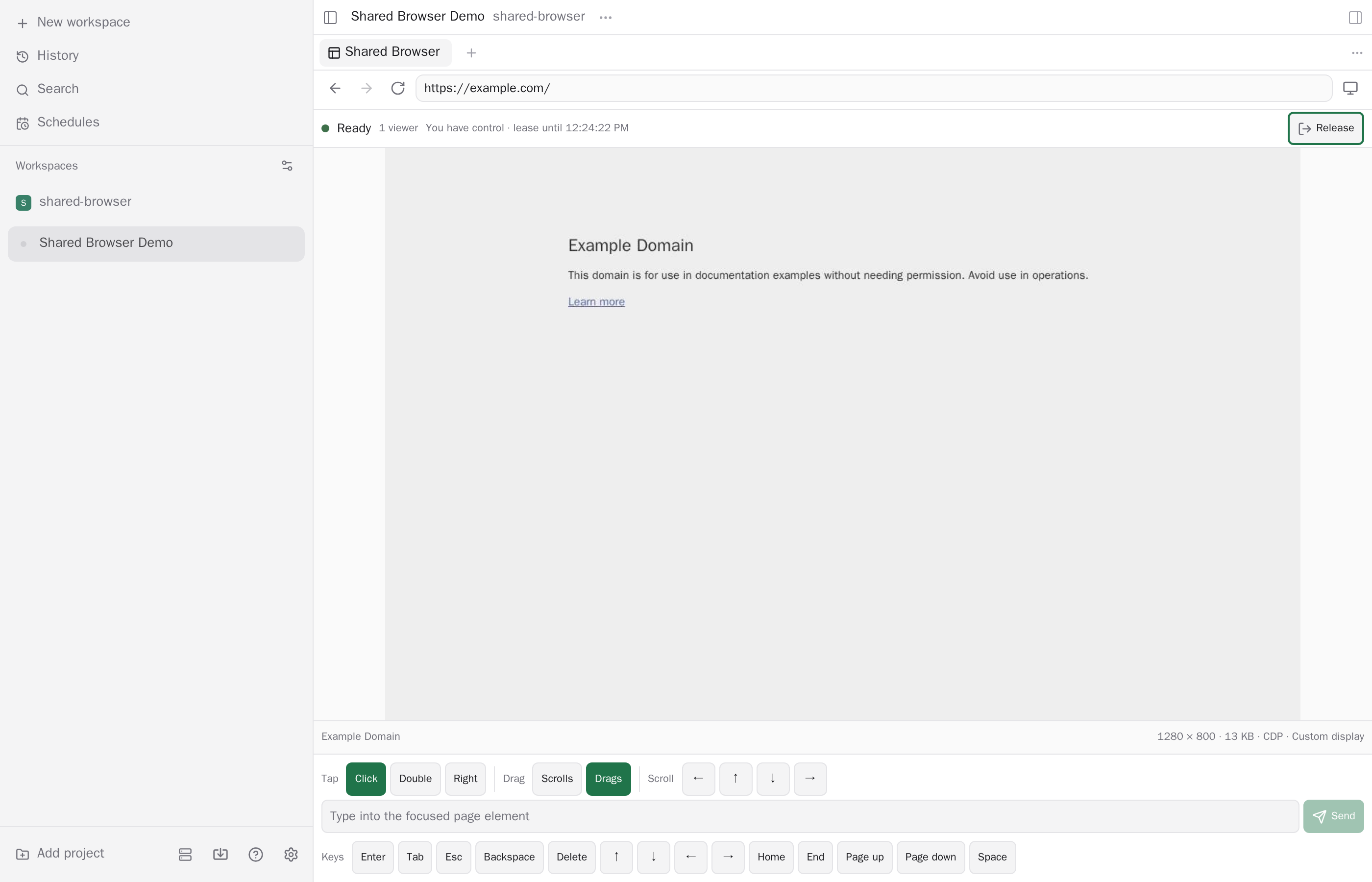
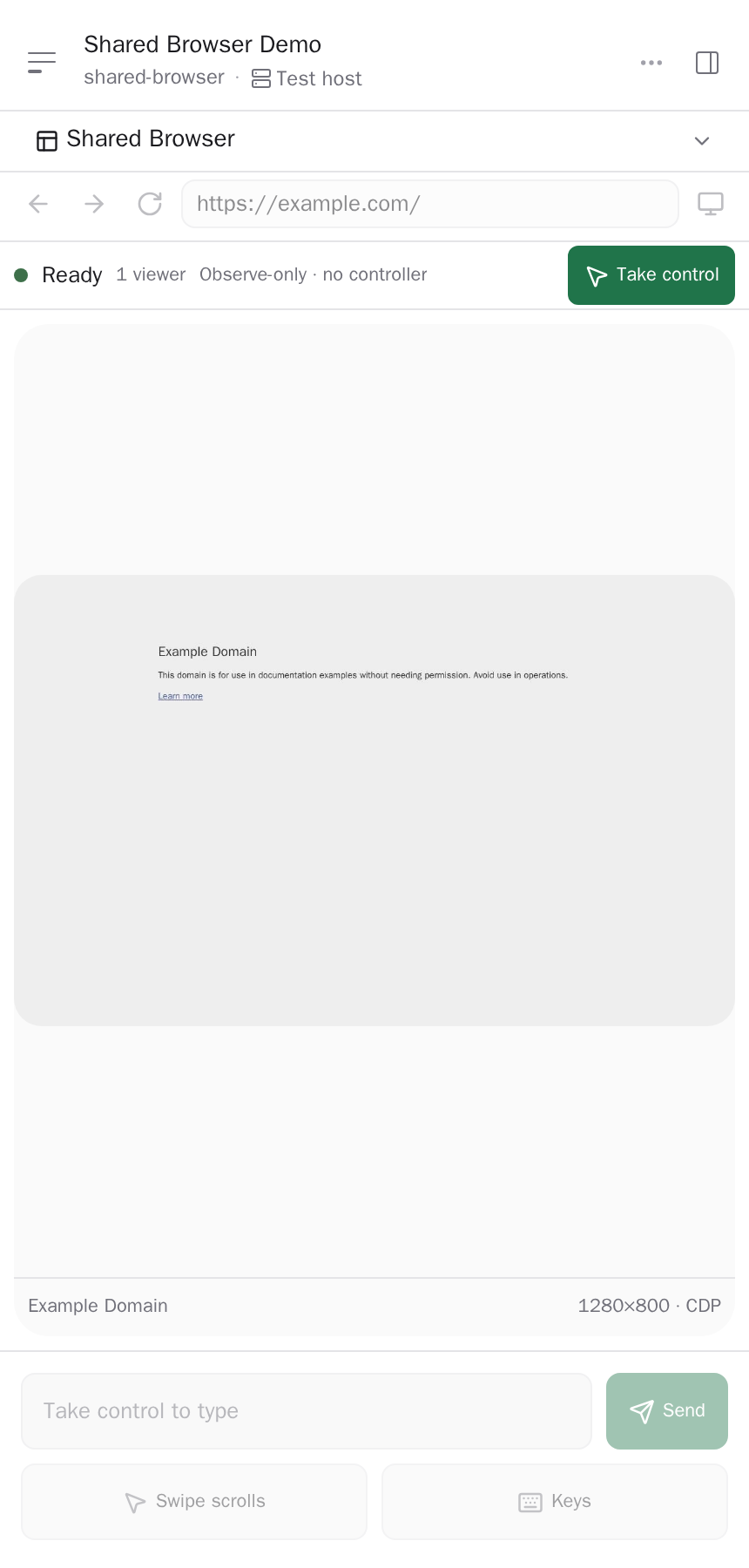
{"id":"shared-browser","repo":"omercnet/paseo-plugins","url":"https://github.com/omercnet/paseo-plugins/tree/main/paseo-shared-browser","package":"@omercnet/paseo-shared-browser","npm":{"package":"@omercnet/paseo-shared-browser","version":"3.0.0","integrity":"sha512-lpai47+QqPSru2ELscI7zYuW6JhniyZ3c8ZU/6RPulNQ6b5s5gDmKYO46WCZnGGuiMUrQbkwt0WBm7/jPjLjew==","publishedAt":"2026-10-19T13:03:10.471Z","downloadsLast30Days":10825},"name":"shared-browser","description":"One real Chromium session per Paseo workspace, shared live across every connected client.","categories":["browser","productivity"],"platforms":[],"caveats":["Installs a dedicated Chromium download of roughly 180 MB on the daemon host","Downloads, uploads, clipboard sync, media permissions, and extensions are disabled"],"images":["https://raw.githubusercontent.com/omercnet/paseo-plugins/main/paseo-shared-browser/docs/images/shared-browser-wide.png","https://raw.githubusercontent.com/omercnet/paseo-plugins/main/paseo-shared-browser/docs/images/shared-browser-compact.png"],"themes":[],"health":{"manifestValid":true,"hasReadme":true,"hasLicense":true,"hasTests":true,"hasTypecheckScript":true,"updatedRecently":true},"scannedAt":"2026-10-23T13:11:59.917Z","addedAt":"2026-09-08T17:07:30+03:00","npmSecurity":{"status":"passed","blockingFindings":0,"advisoryFindings":0,"scannedAt":"2026-10-19T14:36:34.510Z","version":"3.0.0","integrity":"sha512-lpai47+QqPSru2ELscI7zYuW6JhniyZ3c8ZU/6RPulNQ6b5s5gDmKYO46WCZnGGuiMUrQbkwt0WBm7/jPjLjew=="},"path":"paseo-shared-browser","version":"3.0.0","security":{"status":"passed","blockingFindings":0,"advisoryFindings":0,"scannedAt":"2026-10-19T14:36:34.510Z","commit":"01ba4209e099c0f27a5b85ca6a911def76bc0b2a"},"npmPreview":{"package":"@omercnet/paseo-shared-browser","version":"3.0.0-next.278.2","integrity":"sha512-rR2do8bpUCBQYkEnQWu9ApqciJcv3eYkxEUNvkNsbYLCGy/gn360ZK2OJFgFf0usWMfOIsRlOsBTjURuxjjmjA==","publishedAt":"2026-10-20T12:42:32.666Z","distTag":"next"},"npmPreviewSecurity":{"status":"passed","blockingFindings":0,"advisoryFindings":0,"scannedAt":"2026-10-20T14:48:06.627Z","version":"3.0.0-next.278.2","integrity":"sha512-rR2do8bpUCBQYkEnQWu9ApqciJcv3eYkxEUNvkNsbYLCGy/gn360ZK2OJFgFf0usWMfOIsRlOsBTjURuxjjmjA=="},"author":"Omer Cohen","license":"MIT","paseoVersionRequirement":"^0.12.0","descriptionNodes":[{"type":"text","text":"One real Chromium session per Paseo workspace, shared live across every connected client."}],"caveatNodes":[[{"type":"text","text":"Installs a dedicated Chromium download of roughly 180 MB on the daemon host"}],[{"type":"text","text":"Downloads, uploads, clipboard sync, media permissions, and extensions are disabled"}]],"manifest":{"id":"shared-browser","description":"One real Chromium session per Paseo workspace, shared live across every connected client.","requirements":{"paseo":"^0.12.0"},"build":[["node","scripts/prepare-dependencies.mjs"],["npm","run","prepare:runtime"]]},"repoMeta":{"stars":24,"defaultBranch":"main","pushedAt":"2026-10-23T13:10:15Z"},"owner":{"login":"omercnet","avatarUrl":"https://avatars.githubusercontent.com/u/639682?v=4"},"installNotesHtml":"<p>Enable trusted plugins on the target Paseo daemon, then install from npm:</p>\n<pre><code class=\"language-bash\">paseo plugin install npm:@omercnet/paseo-shared-browser\npaseo plugin ls\n</code></pre>\n<p>When Paseo acquires the npm package, it runs the <code>npm run prepare:runtime</code> build hook automatically. The\nhook installs the pinned browser runtime, builds both <code>supervisor.cjs</code> and <code>shared-browser-mcp.cjs</code>\nunder a versioned directory in <code>$PASEO_HOME/plugin-data/shared-browser</code>, then atomically updates the\n<code>runtime-current</code> pointer. Existing processes keep using their immutable runtime during an update.</p>\n<p>The build requires Node.js 24 or newer and npm on the daemon host. On Linux x64, macOS, and\nWindows, runtime preparation installs and stages the platform's Chrome for Testing distribution. On\nLinux ARM64, where that download is unavailable, the installer automatically uses native Chromium\nfrom <code>/usr/bin/chromium</code>. Install a non-Snap Chromium build with the system package manager before\nadding the plugin. Set <code>PASEO_SHARED_BROWSER_CHROMIUM_EXECUTABLE</code> to an absolute path when Chromium\nis installed elsewhere. The plugin does not emulate x64 Chromium on Linux.</p>\n<p>On Windows, the upstream installer retains its Chrome download cache under the OS user profile.\nBefore upgrading the plugin on Windows, close active Shared Browser sessions and stop the Paseo\ndaemon; Windows does not allow the installer to replace runtime executables that are still running.</p>\n<p>Open a workspace, search the Command Center for <strong>Open Shared Browser</strong>, or …</p>","readmeText":"# Shared Browser\n\nA Paseo plugin that runs one real Chromium browser per workspace on the daemon host and shares its\npages with connected Paseo clients and workspace agents. Version 1.0 replaces the previous browser\nruntime in place with a plugin-owned, pinned `agent-browser` runtime; existing installations keep\nthe `shared-browser` plugin ID and upgrade without installing a second plugin.\n\nEach browser tab is a real page in the same Chromium profile, so tabs share site logins and cookies.\nEach client and agent selects a tab independently. Viewers of the same tab share its live page,\nnavigation and control state. Human control remains server-authoritative and takes priority over\nagent input on that tab.\n\n## Demo\n\nhttps://github.com/user-attachments/assets/37d09fff-0750-440d-983d-426150b0724d\n\n## Screenshots\n\nBoth PNGs show the same isolated Chromium session from a dedicated Paseo test daemon. They were\ncaptured at 2× pixel density after browser DevTools verified the rendered page contained no private\norganization names.\n\n### Wide desktop\n\n![Shared Browser showing the same live Paseo page to two viewers on desktop](https://raw.githubusercontent.com/omercnet/paseo-plugins/main/paseo-shared-browser/docs/images/shared-browser-wide.png)\n\n### Compact client\n\n![Shared Browser controls and the same canonical browser viewport on a compact client](https://raw.githubusercontent.com/omercnet/paseo-plugins/main/paseo-shared-browser/docs/images/shared-browser-compact.png)\n\n## Runtime model\n\n- The plugin server runs beside the Paseo daemon and starts one `agent-browser` session and Chromium\n  process per open browser workspace. Browser execution, profiles, IPC, and network access are on the\n  daemon host, not on the viewing phone, browser, or desktop app.\n- A workspace can have up to eight tabs. Each tab has its own page, capture stream, viewport and\n  controller. Selecting a tab affects only the selecting viewer or agent. Closing a tab removes it\n  for every participant viewing it; the last tab stays open until the browser is closed.\n- Viewers can select a browser action while observing. A dialog offers control, names the current\n  controller when a takeover is needed, and continues the selected action after control is granted.\n  Closing a tab or browser still requires its own confirmation. Actions that need a fresh frame wait\n  for one before sending input.\n- The plugin owns `agent-browser` version `0.39.1`, its IPC directory, and the Chromium executable.\n  It strips inherited `AGENT_BROWSER_*` variables and sets `AGENT_BROWSER_SOCKET_DIR`,\n  `AGENT_BROWSER_IDLE_TIMEOUT_MS=0`, `AGENT_BROWSER_STREAM_PORT=0`, and\n  `AGENT_BROWSER_NO_AUTO_DIALOG=1` itself.\n- By default every client receives JPEG frames from CDP `Page.startScreencast` or bounded\n  screenshots, and no capture extension is loaded into Chromium. When the daemon is started with\n  `PASEO_SHARED_BROWSER_VIDEO=1`, desktop/web clients with usable WebCodecs receive encoded\n  workspace-tab video instead; other clients keep JPEG.\n  Remote input supports mouse hover, wheel scrolling, continuous dragging, native touch pan/pinch,\n  tap, double-tap, right-click, text, and special keys.\n- Device presets for Desktop Chrome, iPhone 15 Pro, Pixel 7, and iPad Pro 11 change Chromium's\n  viewport, device pixel ratio, touch behavior, platform, and user agent. A phone can view and\n  control the shared browser, but the rendered browser remains Chromium. An iPhone preset is mobile\n  emulation, not WebKit, iOS, or real Safari.\n\n## Lifetime and persistence\n\nThe browser runtime is held by a detached supervisor rather than by a particular Paseo client or\nplugin subprocess. Closing a panel, disconnecting a client, or losing the plugin bridge invalidates\nthat client's viewer/control tokens but does not immediately close Chromium. A replacement plugin\nbridge can reclaim the existing workspace runtime. If no bridge reconnects, the supervisor closes\nall orphaned runtimes after a 120-second grace period. A missed heartbeat fences the old bridge after\n30 seconds; the bridge sends heartbeats every 10 seconds.\n\nThe browser actions menu has **Close shared browser**. After confirmation,\nit stops that workspace's Chromium process and ends every viewer and agent connection to it, even\nwhen their panels are active. Background reconnects cannot reopen a deliberately closed browser.\nA person can select the prominent **Open shared browser** button in the closed panel to start a new runtime with the\nretained profile. Closing the browser does not remove saved cookies or site data.\n\nEach workspace gets a private profile under\n`$PASEO_HOME/plugin-data/shared-browser/profiles/<workspace-id-sha256>`. Cookies and site login state\ntherefore survive viewer disconnects, plugin reloads, and Chromium process restarts while that\ndirectory remains intact. Profiles are local to one daemon host: they are not synchronized between\nhosts or Paseo clients, do not use a personal Chrome or Safari profile, and are not portable across\narbitrary Chromium versions.\n\nWhen Paseo emits `workspace.archived` while the plugin server is active, the plugin fences that\nworkspace, expires its viewers and controller, and closes its browser runtime, including a runtime\nwhose creation raced the archive. The profile directory is retained. Archive events missed while\nthe plugin bridge is disconnected are not replayed or reconciled by the plugin; the orphan grace\nstill closes the runtime, but retained profile data must be removed manually if it is no longer\nwanted.\n\n## Install\n\nEnable trusted plugins on the target Paseo daemon, then install from npm:\n\n```bash\npaseo plugin install npm:@omercnet/paseo-shared-browser\npaseo plugin ls\n```\n\nWhen Paseo acquires the npm package, it runs the `npm run prepare:runtime` build hook automatically. The\nhook installs the pinned browser runtime, builds both `supervisor.cjs` and `shared-browser-mcp.cjs`\nunder a versioned directory in `$PASEO_HOME/plugin-data/shared-browser`, then atomically updates the\n`runtime-current` pointer. Existing processes keep using their immutable runtime during an update.\n\nThe build requires Node.js 24 or newer and npm on the daemon host. On Linux x64, macOS, and\nWindows, runtime preparation installs and stages the platform's Chrome for Testing distribution. On\nLinux ARM64, where that download is unavailable, the installer automatically uses native Chromium\nfrom `/usr/bin/chromium`. Install a non-Snap Chromium build with the system package manager before\nadding the plugin. Set `PASEO_SHARED_BROWSER_CHROMIUM_EXECUTABLE` to an absolute path when Chromium\nis installed elsewhere. The plugin does not emulate x64 Chromium on Linux.\n\nOn Windows, the upstream installer retains its Chrome download cache under the OS user profile.\nBefore upgrading the plugin on Windows, close active Shared Browser sessions and stop the Paseo\ndaemon; Windows does not allow the installer to replace runtime executables that are still running.\n\nOpen a workspace, search the Command Center for **Open Shared Browser**, or tap the **Shared\nBrowser** composer pill while a workspace session is open. A **Shared\nBrowser (n)** row in the sidebar footer appears while browser sessions are open; it lists them and\njumps to the chosen workspace's browser panel.\n\n## Agent MCP access\n\nThe plugin automatically injects its stdio MCP adapter only when a new, non-internal agent is\ncreated with a provider that accepts external MCP servers. Agents that already exist, resumed\nsessions, imported sessions, and Paseo's internal agents are not modified. Paseo's built-in OMP\nprovider accepts session MCP servers, so new OMP agents receive the adapter.\nPi agents also receive the adapter, but require Pi's optional MCP support to\nlaunch it.\n\nThe injected MCP server exposes `shared_browser_status`, `shared_browser_capture`,\n`shared_browser_acquire_control`, `shared_browser_release_control`,\n`shared_browser_navigate`, `shared_browser_input`, `shared_browser_viewport`,\n`shared_browser_tabs`, `shared_browser_tab_open`, `shared_browser_tab_select`, and\n`shared_browser_tab_close`. It does not\nexpose arbitrary CDP commands, JavaScript or page evaluation, browser profile access, or filesystem\naccess.\n\nEach adapter launch receives an opaque credential bound to its workspace. It cannot use that\ncredential to operate another workspace's browser. Agent input follows human-priority control: an\nagent cannot force a takeover while a human viewer holds control of the same tab. The human must\nrelease control or the lease must expire before agent input can proceed on that tab.\n\nThe provider launches the stdio adapter on the Paseo daemon host, beside the daemon-owned browser\nruntime. Web, desktop, and mobile clients never own or host the adapter or Chromium, and a client\ndisconnect does not close or reset either process.\n\n## Runtime environment overrides\n\nThe plugin recognizes only these deployment overrides:\n\n| Variable                                    | Meaning                                                                                                                                                                                                                                                               |\n| ------------------------------------------- | --------------------------------------------------------------------------------------------------------------------------------------------------------------------------------------------------------------------------------------------------------------------- |\n| `PASEO_HOME`                                | Paseo data root. Defaults to `~/.paseo`; browser runtime, supervisor IPC, and profiles live below `plugin-data/shared-browser`.                                                                                                                                       |\n| `PASEO_SHARED_BROWSER_AGENT_BROWSER_BINARY` | Absolute path to the pinned `agent-browser` executable. Defaults to the active runtime's `node_modules/.bin/agent-browser` (`agent-browser.exe` on Windows). |\n| `PASEO_SHARED_BROWSER_CHROMIUM_EXECUTABLE`  | Absolute path to Chromium. Defaults to the active runtime's `chromium/chrome` (`chrome.exe` on Windows). On Linux ARM64, installation automatically links `/usr/bin/chromium`; use this override for another compatible, non-Snap location. |\n| `PASEO_SHARED_BROWSER_CHROMIUM_ARGS`        | Optional Chromium arguments passed through the managed runtime. Intended for host requirements such as `--no-sandbox` in an already-isolated CI runner; do not disable the browser sandbox on a general-purpose host.                                                 |\n\nUser-supplied `AGENT_BROWSER_*` variables are deliberately ignored.\n\n## Controls\n\n- Toolbar: back, forward, reload, address bar, a combined monitor menu, mobile emulation toggle\n  and a vertical-dots browser actions menu. The controller can close the shared browser from that\n  menu after confirmation. Icon controls expose their action name\n  as a hover tooltip on desktop/web and retain native accessibility labels.\n- Custom viewports support 320 to 3840 pixels wide and 480 to 3840 pixels high. Invalid sizes\n  show their error inside the device dialog; a successful Apply closes it.\n- Desktop presets also include 1280 × 800 (16:10) and 1280 × 1280 (1:1).\n- Pixel 7 (high resolution) keeps the same 412 × 839 phone layout and input coordinates,\n  with a sharper 824 × 1678 capture.\n- Desktop presets include 1920 × 1080 and 2560 × 1440 (16:9), 1920 × 1200 and\n  2560 × 1600 (16:10), and 1920 × 1920 and 2560 × 2560 (1:1).\n- Desktop choices use height names such as 720p, 1080p, 1200p and 1440p, with\n  dimensions shown alongside. Square choices name their width explicitly.\n  The 1440-wide choices are 1440 × 810, 1440 × 900 and 1440 × 1440.\n- The Resolution and quality menu groups desktop choices by 16:9, 16:10 and 1:1,\n  then mobile. Each group sorts by width. Filled stars mark favorites; the monitor\n  menu provides favorites in that same grouped order and access to the full\n  resolution and quality list.\n- **Fill viewport** resizes the shared browser to the visible panel and follows panel size\n  changes while this viewer controls it. It preserves mobile behavior. Auto capture density\n  adjusts detail for the screen as the panel grows or shrinks; manual density is retained.\n  Following pauses when the panel is hidden, control is released, or its dimensions exceed\n  the supported resolution at the current density. Choosing a preset or custom resolution\n  stops following; a failed resize also stops it and displays an error.\n- Monitor and browser actions open compact anchored menus rather than dialogs. Menus stay\n  within the pane, scroll long lists, and dismiss with an outside press, Escape or native Back.\n- The monitor menu offers **Fit to panel** (default) and **Actual size (100%)**. Actual size\n  uses browser layout pixels, not the larger JPEG dimensions of sharper phone captures.\n  This choice affects only the current viewer, without resizing the shared browser.\n  Desktop local scrollbars reveal overflow while wheel events on a controlled frame go to\n  the remote page. Phone viewers can pan while observing; controlling sends swipes to the\n  page instead. Fitting images stay centered without empty scroll ranges; a scrollbar on\n  one axis does not force one on the other. Returning to Fit resets local offsets without\n  reloading the page or image.\n- With `PASEO_SHARED_BROWSER_VIDEO=1` set in the daemon environment, desktop and web clients\n  with WebCodecs play genuine encoded tab video (H264 when supported, otherwise VP8). The\n  bundled capture helper, which holds `tabCapture` and `debugger` permissions, is then\n  loaded into every workspace Chromium profile and captures the exact workspace tab, not a\n  screenshot loop or title-selected window. Without the variable the helper is never\n  materialized or loaded, and clients show a one-time disabled reply then use JPEG.\n  Android and other native apps use JPEG: the plugin SDK this package targets publishes no\n  encoded-video surface, so native video is deferred until the host ships one.\n- The monitor menu's resolution and quality list separates JPEG quality (40%, 65%, 85%,\n  or 100%), video bitrate (2, 5, 12, or 24 Mbps), and video frame rate (15, 30, or 60 FPS).\n  Defaults are JPEG65 (Medium) and, when video is enabled, 12 Mbps at 30 FPS. Old saved quality choices keep their\n  corresponding video bitrate when upgraded. These are encoder targets, not measured\n  bandwidth or guaranteed frame rates. Large JPEGs may reduce quality to stay within\n  the 800 KB frame bound. Preferences persist on the connected Paseo host.\n  Capture density defaults to Auto for each viewer panel. While controlling, it selects\n  1x or 2x from the displayed page size and screen pixel density, accounting for Fit's\n  letterboxing and Actual size. Manual 1x/2x choices override Auto until Auto is selected\n  again, the workspace changes, or the panel is reopened. Density raises real source\n  pixel detail without changing page size, input mode, or user agent. The 2x option\n  requires both page dimensions to be 1920 or less; larger pages use 1x. Fill viewport\n  adjusts automatic density and layout size together. Hidden panels, observers, active\n  gestures, and pending operations never trigger automatic density writes. A failed\n  adjustment pauses automation until Auto is selected again. Higher density can increase\n  processing and bandwidth substantially. Quality changes do not navigate or reload the page.\n- Video packets travel through the existing authenticated Paseo RPC connection, including its\n  relay. No extra video port or unauthenticated media server is opened. This is encoded video\n  delivered in bounded request/reply batches, not WebRTC or a custom push subscription.\n- Animated native capture supports a source ceiling of 60 frames per second. Ordinary\n  frames follow each encoder's requested rate; a recovery keyframe can us"}