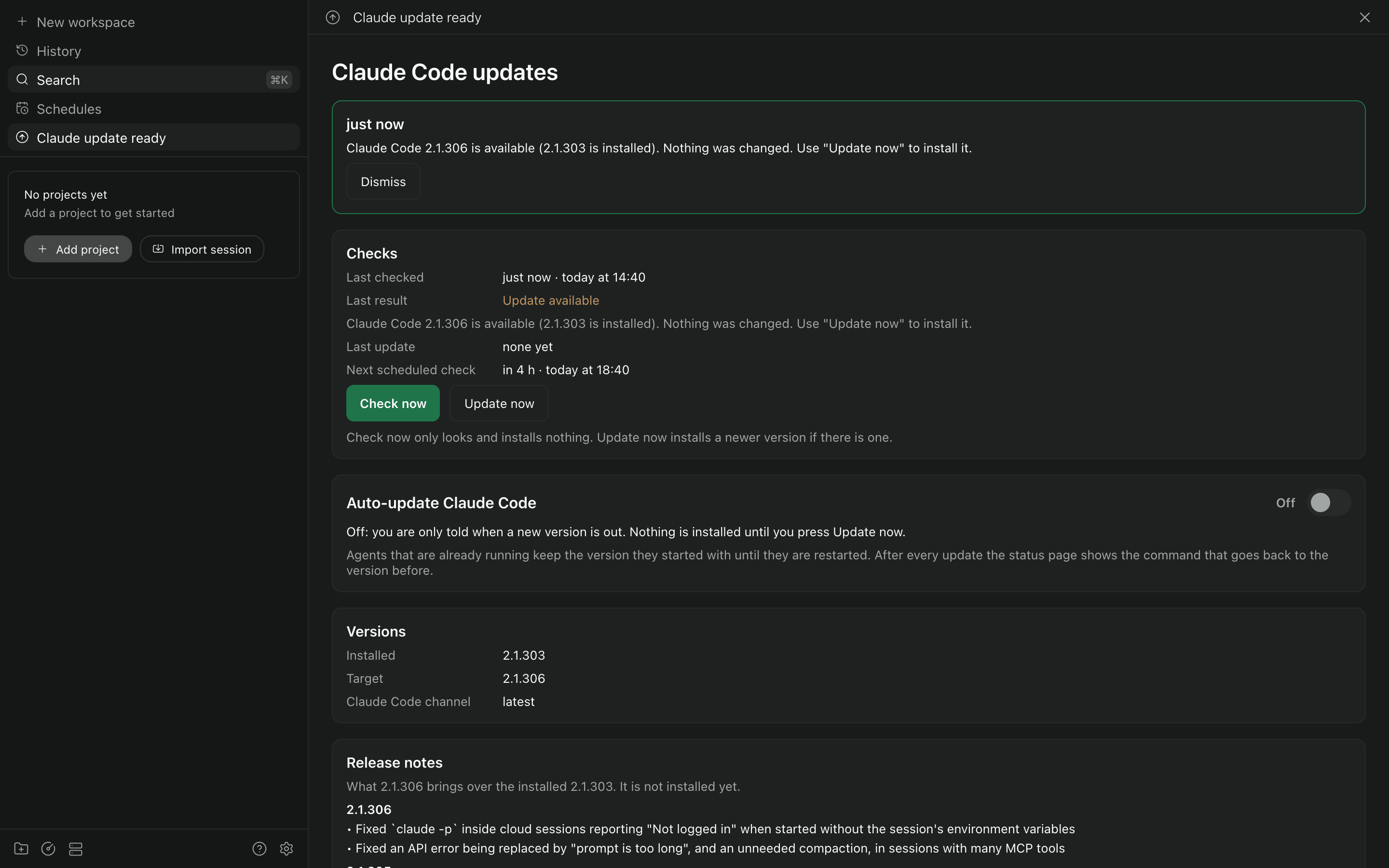
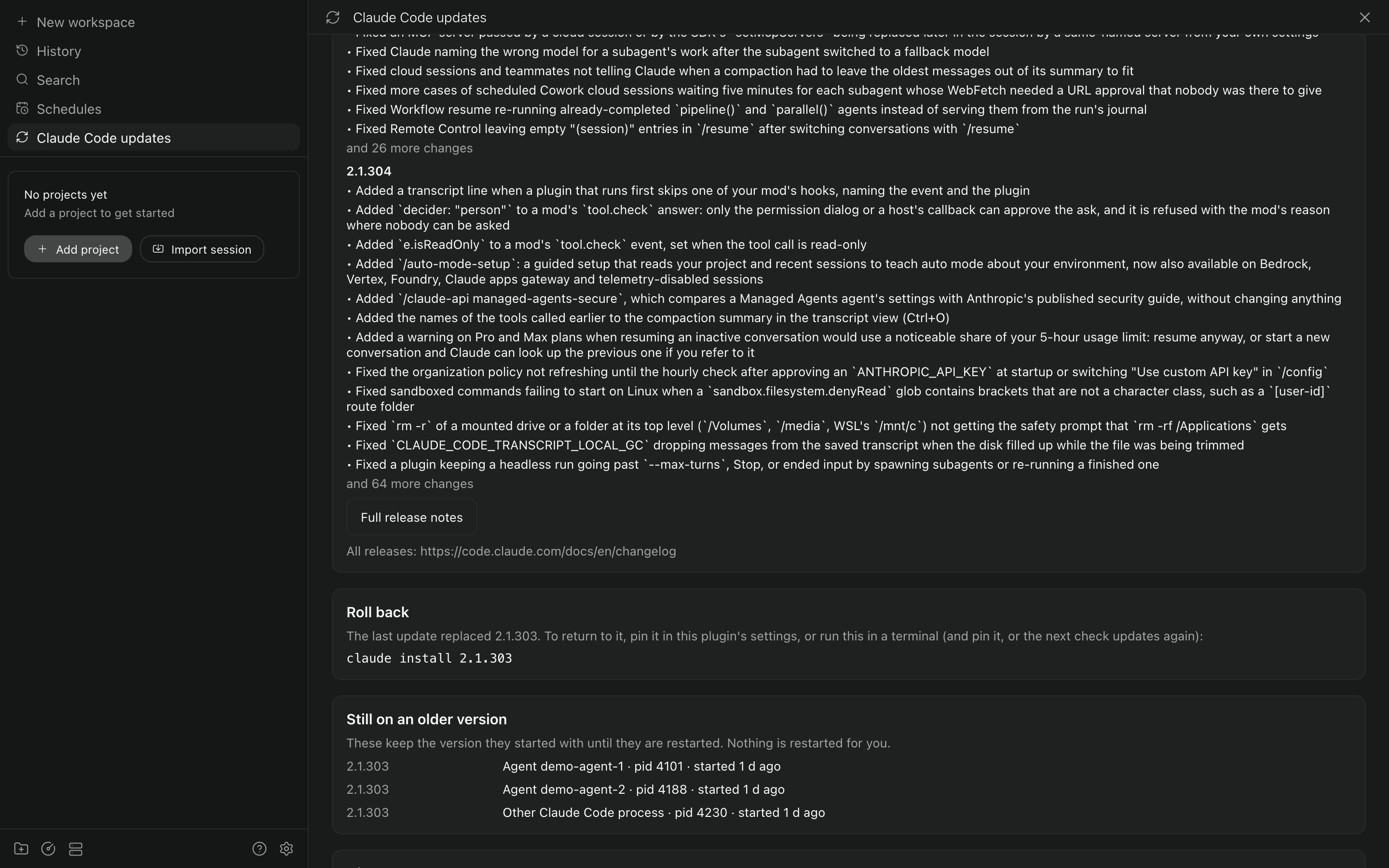
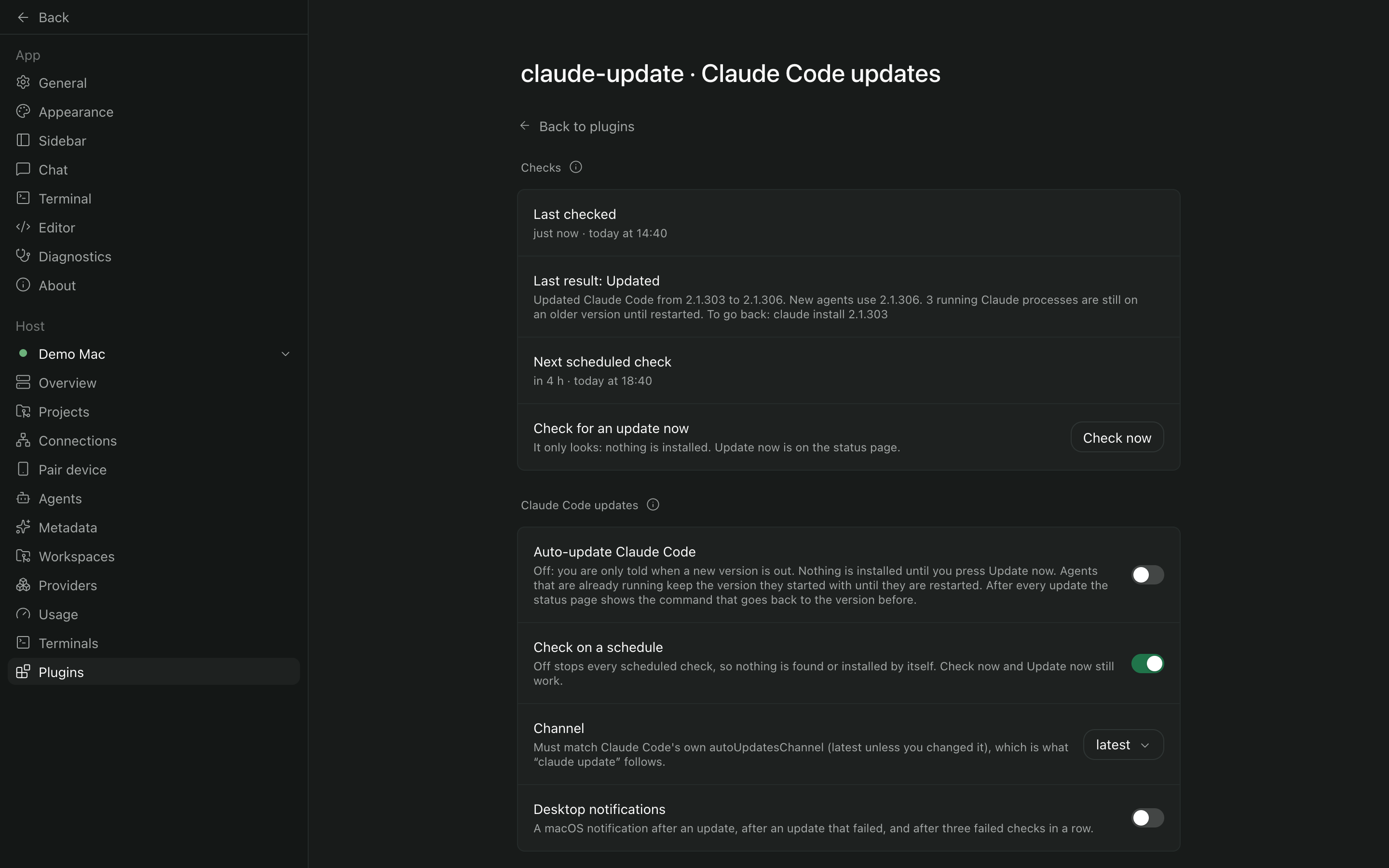
{"id":"claude-update","repo":"tomcrawf90/paseo-plugin-claude-update","url":"https://github.com/tomcrawf90/paseo-plugin-claude-update","package":"paseo-plugin-claude-update","npm":{"package":"paseo-plugin-claude-update","version":"0.2.1","integrity":"sha512-L94pjknTM/g/3mv7s+pgK6/uMMD/FfE0aZenIx+SsbVXDovcyvistMrKqF1dbeqpJVoUQtk7JzPZDe2fI9Jlhg==","publishedAt":"2026-10-21T17:31:05.386Z","downloadsLast30Days":0},"name":"claude-update","description":"Keeps the Claude Code CLI up to date on the Paseo host, where its own updater never runs, and shows which running agents are still on an old version.","categories":["automation","monitoring"],"platforms":[],"caveats":["Only reports updates until you turn on \"Auto-update Claude Code\"; then it runs claude update on a schedule.","Supports Claude Code's native installer only, not Homebrew, WinGet or npm-based installs.","Tested on macOS only; listing old processes and desktop notifications are macOS only.","Running agents keep their old Claude Code version until you restart them; nothing is restarted for you.","Follows Claude Code's own autoUpdatesChannel; set that to stable yourself to follow the stable channel.","Reads process environments on the host to match processes to agents; only the Paseo agent id is used."],"images":["https://raw.githubusercontent.com/tomcrawf90/paseo-plugin-claude-update/main/docs/screenshots/01-status-update-ready.png","https://raw.githubusercontent.com/tomcrawf90/paseo-plugin-claude-update/main/docs/screenshots/02-status-after-update.png","https://raw.githubusercontent.com/tomcrawf90/paseo-plugin-claude-update/main/docs/screenshots/03-settings.png"],"themes":[],"health":{"manifestValid":true,"hasReadme":true,"hasLicense":true,"hasTests":true,"hasTypecheckScript":true,"updatedRecently":true},"scannedAt":"2026-10-21T17:51:19.740Z","addedAt":"2026-10-21T17:48:01Z","npmSecurity":{"status":"passed","blockingFindings":0,"advisoryFindings":0,"scannedAt":"2026-10-21T17:51:13.165Z","version":"0.2.1","integrity":"sha512-L94pjknTM/g/3mv7s+pgK6/uMMD/FfE0aZenIx+SsbVXDovcyvistMrKqF1dbeqpJVoUQtk7JzPZDe2fI9Jlhg=="},"version":"0.2.1","security":{"status":"passed","blockingFindings":0,"advisoryFindings":0,"scannedAt":"2026-10-21T17:51:13.165Z","commit":"acb3d7ced49e253574525c830688ece69c1e7ce8"},"author":"Tom Crawford","license":"MIT","paseoVersionRequirement":">=0.10.3 <0.13.0","descriptionNodes":[{"type":"text","text":"Keeps the Claude Code CLI up to date on the Paseo host, where its own updater never runs, and shows which running agents are still on an old version."}],"caveatNodes":[[{"type":"text","text":"Only reports updates until you turn on \"Auto-update Claude Code\"; then it runs claude update on a schedule."}],[{"type":"text","text":"Supports Claude Code's native installer only, not Homebrew, WinGet or npm-based installs."}],[{"type":"text","text":"Tested on macOS only; listing old processes and desktop notifications are macOS only."}],[{"type":"text","text":"Running agents keep their old Claude Code version until you restart them; nothing is restarted for you."}],[{"type":"text","text":"Follows Claude Code's own autoUpdatesChannel; set that to stable yourself to follow the stable channel."}],[{"type":"text","text":"Reads process environments on the host to match processes to agents; only the Paseo agent id is used."}]],"manifest":{"id":"claude-update","description":"Keeps the Claude Code CLI up to date on the Paseo host, where its own updater never runs, and shows which running agents are still on an old version.","requirements":{"paseo":">=0.10.3 <0.13.0"}},"repoMeta":{"stars":0,"defaultBranch":"main","pushedAt":"2026-10-21T17:29:25Z"},"owner":{"login":"tomcrawf90","avatarUrl":"https://avatars.githubusercontent.com/u/47257049?v=4"},"installNotesHtml":"<p>Requires Paseo 0.10.3 to 0.12 (betas included), with plugins enabled (<strong>Settings → Plugins</strong>), and Claude Code\ninstalled with its native installer on the daemon host.</p>\n<p>From the official Paseo plugin directory, once it is listed there (Paseo 0.11 or later):</p>\n<pre><code class=\"language-bash\">paseo plugin add tomcrawf90/claude-update\n</code></pre>\n<p>From npm, on any supported Paseo:</p>\n<pre><code class=\"language-bash\">paseo plugin install npm:paseo-plugin-claude-update\n</code></pre>\n<p>Or from a checkout of this repository:</p>\n<pre><code class=\"language-bash\">paseo plugin install /absolute/path/to/paseo-plugin-claude-update\n</code></pre>\n<p>Then <code>paseo plugin ls</code> should show <code>claude-update</code> as <code>running</code>. The first check happens about 30\nseconds after the plugin starts. A fresh install only tells you when an update is available and\nchanges nothing; turn on <strong>Auto-update Claude Code</strong>, on the status page or in the\nsettings, to have it update on the schedule.</p>\n<p><strong>Where to find it.</strong> The sidebar row \"Claude Code updates\" opens the status page. Its first card,\n\"Checks\", says when the plugin last checked, how that ended and when it checks next, and has the\n\"Check now\" button (it only looks) and \"Update now\" (it installs). The same lines and \"Check now\"\nare on the settings screen, under <strong>Settings → Plugins → Claude Code updates</strong>. The Command Center\n(⌘K) has \"Claude Code updates: open status\", \"Claude Code updates: check now\" and \"Claude Code\nupdates: settings\". The row's title changes only when:</p>\n<table>\n<thead>\n<tr>\n<th>The row reads</th>\n<th>When</th>\n<th>It goes back to \"Claude Code updates\" when</th>\n</tr>\n</thead>\n<tbody>\n<tr>\n<td>Claude up…</td>\n<td></td>\n<td></td>\n</tr>\n</tbody>\n</table>","limitationsNotesHtml":"<ul>\n<li>Supports Claude Code's native installer. Claude Code installed with Homebrew, WinGet or through npm has a different update command and is not handled.</li>\n<li>Tested on macOS only. Linux and Windows are untested; listing old processes and desktop notifications are macOS only.</li>\n<li>Running agents and Claude's background daemon keep their old version until you restart them. The plugin does not restart anything.</li>\n<li>The schedule runs only while the Paseo daemon is running and the plugin is enabled. A check missed while the machine slept runs within a minute of waking.</li>\n<li>Paseo gives plugin server code no notification of its own, so outside the app the only notice is the macOS notification.</li>\n<li><code>claude update</code> follows Claude Code's own channel; this plugin cannot choose a different one for it.</li>\n<li>The channel check reads <code>autoUpdatesChannel</code> from <code>~/.claude/settings.json</code> only. Claude Code can also take it from managed settings (on macOS <code>/Library/Application Support/ClaudeCode/managed-settings.json</code>) or a project's <code>.claude/settings.json</code>, which the plugin does not read, so with one of those set <code>claude update</code> may follow a channel other than the one the plugin compared against.</li>\n<li>An update that is running when the plugin is reloaded or the daemon stops may be cut short; the next check tries again.</li>\n</ul>\n<p>Not verified at the time of writing (0.2.1): how the status page, settings screen and sidebar row\nlook in the Paseo desktop window or on a phone (they were seen in the app's own web bundle in a br…</p>","readmeText":"# claude-update\n\n[![CI](https://github.com/tomcrawf90/paseo-plugin-claude-update/actions/workflows/ci.yml/badge.svg?branch=main)](https://github.com/tomcrawf90/paseo-plugin-claude-update/actions/workflows/ci.yml)\n[![npm version](https://img.shields.io/npm/v/paseo-plugin-claude-update)](https://www.npmjs.com/package/paseo-plugin-claude-update)\n[![License: MIT](https://img.shields.io/github/license/tomcrawf90/paseo-plugin-claude-update)](https://github.com/tomcrawf90/paseo-plugin-claude-update/blob/main/LICENSE)\n\nA [Paseo](https://paseo.sh) plugin that keeps the Claude Code CLI up to date on the machine your\nPaseo daemon runs on. Its status page shows which running agents are still on an old version.\n\n## Why\n\nClaude Code updates itself only from its interactive terminal interface. Paseo runs `claude` without\none, so on a machine that uses Claude mostly through Paseo the updater never runs and the CLI falls\nbehind. New models often need a newer CLI, so a stale CLI means missing them.\n\nThis plugin checks for a new version on a schedule and tells you. Once you turn on **Auto-update\nClaude Code** it also runs the CLI's own updater, `claude update`, and tells you what happened.\n\n## What it does\n\n| | |\n| --- | --- |\n| Checks | Every 4 hours by default, it compares `claude --version` with the version the release channel points at. |\n| Updates | Off until you choose it. With \"Auto-update Claude Code\" on, the scheduled check runs `claude update` when the CLI is behind, then reads the version again to confirm. Until then it only tells you; \"Update now\" installs on request. |\n| Reports | An update that went in: on its status page and in the history there, with a macOS notification. Something you have to act on (an update waiting with auto-update off, a failure): named on its sidebar row as well. Everything goes to a log file. |\n| Lists old processes | On the status page: running Claude Code processes (Paseo agents and Claude's own background daemon) that are still on an older version. It never restarts or interrupts them. |\n| Shows release notes | On the status page: the notes for the update that is waiting, or else for the last update, with a link to the full notes for every release. |\n| Shows that it is working | Its status page says when it last checked (how long ago and the clock time), how that ended, when the version last changed, and when it checks next, and has a \"Check now\" button. The settings screen has the same lines. |\n| Stays out of the way | While Claude Code is up to date, and after an update that worked, the sidebar row reads only \"Claude Code updates\" and no toast is raised, whatever is still running an older version. A check that finds nothing new changes only the \"Last checked\" time and the \"Last result\" line. |\n\nNew agents use the new version as soon as it is installed. Agents that are already running keep the\nversion they started with until they are restarted; that is how Claude Code works, and the plugin\nonly lists them.\n\n## Screenshots\n\nTaken from Paseo 0.12's own web app against a throwaway daemon with made-up data (`npm run screenshots`).\n\nAn update is waiting and auto-update is off, so the sidebar row says so:\n\n![The status page with an update waiting](https://raw.githubusercontent.com/tomcrawf90/paseo-plugin-claude-update/main/docs/screenshots/01-status-update-ready.png)\n\nAfter \"Update now\": the release notes, the command to go back, and the processes still on the old version:\n\n![The status page after an update](https://raw.githubusercontent.com/tomcrawf90/paseo-plugin-claude-update/main/docs/screenshots/02-status-after-update.png)\n\nThe settings screen:\n\n![The settings screen](https://raw.githubusercontent.com/tomcrawf90/paseo-plugin-claude-update/main/docs/screenshots/03-settings.png)\n\n## Install\n\nRequires Paseo 0.10.3 to 0.12 (betas included), with plugins enabled (**Settings → Plugins**), and Claude Code\ninstalled with its native installer on the daemon host.\n\nFrom the official Paseo plugin directory, once it is listed there (Paseo 0.11 or later):\n\n```bash\npaseo plugin add tomcrawf90/claude-update\n```\n\nFrom npm, on any supported Paseo:\n\n```bash\npaseo plugin install npm:paseo-plugin-claude-update\n```\n\nOr from a checkout of this repository:\n\n```bash\npaseo plugin install /absolute/path/to/paseo-plugin-claude-update\n```\n\nThen `paseo plugin ls` should show `claude-update` as `running`. The first check happens about 30\nseconds after the plugin starts. A fresh install only tells you when an update is available and\nchanges nothing; turn on **Auto-update Claude Code**, on the status page or in the\nsettings, to have it update on the schedule.\n\n**Where to find it.** The sidebar row \"Claude Code updates\" opens the status page. Its first card,\n\"Checks\", says when the plugin last checked, how that ended and when it checks next, and has the\n\"Check now\" button (it only looks) and \"Update now\" (it installs). The same lines and \"Check now\"\nare on the settings screen, under **Settings → Plugins → Claude Code updates**. The Command Center\n(⌘K) has \"Claude Code updates: open status\", \"Claude Code updates: check now\" and \"Claude Code\nupdates: settings\". The row's title changes only when:\n\n| The row reads | When | It goes back to \"Claude Code updates\" when |\n| --- | --- | --- |\n| Claude update ready | A newer version is out and will not install itself: auto-update is off, or scheduled checks are | You dismiss the notice, or the update is installed |\n| Claude update failed | An update was tried and did not go in, or three checks in a row have failed | You dismiss the notice, or the update goes in. After failed checks alone, also when a check works again |\n| Claude pin mismatch | The installed version is not the pinned one and will not be moved to it by itself: auto-update is off, or scheduled checks are | You dismiss the notice, or it matches again |\n| Claude channel issue | Claude Code's own channel is not the plugin's, so nothing was installed | You dismiss the notice, or they match again |\n\nWhatever it reads, the row opens the status page, which has the detail. An update that went in\nnever changes the row: it is on the status page and in its history, with a macOS notification if those are on. Processes still on\nan older version are listed on the status page and nowhere else.\n\n**Release notes.** The \"Release notes\" card on the status page shows what changed: for an update\nthat is waiting, the versions it would bring; otherwise the versions the plugin's last update brought (or the\ninstalled version alone, before any update or after Claude Code updated itself). The newest three versions are shown, each with its\nfirst 12 changes, and the rest are counted. \"Full release notes\" opens\n[the Claude Code changelog](https://code.claude.com/docs/en/changelog), which has every release; its\naddress is on the card as well, to copy. The notes come from the changelog Anthropic publishes in\n[the claude-code repository](https://github.com/anthropics/claude-code/blob/main/CHANGELOG.md). They are\nread right after a check, never as part of it, so they cannot hold up or change an update, and read\nagain only when the versions to show change. If they cannot be read, the card says why, keeps the link, and tries\nagain an hour later.\n\n**Auto-update Claude Code.** On: the next scheduled check installs a new version by itself, with\n`claude update` (or moves to the pinned version, with `claude install <version>`). Off: you are only\ntold. After every update the status page shows the command that goes back to the version before.\n\n**Check now** only looks: it compares versions and installs nothing, whether auto-update is on or\noff. **Update now** on the status page is the one button that installs. While either runs, or while\na scheduled check runs, the button shows a spinner, the page says what is happening and for how\nlong, and the result is shown on the page when it ends. A look counts as a check, so the next\nscheduled one is a full interval after it.\n\n## Configuration\n\nSettings are per daemon host, under **Settings → Plugins → Claude Code updates**.\n\n| Setting | Default | What it does |\n| --- | --- | --- |\n| Check on a schedule | on | The disable switch. Off stops every scheduled check; \"Check now\" and \"Update now\" still work. |\n| Auto-update Claude Code | off | Off reports the update and changes nothing. On installs it at the next scheduled check. \"Update now\" on the status page installs it either way. The same switch is on the status page. (Stored as `mode`: `notify` or `auto`, as in 0.1.0, so an existing choice carries over.) |\n| Channel | `latest` | The channel the installed version is compared with: `latest` or `stable` (about a week behind). See the note below. |\n| Check every (hours) | 4 | 1 to 168. |\n| Pinned version | empty | An exact version such as `2.1.285`. While set, newer versions are not installed. When another version is installed, a scheduled check with auto-update on, or \"Update now\", moves to the pin with `claude install <version>`; otherwise you are told (\"Claude pin mismatch\"). |\n| Path to claude | empty | Empty looks in `~/.local/bin/claude`, then on the daemon's `PATH`. |\n| Desktop notifications | on | A macOS notification for each new thing to know: an update that went in, a new version found and not installed, a pin or channel mismatch (each told once), an update that failed, and three failed checks in a row. |\n\n**Channel.** `claude update` follows Claude Code's own channel, the `autoUpdatesChannel` key in\n`~/.claude/settings.json` (`latest` when unset), not this plugin's setting. If the two differ the\nplugin installs nothing and tells you. To follow `stable`, set `\"autoUpdatesChannel\": \"stable\"`\nthere yourself and choose `stable` here. The plugin never edits Claude Code's files.\n\n## Safety\n\n| Concern | What the plugin does |\n| --- | --- |\n| Changing the install | Only through the CLI's own commands: `claude update`, and `claude install <version>` for a pin. The plugin's own code never downloads a binary and never writes to the install directory, the launcher or `~/.claude.json`; the CLI does all of that. Note that `claude install <version>` (a pin, or the rollback) is the CLI's installer, and it rewrites `installMethod`, `autoUpdates` and `autoUpdatesProtectedForNative` in `~/.claude.json`. Release verification stays with the CLI. |\n| Running sessions | Not touched. Claude Code keeps each version in its own file and keeps the versions that are in use, so an update does not pull the binary from under a live session. |\n| Restarts | None. It lists old processes and leaves restarting to you. |\n| A bad release | Roll back (below), or turn auto-update off, use the `stable` channel, or a pin. |\n| Failures | One attempt per check, no retry inside a check. After a failure the wait doubles (4 h, 8 h, 16 h, then 24 h at the default interval). An update that was tried and did not go in is told at once (and again if it makes three failures in a row); a check that fails before that (no network, say) is told once, at the third failure in a row. |\n| Overlap | One check at a time. The CLI's installer also takes its own lock. |\n| Network | Two reads, nothing sent: the release channel's pointer (`downloads.claude.ai`), and the Claude Code changelog on GitHub (`raw.githubusercontent.com`) for the release notes: when the versions to show change, and hourly while a read fails. |\n| Your environment | To find which agent a process belongs to it reads process environments on the host, takes only `PASEO_AGENT_ID` from them, and stores and logs nothing else. |\n\n## Rolling back\n\nAfter an update the status page shows the command for the previous version, for example:\n\n```bash\nclaude install 2.1.285\n```\n\nRun it in a terminal, and set **Pinned version** to the same version: with auto-update on, the next\nscheduled check would otherwise update again, and with it off, the next check would report the newer\nversion as waiting. Setting the pin alone also works: \"Update now\", or the next scheduled check with\nauto-update on, then runs that install. Clear the pin to follow the channel again.\n\n## Where things are kept\n\nUnder `$PASEO_HOME/plugin-data/claude-update/` (normally `~/.paseo/plugin-data/claude-update/`):\n\n| File | Holds |\n| --- | --- |\n| `state.json` | Installed and target version, last check and result, failure count, previous version. |\n| `history.jsonl` | One line per update, failure or notice. |\n| `plugin.log` | One line per check, rotated once at 512 KB. |\n| `notes.json` | The release notes the status page shows, and when they were read. |\n\n`paseo plugin logs claude-update` shows start-up and unexpected errors.\n\n## Limitations\n\n- Supports Claude Code's native installer. Claude Code installed with Homebrew, WinGet or through npm has a different update command and is not handled.\n- Tested on macOS only. Linux and Windows are untested; listing old processes and desktop notifications are macOS only.\n- Running agents and Claude's background daemon keep their old version until you restart them. The plugin does not restart anything.\n- The schedule runs only while the Paseo daemon is running and the plugin is enabled. A check missed while the machine slept runs within a minute of waking.\n- Paseo gives plugin server code no notification of its own, so outside the app the only notice is the macOS notification.\n- `claude update` follows Claude Code's own channel; this plugin cannot choose a different one for it.\n- The channel check reads `autoUpdatesChannel` from `~/.claude/settings.json` only. Claude Code can also take it from managed settings (on macOS `/Library/Application Support/ClaudeCode/managed-settings.json`) or a project's `.claude/settings.json`, which the plugin does not read, so with one of those set `claude update` may follow a channel other than the one the plugin compared against.\n- An update that is running when the plugin is reloaded or the daemon stops may be cut short; the next check tries again.\n\nNot verified at the time of writing (0.2.1): how the status page, settings screen and sidebar row\nlook in the Paseo desktop window or on a phone (they were seen in the app's own web bundle in a browser, against a throwaway daemon), and\nwhether a macOS notification is displayed when raised from the daemon. The update itself, the schedule, and the state and log files were verified in a real Paseo\n0.10.3 daemon against a throwaway copy of the CLI; in 0.11.4 and 0.12.0 daemons a look, \"Update now\"\nand the release notes were.\n\n## Development\n\n```bash\nnpm install\nnpm run verify    # typecheck, tests, a local pre-check for both listings' rules, the changelog check\n```\n\nThe tests use a stand-in `claude` (`test/stub/claude`) and never touch a real install or the\nnetwork. See [AGENTS.md](https://github.com/tomcrawf90/paseo-plugin-claude-update/blob/main/AGENTS.md) for how to try the plugin against a throwaway home,\n[CONTRIBUTING.md](https://github.com/tomcrawf90/paseo-plugin-claude-update/blob/main/CONTRIBUTING.md) before opening a pull request, and [SECURITY.md](https://github.com/tomcrawf90/paseo-plugin-claude-update/blob/main/SECURITY.md) to\nreport a security problem.\n\n**Versions and releases.** Versions follow [semantic versioning](https://semver.org) and are listed\nin [CHANGELOG.md](https://github.com/tomcrawf90/paseo-plugin-claude-update/blob/main/CHANGELOG.md). The version in `package.json` is the one source; every released\nversion is a git tag `vX.Y.Z` on `main`. Pushing that tag runs the release workflow, which checks\nthe tag against `package.json` and the changelog, publishes to npm with a provenance statement and\ncreates the GitHub release with the same tarball attached. A release is prepared with\n`npm run release:prepare -- <patch|minor|major>` on a branch; the steps are in\n[RELEASING.md](https://github.com/tomcrawf90/paseo-plugin-claude-update/blob/main/RELEASING.md), and listing in the official Paseo directory and on Paseo Cafe is in [SUBMISSION.md](https://github.com/tomcrawf90/paseo-plugin-claude-update/blob/main/SU"}